Indicator BMW 328I 2011 E90 Owner's Guide
[x] Cancel search | Manufacturer: BMW, Model Year: 2011, Model line: 328I, Model: BMW 328I 2011 E90Pages: 286, PDF Size: 8.25 MB
Page 97 of 286
Controls
95Reference
At a glance
Driving tips
Communications
Navigation
Entertainment
Mobility
Automatic deactivation of the front
passenger airbags
An analysis of the impression in the front pas-
senger seat cushion determines whether and
how the seat is occupied. The front and side air-
bags for the front passenger are activated or
deactivated by the system accordingly.
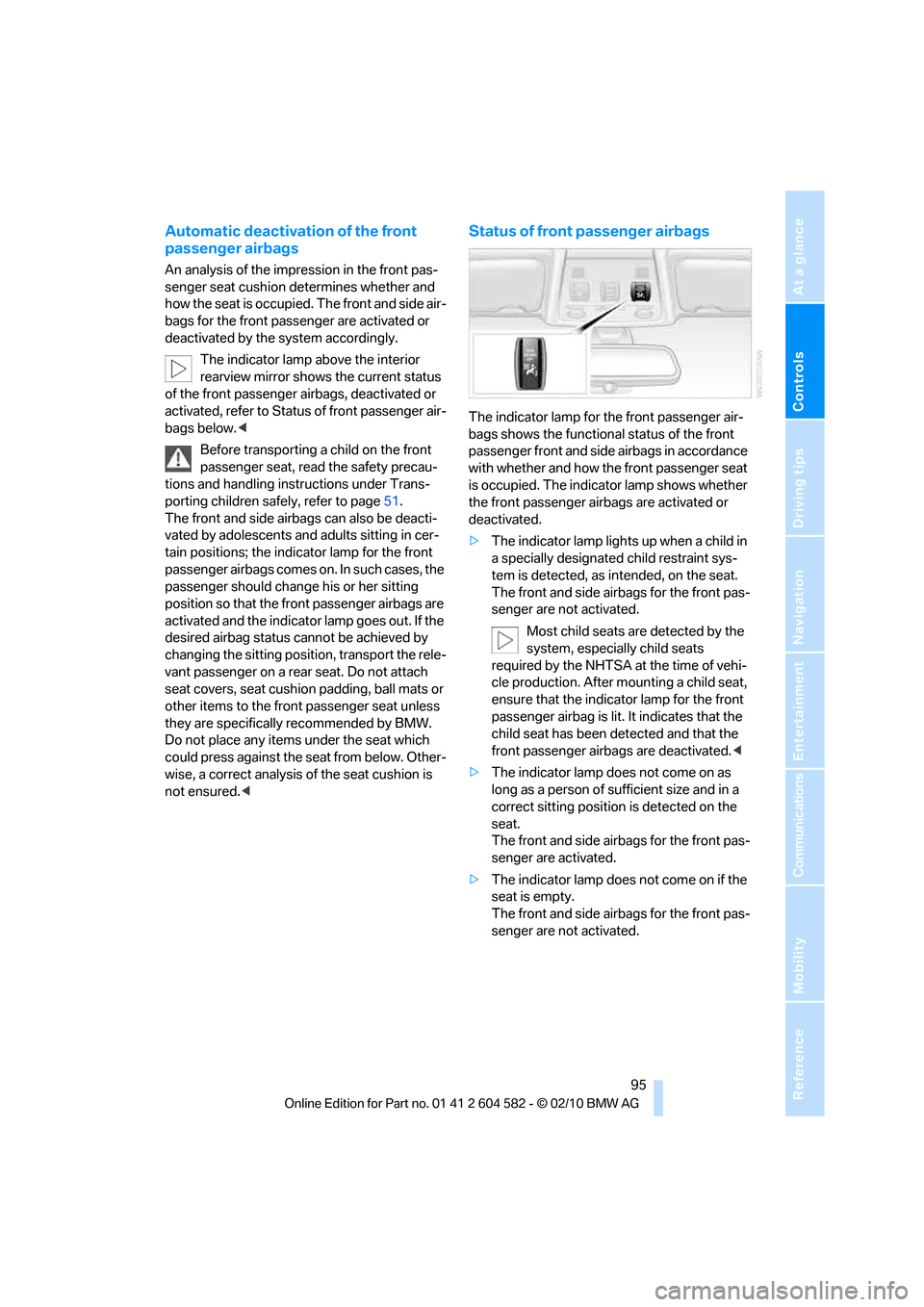
The indicator lamp above the interior
rearview mirror shows the current status
of the front passenger airbags, deactivated or
activated, refer to Status of front passenger air-
bags below.<
Before transporting a child on the front
passenger seat, read the safety precau-
tions and handling instructions under Trans-
porting children safely, refer to page51.
The front and side airbags can also be deacti-
vated by adolescents and adults sitting in cer-
tain positions; the indicator lamp for the front
passenger airbags comes on. In such cases, the
passenger should change his or her sitting
position so that the front passenger airbags are
activated and the indicator lamp goes out. If the
desired airbag status cannot be achieved by
changing the sitting position, transport the rele-
vant passenger on a rear seat. Do not attach
seat covers, seat cushion padding, ball mats or
other items to the front passenger seat unless
they are specifically recommended by BMW.
Do not place any items under the seat which
could press against the seat from below. Other-
wise, a correct analysis of the seat cushion is
not ensured.<
Status of front passenger airbags
The indicator lamp for the front passenger air-
bags shows the functional status of the front
passenger front and side airbags in accordance
with whether and how the front passenger seat
is occupied. The indicator lamp shows whether
the front passenger airbags are activated or
deactivated.
>The indicator lamp lights up when a child in
a specially designated child restraint sys-
tem is detected, as intended, on the seat.
The front and side airbags for the front pas-
senger are not activated.
Most child seats are detected by the
system, especially child seats
required by the NHTSA at the time of vehi-
cle production. After mounting a child seat,
ensure that the indicator lamp for the front
passenger airbag is lit. It indicates that the
child seat has been detected and that the
front passenger airbags are deactivated.<
>The indicator lamp does not come on as
long as a person of sufficient size and in a
correct sitting position is detected on the
seat.
The front and side airbags for the front pas-
senger are activated.
>The indicator lamp does not come on if the
seat is empty.
The front and side airbags for the front pas-
senger are not activated.
Page 101 of 286
Controls
99Reference
At a glance
Driving tips
Communications
Navigation
Entertainment
Mobility
High beams/roadside parking
lamps
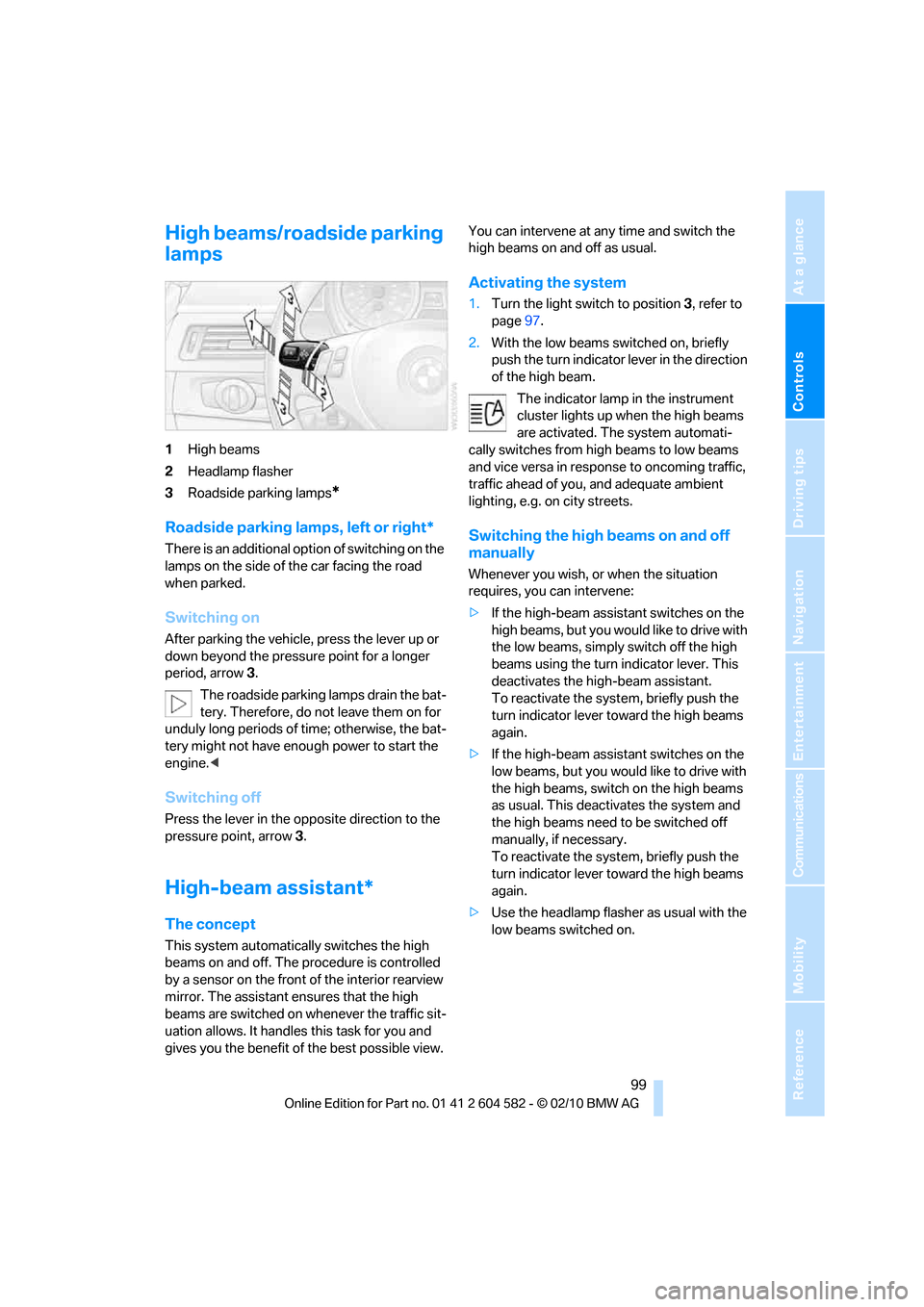
1High beams
2Headlamp flasher
3Roadside parking lamps
*
Roadside parking lamps, left or right*
There is an additional option of switching on the
lamps on the side of the car facing the road
when parked.
Switching on
After parking the vehicle, press the lever up or
down beyond the pressure point for a longer
period, arrow 3.
The roadside parking lamps drain the bat-
tery. Therefore, do not leave them on for
unduly long periods of time; otherwise, the bat-
tery might not have enough power to start the
engine.<
Switching off
Press the lever in the opposite direction to the
pressure point, arrow 3.
High-beam assistant*
The concept
This system automatically switches the high
beams on and off. The procedure is controlled
by a sensor on the front of the interior rearview
mirror. The assistant ensures that the high
beams are switched on whenever the traffic sit-
uation allows. It handles this task for you and
gives you the benefit of the best possible view. You can intervene at any time and switch the
high beams on and off as usual.
Activating the system
1.Turn the light switch to position3, refer to
page97.
2.With the low beams switched on, briefly
push the turn indicator lever in the direction
of the high beam.
The indicator lamp in the instrument
cluster lights up when the high beams
are activated. The system automati-
cally switches from high beams to low beams
and vice versa in response to oncoming traffic,
traffic ahead of you, and adequate ambient
lighting, e.g. on city streets.
Switching the high beams on and off
manually
Whenever you wish, or when the situation
requires, you can intervene:
>If the high-beam assistant switches on the
high beams, but you would like to drive with
the low beams, simply switch off the high
beams using the turn indicator lever. This
deactivates the high-beam assistant.
To reactivate the system, briefly push the
turn indicator lever toward the high beams
again.
>If the high-beam assistant switches on the
low beams, but you would like to drive with
the high beams, switch on the high beams
as usual. This deactivates the system and
the high beams need to be switched off
manually, if necessary.
To reactivate the system, briefly push the
turn indicator lever toward the high beams
again.
>Use the headlamp flasher as usual with the
low beams switched on.
Page 102 of 286
Lamps
100
System limitations
The high-beam assistant cannot serve as
a substitute for the driver's personal judg-
ment of when to use the high beams. Therefore,
manually switch off the high beams in situations
where this is required to avoid a safety risk.<
The system is not fully functional in situations
such as the following, and driver intervention
may be necessary:
>In very unfavorable weather conditions,
such as fog or heavy precipitation
>In detecting poorly-lit road users, such as
pedestrians, cyclists, horseback riders and
wagons; when driving close to train or ship
traffic; and at animal crossings
>In tight curves, on hilltops or in depressions,
in cross traffic or half-obscured oncoming
traffic on highways
>In poorly lit towns and cities and in the pres-
ence of highly reflective signs
>At low speeds
>When the windshield in front of the interior
rearview mirror is fogged over, dirty or cov-
ered with stickers, etc.
>If the sensor is dirty. Clean the sensor on
the front of the interior rearview mirror using
a cloth moistened with a small amount of
glass cleaner.
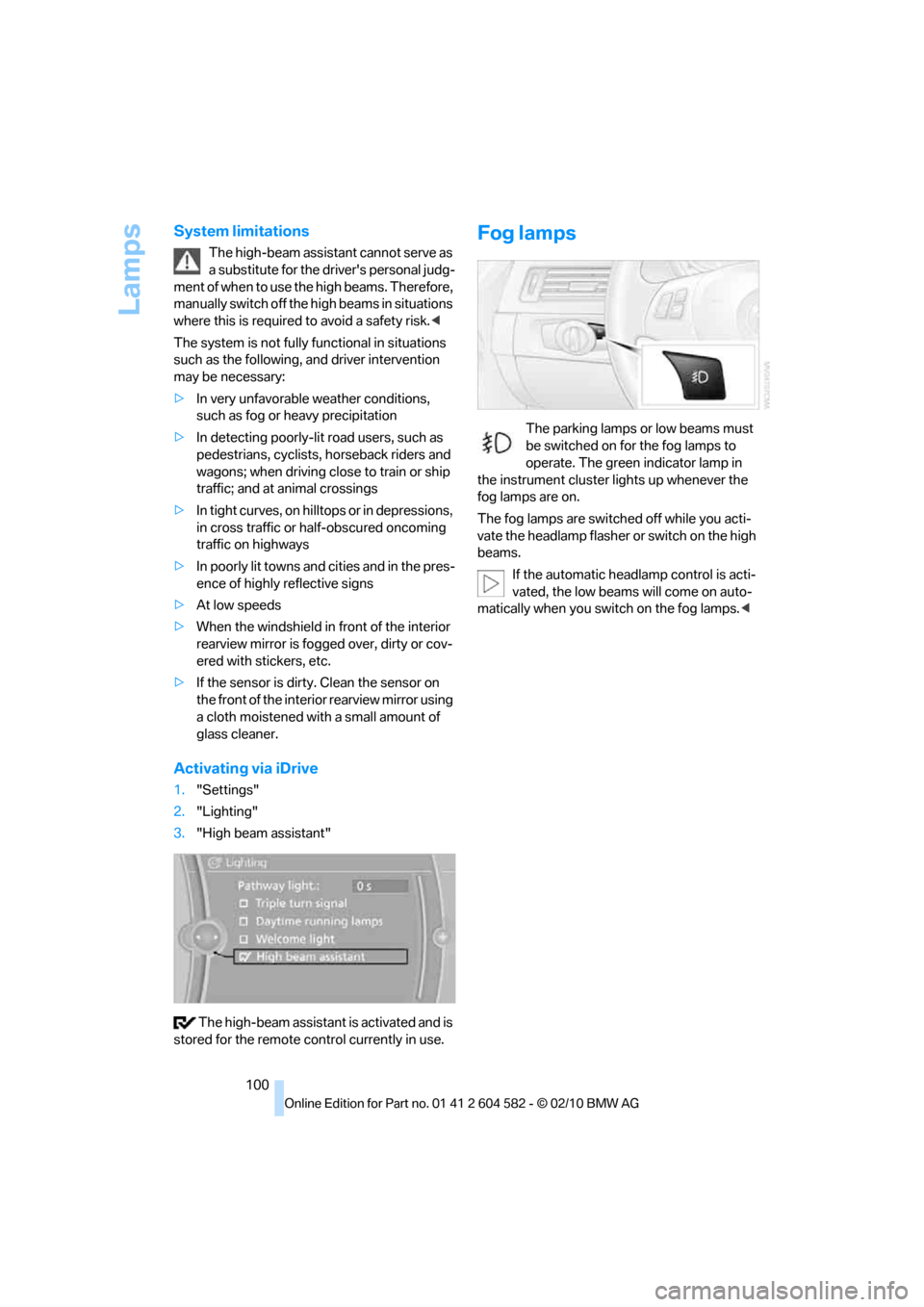
Activating via iDrive
1."Settings"
2."Lighting"
3."High beam assistant"
The high-beam assistant is activated and is
stored for the remote control currently in use.
Fog lamps
The parking lamps or low beams must
be switched on for the fog lamps to
operate. The green indicator lamp in
the instrument cluster lights up whenever the
fog lamps are on.
The fog lamps are switched off while you acti-
vate the headlamp flasher or switch on the high
beams.
If the automatic headlamp control is acti-
vated, the low beams will come on auto-
matically when you switch on the fog lamps.<
Page 224 of 286
Wheels and tires
222 heat when tested under controlled conditions
on a specified indoor laboratory test wheel.
Sustained high temperature can cause the
material of the tire to degenerate and reduce
tire life, and excessive temperature can lead to
sudden tire failure. The grade C corresponds to
a level of performance which all passenger car
tires must meet under the Federal Motor Vehi-
cle Safety Standard No. 109. Grades B and A
represent higher levels of performance on the
laboratory test wheel than the minimum
required by law.
The temperature grade for this tire is
established for a tire that is properly
inflated and not overloaded. Excessive speed,
underinflation, or excessive loading, either sep-
arately or in combination, can cause heat
buildup and possible tire failure.<
RSC – run-flat tires
You will recognize run-flat tires by a circular
symbol containing the letters RSC on the side
of the tire, refer to page223.
M+S
Winter and all-season tires.
These have better winter properties than sum-
mer tires.
XL
Designation for specially reinforced tires.
Tire condition
Inspect your tires frequently for tread wear,
signs of damage and for foreign objects lodged
in the tread. Check the tread depth.
Minimum tread depth
The tread depth should not drop below 0.12 in/
3mm, although, for example, European legisla-
tion only specifies a minimum tread depth of
0.063 in/1.6 mm. At tread depths below 0.12 in/
3 mm there is an increased risk of high-speed
hydroplaning, even when only small amounts of
water are present on the road surface.
When winter tires wear down past a tread depth of 0.16 in/4 mm, they become perceptibly less
suitable for winter conditions. In the interest of
safety, new tires should be installed.
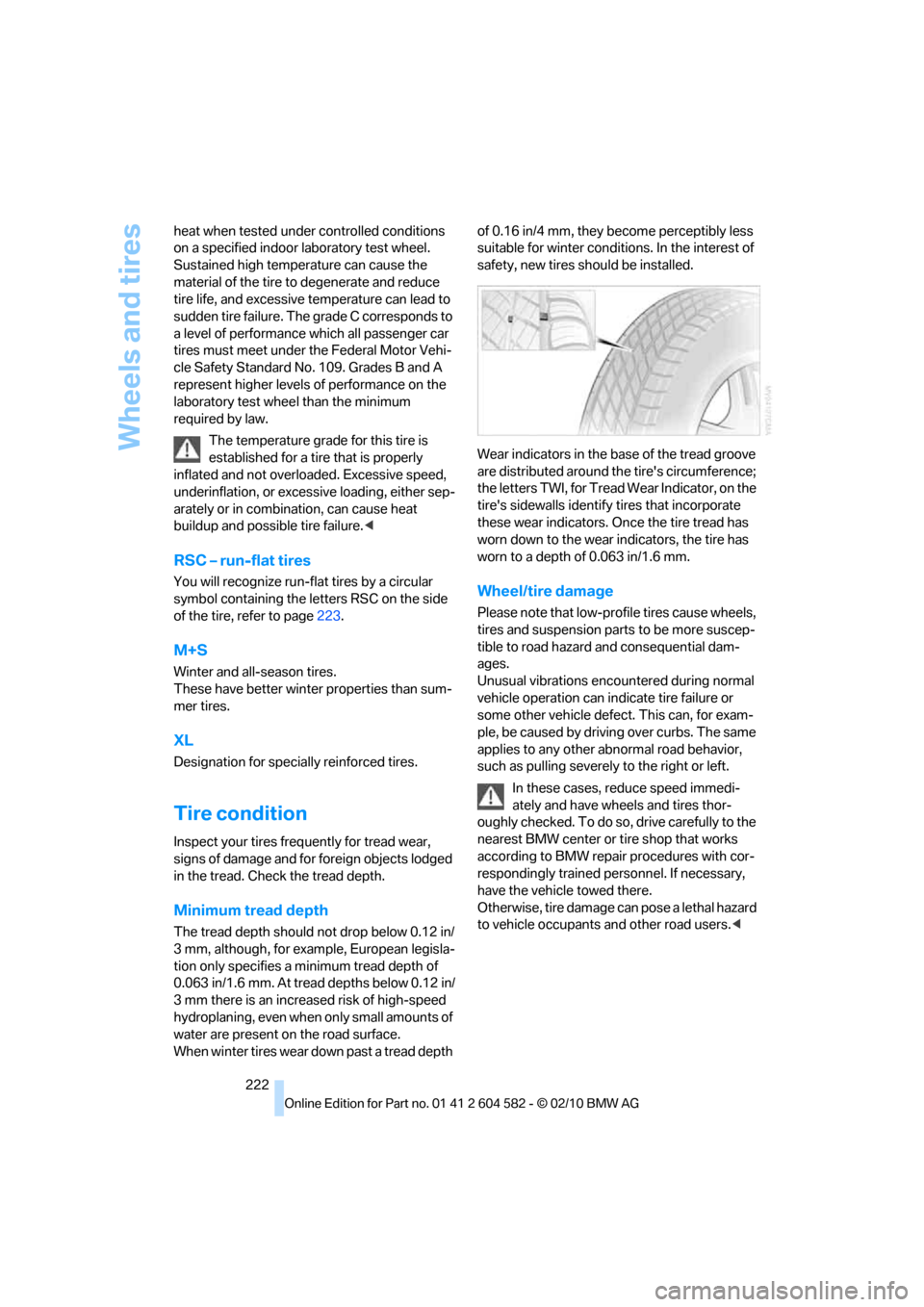
Wear indicators in the base of the tread groove
are distributed around the tire's circumference;
the letters TWI, for Tread Wear Indicator, on the
tire's sidewalls identify tires that incorporate
these wear indicators. Once the tire tread has
worn down to the wear indicators, the tire has
worn to a depth of 0.063 in/1.6 mm.
Wheel/tire damage
Please note that low-profile tires cause wheels,
tires and suspension parts to be more suscep-
tible to road hazard and consequential dam-
ages.
Unusual vibrations encountered during normal
vehicle operation can indicate tire failure or
some other vehicle defect. This can, for exam-
ple, be caused by driving over curbs. The same
applies to any other abnormal road behavior,
such as pulling severely to the right or left.
In these cases, reduce speed immedi-
ately and have wheels and tires thor-
oughly checked. To do so, drive carefully to the
nearest BMW center or tire shop that works
according to BMW repair procedures with cor-
respondingly trained personnel. If necessary,
have the vehicle towed there.
O t h e r w i s e , t i r e d a m a g e c a n p o s e a l e t h a l h a z a r d
to vehicle occupants and other road users.<
Page 229 of 286
Mobility
227Reference
At a glance
Controls
Driving tips
Communications
Navigation
Entertainment
Engine oil
The engine oil consumption is dependent on
driving style and driving conditions.
Checking the engine oil level with the
dipstick*
1.Park the vehicle on a level surface with the
engine at operating temperature, i.e. after
an uninterrupted drive of at least 6.2 miles/
10 km.
2.Switch off the engine.
3.After approx. 5 minutes, pull out the
dipstick5 and wipe it off with a lint-free
cloth, paper towel or similar material.
4.Carefully push the dipstick all the way back
into the measuring tube and pull it out
again.
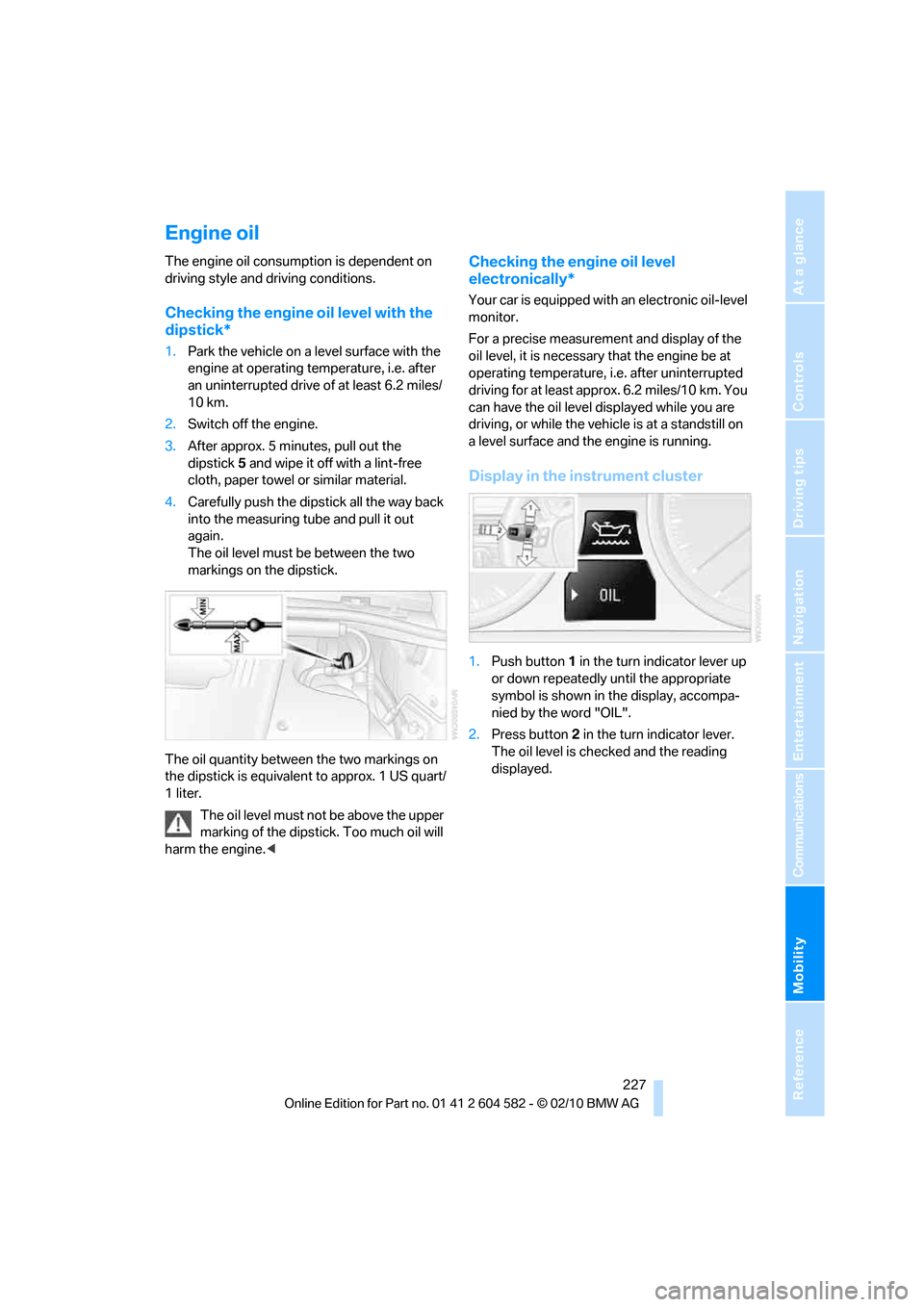
The oil level must be between the two
markings on the dipstick.
The oil quantity between the two markings on
the dipstick is equivalent to approx. 1 US quart/
1 liter.
The oil level must not be above the upper
marking of the dipstick. Too much oil will
harm the engine.<
Checking the engine oil level
electronically*
Your car is equipped with an electronic oil-level
monitor.
For a precise measurement and display of the
oil level, it is necessary that the engine be at
operating temperature, i.e. after uninterrupted
driving for at least approx. 6.2 miles/10 km. You
can have the oil level displayed while you are
driving, or while the vehicle is at a standstill on
a level surface and the engine is running.
Display in the instrument cluster
1.Push button 1 in the turn indicator lever up
or down repeatedly until the appropriate
symbol is shown in the display, accompa-
nied by the word "OIL".
2.Press button 2 in the turn indicator lever.
The oil level is checked and the reading
displayed.
Page 247 of 286
Mobility
245Reference
At a glance
Controls
Driving tips
Communications
Navigation
Entertainment
Power failure
After a temporary power loss, the functioning of
some equipment may be limited and require
reinitialization. Individual settings may likewise
have been lost and will have to be programmed:
>Time and date
These values must be updated, refer to
page79.
>Radio
In some cases, stations may have to be
stored again, refer to page154.
>Navigation system
Operability must be waited for, refer to
page130.
>Glass roof
It may happen that the roof can only be
raised. The system must be initialized.
Please contact your BMW center.
>Panorama glass roof
It may happen that the roof can only be
raised. The system must be initialized.
Please contact your BMW center.
>Seat and mirror memory
The positions must be stored again, refer to
page46.
>Inside rearview mirror with digital compass
The system must be calibrated, refer to
page110.
>Active steering
The system automatically initializes itself
briefly during a trip. The system is deacti-
vated during this time, refer to page92.
>xDrive
The system automatically initializes itself
during a trip. Indicator lamps light up during
this time. If the lamps do not go out during
the current trip, have the system checked.
Fuses
Never attempt to repair a blown fuse and
do not replace a defective fuse with a sub-
stitute of another color or amperage rating; oth-
erwise, this could lead to a circuit overload, ulti-
mately resulting in a fire in the vehicle.<
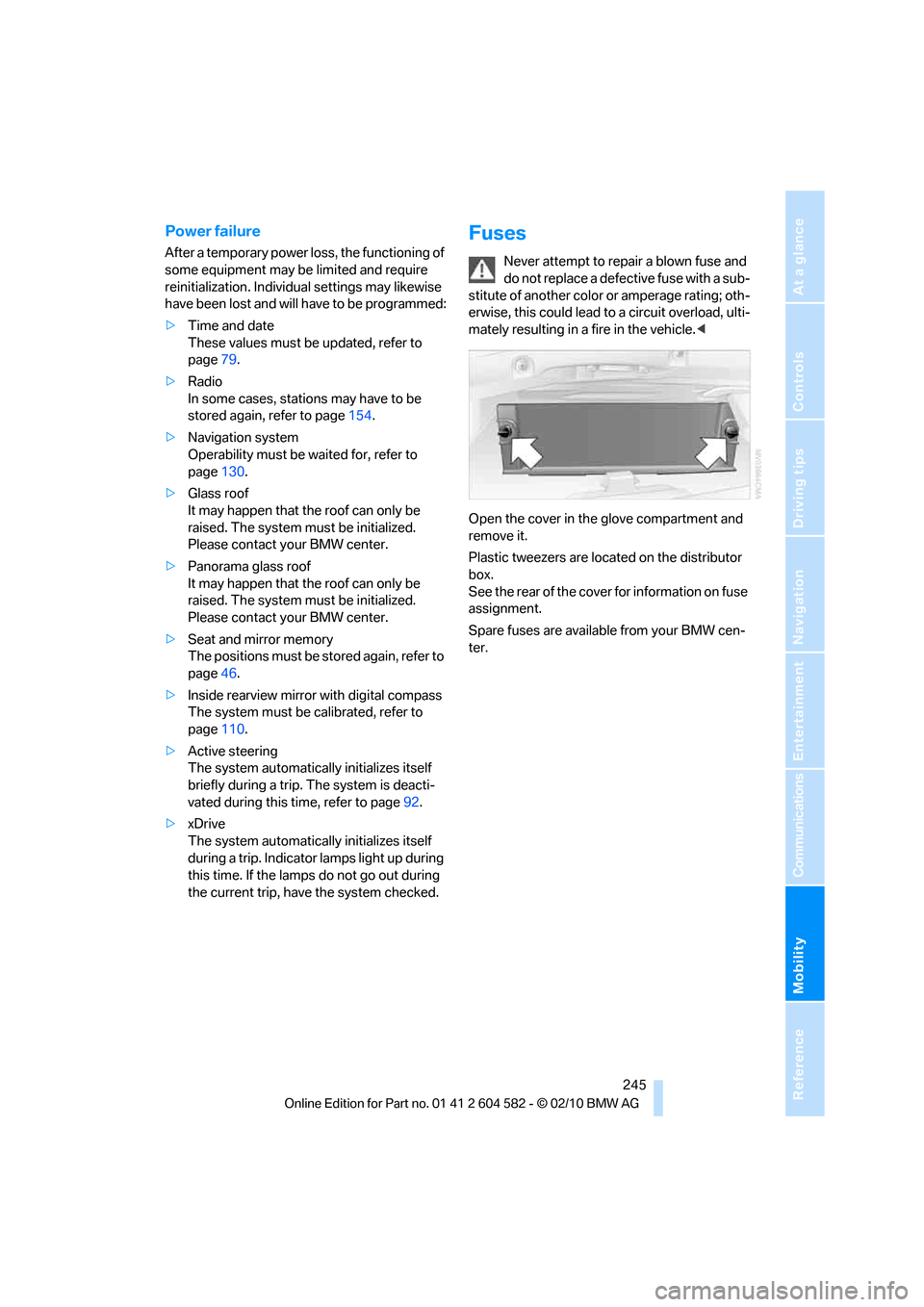
Open the cover in the glove compartment and
remove it.
Plastic tweezers are located on the distributor
box.
See the rear of the cover for information on fuse
assignment.
Spare fuses are available from your BMW cen-
ter.
Page 251 of 286
Mobility
249Reference
At a glance
Controls
Driving tips
Communications
Navigation
Entertainment
Using a tow fitting
The screw-in tow fitting must always be carried
in the car. It can be screwed in at the front or
rear of the BMW.
Sedan: it is stored in the onboard vehicle tool kit
underneath the cover on the right-hand side of
the cargo area, refer to page237.
Sports Wagon: it is stored in the onboard vehi-
cle tool kit underneath the cover on the left-
hand side of the cargo area, refer to page237.
Use only the tow fitting provided with the
vehicle and screw it all the way in. Use the
tow fitting for towing on paved roads only. Avoid
lateral loading of the tow fitting, e.g. do not lift
the vehicle by the tow fitting. Otherwise, the
tow fitting and the vehicle could be damaged.<
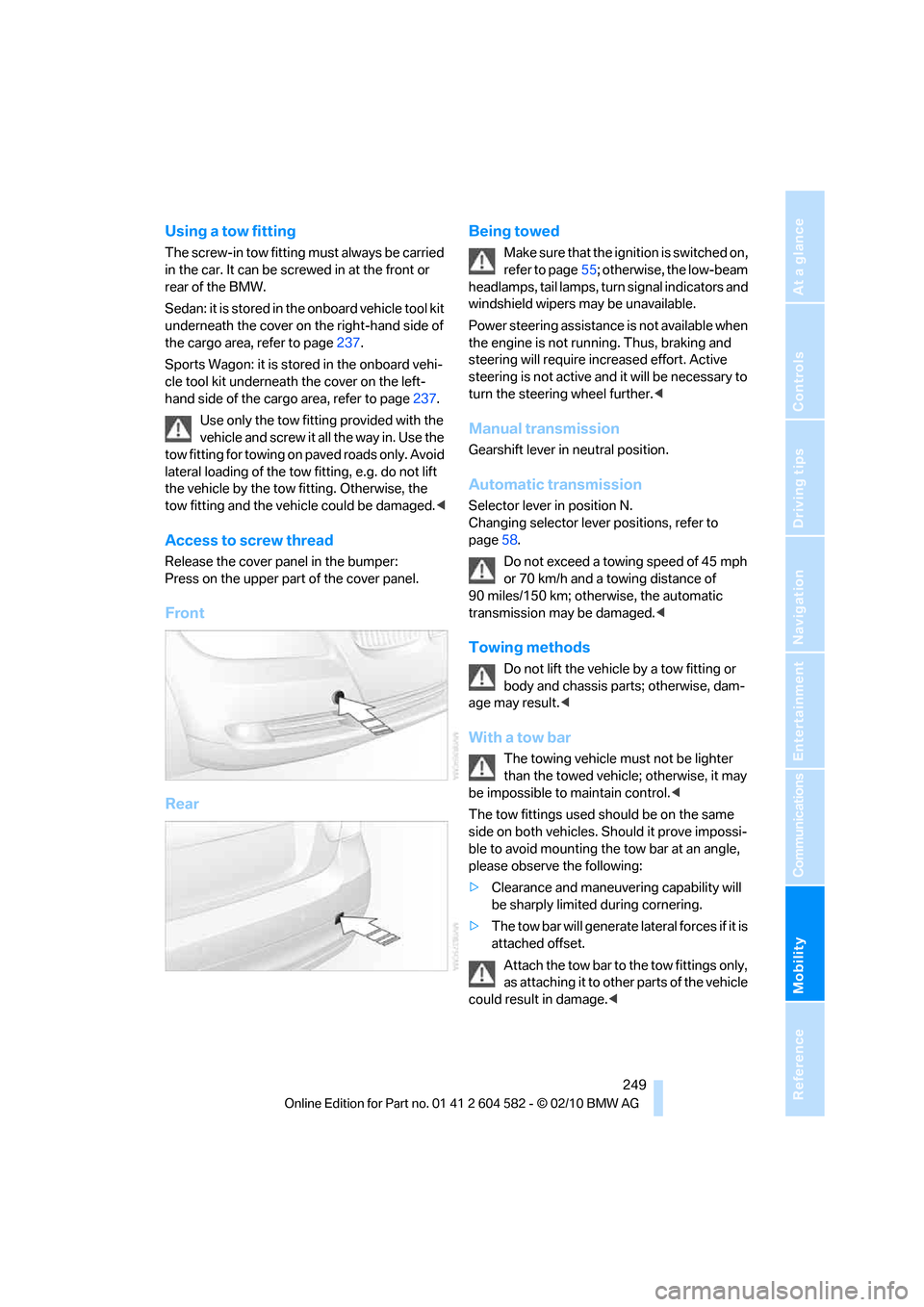
Access to screw thread
Release the cover panel in the bumper:
Press on the upper part of the cover panel.
Front
RearBeing towed
Make sure that the ignition is switched on,
refer to page55; otherwise, the low-beam
headlamps, tail lamps, turn signal indicators and
windshield wipers may be unavailable.
Power steering assistance is not available when
the engine is not running. Thus, braking and
steering will require increased effort. Active
steering is not active and it will be necessary to
turn the steering wheel further.<
Manual transmission
Gearshift lever in neutral position.
Automatic transmission
Selector lever in position N.
Changing selector lever positions, refer to
page58.
Do not exceed a towing speed of 45 mph
or 70 km/h and a towing distance of
90 miles/150 km; otherwise, the automatic
transmission may be damaged.<
Towing methods
Do not lift the vehicle by a tow fitting or
body and chassis parts; otherwise, dam-
age may result.<
With a tow bar
The towing vehicle must not be lighter
than the towed vehicle; otherwise, it may
be impossible to maintain control.<
The tow fittings used should be on the same
side on both vehicles. Should it prove impossi-
ble to avoid mounting the tow bar at an angle,
please observe the following:
>Clearance and maneuvering capability will
be sharply limited during cornering.
>The tow bar will generate lateral forces if it is
attached offset.
Attach the tow bar to the tow fittings only,
as attaching it to other parts of the vehicle
could result in damage.<
Page 268 of 286
Everything from A to Z
266
Everything from A to Z
Index
A
ABS Antilock Brake
System85
ACC, refer to Active cruise
control64
Accident, refer to Sending an
Emergency Request246
Activated-charcoal filter for
automatic climate
control105
Active Cruise Control
– indicator lamp67
– malfunction68
– selecting distance66
– sensor68
Active cruise control64
Active steering92
Adaptive brake light
– Brake Force Display93
Adaptive light control98
Additives
– coolant230
Address, entering131,137
Address for navigation
– entering131
Adjusting temperature inside
the car, refer to Automatic
climate control103
Adjusting the thigh support43
Airbags94
– indicator/warning lamp96
– sitting safely42
Air conditioning mode
– automatic climate
control103
– ventilation105
Air distribution
– automatic103
Airing, refer to Ventilation105
Air pressure, refer to Tire
inflation pressure208Air recirculation, refer to
Recirculated-air mode104
Air supply
– automatic climate
control103
– ventilation105
Air vents102
Air volume104
AKI, refer to Fuel
specifications203
Alarm system33
– avoiding unintentional
alarms34
– interior motion sensor34
– switching off an alarm34
– tilt alarm sensor34
Albums of music
collection170
ALL program104
All-season tires, refer to
Winter tires224
All-wheel drive, refer to
xDrive86
AM, waveband153
Ambient air, refer to
Recirculated-air mode104
Antenna for mobile phone180
Antifreeze
– coolant230
– washer fluid62
Antilock Brake System
ABS85
Anti-theft alarm system, refer
to Alarm system33
Anti-theft system27
Approved axle loads, refer to
Weights257
Approved gross vehicle
weight, refer to Weights257
Armrest, refer to Center
armrest111
Arrival time, refer to
Computer74Ashtray112
Assist systems, refer to
Driving stability control85
AUC Automatic recirculated-
air control104
Audible instructions, refer to
Spoken instructions142
Audio150
– controls150
– switching on/off150
– tone control150
– volume150
Audio device, external111
Automatic
– air distribution103
– air volume103
– cruise control62,64
– headlamp control97
Automatic car washes233
Automatic climate control102
Automatic curb monitor49
Automatic high beams and
low beams, refer to High-
beam assistant99
Automatic recirculated-air
control AUC104
Automatic Service
Request199
Automatic transmission with
Steptronic57
– interlock58
– overriding selector lever
lock60
– shiftlock, refer to Changing
selector lever position58
– sport program59
– towing248
– tow-starting248
AUTO program for automatic
climate control103
AUX-IN
– port111
AUX-IN port173
Page 271 of 286
Reference 269
At a glance
Controls
Driving tips
Communications
Navigation
Entertainment
Mobility
Computer73
– displays on Control
Display74
Computer, refer to iDrive16
Concierge service196
Condensation, refer to When
the vehicle is parked125
Condition Based Service
CBS231
Configuring settings, refer to
Personal Profile26
Confirmation signals for
locking/unlocking the
vehicle28
Congestion
– refer to Route, bypassing
sections141
Connecting vacuum cleaner,
refer to Connecting
electrical appliances113
Consumption, refer to
Average fuel
consumption73
Consumption display
– Energy Control72
Contacts
– creating193
Control Center, refer to
iDrive16
Control Display, refer to
iDrive16
– adjusting brightness83
– switching on/off19
Controller, refer to iDrive16
Controls and displays10
Control unit, refer to iDrive16
Convenient operation
– glass roof28
– windows28
Coolant230
– checking level230
Coolant temperature72
Cooling, maximum103
Cooling fluid, refer to
Coolant230
Cooling system, refer to
Coolant230
Copyright2Corner-illuminating lamps
– replacing bulbs239
Corner-illuminating lamps,
refer to Adaptive light
control98
Cornering lamps, refer to
Adaptive light control98
Correct tires223
Country codes DVD163
Courtesy lamps, refer to
Interior lamps101
Criteria for route140
Cross-hairs in navigation136
Cruise control62
– active64
– malfunction64
Cruise control, refer to Active
cruise control64
Cruising range73
Cupholders112
Curb weight, refer to
Weights257
Current fuel consumption,
refer to Energy Control72
Current playback
– external devices176
– of music collection170
Customer Relations198
D
Dashboard, refer to
Cockpit10
Dashboard, refer to
instrument cluster12
Dashboard lighting, refer to
Instrument lighting101
Data, technical254
– capacities258
– dimensions255
– engine254
– weights257
Data memory232
Data transfer199
Date
– date format80
– setting80
Daytime running lights98
– replacing bulbs238DBC Dynamic Brake
Control85
Deactivating front passenger
airbags95
Deadlocking, refer to
Locking28
Defect
– door lock30
– fuel filler flap202
– glass roof38
– panorama glass roof40
Destination, entering by town/
city name131
Destination address
– entering131,137
Destination entry via BMW
Assist136
Destination for navigation
– entering by voice137
– entering via map136
– entry131
– home address134
– manual entry131
Destination guidance140
– bypassing a route
section141
– changing specified
route140
– continuing140
– starting140
– voice instructions142
– volume of voice
instructions142
Diesel exhaust fluid205
Diesel fuel204
Diesel particulate filter124
Digital clock71
Digital compass109
Digital radio, refer to HD
Radio154
Dimensions255
Dipstick, engine oil227
Directional indicators, refer to
Turn signals60
Direction instructions, refer to
Voice instructions142
Directory for navigation, refer
to Address book133
Page 272 of 286
Everything from A to Z
270 Displacement, refer to Engine
data254
Display, refer to iDrive
controls16
Display lighting, refer to
Instrument lighting101
Displays
– on the Control Display16
Displays, refer to Instrument
cluster12
Displays and controls10
Disposal
– coolant230
– remote control battery36
– vehicle battery244
Distance remaining to service,
refer to Service
requirements76
Distance warning, refer to
Park Distance Control
PDC84
Door key, refer to Remote
control with integrated
key26
Door lock29
Doors, emergency
operation30
DOT Quality Grades221
Draft-free ventilation105
Drinks holders, refer to
Cupholders112
Drive-off assistance, refer to
Dynamic Stability Control
DSC85
Drive-off assistant87
Driving lamps, refer to Parking
lamps/low beams97
Driving notes122
Driving off on hills, refer to
Drive-off assistant87
Driving stability control
systems85
Driving through water124
Driving tips, refer to Driving
notes122
Dry air, refer to Cooling
function104
DSC Dynamic Stability
Control85DTC Dynamic Traction
Control86
– indicator/warning lamp86
DVD
– country codes163
– settings164
– video playback163
DVD menu164
DVD player, refer to CD
player161
DVD video163
Dynamic Brake Control
DBC85
Dynamic destination
guidance141
Dynamic Stability Control
DSC85
– indicator/warning lamp86
Dynamic Traction Control
DTC
– indicator/warning lamp86
E
EBV Electronic brake-force
distribution85
Eject button, refer to Buttons
on the CD/DVD player150
Electrical malfunction
– door lock30
– driver's door30
– fuel filler flap202
– glass roof38
– panorama glass roof40
– trunk lid32
Electric seat adjustment43
Electric steering wheel lock
– with Comfort Access35
Electronic brake-force
distribution EBV85
Electronic oil level check227
Electronic Stability Program
ESP, refer to Dynamic
Stability Control DSC85
Emergency actuation,
automatic transmission,
refer to Overriding selector
lever lock60Emergency operation
– fuel filler flap, manual
release202
Emergency operation, refer to
Closing manually
– glass roof38
– panorama glass roof40
Emergency operation, refer to
Manual operation
– door lock30
Emergency release
– trunk lid from inside32
Emergency Request246
Emergency services, refer to
Roadside Assistance246
Energy, saving
– saving fuel122
Energy-conscious driving,
refer to Energy Control72
Energy Control72
Engine
– breaking in122
– data254
– overheated, refer to Coolant
temperature72
– speed254
– starting56
– starting, Comfort Access34
– switching off56
Engine compartment226
Engine coolant, refer to
Coolant230
Engine oil
– adding229
– alternative oil types229
– BMW Maintenance
System231
– capacity258
– checking level227
– dipstick
227
– intervals between changes,
refer to Service
requirements76
Engine output, refer to Engine
data254
Engine speed, refer to Engine
data254
Engine starting, refer to
Starting the engine56