entry BMW 328I 2011 E90 Owner's Guide
[x] Cancel search | Manufacturer: BMW, Model Year: 2011, Model line: 328I, Model: BMW 328I 2011 E90Pages: 286, PDF Size: 8.25 MB
Page 193 of 286
191
Entertainment
Reference
At a glance
Controls
Driving tips Communications
Navigation
Mobility
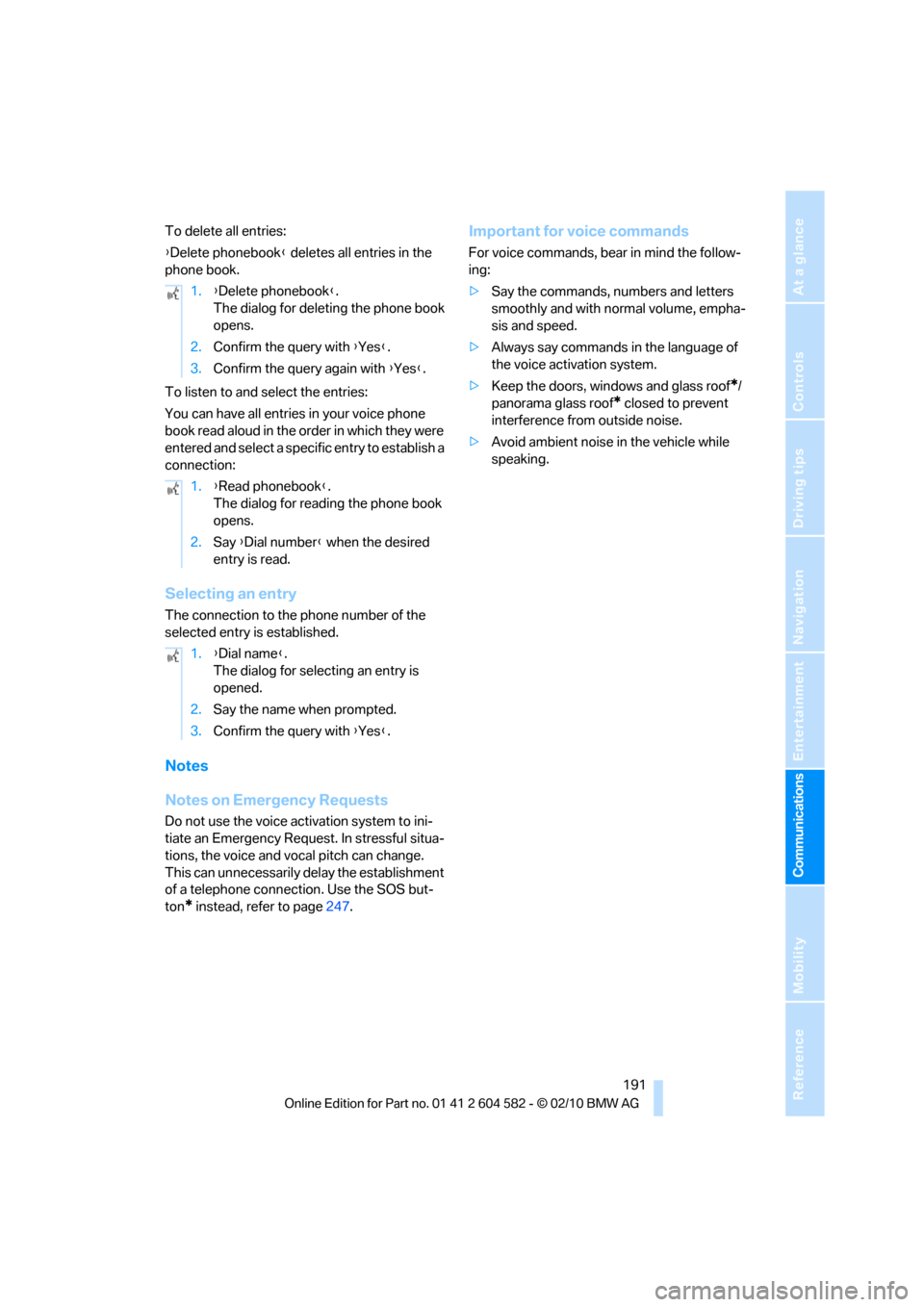
To delete all entries:
{Delete phonebook} deletes all entries in the
phone book.
To listen to and select the entries:
You can have all entries in your voice phone
book read aloud in the order in which they were
entered and select a specific entry to establish a
connection:
Selecting an entry
The connection to the phone number of the
selected entry is established.
Notes
Notes on Emergency Requests
Do not use the voice activation system to ini-
tiate an Emergency Request. In stressful situa-
tions, the voice and vocal pitch can change.
This can unnecessarily delay the establishment
of a telephone connection. Use the SOS but-
ton
* instead, refer to page247.
Important for voice commands
For voice commands, bear in mind the follow-
ing:
>Say the commands, numbers and letters
smoothly and with normal volume, empha-
sis and speed.
>Always say commands in the language of
the voice activation system.
>Keep the doors, windows and glass roof
*/
panorama glass roof
* closed to prevent
interference from outside noise.
>Avoid ambient noise in the vehicle while
speaking. 1.{Delete phonebook}.
The dialog for deleting the phone book
opens.
2.Confirm the query with {Yes}.
3.Confirm the query again with {Yes}.
1.{Read phonebook}.
The dialog for reading the phone book
opens.
2.Say {Dial number} when the desired
entry is read.
1.{Dial name}.
The dialog for selecting an entry is
opened.
2.Say the name when prompted.
3.Confirm the query with {Yes}.
Page 195 of 286
193
Entertainment
Reference
At a glance
Controls
Driving tips Communications
Navigation
Mobility
Contacts
You can create and edit contacts. The contacts
from the mobile phone
* are displayed as well if
this function is supported by the mobile phone.
The addresses can be used as destinations for
navigation and the phone numbers can be
dialed.
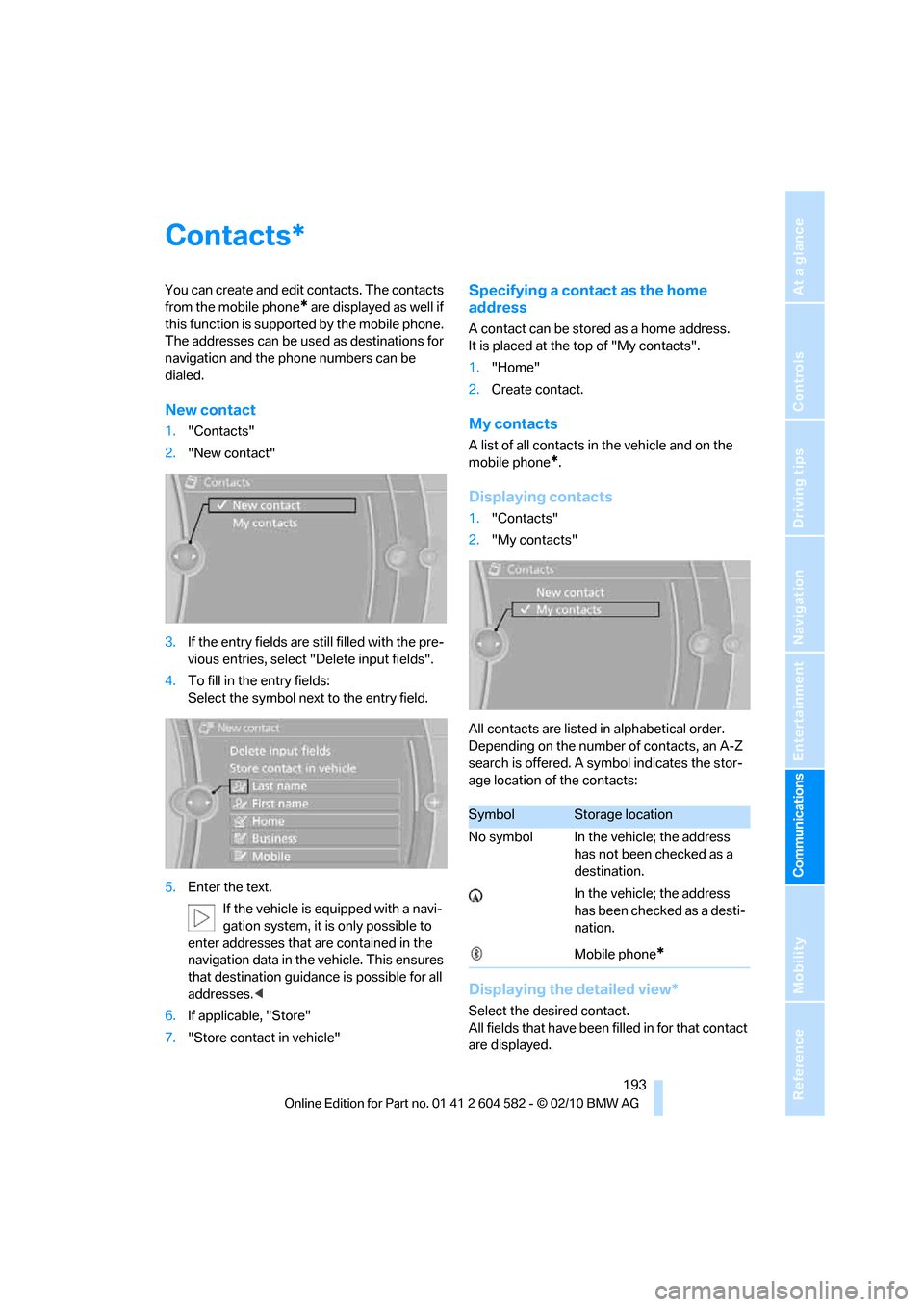
New contact
1."Contacts"
2."New contact"
3.If the entry fields are still filled with the pre-
vious entries, select "Delete input fields".
4.To fill in the entry fields:
Select the symbol next to the entry field.
5.Enter the text.
If the vehicle is equipped with a navi-
gation system, it is only possible to
enter addresses that are contained in the
navigation data in the vehicle. This ensures
that destination guidance is possible for all
addresses.<
6.If applicable, "Store"
7."Store contact in vehicle"
Specifying a contact as the home
address
A contact can be stored as a home address.
It is placed at the top of "My contacts".
1."Home"
2.Create contact.
My contacts
A list of all contacts in the vehicle and on the
mobile phone
*.
Displaying contacts
1."Contacts"
2."My contacts"
All contacts are listed in alphabetical order.
Depending on the number of contacts, an A-Z
search is offered. A symbol indicates the stor-
age location of the contacts:
Displaying the detailed view*
Select the desired contact.
All fields that have been filled in for that contact
are displayed.
*
SymbolStorage location
No symbol In the vehicle; the address
has not been checked as a
destination.
In the vehicle; the address
has been checked as a desti-
nation.
Mobile phone
*
Page 196 of 286
Contacts
194
Selecting name display
Names can be displayed in different sequences.
1."My contacts"
2.Highlight the contact.
3.Open "Options".
4."Display: last, first name" or "Display: first,
last name"
Depending on how the contacts were stored in
your mobile phone, the name display can differ
from the selected display.
Selecting a contact as the navigation
destination
1."My contacts"
2.Select the desired contact.
3.Select the desired address.
Contacts from the mobile phone
* may contain
addresses that do not match the navigation
data contained in the vehicle and thus cannot
be used for destination guidance. In this case:
Manually correct the address.
Checking the address as a destination*
An address that is to be used for destination
guidance must match the navigation data con-
tained in the vehicle. An address that is stored
on the mobile phone can be matched to the
navigation data.
1.Select the desired contact and highlight the
address.
2.Open "Options".
3."Check as destination"
4.Correct and store the address, if necessary.
If the address is corrected and stored, then a
copy is created in the vehicle. The address is
not changed on the mobile phone.
Dialing a phone number*
1."My contacts"
2.Select the desired contact.
3.Select the desired phone number.
The connection is established.
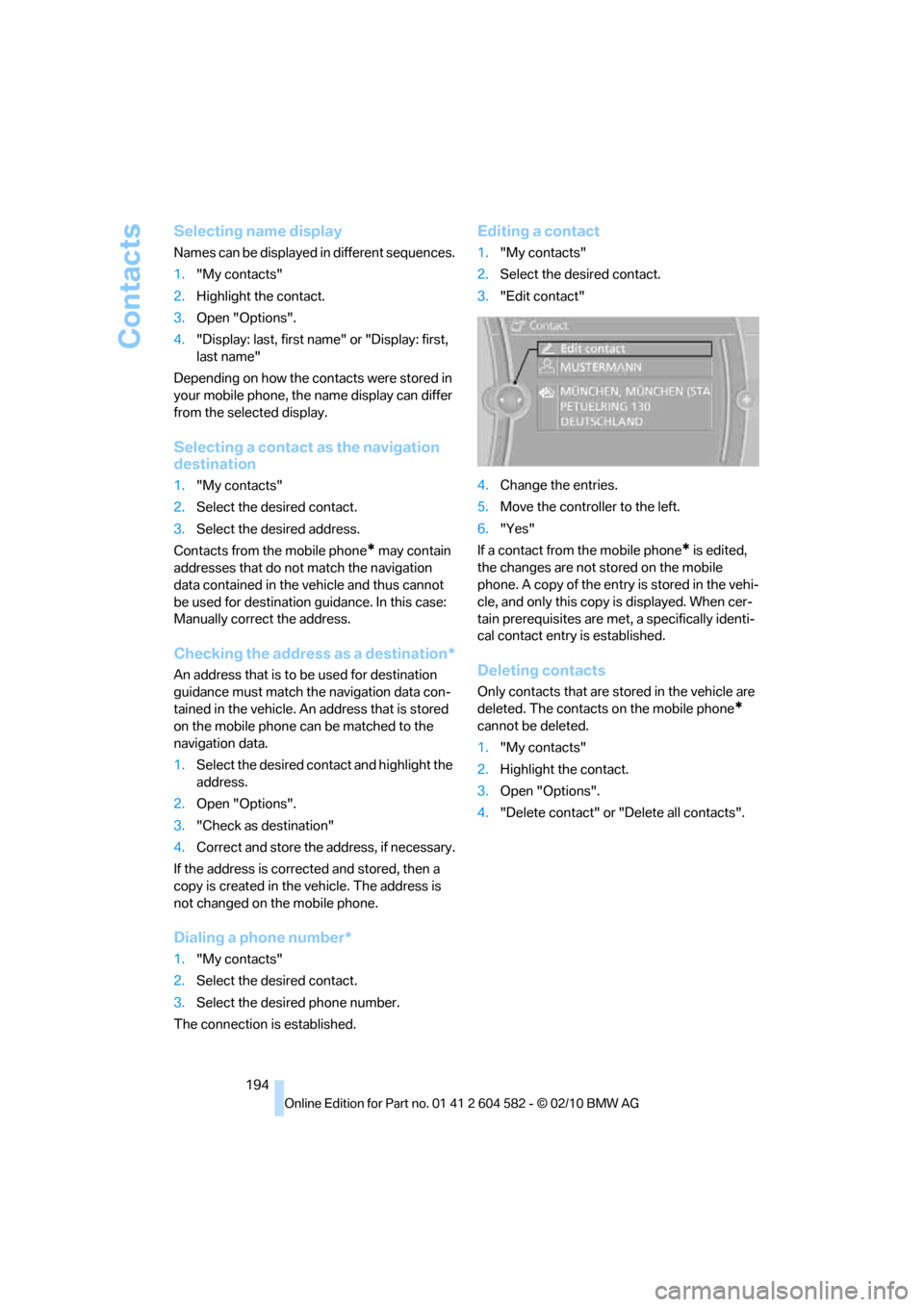
Editing a contact
1."My contacts"
2.Select the desired contact.
3."Edit contact"
4.Change the entries.
5.Move the controller to the left.
6."Yes"
If a contact from the mobile phone
* is edited,
the changes are not stored on the mobile
phone. A copy of the entry is stored in the vehi-
cle, and only this copy is displayed. When cer-
tain prerequisites are met, a specifically identi-
cal contact entry is established.
Deleting contacts
Only contacts that are stored in the vehicle are
deleted. The contacts on the mobile phone
*
cannot be deleted.
1."My contacts"
2.Highlight the contact.
3.Open "Options".
4."Delete contact" or "Delete all contacts".
Page 261 of 286
Reference 259
At a glance
Controls
Driving tips
Communications
Navigation
Entertainment
Mobility
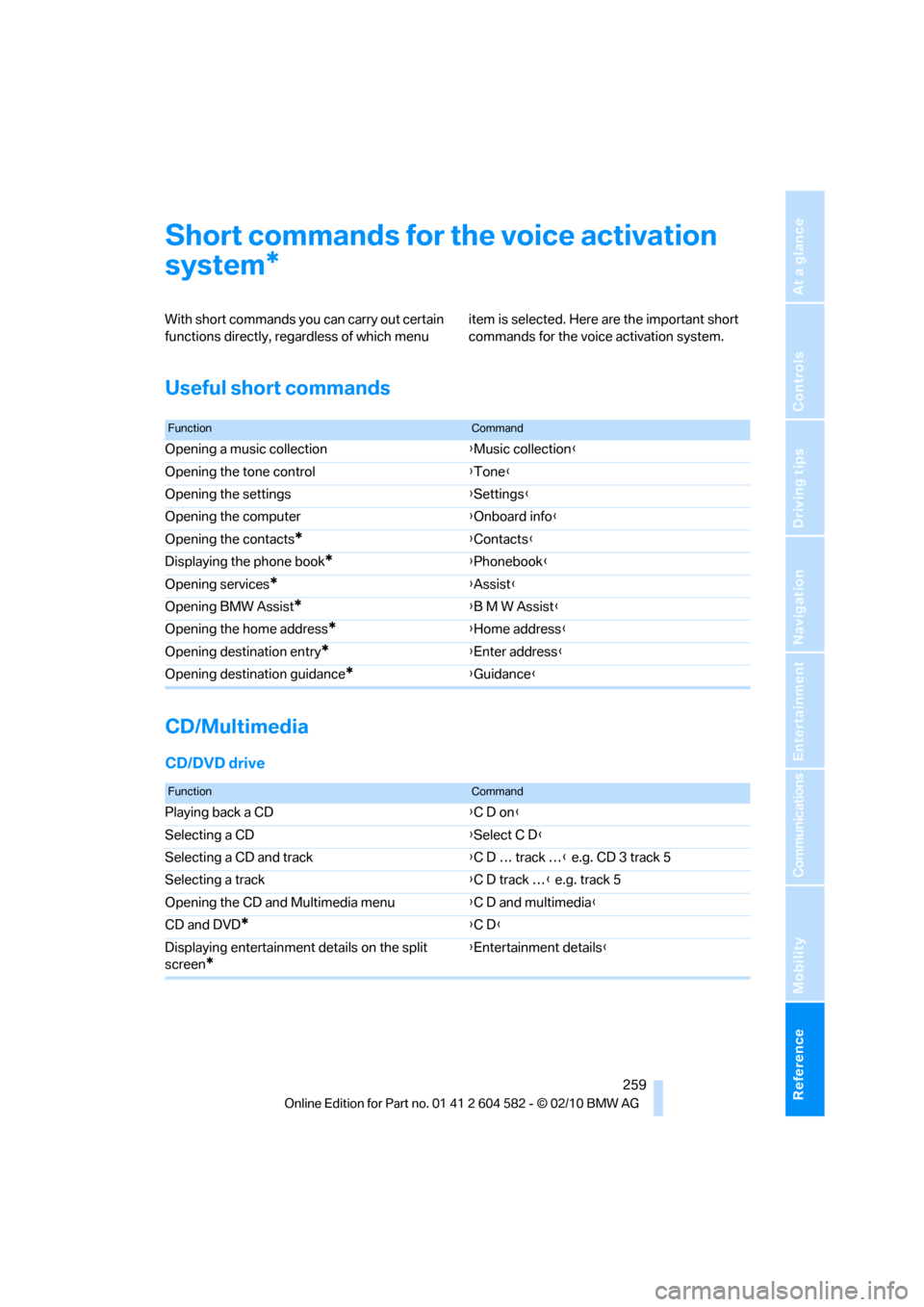
Short commands for the voice activation
system
With short commands you can carry out certain
functions directly, regardless of which menu item is selected. Here are the important short
commands for the voice activation system.
Useful short commands
CD/Multimedia
CD/DVD drive
*
FunctionCommand
Opening a music collection{Music collection}
Opening the tone control{Tone}
Opening the settings{Settings}
Opening the computer{Onboard info}
Opening the contacts
*{Contacts}
Displaying the phone book
*{Phonebook}
Opening services
*{Assist}
Opening BMW Assist
*{B M W Assist}
Opening the home address
*{Home address}
Opening destination entry
*{Enter address}
Opening destination guidance
*{Guidance}
FunctionCommand
Playing back a CD{C D on}
Selecting a CD{Select C D}
Selecting a CD and track{C D … track …} e.g. CD 3 track 5
Selecting a track{C D track …} e.g. track 5
Opening the CD and Multimedia menu{C D and multimedia}
CD and DVD
*{C D}
Displaying entertainment details on the split
screen
*
{Entertainment details}
Page 263 of 286
Reference 261
At a glance
Controls
Driving tips
Communications
Navigation
Entertainment
Mobility
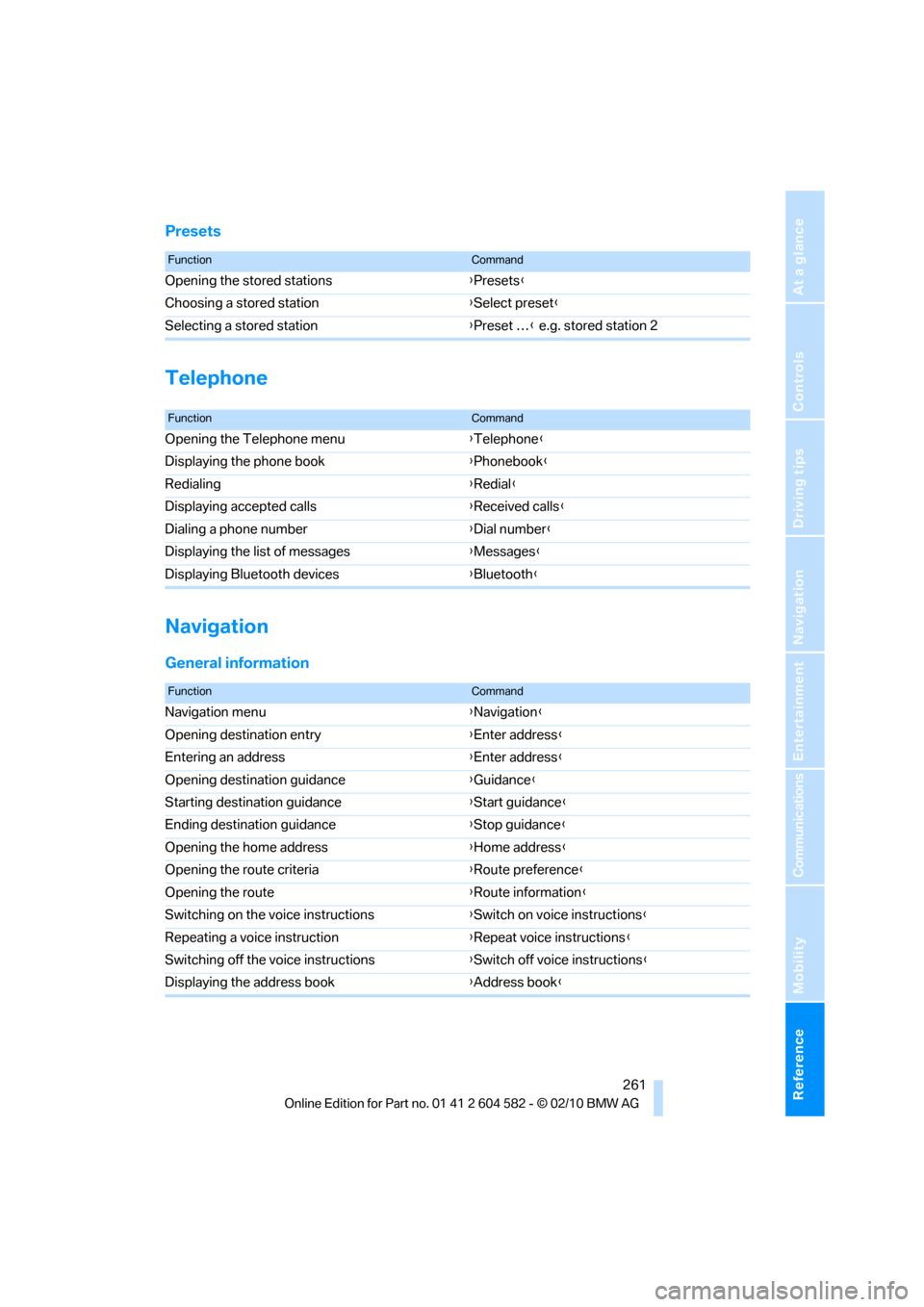
Presets
Telephone
Navigation
General information
FunctionCommand
Opening the stored stations{Presets}
Choosing a stored station{Select preset}
Selecting a stored station{Preset …} e.g. stored station 2
FunctionCommand
Opening the Telephone menu{Telephone}
Displaying the phone book{Phonebook}
Redialing{Redial}
Displaying accepted calls{Received calls}
Dialing a phone number{Dial number}
Displaying the list of messages{Messages}
Displaying Bluetooth devices{Bluetooth}
FunctionCommand
Navigation menu{Navigation}
Opening destination entry{Enter address}
Entering an address{Enter address}
Opening destination guidance{Guidance}
Starting destination guidance{Start guidance}
Ending destination guidance{Stop guidance}
Opening the home address{Home address}
Opening the route criteria{Route preference}
Opening the route{Route information}
Switching on the voice instructions{Switch on voice instructions}
Repeating a voice instruction{Repeat voice instructions}
Switching off the voice instructions{Switch off voice instructions}
Displaying the address book{Address book}
Page 271 of 286
Reference 269
At a glance
Controls
Driving tips
Communications
Navigation
Entertainment
Mobility
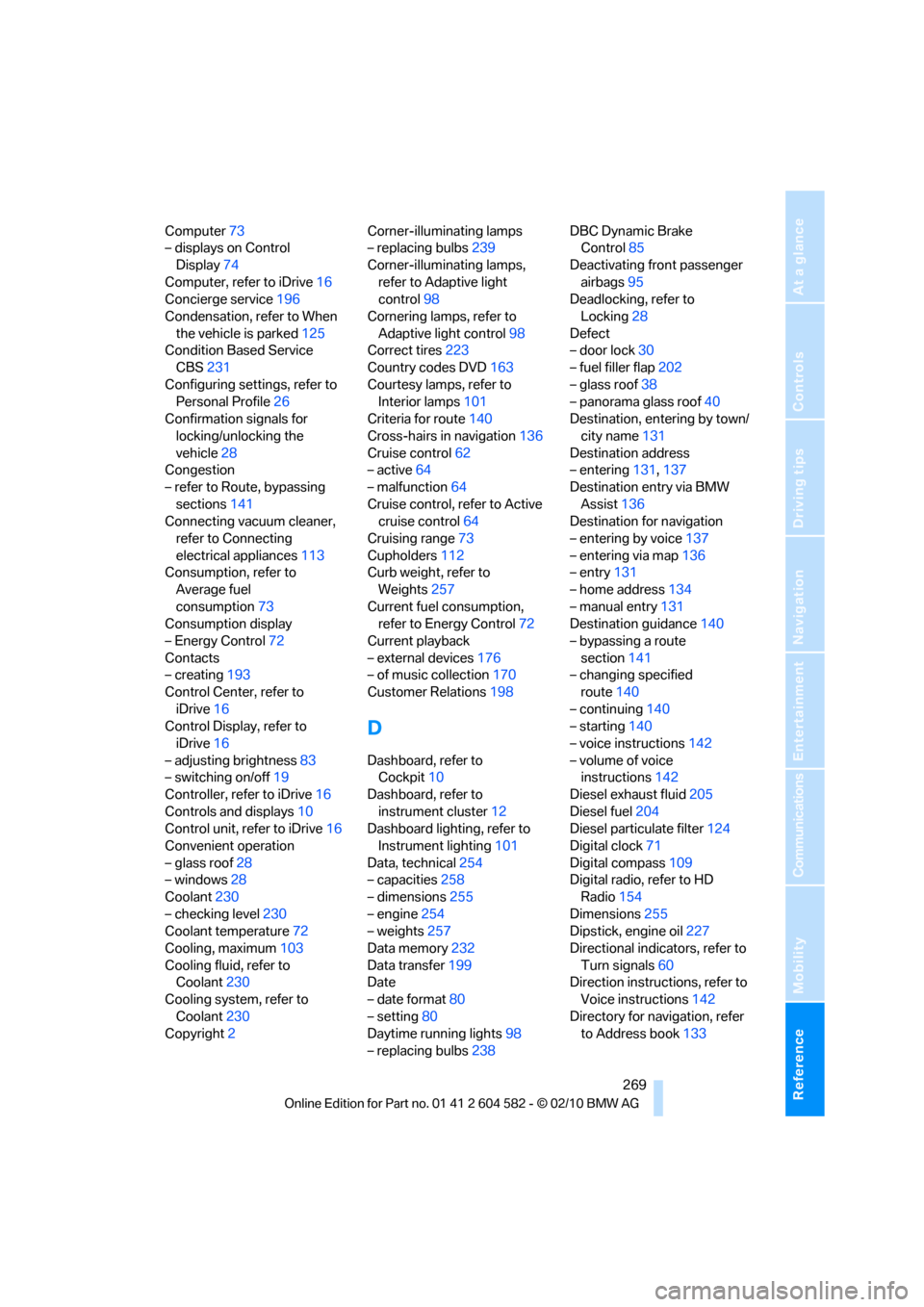
Computer73
– displays on Control
Display74
Computer, refer to iDrive16
Concierge service196
Condensation, refer to When
the vehicle is parked125
Condition Based Service
CBS231
Configuring settings, refer to
Personal Profile26
Confirmation signals for
locking/unlocking the
vehicle28
Congestion
– refer to Route, bypassing
sections141
Connecting vacuum cleaner,
refer to Connecting
electrical appliances113
Consumption, refer to
Average fuel
consumption73
Consumption display
– Energy Control72
Contacts
– creating193
Control Center, refer to
iDrive16
Control Display, refer to
iDrive16
– adjusting brightness83
– switching on/off19
Controller, refer to iDrive16
Controls and displays10
Control unit, refer to iDrive16
Convenient operation
– glass roof28
– windows28
Coolant230
– checking level230
Coolant temperature72
Cooling, maximum103
Cooling fluid, refer to
Coolant230
Cooling system, refer to
Coolant230
Copyright2Corner-illuminating lamps
– replacing bulbs239
Corner-illuminating lamps,
refer to Adaptive light
control98
Cornering lamps, refer to
Adaptive light control98
Correct tires223
Country codes DVD163
Courtesy lamps, refer to
Interior lamps101
Criteria for route140
Cross-hairs in navigation136
Cruise control62
– active64
– malfunction64
Cruise control, refer to Active
cruise control64
Cruising range73
Cupholders112
Curb weight, refer to
Weights257
Current fuel consumption,
refer to Energy Control72
Current playback
– external devices176
– of music collection170
Customer Relations198
D
Dashboard, refer to
Cockpit10
Dashboard, refer to
instrument cluster12
Dashboard lighting, refer to
Instrument lighting101
Data, technical254
– capacities258
– dimensions255
– engine254
– weights257
Data memory232
Data transfer199
Date
– date format80
– setting80
Daytime running lights98
– replacing bulbs238DBC Dynamic Brake
Control85
Deactivating front passenger
airbags95
Deadlocking, refer to
Locking28
Defect
– door lock30
– fuel filler flap202
– glass roof38
– panorama glass roof40
Destination, entering by town/
city name131
Destination address
– entering131,137
Destination entry via BMW
Assist136
Destination for navigation
– entering by voice137
– entering via map136
– entry131
– home address134
– manual entry131
Destination guidance140
– bypassing a route
section141
– changing specified
route140
– continuing140
– starting140
– voice instructions142
– volume of voice
instructions142
Diesel exhaust fluid205
Diesel fuel204
Diesel particulate filter124
Digital clock71
Digital compass109
Digital radio, refer to HD
Radio154
Dimensions255
Dipstick, engine oil227
Directional indicators, refer to
Turn signals60
Direction instructions, refer to
Voice instructions142
Directory for navigation, refer
to Address book133
Page 273 of 286
Reference 271
At a glance
Controls
Driving tips
Communications
Navigation
Entertainment
Mobility
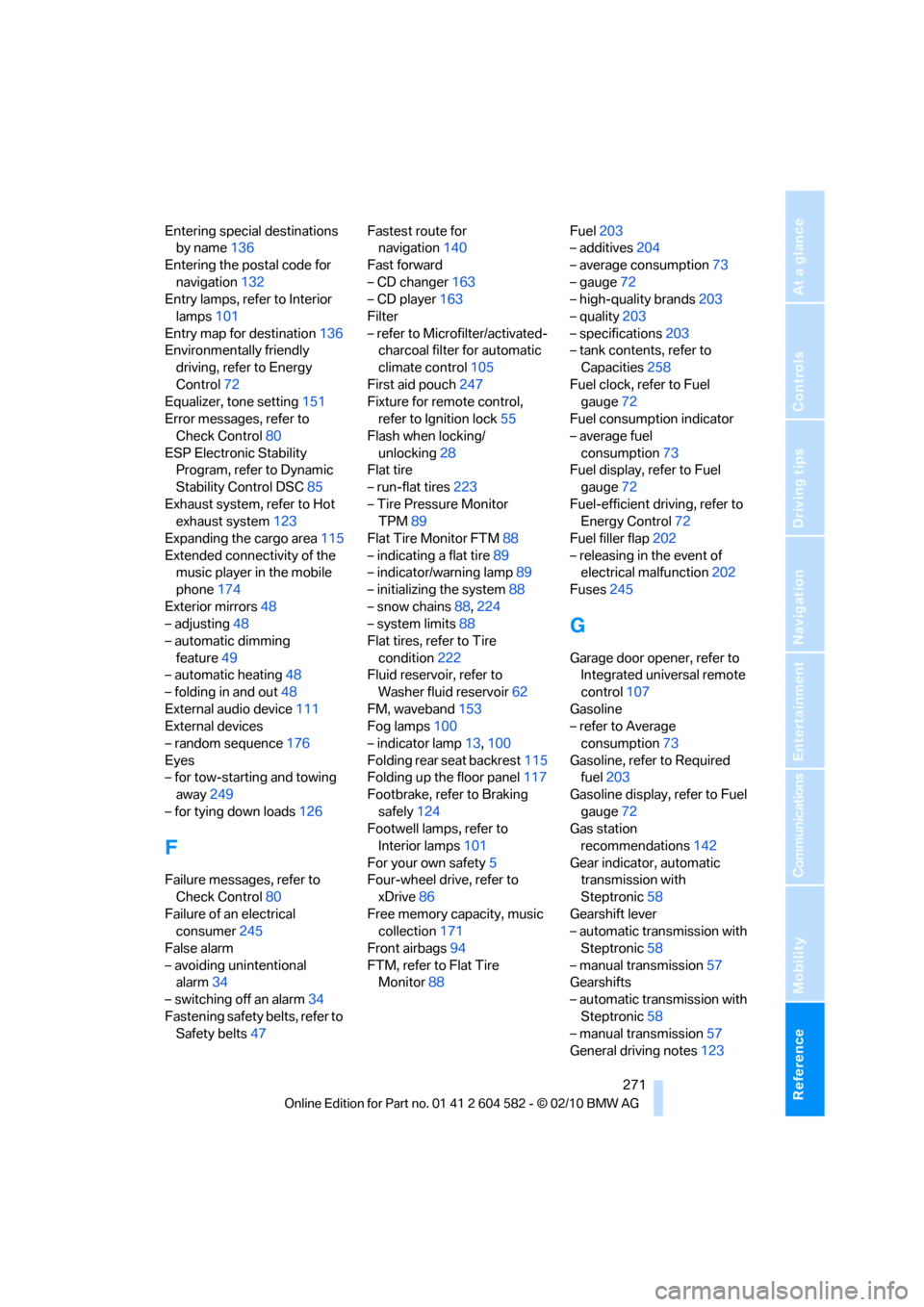
Entering special destinations
by name136
Entering the postal code for
navigation132
Entry lamps, refer to Interior
lamps101
Entry map for destination136
Environmentally friendly
driving, refer to Energy
Control72
Equalizer, tone setting151
Error messages, refer to
Check Control80
ESP Electronic Stability
Program, refer to Dynamic
Stability Control DSC85
Exhaust system, refer to Hot
exhaust system123
Expanding the cargo area115
Extended connectivity of the
music player in the mobile
phone174
Exterior mirrors48
– adjusting48
– automatic dimming
feature49
– automatic heating48
– folding in and out48
External audio device111
External devices
– random sequence176
Eyes
– for tow-starting and towing
away249
– for tying down loads126
F
Failure messages, refer to
Check Control80
Failure of an electrical
consumer245
False alarm
– avoiding unintentional
alarm34
– switching off an alarm34
Fastening safety belts, refer to
Safety belts47Fastest route for
navigation140
Fast forward
– CD changer163
– CD player163
Filter
– refer to Microfilter/activated-
charcoal filter for automatic
climate control105
First aid pouch247
Fixture for remote control,
refer to Ignition lock55
Flash when locking/
unlocking28
Flat tire
– run-flat tires223
– Tire Pressure Monitor
TPM89
Flat Tire Monitor FTM88
– indicating a flat tire89
– indicator/warning lamp89
– initializing the system88
– snow chains88,224
– system limits88
Flat tires, refer to Tire
condition222
Fluid reservoir, refer to
Washer fluid reservoir62
FM, waveband153
Fog lamps100
– indicator lamp13,100
Folding rear seat backrest115
Folding up the floor panel117
Footbrake, refer to Braking
safely124
Footwell lamps, refer to
Interior lamps101
For your own safety5
Four-wheel drive, refer to
xDrive86
Free memory capacity, music
collection171
Front airbags94
FTM, refer to Flat Tire
Monitor88Fuel203
– additives204
– average consumption73
– gauge72
– high-quality brands
203
– quality203
– specifications203
– tank contents, refer to
Capacities258
Fuel clock, refer to Fuel
gauge72
Fuel consumption indicator
– average fuel
consumption73
Fuel display, refer to Fuel
gauge72
Fuel-efficient driving, refer to
Energy Control72
Fuel filler flap202
– releasing in the event of
electrical malfunction202
Fuses245
G
Garage door opener, refer to
Integrated universal remote
control107
Gasoline
– refer to Average
consumption73
Gasoline, refer to Required
fuel203
Gasoline display, refer to Fuel
gauge72
Gas station
recommendations142
Gear indicator, automatic
transmission with
Steptronic58
Gearshift lever
– automatic transmission with
Steptronic58
– manual transmission57
Gearshifts
– automatic transmission with
Steptronic58
– manual transmission57
General driving notes123
Page 276 of 286
Everything from A to Z
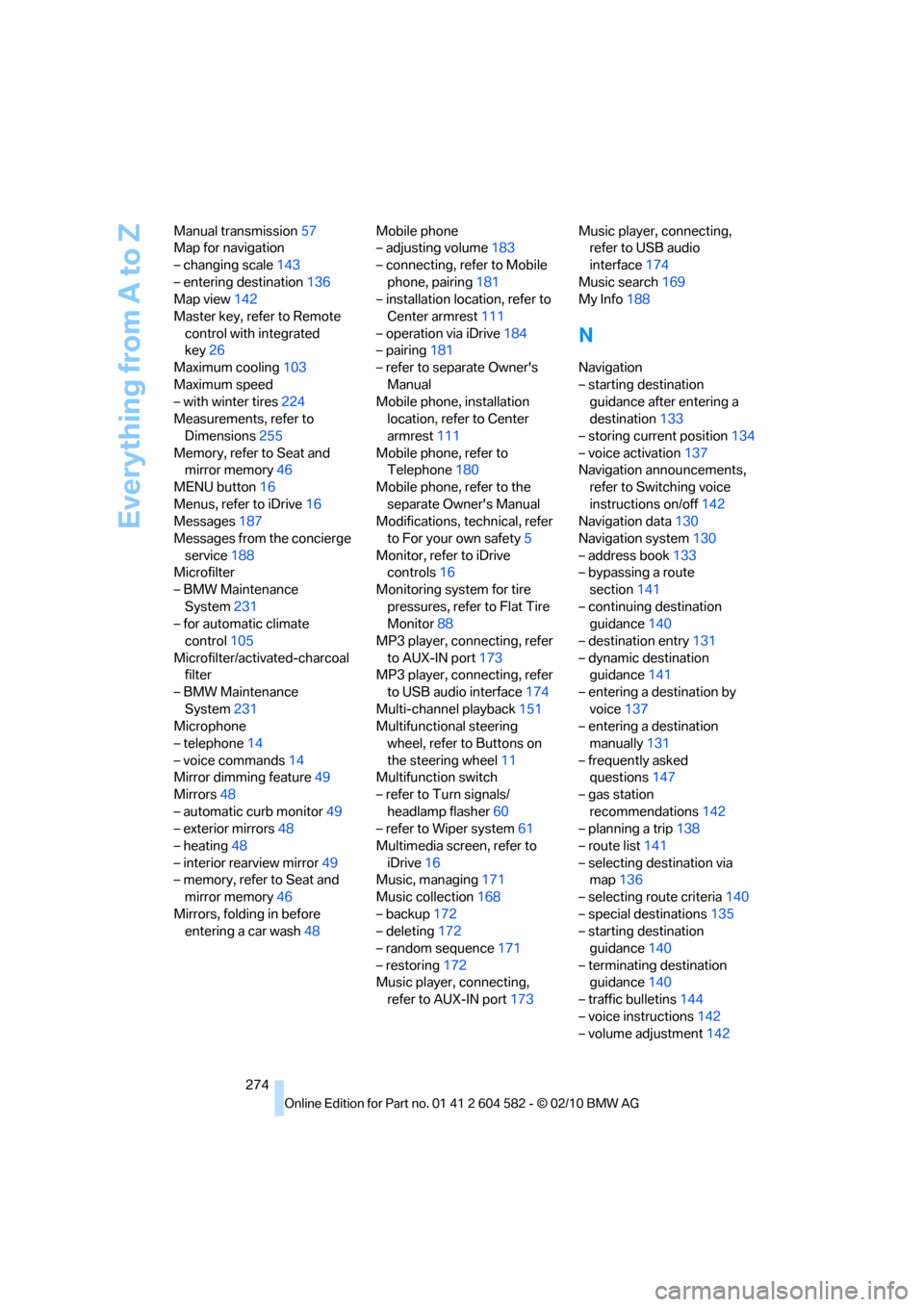
274 Manual transmission57
Map for navigation
– changing scale143
– entering destination136
Map view142
Master key, refer to Remote
control with integrated
key26
Maximum cooling103
Maximum speed
– with winter tires224
Measurements, refer to
Dimensions255
Memory, refer to Seat and
mirror memory46
MENU button16
Menus, refer to iDrive16
Messages187
Messages from the concierge
service188
Microfilter
– BMW Maintenance
System231
– for automatic climate
control105
Microfilter/activated-charcoal
filter
– BMW Maintenance
System231
Microphone
– telephone14
– voice commands14
Mirror dimming feature49
Mirrors48
– automatic curb monitor49
– exterior mirrors48
– heating48
– interior rearview mirror49
– memory, refer to Seat and
mirror memory46
Mirrors, folding in before
entering a car wash48Mobile phone
– adjusting volume183
– connecting, refer to Mobile
phone, pairing181
– installation location, refer to
Center armrest111
– operation via iDrive184
– pairing181
– refer to separate Owner's
Manual
Mobile phone, installation
location, refer to Center
armrest111
Mobile phone, refer to
Telephone180
Mobile phone, refer to the
separate Owner's Manual
Modifications, technical, refer
to For your own safety5
Monitor, refer to iDrive
controls16
Monitoring system for tire
pressures, refer to Flat Tire
Monitor88
MP3 player, connecting, refer
to AUX-IN port
173
MP3 player, connecting, refer
to USB audio interface174
Multi-channel playback151
Multifunctional steering
wheel, refer to Buttons on
the steering wheel11
Multifunction switch
– refer to Turn signals/
headlamp flasher60
– refer to Wiper system61
Multimedia screen, refer to
iDrive16
Music, managing171
Music collection168
– backup172
– deleting172
– random sequence171
– restoring172
Music player, connecting,
refer to AUX-IN port173Music player, connecting,
refer to USB audio
interface174
Music search169
My Info188
N
Navigation
– starting destination
guidance after entering a
destination133
– storing current position134
– voice activation137
Navigation announcements,
refer to Switching voice
instructions on/off142
Navigation data130
Navigation system130
– address book133
– bypassing a route
section141
– continuing destination
guidance140
– destination entry131
– dynamic destination
guidance141
– entering a destination by
voice137
– entering a destination
manually131
– frequently asked
questions147
– gas station
recommendations142
– planning a trip138
– route list141
– selecting destination via
map136
– selecting route criteria140
– special destinations135
– starting destination
guidance140
– terminating destination
guidance140
– traffic bulletins144
– voice instructions142
– volume adjustment142