door lock BMW 328I 2012 User Guide
[x] Cancel search | Manufacturer: BMW, Model Year: 2012, Model line: 328I, Model: BMW 328I 2012Pages: 268, PDF Size: 8.8 MB
Page 43 of 268
Controls
41Reference
At a glance
Driving tips
Communications
Navigation
Entertainment
Mobility
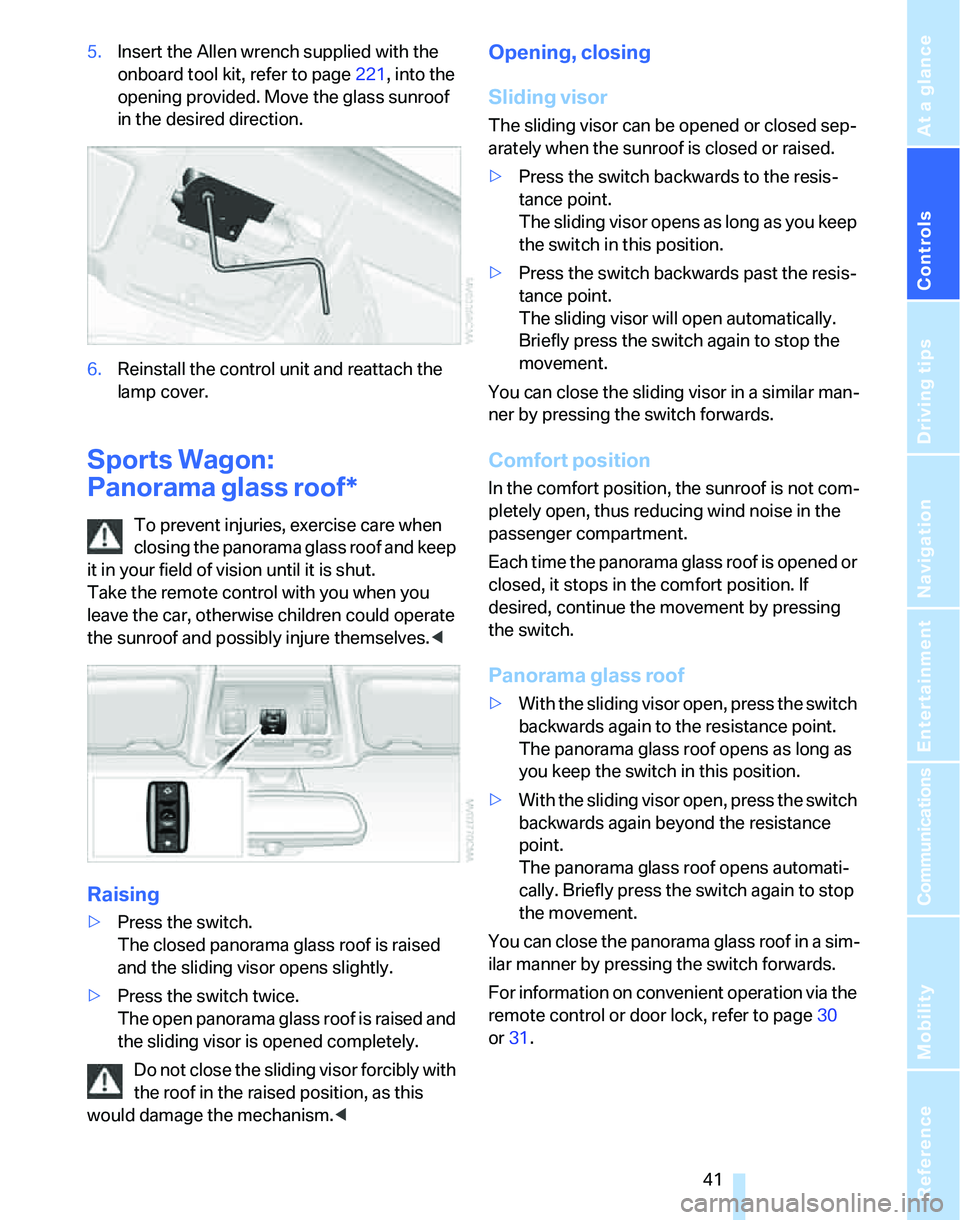
5.Insert the Allen wrench supplied with the
onboard tool kit, refer to page221, into the
opening provided. Move the glass sunroof
in the desired direction.
6.Reinstall the control unit and reattach the
lamp cover.
Sports Wagon:
Panorama glass roof*
To prevent injuries, exercise care when
closing the panorama glass roof and keep
it in your field of vision until it is shut.
Take the remote control with you when you
leave the car, otherwise children could operate
the sunroof and possibly injure themselves.<
Raising
>Press the switch.
The closed panorama glass roof is raised
and the sliding visor opens slightly.
>Press the switch twice.
The open panorama glass roof is raised and
the sliding visor is opened completely.
Do not close the sliding visor forcibly with
the roof in the raised position, as this
would damage the mechanism.<
Opening, closing
Sliding visor
The sliding visor can be opened or closed sep-
arately when the sunroof is closed or raised.
>Press the switch backwards to the resis-
tance point.
The sliding visor opens as long as you keep
the switch in this position.
>Press the switch backwards past the resis-
tance point.
The sliding visor will open automatically.
Briefly press the switch again to stop the
movement.
You can close the sliding visor in a similar man-
ner by pressing the switch forwards.
Comfort position
In the comfort position, the sunroof is not com-
pletely open, thus reducing wind noise in the
passenger compartment.
Each time the panorama glass roof is opened or
closed, it stops in the comfort position. If
desired, continue the movement by pressing
the switch.
Panorama glass roof
>With the sliding visor open, press the switch
backwards again to the resistance point.
The panorama glass roof opens as long as
you keep the switch in this position.
>With the sliding visor open, press the switch
backwards again beyond the resistance
point.
The panorama glass roof opens automati-
cally. Briefly press the switch again to stop
the movement.
You can close the panorama glass roof in a sim-
ilar manner by pressing the switch forwards.
For information on convenient operation via the
remote control or door lock, refer to page30
or31.
Page 50 of 268
Adjustments
48
Heated seats*
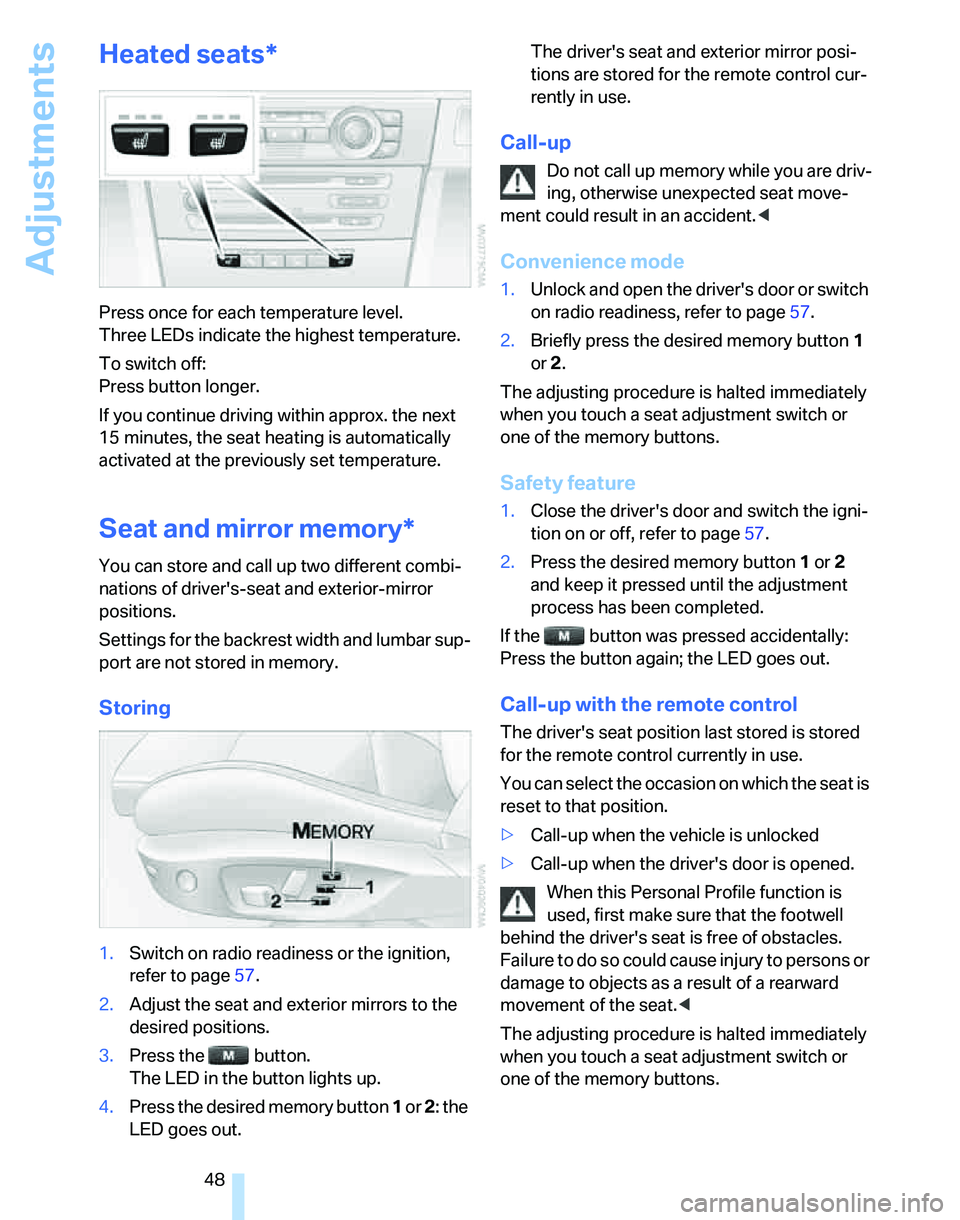
Press once for each temperature level.
Three LEDs indicate the highest temperature.
To switch off:
Press button longer.
If you continue driving within approx. the next
15 minutes, the seat heating is automatically
activated at the previously set temperature.
Seat and mirror memory*
You can store and call up two different combi-
nations of driver's-seat and exterior-mirror
positions.
Settings for the backrest width and lumbar sup-
port are not stored in memory.
Storing
1.Switch on radio readiness or the ignition,
refer to page57.
2.Adjust the seat and exterior mirrors to the
desired positions.
3.Press the button.
The LED in the button lights up.
4.Press the desired memory button 1 or 2: the
LED goes out.The driver's seat and exterior mirror posi-
tions are stored for the remote control cur-
rently in use.
Call-up
Do not call up memory while you are driv-
ing, otherwise unexpected seat move-
ment could result in an accident.<
Convenience mode
1.Unlock and open the driver's door or switch
on radio readiness, refer to page57.
2.Briefly press the desired memory button1
or 2.
The adjusting procedure is halted immediately
when you touch a seat adjustment switch or
one of the memory buttons.
Safety feature
1.Close the driver's door and switch the igni-
tion on or off, refer to page57.
2.Press the desired memory button1 or2
and keep it pressed until the adjustment
process has been completed.
If the button was pressed accidentally:
Press the button again; the LED goes out.
Call-up with the remote control
The driver's seat position last stored is stored
for the remote control currently in use.
You can select the occasion on which the seat is
reset to that position.
>Call-up when the vehicle is unlocked
>Call-up when the driver's door is opened.
When this Personal Profile function is
used, first make sure that the footwell
behind the driver's seat is free of obstacles.
Failure to do so could cause injury to persons or
damage to objects as a result of a rearward
movement of the seat.<
The adjusting procedure is halted immediately
when you touch a seat adjustment switch or
one of the memory buttons.
Page 51 of 268
Controls
49Reference
At a glance
Driving tips
Communications
Navigation
Entertainment
Mobility
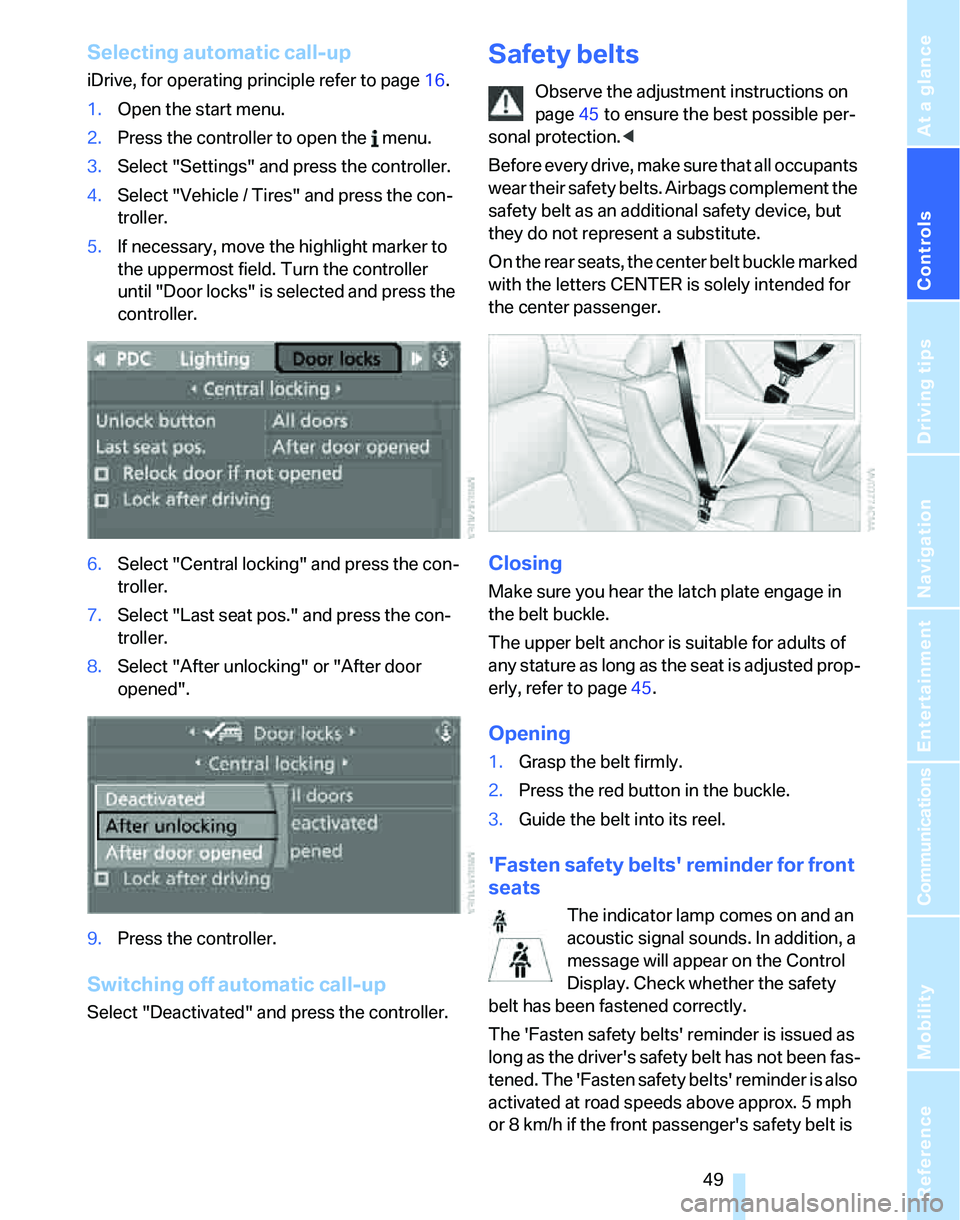
Selecting automatic call-up
iDrive, for operating principle refer to page16.
1.Open the start menu.
2.Press the controller to open the menu.
3.Select "Settings" and press the controller.
4.Select "Vehicle / Tires" and press the con-
troller.
5.If necessary, move the highlight marker to
the uppermost field. Turn the controller
until "Door locks" is selected and press the
controller.
6.Select "Central locking" and press the con-
troller.
7.Select "Last seat pos." and press the con-
troller.
8.Select "After unlocking" or "After door
opened".
9.Press the controller.
Switching off automatic call-up
Select "Deactivated" and press the controller.
Safety belts
Observe the adjustment instructions on
page45 to ensure the best possible per-
sonal protection.<
Before every drive, make sure that all occupants
wear their safety belts. Airbags complement the
safety belt as an additional safety device, but
they do not represent a substitute.
O n t h e r e a r s e a t s , t h e c e n t e r b e l t b u c k l e m a r k e d
with the letters CENTER is solely intended for
the center passenger.
Closing
Make sure you hear the latch plate engage in
the belt buckle.
The upper belt anchor is suitable for adults of
any stature as long as the seat is adjusted prop-
erly, refer to page45.
Opening
1.Grasp the belt firmly.
2.Press the red button in the buckle.
3.Guide the belt into its reel.
'Fasten safety belts' reminder for front
seats
The indicator lamp comes on and an
acoustic signal sounds. In addition, a
message will appear on the Control
Display. Check whether the safety
belt has been fastened correctly.
The 'Fasten safety belts' reminder is issued as
long as the driver's safety belt has not been fas-
tened. The 'Fasten safety belts' reminder is also
activated at road speeds above approx. 5 mph
or 8 km/h if the front passenger's safety belt is
Page 58 of 268
Transporting children safely
56
Rear seats without through-loading
system
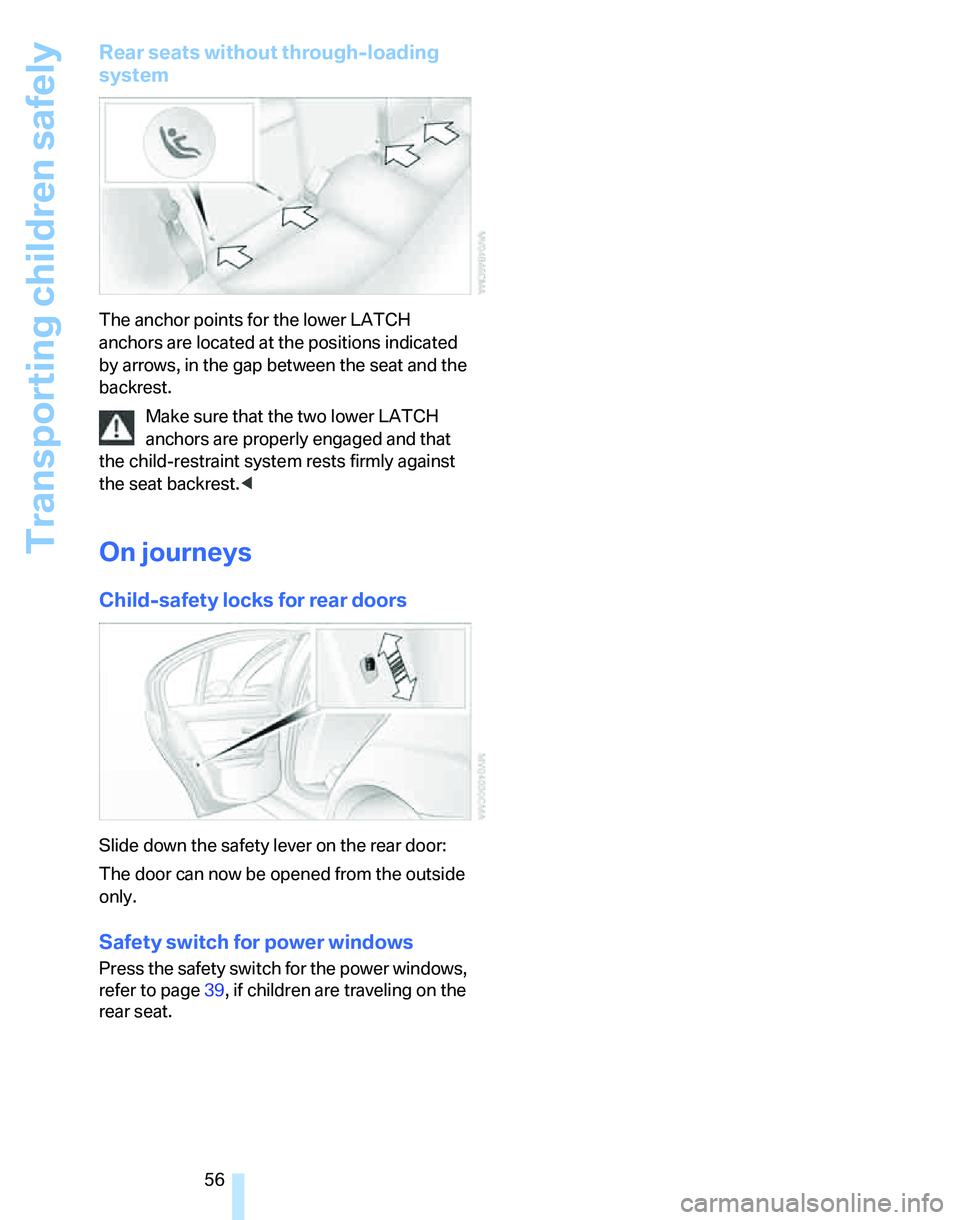
The anchor points for the lower LATCH
anchors are located at the positions indicated
by arrows, in the gap between the seat and the
backrest.
Make sure that the two lower LATCH
anchors are properly engaged and that
the child-restraint system rests firmly against
the seat backrest.<
On journeys
Child-safety locks for rear doors
Slide down the safety lever on the rear door:
The door can now be opened from the outside
only.
Safety switch for power windows
Press the safety switch for the power windows,
refer to page39, if children are traveling on the
rear seat.
Page 59 of 268
Controls
57Reference
At a glance
Driving tips
Communications
Navigation
Entertainment
Mobility
Driving
Ignition lock
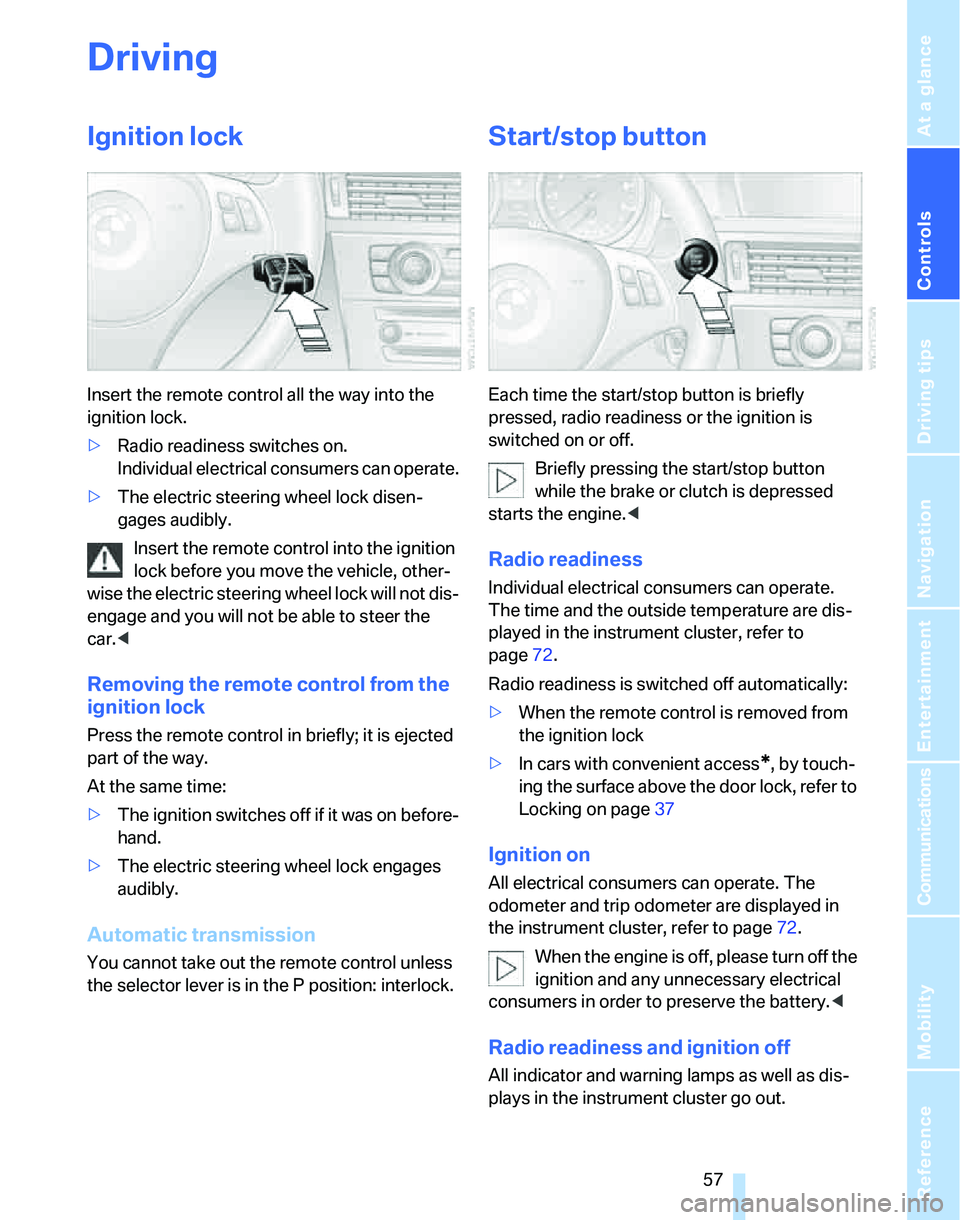
Insert the remote control all the way into the
ignition lock.
>Radio readiness switches on.
Individual electrical consumers can operate.
>The electric steering wheel lock disen-
gages audibly.
Insert the remote control into the ignition
lock before you move the vehicle, other-
wise the electric steering wheel lock will not dis-
engage and you will not be able to steer the
car.<
Removing the remote control from the
ignition lock
Press the remote control in briefly; it is ejected
part of the way.
At the same time:
>The ignition switches off if it was on before-
hand.
>The electric steering wheel lock engages
audibly.
Automatic transmission
You cannot take out the remote control unless
the selector lever is in the P position: interlock.
Start/stop button
Each time the start/stop button is briefly
pressed, radio readiness or the ignition is
switched on or off.
Briefly pressing the start/stop button
while the brake or clutch is depressed
starts the engine.<
Radio readiness
Individual electrical consumers can operate.
The time and the outside temperature are dis-
played in the instrument cluster, refer to
page72.
Radio readiness is switched off automatically:
>When the remote control is removed from
the ignition lock
>In cars with convenient access
*, by touch-
ing the surface above the door lock, refer to
Locking on page37
Ignition on
All electrical consumers can operate. The
odometer and trip odometer are displayed in
the instrument cluster, refer to page72.
W h e n t h e en g i n e is o f f , p l ea s e t u r n o f f t h e
ignition and any unnecessary electrical
consumers in order to preserve the battery.<
Radio readiness and ignition off
All indicator and warning lamps as well as dis-
plays in the instrument cluster go out.
Page 192 of 268
BMW Assist
190
BMW Assist
BMW Assist provides you with various services.
For example, the position data of your vehicle
can be transmitted to the BMW Assist
Response Center if an emergency call
* has
been initiated.
Many BMW Assist services depend on the indi-
vidually agreed contract.
After your contract has expired, the
BMW Assist system will be deactivated by the
BMW Assist Response Center without you hav-
ing to visit a BMW center. After the BMW Assist
system has been deactivated, no BMW Assist
service will be available. The BMW Assist sys-
tem can be reactivated by a BMW center after a
new contract has been signed.
Requirements
You can use BMW Assist when the following
requirements are met:
>The installed BMW Assist system is logged
onto a mobile phone network. This network
must be capable of transmitting the ser-
vices.
>To transmit position data, the vehicle must
be able to determine the current position.
>A GPS signal must be available in order for
BMW Assist to be activated and updated.
>You have subscribed to BMW Assist with
your BMW center or BMW Assist Response
Center and signed a service contract. Acti-
vation must have been completed.
>BMW Assist is activated, refer to page195.
Offered services
The following services are available via
BMW Assist:
>Emergency Request, refer to page229:
When you press the SOS button, a connec-
tion is established to the BMW Assist
Response Center. The BMW Assist Response Center contacts you and takes
further steps to help you.
>Automatic Collision Notification:
Under certain conditions, a connection is
established to the BMW Assist Response
Center after a serious accident. If possible,
the BMW Assist Response Center then
speaks with you and takes further steps to
help you.
>Enhanced Roadside Assistance:
You can call BMW Roadside Assistance
*
should you require help in the event of a
breakdown. If possible, the vehicle data and
position data are transmitted during this
call.
>Customer Relations:
For all information related to your vehicle,
you can be connected to BMW Customer
Relations.
>TeleService:
Data on your vehicle's service status or
required inspections are transmitted to your
BMW center either automatically before a
service due date or when you request a
BMW service appointment.
>Remote Door Unlock:
Contact BMW Assist Customer Care if your
remote control or key is not available and
you would like to have the vehicle unlocked.
>Stolen Vehicle Recovery:
After you report your vehicle stolen with the
police, call BMW Assist Customer Care to
determine its position.
In addition, optional services can be provided to
you, such as Concierge service or information
on directions, traffic or weather.
Press the SOS button in order to contact the
BMW Assist Response Center, see below.
You can also access the BMW Assist Concierge
services via the internet.
*
Page 202 of 268
Refueling
200
Refueling
Always switch off the engine before refu-
eling, otherwise, fuel cannot be added to
the tank and a message will be displayed.<
Take all precautionary measures and
observe all applicable regulations when
handling fuel. Do not carry any spare fuel con-
tainers in your vehicle. They can develop a leak
and cause an explosion or cause a fire in the
event of an accident.<
Gas cap
Opening
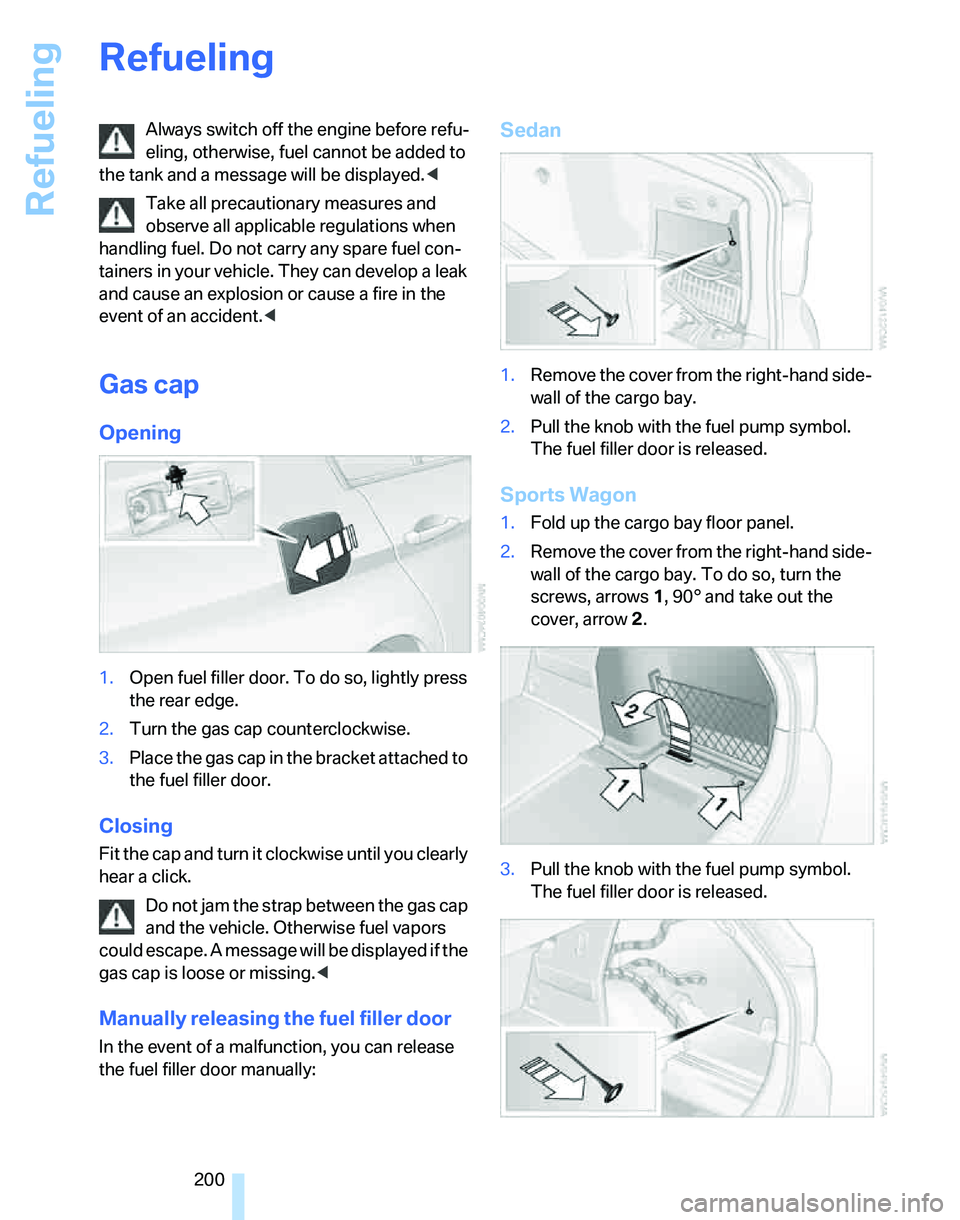
1.Open fuel filler door. To do so, lightly press
the rear edge.
2.Turn the gas cap counterclockwise.
3.Place the gas cap in the bracket attached to
the fuel filler door.
Closing
Fit the cap and turn it clockwise until you clearly
hear a click.
Do not jam the strap between the gas cap
and the vehicle. Otherwise fuel vapors
could escape. A message will be displayed if the
gas cap is loose or missing.<
Manually releasing the fuel filler door
In the event of a malfunction, you can release
the fuel filler door manually:
Sedan
1.Remove the cover from the right-hand side-
wall of the cargo bay.
2.Pull the knob with the fuel pump symbol.
The fuel filler door is released.
Sports Wagon
1.Fold up the cargo bay floor panel.
2.Remove the cover from the right-hand side-
wall of the cargo bay. To do so, turn the
screws, arrows 1, 90° and take out the
cover, arrow 2.
3.Pull the knob with the fuel pump symbol.
The fuel filler door is released.
Page 247 of 268
Reference 245
At a glance
Controls
Driving tips
Communications
Navigation
Entertainment
Mobility
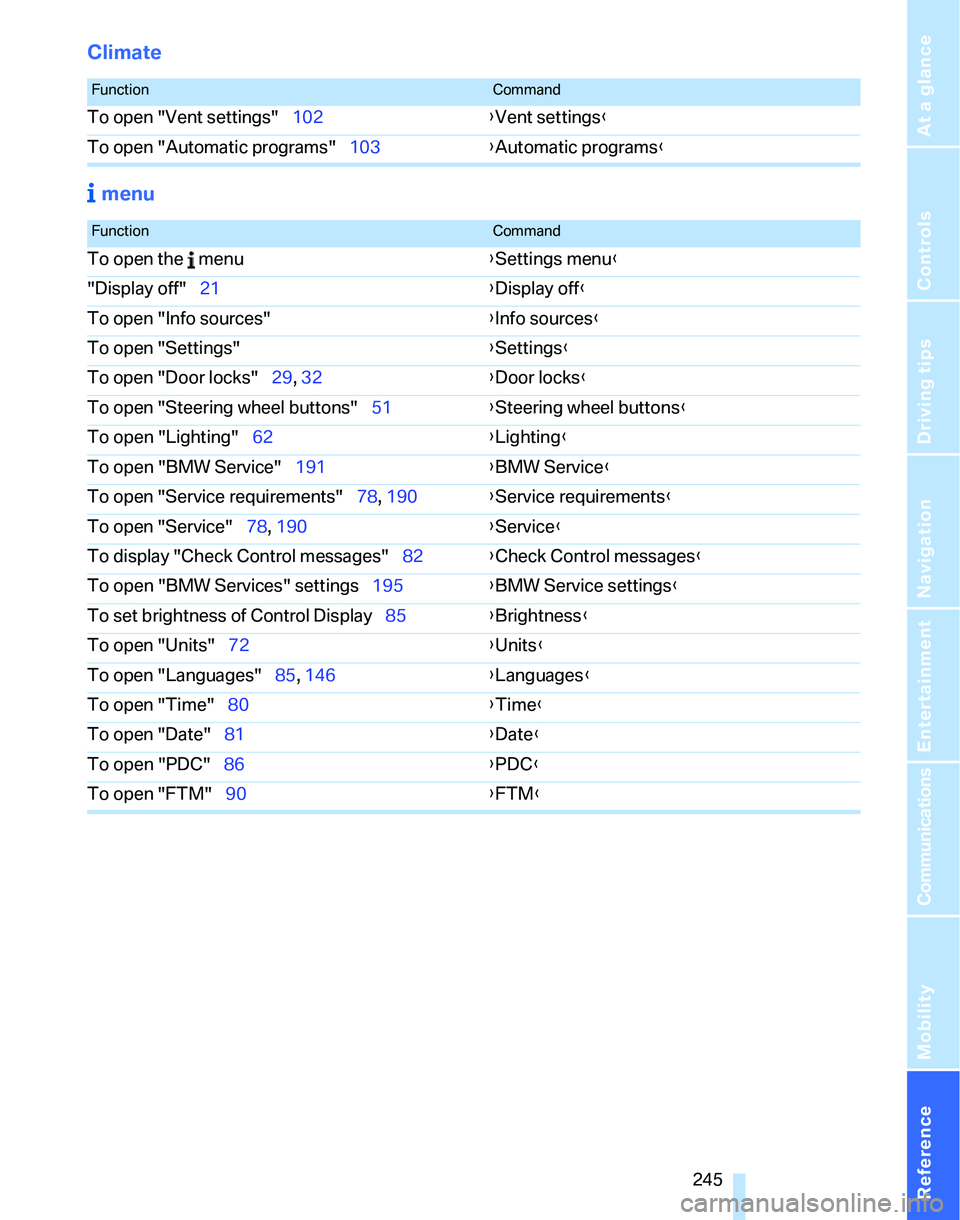
Climate
menu
FunctionCommand
To open "Vent settings"102{Vent settings}
To open "Automatic programs"103{Automatic programs}
FunctionCommand
To open the menu{Settings menu}
"Display off"21{Display off}
To open "Info sources"{Info sources}
To open "Settings"{Settings}
To open "Door locks"29, 32{Door locks}
To open "Steering wheel buttons"51{Steering wheel buttons}
To open "Lighting"62{Lighting}
To open "BMW Service"191{BMW Service}
To open "Service requirements"78, 190{Service requirements}
To open "Service"78, 190{Service}
To display "Check Control messages"82{Check Control messages}
To open "BMW Services" settings195{BMW Service settings}
To set brightness of Control Display85{Brightness}
To open "Units"72{Units}
To open "Languages"85, 146{Languages}
To open "Time"80{Time}
To open "Date"81{Date}
To open "PDC"86{PDC}
To open "FTM"90{FTM}
Page 252 of 268
Everything from A - Z
250 Courtesy lamps, refer to
Interior lamps100
Cross-hairs in navigation136
Cruise control64
– active66
– malfunction65
Cruising range74
Cup holders111
Curb weight, refer to
Weights239
Current fuel consumption,
refer to Energy Control73
"Current position"150
Current position
– displaying150
– entering139
– storing139
"Customer
Relations"184,193
D
Dashboard, refer to
Cockpit10
Dashboard, refer to
Instrument cluster12
Dashboard lighting, refer to
Instrument lighting100
Data, technical236
– dimensions237
– engine236
– weights239
"Date"82
Date
– setting81
– setting format82
"Date format"82
"Daytime running lamps"98
Daytime running lamps98
DBC Dynamic Brake
Control87
DCC, refer to Cruise
control64
"Deactivated"49
Deactivating front passenger
airbags95
Deadlocking, refer to
Locking30Decommissioning the vehicle
– refer to Caring for your
vehicle brochure
Defect
– door lock31
– fuel filler door200
– glass sunroof40
– panorama glass roof42
Defogging windows104
Defrost, windows104
Defrosting windows104
Defrosting windows and
removing condensation
– automatic climate
control104
Defrosting windshield, refer to
Defrosting windows104
Defrost position, refer to
Defrosting windows104
"Delete address book" in
navigation140
"Delete all numbers" on the
mobile phone184
"Delete data" in
navigation140
"Delete" for mobile
phone183
Destination address
– deleting140
– entering131,134
Destination for navigation
– entry131
– navigation list138
– selecting from address
book139
– selecting using
information137
– storing139Destination guidance143
– canceling voice
instructions52
– changing specified
route141
– displaying route144
– displaying routes144
– distance and arrival143
– starting143
– terminating/continuing143
– voice instructions146
– volume of voice
instructions147
Destination list for navigation
system138
Destinations recently driven
to138
Detour, refer to Driving around
a traffic jam150
Detour during navigation150
"Detour" in navigation150
"Dial" for mobile phone181
"Dial number"182
Digital clock72
Digital compass108
Dimensions237
Directional indicators, refer to
Turn signals61
Direction instructions, refer to
Voice instructions146
Directory for navigation, refer
to Address book138
Displacement, refer to Engine
data236
Display, refer to iDrive
controls16
Display lighting, refer to
Instrument lighting100
"Display off"21
Displays
– on the Control Display16
Displays, refer to Instrument
cluster12
Displays and controls10
Disposal
– coolant217
– remote control battery38
– vehicle battery227
Page 253 of 268
Reference 251
At a glance
Controls
Driving tips
Communications
Navigation
Entertainment
Mobility
Distance control, refer to
Active cruise control66
Distance remaining to service,
refer to Service
requirements77
"Distance to dest."75
Distance warning, refer to
PDC Park Distance
Control86
Door key, refer to Remote
control with integrated
key28
Door lock31
"Door locks"29,31,32,78
Doors, emergency
operation31
DOT Quality Grades210
Draft-free ventilation104
Drinks holders, refer to Cup
holders111
Drive-off assistance, refer to
Dynamic Stability Control
DSC87
Drive-off assistant89
Driving around a traffic
jam150
Driving lamps, refer to Parking
lamps/low beams97
Driving notes122
Driving off on hills, refer to
Drive-off assistant89
Driving route, refer to
Displaying route144
Driving stability control
systems87
Driving through water123
Driving tips, refer to Driving
notes122
Dry air, refer to Cooling
function104
DSC Dynamic Stability
Control87
DTC Dynamic Traction
Control88
– indicator/warning lamp88
DVD for navigation130
Dynamic Brake Control
DBC87"Dynamic route" in
navigation142
Dynamic Stability Control
DSC
– indicator/warning lamp88
Dynamic Traction Control
DTC
– indicator/warning lamp88
E
EBV Electronic brake-force
distribution87
Eject button, refer to Buttons
on the CD player156
Electric
– seat adjustment45
Electrical malfunction
– door lock31
– driver's door31
– fuel filler door200
– glass sunroof40
– luggage compartment lid/
tailgate33
– panorama glass roof42
Electric seat adjustment45
Electric steering wheel
lock57
– with convenient access37
Electronic brake-force
distribution EBV87
Electronic oil level check215
Emergency actuation,
automatic transmission,
refer to Overriding selector
lever lock61
Emergency call229
Emergency operation
– fuel filler door, manual
release200
Emergency operation, refer to
Closing manually
– glass sunroof40
– panorama glass roof42
Emergency operation, refer to
Manual operation
– door lock31Emergency release
– luggage compartment lid
from inside34
Emergency services, refer to
Roadside Assistance229
Emissions test, refer to
Service requirements77
"Enable services"196
"End call"182
Energy-conscious driving,
refer to Energy Control73
Energy Control73
Engine
– breaking in122
– data236
– overheated, refer to Coolant
temperature73
– speed236
– starting58
– starting, convenient
access36
– switching off58
Engine compartment215
Engine coolant, refer to
Coolant217
Engine oil
– adding217
– BMW Maintenance
System219
– capacity
241
– checking level215
– intervals between changes,
refer to Service
requirements77
"Engine oil level"216
Engine output, refer to Engine
data236
Engine speed, refer to Engine
data236
Engine starting, refer to
Starting the engine58
"Enter address"132
Entering a destination
country132
Entering a house number or
intersection133
Entering a street133
Entering destination132
Entering the address134