radio controls BMW 328I 2012 Owner's Manual
[x] Cancel search | Manufacturer: BMW, Model Year: 2012, Model line: 328I, Model: BMW 328I 2012Pages: 268, PDF Size: 8.8 MB
Page 229 of 268
Mobility
227Reference
At a glance
Controls
Driving tips
Communications
Navigation
Entertainment
Changing wheels
Your BMW is equipped with Run-Flat Tires as
standard. This removes the need to change a
wheel immediately in the event of a puncture.
For information on continuing to drive with a
damaged tire, refer to Indication of a flat tire on
page91.
The symbol identifying Run-Flat Tires is a circle
with the letters RSC on the sidewall, refer to
Run-Flat Tires, page212.
When mounting new tires or changing over
from summer to winter tires and vice versa,
mount Run-Flat Tires for your own safety. In the
event of a flat, no spare wheel is available. Your
BMW center will be glad to advise you. Refer
also to New wheels and tires, page212.
The tools for changing wheels are avail-
able as optional accessories from your
BMW center.<
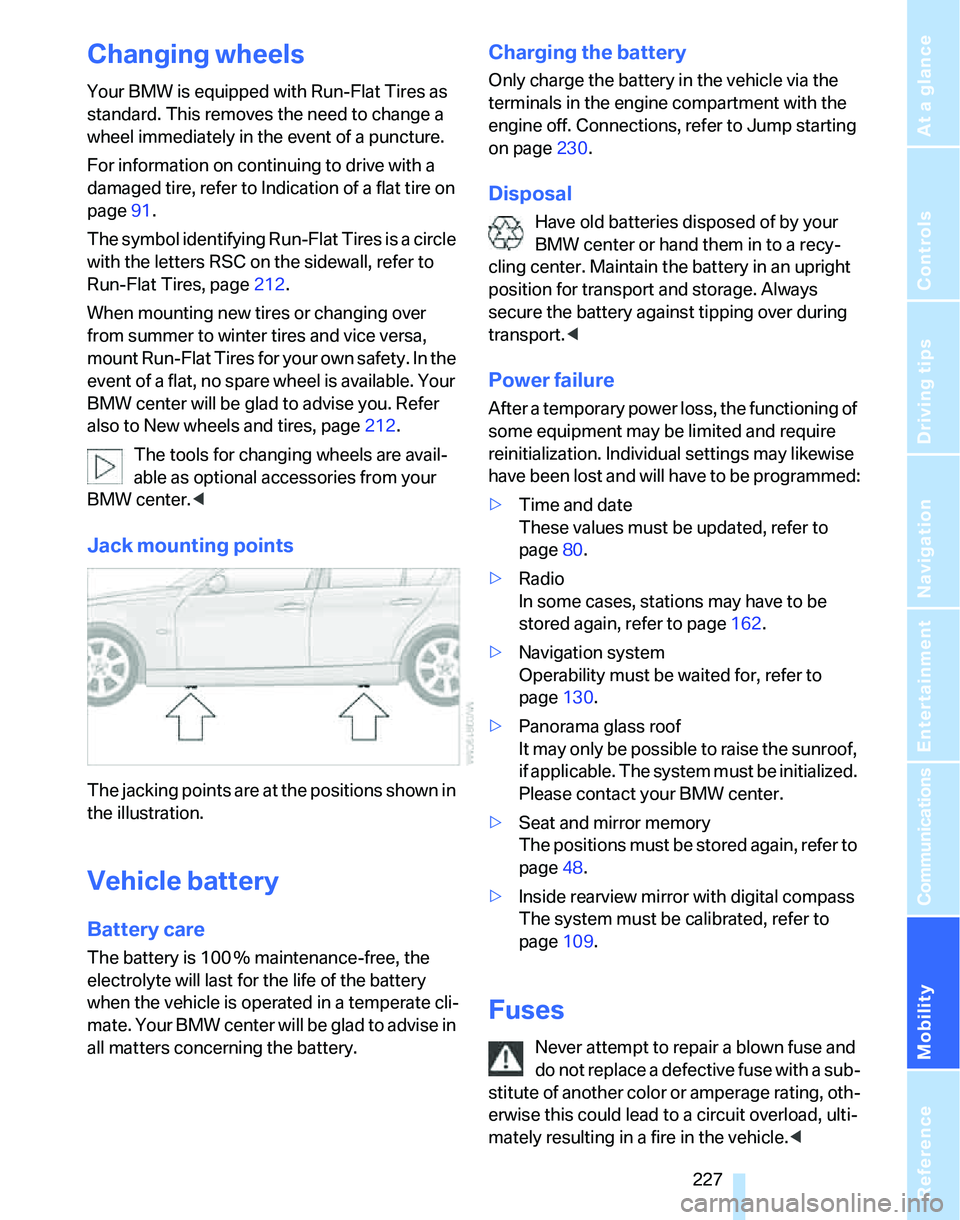
Jack mounting points
The jacking points are at the positions shown in
the illustration.
Vehicle battery
Battery care
The battery is 100 % maintenance-free, the
electrolyte will last for the life of the battery
when the vehicle is operated in a temperate cli-
mate. Your BMW center will be glad to advise in
all matters concerning the battery.
Charging the battery
Only charge the battery in the vehicle via the
terminals in the engine compartment with the
engine off. Connections, refer to Jump starting
on page230.
Disposal
Have old batteries disposed of by your
BMW center or hand them in to a recy-
cling center. Maintain the battery in an upright
position for transport and storage. Always
secure the battery against tipping over during
transport.<
Power failure
After a temporary power loss, the functioning of
some equipment may be limited and require
reinitialization. Individual settings may likewise
have been lost and will have to be programmed:
>Time and date
These values must be updated, refer to
page80.
>Radio
In some cases, stations may have to be
stored again, refer to page162.
>Navigation system
Operability must be waited for, refer to
page130.
>Panorama glass roof
It may only be possible to raise the sunroof,
if applicable. The system must be initialized.
Please contact your BMW center.
>Seat and mirror memory
The positions must be stored again, refer to
page48.
>Inside rearview mirror with digital compass
The system must be calibrated, refer to
page109.
Fuses
Never attempt to repair a blown fuse and
do not replace a defective fuse with a sub-
stitute of another color or amperage rating, oth-
erwise this could lead to a circuit overload, ulti-
mately resulting in a fire in the vehicle.<
Page 231 of 268
Mobility
229Reference
At a glance
Controls
Driving tips
Communications
Navigation
Entertainment
Giving and receiving assistance
Emergency call*
Conditions for an emergency call:
>Equipment version with full mobile phone
preparation package. This equipment
makes it possible to initiate an emergency
call even if no mobile phone is paired with
the vehicle.
>BMW Assist is activated. Activating
BMW Assist, refer to page195.
>Radio readiness is on.
>The BMW Assist system is logged on to a
mobile phone network.
>The emergency calling system is operable.
Once your service contract for BMW Assist
expires, the BMW Assist system can be deacti-
vated by a BMW center without you having to
visit a workshop. Once the BMW Assist system
has been deactivated, emergency calls are not
possible. The BMW Assist system can be reac-
tivated by a BMW center after a new contract
has been signed.
Initiating an Emergency Request call
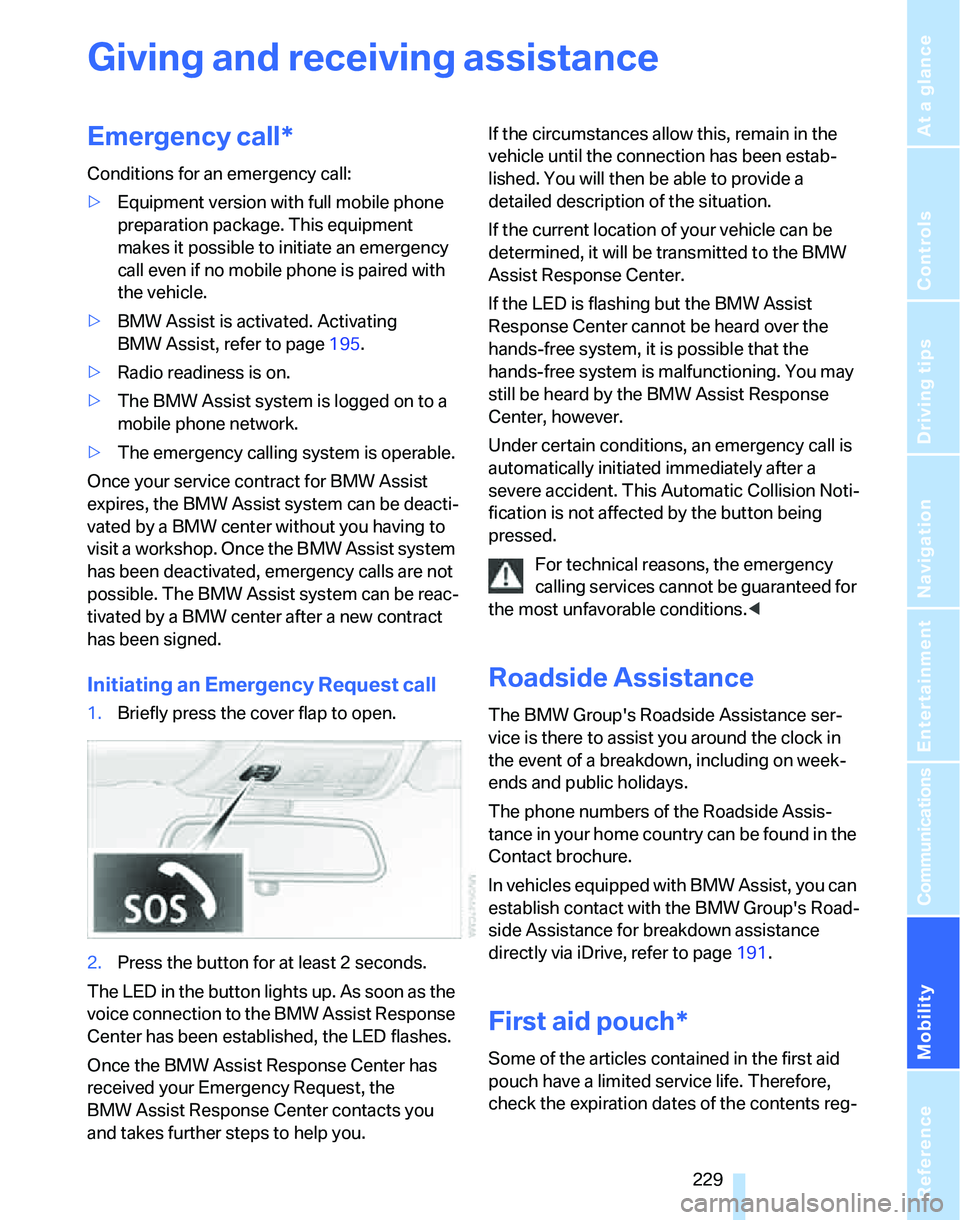
1.Briefly press the cover flap to open.
2.Press the button for at least 2 seconds.
The LED in the button lights up. As soon as the
voice connection to the BMW Assist Response
Center has been established, the LED flashes.
Once the BMW Assist Response Center has
received your Emergency Request, the
BMW Assist Response Center contacts you
and takes further steps to help you.If the circumstances allow this, remain in the
vehicle until the connection has been estab-
lished. You will then be able to provide a
detailed description of the situation.
If the current location of your vehicle can be
determined, it will be transmitted to the BMW
Assist Response Center.
If the LED is flashing but the BMW Assist
Response Center cannot be heard over the
hands-free system, it is possible that the
hands-free system is malfunctioning. You may
still be heard by the BMW Assist Response
Center, however.
Under certain conditions, an emergency call is
automatically initiated immediately after a
severe accident. This Automatic Collision Noti-
fication is not affected by the button being
pressed.
For technical reasons, the emergency
calling services cannot be guaranteed for
the most unfavorable conditions.<
Roadside Assistance
The BMW Group's Roadside Assistance ser-
vice is there to assist you around the clock in
the event of a breakdown, including on week-
ends and public holidays.
The phone numbers of the Roadside Assis-
tance in your home country can be found in the
Contact brochure.
In vehicles equipped with BMW Assist, you can
establish contact with the BMW Group's Road-
side Assistance for breakdown assistance
directly via iDrive, refer to page191.
First aid pouch*
Some of the articles contained in the first aid
pouch have a limited service life. Therefore,
check the expiration dates of the contents reg-
Page 249 of 268
Reference 247
At a glance
Controls
Driving tips
Communications
Navigation
Entertainment
Mobility
Audio156
– controls156
– switching on/off156
– tone control157
– volume157
"Audio", refer to Tone
control157
Audio device, external111
"Auto. headlamps"98
Automatic
– air distribution103
– air flow rate103
– cruise control64,66
– headlamp control97
– service notification192
– storing of stations161
Automatic climate control101
– automatic air
distribution103
– settings via iDrive102
Automatic curb monitor50
"Automatic programs" with
automatic climate
control103
Automatic recirculated-air
control AUC103
Automatic station search161
Automatic transmission with
Steptronic59
– interlock59,60
– overriding selector lever
lock61
– shiftlock, refer to Changing
selector lever position60
– sport program60
– towing231
– tow-starting231
"Automatic ventilation"105
AUTO program for automatic
climate control103
"Autostore"
– on the radio162
"AUX"156,173
"AUX" for external audio
device173
AUX-IN
– port111
AUX-In, refer to External audio
device173Average fuel consumption74
– setting the units77
Average speed74
"Avoid ferries" in
navigation142
"Avoid highways" in
navigation141
Avoid highways in
navigation141
Avoiding unintentional
alarms36
"Avoid tollroads" in
navigation142
Axle loads, refer to
Weights239
"A - Z"182
B
Backrest contour, refer to
Lumbar support46
Backrests, refer to Seat
adjustment45
Backrest width adjustment46
Back seats
– refer to Rear seats47
Backup lamps
– replacing bulbs225,226
Backup lamps, refer to Tail
lamps224
Balance, tone control157
Band-aids, refer to First-aid
pouch229
Bar, refer to Towing
methods232
Bass, tone control157
Bass sounds, refer to Tone
control157
Bass sounds, refer to Treble
and bass157
Battery227
– charging227
– disposal38,227
– jump starting230
– remote control28
– temporary power failure227
Battery renewal
– remote control38
– remote control for vehicle38Being towed232
Belts, refer to Safety belts49
Belt tensioner, refer to Safety
belts49
Beverage holders, refer to
Cup holders111
Blower, refer to Air flow
rate103
Bluetooth, refer to separate
Owner's Manual
"BMW Assist"191,192,193
BMW Assist
– activating195
– Concierge service193
– contacting BMW Customer
Relations193
– Roadside Assistance191
– services offered190
– TeleService192
"BMW Contact"184
"BMW Contact
Numbers"184
BMW Homepage4
BMW Maintenance
System219
"BMW
Services"194
,195,196
BMW webpage4
Bottle holders, refer to Cup
holders111
Bracket for telephone or
mobile phone
– refer to Snap-in adapter in
the center armrest storage
compartment110
Brake assist, refer to Dynamic
Brake Control DBC87
Brake fluid, refer to Service
requirements77
Brake Force Display94
Brake lamps
– replacing bulbs225,226
– two-stage94
Brake pads122
– breaking in122
Brake rotors123
– brakes122
– breaking in122
Page 250 of 268
Everything from A - Z
248 Brakes
– ABS87
– BMW Maintenance
System219
– breaking in122
– parking brake59
– service requirements77
Brakes, refer to Braking
safely123
Brake system122
– BMW Maintenance
System219
– breaking in122
– disc brakes123
Breakdown services, refer to
Roadside Assistance229
Breaking in the clutch122
Breaking in the differential,
refer to Engine and
differential122
Break-in period122
Brightness of the Control
Display85
"Brightness"on the control
display85
Bulb changing, refer to Lamps
and bulbs222
Burned fuel
– refer to Average
consumption74
Button for starting the engine,
refer to Start/stop button57
Buttons on the steering
wheel11
C
California Proposition 65
warning6
"Call"183,194
Call
– accepting181
– displaying accepted183
– ending182
– in absence183
– starting181Calling
– from phone book182
– from Top 8 list183
– redialing183
Can holders, refer to Cup
holders111
Capacities241
Capacity of the cargo bay239
Car battery, refer to Vehicle
battery227
Car care, refer to Caring for
your vehicle brochure
Car-care products, refer to
Caring for your vehicle
brochure
"Car Data"74
Care, refer to Caring for your
vehicle brochure
Cargo, securing125
Cargo bay114
– capacity239
– convenient access37
– folding up the floor
panel117
– lamp, refer to Interior
lamps100
– opening from inside33
– opening from outside33
– partition net115
– roll-up cover114
Cargo bay lid, refer to
Luggage compartment lid/
tailgate32
Cargo bay net, refer to
Partition net115
Cargo loading
– securing cargo125
– stowing cargo125
– vehicle124
Caring for artificial leather,
refer to Caring for your
vehicle brochure
Caring for leather, refer to
Caring for your vehicle
brochure
Caring for plastic, refer to
Caring for your vehicle
brochureCaring for the carpet, refer to
Caring for your vehicle
brochure
Caring for the vehicle finish,
refer to Caring for your
vehicle brochure
Car jack
– jacking points227
Car key, refer to Integrated
key/remote control28
Car phone176
– installation location, refer to
Center armrest110
– refer to Mobile phone176
– refer to separate Owner's
Manual
Car radio, refer to Radio160
Car wash124
– also refer to Caring for your
vehicle brochure
– with convenient access38
Catalytic converter, refer to
Hot exhaust system122
"Categories" for satellite
radio164
CBS Condition Based
Service219
"CD"156,166
CD changer166
– compressed audio files166
– controls156
– fast forward/reverse170
– installation location170
– playing a track168
– random order169
– repeating a track169
– selecting a CD166
– selecting a track167
– switching on/off156
– tone control157
– volume157
Page 255 of 268
Reference 253
At a glance
Controls
Driving tips
Communications
Navigation
Entertainment
Mobility
General driving notes122
Glass sunroof, electric39
– closing after electrical
malfunction40
– convenient operation30,31
– initializing40
– opening, closing40
– operation with convenient
access37
– pinch protection system40
– power failure40
– raising39
– remote control30
Glove compartment110
– rechargeable flashlight110
GPS navigation, refer to
Navigation system130
Grills101
Gross vehicle weight, refer to
Weights239
H
Halogen lamps
– replacing bulbs222
Handbrake, refer to Parking
brake59
Hand lamp, refer to
Rechargeable flashlight110
Hands-free system14
Hazard warning flashers14
HDC Hill Descent Control88
Head airbags95
Headlamp control,
automatic97
Headlamp cover222
Headlamp flasher61
– indicator lamp11,13
Headlamps
– care, refer to Caring for your
vehicle brochure
– replacing bulbs222
Head restraints46
– front, removing47
– rear, removing47
– sitting safely44Heated
– mirrors50
– rear window104
– seats48
Heating
– mirrors50
– rear window104
– residual heat104
– seats48
Heating and ventilation, refer
to Climate101
Heating while at a standstill,
refer to Using residual
heat104
Heavy loads, refer to Stowing
cargo125
Height, refer to
Dimensions237
Height adjustment
– seats45
– steering wheel51
High beams99
– headlamp flasher99
– indicator lamp13
– replacing bulbs222
High water, refer to Driving
through water123
Highways, refer to Route
criteria141
Hill Descent Control HDC88
Hills123
Holders for cups111
Home address140
"Home address" in
navigation141
Homepage BMW4
Hood214
Hooks for shopping bags116
Horn10,11
Hotel function34
Hot exhaust system122
"Hour memo"81
"House number" in
destination entry134
Hydraulic brake assist, refer to
Dynamic Brake Control
DBC87
Hydroplaning123
I
Ice warning, refer to Outside
temperature
warning72
ID3 tag, refer to Information
about the track168
Identification marks
– Run-Flat Tires212
– tire coding210
iDrive16
– adjusting brightness85
– assistance window20
– automatic climate
control102
– changing language85
– changing units of measure
and display format77
– confirming selection or
entry19
– controls16
– displays, menus17
– menu guidance17
– operating principle16
– overview16
– selecting a menu item19
– setting the date and time80
– start menu17
– status information20
– switching menu pages19
– symbols18
iDrive operating principle16
Ignition57
– switched off57
– switched on57
Ignition key, refer to Remote
control with integrated
key28
Ignition key position 1, refer to
Radio readiness57
Ignition key position 2, refer to
Ignition on57
Ignition lock57
i menu18
Indicator and warning
lamps13
– Tire Pressure Monitor
TPM93
Individual air distribution102
Page 257 of 268
Reference 255
At a glance
Controls
Driving tips
Communications
Navigation
Entertainment
Mobility
Lower back support, refer to
Lumbar support46
Luggage compartment lid32
– convenient access37
– emergency operation, refer
to Opening manually33
– emergency release34
– locking or unlocking
separately34
– opening from inside33
– opening from outside33
– opening manually33
– remote control30
Luggage rack, refer to Roof-
mounted luggage rack126
Lumbar support46
M
M+S tires, refer to Winter
tires213
Maintenance, refer to Service
Booklet
Maintenance system219
Malfunction
– automatic transmission with
Steptronic61
– luggage compartment lid/
tailgate33
– tires91
Malfunction warnings, refer to
Check Control82
Manual mode, automatic
transmission with
Steptronic60
"Manual" on the radio161
Manual operation
– door lock31
– driver's door31
– fuel filler door200
– glass sunroof40
– luggage compartment lid/
tailgate33
– panorama glass roof42
– transmission lock, automatic
transmission61
Manual transmission59Map
– changing scale145
– destination entry136
"Map direction of travel"145
"Map facing north"145
Master key, refer to Remote
control with integrated
key28
Maximum cooling103
Maximum speed
– with winter tires213
Measurements, refer to
Dimensions237
Memory, refer to Seat and
mirror memory48
MENU button16
Menus
– Control Display17
Menus, refer to iDrive16
Microfilter
– BMW Maintenance
System219
– for automatic climate
control105
Microfilter/activated-charcoal
filter
– BMW Maintenance
System219
Microphone
– telephone14
– voice input14
Mirror dimming feature51
Mirrors50
– automatic curb monitor50
– exterior mirrors50
– heating50
– interior rearview mirror51
– memory, refer to Seat and
mirror memory48
"Missed calls"182
Missed calls183Mobile phone
– accepted calls183
– adjusting volume180
– calling181
– ending call182
– installation location, refer to
Center armrest110
– missed calls183
– operation via iDrive181
– redialing183
– refer to separate Owner's
Manual
– Top 8183
– touch tone dialing184
Mobile phone, installation
location, refer to Center
armrest110
Mobile phone, refer to the
separate Owner's Manual
Mobile phone in the
vehicle122
Mobile phones, use inside the
car, refer to Mobile phone in
the vehicle122
Modifications, technical, refer
to For your own safety5
Monitor, refer to iDrive
controls16
Monitoring system for tire
pressures, refer to Flat Tire
Monitor90
"Monitor on / off"52
Most recent mobile phone
numbers183
MP3, refer to Compressed
audio files166
Multifunctional steering
wheel, refer to Buttons on
the steering wheel11
Multifunction switch
– refer to Turn signals/
headlamp flasher61
– refer to Wiper system62
Multimedia screen, refer to
iDrive16
Music tracks, refer to
Tracks167
"Mute on / off"52
Page 259 of 268
Reference 257
At a glance
Controls
Driving tips
Communications
Navigation
Entertainment
Mobility
"Parked car ventilation"105
Parked car ventilation105
Parked car ventilation/heating
– activating switch-on
times106
– preselecting switch-on
times105
– switching on and off
directly105
Parking
– vehicle58
Parking aid, refer to PDC Park
Distance Control86
Parking brake59
– indicator lamp59
Parking lamps97
Parking lamps/low beams97
– replacing bulbs223
Partition net115
Passenger-side mirror tilt
function50
"Pathway lighting"98
Pathway lighting98
"PDC"86
PDC Park Distance Control86
Personal Profile28
"Perspective"145
Phone book181
Phone numbers
– deleting from phone
book183
– dialing181
– most recent numbers183
– selecting in phone book183
– Top 8183
Pinch protection system
– glass sunroof, electric40
– panorama glass roof42
– windows39
Placing a call, refer to
telephone owner's manual
"Play" for audio mode167
"Play" for satellite radio165
Pollen
– refer to Microfilter/activated-
charcoal filter for automatic
climate control105Position
– displaying150
– saving, refer to Storing
current position139
Power failure227
Power seats45
Power windows38
– safety switch39
Power windows, refer to
Windows38
Preselecting the switch-on
times for parked car
ventilation/heating105
"Presets" displaying with the
radio160
"Presets" for satellite
radio164
Pressure, tires202
Pressure monitoring, tires90
– Flat Tire Monitor90
Pressure monitoring of tires,
refer to Tire Pressure
Monitor TPM91
"Profile"196
Programmable buttons on the
steering wheel11
Protection function, refer to
Pinch protection system
– glass sunroof, electric40
– panorama glass sunroof42
– windows39
Providing medical assistance,
refer to First add pouch229
Puncture
– Flat Tire Monitor90
R
Radio
– autostore161
– controls156
– listening to stations160
– sampling stations161
– satellite radio163
– selecting a
waveband156,160
– selecting the frequency
manually161
– station search161
– stations with best
reception161
– storing stations162
– switching on/off156
– tone control157
– volume157
Radio position, refer to Radio
readiness57
Radio readiness57
– switched off57
– switched on57
Radio-remote key, refer to
Remote control with
integrated key28
Rain sensor62
"Random", refer to Random
play169
"Random all" for audio
mode170
"Random directory" for audio
mode170
Random play169
"RDS" Radio Data
System163
Reading lamps100
Rear lamps, refer to Tail
lamps224
– replacing bulbs225,226
Rear seat backrest,
folding115
Rear seats
– adjusting head restraints47
– folding115
– folding head restraint down
and up47
– folding the backrests115
Page 261 of 268
Reference 259
At a glance
Controls
Driving tips
Communications
Navigation
Entertainment
Mobility
Safety systems
– airbags95
– Antilock Brake System
ABS87
– brake system87
– driving stability control
systems87
– Dynamic Stability Control
DSC87
– safety belts49
Safety tires, refer to Run-Flat
Tires212
"SAT"156,163
Satellite radio163
– displaying additional
information165
– enabling163
– selecting channel164
– storing channel164
"Scan"
– sampling radio stations161
– sampling tracks on CD168
Scan
– CD changer168
– CD player168
– radio161
"Scan all" for audio mode168
"Scan directory" for audio
mode168
Screen, refer to iDrive
controls16
Screw thread for tow
fitting232
SDARS, refer to Satellite
radio163
Seat adjustment
– electric45
– mechanical45
Seat and mirror memory48
Seat backrests in the rear
– folding113
Seat belt reminder, refer to
'Fasten safety belts'
reminder49
Seat heating48Seats45
– adjusting electrically45
– adjusting the seats45
– heating48
– memory, refer to Seat and
mirror memory48
– saving a setting, refer to Seat
and mirror memory48
– sitting safely44
Securing cargo118
Securing the vehicle
– from inside32
– from outside29
"Select as
destination"137,194
"Select current speed"84
Selecting a country for
navigation132
Selecting an audio source156
Selecting distance for active
cruise control67
Selecting menu items19
Selecting new scale for
navigation145
Selecting the frequency
manually161
Selector lever
– automatic transmission with
Steptronic60
Selector lever interlock, refer
to Changing selector lever
position, Shiftlock60
Selector lever positions
– automatic transmission with
Steptronic60
"Service"78,192,216
Service, refer to Roadside
Assistance229
Service car, refer to Roadside
Assistance229
Service data in the remote
control219
Service Interval Display, refer
to Condition Based Service
CBS219
"Service notification"192
"Service Request"184,192Service requirement display,
refer to Condition Based
Service CBS219
"Service
requirements"78,192,216
Service requirements77
"Service Status"195
"Set date"82
"Set time"81
"Settings"194,195,196
Settings
– changing settings on the
Control Display85
– clock, 12h/24h mode81
– date format82
– language85
Settings and information76
"Settings" for unlocking29
Settings menu, refer to
imenu17
Setting times, refer to
Preselecting switch-on
times105
Shifting gears
– automatic transmission with
Steptronic
60
– manual transmission59
Shiftlock
– automatic transmission,
refer to Changing selector
lever positions60
Short commands for the voice
command system242
Shortest route in navigation,
refer to Selecting route141
"Short route" in
navigation141
"Show current position"137
"Show destination
position"137
Shuffled, refer to Random
– CD changer169
– CD player169
Side airbags95
Side window blind, refer to
Roller sun blinds110
Side windows, refer to
Windows38
Page 265 of 268
Reference 263
At a glance
Controls
Driving tips
Communications
Navigation
Entertainment
Mobility
Voice phone book187
Volume156
– audio sources156
– fuel tank, refer to
Capacities241
– mobile phone180
– speed-dependent
control157
– voice instructions147
W
Warning and indicator
lamps13
Warning messages, refer to
Check Control82
Warning triangle230
Washer fluid63
– content of the reservoir64
Washer fluid reservoir64
Washing the car, refer to
Caring for your vehicle
brochure
Waste tray, refer to
Ashtray112
Water on roads, refer to
Driving through water123
Waveband with the radio160
"WB"156
Wear indicators in tires, refer
to Minimum tread depth211
Weights239
Wheel/tire combination, refer
to Correct wheels and
tires212
Wheelbase, refer to
Dimensions237
Wheels, new212
Wheels and tires202
Width, refer to
Dimensions237
Windows38
– convenience operation30
– opening, closing38
– operation with convenient
access37
– pinch protection system39
– rear window35
– safety switch39Windows, indicator on Control
Display16
Windshield
– cleaning63
– defrosting and removing
condensation104
Windshield wash62
– filling capacity, reservoir241
– nozzles63
– rear window63
– reservoir for washer fluid64
– washer fluid64
Windshield wiper blades,
changing221
Windshield wipers, blades,
care, refer to Caring for your
vehicle brochure
Windshield wipers, refer to
Wiper system62
Winter tires213
– setting speed limit84
– storage213
Wiper blade replacement221
Wiper system62
"With highways" in
navigation141
Wooden trim, refer to Caring
for your vehicle brochure
Word-matching principle for
navigation142
Work in the engine
compartment214
Wrench/screwdriver, refer to
Onboard tool kit221
X
xDrive88
Xenon lamps
– replacing bulbs222
Y
Your individual vehicle
– settings, refer to Personal
Profile28