display BMW 328I CONVERTIBLE 2009 E93 Owner's Manual
[x] Cancel search | Manufacturer: BMW, Model Year: 2009, Model line: 328I CONVERTIBLE, Model: BMW 328I CONVERTIBLE 2009 E93Pages: 260, PDF Size: 7.95 MB
Page 210 of 260
Under the hood
208
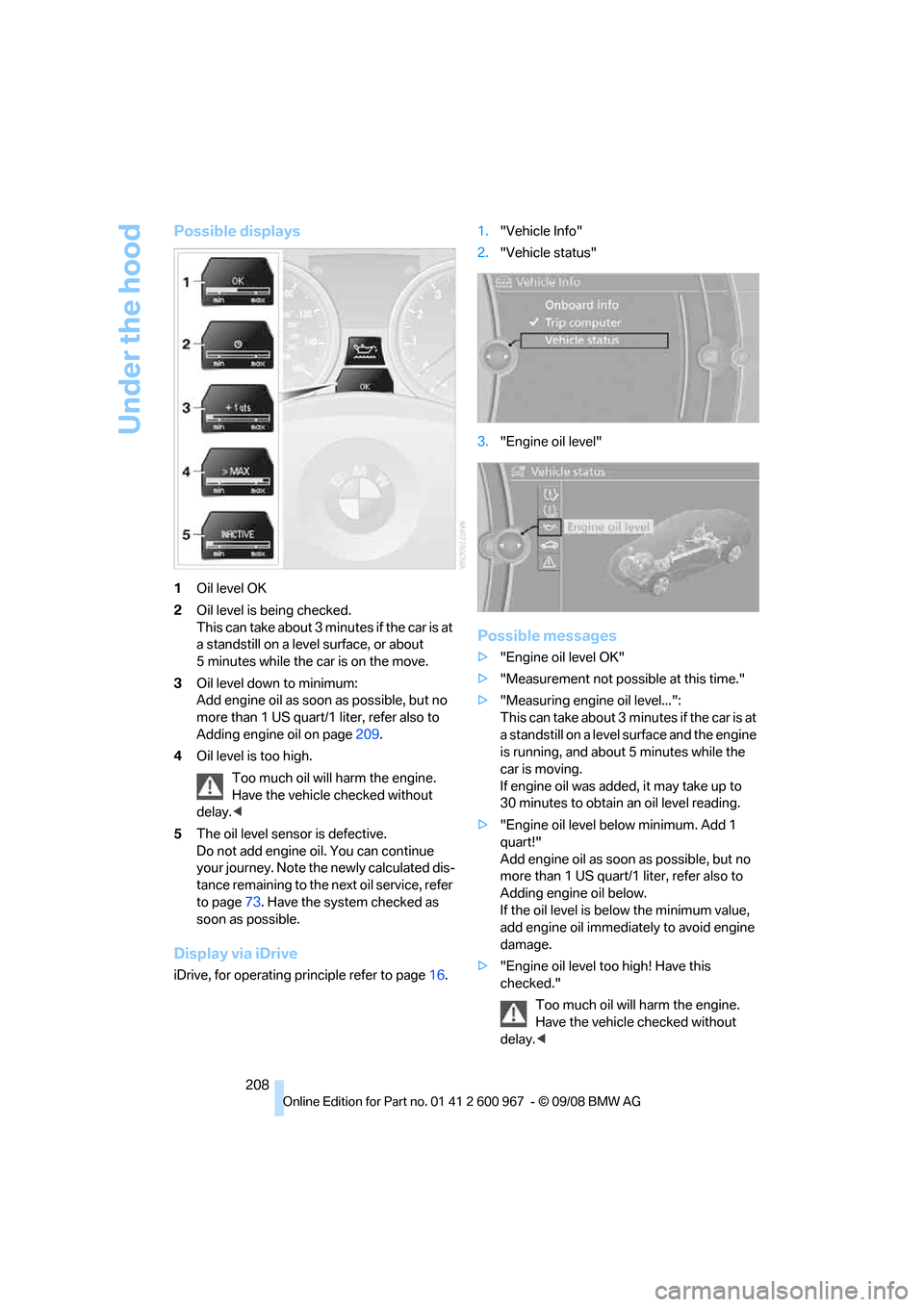
Possible displays
1Oil level OK
2Oil level is being checked.
This can take about 3 minutes if the car is at
a standstill on a level surface, or about
5 minutes while the car is on the move.
3Oil level down to minimum:
Add engine oil as soon as possible, but no
more than 1 US quart/1 liter, refer also to
Adding engine oil on page209.
4Oil level is too high.
Too much oil will harm the engine.
Have the vehicle checked without
delay.<
5The oil level sensor is defective.
Do not add engine oil. You can continue
your journey. Note the newly calculated dis-
tance remaining to the next oil service, refer
to page73. Have the system checked as
soon as possible.
Display via iDrive
iDrive, for operating principle refer to page16.1."Vehicle Info"
2."Vehicle status"
3."Engine oil level"
Possible messages
>"Engine oil level OK"
>"Measurement not possible at this time."
>"Measuring engine oil level...":
This can take about 3 minutes if the car is at
a standstill on a level surface and the engine
is running, and about 5 minutes while the
car is moving.
If engine oil was added, it may take up to
30 minutes to obtain an oil level reading.
>"Engine oil level below minimum. Add 1
quart!"
Add engine oil as soon as possible, but no
more than 1 US quart/1 liter, refer also to
Adding engine oil below.
If the oil level is below the minimum value,
add engine oil immediately to avoid engine
damage.
>"Engine oil level too high! Have this
checked."
Too much oil will harm the engine.
Have the vehicle checked without
delay.<
Page 213 of 260
Mobility
211Reference
At a glance
Controls
Driving tips
Communications
Navigation
Entertainment
Maintenance
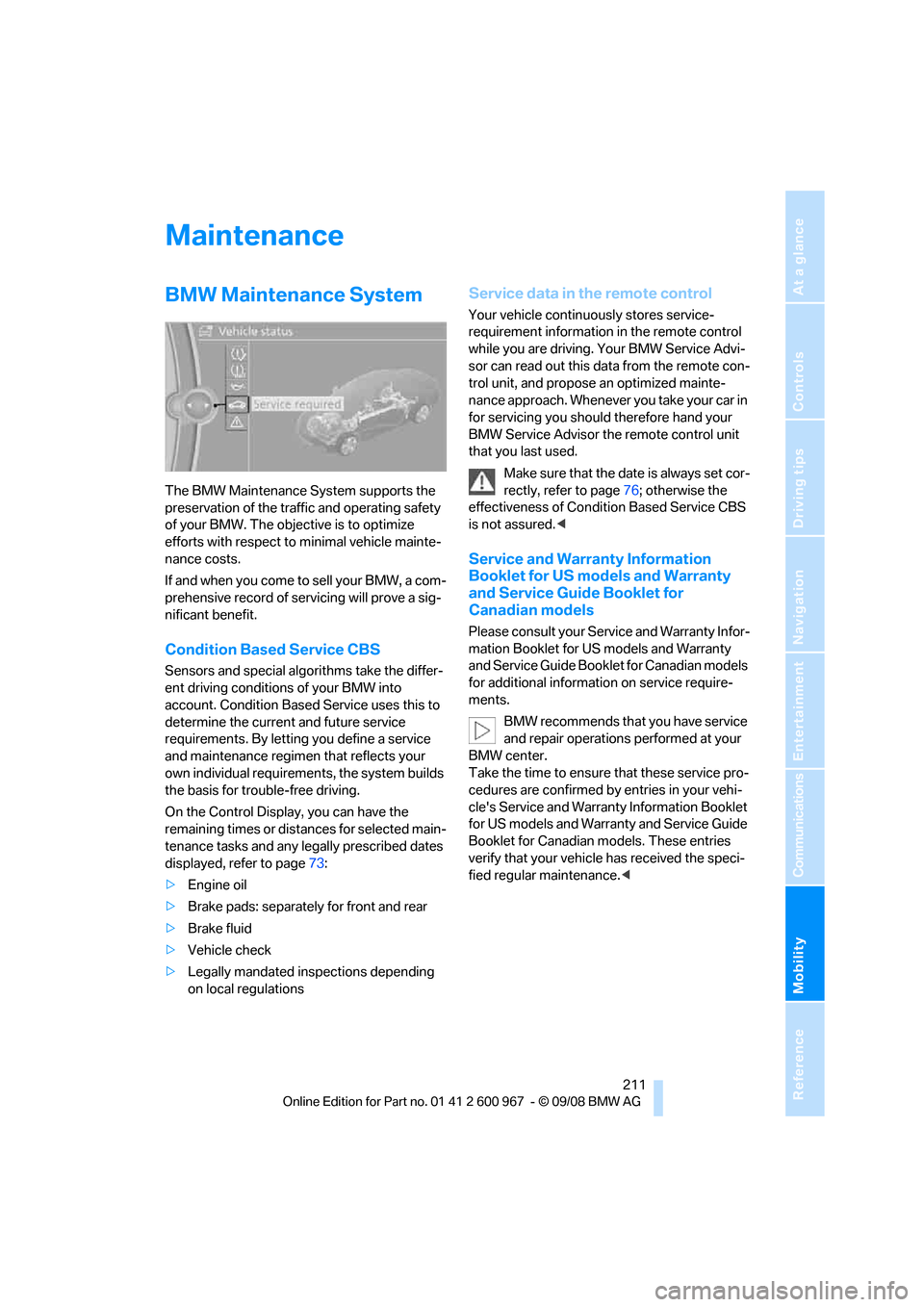
BMW Maintenance System
The BMW Maintenance System supports the
preservation of the traffic and operating safety
of your BMW. The objective is to optimize
efforts with respect to minimal vehicle mainte-
nance costs.
If and when you come to sell your BMW, a com-
prehensive record of servicing will prove a sig-
nificant benefit.
Condition Based Service CBS
Sensors and special algorithms take the differ-
ent driving conditions of your BMW into
account. Condition Based Service uses this to
determine the current and future service
requirements. By letting you define a service
and maintenance regimen that reflects your
own individual requirements, the system builds
the basis for trouble-free driving.
On the Control Display, you can have the
remaining times or distances for selected main-
tenance tasks and any legally prescribed dates
displayed, refer to page73:
>Engine oil
>Brake pads: separately for front and rear
>Brake fluid
>Vehicle check
>Legally mandated inspections depending
on local regulations
Service data in the remote control
Your vehicle continuously stores service-
requirement information in the remote control
while you are driving. Your BMW Service Advi-
sor can read out this data from the remote con-
trol unit, and propose an optimized mainte-
nance approach. Whenever you take your car in
for servicing you should therefore hand your
BMW Service Advisor the remote control unit
that you last used.
Make sure that the date is always set cor-
rectly, refer to page76; otherwise the
effectiveness of Condition Based Service CBS
is not assured.<
Service and Warranty Information
Booklet for US models and Warranty
and Service Guide Booklet for
Canadian models
Please consult your Service and Warranty Infor-
mation Booklet for US models and Warranty
and Service Guide Booklet for Canadian models
for additional information on service require-
ments.
BMW recommends that you have service
and repair operations performed at your
BMW center.
Take the time to ensure that these service pro-
cedures are confirmed by entries in your vehi-
cle's Service and Warranty Information Booklet
for US models and Warranty and Service Guide
Booklet for Canadian models. These entries
verify that your vehicle has received the speci-
fied regular maintenance.<
Page 214 of 260
Maintenance
212
Socket for On-Board
Diagnosis OBD
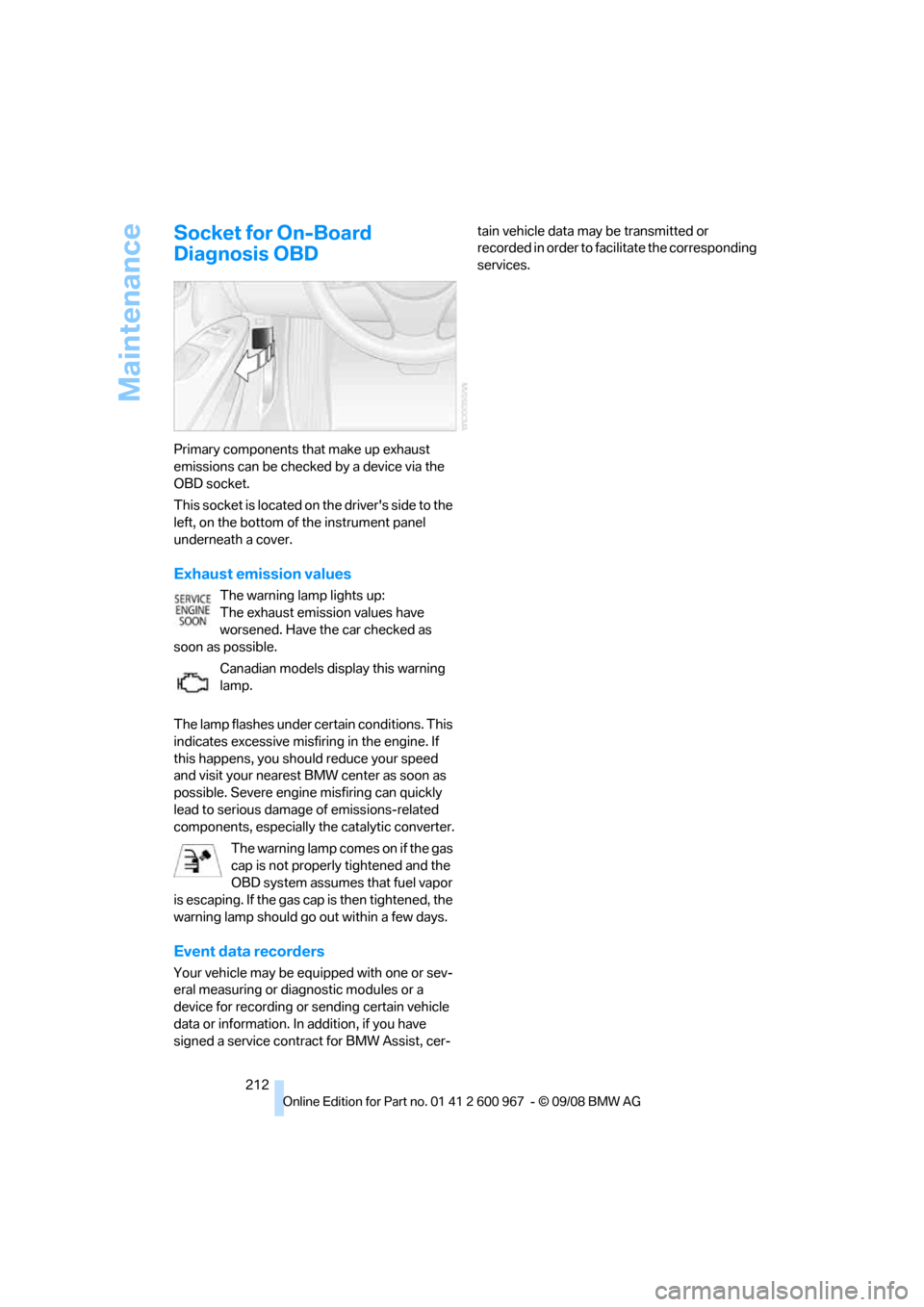
Primary components that make up exhaust
emissions can be checked by a device via the
OBD socket.
This socket is located on the driver's side to the
left, on the bottom of the instrument panel
underneath a cover.
Exhaust emission values
The warning lamp lights up:
The exhaust emission values have
worsened. Have the car checked as
soon as possible.
Canadian models display this warning
lamp.
The lamp flashes under certain conditions. This
indicates excessive misfiring in the engine. If
this happens, you should reduce your speed
and visit your nearest BMW center as soon as
possible. Severe engine misfiring can quickly
lead to serious damage of emissions-related
components, especially the catalytic converter.
The warning lamp comes on if the gas
cap is not properly tightened and the
OBD system assumes that fuel vapor
is escaping. If the gas cap is then tightened, the
warning lamp should go out within a few days.
Event data recorders
Your vehicle may be equipped with one or sev-
eral measuring or diagnostic modules or a
device for recording or sending certain vehicle
data or information. In addition, if you have
signed a service contract for BMW Assist, cer-tain vehicle data may be transmitted or
recorded in order to facilitate the corresponding
services.
Page 217 of 260
Mobility
215Reference
At a glance
Controls
Driving tips
Communications
Navigation
Entertainment
additive. For additional treatment, use a chrome
polish.
Light-alloy wheels
For technical reasons, dust is generated during
braking that is deposited on the light-alloy
wheels. Remove the dust regularly using acid-
free rim cleaner.
Do not use aggressive, acidic, strongly
alkaline and abrasive cleaning agents or
steam jets over 1407/606, otherwise dam-
age may occur.<
Outside sensors / cameras
Keep the sensors and cameras on the
outside of the vehicle, e.g. Park Distance
Control, clean and free of ice to ensure that they
remain fully functional.<
Interior care
Upholstery / cloth trim
Vacuum regularly with a vacuum cleaner to
remove superficial dirt.
To treat severe stains, e.g. from beverages, use
a soft sponge or lint-free microfiber cloth in
combination with suitable interior cleaners. Fol-
low the instructions on the packaging.
Clean the upholstery down to the seams
using a sweeping motion. Avoid strong
rubbing.<
Opened Velcro fasteners on pants or
other articles of clothing can damage the
seat covers. Ensure that Velcro fasteners are
closed.<
Leather / leather trim
The leather used by BMW is a high quality
natural product. Slight irregularities in the
leather are a typical characteristic of natural
leather.<
Dust and road grit in the pores and folds of the
leather have an abrasive effect, leading to
increased wear and causing the leather surface
to become brittle prematurely. Therefore, fre-quently clean the leather of dust using a cloth or
vacuum cleaner.
In particular, ensure that light-colored leather is
cleaned regularly as it has a tendency to soil
more easily.
Treat the leather twice a year using a leather
lotion as dirt and grease will gradually attack the
leather's protective layer.
Carpets / cargo bay
You can vacuum the carpets and floor mats or
clean them with interior cleaner if heavily soiled.
The floor mats can be removed for cleaning.
When replacing the mats, ensure that the seat
rails do not extend over the floor mats, as this
may damage the mats.
Lint on the floor mats occurs for technical rea-
sons and can be removed by vacuuming
repeatedly.
Interior plastic parts
>Imitation leather surfaces
>Lamp glasses
>Display pane of instrument cluster
>Matt parts
Clean with water and solvent-free plastic
cleaner if necessary.
Fine wood parts
Clean fine wood trim and fine wood parts with a
damp cloth. Wipe dry with a soft cloth.
Safety belts
Do not clean with cleaning agents as
these may destroy the fabric.<
Interior sensors / cameras
To clean interior sensors and cameras, use a
lint-free cloth moistened with glass cleaner.
Displays
To clean the displays, e.g. of the radio or instru-
ment cluster, use a display cleaning cloth or a
soft, non-abrasive, lint-free cloth.
Page 218 of 260
Care
216 Avoid applying excessive pressure when
cleaning the displays, otherwise damage
may occur.<
Do not use chemical or abrasive house-
hold cleaning agents. Keep all types of
fluid away from the device. Otherwise, surfaces
or electrical components may be corroded or
damaged.<
CD/DVD drives
Do not use a cleaning CD, as it may dam-
age parts of the drive.<
Vehicle storage
If your vehicle is to be decommissioned for
longer than three months, your BMW center or
a workshop that operates according to BMW
specifications will be glad to advise you.
Page 220 of 260
Replacing components
218
Lamps and bulbs
Lamps and bulbs make an essential contribu-
tion to vehicle safety. They should, therefore,
be handled carefully. BMW recommends hav-
ing your BMW center perform any work that you
do not feel competent to perform yourself or
that is not described here.
Never touch the glass of new bulbs with
your bare fingers, as even minute
amounts of contamination will burn into the
bulb's surface and reduce its service life. Use a
clean tissue, cloth or something similar, or hold
the bulb by its base.<
You can obtain a selection of replacement bulbs
at your BMW center.
Only change bulbs while they are cool to
the touch, otherwise you could suffer
burns.<
When working on electrical systems,
always begin by switching off the con-
sumer in question, otherwise short-circuits
could result. To avoid possible injury or equip-
ment damage when replacing bulbs, observe
any instructions provided by the bulb manufac-
turer.<
For care of the headlamps, please follow the
instructions in the chapter entitled 'Care'.
If the routine for changing a particular
bulb is not described here, please contact
your BMW center or a workshop that works
according to BMW repair procedures with cor-
respondingly trained personnel.<
Light-emitting diodes LED
Light-emitting diodes installed behind translu-
cent lenses serve as the light source for many of
the controls and displays in your vehicle. These
light-emitting diodes, which operate using a
concept similar to that applied in conventional
lasers, are officially designated as Class 1 light-
emitting diodes.
Do not remove the covers or expose the
eyes directly to the unfiltered light source
for several hours, otherwise this could cause
irritation to the retina.<
Xenon lamps
These bulbs have a very long service life and are
highly unlikely to fail. If a xenon bulb fails never-
theless, switch on the fog lamps and continue
the journey with great care, provided that local
legislation does not prohibit this.
Have any work on the xenon lamp system,
including bulb replacements, performed
only by a BMW center or a workshop that works
according to BMW repair procedures with cor-
respondingly trained personnel. Otherwise, if
such work is carried out improperly, the high
voltage in the system presents the danger of
fatal injuries.<
Access to the bulbs
1.Switch off the lamps and take the remote
control out of the ignition lock.
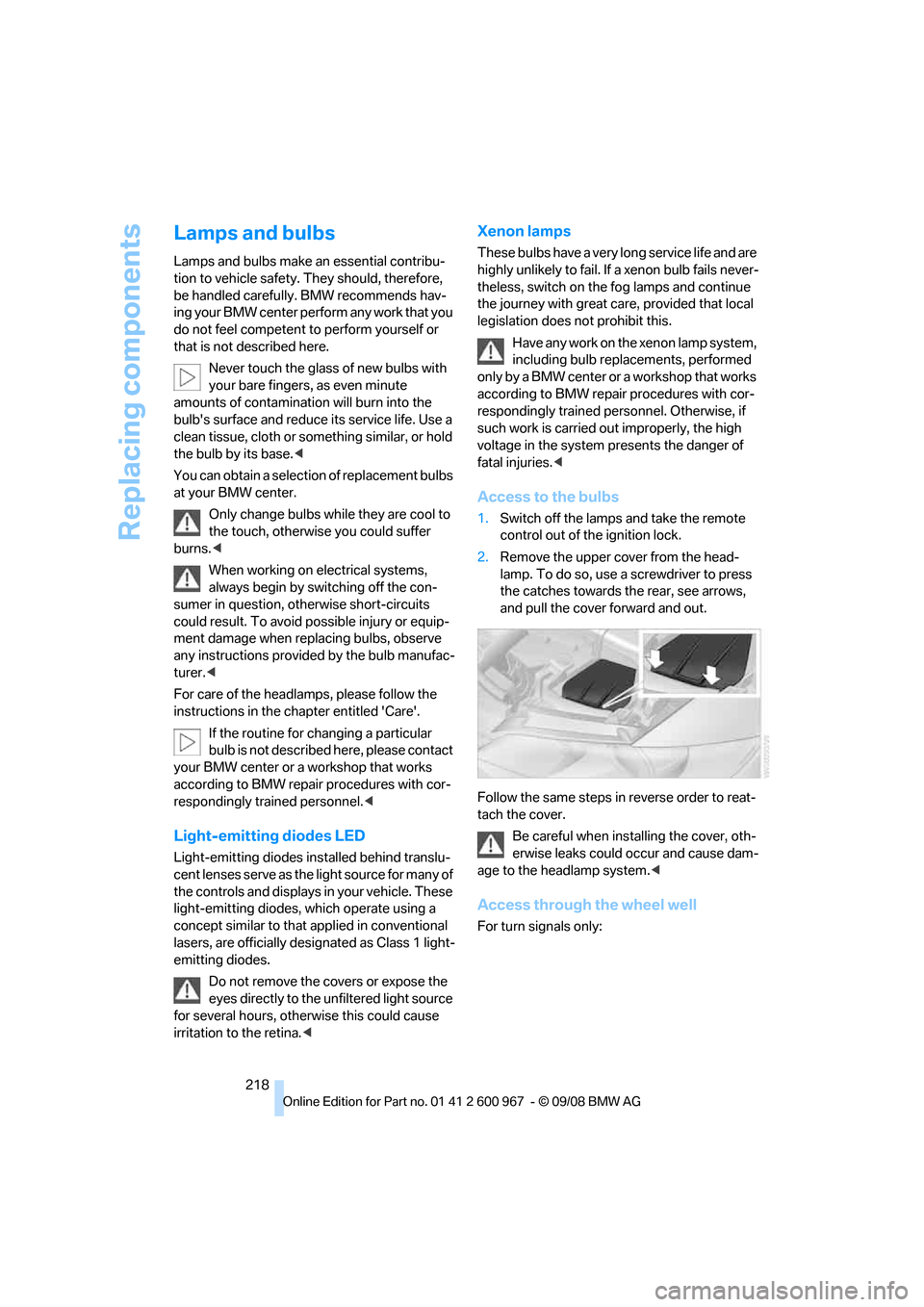
2.Remove the upper cover from the head-
lamp. To do so, use a screwdriver to press
the catches towards the rear, see arrows,
and pull the cover forward and out.
Follow the same steps in reverse order to reat-
tach the cover.
Be careful when installing the cover, oth-
erwise leaks could occur and cause dam-
age to the headlamp system.<
Access through the wheel well
For turn signals only:
Page 222 of 260
Replacing components
220
Tail lamps
Coupe
>Turn signal:
PY21W bulb, 21 watts
>Brake lamp in the luggage compartment lid:
H21W bulb, 21 watts
>Other bulbs:
W16W bulb, 16 watts
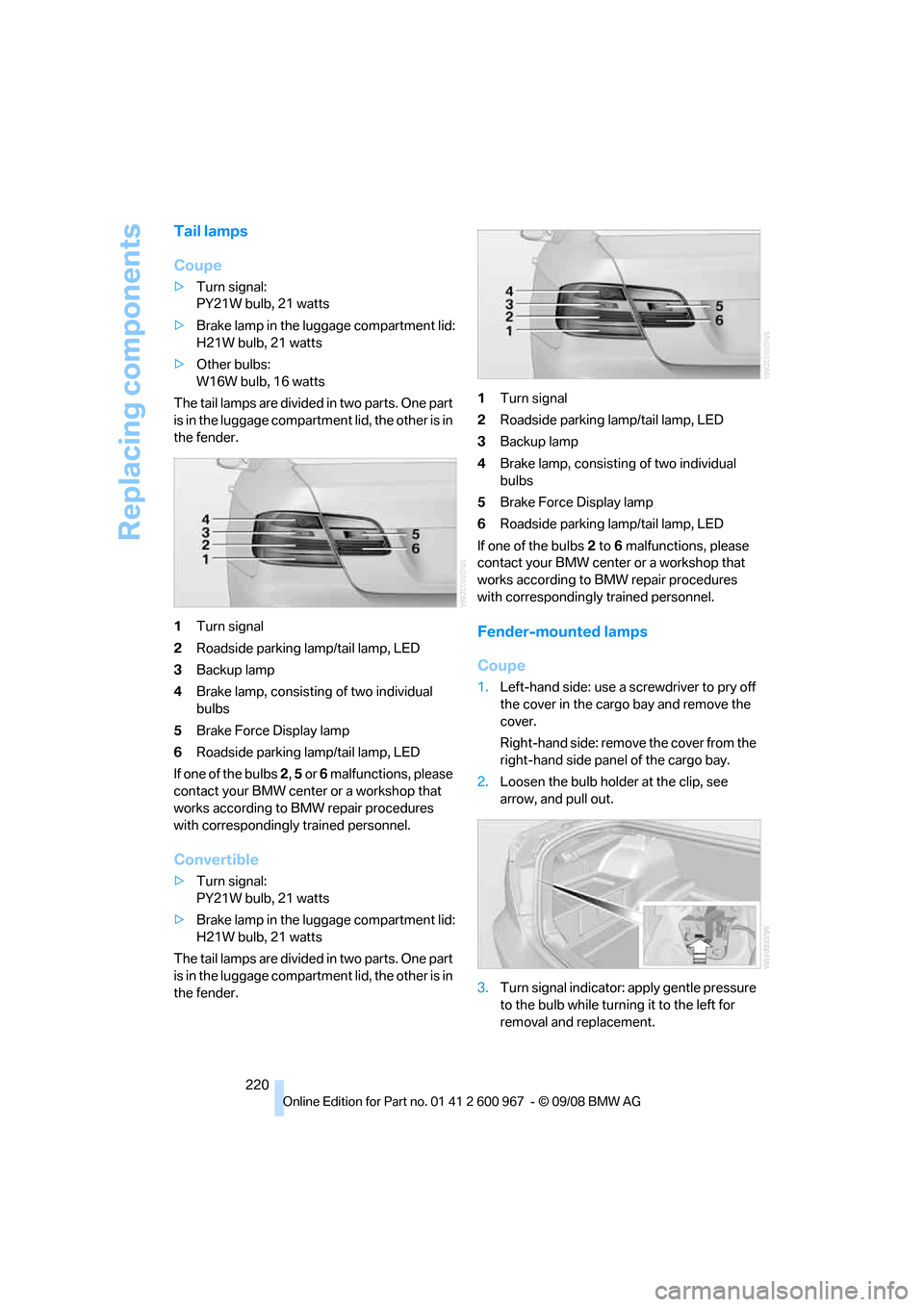
The tail lamps are divided in two parts. One part
is in the luggage compartment lid, the other is in
the fender.
1Turn signal
2Roadside parking lamp/tail lamp, LED
3Backup lamp
4Brake lamp, consisting of two individual
bulbs
5Brake Force Display lamp
6Roadside parking lamp/tail lamp, LED
If one of the bulbs 2, 5 or 6 malfunctions, please
contact your BMW center or a workshop that
works according to BMW repair procedures
with correspondingly trained personnel.
Convertible
>Turn signal:
PY21W bulb, 21 watts
>Brake lamp in the luggage compartment lid:
H21W bulb, 21 watts
The tail lamps are divided in two parts. One part
is in the luggage compartment lid, the other is in
the fender.1Turn signal
2Roadside parking lamp/tail lamp, LED
3Backup lamp
4Brake lamp, consisting of two individual
bulbs
5Brake Force Display lamp
6Roadside parking lamp/tail lamp, LED
If one of the bulbs 2 to 6 malfunctions, please
contact your BMW center or a workshop that
works according to BMW repair procedures
with correspondingly trained personnel.
Fender-mounted lamps
Coupe
1.Left-hand side: use a screwdriver to pry off
the cover in the cargo bay and remove the
cover.
Right-hand side: remove the cover from the
right-hand side panel of the cargo bay.
2.Loosen the bulb holder at the clip, see
arrow, and pull out.
3.Turn signal indicator: apply gentle pressure
to the bulb while turning it to the left for
removal and replacement.
Page 238 of 260
Short commands for the voice activation system
236
Short commands for the voice activation
system
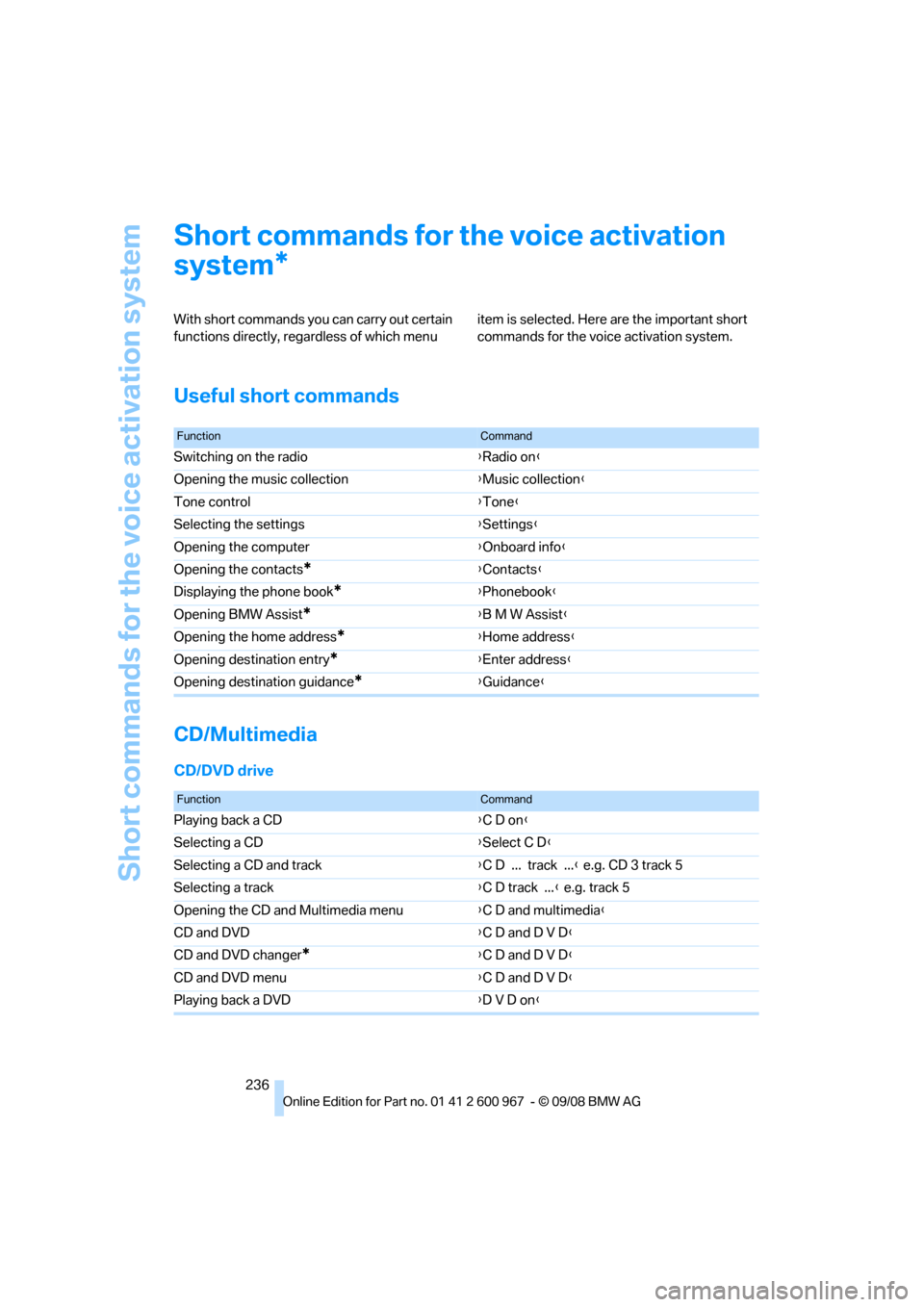
With short commands you can carry out certain
functions directly, regardless of which menu item is selected. Here are the important short
commands for the voice activation system.
Useful short commands
CD/Multimedia
CD/DVD drive
*
FunctionCommand
Switching on the radio{Radio on}
Opening the music collection{Music collection}
Tone control{Tone}
Selecting the settings{Settings}
Opening the computer{Onboard info}
Opening the contacts
*{Contacts}
Displaying the phone book
*{Phonebook}
Opening BMW Assist
*{B M W Assist}
Opening the home address
*{Home address}
Opening destination entry
*{Enter address}
Opening destination guidance
*{Guidance}
FunctionCommand
Playing back a CD{C D on}
Selecting a CD{Select C D}
Selecting a CD and track{C D ... track ...} e.g. CD 3 track 5
Selecting a track{C D track ...} e.g. track 5
Opening the CD and Multimedia menu{C D and multimedia}
CD and DVD{C D and D V D}
CD and DVD changer
*{C D and D V D}
CD and DVD menu{C D and D V D}
Playing back a DVD{D V D on}
Page 240 of 260
Short commands for the voice activation system
238
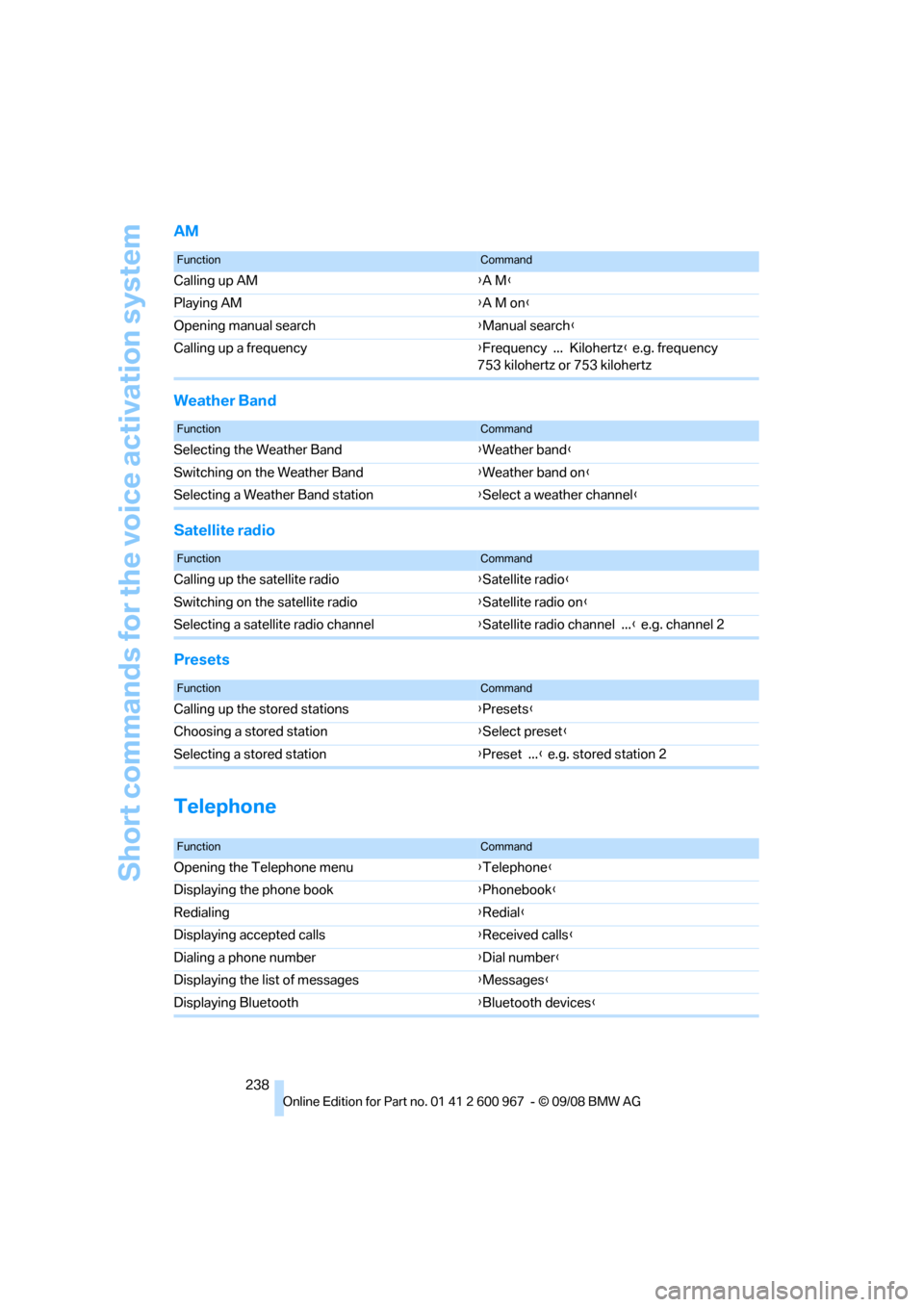
AM
Weather Band
Satellite radio
Presets
Telephone
FunctionCommand
Calling up AM{A M}
Playing AM{A M on}
Opening manual search{Manual search}
Calling up a frequency{Frequency ... Kilohertz} e.g. frequency
753 kilohertz or 753 kilohertz
FunctionCommand
Selecting the Weather Band{Weather band}
Switching on the Weather Band{Weather band on}
Selecting a Weather Band station{Select a weather channel}
FunctionCommand
Calling up the satellite radio{Satellite radio}
Switching on the satellite radio{Satellite radio on}
Selecting a satellite radio channel{Satellite radio channel ...} e.g. channel 2
FunctionCommand
Calling up the stored stations{Presets}
Choosing a stored station{Select preset}
Selecting a stored station{Preset ...} e.g. stored station 2
FunctionCommand
Opening the Telephone menu{Telephone}
Displaying the phone book{Phonebook}
Redialing{Redial}
Displaying accepted calls{Received calls}
Dialing a phone number{Dial number}
Displaying the list of messages{Messages}
Displaying Bluetooth{Bluetooth devices}
Page 241 of 260
Reference 239
At a glance
Controls
Driving tips
Communications
Navigation
Entertainment
Mobility
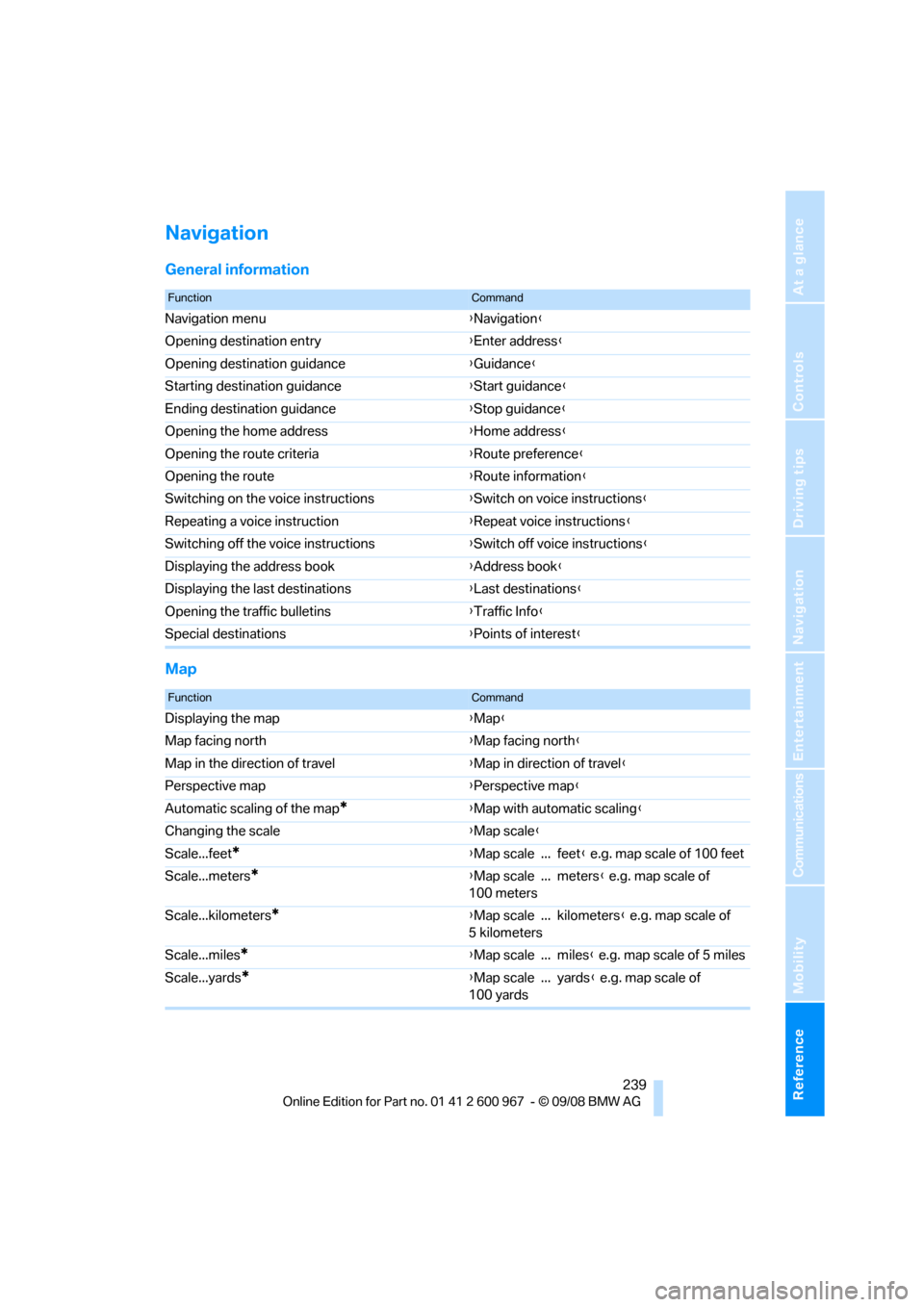
Navigation
General information
Map
FunctionCommand
Navigation menu{Navigation}
Opening destination entry{Enter address}
Opening destination guidance{Guidance}
Starting destination guidance{Start guidance}
Ending destination guidance{Stop guidance}
Opening the home address{Home address}
Opening the route criteria{Route preference}
Opening the route{Route information}
Switching on the voice instructions{Switch on voice instructions}
Repeating a voice instruction{Repeat voice instructions}
Switching off the voice instructions{Switch off voice instructions}
Displaying the address book{Address book}
Displaying the last destinations{Last destinations}
Opening the traffic bulletins{Traffic Info}
Special destinations{Points of interest}
FunctionCommand
Displaying the map{Map}
Map facing north{Map facing north}
Map in the direction of travel{Map in direction of travel}
Perspective map{Perspective map}
Automatic scaling of the map
*{Map with automatic scaling}
Changing the scale{Map scale}
Scale...feet
*{Map scale ... feet} e.g. map scale of 100 feet
Scale...meters
*{Map scale ... meters} e.g. map scale of
100 meters
Scale...kilometers
*{Map scale ... kilometers} e.g. map scale of
5 kilometers
Scale...miles
*{Map scale ... miles} e.g. map scale of 5 miles
Scale...yards
*{Map scale ... yards} e.g. map scale of
100 yards