controls BMW 328I CONVERTIBLE 2010 E93 Owner's Manual
[x] Cancel search | Manufacturer: BMW, Model Year: 2010, Model line: 328I CONVERTIBLE, Model: BMW 328I CONVERTIBLE 2010 E93Pages: 266, PDF Size: 8.6 MB
Page 231 of 266
Mobility
229Reference
At a glance
Controls
Driving tips
Communications
Navigation
Entertainment
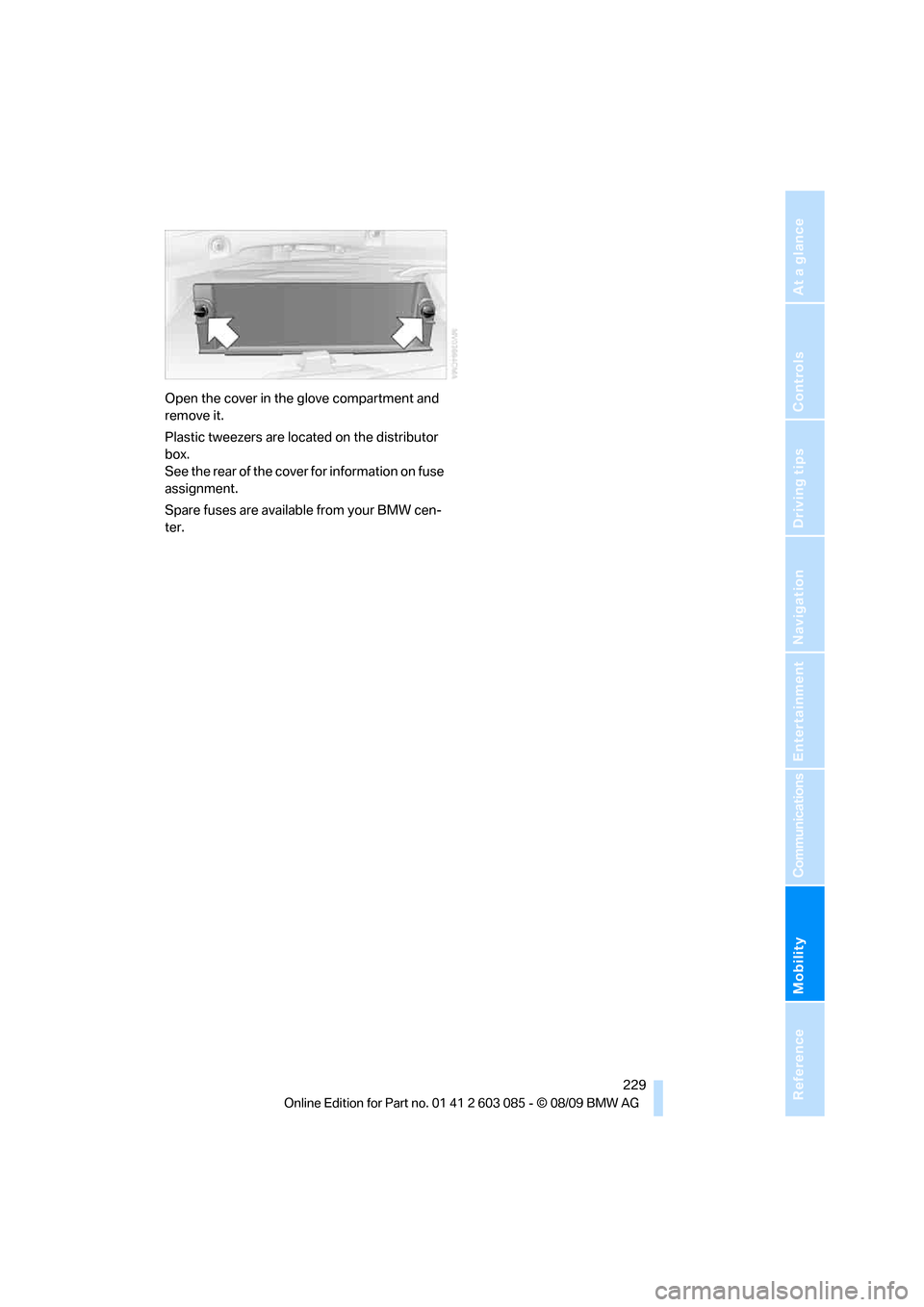
Open the cover in the glove compartment and
remove it.
Plastic tweezers are located on the distributor
box.
See the rear of the cover for information on fuse
assignment.
Spare fuses are available from your BMW cen-
ter.
Page 233 of 266
Mobility
231Reference
At a glance
Controls
Driving tips
Communications
Navigation
Entertainment
ularly and replace any items in good time, if nec-
essary.
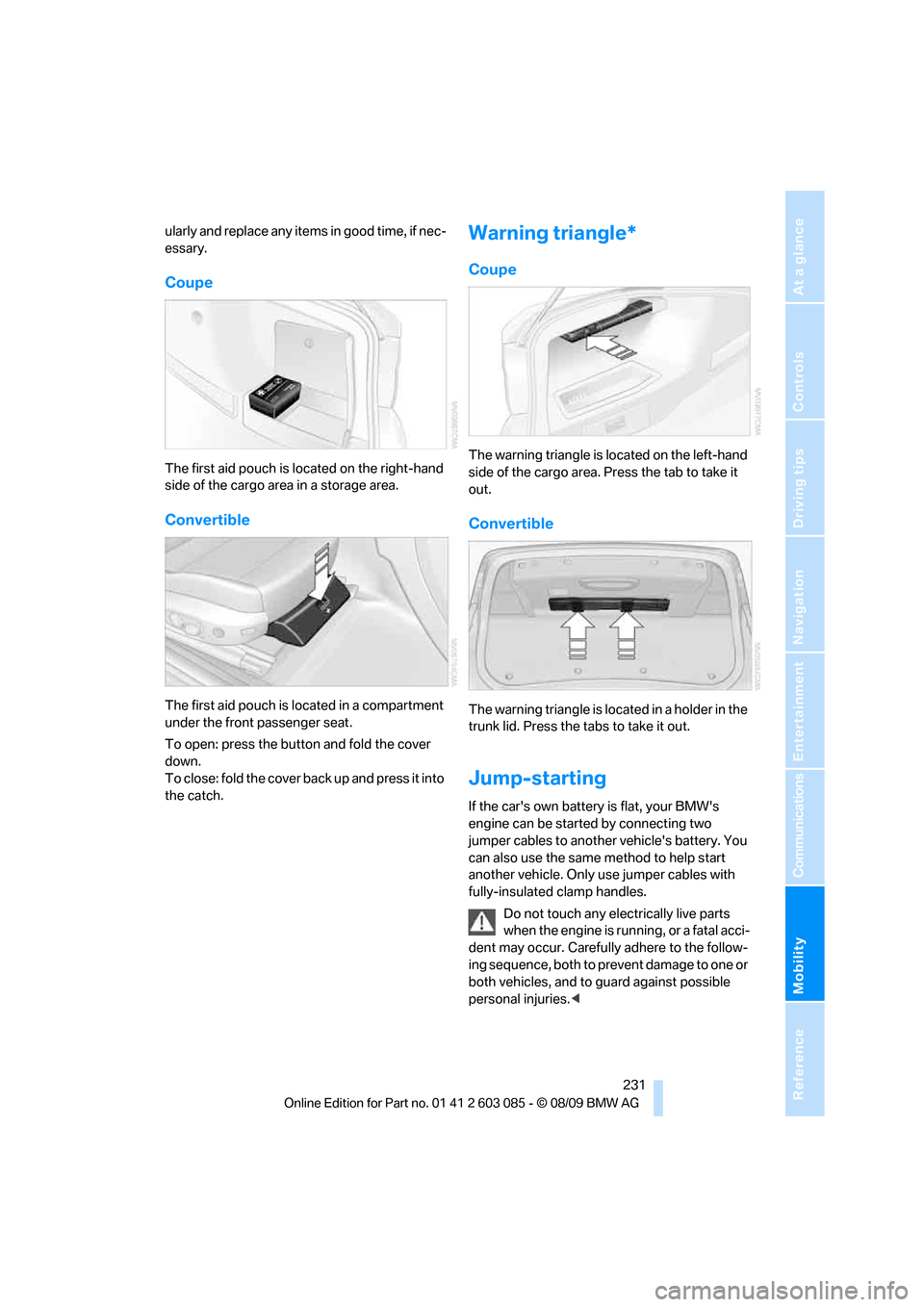
Coupe
The first aid pouch is located on the right-hand
side of the cargo area in a storage area.
Convertible
The first aid pouch is located in a compartment
under the front passenger seat.
To open: press the button and fold the cover
down.
To close: fold the cover back up and press it into
the catch.
Warning triangle*
Coupe
The warning triangle is located on the left-hand
side of the cargo area. Press the tab to take it
out.
Convertible
The warning triangle is located in a holder in the
trunk lid. Press the tabs to take it out.
Jump-starting
If the car's own battery is flat, your BMW's
engine can be started by connecting two
jumper cables to another vehicle's battery. You
can also use the same method to help start
another vehicle. Only use jumper cables with
fully-insulated clamp handles.
Do not touch any electrically live parts
when the engine is running, or a fatal acci-
dent may occur. Carefully adhere to the follow-
ing sequence, both to prevent damage to one or
both vehicles, and to guard against possible
personal injuries.<
Page 235 of 266
Mobility
233Reference
At a glance
Controls
Driving tips
Communications
Navigation
Entertainment
Using a tow fitting
The screw-in tow fitting must always be carried
in the car. It can be screwed in at the front or
rear of the BMW.
Coupe: it is stored in the onboard vehicle tool kit
underneath the cover on the right-hand side of
the cargo area, refer to page223.
Convertible: it is stored in the onboard vehicle
tool kit underneath the cargo area floor, refer to
page223.
Use only the tow fitting provided with the
vehicle and screw it all the way in. Use the
tow fitting for towing on paved roads only. Avoid
lateral loading of the tow fitting, e.g. do not lift
the vehicle by the tow fitting. Otherwise, the
tow fitting and the vehicle could be damaged.<
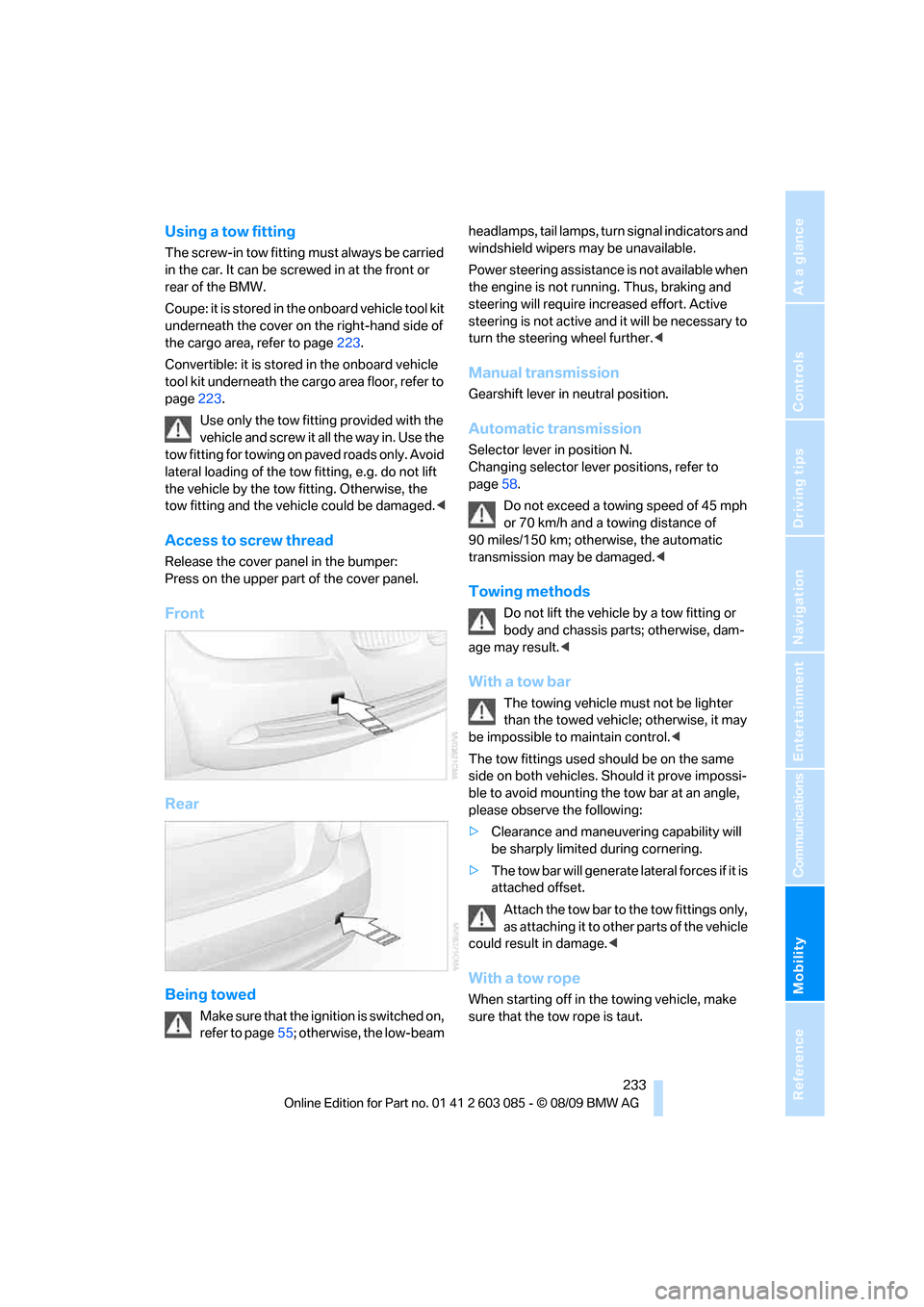
Access to screw thread
Release the cover panel in the bumper:
Press on the upper part of the cover panel.
Front
Rear
Being towed
Make sure that the ignition is switched on,
refer to page55; otherwise, the low-beam headlamps, tail lamps, turn signal indicators and
windshield wipers may be unavailable.
Power steering assistance is not available when
the engine is not running. Thus, braking and
steering will require increased effort. Active
steering is not active and it will be necessary to
turn the steering wheel further.<
Manual transmission
Gearshift lever in neutral position.
Automatic transmission
Selector lever in position N.
Changing selector lever positions, refer to
page58.
Do not exceed a towing speed of 45 mph
or 70 km/h and a towing distance of
90 miles/150 km; otherwise, the automatic
transmission may be damaged.<
Towing methods
Do not lift the vehicle by a tow fitting or
body and chassis parts; otherwise, dam-
age may result.<
With a tow bar
The towing vehicle must not be lighter
than the towed vehicle; otherwise, it may
be impossible to maintain control.<
The tow fittings used should be on the same
side on both vehicles. Should it prove impossi-
ble to avoid mounting the tow bar at an angle,
please observe the following:
>Clearance and maneuvering capability will
be sharply limited during cornering.
>The tow bar will generate lateral forces if it is
attached offset.
Attach the tow bar to the tow fittings only,
as attaching it to other parts of the vehicle
could result in damage.<
With a tow rope
When starting off in the towing vehicle, make
sure that the tow rope is taut.
Page 237 of 266

Mobility
235Reference
At a glance
Controls
Driving tips
Communications
Navigation
Entertainment
Page 241 of 266
Reference 239
At a glance
Controls
Driving tips
Communications
Navigation
Entertainment
Mobility
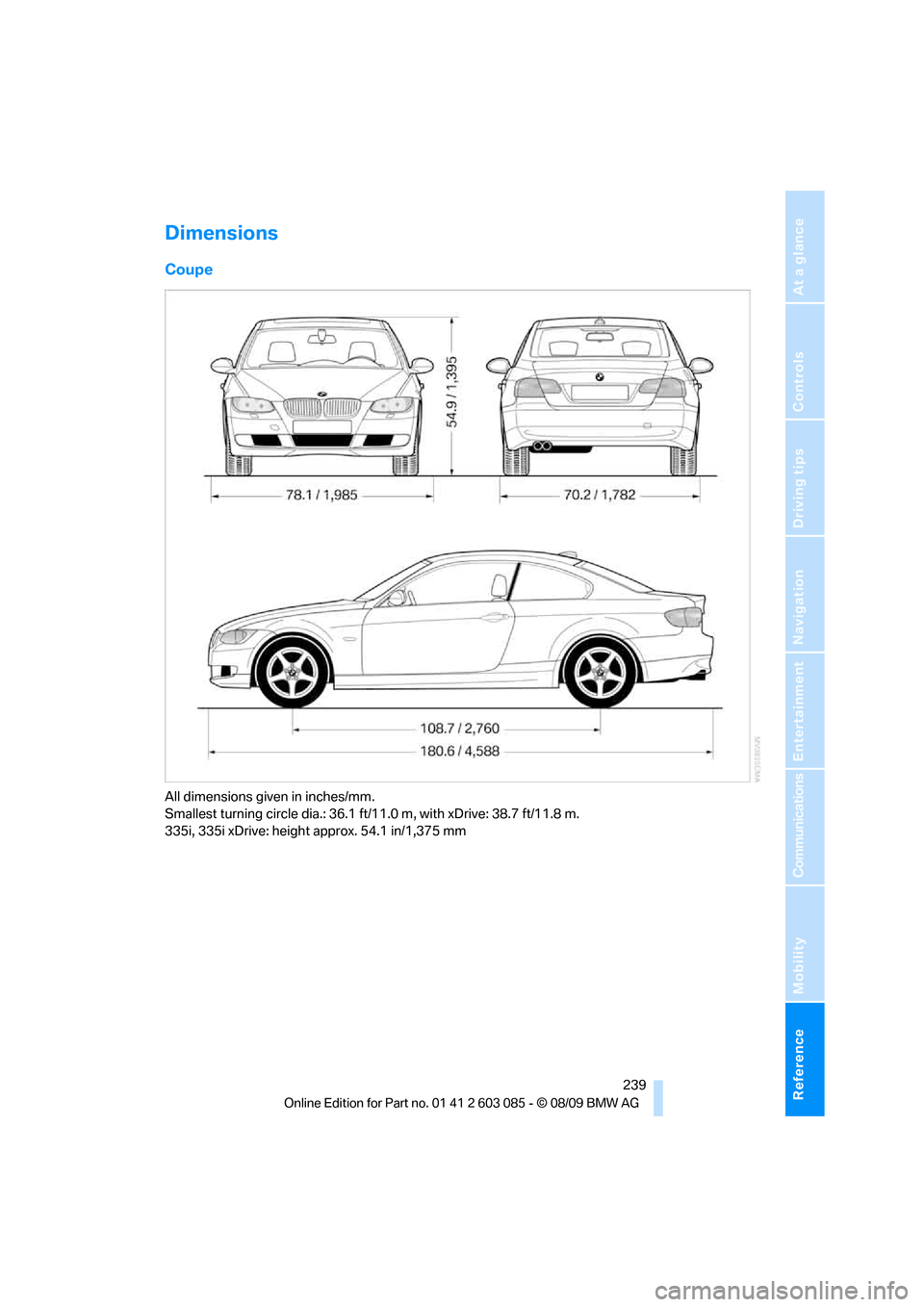
Dimensions
Coupe
All dimensions given in inches/mm.
Smallest turning circle dia.: 36.1 ft/11.0 m, with xDrive: 38.7 ft/11.8 m.
335i, 335i xDrive: height approx. 54.1 in/1,375 mm
Page 243 of 266
Reference 241
At a glance
Controls
Driving tips
Communications
Navigation
Entertainment
Mobility
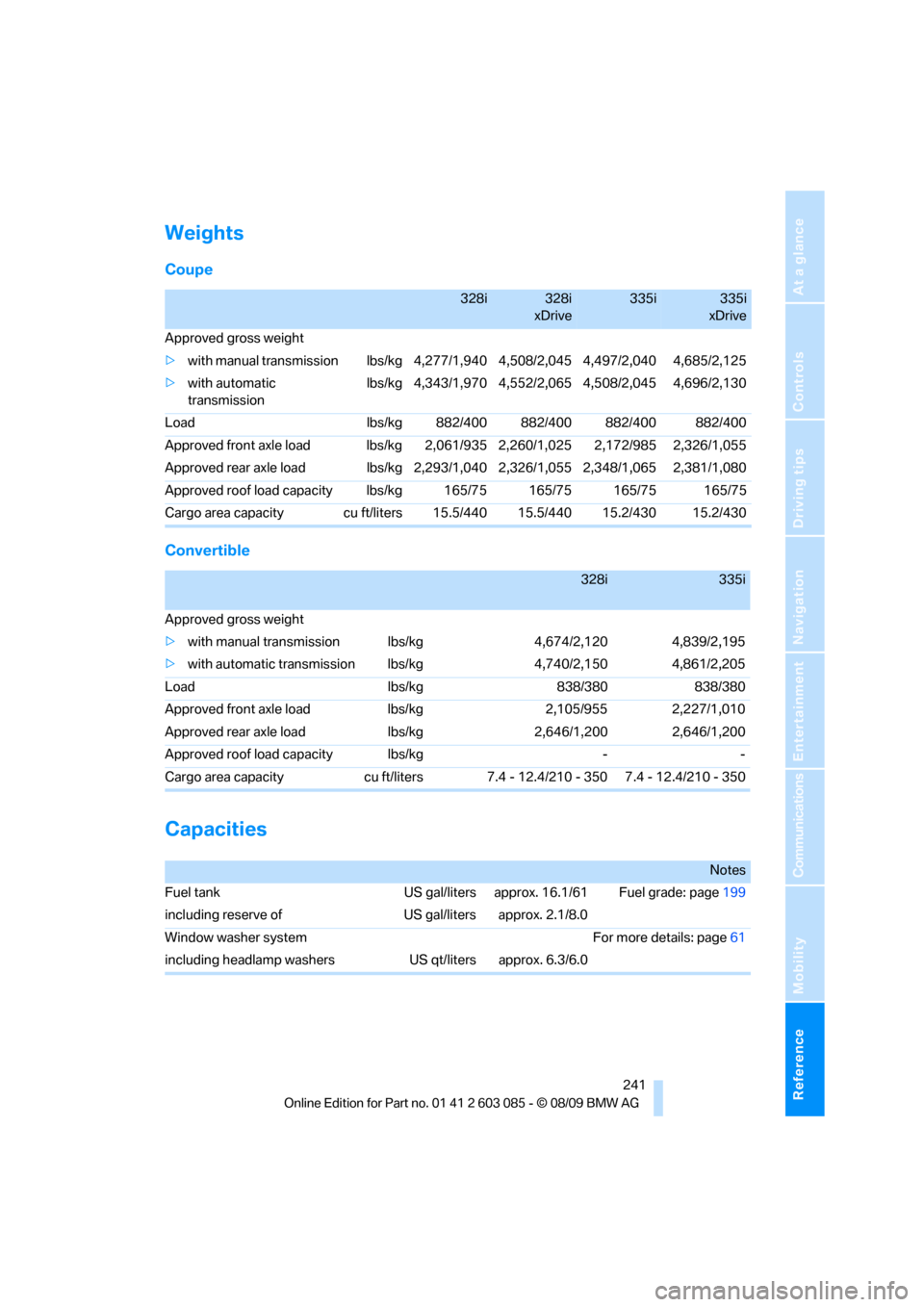
Weights
Coupe
Convertible
Capacities
328i328i
xDrive335i335i
xDrive
Approved gross weight
>with manual transmission lbs/kg 4,277/1,940 4,508/2,045 4,497/2,040 4,685/2,125
>with automatic
transmissionlbs/kg 4,343/1,970 4,552/2,065 4,508/2,045 4,696/2,130
Load lbs/kg 882/400 882/400 882/400 882/400
Approved front axle load lbs/kg 2,061/935 2,260/1,025 2,172/985 2,326/1,055
Approved rear axle load lbs/kg 2,293/1,040 2,326/1,055 2,348/1,065 2,381/1,080
Approved roof load capacity lbs/kg 165/75 165/75 165/75 165/75
Cargo area capacity cu ft/liters 15.5/440 15.5/440 15.2/430 15.2/430
328i335i
Approved gross weight
>with manual transmission lbs/kg 4,674/2,120 4,839/2,195
>with automatic transmission lbs/kg 4,740/2,150 4,861/2,205
Load lbs/kg 838/380 838/380
Approved front axle load lbs/kg 2,105/955 2,227/1,010
Approved rear axle load lbs/kg 2,646/1,200 2,646/1,200
Approved roof load capacity lbs/kg - -
Cargo area capacity cu ft/liters 7.4 - 12.4/210 - 350 7.4 - 12.4/210 - 350
Notes
Fuel tank US gal/liters approx. 16.1/61 Fuel grade: page199
including reserve of US gal/liters approx. 2.1/8.0
Window washer system For more details: page61
including headlamp washers US qt/liters approx. 6.3/6.0
Page 245 of 266
Reference 243
At a glance
Controls
Driving tips
Communications
Navigation
Entertainment
Mobility
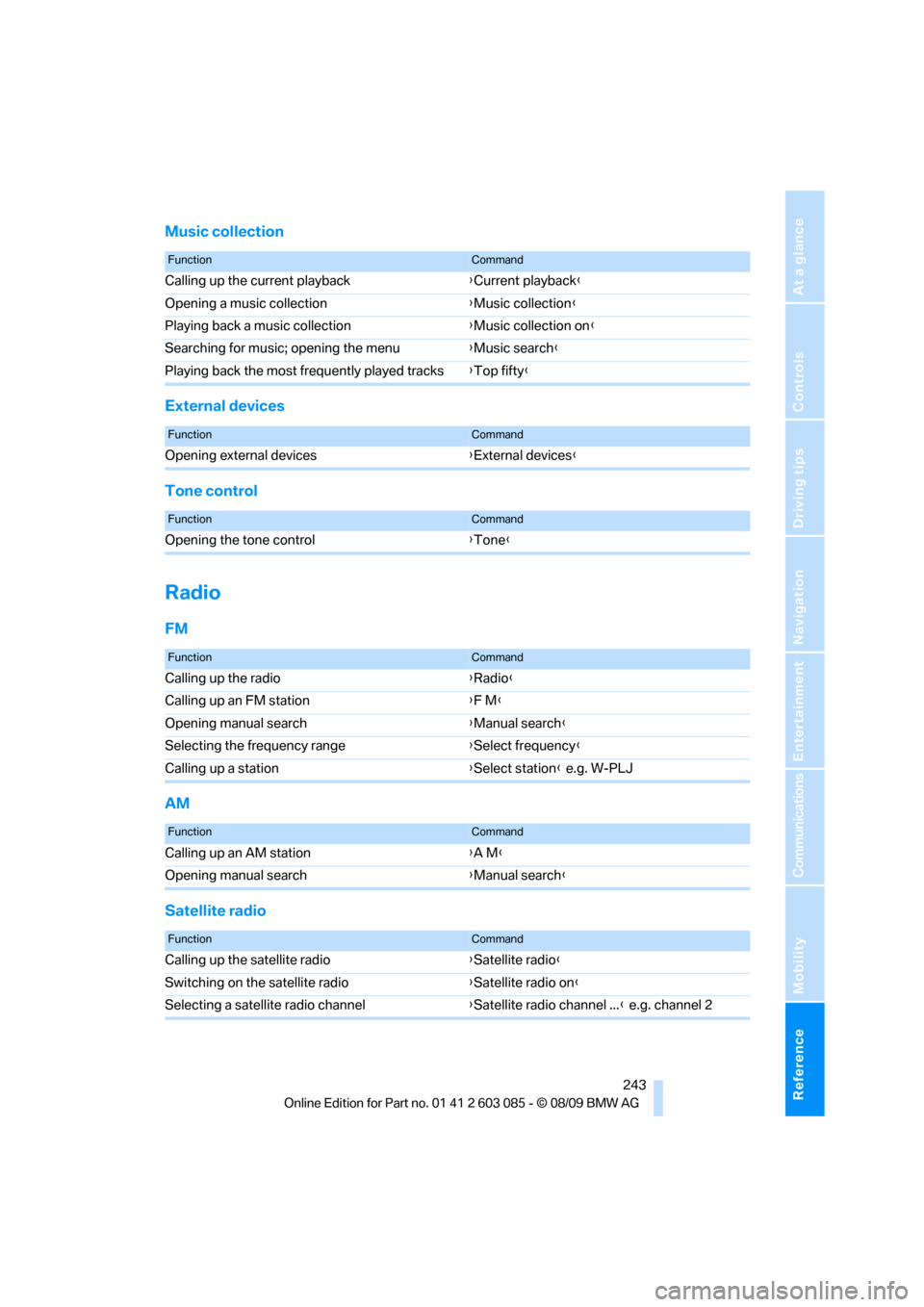
Music collection
External devices
Tone control
Radio
FM
AM
Satellite radio
FunctionCommand
Calling up the current playback{Current playback}
Opening a music collection{Music collection}
Playing back a music collection{Music collection on}
Searching for music; opening the menu{Music search}
Playing back the most frequently played tracks{Top fifty}
FunctionCommand
Opening external devices{External devices}
FunctionCommand
Opening the tone control{Tone}
FunctionCommand
Calling up the radio{Radio}
Calling up an FM station{F M}
Opening manual search{Manual search}
Selecting the frequency range{Select frequency}
Calling up a station{Select station} e.g. W-PLJ
FunctionCommand
Calling up an AM station{A M}
Opening manual search{Manual search}
FunctionCommand
Calling up the satellite radio{Satellite radio}
Switching on the satellite radio{Satellite radio on}
Selecting a satellite radio channel{Satellite radio channel ...} e.g. channel 2
Page 247 of 266
Reference 245
At a glance
Controls
Driving tips
Communications
Navigation
Entertainment
Mobility
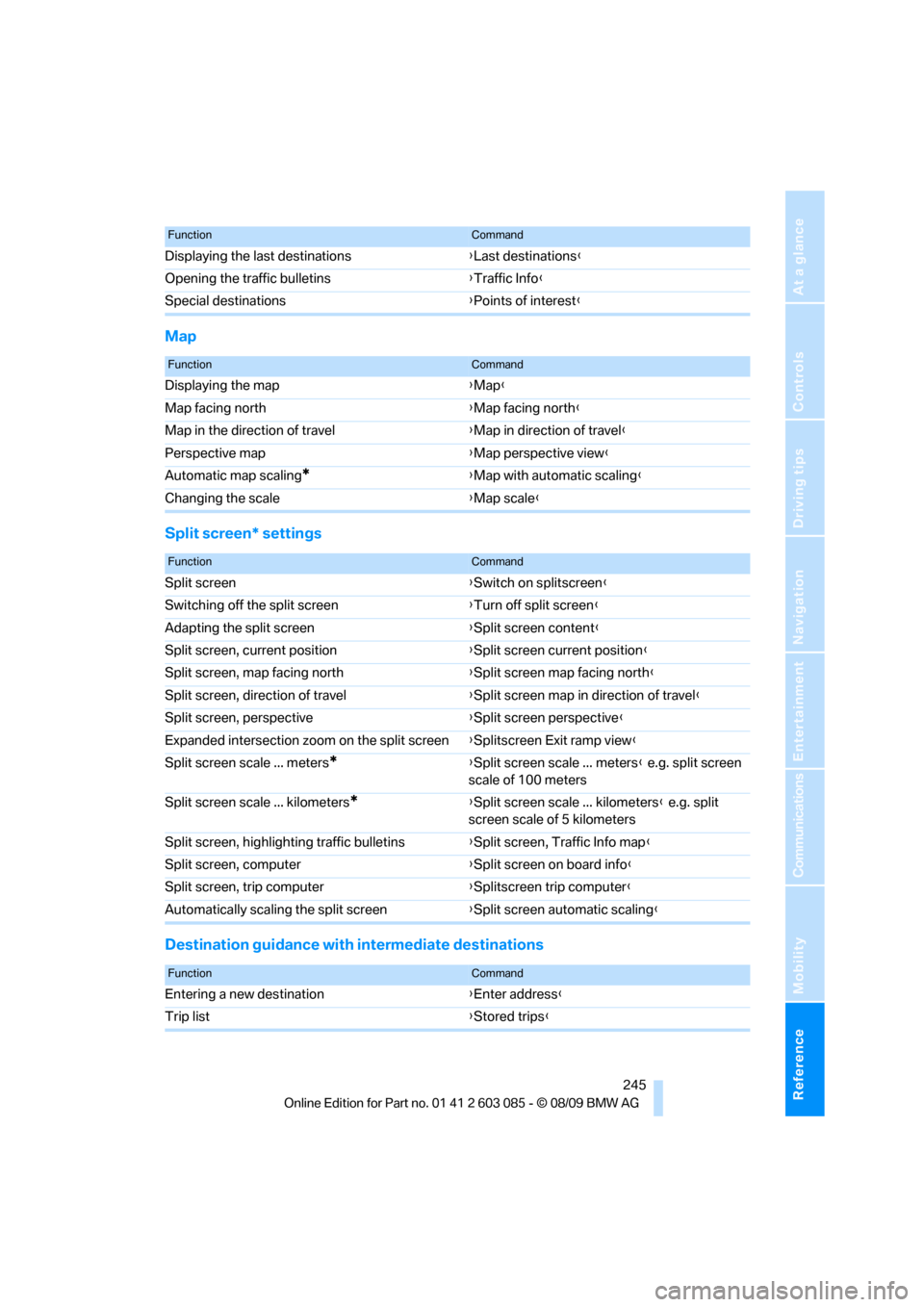
Map
Split screen* settings
Destination guidance with intermediate destinations
Displaying the last destinations{Last destinations}
Opening the traffic bulletins{Traffic Info}
Special destinations{Points of interest}
FunctionCommand
FunctionCommand
Displaying the map{Map}
Map facing north{Map facing north}
Map in the direction of travel{Map in direction of travel}
Perspective map{Map perspective view}
Automatic map scaling
*{Map with automatic scaling}
Changing the scale{Map scale}
FunctionCommand
Split screen{Switch on splitscreen}
Switching off the split screen{Turn off split screen}
Adapting the split screen{Split screen content}
Split screen, current position{Split screen current position}
Split screen, map facing north{Split screen map facing north}
Split screen, direction of travel{Split screen map in direction of travel}
Split screen, perspective{Split screen perspective}
Expanded intersection zoom on the split screen{Splitscreen Exit ramp view}
Split screen scale ... meters
*{Split screen scale ... meters} e.g. split screen
scale of 100 meters
Split screen scale ... kilometers
*{Split screen scale ... kilometers} e.g. split
screen scale of 5 kilometers
Split screen, highlighting traffic bulletins{Split screen, Traffic Info map}
Split screen, computer{Split screen on board info}
Split screen, trip computer{Splitscreen trip computer}
Automatically scaling the split screen{Split screen automatic scaling}
FunctionCommand
Entering a new destination{Enter address}
Trip list{Stored trips}
Page 249 of 266

Reference 247
At a glance
Controls
Driving tips
Communications
Navigation
Entertainment
Mobility
Page 250 of 266
Everything from A - Z
248
Everything from A - Z
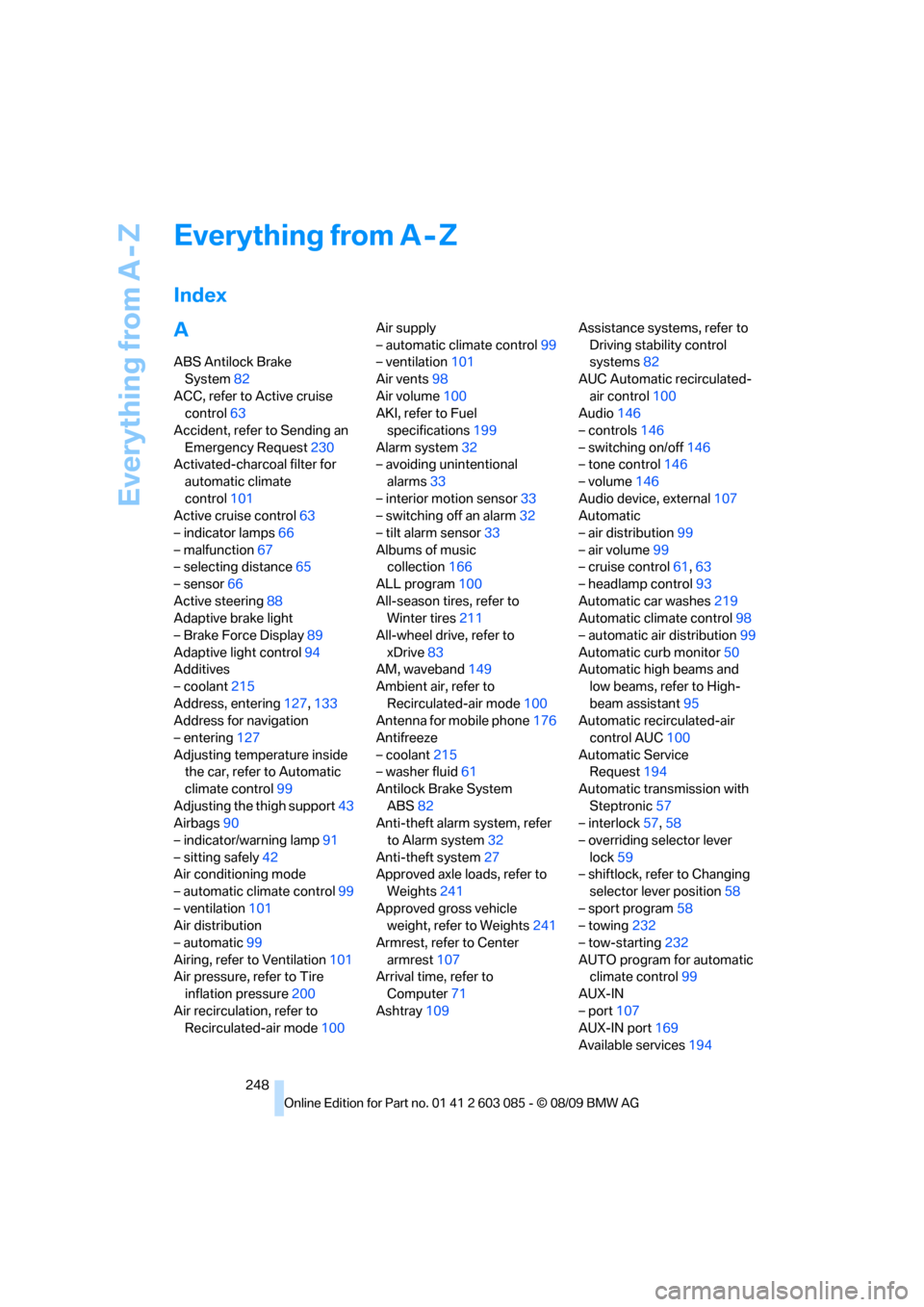
Index
A
ABS Antilock Brake
System82
ACC, refer to Active cruise
control63
Accident, refer to Sending an
Emergency Request230
Activated-charcoal filter for
automatic climate
control101
Active cruise control63
– indicator lamps66
– malfunction67
– selecting distance65
– sensor66
Active steering88
Adaptive brake light
– Brake Force Display89
Adaptive light control94
Additives
– coolant215
Address, entering127,133
Address for navigation
– entering127
Adjusting temperature inside
the car, refer to Automatic
climate control99
Adjusting the thigh support43
Airbags90
– indicator/warning lamp91
– sitting safely42
Air conditioning mode
– automatic climate control99
– ventilation101
Air distribution
– automatic99
Airing, refer to Ventilation101
Air pressure, refer to Tire
inflation pressure200
Air recirculation, refer to
Recirculated-air mode100Air supply
– automatic climate control99
– ventilation101
Air vents98
Air volume100
AKI, refer to Fuel
specifications199
Alarm system32
– avoiding unintentional
alarms33
– interior motion sensor33
– switching off an alarm32
– tilt alarm sensor33
Albums of music
collection166
ALL program100
All-season tires, refer to
Winter tires211
All-wheel drive, refer to
xDrive83
AM, waveband149
Ambient air, refer to
Recirculated-air mode100
Antenna for mobile phone176
Antifreeze
– coolant215
– washer fluid61
Antilock Brake System
ABS82
Anti-theft alarm system, refer
to Alarm system32
Anti-theft system27
Approved axle loads, refer to
Weights241
Approved gross vehicle
weight, refer to Weights241
Armrest, refer to Center
armrest107
Arrival time, refer to
Computer71
Ashtray109Assistance systems, refer to
Driving stability control
systems82
AUC Automatic recirculated-
air control100
Audio146
– controls146
– switching on/off146
– tone control146
– volume146
Audio device, external107
Automatic
– air distribution99
– air volume99
– cruise control61,63
– headlamp control93
Automatic car washes219
Automatic climate control98
– automatic air distribution99
Automatic curb monitor50
Automatic high beams and
low beams, refer to High-
beam assistant95
Automatic recirculated-air
control AUC100
Automatic Service
Request194
Automatic transmission with
Steptronic57
– interlock57,58
– overriding selector lever
lock59
– shiftlock, refer to Changing
selector lever position58
– sport program58
– towing232
– tow-starting232
AUTO program for automatic
climate control
99
AUX-IN
– port107
AUX-IN port169
Available services194