hardtop BMW 328I CONVERTIBLE 2011 E94 User Guide
[x] Cancel search | Manufacturer: BMW, Model Year: 2011, Model line: 328I CONVERTIBLE, Model: BMW 328I CONVERTIBLE 2011 E94Pages: 278, PDF Size: 8.23 MB
Page 102 of 278
Technology for driving comfort and safety
100
Convertible: rollover
protection system
The rollover protection system is activated
automatically in the event of an accident, a crit-
ical driving situation, an extreme tilt in the car's
longitudinal axis or upon loss of ground contact.
The protection bars behind the rear head
restraints deploy within fractions of a second.
As a supplementary system to the reinforced
windshield frame, the rollover protection sys-
tem ensures that the necessary headroom is
maintained for all vehicle occupants.
Always keep the area of movement of the
rollover protection system clear.
In minor accidents, you are protected by the
fastened safety belt and, depending on acci-
dent severity, by the safety belt tensioner and
multi-phase airbag retention system.<
Resetting
If the rollover protection system was not
impacted after being automatically activated, it
can be reset by lowering the protection bars to
their original positions. This does not require
tools.
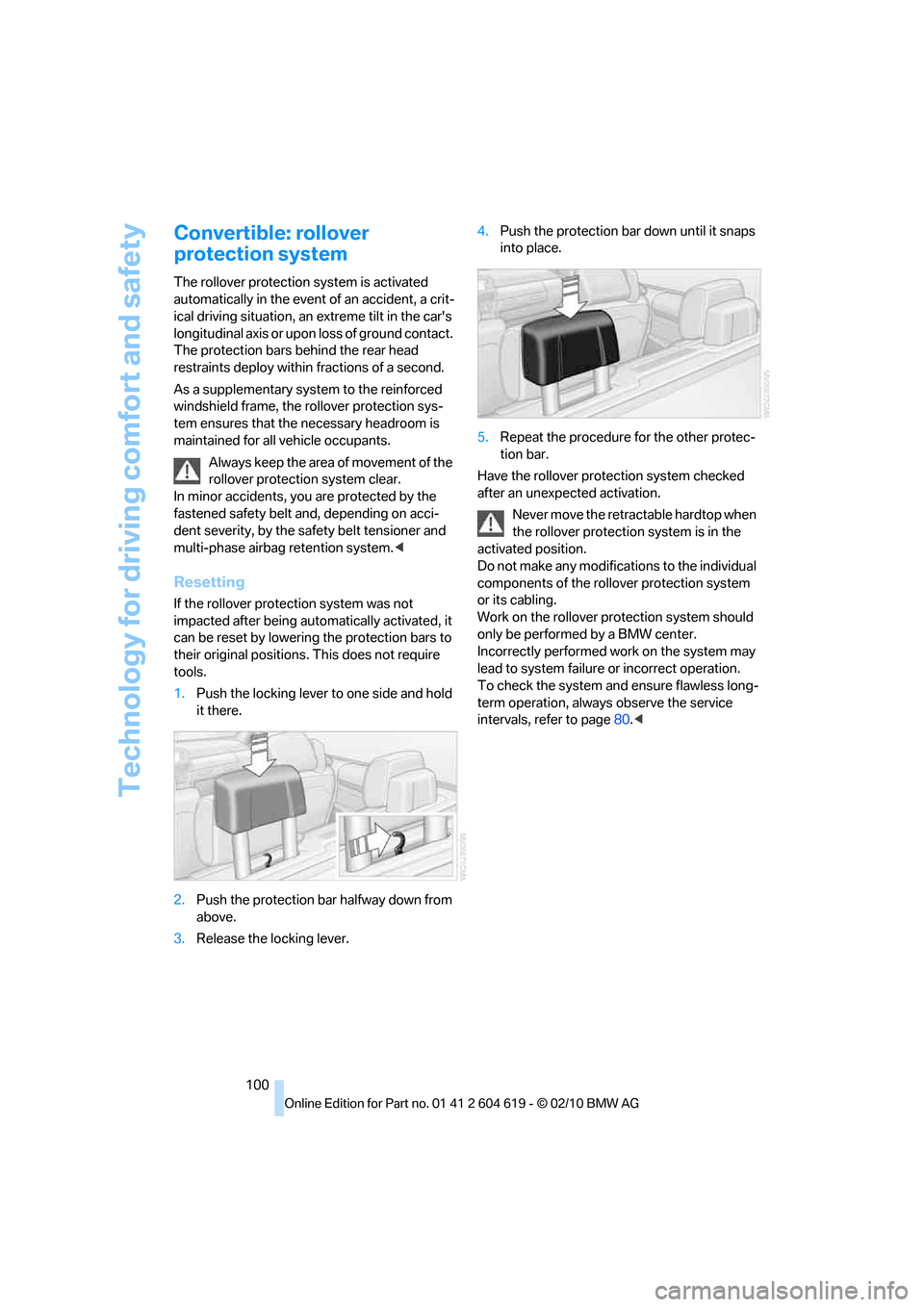
1.Push the locking lever to one side and hold
it there.
2.Push the protection bar halfway down from
above.
3.Release the locking lever.4.Push the protection bar down until it snaps
into place.
5.Repeat the procedure for the other protec-
tion bar.
Have the rollover protection system checked
after an unexpected activation.
Never move the retractable hardtop when
the rollover protection system is in the
activated position.
Do not make any modifications to the individual
components of the rollover protection system
or its cabling.
Work on the rollover protection system should
only be performed by a BMW center.
Incorrectly performed work on the system may
lead to system failure or incorrect operation.
To check the system and ensure flawless long-
term operation, always observe the service
intervals, refer to page80.<
Page 110 of 278
Climate
108
Convertible program
The Convertible program is active when the
hardtop is open and the AUTO program is
switched on. In the Convertible program, the
automatic climate control is optimized for driv-
ing with the hardtop open. In addition, the air
volume is increased as vehicle speed increases.
The effectiveness of the Convertible pro-
gram can be enhanced considerably by
installing the wind deflector.<
Adjusting air volume manually
To be able to manually adjust the air volume,
switch off the AUTO program first.
Press the left side of the button
to reduce the air volume. Press
the right side of the button to
increase it.
The air volume may be reduced or the blower
may be switched off entirely to save on battery
power. The display remains the same.
Automatic recirculated-air control
AUC/Recirculated-air mode
You can respond to unpleasant odors or pollut-
ants in the immediate environment by tempo-
rarily suspending the supply of outside air. The
system then recirculates the air currently within
the vehicle.
Press the button repeatedly to
select an operating mode:
>LED off: outside air flows in continuously.
>Left-hand LED on, AUC mode: a sensor
detects pollutants in the outside air and
controls the shut-off automatically.
>Right-hand LED on, recirculated-air mode:
the supply of outside air is permanently
shut off. If the windows fog over, switch off
recirculated-air mode and increase the air
volume, if necessary. Make sure that air can
flow onto the windshield.
The recirculated-air mode should not be
used over an extended period of time;
otherwise, the air quality inside the car will dete-
riorate continuously.<
Via the button on the steering wheel
You can switch quickly between the recircu-
lated-air mode and the previous mode using a
button
on the steering wheel, refer to page11.
ALL program
Press the button.
The current temperature setting
on the driver's side is transferred to
the front passenger side.
If the temperature setting on the driver's side is
changed, the temperature on the front passen-
ger side is changed as well.
The program is switched off when the setting is
adjusted on the front passenger side or the but-
ton is pressed again.
Defrosting windows and removing
condensation
Press the button.
Quickly removes ice and conden-
sation from the windshield and
front side windows.
For this purpose, also switch on the cooling
function.
Switching cooling function on/off
The passenger compartment can only be
cooled while the engine is running.
Press the button.
The air is cooled and dehumidified
and – depending on the tempera-
ture setting – warmed again.
Depending on the weather, the windshield may
fog up briefly when the engine is started.
Pressing the AUTO button automatically
switches on the cooling function.
Rear window defroster
Press the button.
The defroster is switched off auto-
matically after a certain time.
Depending on your vehicle's equipment, the
upper wires serve as an antenna and are not
part of the rear window defroster.
Page 116 of 278
Practical interior accessories
114
Calibrating the digital compass
The digital compass must be calibrated in the
following situations:
>An incorrect compass direction is shown.
>The compass direction shown does not
change although the direction of travel
does.
>Not all compass directions are shown.
Procedure
1.Make sure that no large metal objects or
overhead power lines are in the vicinity of
your vehicle and that you have enough
space to drive in a circle.
2.Set the currently valid compass zone.
3.Convertible: ensure that the retractable
hardtop is fully closed.
4.Press the adjustment button for approx. 6-7
seconds to call up C. Then drive in at least
one full circle at a speed of no more than
4mph or 7km/h.
If calibration is successful, the display
changes from C to a compass direction.
5.Convertible: open the retractable hardtop
fully and repeat step 4.
Setting right-hand/left-hand steering
Your digital compass is factory-set to right-
hand or left-hand steering, in accordance with
your vehicle.
Set the language
You can set the language of the display:
Press the adjustment button for approx.
12-13 seconds. Briefly press the adjustment
button again to switch between English, "E",
and German, "O".
The setting is automatically saved after approx.
10 seconds.
Coupe:
Roller sun blind*
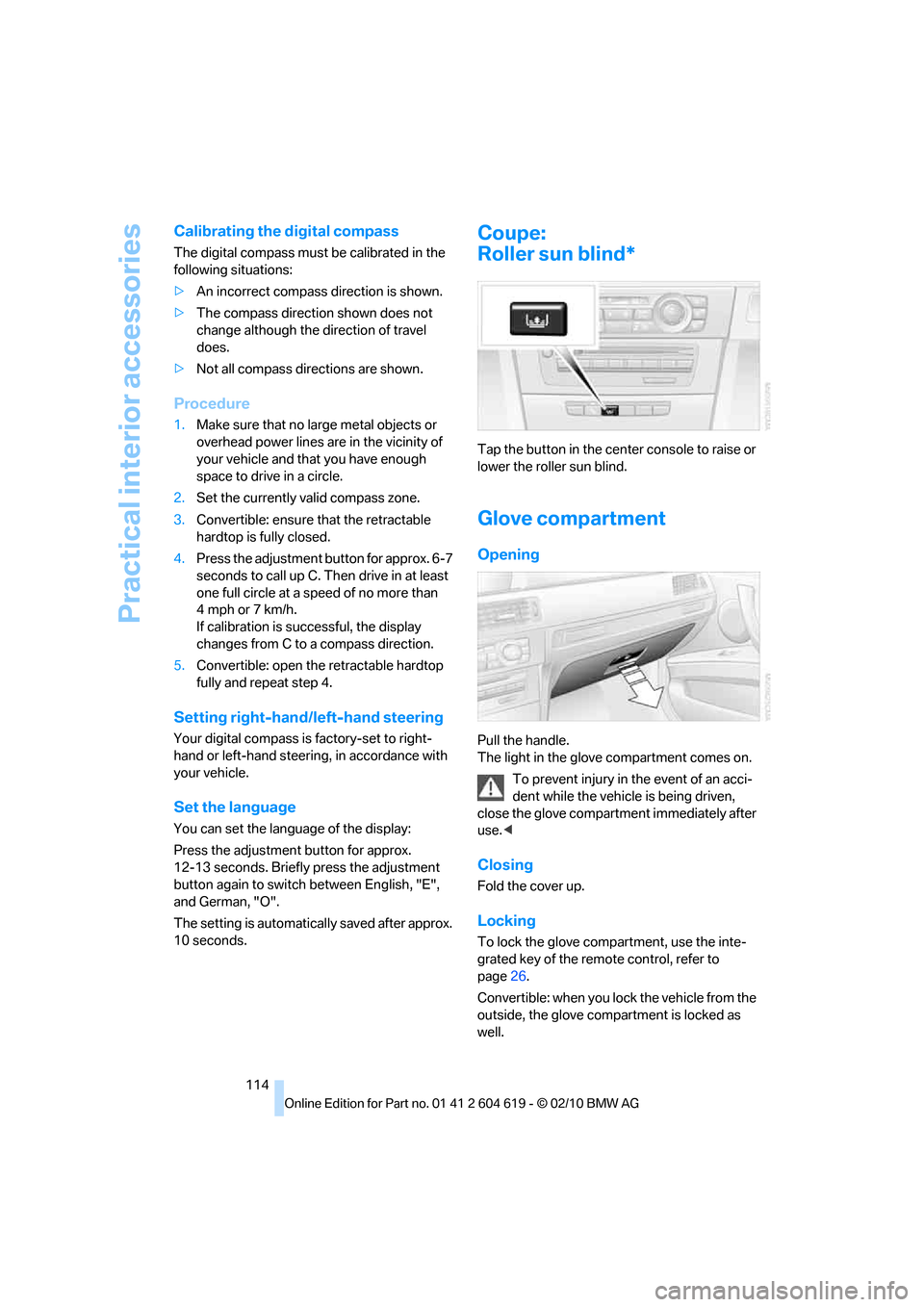
Tap the button in the center console to raise or
lower the roller sun blind.
Glove compartment
Opening
Pull the handle.
The light in the glove compartment comes on.
To prevent injury in the event of an acci-
dent while the vehicle is being driven,
close the glove compartment immediately after
use.<
Closing
Fold the cover up.
Locking
To lock the glove compartment, use the inte-
grated key of the remote control, refer to
page26.
Convertible: when you lock the vehicle from the
outside, the glove compartment is locked as
well.
Page 121 of 278
Controls
119Reference
At a glance
Driving tips
Communications
Navigation
Entertainment
Mobility
Convertible:
Cargo loading
Enlarging the cargo area
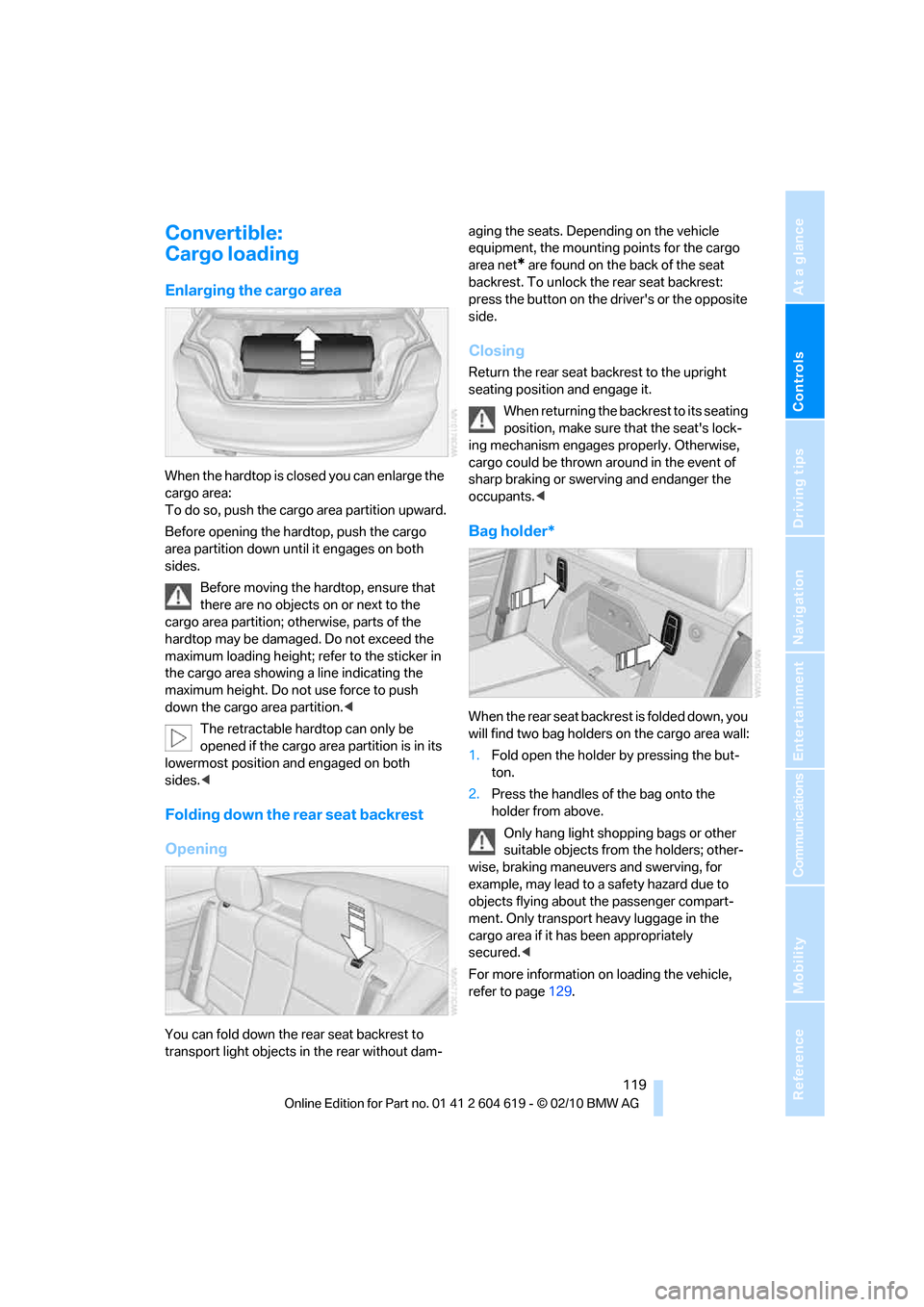
When the hardtop is closed you can enlarge the
cargo area:
To do so, push the cargo area partition upward.
Before opening the hardtop, push the cargo
area partition down until it engages on both
sides.
Before moving the hardtop, ensure that
there are no objects on or next to the
cargo area partition; otherwise, parts of the
hardtop may be damaged. Do not exceed the
maximum loading height; refer to the sticker in
the cargo area showing a line indicating the
maximum height. Do not use force to push
down the cargo area partition.<
The retractable hardtop can only be
opened if the cargo area partition is in its
lowermost position and engaged on both
sides.<
Folding down the rear seat backrest
Opening
You can fold down the rear seat backrest to
transport light objects in the rear without dam-aging the seats. Depending on the vehicle
equipment, the mounting points for the cargo
area net
* are found on the back of the seat
backrest. To unlock the rear seat backrest:
press the button on the driver's or the opposite
side.
Closing
Return the rear seat backrest to the upright
seating position and engage it.
When returning the backrest to its seating
position, make sure that the seat's lock-
ing mechanism engages properly. Otherwise,
cargo could be thrown around in the event of
sharp braking or swerving and endanger the
occupants.<
Bag holder*
W h e n t h e r e a r s e a t b a c k r e s t i s f o l d e d d o w n , y o u
will find two bag holders on the cargo area wall:
1.Fold open the holder by pressing the but-
ton.
2.Press the handles of the bag onto the
holder from above.
Only hang light shopping bags or other
suitable objects from the holders; other-
wise, braking maneuvers and swerving, for
example, may lead to a safety hazard due to
objects flying about the passenger compart-
ment. Only transport heavy luggage in the
cargo area if it has been appropriately
secured.<
For more information on loading the vehicle,
refer to page129.
Page 132 of 278
Things to remember when driving
130
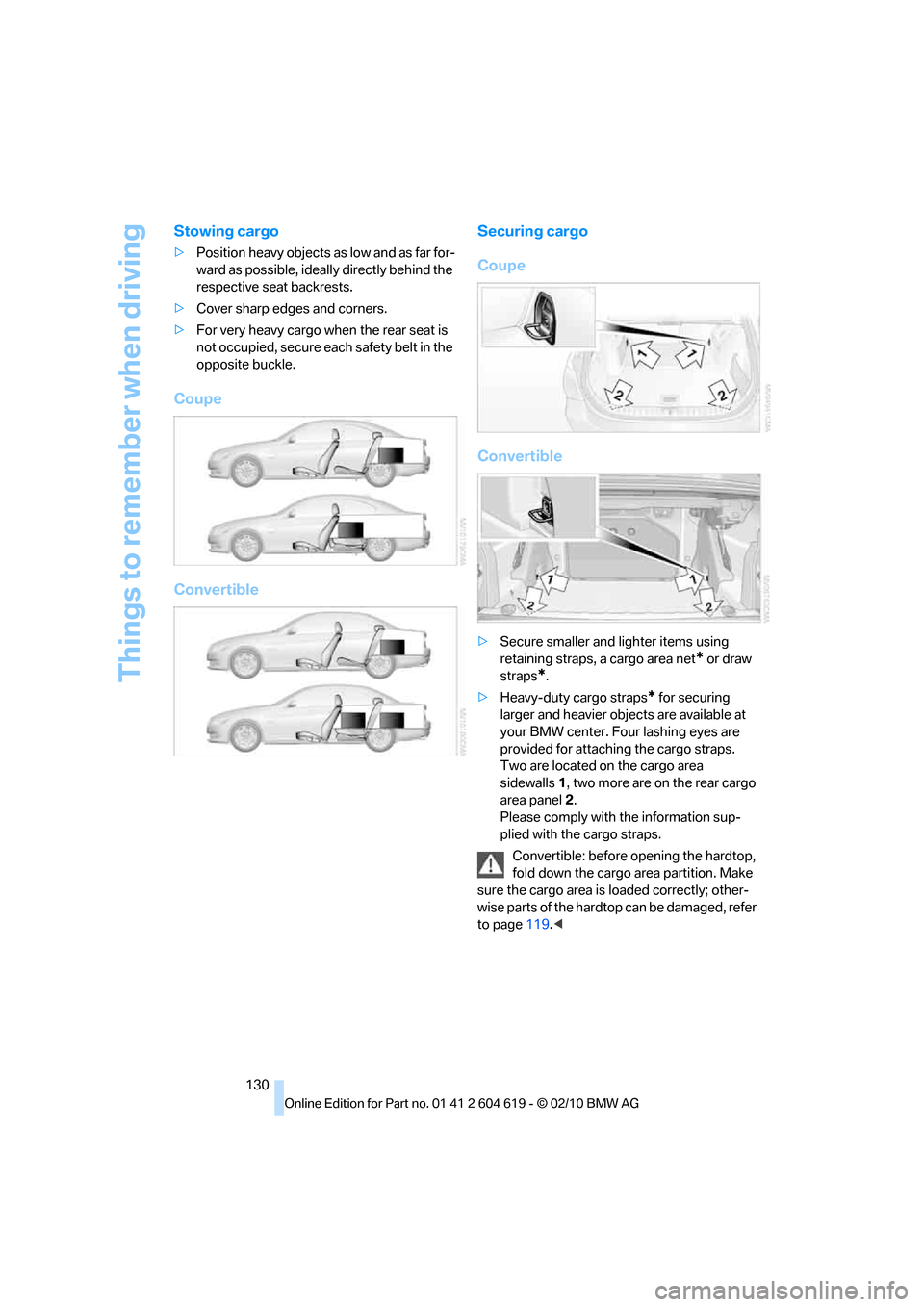
Stowing cargo
>Position heavy objects as low and as far for-
ward as possible, ideally directly behind the
respective seat backrests.
>Cover sharp edges and corners.
>For very heavy cargo when the rear seat is
not occupied, secure each safety belt in the
opposite buckle.
Coupe
ConvertibleSecuring cargo
Coupe
Convertible
>Secure smaller and lighter items using
retaining straps, a cargo area net
* or draw
straps
*.
>Heavy-duty cargo straps
* for securing
larger and heavier objects are available at
your BMW center. Four lashing eyes are
provided for attaching the cargo straps.
Two are located on the cargo area
sidewalls1, two more are on the rear cargo
area panel2.
Please comply with the information sup-
plied with the cargo straps.
Convertible: before opening the hardtop,
fold down the cargo area partition. Make
sure the cargo area is loaded correctly; other-
wise parts of the hardtop can be damaged, refer
to page119.<
Page 232 of 278
Care
230
Sports automatic transmission with
double clutch
Before driving into an automatic car wash, per-
form the following steps to ensure that the vehi-
cle can roll:
1.Insert the remote control into the ignition
lock, even with Comfort Access.
2.Engage transmission position N.
3.Release the parking brake.
4.Switch off the engine.
5.Leave the remote control in the ignition lock
so that the vehicle can roll.
The transmission is switched into position P:
>automatically after approx. 30 minutes
>if you remove the infrared remote control
from the ignition lock
Steam jets/high-pressure washers
When using steam jets or high-pressure
washers, ensure that you maintain suffi-
cient clearance to the vehicle and do not exceed
a temperature of 1407/606.
Insufficient clearance or excessive pressure or
temperature can lead to component damage or
water penetration. Follow the operating instruc-
tions of the high-pressure washer.<
When using high-pressure washers, do
not spray against the sensors and cam-
eras, e.g. of the Park Distance Control or Rear
View Camera, for an extended period and main-
tain a distance of at least 1 ft/30 cm.<
Manual car wash
When washing the vehicle by hand, use large
quantities of water and car shampoo if neces-
sary. Clean the vehicle with a sponge or wash-
ing brush, applying light pressure only.
Before cleaning the windshield, deacti-
vate the rain sensor or switch off the igni-
tion to prevent unintentional activation of the
wipers.<
Observe local regulations pertaining to
washing vehicles by hand.<
Headlamps
Do not rub them dry and do not use abrasive or
corrosive cleaning agents.
Loosen dirt, e.g. insects, with shampoo or
insect remover and wash away with copious
quantities of water.
Thaw ice with a windshield deicer and do not
use an ice scraper.
Windows
Clean the inside and outside surfaces of the
windows and the mirrors with window cleaner.
Do not clean the mirrors with cleaners
containing quartz.<
Convertible: retractable hardtop
Proceed as you would in a normal car wash.
When you open a wet hardtop, water
drops may run into the cargo area. If nec-
essary, remove items from the cargo area
beforehand to avoid water stains or soiling.<
Paintwork care
Regular care contributes to value retention and
protects the paintwork against the long-term
effects of damaging substances.
Region-specific environmental influences can
damage the vehicle paintwork. Therefore, it is
important to adapt the frequency and scope of
car care accordingly.
Immediately remove aggressive materials such
as spilled fuel, oil, grease, brake fluid, tree sap or
bird droppings to prevent damage to the paint-
work.
Repairing paintwork damage
Immediately repair scratches or similar
damage, such as that caused by stones
hitting the vehicle, where necessary to prevent
rusting.<
BMW recommends having paintwork damage
repaired by a professional paint repair work-
shop according to BMW specifications using
original BMW paint materials.
Page 262 of 278
Everything from A to Z
260 Care229
– automatic car washes229
– care products229
– carpets232
– CD/DVD drives232
– chrome parts231
– displays232
– exterior229
– fine wood parts232
– headlamps230
– high-pressure washer230
– interior231
– leather231
– light-alloy wheels231
– paintwork230
– plastic parts232
– retractable hardtop230
– rubber seals231
– safety belts232
– sensors and cameras232
– upholstery and cloth
trim231
– washing the car
manually230
– windows230
Cargo, securing130
Cargo area
– capacity249
– Comfort Access34
– folding up the floor
panel120
– lamp, refer to Interior
lamps105
– opening from inside31
– opening from outside31
Cargo loading129
– securing cargo130
– stowing cargo130
– vehicle129
Car jack
– jacking points236
Car key, refer to Integrated
key/remote control26
Car phone
– installation location, refer to
Center armrest115
– refer to separate Owner's
ManualCar phone, refer to
Telephone184
Car radio, refer to Radio157
Car shampoo232
Catalytic converter, refer to
Hot exhaust system127
CD, audio playback165
CD changer165,169
– controls154
– fast forward/reverse167
– filling or emptying the
magazine170
– random play sequence166
– selecting a track165
– switching on/off154
– tone control154
– volume154
CD player165
– controls154
– fast forward/reverse167
– random play sequence166
– selecting a track165
– switching on/off154
– tone control154
– volume154
Center armrest115
Center brake lamp
– replacing bulb235
Center console, refer to
Around the center
console14
Central locking
– from inside30
– from outside27
Central locking system27
– Comfort Access33
– hotel function31
– setting unlocking
characteristics28
Changes, technical, refer to
For your own safety5
Changing bulbs, refer to
Lamps and bulbs233
Changing gears62
Changing the language on the
Control Display87
Changing the measurement
units on the Control
Display80Changing wheels236
Chassis number, refer to
Engine compartment223
Check Control84
Child restraint fixing system
LATCH53
Child restraint systems52
Child seats, refer to
Transporting children
safely52
Chrome parts232
Chrome polish232
Cigarette lighter, refer to
Lighter117
Cleaning headlamps66
– washer fluid66
Cleaning your BMW, refer to
Care229
Climate control
– automatic air
distribution
107
Clock75
– 12h/24h mode83
– setting the time and date83
– setting time83
Closing
– from inside30
– from outside27
Clothes hooks116
Cockpit10
Cold start, refer to Starting the
engine56
Comfort Access33
– replacing the battery35
Comfort access, refer to
Comfort Access33
Comfort area, refer to Around
the center console14
Compartment for remote
control, refer to Ignition
lock55
Compass113
Computer76
– displays on Control
Display77
Computer, refer to iDrive16
Concierge service199
Condensation, refer to When
the vehicle is parked128
Page 263 of 278
Reference 261
At a glance
Controls
Driving tips
Communications
Navigation
Entertainment
Mobility
Condition Based Service
CBS227
Configuring settings, refer to
Personal Profile26
Confirmation signals for
locking/unlocking the
vehicle29
Congestion
– refer to Route, bypassing
sections145
Connecting vacuum cleaner,
refer to Connecting
electrical appliances118
Consumption, refer to
Average fuel
consumption77
Contacts
– creating196
Control Center, refer to
iDrive16
Control Display, refer to
iDrive16
– adjusting brightness87
– switching on/off19
Controller, refer to iDrive16
Controls and displays10
Control unit, refer to iDrive16
Convenient loading in
Convertible28
Convenient operation
– glass roof28
– glass roof with Comfort
Access34
– retractable hardtop28
– windows28
– windows with Comfort
Access34
Convertible
– bag holder119
– convenient loading28
– enlarging cargo area119
– folding down rear
backrest119
– retractable hardtop38
– rollover protection
system100
– securing cargo130
– stowing cargo130Coolant226
– checking level226
Coolant temperature76
Cooling, maximum107
Cooling fluid, refer to
Coolant226
Cooling system, refer to
Coolant226
Copyright2
Corner-illuminating lamps
– replacing bulbs234
Corner-illuminating lamps,
refer to Adaptive light
control102
Cornering lamps, refer to
Adaptive light control102
Correct tires220
Country codes DVD167
Courtesy lamps, refer to
Interior lamps105
Criteria for route144
Cross-hairs in navigation140
Cruise control66
– active68
– malfunction68
Cruise control, refer to Active
cruise control68
Cruising range77
Cupholders116
Curb weight, refer to
Weights249
Current playback
– external devices180
– of music collection174
Customer Relations201
D
Dashboard, refer to
Cockpit10
Dashboard, refer to
instrument cluster12
Dashboard lighting, refer to
Instrument lighting105
Data, technical246
– capacities250
– dimensions247
– engine246
– weights249Data memory228
Data transfer202
Date
– date format84
– setting84
Daytime running lights102
– replacing bulbs234
DBC Dynamic Brake
Control89
Deactivating front passenger
airbags98
Deadlocking, refer to
Locking28
Defect
– door lock30
– fuel filler flap206
– glass roof38
Destination, entering by town/
city name135
Destination address
– entering135,141
Destination entry via BMW
Assist140
Destination for navigation
– entering by voice141
– entering via map140
– entry135
– home address138
– manual entry135
Destination guidance144
– bypassing a route
section145
– changing specified
route144
– continuing144
– starting144
– voice instructions146
– volume of voice
instructions146
Digital clock75
Digital compass113
Digital radio, refer to HD
Radio158
Dimensions247
Directional indicators, refer to
Turn signals64
Direction instructions, refer to
Voice instructions146
Page 270 of 278
Everything from A to Z
268 Rear seats
– adjusting head restraints46
– folding down backrests118
Rear ventilation109
Rearview mirror, refer to
Mirrors50
Rear window defroster108
Rear window roller blind, refer
to Roller sun blinds114
Receiving level of mobile
phone, refer to Status
information19
Reception
– quality158
– radio station158
Recirculated-air mode108
Recirculation of air, refer to
Recirculated-air mode108
Reclining seat, refer to
Backrest43
Refueling206
Releasing
– hood222
Remaining distance, refer to
Cruising range77
Remote control26
– battery renewal35
– Comfort Access33
– garage door opener111
– malfunction29,35
– removing from the ignition
lock55
– service data227
– trunk lid28
Replacement fuses, refer to
Fuses237
Replacement remote
control26
Replacing bulbs, refer to
Lamps and bulbs233
Replacing tires220
Replacing tires, refer to New
wheels and tires220
Reporting safety defects7
Reserve warning, refer to Fuel
gauge76Reset, refer to Resetting tone
settings156
Restraint systems
– for children52
– refer to Safety belts49
Retractable hardtop38
– care, refer to Caring for your
vehicle brochure
– convenient operation28
– opening and closing39
– remote control28
Reverse
– CD changer167
– CD player
167
Reverse gear61
– automatic transmission with
Steptronic58
– manual transmission58
Road map146
Roadside
Assistance199,238
Roadside parking lamps103
– replacing bulbs234
Roadworthiness test, refer to
Service requirements80
Roller sun blinds114
Rollover protection system,
Convertible100
– resetting100
Roof load capacity249
Roof-mounted luggage
rack131
Rope, refer to Tow-starting,
towing away242
Rotary/pushbutton, refer to
iDrive16
Route144,145
– bypassing sections145
– changing144,145
– changing criteria144
– displaying streets or towns/
cities145
– map view146
– selecting144
Route instructions, refer to
Destination guidance
through voice
instructions146Route map, refer to Map
view146
Route section, changing145
Route selection144
RSC Runflat System
Component, refer to Run-
flat tires220
Runflat System Component
RSC, refer to Run-flat
tires220
Run-flat tires220
– continuing driving with a
damaged tire93
– flat tire93
– Flat Tire Monitor93
– Inflation pressure208
– new tires220
– tire replacement220
– winter tires221
Runflat tyres, refer to Run-flat
tires220
S
Safety-belt height
adjustment49
Safety belts49
– belt hand-over49
– damage49
– indicator/warning lamp49
– reminder49
– sitting safely42
Safety systems
– airbags98
– Antilock Brake System
ABS89
– brake system89
– driving stability control89
– Dynamic Stability Control
DSC89
– rollover protection system,
Convertible100
– safety belts49
Safety tires, refer to Run-flat
tires220
Page 273 of 278
Reference 271
At a glance
Controls
Driving tips
Communications
Navigation
Entertainment
Mobility
Temperature display
– outside temperature75
– outside temperature
warning75
– setting the units80
Tempomat, refer to Cruise
control66
Tensioning straps, refer to
Securing cargo130
The individual vehicle5
Third brake lamp, refer to
Center brake lamp235
Through-loading opening with
integrated transport
bag121
Through-loading system118
Tilt alarm sensor33
Tilt function, passenger side
mirror50
Timer, refer to Preselecting
switch-on times110
Tire inflation pressure208
– loss93,94
Tire pressure monitoring,
refer to Flat Tire Monitor92
Tire Pressure Monitor
TPM94
– resetting the system95
– system limitations94
– warning lamp95
Tire puncture, refer to Flat Tire
Monitor93
Tire Quality Grading218Tires
– age218,220
– air loss95
– breaking in126
– changing, refer to Changing
wheels236
– condition219
– damage219
– inflation pressure208
– labels218
– minimum tread depth219
– new wheels and tires220
– pressure monitoring, refer to
Flat Tire Monitor92
– pressure monitoring, refer to
Tire Pressure Monitor
TPM94
– puncture93
– replacing220
– size218
– storage221
– tread depth219
– wear indicators, refer to
Minimum tread depth219
– wheel/tire combination, refer
to Correct wheels and
tires220
– winter tires221
TMC station, refer to Traffic
bulletins148
Tone
– control154
– middle setting156
Tools, refer to Onboard
vehicle tool kit233
Top, refer to Retractable
hardtop38
Top 50 of music
collection174
Torque, refer to Engine
data246
Tow bar242
Tow fitting241
– screw thread241Tow fittings for tow-starting
and towing away241
Towing241
– car with automatic
transmission241
– methods242
– with 7-gear Sports
automatic transmission with
double clutch242
Towing and tow-starting241
Town/city, for navigation135
Tow rope242
Tow-starting241,243
TPM, refer to Tire Pressure
Monitor94
Track
– selecting on CD165
Traction control, refer to
Dynamic Stability Control
DSC89
Traffic bulletins
– categories149
Traffic bulletins, filtering149
Traffic bulletins for
navigation148
– display in map view149
– during destination
guidance150
Traffic jam
– displaying traffic
bulletins148
Transmission
– 7-gear Sports automatic
transmission with double
clutch60
– automatic transmission with
Steptronic58
– idle position61
– Launch Control64
– manually unlocking parking
lock63
– manual transmission57
– overriding selector lever lock
for automatic transmission
with Steptronic59
– reverse gear61