Light bulbs BMW 328I CONVERTIBLE 2011 E94 Owner's Manual
[x] Cancel search | Manufacturer: BMW, Model Year: 2011, Model line: 328I CONVERTIBLE, Model: BMW 328I CONVERTIBLE 2011 E94Pages: 278, PDF Size: 8.23 MB
Page 235 of 278
Mobility
233Reference
At a glance
Controls
Driving tips
Communications
Navigation
Entertainment
Replacing components
Onboard vehicle tool kit
Coupe
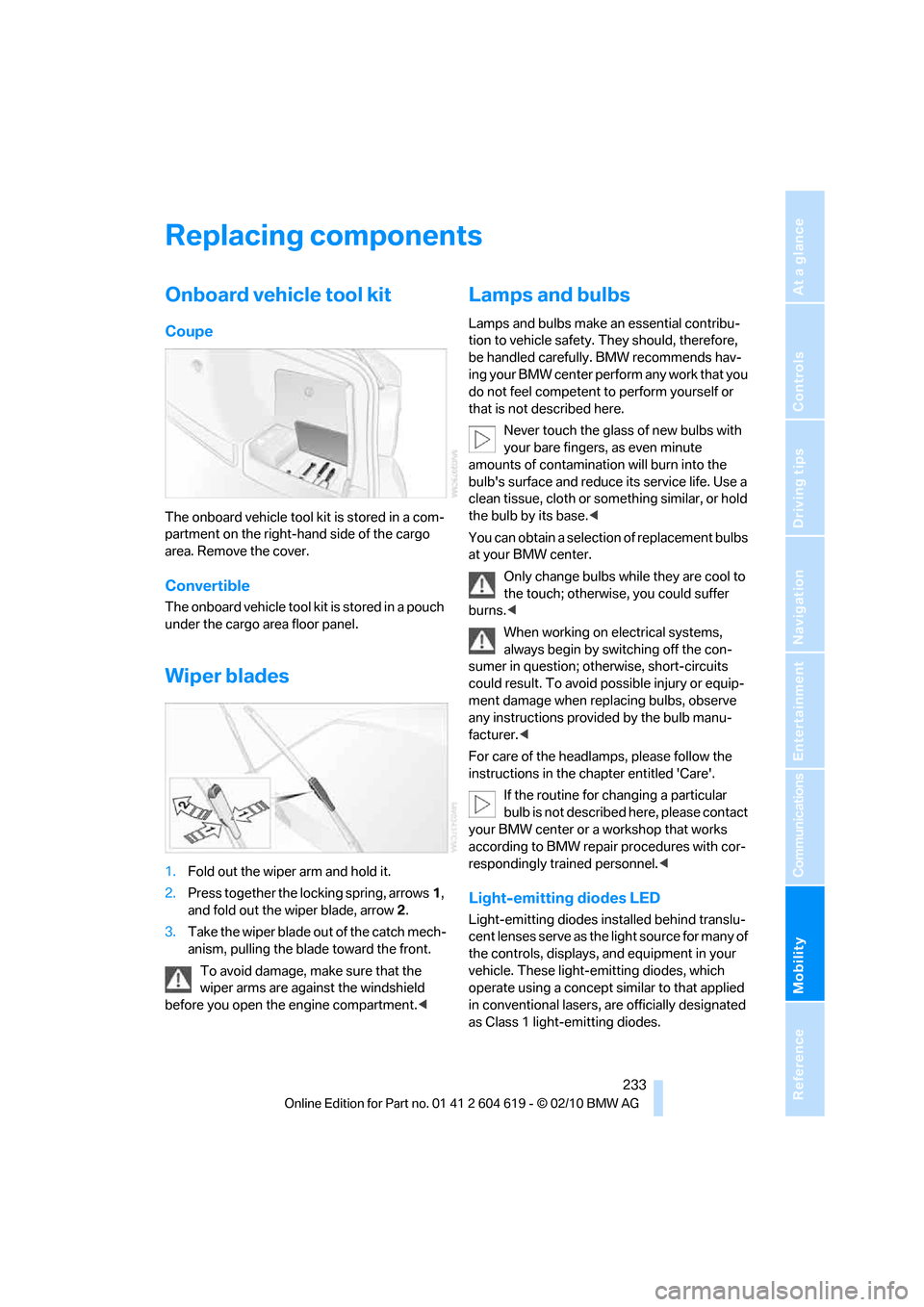
The onboard vehicle tool kit is stored in a com-
partment on the right-hand side of the cargo
area. Remove the cover.
Convertible
The onboard vehicle tool kit is stored in a pouch
under the cargo area floor panel.
Wiper blades
1.Fold out the wiper arm and hold it.
2.Press together the locking spring, arrows1,
and fold out the wiper blade, arrow2.
3.Take the wiper blade out of the catch mech-
anism, pulling the blade toward the front.
To avoid damage, make sure that the
wiper arms are against the windshield
before you open the engine compartment.<
Lamps and bulbs
Lamps and bulbs make an essential contribu-
tion to vehicle safety. They should, therefore,
be handled carefully. BMW recommends hav-
ing your BMW center perform any work that you
do not feel competent to perform yourself or
that is not described here.
Never touch the glass of new bulbs with
your bare fingers, as even minute
amounts of contamination will burn into the
bulb's surface and reduce its service life. Use a
clean tissue, cloth or something similar, or hold
the bulb by its base.<
You can obtain a selection of replacement bulbs
at your BMW center.
Only change bulbs while they are cool to
the touch; otherwise, you could suffer
burns.<
When working on electrical systems,
always begin by switching off the con-
sumer in question; otherwise, short-circuits
could result. To avoid possible injury or equip-
ment damage when replacing bulbs, observe
any instructions provided by the bulb manu-
facturer.<
For care of the headlamps, please follow the
instructions in the chapter entitled 'Care'.
If the routine for changing a particular
bulb is not described here, please contact
your BMW center or a workshop that works
according to BMW repair procedures with cor-
respondingly trained personnel.<
Light-emitting diodes LED
Light-emitting diodes installed behind translu-
c e n t l e n s e s s e r v e a s t h e l i g h t s o u r c e f o r m a n y o f
the controls, displays, and equipment in your
vehicle. These light-emitting diodes, which
operate using a concept similar to that applied
in conventional lasers, are officially designated
as Class 1 light-emitting diodes.
Page 236 of 278
Replacing components
234 Do not remove the covers or expose the
eyes directly to the unfiltered light source
for several hours; otherwise, this could cause
irritation of the retina.<
Headlight lenses
In cool or humid weather, condensation may
form on the interior of outside lamps. When the
light is switched on, the condensation will dis-
appear after a short time. The headlight lenses
do not need to be replaced.
At high humidities, e.g. water droplets may form
in the lights; have these checked by your BMW
center.,
Xenon lamps
These bulbs have a very long service life and are
highly unlikely to fail. If a xenon lamp fails never-
theless, switch on the fog lamps and continue
the journey with great care, provided that local
legislation does not prohibit this.
Have any work on the xenon lamp system,
including bulb replacements, performed
only by a BMW center or a workshop that works
according to BMW repair procedures with cor-
respondingly trained personnel. Otherwise, if
such work is carried out improperly, the high
voltage in the system presents the danger of
fatal injuries.<
Access to the lamps
1.Switch off the lamps and take the remote
control out of the ignition lock.
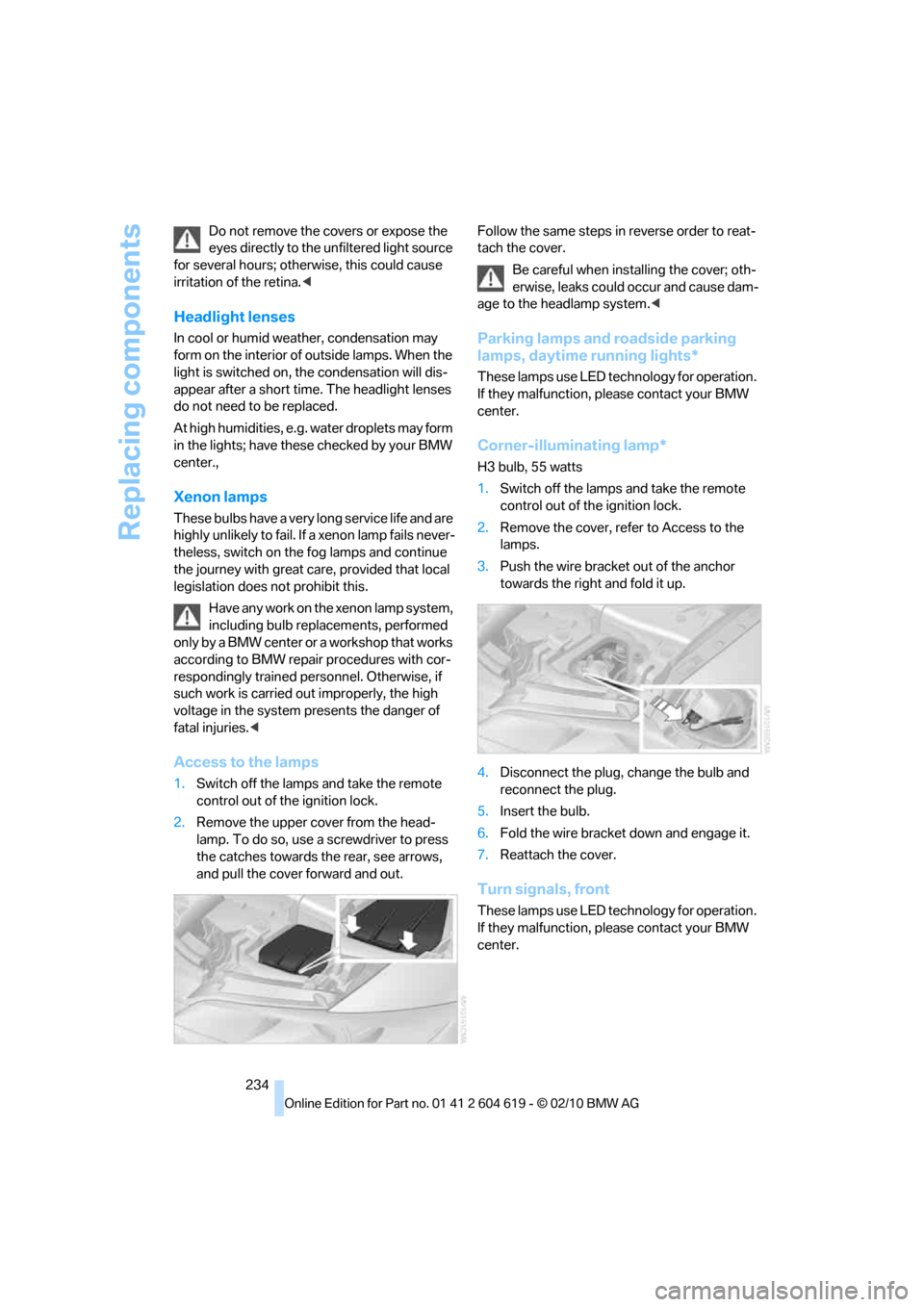
2.Remove the upper cover from the head-
lamp. To do so, use a screwdriver to press
the catches towards the rear, see arrows,
and pull the cover forward and out.Follow the same steps in reverse order to reat-
tach the cover.
Be careful when installing the cover; oth-
erwise, leaks could occur and cause dam-
age to the headlamp system.<
Parking lamps and roadside parking
lamps, daytime running lights*
These lamps use LED technology for operation.
If they malfunction, please contact your BMW
center.
Corner-illuminating lamp*
H3 bulb, 55 watts
1.Switch off the lamps and take the remote
control out of the ignition lock.
2.Remove the cover, refer to Access to the
lamps.
3.Push the wire bracket out of the anchor
towards the right and fold it up.
4.Disconnect the plug, change the bulb and
reconnect the plug.
5.Insert the bulb.
6.Fold the wire bracket down and engage it.
7.Reattach the cover.
Turn signals, front
These lamps use LED technology for operation.
If they malfunction, please contact your BMW
center.
Page 262 of 278
Everything from A to Z
260 Care229
– automatic car washes229
– care products229
– carpets232
– CD/DVD drives232
– chrome parts231
– displays232
– exterior229
– fine wood parts232
– headlamps230
– high-pressure washer230
– interior231
– leather231
– light-alloy wheels231
– paintwork230
– plastic parts232
– retractable hardtop230
– rubber seals231
– safety belts232
– sensors and cameras232
– upholstery and cloth
trim231
– washing the car
manually230
– windows230
Cargo, securing130
Cargo area
– capacity249
– Comfort Access34
– folding up the floor
panel120
– lamp, refer to Interior
lamps105
– opening from inside31
– opening from outside31
Cargo loading129
– securing cargo130
– stowing cargo130
– vehicle129
Car jack
– jacking points236
Car key, refer to Integrated
key/remote control26
Car phone
– installation location, refer to
Center armrest115
– refer to separate Owner's
ManualCar phone, refer to
Telephone184
Car radio, refer to Radio157
Car shampoo232
Catalytic converter, refer to
Hot exhaust system127
CD, audio playback165
CD changer165,169
– controls154
– fast forward/reverse167
– filling or emptying the
magazine170
– random play sequence166
– selecting a track165
– switching on/off154
– tone control154
– volume154
CD player165
– controls154
– fast forward/reverse167
– random play sequence166
– selecting a track165
– switching on/off154
– tone control154
– volume154
Center armrest115
Center brake lamp
– replacing bulb235
Center console, refer to
Around the center
console14
Central locking
– from inside30
– from outside27
Central locking system27
– Comfort Access33
– hotel function31
– setting unlocking
characteristics28
Changes, technical, refer to
For your own safety5
Changing bulbs, refer to
Lamps and bulbs233
Changing gears62
Changing the language on the
Control Display87
Changing the measurement
units on the Control
Display80Changing wheels236
Chassis number, refer to
Engine compartment223
Check Control84
Child restraint fixing system
LATCH53
Child restraint systems52
Child seats, refer to
Transporting children
safely52
Chrome parts232
Chrome polish232
Cigarette lighter, refer to
Lighter117
Cleaning headlamps66
– washer fluid66
Cleaning your BMW, refer to
Care229
Climate control
– automatic air
distribution
107
Clock75
– 12h/24h mode83
– setting the time and date83
– setting time83
Closing
– from inside30
– from outside27
Clothes hooks116
Cockpit10
Cold start, refer to Starting the
engine56
Comfort Access33
– replacing the battery35
Comfort access, refer to
Comfort Access33
Comfort area, refer to Around
the center console14
Compartment for remote
control, refer to Ignition
lock55
Compass113
Computer76
– displays on Control
Display77
Computer, refer to iDrive16
Concierge service199
Condensation, refer to When
the vehicle is parked128
Page 263 of 278
Reference 261
At a glance
Controls
Driving tips
Communications
Navigation
Entertainment
Mobility
Condition Based Service
CBS227
Configuring settings, refer to
Personal Profile26
Confirmation signals for
locking/unlocking the
vehicle29
Congestion
– refer to Route, bypassing
sections145
Connecting vacuum cleaner,
refer to Connecting
electrical appliances118
Consumption, refer to
Average fuel
consumption77
Contacts
– creating196
Control Center, refer to
iDrive16
Control Display, refer to
iDrive16
– adjusting brightness87
– switching on/off19
Controller, refer to iDrive16
Controls and displays10
Control unit, refer to iDrive16
Convenient loading in
Convertible28
Convenient operation
– glass roof28
– glass roof with Comfort
Access34
– retractable hardtop28
– windows28
– windows with Comfort
Access34
Convertible
– bag holder119
– convenient loading28
– enlarging cargo area119
– folding down rear
backrest119
– retractable hardtop38
– rollover protection
system100
– securing cargo130
– stowing cargo130Coolant226
– checking level226
Coolant temperature76
Cooling, maximum107
Cooling fluid, refer to
Coolant226
Cooling system, refer to
Coolant226
Copyright2
Corner-illuminating lamps
– replacing bulbs234
Corner-illuminating lamps,
refer to Adaptive light
control102
Cornering lamps, refer to
Adaptive light control102
Correct tires220
Country codes DVD167
Courtesy lamps, refer to
Interior lamps105
Criteria for route144
Cross-hairs in navigation140
Cruise control66
– active68
– malfunction68
Cruise control, refer to Active
cruise control68
Cruising range77
Cupholders116
Curb weight, refer to
Weights249
Current playback
– external devices180
– of music collection174
Customer Relations201
D
Dashboard, refer to
Cockpit10
Dashboard, refer to
instrument cluster12
Dashboard lighting, refer to
Instrument lighting105
Data, technical246
– capacities250
– dimensions247
– engine246
– weights249Data memory228
Data transfer202
Date
– date format84
– setting84
Daytime running lights102
– replacing bulbs234
DBC Dynamic Brake
Control89
Deactivating front passenger
airbags98
Deadlocking, refer to
Locking28
Defect
– door lock30
– fuel filler flap206
– glass roof38
Destination, entering by town/
city name135
Destination address
– entering135,141
Destination entry via BMW
Assist140
Destination for navigation
– entering by voice141
– entering via map140
– entry135
– home address138
– manual entry135
Destination guidance144
– bypassing a route
section145
– changing specified
route144
– continuing144
– starting144
– voice instructions146
– volume of voice
instructions146
Digital clock75
Digital compass113
Digital radio, refer to HD
Radio158
Dimensions247
Directional indicators, refer to
Turn signals64
Direction instructions, refer to
Voice instructions146
Page 267 of 278
Reference 265
At a glance
Controls
Driving tips
Communications
Navigation
Entertainment
Mobility
Instructions for navigation
system, refer to Voice
instructions146
Instrument cluster12
Instrument combination, refer
to Instrument cluster12
Instrument lighting105
Instrument panel, refer to
Cockpit10
Integrated key26
Integrated universal remote
control111
Interactive map141
Interior lamps105
– remote control28
Interior motion sensor33
Interior rearview mirror51
– automatic dimming
feature51
– compass113
Interlock, refer to Disengaging
the remote control58
Intermittent mode of the
wipers65
Intersection, entering,
navigation136
iPod, connecting, refer to
AUX-IN port177
iPod, connecting, refer to USB
audio interface178
J
Jacking points236
Joystick, refer to iDrive16
Jumpering, refer to Jump-
starting239
Jump-starting239
K
Key, refer to Integrated key/
remote control26
Keyless go, refer to Comfort
Access33
Keyless opening and closing,
refer to Comfort Access33
Key Memory, refer to Personal
Profile26Kickdown58
– automatic transmission with
Steptronic58
Knock control207
L
Lamps
– automatic headlamp
control101
– parking lamps/low
beams101
Lamps and bulbs, replacing
bulbs233
Lap-and-shoulder belt, refer
to Safety belts49
Lashing eyes, refer to
Securing cargo130
Last destinations138
LATCH child restraint fixing
system53
Launch Control64
Leather care231
LED Light-emitting
diodes233
Length, refer to
Dimensions247
License plate lamp, replacing
bulb235
Light
– high-beam assistant103
Light-alloy wheels231
Light-emitting diodes
LED233
Lighter117
– connecting electrical
appliances118
Lighting
– instruments105
– lamps and bulbs233
– vehicle, refer to Lamps101
Light switch101
Limit, refer to Speed limit86
Load129
Load securing equipment,
refer to Securing cargo130
Lock buttons, doors, refer to
Locking31Locking
– adjusting confirmation
signal29
– from inside31
– from outside28
– without remote control, refer
to Comfort Access33
Locking and unlocking doors
– confirmation signals29
– from inside30
– from outside27
Low beam control, refer to
High-beam assistant103
Low-beam headlamps101
– automatic101
Lower back support, refer to
Lumbar support44
Luggage rack, refer to Roof-
mounted luggage rack131
Lumbar support44
M
M+S tires, refer to Winter
tires221
Maintenance, refer to Service
Booklet
Maintenance system227
Malfunction
– automatic transmission with
Steptronic59
– tires93
Malfunction warnings, refer to
Check Control84
Manual car wash230
Manually unlocking parking
lock63
Manual mode, automatic
transmission with
Steptronic59
Manual operation
– door lock30
– driver's door30
– fuel filler flap206
– glass roof38
– parking lock63
– parking lock, automatic
transmission59
Page 269 of 278
Reference 267
At a glance
Controls
Driving tips
Communications
Navigation
Entertainment
Mobility
Neck support, refer to Head
restraints45
Nets, refer to Storage
compartments116
Neutral61
New tires220
Next Service indicator, refer to
Condition Based Service
CBS227
North-facing map146
Nozzles106
Number of cylinders, refer to
Engine data246
Nylon rope, refer to Tow
rope242
O
OBD socket, refer to Socket
for Onboard Diagnosis228
Octane ratings, refer to Fuel
specifications207
Odometer75
Oil, refer to Engine oil223
Oil consumption223
Oil level223
Old batteries, refer to
Disposal237
Onboard vehicle tool kit233
Opening and closing
– Comfort Access33
– from inside30
– from outside27
– using the door lock29
– using the remote control27
Options, selecting for
navigation144
Orientation menu, refer to
Start menu17
Outlets
– refer to Ventilation109
Output, refer to Engine
data246
Outside-air mode
– automatic climate
control108Outside temperature
display75
– changing unit of measure80
– in computer80
Outside temperature
warning75
Overheated engine, refer to
Coolant temperature76
Overriding selector lever
lock59
Overview
– radio control154
P
Paintwork care230
Park assistant, refer to Park
Distance Control88
Park Distance Control PDC88
Parked car ventilation110
– preselecting switch-on
times110
– switching on and off
directly110
Parking
– vehicle56
Parking aid, refer to Park
Distance Control PDC88
Parking brake57
– indicator lamp57
Parking lamps101
– replacing bulbs234
Parking lamps/low beams101
Passenger side mirror tilt
function50
Pathway lighting102
Personal Profile26
Phone book187
Phone numbers
– dialing188
Pinch protection system
– glass roof, electric37
– windows36
Playing music173
Polish232
Pollen
– refer to Microfilter/activated-
charcoal filter for automatic
climate control109Power failure237
Power windows36
Power windows, refer to
Windows35
Pressure, tires208
Pressure monitoring, tires92
– Flat Tire Monitor92
Pressure monitoring of tires,
refer to Tire Pressure
Monitor TPM94
Programmable buttons on the
steering wheel11
Protection function, refer to
Pinch protection system
– glass roof, electric37
– windows36
Providing medical assistance,
refer to First aid pouch239
Puncture
– Flat Tire Monitor92
R
Radio
– controls154
– HD Radio158
– satellite radio160
– selecting waveband157
– storing stations157
– switching on/off154
– tone control154
– volume154
Radio position, refer to Radio
readiness55
Radio readiness55
– switched off56
– switched on55
Radio-remote key, refer to
Remote control with
integrated key26
Rain sensor65
Random sequence
– external devices180
– music collection175
Reading lamps105
Rear lamps, refer to Tail
lamps235