lock BMW 328I COUPE 2006 E92 Service Manual
[x] Cancel search | Manufacturer: BMW, Model Year: 2006, Model line: 328I COUPE, Model: BMW 328I COUPE 2006 E92Pages: 239, PDF Size: 11.87 MB
Page 184 of 239
Refueling
182
Refueling
Always switch off the engine before refu-
eling, otherwise, fuel cannot be added to
the tank and a message will be displayed.<
Take all precautionary measures and
observe all applicable regulations when
handling fuel. Do not carry any spare fuel con-
tainers in your vehicle. They can develop a leak
and cause an explosion or cause a fire in the
event of an accident.<
Gas cap
Opening
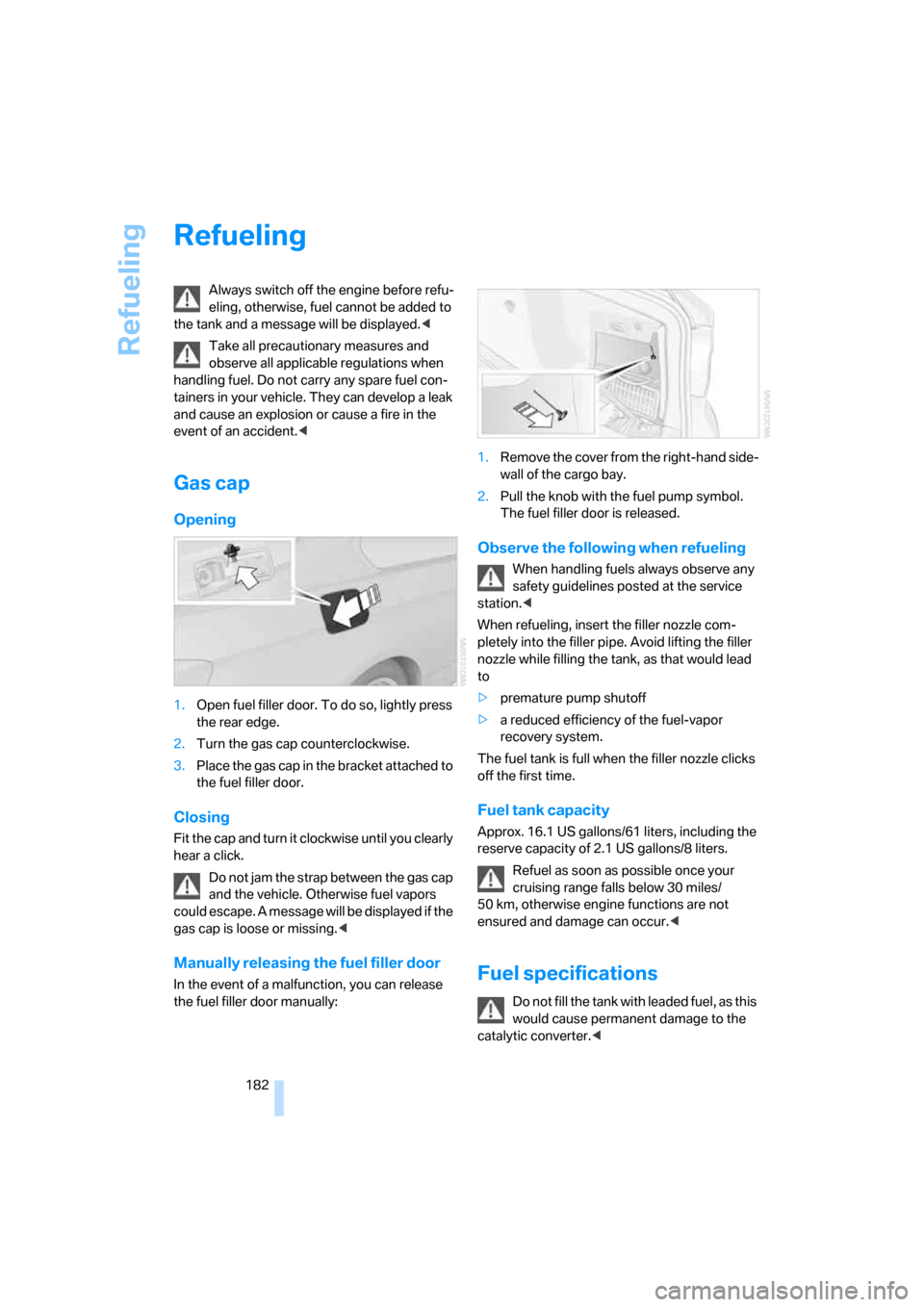
1.Open fuel filler door. To do so, lightly press
the rear edge.
2.Turn the gas cap counterclockwise.
3.Place the gas cap in the bracket attached to
the fuel filler door.
Closing
Fit the cap and turn it clockwise until you clearly
hear a click.
Do not jam the strap between the gas cap
and the vehicle. Otherwise fuel vapors
could escape. A message will be displayed if the
gas cap is loose or missing.<
Manually releasing the fuel filler door
In the event of a malfunction, you can release
the fuel filler door manually:1.Remove the cover from the right-hand side-
wall of the cargo bay.
2.Pull the knob with the fuel pump symbol.
The fuel filler door is released.
Observe the following when refueling
When handling fuels always observe any
safety guidelines posted at the service
station.<
When refueling, insert the filler nozzle com-
pletely into the filler pipe. Avoid lifting the filler
nozzle while filling the tank, as that would lead
to
>premature pump shutoff
>a reduced efficiency of the fuel-vapor
recovery system.
The fuel tank is full when the filler nozzle clicks
off the first time.
Fuel tank capacity
Approx. 16.1 US gallons/61 liters, including the
reserve capacity of 2.1 US gallons/8 liters.
Refuel as soon as possible once your
cruising range falls below 30 miles/
50 km, otherwise engine functions are not
ensured and damage can occur.<
Fuel specifications
Do not fill the tank with leaded fuel, as this
would cause permanent damage to the
catalytic converter.<
ba8_E9293_US.book Seite 182 Freitag, 5. Mai 2006 1:02 13
Page 196 of 239
Under the hood
194 Too much oil will harm the engine.
Have the vehicle checked without
delay.<
>"Please observe recalculated service inter-
val for engine oil"
Do not add engine oil. You can continue
your journey. Note the newly calculated dis-
tance remaining to the next oil service, refer
to page71. Have the system checked as
soon as possible.
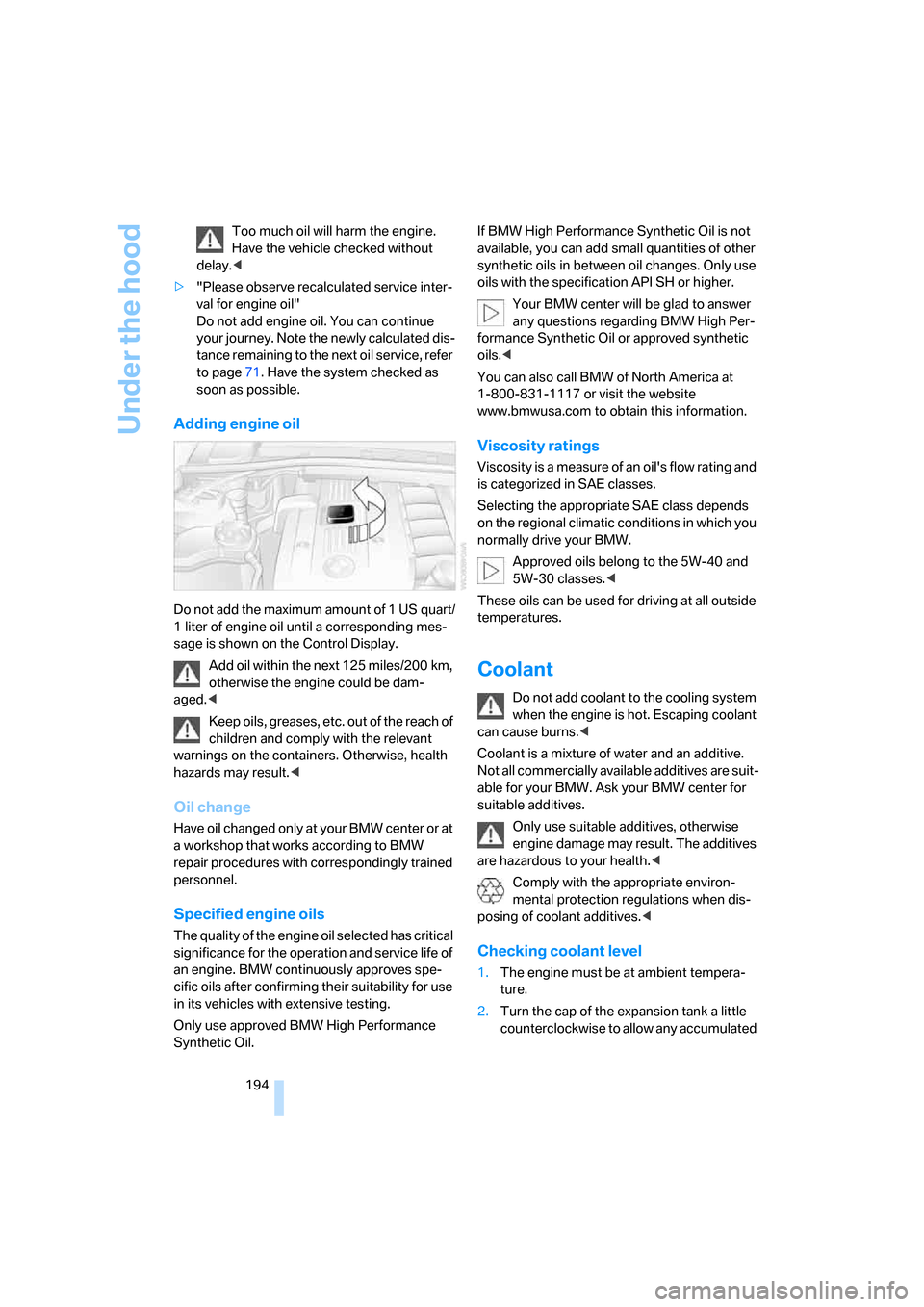
Adding engine oil
Do not add the maximum amount of 1 US quart/
1 liter of engine oil until a corresponding mes-
sage is shown on the Control Display.
Add oil within the next 125 miles/200 km,
otherwise the engine could be dam-
aged.<
Keep oils, greases, etc. out of the reach of
children and comply with the relevant
warnings on the containers. Otherwise, health
hazards may result.<
Oil change
Have oil changed only at your BMW center or at
a workshop that works according to BMW
repair procedures with correspondingly trained
personnel.
Specified engine oils
The quality of the engine oil selected has critical
significance for the operation and service life of
an engine. BMW continuously approves spe-
cific oils after confirming their suitability for use
in its vehicles with extensive testing.
Only use approved BMW High Performance
Synthetic Oil.If BMW High Performance Synthetic Oil is not
available, you can add small quantities of other
synthetic oils in between oil changes. Only use
oils with the specification API SH or higher.
Your BMW center will be glad to answer
any questions regarding BMW High Per-
formance Synthetic Oil or approved synthetic
oils.<
You can also call BMW of North America at
1-800-831-1117 or visit the website
www.bmwusa.com to obtain this information.
Viscosity ratings
Viscosity is a measure of an oil's flow rating and
is categorized in SAE classes.
Selecting the appropriate SAE class depends
on the regional climatic conditions in which you
normally drive your BMW.
Approved oils belong to the 5W-40 and
5W-30 classes.<
These oils can be used for driving at all outside
temperatures.
Coolant
Do not add coolant to the cooling system
when the engine is hot. Escaping coolant
can cause burns.<
Coolant is a mixture of water and an additive.
Not all commercially available additives are suit-
able for your BMW. Ask your BMW center for
suitable additives.
Only use suitable additives, otherwise
engine damage may result. The additives
are hazardous to your health.<
Comply with the appropriate environ-
mental protection regulations when dis-
posing of coolant additives.<
Checking coolant level
1.The engine must be at ambient tempera-
ture.
2.Turn the cap of the expansion tank a little
counterclockwise to allow any accumulated
ba8_E9293_US.book Seite 194 Freitag, 5. Mai 2006 1:02 13
Page 201 of 239
Mobility
199Reference
At a glance
Controls
Driving tips
Communications
Navigation
Entertainment
the controls and displays in your vehicle. These
light-emitting diodes, which operate using a
concept similar to that applied in conventional
lasers, are officially designated as Class 1 light-
emitting diodes.
Do not remove the covers or expose the
eyes directly to the unfiltered light source
for several hours at a time, otherwise this could
cause irritation to the retina.<
Xenon lamps
These bulbs have a very long service life and are
highly unlikely to fail. If a xenon lamp fails never-
theless, switch on the fog lamps and continue
the journey with great care, provided that local
legislation does not prohibit this.
Have any work on the xenon lamp system,
including bulb replacements, performed
only by a BMW center or a workshop that works
according to BMW repair procedures with cor-
respondingly trained personnel. Otherwise, if
such work is carried out improperly, the high
voltage in the system presents the danger of
fatal injuries.<
Access to the lamps
1.Switch off the lamps and take the remote
control out of the ignition lock.
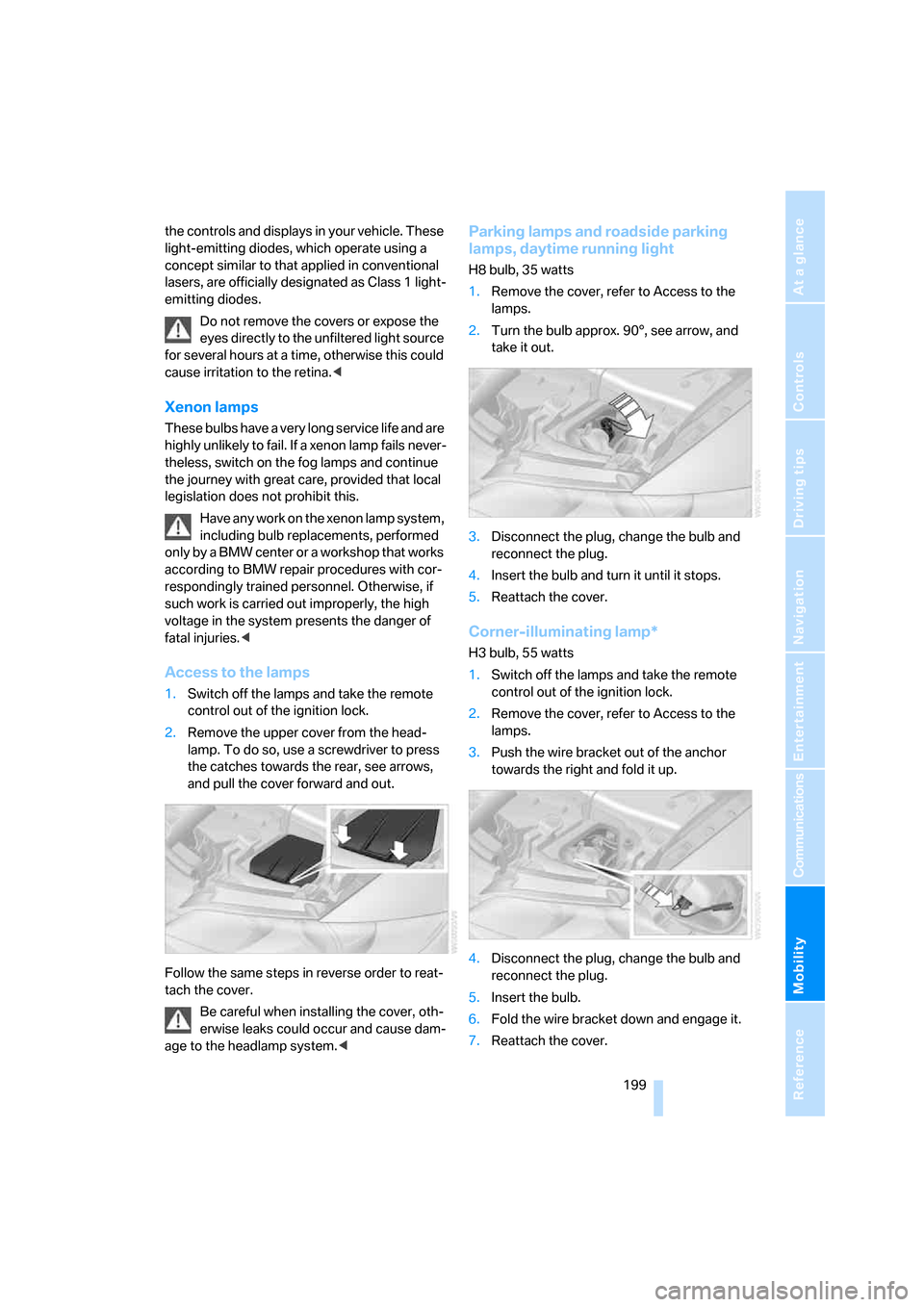
2.Remove the upper cover from the head-
lamp. To do so, use a screwdriver to press
the catches towards the rear, see arrows,
and pull the cover forward and out.
Follow the same steps in reverse order to reat-
tach the cover.
Be careful when installing the cover, oth-
erwise leaks could occur and cause dam-
age to the headlamp system.<
Parking lamps and roadside parking
lamps, daytime running light
H8 bulb, 35 watts
1.Remove the cover, refer to Access to the
lamps.
2.Turn the bulb approx. 90°, see arrow, and
take it out.
3.Disconnect the plug, change the bulb and
reconnect the plug.
4.Insert the bulb and turn it until it stops.
5.Reattach the cover.
Corner-illuminating lamp*
H3 bulb, 55 watts
1.Switch off the lamps and take the remote
control out of the ignition lock.
2.Remove the cover, refer to Access to the
lamps.
3.Push the wire bracket out of the anchor
towards the right and fold it up.
4.Disconnect the plug, change the bulb and
reconnect the plug.
5.Insert the bulb.
6.Fold the wire bracket down and engage it.
7.Reattach the cover.
ba8_E9293_US.book Seite 199 Freitag, 5. Mai 2006 1:02 13
Page 205 of 239
Mobility
203Reference
At a glance
Controls
Driving tips
Communications
Navigation
Entertainment
Giving and receiving assistance
Emergency calling*
Conditions for an emergency call:
>Full preparation package mobile phone.
This equipment package makes it possible
to initiate an emergency call even if no
mobile phone is paired with the vehicle.
>BMW Assist is enabled. Enabling BMW
Assist, refer to page175.
>Radio readiness is on.
>The car phone is logged on to a mobile tele-
phone network.
>The emergency call system is operable.
If your subscription contract with BMW Assist
expires, the car phone can be deactivated by a
BMW center without having to schedule an
appointment at a workshop. Once the car
phone has been deactivated, emergency calls
are not possible. The car phone can be reacti-
vated by a BMW center after signing a new con-
tract.
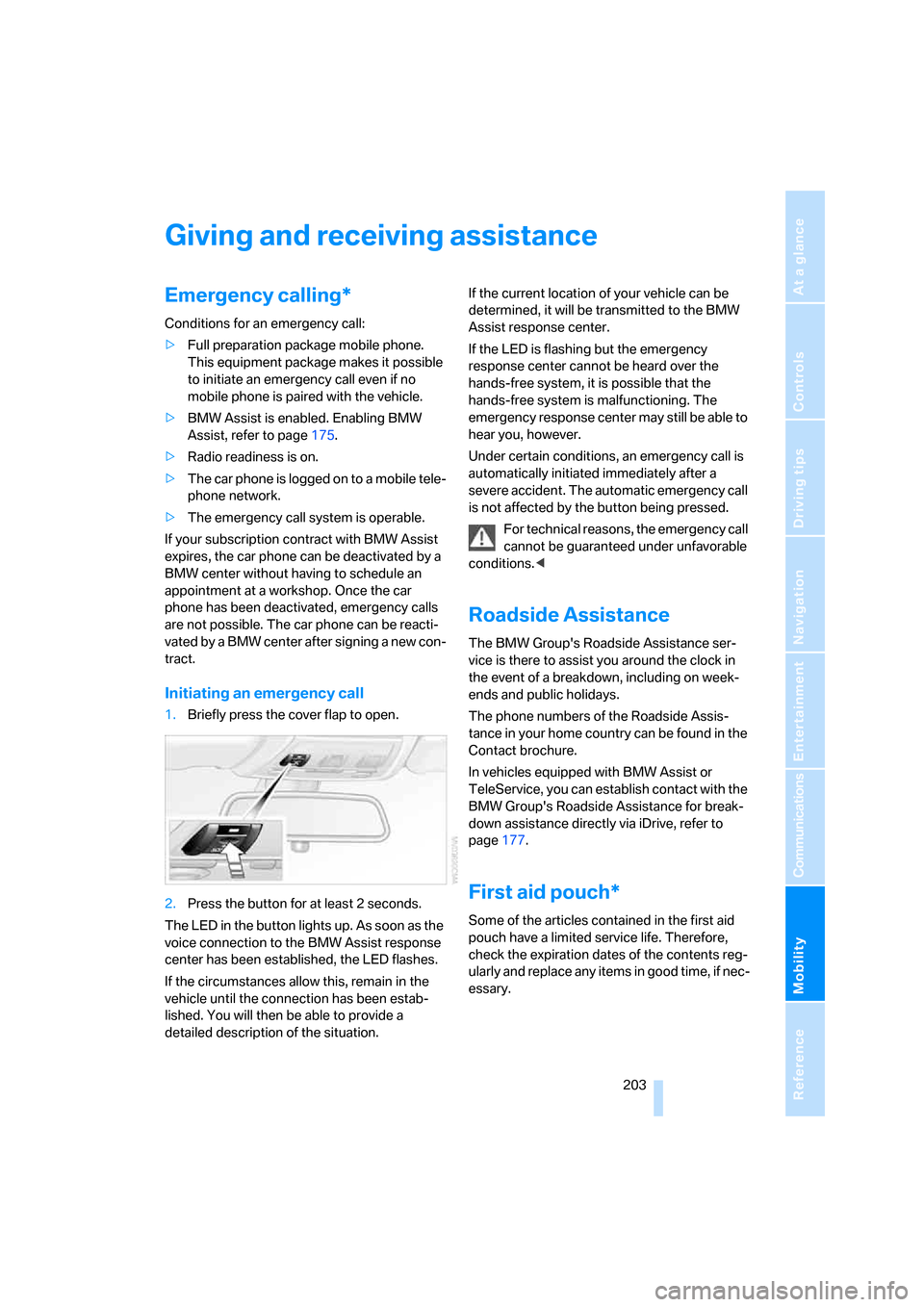
Initiating an emergency call
1.Briefly press the cover flap to open.
2.Press the button for at least 2 seconds.
The LED in the button lights up. As soon as the
voice connection to the BMW Assist response
center has been established, the LED flashes.
If the circumstances allow this, remain in the
vehicle until the connection has been estab-
lished. You will then be able to provide a
detailed description of the situation.If the current location of your vehicle can be
determined, it will be transmitted to the BMW
Assist response center.
If the LED is flashing but the emergency
response center cannot be heard over the
hands-free system, it is possible that the
hands-free system is malfunctioning. The
emergency response center may still be able to
hear you, however.
Under certain conditions, an emergency call is
automatically initiated immediately after a
severe accident. The automatic emergency call
is not affected by the button being pressed.
For technical reasons, the emergency call
cannot be guaranteed under unfavorable
conditions.<
Roadside Assistance
The BMW Group's Roadside Assistance ser-
vice is there to assist you around the clock in
the event of a breakdown, including on week-
ends and public holidays.
The phone numbers of the Roadside Assis-
tance in your home country can be found in the
Contact brochure.
In vehicles equipped with BMW Assist or
TeleService, you can establish contact with the
BMW Group's Roadside Assistance for break-
down assistance directly via iDrive, refer to
page177.
First aid pouch*
Some of the articles contained in the first aid
pouch have a limited service life. Therefore,
check the expiration dates of the contents reg-
ularly and replace any items in good time, if nec-
essary.
ba8_E9293_US.book Seite 203 Freitag, 5. Mai 2006 1:02 13
Page 208 of 239
Giving and receiving assistance
206 wheel lock cannot be disengaged and the car is
not steerable. Jump starting, refer to page204.
Power steering assistance is not available when
the engine is not running. Thus, braking and
steering will require increased effort.<
Switch on the hazard warning flashers, depend-
ing on local regulations.
Manual transmission
Gearshift lever in idle position.
Automatic transmission
Selector lever in position N.
Changing selector lever positions, refer to
page55.
Do not exceed a towing speed of 45 mph
or 70 km/h and a towing distance of
90 miles/150 km, otherwise the automatic
transmission may be damaged.<
Towing methods
In come countries, it is illegal to tow your vehicle
with a tow bar or tow rope on public highways.
Please familiarize yourself with the relevant
towing regulations for the country in which you
are driving.
With a tow bar
The towing vehicle must not be lighter
than the towed vehicle, otherwise it may
be impossible to maintain control.<
The tow fittings used should be on the same
side on both vehicles. Should it prove impossi-
ble to avoid mounting the tow bar at an angle,
please observe the following:
>Clearance and maneuvering capability will
be sharply limited during cornering.
>The tow bar will generate lateral forces if it is
attached offset.
Attach the tow bar to the tow fittings only,
as attaching it to other parts of the vehicle
could result in damage.<
With a tow rope
When starting off in the towing vehicle, make
sure that the tow rope is taut.
To avoid jerking and the associated
stresses on vehicle components when
towing, always use nylon ropes or nylon straps.
Attach the tow rope to the tow fittings only, as
attaching it to other parts of the vehicle could
result in damage.<
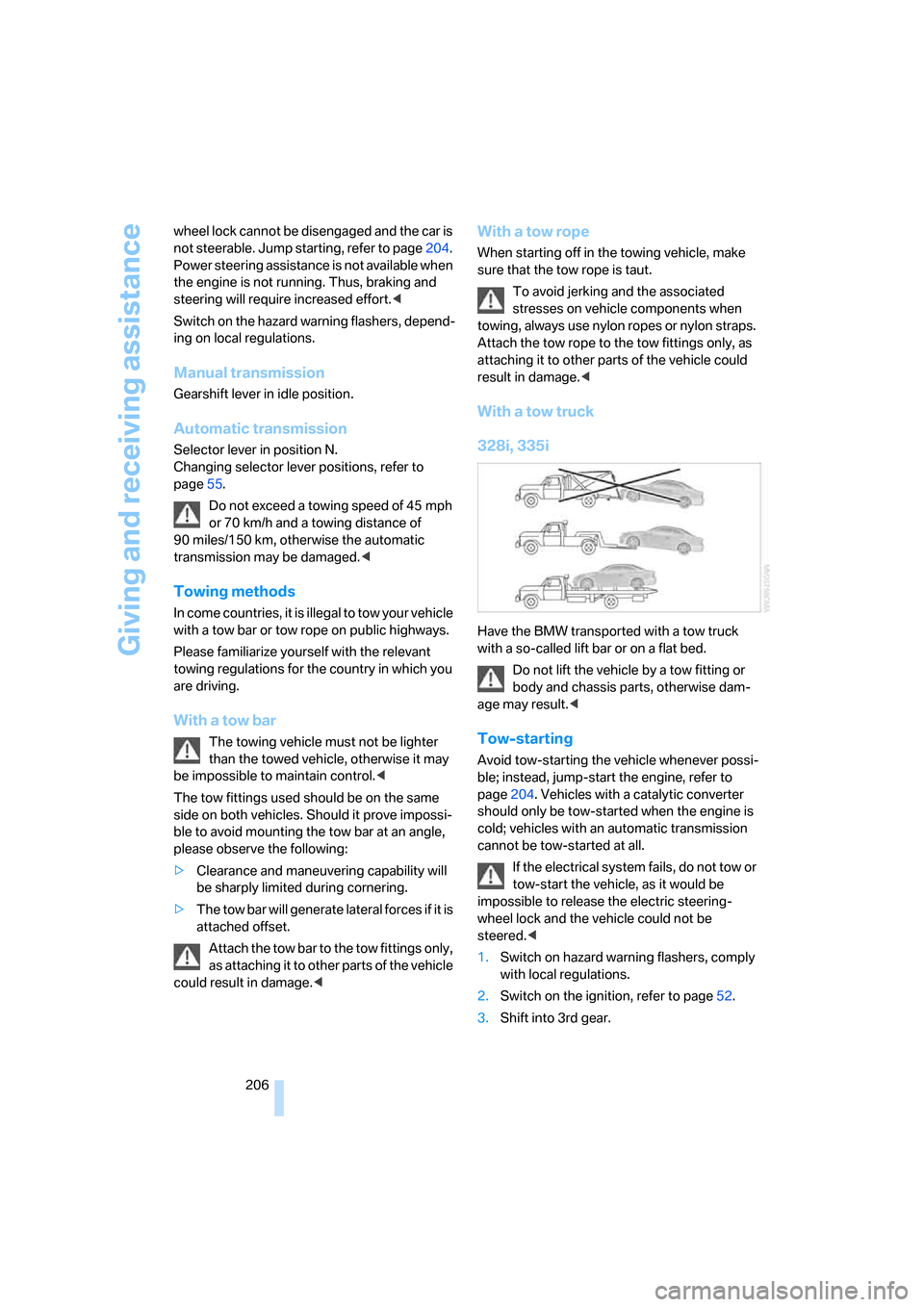
With a tow truck
328i, 335i
Have the BMW transported with a tow truck
with a so-called lift bar or on a flat bed.
Do not lift the vehicle by a tow fitting or
body and chassis parts, otherwise dam-
age may result.<
Tow-starting
Avoid tow-starting the vehicle whenever possi-
ble; instead, jump-start the engine, refer to
page204. Vehicles with a catalytic converter
should only be tow-started when the engine is
cold; vehicles with an automatic transmission
cannot be tow-started at all.
If the electrical system fails, do not tow or
tow-start the vehicle, as it would be
impossible to release the electric steering-
wheel lock and the vehicle could not be
steered.<
1.Switch on hazard warning flashers, comply
with local regulations.
2.Switch on the ignition, refer to page52.
3.Shift into 3rd gear.
ba8_E9293_US.book Seite 206 Freitag, 5. Mai 2006 1:02 13
Page 219 of 239
Reference 217
At a glance
Controls
Driving tips
Communications
Navigation
Entertainment
Mobility
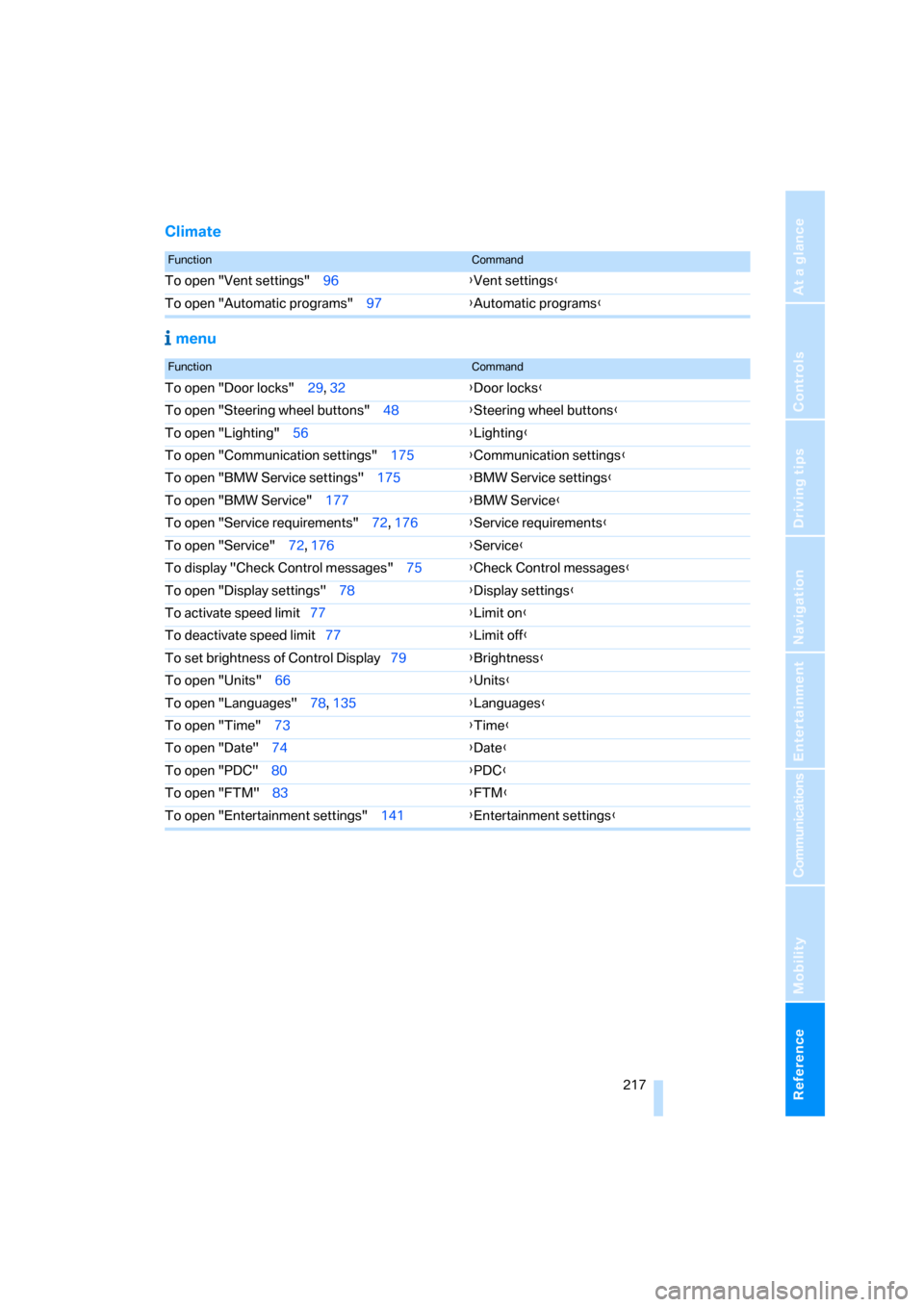
Climate
menu
FunctionCommand
To open "Vent settings" 96{Vent settings}
To open "Automatic programs" 97{Automatic programs}
FunctionCommand
To open "Door locks" 29, 32{Door locks}
To open "Steering wheel buttons" 48{Steering wheel buttons}
To open "Lighting" 56{Lighting}
To open "Communication settings" 175{Communication settings}
To open "BMW Service settings" 175{BMW Service settings}
To open "BMW Service" 177{BMW Service}
To open "Service requirements" 72, 176{Service requirements}
To open "Service" 72, 176{Service}
To display "Check Control messages" 75{Check Control messages}
To open "Display settings" 78{Display settings}
To activate speed limit77{Limit on}
To deactivate speed limit77{Limit off}
To set brightness of Control Display79{Brightness}
To open "Units" 66{Units}
To open "Languages" 78, 135{Languages}
To open "Time" 73{Time}
To open "Date" 74{Date}
To open "PDC" 80{PDC}
To open "FTM" 83{
FTM}
To open "Entertainment settings" 141{Entertainment settings}
ba8_E9293_US.book Seite 217 Freitag, 5. Mai 2006 1:02 13
Page 220 of 239
Everything from A - Z
218
Everything from A - Z
Index
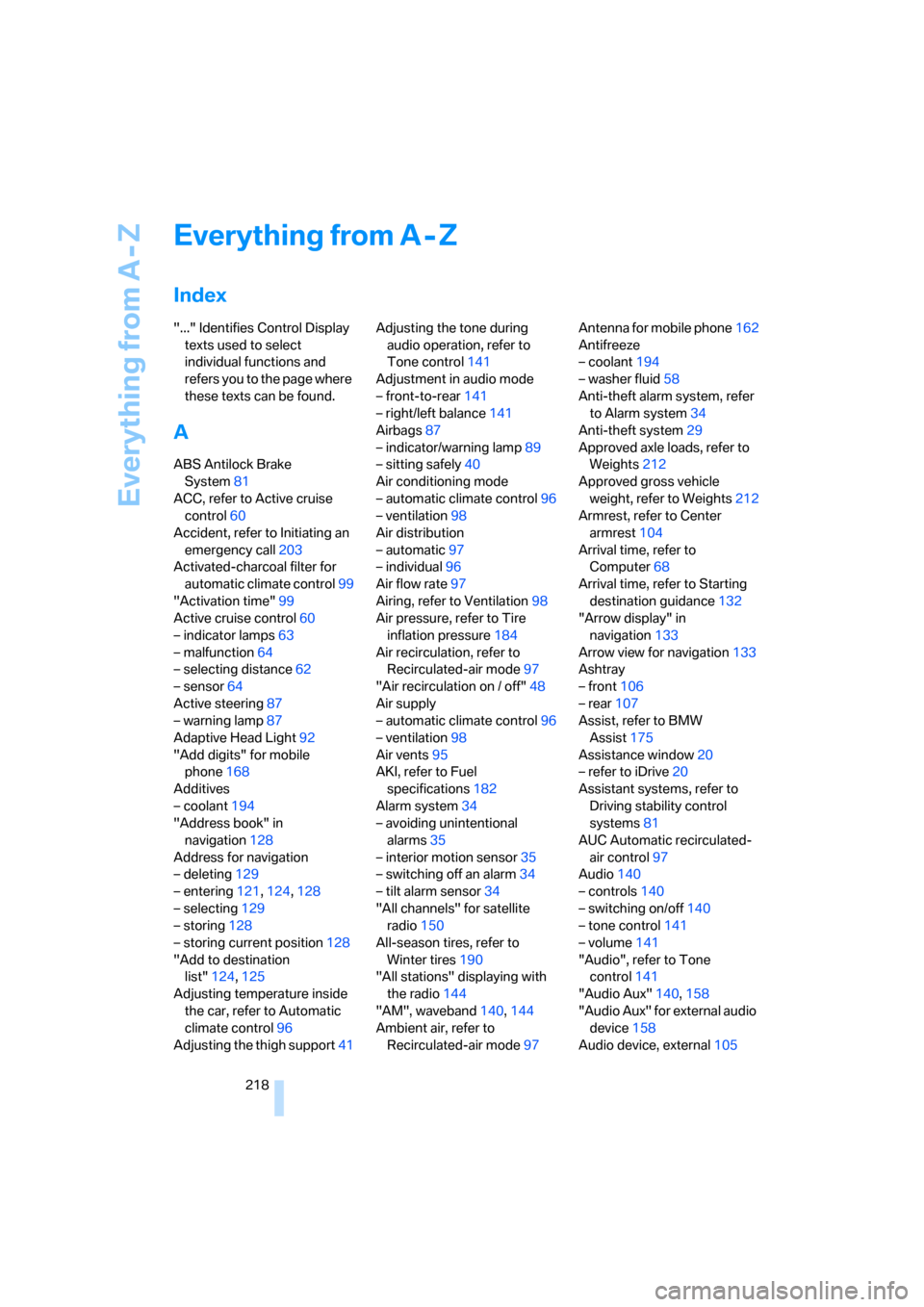
"..." Identifies Control Display
texts used to select
individual functions and
refers you to the page where
these texts can be found.
A
ABS Antilock Brake
System81
ACC, refer to Active cruise
control60
Accident, refer to Initiating an
emergency call203
Activated-charcoal filter for
automatic climate control99
"Activation time"99
Active cruise control60
– indicator lamps63
– malfunction64
– selecting distance62
– sensor64
Active steering87
– warning lamp87
Adaptive Head Light92
"Add digits" for mobile
phone168
Additives
– coolant194
"Address book" in
navigation128
Address for navigation
– deleting129
– entering121,124,128
– selecting129
– storing128
– storing current position128
"Add to destination
list"124,125
Adjusting temperature inside
the car, refer to Automatic
climate control96
Adjusting the thigh support41Adjusting the tone during
audio operation, refer to
Tone control141
Adjustment in audio mode
– front-to-rear141
– right/left balance141
Airbags87
– indicator/warning lamp89
– sitting safely40
Air conditioning mode
– automatic climate control96
– ventilation98
Air distribution
– automatic97
– individual96
Air flow rate97
Airing, refer to Ventilation98
Air pressure, refer to Tire
inflation pressure184
Air recirculation, refer to
Recirculated-air mode97
"Air recirculation on / off"48
Air supply
– automatic climate control96
– ventilation98
Air vents95
AKI, refer to Fuel
specifications182
Alarm system34
– avoiding unintentional
alarms35
– interior motion sensor35
– switching off an alarm34
– tilt alarm sensor34
"All channels" for satellite
radio150
All-season tires, refer to
Winter tires190
"All stations" displaying with
the radio144
"AM", waveband140,144
Ambient air, refer to
Recirculated-air mode97Antenna for mobile phone162
Antifreeze
– coolant194
– washer fluid58
Anti-theft alarm system, refer
to Alarm system34
Anti-theft system29
Approved axle loads, refer to
Weights212
Approved gross vehicle
weight, refer to Weights212
Armrest, refer to Center
armrest104
Arrival time, refer to
Computer68
Arrival time, refer to Starting
destination guidance132
"Arrow display" in
navigation133
Arrow view for navigation133
Ashtray
– front106
– rear107
Assist, refer to BMW
Assist175
Assistance window20
– refer to iDrive20
Assistant systems, refer to
Driving stability control
systems81
AUC Automatic recirculated-
air control97
Audio140
– controls140
– switching on/off140
– tone control141
– volume141
"Audio", refer to Tone
control141
"Audio Aux"140,
158
"Audio Aux" for external audio
device158
Audio device, external105
ba8_E9293_US.book Seite 218 Freitag, 5. Mai 2006 1:02 13
Page 221 of 239
Reference 219
At a glance
Controls
Driving tips
Communications
Navigation
Entertainment
Mobility
"Auto. headlamps"91
Automatic
– air distribution97
– air flow rate97
– cruise control58,60
– headlamp control90
– service notification176
– storing of stations145
Automatic climate control95
– automatic air distribution97
– settings via iDrive96
Automatic curb monitor47
Automatic lamps, refer to
Automatic headlamp
control90
"Automatic programs" with
automatic climate control97
Automatic recirculated-air
control AUC97
Automatic station search145
Automatic transmission with
Steptronic54
– interlock54,55
– overriding selector lever
lock56
– shiftlock, refer to Changing
selector lever position55
– sport program55
– towing205
– tow-starting205
"Automatic ventilation"99
AUTO program for automatic
climate control97
"Autostore"
– on the radio146
AUX-IN
– port105
AUX-In, refer to External audio
device158
Average fuel consumption68
– setting the units70
Average speed68
"Avoid ferries" in
navigation131
"Avoid highways" in
navigation131
Avoid highways in
navigation131Avoiding unintentional
alarms35
"Avoid tollroads" in
navigation131
Axle loads, refer to
Weights212
"A - Z"168
B
Backrest contour, refer to
Lumbar support42
Backrests, refer to Seat
adjustment41
Backrest width adjustment42
Back seats
– refer to Rear seats43
Back seats, refer to Rear seats
– adjusting head restraints43
Backup lamps
– replacing bulbs200
Backup lamps, refer to Tail
lamps200
Balance, tone control141
Band-aids, refer to First-aid
pouch203
Bar, refer to Towing
methods206
Bass, tone control141
Bass sounds, refer to Tone
control141
Bass sounds, refer to Treble
and bass141
Battery201
– charging201
– disposal37,201
– jump starting204
– remote control28
– temporary power failure201
Battery renewal
– remote control37
– remote control for vehicle36
Being towed205
Belt hand-over46
Belts, refer to Safety belts45
Belt tensioner, refer to Safety
belts45
Beverage holders, refer to
Cup holders105Blinds, refer to Roller sun
blinds104
Blower, refer to Air flow
rate97
Bluetooth, refer to separate
Owner's Manual
BMW Assist175
– enabling175
– services offered176
"BMW Contact"170
"BMW Contact
Numbers"170
BMW Homepage4
BMW Maintenance
System196
"BMW Service"177
"BMW Service settings"176
BMW webpage4
Bottle holders, refer to Cup
holders105
Bracket for telephone or
mobile phone
– refer to Snap-in adapter in
the center armrest storage
compartment104
Brake assist, refer to Dynamic
Brake Control DBC81
Brake fluid, refer to Service
requirements71
Brake Force Display87
Brake lamps
– replacing bulbs200
– two-stage87
Brake pads112
– breaking in112
Brake rotors114
– brakes112
– breaking in112
Brakes
– ABS81
– BMW Maintenance
System196
– breaking in112
– handbrake54
– service requirements71
Brakes, refer to Braking
safely113
ba8_E9293_US.book Seite 219 Freitag, 5. Mai 2006 1:02 13
Page 222 of 239
Everything from A - Z
220 Brake system112
– BMW Maintenance
System196
– breaking in112
– disc brakes114
Breakdown services, refer to
Roadside Assistance203
Breaking in the clutch112
Breaking in the differential,
refer to Engine and
differential112
Break-in period112
Brightness of the Control
Display79
"Brightness"on the control
display79
Bulb changing, refer to Lamps
and bulbs198
Burned fuel
– refer to Average
consumption68
Button for starting the engine,
refer to Start/stop button52
Buttons on the steering
wheel11
Button to start engine52
C
California Proposition 65
warning6
"Call"168
Call
– accepting166
– displaying accepted168
– ending167
– in absence168
– starting167
Calling
– from phone book167
– from Top 8 list168
– redialing168
Can holders, refer to Cup
holders105
Capacities213
Capacity of the cargo bay212
Car battery, refer to Vehicle
battery201Car care, refer to Caring for
your vehicle brochure
Car-care products, refer to
Caring for your vehicle
brochure
"Car Data"68
Care, refer to Caring for your
vehicle brochure
Cargo, securing115
Cargo bay
– capacity212
– convenient access36
– folding up the floor
panel108
– lamp, refer to Interior
lamps93
– opening from inside33
– opening from outside33
Cargo loading
– securing cargo115
– stowing cargo115
– vehicle114
Caring for artificial leather,
refer to Caring for your
vehicle brochure
Caring for leather, refer to
Caring for your vehicle
brochure
Caring for plastic, refer to
Caring for your vehicle
brochure
Caring for the carpet, refer to
Caring for your vehicle
brochure
Caring for the vehicle finish,
refer to Caring for your
vehicle brochure
Car jack
– jacking points201
Car key, refer to Integrated
key/remote control28
Car phone162
– installation location, refer to
Center armrest104
– refer to Mobile phone162
– refer to separate Owner's
Manual
Car radio, refer to Radio144Car wash114
– also refer to Caring for your
vehicle brochure
– with convenient access36
Catalytic converter, refer to
Hot exhaust system112
"Categories" for satellite
radio150
CBS Condition Based
Service196
"CD"140,152
CD changer152
– compressed audio files152
– controls140
– fast forward/reverse156
– installation location156
– playing a track154
– random order155
– repeating a track155
– selecting a CD152
– selecting a track153
– switching on/off140
– tone control141
– volume141
CD player152
– compressed audio files152
– controls140
– fast forward/reverse156
– playing a track154
– random order155
– repeating a track155
– selecting a track153
– switching on/off140
– tone control141
– volume141
Center armrest104
Center brake lamp
– replacing bulbs200
Center console, refer to
Around the center
console14
"Central locking"30
Central locking
– from inside32
– from outside29
Central locking system29
– convenient access35
– hotel function33
ba8_E9293_US.book Seite 220 Freitag, 5. Mai 2006 1:02 13
Page 223 of 239
Reference 221
At a glance
Controls
Driving tips
Communications
Navigation
Entertainment
Mobility
Changes, technical, refer to
For your own safety5
Changing bulbs, refer to
Lamps and bulbs198
Changing the language on the
Control Display78
Changing the measurement
units on the Control
Display70
Changing wheels201
Chassis number, refer to
Engine compartment192
Check Control75
"Check Control
messages"77
Child-restraint fixing system
LATCH51
Child-restraint systems50
Child seats, refer to
Transporting children
safely50
Chrome parts, care, refer to
Caring for your vehicle
brochure
Chrome parts, refer to Caring
for your vehicle brochure
Cigarette lighter, refer to
Lighter106
Cleaning, refer to Caring for
your vehicle brochure
Cleaning headlamps58
– washer fluid58
"Climate"96
Clock66
– 12h/24h mode74
– setting time73
Closing
– from inside32
– from outside29
Clothes hooks105
Cockpit10
Cold start, refer to Starting the
engine53
Combined instrument, refer to
Instrument cluster12
Comfort Access, refer to
Convenient access35
Comfort area, refer to Around
the center console14"Communication"166
"Communication
settings"176
Compact disc, refer to
– CD changer152
– CD player152
Compartment for remote
control, refer to Ignition
lock52
Compass102
Computer67
– displays on Control
Display68
– hour signal74
Computer, refer to iDrive16
"Concert hall" for Tone
control142
Condensation, refer to When
the vehicle is parked
114
Configuring settings, refer to
Personal Profile28
Confirmation signals for
locking/unlocking the
vehicle30
Connecting vacuum cleaner,
refer to Connecting
electrical appliances107
Consumption, refer to
Average consumption68
Consumption display
– average consumption68
"Continue guidance to
destination?"133
Control Center, refer to
iDrive16
Control Display
– brightness79
– changing the language78
– switching on/off21
Control Display, refer to
iDrive16
Controller, refer to iDrive16
Controls and displays10
Control unit, refer to iDrive16
Convenience operation
– windows30Convenient access35
– replacing the battery36
– what to observe before
entering a car wash36
Convenient operation
– glass sunroof30
– glass sunroof with
convenient access36
– windows with convenient
access36
Coolant194
– checking level194
Coolant temperature67
Cooling, maximum97
Cooling fluid, refer to
Coolant194
Cooling system, refer to
Coolant194
Corner-illuminating lamps,
refer to Adaptive Head
Light92
Correct tires189
Courtesy lamps, refer to
Interior lamps93
Cross-hairs in navigation125
Cruise control58
– active60
– malfunction60
Cruising range67
Cup holders105
Curb weight, refer to
Weights212
"Current position"136
Current position
– displaying136
– entering128
– storing
128
"Customer
Relations"170,177
D
Dashboard, refer to
Cockpit10
Dashboard, refer to
Instrument cluster12
Dashboard lighting, refer to
Instrument lighting93
ba8_E9293_US.book Seite 221 Freitag, 5. Mai 2006 1:02 13