belt BMW 328I COUPE 2009 E92 User Guide
[x] Cancel search | Manufacturer: BMW, Model Year: 2009, Model line: 328I COUPE, Model: BMW 328I COUPE 2009 E92Pages: 260, PDF Size: 7.95 MB
Page 115 of 260
Controls
113Reference
At a glance
Driving tips
Communications
Navigation
Entertainment
Mobility
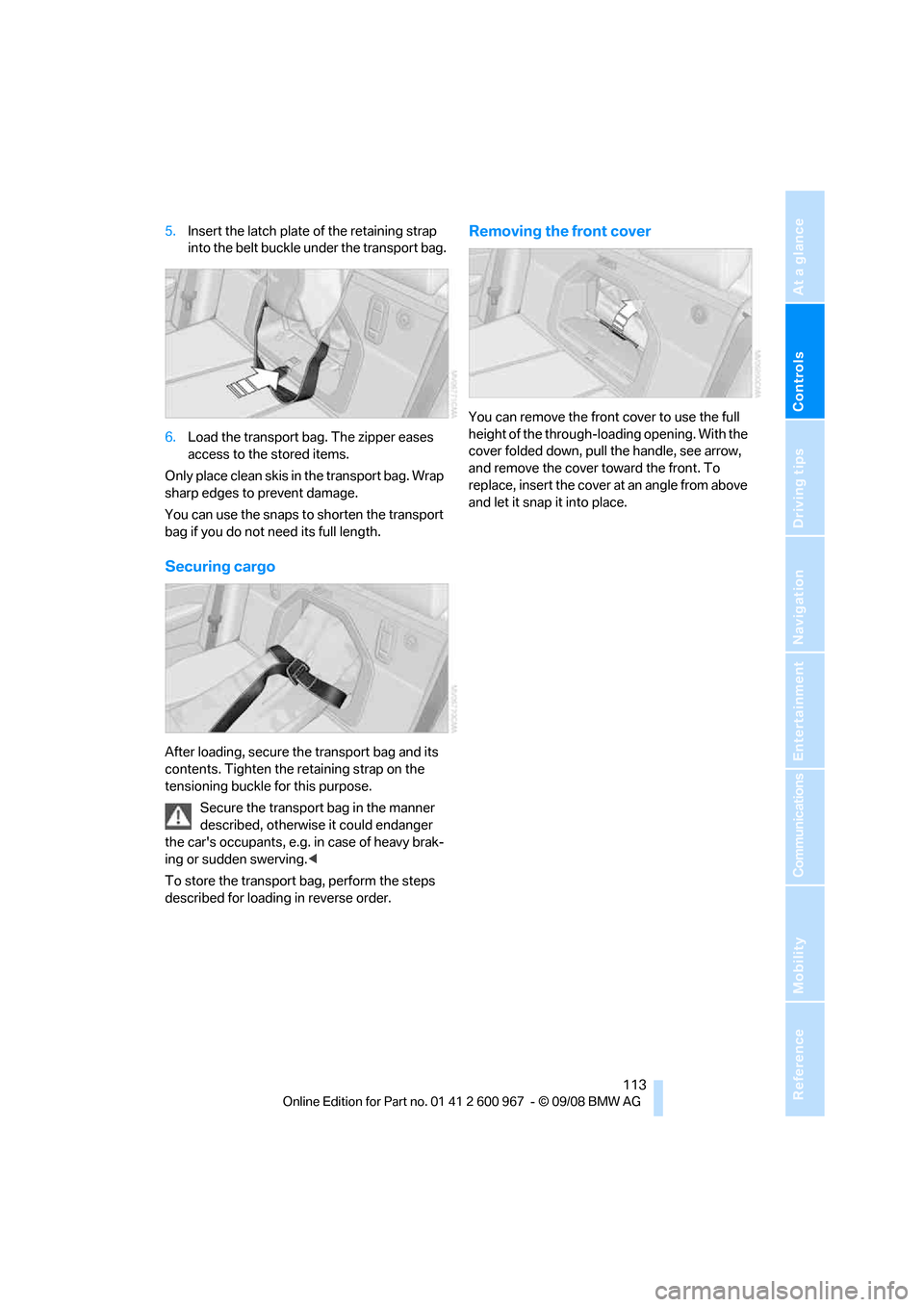
5.Insert the latch plate of the retaining strap
into the belt buckle under the transport bag.
6.Load the transport bag. The zipper eases
access to the stored items.
Only place clean skis in the transport bag. Wrap
sharp edges to prevent damage.
You can use the snaps to shorten the transport
bag if you do not need its full length.
Securing cargo
After loading, secure the transport bag and its
contents. Tighten the retaining strap on the
tensioning buckle for this purpose.
Secure the transport bag in the manner
described, otherwise it could endanger
the car's occupants, e.g. in case of heavy brak-
ing or sudden swerving.<
To store the transport bag, perform the steps
described for loading in reverse order.
Removing the front cover
You can remove the front cover to use the full
height of the through-loading opening. With the
cover folded down, pull the handle, see arrow,
and remove the cover toward the front. To
replace, insert the cover at an angle from above
and let it snap it into place.
Page 121 of 260
Driving tips
119Reference
At a glance
Controls
Communications
Navigation
Entertainment
Mobility
With convenient access and automatic
transmission
Insert the remote control into the ignition
switch.
The engine can be switched off when the selec-
tor lever is in position N. Refer also to page213.
Cargo loading
To avoid loading the tires beyond their
approved carrying capacity, never over-
load the vehicle. Overloading can lead to over-
heating and increases the rate at which damage
develops inside the tires. This can ultimately
result in a sudden blow-out.<
Make sure that no liquids are spilled or
leak from their containers in the cargo
bay, as this could result in damage to the vehi-
cle.<
Determining loading limit
1.Locate the following statement on your
vehicle's placard
*:
The combined weight of occupants
and cargo should never exceed
XXX kg or YYY lbs. Otherwise, overloading
can result in damage to the vehicle and
unstable driving conditions.<
2.Determine the combined weight of the
driver and passengers that will be riding in
your vehicle.
3.Subtract the combined weight of the driver
and passengers from XXX kilograms or YYY
pounds.
4.The resulting figure equals the available
amount of cargo and luggage load capacity. For example, if the YYY amount equals
1,400 lbs. and there will be five 150-lb. pas-
sengers in your vehicle, the amount of avail-
able cargo and luggage load capacity is
650 lbs:
1,400 lbs. minus 750 lbs. = 650 lbs.
5.Determine the combined weight of luggage
and cargo being loaded on the vehicle. That
weight may not safely exceed the available
cargo and luggage load capacity calculated
in step 4.
6.If your vehicle will be towing a trailer, part of
the load from your trailer will be transferred
to your vehicle. Consult the manual for
transporting a trailer to determine how this
may reduce the available cargo and luggage
load capacity of your vehicle.
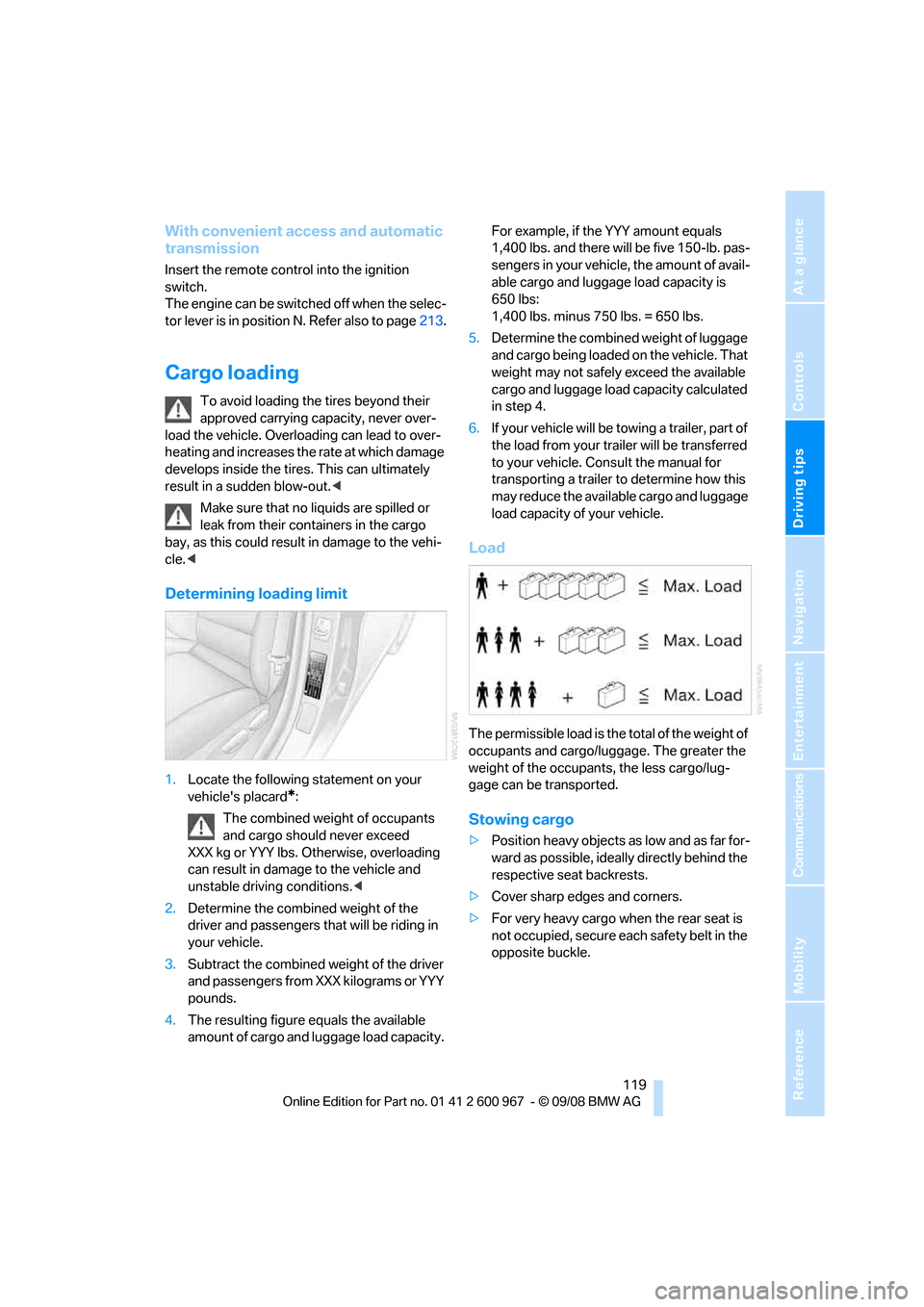
Load
The permissible load is the total of the weight of
occupants and cargo/luggage. The greater the
weight of the occupants, the less cargo/lug-
gage can be transported.
Stowing cargo
>Position heavy objects as low and as far for-
ward as possible, ideally directly behind the
respective seat backrests.
>Cover sharp edges and corners.
>For very heavy cargo when the rear seat is
not occupied, secure each safety belt in the
opposite buckle.
Page 147 of 260
Navigation
Entertainment
Driving tips
145Reference
At a glance
Controls
Communications
Mobility
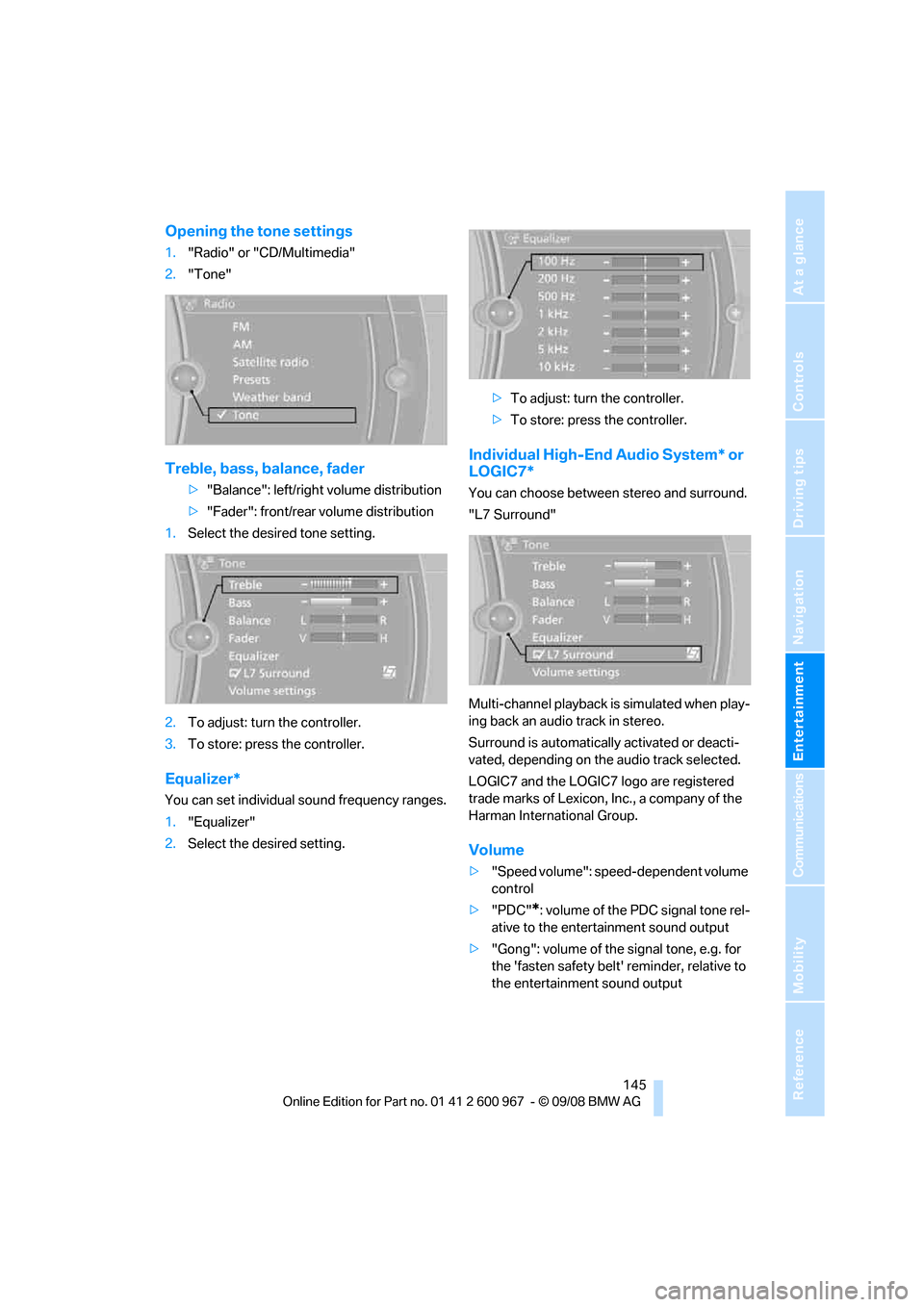
Opening the tone settings
1."Radio" or "CD/Multimedia"
2."Tone"
Treble, bass, balance, fader
>"Balance": left/right volume distribution
>"Fader": front/rear volume distribution
1.Select the desired tone setting.
2.To adjust: turn the controller.
3.To store: press the controller.
Equalizer*
You can set individual sound frequency ranges.
1."Equalizer"
2.Select the desired setting.>To adjust: turn the controller.
>To store: press the controller.
Individual High-End Audio System* or
LOGIC7*
You can choose between stereo and surround.
"L7 Surround"
Multi-channel playback is simulated when play-
ing back an audio track in stereo.
Surround is automatically activated or deacti-
vated, depending on the audio track selected.
LOGIC7 and the LOGIC7 logo are registered
trade marks of Lexicon, Inc., a company of the
Harman International Group.
Volume
>"Speed volume": speed-dependent volume
control
>"PDC"
*: volume of the PDC signal tone rel-
ative to the entertainment sound output
>"Gong": volume of the signal tone, e.g. for
the 'fasten safety belt' reminder, relative to
the entertainment sound output
Page 204 of 260
Wheels and tires
202
Tire identification marks
Knowledge of the labeling on the side of the tire
makes it easier to identify and choose the right
tires.
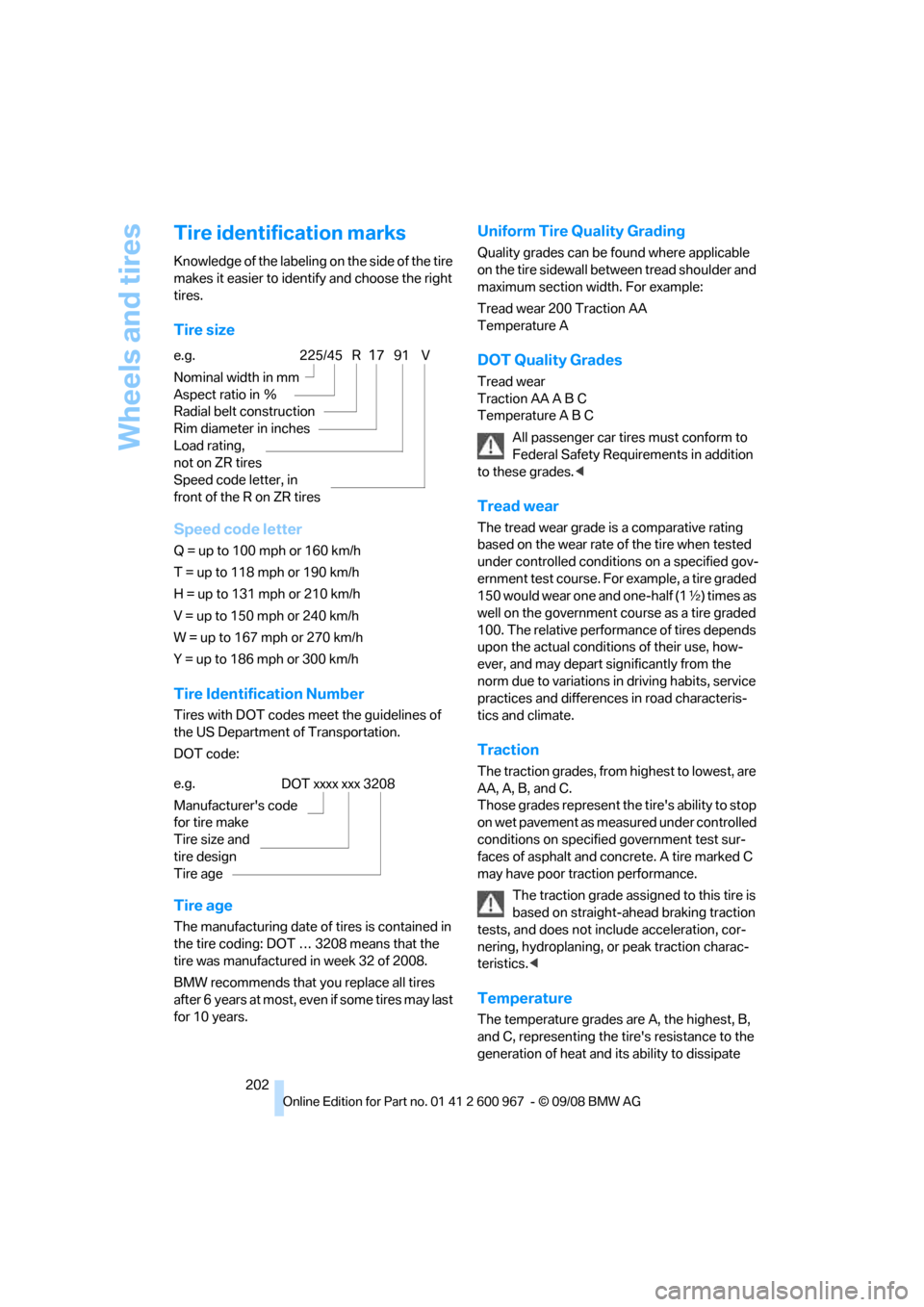
Tire size
Speed code letter
Q = up to 100 mph or 160 km/h
T = up to 118 mph or 190 km/h
H = up to 131 mph or 210 km/h
V = up to 150 mph or 240 km/h
W = up to 167 mph or 270 km/h
Y = up to 186 mph or 300 km/h
Tire Identification Number
Tires with DOT codes meet the guidelines of
the US Department of Transportation.
DOT code:
Tire age
The manufacturing date of tires is contained in
the tire coding: DOT … 3208 means that the
tire was manufactured in week 32 of 2008.
BMW recommends that you replace all tires
after 6 years at most, even if some tires may last
for 10 years.
Uniform Tire Quality Grading
Quality grades can be found where applicable
on the tire sidewall between tread shoulder and
maximum section width. For example:
Tread wear 200 Traction AA
Temperature A
DOT Quality Grades
Tread wear
Traction AA A B C
Temperature A B C
All passenger car tires must conform to
Federal Safety Requirements in addition
to these grades.<
Tread wear
The tread wear grade is a comparative rating
based on the wear rate of the tire when tested
under controlled conditions on a specified gov-
ernment test course. For example, a tire graded
150 would wear one and one-half (1γ) times as
well on the government course as a tire graded
100. The relative performance of tires depends
upon the actual conditions of their use, how-
ever, and may depart significantly from the
norm due to variations in driving habits, service
practices and differences in road characteris-
tics and climate.
Traction
The traction grades, from highest to lowest, are
AA, A, B, and C.
Those grades represent the tire's ability to stop
on wet pavement as measured under controlled
conditions on specified government test sur-
faces of asphalt and concrete. A tire marked C
may have poor traction performance.
The traction grade assigned to this tire is
based on straight-ahead braking traction
tests, and does not include acceleration, cor-
nering, hydroplaning, or peak traction charac-
teristics.<
Temperature
The temperature grades are A, the highest, B,
and C, representing the tire's resistance to the
generation of heat and its ability to dissipate
e.g.
Nominal width in mm
Aspect ratio in Ξ
Radial belt construction
Rim diameter in inches
Load rating,
not on ZR tires
Speed code letter, in
front of the R on ZR tires225/45 R1791 V
e.g.
Manufacturer's code
for tire make
Tire size and
tire design
Tire ageDOT xxxx xxx 3208
Page 217 of 260
Mobility
215Reference
At a glance
Controls
Driving tips
Communications
Navigation
Entertainment
additive. For additional treatment, use a chrome
polish.
Light-alloy wheels
For technical reasons, dust is generated during
braking that is deposited on the light-alloy
wheels. Remove the dust regularly using acid-
free rim cleaner.
Do not use aggressive, acidic, strongly
alkaline and abrasive cleaning agents or
steam jets over 1407/606, otherwise dam-
age may occur.<
Outside sensors / cameras
Keep the sensors and cameras on the
outside of the vehicle, e.g. Park Distance
Control, clean and free of ice to ensure that they
remain fully functional.<
Interior care
Upholstery / cloth trim
Vacuum regularly with a vacuum cleaner to
remove superficial dirt.
To treat severe stains, e.g. from beverages, use
a soft sponge or lint-free microfiber cloth in
combination with suitable interior cleaners. Fol-
low the instructions on the packaging.
Clean the upholstery down to the seams
using a sweeping motion. Avoid strong
rubbing.<
Opened Velcro fasteners on pants or
other articles of clothing can damage the
seat covers. Ensure that Velcro fasteners are
closed.<
Leather / leather trim
The leather used by BMW is a high quality
natural product. Slight irregularities in the
leather are a typical characteristic of natural
leather.<
Dust and road grit in the pores and folds of the
leather have an abrasive effect, leading to
increased wear and causing the leather surface
to become brittle prematurely. Therefore, fre-quently clean the leather of dust using a cloth or
vacuum cleaner.
In particular, ensure that light-colored leather is
cleaned regularly as it has a tendency to soil
more easily.
Treat the leather twice a year using a leather
lotion as dirt and grease will gradually attack the
leather's protective layer.
Carpets / cargo bay
You can vacuum the carpets and floor mats or
clean them with interior cleaner if heavily soiled.
The floor mats can be removed for cleaning.
When replacing the mats, ensure that the seat
rails do not extend over the floor mats, as this
may damage the mats.
Lint on the floor mats occurs for technical rea-
sons and can be removed by vacuuming
repeatedly.
Interior plastic parts
>Imitation leather surfaces
>Lamp glasses
>Display pane of instrument cluster
>Matt parts
Clean with water and solvent-free plastic
cleaner if necessary.
Fine wood parts
Clean fine wood trim and fine wood parts with a
damp cloth. Wipe dry with a soft cloth.
Safety belts
Do not clean with cleaning agents as
these may destroy the fabric.<
Interior sensors / cameras
To clean interior sensors and cameras, use a
lint-free cloth moistened with glass cleaner.
Displays
To clean the displays, e.g. of the radio or instru-
ment cluster, use a display cleaning cloth or a
soft, non-abrasive, lint-free cloth.
Page 245 of 260
Reference 243
At a glance
Controls
Driving tips
Communications
Navigation
Entertainment
Mobility
AUTO program for automatic
climate control98
AUX-IN
– port106
AUX-IN port163
Average fuel consumption71
– setting the units72
Average speed71
Avoid highways in
navigation135
Avoiding unintentional
alarms33
Axle loads, refer to
Weights235
B
Backrest contour, refer to
Lumbar support44
Backrests, refer to Seat
adjustment43
Backrest width adjustment44
Back seats
– refer to Rear seats45
Backup lamps
– replacing bulb220,221
Backup lamps, refer to Tail
lamps220
Bag holder110
Band-aids, refer to First-aid
pouch225
Bar, refer to Towing
methods227
Base plate for telephone or
mobile phone
– refer to Snap-in adapter179
– refer to Snap-in adapter in
the center armrest storage
compartment106
Bass, tone setting144
Battery222
– charging222
– disposal35,222
– jump starting225
– remote control26
– temporary power failure222
Battery for mobile phone179Battery renewal
– remote control35
– remote control for vehicle35
Being towed227
Belt hand-over49
– pinch protection system49
Belts, refer to Safety belts48
Belt tensioner, refer to Safety
belts48
Beverage holders, refer to
Cup holders107
Blinds, refer to Roller sun
blinds105
Blower, refer to Air flow
rate99
Bluetooth, activating/
deactivating172
Bluetooth, refer to separate
Owner's Manual
BMW
– car shampoo215
BMW Assist, activating184
BMW Assist183
BMW center188
BMW Homepage4
BMW Maintenance
System211
BMW Search184
BMW webpage
4
Bottle holders, refer to Cup
holders107
Brake assist, refer to Dynamic
Brake Control DBC83
Brake fluid, refer to Service
requirements73
Brake force display89
Brake lamps
– brake force display89
– replacing bulb220,221
Brake pads116
– breaking in116
Brake rotors118
– brakes116
– breaking in116Brakes
– ABS83
– BMW Maintenance
System211
– brake force display89
– breaking in116
– parking brake56
– service requirements73
Brakes, refer to Braking
safely118
Brake system116
– BMW Maintenance
System211
– breaking in116
– disc brakes118
Breakdown services, refer to
Roadside Assistance224
Breaking in the clutch116
Breaking in the differential,
refer to Engine and
differential116
Break-in period116
Brightness of Control
Display80
Bulb changing, refer to Lamps
and bulbs218
Button for starting the engine,
refer to Start/stop button55
Buttons on the steering
wheel11
C
California Proposition 65
warning6
Call
– accepting173
– ending174
– rejecting174
Calling, refer to Phone
numbers, dialing174
Can holders, refer to Cup
holders107
Capacities235
Capacity of the cargo bay235
Car battery, refer to Vehicle
battery222
Car care, refer to Care213
Page 246 of 260
Everything from A - Z
244 Care213
– automatic car washes213
– care products213
– carpets215
– CD/DVD drives216
– chrome parts214
– displays215
– exterior213
– fine wood parts215
– headlamps214
– high-pressure washer213
– interior215
– leather215
– light-alloy wheels215
– paintwork214
– plastic parts215
– retractable hardtop214
– rubber seals214
– safety belts215
– sensors and cameras215
– upholstery and cloth
trim215
– washing the car
manually214
– windows214
– wiper blades214
Cargo, securing120
Cargo bay
– capacity235
– convenient access34
– folding up the floor
panel111
– lamp, refer to Interior
lamps96
– opening from inside31
– opening from outside31
Cargo loading119
– securing cargo120
– stowing cargo119
– vehicle119
Car jack
– jacking points222
Car key, refer to Integrated
key/remote control26
Car phone
– installation location, refer to
Center armrest106
– refer to separate Owner's
ManualCar phone, refer to
Telephone170
Car radio, refer to Radio147
Car shampoo215
Car wash118
Catalytic converter, refer to
Hot exhaust system117
CBS Condition Based
Service
211
CD, audio playback152
CD changer152
– controls144
– fast forward/reverse154
– installation location156
– random play sequence153
– selecting a track152
– switching on/off144
– tone control144
– volume144
CD player152
– controls144
– fast forward/reverse154
– random play sequence153
– selecting a track152
– switching on/off144
– tone control144
– volume144
Center armrest106
Center brake lamp
– replacing bulb222
Center console, refer to
Around the center
console14
Central locking
– from inside30
– from outside27
Central locking system27
– convenient access34
– hotel function31
– setting unlocking
characteristics27
Changes, technical, refer to
For your own safety5
Changing bulbs, refer to
Lamps and bulbs218
Changing the measurement
units on the Control
Display72
Changing wheels222Chassis number, refer to
Engine compartment207
Check Control77
Child-restraint fixing system
LATCH53
Child-restraint systems52
Child seats, refer to
Transporting children
safely52
Chrome parts215
Chrome polish215
Cigarette lighter, refer to
Lighter108
Cleaning headlamps60
– washer fluid61
Cleaning your BMW, refer to
Care213
Clock
69
– 12h/24h mode76
– setting the time and date76
– setting time75
Closing
– from inside30
– from outside27
Clothes hooks107
Cockpit10
Cold start, refer to Starting the
engine55
Combined instrument, refer to
Instrument cluster12
Comfort access, refer to
Convenient access34
Comfort area, refer to Around
the center console14
Compartment for remote
control, refer to Ignition
lock55
Compass104
Computer70
– displays on Control
Display71
Computer, refer to iDrive16
Concierge service183
Condensation, refer to When
the vehicle is parked118
Condition Based Service
CBS211
Configuring settings, refer to
Personal Profile26
Page 249 of 260
Reference 247
At a glance
Controls
Driving tips
Communications
Navigation
Entertainment
Mobility
Eyes
– for tow-starting and towing
away227
– for tying down loads120
F
Failure messages, refer to
Check Control77
Failure of an electrical
consumer223
False alarm
– avoiding unintentional
alarm33
– switching off an alarm33
Fastening safety belts, refer to
Safety belts48
Fastest route for
navigation135
Fast forward
– CD changer154
– CD player154
Filter
– refer to Microfilter/activated-
charcoal filter for automatic
climate control100
First aid pouch225
Fixture for remote control,
refer to Ignition lock55
Flash when locking/
unlocking29
Flat tire
– Run-Flat Tires204
– Tire Pressure Monitor
TPM86
Flat Tire Monitor FTM85
– indicating a flat tire86
– indicator/warning lamp86
– initializing the system85
– malfunction86
– snow chains85,205
– system limits85
Flat tires, refer to Tire
condition203
Fluid reservoir, refer to
Washer fluid reservoir61
FM, waveband147
Fog lamps95
– indicator lamp13,95Folding up the floor panel111
Footbrake, refer to Braking
safely118
Footwell lamps, refer to
Interior lamps96
For your own safety5
Four-wheel drive, refer to
xDrive84
Free memory capacity, music
collection161
Front airbags90
FTM, refer to Flat Tire
Monitor85
Fuel193
– average consumption71
– gauge70
– high-quality brands193
– quality193
– specifications193
– tank contents, refer to
Capacities235
Fuel clock, refer to Fuel
gauge70
Fuel display, refer to Fuel
gauge70
Fuel filler door192
– releasing in the event of
electrical malfunction192
Fuses223
G
Garage door opener, refer to
Integrated universal remote
control102
Gasoline
– refer to Average
consumption71
Gasoline, refer to Required
fuel193
Gasoline display, refer to Fuel
gauge70
Gear indicator, automatic
transmission with
Steptronic57
Gearshift lever
– automatic transmission with
Steptronic58
– manual transmission57Gearshifts
– automatic transmission with
Steptronic58
– manual transmission57
General driving notes117
Glass roof, electric37
– closing after electrical
malfunction38
– convenient operation28,30
– initializing37
– opening, closing37
– operation with convenient
access34
– pinch protection system37
– power failure37
– raising37
– remote control28
Glove compartment105
GPS navigation, refer to
Navigation system124
Grills97
Gross vehicle weight, refer to
Weights235
H
Handbrake, refer to Parking
brake56
Hands-free system14
Hazard warning flashers14
HDC Hill Descent Control84
HD radio, refer to High
Definition Radio148
Head airbags90
Headlamp control,
automatic93
Headlamp flasher59
– indicator lamp11,13
Head restraints44
– rear, removing46
– sitting safely42
Heated
– mirrors50
– rear window100
– seats47
Page 251 of 260
Reference 249
At a glance
Controls
Driving tips
Communications
Navigation
Entertainment
Mobility
K
Key, refer to Integrated key/
remote control26
Keyless go, refer to
Convenient access34
Keyless opening and closing,
refer to Convenient
access34
Key Memory, refer to Personal
Profile26
Kick-down58
– automatic transmission with
Steptronic58
Knock control193
L
Lamps
– automatic headlamp
control93
– parking lamps/low beams93
Lamps and bulbs, replacing
bulbs218
Language, changing on
Control Display80
Lap-and-shoulder belt, refer
to Safety belts48
Lashing eyes, refer to
Securing cargo120
Last destinations128
LATCH child-restraint fixing
system53
Leather care215
LED Light-emitting
diodes218
Length, refer to
Dimensions233
License plate lamp, replacing
bulb222
Light-alloy wheels215
Light-emitting diodes
LED218
Lighter108
– connecting electrical
appliances108Lighting
– instruments95
– lamps and bulbs218
– vehicle, refer to Lamps93
Light switch93
Limit, refer to Speed limit79
Load119
Load securing equipment,
refer to Securing cargo120
Lock buttons, doors, refer to
Locking31
Locking
– adjusting confirmation
signal29
– from inside31
– from outside28
– without remote control, refer
to Convenient access34
Locking and unlocking doors
– confirmation signals29
– from inside30
– from outside27
Low-beam headlamps93
– automatic93
Lower back support, refer to
Lumbar support44
Luggage compartment lid31
– convenient access34
– emergency release32
– locking or unlocking
separately31
– opening from inside31
– opening from outside
31
– remote control28
Luggage rack, refer to Roof-
mounted luggage rack121
Lumbar support44
LW, waveband147
M
M+S tires, refer to Winter
tires205
Maintenance, refer to Service
Booklet
Maintenance system211Malfunction
– automatic transmission with
Steptronic59
– tires86
Malfunction warnings, refer to
Check Control77
Manual car wash214
Manual mode, automatic
transmission with
Steptronic58
Manual operation
– door lock30
– driver's door30
– fuel filler door192
– glass roof38
– transmission lock, automatic
transmission59
Manual transmission57
Map display137
Map for navigation
– changing scale137
– entering destination130
Master key, refer to Remote
control with integrated
key26
Maximum cooling98
Maximum speed
– with winter tires205
Measurements, refer to
Dimensions233
Memory, refer to Seat and
mirror memory47
MENU button16
Menus, refer to iDrive16
Microfilter
– BMW Maintenance
System211
– for automatic climate
control100
Microfilter/activated-charcoal
filter
– BMW Maintenance
System211
Microphone
– telephone14
– voice commands14
Mirror dimming feature50
Page 253 of 260
Reference 251
At a glance
Controls
Driving tips
Communications
Navigation
Entertainment
Mobility
P
Paintwork care214
Park assistant, refer to Park
Distance Control82
Park Distance Control PDC82
Parked car ventilation100
– preselecting switch-on
times101
– switching on and off
directly101
Parking
– vehicle56
Parking aid, refer to Park
Distance Control PDC82
Parking brake56
– indicator lamp56
Parking lamps93
– replacing bulbs219
Parking lamps/low beams93
Passenger-side mirror tilt
function50
Pathway lighting94
Personal Profile26
Phone book173
Phone numbers
– dialing174
Pinch protection system
– glass roof, electric37
– windows36
Placing a call, refer to
telephone owner's manual
Polish215
Pollen
– refer to Microfilter/activated-
charcoal filter for automatic
climate control100
Position, refer to Current
position, displaying141
Postal code, entering for
navigation126
Power failure222
Power windows36
Power windows, refer to
Windows35
Pressure, tires194
Pressure monitoring, tires85
– Flat Tire Monitor85Pressure monitoring of tires,
refer to Tire Pressure
Monitor TPM86
Programmable buttons on the
steering wheel11
Protection function, refer to
Pinch protection system
– glass roof, electric37
– windows36
Providing medical assistance,
refer to First add pouch225
Puncture
– Flat Tire Monitor85
R
Radio
– controls144
– High Definition Radio148
– satellite radio150
– selecting a waveband147
– storing stations147
– switching on/off144
– tone control144
– volume144
– Weather Band, refer to
Weather information150
Radio position, refer to Radio
readiness55
Radio readiness55
– switched off55
– switched on55
Radio-remote key, refer to
Remote control with
integrated key26
Rain sensor60
Reading lamps96
Rear lamps, refer to Tail
lamps220
Rear seats
– adjusting head restraints45
– folding down backrests109
Rear turn signals
– replacing bulb220
Rear ventilation100
Rearview mirror, refer to
Mirrors49
Rear window defroster100Rear window roller blind, refer
to Roller sun blinds105
Receiving level of mobile
phone, refer to Status
information19
Reception
– quality148
– radio station148
Recirculated-air mode99
Recirculation of air, refer to
Recirculated-air mode99
Reclining seat, refer to
Backrest43
Refueling192
Releasing
– hood206
Remaining distance, refer to
Cruising range70
Remote control26
– battery renewal35
– convenient access34
– garage door opener102
– luggage compartment lid28
– malfunction29,35
– removing from the ignition
lock55
– service data211
Replacement remote
control26
Replacing bulbs, refer to
Lamps and bulbs218
Replacing tires204
Replacing tires, refer to New
wheels and tires204
Reporting safety defects6
Reserve warning, refer to Fuel
gauge70
Reset, refer to Resetting tone
settings146
Residual heat99
Restraint systems
– for children52
– refer to Safety belts48
Retractable hardtop38
– care, refer to Caring for your
vehicle brochure
– convenient operation28
– opening and closing39
– remote control28