reset BMW 328I COUPE 2012 User Guide
[x] Cancel search | Manufacturer: BMW, Model Year: 2012, Model line: 328I COUPE, Model: BMW 328I COUPE 2012Pages: 314, PDF Size: 7.72 MB
Page 105 of 314
104
ControlsTechnology for driving comfort and safety
When driving with damaged tires, the handling
characteristics ch ange, e.g. the vehicle will skid
sooner when braking, braking distances will be
longer, or self-steerin g response will change.
Adapt your driving style accordingly. Avoid
turning abruptly and driving over obstacles
such as curbs, potholes, etc.
Since the possible driving distance depends to
a considerable degree on the strain exerted on
the vehicle while driving, it can be shorter or,
with a gentle driving style, can also be longer,
depending on the speed, road condition, out-
side temperature, vehicle load, etc.
Drive cautiously and do not exceed a
speed of 50 mph/80 km/h.
When there is a tire pressure loss, the handling
characteristics change, e.g. there will be
reduced directional stability during braking,
braking distances will be longer, and self-steer-
ing response will change. <
Vibrations or loud noises while driving can
indicate complete fa ilure of the tire.
Reduce your speed and bring the vehicle to a
stop; otherwise, tire components may become
detached, which could result in an accident. Do
not continue driving; instead, contact your
BMW center. <
Message for unsuccessful system
reset
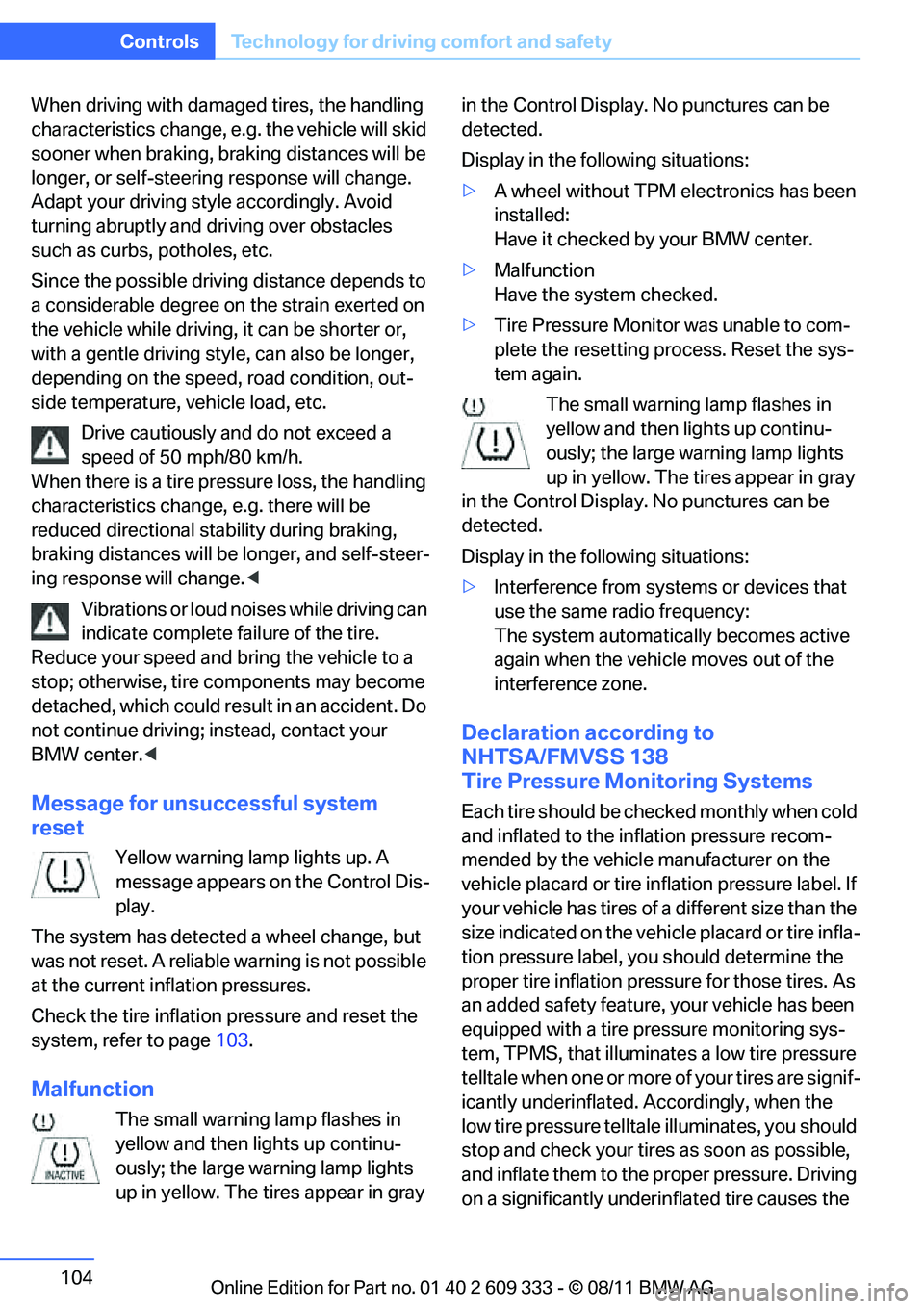
Yellow warning lamp lights up. A
message appears on the Control Dis-
play.
The system has detected a wheel change, but
was not reset. A reliable warning is not possible
at the current inflation pressures.
Check the tire inflation pressure and reset the
system, refer to page 103.
Malfunction
The small warning lamp flashes in
yellow and then lights up continu-
ously; the large warning lamp lights
up in yellow. The tires appear in gray in the Control Display. No punctures can be
detected.
Display in the follo
wing situations:
> A wheel without TPM electronics has been
installed:
Have it checked by your BMW center.
> Malfunction
Have the system checked.
> Tire Pressure Monitor was unable to com-
plete the resetting process. Reset the sys-
tem again.
The small warning lamp flashes in
yellow and then lights up continu-
ously; the large warning lamp lights
up in yellow. The tires appear in gray
in the Control Display. No punctures can be
detected.
Display in the follo wing situations:
> Interference from systems or devices that
use the same radio frequency:
The system automatica lly becomes active
again when the vehicl e moves out of the
interference zone.
Declaration according to
NHTSA/FMVSS 138
Tire Pressure Monitoring Systems
Each tire should be checked monthly when cold
and inflated to the inflation pressure recom-
mended by the vehicle manufacturer on the
vehicle placard or tire infl ation pressure label. If
your vehicle has tires of a different size than the
size indicated on the vehicle placard or tire infla-
tion pressure label, yo u should determine the
proper tire inflation pressure for those tires. As
an added safety feature, your vehicle has been
equipped with a tire pressure monitoring sys-
tem, TPMS, that illuminate s a low tire pressure
telltale when one or more of your tires are signif-
icantly underinflated. Accordingly, when the
low tire pressure telltal e illuminates, you should
stop and check your tires as soon as possible,
and inflate them to the proper pressure. Driving
on a significantly underi nflated tire causes the
Online Edition for Part no. 01 40 2 609 333 - \251 08/11 BMW AG
Page 110 of 314
109
Technology for driving comfort and safety
Controls
In the event of a fault in the airbag system,
have it checked without delay; otherwise,
there is the risk that the system will not function
as intended even if a su fficiently severe acci-
dent occurs. <
Convertible: rollover
protection system
The rollover protection system is activated
automatically in the event of an accident, a crit-
ical driving situation, an extreme tilt in the car's
longitudinal axis or upon loss of ground contact.
The protection bars behind the rear head
restraints deploy within fractions of a second.
As a supplementary system to the reinforced
windshield frame, the rollover protection sys-
tem ensures that the necessary headroom is
maintained for all vehicle occupants. Always keep the area of movement of the
rollover protection system clear.
In minor accidents, you are protected by the
fastened safety belt and, depending on acci-
dent severity, by the sa fety belt tensioner and
multi-phase airbag retention system. <
Resetting
If the rollover protection system was not
impacted after being automatically activated, it
can be reset by lowering the protection bars to
their original positions. This does not require
tools.
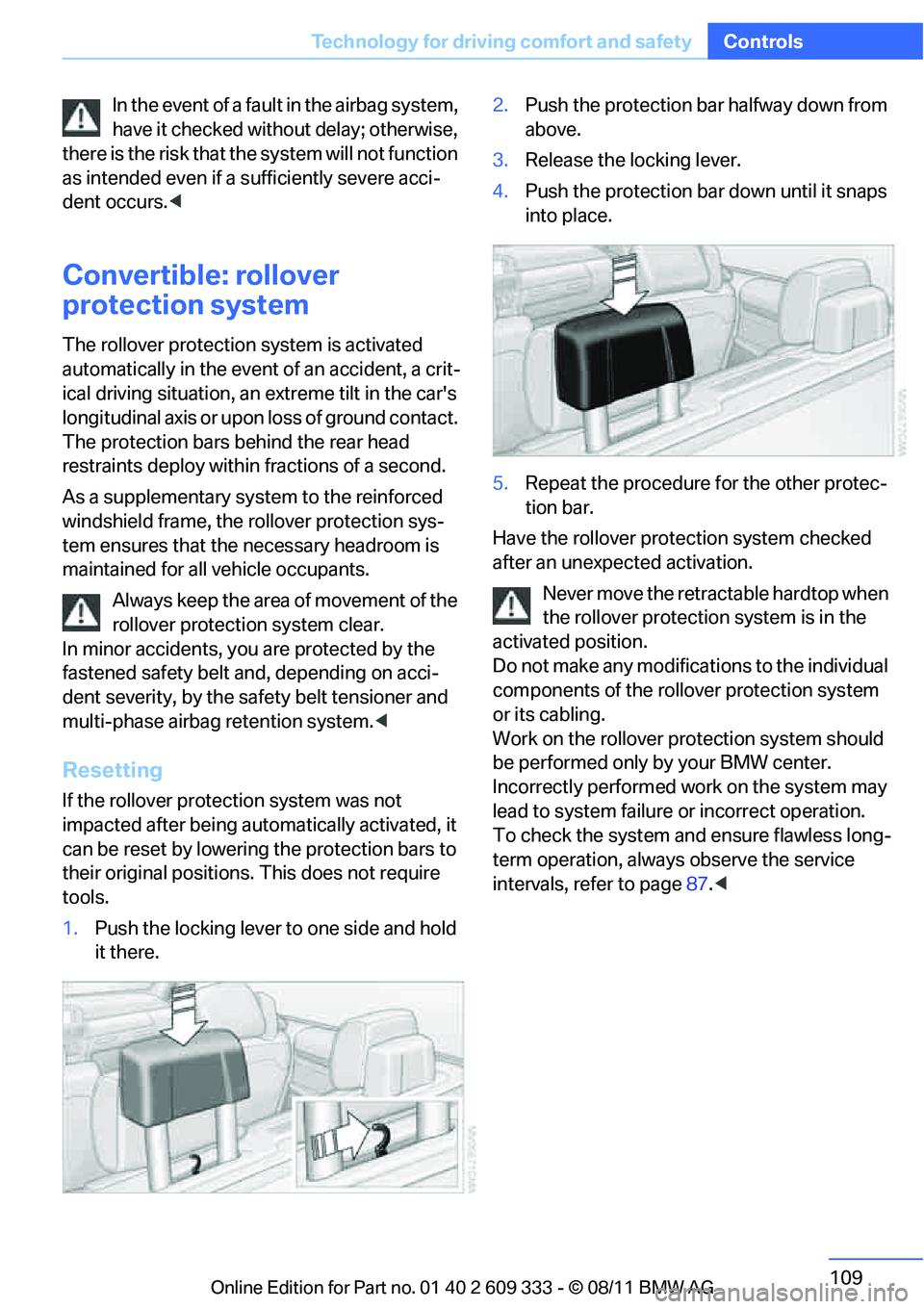
1. Push the locking lever to one side and hold
it there. 2.
Push the protection bar halfway down from
above.
3. Release the locking lever.
4. Push the protection bar down until it snaps
into place.
5. Repeat the procedure for the other protec-
tion bar.
Have the rollover protection system checked
after an unexpected activation.
Never move the retrac table hardtop when
the rollover protection system is in the
activated position.
Do not make any modifica tions to the individual
components of the rollover protection system
or its cabling.
Work on the rollover protection system should
be performed only by your BMW center.
Incorrectly performed work on the system may
lead to system failure or incorrect operation.
To check the system and ensure flawless long-
term operation, always observe the service
intervals, refer to page 87.<
Online Edition for Part no. 01 40 2 609 333 - \251 08/11 BMW AG
Page 173 of 314
172
EntertainmentOn/off and tone
Multi-channel playback, surround
You can choose between stereo and multi-
channel playback, surround.
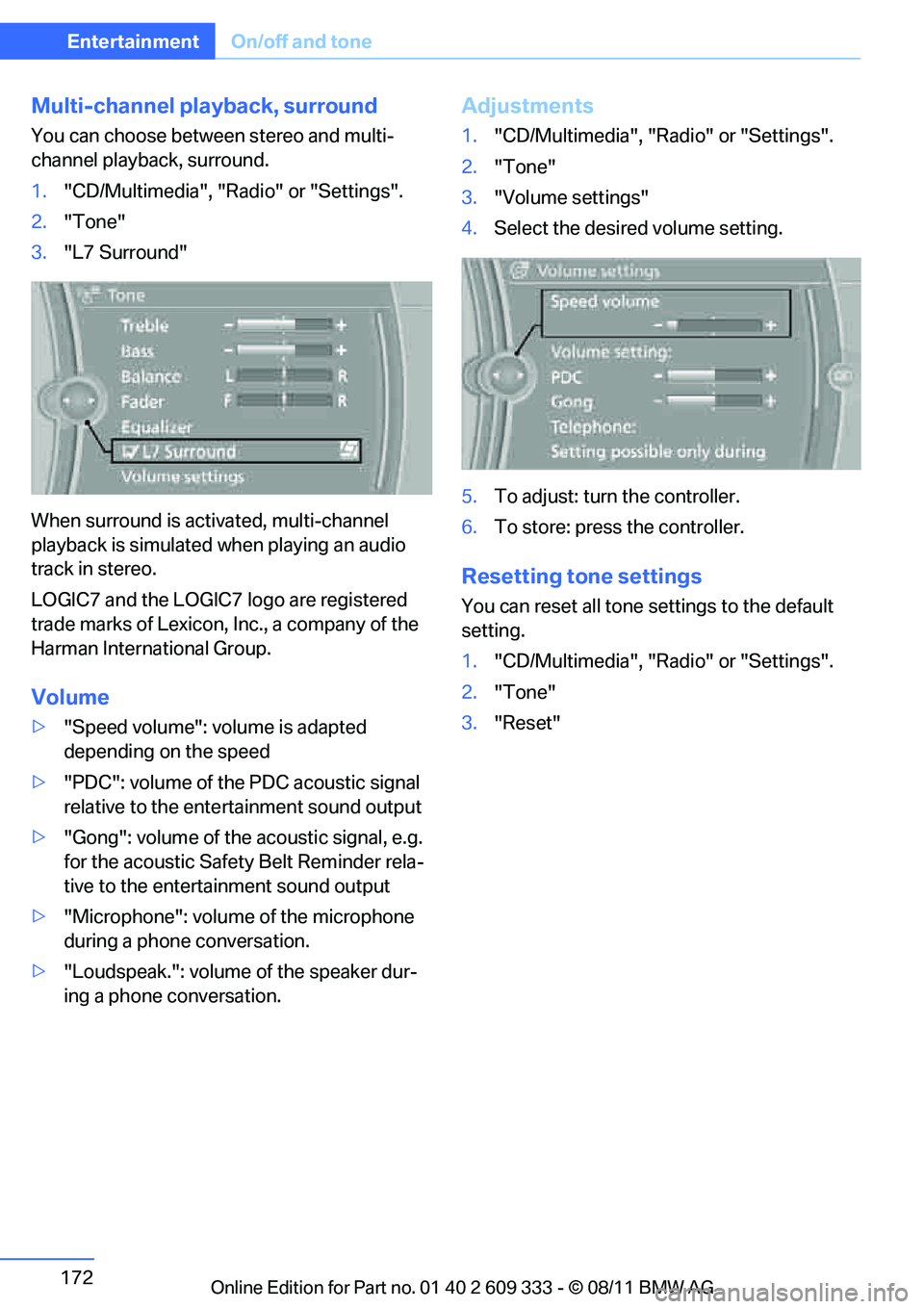
1."CD/Multimedia", "Radio" or "Settings".
2. "Tone"
3. "L7 Surround"
When surround is acti vated, multi-channel
playback is simulated when playing an audio
track in stereo.
LOGIC7 and the LOGIC7 logo are registered
trade marks of Lexicon, Inc., a company of the
Harman International Group.
Volume
> "Speed volume": volume is adapted
depending on the speed
> "PDC": volume of the PDC acoustic signal
relative to the ente rtainment sound output
> "Gong": volume of the acoustic signal, e.g.
for the acoustic Safety Belt Reminder rela-
tive to the entertainment sound output
> "Microphone": volume of the microphone
during a phone conversation.
> "Loudspeak.": volume of the speaker dur-
ing a phone conversation.
Adjustments
1."CD/Multimedia", "Radio" or "Settings".
2. "Tone"
3. "Volume settings"
4. Select the desired volume setting.
5. To adjust: turn the controller.
6. To store: press the controller.
Resetting tone settings
You can reset all tone settings to the default
setting.
1. "CD/Multimedia", "Radio" or "Settings".
2. "Tone"
3. "Reset"
Online Edition for Part no. 01 40 2 609 333 - \251 08/11 BMW AG
Page 176 of 314
175
Radio
Entertainment
HD Radio™ reception
Many radio stations transmit analog and digital
signals.
License conditions
HD Radio™ technology is
manufactured under
U.S. and Foreign Patents licensed from iBiquity
Digital Corp. HD Radio™ and the HD and HD
Radio logos are proprietary trademarks of iBiq-
uity Digital Corp.
Activating/deactivating digital radio
reception
1. "Radio"
2. "FM" or "AM"
3. Open "Options".
4. "HD Radio Reception"
The setting is stored for the remote control cur-
rently in use. This symbol is displa yed when a station is
being received digitally.
When setting a station that has a digital signal, it
may take several second s before the station
plays in HD quality.
In areas in which the station is not continuously
received in digital mode, playback switches
between analog and digital reception. In this
case, switch off digital radio reception.
Displaying additional information
Some stations broadcast additional information
on the current track, such as the name of the
artist.
1. Select the desired station.
2. Open "Options".
3. "Station info"
Selecting a substation
The symbol indicates that a main station also
broadcasts additional substations. The station
name of the main station ends in HD1. The sta-
tion names of the substations end in HD2, HD3,
etc. 1.
Select the desired station.
2. Press the controller.
3. Select the substation.
When reception is poor, the substation is muted
for several seconds.
Presets
It is possible to store up to 40 stations.
Selecting a station
1. "Radio"
2. "Presets"
3. Select the desired station.
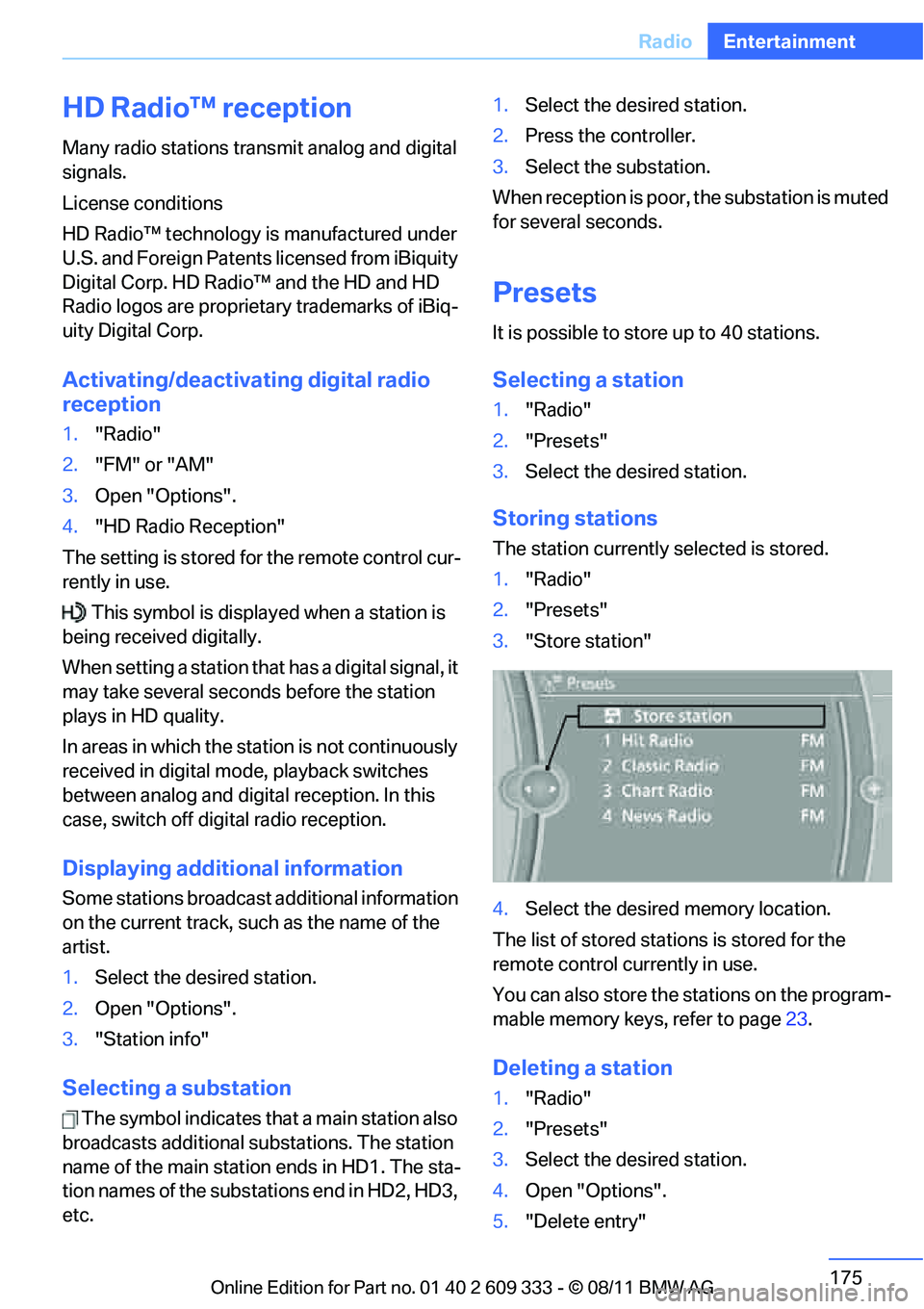
Storing stations
The station currently selected is stored.
1."Radio"
2. "Presets"
3. "Store station"
4. Select the desired memory location.
The list of stored stations is stored for the
remote control currently in use.
You can also store the stations on the program-
mable memory keys, refer to page 23.
Deleting a station
1."Radio"
2. "Presets"
3. Select the desired station.
4. Open "Options".
5. "Delete entry"
Online Edition for Part no. 01 40 2 609 333 - \251 08/11 BMW AG
Page 199 of 314
198
EntertainmentExternal devices
>Bluetooth® is a registered trademark of
Bluetooth® SIG, Inc.
> Sound is output over the vehicle speakers.
> The volume of the sound output depends
on the device. If necessary, change the vol-
ume setting on the device.
> Up to four external devices can be paired
with the vehicle.
Requirements
> Suitable device. For information, go to
www.bmwusa.com/bluetooth.
> Device operational.
> Ignition switched on.
> Bluetooth activated in vehicle, refer to
page 205, and in the device.
> Activating Bluetooth audio, refer to
page 205.
> Bluetooth presets in the device are
required, e.g. connection not confirmed or
visible, refer to Owner's Manual for the
device.
> A number with at least 4 and at most
16 digits has been established as the Blue-
tooth passkey. Only requ ired once for pair-
ing.
Pairing and connecting
Only pair the device when the vehicle is
stopped; otherwise, inattention may lead
to endangerment of passengers or other road
users. <
1. "CD/Multimedia"
2. "Bluetooth® (audio)"
3. "Bluetooth® audio" if applicable
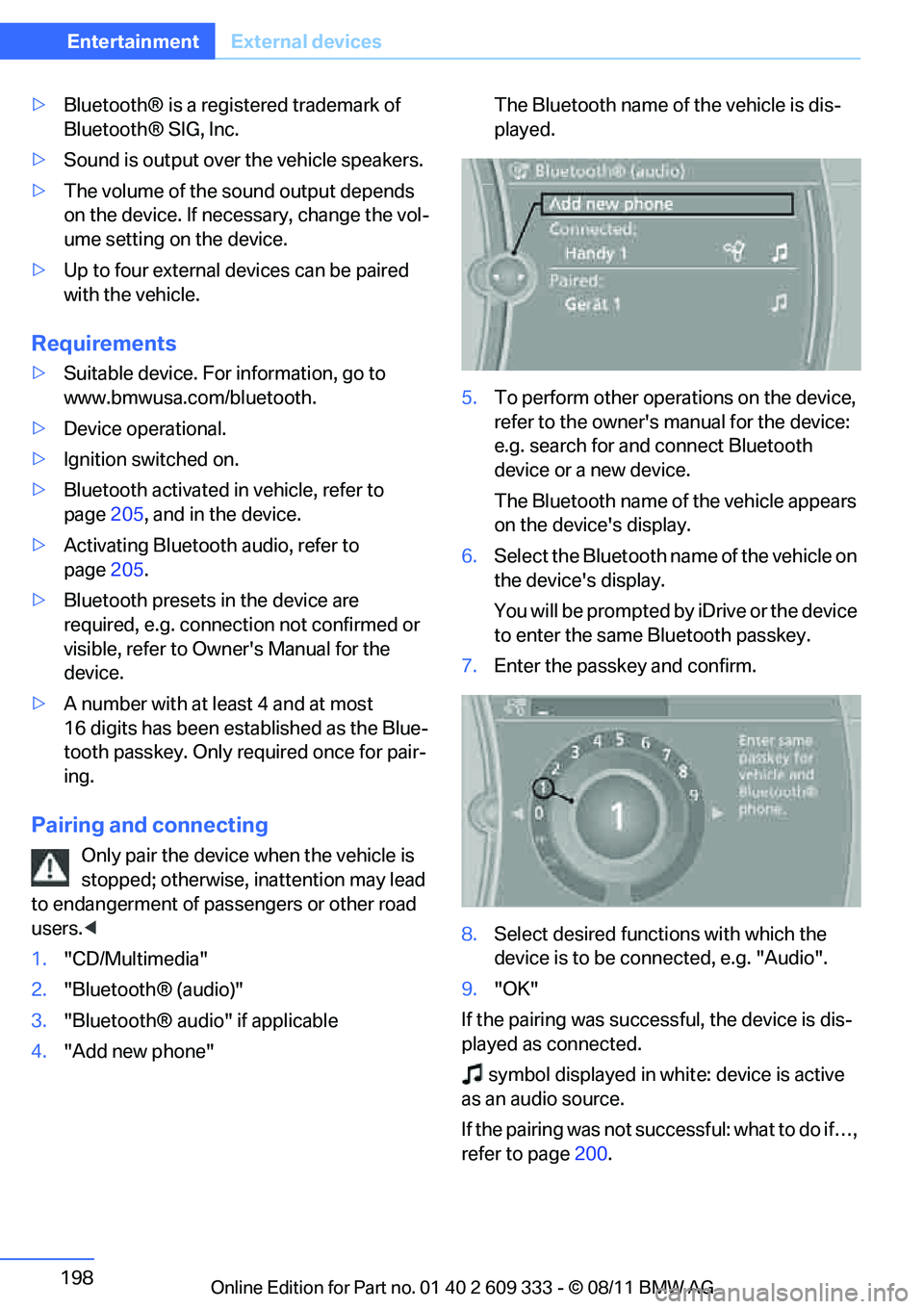
4. "Add new phone" The Bluetooth name of the vehicle is dis-
played.
5. To perform other operations on the device,
refer to the owner's manual for the device:
e.g. search for and connect Bluetooth
device or a new device.
The Bluetooth name of the vehicle appears
on the device's display.
6. Select the Bluetooth name of the vehicle on
the device's display.
You will be prompted by iDrive or the device
to enter the same Bluetooth passkey.
7. Enter the passkey and confirm.
8. Select desired functi ons with which the
device is to be connected, e.g. "Audio".
9. "OK"
If the pairing was successful, the device is dis-
played as connected. symbol displayed in whit e: device is active
as an audio source.
If the pairing was not succ essful: what to do if…,
refer to page 200.
Online Edition for Part no. 01 40 2 609 333 - \251 08/11 BMW AG
Page 206 of 314
205
Te l e p h o n e
Communications
Notes
At high temperatures, the charging function of
the mobile phone may be limited and some
functions may no longer be carried out.
When using the mobile phone via the vehicle,
follow the operating instructions of the mobile
phone.
Pairing/unpairing mobile
phone
General information
The following functions are available:
>
Using a mobile phone as a telephone.
> Using the mobile phone as an auxiliary
phone.
> Using the mobile phone as an audio source.
> Using an audio device as an audio source,
refer to page 197.
Requirements
>Suitable mobile phone, refer to page 204.
> Mobile phone operational.
> Bluetooth activated in vehicle, refer to
page 207, and in the mobile phone.
> Bluetooth presets in the mobile phone are
required, e.g. connection not confirmed or
visible, refer to Owner's Manual for the
mobile phone.
> Deactivating Bluetooth audio, refer to
page 205.
> A number with at least 4 and at most
16 digits has been established as the Blue-
tooth passkey. Only required once for pair-
ing.
> Ignition switched on.
Activating/deactivating Bluetooth link
Bluetooth is not permi tted everywhere. Comply
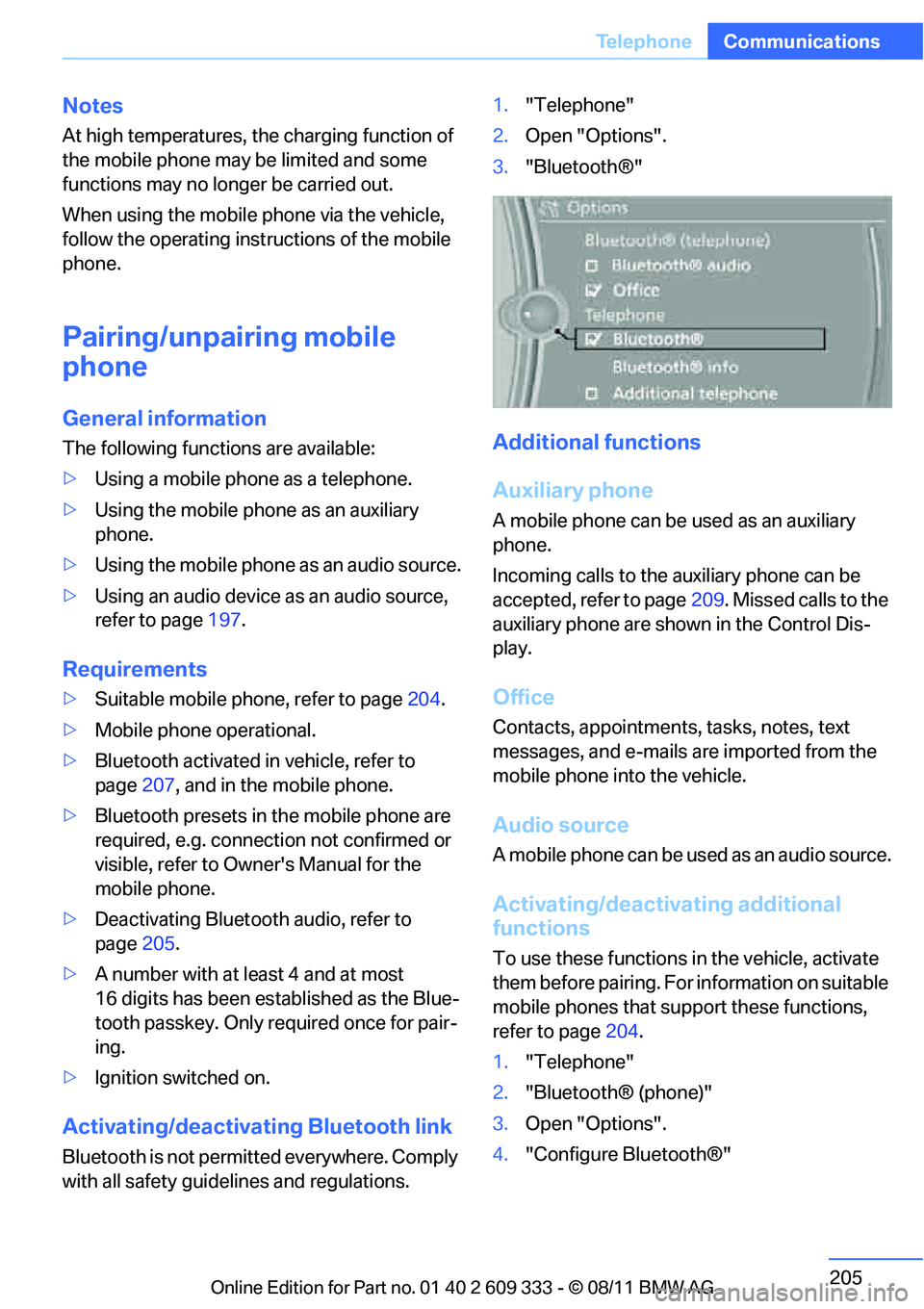
with all safety guide lines and regulations. 1.
"Telephone"
2. Open "Options".
3. "Bluetooth®"
Additional functions
Auxiliary phone
A mobile phone can be used as an auxiliary
phone.
Incoming calls to the auxiliary phone can be
accepted, refer to page 209. Missed calls to the
auxiliary phone are shown in the Control Dis-
play.
Office
Contacts, appointments, tasks, notes, text
messages, and e-mails are imported from the
mobile phone into the vehicle.
Audio source
A mobile phone can be used as an audio source.
Activating/deactivating additional
functions
To use these functions in the vehicle, activate
them before pairing. For information on suitable
mobile phones that support these functions,
refer to page 204.
1. "Telephone"
2. "Bluetooth® (phone)"
3. Open "Options".
4. "Configure Bluetooth®"
Online Edition for Part no. 01 40 2 609 333 - \251 08/11 BMW AG
Page 216 of 314
215
Te l e p h o n e
Communications
The command can be repeated as often as nec-
essary.
Deleting phone number
All digits entered up to
this point are deleted.
Redialing
Voice phone book
Depending on how your vehicle is equipped, it
may be necessary to cr eate your own voice
phone book.
The entries must be entered using voice com-
mands and are separate fr om the memory in the
mobile phone. Up to 50 entries can be set up.
Store the entry
Delete the entry
Delete all entries To listen to and select the entries
Select an entry
Adjusting volume
Turn knob during announcement.
>
The volume remains the same, even if the
volume of other audio sources is changed.
> The volume is stored for the remote control
currently in use.
Notes
Notes on Emergency Requests
Do not use the voice activation system to ini-
tiate an emergency call. In stressful situations,
the voice and vocal pitch can change. This can
unnecessarily delay the establishment of a tele-
phone connection.
Instead, use the SOS button, refer to page 276,
in the vicinity of the interior rearview mirror.
Ambient conditions
> Say the commands, numbers and letters
smoothly and with normal volume, empha-
sis and speed.
> Always say the commands in the language
of the system. The language of the voice
activation of the mobile phone is preset and
cannot be changed via the Control Display.
> Keep the doors, windows, glass roof, and
convertible top closed to prevent interfer-
ence from outside noise.
> Avoid ambient noise in the vehicle while
speaking.
{
Delete }.
{ Redial }.
1. {Save name }.
2. Say the name aloud. Do not exceed a
speaking duration of about 2 seconds.
3. Say the phone number after being
prompted to do so by the system.
4. {Save }.
1. {Delete name }.
2. Say the name when prompted.
3. Confirm request: {Yes }
1. {Delete phonebook }.
The dialog for deleting phone book is
opened.
2. Confirm request: {Yes }
3. Confirm request again: {Yes }
1. {Read phonebook }.
The dialog for reading phone book is
opened.
2. Say {Dial number } when the desired
entry is read.
1. {Dial name }.
2. Say the name when prompted.
3. Confirm request: {Yes }
Online Edition for Part no. 01 40 2 609 333 - \251 08/11 BMW AG
Page 240 of 314
239
Wheels and tires
Mobility
Wheels and tires
Vehicle equipment
In this chapter, all production, country, and
optional equipment that is offered in the model
range is described. For this reason, descrip-
tions will be given of some equipment that may
not be available in a vehi
cle, for example due to
the special options or national-market version
selected. This also app lies to safety related
functions and systems.
Tire inflation pressures
Information for your safety
It is not merely the tires' service life, but also
driving comfort and, to a great extent, driving
safety that depend on th e condition of the tires
and the maintenance of th e specified tire pres-
sure.
Check the tire inflation pressure regularly
and correct it, if nece ssary: at least twice a
month and before starting long trips. If you fail
to observe this precaution you may be driving
on tires with incorrect tire pressures, a condi-
tion that can not only compromise your vehi-
cle's driving stability, but also lead to tire dam-
age and the risk of an accident. Do not drive
with deflated, i.e. flat tires, except when using
run-flat tires. A flat tire will seriously impair your
vehicle's handling and braking response.
Attempts to drive on a flat tire can lead to loss of
control over the vehicle. <
Checking pressure
Only check tire inflation pressure when the
tires are cold. This means after a maximum of
1.25 miles/2 km driving or when the vehicle has
been parked for at least 2 hours. When tires are
warm, the tire inflation pressure is higher.
After correcting the tire inflation pressure,
reset the Tire Pressure Monitor, refer to page
103, or reinitialize the Flat Tire Monitor,
refer to page 100.<
Inflation pressure specifications
The tables below provide all the correct inflation
pressures for the specified tire sizes at ambient
temperature.
The inflation pressure s apply to the tire
sizes approved and tire brands recom-
mended by BMW; a list of these is available
from your BMW center. <
For correct identification of the right tire infla-
tion pressures, observe the following:
> Tire sizes for your vehicle
> Maximum allowable driving speed
Tire inflation pressures for driving up to
100 mph or 160 km/h
For normal driving up to 100 mph or 160 km/h
and to achieve optimum driving comfort, adjust
pressures to the respecti ve tire inflation pres-
sures listed on the following pages in the col-
umns for traveling speeds up to a maximum of
100 mph or 160 km/h.
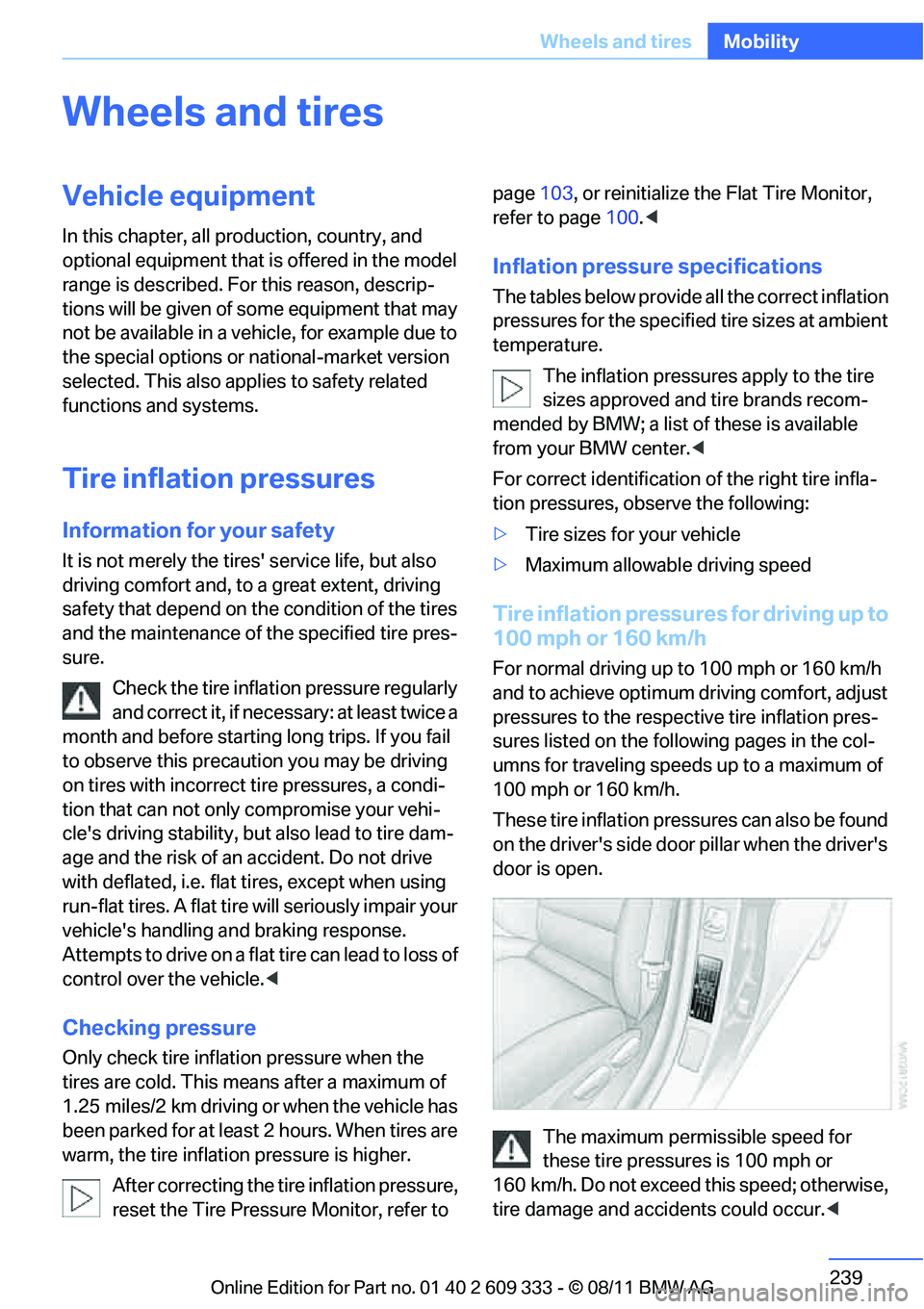
These tire inflation pressures can also be found
on the driver's side door pillar when the driver's
door is open.
The maximum permissible speed for
these tire pressures is 100 mph or
160 km/h. Do not exceed this speed; otherwise,
tire damage and accidents could occur. <
Online Edition for Part no. 01 40 2 609 333 - \251 08/11 BMW AG
Page 293 of 314
292
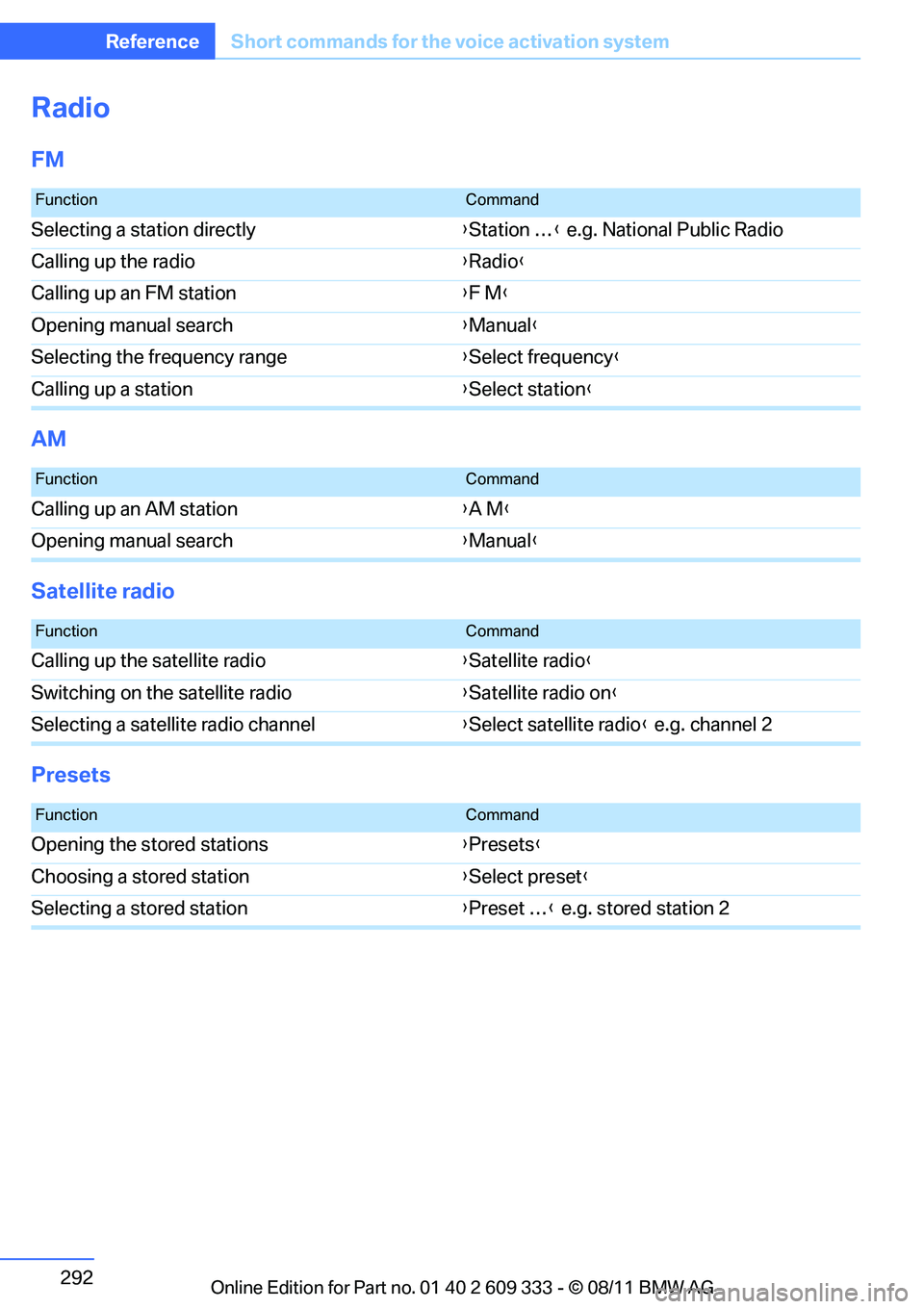
ReferenceShort commands for the voice activation system
Radio
FM
AM
Satellite radio
Presets
FunctionCommand
Selecting a station directly {Station … } e.g. National Public Radio
Calling up the radio {Radio }
Calling up an FM station {F M }
Opening manual search {Manual }
Selecting the frequency range {Select frequency }
Calling up a station {Select station }
FunctionCommand
Calling up an AM station {A M }
Opening manual search {Manual }
FunctionCommand
Calling up the satellite radio {Satellite radio }
Switching on the satellite radio {Satellite radio on }
Selecting a satellite radio channel {Select satellite radio } e.g. channel 2
FunctionCommand
Opening the stored stations {Presets }
Choosing a stored station {Select preset }
Selecting a stored station {Preset … } e.g. stored station 2
Online Edition for Part no. 01 40 2 609 333 - \251 08/11 BMW AG
Page 309 of 314
308
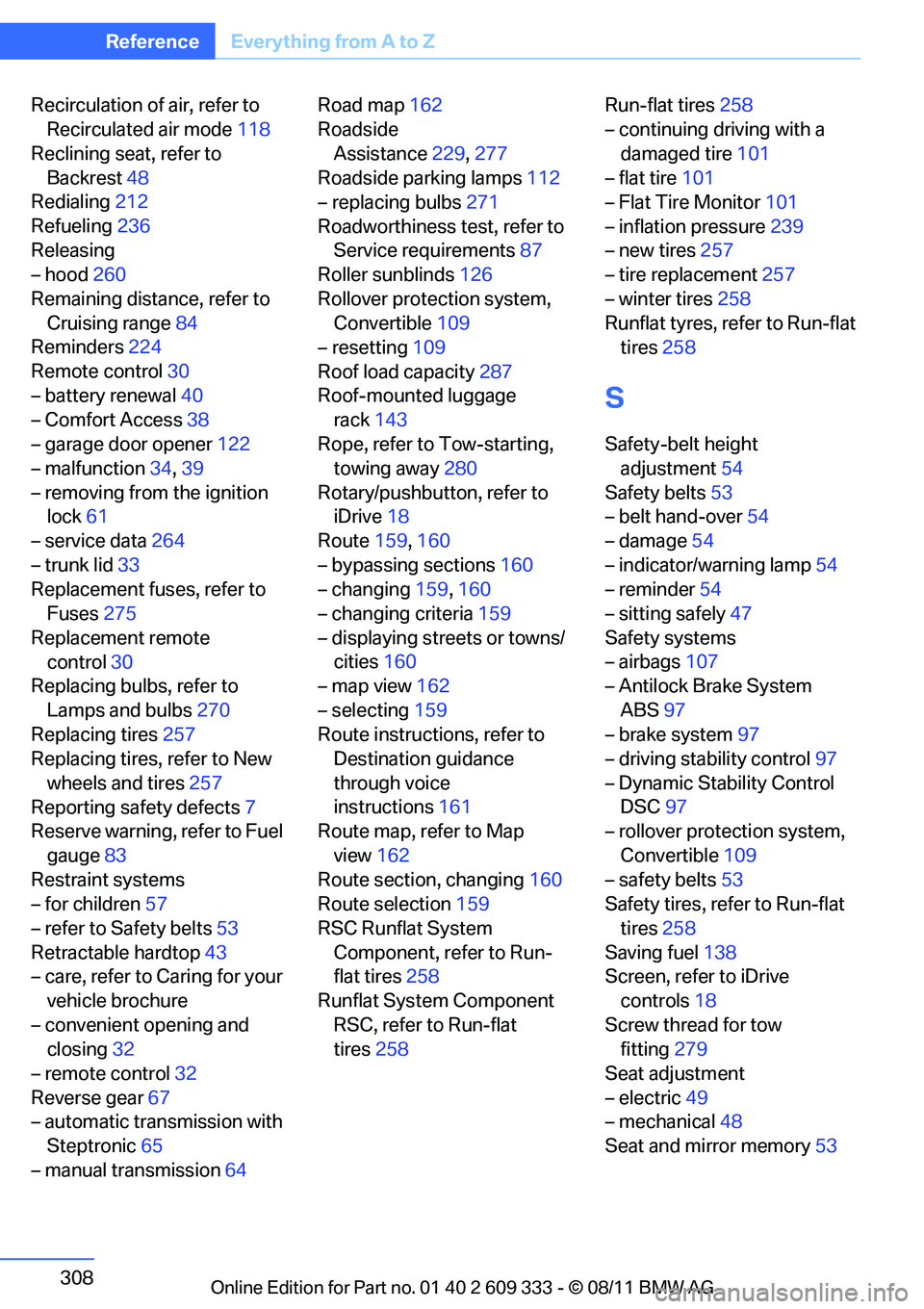
ReferenceEverything from A to Z
Recirculation of air, refer to
Recirculated air mode 118
Reclining seat, refer to Backrest 48
Redialing 212
Refueling 236
Releasing
– hood 260
Remaining distance, refer to Cruising range 84
Reminders 224
Remote control 30
– battery renewal 40
– Comfort Access 38
– garage door opener 122
– malfunction 34,39
– removing from the ignition lock 61
– service data 264
– trunk lid 33
Replacement fuses, refer to Fuses 275
Replacement remote control 30
Replacing bulbs, refer to
Lamps and bulbs 270
Replacing tires 257
Replacing tires, refer to New
wheels and tires 257
Reporting safety defects 7
Reserve warning, refer to Fuel
gauge 83
Restraint systems
– for children 57
– refer to Safety belts 53
Retractable hardtop 43
– care, refer to Caring for your
vehicle brochure
– convenient opening and closing 32
– remote control 32
Reverse gear 67
– automatic transmission with
Steptronic 65
– manual transmission 64Road map
162
Roadside
Assistance 229,277
Roadside parking lamps 112
– replacing bulbs 271
Roadworthiness te st, refer to
Service requirements 87
Roller sunblinds 126
Rollover protection system, Convertible 109
– resetting 109
Roof load capacity 287
Roof-mounted luggage rack 143
Rope,
refer to Tow-starting,
towing away 280
Rotary/pushbutton, refer to iDrive 18
Route 159,160
– bypassing sections 160
– changing 159,160
– changing criteria 159
– displaying streets or towns/ cities 160
– map view 162
– selecting 159
Route instructions, refer to Destination guidance
through voice
instructions 161
Route map, refer to Map
view 162
Route section, changing 160
Route selection 159
RSC Runflat System Component, refer to Run-
flat tires 258
Runflat System Component RSC, refer to Run-flat
tires 258 Run-flat tires
258
– continuing driving with a
damaged tire 101
– flat tire 101
– Flat Tire Monitor 101
– inflation pressure 239
– new tires 257
– tire replacement 257
– winter tires 258
Runflat tyres, refer to Run-flat tires 258S
Safety-belt height
adjustment 54
Safety belts 53
– belt hand-over 54
– damage 54
– indicator/warning lamp 54
– reminder 54
– sitting safely 47
Safety systems
– airbags 107
– Antilock Brake System
ABS 97
– brake system 97
– driving stability control 97
– Dynamic Stability Control DSC 97
– rollover protection system,
Convertible 109
– safety belts 53
Safety tires, refer to Run-flat
tires 258
Saving fuel 138
Screen, refer to iDrive
controls 18
Screw thread for tow fitting 279
Seat adjustment
– electric 49
– mechanical 48
Seat and mirror memory 53
Online Edition for Part no. 01 40 2 609 333 - \251 08/11 BMW AG