high beam BMW 328I COUPE 2013 User Guide
[x] Cancel search | Manufacturer: BMW, Model Year: 2013, Model line: 328I COUPE, Model: BMW 328I COUPE 2013Pages: 308, PDF Size: 5.65 MB
Page 91 of 308
90
ControlsControls overview
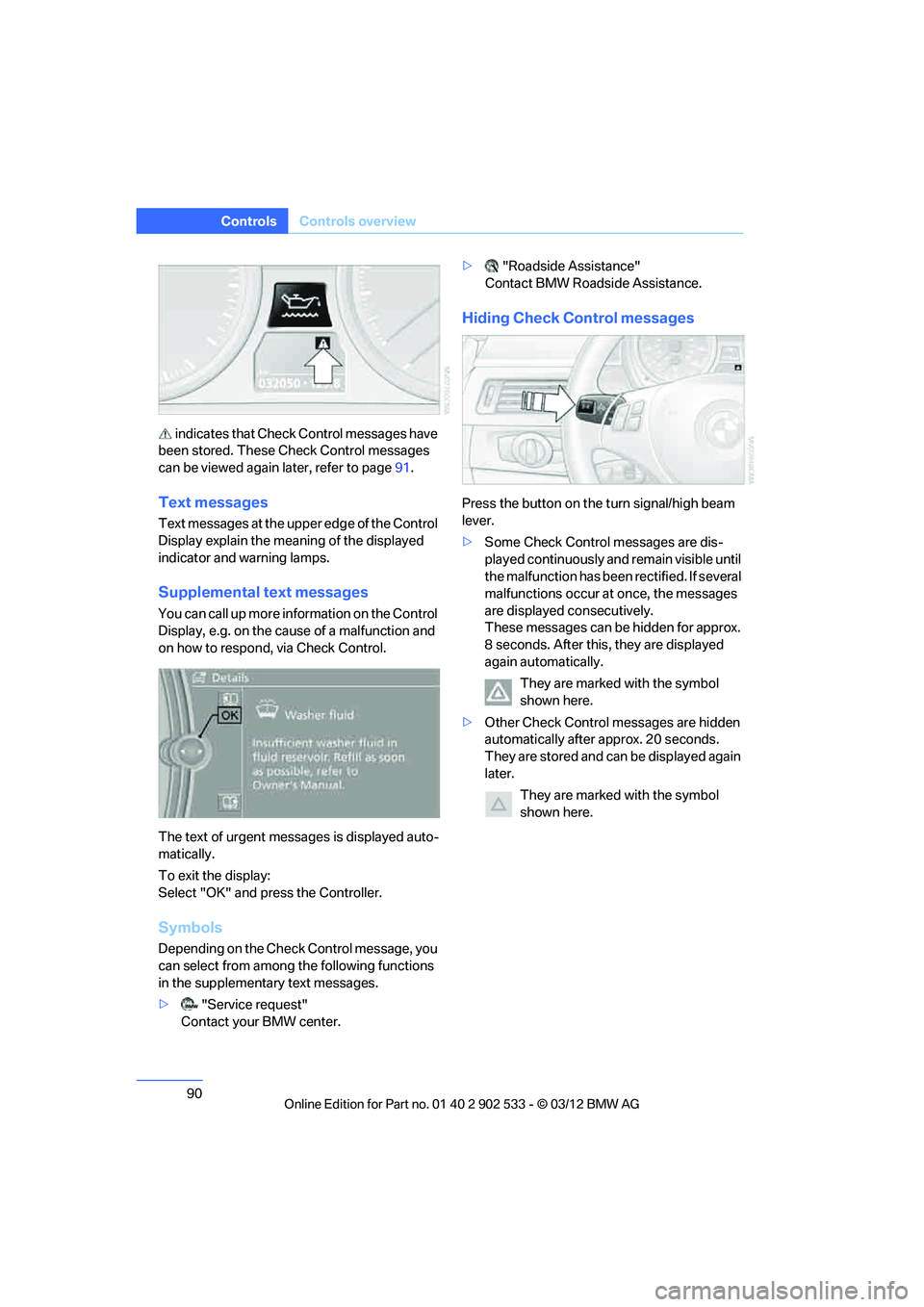
indicates that Check Control messages have
been stored. These Check Control messages
can be viewed again later, refer to page 91.
Text messages
Text messages at the upper edge of the Control
Display explain the meaning of the displayed
indicator and warning lamps.
Supplemental text messages
You can call up more in formation on the Control
Display, e.g. on the cause of a malfunction and
on how to respond, via Check Control.
The text of urgent messages is displayed auto-
matically.
To exit the display:
Select "OK" and press the Controller.
Symbols
Depending on the Check Control message, you
can select from among the following functions
in the supplementary text messages.
> "Service request"
Contact your BMW center. >
"Roadside Assistance"
Contact BMW Roadside Assistance.
Hiding Check Control messages
Press the button on the turn signal/high beam
lever.
> Some Check Control messages are dis-
played continuously and remain visible until
the malfunction has been rectified. If several
malfunctions occur at once, the messages
are displayed consecutively.
These messages can be hidden for approx.
8 seconds. After this, they are displayed
again automatically.
They are marked with the symbol
shown here.
> Other Check Control messages are hidden
automatically after approx. 20 seconds.
They are stored and can be displayed again
later.
They are marked with the symbol
shown here.
00320051004F004C00510048000300280047004C0057004C005200510003
Page 92 of 308
91
Controls overview
Controls
Displaying stored Check Control
messages
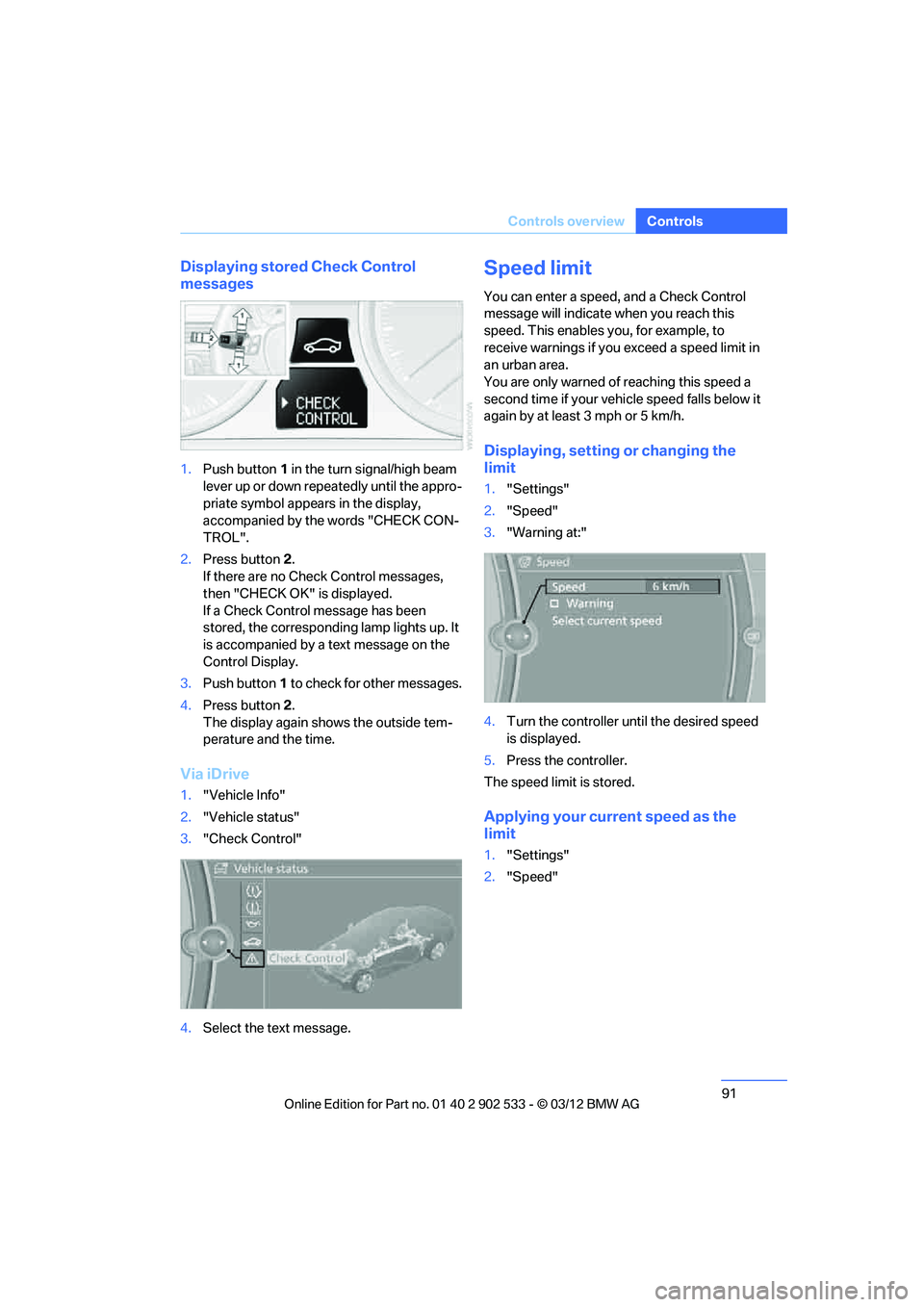
1.
Push button 1 in the turn signal/high beam
lever up or down repeatedly until the appro-
priate symbol appears in the display,
accompanied by the words "CHECK CON-
TROL".
2. Press button 2.
If there are no Check Control messages,
then "CHECK OK" is displayed.
If a Check Control message has been
stored, the corresponding lamp lights up. It
is accompanied by a text message on the
Control Display.
3. Push button 1 to check for other messages.
4. Press button 2.
The display again shows the outside tem-
perature and the time.
Via iDrive
1. "Vehicle Info"
2. "Vehicle status"
3. "Check Control"
4. Select the text message.
Speed limit
You can enter a speed, and a Check Control
message will indicate when you reach this
speed. This enables you, for example, to
receive warnings if you exceed a speed limit in
an urban area.
You are only warned of reaching this speed a
second time if your vehicle speed falls below it
again by at least 3 mph or 5 km/h.
Displaying, setting or changing the
limit
1."Settings"
2. "Speed"
3. "Warning at:"
4. Turn the controller until the desired speed
is displayed.
5. Press the controller.
The speed limit is stored.
Applying your current speed as the
limit
1. "Settings"
2. "Speed"
00320051004F004C00510048000300280047004C0057004C005200510003
Page 109 of 308
108
ControlsLamps
Lamps
Vehicle equipment
In this chapter, all production, country, and
optional equipment that is offered in the model
range is described. For this reason, descrip-
tions will be given of some equipment that may
not be available in a vehicle, for example due to
the special options or national-market version
selected. This also applies to safety related
functions and systems.
At a glance
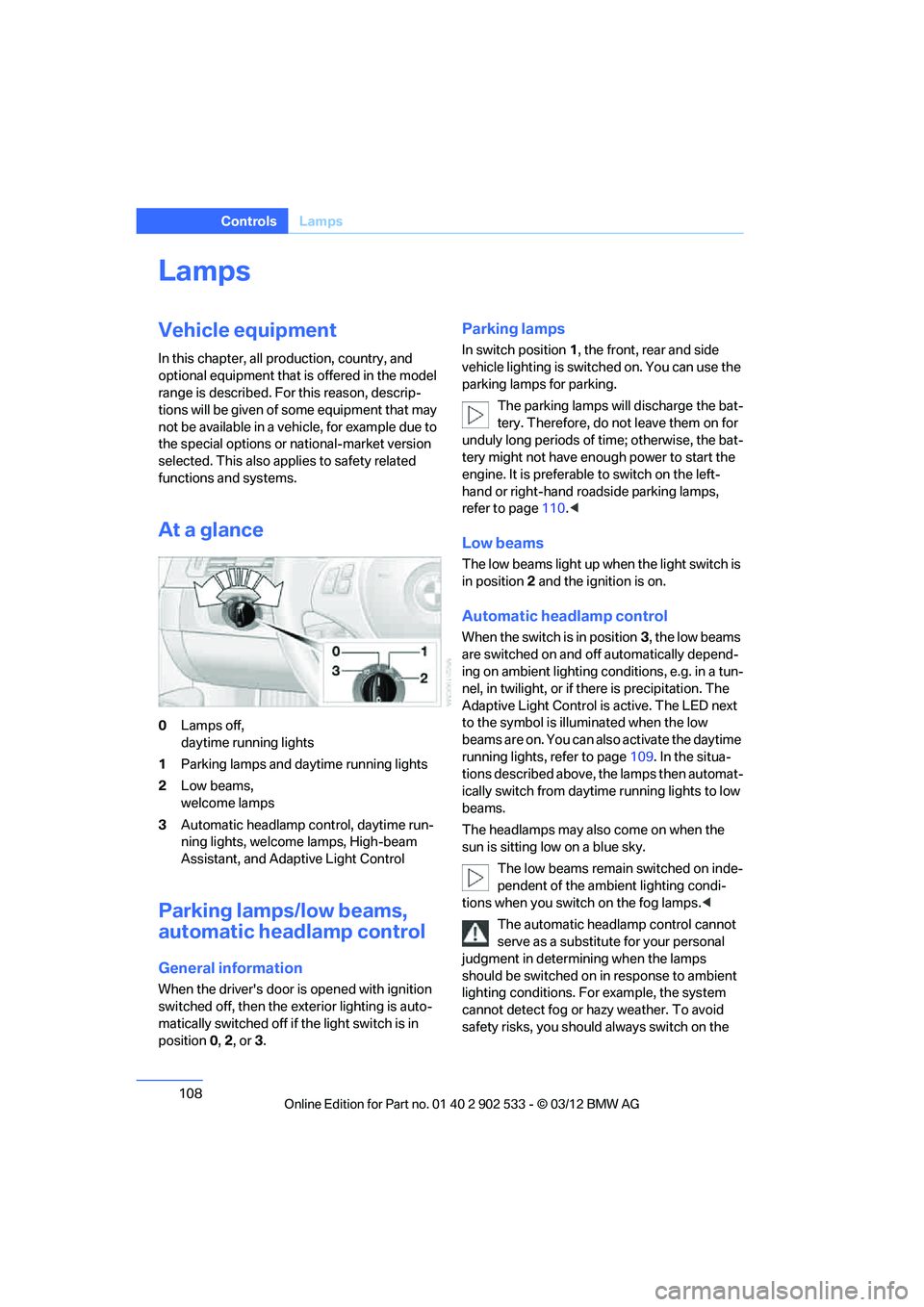
0Lamps off,
daytime running lights
1 Parking lamps and daytime running lights
2 Low beams,
welcome lamps
3 Automatic headlamp control, daytime run-
ning lights, welcome lamps, High-beam
Assistant, and Adaptive Light Control
Parking lamps/low beams,
automatic headlamp control
General information
When the driver's door is opened with ignition
switched off, then the exterior lighting is auto-
matically switched off if the light switch is in
position 0, 2, or3.
Parking lamps
In switch position 1, the front, rear and side
vehicle lighting is switched on. You can use the
parking lamps for parking.
The parking lamps will discharge the bat-
tery. Therefore, do not leave them on for
unduly long periods of time; otherwise, the bat-
tery might not have enough power to start the
engine. It is preferable to switch on the left-
hand or right-hand roadside parking lamps,
refer to page 110.<
Low beams
The low beams light up when the light switch is
in position 2 and the ignition is on.
Automatic headlamp control
When the switch is in position 3, the low beams
are switched on and off automatically depend-
ing on ambient lighting conditions, e.g. in a tun-
nel, in twilight, or if there is precipitation. The
Adaptive Light Control is active. The LED next
to the symbol is illuminated when the low
beams are on. You can also activate the daytime
running lights, refer to page 109. In the situa-
tions described above, the lamps then automat-
ically switch from daytime running lights to low
beams.
The headlamps may also come on when the
sun is sitting low on a blue sky.
The low beams remain switched on inde-
pendent of the ambient lighting condi-
tions when you switch on the fog lamps. <
The automatic headlamp control cannot
serve as a substitute for your personal
judgment in determining when the lamps
should be switched on in response to ambient
lighting conditions. For example, the system
cannot detect fog or hazy weather. To avoid
safety risks, you should always switch on the
00320051004F004C00510048000300280047004C0057004C005200510003
Page 111 of 308
110
ControlsLamps
angle and other parameters, the light from the
headlamp follows the course of the road.
In tight curves at speeds up to 40 mph/70 km/h,
e.g. on mountainous roads or when turning, an
additional, corner-illuminating lamp is switched
on that lights up the inside area of the curve.
Activating Adaptive Light Control
With the ignition switched on, turn the light
switch to position 3, refer to page 108.
The corner-illuminating lamp is switched on
automatically, depending on the steering wheel
angle or turn signal indicator.
Standstill function: to avoid blinding oncoming
traffic, the Adaptive Light Control does not
direct light toward the driver's side when the
vehicle is at a standstill.
When you are reversing, only the corner-illumi-
nating lamps are switched on and active on
both sides.
Malfunction
The warning lamp lights up. A mes-
sage appears on the Control Dis-
play.The Adaptive Light Control is
malfunctioning or failed. Have the system
checked as soon as possible.
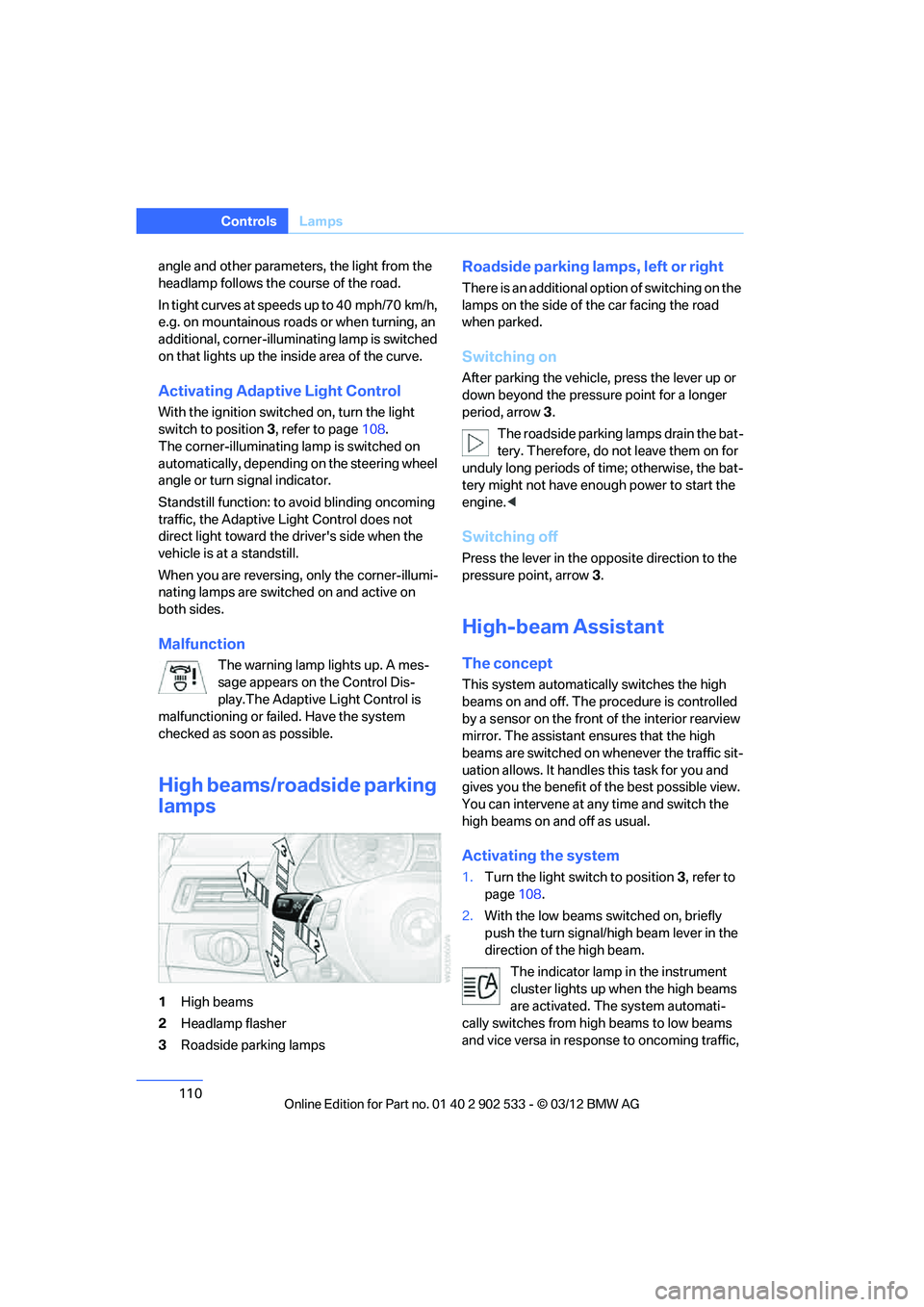
High beams/roadside parking
lamps
1 High beams
2 Headlamp flasher
3 Roadside parking lamps
Roadside parking lamps, left or right
There is an additional option of switching on the
lamps on the side of the car facing the road
when parked.
Switching on
After parking the vehicle, press the lever up or
down beyond the pressure point for a longer
period, arrow 3 .
The roadside parking lamps drain the bat-
tery. Therefore, do not leave them on for
unduly long periods of time; otherwise, the bat-
tery might not have enough power to start the
engine. <
Switching off
Press the lever in the opposite direction to the
pressure point, arrow 3.
High-beam Assistant
The concept
This system automatically switches the high
beams on and off. The procedure is controlled
by a sensor on the front of the interior rearview
mirror. The assistant ensures that the high
beams are switched on whenever the traffic sit-
uation allows. It handles this task for you and
gives you the benefit of the best possible view.
You can intervene at any time and switch the
high beams on and off as usual.
Activating the system
1. Turn the light switch to position 3, refer to
page 108.
2. With the low beams switched on, briefly
push the turn signal/high beam lever in the
direction of the high beam.
The indicator lamp in the instrument
cluster lights up when the high beams
are activated. The system automati-
cally switches from high beams to low beams
and vice versa in response to oncoming traffic,
00320051004F004C00510048000300280047004C0057004C005200510003
Page 112 of 308
111
Lamps
Controls
traffic ahead of you, and adequate ambient
lighting, e.g. on city streets.
Switching the high beams on and off
manually
Whenever you wish, or when the situation
requires, you can intervene:
>
If the High-beam Assistant switches on the
high beams, but you would like to drive with
the low beams, simply switch off the high
beams using the turn signal/high beam
lever. This deactivates the High-beam
Assistant.
To reactivate the system, briefly push the
turn signal/high beam lever toward the high
beams again.
> If the High-beam Assistant switches on the
low beams, but you would like to drive with
the high beams, switch on the high beams
as usual. This deactivates the system and
the high beams need to be switched off
manually, if necessary.
To reactivate the system, briefly push the
turn signal/high beam lever toward the high
beams again.
> Use the headlamp flasher as usual with the
low beams switched on.
System limitations
The High-beam Assistant cannot serve
as a substitute for the driver's personal
judgment of when to use the high beams.
Therefore, manually switch off the high beams
in situations where this is required to avoid a
safety risk.<
The system is not fully functional in situations
such as the following, and driver intervention
may be necessary:
> In very unfavorable weather conditions,
such as fog or heavy precipitation
> In detecting poorly-lit road users, such as
pedestrians, cyclists, horseback riders and
wagons; when driving close to train or ship
traffic; and at animal crossings >
In tight curves, on hilltops or in depressions,
in cross traffic or half-obscured oncoming
traffic on highways
> In poorly lit towns and cities and in the pres-
ence of highly reflective signs
> At low speeds
> When the windshield in front of the interior
rearview mirror is fogged over, dirty or cov-
ered with stickers, etc.
> If the sensor is dirty. Clean the sensor on
the front of the interior rearview mirror using
a cloth moistened with a small amount of
glass cleaner.
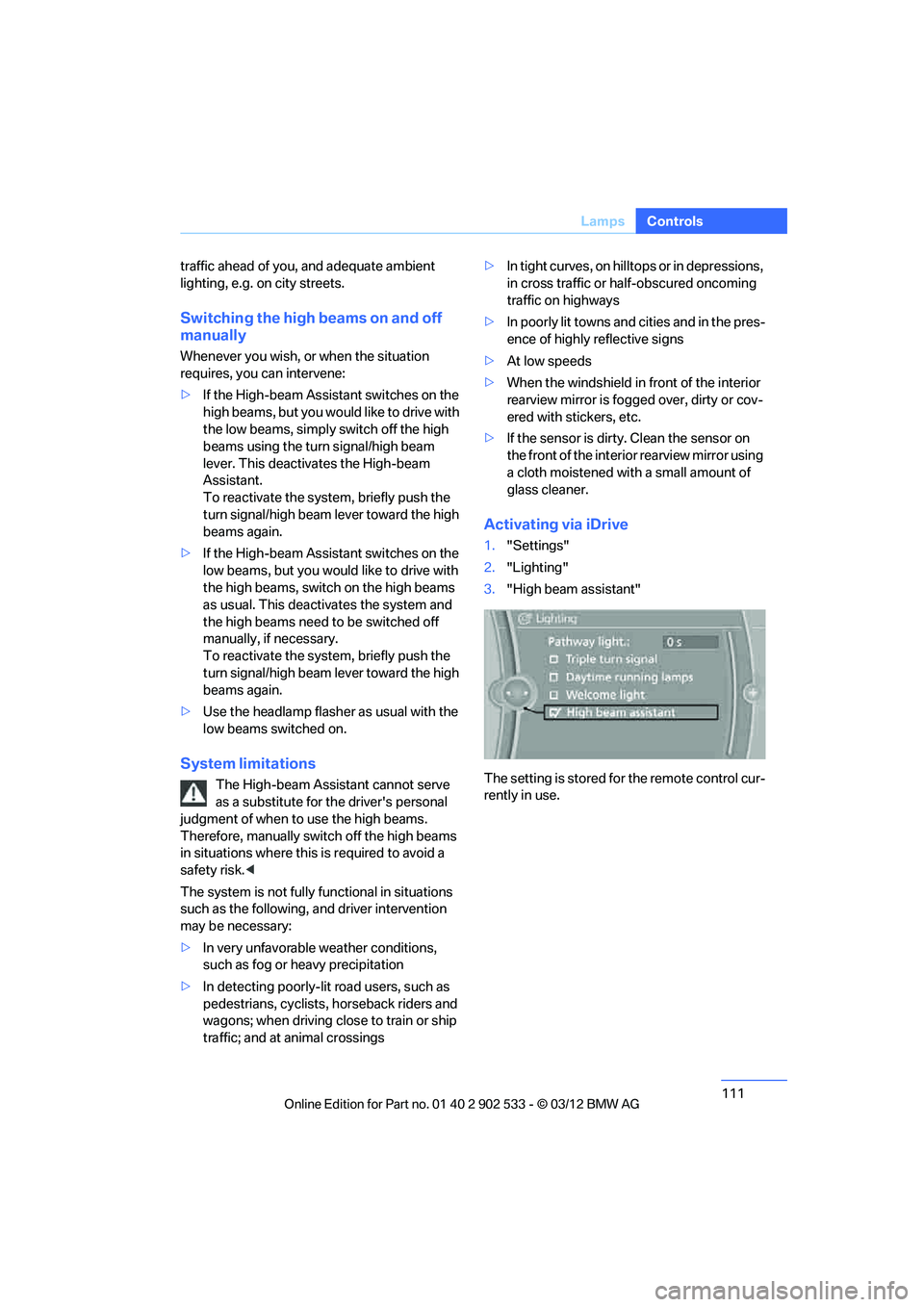
Activating via iDrive
1."Settings"
2. "Lighting"
3. "High beam assistant"
The setting is stored for the remote control cur-
rently in use.
00320051004F004C00510048000300280047004C0057004C005200510003
Page 113 of 308
112
ControlsLamps
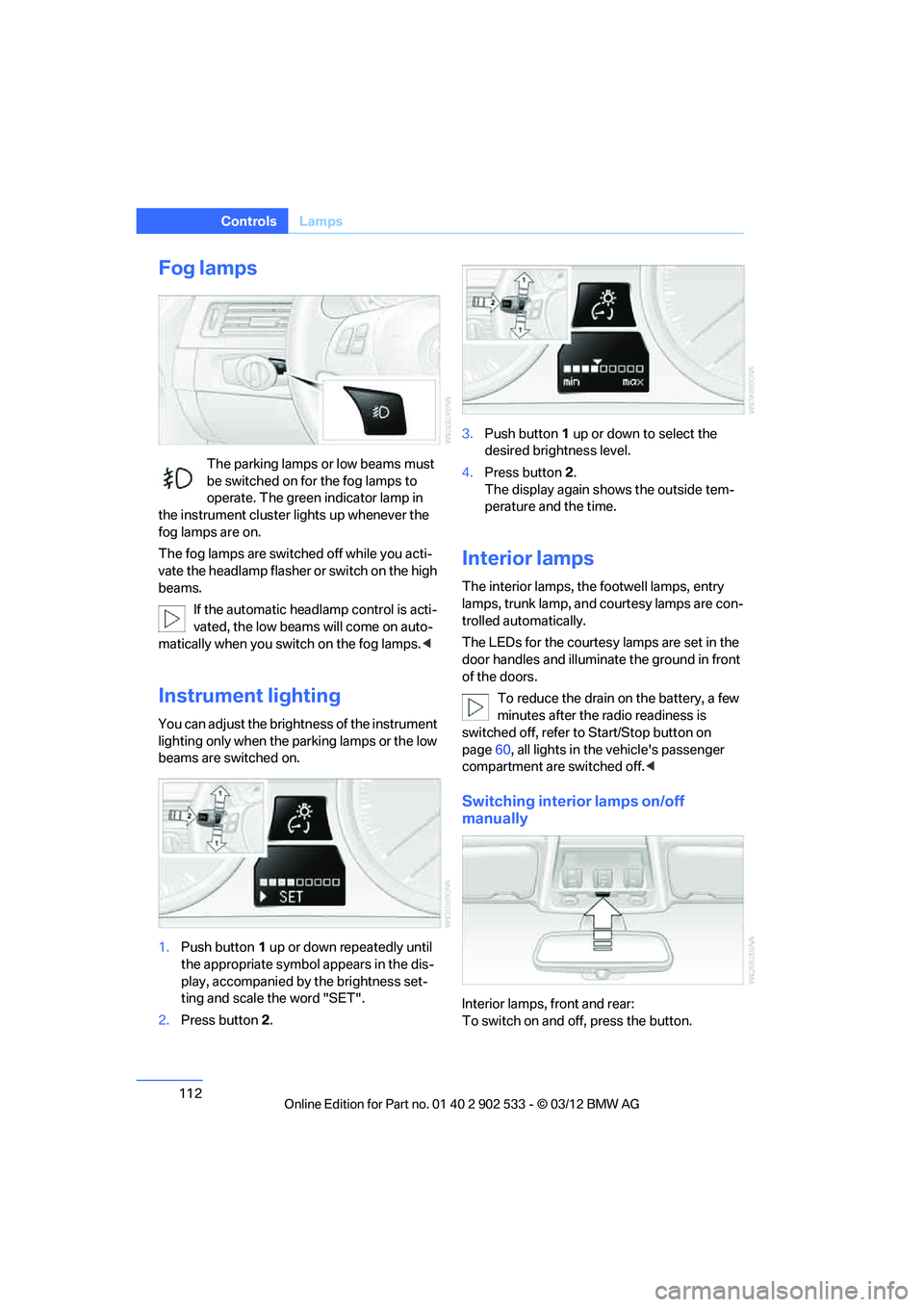
Fog lamps
The parking lamps or low beams must
be switched on for the fog lamps to
operate. The green indicator lamp in
the instrument cluster lights up whenever the
fog lamps are on.
The fog lamps are switched off while you acti-
vate the headlamp flasher or switch on the high
beams.
If the automatic headlamp control is acti-
vated, the low beams will come on auto-
matically when you switch on the fog lamps. <
Instrument lighting
You can adjust the brightness of the instrument
lighting only when the parking lamps or the low
beams are switched on.
1.Push button 1 up or down repeatedly until
the appropriate symbol appears in the dis-
play, accompanied by the brightness set-
ting and scale the word "SET".
2. Press button 2. 3.
Push button 1 up or down to select the
desired brightness level.
4. Press button 2.
The display again shows the outside tem-
perature and the time.
Interior lamps
The interior lamps, the footwell lamps, entry
lamps, trunk lamp, and courtesy lamps are con-
trolled automatically.
The LEDs for the courtesy lamps are set in the
door handles and illuminate the ground in front
of the doors.
To reduce the drain on the battery, a few
minutes after the radio readiness is
switched off, refer to Start/Stop button on
page 60, all lights in the vehicle's passenger
compartment are switched off. <
Switching interior lamps on/off
manually
Interior lamps, front and rear:
To switch on and off, press the button.
00320051004F004C00510048000300280047004C0057004C005200510003
Page 258 of 308
257
Engine compartment
Mobility
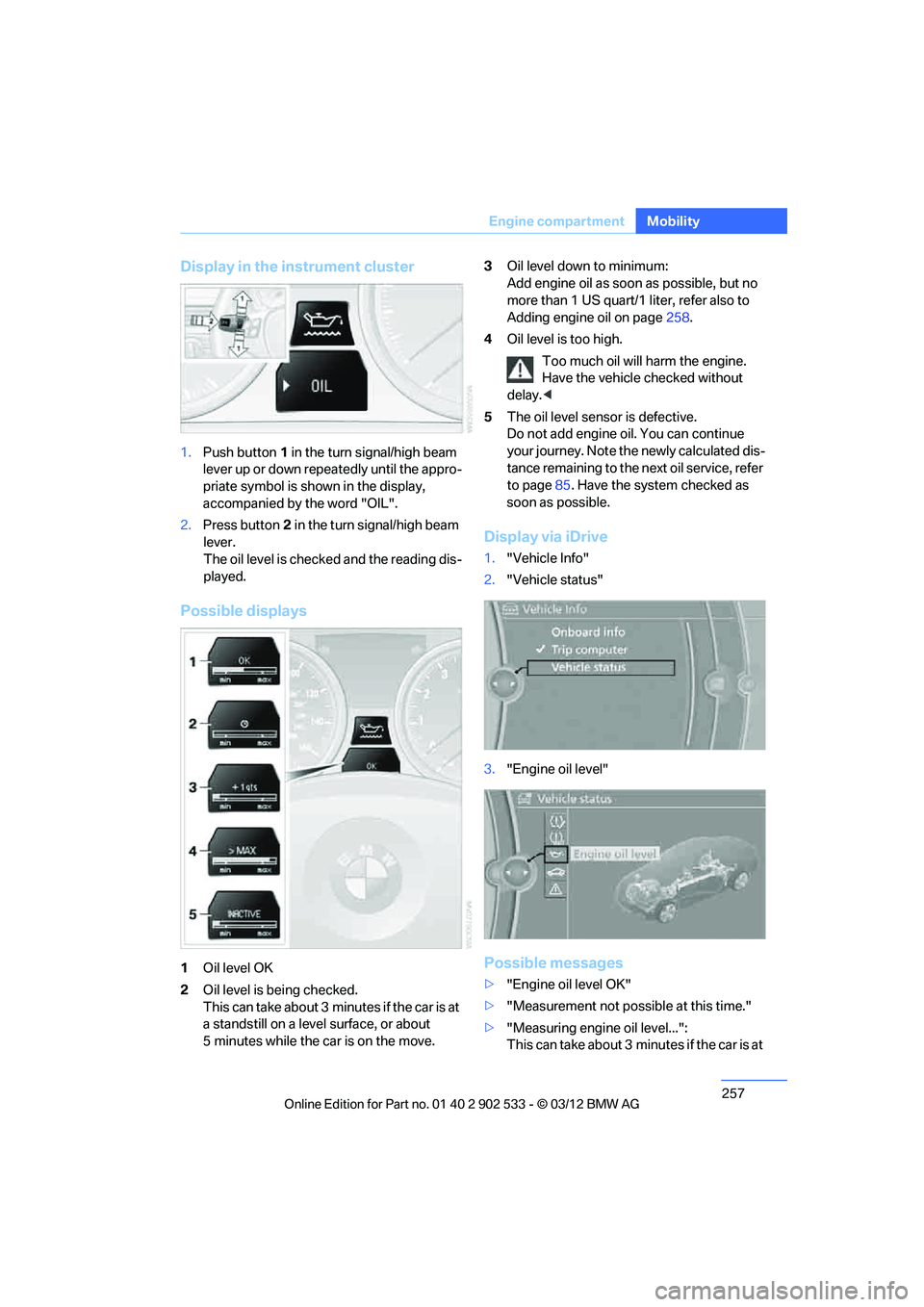
Display in the instrument cluster
1.
Push button 1 in the turn signal/high beam
lever up or down repeatedly until the appro-
priate symbol is shown in the display,
accompanied by the word "OIL".
2. Press button 2 in the turn signal/high beam
lever.
The oil level is checked and the reading dis-
played.
Possible displays
1 Oil level OK
2 Oil level is being checked.
This can take about 3 minutes if the car is at
a standstill on a level surface, or about
5 minutes while the car is on the move. 3
Oil level down to minimum:
Add engine oil as soon as possible, but no
more than 1 US quart/1 liter, refer also to
Adding engine oil on page 258.
4 Oil level is too high.
Too much oil will harm the engine.
Have the vehicle checked without
delay. <
5 The oil level sensor is defective.
Do not add engine oi l. You can continue
your journey. Note the newly calculated dis-
tance remaining to the next oil service, refer
to page 85. Have the system checked as
soon as possible.
Display via iDrive
1. "Vehicle Info"
2. "Vehicle status"
3. "Engine oil level"
Possible messages
>"Engine oil level OK"
> "Measurement not possible at this time."
> "Measuring engine oil level...":
This can take about 3 minutes if the car is at
00320051004F004C00510048000300280047004C0057004C005200510003
Page 266 of 308
265
Care
Mobility
Clean light-colored leather more frequently as
dust and dirt are more noticeable.
Treat the leather at least once every two
months using a leather lotion as dirt and grease
will gradually attack the leather's protective
layer.
Carpet and floor mats
Keep floor mats, carpet, and other objects
out of the movement range of the pedals;
otherwise, they may inhibit the function of the
pedals during driving.
Do not place additional floor mats onto an exist-
ing one or onto other objects.
Only use floor mats that have been approved for
the vehicle and can be appropriately fastened.
Make sure that the floor mats are securely fas-
tened again after they have been removed, e.g.
for cleaning. <
Interior plastic parts
>Imitation leather surfaces
> Lamp glasses
> Display pane of instrument cluster
> Matte parts
Clean with water and solvent-free plastic
cleaner if necessary.
Fine wood parts
Clean fine wood trim and fine wood parts with a
damp cloth. Wipe dry with a soft cloth.
Safety belts
Dirty belt straps impede the reeling action and
thus have a negative impact on safety. Do not clean chemically, as this may
destroy the webbing. <
Interior sensors/cameras
To clean interior sensors and cameras, e.g. of
the High-beam Assistant, use a lint-free cloth
moistened with glass cleaner.
Displays
Use an antistatic microfiber cloth to clean dis-
plays, e.g. of the radio or instrument cluster.
Avoid applying excessive pressure when
cleaning the displays; otherwise, damage
may occur. <
Do not use chemical or abrasive house-
hold cleaning agents. Keep all types of
fluid away from the device. Otherwise, surfaces
or electrical components may be corroded or
damaged. <
CD/DVD drives
Do not use a cleaning CD, as it may dam-
age parts of the drive. <
Vehicle storage
If you plan to park your vehicle for longer than
three months, your BMW center will be happy
to advise you.
00320051004F004C00510048000300280047004C0057004C005200510003
Page 293 of 308
292
Referen ceEverything from A to Z
Everything from A to Z
Index
A
ABS Antilock Brake
System 95
ACC, refer to Active Cruise
Control 74
Acceleration assistant, refer to Launch Control 69
Accessories, refer to Vehicle equipment 5
Accident, refer to Sending an
Emergency Request 272
Activated-charcoal filter for automatic climate
control 118
Active Cruise Control 74
– indicator lamp 77
– malfunction 78
– selecting distance 75
– sensor 77
Active steering 103
Adaptive brake lamp
– Brake Force Display 104
Adaptive Light Control 109
Additives
– coolant 259
– engine oil 258
Address, entering 146,152
Address for navigation
– entering 146
Adjusting temperature inside the car, refer to Automatic
climate control 115
Adjusting the thigh support 48
Airbags 104
– indicator/warning lamp 106
– sitting safely 46
Air conditioning mode
– automatic climate
control 115
– ventilation 117 Air distribution
– automatic
115
Airing, refer to Ventilation 117
Air pressure, refer to Tire inflation pressure 235
Air recirculation, refer to Recirculated air mode 116
Air supply
– automatic climate
control 115
– ventilation 117
Air vents 114
Air volume 116
AKI, refer to Fuel grade 233
Alarm system 36
– avoiding unintentional alarms 38
– interior motion sensor 37
– switching off an alarm 37
– tilt alarm sensor 37
ALL program 116
All -se
ason tires, refer to
Winter tires 254
All-wheel drive, refer to xDrive 97
Ambient air, refer to
Recirculated air mode 116
Antifreeze
– coolant 259
– washer fluid 71
Antilock Brake System ABS 95
Anti-theft alarm system, refer to Alarm system 36
Appointments, refer to
Calendar 219
Approved axle loads, refer to Weights 283
Approved engine oils 258
Approved gross vehicle weight, refer to Weights 283Apps
228
Armrest, refer to Center
armrest 124
Arrival time, refer to Computer 82
Ashtray 126
Assist systems, refer to Driving stability control 95
AUC Automatic recirculated air control 116
Audible instructions, refer to
Voice instructions 157
Audio device, external 125
Automatic
– air distribution 115
– air volume 115
– cruise control 72,74
– headlamp control 108
Automatic car washes 262
Automatic climate control 114
Automatic curb monitor 54
Automatic high beams and low beams, refer to High-
beam Assistant 110
Automatic recirculated air control AUC 116
Automatic Service Request 227
Automatic transmission with
Steptronic 63
– interlock 63
– overriding selector lever
lock 65
– shiftlock, refer to Changing selector lever position 63
– sport program 64
– towing 275
– tow-starting 275
AUTO program for automatic climate control 115
00320051004F004C00510048000300280047004C0057004C005200510003
Page 299 of 308
298
Referen ceEverything from A to Z
Heating
– mirrors54
– rear window 117
– seats 51
– steering wheel 55
Heating and ventilation, refer to Climate 114
Heavy loads, refer to Stowing cargo 140
Height, refer to
Dimensions 281
Height adjustment
– seats 47
– steering wheel 55
High-beam Assistant 110
High beams 110
– headlamp flasher 110
– indicator lamp 13
High beams and low beams,
automatic, refer to High-
beam Assistant 110
High-pressure
washer 262,263
High water, refer to Driving through water 138
Highways, refer to Route criteria 155
Hill Descent Control HDC 97
Hills 139
Holders for cups 126
Homepage BMW 4
Hood 256
Hooks for shopping bags 129
Horn 10,11
Hotel function, refer to Locking or unlocking
separately 36
Hot exhaust system 137
Hydraulic brake assist, refer to Dynamic Brake Control 95
Hydroplaning 138
I
Ice warning, refer to Outside
temperature warning 80Identification marks
– run-flat tires
254
– tire coding 251
iDrive 18
– adjusting brightness 92
– changing date and time 88
– changing language 92
– changing settings 92
– changing units of measure and display format 85
– controls 18
– menu guidance 19
– operating principle 18
– overview 18
– start menu 19
– status information 21
Ignition 61
– switched off 61
– switched on 61
Ignition key, refer to Remote control with integrated
key 30
Ignition key position 1, refer to Radio readiness 60
Ignition key position 2, refer to
Ignition on 61
Ignition lock 60
Imprint 2
Incoming call 205
Indicator and warning lamps 13
– Tire Pressure Monitor TPM 101
Inflation pressure, refer to Tire
inflation pressure 235
Inflation pressure monitoring, refer to Tire Pressure
Monitor TPM 100
Initializing
– after power failure 270
– compass, refer to Calibrating 123
– Flat Tire Monitor FTM 98
– glass roof 42
– refer to Setting the time and date 88 Installation location
– telephone
124
Instructions for navigation system, refer to Voice
instructions 157
Instrument cluster 12
Instrument cluster, refer to
Cockpit 10
Instrument combination, refer to Instrument cluster 12
Instrument lighting 112
Integrated key 30
Integrated universal remote
control 12
0
Intera
ctive map 152
Interior lamps 112
– remote control 32
Interior motion sensor 37
Interior rearview mirror 54
– automatic dimming feature 55
– compass 122
Interlock, refer to Disengaging the remote control 63
Intermittent mode of the
wipers 71
Intersection, entering, navigation 147
J
Jacking points 270
Joystick, refer to iDrive 18
Jumpering, refer to Jump-
starting 274
Jump-starting 274
K
Key, refer to Integrated key/
remote control 30
Keyless go, refer to Comfort Access 38
Keyless opening and closing, refer to Comfort Access 38
00320051004F004C00510048000300280047004C0057004C005200510003