bc button BMW 328I SEDAN 2007 E90 Owners Manual
[x] Cancel search | Manufacturer: BMW, Model Year: 2007, Model line: 328I SEDAN, Model: BMW 328I SEDAN 2007 E90Pages: 268, PDF Size: 8.8 MB
Page 218 of 268
Under the hood
216
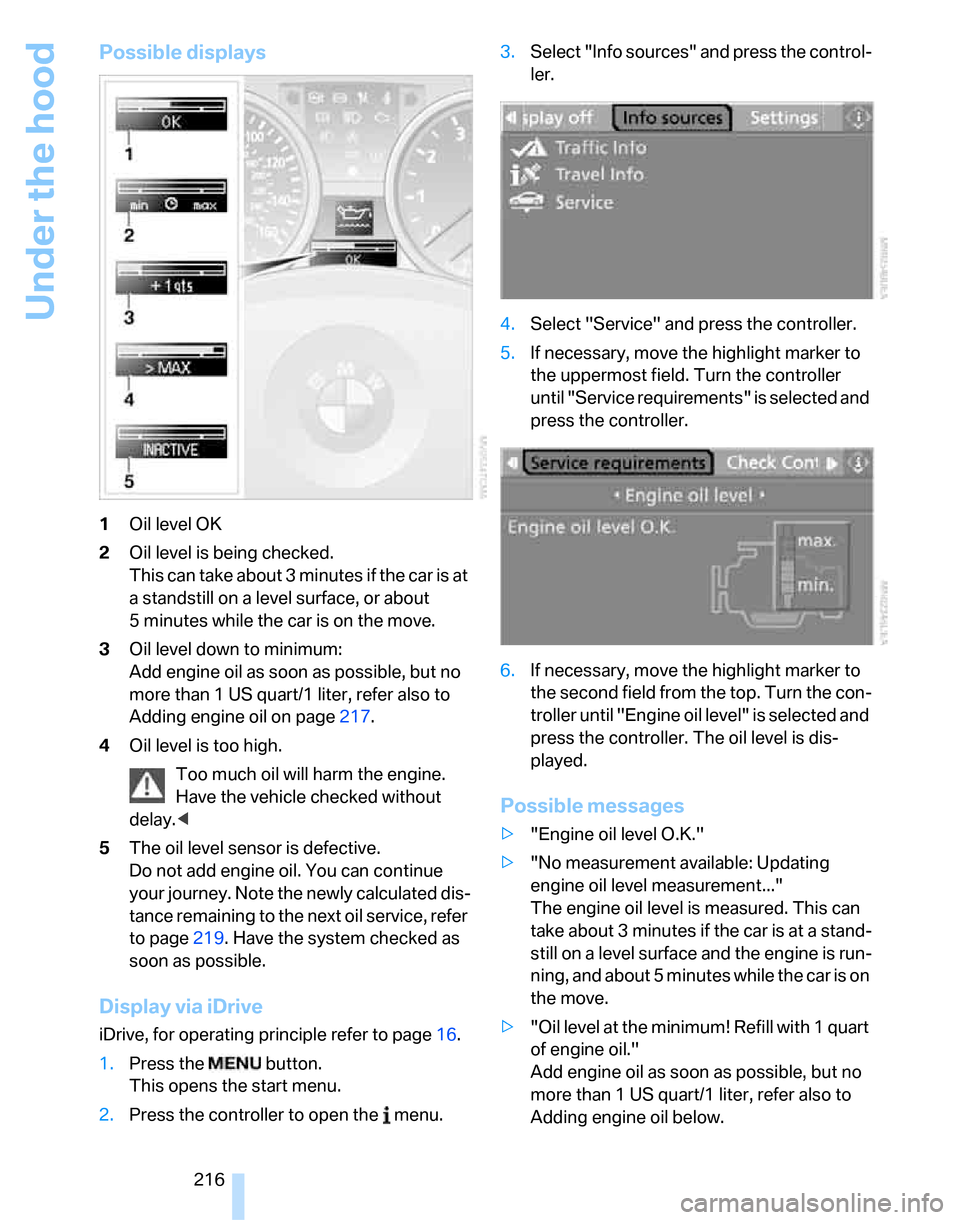
Possible displays
1Oil level OK
2Oil level is being checked.
This can take about 3 minutes if the car is at
a standstill on a level surface, or about
5 minutes while the car is on the move.
3Oil level down to minimum:
Add engine oil as soon as possible, but no
more than 1 US quart/1 liter, refer also to
Adding engine oil on page217.
4Oil level is too high.
Too much oil will harm the engine.
Have the vehicle checked without
delay.<
5The oil level sensor is defective.
Do not add engine oil. You can continue
your journey. Note the newly calculated dis-
tance remaining to the next oil service, refer
to page219. Have the system checked as
soon as possible.
Display via iDrive
iDrive, for operating principle refer to page16.
1.Press the button.
This opens the start menu.
2.Press the controller to open the menu.3.Select "Info sources" and press the control-
ler.
4.Select "Service" and press the controller.
5.If necessary, move the highlight marker to
the uppermost field. Turn the controller
until "Service requirements" is selected and
press the controller.
6.If necessary, move the highlight marker to
the second field from the top. Turn the con-
troller until "Engine oil level" is selected and
press the controller. The oil level is dis-
played.
Possible messages
>"Engine oil level O.K."
>"No measurement available: Updating
engine oil level measurement..."
The engine oil level is measured. This can
take about 3 minutes if the car is at a stand-
still on a level surface and the engine is run-
ning, and about 5 minutes while the car is on
the move.
>"Oil level at the minimum! Refill with 1 quart
of engine oil."
Add engine oil as soon as possible, but no
more than 1 US quart/1 liter, refer also to
Adding engine oil below.
Page 231 of 268
Mobility
229Reference
At a glance
Controls
Driving tips
Communications
Navigation
Entertainment
Giving and receiving assistance
Emergency call*
Conditions for an emergency call:
>Equipment version with full mobile phone
preparation package. This equipment
makes it possible to initiate an emergency
call even if no mobile phone is paired with
the vehicle.
>BMW Assist is activated. Activating
BMW Assist, refer to page195.
>Radio readiness is on.
>The BMW Assist system is logged on to a
mobile phone network.
>The emergency calling system is operable.
Once your service contract for BMW Assist
expires, the BMW Assist system can be deacti-
vated by a BMW center without you having to
visit a workshop. Once the BMW Assist system
has been deactivated, emergency calls are not
possible. The BMW Assist system can be reac-
tivated by a BMW center after a new contract
has been signed.
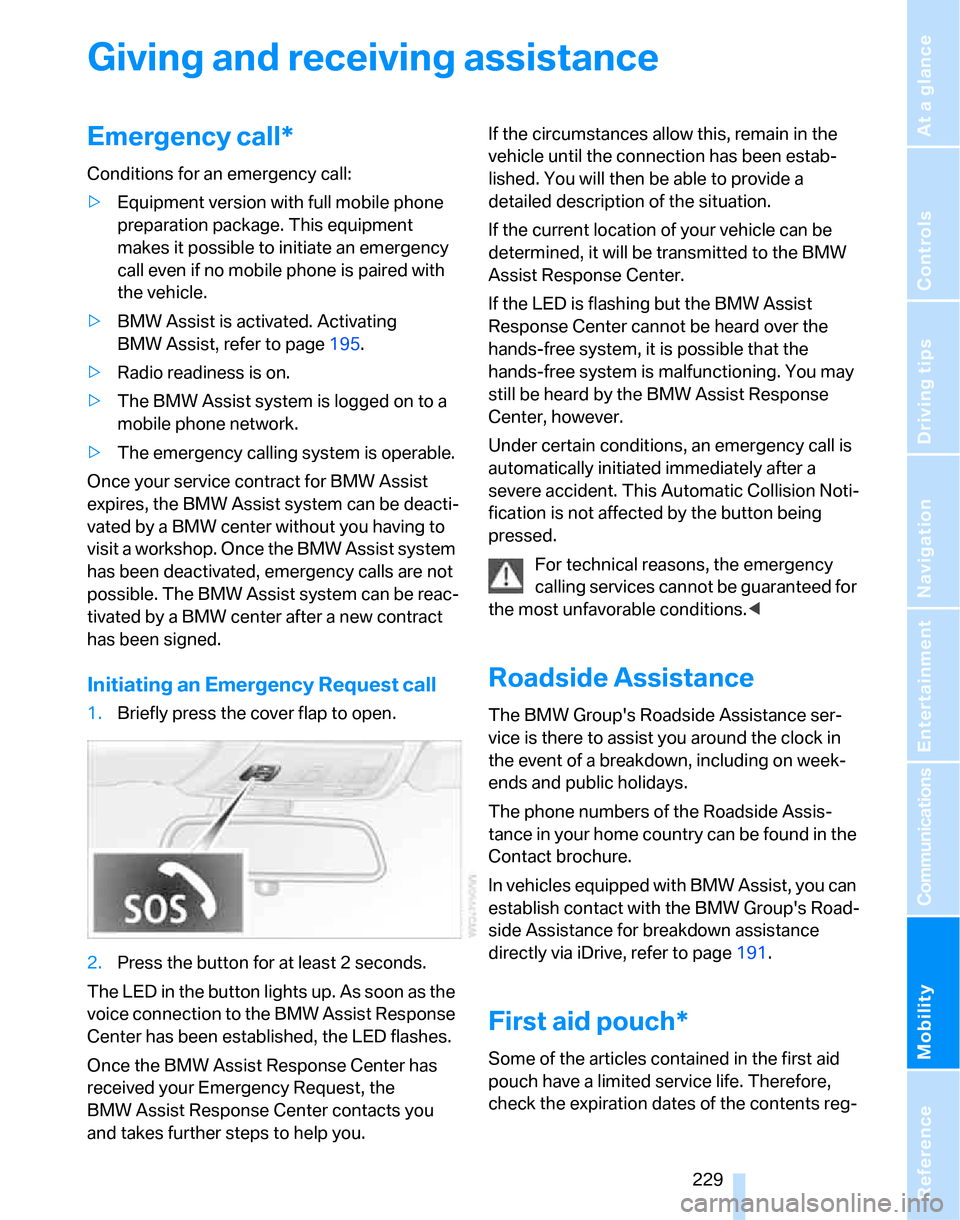
Initiating an Emergency Request call
1.Briefly press the cover flap to open.
2.Press the button for at least 2 seconds.
The LED in the button lights up. As soon as the
voice connection to the BMW Assist Response
Center has been established, the LED flashes.
Once the BMW Assist Response Center has
received your Emergency Request, the
BMW Assist Response Center contacts you
and takes further steps to help you.If the circumstances allow this, remain in the
vehicle until the connection has been estab-
lished. You will then be able to provide a
detailed description of the situation.
If the current location of your vehicle can be
determined, it will be transmitted to the BMW
Assist Response Center.
If the LED is flashing but the BMW Assist
Response Center cannot be heard over the
hands-free system, it is possible that the
hands-free system is malfunctioning. You may
still be heard by the BMW Assist Response
Center, however.
Under certain conditions, an emergency call is
automatically initiated immediately after a
severe accident. This Automatic Collision Noti-
fication is not affected by the button being
pressed.
For technical reasons, the emergency
calling services cannot be guaranteed for
the most unfavorable conditions.<
Roadside Assistance
The BMW Group's Roadside Assistance ser-
vice is there to assist you around the clock in
the event of a breakdown, including on week-
ends and public holidays.
The phone numbers of the Roadside Assis-
tance in your home country can be found in the
Contact brochure.
In vehicles equipped with BMW Assist, you can
establish contact with the BMW Group's Road-
side Assistance for breakdown assistance
directly via iDrive, refer to page191.
First aid pouch*
Some of the articles contained in the first aid
pouch have a limited service life. Therefore,
check the expiration dates of the contents reg-
Page 247 of 268
Reference 245
At a glance
Controls
Driving tips
Communications
Navigation
Entertainment
Mobility
Climate
menu
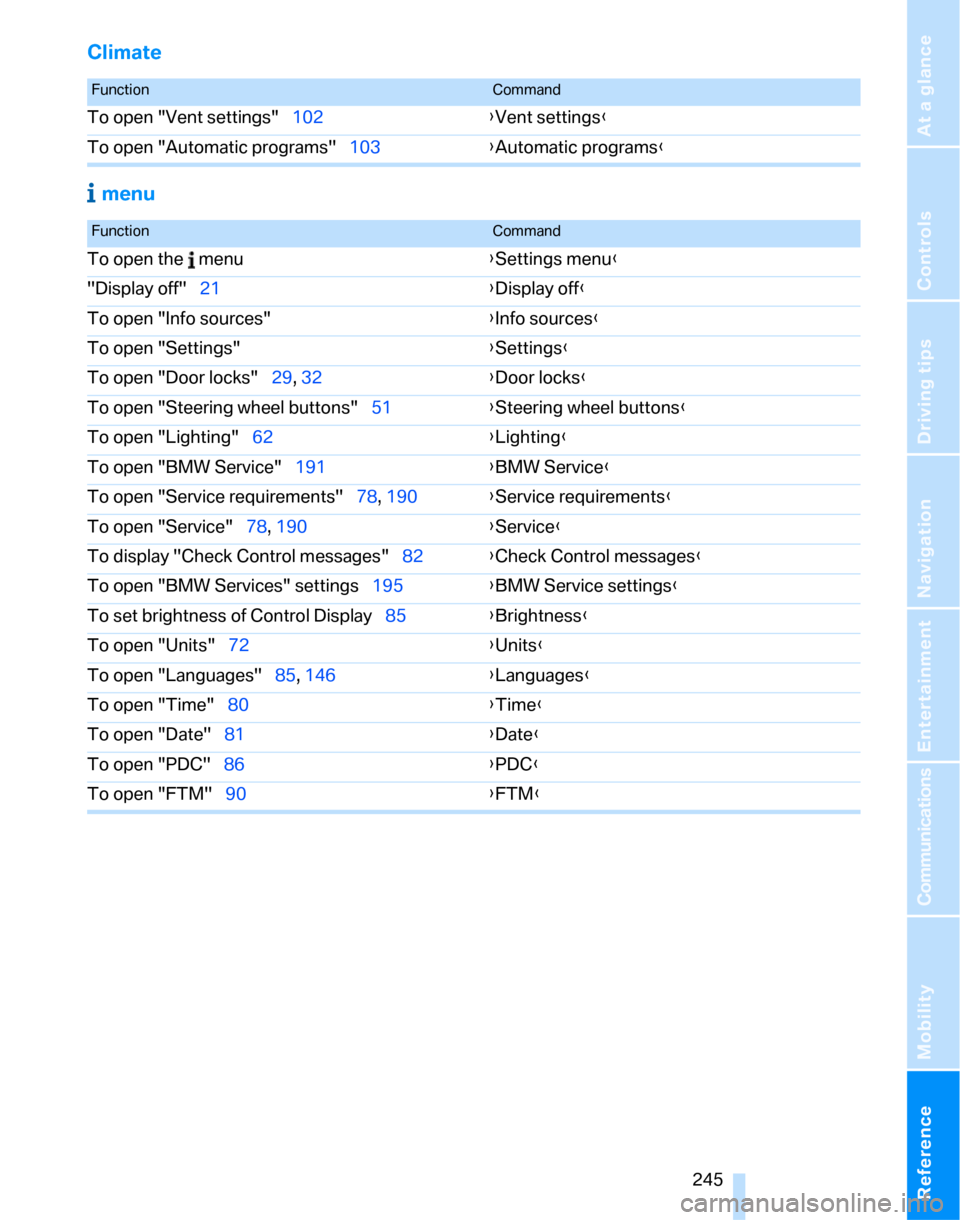
FunctionCommand
To open "Vent settings"102{Vent settings}
To open "Automatic programs"103{Automatic programs}
FunctionCommand
To open the menu{Settings menu}
"Display off"21{Display off}
To open "Info sources"{Info sources}
To open "Settings"{Settings}
To open "Door locks"29, 32{Door locks}
To open "Steering wheel buttons"51{Steering wheel buttons}
To open "Lighting"62{Lighting}
To open "BMW Service"191{BMW Service}
To open "Service requirements"78, 190{Service requirements}
To open "Service"78, 190{Service}
To display "Check Control messages"82{Check Control messages}
To open "BMW Services" settings195{BMW Service settings}
To set brightness of Control Display85{Brightness}
To open "Units"72{Units}
To open "Languages"85, 146{Languages}
To open "Time"80{Time}
To open "Date"81{Date}
To open "PDC"86{PDC}
To open "FTM"90{FTM}
Page 250 of 268
Everything from A - Z
248 Brakes
– ABS87
– BMW Maintenance
System219
– breaking in122
– parking brake59
– service requirements77
Brakes, refer to Braking
safely123
Brake system122
– BMW Maintenance
System219
– breaking in122
– disc brakes123
Breakdown services, refer to
Roadside Assistance229
Breaking in the clutch122
Breaking in the differential,
refer to Engine and
differential122
Break-in period122
Brightness of the Control
Display85
"Brightness"on the control
display85
Bulb changing, refer to Lamps
and bulbs222
Burned fuel
– refer to Average
consumption74
Button for starting the engine,
refer to Start/stop button57
Buttons on the steering
wheel11
C
California Proposition 65
warning6
"Call"183,194
Call
– accepting181
– displaying accepted183
– ending182
– in absence183
– starting181Calling
– from phone book182
– from Top 8 list183
– redialing183
Can holders, refer to Cup
holders111
Capacities241
Capacity of the cargo bay239
Car battery, refer to Vehicle
battery227
Car care, refer to Caring for
your vehicle brochure
Car-care products, refer to
Caring for your vehicle
brochure
"Car Data"74
Care, refer to Caring for your
vehicle brochure
Cargo, securing125
Cargo bay114
– capacity239
– convenient access37
– folding up the floor
panel117
– lamp, refer to Interior
lamps100
– opening from inside33
– opening from outside33
– partition net115
– roll-up cover114
Cargo bay lid, refer to
Luggage compartment lid/
tailgate32
Cargo bay net, refer to
Partition net115
Cargo loading
– securing cargo125
– stowing cargo125
– vehicle124
Caring for artificial leather,
refer to Caring for your
vehicle brochure
Caring for leather, refer to
Caring for your vehicle
brochure
Caring for plastic, refer to
Caring for your vehicle
brochureCaring for the carpet, refer to
Caring for your vehicle
brochure
Caring for the vehicle finish,
refer to Caring for your
vehicle brochure
Car jack
– jacking points227
Car key, refer to Integrated
key/remote control28
Car phone176
– installation location, refer to
Center armrest110
– refer to Mobile phone176
– refer to separate Owner's
Manual
Car radio, refer to Radio160
Car wash124
– also refer to Caring for your
vehicle brochure
– with convenient access38
Catalytic converter, refer to
Hot exhaust system122
"Categories" for satellite
radio164
CBS Condition Based
Service219
"CD"156,166
CD changer166
– compressed audio files166
– controls156
– fast forward/reverse170
– installation location170
– playing a track168
– random order169
– repeating a track169
– selecting a CD166
– selecting a track167
– switching on/off156
– tone control157
– volume157
Page 253 of 268
Reference 251
At a glance
Controls
Driving tips
Communications
Navigation
Entertainment
Mobility
Distance control, refer to
Active cruise control66
Distance remaining to service,
refer to Service
requirements77
"Distance to dest."75
Distance warning, refer to
PDC Park Distance
Control86
Door key, refer to Remote
control with integrated
key28
Door lock31
"Door locks"29,31,32,78
Doors, emergency
operation31
DOT Quality Grades210
Draft-free ventilation104
Drinks holders, refer to Cup
holders111
Drive-off assistance, refer to
Dynamic Stability Control
DSC87
Drive-off assistant89
Driving around a traffic
jam150
Driving lamps, refer to Parking
lamps/low beams97
Driving notes122
Driving off on hills, refer to
Drive-off assistant89
Driving route, refer to
Displaying route144
Driving stability control
systems87
Driving through water123
Driving tips, refer to Driving
notes122
Dry air, refer to Cooling
function104
DSC Dynamic Stability
Control87
DTC Dynamic Traction
Control88
– indicator/warning lamp88
DVD for navigation130
Dynamic Brake Control
DBC87"Dynamic route" in
navigation142
Dynamic Stability Control
DSC
– indicator/warning lamp88
Dynamic Traction Control
DTC
– indicator/warning lamp88
E
EBV Electronic brake-force
distribution87
Eject button, refer to Buttons
on the CD player156
Electric
– seat adjustment45
Electrical malfunction
– door lock31
– driver's door31
– fuel filler door200
– glass sunroof40
– luggage compartment lid/
tailgate33
– panorama glass roof42
Electric seat adjustment45
Electric steering wheel
lock57
– with convenient access37
Electronic brake-force
distribution EBV87
Electronic oil level check215
Emergency actuation,
automatic transmission,
refer to Overriding selector
lever lock61
Emergency call229
Emergency operation
– fuel filler door, manual
release200
Emergency operation, refer to
Closing manually
– glass sunroof40
– panorama glass roof42
Emergency operation, refer to
Manual operation
– door lock31Emergency release
– luggage compartment lid
from inside34
Emergency services, refer to
Roadside Assistance229
Emissions test, refer to
Service requirements77
"Enable services"196
"End call"182
Energy-conscious driving,
refer to Energy Control73
Energy Control73
Engine
– breaking in122
– data236
– overheated, refer to Coolant
temperature73
– speed236
– starting58
– starting, convenient
access36
– switching off58
Engine compartment215
Engine coolant, refer to
Coolant217
Engine oil
– adding217
– BMW Maintenance
System219
– capacity
241
– checking level215
– intervals between changes,
refer to Service
requirements77
"Engine oil level"216
Engine output, refer to Engine
data236
Engine speed, refer to Engine
data236
Engine starting, refer to
Starting the engine58
"Enter address"132
Entering a destination
country132
Entering a house number or
intersection133
Entering a street133
Entering destination132
Entering the address134
Page 256 of 268
Everything from A - Z
254 Individually programmable
buttons on steering
wheel51
Inflation pressure, refer to Tire
inflation pressure202
Inflation pressure monitoring,
refer to Tire Pressure
Monitor TPM91
Information
– on another location137
– on country137
– on current position137
– on destination location137
Information menu, refer to
i menu18
"Information on
destination"138
"Info sources"78
Initializing
– active steering94
– after power failure227
– compass, refer to
Calibrating109
– Flat Tire Monitor FTM90
– glass sunroof40
– panorama glass roof42
"Input map"136
Installation location
– CD changer170
– drive for navigation DVD and
audio CD130
– telephone110
Instructions for navigation
system, refer to Voice
instructions146
Instrument cluster12
Instrument lighting100
Instrument panel, refer to
Cockpit10
Integrated key28
Integrated universal remote
control107
Interesting destination for
navigation137
"Interim time"85
Interior lamps100
– remote control30
Interior motion sensor36Interior rearview mirror51
– automatic dimming
feature51
– compass108
Interlock, refer to Disengaging
the remote control59
Intermittent mode of the
wipers62
J
Jacking points227
Joystick, refer to iDrive16
Jumpering, refer to Jump
starting230
Jump starting230
K
Key, refer to Integrated key/
remote control28
Keyless go, refer to
Convenient access36
Keyless opening and closing,
refer to Convenient
access36
Key Memory, refer to Personal
Profile28
Kick-down60
– automatic transmission with
Steptronic60
Knock control201
L
Lamps
– automatic headlamp
control97
– parking lamps/low beams97
Lamps and bulbs, replacing
bulbs222
"Language / Units"77
"Language / Units" in
navigation146
"Languages" in
navigation146
"Languages"on the control
display85Lap-and-shoulder belt, refer
to Safety belts49
Lashing eyes, refer to
Securing cargo125
Last destinations, refer to
Destination list138
"Last seat pos."49
LATCH child-restraint fixing
system55
LED Light-emitting
diodes222
Length, refer to
Dimensions237
License plate lamp, replacing
bulbs226
Light-emitting diodes
LED222
Lighter112
– connecting electrical
appliances112
"Lighting"62,98
Lighting
– instruments100
– lamps and bulbs222
– vehicle, refer to Lamps97
Light-metal alloy wheels, care,
refer to Caring for your
vehicle brochure
Light switch97
"Limit"84
Limit, refer to Speed limit84
Load securing equipment,
refer to Securing cargo125
Lock buttons, doors, refer to
Locking32
Locking
– adjusting confirmation
signal30
– from inside32
– from outside30
– without remote control, refer
to Convenient access36
Locking and unlocking doors
– confirmation signals30
– from inside32
– from outside29
Low beams97
– automatic97
– replacing bulbs222
Page 257 of 268
Reference 255
At a glance
Controls
Driving tips
Communications
Navigation
Entertainment
Mobility
Lower back support, refer to
Lumbar support46
Luggage compartment lid32
– convenient access37
– emergency operation, refer
to Opening manually33
– emergency release34
– locking or unlocking
separately34
– opening from inside33
– opening from outside33
– opening manually33
– remote control30
Luggage rack, refer to Roof-
mounted luggage rack126
Lumbar support46
M
M+S tires, refer to Winter
tires213
Maintenance, refer to Service
Booklet
Maintenance system219
Malfunction
– automatic transmission with
Steptronic61
– luggage compartment lid/
tailgate33
– tires91
Malfunction warnings, refer to
Check Control82
Manual mode, automatic
transmission with
Steptronic60
"Manual" on the radio161
Manual operation
– door lock31
– driver's door31
– fuel filler door200
– glass sunroof40
– luggage compartment lid/
tailgate33
– panorama glass roof42
– transmission lock, automatic
transmission61
Manual transmission59Map
– changing scale145
– destination entry136
"Map direction of travel"145
"Map facing north"145
Master key, refer to Remote
control with integrated
key28
Maximum cooling103
Maximum speed
– with winter tires213
Measurements, refer to
Dimensions237
Memory, refer to Seat and
mirror memory48
MENU button16
Menus
– Control Display17
Menus, refer to iDrive16
Microfilter
– BMW Maintenance
System219
– for automatic climate
control105
Microfilter/activated-charcoal
filter
– BMW Maintenance
System219
Microphone
– telephone14
– voice input14
Mirror dimming feature51
Mirrors50
– automatic curb monitor50
– exterior mirrors50
– heating50
– interior rearview mirror51
– memory, refer to Seat and
mirror memory48
"Missed calls"182
Missed calls183Mobile phone
– accepted calls183
– adjusting volume180
– calling181
– ending call182
– installation location, refer to
Center armrest110
– missed calls183
– operation via iDrive181
– redialing183
– refer to separate Owner's
Manual
– Top 8183
– touch tone dialing184
Mobile phone, installation
location, refer to Center
armrest110
Mobile phone, refer to the
separate Owner's Manual
Mobile phone in the
vehicle122
Mobile phones, use inside the
car, refer to Mobile phone in
the vehicle122
Modifications, technical, refer
to For your own safety5
Monitor, refer to iDrive
controls16
Monitoring system for tire
pressures, refer to Flat Tire
Monitor90
"Monitor on / off"52
Most recent mobile phone
numbers183
MP3, refer to Compressed
audio files166
Multifunctional steering
wheel, refer to Buttons on
the steering wheel11
Multifunction switch
– refer to Turn signals/
headlamp flasher61
– refer to Wiper system62
Multimedia screen, refer to
iDrive16
Music tracks, refer to
Tracks167
"Mute on / off"52
Page 258 of 268
Everything from A - Z
256
N
"Navigation"131
Navigation address
– home address140
Navigation announcements,
refer to Switching voice
instructions on/off146
Navigation destination
– manual entry131,134
– selecting via language134
– selecting via map136
Navigation drive, location130
Navigation DVD130
Navigation system130
– address book138
– changing a route147
– destination entry131
– destination guidance in
assistance window130
– destination list138
– displaying current
position150
– entering a destination
manually131,134
– last destinations138
– navigation DVD130
– opening131
– route display144
– route list146
– searching for a special
destination137
– selecting destination using
information137
– selecting destination via
map136
– selecting route criteria141
– starting destination
guidance143
– switching off, refer to
Terminating/continuing
destination guidance143
– terminating/continuing
destination guidance143
– voice instructions146
– volume adjustment147
"Navigation voice
instructions" via buttons on
the steering wheel52Neck support, refer to Head
restraints46
Nets, refer to Storage
compartments111
"New address" in
navigation139
"New data request" for BMW
Assist193
"New destination"131,136
"New route"147
New tires212
"Next entertainment
source"52
North-facing map145
Nozzles101
Number of cylinders, refer to
Engine data236
Nylon rope, refer to Tow
rope232
O
OBD socket, refer to Socket
for On-Board Diagnosis220
Octane ratings, refer to Fuel
specifications201
Odometer72
Oil, refer to Engine oil215
Oil consumption215
Oil level215
Old batteries, refer to
Disposal227
"On a new destination" in
navigation137
"Onboard info"75
Onboard tool kit221
"On destination"137
"On location"137
Opening and closing
– convenient access36
– from inside32
– from outside29
– using the door lock31
– via the remote control29Operation by voice for mobile
phone185
– adjusting volume187
– canceling186
– correcting phone
number187
– dialing phone number187
– placing a call187
– redialing188
– voice commands185
– voice phone book187
"Options"194
Orientation menu, refer to
Start menu17
Outlets
– refer to Ventilation104
Output, refer to Engine
data236
Outside-air mode
– automatic climate
control103
Outside-temperature
display72
– changing units of
measure77
– in computer77
Outside temperature
warning72
Overheated engine, refer to
Coolant temperature73
Overriding selector lever
lock61
P
Panorama glass roof41
– closing after electrical
malfunction42
– comfort position41
– convenient operation30
– initializing42
– opening, closing41
– pinch protection system42
– power failure42
– raising41
– remote control30
Park assistant, refer to Park
Distance Control86
"Parked car operation"105
Page 259 of 268
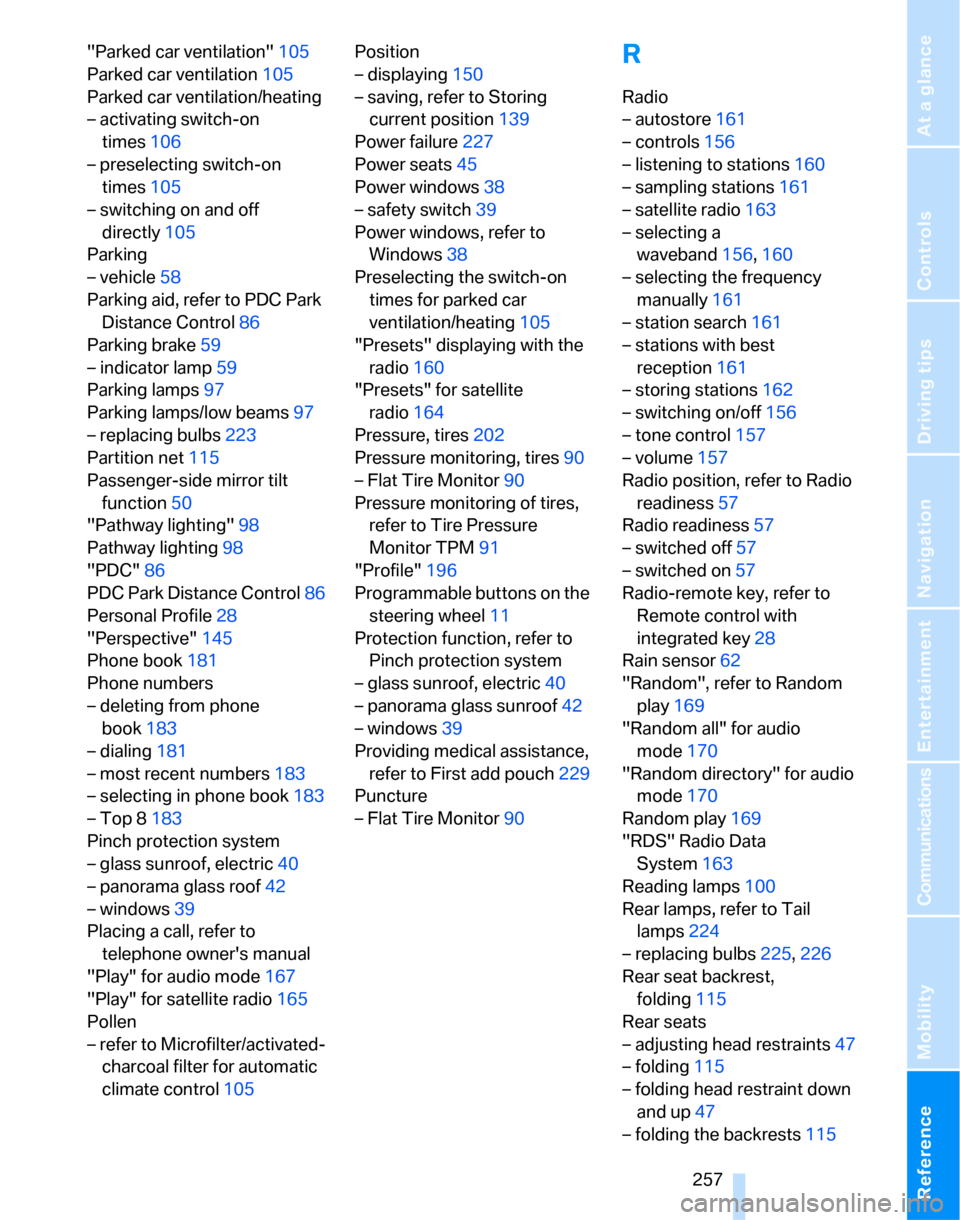
Reference 257
At a glance
Controls
Driving tips
Communications
Navigation
Entertainment
Mobility
"Parked car ventilation"105
Parked car ventilation105
Parked car ventilation/heating
– activating switch-on
times106
– preselecting switch-on
times105
– switching on and off
directly105
Parking
– vehicle58
Parking aid, refer to PDC Park
Distance Control86
Parking brake59
– indicator lamp59
Parking lamps97
Parking lamps/low beams97
– replacing bulbs223
Partition net115
Passenger-side mirror tilt
function50
"Pathway lighting"98
Pathway lighting98
"PDC"86
PDC Park Distance Control86
Personal Profile28
"Perspective"145
Phone book181
Phone numbers
– deleting from phone
book183
– dialing181
– most recent numbers183
– selecting in phone book183
– Top 8183
Pinch protection system
– glass sunroof, electric40
– panorama glass roof42
– windows39
Placing a call, refer to
telephone owner's manual
"Play" for audio mode167
"Play" for satellite radio165
Pollen
– refer to Microfilter/activated-
charcoal filter for automatic
climate control105Position
– displaying150
– saving, refer to Storing
current position139
Power failure227
Power seats45
Power windows38
– safety switch39
Power windows, refer to
Windows38
Preselecting the switch-on
times for parked car
ventilation/heating105
"Presets" displaying with the
radio160
"Presets" for satellite
radio164
Pressure, tires202
Pressure monitoring, tires90
– Flat Tire Monitor90
Pressure monitoring of tires,
refer to Tire Pressure
Monitor TPM91
"Profile"196
Programmable buttons on the
steering wheel11
Protection function, refer to
Pinch protection system
– glass sunroof, electric40
– panorama glass sunroof42
– windows39
Providing medical assistance,
refer to First add pouch229
Puncture
– Flat Tire Monitor90
R
Radio
– autostore161
– controls156
– listening to stations160
– sampling stations161
– satellite radio163
– selecting a
waveband156,160
– selecting the frequency
manually161
– station search161
– stations with best
reception161
– storing stations162
– switching on/off156
– tone control157
– volume157
Radio position, refer to Radio
readiness57
Radio readiness57
– switched off57
– switched on57
Radio-remote key, refer to
Remote control with
integrated key28
Rain sensor62
"Random", refer to Random
play169
"Random all" for audio
mode170
"Random directory" for audio
mode170
Random play169
"RDS" Radio Data
System163
Reading lamps100
Rear lamps, refer to Tail
lamps224
– replacing bulbs225,226
Rear seat backrest,
folding115
Rear seats
– adjusting head restraints47
– folding115
– folding head restraint down
and up47
– folding the backrests115
Page 260 of 268
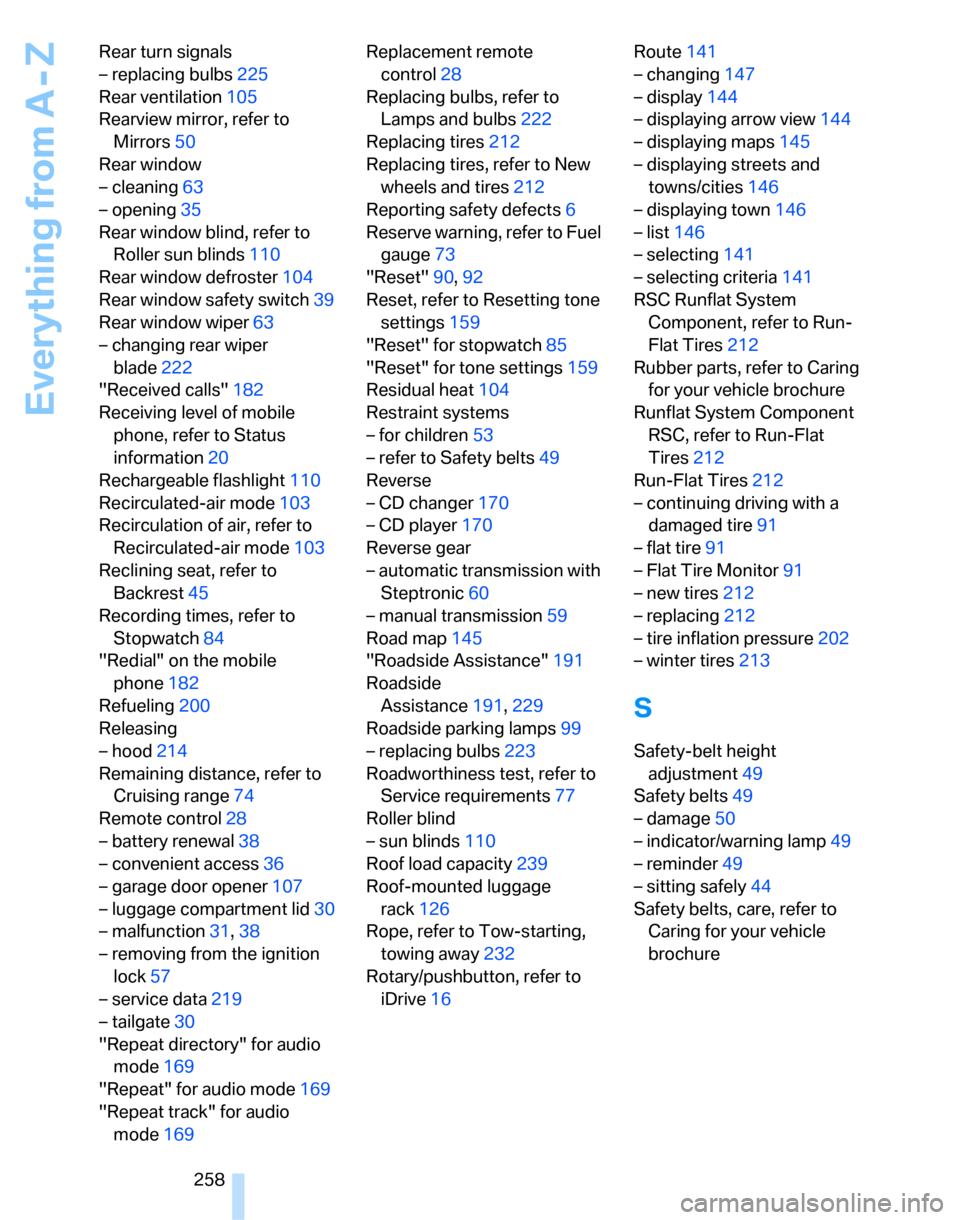
Everything from A - Z
258 Rear turn signals
– replacing bulbs225
Rear ventilation105
Rearview mirror, refer to
Mirrors50
Rear window
– cleaning63
– opening35
Rear window blind, refer to
Roller sun blinds110
Rear window defroster104
Rear window safety switch39
Rear window wiper63
– changing rear wiper
blade222
"Received calls"182
Receiving level of mobile
phone, refer to Status
information20
Rechargeable flashlight110
Recirculated-air mode103
Recirculation of air, refer to
Recirculated-air mode103
Reclining seat, refer to
Backrest45
Recording times, refer to
Stopwatch84
"Redial" on the mobile
phone182
Refueling200
Releasing
– hood214
Remaining distance, refer to
Cruising range74
Remote control28
– battery renewal38
– convenient access36
– garage door opener107
– luggage compartment lid30
– malfunction31,38
– removing from the ignition
lock57
– service data219
– tailgate30
"Repeat directory" for audio
mode169
"Repeat" for audio mode169
"Repeat track" for audio
mode169Replacement remote
control28
Replacing bulbs, refer to
Lamps and bulbs222
Replacing tires212
Replacing tires, refer to New
wheels and tires212
Reporting safety defects6
Reserve warning, refer to Fuel
gauge73
"Reset"90,92
Reset, refer to Resetting tone
settings159
"Reset" for stopwatch85
"Reset" for tone settings159
Residual heat104
Restraint systems
– for children53
– refer to Safety belts49
Reverse
– CD changer170
– CD player170
Reverse gear
– automatic transmission with
Steptronic60
– manual transmission59
Road map145
"Roadside Assistance"191
Roadside
Assistance191,229
Roadside parking lamps99
– replacing bulbs223
Roadworthiness test, refer to
Service requirements77
Roller blind
– sun blinds110
Roof load capacity239
Roof-mounted luggage
rack126
Rope, refer to Tow-starting,
towing away232
Rotary/pushbutton, refer to
iDrive16Route141
– changing147
– display144
– displaying arrow view144
– displaying maps145
– displaying streets and
towns/cities146
– displaying town146
– list146
– selecting141
– selecting criteria141
RSC Runflat System
Component, refer to Run-
Flat Tires212
Rubber parts, refer to Caring
for your vehicle brochure
Runflat System Component
RSC, refer to Run-Flat
Tires212
Run-Flat Tires212
– continuing driving with a
damaged tire91
– flat tire91
– Flat Tire Monitor91
– new tires212
– replacing212
– tire inflation pressure202
– winter tires213
S
Safety-belt height
adjustment49
Safety belts49
– damage50
– indicator/warning lamp49
– reminder49
– sitting safely44
Safety belts, care, refer to
Caring for your vehicle
brochure