language BMW 328I SEDAN 2013 User Guide
[x] Cancel search | Manufacturer: BMW, Model Year: 2013, Model line: 328I SEDAN, Model: BMW 328I SEDAN 2013Pages: 248, PDF Size: 5.21 MB
Page 158 of 248
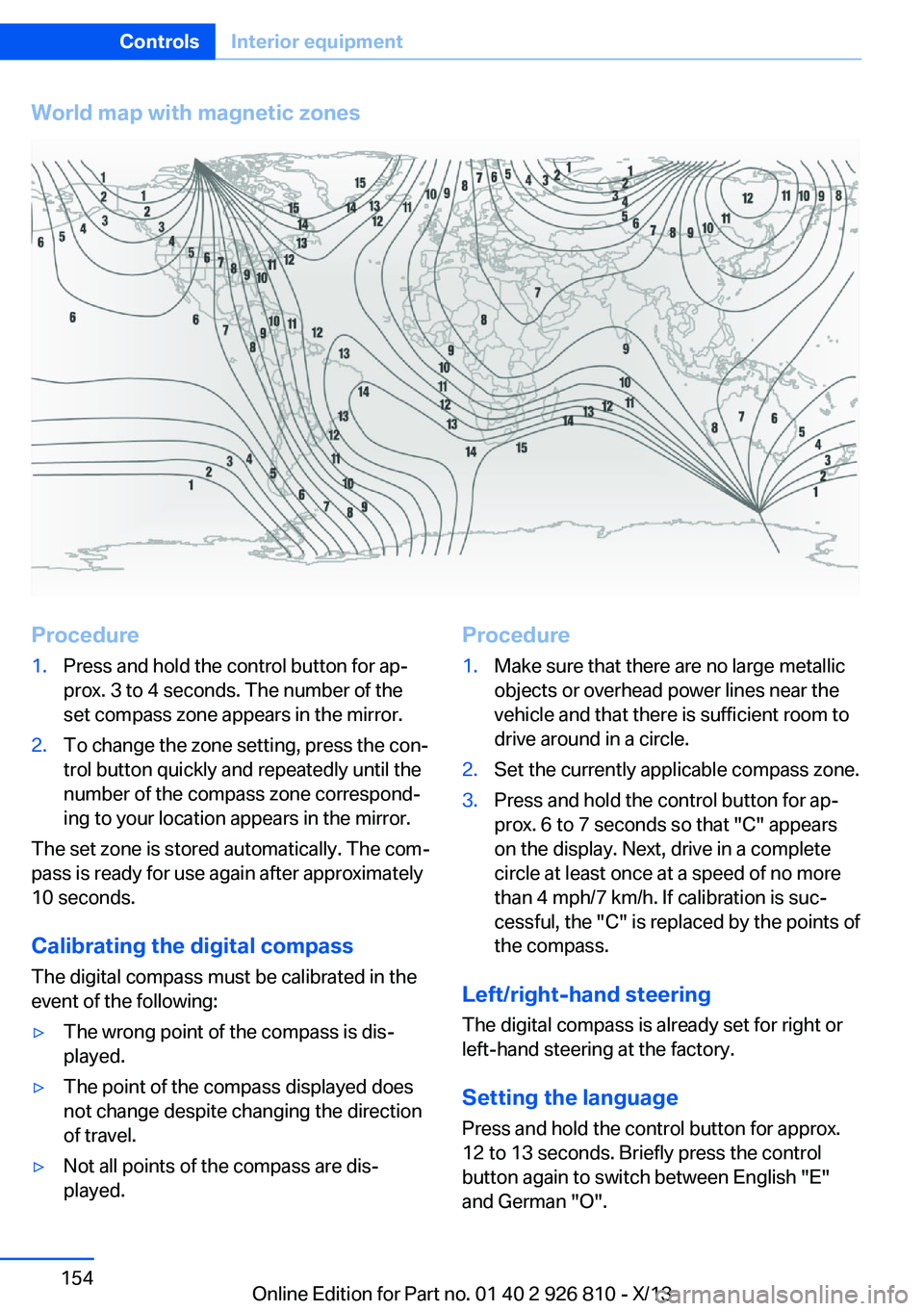
World map with magnetic zonesProcedure1.Press and hold the control button for ap‐
prox. 3 to 4 seconds. The number of the
set compass zone appears in the mirror.2.To change the zone setting, press the con‐
trol button quickly and repeatedly until the
number of the compass zone correspond‐
ing to your location appears in the mirror.
The set zone is stored automatically. The com‐
pass is ready for use again after approximately
10 seconds.
Calibrating the digital compass
The digital compass must be calibrated in the
event of the following:
▷The wrong point of the compass is dis‐
played.▷The point of the compass displayed does
not change despite changing the direction
of travel.▷Not all points of the compass are dis‐
played.Procedure1.Make sure that there are no large metallic
objects or overhead power lines near the
vehicle and that there is sufficient room to
drive around in a circle.2.Set the currently applicable compass zone.3.Press and hold the control button for ap‐
prox. 6 to 7 seconds so that "C" appears
on the display. Next, drive in a complete
circle at least once at a speed of no more
than 4 mph/7 km/h. If calibration is suc‐
cessful, the "C" is replaced by the points of
the compass.
Left/right-hand steering
The digital compass is already set for right or
left-hand steering at the factory.
Setting the language
Press and hold the control button for approx.
12 to 13 seconds. Briefly press the control
button again to switch between English "E"
and German "O".
Seite 154ControlsInterior equipment154
Online Edition for Part no. 01 40 2 926 810 - X/13
Page 242 of 248
Hill start assistant, refer toDrive-off assistant 120
Hints 6
Holder for beverages 161
Homepage 6
Hood 199
Horn 14
Hotel function, trunk lid 41
Hot exhaust system 167
HUD Head-up Display 89
Hydroplaning 167
I Ice warning, refer to External temperature warning 81
Icy roads, refer to External temperature warning 81
Identification marks, tires 193
Identification number, refer to Important features in the en‐
gine compartment 198
iDrive 18
Ignition key, refer to Remote control 34
Ignition off 63
Ignition on 63
Indication of a flat tire 100 , 103
Indicator and warning lamps 78
Individual air distribu‐ tion 145, 148
Individual settings, refer to Personal Profile 35
Inflation pressure, tires 187
Inflation pressure warning FTM, tires 102
Info display, refer to Com‐ puter 86
Initialize, Tire Pressure Moni‐ tor TPM 100
Initializing, Flat Tire Monitor FTM 103
Instrument cluster 75 Instrument cluster, electronic
displays 77
Instrument lighting 94
Integrated key 34
Intelligent Emergency Re‐ quest 217
Intelligent Safety 104
Intensity, AUTO pro‐ gram 147
Interior equipment 151
Interior lamps 94
Interior lamps via remote con‐ trol 38
Interior motion sensor 45
Interior rearview mirror, auto‐ matic dimming feature 58
Interior rearview mirror, com‐ pass 153
Interior rearview mirror, man‐ ually dimmable 58
Internet page 6
Interval display, service re‐ quirements 82
J Jacking points for the vehicle jack 214
Joystick, automatic transmis‐ sion 72
Jump-starting 218
K
Key/remote control 34
Keyless Go, refer to Comfort Access 41
Key Memory, refer to Per‐ sonal Profile 35
Kickdown, automatic trans‐ mission 72
Knee airbag 96
L Lamp replacement 206 Lamp replacement, front 207
Lamp replacement, rear 212
Lamps 91
Lamps and bulbs 206
Lane departure warning 112
Lane margin, warning 112
Language on Control Dis‐ play 88
Lashing eyes, securing cargo 170
LATCH child restraint fixing system 60
Launch Control 74
Leather, care 224
LEDs, light-emitting di‐ odes 207
Letters and numbers, enter‐ ing 25
Light alloy wheels, care 225
Light control 92
Light-emitting diodes, LEDs 207
Lighter 155
Lighting 91
Lighting via remote con‐ trol 38
Light switch 91
Load 170
Loading 169
Lock, door 39
Locking/unlocking from in‐ side 40
Locking/unlocking via door lock 39
Locking/unlocking with re‐ mote control 38
Locking, automatic 43
Locking, central 37
Locking, settings 43
Lock, power window 46
Locks, doors, and win‐ dows 62
Low beams 91
Low beams, automatic, refer to High-beam Assistant 93
Lower back support 51 Seite 238ReferenceEverything from A to Z238
Online Edition for Part no. 01 40 2 926 810 - X/13