display BMW 328I XDRIVE COUPE 2013 Owners Manual
[x] Cancel search | Manufacturer: BMW, Model Year: 2013, Model line: 328I XDRIVE COUPE, Model: BMW 328I XDRIVE COUPE 2013Pages: 308, PDF Size: 5.65 MB
Page 269 of 308

268
MobilityReplacin g compon ents
3.Push the wire bracket out of the anchor
towards the right and fold it up.
4. Disconnect the plug, change the bulb and
reconnect the plug.
5. Insert the bulb.
6. Fold the wire bracket down and engage it.
7. Reattach the cover.
Turn signals, front
These lamps use LED technology for operation.
If they malfunction, please contact your BMW
center.
Side turn signals
W5W bulb, 5 watts
1.Press the front edge of the lamp toward the
rear with your fingertip, arrow 1 and pivot it
out, arrow 2.
2. While simultaneously lifting the retaining
tab, rotate bulb holder to the left and
remove.
3. Remove lamp and replace it.
To install, insert rear end of the lamp and press
into place at the front.
Tail lamps
Coupe: overview
The tail lamps are divided in two parts. One part
is in the trunk lid, the other is in the fender.
1 Backup lamp
2 Brake lamp
3 Parking/tail lamps
4 Turn signal
5 Brake Force Display lamp
6 Parking/tail lamps
Convertible: overview
The tail lamps are divided in two parts. One part
is in the trunk lid, the other is in the fender.
1Backup lamp
2 Brake lamp
3 Parking/tail lamps
4 Turn signal
5 Brake Force Display lamp
6 Parking/tail lamps
00320051004F004C00510048000300280047004C0057004C005200510003
Page 270 of 308
269
Replacin g components
Mobility
Backup lamp
If these lamps malfunction, please contact your
BMW center.
Turn signal, brake, license plate,
parking, and tail lamps
These lamps use LED technology for operation.
If they malfunction, please contact your BMW
center.
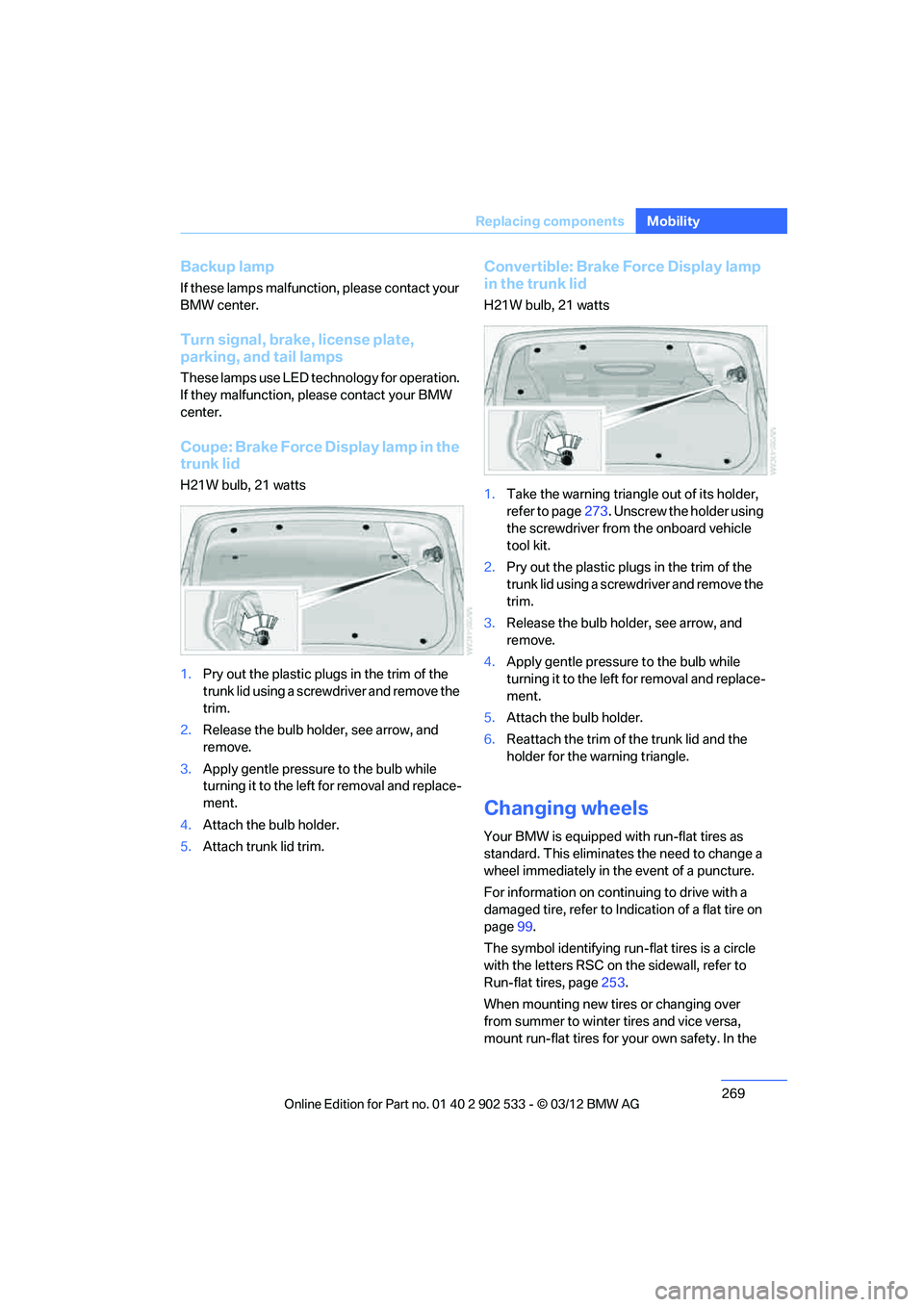
Coupe: Brake Force Display lamp in the
trunk lid
H21W bulb, 21 watts
1.
Pry out the plastic plugs in the trim of the
trunk lid using a screwdriver and remove the
trim.
2. Release the bulb holder, see arrow, and
remove.
3. Apply gentle pressure to the bulb while
turning it to the left for removal and replace-
ment.
4. Attach the bulb holder.
5. Attach trunk lid trim.
Convertible: Brake Force Display lamp
in the trunk lid
H21W bulb, 21 watts
1.Take the warning triangle out of its holder,
refer to page 273. Unscrew the holder using
the screwdriver from the onboard vehicle
tool kit.
2. Pry out the plastic plugs in the trim of the
trunk lid using a screwdriver and remove the
trim.
3. Release the bulb holder, see arrow, and
remove.
4. Apply gentle pressure to the bulb while
turning it to the left for removal and replace-
ment.
5. Attach the bulb holder.
6. Reattach the trim of the trunk lid and the
holder for the warning triangle.
Changing wheels
Your BMW is equipped with run-flat tires as
standard. This eliminates the need to change a
wheel immediately in the event of a puncture.
For information on continuing to drive with a
damaged tire, refer to Indication of a flat tire on
page 99.
The symbol identifying run-flat tires is a circle
with the letters RSC on the sidewall, refer to
Run-flat tires, page 253.
When mounting new tires or changing over
from summer to winter tires and vice versa,
mount run-flat tires for your own safety. In the
00320051004F004C00510048000300280047004C0057004C005200510003
Page 286 of 308
285
Short commands for the voice activation system
Reference
Short commands for the voice activation
system
Vehicle equipment
In this chapter, all production, country, and
optional equipment that is offered in the model
range is described. For this reason, descrip-
tions will be given of some equipment that may
not be available in a vehicle, for example due to
the special options or national-market version
selected. This also applies to safety related
functions and systems.
General information
For instructions on the voice activation system,
refer to page
25.
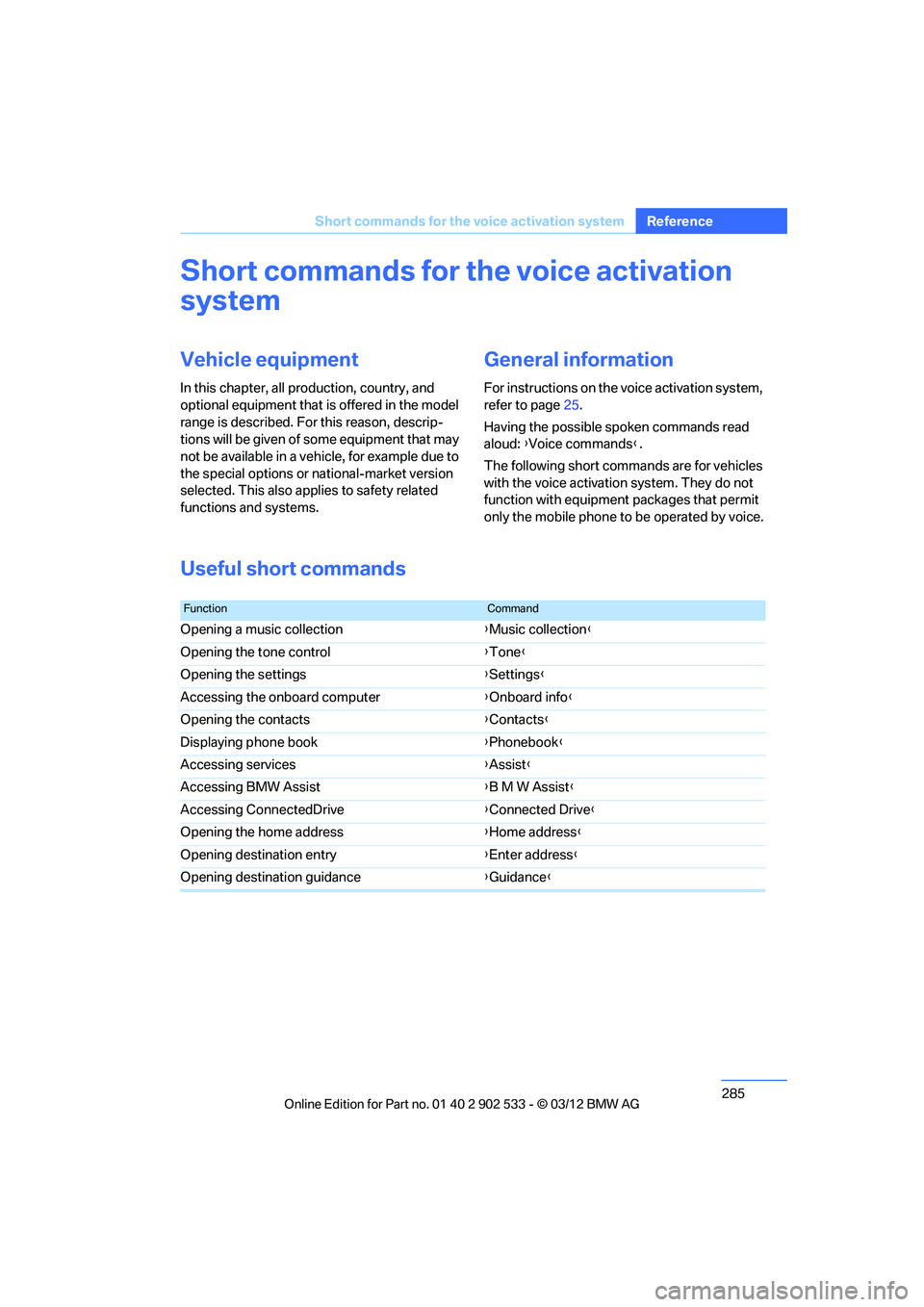
Having the possible spoken commands read
aloud: {Voice commands }.
The following short commands are for vehicles
with the voice activation system. They do not
function with equipment packages that permit
only the mobile phone to be operated by voice.
Useful short commands
FunctionCommand
Opening a music collection {Music collection}
Opening the tone control {Tone }
Opening the settings {Settings }
Accessing the onboard computer {Onboard info }
Opening the contacts {Contacts }
Displaying phone book {Phonebook }
Accessing services {Assist }
Accessing BMW Assist {B M W Assist }
Accessing ConnectedDrive {Connected Drive }
Opening the home address {Home address }
Opening destination entry {Enter address }
Opening destination guidance {Guidance}
00320051004F004C00510048000300280047004C0057004C005200510003
Page 287 of 308
286
Referen ceShort commands for the voice activation system
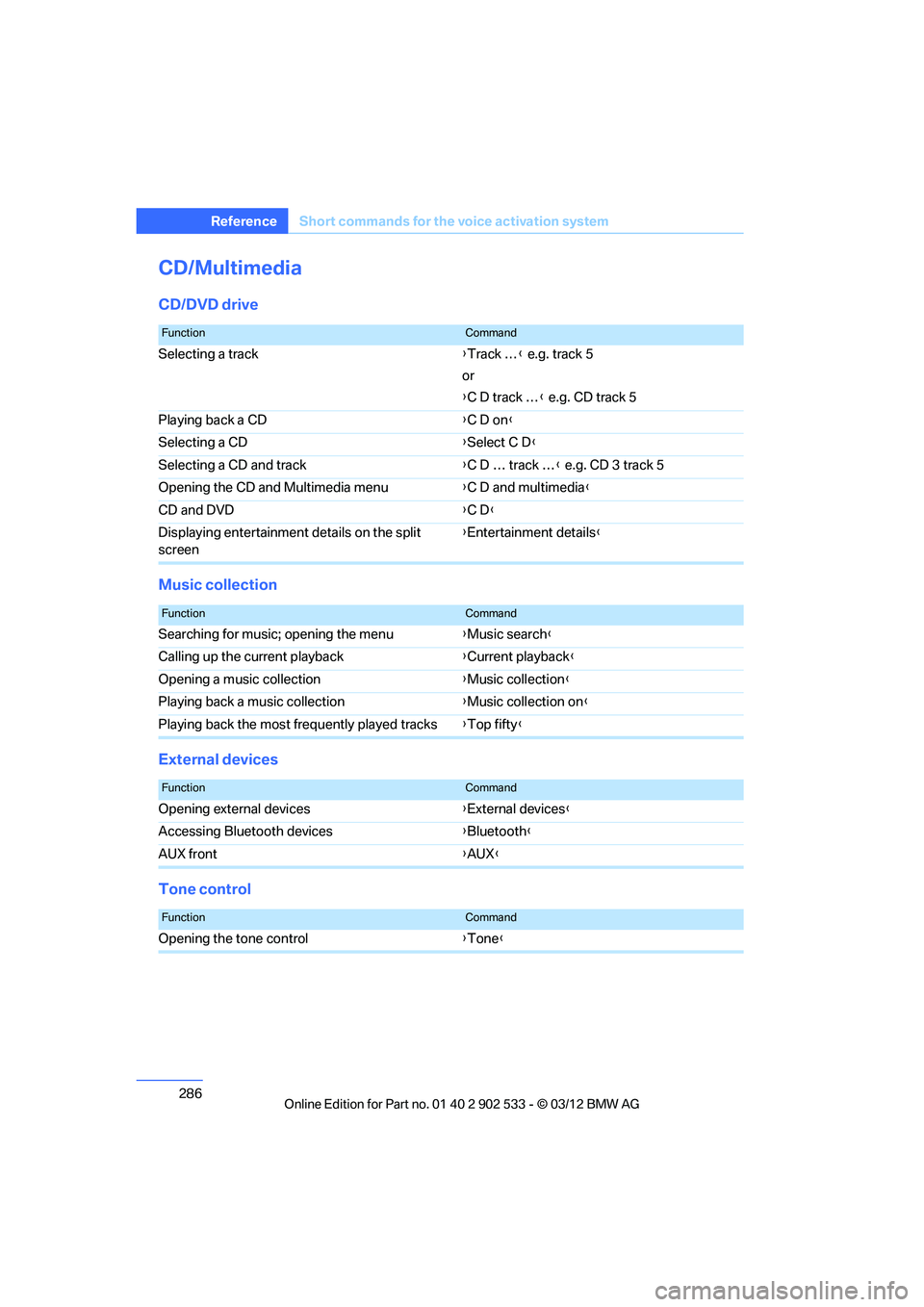
CD/Multimedia
CD/DVD drive
Music collection
External devices
Tone control
FunctionCommand
Selecting a track {Track … } e.g. track 5
or
{ C D track … } e.g. CD track 5
Playing back a CD {C D on}
Selecting a CD {Select C D }
Selecting a CD and track {C D … track … } e.g. CD 3 track 5
Opening the CD and Multimedia menu {C D and multimedia }
CD and DVD {C D }
Displaying entertainment details on the split
screen {
Entertainment details }
FunctionCommand
Searching for music; opening the menu {Music search}
Calling up the current playback {Current playback }
Opening a music collection {Music collection}
Playing back a music collection {Music collection on }
Playing back the most frequently played tracks {Top fifty }
FunctionCommand
Opening external devices {External devices }
Accessing Bluetooth devices {Bluetooth}
AUX front {AUX }
FunctionCommand
Opening the tone control {Tone }
00320051004F004C00510048000300280047004C0057004C005200510003
Page 288 of 308
287
Short commands for the voice activation system
Reference
Radio
FM
AM
Satellite radio
Presets
Telephone
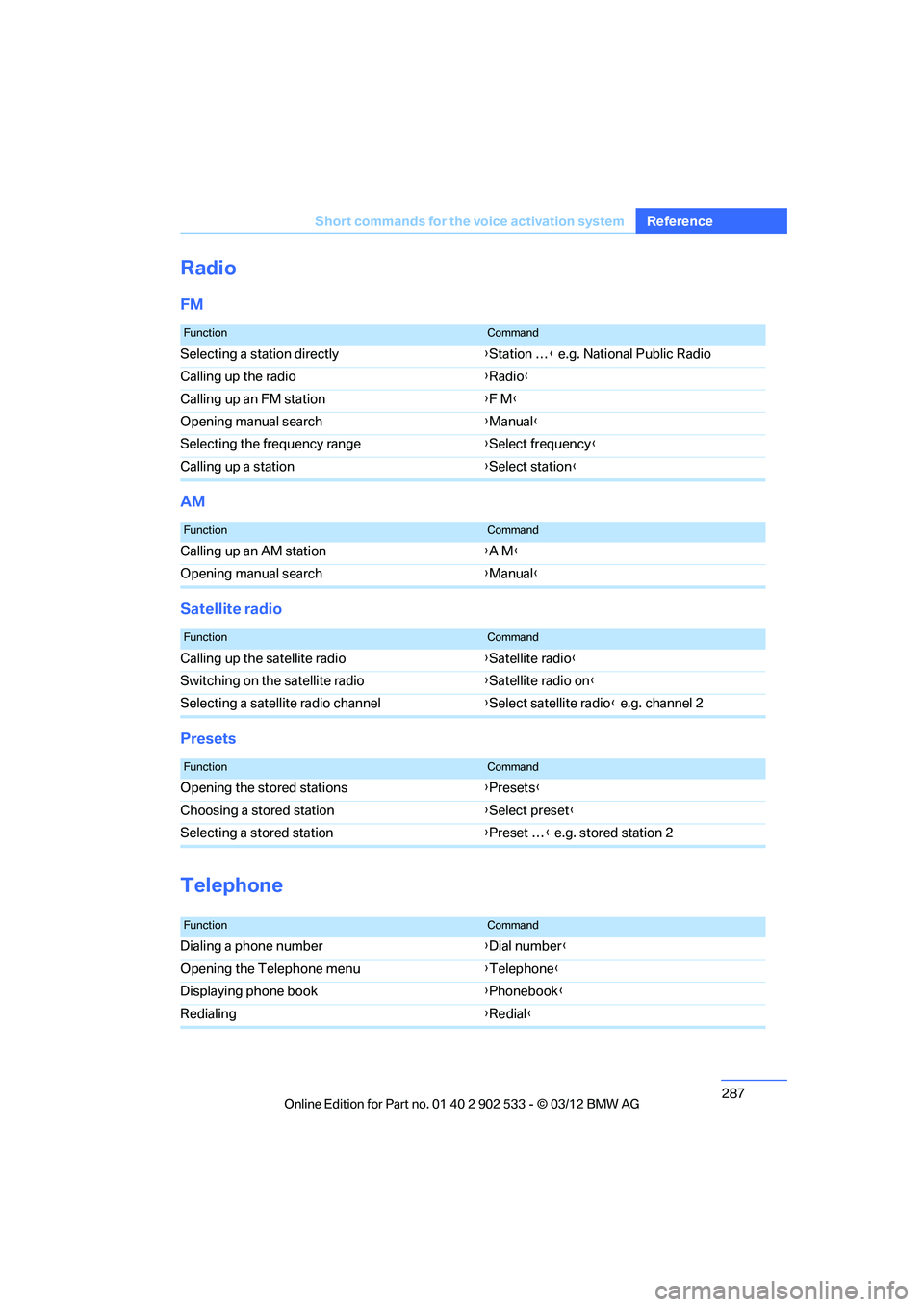
FunctionCommand
Selecting a station directly
{Station … } e.g. National Public Radio
Calling up the radio {Radio }
Calling up an FM station {F M }
Opening manual search {Manual }
Selecting the frequency range {Select frequency }
Calling up a station {Select station }
FunctionCommand
Calling up an AM station {A M }
Opening manual search {Manual }
FunctionCommand
Calling up the satellite radio {Satellite radio }
Switching on the satellite radio {Satellite radio on }
Selecting a satellite radio channel {Select satellite radio } e.g. channel 2
FunctionCommand
Opening the stored stations {Presets }
Choosing a stored station {Select preset }
Selecting a stored station {Preset … } e.g. stored station 2
FunctionCommand
Dialing a phone number {Dial number }
Opening the Telephone menu {Telephone}
Displaying phone book {Phonebook }
Redialing {Redial }
00320051004F004C00510048000300280047004C0057004C005200510003
Page 289 of 308
288
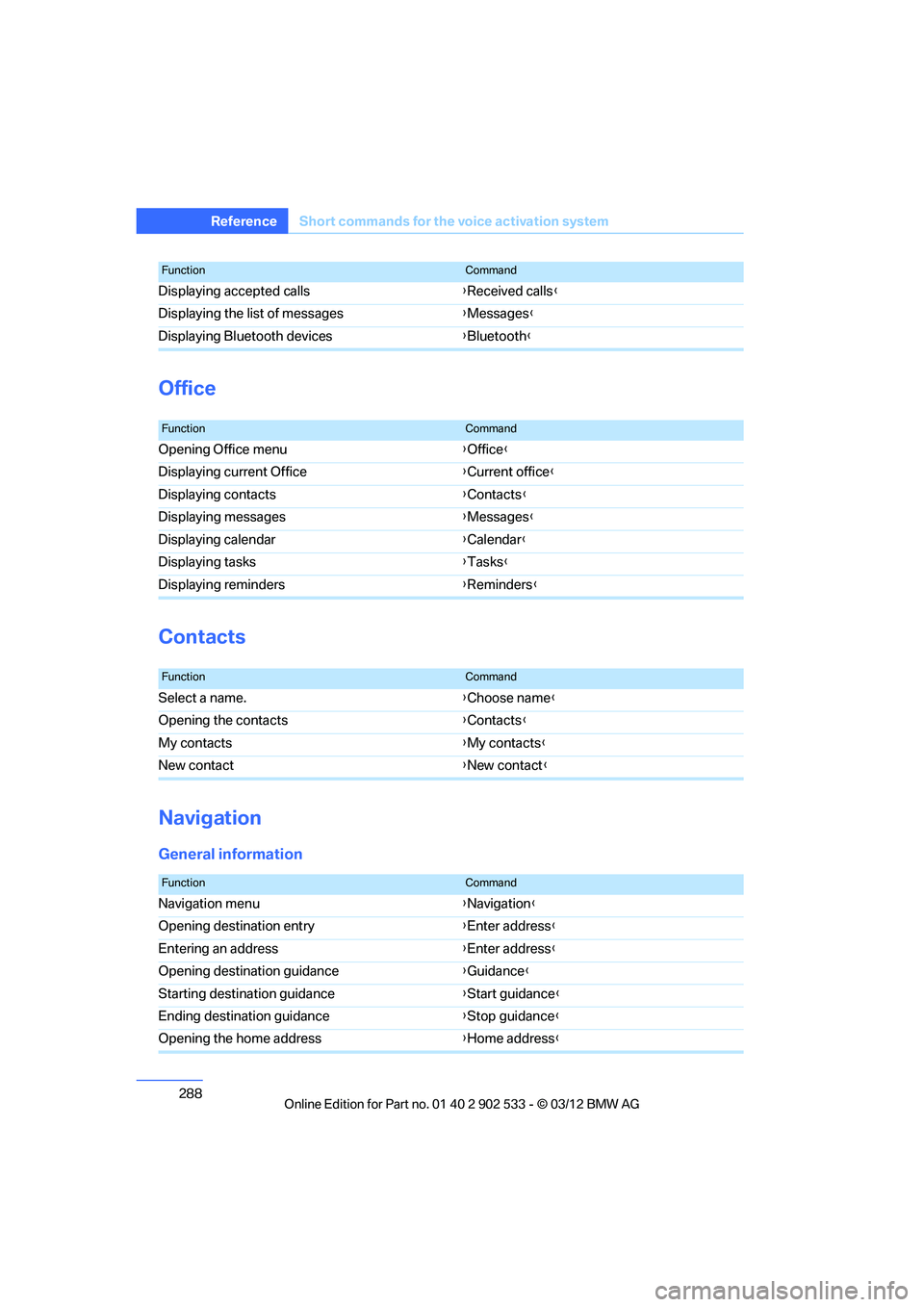
Referen ceShort commands for the voice activation system
Office
Contacts
Navigation
General information
Displaying accepted calls {Received calls }
Displaying the list of messages {Messages }
Displaying Bluetooth devices {Bluetooth}
FunctionCommand
FunctionCommand
Opening Office menu {Office }
Displaying current Office {Current office }
Displaying contacts {Contacts }
Displaying messages {Messages }
Displaying calendar {Calendar }
Displaying tasks {Tasks }
Displaying reminders {Reminders }
FunctionCommand
Select a name. {Choose name }
Opening the contacts {Contacts }
My contacts {My contacts }
New contact {New contact }
FunctionCommand
Navigation menu {Navigation }
Opening destination entry {Enter address }
Entering an address {Enter address }
Opening destination guidance {Guidance }
Starting destination guidance {Start guidance }
Ending destination guidance {Stop guidance }
Opening the home address {Home address }
00320051004F004C00510048000300280047004C0057004C005200510003
Page 290 of 308
289
Short commands for the voice activation system
Reference
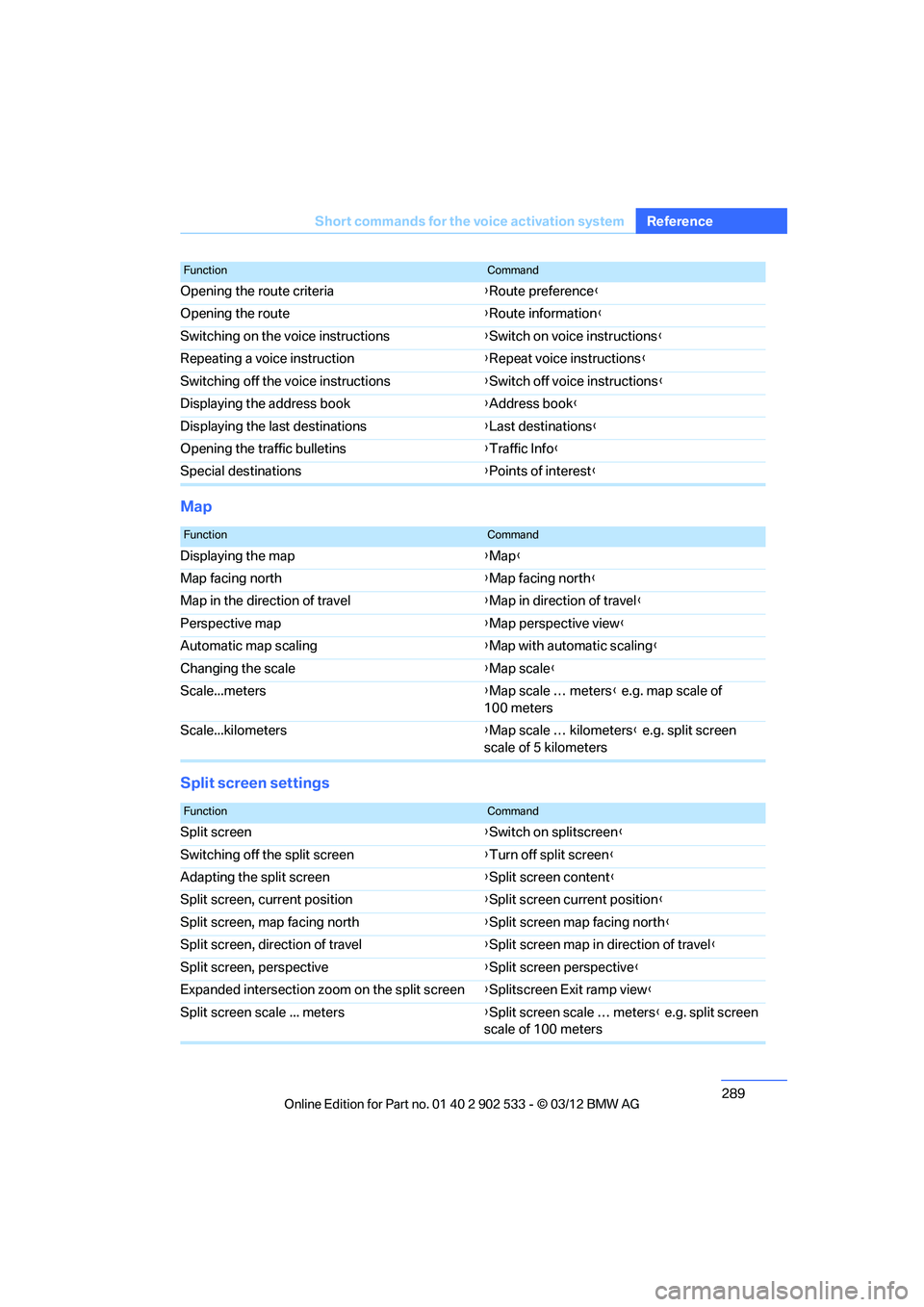
Map
Split screen settings
Opening the route criteria
{Route preference}
Opening the route {Route information }
Switching on the voice instructions {Switch on voice instructions }
Repeating a voice instruction {Repeat voice instructions }
Switching off the voice instructions {Switch off voice instructions }
Displaying the address book {Address book }
Displaying the last destinations {Last destinations }
Opening the traffic bulletins {Traffic Info}
Special destinations {Points of interest}
FunctionCommand
FunctionCommand
Displaying the map {Map }
Map facing north {Map facing north }
Map in the direction of travel {Map in direction of travel }
Perspective map {Map perspective view }
Automatic map scaling {Map with automatic scaling }
Changing the scale {Map scale }
Scale...meters {Map scale … meters } e.g. map scale of
100 meters
Scale...kilometers {Map scale … kilometers } e.g. split screen
scale of 5 kilometers
FunctionCommand
Split screen {Switch on splitscreen }
Switching off the split screen {Turn off split screen }
Adapting the split screen {Split screen content }
Split screen, current position {Split screen current position }
Split screen, map facing north {Split screen map facing north }
Split screen, direction of travel {Split screen map in direction of travel }
Split screen, perspective {Split screen perspective }
Expanded intersection zoom on the split screen {Splitscreen Exit ramp view }
Split screen scale ... meters {Split screen scale … meters } e.g. split screen
scale of 100 meters
00320051004F004C00510048000300280047004C0057004C005200510003
Page 292 of 308
291
Short commands for the voice activation system
Reference
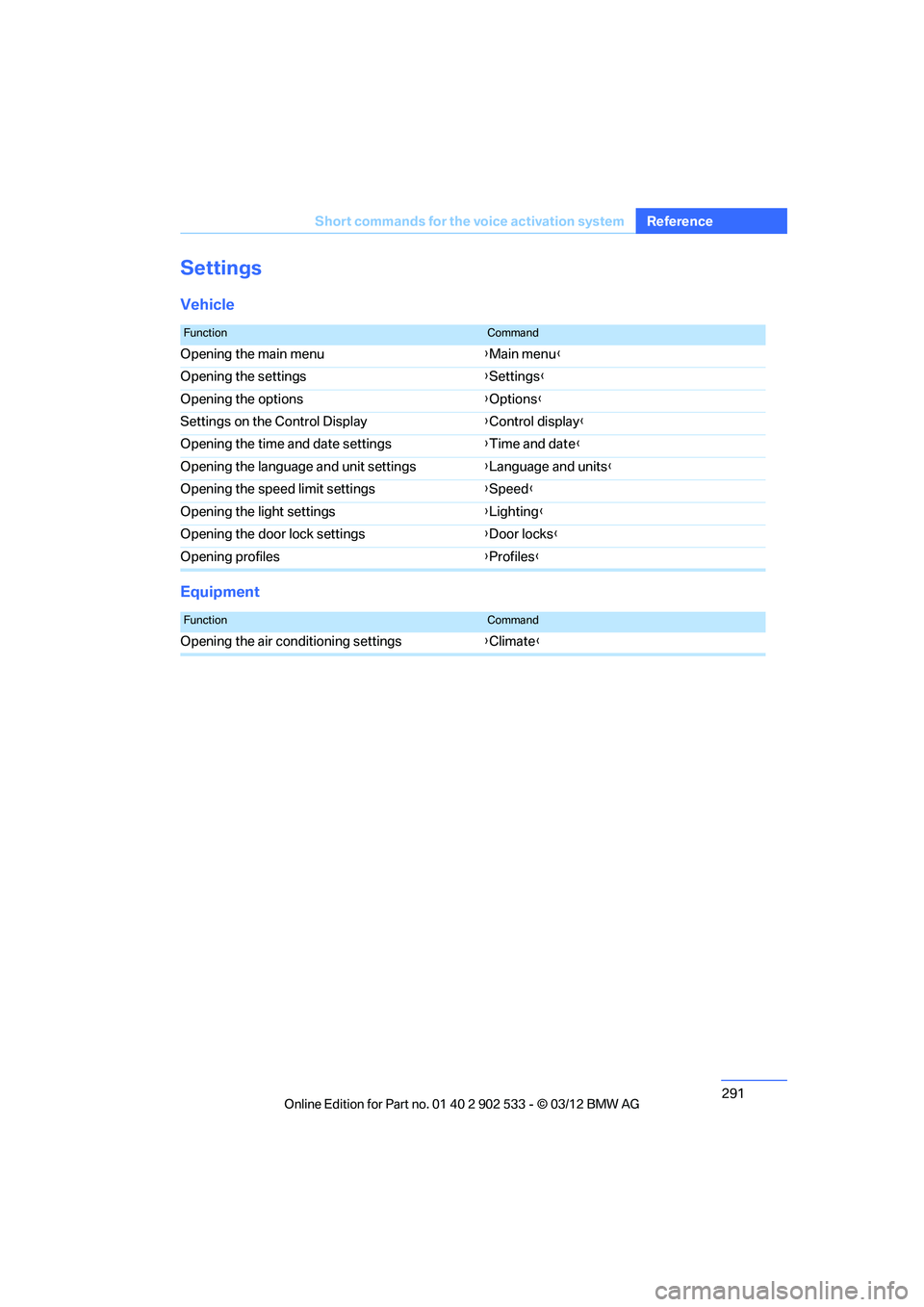
Settings
Vehicle
Equipment
FunctionCommand
Opening the main menu
{Main menu }
Opening the settings {Settings }
Opening the options {Options }
Settings on the Control Display {Control display }
Opening the time and date settings {Time and date }
Opening the language and unit settings {Language and units }
Opening the speed limit settings {Speed }
Opening the light settings {Lighting }
Opening the door lock settings {Door locks }
Opening profiles {Profiles }
FunctionCommand
Opening the air conditioning settings {Climate}
00320051004F004C00510048000300280047004C0057004C005200510003
Page 293 of 308
292
Referen ceEverything from A to Z
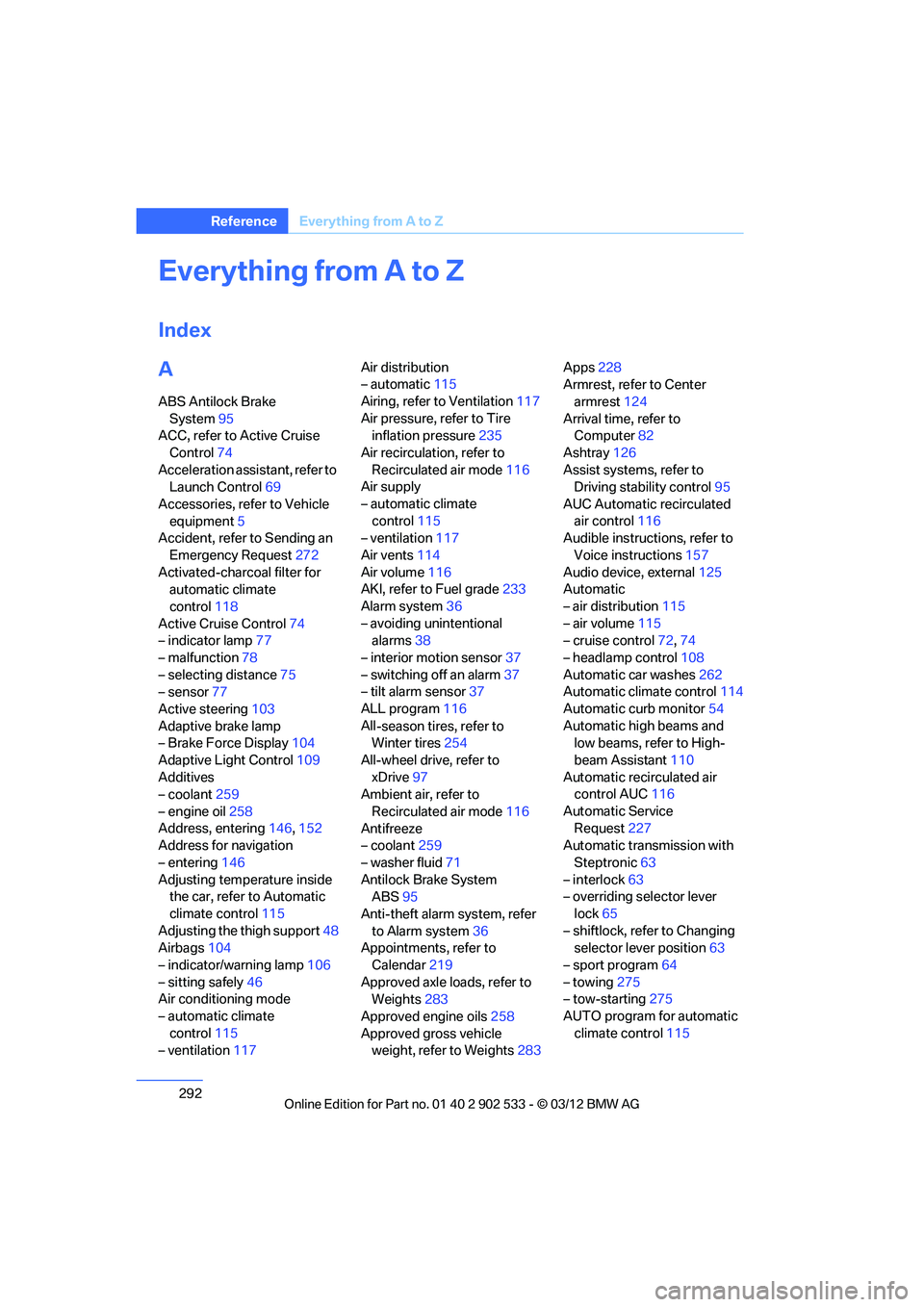
Everything from A to Z
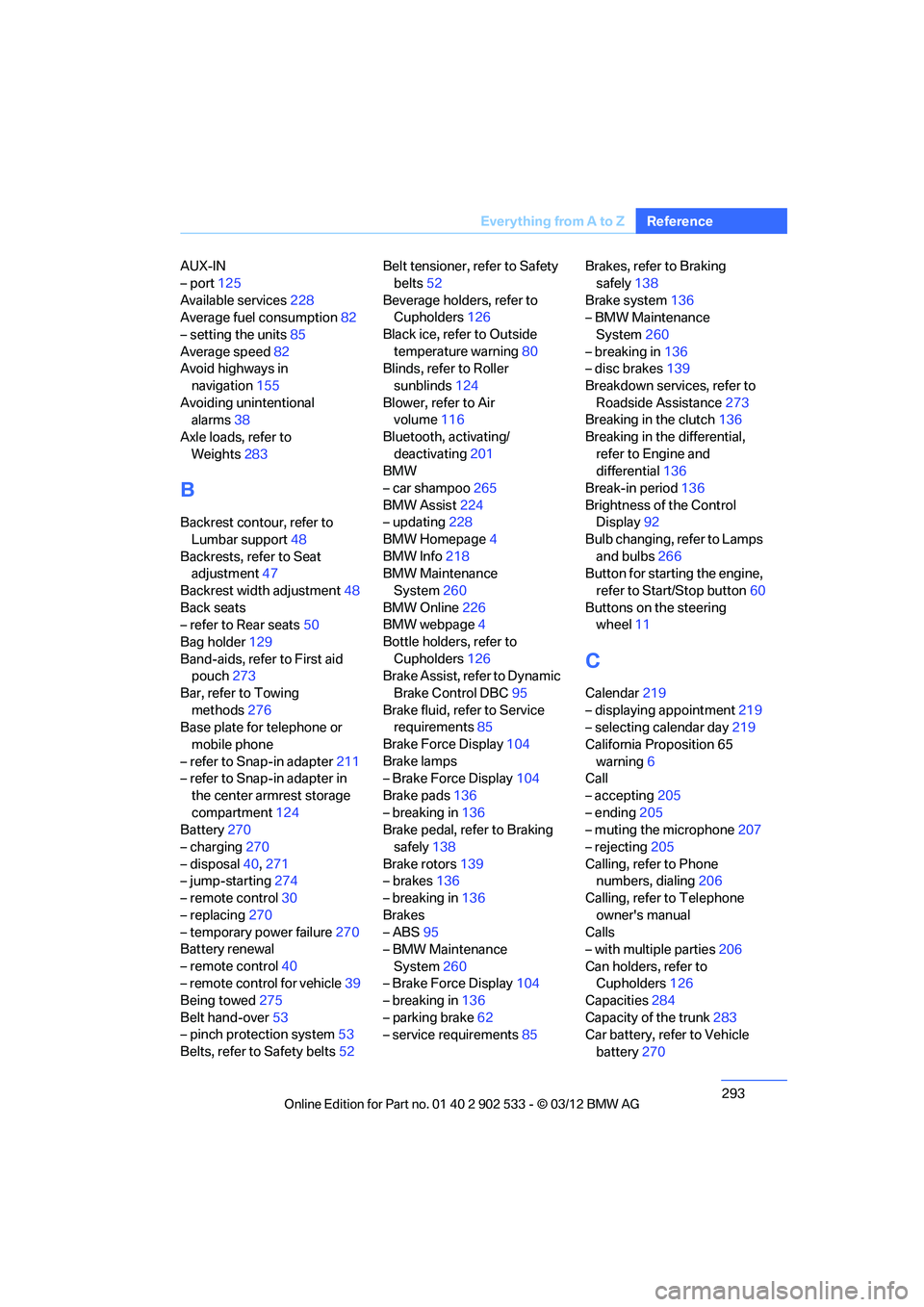
Index
A
ABS Antilock Brake
System 95
ACC, refer to Active Cruise
Control 74
Acceleration assistant, refer to Launch Control 69
Accessories, refer to Vehicle equipment 5
Accident, refer to Sending an
Emergency Request 272
Activated-charcoal filter for automatic climate
control 118
Active Cruise Control 74
– indicator lamp 77
– malfunction 78
– selecting distance 75
– sensor 77
Active steering 103
Adaptive brake lamp
– Brake Force Display 104
Adaptive Light Control 109
Additives
– coolant 259
– engine oil 258
Address, entering 146,152
Address for navigation
– entering 146
Adjusting temperature inside the car, refer to Automatic
climate control 115
Adjusting the thigh support 48
Airbags 104
– indicator/warning lamp 106
– sitting safely 46
Air conditioning mode
– automatic climate
control 115
– ventilation 117 Air distribution
– automatic
115
Airing, refer to Ventilation 117
Air pressure, refer to Tire inflation pressure 235
Air recirculation, refer to Recirculated air mode 116
Air supply
– automatic climate
control 115
– ventilation 117
Air vents 114
Air volume 116
AKI, refer to Fuel grade 233
Alarm system 36
– avoiding unintentional alarms 38
– interior motion sensor 37
– switching off an alarm 37
– tilt alarm sensor 37
ALL program 116
All -se
ason tires, refer to
Winter tires 254
All-wheel drive, refer to xDrive 97
Ambient air, refer to
Recirculated air mode 116
Antifreeze
– coolant 259
– washer fluid 71
Antilock Brake System ABS 95
Anti-theft alarm system, refer to Alarm system 36
Appointments, refer to
Calendar 219
Approved axle loads, refer to Weights 283
Approved engine oils 258
Approved gross vehicle weight, refer to Weights 283Apps
228
Armrest, refer to Center
armrest 124
Arrival time, refer to Computer 82
Ashtray 126
Assist systems, refer to Driving stability control 95
AUC Automatic recirculated air control 116
Audible instructions, refer to
Voice instructions 157
Audio device, external 125
Automatic
– air distribution 115
– air volume 115
– cruise control 72,74
– headlamp control 108
Automatic car washes 262
Automatic climate control 114
Automatic curb monitor 54
Automatic high beams and low beams, refer to High-
beam Assistant 110
Automatic recirculated air control AUC 116
Automatic Service Request 227
Automatic transmission with
Steptronic 63
– interlock 63
– overriding selector lever
lock 65
– shiftlock, refer to Changing selector lever position 63
– sport program 64
– towing 275
– tow-starting 275
AUTO program for automatic climate control 115
00320051004F004C00510048000300280047004C0057004C005200510003
Page 294 of 308
293
Everything from A to Z
Reference
AUX-IN
– port
125
Available services 228
Average fuel consumption 82
– setting the units 85
Average speed 82
Avoid highways in
navigation 155
Avoiding unintentional alarms 38
Axle loads, refer to Weights 283
B
Backrest contour, refer to
Lumbar support 48
Backrests, refer to Seat adjustment 47
Backrest width adjustment 48
Back seats
– refer to Rear seats 50
Bag holder 129
Band-aids, refer to First aid pouch 273
Bar, refer to Towing methods 276
Base plate for telephone or
mobile phone
– refer to Snap-in adapter 211
– refer to Snap-in adapter in
the center armrest storage
compartment 124
Battery 270
– charging 270
– disposal 40,271
– jump-starting 274
– remote control 30
– replacing 270
– temporary power failure 270
Battery renewal
– remote control 40
– remote control for vehicle 39
Being towed 275
Belt hand-over 53
– pinch protection system 53
Belts, refer to Safety belts 52Belt tensioner, refer to Safety
belts 52
Beverage holders, refer to Cupholders 126
Black ice, refer to Outside temperature warning 80
Blinds, refer to Roller
sunblinds 124
Blower, refer to Air volume 116
Bluetooth, activating/ deactivating 201
BMW
– car shampoo 265
BMW Assist 224
– updating 228
BMW Homepage 4
BMW Info 218
BMW Maintenance
System 260
BMW Online 226
BMW webpage 4
Bottle holders, refer to Cupholders 126
Brake Assist, refer to Dynamic
Brake Control DBC 95
Brake fluid, refer to Service requirements 85
Brake Force Display 104
Brake lamps
– B ra
ke Force Display 104
Brake pads 136
– breaking in 136
Brake pedal, refer to Braking
safely 138
Brake rotors 139
– brakes 136
– breaking in 136
Brakes
– ABS 95
– BMW Maintenance System 260
– Brake Force Display 104
– breaking in 136
– parking brake 62
– service requirements 85Brakes, refer to Braking
safely 138
Brake system 136
– BMW Maintenance
System 260
– breaking in 136
– disc brakes 139
Breakdown services, refer to Roadside Assistance 273
Breaking in the clutch 136
Breaking in the differential, refer to Engine and
differential 136
Break-in period 136
Brightness of the Control Display 92
Bulb changing, refer to Lamps and bulbs 266
Button for starting the engine,
refer to Start/Stop button 60
Buttons on the steering wheel 11
C
Calendar 219
– displaying appointment 219
– selecting calendar day 219
California Proposition 65 warning 6
Call
– accepting 205
– ending 205
– muting the microphone 207
– rejecting 205
Calling, refer to Phone numbers, dialing 206
Calling, refer to Telephone owner's manual
Calls
– with multiple parties 206
Can holders, refer to Cupholders 126
Capacities 284
Capacity of the trunk 283
Car battery, refer to Vehicle
battery 270
00320051004F004C00510048000300280047004C0057004C005200510003