maintenance BMW 328XI CONVERTIBLE 2007 E93 User Guide
[x] Cancel search | Manufacturer: BMW, Model Year: 2007, Model line: 328XI CONVERTIBLE, Model: BMW 328XI CONVERTIBLE 2007 E93Pages: 272, PDF Size: 8.97 MB
Page 214 of 272
Wheels and tires
212
Wheels and tires
Tire inflation pressures
Information for your safety
It is not merely the tires' service life, but also
driving comfort and, to a great extent, driving
safety that depend on the condition of the tires
and the maintenance of the specified tire pres-
sure.
Check the tire inflation pressure regularly
and correct it, if necessary: at least twice a
month and before starting long trips. If you fail
to observe this precaution you may be driving
on tires with incorrect tire pressures, a condi-
tion that can not only compromise your vehi-
cle's driving stability, but also lead to tire dam-
age and the risk of an accident. Do not drive
with deflated, i.e. flat tires, except when using
Run-Flat Tires. A flat tire will seriously impair
your vehicle's handling and braking response.
Attempts to drive on a flat tire can lead to loss of
control over the vehicle.<
Checking pressure
Only check tire inflation pressure when the
tires are cold. This means after a maximum of
1.25 miles/2 km driving or when the vehicle has
been parked for at least 2 hours. When tires are
warm, the tire inflation pressure is higher.
After correcting tire inflation pressures,
always reinitialize the Flat Tire Monitor,
refer to page92.<
Inflation pressure specifications
The tables below provide all the correct inflation
pressures for the specified tire sizes at ambient
temperature.
The inflation pressures apply to the tire
sizes approved and tire brands recom-
mended by BMW; a list of these is available
from your BMW center.<
For correct identification of the right tire infla-
tion pressures, observe the following:
>Tire sizes for your vehicle>Load conditions
>Maximum allowable driving speed
Tire inflation pressures for driving up to
100 mph or 160 km/h
For normal driving up to 100 mph or 160 km/h
and to achieve optimum driving comfort, adjust
pressures to the respective tire inflation pres-
sures listed on the following pages in the col-
umns for traveling speeds up to a maximum of
100mph or 160km/h.
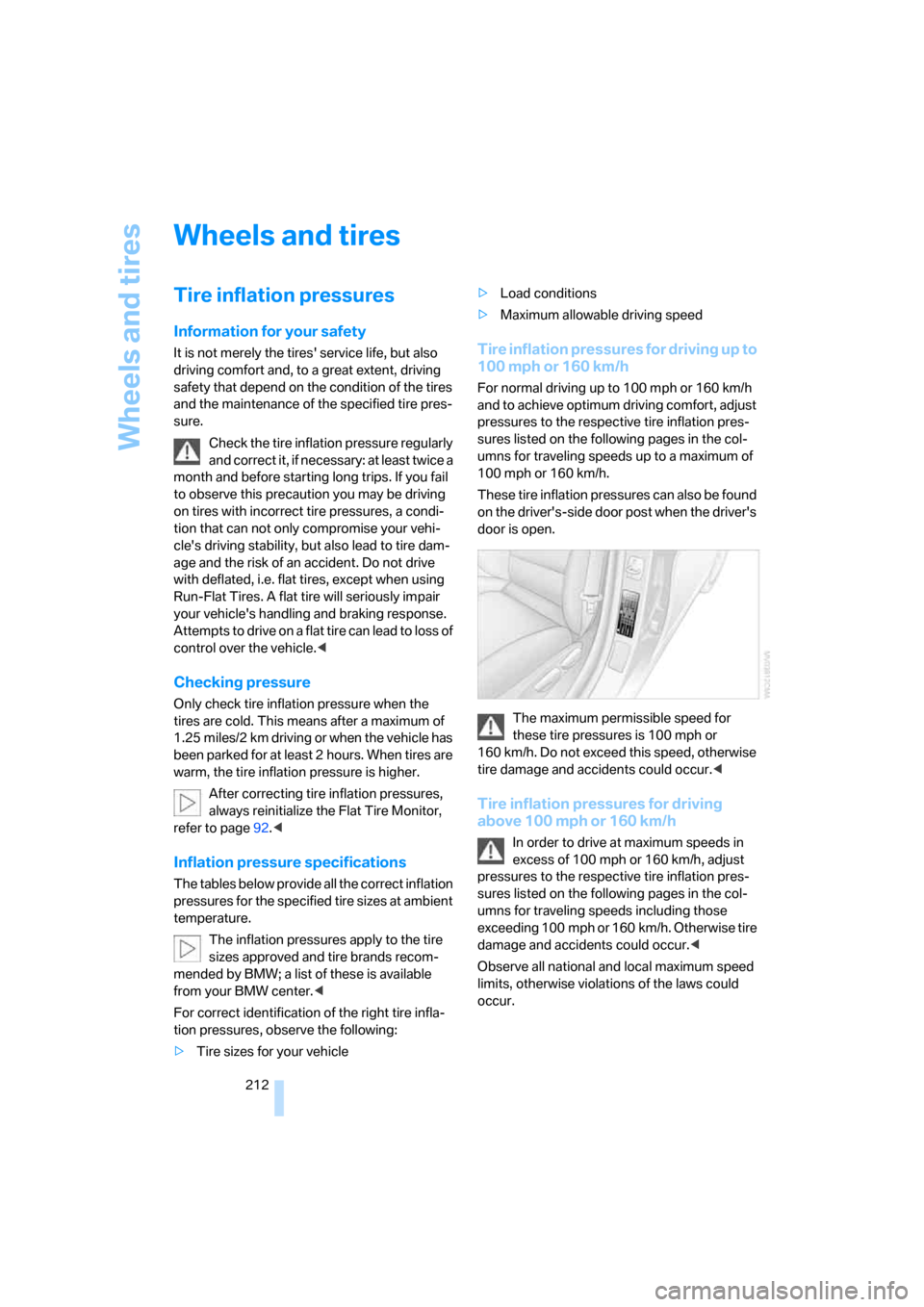
These tire inflation pressures can also be found
on the driver's-side door post when the driver's
door is open.
The maximum permissible speed for
these tire pressures is 100 mph or
160 km/h. Do not exceed this speed, otherwise
tire damage and accidents could occur.<
Tire inflation pressures for driving
above 100 mph or 160 km/h
In order to drive at maximum speeds in
excess of 100 mph or 160 km/h, adjust
pressures to the respective tire inflation pres-
sures listed on the following pages in the col-
umns for traveling speeds including those
exceeding 100 mph or 160 km/h. Otherwise tire
damage and accidents could occur.<
Observe all national and local maximum speed
limits, otherwise violations of the laws could
occur.
Page 230 of 272
Maintenance
228
Maintenance
BMW Maintenance System
The BMW Maintenance System supports the
preservation of the traffic and operating safety
of your BMW. The objective is to optimize
efforts with respect to minimal vehicle mainte-
nance costs.
If and when you come to sell your BMW, a com-
prehensive record of servicing will prove a sig-
nificant benefit.
CBS Condition Based Service
Sensors and special algorithms take the differ-
ent driving conditions of your BMW into
account. Condition Based Service uses this to
determine the current and future service
requirements. By letting you define a service
and maintenance regimen that reflects your
own individual requirements, the system builds
the basis for trouble-free driving.
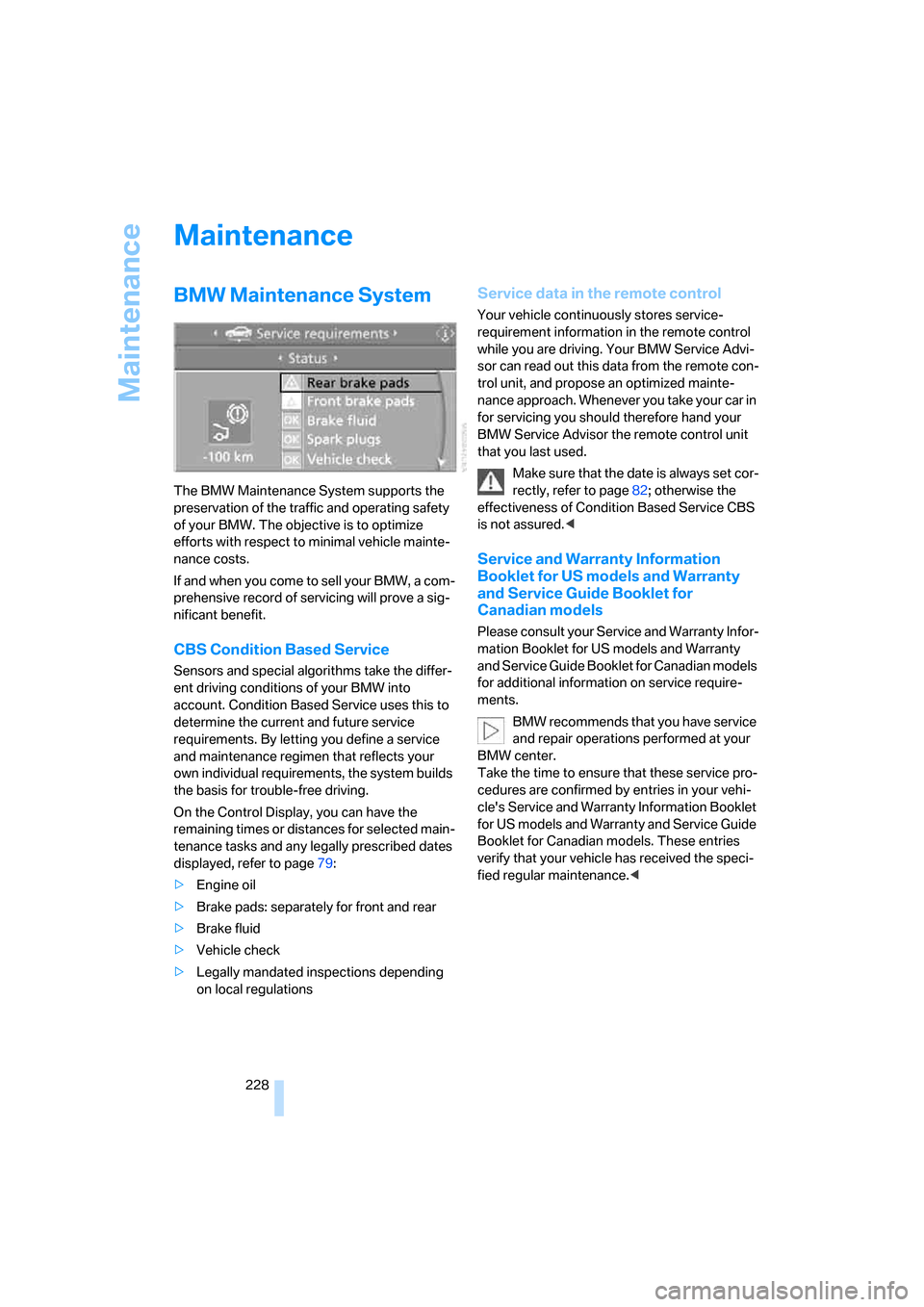
On the Control Display, you can have the
remaining times or distances for selected main-
tenance tasks and any legally prescribed dates
displayed, refer to page79:
>Engine oil
>Brake pads: separately for front and rear
>Brake fluid
>Vehicle check
>Legally mandated inspections depending
on local regulations
Service data in the remote control
Your vehicle continuously stores service-
requirement information in the remote control
while you are driving. Your BMW Service Advi-
sor can read out this data from the remote con-
trol unit, and propose an optimized mainte-
nance approach. Whenever you take your car in
for servicing you should therefore hand your
BMW Service Advisor the remote control unit
that you last used.
Make sure that the date is always set cor-
rectly, refer to page82; otherwise the
effectiveness of Condition Based Service CBS
is not assured.<
Service and Warranty Information
Booklet for US models and Warranty
and Service Guide Booklet for
Canadian models
Please consult your Service and Warranty Infor-
mation Booklet for US models and Warranty
and Service Guide Booklet for Canadian models
for additional information on service require-
ments.
BMW recommends that you have service
and repair operations performed at your
BMW center.
Take the time to ensure that these service pro-
cedures are confirmed by entries in your vehi-
cle's Service and Warranty Information Booklet
for US models and Warranty and Service Guide
Booklet for Canadian models. These entries
verify that your vehicle has received the speci-
fied regular maintenance.<
Page 233 of 272
Mobility
231Reference
At a glance
Controls
Driving tips
Communications
Navigation
Entertainment
For care and maintenance of the headlamps,
please follow the instructions in the separate
Caring for your vehicle brochure.
If the routine for changing a particular
bulb is not described here, please contact
your BMW center or a workshop that works
according to BMW repair procedures with cor-
respondingly trained personnel.<
Light-emitting diodes LED
Light-emitting diodes installed behind translu-
cent lenses serve as the light source for many of
the controls and displays in your vehicle. These
light-emitting diodes, which operate using a
concept similar to that applied in conventional
lasers, are officially designated as Class 1 light-
emitting diodes.
Do not remove the covers or expose the
eyes directly to the unfiltered light source
for several hours, otherwise this could cause
irritation to the retina.<
Xenon lamps
These bulbs have a very long service life and are
highly unlikely to fail. If a xenon lamp fails never-
theless, switch on the fog lamps and continue
the journey with great care, provided that local
legislation does not prohibit this.
Have any work on the xenon lamp system,
including bulb replacements, performed
only by a BMW center or a workshop that works
according to BMW repair procedures with cor-
respondingly trained personnel. Otherwise, if
such work is carried out improperly, the high
voltage in the system presents the danger of
fatal injuries.<
Access to the lamps
1.Switch off the lamps and take the remote
control out of the ignition lock.
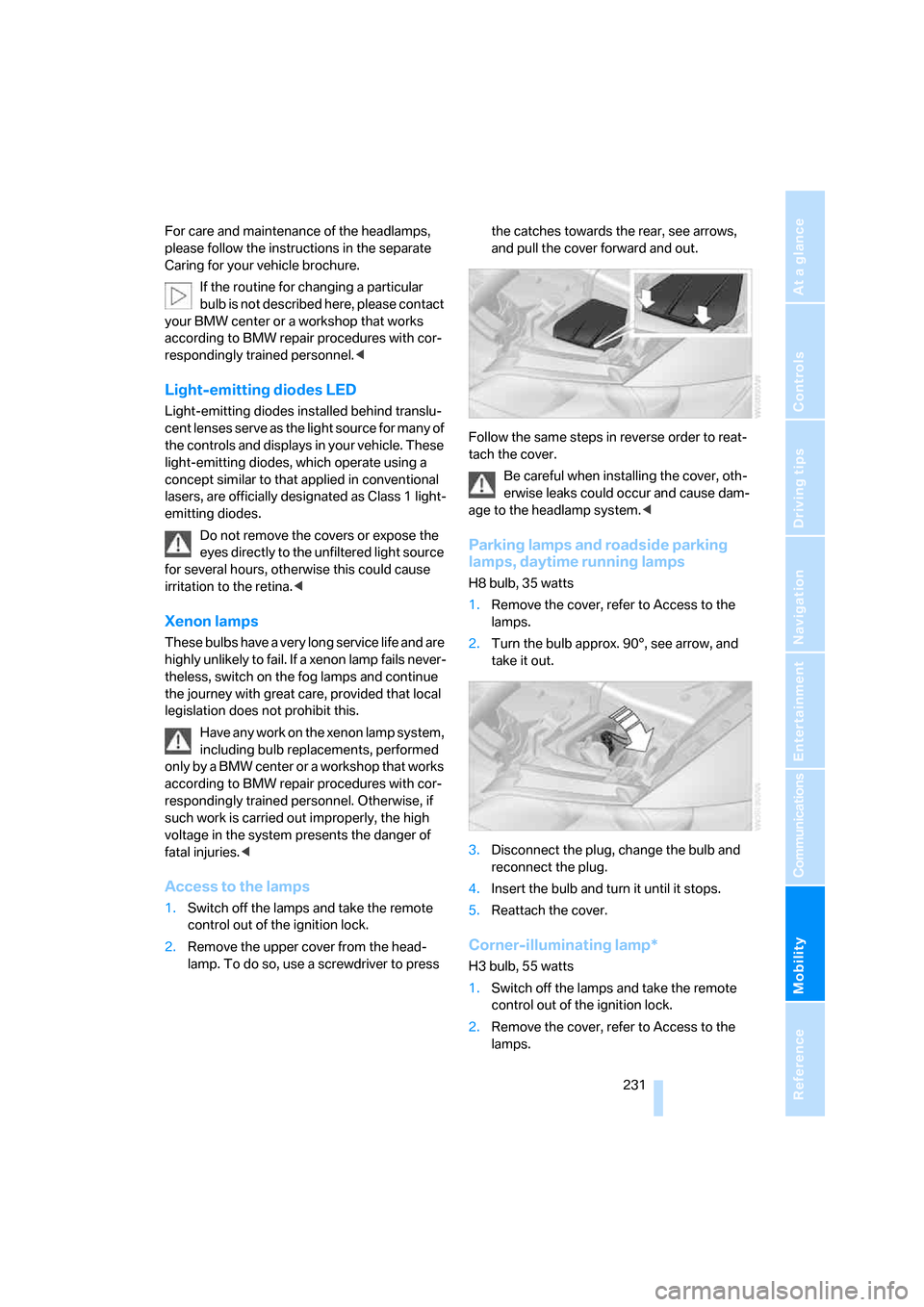
2.Remove the upper cover from the head-
lamp. To do so, use a screwdriver to press the catches towards the rear, see arrows,
and pull the cover forward and out.
Follow the same steps in reverse order to reat-
tach the cover.
Be careful when installing the cover, oth-
erwise leaks could occur and cause dam-
age to the headlamp system.<
Parking lamps and roadside parking
lamps, daytime running lamps
H8 bulb, 35 watts
1.Remove the cover, refer to Access to the
lamps.
2.Turn the bulb approx. 90°, see arrow, and
take it out.
3.Disconnect the plug, change the bulb and
reconnect the plug.
4.Insert the bulb and turn it until it stops.
5.Reattach the cover.
Corner-illuminating lamp*
H3 bulb, 55 watts
1.Switch off the lamps and take the remote
control out of the ignition lock.
2.Remove the cover, refer to Access to the
lamps.
Page 236 of 272
Replacing components
234 For information on continuing to drive with a
damaged tire, refer to Indication of a flat tire on
page93.
The symbol identifying Run-Flat Tires is a circle
with the letters RSC on the sidewall, refer to
Run-Flat Tires, page221.
When mounting new tires or changing over
from summer to winter tires and vice versa,
mount Run-Flat Tires for your own safety. In the
event of a flat, no spare wheel is available. Your
BMW center will be glad to advise you. Refer
also to New wheels and tires, page221.
The tools for changing wheels are avail-
able as optional accessories from your
BMW center.<
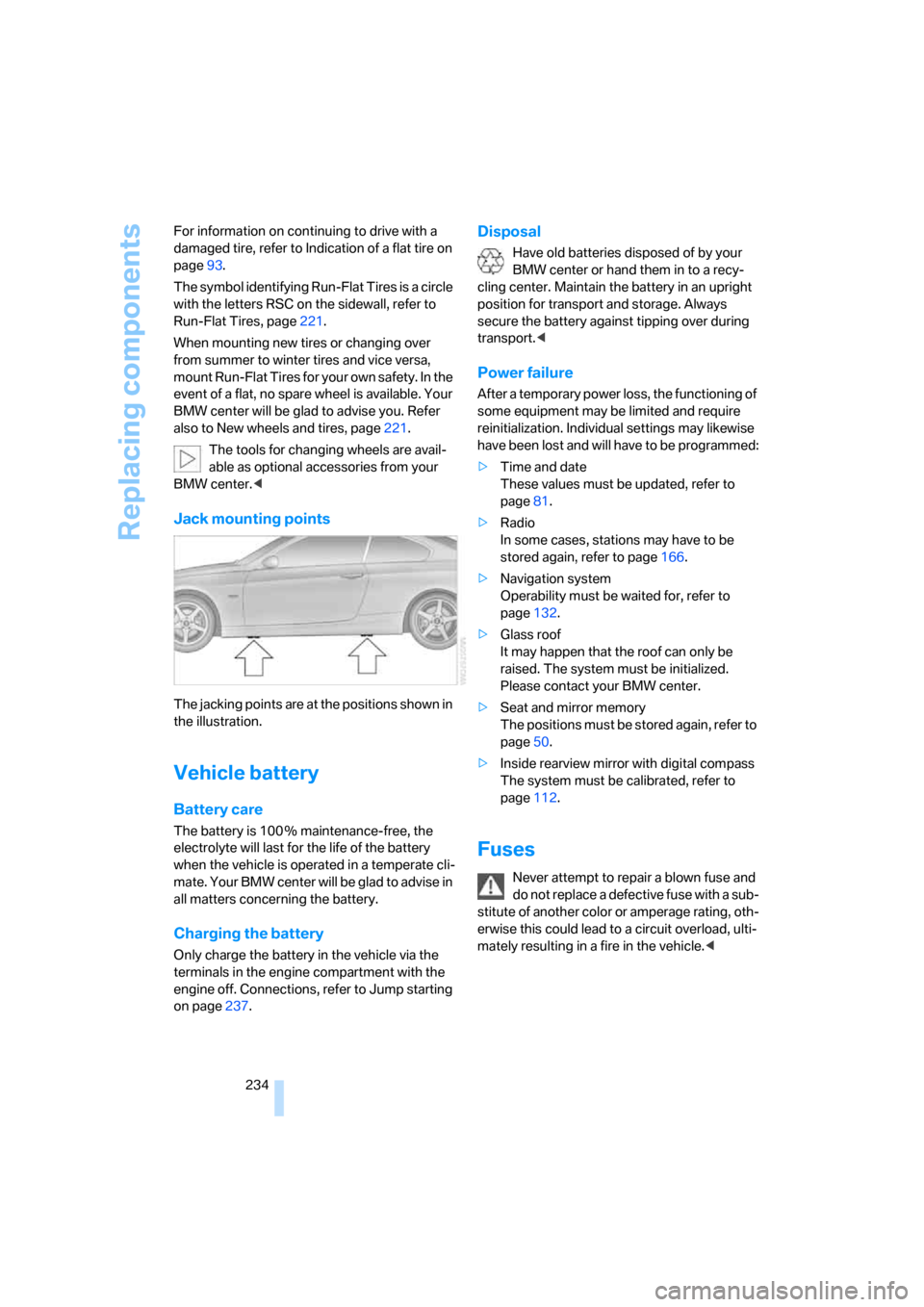
Jack mounting points
The jacking points are at the positions shown in
the illustration.
Vehicle battery
Battery care
The battery is 100 % maintenance-free, the
electrolyte will last for the life of the battery
when the vehicle is operated in a temperate cli-
ma te. Your BM W center will be glad to advise in
all matters concerning the battery.
Charging the battery
Only charge the battery in the vehicle via the
terminals in the engine compartment with the
engine off. Connections, refer to Jump starting
on page237.
Disposal
Have old batteries disposed of by your
BMW center or hand them in to a recy-
cling center. Maintain the battery in an upright
position for transport and storage. Always
secure the battery against tipping over during
transport.<
Power failure
After a temporary power loss, the functioning of
some equipment may be limited and require
reinitialization. Individual settings may likewise
have been lost and will have to be programmed:
>Time and date
These values must be updated, refer to
page81.
>Radio
In some cases, stations may have to be
stored again, refer to page166.
>Navigation system
Operability must be waited for, refer to
page132.
>Glass roof
It may happen that the roof can only be
raised. The system must be initialized.
Please contact your BMW center.
>Seat and mirror memory
The positions must be stored again, refer to
page50.
>Inside rearview mirror with digital compass
The system must be calibrated, refer to
page112.
Fuses
Never attempt to repair a blown fuse and
do not replace a defective fuse with a sub-
stitute of another color or amperage rating, oth-
erwise this could lead to a circuit overload, ulti-
mately resulting in a fire in the vehicle.<
Page 255 of 272
Reference 253
At a glance
Controls
Driving tips
Communications
Navigation
Entertainment
Mobility
"Audio", refer to Tone
control161
Audio device, external114
Automatic
– air distribution106
– air flow rate106
– cruise control66,67
– headlamp control100
– service notification203
– storing of stations165
Automatic climate control104
– automatic air
distribution106
– settings via iDrive105
Automatic curb monitor53
"Automatic programs" with
automatic climate
control106
Automatic recirculated-air
control AUC106
Automatic station search165
Automatic transmission with
Steptronic61
– interlock61,62
– overriding selector lever
lock63
– shiftlock, refer to Changing
selector lever position62
– sport program62
– towing238
– tow-starting238
"Automatic ventilation"108
AUTO program for automatic
climate control106
"Autostore"
– on the radio166
"AUX"160,180,181
– AUX-In port180
– USB/audio interface181
AUX-IN
– port114
AUX-In port180
Average fuel consumption76
– setting the units78
Average speed76
"Avoid ferries" in
navigation145
"Avoid highways" in
navigation145Avoid highways in
navigation145
Avoiding unintentional
alarms36
"Avoid tollroads" in
navigation145
Axle loads, refer to
Weights
247
"A - Z"193,194
B
Backrest contour, refer to
Lumbar support47
Backrests, refer to Seat
adjustment46
Backrest width adjustment47
Back seats
– refer to Rear seats48
Backup lamps
– replacing bulb232
Backup lamps, refer to Tail
lamps232
Bag holder118
Balance, tone control161
Band-aids, refer to First-aid
pouch237
Bar, refer to Towing
methods239
Base plate for telephone or
mobile phone
– refer to Snap-in adapter in
the center armrest storage
compartment114
Bass, tone control161
Bass sounds, refer to Treble
and bass161
Battery234
– charging234
– disposal38,234
– jump starting237
– remote control28
– temporary power failure234
Battery renewal
– remote control38
– remote control for vehicle38
Being towed239
Belt hand-over52
Belts, refer to Safety belts51Belt tensioner, refer to Safety
belts51
Beverage holders, refer to
Cup holders115
Blinds, refer to Roller sun
blinds113
Blower, refer to Air flow
rate106
Bluetooth, refer to separate
Owner's Manual
"BMW Assist"202,203,204
BMW Assist
– activating206
– Concierge service204
– contacting BMW Customer
Relations204
– Roadside Assistance202
– services offered201
– TeleService203
"BMW Contact"196
"BMW Contact
Numbers"196
BMW Homepage
4
BMW Maintenance
System228
"BMW Service settings"207
BMW webpage4
Bottle holders, refer to Cup
holders115
Brake assist, refer to Dynamic
Brake Control DBC89
Brake fluid, refer to Service
requirements79
Brake Force Display97
Brake lamps
– replacing bulb232
– two-stage97
Brake pads124
– breaking in124
Brake rotors125
– brakes124
– breaking in124
Brakes
– ABS89
– BMW Maintenance
System228
– breaking in124
– parking brake60
– service requirements79
Page 256 of 272
Everything from A - Z
254 Brakes, refer to Braking
safely125
Brake system124
– BMW Maintenance
System228
– breaking in124
– disc brakes125
Breakdown services, refer to
Roadside Assistance236
Breaking in the clutch124
Breaking in the differential,
refer to Engine and
differential124
Break-in period124
Brightness of the Control
Display86
"Brightness" on the control
display86
Bulb changing, refer to Lamps
and bulbs230
Button for starting the engine,
refer to Start/stop button59
Buttons on the steering
wheel11
C
California Proposition 65
warning6
"Call"194,205
Call
– accepting192
– displaying accepted194
– ending193
– missed194
– starting193
Calling
– from phone book193
– from Top 8 list194
– redialing194
Can holders, refer to Cup
holders115
Capacities247
Capacity of the cargo bay247
Car battery, refer to Vehicle
battery234
Car care, refer to Caring for
your vehicle brochureCar-care products, refer to
Caring for your vehicle
brochure
"Car Data"76
Care, refer to Caring for your
vehicle brochure
Cargo, securing127
Cargo bay
– capacity247
– convenient access37
– folding up the floor
panel119
– lamp, refer to Interior
lamps103
– opening from inside33
– opening from outside33
Cargo loading
– securing cargo127
– stowing cargo126
– vehicle126
Caring for artificial leather,
refer to Caring for your
vehicle brochure
Caring for leather, refer to
Caring for your vehicle
brochure
Caring for plastic, refer to
Caring for your vehicle
brochure
Caring for the carpet, refer to
Caring for your vehicle
brochure
Caring for the vehicle finish,
refer to Caring for your
vehicle brochure
Car jack
– jacking points234
Car key, refer to Integrated
key/remote control28
Car phone186
– installation location, refer to
Center armrest114
– refer to Mobile phone186
– refer to separate Owner's
Manual
Car radio, refer to Radio164Car wash126
– also refer to Caring for your
vehicle brochure
– with convenient access37
Catalytic converter, refer to
Hot exhaust system124
"Categories" for satellite
radio171
CBS Condition Based
Service228
"CD"160,173
CD changer173
– compressed audio files173
– controls160
– fast forward/reverse177
– installation location177
– playing a track175
– random order176
– repeating a track176
– selecting a CD173
– selecting a track174
– switching on/off160
– tone control161
– volume161
CD player173
– compressed audio files173
– controls160
– fast forward/reverse177
– playing a track175
– random order176
– repeating a track176
– selecting a track174
– switching on/off160
– tone control161
– volume161
Cell phones, use inside the
car, refer to Mobile phones
in the vehicle124
Center armrest114
Center brake lamp
– replacing bulb233
Center console, refer to
Around the center
console14
"Central locking"30
Central locking
– from inside32
– from outside29
Page 259 of 272
Reference 257
At a glance
Controls
Driving tips
Communications
Navigation
Entertainment
Mobility
Driving stability control
systems89
Driving through water125
Driving tips, refer to Driving
notes124
Dry air, refer to Cooling
function107
DSC Dynamic Stability
Control89
DTC Dynamic Traction
Control90
– indicator/warning lamp90
DVD for navigation132
Dynamic Brake Control
DBC89
"Dynamic route" in
navigation145
Dynamic Stability Control
DSC
– indicator/warning lamp90
Dynamic Traction Control
DTC
– indicator/warning lamp90
E
EBV Electronic brake-force
distribution89
Eject button, refer to Buttons
on the CD player160
Electric
– seat adjustment46
Electrical malfunction
– door lock32
– driver's door32
– fuel filler door210
– glass roof40
– luggage compartment lid33
Electric seat adjustment46
Electric steering wheel lock
– with convenient access37
Electronic brake-force
distribution EBV89
Electronic oil level check224
Emergency actuation,
automatic transmission,
refer to Overriding selector
lever lock63
Emergency call236Emergency operation
– fuel filler door, manual
release210
Emergency operation, refer to
Closing manually
– glass roof40
Emergency operation, refer to
Manual operation
– door lock32
Emergency release
– luggage compartment lid
from inside34
Emergency services, refer to
Roadside Assistance236
"Enable services"207
"End call"193
Engine
– breaking in124
– data244
– overheated, refer to Coolant
temperature75
– speed244
– starting60
– starting, convenient
access36
– switching off60
Engine compartment224
Engine coolant, refer to
Coolant226
Engine oil
– adding226
– BMW Maintenance
System228
– capacity247
– checking level224
– intervals between changes,
refer to Service
requirements79
"Engine oil level"225
Engine output, refer to Engine
data244
Engine speed, refer to Engine
data
244
Engine starting, refer to
Starting the engine60
"Enter address"135
Entering a destination135
Entering a destination
country135Entering a house number or
intersection137
Entering an intersection136
Entering a street136
"Entertainment"160
Entry lamps, refer to Interior
lamps103
"Equalizer", refer to Tone
control162
Equalizer, refer to Tone
control162
Error messages, refer to
Check Control83
"ESN"170
ESP Electronic Stability
Program, refer to DSC
Dynamic Stability
Control89
Event data recorders229
Exhaust system, refer to Hot
exhaust system124
Exterior mirrors52
– adjusting52
– automatic dimming
feature53
– automatic heating52
– folding in and out52
External audio device114
External audio device, refer to
AUX-In port180
Eyes
– for tow-starting and towing
away239
– for tying down loads127
F
Fader, tone control161
Failure messages, refer to
Check Control83
Failure of an electrical
consumer234
False alarm
– avoiding unintentional
alarm36
– switching off an alarm35
Fastening safety belts, refer to
Safety belts51
Page 262 of 272
Everything from A - Z
260 Intermittent mode of the
wipers64
J
Jacking points234
Joystick, refer to iDrive16
Jumpering, refer to Jump
starting237
Jump starting237
K
Key, refer to Integrated key/
remote control28
Keyless go, refer to
Convenient access36
Keyless opening and closing,
refer to Convenient
access36
Key Memory, refer to Personal
Profile28
Kick-down62
– automatic transmission with
Steptronic62
Knock control211
L
Lamps
– automatic headlamp
control100
– parking lamps/low
beams100
Lamps and bulbs, replacing
bulbs230
"Language / Units"78
"Language / Units" in
navigation133,150
"Languages" in
navigation133,150
"Languages" on the control
display86
Lap-and-shoulder belt, refer
to Safety belts51
Lashing eyes, refer to
Securing cargo127
Last destinations, refer to
Destination list141"Last seat pos."51
LATCH child-restraint fixing
system57
LED Light-emitting
diodes231
Length, refer to
Dimensions245
License plate lamp, replacing
bulb233
Light-emitting diodes
LED231
Lighter116
– connecting electrical
appliances116
"Lighting"64
Lighting
– instruments103
– lamps and bulbs230
– vehicle, refer to Lamps100
Light-metal alloy wheels, care,
refer to Caring for your
vehicle brochure
Light switch100
"Limit"85
Limit, refer to Speed limit85
Load securing equipment,
refer to Securing cargo127
Lock buttons, doors, refer to
Locking33
Locking
– adjusting confirmation
signal31
– from inside33
– from outside30
– without remote control, refer
to Convenient access36
Locking and unlocking doors
– confirmation signals31
– from inside32
– from outside29
Low-beam headlamps100
– automatic
100
Lower back support, refer to
Lumbar support47Luggage compartment lid33
– convenient access37
– emergency operation, refer
to Opening manually33
– emergency release34
– locking or unlocking
separately34
– opening from inside33
– opening from outside33
– opening manually33
– remote control30
Luggage rack, refer to Roof-
mounted luggage rack128
Lumbar support47
M
M+S tires, refer to Winter
tires222
Maintenance, refer to Service
Booklet
Maintenance system228
Malfunction
– automatic transmission with
Steptronic63
– luggage compartment lid33
– tires93
Malfunction warnings, refer to
Check Control83
Manual mode, automatic
transmission with
Steptronic62
"Manual" on the radio165
Manual operation
– door lock32
– driver's door32
– fuel filler door210
– glass roof40
– luggage compartment lid33
– transmission lock, automatic
transmission63
Manual transmission61
Map
– changing scale149
– destination entry139
"Map direction of travel"149
"Map facing north"149
Page 263 of 272
Reference 261
At a glance
Controls
Driving tips
Communications
Navigation
Entertainment
Mobility
Master key, refer to Remote
control with integrated
key28
Maximum cooling106
Maximum speed
– with winter tires222
Measurements, refer to
Dimensions245
Memory, refer to Seat and
mirror memory50
Memory keys,
programmable21
MENU button16
Menus
– Control Display17
Menus, refer to iDrive16
Message list, traffic
information152
Microfilter
– BMW Maintenance
System228
– for automatic climate
control108
Microfilter/activated-charcoal
filter
– BMW Maintenance
System228
Microphone
– telephone14
– voice input14
Mirror dimming feature53
Mirrors52
– automatic curb monitor53
– exterior mirrors52
– heating52
– interior rearview mirror53
– memory, refer to Seat and
mirror memory50
"Missed calls"194
Missed calls194Mobile phone
– accepted calls194
– adjusting volume191
– calling193
– ending call193
– installation location, refer to
Center armrest114
– missed calls194
– operation via iDrive192
– redialing194
– refer to separate Owner's
Manual
– Top 8194
– touch tone dialing196
Mobile phone, installation
location, refer to Center
armrest114
Mobile phone, refer to the
separate Owner's Manual
Mobile phones in the
vehicle124
Modifications, technical, refer
to For your own safety5
Monitor, refer to iDrive
controls16
Monitoring system for tire
pressures, refer to Flat Tire
Monitor92
"Monitor on / off"54
Most recent mobile phone
numbers194
MP3, refer to Compressed
audio files173
Multifunctional steering
wheel, refer to Buttons on
the steering wheel11
Multifunction switch
– refer to Turn signals/
headlamp flasher63
– refer to Wiper system64
Multimedia screen, refer to
iDrive16
Music tracks, refer to
Tracks174
"Mute on / off"54
N
"Navigation"134,140Navigation announcements,
refer to Switching voice
instructions on/off150
Navigation drive, location132
Navigation DVD132
Navigation system132
– address book142
– changing a route151
– destination entry134
– destination guidance in
assistance window132
– destination list141
– displaying current
position155
– entering a destination
manually134,138
– last destinations141
– navigation DVD132
– opening134
– route display148
– route list150
– searching for a special
destination140
– selecting destination using
information140
– selecting destination via
map139
– selecting route criteria145
– starting destination
guidance147
– switching off, refer to
Terminating/continuing
destination guidance147
– terminating/continuing
destination guidance147
– voice instructions150
– volume adjustment151
"Navigation voice
instructions"133
"Navigation voice
instructions" via buttons on
the steering wheel54
Neck support, refer to Head
restraints47
Nets, refer to Storage
compartments114
"New address" in
navigation143
"New destination"134,139