wheel BMW 328XI COUPE 2007 E92 Workshop Manual
[x] Cancel search | Manufacturer: BMW, Model Year: 2007, Model line: 328XI COUPE, Model: BMW 328XI COUPE 2007 E92Pages: 272, PDF Size: 8.97 MB
Page 223 of 272
Mobility
221Reference
At a glance
Controls
Driving tips
Communications
Navigation
Entertainment
The manufacturing date of tires is contained in
the tire coding:
DOT ... 0705 means that the tire was manufac-
tured in week 07 of 2005.
Run-Flat Tires
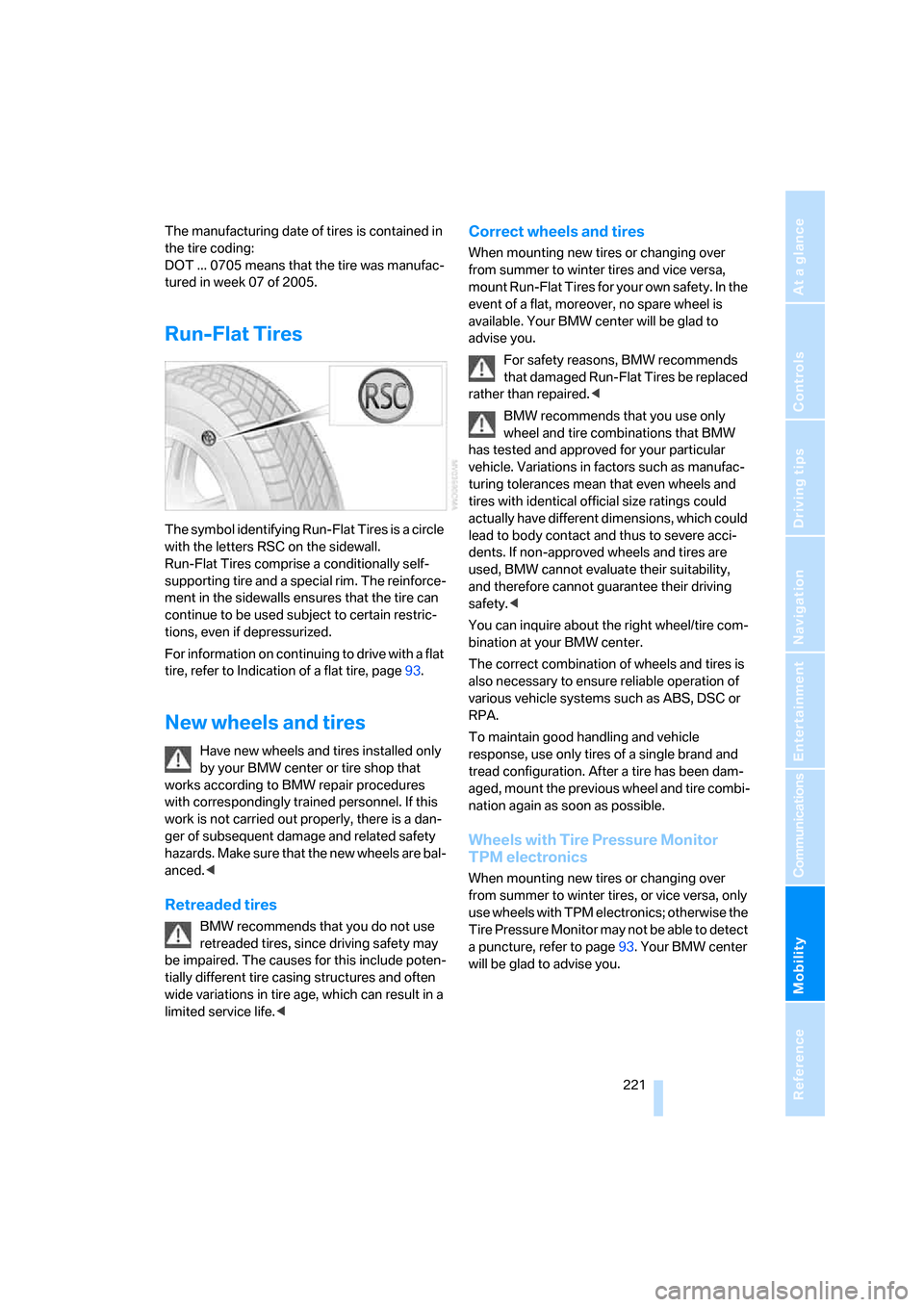
The symbol identifying Run-Flat Tires is a circle
with the letters RSC on the sidewall.
Run-Flat Tires comprise a conditionally self-
supporting tire and a special rim. The reinforce-
ment in the sidewalls ensures that the tire can
continue to be used subject to certain restric-
tions, even if depressurized.
For information on continuing to drive with a flat
tire, refer to Indication of a flat tire, page93.
New wheels and tires
Have new wheels and tires installed only
by your BMW center or tire shop that
works according to BMW repair procedures
with correspondingly trained personnel. If this
work is not carried out properly, there is a dan-
ger of subsequent damage and related safety
hazards. Make sure that the new wheels are bal-
anced.<
Retreaded tires
BMW recommends that you do not use
retreaded tires, since driving safety may
be impaired. The causes for this include poten-
tially different tire casing structures and often
wide variations in tire age, which can result in a
limited service life.<
Correct wheels and tires
When mounting new tires or changing over
from summer to winter tires and vice versa,
mount Run-Flat Tires for your own safety. In the
event of a flat, moreover, no spare wheel is
available. Your BMW center will be glad to
advise you.
For safety reasons, BMW recommends
that damaged Run-Flat Tires be replaced
rather than repaired.<
BMW recommends that you use only
wheel and tire combinations that BMW
has tested and approved for your particular
vehicle. Variations in factors such as manufac-
turing tolerances mean that even wheels and
tires with identical official size ratings could
actually have different dimensions, which could
lead to body contact and thus to severe acci-
dents. If non-approved wheels and tires are
used, BMW cannot evaluate their suitability,
and therefore cannot guarantee their driving
safety.<
You can inquire about the right wheel/tire com-
bination at your BMW center.
The correct combination of wheels and tires is
also necessary to ensure reliable operation of
various vehicle systems such as ABS, DSC or
RPA.
To maintain good handling and vehicle
response, use only tires of a single brand and
tread configuration. After a tire has been dam-
aged, mount the previous wheel and tire combi-
nation again as soon as possible.
Wheels with Tire Pressure Monitor
TPM electronics
When mounting new tires or changing over
from summer to winter tires, or vice versa, only
use wheels with TPM electronics; otherwise the
Tire Pressure Monitor may not be able to detect
a puncture, refer to page93. Your BMW center
will be glad to advise you.
Page 224 of 272
Wheels and tires
222
Recommended tire brands
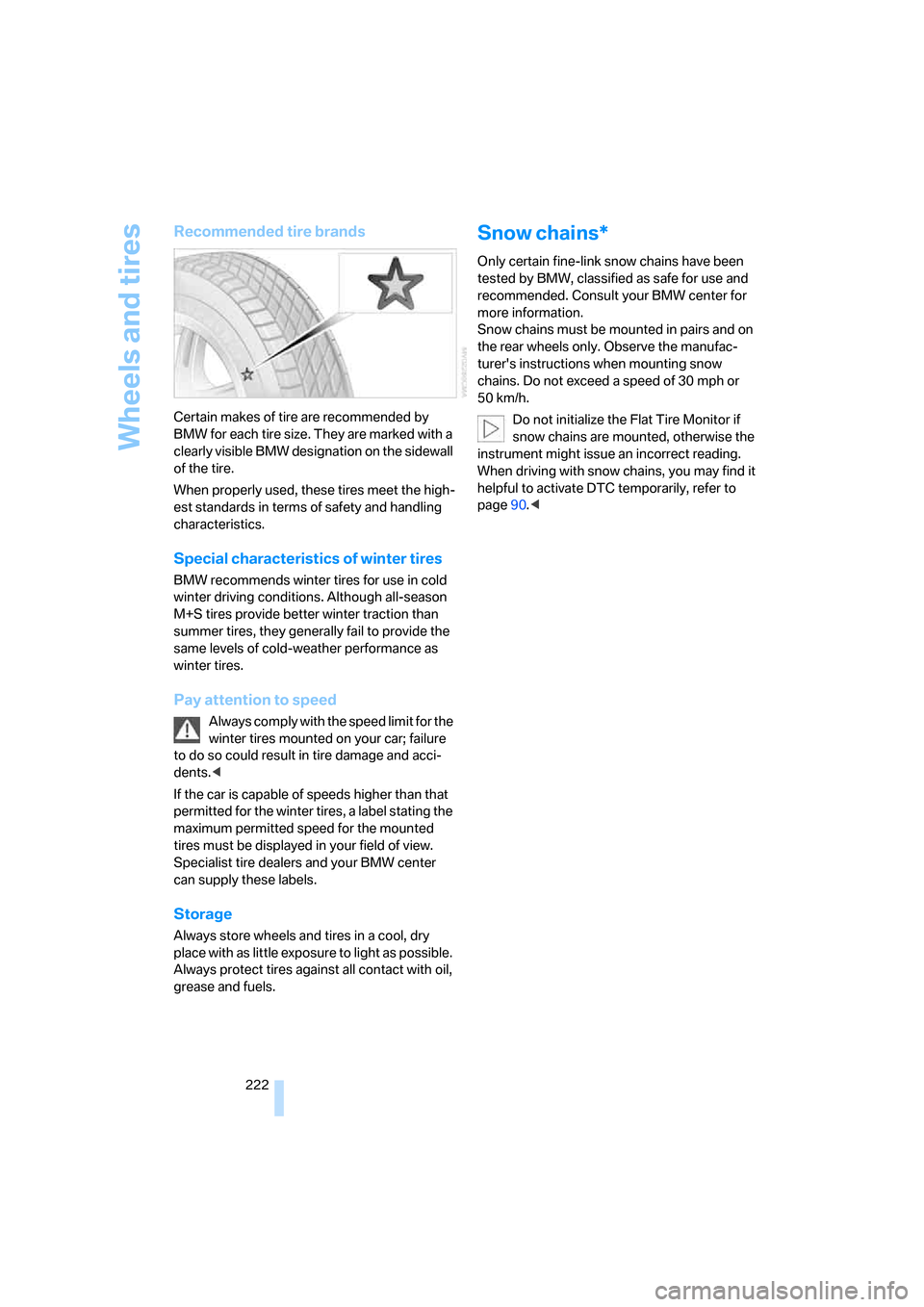
Certain makes of tire are recommended by
BMW for each tire size. They are marked with a
clearly visible BMW designation on the sidewall
of the tire.
When properly used, these tires meet the high-
est standards in terms of safety and handling
characteristics.
Special characteristics of winter tires
BMW recommends winter tires for use in cold
winter driving conditions. Although all-season
M+S tires provide better winter traction than
summer tires, they generally fail to provide the
same levels of cold-weather performance as
winter tires.
Pay attention to speed
Always comply with the speed limit for the
winter tires mounted on your car; failure
to do so could result in tire damage and acci-
dents.<
If the car is capable of speeds higher than that
permitted for the winter tires, a label stating the
maximum permitted speed for the mounted
tires must be displayed in your field of view.
Specialist tire dealers and your BMW center
can supply these labels.
Storage
Always store wheels and tires in a cool, dry
place with as little exposure to light as possible.
Always protect tires against all contact with oil,
grease and fuels.
Snow chains*
Only certain fine-link snow chains have been
tested by BMW, classified as safe for use and
recommended. Consult your BMW center for
more information.
Snow chains must be mounted in pairs and on
the rear wheels only. Observe the manufac-
turer's instructions when mounting snow
chains. Do not exceed a speed of 30 mph or
50 km/h.
Do not initialize the Flat Tire Monitor if
snow chains are mounted, otherwise the
instrument might issue an incorrect reading.
When driving with snow chains, you may find it
helpful to activate DTC temporarily, refer to
page90.<
Page 235 of 272
Mobility
233Reference
At a glance
Controls
Driving tips
Communications
Navigation
Entertainment
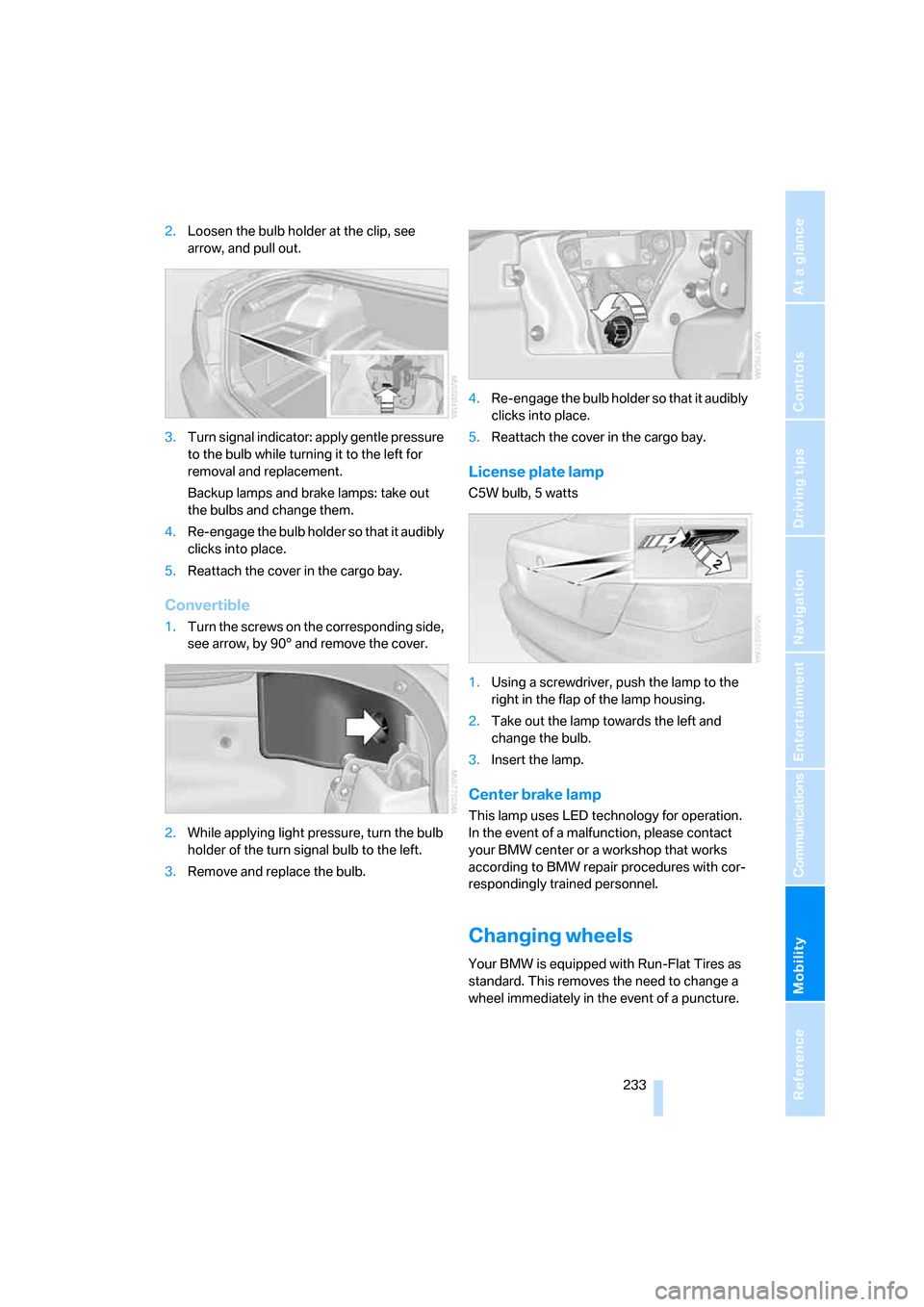
2.Loosen the bulb holder at the clip, see
arrow, and pull out.
3.Turn s igna l indicator: apply gentle pressure
to the bulb while turning it to the left for
removal and replacement.
Backup lamps and brake lamps: take out
the bulbs and change them.
4.Re-engage the bulb holder so that it audibly
clicks into place.
5.Reattach the cover in the cargo bay.
Convertible
1.Turn the screws on the corresponding side,
see arrow, by 90° and remove the cover.
2.While applying light pressure, turn the bulb
holder of the turn signal bulb to the left.
3.Remove and replace the bulb.4.Re-engage the bulb holder so that it audibly
clicks into place.
5.Reattach the cover in the cargo bay.
License plate lamp
C5W bulb, 5 watts
1.Using a screwdriver, push the lamp to the
right in the flap of the lamp housing.
2.Take out the lamp towards the left and
change the bulb.
3.Insert the lamp.
Center brake lamp
This lamp uses LED technology for operation.
In the event of a malfunction, please contact
your BMW center or a workshop that works
according to BMW repair procedures with cor-
respondingly trained personnel.
Changing wheels
Your BMW is equipped with Run-Flat Tires as
standard. This removes the need to change a
wheel immediately in the event of a puncture.
Page 236 of 272
Replacing components
234 For information on continuing to drive with a
damaged tire, refer to Indication of a flat tire on
page93.
The symbol identifying Run-Flat Tires is a circle
with the letters RSC on the sidewall, refer to
Run-Flat Tires, page221.
When mounting new tires or changing over
from summer to winter tires and vice versa,
mount Run-Flat Tires for your own safety. In the
event of a flat, no spare wheel is available. Your
BMW center will be glad to advise you. Refer
also to New wheels and tires, page221.
The tools for changing wheels are avail-
able as optional accessories from your
BMW center.<
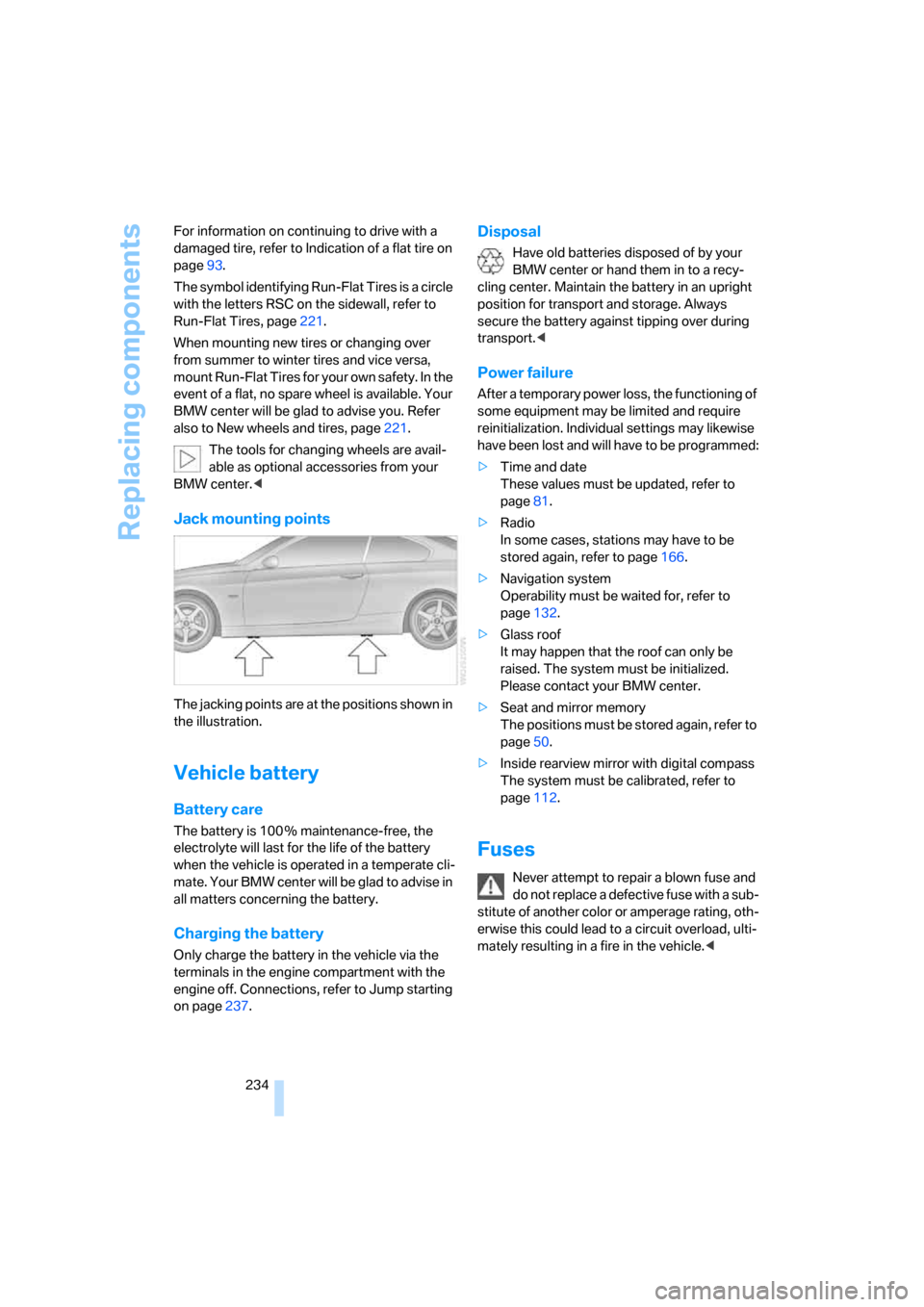
Jack mounting points
The jacking points are at the positions shown in
the illustration.
Vehicle battery
Battery care
The battery is 100 % maintenance-free, the
electrolyte will last for the life of the battery
when the vehicle is operated in a temperate cli-
ma te. Your BM W center will be glad to advise in
all matters concerning the battery.
Charging the battery
Only charge the battery in the vehicle via the
terminals in the engine compartment with the
engine off. Connections, refer to Jump starting
on page237.
Disposal
Have old batteries disposed of by your
BMW center or hand them in to a recy-
cling center. Maintain the battery in an upright
position for transport and storage. Always
secure the battery against tipping over during
transport.<
Power failure
After a temporary power loss, the functioning of
some equipment may be limited and require
reinitialization. Individual settings may likewise
have been lost and will have to be programmed:
>Time and date
These values must be updated, refer to
page81.
>Radio
In some cases, stations may have to be
stored again, refer to page166.
>Navigation system
Operability must be waited for, refer to
page132.
>Glass roof
It may happen that the roof can only be
raised. The system must be initialized.
Please contact your BMW center.
>Seat and mirror memory
The positions must be stored again, refer to
page50.
>Inside rearview mirror with digital compass
The system must be calibrated, refer to
page112.
Fuses
Never attempt to repair a blown fuse and
do not replace a defective fuse with a sub-
stitute of another color or amperage rating, oth-
erwise this could lead to a circuit overload, ulti-
mately resulting in a fire in the vehicle.<
Page 241 of 272
Mobility
239Reference
At a glance
Controls
Driving tips
Communications
Navigation
Entertainment
Using a tow fitting
The screw-in tow fitting must always be carried
in the car. It can be screwed in at the front or
rear of the BMW.
Coupe: it is sto red in the onboard tool kit under-
neath the cover on the right-hand side of the
cargo bay, refer to page230.
Convertible: it is stored in the onboard tool kit
underneath the cargo bay floor, refer to
page230.
Use only the tow fitting provided with the
vehicle and screw it all the way in. Use the
tow fitting for towing on paved roads only. Avoid
lateral loading of the tow fitting, e.g. do not lift
the vehicle by the tow fitting. Otherwise the tow
fitting and the vehicle could be damaged.<
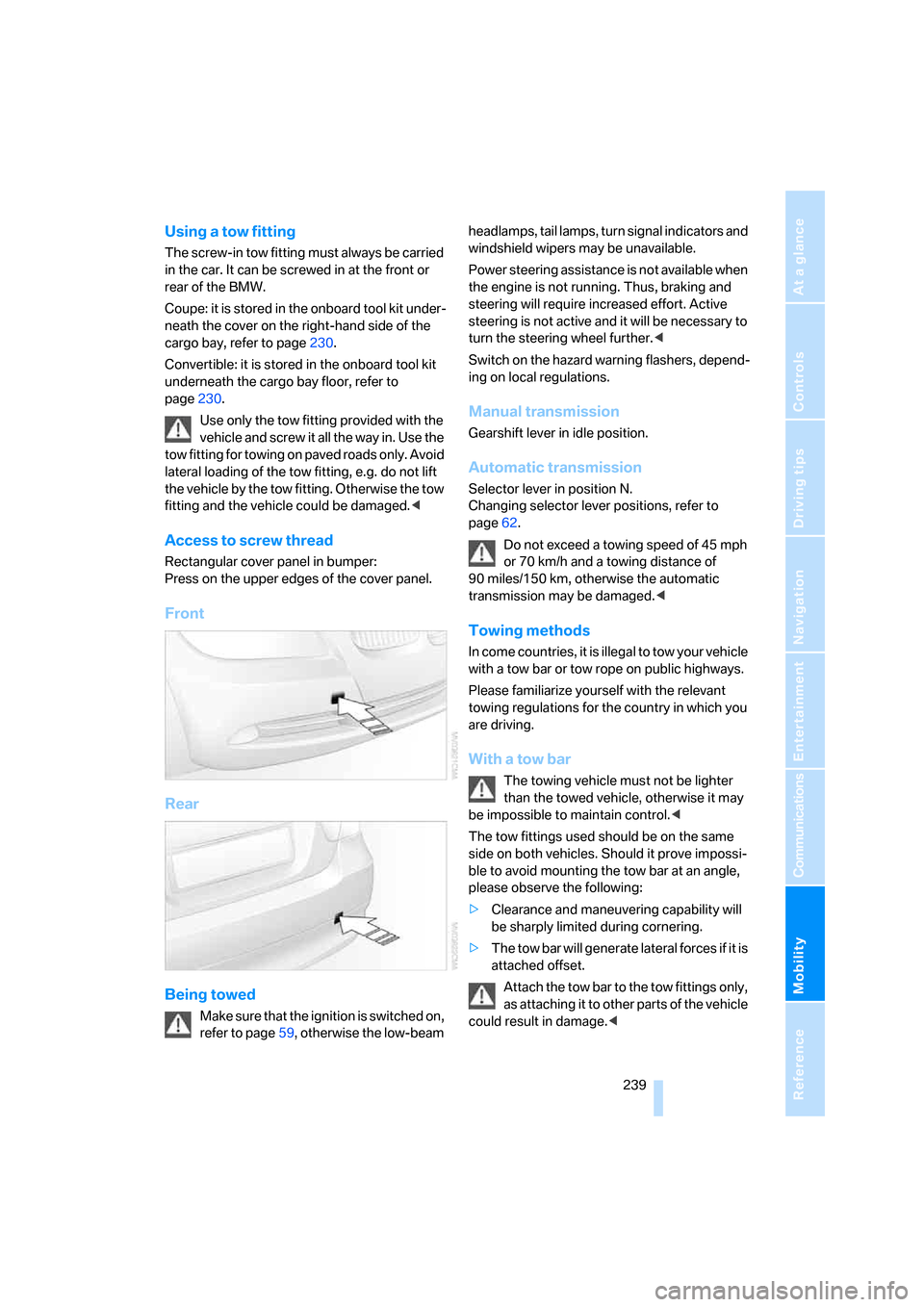
Access to screw thread
Rectangular cover panel in bumper:
Press on the upper edges of the cover panel.
Front
Rear
Being towed
Make sure that the ignition is switched on,
refer to page59, otherwise the low-beam headlamps, tail lamps, turn signal indicators and
windshield wipers may be unavailable.
Power steering assistance is not available when
the engine is not running. Thus, braking and
steering will require increased effort. Active
steering is not active and it will be necessary to
turn the steering wheel further.<
Switch on the hazard warning flashers, depend-
ing on local regulations.
Manual transmission
Gearshift lever in idle position.
Automatic transmission
Selector lever in position N.
Changing selector lever positions, refer to
page62.
Do not exceed a towing speed of 45 mph
or 70 km/h and a towing distance of
90 miles/150 km, otherwise the automatic
transmission may be damaged.<
Towing methods
In come countries, it is illegal to tow your vehicle
with a tow bar or tow rope on public highways.
Please familiarize yourself with the relevant
towing regulations for the country in which you
are driving.
With a tow bar
The towing vehicle must not be lighter
than the towed vehicle, otherwise it may
be impossible to maintain control.<
The tow fittings used should be on the same
side on both vehicles. Should it prove impossi-
ble to avoid mounting the tow bar at an angle,
please observe the following:
>Clearance and maneuvering capability will
be sharply limited during cornering.
>The tow bar will generate lateral forces if it is
attached offset.
Attach the tow bar to the tow fittings only,
as attaching it to other parts of the vehicle
could result in damage.<
Page 242 of 272
Giving and receiving assistance
240
With a tow rope
When starting off in the towing vehicle, make
sure that the tow rope is taut.
To avoid jerking and the associated
stresses on vehicle components when
towing, always use nylon ropes or nylon straps.
Attach the tow rope to the tow fittings only, as
attaching it to other parts of the vehicle could
result in damage.<
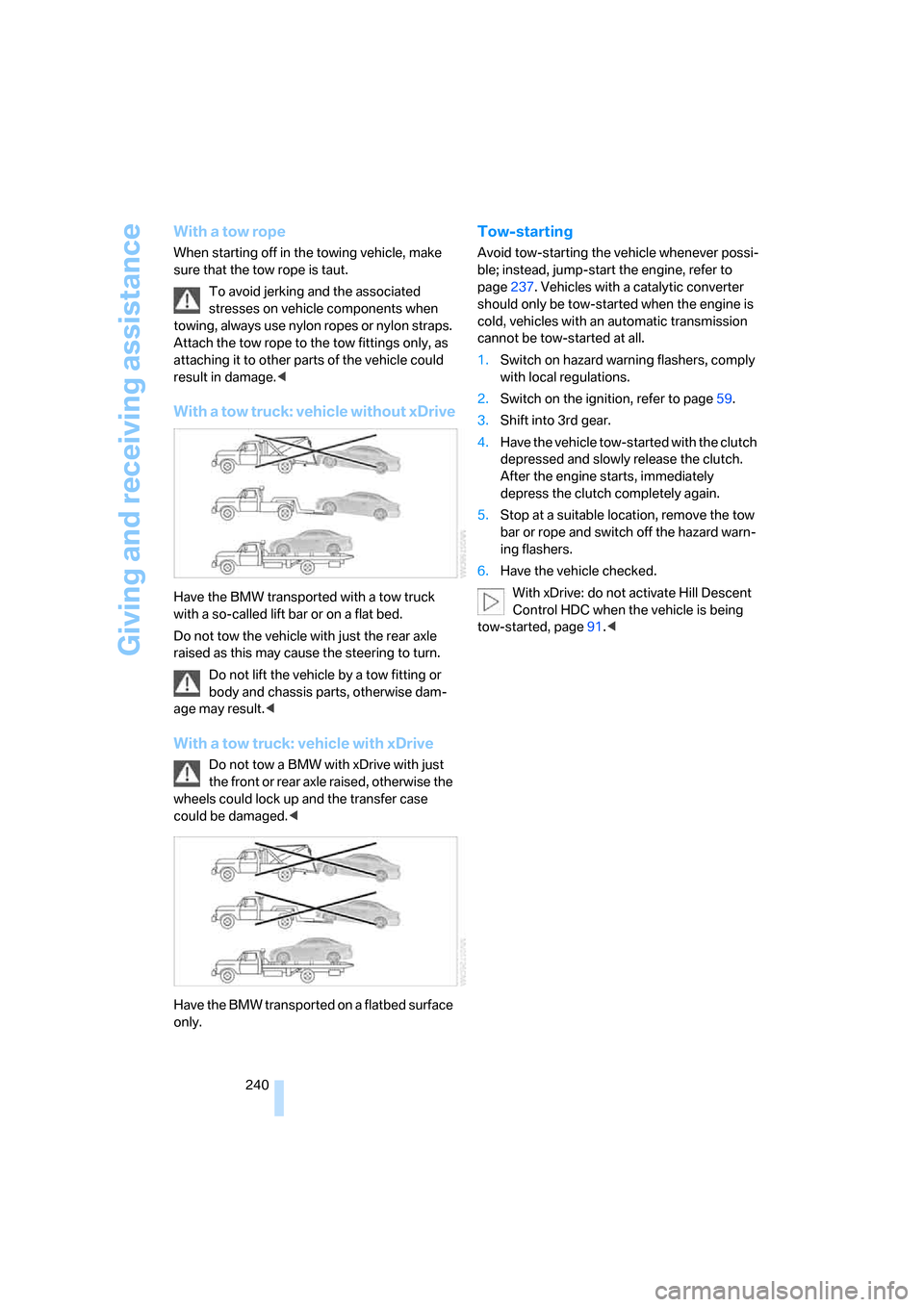
With a tow truck: vehicle without xDrive
Have the BMW transported with a tow truck
with a so-called lift bar or on a flat bed.
Do not tow the vehicle with just the rear axle
raised as this may cause the steering to turn.
Do not lift the vehicle by a tow fitting or
body and chassis parts, otherwise dam-
age may result.<
With a tow truck: vehicle with xDrive
Do not tow a BMW with xDrive with just
the front or rear axle raised, otherwise the
wheels could lock up and the transfer case
could be damaged.<
Have the BMW transported on a flatbed surface
only.
Tow-starting
Avoid tow-starting the vehicle whenever possi-
ble; instead, jump-start the engine, refer to
page237. Vehicles with a catalytic converter
should only be tow-started when the engine is
cold, vehicles with an automatic transmission
cannot be tow-started at all.
1.Switch on hazard warning flashers, comply
with local regulations.
2.Switch on the ignition, refer to page59.
3.Shift into 3rd gear.
4.Have the vehicle tow-started with the clutch
depressed and slowly release the clutch.
After the engine starts, immediately
depress the clutch completely again.
5.Stop at a suitable location, remove the tow
bar or rope and switch off the hazard warn-
ing flashers.
6.Have the vehicle checked.
With xDrive: do not activate Hill Descent
Control HDC when the vehicle is being
tow-started, page91.<
Page 253 of 272
Reference 251
At a glance
Controls
Driving tips
Communications
Navigation
Entertainment
Mobility
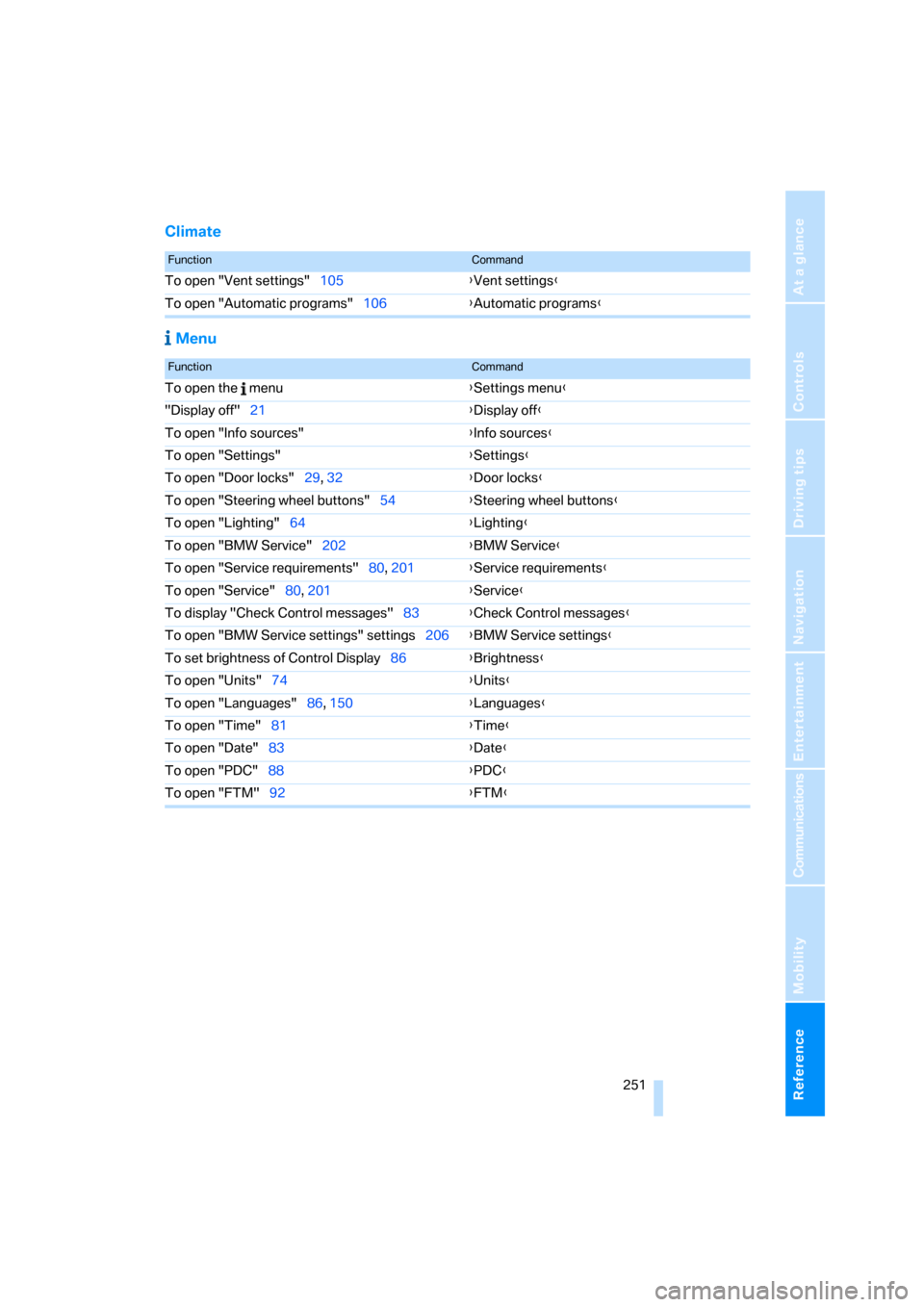
Climate
Menu
FunctionCommand
To open "Vent settings"105{Vent settings}
To open "Automatic programs"106{Automatic programs}
FunctionCommand
To open the menu{Settings menu}
"Display off"21{Display off}
To open "Info sources"{Info sources}
To open "Settings"{Settings}
To open "Door locks"29, 32{Door locks}
To open "Steering wheel buttons"54{Steering wheel buttons}
To open "Lighting"64{Lighting}
To open "BMW Service"202{BMW Service}
To open "Service requirements"80, 201{Service requirements}
To open "Service"80, 201{Service}
To display "Check Control messages"83{Check Control messages}
To open "BMW Service settings" settings206{BMW Service settings}
To set brightness of Control Display86{Brightness}
To open "Units"74{Units}
To open "Languages"86, 150{Languages}
To open "Time"81{Time}
To open "Date"83{Date}
To open "PDC"88{PDC}
To open "FTM"92{FTM}
Page 254 of 272
Everything from A - Z
252
Everything from A - Z
Index
"..." Identifies Control Display
texts used to select
individual functions and
refers you to the page where
these texts can be found.
A
ABS Antilock Brake
System89
ACC, refer to Active cruise
control67
Accident, refer to Initiating an
Emergency Request
call236
Activated-charcoal filter for
automatic climate
control108
"Activation time"109
Active cruise control67
– indicator lamps70
– malfunction71
– selecting distance69
– sensor71
Active steering96
– warning lamp96
Adaptive Head Light101
"Add digits" on the mobile
phone194
Additives
– coolant226
"Address book" in
navigation142
Address for navigation
– deleting144
– entering134,142
– selecting143
– storing142
– storing current position143
"Add to destination
list"137,139Adjusting temperature inside
the car, refer to Automatic
climate control105
Adjusting the thigh support46
Adjusting the tone during
audio operation, refer to
Tone control161
Airbags97
– indicator/warning lamp98
– sitting safely45
Air conditioning mode
– automatic climate
control105
– ventilation107
Air distribution
– automatic106
– individual105
Air flow rate106
Airing, refer to Ventilation107
Air pressure, refer to Tire
inflation pressure212
Air recirculation, refer to
Recirculated-air mode106
"Air recirculation on / off"54
Air supply
– automatic climate
control105
– ventilation
107
Air vents104
AKI, refer to Fuel
specifications211
Alarm system35
– avoiding unintentional
alarms36
– interior motion sensor36
– switching off an alarm35
– tilt alarm sensor36
"All channels" for satellite
radio171
All-season tires, refer to
Winter tires222
"All stations", displaying with
the radio164All-wheel drive, refer to
xDrive90
"AM", waveband160,164
Ambient air, refer to
Recirculated-air mode106
Antenna for mobile phone186
Antifreeze
– coolant226
– washer fluid65
Anti-theft alarm system, refer
to Alarm system35
Anti-theft system29
Approved axle loads, refer to
Weights247
Approved gross vehicle
weight, refer to Weights247
Armrest, refer to Center
armrest114
Arrival time, refer to
Computer76
Arrival time, refer to Starting
destination guidance147
Arrow display for
navigation148
"Arrow display" in
navigation148
Ashtray
– front116
– rear116
Assistance systems, refer to
Driving stability control
systems89
Assistance window20
– refer to iDrive20
AUC Automatic recirculated-
air control106
"Audio"163,167
Audio160
– controls160
– switching on/off160
– tone control161
– volume161
Page 256 of 272
Everything from A - Z
254 Brakes, refer to Braking
safely125
Brake system124
– BMW Maintenance
System228
– breaking in124
– disc brakes125
Breakdown services, refer to
Roadside Assistance236
Breaking in the clutch124
Breaking in the differential,
refer to Engine and
differential124
Break-in period124
Brightness of the Control
Display86
"Brightness" on the control
display86
Bulb changing, refer to Lamps
and bulbs230
Button for starting the engine,
refer to Start/stop button59
Buttons on the steering
wheel11
C
California Proposition 65
warning6
"Call"194,205
Call
– accepting192
– displaying accepted194
– ending193
– missed194
– starting193
Calling
– from phone book193
– from Top 8 list194
– redialing194
Can holders, refer to Cup
holders115
Capacities247
Capacity of the cargo bay247
Car battery, refer to Vehicle
battery234
Car care, refer to Caring for
your vehicle brochureCar-care products, refer to
Caring for your vehicle
brochure
"Car Data"76
Care, refer to Caring for your
vehicle brochure
Cargo, securing127
Cargo bay
– capacity247
– convenient access37
– folding up the floor
panel119
– lamp, refer to Interior
lamps103
– opening from inside33
– opening from outside33
Cargo loading
– securing cargo127
– stowing cargo126
– vehicle126
Caring for artificial leather,
refer to Caring for your
vehicle brochure
Caring for leather, refer to
Caring for your vehicle
brochure
Caring for plastic, refer to
Caring for your vehicle
brochure
Caring for the carpet, refer to
Caring for your vehicle
brochure
Caring for the vehicle finish,
refer to Caring for your
vehicle brochure
Car jack
– jacking points234
Car key, refer to Integrated
key/remote control28
Car phone186
– installation location, refer to
Center armrest114
– refer to Mobile phone186
– refer to separate Owner's
Manual
Car radio, refer to Radio164Car wash126
– also refer to Caring for your
vehicle brochure
– with convenient access37
Catalytic converter, refer to
Hot exhaust system124
"Categories" for satellite
radio171
CBS Condition Based
Service228
"CD"160,173
CD changer173
– compressed audio files173
– controls160
– fast forward/reverse177
– installation location177
– playing a track175
– random order176
– repeating a track176
– selecting a CD173
– selecting a track174
– switching on/off160
– tone control161
– volume161
CD player173
– compressed audio files173
– controls160
– fast forward/reverse177
– playing a track175
– random order176
– repeating a track176
– selecting a track174
– switching on/off160
– tone control161
– volume161
Cell phones, use inside the
car, refer to Mobile phones
in the vehicle124
Center armrest114
Center brake lamp
– replacing bulb233
Center console, refer to
Around the center
console14
"Central locking"30
Central locking
– from inside32
– from outside29
Page 257 of 272
Reference 255
At a glance
Controls
Driving tips
Communications
Navigation
Entertainment
Mobility
Central locking system29
– convenient access36
– hotel function34
Changes, technical, refer to
For your own safety5
Changing bulbs, refer to
Lamps and bulbs230
Changing the language on the
Control Display86
Changing the measurement
units on the Control
Display78
Changing wheels233
Chassis number, refer to
Engine compartment224
Check Control83
"Check Control
messages"85
Child-restraint fixing system
LATCH57
Child-restraint systems56
Child seats, refer to
Transporting children
safely56
Chrome parts, care, refer to
Caring for your vehicle
brochure
Cigarette lighter, refer to
Lighter116
Cleaning, refer to Caring for
your vehicle brochure
Cleaning headlamps65
– washer fluid65
"Climate"105
Clock74
– 12h/24h mode82
– setting time81
Closing
– from inside32
– from outside29
Clothes hooks115
Cockpit10
Cold start, refer to Starting the
engine60
Combined instrument, refer to
Instrument cluster12
Comfort access, refer to
Convenient access36Comfort area, refer to Around
the center console14
"Communication"192,202,
203,204
Compact disc, refer to
– CD changer173
– CD player173
Compartment for remote
control, refer to Ignition
lock59
Compass112
Computer75
– displays on Control
Display76
– hour signal82
Computer, refer to iDrive
16
"Concert hall" for Tone
control162
"Concierge"204
Concierge service204
Condensation, refer to When
the vehicle is parked126
Condition Based Service
CBS228
Configuring settings, refer to
Personal Profile28
Confirmation signals for
locking/unlocking the
vehicle31
Connecting vacuum cleaner,
refer to Connecting
electrical appliances116
Consumption, refer to
Average consumption76
Consumption display
– average consumption76
"Continue guidance to
destination?"148
Control Center, refer to
iDrive16
Control Display
– brightness86
– changing the language86
– switching off/on21
Control Display, refer to
iDrive16
Controller, refer to iDrive16
Controls and displays10
Control unit, refer to iDrive16Convenient access36
– replacing the battery38
– what to observe before
entering a car wash37
Convenient operation
– glass roof30
– glass roof with convenient
access37
– retractable hardtop30
– windows30
– windows with convenient
access37
Convertible
– bag holder118
– enlarging cargo bay117
– folding down rear
backrest118
– retractable hardtop41
– rollover protection
system99
– securing cargo127
– stowing cargo126
Coolant226
– checking level227
Coolant temperature75
Cooling, maximum106
Cooling fluid, refer to
Coolant226
Cooling system, refer to
Coolant226
Copyright2
Corner-illuminating lamps,
refer to Adaptive Head
Light101
Cornering lamps, refer to
Adaptive Head Light101
Correct tires221
Courtesy lamps, refer to
Interior lamps103
Cross-hairs in navigation139
Cruise control66
– active67
– malfunction67
Cruising range75
Cup holders115
Curb weight, refer to
Weights247
"Current position"155