Voice command BMW 328XI SEDAN 2008 E90 User Guide
[x] Cancel search | Manufacturer: BMW, Model Year: 2008, Model line: 328XI SEDAN, Model: BMW 328XI SEDAN 2008 E90Pages: 274, PDF Size: 8.88 MB
Page 196 of 274
Telephoning
194
Example: dialing phone numbers
Start the dialog:
Press the button on the steering wheel.
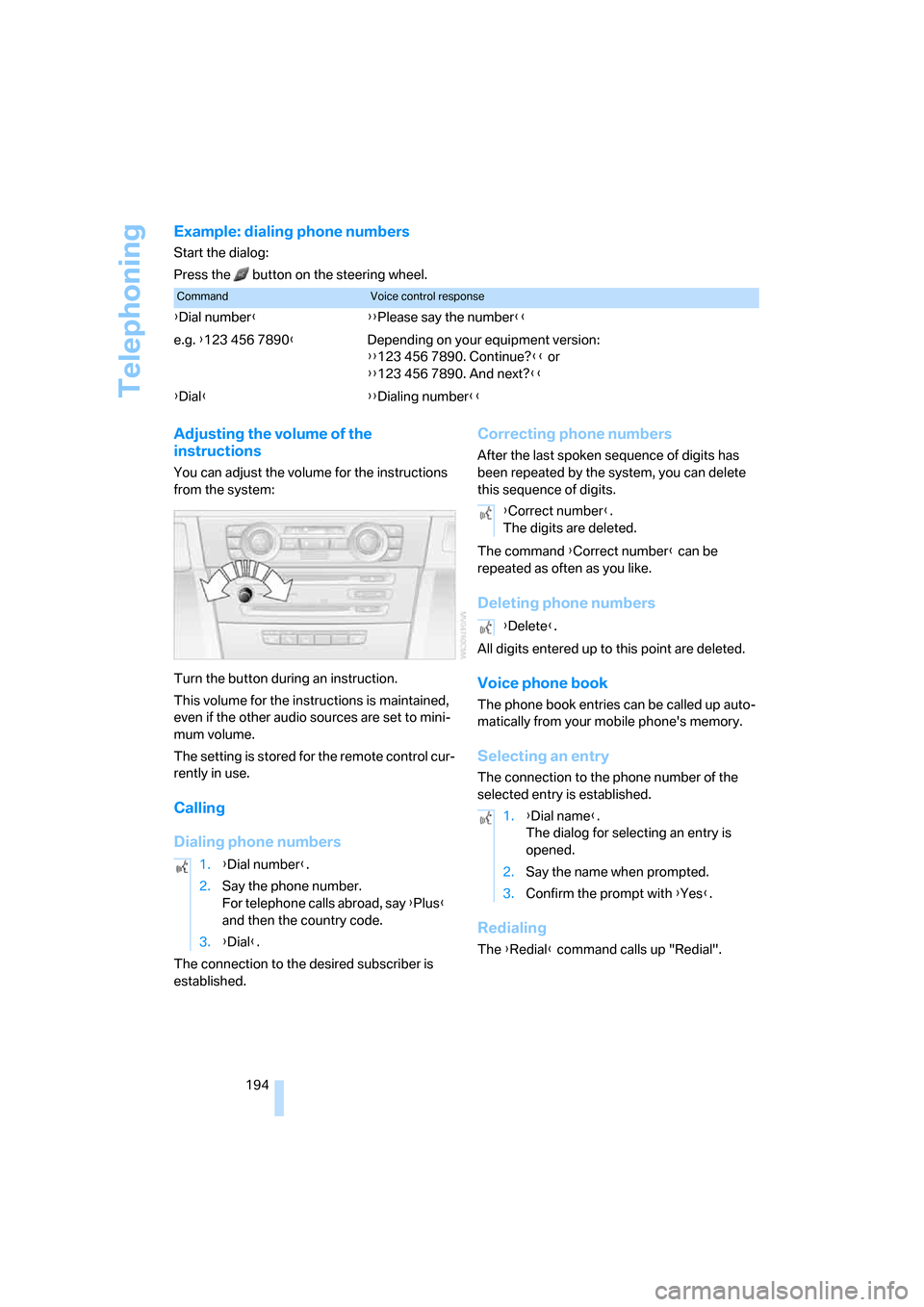
Adjusting the volume of the
instructions
You can adjust the volume for the instructions
from the system:
Turn the button during an instruction.
This volume for the instructions is maintained,
even if the other audio sources are set to mini-
mum volume.
The setting is stored for the remote control cur-
rently in use.
Calling
Dialing phone numbers
The connection to the desired subscriber is
established.
Correcting phone numbers
After the last spoken sequence of digits has
been repeated by the system, you can delete
this sequence of digits.
The command {Correct number} can be
repeated as often as you like.
Deleting phone numbers
All digits entered up to this point are deleted.
Voice phone book
The phone book entries can be called up auto-
matically from your mobile phone's memory.
Selecting an entry
The connection to the phone number of the
selected entry is established.
Redialing
The {Redial} command calls up "Redial".
CommandVoice control response
{Dial number}{{Please say the number}}
e.g. {123 456 7890}Depending on your equipment version:
{{123 456 7890. Continue?}} or
{{123 456 7890. And next?}}
{Dial}{{Dialing number}}
1.{Dial number}.
2.Say the phone number.
For telephone calls abroad, say {Plus}
and then the country code.
3.{Dial}.
{Correct number}.
The digits are deleted.
{Delete}.
1.{Dial name}.
The dialog for selecting an entry is
opened.
2.Say the name when prompted.
3.Confirm the prompt with {Yes}.
Page 197 of 274
195
Entertainment
Reference
At a glance
Controls
Driving tips Communications
Navigation
Mobility
Notes
Important for voice commands
For voice commands, bear in mind the follow-
ing:
>Pronounce the commands smoothly and at
normal volume, avoiding excessive empha-
ses and pauses.
>Keep the doors, windows and glass roof
closed to prevent interference from outside
noise.
>Avoid ambient noise in the vehicle while
speaking.
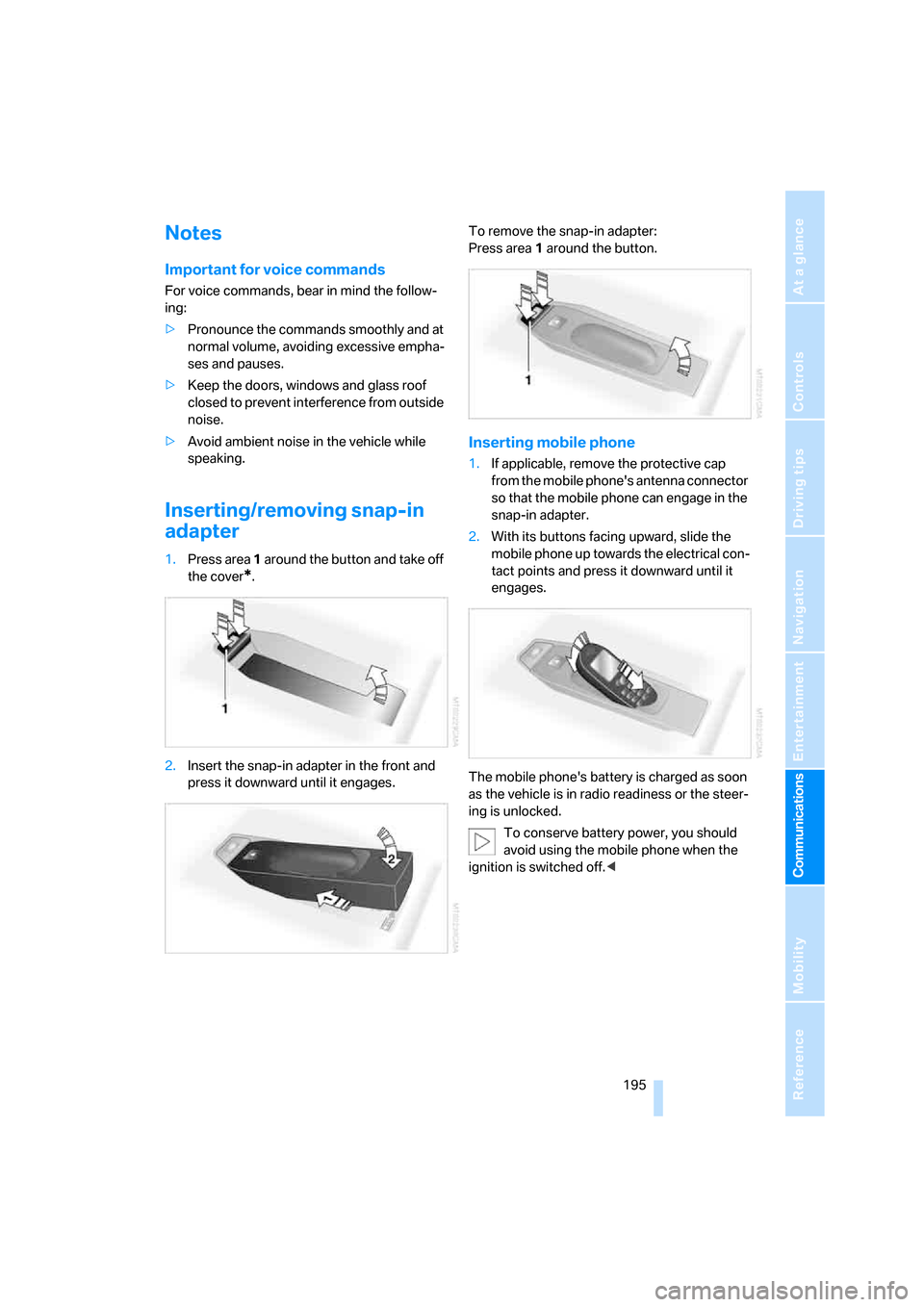
Inserting/removing snap-in
adapter
1.Press area 1 around the button and take off
the cover
*.
2.Insert the snap-in adapter in the front and
press it downward until it engages.To remove the snap-in adapter:
Press area 1 around the button.
Inserting mobile phone
1.If applicable, remove the protective cap
from the mobile phone's antenna connector
so that the mobile phone can engage in the
snap-in adapter.
2.With its buttons facing upward, slide the
mobile phone up towards the electrical con-
tact points and press it downward until it
engages.
The mobile phone's battery is charged as soon
as the vehicle is in radio readiness or the steer-
ing is unlocked.
To conserve battery power, you should
avoid using the mobile phone when the
ignition is switched off.<
Page 243 of 274
Reference
This chapter contains technical data, short
commands for the voice command system and
an index that will help you find information most
quickly.
Reference
Page 249 of 274
Reference 247
At a glance
Controls
Driving tips
Communications
Navigation
Entertainment
Mobility
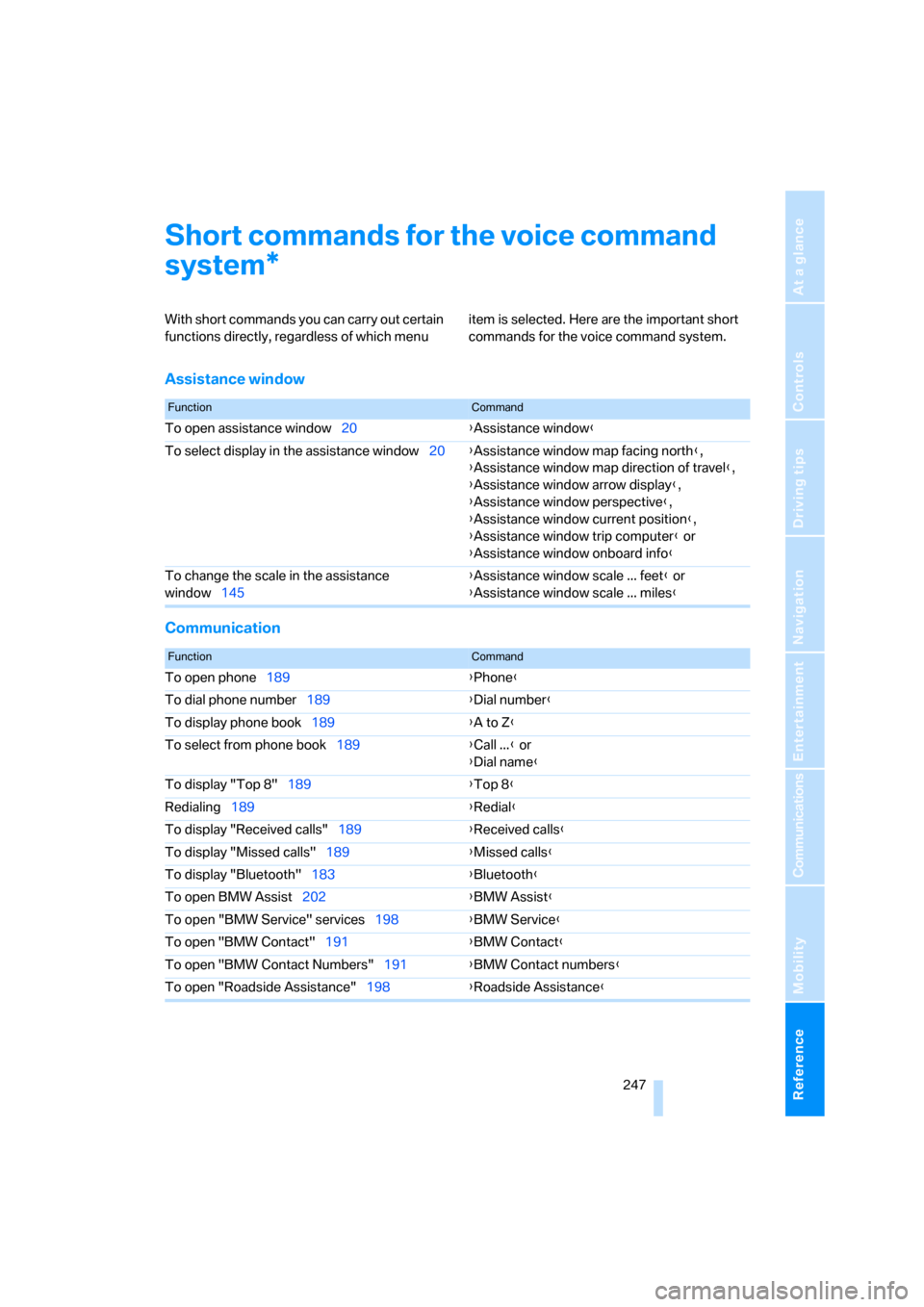
Short commands for the voice command
system
With short commands you can carry out certain
functions directly, regardless of which menu item is selected. Here are the important short
commands for the voice command system.
Assistance window
Communication
*
FunctionCommand
To open assistance window20{Assistance window}
To select display in the assistance window20{Assistance window map facing north},
{Assistance window map direction of travel},
{Assistance window arrow display},
{Assistance window perspective},
{Assistance window current position},
{Assistance window trip computer} or
{Assistance window onboard info}
To change the scale in the assistance
window145{Assistance window scale ... feet} or
{Assistance window scale ... miles}
FunctionCommand
To open phone189{Phone}
To dial phone number189{Dial number}
To display phone book189{A to Z}
To select from phone book189{Call ...} or
{Dial name}
To display "Top 8"189{Top 8}
Redialing189{Redial}
To display "Received calls"189{Received calls}
To display "Missed calls"189{Missed calls}
To display "Bluetooth"183{Bluetooth}
To open BMW Assist202{BMW Assist}
To open "BMW Service" services198{BMW Service}
To open "BMW Contact"191{BMW Contact}
To open "BMW Contact Numbers"191{BMW Contact numbers}
To open "Roadside Assistance"198{Roadside Assistance}
Page 250 of 274
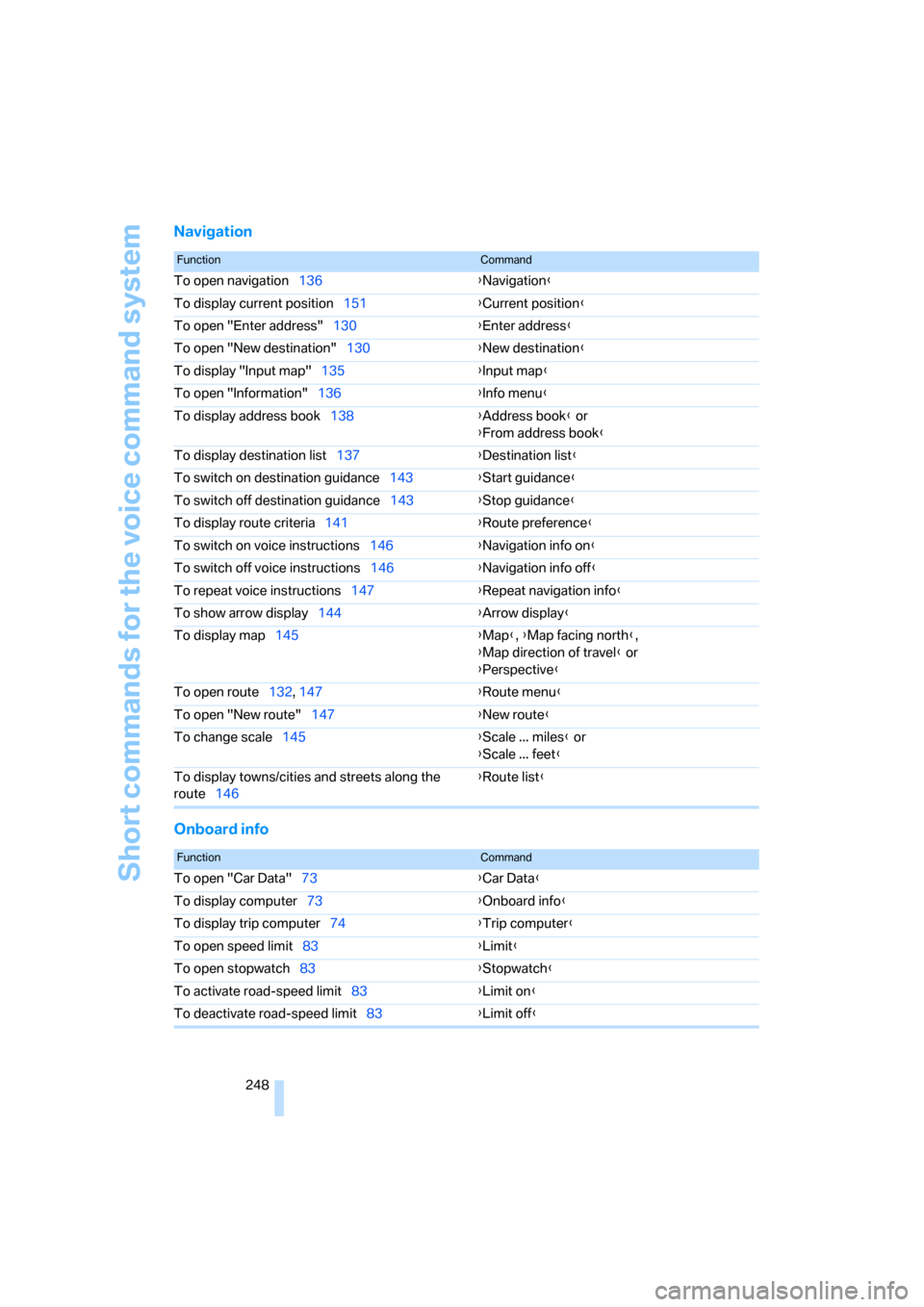
Short commands for the voice command system
248
Navigation
Onboard info
FunctionCommand
To open navigation136{Navigation}
To display current position151{Current position}
To open "Enter address"130{Enter address}
To open "New destination"130{New destination}
To display "Input map"135{Input map}
To open "Information"136{Info menu}
To display address book138{Address book} or
{From address book}
To display destination list137{Destination list}
To switch on destination guidance143{Start guidance}
To switch off destination guidance143{Stop guidance}
To display route criteria141{Route preference}
To switch on voice instructions146{Navigation info on}
To switch off voice instructions146{Navigation info off}
To repeat voice instructions147{Repeat navigation info}
To show arrow display144{Arrow display}
To display map145{Map}, {Map facing north},
{Map direction of travel} or
{Perspective}
To open route132, 147
{Route menu}
To open "New route"147{New route}
To change scale145{Scale ... miles} or
{Scale ... feet}
To display towns/cities and streets along the
route146{Route list}
FunctionCommand
To open "Car Data"73{Car Data}
To display computer73{Onboard info}
To display trip computer74{Trip computer}
To open speed limit83{Limit}
To open stopwatch83{Stopwatch}
To activate road-speed limit83{Limit on}
To deactivate road-speed limit83{Limit off}
Page 252 of 274
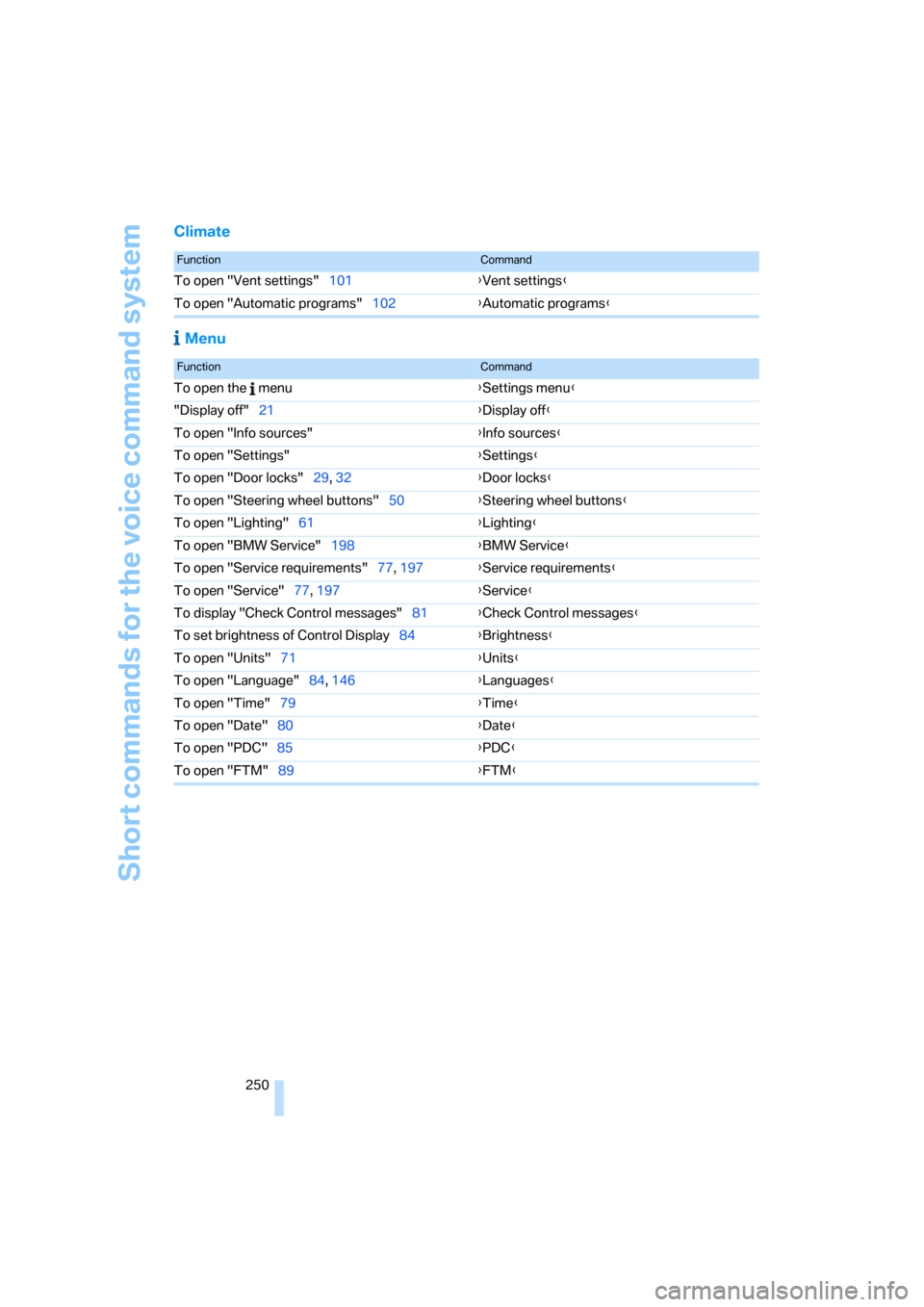
Short commands for the voice command system
250
Climate
Menu
FunctionCommand
To open "Vent settings"101{Vent settings}
To open "Automatic programs"102{Automatic programs}
FunctionCommand
To open the menu{Settings menu}
"Display off"21{Display off}
To open "Info sources"{Info sources}
To open "Settings"{Settings}
To open "Door locks"29, 32{Door locks}
To open "Steering wheel buttons"50{Steering wheel buttons}
To open "Lighting"61{Lighting}
To open "BMW Service"198{BMW Service}
To open "Service requirements"77, 197{Service requirements}
To open "Service"77, 197{Service}
To display "Check Control messages"81{Check Control messages}
To set brightness of Control Display84{Brightness}
To open "Units"71{Units}
To open "Language"84, 146{Languages}
To open "Time"79{Time}
To open "Date"80{Date}
To open "PDC"85{PDC}
To open "FTM"89{FTM}
Page 264 of 274
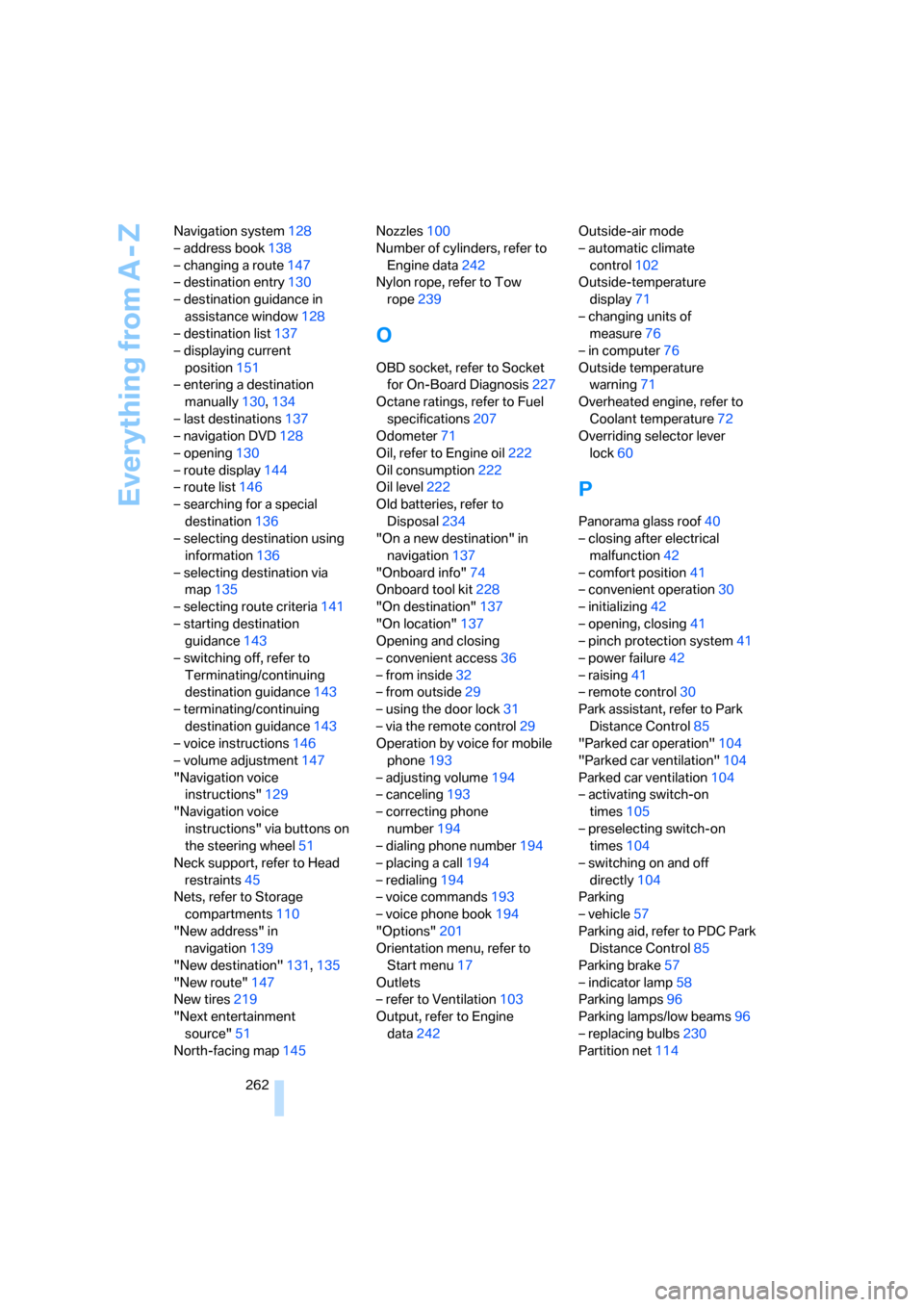
Everything from A - Z
262 Navigation system128
– address book138
– changing a route147
– destination entry130
– destination guidance in
assistance window128
– destination list137
– displaying current
position151
– entering a destination
manually130,134
– last destinations137
– navigation DVD128
– opening130
– route display144
– route list146
– searching for a special
destination136
– selecting destination using
information136
– selecting destination via
map135
– selecting route criteria141
– starting destination
guidance143
– switching off, refer to
Terminating/continuing
destination guidance143
– terminating/continuing
destination guidance143
– voice instructions146
– volume adjustment147
"Navigation voice
instructions"129
"Navigation voice
instructions" via buttons on
the steering wheel51
Neck support, refer to Head
restraints45
Nets, refer to Storage
compartments110
"New address" in
navigation139
"New destination"131,135
"New route"147
New tires219
"Next entertainment
source"51
North-facing map145Nozzles100
Number of cylinders, refer to
Engine data242
Nylon rope, refer to Tow
rope239
O
OBD socket, refer to Socket
for On-Board Diagnosis227
Octane ratings, refer to Fuel
specifications207
Odometer71
Oil, refer to Engine oil222
Oil consumption222
Oil level222
Old batteries, refer to
Disposal234
"On a new destination" in
navigation137
"Onboard info"74
Onboard tool kit228
"On destination"137
"On location"137
Opening and closing
– convenient access36
– from inside32
– from outside29
– using the door lock31
– via the remote control29
Operation by voice for mobile
phone193
– adjusting volume194
– canceling193
– correcting phone
number194
– dialing phone number194
– placing a call194
– redialing194
– voice commands193
– voice phone book194
"Options"201
Orientation menu, refer to
Start menu17
Outlets
– refer to Ventilation103
Output, refer to Engine
data242Outside-air mode
– automatic climate
control102
Outside-temperature
display71
– changing units of
measure76
– in computer76
Outside temperature
warning71
Overheated engine, refer to
Coolant temperature72
Overriding selector lever
lock60
P
Panorama glass roof40
– closing after electrical
malfunction42
– comfort position41
– convenient operation30
– initializing42
– opening, closing41
– pinch protection system41
– power failure42
– raising41
– remote control30
Park assistant, refer to Park
Distance Control85
"Parked car operation"104
"Parked car ventilation"104
Parked car ventilation104
– activating switch-on
times105
– preselecting switch-on
times104
– switching on and off
directly104
Parking
– vehicle57
Parking aid, refer to PDC Park
Distance Control85
Parking brake57
– indicator lamp58
Parking lamps96
Parking lamps/low beams96
– replacing bulbs230
Partition net114
Page 267 of 274
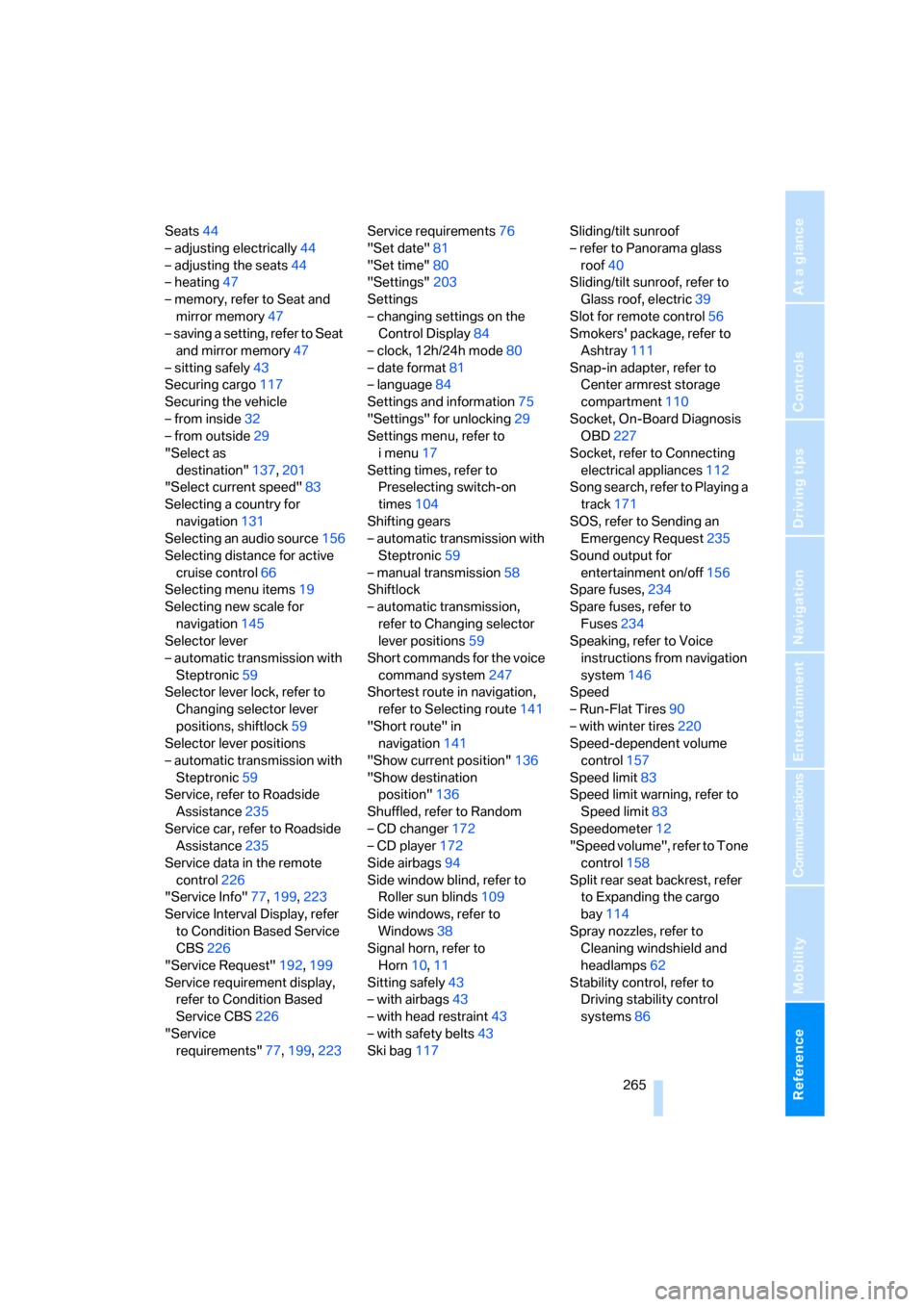
Reference 265
At a glance
Controls
Driving tips
Communications
Navigation
Entertainment
Mobility
Seats44
– adjusting electrically44
– adjusting the seats44
– heating47
– memory, refer to Seat and
mirror memory47
– saving a setting, refer to Seat
and mirror memory47
– sitting safely43
Securing cargo117
Securing the vehicle
– from inside32
– from outside29
"Select as
destination"137,201
"Select current speed"83
Selecting a country for
navigation131
Selecting an audio source156
Selecting distance for active
cruise control66
Selecting menu items19
Selecting new scale for
navigation145
Selector lever
– automatic transmission with
Steptronic59
Selector lever lock, refer to
Changing selector lever
positions, shiftlock59
Selector lever positions
– automatic transmission with
Steptronic59
Service, refer to Roadside
Assistance235
Service car, refer to Roadside
Assistance235
Service data in the remote
control226
"Service Info"77,199,223
Service Interval Display, refer
to Condition Based Service
CBS226
"Service Request"192,199
Service requirement display,
refer to Condition Based
Service CBS226
"Service
requirements"77,199,223Service requirements76
"Set date"81
"Set time"80
"Settings"203
Settings
– changing settings on the
Control Display84
– clock, 12h/24h mode80
– date format
81
– language84
Settings and information75
"Settings" for unlocking29
Settings menu, refer to
imenu17
Setting times, refer to
Preselecting switch-on
times104
Shifting gears
– automatic transmission with
Steptronic59
– manual transmission58
Shiftlock
– automatic transmission,
refer to Changing selector
lever positions59
Short commands for the voice
command system247
Shortest route in navigation,
refer to Selecting route141
"Short route" in
navigation141
"Show current position"136
"Show destination
position"136
Shuffled, refer to Random
– CD changer172
– CD player172
Side airbags94
Side window blind, refer to
Roller sun blinds109
Side windows, refer to
Windows38
Signal horn, refer to
Horn10,11
Sitting safely43
– with airbags43
– with head restraint43
– with safety belts43
Ski bag117Sliding/tilt sunroof
– refer to Panorama glass
roof40
Sliding/tilt sunroof, refer to
Glass roof, electric39
Slot for remote control56
Smokers' package, refer to
Ashtray111
Snap-in adapter, refer to
Center armrest storage
compartment110
Socket, On-Board Diagnosis
OBD227
Socket, refer to Connecting
electrical appliances112
Song search, refer to Playing a
track171
SOS, refer to Sending an
Emergency Request235
Sound output for
entertainment on/off156
Spare fuses,234
Spare fuses, refer to
Fuses
234
Speaking, refer to Voice
instructions from navigation
system146
Speed
– Run-Flat Tires90
– with winter tires220
Speed-dependent volume
control157
Speed limit83
Speed limit warning, refer to
Speed limit83
Speedometer12
"Speed volume", refer to Tone
control158
Split rear seat backrest, refer
to Expanding the cargo
bay114
Spray nozzles, refer to
Cleaning windshield and
headlamps62
Stability control, refer to
Driving stability control
systems86
Page 270 of 274
Everything from A - Z
268
U
Underbody protection, refer to
Caring for your vehicle
brochure
Uniform Tire Quality Grading/
UTQR217
"Units"76
Units
– average consumption76
– temperature76
Universal garage door opener,
refer to Integrated universal
remote control106
Universal mobile phone
preparation package, refer
to separate Owner's Manual
Universal remote control106
Unlatching, refer to
Unlocking36
"Unlock button"30
Unlocking
– from inside32
– from outside29
– luggage compartment lid37
– tailgate37
– without remote control, refer
to Convenient access36
"Update services"201
USB-audio interface176
"USB" for audio
mode175,177
V
Vehicle
– battery233
– breaking in120
– care, refer to Caring for your
vehicle brochure
– cargo loading123
– Identification Number, refer
to Engine compartment222
– measurements, refer to
Dimensions243
– parking57
– washing, refer to Caring for
your vehicle brochure
– weight245"Vehicle / Tires" for
unlocking30
Vehicle decommissioning
– refer to Caring for your
vehicle brochure
Vehicle jack233
Vehicle position, refer to
Displaying current
position151
Ventilation103
– draft-free103
– in the rear104
Ventilation, refer to
Climate100
Ventilation while at a
standstill104
Vents, refer to Ventilation103
"Vent settings"101
Voice commands
– overview23
– short commands247
Voice instructions from
navigation system146
– muting51,147
– repeating51,147
– switching on/off146
– volume147
Voice phone book194
Volume156
– audio sources156
– fuel tank, refer to
Capacities246
– mobile phone187
– speed-dependent
control157
– voice instructions147
Volume distribution
– front/rear157
– left/right157
W
Warning and indicator
lamps13
Warning messages, refer to
Check Control81
Warning triangle236
Washer fluid62
– content of the reservoir63Washer fluid reservoir62
Washing the car, refer to
Caring for your vehicle
brochure
Waste tray, refer to
Ashtray111
Water on roads, refer to
Driving through water122
Waveband with the radio160
Wear indicators in tires, refer
to Minimum tread depth218
Weights245
Welcome lamps96
"Welcome light"97
Wheel/tire combination, refer
to Correct wheels and
tires219
Wheelbase, refer to
Dimensions243
Wheels, new219
Wheels and tires208
Width, refer to
Dimensions243
Windows38
– convenient operation30
– opening, closing38
– pinch protection system39
– rear window35
– safety switch39
Windows, indicator on Control
Display16
Windshield
– cleaning62
Windshield wash61
– filling capacity, reservoir246
– nozzles62
– rear window62
– reservoir for washer fluid62
– washer fluid62
Windshield wiper blades,
changing228
Windshield wipers, blades,
care, refer to Caring for your
vehicle brochure
Windshield wipers, refer to
Wiper system61
Winter tires220
– setting speed limit83
– storage220