ECO mode BMW 330CI COUPE 2004 E46 User Guide
[x] Cancel search | Manufacturer: BMW, Model Year: 2004, Model line: 330CI COUPE, Model: BMW 330CI COUPE 2004 E46Pages: 174, PDF Size: 2.73 MB
Page 74 of 174
74Everything under control
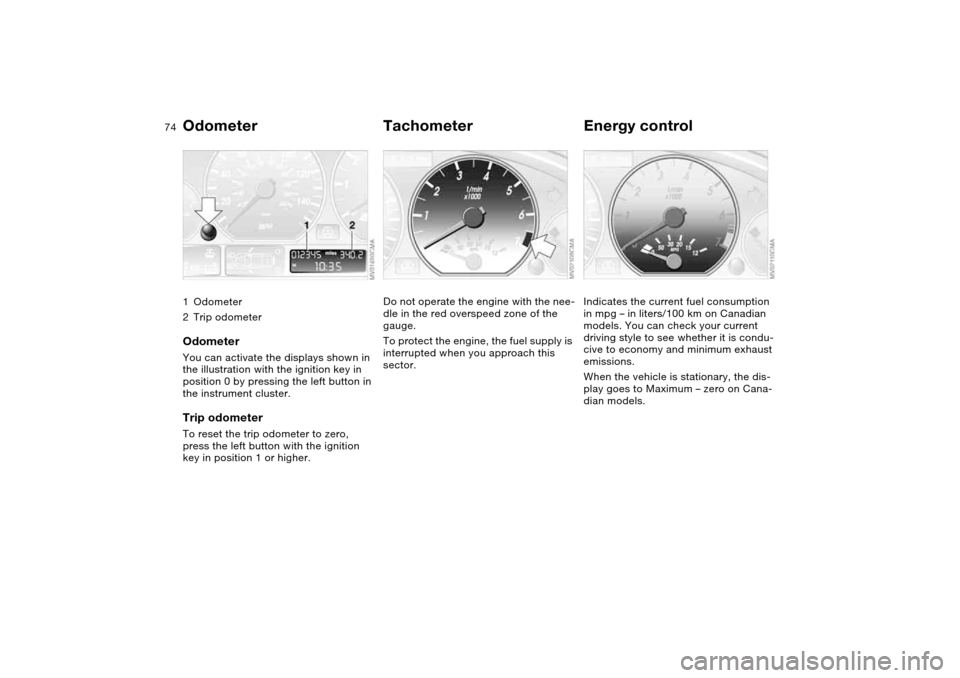
Odometer1Odometer
2Trip odometerOdometerYou can activate the displays shown in
the illustration with the ignition key in
position 0 by pressing the left button in
the instrument cluster.Trip odometerTo reset the trip odometer to zero,
press the left button with the ignition
key in position 1 or higher.
TachometerDo not operate the engine with the nee-
dle in the red overspeed zone of the
gauge.
To protect the engine, the fuel supply is
interrupted when you approach this
sector.
Energy controlIndicates the current fuel consumption
in mpg – in liters/100 km on Canadian
models. You can check your current
driving style to see whether it is condu-
cive to economy and minimum exhaust
emissions.
When the vehicle is stationary, the dis-
play goes to Maximum – zero on Cana-
dian models.
Page 77 of 174
77
ClockIf you wish to have a permanent time
display, you can make this adjustment
in the radio display, refer to the Owner's
Manual for Radio.
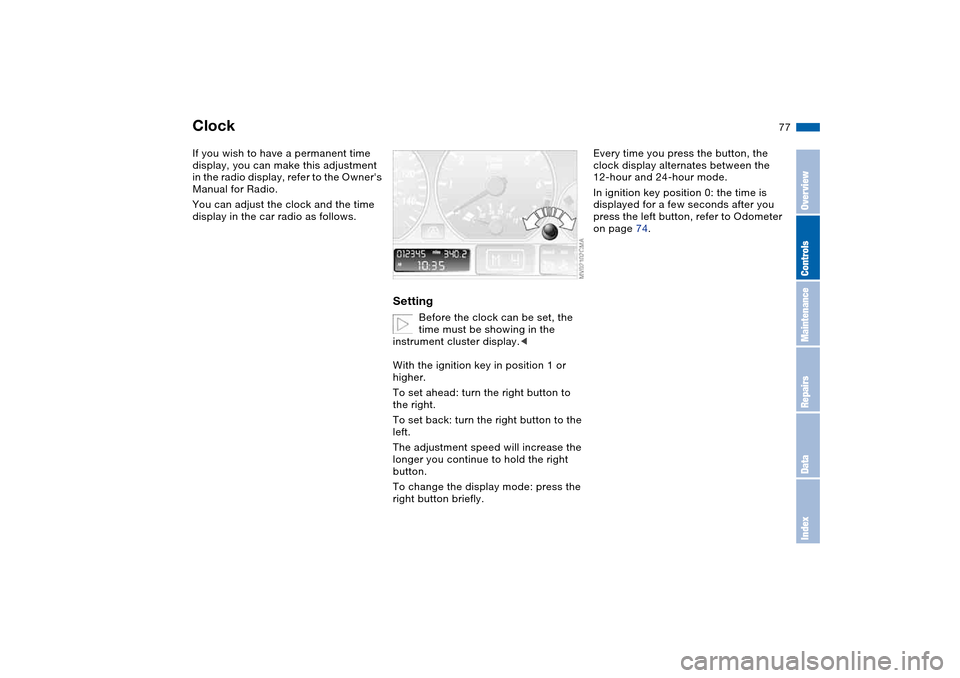
You can adjust the clock and the time
display in the car radio as follows.
Setting
Before the clock can be set, the
time must be showing in the
instrument cluster display.<
With the ignition key in position 1 or
higher.
To set ahead: turn the right button to
the right.
To set back: turn the right button to the
left.
The adjustment speed will increase the
longer you continue to hold the right
button.
To change the display mode: press the
right button briefly.
Every time you press the button, the
clock display alternates between the
12-hour and 24-hour mode.
In ignition key position 0: the time is
displayed for a few seconds after you
press the left button, refer to Odometer
on page 74.
OverviewControlsMaintenanceRepairsDataIndex
Page 92 of 174
92
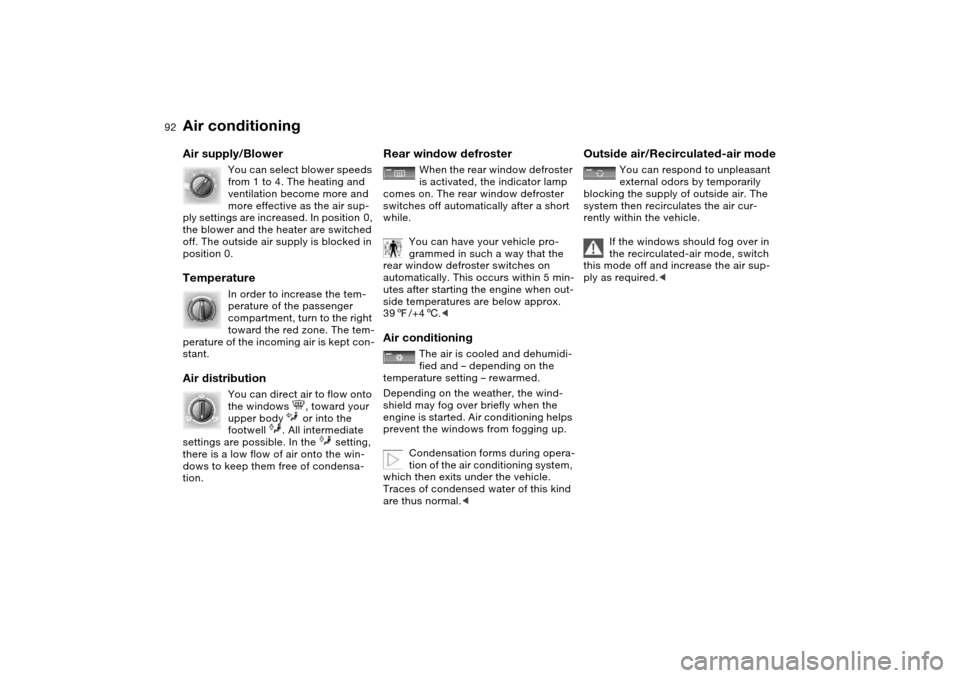
Air supply/Blower
You can select blower speeds
from 1 to 4. The heating and
ventilation become more and
more effective as the air sup-
ply settings are increased. In position 0,
the blower and the heater are switched
off. The outside air supply is blocked in
position 0.
Temperature
In order to increase the tem-
perature of the passenger
compartment, turn to the right
toward the red zone. The tem-
perature of the incoming air is kept con-
stant.
Air distribution
You can direct air to flow onto
the windows , toward your
upper body or into the
footwell . All intermediate
settings are possible. In the setting,
there is a low flow of air onto the win-
dows to keep them free of condensa-
tion.
Rear window defroster
When the rear window defroster
is activated, the indicator lamp
comes on. The rear window defroster
switches off automatically after a short
while.
You can have your vehicle pro-
grammed in such a way that the
rear window defroster switches on
automatically. This occurs within 5 min-
utes after starting the engine when out-
side temperatures are below approx.
397/+46.<
Air conditioning
The air is cooled and dehumidi-
fied and – depending on the
temperature setting – rewarmed.
Depending on the weather, the wind-
shield may fog over briefly when the
engine is started. Air conditioning helps
prevent the windows from fogging up.
Condensation forms during opera-
tion of the air conditioning system,
which then exits under the vehicle.
Traces of condensed water of this kind
are thus normal.<
Outside air/Recirculated-air mode
You can respond to unpleasant
external odors by temporarily
blocking the supply of outside air. The
system then recirculates the air cur-
rently within the vehicle.
If the windows should fog over in
the recirculated-air mode, switch
this mode off and increase the air sup-
ply as required.<
Air conditioning
Page 96 of 174
96
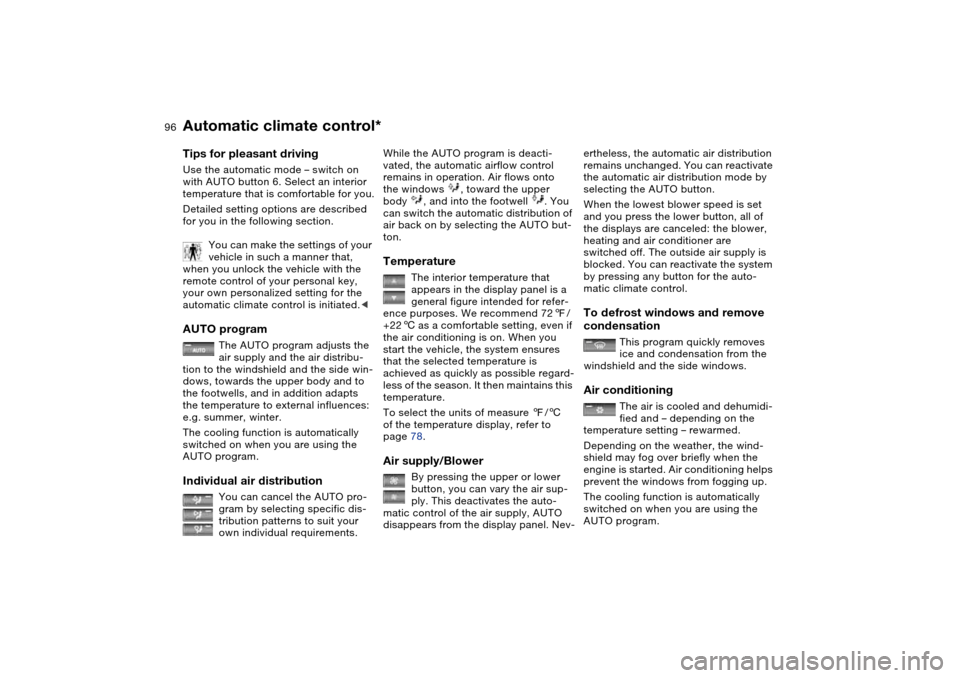
Tips for pleasant drivingUse the automatic mode – switch on
with AUTO button 6. Select an interior
temperature that is comfortable for you.
Detailed setting options are described
for you in the following section.
You can make the settings of your
vehicle in such a manner that,
when you unlock the vehicle with the
remote control of your personal key,
your own personalized setting for the
automatic climate control is initiated.
air supply and the air distribu-
tion to the windshield and the side win-
dows, towards the upper body and to
the footwells, and in addition adapts
the temperature to external influences:
e.g. summer, winter.
The cooling function is automatically
switched on when you are using the
AUTO program.
Individual air distribution
You can cancel the AUTO pro-
gram by selecting specific dis-
tribution patterns to suit your
own individual requirements.
While the AUTO program is deacti-
vated, the automatic airflow control
remains in operation. Air flows onto
the windows , toward the upper
body , and into the footwell . You
can switch the automatic distribution of
air back on by selecting the AUTO but-
ton.Temperature
The interior temperature that
appears in the display panel is a
general figure intended for refer-
ence purposes. We recommend 727/
+226 as a comfortable setting, even if
the air conditioning is on. When you
start the vehicle, the system ensures
that the selected temperature is
achieved as quickly as possible regard-
less of the season. It then maintains this
temperature.
To select the units of measure 7/6
of the temperature display, refer to
page 78.
Air supply/Blower
By pressing the upper or lower
button, you can vary the air sup-
ply. This deactivates the auto-
matic control of the air supply, AUTO
disappears from the display panel. Nev-
ertheless, the automatic air distribution
remains unchanged. You can reactivate
the automatic air distribution mode by
selecting the AUTO button.
When the lowest blower speed is set
and you press the lower button, all of
the displays are canceled: the blower,
heating and air conditioner are
switched off. The outside air supply is
blocked. You can reactivate the system
by pressing any button for the auto-
matic climate control.To defrost windows and remove
condensation
This program quickly removes
ice and condensation from the
windshield and the side windows.
Air conditioning
The air is cooled and dehumidi-
fied and – depending on the
temperature setting – rewarmed.
Depending on the weather, the wind-
shield may fog over briefly when the
engine is started. Air conditioning helps
prevent the windows from fogging up.
The cooling function is automatically
switched on when you are using the
AUTO program.
Automatic climate control*
Page 97 of 174
97
Condensation forms during opera-
tion of the air conditioning system,
which then exits under the vehicle.
Traces of condensed water on the
ground underneath the vehicle are thus
normal.<
Outside air/Automatic
recirculated-air control (AUC)/
Recirculated air
You can respond to unpleasant
external odors or pollutants by
temporarily stopping the flow of outside
air. The system then recirculates the air
currently within the vehicle.
Press the button repeatedly to select
one of three different operating modes.
>Indicator lamps off: outside airflow is
on
>Left-hand indicator lamp on – AUC
mode: the system recognizes pollut-
ants in the outside air and blocks the
flow of air when necessary. The sys-
tem then recirculates the air currently
within the vehicle. Depending on the
air quality, the automatic system then
switches back and forth between
outside air supply and recirculation of
the air within the vehicle
>Right-hand indicator lamp on: the
flow of external air into the vehicle is
permanently blocked. The system
then recirculates the air currently
within the vehicle.
If the windows should fog over in
the recirculated-air mode, switch
this mode off and increase the air sup-
ply as required.
is activated, the indicator lamp
comes on. The rear window defroster
switches off automatically after a short
while.
You can have your vehicle pro-
grammed in such a way that the
rear window defroster switches on
automatically. This occurs within 5 min-
utes after starting the engine when out-
side temperatures are below approx.
397/+46.<
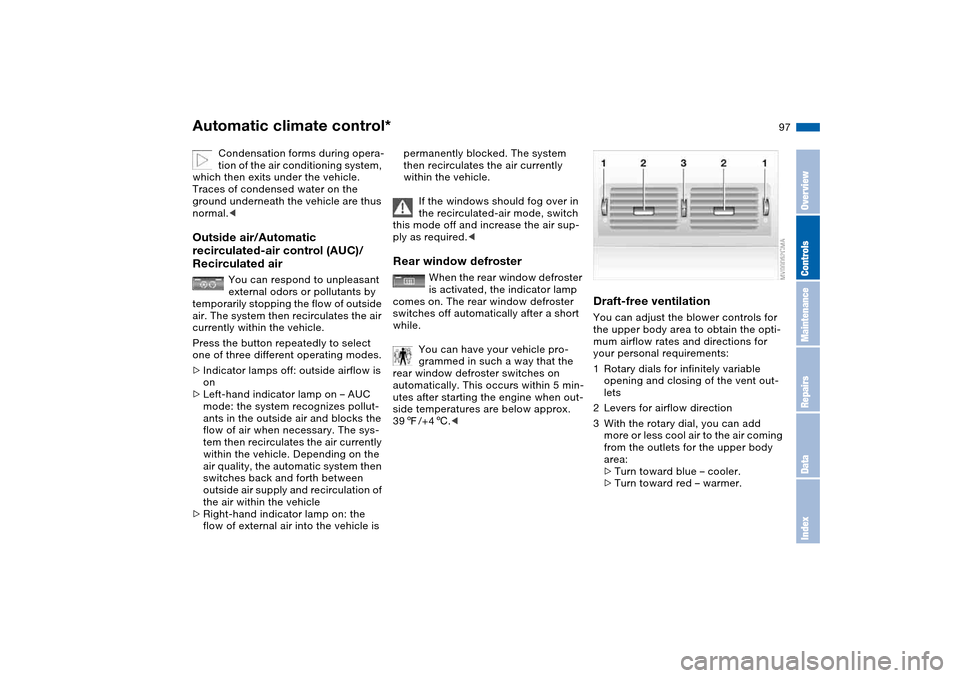
Draft-free ventilationYou can adjust the blower controls for
the upper body area to obtain the opti-
mum airflow rates and directions for
your personal requirements:
1Rotary dials for infinitely variable
opening and closing of the vent out-
lets
2Levers for airflow direction
3With the rotary dial, you can add
more or less cool air to the air coming
from the outlets for the upper body
area:
>Turn toward blue – cooler.
>Turn toward red – warmer.
Automatic climate control*
OverviewControlsMaintenanceRepairsDataIndex
Page 113 of 174
113
General driving notesHot exhaust system
High temperatures occur with
every vehicle equipped with a cat-
alytic converter. Heat shields are
installed adjacent to some sections of
the exhaust system. Never remove
these shields; do not apply undercoat-
ing to their surfaces. When driving,
standing at idle and parking the vehicle,
take care to avoid contact between the
hot exhaust system and flammable
materials, e.g. hay, leaves, grass, etc.
Such contact could lead to a fire,
resulting in serious personal injury and
property damage.<
Parking the vehicleCondensation forms in the air condi-
tioner system during operation, which
then exits under the vehicle. Traces of
condensed water on the ground under-
neath the vehicle are thus normal.Before driving through a car washFold in the exterior mirrors manually
because they could otherwise be dam-
aged due to the width of the vehicle.
Hydroplaning
When driving on wet or slushy
roads, reduce your speed. If you
do not, a wedge of water may form
between tire and road surface. This
phenomenon is referred to as hydro-
planing, and can lead to partial or com-
plete loss of traction, vehicle control
and braking effectiveness.<
The risk of hydroplaning increases as
the tread depth of the tires decreases,
refer also to Tire tread on page 120.
Driving through water
Do not drive through water on the
road if it is deeper than 1 ft/30 cm,
and then only at walking speed. Other-
wise, the vehicle's engine, the electrical
systems and the transmission may be
damaged.<
Braking safelyYour BMW is equipped with ABS as a
standard feature. If you are in a situa-
tion which requires full braking, it is
best to brake using maximum brake
pressure: panic stop. Since the vehicle
maintains steering responsiveness, you
can avoid possible obstacles with a
minimum of steering effort, despite the
full brake application.
Pulsation at the brake pedal, combined
with sounds from the hydraulic circuits,
indicates to the driver that ABS is in its
active mode.
Do not drive with your foot resting
on the brake pedal. Otherwise,
even light but consistent pedal pres-
sure can lead to high temperatures,
brake wear and possibly even brake
failure.<
Wet roads:
if the roads are wet or if there is heavy
rain, it is advisable to gently press the
brakes for a brief moment every few
miles/kilometers. Monitor traffic condi-
tions to ensure that this maneuver does
not endanger other road users. The
heat generated in this process helps
dry the pads and rotors. Immediate
braking force is then available if neces-
sary.
OverviewControlsMaintenanceRepairsDataIndex
Page 121 of 174
121
If there is a total loss of tire inflation
pressure, 0 psi/0 kPa, or obvious tire
damage, you can determine the dis-
tance you may continue driving based
on the following values:
>With a light load:
1 to 2 persons without luggage:
approx. 155 miles/250 km
>With a medium load:
2 persons, luggage compartment full;
or 4 persons without luggage:
approx. 90 miles/150 km
>With a full load:
4 persons or more, luggage compart-
ment full:
approx. 30 miles/50 km
Drive cautiously. Do not exceed a
speed of 50 mph / 80 km/h. Be
aware that vehicle handling will be
altered when there is a loss in inflation
pressure. Anticipate, e.g., reduced
tracking during braking, longer braking
distances and changed steering char-
acteristics.
For safety reasons, BMW recommends
not having damaged Run Flat tires
repaired. In this case, consult your
BMW center.<
New wheels and tires
Have new wheels and tires
mounted only by a skilled profes-
sional. Work that is improperly carried
out could result in consequential dam-
age and pose safety hazards.<
Ask your BMW center for details con-
cerning the correct wheel and tire com-
bination. Have the wheels balanced
each time a wheel or tire has been
replaced.
The correct wheel and tire combination
also affects different systems such as
ABS or DSC. The function of these sys-
tems is impaired if improper wheel and
tire combinations are used.
BMW advises against using
retreaded tires, as driving safety
could otherwise be impaired. This is
due to the possible variations in casing
structures and, in some cases, to their
extreme age, which can lead to a
decrease in their durability.<
The correct wheels and tires
BMW recommends using only
wheels and tires that have been
tested and approved by BMW for the
particular vehicle model, as otherwise
body contact and serious accidents can
result despite the use of the same nom-
inal size, e.g. due to manufacturing tol-
erances. BMW cannot evaluate all tires
and wheels on the market, and is thus
unable to guarantee that the vehicle will
continue to perform safely if unap-
proved tires and/or wheels are
mounted.<
To maintain good handling and vehicle
response, use only tires of a single
brand and tread configuration. After a
flat tire, have the previous wheel and
tire combination restored as soon as
possible.
Recommended tire sizes and
brandsFor each tire size, certain tire brands
have been tested, classified as road-
safe and approved by BMW. You can
find out about these from a professional
Run Flat tires*
OverviewControlsMaintenanceRepairsDataIndex
Page 131 of 174
131
Have your BMW center perform
maintenance and repair.
Be sure that all maintenance work is
recorded in the Service and Warranty
Information Booklet for US models, or
in the Warranty and Service Guide
Booklet for Canadian models. These
entries are your verification of regular
maintenance on your vehicle and are
required for the performance of war-
ranty repairs.<
CareYou can find everything you need to
know on this topic by consulting the
separate Caring for your vehicle bro-
chure.BMW Maintenance System
OverviewControlsMaintenanceRepairsDataIndex
Page 169 of 174
Everything from A to Z
169
Tail lamps
bulb replacement 139
Tail lamps, refer to Rear
lamps 139
Tank capacity, refer to Fuel
tank capacity 157
Tank indicator, refer to Fuel
gauge 75
Technical data 154
Technical modifications 5
Technical modifications,
refer to For your own
safety 5
Telephone hookup 101
Telephone, refer to the sep-
arate Owner's Manual
Television, refer to the
Owner's Manual for
Onboard Computer
Temperature
air conditioning 92
automatic climate
control 96
Temperature adjustment
92, 96
Temperature display
engine coolant 75
ice warning 78
outside temperature 78
setting units 78
Temperature layering 93, 97Tempomat, refer to Cruise
control 72
Thigh support area, adjust-
ing 43
Third brake lamp, refer to
Center high-mount brake
lamp 140
Threaded socket for towing
eyelet 149
Three-point safety belt 46
Through-loading system 104
Tilt alarm
deactivate 37
Tilt alarm sensor 37
Tilting passenger-side exte-
rior mirror 48
Time 77
Tire change 141
Tire inflation pressure 116
Tire pressure monitoring,
refer to Flat Tire
Monitor 82
Tire replacement 141Tires
age 118
breaking in 112
changing 141
condition 119
damage 119
flat 141
inflation pressure 116
storing 122
tread 119, 120
tread wear indicators,
refer to Tire tread 120
winter tires 121, 122
Tools, refer to Onboard tool
kit 136
Torque
engine 154
lug bolts 142
Tow bar 149
Tow rope 149
Towing 149
Towing eyelet 149
Towing the vehicle 149
Tow-starting 149
Track width, refer to Dimen-
sions 155
Transmission
automatic transmission
with Steptronic 67
sequential manual gear-
box SMG 63Transmission lock, refer to P
Park 67
Transmission malfunction
automatic transmission
with Steptronic 69
sequential manual gear-
box SMG 65
Transport securing devices,
refer to Securing
cargo 108
Transporting children
safely 54
Trap protection
electric power windows 38
glass sunroof 40
Tread depth, refer to Tire
tread 120
Tread wear indicators in
the tires, refer to Tire
tread 120
Tread wear, tires 120
Trigger alarm – Panic
mode 30
Trip distance recorder, refer
to Trip odometer 74
Trip meter, refer to Trip
odometer 74
Trip odometer 74
Trunk lid, refer to Luggage
compartment lid 33
OverviewControlsMaintenanceRepairsDataIndex