automatic transmission BMW 330CI COUPE 2004 E46 User Guide
[x] Cancel search | Manufacturer: BMW, Model Year: 2004, Model line: 330CI COUPE, Model: BMW 330CI COUPE 2004 E46Pages: 174, PDF Size: 2.73 MB
Page 69 of 174
69
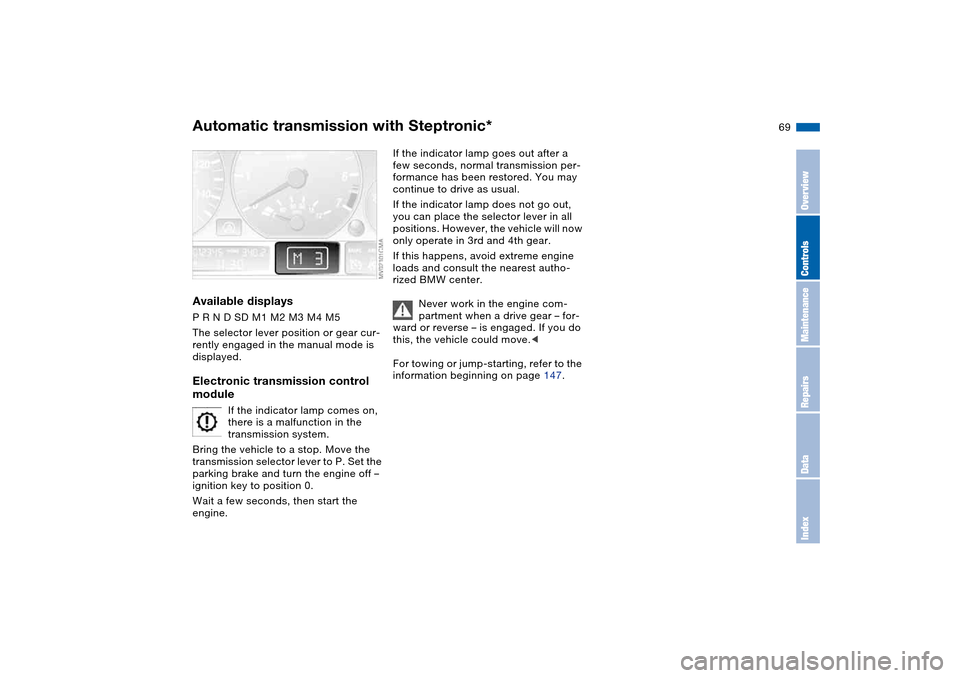
Available displaysP R N D SD M1 M2 M3 M4 M5
The selector lever position or gear cur-
rently engaged in the manual mode is
displayed.Electronic transmission control
module
If the indicator lamp comes on,
there is a malfunction in the
transmission system.
Bring the vehicle to a stop. Move the
transmission selector lever to P. Set the
parking brake and turn the engine off –
ignition key to position 0.
Wait a few seconds, then start the
engine.
If the indicator lamp goes out after a
few seconds, normal transmission per-
formance has been restored. You may
continue to drive as usual.
If the indicator lamp does not go out,
you can place the selector lever in all
positions. However, the vehicle will now
only operate in 3rd and 4th gear.
If this happens, avoid extreme engine
loads and consult the nearest autho-
rized BMW center.
Never work in the engine com-
partment when a drive gear – for-
ward or reverse – is engaged. If you do
this, the vehicle could move.<
For towing or jump-starting, refer to the
information beginning on page 147.
Automatic transmission with Steptronic*
OverviewControlsMaintenanceRepairsDataIndex
Page 73 of 174
73
The speed stored in memory is deleted.To store and maintain speed or to
acceleratePress button + briefly:
The system registers and maintains the
current vehicle speed. Every time you
tap the button, the speed increases by
approx. 0.6 mph / 1 km/h.
Press and hold button +:
The vehicle accelerates without pres-
sure on the accelerator pedal. When
you release the button, the system
stores and maintains the current speed.
If on a downhill gradient the
engine braking effect is not suffi-
cient, the controlled speed can be
exceeded. Speed can drop on uphill
grades if the engine output is insuffi-
cient.<
To deceleratePress button – briefly:
If you are already driving with activated
cruise control, the speed is decreased
by approx. 0.6 mph / 1 km/h every time
you tap the button.
Press and hold button –:
With the cruise control active, the sys-
tem automatically reduces the throttle
opening to slow the vehicle. When you
release the button, the system stores
and maintains the current speed.To interrupt the cruise controlWhen the system is activated, press the
button. The indicator lamp stays on.
You can use the cruise control again
whenever you want by calling up the
speed that was stored last.
In addition, cruise control is interrupted
automatically:
>When the brakes are applied
>When you apply pressure to the
clutch pedal, or when you move the
automatic transmission selector lever
from D to N
>If you exceed or fall below the pro-
grammed speed for an extended
period – by depressing the accelera-
tor, for example.To recall the stored settingPress button:
The vehicle accelerates to and main-
tains the last speed stored.
Cruise control*
OverviewControlsMaintenanceRepairsDataIndex
Page 114 of 174
114
Inclines:
To prevent overheating and, as a
result, diminished braking effec-
tiveness, drive down long or steep
downhill grades in a gear which
requires the least braking. Otherwise,
even light but consistent pedal pres-
sure can lead to high temperatures,
brake wear and possibly even brake
failure.<
The braking power of the engine can be
further enhanced by downshifting the
automatic transmission in manual
mode, if necessary, into first gear. This
helps avoid placing excessive loads on
the brake system.
Do not coast with the clutch
depressed or with the transmis-
sion or selector lever in Neutral. Do not
coast with the engine switched off. Oth-
erwise, the engine provides no braking
effect while the transmission is in idling
position, and there is no power-assist
for braking or steering when the engine
is off.
Floor mats, floor carpets or other
objects must not be in the area near the
brake or accelerator pedal, as this
could impair the movement of the ped-
als.<
Corrosion on the brake rotorsLimited vehicle use, extended periods
with the vehicle parked or in storage,
and operating conditions in which brak-
ing is restricted to gentle, low-pressure
applications will all increase the ten-
dency for corrosion to form on the
rotors and contamination to accumulate
on the brake pads. This occurs because
the minimal pressure which must be
exerted by the pads to clean the rotors
by brake applications is not reached.
If the brake rotors are corroded, they
will tend to respond to braking with a
pulsating effect that even extended
brake applications will fail to cure.
Brake pads
For your own safety: use only
brake pads that BMW has
released for your particular vehicle
model. BMW cannot evaluate non-
approved brake pads to determine if
they are suitable for use, and therefore
cannot ensure the operating safety of
the vehicle if they are installed.<
Portable phone in the vehicle
BMW advises against using
mobile equipment, e.g. cellular
phones, inside the vehicle without con-
necting them directly to an outside
antenna. Otherwise, it cannot be ruled
out that vehicle electronics and the
mobile equipment interfere with one
another. In addition, it is not ensured
that the radio waves emitted during
transmission are directed outside of the
vehicle interior.<
General driving notes
Page 149 of 174
149
Towing and tow-starting the vehicle
Always observe all applicable
towing laws and regulations.<
Using the towing eyeletThe screw-in towing eyelet is located in
the luggage compartment under the
floor panel; be sure that it remains with
the vehicle at all times. It can be
attached at the front or rear of your
BMW.
Observe the following instruc-
tions in order to avoid damaging
the towing eyelet or the vehicle: use
only the towing eyelet supplied with the
vehicle, and screw it in firmly until it
stops. Use the towing eyelet for towing
on paved roads only. Avoid subjecting
the towing eyelet to lateral loads, e.g.
do not lift the vehicle using the towing
eyelet.<
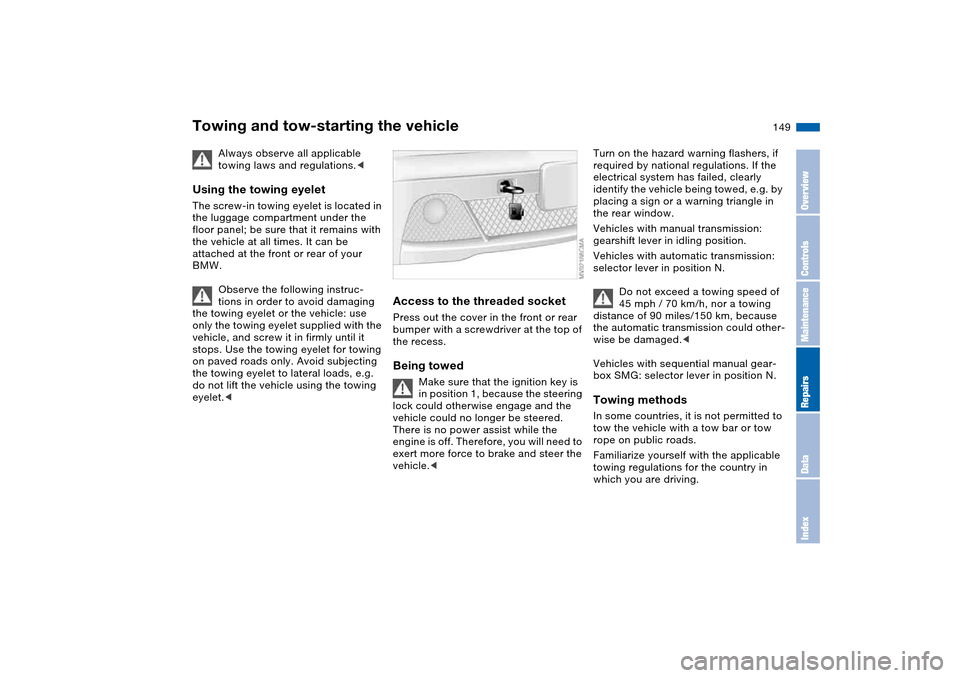
Access to the threaded socketPress out the cover in the front or rear
bumper with a screwdriver at the top of
the recess.Being towed
Make sure that the ignition key is
in position 1, because the steering
lock could otherwise engage and the
vehicle could no longer be steered.
There is no power assist while the
engine is off. Therefore, you will need to
exert more force to brake and steer the
vehicle.<
Turn on the hazard warning flashers, if
required by national regulations. If the
electrical system has failed, clearly
identify the vehicle being towed, e.g. by
placing a sign or a warning triangle in
the rear window.
Vehicles with manual transmission:
gearshift lever in idling position.
Vehicles with automatic transmission:
selector lever in position N.
Do not exceed a towing speed of
45 mph / 70 km/h, nor a towing
distance of 90 miles/150 km, because
the automatic transmission could other-
wise be damaged.<
Vehicles with sequential manual gear-
box SMG: selector lever in position N.Towing methodsIn some countries, it is not permitted to
tow the vehicle with a tow bar or tow
rope on public roads.
Familiarize yourself with the applicable
towing regulations for the country in
which you are driving.
OverviewControlsMaintenanceRepairsDataIndex
Page 150 of 174
150
With a tow bar
The towing vehicle must not be
lighter than the vehicle being
towed; otherwise, vehicle handling can
no longer be controlled.<
The towing eyelets of both vehicles
should be on the same side.
If the tow bar can only be used in a
diagonal position, please note the fol-
lowing:
>Clearance is restricted while you are
driving around corners
>The inclination of the tow bar pro-
duces lateral force.
Only attach the tow bar to the
towing eyelets. Other parts of the
vehicles could otherwise be dam-
aged.<
With a tow ropeWhen the towing vehicle is driving off,
make sure that the tow rope is taut.
Use nylon ropes or straps for tow-
ing because they prevent sudden
jerking movements. Attach the tow rope
only to the towing eyelets. Other parts
of the vehicles could otherwise be
damaged.<
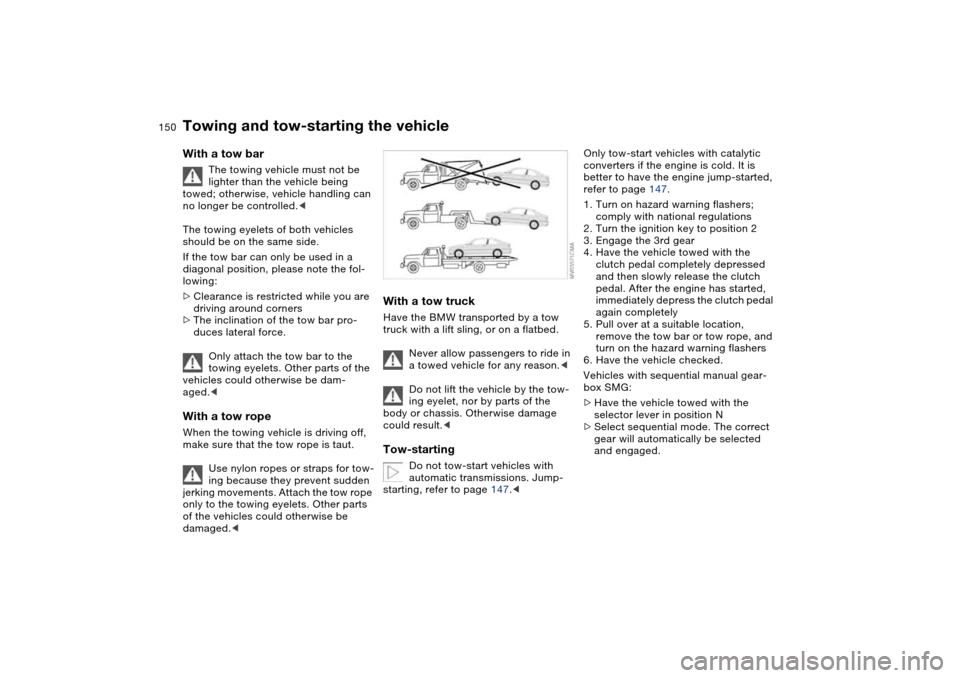
With a tow truckHave the BMW transported by a tow
truck with a lift sling, or on a flatbed.
Never allow passengers to ride in
a towed vehicle for any reason.<
Do not lift the vehicle by the tow-
ing eyelet, nor by parts of the
body or chassis. Otherwise damage
could result.
automatic transmissions. Jump-
starting, refer to page 147.<
Only tow-start vehicles with catalytic
converters if the engine is cold. It is
better to have the engine jump-started,
refer to page 147.
1. Turn on hazard warning flashers;
comply with national regulations
2. Turn the ignition key to position 2
3. Engage the 3rd gear
4. Have the vehicle towed with the
clutch pedal completely depressed
and then slowly release the clutch
pedal. After the engine has started,
immediately depress the clutch pedal
again completely
5. Pull over at a suitable location,
remove the tow bar or tow rope, and
turn on the hazard warning flashers
6. Have the vehicle checked.
Vehicles with sequential manual gear-
box SMG:
>Have the vehicle towed with the
selector lever in position N
>Select sequential mode. The correct
gear will automatically be selected
and engaged.
Towing and tow-starting the vehicle
Page 156 of 174
156
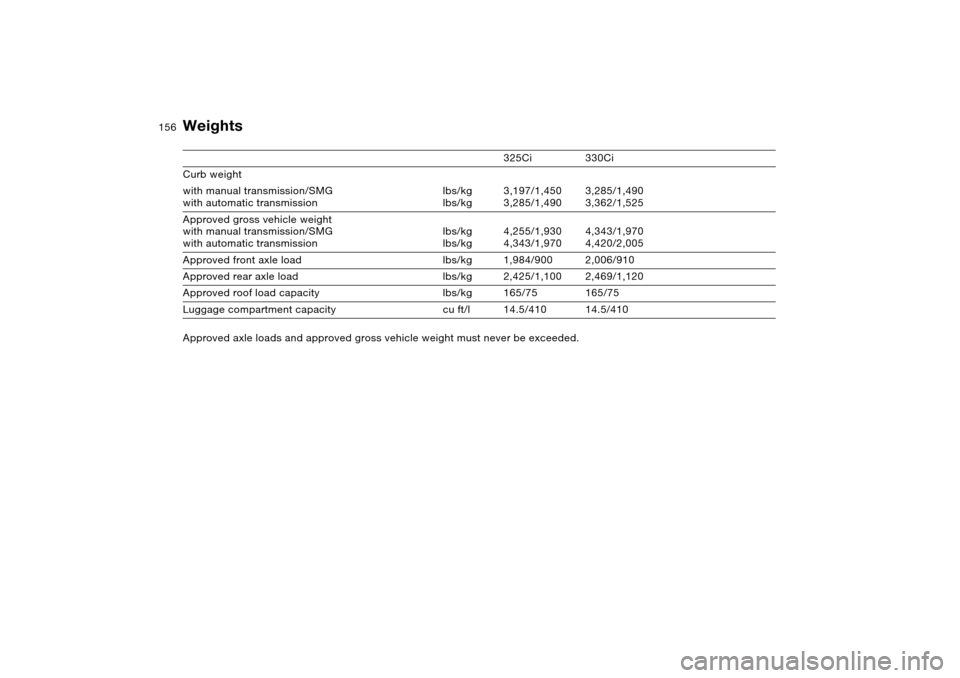
Weights
325Ci 330Ci
Curb weight
with manual transmission/SMG
with automatic transmissionlbs/kg
lbs/kg3,197/1,450
3,285/1,4903,285/1,490
3,362/1,525
Approved gross vehicle weight
with manual transmission/SMG
with automatic transmissionlbs/kg
lbs/kg4,255/1,930
4,343/1,9704,343/1,970
4,420/2,005
Approved front axle load lbs/kg 1,984/900 2,006/910
Approved rear axle load lbs/kg 2,425/1,100 2,469/1,120
Approved roof load capacity lbs/kg 165/75 165/75
Luggage compartment capacity cu ft/l 14.5/410 14.5/410
Approved axle loads and approved gross vehicle weight must never be exceeded.
Page 160 of 174
Everything from A to ZA
ABS Antilock Brake
System 115
indicator lamp 18
Acceleration assistant 66
Accessories, refer to For
your own safety 5
Accident, refer to Emer-
gency call 146
Activated-charcoal filter 98
Adaptive brake lamp, refer
to Brake force display 84
Adaptive headlights 86
Adding brake fluid 129
Additional sources of infor-
mation 4
Air conditioning 90
Air conditioning mode 92
automatic climate
control 96
Air distribution
air conditioning 92
automatic climate
control 96
Air distribution, individual 96
Air outlets, refer to Ventila-
tion 90, 94
Air pressure, refer to Tire
inflation pressure 116
Air recirculation, refer to
Recirculated-air mode
92, 97Air supply
air conditioning 92
automatic climate
control 96
Air, drying, refer to Air con-
ditioning mode 92, 96
Airbags 51
deactivating 54
indicator lamp 18, 53
sitting safely 41
Airing out, refer to Ventila-
tion 90, 94
AKI, refer to Fuel specifica-
tions 24
Alarm system 36
avoiding unintentional
alarms 37
All-season tires, refer to
Winter tires 121, 122
Antifreeze 128
coolant 128
washer fluid 126
Antilock Brake System
(ABS) 115
indicator lamp 18
Anti-theft system 28
Anti-theft warning system,
refer to Alarm system 36
Approved axle loads, refer
to Weights 156
Approved gross weight,
refer to Weights 156Armrest
front 100
rear 101
Artificial leather, refer to the
Caring for your vehicle
brochure
Ashtray
front 102
rear 102
Assistant systems, refer to
Dynamic Stability Control
(DSC) 81
AUC Automatic recircu-
lated-air control 97
AUTO program 96
Automatic
cruise control 72
headlamp control 85
Automatic air distribution,
refer to AUTO program 96
Automatic air supply, refer
to AUTO program 96
Automatic car wash, refer to
the Caring for your vehicle
brochure
Automatic climate control 94
Automatic curb monitor 48
Automatic dimming, interior
rearview mirror 50
Automatic recirculated-air
control (AUC) 97Automatic transmission with
Steptronic 67
indicator lamp 19, 69
interlock 59
selector lever lock 67
shiftlock 67
tow-starting 150
Automatic windshield
washer, refer to Rain sen-
sor 71
Average fuel
consumption 79
Average speed 79
Avoiding unintentional
alarms 37
Axle loads, refer to
Weights 156
B
Backrest
unlocking 45
Backrest, refer to Seat
adjustment 42, 44
Backup lamps 62
bulb replacement 139
Bandages, refer to First-aid
kit 22
Bar, for towing 149
Page 163 of 174
Everything from A to Z
163
DSC Dynamic Stability Con-
trol 81
indicator lamp 19, 81
DTC Dynamic Traction Con-
trol 81
indicator lamp 19, 81
Dynamic Brake Control
(DBC) 19, 115
indicator lamp 19
Dynamic Stability Control
(DSC) 19, 81
Dynamic Traction Control
(DTC) 81
indicator lamp 19, 81
E
Easy entry, refer to Entering
the rear 45
Electric glass sunroof 39
Electric power windows 38
Electrical accessories, fail-
ure 145
Electrical malfunction
automatic transmission
with Steptronic 69
door lock 31
driver's door 31
fuel filler door 23
glass sunroof 40
luggage compartment
lid 33Electronic Stability Program
(ESP), refer to Dynamic
Stability Control (DSC) 81
Emergency call 146
Emergency operation
doors 31
driver's door 31
fuel filler door 23
glass sunroof 40
Emergency release
luggage compartment lid
33, 35
Emissions, minimum, refer
to Energy control 74
Energy control 74
Engine
breaking in 112
data 154
electronics 19
indicator lamp 19
speed 74, 154
starting 59
switching off 61
Engine compartment 124
Engine coolant 128
adding 128Engine oil
adding 127
additives, refer to Adding
engine oil 127
capacity 157
indicator/warning lamp 19
quality 127
specified oils 127
Engine oil consumption 126
Engine oil level 19
check 126
indicator/warning lamp 18
Engine oil pressure
indicator/warning lamp 18
Engine oil types 127
Engine output, refer to
Engine data 154
Engine speed 74, 154
Entering the rear 45
Environmentally-friendly
driving, refer to Energy
control 74
Equipment range, refer to
Service and Warranty
Information Booklet for US
models/Warranty and Ser-
vice Guide Booklet for
Canadian models
ESP Electronic Stability Pro-
gram, refer to Dynamic
Stability Control (DSC) 81
Exterior mirrors 49Eyeglasses
compartment 101
Eyelets, towing and tow-
starting 149
F
False alarm, refer to Avoid-
ing unintentional
alarms 37
Fasten safety belts
indicator lamp 18
Fastening the safety belts 46
Fault displays 76
Filling the windshield washer
reservoir 157
First aid, refer to First-aid
kit 22
First-aid kit 22
Flashlight 100
Flashlight, refer to
Rechargeable
flashlight 100
Flat tire 141
Flat Tire Monitor 82
space-saver spare tire 141
Flat Tire Monitor 82
indicator lamp 18, 19, 83
Fluid reservoir for washer
systems 126
Folding rear backrest 104
Follow me home lamps 85
OverviewControlsMaintenanceRepairsDataIndex
Page 164 of 174
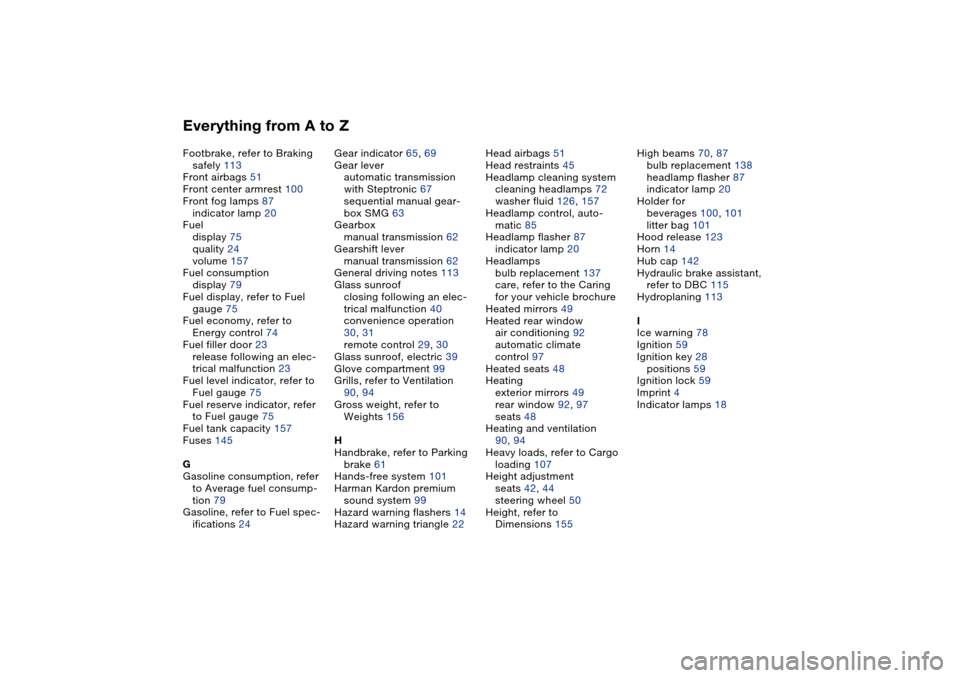
Everything from A to ZFootbrake, refer to Braking
safely 113
Front airbags 51
Front center armrest 100
Front fog lamps 87
indicator lamp 20
Fuel
display 75
quality 24
volume 157
Fuel consumption
display 79
Fuel display, refer to Fuel
gauge 75
Fuel economy, refer to
Energy control 74
Fuel filler door 23
release following an elec-
trical malfunction 23
Fuel level indicator, refer to
Fuel gauge 75
Fuel reserve indicator, refer
to Fuel gauge 75
Fuel tank capacity 157
Fuses 145
G
Gasoline consumption, refer
to Average fuel consump-
tion 79
Gasoline, refer to Fuel spec-
ifications 24Gear indicator 65, 69
Gear lever
automatic transmission
with Steptronic 67
sequential manual gear-
box SMG 63
Gearbox
manual transmission 62
Gearshift lever
manual transmission 62
General driving notes 113
Glass sunroof
closing following an elec-
trical malfunction 40
convenience operation
30, 31
remote control 29, 30
Glass sunroof, electric 39
Glove compartment 99
Grills, refer to Ventilation
90, 94
Gross weight, refer to
Weights 156
H
Handbrake, refer to Parking
brake 61
Hands-free system 101
Harman Kardon premium
sound system 99
Hazard warning flashers 14
Hazard warning triangle 22Head airbags 51
Head restraints 45
Headlamp cleaning system
cleaning headlamps 72
washer fluid 126, 157
Headlamp control, auto-
matic 85
Headlamp flasher 87
indicator lamp 20
Headlamps
bulb replacement 137
care, refer to the Caring
for your vehicle brochure
Heated mirrors 49
Heated rear window
air conditioning 92
automatic climate
control 97
Heated seats 48
Heating
exterior mirrors 49
rear window 92, 97
seats 48
Heating and ventilation
90, 94
Heavy loads, refer to Cargo
loading 107
Height adjustment
seats 42, 44
steering wheel 50
Height, refer to
Dimensions 155High beams 70, 87
bulb replacement 138
headlamp flasher 87
indicator lamp 20
Holder for
beverages 100, 101
litter bag 101
Hood release 123
Horn 14
Hub cap 142
Hydraulic brake assistant,
refer to DBC 115
Hydroplaning 113
I
Ice warning 78
Ignition 59
Ignition key 28
positions 59
Ignition lock 59
Imprint 4
Indicator lamps 18
Page 166 of 174
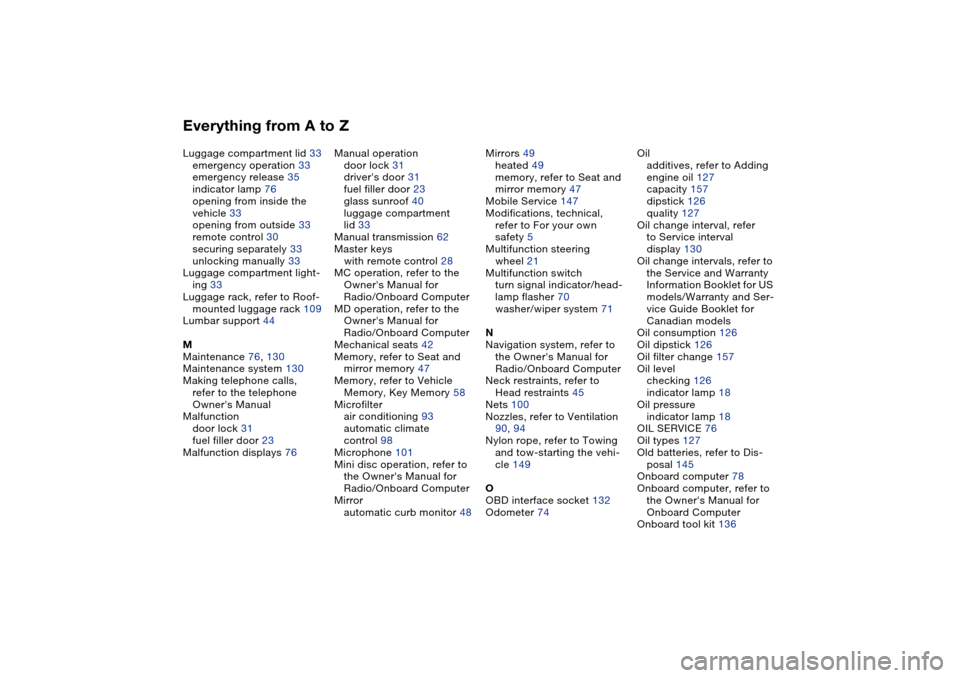
Everything from A to ZLuggage compartment lid 33
emergency operation 33
emergency release 35
indicator lamp 76
opening from inside the
vehicle 33
opening from outside 33
remote control 30
securing separately 33
unlocking manually 33
Luggage compartment light-
ing 33
Luggage rack, refer to Roof-
mounted luggage rack 109
Lumbar support 44
M
Maintenance 76, 130
Maintenance system 130
Making telephone calls,
refer to the telephone
Owner's Manual
Malfunction
door lock 31
fuel filler door 23
Malfunction displays 76Manual operation
door lock 31
driver's door 31
fuel filler door 23
glass sunroof 40
luggage compartment
lid 33
Manual transmission 62
Master keys
with remote control 28
MC operation, refer to the
Owner's Manual for
Radio/Onboard Computer
MD operation, refer to the
Owner's Manual for
Radio/Onboard Computer
Mechanical seats 42
Memory, refer to Seat and
mirror memory 47
Memory, refer to Vehicle
Memory, Key Memory 58
Microfilter
air conditioning 93
automatic climate
control 98
Microphone 101
Mini disc operation, refer to
the Owner's Manual for
Radio/Onboard Computer
Mirror
automatic curb monitor 48Mirrors 49
heated 49
memory, refer to Seat and
mirror memory 47
Mobile Service 147
Modifications, technical,
refer to For your own
safety 5
Multifunction steering
wheel 21
Multifunction switch
turn signal indicator/head-
lamp flasher 70
washer/wiper system 71
N
Navigation system, refer to
the Owner's Manual for
Radio/Onboard Computer
Neck restraints, refer to
Head restraints 45
Nets 100
Nozzles, refer to Ventilation
90, 94
Nylon rope, refer to Towing
and tow-starting the vehi-
cle 149
O
OBD interface socket 132
Odometer 74Oil
additives, refer to Adding
engine oil 127
capacity 157
dipstick 126
quality 127
Oil change interval, refer
to Service interval
display 130
Oil change intervals, refer to
the Service and Warranty
Information Booklet for US
models/Warranty and Ser-
vice Guide Booklet for
Canadian models
Oil consumption 126
Oil dipstick 126
Oil filter change 157
Oil level
checking 126
indicator lamp 18
Oil pressure
indicator lamp 18
OIL SERVICE 76
Oil types 127
Old batteries, refer to Dis-
posal 145
Onboard computer 78
Onboard computer, refer to
the Owner's Manual for
Onboard Computer
Onboard tool kit 136