check engine BMW 330CI IDRIVE COUPE 2006 User Guide
[x] Cancel search | Manufacturer: BMW, Model Year: 2006, Model line: 330CI IDRIVE COUPE, Model: BMW 330CI IDRIVE COUPE 2006Pages: 239, PDF Size: 11.87 MB
Page 194 of 239
Under the hood
192
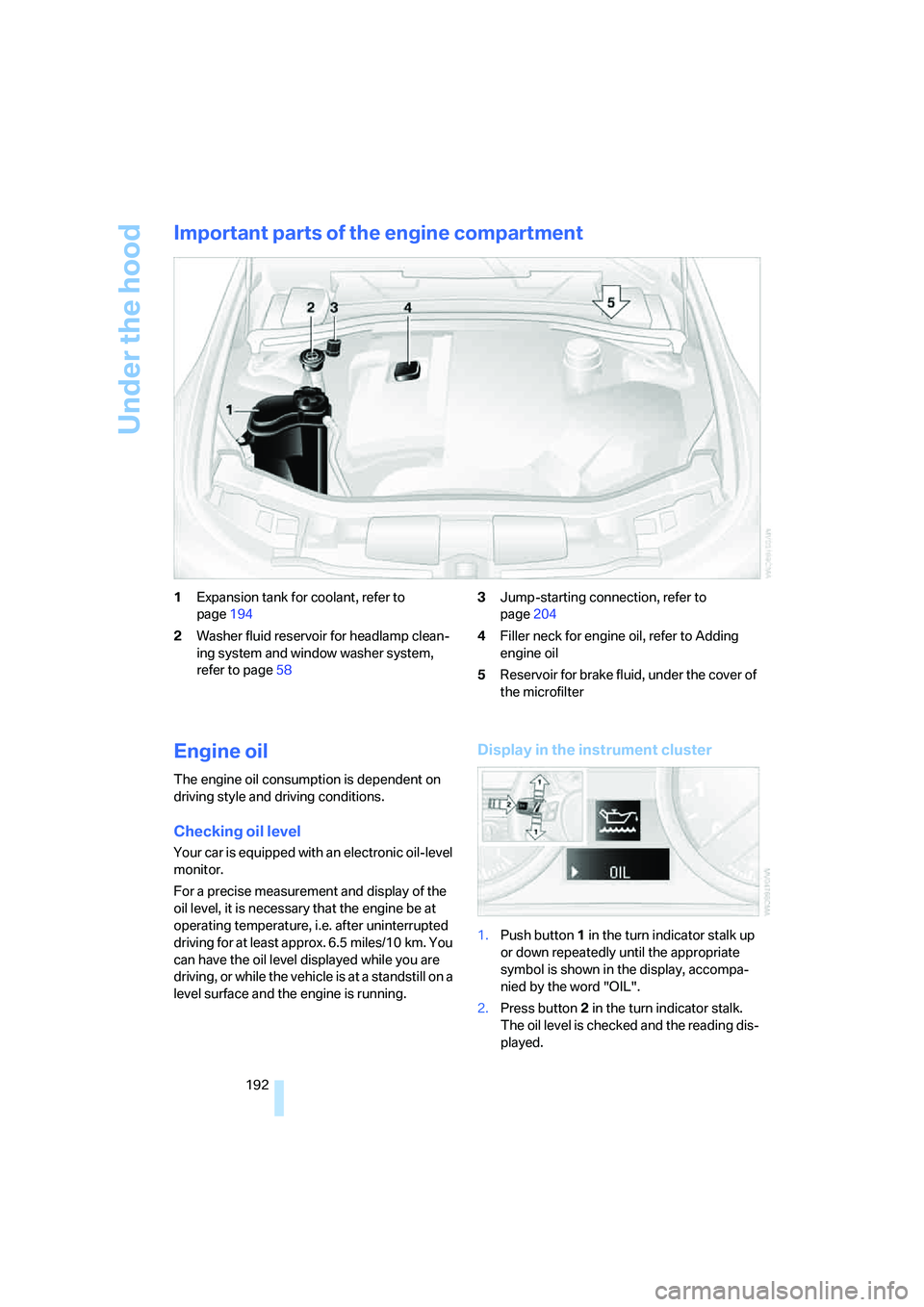
Important parts of the engine compartment
1Expansion tank for coolant, refer to
page194
2Washer fluid reservoir for headlamp clean-
ing system and window washer system,
refer to page583Jump-starting connection, refer to
page204
4Filler neck for engine oil, refer to Adding
engine oil
5Reservoir for brake fluid, under the cover of
the microfilter
Engine oil
The engine oil consumption is dependent on
driving style and driving conditions.
Checking oil level
Your car is equipped with an electronic oil-level
monitor.
For a precise measurement and display of the
oil level, it is necessary that the engine be at
operating temperature, i.e. after uninterrupted
driving for at least approx. 6.5 miles/10 km. You
can have the oil level displayed while you are
driving, or while the vehicle is at a standstill on a
level surface and the engine is running.
Display in the instrument cluster
1.Push button 1 in the turn indicator stalk up
or down repeatedly until the appropriate
symbol is shown in the display, accompa-
nied by the word "OIL".
2.Press button 2 in the turn indicator stalk.
The oil level is checked and the reading dis-
played.
ba8_E9293_US.book Seite 192 Freitag, 5. Mai 2006 1:02 13
Page 195 of 239
Mobility
193Reference
At a glance
Controls
Driving tips
Communications
Navigation
Entertainment
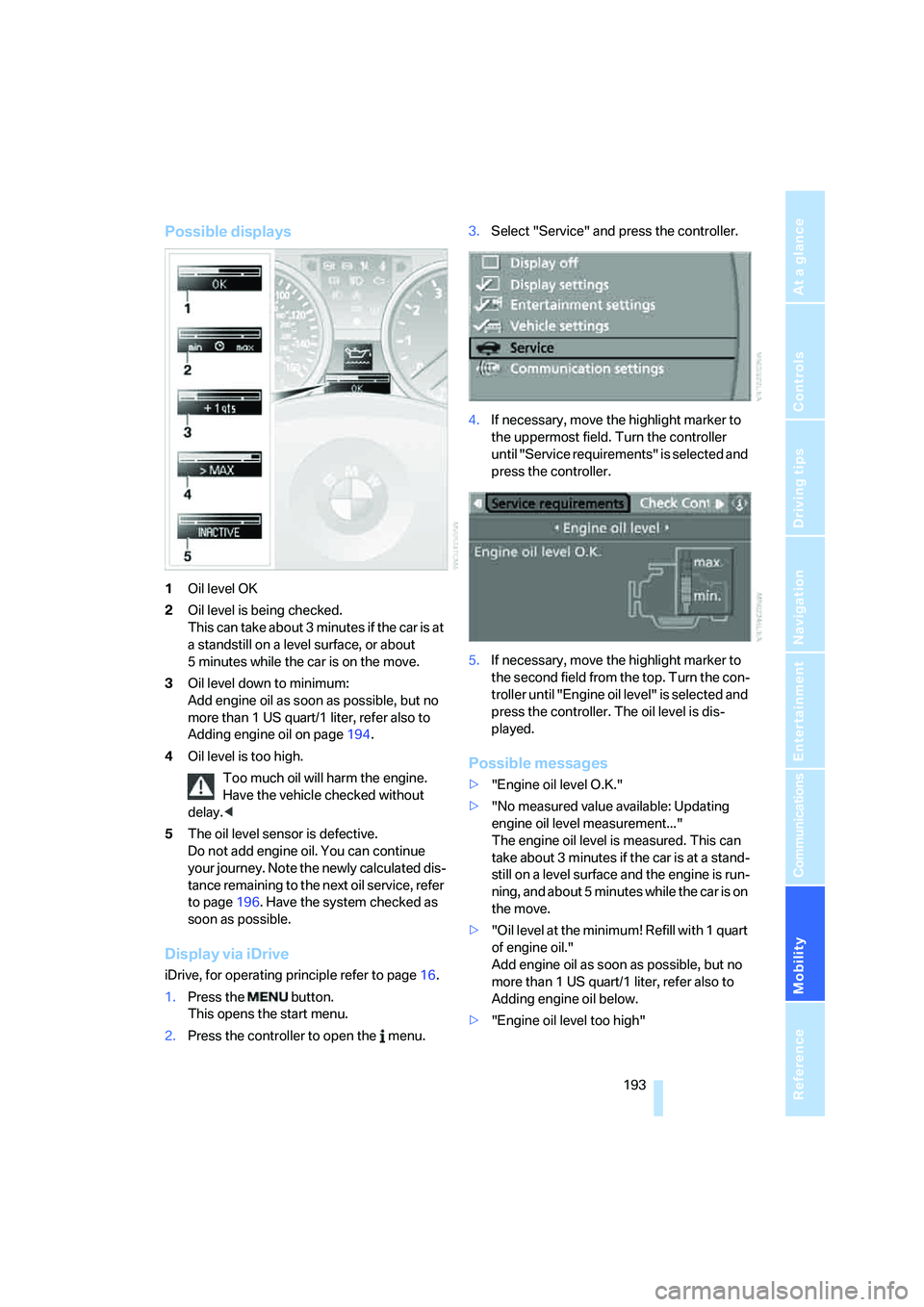
Possible displays
1Oil level OK
2Oil level is being checked.
This can take about 3 minutes if the car is at
a standstill on a level surface, or about
5 minutes while the car is on the move.
3Oil level down to minimum:
Add engine oil as soon as possible, but no
more than 1 US quart/1 liter, refer also to
Adding engine oil on page194.
4Oil level is too high.
Too much oil will harm the engine.
Have the vehicle checked without
delay.<
5The oil level sensor is defective.
Do not add engine oil. You can continue
your journey. Note the newly calculated dis-
tance remaining to the next oil service, refer
to page196. Have the system checked as
soon as possible.
Display via iDrive
iDrive, for operating principle refer to page16.
1.Press the button.
This opens the start menu.
2.Press the controller to open the menu.3.Select "Service" and press the controller.
4.If necessary, move the highlight marker to
the uppermost field. Turn the controller
until "Service requirements" is selected and
press the controller.
5.If necessary, move the highlight marker to
the second field from the top. Turn the con-
troller until "Engine oil level" is selected and
press the controller. The oil level is dis-
played.
Possible messages
>"Engine oil level O.K."
>"No measured value available: Updating
engine oil level measurement..."
The engine oil level is measured. This can
take about 3 minutes if the car is at a stand-
still on a level surface and the engine is run-
ning, and about 5 minutes while the car is on
the move.
>"Oil level at the minimum! Refill with 1 quart
of engine oil."
Add engine oil as soon as possible, but no
more than 1 US quart/1 liter, refer also to
Adding engine oil below.
>"Engine oil level too high"
ba8_E9293_US.book Seite 193 Freitag, 5. Mai 2006 1:02 13
Page 196 of 239
Under the hood
194 Too much oil will harm the engine.
Have the vehicle checked without
delay.<
>"Please observe recalculated service inter-
val for engine oil"
Do not add engine oil. You can continue
your journey. Note the newly calculated dis-
tance remaining to the next oil service, refer
to page71. Have the system checked as
soon as possible.
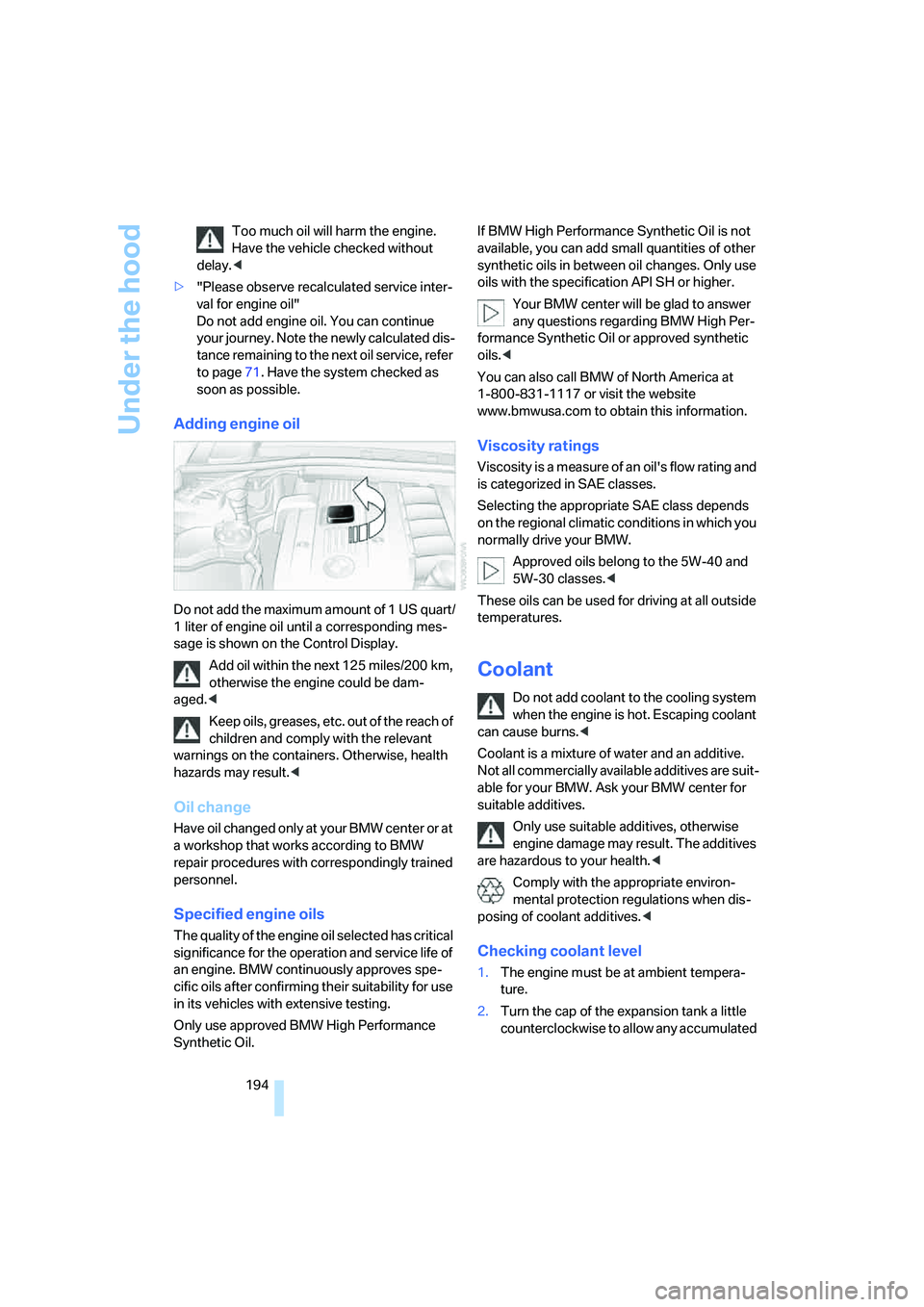
Adding engine oil
Do not add the maximum amount of 1 US quart/
1 liter of engine oil until a corresponding mes-
sage is shown on the Control Display.
Add oil within the next 125 miles/200 km,
otherwise the engine could be dam-
aged.<
Keep oils, greases, etc. out of the reach of
children and comply with the relevant
warnings on the containers. Otherwise, health
hazards may result.<
Oil change
Have oil changed only at your BMW center or at
a workshop that works according to BMW
repair procedures with correspondingly trained
personnel.
Specified engine oils
The quality of the engine oil selected has critical
significance for the operation and service life of
an engine. BMW continuously approves spe-
cific oils after confirming their suitability for use
in its vehicles with extensive testing.
Only use approved BMW High Performance
Synthetic Oil.If BMW High Performance Synthetic Oil is not
available, you can add small quantities of other
synthetic oils in between oil changes. Only use
oils with the specification API SH or higher.
Your BMW center will be glad to answer
any questions regarding BMW High Per-
formance Synthetic Oil or approved synthetic
oils.<
You can also call BMW of North America at
1-800-831-1117 or visit the website
www.bmwusa.com to obtain this information.
Viscosity ratings
Viscosity is a measure of an oil's flow rating and
is categorized in SAE classes.
Selecting the appropriate SAE class depends
on the regional climatic conditions in which you
normally drive your BMW.
Approved oils belong to the 5W-40 and
5W-30 classes.<
These oils can be used for driving at all outside
temperatures.
Coolant
Do not add coolant to the cooling system
when the engine is hot. Escaping coolant
can cause burns.<
Coolant is a mixture of water and an additive.
Not all commercially available additives are suit-
able for your BMW. Ask your BMW center for
suitable additives.
Only use suitable additives, otherwise
engine damage may result. The additives
are hazardous to your health.<
Comply with the appropriate environ-
mental protection regulations when dis-
posing of coolant additives.<
Checking coolant level
1.The engine must be at ambient tempera-
ture.
2.Turn the cap of the expansion tank a little
counterclockwise to allow any accumulated
ba8_E9293_US.book Seite 194 Freitag, 5. Mai 2006 1:02 13
Page 198 of 239
Maintenance
196
Maintenance
BMW Maintenance System
The BMW Maintenance System supports the
preservation of the traffic and operating safety
of your BMW. The service schedule also
includes operations related to the vehicle's
comfort and convenience features, such as
replacement of the filters for the inside air. The
objective is to optimize efforts with respect to
minimal vehicle maintenance costs.
If and when you come to sell your BMW, a com-
prehensive record of servicing will prove a sig-
nificant benefit.
CBS Condition Based Service
Sensors and special algorithms take the differ-
ent driving conditions of your BMW into
account. Condition Based Service uses this to
determine the current and future service
requirements. By letting you define a service
and maintenance regimen that reflects your
own individual requirements, the system builds
the basis for trouble-free driving.
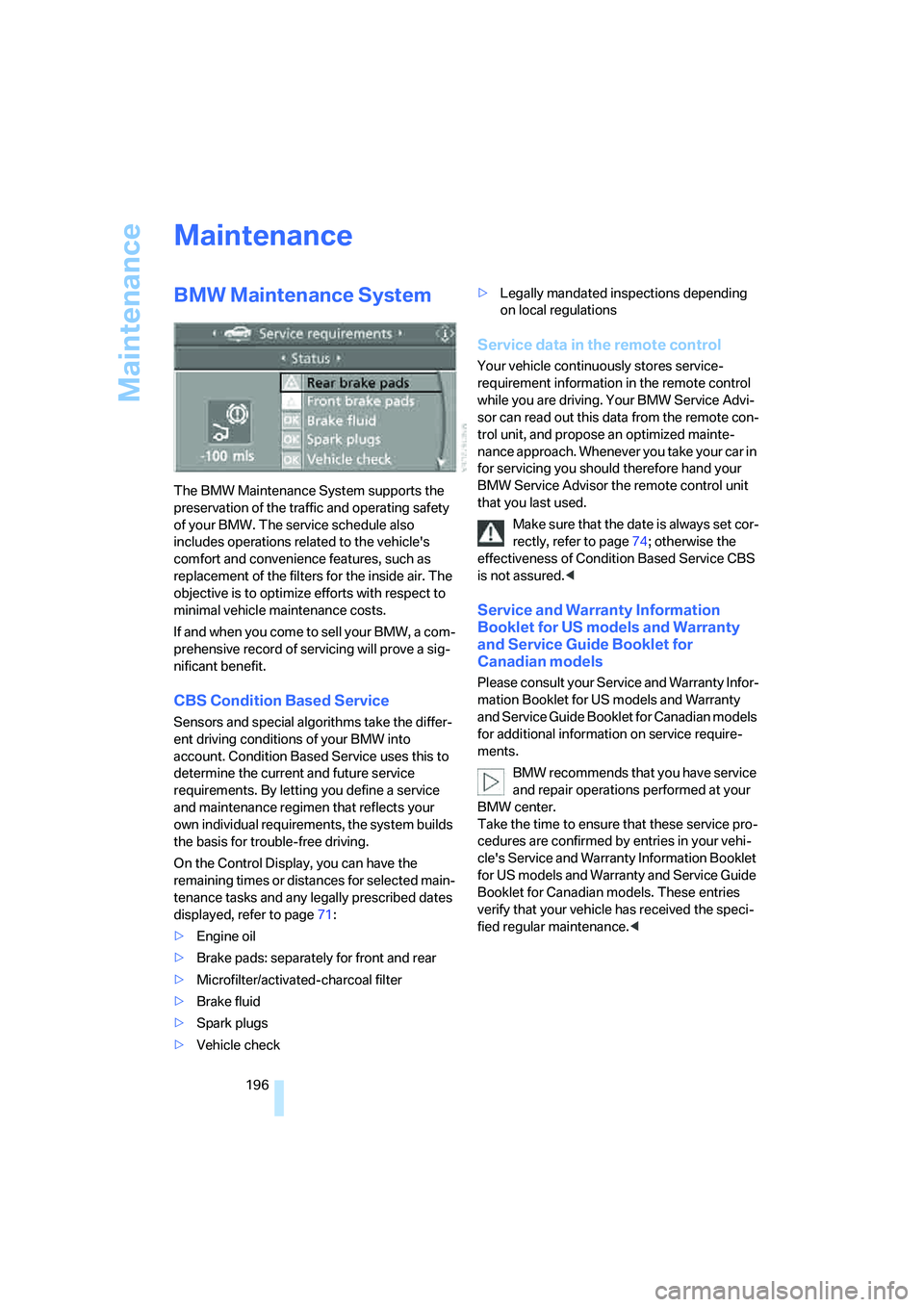
On the Control Display, you can have the
remaining times or distances for selected main-
tenance tasks and any legally prescribed dates
displayed, refer to page71:
>Engine oil
>Brake pads: separately for front and rear
>Microfilter/activated-charcoal filter
>Brake fluid
>Spark plugs
>Vehicle check>Legally mandated inspections depending
on local regulations
Service data in the remote control
Your vehicle continuously stores service-
requirement information in the remote control
while you are driving. Your BMW Service Advi-
sor can read out this data from the remote con-
trol unit, and propose an optimized mainte-
nance approach. Whenever you take your car in
for servicing you should therefore hand your
BMW Service Advisor the remote control unit
that you last used.
Make sure that the date is always set cor-
rectly, refer to page74; otherwise the
effectiveness of Condition Based Service CBS
is not assured.<
Service and Warranty Information
Booklet for US models and Warranty
and Service Guide Booklet for
Canadian models
Please consult your Service and Warranty Infor-
mation Booklet for US models and Warranty
and Service Guide Booklet for Canadian models
for additional information on service require-
ments.
BMW recommends that you have service
and repair operations performed at your
BMW center.
Take the time to ensure that these service pro-
cedures are confirmed by entries in your vehi-
cle's Service and Warranty Information Booklet
for US models and Warranty and Service Guide
Booklet for Canadian models. These entries
verify that your vehicle has received the speci-
fied regular maintenance.<
ba8_E9293_US.book Seite 196 Freitag, 5. Mai 2006 1:02 13
Page 199 of 239
Mobility
197Reference
At a glance
Controls
Driving tips
Communications
Navigation
Entertainment
Socket for On-Board
Diagnosis OBD
Primary components that make up exhaust
emissions can be checked by a device via the
OBD socket.
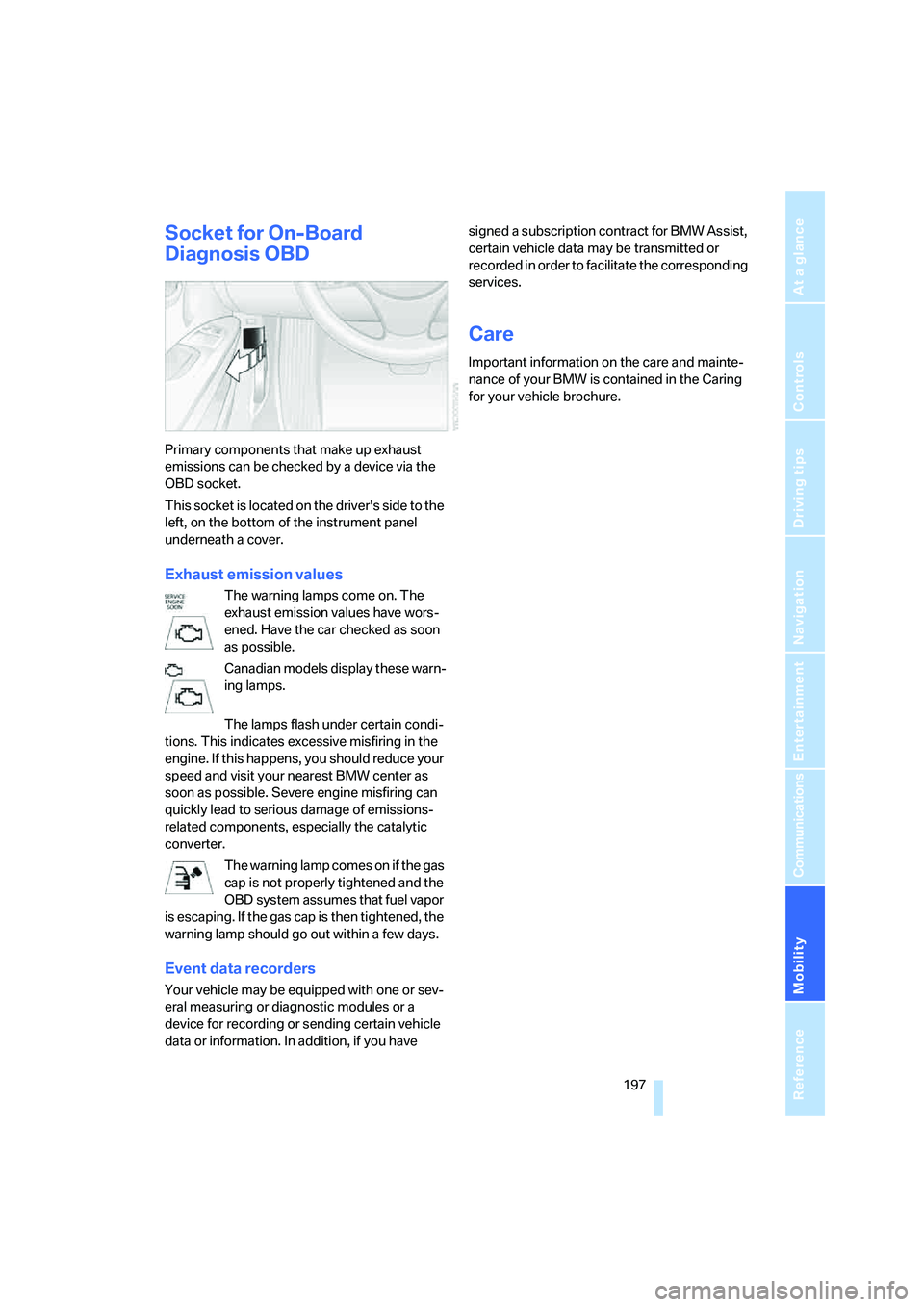
This socket is located on the driver's side to the
left, on the bottom of the instrument panel
underneath a cover.
Exhaust emission values
The warning lamps come on. The
exhaust emission values have wors-
ened. Have the car checked as soon
as possible.
Canadian models display these warn-
ing lamps.
The lamps flash under certain condi-
tions. This indicates excessive misfiring in the
engine. If this happens, you should reduce your
speed and visit your nearest BMW center as
soon as possible. Severe engine misfiring can
quickly lead to serious damage of emissions-
related components, especially the catalytic
converter.
The warning lamp comes on if the gas
cap is not properly tightened and the
OBD system assumes that fuel vapor
is escaping. If the gas cap is then tightened, the
warning lamp should go out within a few days.
Event data recorders
Your vehicle may be equipped with one or sev-
eral measuring or diagnostic modules or a
device for recording or sending certain vehicle
data or information. In addition, if you have signed a subscription contract for BMW Assist,
certain vehicle data may be transmitted or
recorded in order to facilitate the corresponding
services.
Care
Important information on the care and mainte-
nance of your BMW is contained in the Caring
for your vehicle brochure.
ba8_E9293_US.book Seite 197 Freitag, 5. Mai 2006 1:02 13
Page 206 of 239
Giving and receiving assistance
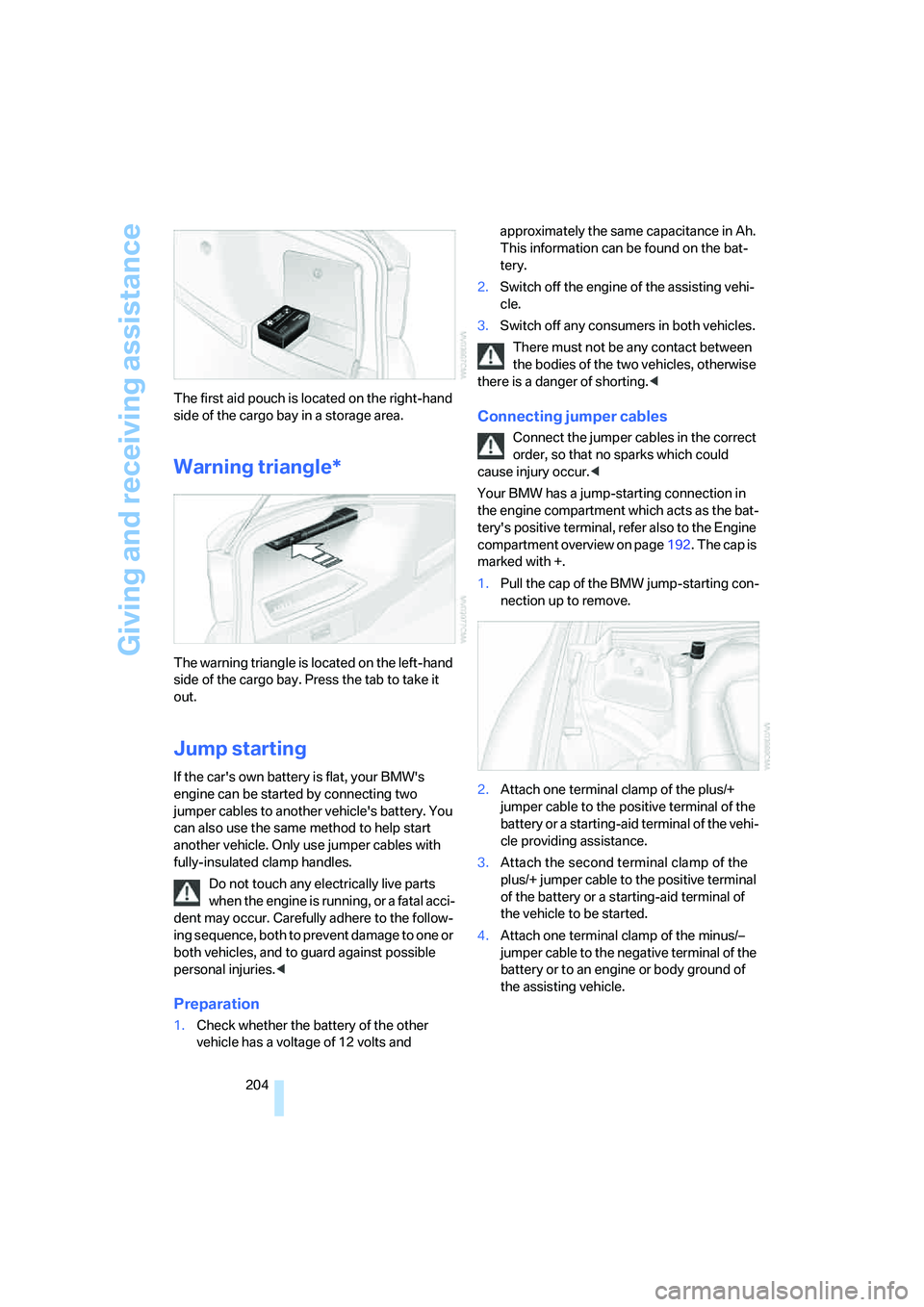
204 The first aid pouch is located on the right-hand
side of the cargo bay in a storage area.
Warning triangle*
The warning triangle is located on the left-hand
side of the cargo bay. Press the tab to take it
out.
Jump starting
If the car's own battery is flat, your BMW's
engine can be started by connecting two
jumper cables to another vehicle's battery. You
can also use the same method to help start
another vehicle. Only use jumper cables with
fully-insulated clamp handles.
Do not touch any electrically live parts
when the engine is running, or a fatal acci-
dent may occur. Carefully adhere to the follow-
ing sequence, both to prevent damage to one or
both vehicles, and to guard against possible
personal injuries.<
Preparation
1.Check whether the battery of the other
vehicle has a voltage of 12 volts and approximately the same capacitance in Ah.
This information can be found on the bat-
tery.
2.Switch off the engine of the assisting vehi-
cle.
3.Switch off any consumers in both vehicles.
There must not be any contact between
the bodies of the two vehicles, otherwise
there is a danger of shorting.<
Connecting jumper cables
Connect the jumper cables in the correct
order, so that no sparks which could
cause injury occur.<
Your BMW has a jump-starting connection in
the engine compartment which acts as the bat-
tery's positive terminal, refer also to the Engine
compartment overview on page192. The cap is
marked with +.
1.Pull the cap of the BMW jump-starting con-
nection up to remove.
2.Attach one terminal clamp of the plus/+
jumper cable to the positive terminal of the
battery or a starting-aid terminal of the vehi-
cle providing assistance.
3.Attach the second terminal clamp of the
plus/+ jumper cable to the positive terminal
of the battery or a starting-aid terminal of
the vehicle to be started.
4.Attach one terminal clamp of the minus/–
jumper cable to the negative terminal of the
battery or to an engine or body ground of
the assisting vehicle.
ba8_E9293_US.book Seite 204 Freitag, 5. Mai 2006 1:02 13
Page 207 of 239
Mobility
205Reference
At a glance
Controls
Driving tips
Communications
Navigation
Entertainment
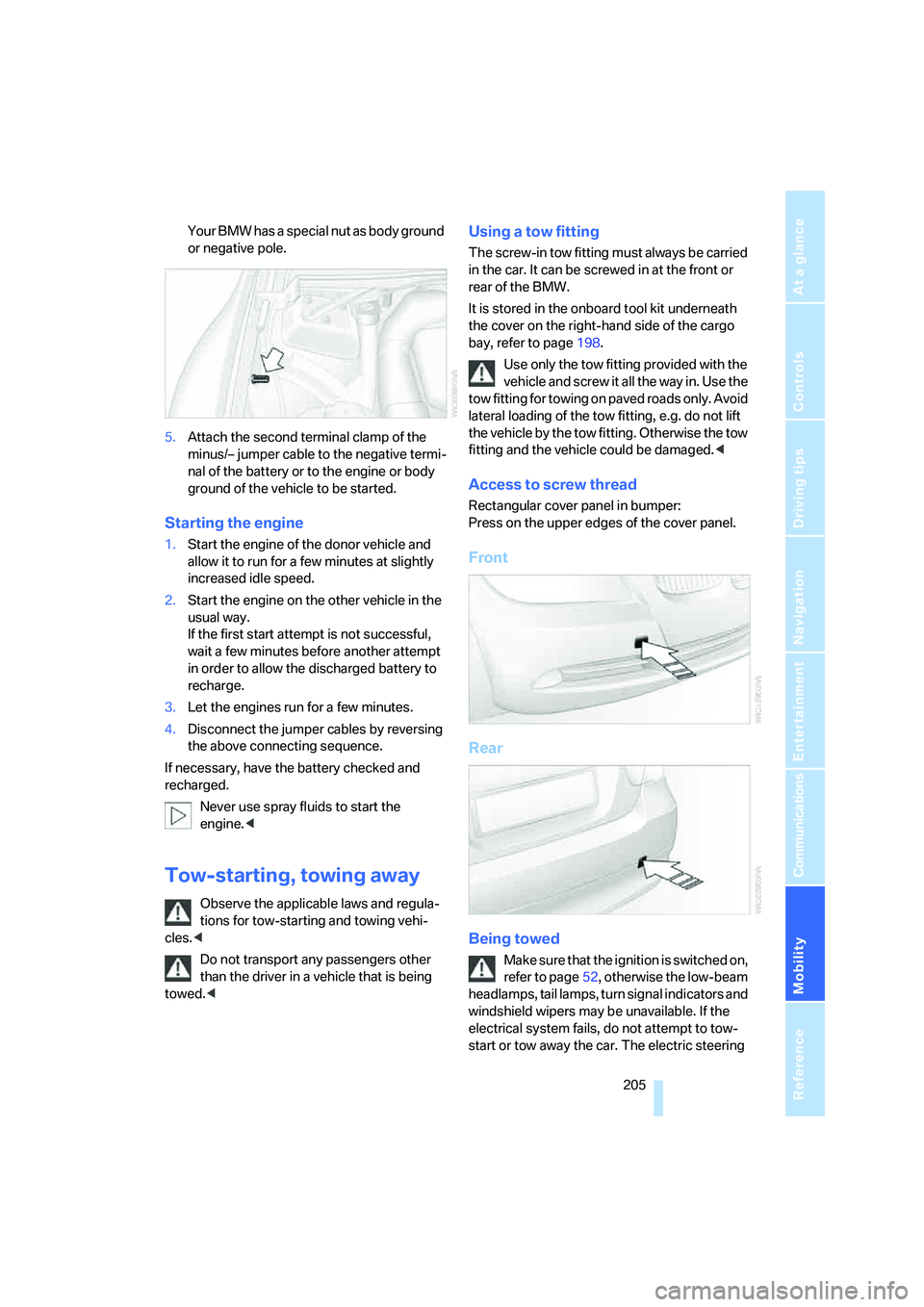
Your BMW has a special nut as body ground
or negative pole.
5.Attach the second terminal clamp of the
minus/– jumper cable to the negative termi-
nal of the battery or to the engine or body
ground of the vehicle to be started.
Starting the engine
1.Start the engine of the donor vehicle and
allow it to run for a few minutes at slightly
increased idle speed.
2.Start the engine on the other vehicle in the
usual way.
If the first start attempt is not successful,
wait a few minutes before another attempt
in order to allow the discharged battery to
recharge.
3.Let the engines run for a few minutes.
4.Disconnect the jumper cables by reversing
the above connecting sequence.
If necessary, have the battery checked and
recharged.
Never use spray fluids to start the
engine.<
Tow-starting, towing away
Observe the applicable laws and regula-
tions for tow-starting and towing vehi-
cles.<
Do not transport any passengers other
than the driver in a vehicle that is being
towed.<
Using a tow fitting
The screw-in tow fitting must always be carried
in the car. It can be screwed in at the front or
rear of the BMW.
It is stored in the onboard tool kit underneath
the cover on the right-hand side of the cargo
bay, refer to page198.
Use only the tow fitting provided with the
vehicle and screw it all the way in. Use the
tow fitting for towing on paved roads only. Avoid
lateral loading of the tow fitting, e.g. do not lift
the vehicle by the tow fitting. Otherwise the tow
fitting and the vehicle could be damaged.<
Access to screw thread
Rectangular cover panel in bumper:
Press on the upper edges of the cover panel.
Front
Rear
Being towed
Make sure that the ignition is switched on,
refer to page52, otherwise the low-beam
headlamps, tail lamps, turn signal indicators and
windshield wipers may be unavailable. If the
electrical system fails, do not attempt to tow-
start or tow away the car. The electric steering
ba8_E9293_US.book Seite 205 Freitag, 5. Mai 2006 1:02 13
Page 209 of 239
Mobility
207Reference
At a glance
Controls
Driving tips
Communications
Navigation
Entertainment
4.Have the vehicle tow-started with the clutch
depressed and slowly release the clutch.
After the engine starts, immediately
depress the clutch completely.
5.Stop at a suitable location, remove the tow
bar or rope and switch off the hazard warn-
ing flashers.
6.Have the vehicle checked.
ba8_E9293_US.book Seite 207 Freitag, 5. Mai 2006 1:02 13
Page 223 of 239
Reference 221
At a glance
Controls
Driving tips
Communications
Navigation
Entertainment
Mobility
Changes, technical, refer to
For your own safety5
Changing bulbs, refer to
Lamps and bulbs198
Changing the language on the
Control Display78
Changing the measurement
units on the Control
Display70
Changing wheels201
Chassis number, refer to
Engine compartment192
Check Control75
"Check Control
messages"77
Child-restraint fixing system
LATCH51
Child-restraint systems50
Child seats, refer to
Transporting children
safely50
Chrome parts, care, refer to
Caring for your vehicle
brochure
Chrome parts, refer to Caring
for your vehicle brochure
Cigarette lighter, refer to
Lighter106
Cleaning, refer to Caring for
your vehicle brochure
Cleaning headlamps58
– washer fluid58
"Climate"96
Clock66
– 12h/24h mode74
– setting time73
Closing
– from inside32
– from outside29
Clothes hooks105
Cockpit10
Cold start, refer to Starting the
engine53
Combined instrument, refer to
Instrument cluster12
Comfort Access, refer to
Convenient access35
Comfort area, refer to Around
the center console14"Communication"166
"Communication
settings"176
Compact disc, refer to
– CD changer152
– CD player152
Compartment for remote
control, refer to Ignition
lock52
Compass102
Computer67
– displays on Control
Display68
– hour signal74
Computer, refer to iDrive16
"Concert hall" for Tone
control142
Condensation, refer to When
the vehicle is parked
114
Configuring settings, refer to
Personal Profile28
Confirmation signals for
locking/unlocking the
vehicle30
Connecting vacuum cleaner,
refer to Connecting
electrical appliances107
Consumption, refer to
Average consumption68
Consumption display
– average consumption68
"Continue guidance to
destination?"133
Control Center, refer to
iDrive16
Control Display
– brightness79
– changing the language78
– switching on/off21
Control Display, refer to
iDrive16
Controller, refer to iDrive16
Controls and displays10
Control unit, refer to iDrive16
Convenience operation
– windows30Convenient access35
– replacing the battery36
– what to observe before
entering a car wash36
Convenient operation
– glass sunroof30
– glass sunroof with
convenient access36
– windows with convenient
access36
Coolant194
– checking level194
Coolant temperature67
Cooling, maximum97
Cooling fluid, refer to
Coolant194
Cooling system, refer to
Coolant194
Corner-illuminating lamps,
refer to Adaptive Head
Light92
Correct tires189
Courtesy lamps, refer to
Interior lamps93
Cross-hairs in navigation125
Cruise control58
– active60
– malfunction60
Cruising range67
Cup holders105
Curb weight, refer to
Weights212
"Current position"136
Current position
– displaying136
– entering128
– storing
128
"Customer
Relations"170,177
D
Dashboard, refer to
Cockpit10
Dashboard, refer to
Instrument cluster12
Dashboard lighting, refer to
Instrument lighting93
ba8_E9293_US.book Seite 221 Freitag, 5. Mai 2006 1:02 13
Page 225 of 239
Reference 223
At a glance
Controls
Driving tips
Communications
Navigation
Entertainment
Mobility
DTC Dynamic Traction
Control82
– indicator/warning lamp82
DVD for navigation120
Dynamic Stability Control
DSC
– indicator/warning lamp82
Dynamic Traction Control
DTC
– indicator/warning lamp82
E
EBV Electronic brake-force
distribution81
Eject button, refer to Buttons
on the CD player140
Electric
– seat adjustment41
Electrical malfunction
– door lock31
– driver's door31
– fuel filler door182
– glass sunroof38
– luggage compartment lid33
Electric seat adjustment41
Electric steering wheel
lock52
Electric steering-wheel lock
– with convenient access35
Electronic brake-force
distribution EBV81
Electronic oil level check192
Emergency actuation,
automatic transmission,
refer to Overriding selector
lever lock56
Emergency call203
Emergency operation
– fuel filler door, manual
release182
Emergency operation, refer to
Closing manually
– glass sunroof38
Emergency operation, refer to
Manual operation
– door lock31Emergency release
– luggage compartment lid
from inside33
Emergency services, refer to
Roadside Assistance203
Emissions test, refer to
Service requirements71
"Enable services"176
"End call"167
Engine
– breaking in112
– data210
– overheated, refer to Coolant
temperature67
– speed210
– starting53
– starting, convenient
access35
– switching off53
Engine compartment192
Engine coolant, refer to
Coolant194
Engine oil
– adding194
– BMW Maintenance
System196
– checking level192
– intervals between changes,
refer to Service
requirements71
"Engine oil level"193
Engine output, refer to Engine
data210
Engine speed, refer to Engine
data210
Engine starting, refer to
Starting the engine53
"Enter address"122
Entering a destination
country122
Entering a house number or
intersection123
Entering a street123
Entering destination122
Entering the address124
Entering the intersection123
"Entertainment"140
"Entertainment
settings"141,147Entry lamps, refer to Interior
lamps93
"Equalizer", refer to Tone
control142
Equalizer, refer to Tone
control142
Error messages, refer to
Check Control75
"ESN"149
ESP Electronic Stability
Program, refer to DSC
Dynamic Stability
Control81
Event data recorders197
Exhaust system, refer to Hot
exhaust system112
Exterior mirrors47
– adjusting47
– automatic dimming
feature113
– automatic heating47
– folding in and out47
External audio
device105,158
Eyes
– for tow-starting and towing
away205
– for tying down loads115
F
Fader, tone control141
Failure messages, refer to
Check Control75
Failure of an electrical
consumer201
False alarm
– refer to Switching off an
alarm34
False alarm, refer to Avoiding
unintentional alarms35
Fastening safety belts, refer to
Safety belts45
Fastest route for
navigation130
Fast forward
– CD changer156
– CD player156
"Fast route" in navigation131
ba8_E9293_US.book Seite 223 Freitag, 5. Mai 2006 1:02 13