change time BMW 330D 2010 Owner's Manual
[x] Cancel search | Manufacturer: BMW, Model Year: 2010, Model line: 330D, Model: BMW 330D 2010Pages: 274, PDF Size: 8.69 MB
Page 167 of 274
Navigation
Entertainment
Driving tips
165Reference
At a glance
Controls
Communications
Mobility
Depending on the album, the tracks or the
subdirectories of the album are displayed.
The first track is played automatically, if
possible.
4.To select tracks, change directories if
needed. To go up one level in the directory,
move the controller to the left.
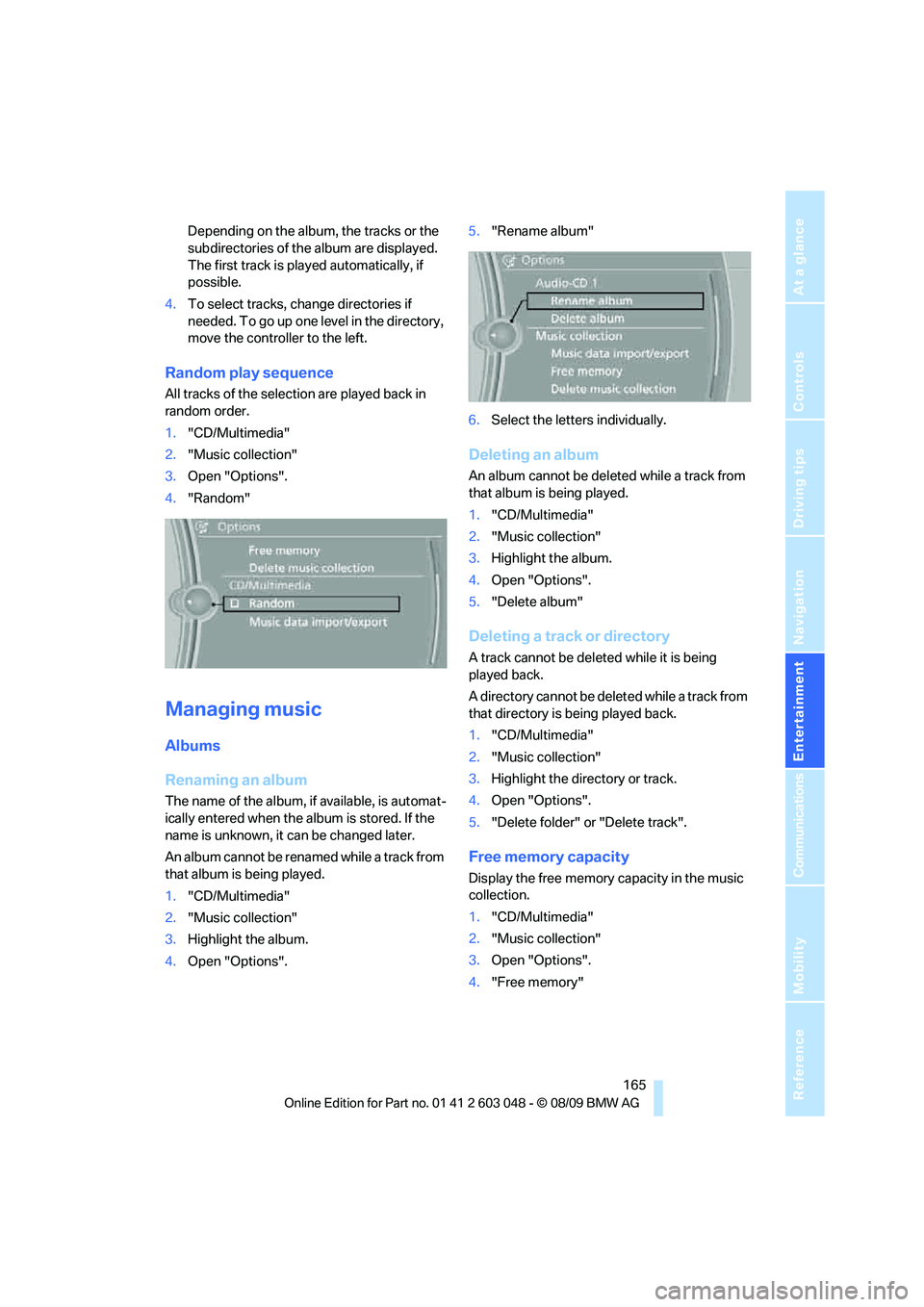
Random play sequence
All tracks of the selection are played back in
random order.
1."CD/Multimedia"
2."Music collection"
3.Open "Options".
4."Random"
Managing music
Albums
Renaming an album
The name of the album, if available, is automat-
ically entered when the album is stored. If the
name is unknown, it can be changed later.
An album cannot be renamed while a track from
that album is being played.
1."CD/Multimedia"
2."Music collection"
3.Highlight the album.
4.Open "Options".5."Rename album"
6.Select the letters individually.
Deleting an album
An album cannot be deleted while a track from
that album is being played.
1."CD/Multimedia"
2."Music collection"
3.Highlight the album.
4.Open "Options".
5."Delete album"
Deleting a track or directory
A track cannot be deleted while it is being
played back.
A directory cannot be deleted while a track from
that directory is being played back.
1."CD/Multimedia"
2."Music collection"
3.Highlight the directory or track.
4.Open "Options".
5."Delete folder" or "Delete track".
Free memory capacity
Display the free memory capacity in the music
collection.
1."CD/Multimedia"
2."Music collection"
3.Open "Options".
4."Free memory"
Page 223 of 274
Mobility
221Reference
At a glance
Controls
Driving tips
Communications
Navigation
Entertainment
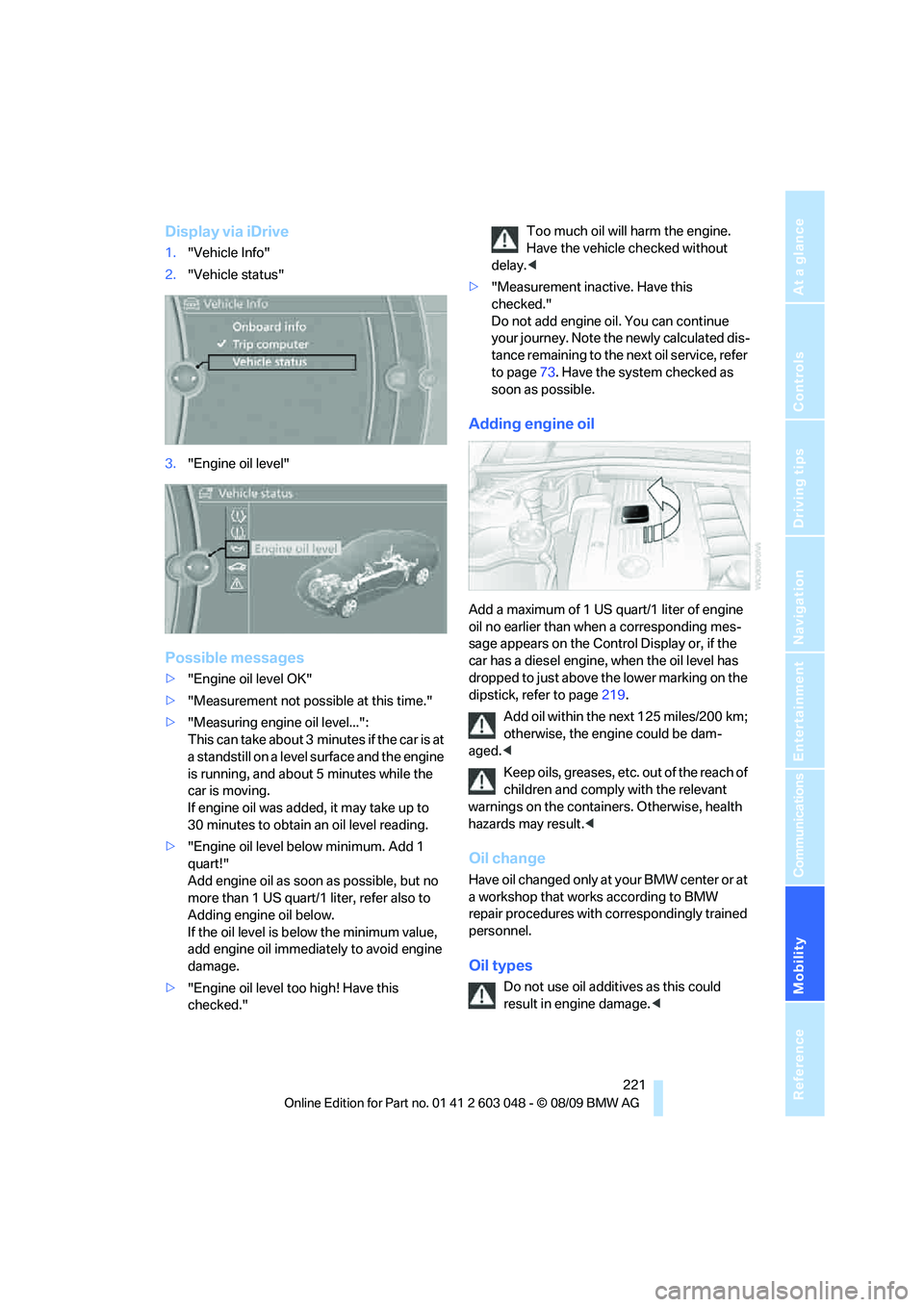
Display via iDrive
1."Vehicle Info"
2."Vehicle status"
3."Engine oil level"
Possible messages
>"Engine oil level OK"
>"Measurement not possible at this time."
>"Measuring engine oil level...":
This can take about 3 minutes if the car is at
a standstill on a level surface and the engine
is running, and about 5 minutes while the
car is moving.
If engine oil was added, it may take up to
30 minutes to obtain an oil level reading.
>"Engine oil level below minimum. Add 1
quart!"
Add engine oil as soon as possible, but no
more than 1 US quart/1 liter, refer also to
Adding engine oil below.
If the oil level is below the minimum value,
add engine oil immediately to avoid engine
damage.
>"Engine oil level too high! Have this
checked."Too much oil will harm the engine.
Have the vehicle checked without
delay.<
>"Measurement inactive. Have this
checked."
Do not add engine oil. You can continue
your journey. Note the newly calculated dis-
tance remaining to the next oil service, refer
to page73. Have the system checked as
soon as possible.
Adding engine oil
Add a maximum of 1 US quart/1 liter of engine
oil no earlier than when a corresponding mes-
sage appears on the Control Display or, if the
car has a diesel engine, when the oil level has
dropped to just above the lower marking on the
dipstick, refer to page219.
Add oil within the next 125 miles/200 km;
otherwise, the engine could be dam-
aged.<
Keep oils, greases, etc. out of the reach of
children and comply with the relevant
warnings on the containers. Otherwise, health
hazards may result.<
Oil change
Have oil changed only at your BMW center or at
a workshop that works according to BMW
repair procedures with correspondingly trained
personnel.
Oil types
Do not use oil additives as this could
result in engine damage.<
Page 232 of 274
Replacing components
230 do not feel competent to perform yourself or
that is not described here.
Never touch the glass of new bulbs with
your bare fingers, as even minute
amounts of contamination will burn into the
bulb's surface and reduce its service life. Use a
clean tissue, cloth or something similar, or hold
the bulb by its base.<
You can obtain a selection of replacement bulbs
at your BMW center.
Only change bulbs while they are cool to
the touch; otherwise, you could suffer
burns.<
When working on electrical systems,
always begin by switching off the con-
sumer in question; otherwise, short-circuits
could result. To avoid possible injury or equip-
ment damage when replacing bulbs, observe
any instructions provided by the bulb manufac-
turer.<
For care of the headlamps, please follow the
instructions in the chapter entitled 'Care'.
If the routine for changing a particular
bulb is not described here, please contact
your BMW center or a workshop that works
according to BMW repair procedures with cor-
respondingly trained personnel.<
Light-emitting diodes LED
Light-emitting diodes installed behind translu-
cent lenses serve as the light source for many of
the controls and displays in your vehicle. These
light-emitting diodes, which operate using a
concept similar to that applied in conventional
lasers, are officially designated as Class 1 light-
emitting diodes.
Do not remove the covers or expose the
eyes directly to the unfiltered light source
for several hours; otherwise, this could cause
irritation of the retina.<
Xenon lamps*
These bulbs have a very long service life and are
highly unlikely to fail. If a xenon lamp fails never-
theless, switch on the fog lamps and continue the journey with great care, provided that local
legislation does not prohibit this.
Have any work on the xenon lamp system,
including bulb replacements, performed
o nl y b y a BM W c e n t er o r a w o r k s h o p t h a t w o rk s
according to BMW repair procedures with cor-
respondingly trained personnel. Otherwise, if
such work is carried out improperly, the high
voltage in the system presents the danger of
fatal injuries.<
Replacing parking lamps, roadside
parking lamps, and daytime running
lights
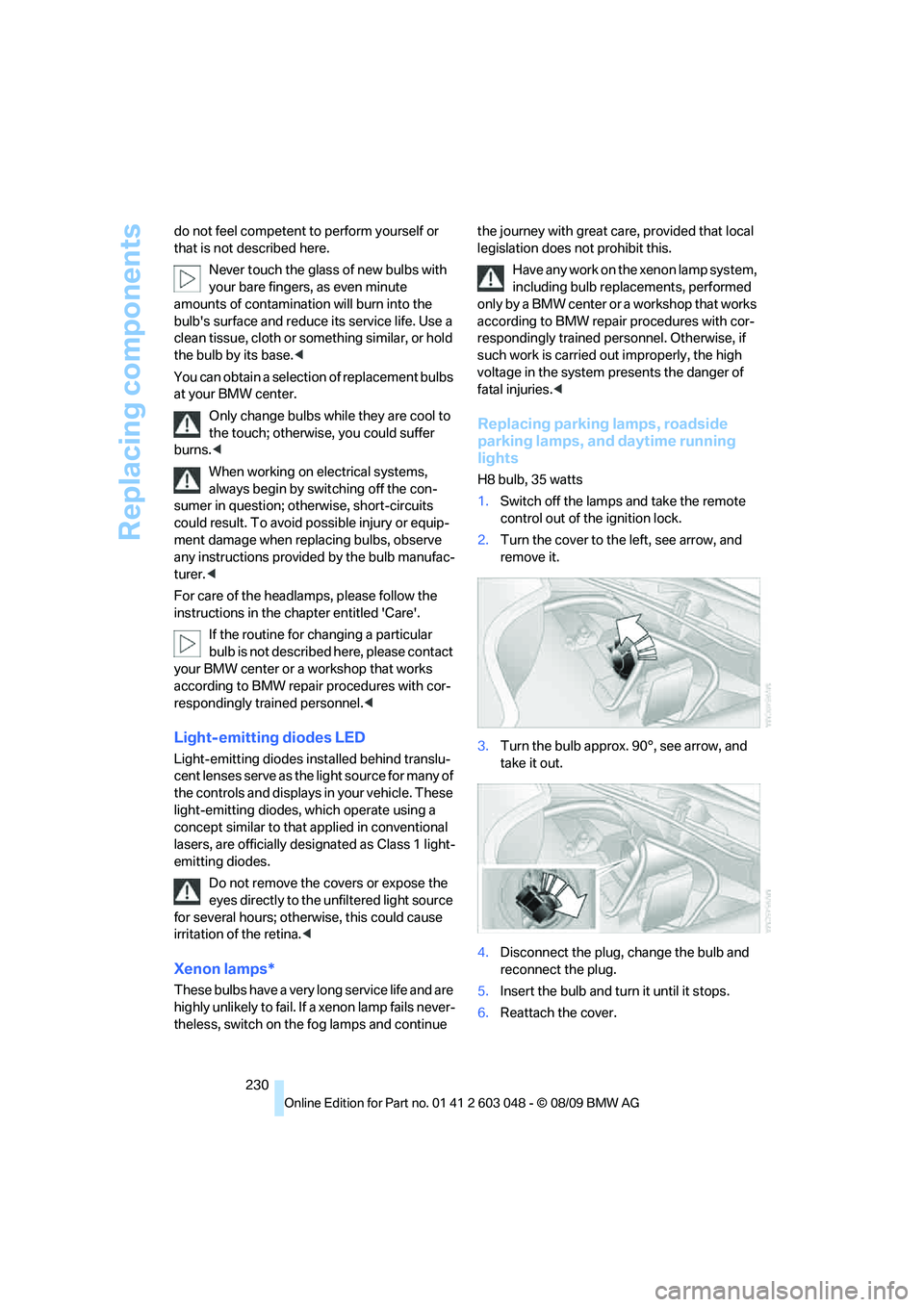
H8 bulb, 35 watts
1.Switch off the lamps and take the remote
control out of the ignition lock.
2.Turn the cover to the left, see arrow, and
remove it.
3.Turn the bulb approx. 90°, see arrow, and
take it out.
4.Disconnect the plug, change the bulb and
reconnect the plug.
5.Insert the bulb and turn it until it stops.
6.Reattach the cover.
Page 258 of 274
Everything from A - Z
256 Care225
– automatic car washes225
– care products225
– carpets227
– CD/DVD drives228
– chrome parts226
– displays227
– exterior225
– fine wood parts227
– headlamps226
– high-pressure washer225
– interior227
– leather227
– light-alloy wheels226
– paintwork226
– plastic parts227
– rubber seals226
– safety belts227
– sensors and cameras227
– upholstery and cloth
trim227
– washing the car
manually226
– windows226
Cargo, securing120
Cargo area110
– capacity247
– Comfort Access35
– folding up the floor
panel112
– lamp, refer to Interior
lamps96
– opening from inside30
– opening from outside31
– partition net111
– roller cover110
Cargo area lid, refer to Trunk
lid/tailgate30
Cargo area net, refer to
Partition net111
Cargo loading119
– securing cargo120
– stowing cargo119
– vehicle119
Car jack
– jacking points235
Car key, refer to Integrated
key/remote control26Car phone
– installation location, refer to
Center armrest106
– refer to separate Owner's
Manual
Car phone, refer to
Telephone174
Car radio, refer to Radio147
Car shampoo
227
Catalytic converter, refer to
Hot exhaust system117
CD, audio playback155
CD changer155,159
– controls144
– fast forward/reverse157
– filling or emptying the
magazine160
– random play sequence156
– selecting a track155
– switching on/off144
– tone control144
– volume144
CD player155
– controls144
– fast forward/reverse157
– random play sequence156
– selecting a track155
– switching on/off144
– tone control144
– volume144
Center armrest106
Center brake lamp
– replacing bulb235
Center console, refer to
Around the center
console14
Central locking
– from inside30
– from outside27
Central locking system27
– Comfort Access34
– hotel function31
– setting unlocking
characteristics27
Changes, technical, refer to
For your own safety5
Changing bulbs, refer to
Lamps and bulbs229Changing the language on the
Control Display79
Changing the measurement
units on the Control
Display73
Changing wheels235
Chassis number, refer to
Engine compartment219
Check Control77
Check Gas Cap196
Child restraint fixing system
LATCH51
Child restraint systems50
Child safety locks53
Child seats, refer to
Transporting children
safely50
Chrome parts227
Chrome polish227
Cigarette lighter, refer to
Lighter108
Cleaning headlamps60
– washer fluid60
Cleaning your BMW, refer to
Care225
Clock69
– 12h/24h mode76
– setting the time and date76
– setting time75
Closing
– from inside30
– from outside27
Clothes hooks107
Cockpit10
Cold start, refer to Starting the
engine55
Combined instrument, refer to
Instrument cluster12
Comfort Access34
– replacing the battery35
Comfort access, refer to
Comfort Access34
Comfort area, refer to Around
the center console14
Compartment for remote
control, refer to Ignition
lock54
Compass104
Page 267 of 274
Reference 265
At a glance
Controls
Driving tips
Communications
Navigation
Entertainment
Mobility
Safety systems
– airbags90
– Antilock Brake System
ABS82
– brake system82
– driving stability control
systems82
– Dynamic Stability Control
DSC82
– safety belts46
Safety tires, refer to Run-flat
tires216
Satellite radio150
– enabling or unsubscribing
from a channel150
– favorites152
– selecting channel151
– storing channel151
– timeshift152
– Traffic Jump153
Saving fuel116
Screen, refer to iDrive
controls16
Screw thread for tow
fitting240
SDARS, refer to Satellite
radio150
Seat adjustment
– electric42
– mechanical42
Seat and mirror memory45
Seat belt reminder, refer to
"Fasten safety belts"
reminder46
Seat heating45
Seats42
– adjusting electrically42
– adjusting the seats42
– heating45
– memory, refer to Seat and
mirror memory45
– saving a setting, refer to Seat
and mirror memory45
– sitting safely41
Securing cargo113
Securing the vehicle
– from inside30
– from outside27
Selecting a detour139Selecting distance for active
cruise control64
Selecting new scale for
navigation137
Selector lever
– automatic transmission with
Steptronic57
Selector lever lock, refer to
Changing selector lever
positions, shiftlock57
Selector lever positions
– automatic transmission with
Steptronic57
Service, refer to Roadside
Assistance
237
Service car, refer to Roadside
Assistance237
Service data in the remote
control223
Service Interval Display, refer
to Condition Based Service
CBS223
Service Request191
Service requirement display,
refer to Condition Based
Service CBS223
Service requirements73
Service status192
Settings
– changing on Control
Display79
– clock, 12h/24h format76
– DVD158
– language79
Settings and information72
Settings for the map view137
Setting times, refer to
Preselecting switch-on
times101
Shifting gears
– automatic transmission with
Steptronic57
– manual transmission56
Shiftlock
– automatic transmission,
refer to Changing selector
lever positions57
Short commands for the voice
activation system249Short route in navigation, refer
to Selecting route134
Shuffled, refer to Random
– CD changer156
– CD player156
Side airbags90
Side window blind, refer to
Roller sun blinds105
Side windows, refer to
Windows36
Signal horn, refer to
Horn10,11
Sitting safely41
– with airbags41
– with head restraint41
– with safety belts41
Ski bag112
Sliding/tilt sunroof
– refer to Panorama glass
roof38
Sliding/tilt sunroof, refer to
Glass roof, electric37
Slot for remote control54
Smokers' package, refer to
Ashtray108
Snap-in adapter
– inserting/removing184
– use174
Snap-in adapter, refer to
Center armrest storage
compartment106
Socket, Onboard Diagnosis
OBD224
Socket, refer to Connecting
electrical appliances108
Soot particulate filter, refer to
Diesel particulate filter117
SOS, refer to Sending an
Emergency Request237
Sound, adjusting during audio
playback, refer to Tone
control144
Sound output for
entertainment on/off144
Spare fuses236
Special destinations128
Special destinations,
displaying130
Page 268 of 274
Everything from A - Z
266 Special destinations, entering
by name129
Speed
– run-flat tires85
– with winter tires217
Speed limit79
Speed limit warning, refer to
Speed limit79
Speedometer12
Speed Volume145
Split rear seat backrest, refer
to Expanding the cargo
area110
Split screen, refer to Control
Display, switching on/off19
Split screen content, refer to
Display for split screen
content, selecting19
Spray nozzles, refer to
Cleaning windshield and
headlamps60
Stability control, refer to
Driving stability control
systems82
Start/stop button54
– starting the engine55
– switching off the engine55
Starting, refer to Starting the
engine55
Starting assistance, refer to
Jump-starting238
Starting difficulties
– jump-starting238
Starting the engine
– start/stop button54
Start menu17
State/province, for
navigation125
Station, selecting
– radio147
Status of this Owner's Manual
at time of printing5
Steam jet225,226Steering wheel48
– adjustment48
– buttons on steering
wheel11
– heating49
– lock54
– locking with Comfort
Access34
Steering with variable ratio,
refer to Active steering88
Steptronic, refer to Automatic
transmission with
Steptronic56
Storage228
Storage compartments106
Storage nets111
Stored trip, calling up133
Storing a destination in the
address book127
Storing music162
Storing seat positions, refer to
Seat and mirror memory45
Storing tires217
Stowage, refer to Storage
compartments106
Street, entering,
navigation126
Summer tires, refer to Wheels
and tires201
Sun blinds105
Surface ice, refer to Outside
temperature warning69
Surround145
SVCD157
SW, waveband147
Switches, refer to Cockpit10
Switching off
– engine55
Switching off the engine
– start/stop button54
Switching on
– audio144
– CD changer144
– CD player144
– radio144
Switching the cooling function
on and off99
Switch-on times of parked car
ventilation, preselecting101Symbols4
– status information19
T
Tachometer69
Tailgate30
– Comfort Access35
– emergency operation, refer
to Opening manually31
– opening from inside30
– opening from outside31
– opening manually31
– remote control28
Tailgate, refer to Trunk lid/
tailgate30
Tail lamp
– replacing bulb235
Tail lamp, refer to Tail
lamps232
Tail lamps232
– replacing bulb233,234
Tank contents, refer to
Capacities248
Technical data244
– dimensions245
Technical modifications, refer
to For your own safety5
Telephone174
– installation location, refer to
Center armrest106
– refer to separate Owner's
Manual
TeleService188
TeleService Diagnosis190
TeleService Help190
Temperature
– automatic climate control98
– changing unit of measure73
– coolant, refer to Coolant
temperature70
Temperature display
– outside temperature69
– outside temperature
warning69
– setting the units73
Tempomat, refer to Cruise
control61