audio BMW 330I 2005 User Guide
[x] Cancel search | Manufacturer: BMW, Model Year: 2005, Model line: 330I, Model: BMW 330I 2005Pages: 223, PDF Size: 7.49 MB
Page 136 of 223
Navigation
Entertainment
Driving tips
135Reference
At a glance
Controls
Communications
Mobility
Adjusting volume
Turn knob1 on the CD player until the desired
volume is obtained.
You can also adjust the volume with buttons on
the steering wheel, refer to page10.
The setting is stored for the remote control cur-
rently in use.
Tone control
You can alter various tone settings, e.g. treble
and bass or the speed-dependent volume
increase.
The tone settings are applied to all audio
sources.
The settings are stored for the remote control
currently in use.
Changing tone settings
1.Press the button.
This opens the start menu.
2.Press the controller to open the menu.
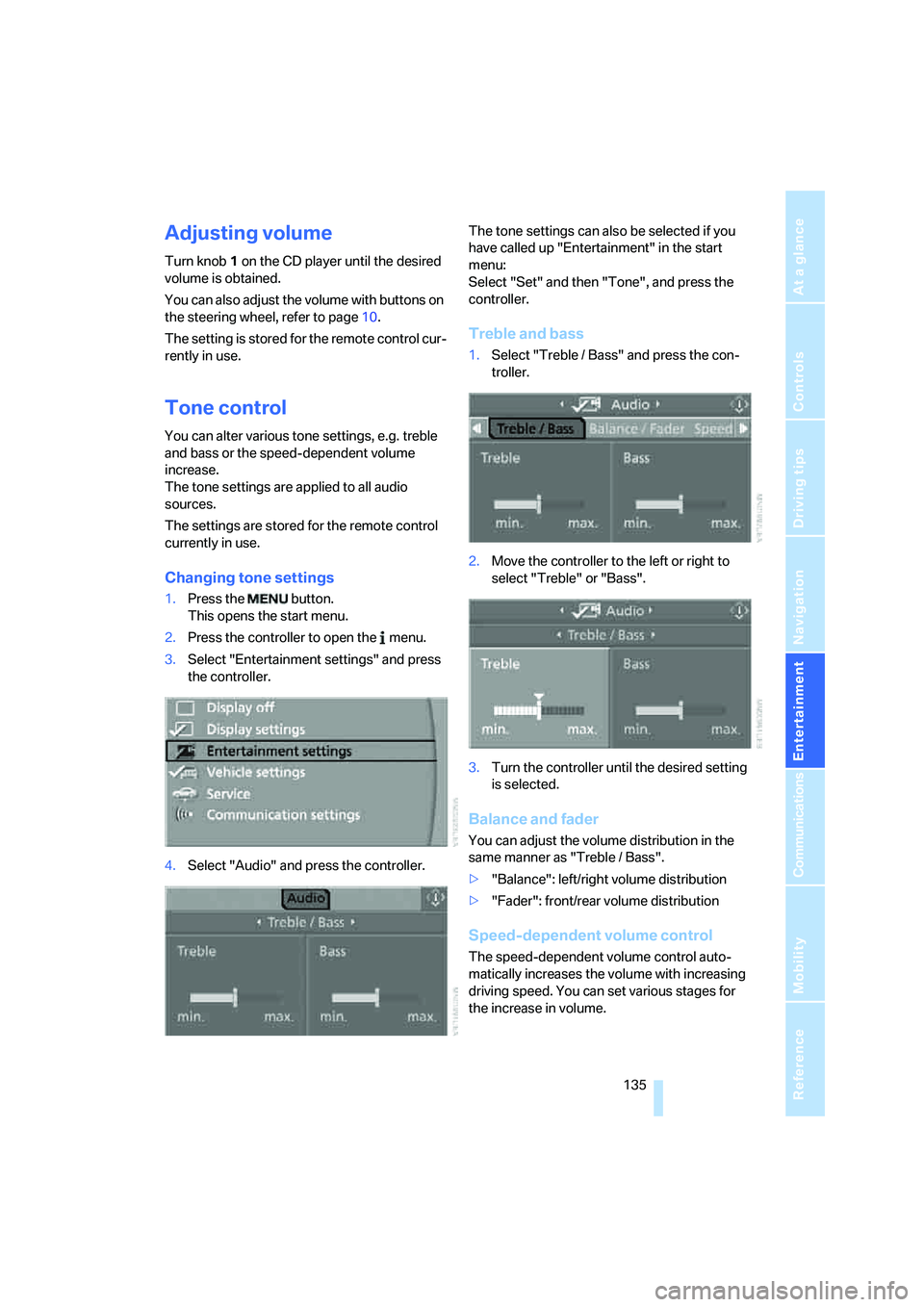
3.Select "Entertainment settings" and press
the controller.
4.Select "Audio" and press the controller.The tone settings can also be selected if you
have called up "Entertainment" in the start
menu:
Select "Set" and then "Tone", and press the
controller.
Treble and bass
1.Select "Treble / Bass" and press the con-
troller.
2.Move the controller to the left or right to
select "Treble" or "Bass".
3.Turn the controller until the desired setting
is selected.
Balance and fader
You can adjust the volume distribution in the
same manner as "Treble / Bass".
>"Balance": left/right volume distribution
>"Fader": front/rear volume distribution
Speed-dependent volume control
The speed-dependent volume control auto-
matically increases the volume with increasing
driving speed. You can set various stages for
the increase in volume.
Page 138 of 223
Navigation
Entertainment
Driving tips
137Reference
At a glance
Controls
Communications
Mobility
Resetting tone settings
You can reset all tone settings to the default
setting.
1.Open the start menu.
2.Press the controller to open the menu.
3.Select "Entertainment settings" and press
the controller.
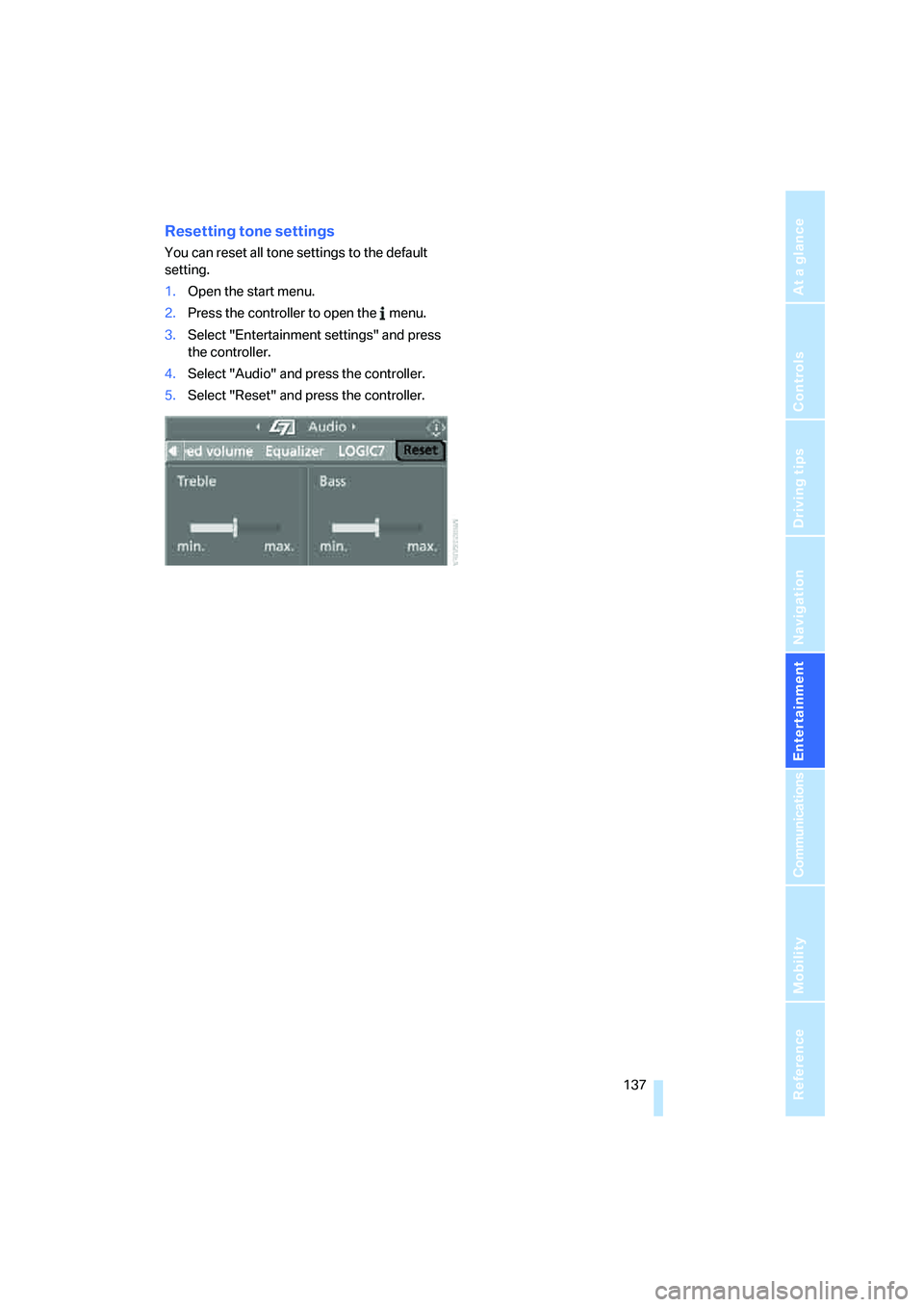
4.Select "Audio" and press the controller.
5.Select "Reset" and press the controller.
Page 146 of 223
Navigation
Entertainment
Driving tips
145Reference
At a glance
Controls
Communications
Mobility
CD player and CD changer
Listening to CDs
Starting the CD player
When equipped with two drives:
The upper drive is for audio CDs.
Insert the CD into the drive with the labeled side
up.
Playback starts automatically if the sound out-
put is on.
To start playback when there is already a CD in
the drive:
iDrive concept, refer to page16.
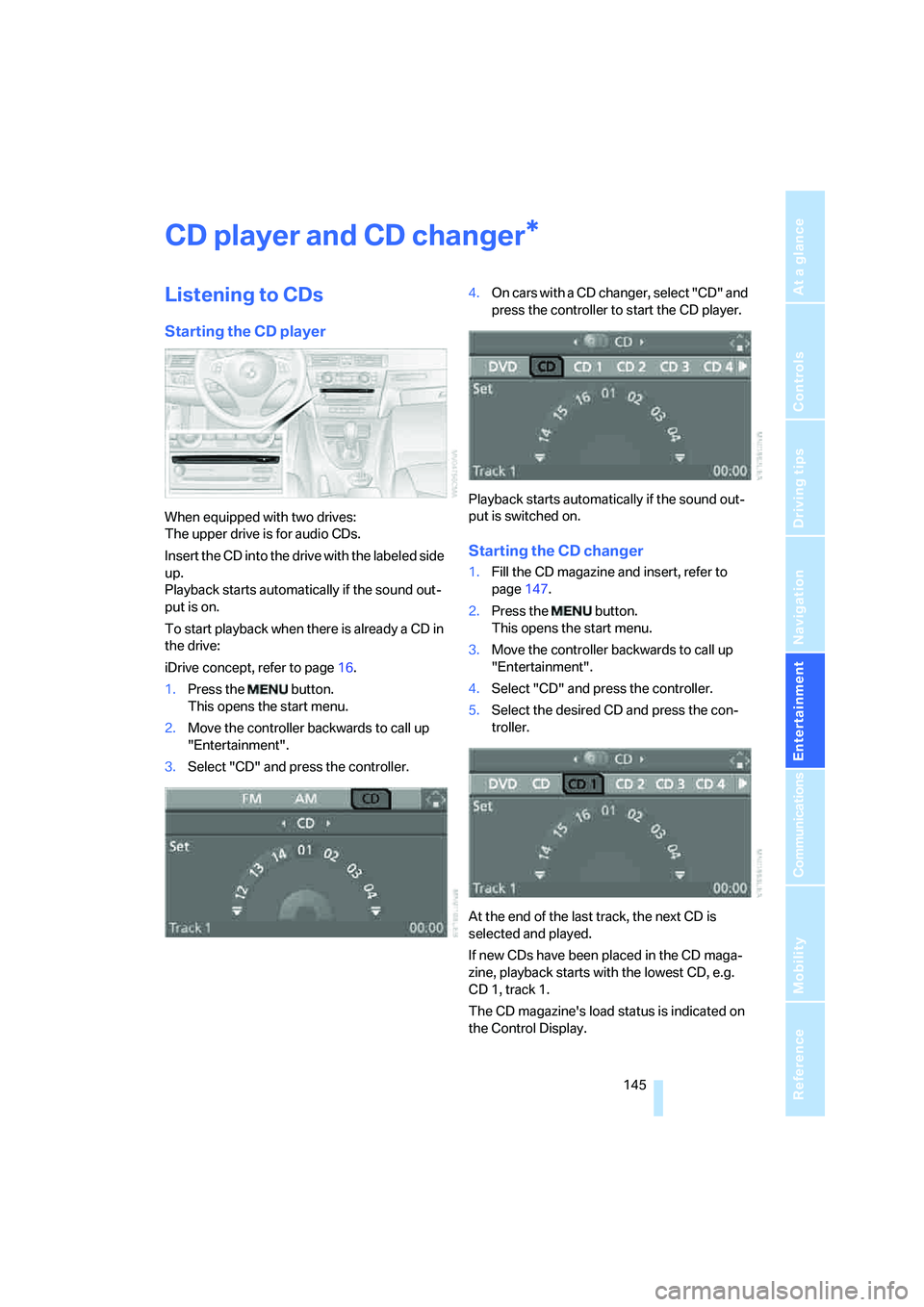
1.Press the button.
This opens the start menu.
2.Move the controller backwards to call up
"Entertainment".
3.Select "CD" and press the controller.4.O n c a r s w i t h a C D c h a n g e r , s e l e c t " C D " a n d
press the controller to start the CD player.
Playback starts automatically if the sound out-
put is switched on.
Starting the CD changer
1.Fill the CD magazine and insert, refer to
page147.
2.Press the button.
This opens the start menu.
3.Move the controller backwards to call up
"Entertainment".
4.Select "CD" and press the controller.
5.Select the desired CD and press the con-
troller.
At the end of the last track, the next CD is
selected and played.
If new CDs have been placed in the CD maga-
zine, playback starts with the lowest CD, e.g.
CD 1, track 1.
The CD magazine's load status is indicated on
the Control Display.
*
Page 150 of 223
Navigation
Entertainment
Driving tips
149Reference
At a glance
Controls
Communications
Mobility
External audio device
You can connect an external audio device, for
instance an MP3 player, and play audio tracks
over the car's loudspeaker system. You can
adjust the tone using iDrive.
Connecting
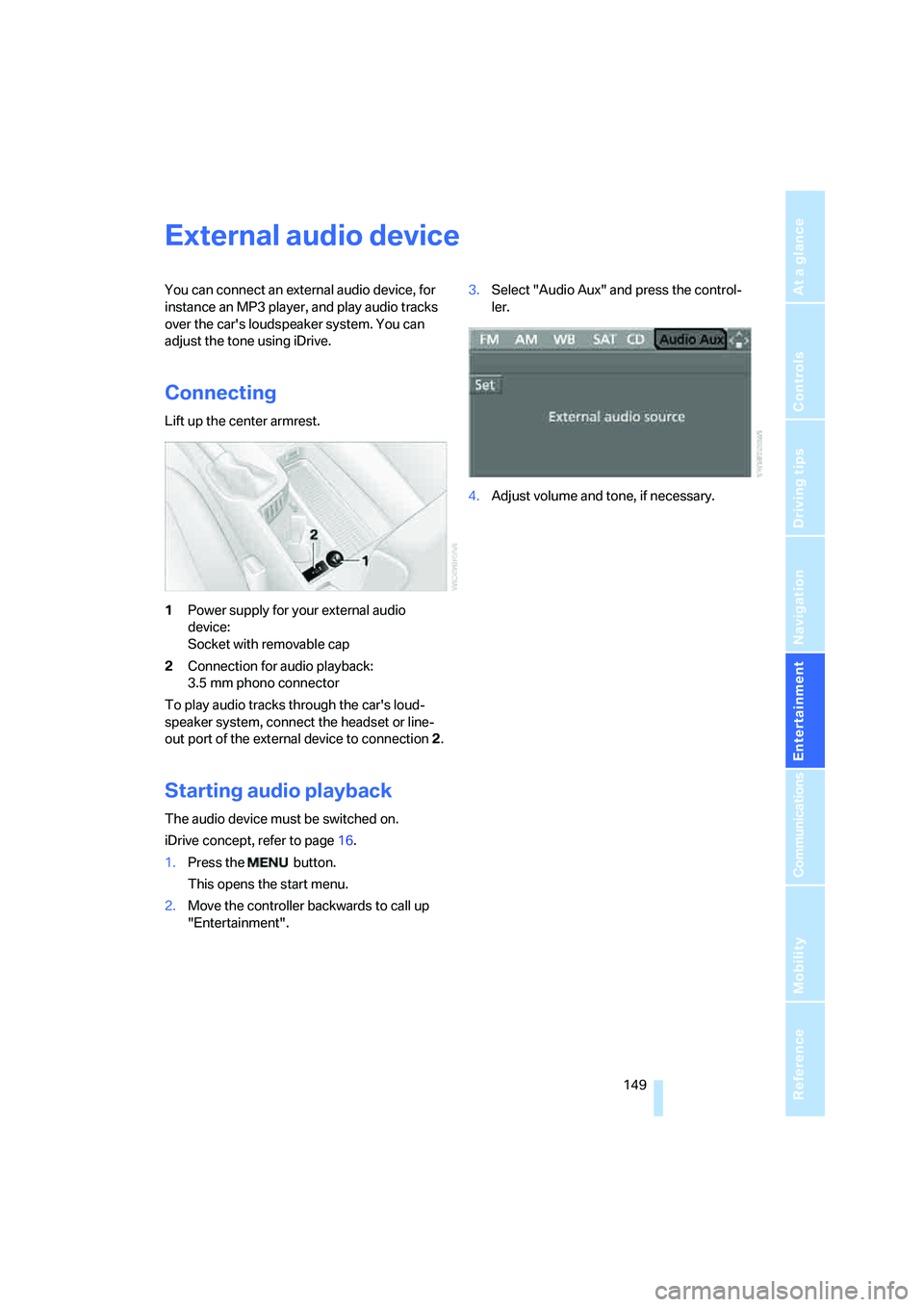
Lift up the center armrest.
1Power supply for your external audio
device:
Socket with removable cap
2Connection for audio playback:
3.5 mm phono connector
To play audio tracks through the car's loud-
speaker system, connect the headset or line-
out port of the external device to connection 2.
Starting audio playback
The audio device must be switched on.
iDrive concept, refer to page16.
1.Press the button.
This opens the start menu.
2.Move the controller backwards to call up
"Entertainment".3.Select "Audio Aux" and press the control-
ler.
4.Adjust volume and tone, if necessary.
Page 154 of 223
153
Entertainment
Reference
At a glance
Controls
Driving tips Communications
Navigation
Mobility
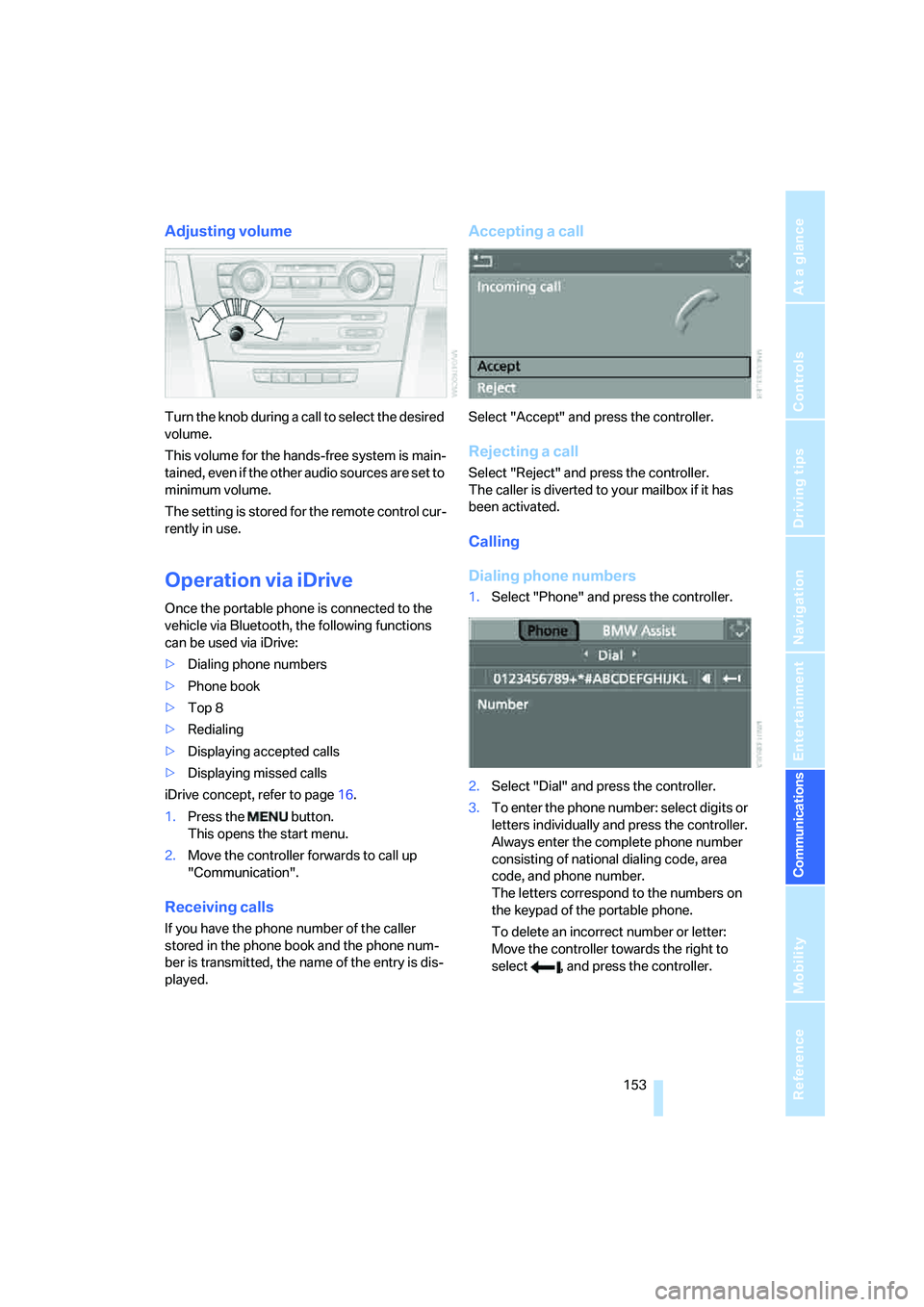
Adjusting volume
Turn the knob during a call to select the desired
volume.
This volume for the hands-free system is main-
tained, even if the other audio sources are set to
minimum volume.
The setting is stored for the remote control cur-
rently in use.
Operation via iDrive
Once the portable phone is connected to the
vehicle via Bluetooth, the following functions
can be used via iDrive:
>Dialing phone numbers
>Phone book
>Top 8
>Redialing
>Displaying accepted calls
>Displaying missed calls
iDrive concept, refer to page16.
1.Press the button.
This opens the start menu.
2.Move the controller forwards to call up
"Communication".
Receiving calls
If you have the phone number of the caller
stored in the phone book and the phone num-
ber is transmitted, the name of the entry is dis-
played.
Accepting a call
Select "Accept" and press the controller.
Rejecting a call
Select "Reject" and press the controller.
The caller is diverted to your mailbox if it has
been activated.
Calling
Dialing phone numbers
1.Select "Phone" and press the controller.
2.Select "Dial" and press the controller.
3.To enter the phone number: select digits or
letters individually and press the controller.
Always enter the complete phone number
consisting of national dialing code, area
code, and phone number.
The letters correspond to the numbers on
the keypad of the portable phone.
To delete an incorrect number or letter:
Move the controller towards the right to
select , and press the controller.
Page 159 of 223
Telephoning
158
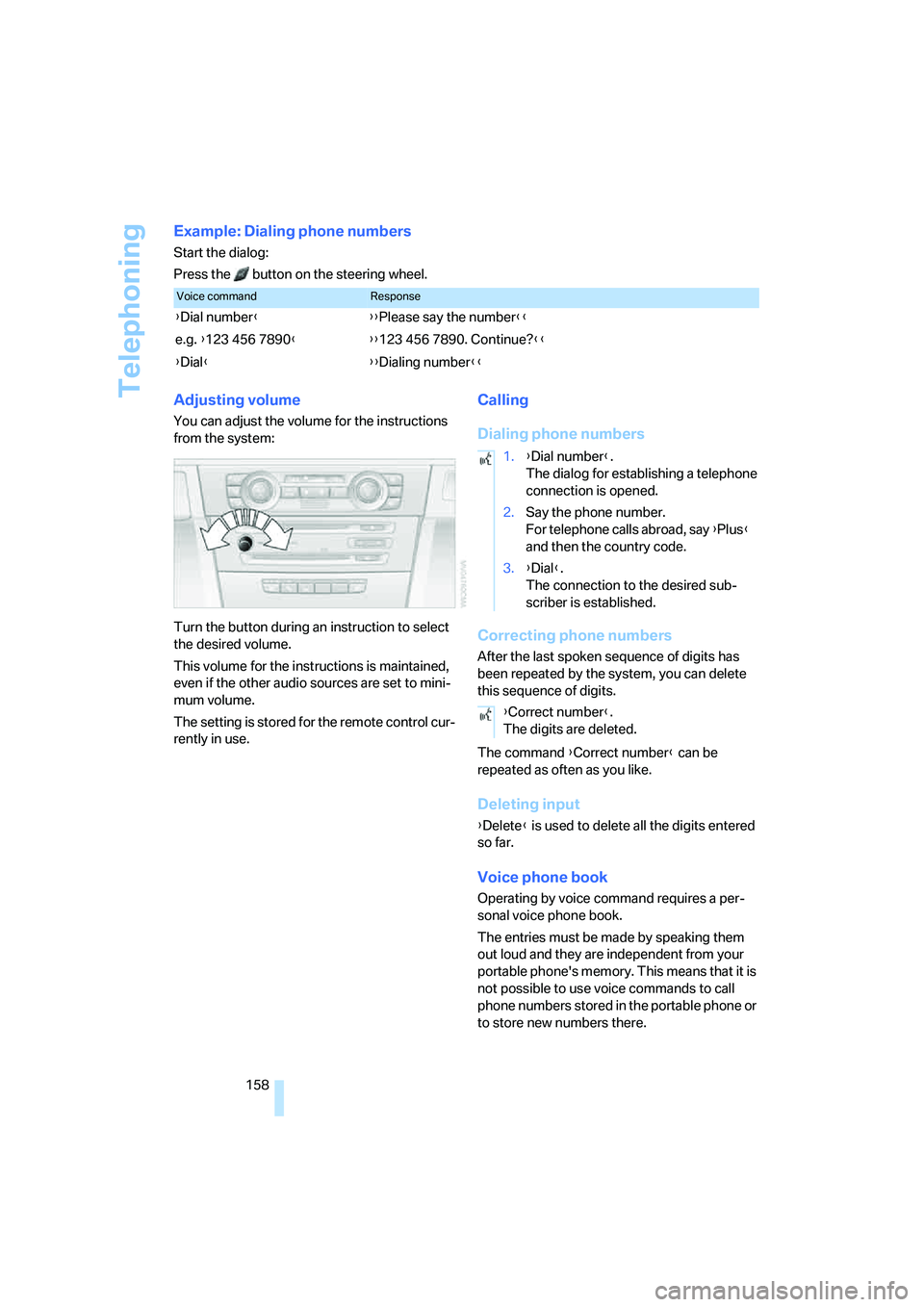
Example: Dialing phone numbers
Start the dialog:
Press the button on the steering wheel.
Adjusting volume
You can adjust the volume for the instructions
from the system:
Turn the button during an instruction to select
the desired volume.
This volume for the instructions is maintained,
even if the other audio sources are set to mini-
mum volume.
The setting is stored for the remote control cur-
rently in use.
Calling
Dialing phone numbers
Correcting phone numbers
After the last spoken sequence of digits has
been repeated by the system, you can delete
this sequence of digits.
The command {Correct number} can be
repeated as often as you like.
Deleting input
{Delete} is used to delete all the digits entered
so far.
Voice phone book
Operating by voice command requires a per-
sonal voice phone book.
The entries must be made by speaking them
out loud and they are independent from your
portable phone's memory. This means that it is
not possible to use voice commands to call
phone numbers stored in the portable phone or
to store new numbers there.
Voice commandResponse
{Dial number}{{Please say the number}}
e.g. {123 456 7890}{{123 456 7890. Continue?}}
{Dial}{{Dialing number}}
1.{Dial number}.
The dialog for establishing a telephone
connection is opened.
2.Say the phone number.
For telephone calls abroad, say {Plus}
and then the country code.
3.{Dial}.
The connection to the desired sub-
scriber is established.
{Correct number}.
The digits are deleted.
Page 204 of 223
Reference 203
At a glance
Controls
Driving tips
Communications
Navigation
Entertainment
Mobility
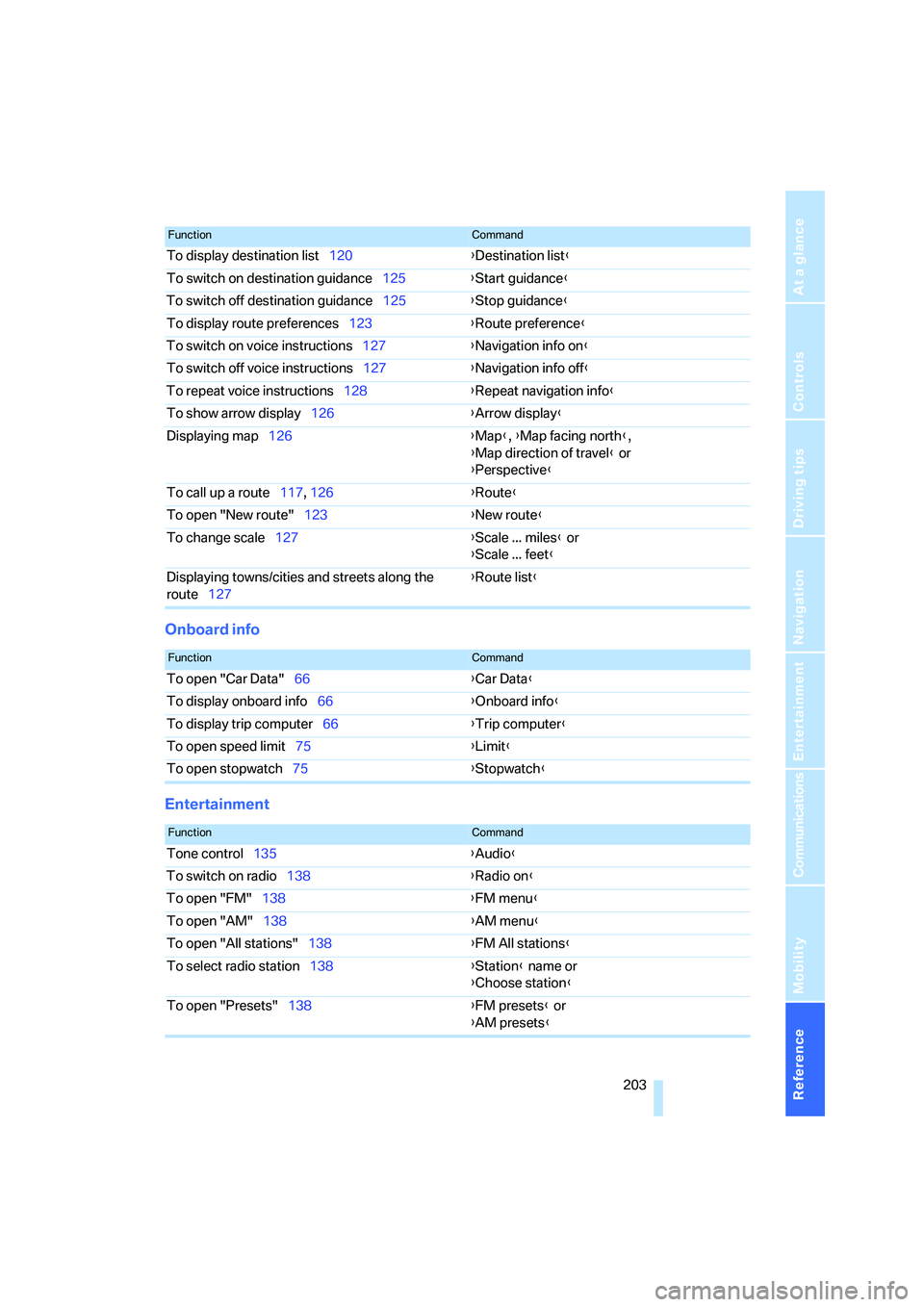
Onboard info
Entertainment
To display destination list120{Destination list}
To switch on destination guidance125{Start guidance}
To switch off destination guidance125{Stop guidance}
To display route preferences123{Route preference}
To switch on voice instructions127{Navigation info on}
To switch off voice instructions127{Navigation info off}
To repeat voice instructions128{Repeat navigation info}
To show arrow display126{Arrow display}
Displaying map126{Map}, {Map facing north},
{Map direction of travel} or
{Perspective}
To call up a route117, 126 {Route}
To open "New route"123{New route}
To change scale127{Scale ... miles} or
{Scale ... feet}
Displaying towns/cities and streets along the
route127{Route list}
FunctionCommand
FunctionCommand
To open "Car Data"66{Car Data}
To display onboard info66{Onboard info}
To display trip computer66{Trip computer}
To open speed limit75{Limit}
To open stopwatch75{Stopwatch}
FunctionCommand
Tone control135{Audio}
To switch on radio138{Radio on}
To open "FM"138{FM menu}
To open "AM"138{AM menu}
To open "All stations"138{FM All stations}
To select radio station138{Station} name or
{Choose station}
To open "Presets"138{FM presets} or
{AM presets}
Page 205 of 223
Short commands for the voice command system
204
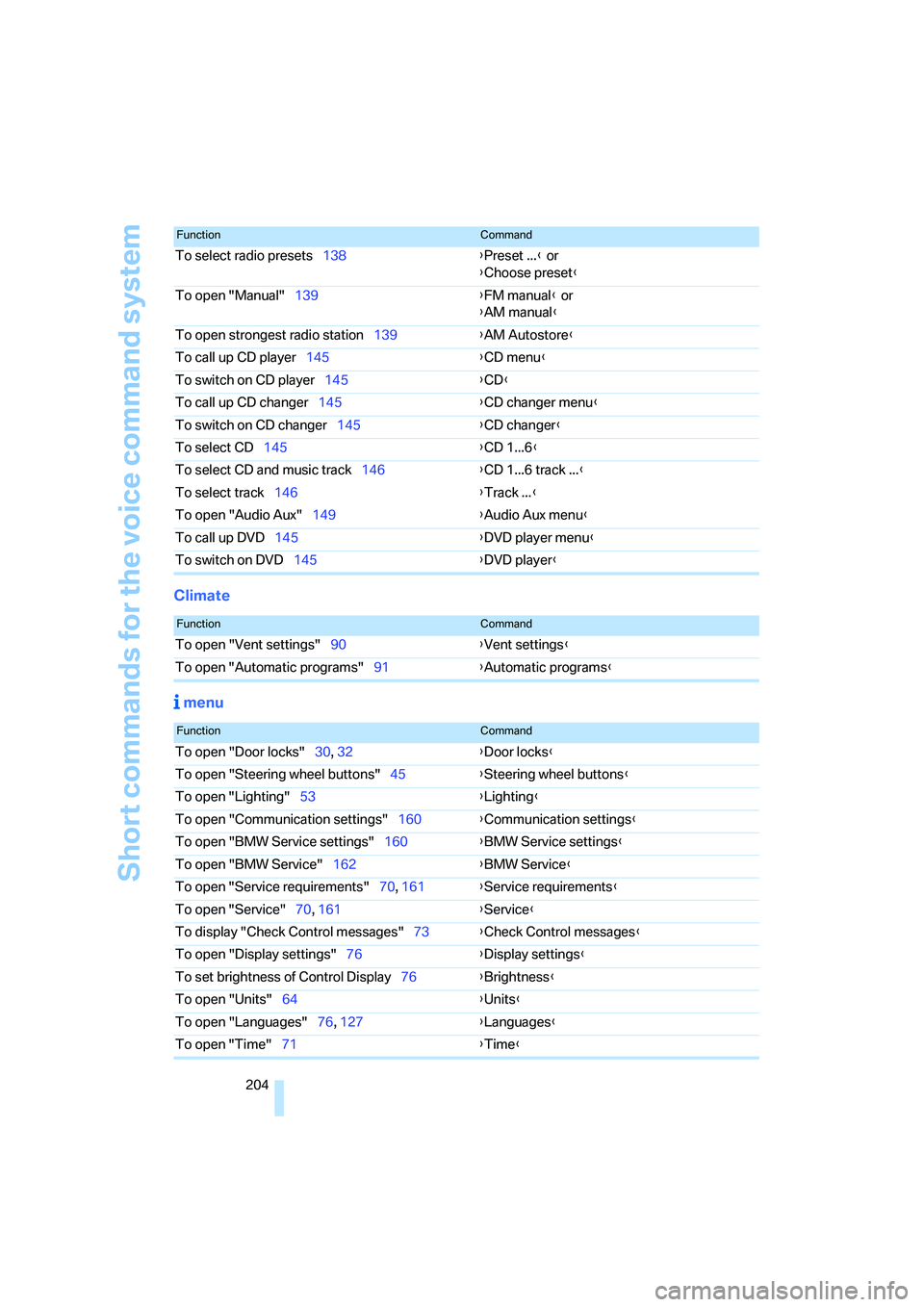
Climate
menu
To select radio presets138{Preset ...} or
{Choose preset}
To open "Manual"139{FM manual} or
{AM manual}
To open strongest radio station139{AM Autostore}
To call up CD player145{CD menu}
To switch on CD player145{CD}
To call up CD changer145{CD changer menu}
To switch on CD changer145{CD changer}
To select CD145{CD 1...6}
To select CD and music track146{CD 1...6 track ...}
To select track146{Track ...}
To open "Audio Aux"149{Audio Aux menu}
To call up DVD145{DVD player menu}
To switch on DVD145{DVD player}
FunctionCommand
FunctionCommand
To open "Vent settings"90{Vent settings}
To open "Automatic programs"91{Automatic programs}
FunctionCommand
To open "Door locks"30, 32{Door locks}
To open "Steering wheel buttons"45{Steering wheel buttons}
To open "Lighting"53{Lighting}
To open "Communication settings"160{Communication settings}
To open "BMW Service settings"160{BMW Service settings}
To open "BMW Service"162{BMW Service}
To open "Service requirements"70, 161{Service requirements}
To open "Service"70, 161{Service}
To display "Check Control messages"73{Check Control messages}
To open "Display settings"76{Display settings}
To set brightness of Control Display76{Brightness}
To open "Units"64{Units}
To open "Languages"76, 127{Languages}
To open "Time"71{Time}
Page 207 of 223
Everything from A - Z
206
Everything from A - Z
Index
"..." Identifies Control Display
texts used to select
individual functions and
refers you to the page where
these texts can be found.
A
ABS Antilock Brake
System78
ACC, refer to Active cruise
control57
Accessories, refer to The
individual vehicle5
Activated-charcoal filter for
automatic climate control92
Active cruise control57
– indicator lamps60
– malfunction61
– selecting distance59
– sensor61
Active steering81
– initializing the system82
– warning lamp82
Adaptive Head Light86
"Add digits" for portable
phone155
Additives
– coolant183
"Address book" in
navigation121
Address for navigation
– deleting122
– entering115
– selecting121
– storing current position121
"Add to destination list"118
Adjusting the temperature
with automatic climate
control90
Adjusting the tone during
audio operation, refer to
Tone control135Adjustment in audio mode
– front-to-rear135
– right/left balance135
Airbags82
– sitting safely38
– warning lamp84
Air distribution
– automatic90
– individual90
Air flow rate91
Airing, refer to Ventilation92
Air pressure, tires170
Air recirculation, refer to
Recirculated-air mode91
"Air recirculation on / off"45
Air vents89
AKI, refer to Fuel
specifications168
Alarm system34
– avoiding unintentional
alarms35
– interior motion sensor35
– switching off an alarm34
– tilt alarm sensor35
"All channels"
142
All-season tires, refer to
Winter tires179
"All stations", calling up on
radio138
"AM", waveband134,138
AM, waveband138
Ambient air, refer to
Recirculated-air mode91
Antenna for portable
phone152
Antifreeze
– coolant183
– washer fluid55
Antilock Brake System ABS
– indicator lamp79
Anti-theft alarm system, refer
to Alarm system34
Anti-theft system29Anti-trapping mechanism
– glass sunroof, electric37
– windows35
Approved axle loads, refer to
Weights201
Approved gross vehicle
weight, refer to Weights201
Armrest, refer to Center
armrest96
Arrival time
– computer66
– destination guidance125
"Arrow display" in
navigation126
Ashtray98
Assist, refer to BMW
Assist160
Assistance systems, refer to
Dynamic Stability Control
DSC78
Assistance window20
AUC Automatic recirculated-
air control91
Audio134
– controls134
– switching on/off134
– tone control135
– volume135
"Audio Aux"134
Audio device, external97
"Audio" tone settings135
"Auto. headlamps"85
Automatic
– air distribution90
– air flow rate90
– cruise control55,57
– headlamp control85
– service notification161
– storing of stations139
Automatic climate control89
– automatic air distribution90
– settings via iDrive90
Automatic curb monitor44
Page 211 of 223
Everything from A - Z
210 Display lighting, refer to
Instrument lighting87
"Display off"21
Displays, refer to Instrument
cluster12
Displays and controls10
"Display settings"72
Disposal
– of coolant183
– vehicle battery191
Distance control, refer to
Active cruise control57
Distance remaining to service,
refer to Service
requirements69
"Distance to dest."66
Distance warning, refer to
PDC Park Distance
Control77
Door key, refer to Integrated
key/remote control28
Door lock31
Door locking, confirmation
signals31
"Door locks"30
Doors, emergency
operation31
DOT Quality Grades176
Draft-free ventilation92
Drinks holders, refer to Cup
holders98
Drive-off assistant80
Driving lamps, refer to Parking
lamps/low beams85
Driving notes106
Driving route, refer to
Displaying route126
Driving stability control
systems78
Driving through water107
Driving tips, refer to Driving
notes106
Dry air, refer to Cooling
function92
DSC Dynamic Stability
Control78
– indicator lamps79DTC Dynamic Traction
Control79
– indicator lamps79
DVD for navigation114
Dynamic Stability Control
DSC
– indicator lamps79
Dynamic Traction Control
DTC
– indicator lamps79
E
EBV Electronic brake-force
distribution78
Eject button, refer to Buttons
on the CD player134
Electrical malfunction
– door lock31
– fuel filler door168
– glass sunroof37
Electric seat adjustment39
Electronic brake-force
distribution78
Electronic oil level check181
Emergency call193
Emergency operation, refer to
Manual operation
– door lock31
– fuel filler door168
– glass sunroof37
– transmission lock, automatic
transmission53
Emergency release of luggage
compartment lid from
luggage compartment's
interior33
Emergency services, refer to
Roadside Assistance193
Emissions test, refer to
Service requirements69
"Enable services"161
"End call"154
Energy-conscious driving,
refer to Energy Control64
Energy Control64Engine
– breaking in106
– data200
– speed200
– starting49
– switching off50
Engine compartment181
Engine coolant, refer to
Coolant183
Engine oil
– adding183
– BMW Maintenance
System185
– checking level181
– intervals between changes,
refer to Service
requirements69
"Engine oil level"182
Engine output, refer to Engine
data200
Engine speed200
Engine starting, refer to
Starting the engine49
"Enter address"116
Entering destination116
Entering the address115
Entering the intersection117
"Entertainment"134
"Entertainment settings"135
Entry map for destination118
"Equalizer", refer to Tone
control136
Error messages, refer to
Check Control73
"ESN"142
ESP Electronic Stability
Program, refer to DSC
Dynamic Stability
Control78
Event data recorders186
Exhaust system, refer to Hot
exhaust system106
Exterior mirrors43
– adjusting43
– automatic dimming
feature107
– automatic heating44
External audio device97,149