brake light BMW 330I 2005 User Guide
[x] Cancel search | Manufacturer: BMW, Model Year: 2005, Model line: 330I, Model: BMW 330I 2005Pages: 223, PDF Size: 7.49 MB
Page 81 of 223
Technology for driving comfort and safety
80 If the warning lamps for DSC come
on. DSC including DTC and DBC is
malfunctioning.
The stabilizing action and brake-
servo boost are no longer available. The vehicle
remains operational. Have the system checked
as soon as possible.
Drive-off assistant
The drive-off assistant enables you to drive off
smoothly on uphill gradients. It is not necessary
to use the handbrake for this.
1.Hold the car in place by pressing the brake
pedal.
2.Release the brake pedal and drive off with-
out delay.
The drive-off assistant holds the car in
place for approx. 2 seconds after the
brake pedal is released. Depending on vehicle
load, the car may roll backwards a little during
this time span. Drive off without delay after
releasing the brake pedal. Otherwise, the drive-
off assistant will no longer hold the car in place
after approx. 2 seconds and the car will start to
roll backwards.<
Malfunction
The warning lamps for the brake sys-
tem light up in yellow. The drive-off
assistant has failed. The car will not
be held in place after the brake pedal
is released. Have the system checked as soon
as possible.
Display of this malfunction on Cana-
dian models.
Flat Tire Monitor FTM
The concept
The Flat Tire Monitor monitors tire pressures
while the car is being driven. The system
reports any significant loss of pressure in one
tire in relation to another.If a tire loses pressure, its rolling radius
changes, and this in turn alters the speed of
rotation. This change is detected and is
reported as a flat tire.
Functional requirement
In order to assure the reliable reporting of a flat
tire, the system must be initialized for the cor-
rect tire inflation pressure.
The system must be reinitialized each
time a tire inflation pressure has been cor-
rected or a wheel or tire has been changed.<
System limitations
The Flat Tire Monitor is unable to warn
the driver of sudden, severe tire damage
caused by external factors, nor can it identify
the gradual loss of pressure that will inevitably
occur in all four tires over a lengthy period of
time.<
In the following situations, the system could be
delayed or malfunction:
>System has not been initialized
>Driving on snowy or slippery road surface
>Performance-oriented style of driving: slip
in the drive wheels, high lateral acceleration
>If snow chains are attached
Initializing the system
The initialization is completed during driv-
ing, which can be interrupted at any time.
When driving resumes, the initialization is con-
tinued automatically.
Do not initialize the system while snow chains
are attached.<
iDrive concept, refer to page16.
1.Press the button.
This opens the start menu.
2.Press the controller to open the menu.
3.Select "Vehicle settings" and press the
controller.
Page 83 of 223
Technology for driving comfort and safety
82 ments. It also varies the steering force required
to turn the wheels depending on the speed at
which you are driving.
When you are driving in the low road-speed
range, e.g. in a town or when parking, the steer-
ing angle increases, i.e. the steering becomes
very direct, and less effort is required to turn the
wheels. In the higher speed range, on the other
hand, the steering angle is reduced more and
more. This improves the handling capability of
your BMW over the entire speed range.
In critical situations, the system can make tar-
geted corrections to the steering angle pro-
vided by the driver and thus stabilize the vehicle
before the driver intervenes. This stabilizing
intervention is simultaneously deactivated
when DSC is switched off, refer to page79.
Malfunction
The warning lamps come on. Active
steering is no longer operational. At
low speeds, greater steering wheel
movements are required, whereas at
higher speeds the vehicle reacts more sensi-
tively to steering wheel movements. Drive cau-
tiously and think well ahead. Have the system
checked.
If the warning lamp lights up during the first
engine starting following a power supply inter-
ruption, the system must be activated by being
initialized.
Initializing the system
1.Start the engine.
2.With the vehicle stationary, turn the steer-
ing wheel from the straight-ahead position
to the left as far as it will go and then back to
the straight-ahead position.
3.Switch off the engine.
When you start the engine again, all the func-
tions of Active steering are available once again.
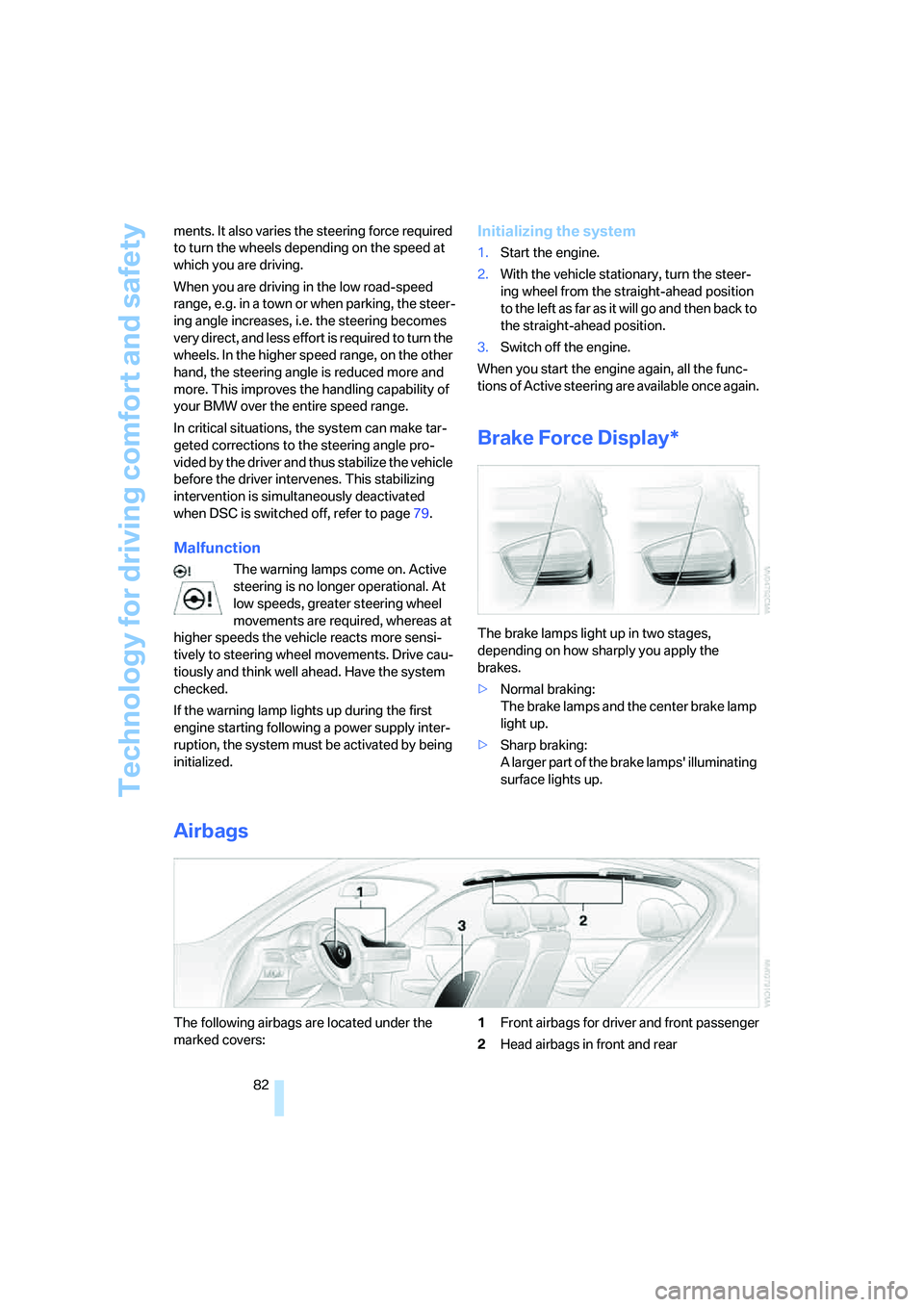
Brake Force Display*
The brake lamps light up in two stages,
depending on how sharply you apply the
brakes.
>Normal braking:
The brake lamps and the center brake lamp
light up.
>Sharp braking:
A larger part of the brake lamps' illuminating
surface lights up.
Airbags
The following airbags are located under the
marked covers:1Front airbags for driver and front passenger
2Head airbags in front and rear
Page 108 of 223
Driving tips
107Reference
At a glance
Controls
Communications
Navigation
Entertainment
Mobility
Interior and exterior mirrors, automatic
dimming feature*
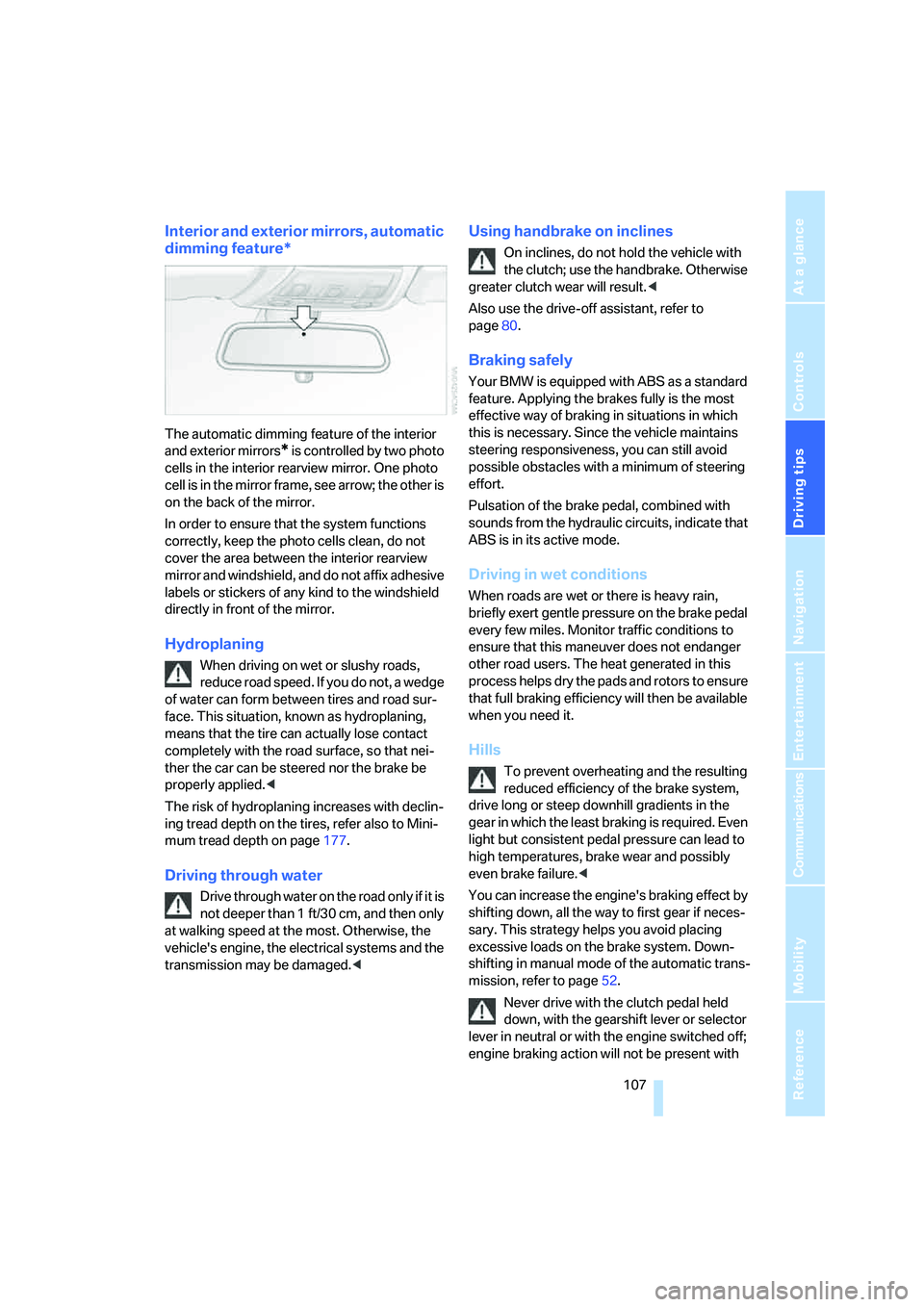
The automatic dimming feature of the interior
and exterior mirrors
* is controlled by two photo
cells in the interior rearview mirror. One photo
cell is in the mirror frame, see arrow; the other is
on the back of the mirror.
In order to ensure that the system functions
correctly, keep the photo cells clean, do not
cover the area between the interior rearview
mirror and windshield, and do not affix adhesive
labels or stickers of any kind to the windshield
directly in front of the mirror.
Hydroplaning
When driving on wet or slushy roads,
reduce road speed. If you do not, a wedge
of water can form between tires and road sur-
face. This situation, known as hydroplaning,
means that the tire can actually lose contact
completely with the road surface, so that nei-
ther the car can be steered nor the brake be
properly applied.<
The risk of hydroplaning increases with declin-
ing tread depth on the tires, refer also to Mini-
mum tread depth on page177.
Driving through water
Drive through water on the road only if it is
not deeper than 1 ft/30 cm, and then only
at walking speed at the most. Otherwise, the
vehicle's engine, the electrical systems and the
transmission may be damaged.<
Using handbrake on inclines
On inclines, do not hold the vehicle with
the clutch; use the handbrake. Otherwise
greater clutch wear will result.<
Also use the drive-off assistant, refer to
page80.
Braking safely
Your BMW is equipped with ABS as a standard
feature. Applying the brakes fully is the most
effective way of braking in situations in which
this is necessary. Since the vehicle maintains
steering responsiveness, you can still avoid
possible obstacles with a minimum of steering
effort.
Pulsation of the brake pedal, combined with
sounds from the hydraulic circuits, indicate that
ABS is in its active mode.
Driving in wet conditions
When roads are wet or there is heavy rain,
briefly exert gentle pressure on the brake pedal
every few miles. Monitor traffic conditions to
ensure that this maneuver does not endanger
other road users. The heat generated in this
process helps dry the pads and rotors to ensure
that full braking efficiency will then be available
when you need it.
Hills
To prevent overheating and the resulting
reduced efficiency of the brake system,
drive long or steep downhill gradients in the
gear in which the least braking is required. Even
light but consistent pedal pressure can lead to
high temperatures, brake wear and possibly
even brake failure.<
You can increase the engine's braking effect by
shifting down, all the way to first gear if neces-
sary. This strategy helps you avoid placing
excessive loads on the brake system. Down-
shifting in manual mode of the automatic trans-
mission, refer to page52.
Never drive with the clutch pedal held
down, with the gearshift lever or selector
lever in neutral or with the engine switched off;
engine braking action will not be present with
Page 182 of 223
Mobility
181Reference
At a glance
Controls
Driving tips
Communications
Navigation
Entertainment
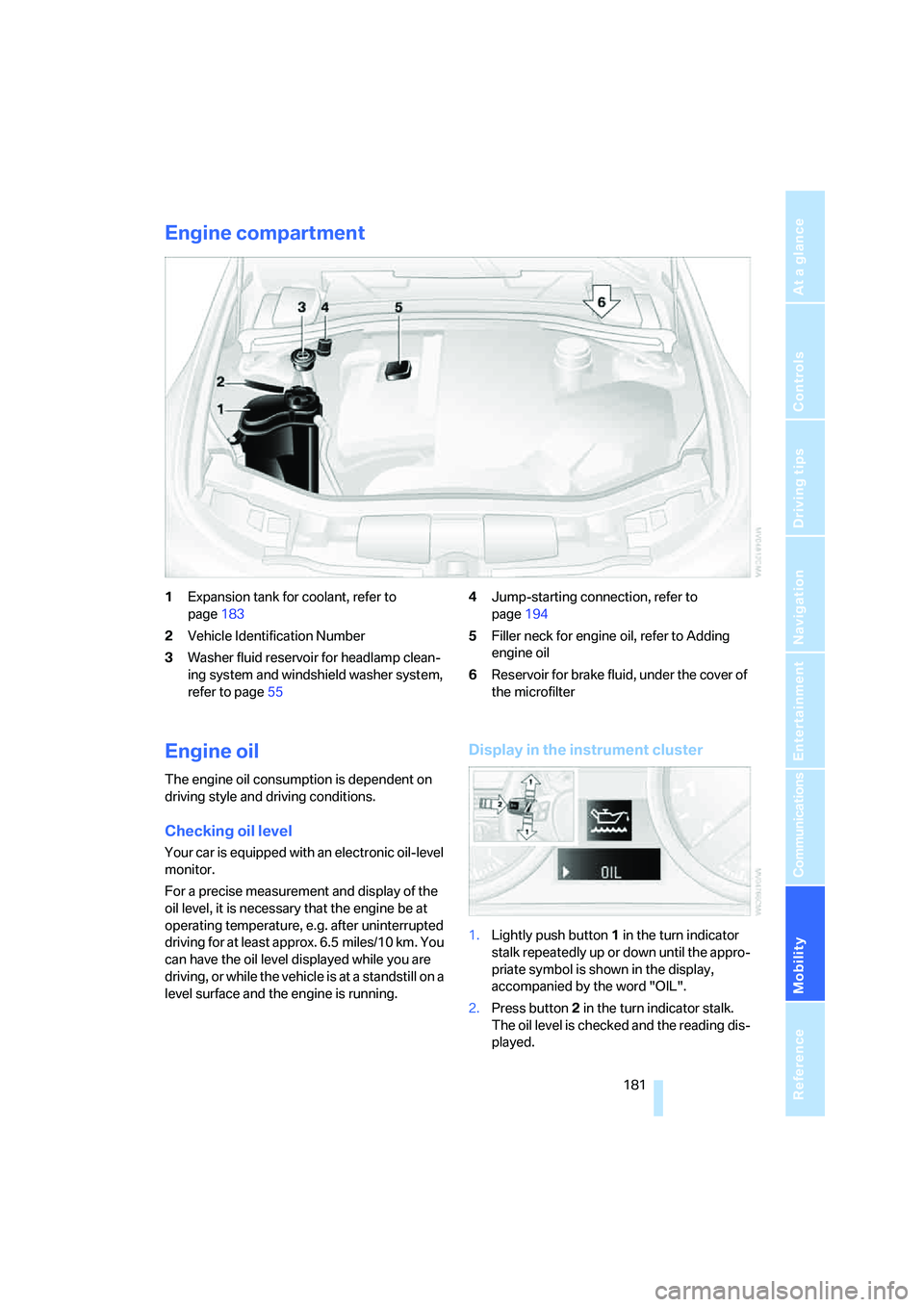
Engine compartment
1Expansion tank for coolant, refer to
page183
2Vehicle Identification Number
3Washer fluid reservoir for headlamp clean-
ing system and windshield washer system,
refer to page554Jump-starting connection, refer to
page194
5Filler neck for engine oil, refer to Adding
engine oil
6Reservoir for brake fluid, under the cover of
the microfilter
Engine oil
The engine oil consumption is dependent on
driving style and driving conditions.
Checking oil level
Your car is equipped with an electronic oil-level
monitor.
For a precise measurement and display of the
oil level, it is necessary that the engine be at
operating temperature, e.g. after uninterrupted
driving for at least approx. 6.5 miles/10 km. You
can have the oil level displayed while you are
driving, or while the vehicle is at a standstill on a
level surface and the engine is running.
Display in the instrument cluster
1.Lightly push button 1 in the turn indicator
stalk repeatedly up or down until the appro-
priate symbol is shown in the display,
accompanied by the word "OIL".
2.Press button 2 in the turn indicator stalk.
The oil level is checked and the reading dis-
played.
Page 185 of 223
Under the hood
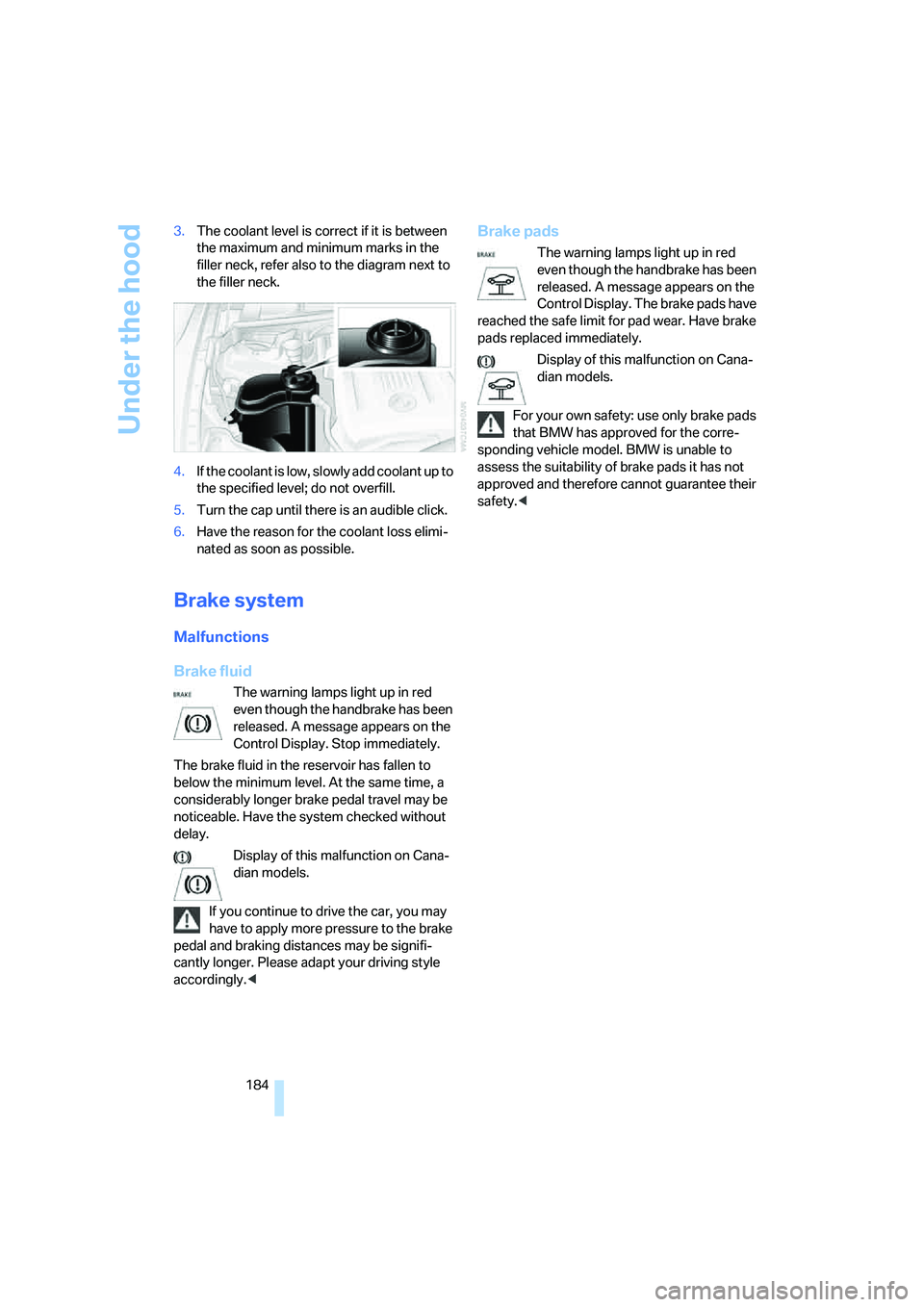
184 3.The coolant level is correct if it is between
the maximum and minimum marks in the
filler neck, refer also to the diagram next to
the filler neck.
4.If the coolant is low, slowly add coolant up to
the specified level; do not overfill.
5.Turn the cap until there is an audible click.
6.Have the reason for the coolant loss elimi-
nated as soon as possible.
Brake system
Malfunctions
Brake fluid
The warning lamps light up in red
even though the handbrake has been
released. A message appears on the
Control Display. Stop immediately.
The brake fluid in the reservoir has fallen to
below the minimum level. At the same time, a
considerably longer brake pedal travel may be
noticeable. Have the system checked without
delay.
Display of this malfunction on Cana-
dian models.
If you continue to drive the car, you may
have to apply more pressure to the brake
pedal and braking distances may be signifi-
cantly longer. Please adapt your driving style
accordingly.<
Brake pads
The warning lamps light up in red
even though the handbrake has been
released. A message appears on the
Control Display. The brake pads have
reached the safe limit for pad wear. Have brake
pads replaced immediately.
Display of this malfunction on Cana-
dian models.
For your own safety: use only brake pads
that BMW has approved for the corre-
sponding vehicle model. BMW is unable to
assess the suitability of brake pads it has not
approved and therefore cannot guarantee their
safety.<
Page 207 of 223
Everything from A - Z
206
Everything from A - Z
Index
"..." Identifies Control Display
texts used to select
individual functions and
refers you to the page where
these texts can be found.
A
ABS Antilock Brake
System78
ACC, refer to Active cruise
control57
Accessories, refer to The
individual vehicle5
Activated-charcoal filter for
automatic climate control92
Active cruise control57
– indicator lamps60
– malfunction61
– selecting distance59
– sensor61
Active steering81
– initializing the system82
– warning lamp82
Adaptive Head Light86
"Add digits" for portable
phone155
Additives
– coolant183
"Address book" in
navigation121
Address for navigation
– deleting122
– entering115
– selecting121
– storing current position121
"Add to destination list"118
Adjusting the temperature
with automatic climate
control90
Adjusting the tone during
audio operation, refer to
Tone control135Adjustment in audio mode
– front-to-rear135
– right/left balance135
Airbags82
– sitting safely38
– warning lamp84
Air distribution
– automatic90
– individual90
Air flow rate91
Airing, refer to Ventilation92
Air pressure, tires170
Air recirculation, refer to
Recirculated-air mode91
"Air recirculation on / off"45
Air vents89
AKI, refer to Fuel
specifications168
Alarm system34
– avoiding unintentional
alarms35
– interior motion sensor35
– switching off an alarm34
– tilt alarm sensor35
"All channels"
142
All-season tires, refer to
Winter tires179
"All stations", calling up on
radio138
"AM", waveband134,138
AM, waveband138
Ambient air, refer to
Recirculated-air mode91
Antenna for portable
phone152
Antifreeze
– coolant183
– washer fluid55
Antilock Brake System ABS
– indicator lamp79
Anti-theft alarm system, refer
to Alarm system34
Anti-theft system29Anti-trapping mechanism
– glass sunroof, electric37
– windows35
Approved axle loads, refer to
Weights201
Approved gross vehicle
weight, refer to Weights201
Armrest, refer to Center
armrest96
Arrival time
– computer66
– destination guidance125
"Arrow display" in
navigation126
Ashtray98
Assist, refer to BMW
Assist160
Assistance systems, refer to
Dynamic Stability Control
DSC78
Assistance window20
AUC Automatic recirculated-
air control91
Audio134
– controls134
– switching on/off134
– tone control135
– volume135
"Audio Aux"134
Audio device, external97
"Audio" tone settings135
"Auto. headlamps"85
Automatic
– air distribution90
– air flow rate90
– cruise control55,57
– headlamp control85
– service notification161
– storing of stations139
Automatic climate control89
– automatic air distribution90
– settings via iDrive90
Automatic curb monitor44
Page 209 of 223
Everything from A - Z
208 Car battery, refer to Vehicle
battery191
Car care, refer to Caring for
your vehicle brochure
Car-care products, refer to
Caring for your vehicle
brochure
"Car Data"66
Care, refer to Caring for your
vehicle brochure
Cargo, securing109
Cargo loading
– stowing cargo109
– vehicle108
Caring for artificial leather,
refer to Caring for your
vehicle brochure
Caring for leather, refer to
Caring for your vehicle
brochure
Caring for light-alloy wheels,
refer to Caring for your
vehicle brochure
Caring for plastic, refer to
Caring for your vehicle
brochure
Caring for the carpet, refer to
Caring for your vehicle
brochure
Caring for the vehicle finish,
refer to Caring for your
vehicle brochure
Car jack
– jacking points191
Car key, refer to Integrated
key/remote control28
Car phone152
– installation location, refer to
Center armrest96
– refer to Portable phone152
– refer to separate Owner's
Manual
Car radio, refer to Radio138
Car wash108
– also refer to Caring for your
vehicle brochure
Catalytic converter, refer to
Hot exhaust system106
"Categories"142CBS Condition Based
Service185
"CD"134,145
CD changer145
– controls134
– fast forward/reverse147
– installation location147
– playing a track146
– random order147
– repeating a track146
– selecting a CD145
– selecting a track146
– switching on/off134
– tone control135
– volume135
CD player145
– controls134
– fast forward/reverse147
– playing a track
146
– random order147
– repeating a track146
– selecting a track146
– switching on/off134
– tone control135
– volume135
Center armrest96
Center brake lamp
– replacing bulbs190
Center console, refer to
Around the center
console14
"Central locking"30
Central locking
– from inside32
– from outside29
Central locking system29
Changing bulbs187
Changing the language on the
Control Display76
Changing the measurement
units on the Control
Display68
Changing wheels191
Chassis number, refer to
Engine compartment181
Check Control73
"Check Control
messages"75
Check Gas Cap168Checking the air pressure,
refer to Tire inflation
pressure170
Child-restraint fixing system
LATCH48
Child-restraint systems46
Child-safety lock48
Child seats46
Chrome parts, care, refer to
Caring for your vehicle
brochure
Cigarette lighter99
– socket99
Cleaning, refer to Caring for
your vehicle brochure
Cleaning headlamps54
– washer fluid55
"Climate"90
Clock64
– 12h/24h mode72
– setting time71
Closing
– from inside32
– from outside30
Clothes hooks97
Cold start, refer to Starting the
engine49
Combined instrument, refer to
Instrument cluster12
Comfort area, refer to Around
the center console14
"Communication"153
"Communication
settings"160
Compact disc, refer to
– CD changer145
– CD player145
Compact wheel
– inflation pressure
172,173,174,175
Compartment for remote
control, refer to Ignition
lock49
Compass94
Computer65
– displays on Control
Display66
– hour signal72
Computer, refer to iDrive16
Page 210 of 223
Reference 209
At a glance
Controls
Driving tips
Communications
Navigation
Entertainment
Mobility
"Concert hall" tone
settings136
Condensation, refer to When
the vehicle is parked108
Configuring settings, refer to
Personal Profile29
Confirmation signals for
locking/unlocking of the
vehicle31
Connecting vacuum cleaner,
refer to Connecting
electrical appliances99
Consumption display
– average consumption66
Consumption indicator
– Energy Control64
"Continue guidance to
destination?"126
Control Center, refer to
iDrive16
Control Display, refer to
iDrive16
Controller, refer to iDrive16
Controls and displays10
Convenience operation
– windows30
Convenience start, refer to
Starting the engine49
Coolant183
– adding183
– checking level183
Cooling, maximum90
Cooling fluid, refer to
Coolant183
Country of destination for
navigation116
Courtesy lamps87
Cruise control55
– active57
– malfunction57
Cruising range65
Cup holders98
Curb weight, refer to
Weights201
Current fuel consumption64
"Current position"129Current position
– displaying129
– entering121
– storing121
"Customer
Relations"162,164
D
Dashboard, refer to
Cockpit10
Dashboard lighting, refer to
Instrument lighting87
Data200
– capacities201
– dimensions200
– engine200
– weights201
"Date"73
Date
– setting72
– setting format73
"Date format"73
Daytime driving lamps86
DBC Dynamic Brake
Control78
Deactivating front passenger
airbags83
Deadlocking, refer to
Locking30
Decommissioning the vehicle
– refer to Caring for your
vehicle brochure
Defect
– fuel filler door168
– glass sunroof37
Defogging windows91
Defroster
– rear window92
Defrosting windows91
Defrosting windows and
removing condensation91
Defrost position, refer to
Defrosting windows91
"Delete address book" in
navigation122
"Delete all numbers" on the
portable phone156"Delete data" in
navigation122
"Delete" for portable
phone156
Destination address
– deleting122
– entering115
Destination for navigation
– entry115
– navigation list120
– selecting from address
book121
– selecting using
information119
– storing121
Destination guidance125
– canceling voice
instructions45
– changing specified
route123
– displaying routes126
– distance and arrival125
– interrupting125
– starting125
– terminating/continuing125
– voice instructions127
– volume of voice
instructions128
Destination list for navigation
system120
Destinations recently driven
to120
"Dial" for portable phone153
"Dial number"154
Digital clock64
Digital compass94
Dimensions200
Directional indicators, refer to
Turn signals53
Direction instructions, refer to
Voice instructions127
Directory, refer to Phone
book154
Directory for navigation, refer
to Address book121
Displacement, refer to Engine
data200
Display, refer to iDrive
controls16
Page 211 of 223
Everything from A - Z
210 Display lighting, refer to
Instrument lighting87
"Display off"21
Displays, refer to Instrument
cluster12
Displays and controls10
"Display settings"72
Disposal
– of coolant183
– vehicle battery191
Distance control, refer to
Active cruise control57
Distance remaining to service,
refer to Service
requirements69
"Distance to dest."66
Distance warning, refer to
PDC Park Distance
Control77
Door key, refer to Integrated
key/remote control28
Door lock31
Door locking, confirmation
signals31
"Door locks"30
Doors, emergency
operation31
DOT Quality Grades176
Draft-free ventilation92
Drinks holders, refer to Cup
holders98
Drive-off assistant80
Driving lamps, refer to Parking
lamps/low beams85
Driving notes106
Driving route, refer to
Displaying route126
Driving stability control
systems78
Driving through water107
Driving tips, refer to Driving
notes106
Dry air, refer to Cooling
function92
DSC Dynamic Stability
Control78
– indicator lamps79DTC Dynamic Traction
Control79
– indicator lamps79
DVD for navigation114
Dynamic Stability Control
DSC
– indicator lamps79
Dynamic Traction Control
DTC
– indicator lamps79
E
EBV Electronic brake-force
distribution78
Eject button, refer to Buttons
on the CD player134
Electrical malfunction
– door lock31
– fuel filler door168
– glass sunroof37
Electric seat adjustment39
Electronic brake-force
distribution78
Electronic oil level check181
Emergency call193
Emergency operation, refer to
Manual operation
– door lock31
– fuel filler door168
– glass sunroof37
– transmission lock, automatic
transmission53
Emergency release of luggage
compartment lid from
luggage compartment's
interior33
Emergency services, refer to
Roadside Assistance193
Emissions test, refer to
Service requirements69
"Enable services"161
"End call"154
Energy-conscious driving,
refer to Energy Control64
Energy Control64Engine
– breaking in106
– data200
– speed200
– starting49
– switching off50
Engine compartment181
Engine coolant, refer to
Coolant183
Engine oil
– adding183
– BMW Maintenance
System185
– checking level181
– intervals between changes,
refer to Service
requirements69
"Engine oil level"182
Engine output, refer to Engine
data200
Engine speed200
Engine starting, refer to
Starting the engine49
"Enter address"116
Entering destination116
Entering the address115
Entering the intersection117
"Entertainment"134
"Entertainment settings"135
Entry map for destination118
"Equalizer", refer to Tone
control136
Error messages, refer to
Check Control73
"ESN"142
ESP Electronic Stability
Program, refer to DSC
Dynamic Stability
Control78
Event data recorders186
Exhaust system, refer to Hot
exhaust system106
Exterior mirrors43
– adjusting43
– automatic dimming
feature107
– automatic heating44
External audio device97,149
Page 212 of 223
Reference 211
At a glance
Controls
Driving tips
Communications
Navigation
Entertainment
Mobility
Eyes
– for tow-starting and towing
away195
– for tying down loads109
F
Fader, tone control135
Failure messages, refer to
Check Control73
Failure of an electrical
consumer192
False alarm, refer to Avoiding
unintentional alarms35
Fastening safety belts, refer to
Safety belts43
Fastest route for
navigation123
Fast forward
– CD changer147
– CD player147
"Fast route" in navigation123
Filter
– refer to Microfilter/activated-
charcoal filter for automatic
climate control92
First-aid kit193
Fixture for remote control,
refer to Ignition lock49
Flashlight, refer to
Rechargeable flashlight96
Flash when locking/
unlocking31
Flat
– Run-Flat Tires178
Flat Tire Monitor
– snow chains179
Flat Tire Monitor FTM80
– indicating a flat tire81
– initializing the system80
– malfunction81
– system limits80
Flat tires, refer to Tire
condition177
"FM", waveband134,138
FM, waveband138
Fog lamps87
– indicator lamp13,87Footbrake, refer to Braking
safely107
Footwell lamps87
Front airbags82
Front seat adjustment39
"FTM"81
FTM, refer to Flat Tire
Monitor80
Fuel168
– display65
– high-quality brands168
– quality168
– specifications168
– tank capacity201
Fuel clock, refer to Fuel
gauge65
Fuel consumption, refer to
Average fuel
consumption66
Fuel display, refer to Fuel
gauge65
Fuel filler door168
– releasing in the event of
electrical malfunction168
Fuses192
G
Garage door opener, refer to
Integrated universal remote
control93
Gasoline, refer to Required
fuel168
Gasoline display, refer to Fuel
gauge65
Gasoline engine, checking oil
level181
Gear indicator, for automatic
transmission51
Gearshift lever
– automatic transmission with
Steptronic52
– manual transmission51
Gearshifts
– with automatic
transmission52
– with manual transmission51
General driving notes106Glass sunroof, electric36
– anti-trapping mechanism37
– closing after electrical
malfunction37
– convenient operation30,31
– opening, closing36
– raising36
– remote control30
Glove compartment96
– rechargeable flashlight96
GPS navigation, refer to
Navigation system114
Grills89
Gross vehicle weight, refer to
Weights201
H
Halogen lamps
– replacing bulbs188
Handbrake51
– indicator lamp51
Hand lamp, refer to
Rechargeable flashlight96
Hands-free system14,152
Hazard warning flashers14
Head airbags82
Headlamp control,
automatic85
Headlamp cover188
Headlamp flasher53
– indicator lamp11,13
Headlamps
– care, refer to Caring for your
vehicle brochure
– replacing bulbs188
Head restraints40
– sitting safely38
Heated
– mirrors44
– rear window92
– seats41
Heating
– mirrors44
– seats41
Heating while at a standstill,
refer to Using residual
heat91