buttons BMW 330I 2005 User Guide
[x] Cancel search | Manufacturer: BMW, Model Year: 2005, Model line: 330I, Model: BMW 330I 2005Pages: 223, PDF Size: 7.49 MB
Page 140 of 223
Navigation
Entertainment
Driving tips
139Reference
At a glance
Controls
Communications
Mobility
Buttons on the CD player
Press the button for the corre-
sponding direction.
The system switches to the next displayed sta-
tion.
You can also change stations with buttons on
the steering wheel, refer to page10.
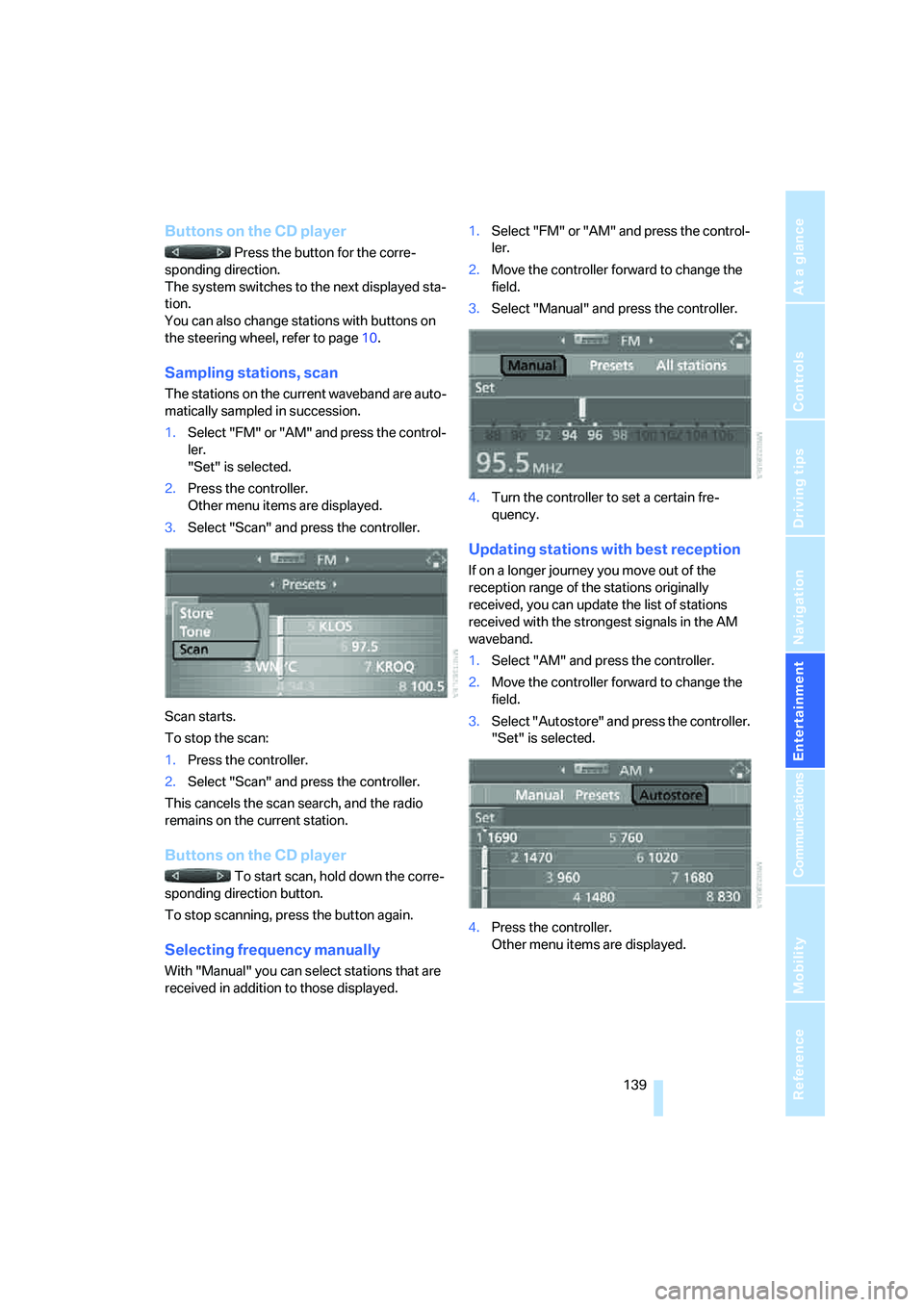
Sampling stations, scan
The stations on the current waveband are auto-
matically sampled in succession.
1.Select "FM" or "AM" and press the control-
ler.
"Set" is selected.
2.Press the controller.
Other menu items are displayed.
3.Select "Scan" and press the controller.
Scan starts.
To stop the scan:
1.Press the controller.
2.Select "Scan" and press the controller.
This cancels the scan search, and the radio
remains on the current station.
Buttons on the CD player
To start scan, hold down the corre-
sponding direction button.
To stop scanning, press the button again.
Selecting frequency manually
With "Manual" you can select stations that are
received in addition to those displayed.1.Select "FM" or "AM" and press the control-
ler.
2.Move the controller forward to change the
field.
3.Select "Manual" and press the controller.
4.Turn the controller to set a certain fre-
quency.
Updating stations with best reception
If on a longer journey you move out of the
reception range of the stations originally
received, you can update the list of stations
received with the strongest signals in the AM
waveband.
1.Select "AM" and press the controller.
2.Move the controller forward to change the
field.
3.Select "Autostore" and press the controller.
"Set" is selected.
4.Press the controller.
Other menu items are displayed.
Page 145 of 223
Radio
144
Changing channels with buttons on CD
player
Press the button for the corresponding
direction.
The system switches to the next enabled chan-
nel.
Notes
When there is a signal blockage or the transmis-
sion is suspended momentarily for more than
4 seconds, a message appears on the Control
Display.
Service may be interrupted or unavailable
for specific reasons such as environmen-
tal or topographic conditions and others that
satellite radio cannot directly control.
Signal may not be available under tunnels, in
parking garages, next to tall buildings, nearby
trees with dense foliage, nearby mountains or
other possible strong sources of radio interfer-
ence.
Service should resume normally after the
source of signal unavailability has been
cleared.<
Page 147 of 223
CD player and CD changer
146
Selecting a track
Buttons on the CD player
Press the button for the appropriate
direction as often as necessary until the desired
track on the current CD is reached.
The CD starts to play at the start of the track.
The track is displayed on the Control Display.
You can also change the track with buttons on
the steering wheel, refer to page10.
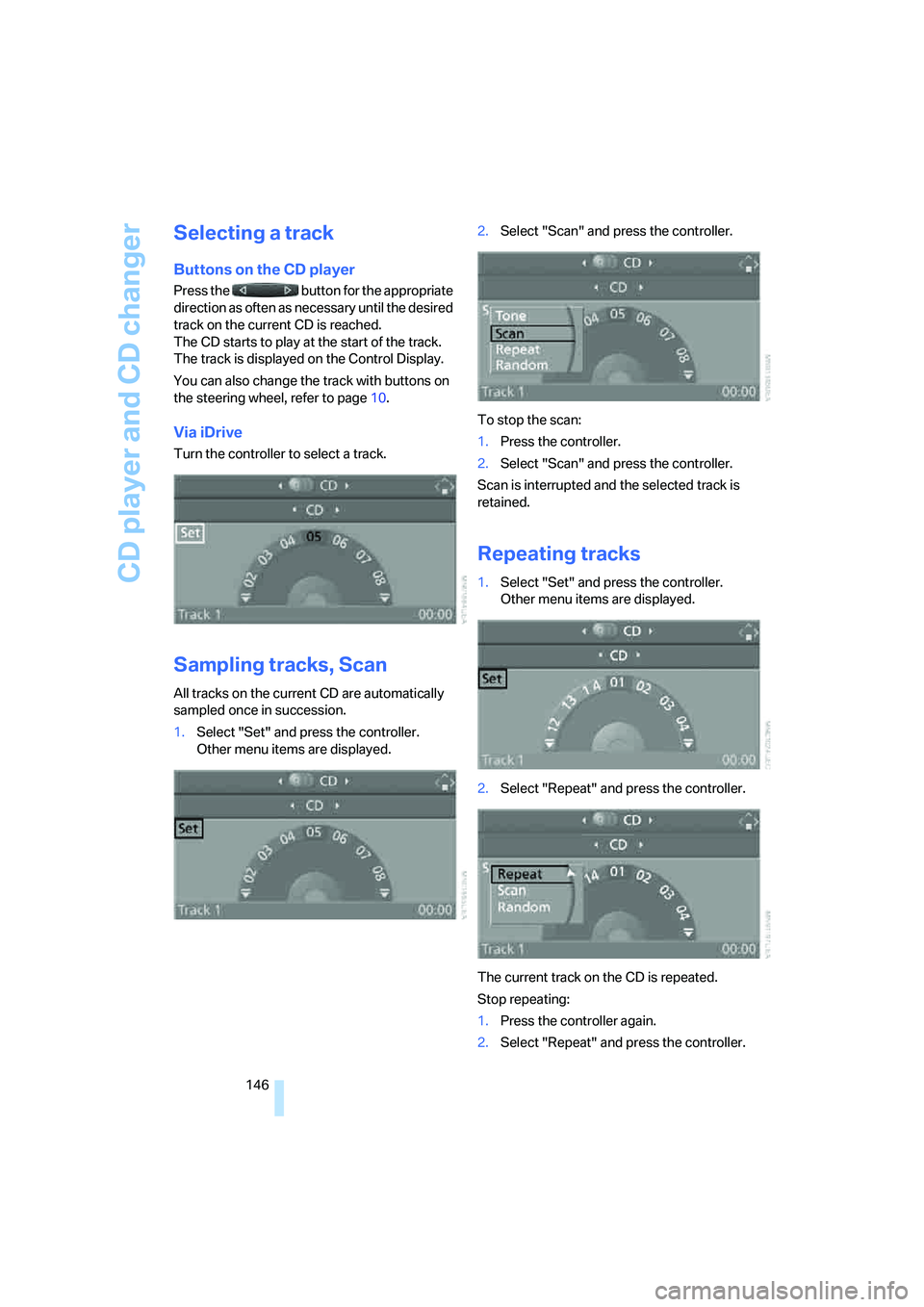
Via iDrive
Turn the controller to select a track.
Sampling tracks, Scan
All tracks on the current CD are automatically
sampled once in succession.
1.Select "Set" and press the controller.
Other menu items are displayed.2.Select "Scan" and press the controller.
To stop the scan:
1.Press the controller.
2.Select "Scan" and press the controller.
Scan is interrupted and the selected track is
retained.
Repeating tracks
1.Select "Set" and press the controller.
Other menu items are displayed.
2.Select "Repeat" and press the controller.
The current track on the CD is repeated.
Stop repeating:
1.Press the controller again.
2.Select "Repeat" and press the controller.
Page 148 of 223
Navigation
Entertainment
Driving tips
147Reference
At a glance
Controls
Communications
Mobility
Random play sequence
The tracks on the current CD are played once
each in random order.
1.Select "Set" and press the controller.
Other menu items are displayed.
2.Select "Random" and press the controller.
Stop random function:
1.Press the controller.
2.Select "Random" and press the controller.
Fast forward/reverse
Buttons on the CD player:
Press and hold the button for the
corresponding direction.
The tracks can be heard, but reproduction is
distorted.
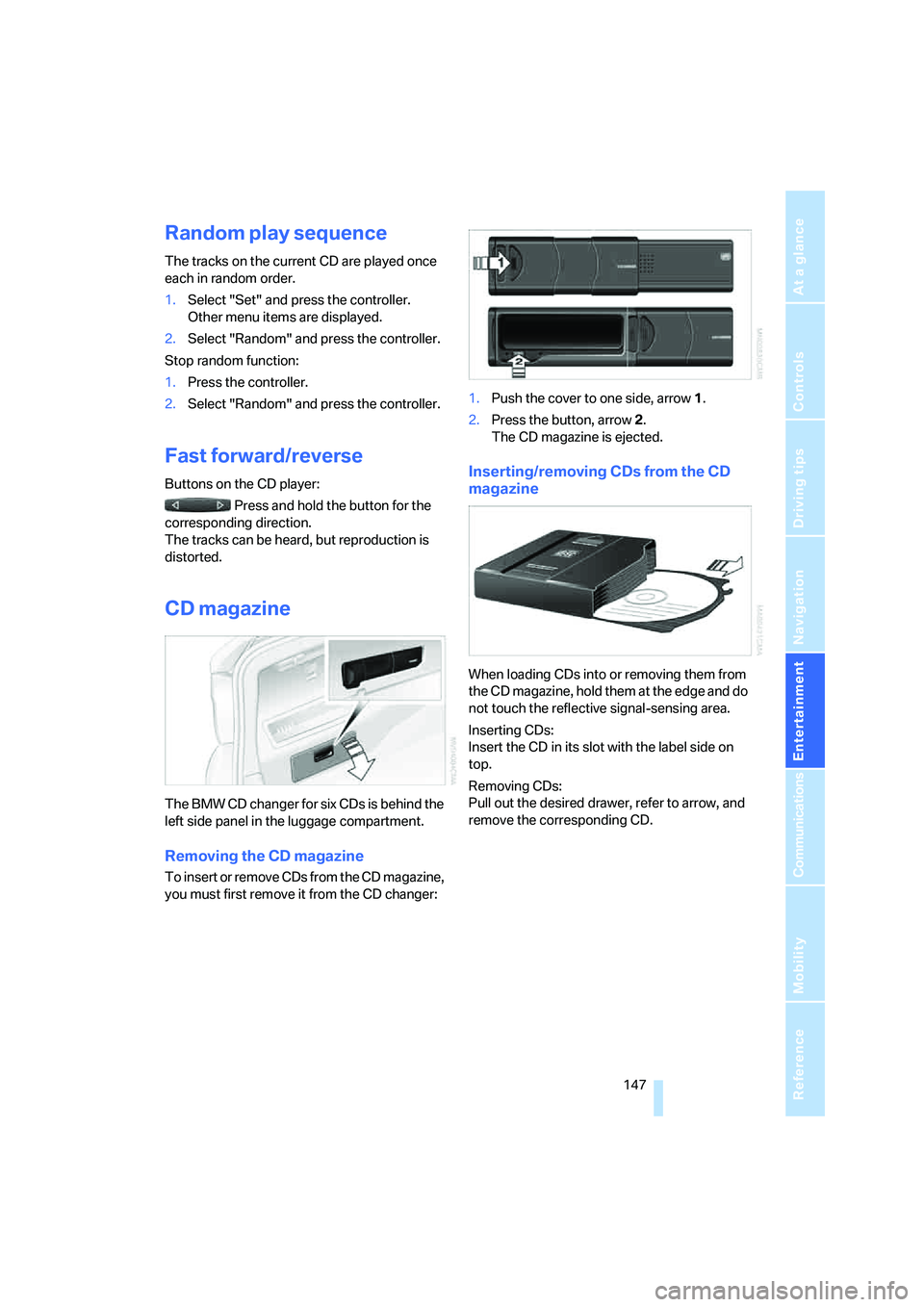
CD magazine
The BMW CD changer for six CDs is behind the
left side panel in the luggage compartment.
Removing the CD magazine
To insert or remove CDs from the CD magazine,
you must first remove it from the CD changer:1.Push the cover to one side, arrow 1.
2.Press the button, arrow 2.
The CD magazine is ejected.
Inserting/removing CDs from the CD
magazine
When loading CDs into or removing them from
the CD magazine, hold them at the edge and do
not touch the reflective signal-sensing area.
Inserting CDs:
Insert the CD in its slot with the label side on
top.
Removing CDs:
Pull out the desired drawer, refer to arrow, and
remove the corresponding CD.
Page 153 of 223
Telephoning
152
Telephoning
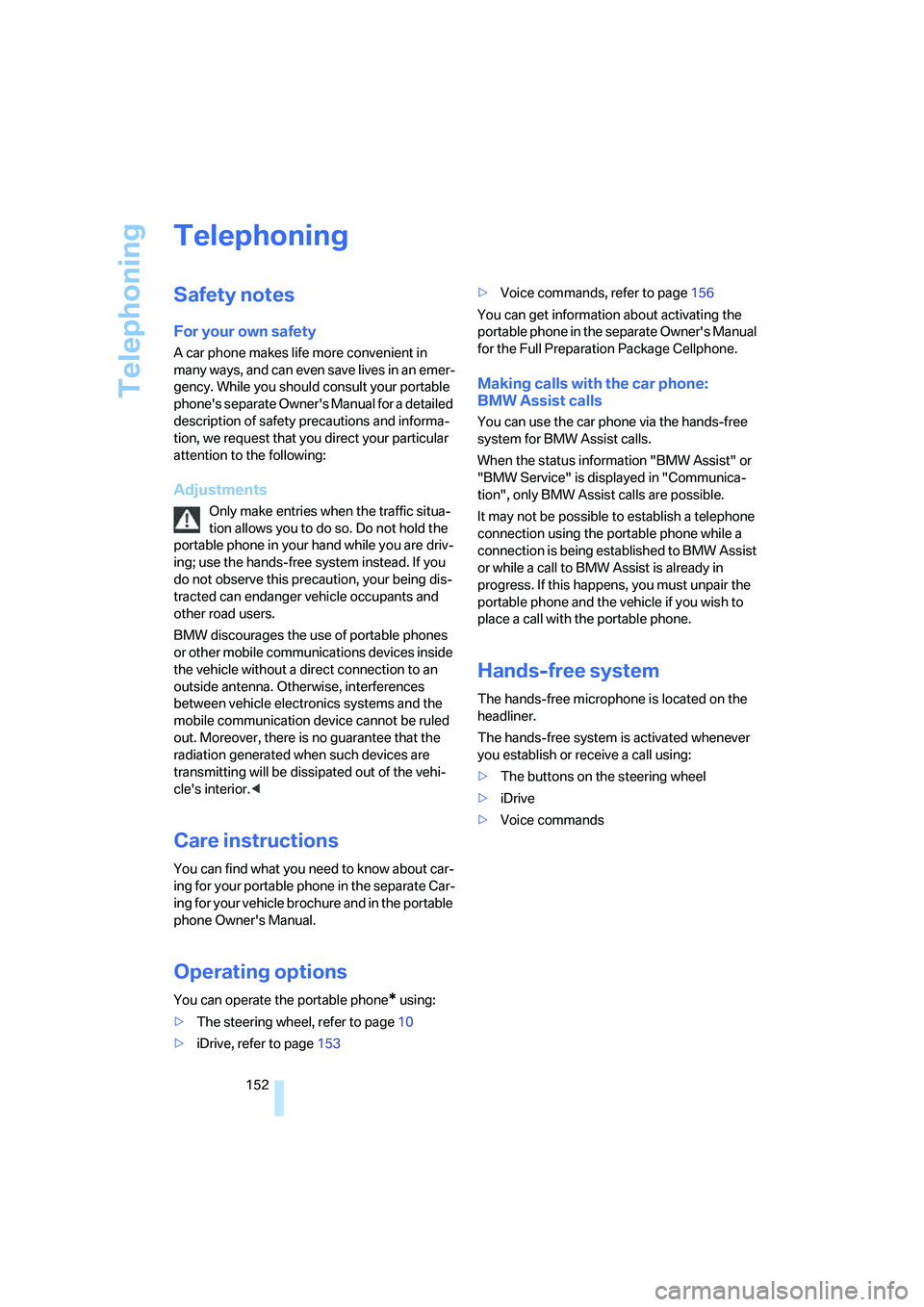
Safety notes
For your own safety
A car phone makes life more convenient in
many ways, and can even save lives in an emer-
gency. While you should consult your portable
phone's separate Owner's Manual for a detailed
description of safety precautions and informa-
tion, we request that you direct your particular
attention to the following:
Adjustments
Only make entries when the traffic situa-
tion allows you to do so. Do not hold the
portable phone in your hand while you are driv-
ing; use the hands-free system instead. If you
do not observe this precaution, your being dis-
tracted can endanger vehicle occupants and
other road users.
BMW discourages the use of portable phones
or other mobile communications devices inside
the vehicle without a direct connection to an
outside antenna. Otherwise, interferences
between vehicle electronics systems and the
mobile communication device cannot be ruled
out. Moreover, there is no guarantee that the
radiation generated when such devices are
transmitting will be dissipated out of the vehi-
cle's interior.<
Care instructions
You can find what you need to know about car-
ing for your portable phone in the separate Car-
ing for your vehicle brochure and in the portable
phone Owner's Manual.
Operating options
You can operate the portable phone* using:
>The steering wheel, refer to page10
>iDrive, refer to page153>Voice commands, refer to page156
You can get information about activating the
portable phone in the separate Owner's Manual
for the Full Preparation Package Cellphone.
Making calls with the car phone:
BMW Assist calls
You can use the car phone via the hands-free
system for BMW Assist calls.
When the status information "BMW Assist" or
"BMW Service" is displayed in "Communica-
tion", only BMW Assist calls are possible.
It may not be possible to establish a telephone
connection using the portable phone while a
connection is being established to BMW Assist
or while a call to BMW Assist is already in
progress. If this happens, you must unpair the
portable phone and the vehicle if you wish to
place a call with the portable phone.
Hands-free system
The hands-free microphone is located on the
headliner.
The hands-free system is activated whenever
you establish or receive a call using:
>The buttons on the steering wheel
>iDrive
>Voice commands
Page 205 of 223
Short commands for the voice command system
204
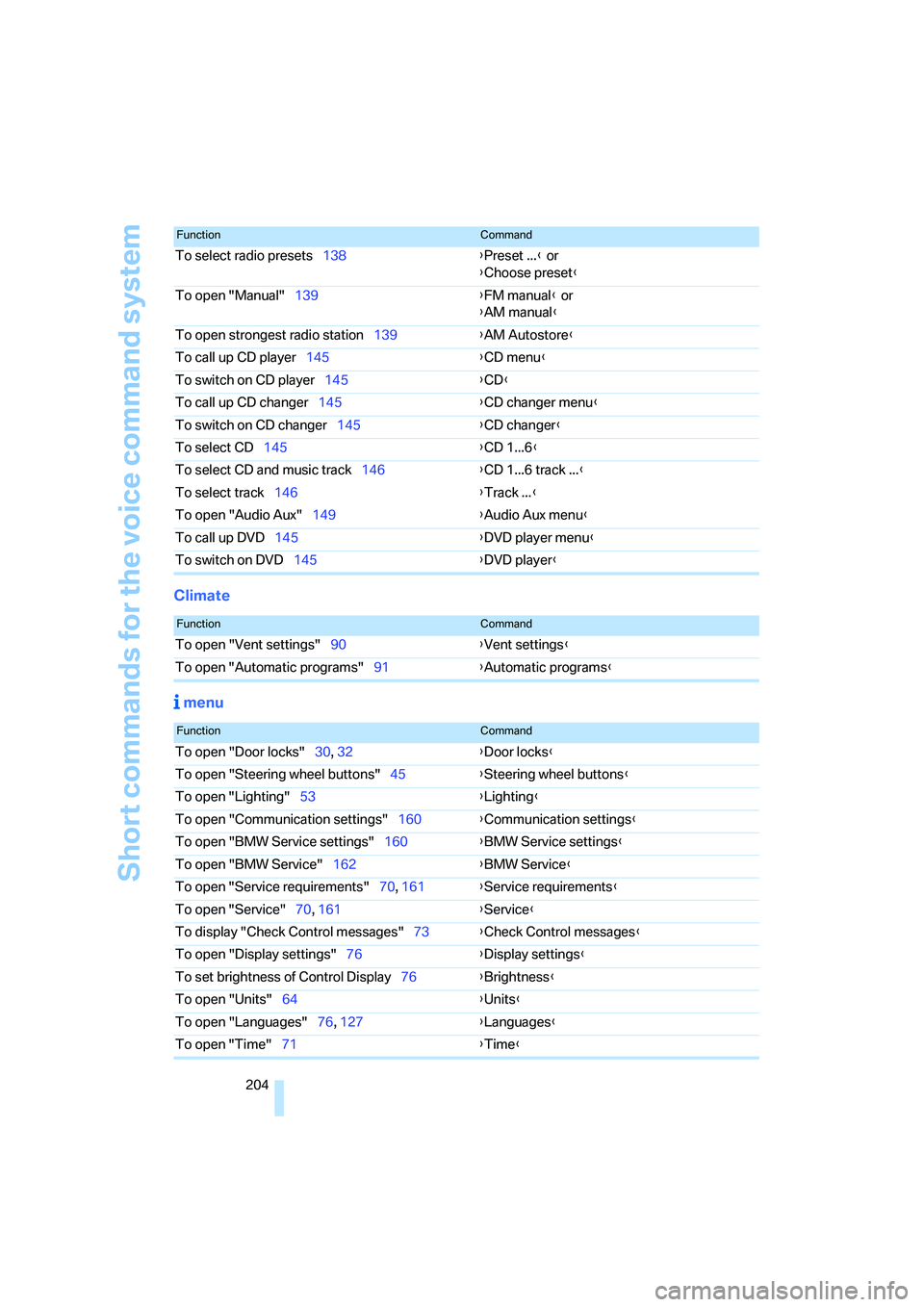
Climate
menu
To select radio presets138{Preset ...} or
{Choose preset}
To open "Manual"139{FM manual} or
{AM manual}
To open strongest radio station139{AM Autostore}
To call up CD player145{CD menu}
To switch on CD player145{CD}
To call up CD changer145{CD changer menu}
To switch on CD changer145{CD changer}
To select CD145{CD 1...6}
To select CD and music track146{CD 1...6 track ...}
To select track146{Track ...}
To open "Audio Aux"149{Audio Aux menu}
To call up DVD145{DVD player menu}
To switch on DVD145{DVD player}
FunctionCommand
FunctionCommand
To open "Vent settings"90{Vent settings}
To open "Automatic programs"91{Automatic programs}
FunctionCommand
To open "Door locks"30, 32{Door locks}
To open "Steering wheel buttons"45{Steering wheel buttons}
To open "Lighting"53{Lighting}
To open "Communication settings"160{Communication settings}
To open "BMW Service settings"160{BMW Service settings}
To open "BMW Service"162{BMW Service}
To open "Service requirements"70, 161{Service requirements}
To open "Service"70, 161{Service}
To display "Check Control messages"73{Check Control messages}
To open "Display settings"76{Display settings}
To set brightness of Control Display76{Brightness}
To open "Units"64{Units}
To open "Languages"76, 127{Languages}
To open "Time"71{Time}
Page 208 of 223
Reference 207
At a glance
Controls
Driving tips
Communications
Navigation
Entertainment
Mobility
"Automatic programs" with
automatic climate control91
Automatic recirculated-air
control AUC91
Automatic station search139
Automatic transmission with
Steptronic51
– interlock51,52
– overriding selector lever
lock53
– shiftlock52
– sport program52
– towing away195
– tow-starting195
AUTO program for automatic
climate control90
"Autostore"
on the radio140
AUX-IN149
– port97
Average fuel consumption66
– setting the units68
Average speed65
"Avoid ferries" in
navigation124
Avoid freeways for
navigation123
"Avoid highways" in
navigation123
Avoiding unintentional
alarms35
"Avoid tollroads" in
navigation124
Axle loads, refer to
Weights201
"A - Z"154
B
Backrests, refer to Seats39
Backrest width adjustment40
Back seats, refer to Rear seats
– adjusting head restraints41
Backup lamps
– replacing bulbs190
Backup lamps, refer to Tail
lamps189
Balance, tone control135Bar, refer to Tow-starting,
towing away196
Bass, tone control135
Battery191
– charging191
– disposal191
– jump starting194
– temporary power failure191
Being towed195
Belts, refer to Safety belts43
Belt tensioner, refer to Safety
belts43
Beverage holders, refer to
Cup holders98
Black ice, refer to Ice
warning64
Blower, refer to Air flow
rate91
BMW Assist160
– enabling160
– services offered161
"BMW Contact"164
"BMW Contact
Numbers"164
BMW Maintenance
System185
"BMW Service"162
"BMW Service settings"161
Bottle holders, refer to Cup
holders98
Brake assist, refer to Dynamic
Brake Control78
Brake fluid184
– level too low184
– warning lamp184
Brake fluid, refer to Service
requirements69
Brake Force Display82
Brake hydraulics, refer to
Brakes184
Brake lamps
– Brake Force Display82
– replacing bulbs190
Brake pads, breaking in106
Brake rotors108
– brakes106
– breaking in106Brakes
– ABS78
– BMW Maintenance
System185
– brake fluid184
– brake pads184
– breaking in106
– handbrake51
– service requirements69
Brakes, refer to Braking
safely107
Brake system106
– BMW Maintenance
System185
– brake fluid184
– brake pads184
– breaking in106
– disc brakes108
Breakdown services, refer to
Roadside Assistance193
Breaking in the clutch106
Breaking in the
differential106
Break-in period106
"Brightness"76
Bulb changing, refer to Lamps
and bulbs187
Button for starting engine49
Buttons on steering wheel11
C
California Proposition 65
warning5
"Call"154
Call
– accepting153
– displaying accepted155
– ending154
– in absence155
– starting153
Calling
– from phone book154
– from Top 8 list155
– redialing155
Can holders, refer to Cup
holders98
Capacities201
Page 211 of 223
Everything from A - Z
210 Display lighting, refer to
Instrument lighting87
"Display off"21
Displays, refer to Instrument
cluster12
Displays and controls10
"Display settings"72
Disposal
– of coolant183
– vehicle battery191
Distance control, refer to
Active cruise control57
Distance remaining to service,
refer to Service
requirements69
"Distance to dest."66
Distance warning, refer to
PDC Park Distance
Control77
Door key, refer to Integrated
key/remote control28
Door lock31
Door locking, confirmation
signals31
"Door locks"30
Doors, emergency
operation31
DOT Quality Grades176
Draft-free ventilation92
Drinks holders, refer to Cup
holders98
Drive-off assistant80
Driving lamps, refer to Parking
lamps/low beams85
Driving notes106
Driving route, refer to
Displaying route126
Driving stability control
systems78
Driving through water107
Driving tips, refer to Driving
notes106
Dry air, refer to Cooling
function92
DSC Dynamic Stability
Control78
– indicator lamps79DTC Dynamic Traction
Control79
– indicator lamps79
DVD for navigation114
Dynamic Stability Control
DSC
– indicator lamps79
Dynamic Traction Control
DTC
– indicator lamps79
E
EBV Electronic brake-force
distribution78
Eject button, refer to Buttons
on the CD player134
Electrical malfunction
– door lock31
– fuel filler door168
– glass sunroof37
Electric seat adjustment39
Electronic brake-force
distribution78
Electronic oil level check181
Emergency call193
Emergency operation, refer to
Manual operation
– door lock31
– fuel filler door168
– glass sunroof37
– transmission lock, automatic
transmission53
Emergency release of luggage
compartment lid from
luggage compartment's
interior33
Emergency services, refer to
Roadside Assistance193
Emissions test, refer to
Service requirements69
"Enable services"161
"End call"154
Energy-conscious driving,
refer to Energy Control64
Energy Control64Engine
– breaking in106
– data200
– speed200
– starting49
– switching off50
Engine compartment181
Engine coolant, refer to
Coolant183
Engine oil
– adding183
– BMW Maintenance
System185
– checking level181
– intervals between changes,
refer to Service
requirements69
"Engine oil level"182
Engine output, refer to Engine
data200
Engine speed200
Engine starting, refer to
Starting the engine49
"Enter address"116
Entering destination116
Entering the address115
Entering the intersection117
"Entertainment"134
"Entertainment settings"135
Entry map for destination118
"Equalizer", refer to Tone
control136
Error messages, refer to
Check Control73
"ESN"142
ESP Electronic Stability
Program, refer to DSC
Dynamic Stability
Control78
Event data recorders186
Exhaust system, refer to Hot
exhaust system106
Exterior mirrors43
– adjusting43
– automatic dimming
feature107
– automatic heating44
External audio device97,149
Page 213 of 223
Everything from A - Z
212 Heavy loads, refer to Stowing
cargo109
Height, refer to
Dimensions200
Height adjustment
– seats39
– steering wheel44
High beams86
– indicator lamp13
– replacing bulbs188
High water, refer to Driving
through water107
Hills107
Holders for cups98
"Home address" in
navigation123
Hood180
Horn10
Hot exhaust system106
"Hour memo"72
"House number" in
destination entry117
Hydraulic brake assist, refer to
Dynamic Brake Control78
Hydroplaning107
I
Ice warning64
iDrive16
– adjusting brightness76
– assistance window20
– automatic climate control90
– changing language76
– confirming a selection or
entry19
– date and time, setting72
– displays, menus17
– lists19
– menu guidance17
– operating principle16
– selecting a menu item19
– status information20
– switching menu pages19
– symbols18
Ignition49
– switched off49
– switched on49Ignition key, refer to
Integrated key/remote
control28
Ignition key position 1, refer to
Radio readiness49
Ignition key position 2, refer to
Ignition on49
Ignition lock49
Indicator and warning
lamps13
Individual air distribution90
Individually programmable
buttons on steering
wheel45
Individual settings, refer to
Personal Profile29
Information
– on another location119
– on country119
– on current position119
– on destination location119
"Information" in
navigation119
"Information on
destination"120
"Input map"118
Installation location
– CD changer147
Instructions for navigation
system, refer to Voice
instructions127
Instrument cluster12
Instrument lighting87
Integrated key28
Integrated universal remote
control93
Interesting destination for
navigation119
"Interim time"76
Interior lamps87
– remote control30
Interior motion sensor35
Interior rearview mirror44
– automatic dimming
feature107
Interior rearview mirror with
digital compass94
Interlock52Intermittent mode of the
wipers54
J
Jacking points191
Joystick, refer to iDrive16
Jumpering, refer to Jump
starting194
Jump starting194
K
Key, refer to Integrated key/
remote control28
Key Memory, refer to Personal
Profile29
"Keypad"156
Kick-down52
Knock control168
L
Lamps, refer to Parking lamps/
low beams85
Lamps and bulbs, replacing
bulbs187
"Languages" in
navigation128
"Languages"on the control
display76
Lap-and-shoulder safety
belt43
Lashing eyes, refer to
Securing cargo109
Last destinations, refer to
Destination list120
"Last seat pos."42
LATCH child-restraint fixing
system48
LEDs light-emitting
diodes191
Length, refer to
Dimensions200
License plate lamp, replacing
bulbs190
Light-emitting diodes
LEDs191
Lighter99
Page 214 of 223
Reference 213
At a glance
Controls
Driving tips
Communications
Navigation
Entertainment
Mobility
"Lighting"85,86
Lighting
– instruments87
– lamps and bulbs187
– of the vehicle, refer to
Lamps85
Light switch85
"Limit"75
Limit, refer to Speed limit75
Loading
– securing cargo109
Load securing equipment,
refer to Securing cargo109
Location
– drive for navigation DVD and
audio CD114
Lock buttons in the doors,
refer to Locking32
Locking
– adjusting confirmation
signal31
– from inside32
– from outside30
Locking and unlocking doors
– from inside32
– from outside30
"LOGIC7", refer to Tone
control136
Low beams85
– automatic85
– replacing bulbs188
Lower back support, refer to
Lumbar support39
Luggage compartment
– capacity201
– lamp87
– lid32
– opening from inside33
– opening from outside33
– volume201
Luggage compartment lid32
– locking or unlocking
separately33
– opening and closing33
– opening from inside33
– opening from outside33
– unlocking with remote
control30Luggage compartment net,
refer to Securing cargo109
Luggage rack, refer to Roof-
mounted luggage rack109
Lumbar support39
LW, waveband138
M
M+S tires, refer to Winter
tires179
Maintenance, refer to Service
Booklet
Maintenance system185
Malfunction warnings, refer to
Check Control73
Manual mode of automatic
transmission52
"Manual"
on the radio139
Manual operation
– door lock31
– glass sunroof37
– transmission lock, automatic
transmission53
Manual release
– fuel filler door168
Manual transmission51
Map
– changing scale127
– destination entry118
"Map direction of travel"127
"Map facing north"127
Master key, refer to Integrated
key/remote control28
Maximum cooling90
Maximum speed
– for winter tires179
Menus, refer to iDrive16
Microfilter
– BMW Maintenance
System185
– for automatic climate
control92
Microfilter/activated-charcoal
filter
– BMW Maintenance
System185Microphone
– for hands-free system152
Microphone for telephone14
Mirror dimming feature107
Mirrors43
– automatic curb monitor44
– exterior mirrors43
– heating44
– interior rearview mirror44
"Missed calls"155
Missed calls155
Modifications, technical, refer
to For your own safety5
Monitor, refer to iDrive
controls16
Monitoring system for tire
pressures, refer to Flat Tire
Monitor80
"Monitor on / off"45
Most recent portable phone
numbers155
Multifunction switch
– refer to Turn signals/
headlamp flasher53
– refer to Wiper system
54
Music track
– finding146
"Mute on / off"45
N
"Navigation"115
Navigation address
– home address122
Navigation destination
– manual entry115
– selecting via map118
Navigation drive, location114
Navigation DVD114