change time BMW 330I 2005 User Guide
[x] Cancel search | Manufacturer: BMW, Model Year: 2005, Model line: 330I, Model: BMW 330I 2005Pages: 223, PDF Size: 7.49 MB
Page 92 of 223
Controls
91Reference
At a glance
Driving tips
Communications
Navigation
Entertainment
Mobility
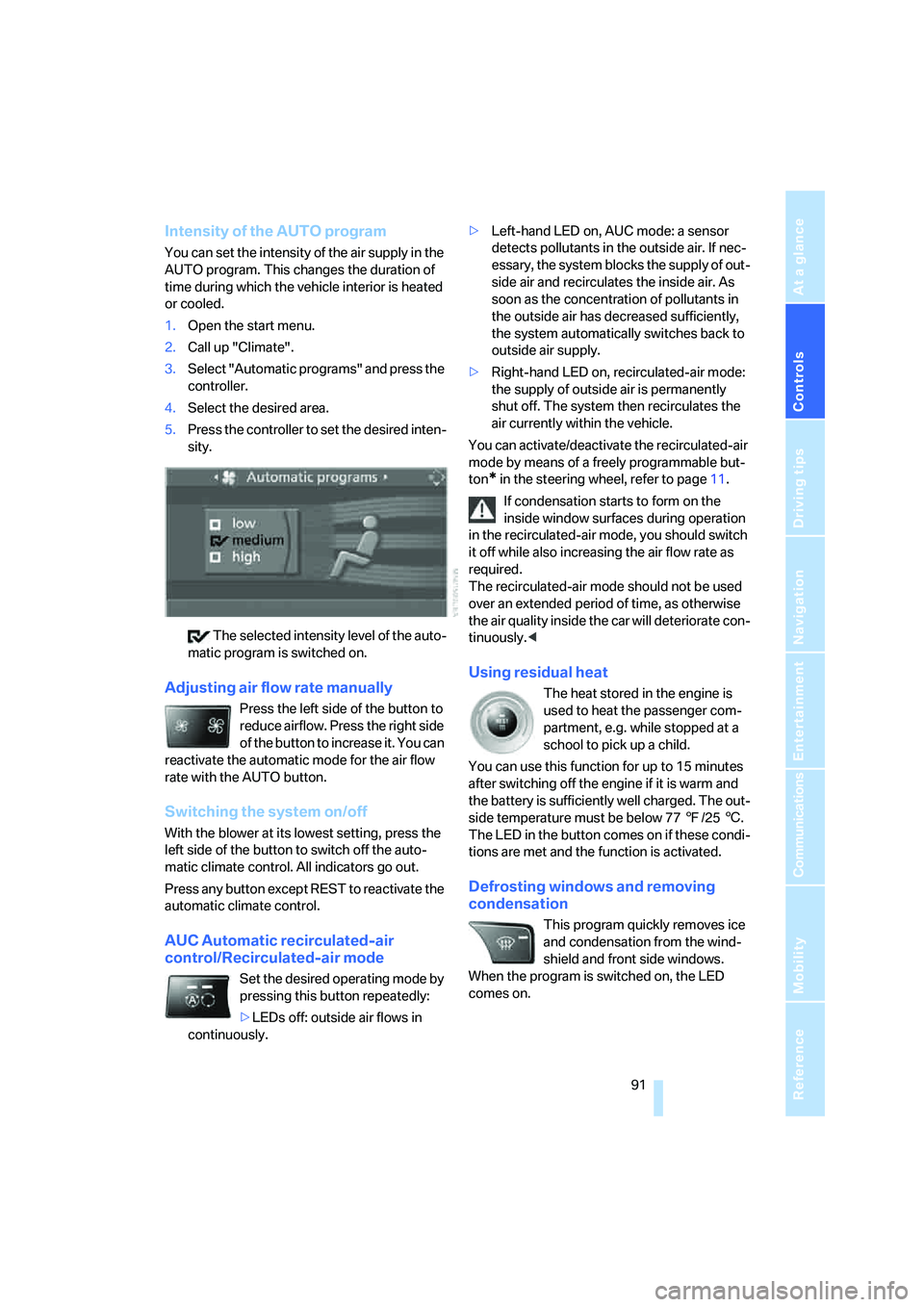
Intensity of the AUTO program
You can set the intensity of the air supply in the
AUTO program. This changes the duration of
time during which the vehicle interior is heated
or cooled.
1.Open the start menu.
2.Call up "Climate".
3.Select "Automatic programs" and press the
controller.
4.Select the desired area.
5.Press the controller to set the desired inten-
sity.
The selected intensity level of the auto-
matic program is switched on.
Adjusting air flow rate manually
Press the left side of the button to
reduce airflow. Press the right side
of the button to increase it. You can
reactivate the automatic mode for the air flow
rate with the AUTO button.
Switching the system on/off
With the blower at its lowest setting, press the
left side of the button to switch off the auto-
matic climate control. All indicators go out.
Press any button except REST to reactivate the
automatic climate control.
AUC Automatic recirculated-air
control/Recirculated-air mode
Set the desired operating mode by
pressing this button repeatedly:
>LEDs off: outside air flows in
continuously.>Left-hand LED on, AUC mode: a sensor
detects pollutants in the outside air. If nec-
essary, the system blocks the supply of out-
side air and recirculates the inside air. As
soon as the concentration of pollutants in
the outside air has decreased sufficiently,
the system automatically switches back to
outside air supply.
>Right-hand LED on, recirculated-air mode:
the supply of outside air is permanently
shut off. The system then recirculates the
air currently within the vehicle.
You can activate/deactivate the recirculated-air
mode by means of a freely programmable but-
ton
* in the steering wheel, refer to page11.
If condensation starts to form on the
inside window surfaces during operation
in the recirculated-air mode, you should switch
it off while also increasing the air flow rate as
required.
The recirculated-air mode should not be used
over an extended period of time, as otherwise
the air quality inside the car will deteriorate con-
tinuously.<
Using residual heat
The heat stored in the engine is
used to heat the passenger com-
partment, e.g. while stopped at a
school to pick up a child.
You can use this function for up to 15 minutes
after switching off the engine if it is warm and
the battery is sufficiently well charged. The out-
side temperature must be below 777/256.
The LED in the button comes on if these condi-
tions are met and the function is activated.
Defrosting windows and removing
condensation
This program quickly removes ice
and condensation from the wind-
shield and front side windows.
When the program is switched on, the LED
comes on.
Page 93 of 223
Controlling the climate for pleasant driving
92
Switching the cooling function on and
off
The cooling function cools and
dehumidifies the incoming air
before also reheating it as
required, according to the temperature setting.
Depending on the weather, the windshield may
fog over briefly when the engine is started.
The cooling function is only available when the
engine is running and is switched on automati-
cally with the AUTO program.
Rear window defroster
When the rear window defroster is
switched on, the LED comes on.
The defroster switches off auto-
matically after a certain time.
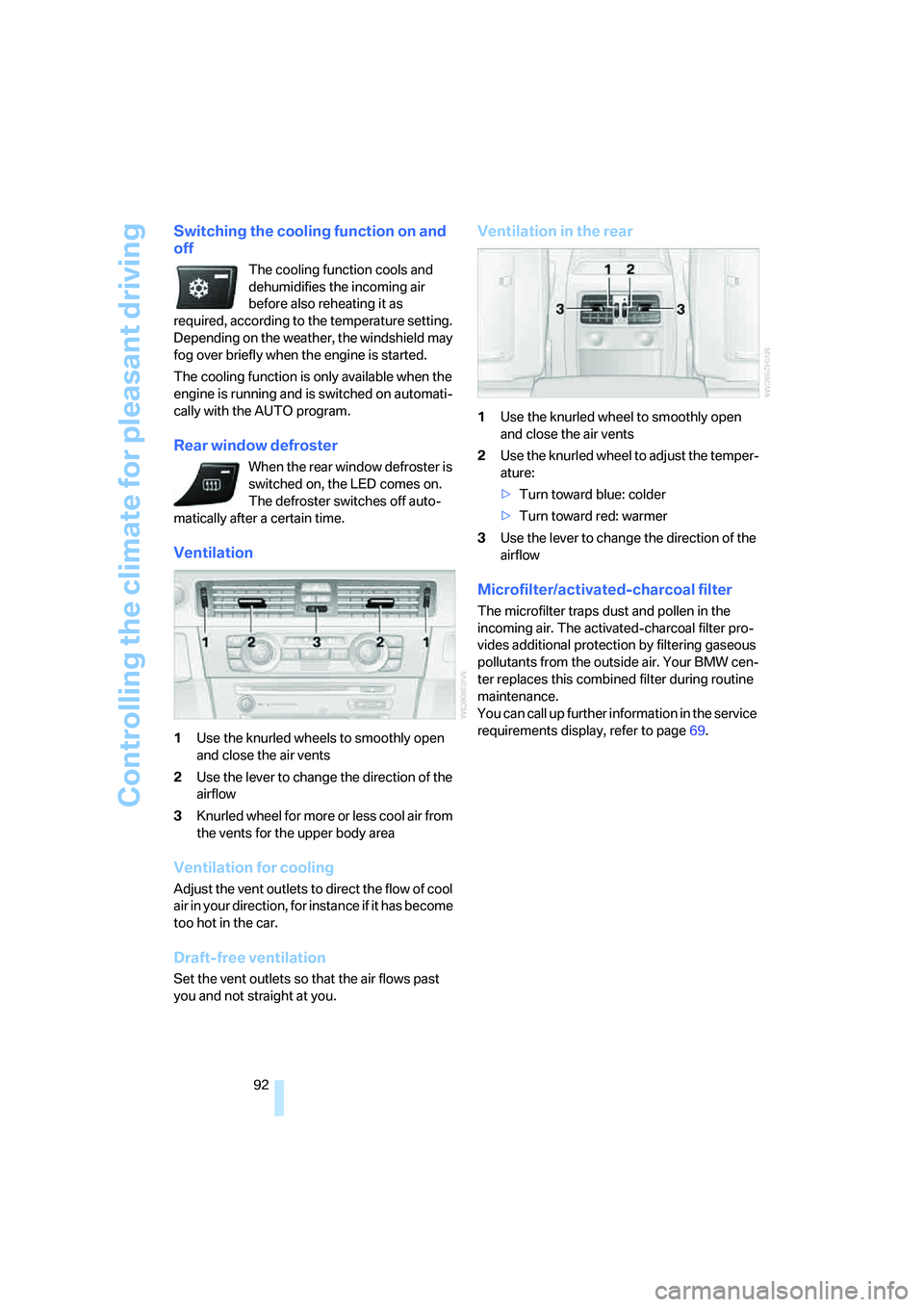
Ventilation
1Use the knurled wheels to smoothly open
and close the air vents
2Use the lever to change the direction of the
airflow
3Knurled wheel for more or less cool air from
the vents for the upper body area
Ventilation for cooling
Adjust the vent outlets to direct the flow of cool
air in your direction, for instance if it has become
too hot in the car.
Draft-free ventilation
Set the vent outlets so that the air flows past
you and not straight at you.
Ventilation in the rear
1Use the knurled wheel to smoothly open
and close the air vents
2Use the knurled wheel to adjust the temper-
ature:
>Turn toward blue: colder
>Turn toward red: warmer
3Use the lever to change the direction of the
airflow
Microfilter/activated-charcoal filter
The microfilter traps dust and pollen in the
incoming air. The activated-charcoal filter pro-
vides additional protection by filtering gaseous
pollutants from the outside air. Your BMW cen-
ter replaces this combined filter during routine
maintenance.
You can call up further information in the service
requirements display, refer to page69.
Page 126 of 223
Navigation
Driving tips
125Reference
At a glance
Controls
Communications
Entertainment
Mobility
Destination guidance
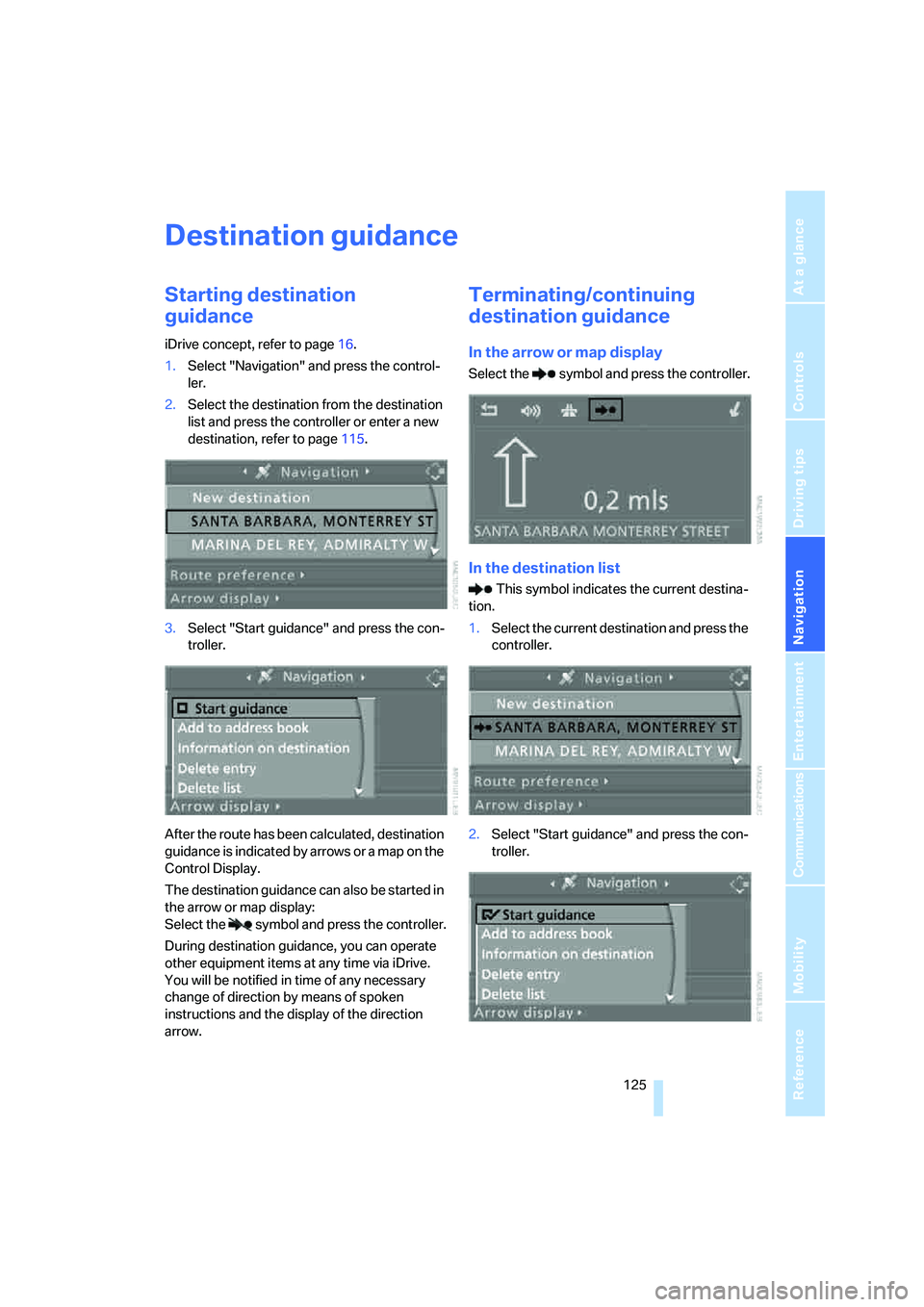
Starting destination
guidance
iDrive concept, refer to page16.
1.Select "Navigation" and press the control-
ler.
2.Select the destination from the destination
list and press the controller or enter a new
destination, refer to page115.
3.Select "Start guidance" and press the con-
troller.
After the route has been calculated, destination
guidance is indicated by arrows or a map on the
Control Display.
The destination guidance can also be started in
the arrow or map display:
Select the symbol and press the controller.
During destination guidance, you can operate
other equipment items at any time via iDrive.
You will be notified in time of any necessary
change of direction by means of spoken
instructions and the display of the direction
arrow.
Terminating/continuing
destination guidance
In the arrow or map display
Select the symbol and press the controller.
In the destination list
This symbol indicates the current destina-
tion.
1.Select the current destination and press the
controller.
2.Select "Start guidance" and press the con-
troller.
Page 127 of 223
Destination guidance
126 If you did not reach your destination before the
end of your last journey, the following question
will appear in the display at the start of the next
journey:
"Continue guidance to destination?".
The destination guidance starts automatically
after a short time.
To start destination guidance immediately:
Select "Yes" and press the controller.
Route display
You have the option of displaying various views
of the route during destination guidance.
From another menu, you can switch
directly to the screen last displayed, refer
to Convenient call-up of menu items on
page18.<
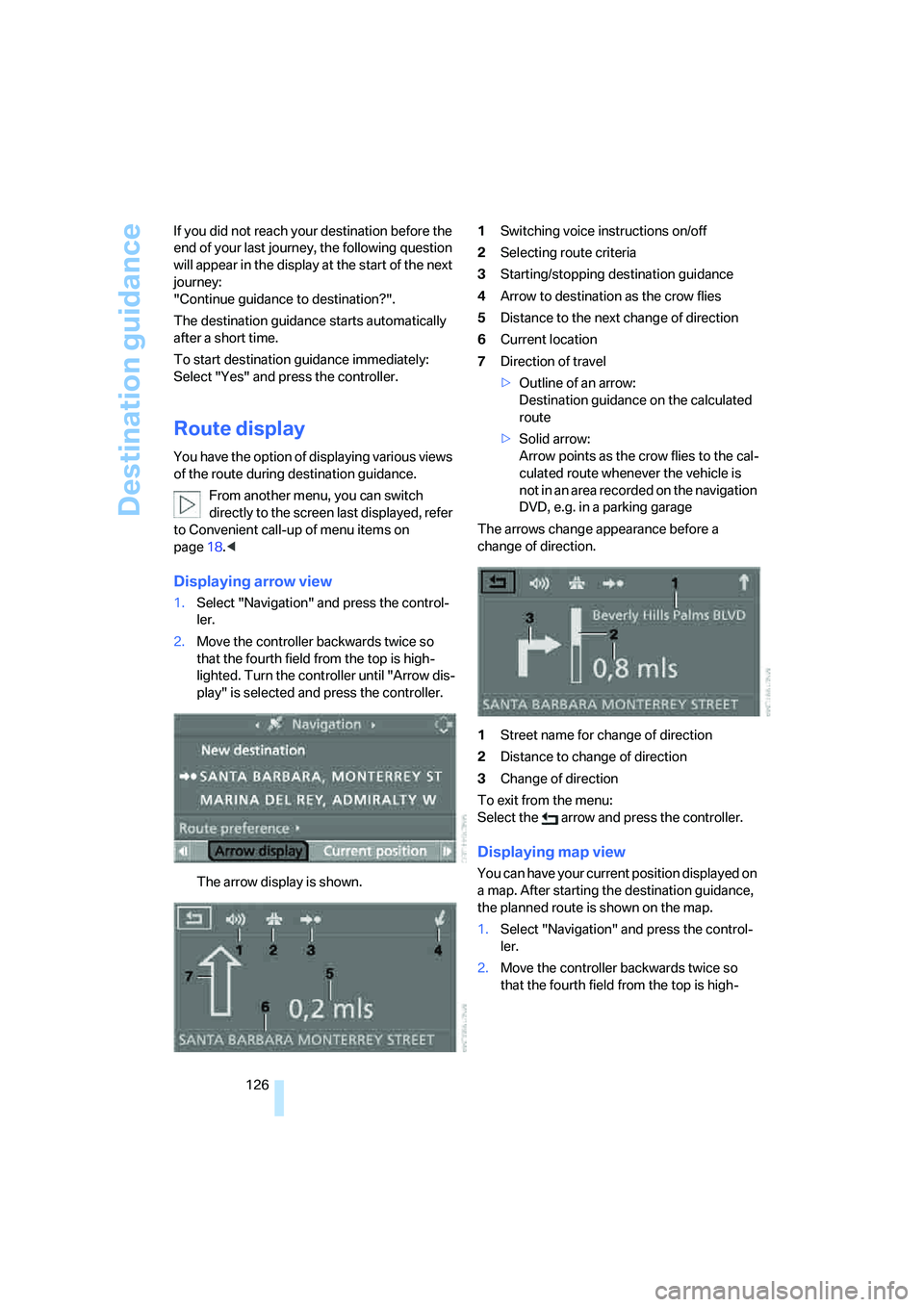
Displaying arrow view
1.Select "Navigation" and press the control-
ler.
2.Move the controller backwards twice so
that the fourth field from the top is high-
lighted. Turn the controller until "Arrow dis-
play" is selected and press the controller.
The arrow display is shown.1Switching voice instructions on/off
2Selecting route criteria
3Starting/stopping destination guidance
4Arrow to destination as the crow flies
5Distance to the next change of direction
6Current location
7Direction of travel
>Outline of an arrow:
Destination guidance on the calculated
route
>Solid arrow:
Arrow points as the crow flies to the cal-
culated route whenever the vehicle is
not in an area recorded on the navigation
DVD, e.g. in a parking garage
The arrows change appearance before a
change of direction.
1Street name for change of direction
2Distance to change of direction
3Change of direction
To exit from the menu:
Select the arrow and press the controller.
Displaying map view
You can have your current position displayed on
a map. After starting the destination guidance,
the planned route is shown on the map.
1.Select "Navigation" and press the control-
ler.
2.Move the controller backwards twice so
that the fourth field from the top is high-
Page 192 of 223
Mobility
191Reference
At a glance
Controls
Driving tips
Communications
Navigation
Entertainment
according to BMW repair procedures with cor-
respondingly trained personnel.
Light-emitting diodes LEDs
Light-emitting diodes installed behind translu-
c e n t l e n s e s s e r v e a s t h e l i g h t s o u r c e f o r m a n y o f
the controls and displays in your vehicle. These
light-emitting diodes, which operate using a
concept similar to that applied in conventional
lasers, are officially designated as Class 1 light-
emitting diodes.
Do not remove the covers or expose the
eyes directly to the unfiltered light source
for several hours at a time, as this could cause
irritation to the retina.<
Changing wheels
Your BMW is equipped with Run-Flat Tires as
standard. This removes the need to change a
wheel immediately in the event of a puncture.
The symbol identifying Run-Flat Tires is a circle
with the letters RSC on the sidewall, refer to
Run-Flat Tires, page178.
When mounting new tires or changing over
from summer to winter tires and vice versa,
mount Run-Flat Tires for your own safety. In the
event of a flat, moreover, no spare wheel is
available. Your BMW center will be glad to
advise you. Refer also to New wheels and tires,
page178.
The tools for changing wheels are avail-
able as optional accessories from your
BMW center.<
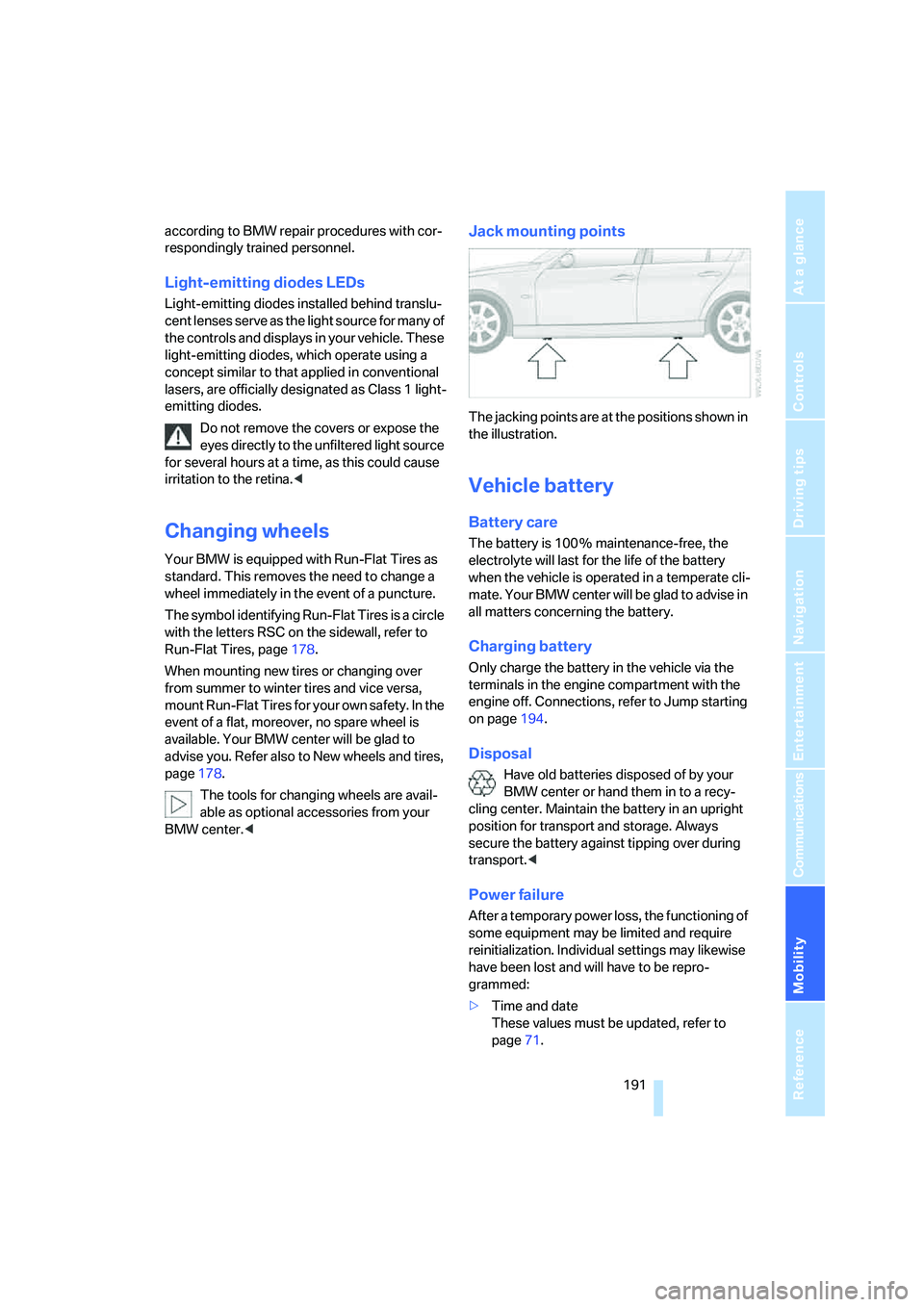
Jack mounting points
The jacking points are at the positions shown in
the illustration.
Vehicle battery
Battery care
The battery is 100 % maintenance-free, the
electrolyte will last for the life of the battery
when the vehicle is operated in a temperate cli-
mate. Your BMW center will be glad to advise in
all matters concerning the battery.
Charging battery
Only charge the battery in the vehicle via the
terminals in the engine compartment with the
engine off. Connections, refer to Jump starting
on page194.
Disposal
Have old batteries disposed of by your
BMW center or hand them in to a recy-
cling center. Maintain the battery in an upright
position for transport and storage. Always
secure the battery against tipping over during
transport.<
Power failure
After a temporary power loss, the functioning of
some equipment may be limited and require
reinitialization. Individual settings may likewise
have been lost and will have to be repro-
grammed:
>Time and date
These values must be updated, refer to
page71.
Page 205 of 223
Short commands for the voice command system
204
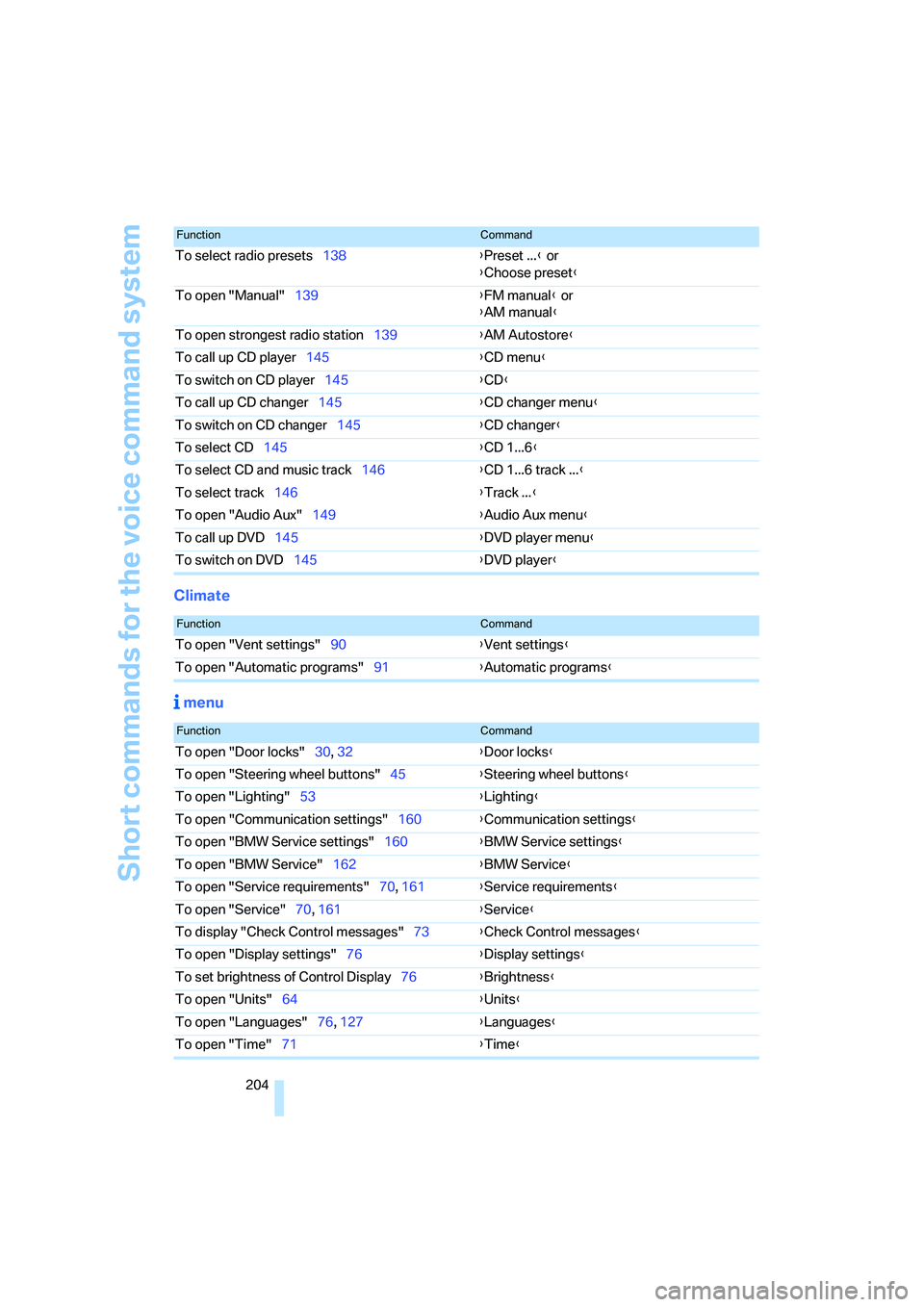
Climate
menu
To select radio presets138{Preset ...} or
{Choose preset}
To open "Manual"139{FM manual} or
{AM manual}
To open strongest radio station139{AM Autostore}
To call up CD player145{CD menu}
To switch on CD player145{CD}
To call up CD changer145{CD changer menu}
To switch on CD changer145{CD changer}
To select CD145{CD 1...6}
To select CD and music track146{CD 1...6 track ...}
To select track146{Track ...}
To open "Audio Aux"149{Audio Aux menu}
To call up DVD145{DVD player menu}
To switch on DVD145{DVD player}
FunctionCommand
FunctionCommand
To open "Vent settings"90{Vent settings}
To open "Automatic programs"91{Automatic programs}
FunctionCommand
To open "Door locks"30, 32{Door locks}
To open "Steering wheel buttons"45{Steering wheel buttons}
To open "Lighting"53{Lighting}
To open "Communication settings"160{Communication settings}
To open "BMW Service settings"160{BMW Service settings}
To open "BMW Service"162{BMW Service}
To open "Service requirements"70, 161{Service requirements}
To open "Service"70, 161{Service}
To display "Check Control messages"73{Check Control messages}
To open "Display settings"76{Display settings}
To set brightness of Control Display76{Brightness}
To open "Units"64{Units}
To open "Languages"76, 127{Languages}
To open "Time"71{Time}
Page 209 of 223
Everything from A - Z
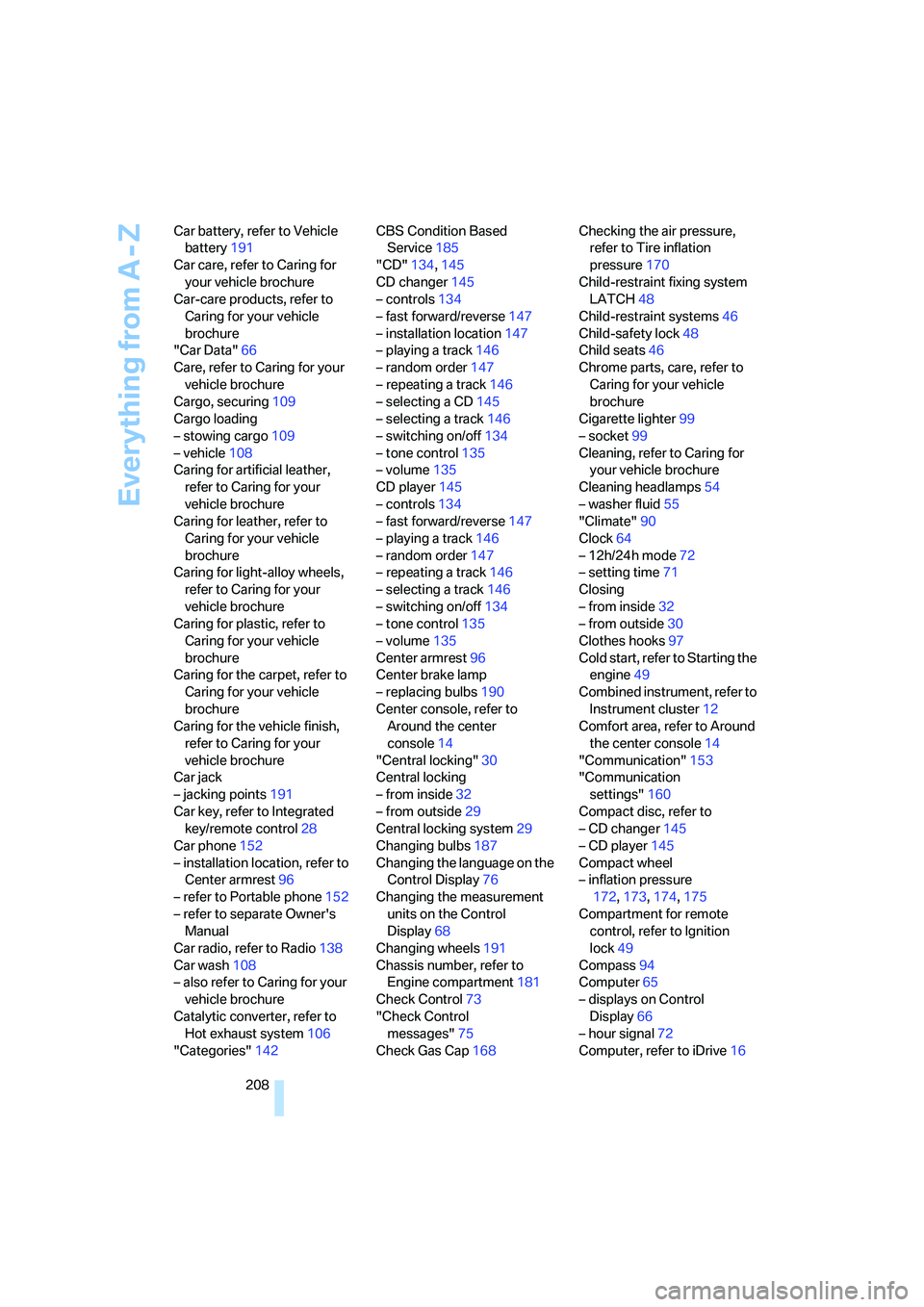
208 Car battery, refer to Vehicle
battery191
Car care, refer to Caring for
your vehicle brochure
Car-care products, refer to
Caring for your vehicle
brochure
"Car Data"66
Care, refer to Caring for your
vehicle brochure
Cargo, securing109
Cargo loading
– stowing cargo109
– vehicle108
Caring for artificial leather,
refer to Caring for your
vehicle brochure
Caring for leather, refer to
Caring for your vehicle
brochure
Caring for light-alloy wheels,
refer to Caring for your
vehicle brochure
Caring for plastic, refer to
Caring for your vehicle
brochure
Caring for the carpet, refer to
Caring for your vehicle
brochure
Caring for the vehicle finish,
refer to Caring for your
vehicle brochure
Car jack
– jacking points191
Car key, refer to Integrated
key/remote control28
Car phone152
– installation location, refer to
Center armrest96
– refer to Portable phone152
– refer to separate Owner's
Manual
Car radio, refer to Radio138
Car wash108
– also refer to Caring for your
vehicle brochure
Catalytic converter, refer to
Hot exhaust system106
"Categories"142CBS Condition Based
Service185
"CD"134,145
CD changer145
– controls134
– fast forward/reverse147
– installation location147
– playing a track146
– random order147
– repeating a track146
– selecting a CD145
– selecting a track146
– switching on/off134
– tone control135
– volume135
CD player145
– controls134
– fast forward/reverse147
– playing a track
146
– random order147
– repeating a track146
– selecting a track146
– switching on/off134
– tone control135
– volume135
Center armrest96
Center brake lamp
– replacing bulbs190
Center console, refer to
Around the center
console14
"Central locking"30
Central locking
– from inside32
– from outside29
Central locking system29
Changing bulbs187
Changing the language on the
Control Display76
Changing the measurement
units on the Control
Display68
Changing wheels191
Chassis number, refer to
Engine compartment181
Check Control73
"Check Control
messages"75
Check Gas Cap168Checking the air pressure,
refer to Tire inflation
pressure170
Child-restraint fixing system
LATCH48
Child-restraint systems46
Child-safety lock48
Child seats46
Chrome parts, care, refer to
Caring for your vehicle
brochure
Cigarette lighter99
– socket99
Cleaning, refer to Caring for
your vehicle brochure
Cleaning headlamps54
– washer fluid55
"Climate"90
Clock64
– 12h/24h mode72
– setting time71
Closing
– from inside32
– from outside30
Clothes hooks97
Cold start, refer to Starting the
engine49
Combined instrument, refer to
Instrument cluster12
Comfort area, refer to Around
the center console14
"Communication"153
"Communication
settings"160
Compact disc, refer to
– CD changer145
– CD player145
Compact wheel
– inflation pressure
172,173,174,175
Compartment for remote
control, refer to Ignition
lock49
Compass94
Computer65
– displays on Control
Display66
– hour signal72
Computer, refer to iDrive16
Page 213 of 223
Everything from A - Z
212 Heavy loads, refer to Stowing
cargo109
Height, refer to
Dimensions200
Height adjustment
– seats39
– steering wheel44
High beams86
– indicator lamp13
– replacing bulbs188
High water, refer to Driving
through water107
Hills107
Holders for cups98
"Home address" in
navigation123
Hood180
Horn10
Hot exhaust system106
"Hour memo"72
"House number" in
destination entry117
Hydraulic brake assist, refer to
Dynamic Brake Control78
Hydroplaning107
I
Ice warning64
iDrive16
– adjusting brightness76
– assistance window20
– automatic climate control90
– changing language76
– confirming a selection or
entry19
– date and time, setting72
– displays, menus17
– lists19
– menu guidance17
– operating principle16
– selecting a menu item19
– status information20
– switching menu pages19
– symbols18
Ignition49
– switched off49
– switched on49Ignition key, refer to
Integrated key/remote
control28
Ignition key position 1, refer to
Radio readiness49
Ignition key position 2, refer to
Ignition on49
Ignition lock49
Indicator and warning
lamps13
Individual air distribution90
Individually programmable
buttons on steering
wheel45
Individual settings, refer to
Personal Profile29
Information
– on another location119
– on country119
– on current position119
– on destination location119
"Information" in
navigation119
"Information on
destination"120
"Input map"118
Installation location
– CD changer147
Instructions for navigation
system, refer to Voice
instructions127
Instrument cluster12
Instrument lighting87
Integrated key28
Integrated universal remote
control93
Interesting destination for
navigation119
"Interim time"76
Interior lamps87
– remote control30
Interior motion sensor35
Interior rearview mirror44
– automatic dimming
feature107
Interior rearview mirror with
digital compass94
Interlock52Intermittent mode of the
wipers54
J
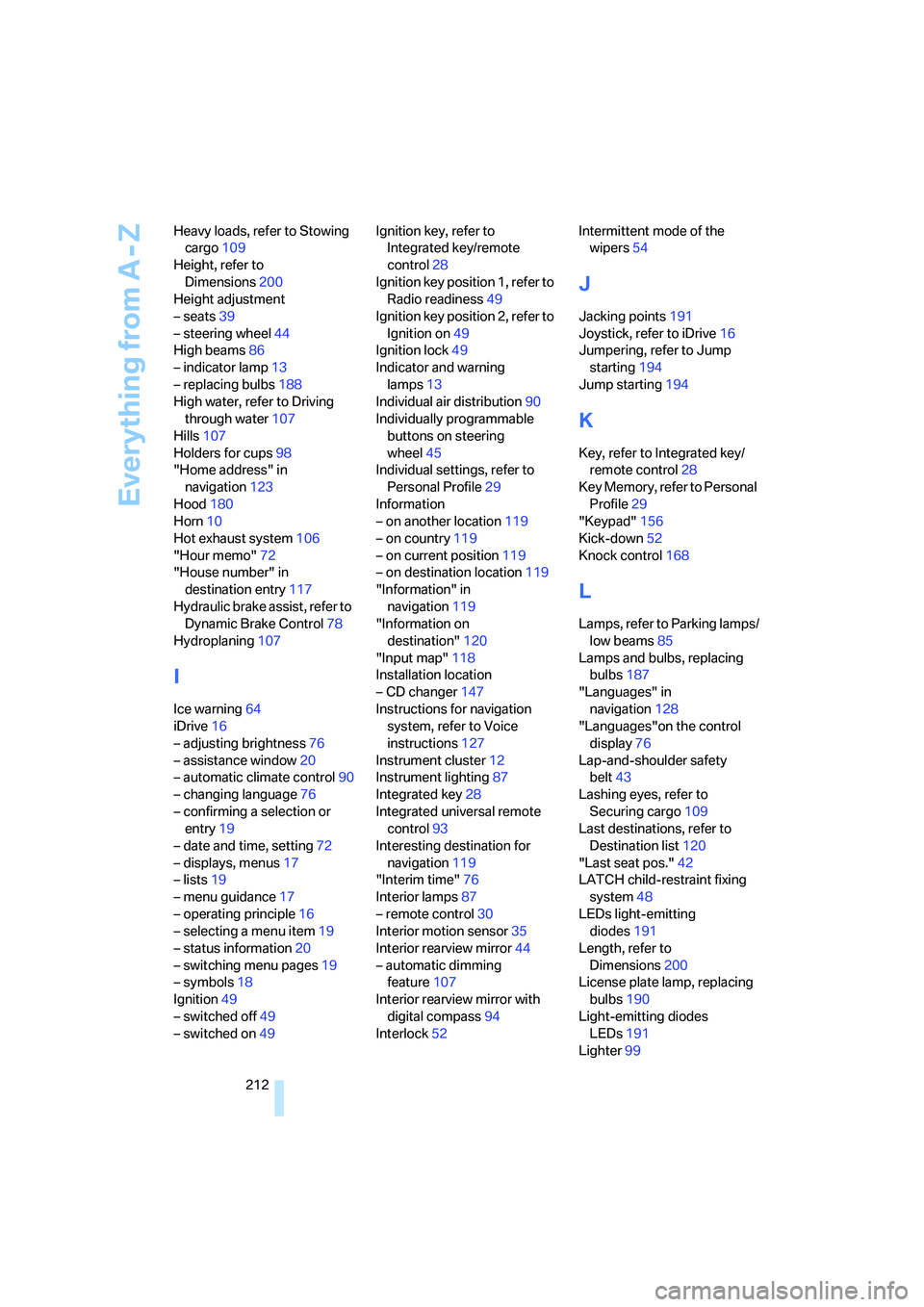
Jacking points191
Joystick, refer to iDrive16
Jumpering, refer to Jump
starting194
Jump starting194
K
Key, refer to Integrated key/
remote control28
Key Memory, refer to Personal
Profile29
"Keypad"156
Kick-down52
Knock control168
L
Lamps, refer to Parking lamps/
low beams85
Lamps and bulbs, replacing
bulbs187
"Languages" in
navigation128
"Languages"on the control
display76
Lap-and-shoulder safety
belt43
Lashing eyes, refer to
Securing cargo109
Last destinations, refer to
Destination list120
"Last seat pos."42
LATCH child-restraint fixing
system48
LEDs light-emitting
diodes191
Length, refer to
Dimensions200
License plate lamp, replacing
bulbs190
Light-emitting diodes
LEDs191
Lighter99
Page 216 of 223
Reference 215
At a glance
Controls
Driving tips
Communications
Navigation
Entertainment
Mobility
Portable phone
– accepted calls155
– adjusting volume153
– calling153
– ending call154
– hands-free system152
– missed calls155
– operation via iDrive153
– phone book154
– redialing155
– Top 8155
– touch tone dialing156
Portable phone, installation
location, refer to Center
armrest96
Portable phone, refer to the
separate Owner's Manual
Portable phone in the
vehicle106
Portable phones, use inside
the car, refer to Portable
phone in the vehicle106
Position
– displaying129
– storing121
Power windows35
– safety switch36
Power windows, refer to
Windows35
"Presets", calling up on
radio138
"Presets" on the radio142
Pressure, tires170
Pressure monitoring, tires80
– Flat Tire Monitor80
Protection function, refer to
Anti-trapping mechanism
– glass sunroof, electric37
– windows35
Puncture
– Flat Tire Monitor80R
Radio
– autostore139
– controls134
– sampling stations139
– satellite radio141
– selecting the frequency
manually139
– selecting the
waveband134,138
– station search139
– station selection138
– station with the best
reception139
– storing stations140
– switching on/off134
– tone control135
– volume135
– Weather Band141
Radio key, refer to Integrated
key/Remote control28
Radio position, refer to Radio
readiness49
Radio readiness49
– switched off49
– switched on49
Rain sensor54
"Random", random play147
Reading lamps88
Rear lamps, refer to Tail
lamps189
– replacing bulbs190
Rear seats
– adjusting head restraints41
Rear turn signals
– replacing bulbs190
Rear ventilation92
Rearview mirror, refer to
Mirrors43
Rear window defroster92
Rear window roller blind, refer
to Roller sun blinds95
Rear window safety switch36
"Received calls"155
Receiving level of portable
phone, refer to Status
information20Reception
– radio stations141
Rechargeable flashlight96
Recirculated-air mode91
Recirculation of air, refer to
Recirculated-air mode91
Reclining seat, refer to
Backrest39
Recording times, refer to
Stopwatch75
"Redial" for portable
phone155
Refueling168
Releasing
– hood180
Remaining distance, refer to
Cruising range65
Remote control28
– garage door opener93
– luggage compartment lid30
– malfunctions31
– service data185
"Repeat" for audio mode146
Replacement remote
control28
Replacing bulbs, refer to
Lamps and bulbs187
Replacing tires, refer to New
wheels and tires178
Reporting an accident, refer to
Initiating an emergency
call193
Reporting safety defects7
Reserve warning, refer to Fuel
gauge65
Reservoir for washer
systems55
Reset, refer to Resetting tone
settings137
"Reset" for stopwatch76
"Reset" for tone settings137
Residual heat mode91
Restraint system
– for children46
Restraint systems
– refer to Safety belts43
Reverse, fast
– CD changer147
– CD player147
Page 217 of 223
Everything from A - Z
216 Reverse gear
– automatic transmission with
Steptronic52
– manual transmission51
Road map126
"Roadside Assistance"162
Roadside
Assistance162,193
Roadside parking lamps86
– replacing bulbs189
Roadworthiness test, refer to
Service requirements69
Roller blind
– sun blinds95
Roof load capacity201
Roof-mounted luggage
rack109
Rope, refer to Tow-starting,
towing away196
Rotary/pushbutton, refer to
iDrive16
Route123
– changing123
– display126
– displaying arrow view126
– displaying map view126
– displaying town127
– list127
– selecting123
– selecting criteria123
"Route list" in navigation127
Route map126
"Route preference",
changing123
Route selection123
RSC Runflat System
Component, refer to Run-
Flat Tires178
Runflat System Component
RSC, refer to Run-Flat
Tires178
Run-Flat Tires178
– continuing driving with a
damaged tire81
– flat tire81
– new tires178
– replacing tires178
– tire pressures170
– winter tires179Runflat Tyres, refer to Run-
Flat Tires178
S
Safety-belt height
adjustment43
Safety belts43
– damage43
– indicator lamp43
– reminder43
– sitting safely38
Safety systems
– airbags82
– Antilock Brake System
ABS78
– Dynamic Stability Control
DSC78
– safety belts43
Safety tires, refer to Run-Flat
Tires178
Sampling tracks
– scan146
Satellite radio141
– enabling141
– selecting channel142
– storing channel142
"SAT" for radio134,142
Scan
– CD changer146
– CD player146
– radio139
"Scan", sampling radio
stations139
"Scan", sampling
tracks on CD146
Screen, refer to iDrive
controls16
Seat adjustment
– electric39
– mechanical39
Seat belt reminder, refer to
'Fasten safety belts'
reminder43
Seats39
– adjusting the seats39
– heating41
– sitting safely38
Securing cargo101"Select as destination"120
"Select current speed"75
Selecting distance for active
cruise control59
Selecting menu items19
Selecting new scale for
navigation127
Selecting the frequency
manually139
Selection options with
navigation system123
Selector lever
– automatic transmission with
Steptronic52
"Service"75
,161,182
Service, refer to Roadside
Assistance193
Service car, refer to Roadside
Assistance193
Service data in the remote
control185
Service Interval Display, refer
to Condition Based Service
CBS185
"Service notification"161
"Service Request"162,164
Service requirement display,
refer to Condition Based
Service CBS185
"Service
requirements"70,161,182
Service requirements69
"Service Status"161
"Set date"73
"Set" for audio mode134
"Set time"72
Settings
– clock,12h/24h mode72
– date format73
"Set tire pressure"81
Shifting with automatic
transmission with
Steptronic52
Shiftlock, refer to Changing
selector lever positions52
Short commands of voice
command system202
Shortest route in navigation,
refer to Selecting route123