reset BMW 330I 2005 User Guide
[x] Cancel search | Manufacturer: BMW, Model Year: 2005, Model line: 330I, Model: BMW 330I 2005Pages: 223, PDF Size: 7.49 MB
Page 143 of 223
Radio
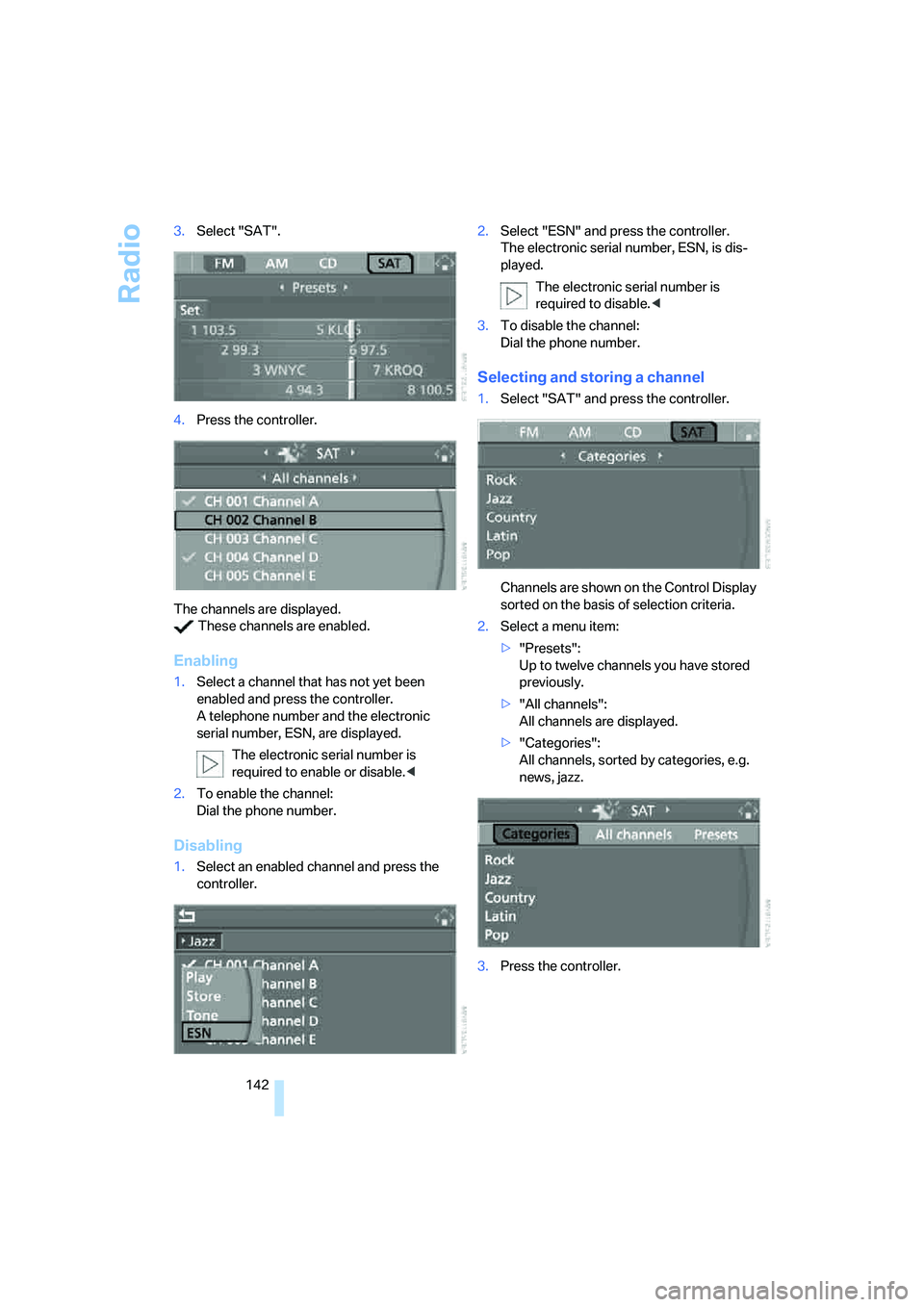
142 3.Select "SAT".
4.Press the controller.
The channels are displayed.
These channels are enabled.
Enabling
1.Select a channel that has not yet been
enabled and press the controller.
A telephone number and the electronic
serial number, ESN, are displayed.
The electronic serial number is
required to enable or disable.<
2.To enable the channel:
Dial the phone number.
Disabling
1.Select an enabled channel and press the
controller.2.Select "ESN" and press the controller.
The electronic serial number, ESN, is dis-
played.
The electronic serial number is
required to disable.<
3.To disable the channel:
Dial the phone number.
Selecting and storing a channel
1.Select "SAT" and press the controller.
Channels are shown on the Control Display
sorted on the basis of selection criteria.
2.Select a menu item:
>"Presets":
Up to twelve channels you have stored
previously.
>"All channels":
All channels are displayed.
>"Categories":
All channels, sorted by categories, e.g.
news, jazz.
3.Press the controller.
Page 144 of 223
Navigation
Entertainment
Driving tips
143Reference
At a glance
Controls
Communications
Mobility
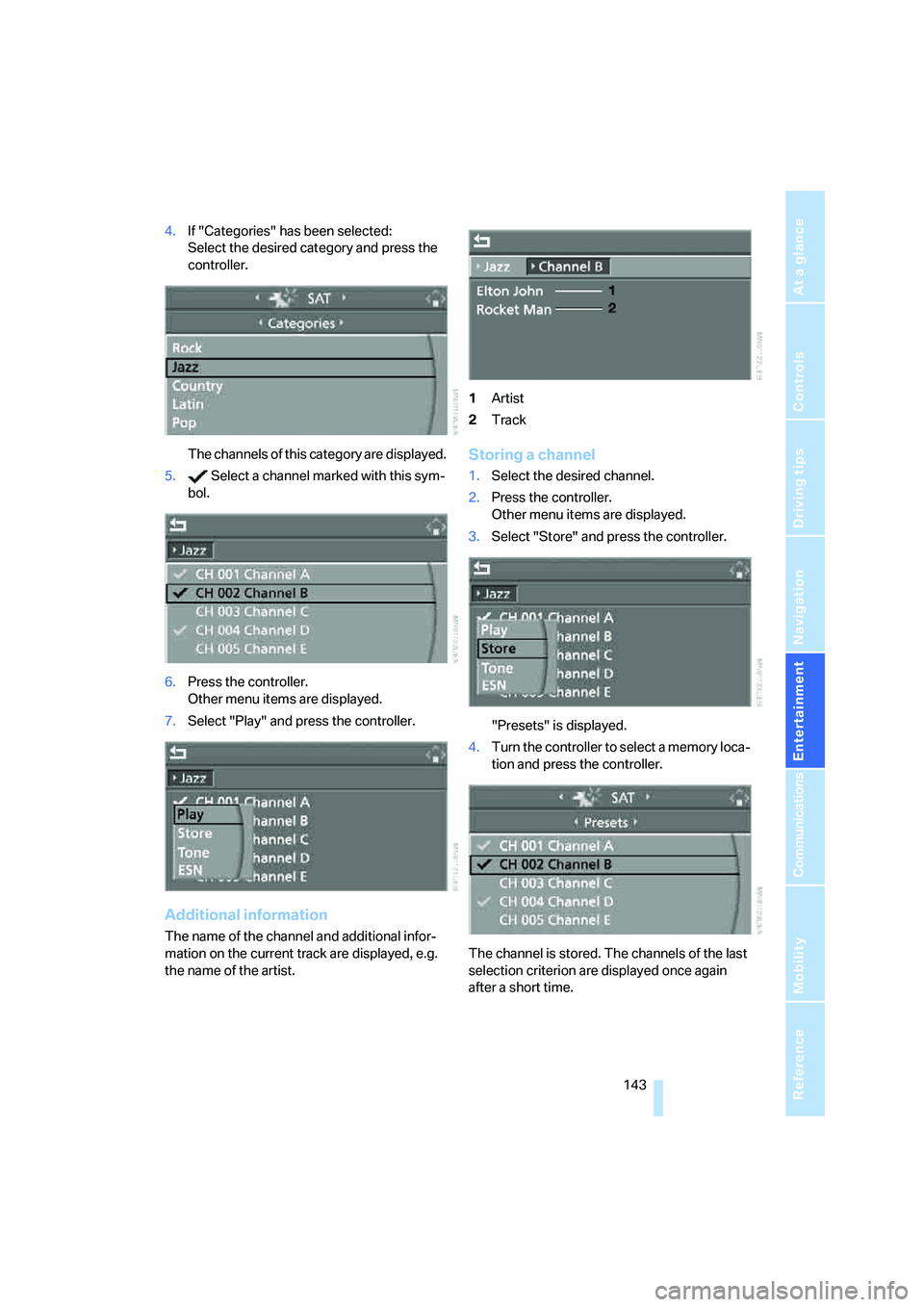
4.If "Categories" has been selected:
Select the desired category and press the
controller.
The channels of this category are displayed.
5. Select a channel marked with this sym-
bol.
6.Press the controller.
Other menu items are displayed.
7.Select "Play" and press the controller.
Additional information
The name of the channel and additional infor-
mation on the current track are displayed, e.g.
the name of the artist.1Artist
2Track
Storing a channel
1.Select the desired channel.
2.Press the controller.
Other menu items are displayed.
3.Select "Store" and press the controller.
"Presets" is displayed.
4.Turn the controller to select a memory loca-
tion and press the controller.
The channel is stored. The channels of the last
selection criterion are displayed once again
after a short time.
Page 204 of 223
Reference 203
At a glance
Controls
Driving tips
Communications
Navigation
Entertainment
Mobility
Onboard info
Entertainment
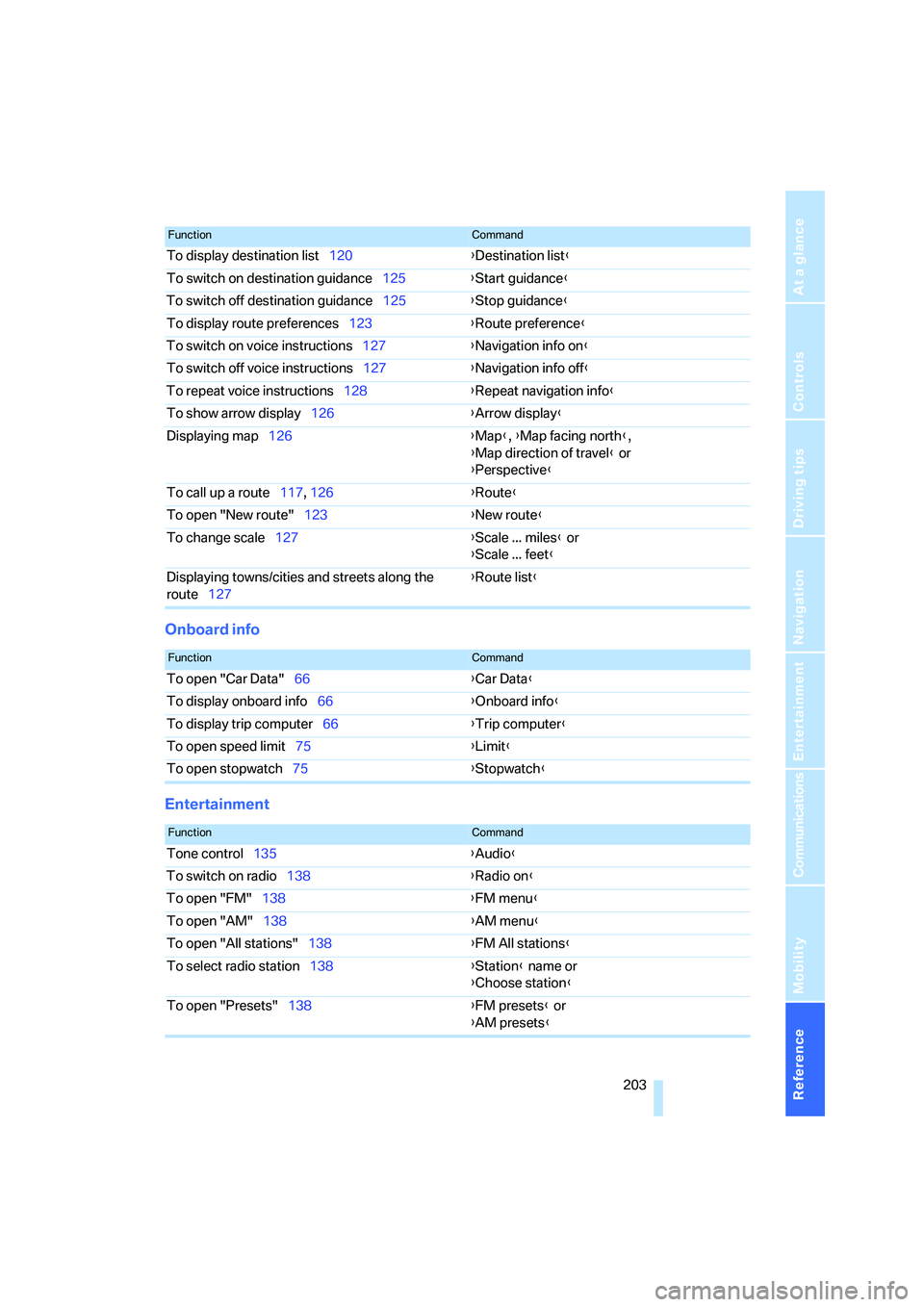
To display destination list120{Destination list}
To switch on destination guidance125{Start guidance}
To switch off destination guidance125{Stop guidance}
To display route preferences123{Route preference}
To switch on voice instructions127{Navigation info on}
To switch off voice instructions127{Navigation info off}
To repeat voice instructions128{Repeat navigation info}
To show arrow display126{Arrow display}
Displaying map126{Map}, {Map facing north},
{Map direction of travel} or
{Perspective}
To call up a route117, 126 {Route}
To open "New route"123{New route}
To change scale127{Scale ... miles} or
{Scale ... feet}
Displaying towns/cities and streets along the
route127{Route list}
FunctionCommand
FunctionCommand
To open "Car Data"66{Car Data}
To display onboard info66{Onboard info}
To display trip computer66{Trip computer}
To open speed limit75{Limit}
To open stopwatch75{Stopwatch}
FunctionCommand
Tone control135{Audio}
To switch on radio138{Radio on}
To open "FM"138{FM menu}
To open "AM"138{AM menu}
To open "All stations"138{FM All stations}
To select radio station138{Station} name or
{Choose station}
To open "Presets"138{FM presets} or
{AM presets}
Page 205 of 223
Short commands for the voice command system
204
Climate
menu
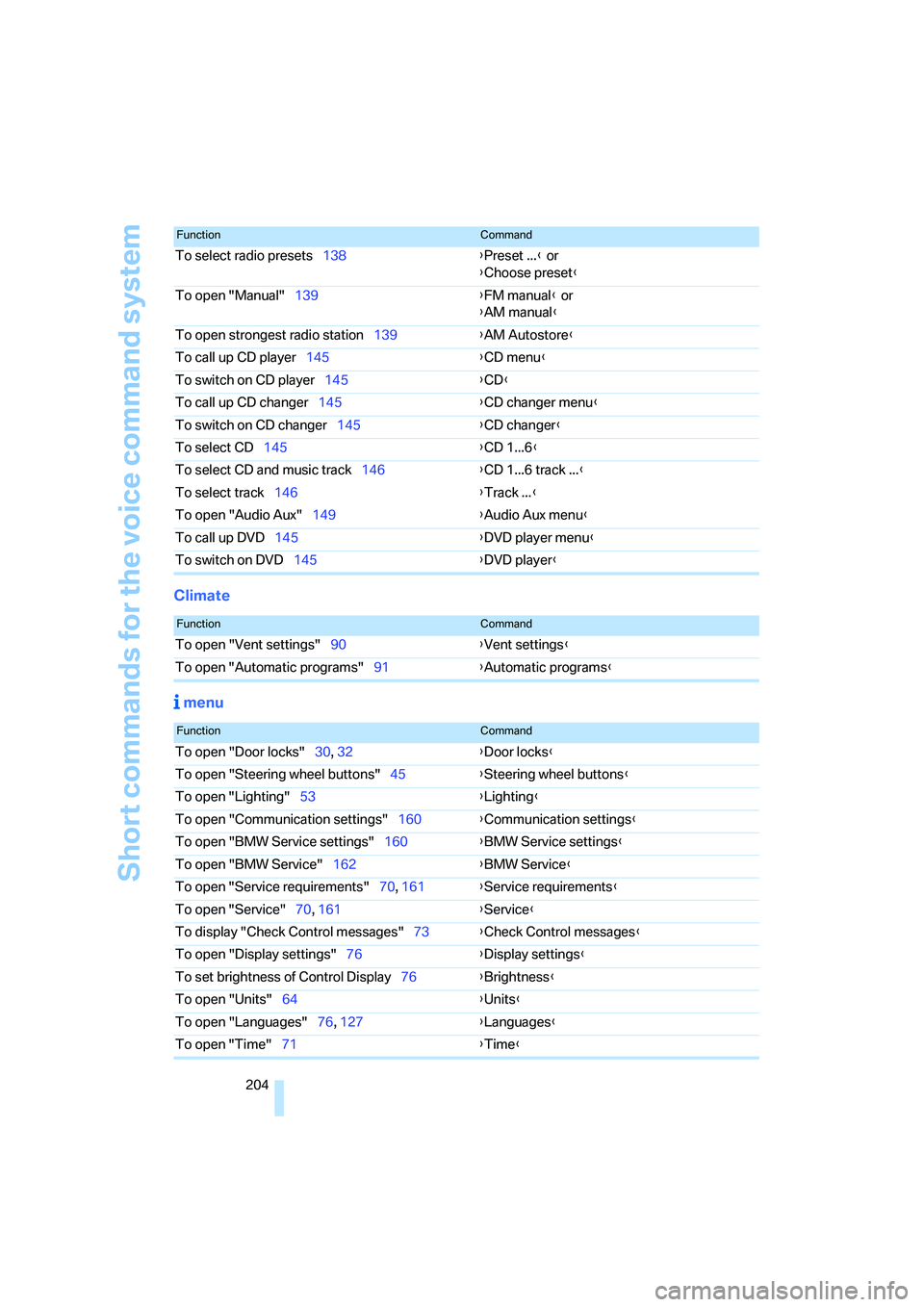
To select radio presets138{Preset ...} or
{Choose preset}
To open "Manual"139{FM manual} or
{AM manual}
To open strongest radio station139{AM Autostore}
To call up CD player145{CD menu}
To switch on CD player145{CD}
To call up CD changer145{CD changer menu}
To switch on CD changer145{CD changer}
To select CD145{CD 1...6}
To select CD and music track146{CD 1...6 track ...}
To select track146{Track ...}
To open "Audio Aux"149{Audio Aux menu}
To call up DVD145{DVD player menu}
To switch on DVD145{DVD player}
FunctionCommand
FunctionCommand
To open "Vent settings"90{Vent settings}
To open "Automatic programs"91{Automatic programs}
FunctionCommand
To open "Door locks"30, 32{Door locks}
To open "Steering wheel buttons"45{Steering wheel buttons}
To open "Lighting"53{Lighting}
To open "Communication settings"160{Communication settings}
To open "BMW Service settings"160{BMW Service settings}
To open "BMW Service"162{BMW Service}
To open "Service requirements"70, 161{Service requirements}
To open "Service"70, 161{Service}
To display "Check Control messages"73{Check Control messages}
To open "Display settings"76{Display settings}
To set brightness of Control Display76{Brightness}
To open "Units"64{Units}
To open "Languages"76, 127{Languages}
To open "Time"71{Time}
Page 216 of 223
Reference 215
At a glance
Controls
Driving tips
Communications
Navigation
Entertainment
Mobility
Portable phone
– accepted calls155
– adjusting volume153
– calling153
– ending call154
– hands-free system152
– missed calls155
– operation via iDrive153
– phone book154
– redialing155
– Top 8155
– touch tone dialing156
Portable phone, installation
location, refer to Center
armrest96
Portable phone, refer to the
separate Owner's Manual
Portable phone in the
vehicle106
Portable phones, use inside
the car, refer to Portable
phone in the vehicle106
Position
– displaying129
– storing121
Power windows35
– safety switch36
Power windows, refer to
Windows35
"Presets", calling up on
radio138
"Presets" on the radio142
Pressure, tires170
Pressure monitoring, tires80
– Flat Tire Monitor80
Protection function, refer to
Anti-trapping mechanism
– glass sunroof, electric37
– windows35
Puncture
– Flat Tire Monitor80R
Radio
– autostore139
– controls134
– sampling stations139
– satellite radio141
– selecting the frequency
manually139
– selecting the
waveband134,138
– station search139
– station selection138
– station with the best
reception139
– storing stations140
– switching on/off134
– tone control135
– volume135
– Weather Band141
Radio key, refer to Integrated
key/Remote control28
Radio position, refer to Radio
readiness49
Radio readiness49
– switched off49
– switched on49
Rain sensor54
"Random", random play147
Reading lamps88
Rear lamps, refer to Tail
lamps189
– replacing bulbs190
Rear seats
– adjusting head restraints41
Rear turn signals
– replacing bulbs190
Rear ventilation92
Rearview mirror, refer to
Mirrors43
Rear window defroster92
Rear window roller blind, refer
to Roller sun blinds95
Rear window safety switch36
"Received calls"155
Receiving level of portable
phone, refer to Status
information20Reception
– radio stations141
Rechargeable flashlight96
Recirculated-air mode91
Recirculation of air, refer to
Recirculated-air mode91
Reclining seat, refer to
Backrest39
Recording times, refer to
Stopwatch75
"Redial" for portable
phone155
Refueling168
Releasing
– hood180
Remaining distance, refer to
Cruising range65
Remote control28
– garage door opener93
– luggage compartment lid30
– malfunctions31
– service data185
"Repeat" for audio mode146
Replacement remote
control28
Replacing bulbs, refer to
Lamps and bulbs187
Replacing tires, refer to New
wheels and tires178
Reporting an accident, refer to
Initiating an emergency
call193
Reporting safety defects7
Reserve warning, refer to Fuel
gauge65
Reservoir for washer
systems55
Reset, refer to Resetting tone
settings137
"Reset" for stopwatch76
"Reset" for tone settings137
Residual heat mode91
Restraint system
– for children46
Restraint systems
– refer to Safety belts43
Reverse, fast
– CD changer147
– CD player147