stop start BMW 330I 2005 User Guide
[x] Cancel search | Manufacturer: BMW, Model Year: 2005, Model line: 330I, Model: BMW 330I 2005Pages: 223, PDF Size: 7.49 MB
Page 128 of 223
Navigation
Driving tips
127Reference
At a glance
Controls
Communications
Entertainment
Mobility
lighted. Turn the controller until the desired
map view is selected:
>"Map facing north"
>"Map direction of travel"
>"Perspective"
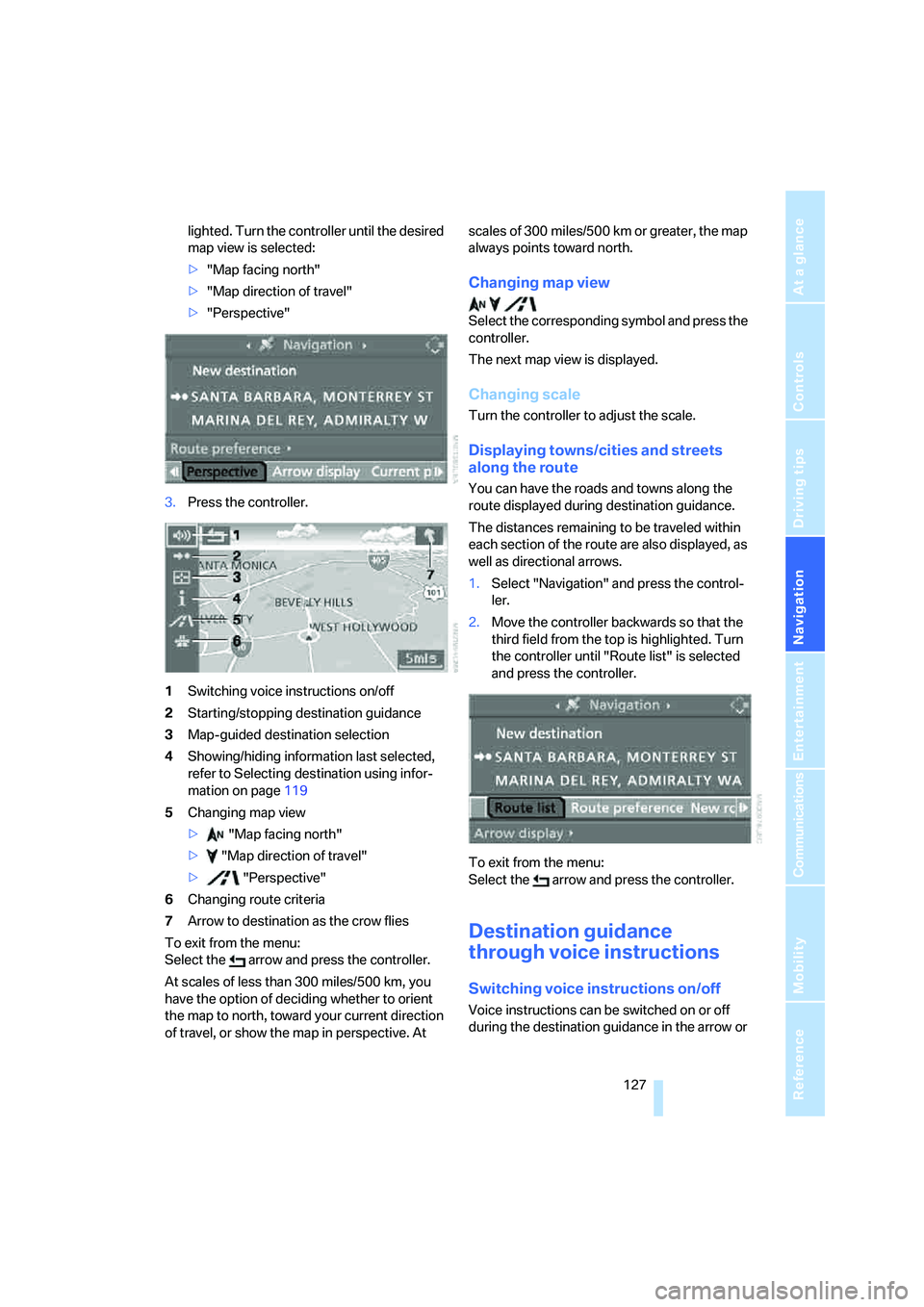
3.Press the controller.
1Switching voice instructions on/off
2Starting/stopping destination guidance
3Map-guided destination selection
4Showing/hiding information last selected,
refer to Selecting destination using infor-
mation on page119
5Changing map view
> "Map facing north"
> "Map direction of travel"
> "Perspective"
6Changing route criteria
7Arrow to destination as the crow flies
To exit from the menu:
Select the arrow and press the controller.
At scales of less than 300 miles/500 km, you
have the option of deciding whether to orient
the map to north, toward your current direction
of travel, or show the map in perspective. At scales of 300 miles/500 km or greater, the map
always points toward north.
Changing map view
Select the corresponding symbol and press the
controller.
The next map view is displayed.
Changing scale
Turn the controller to adjust the scale.
Displaying towns/cities and streets
along the route
You can have the roads and towns along the
route displayed during destination guidance.
The distances remaining to be traveled within
each section of the route are also displayed, as
well as directional arrows.
1.Select "Navigation" and press the control-
ler.
2.Move the controller backwards so that the
third field from the top is highlighted. Turn
the controller until "Route list" is selected
and press the controller.
To exit from the menu:
Select the arrow and press the controller.
Destination guidance
through voice instructions
Switching voice instructions on/off
Voice instructions can be switched on or off
during the destination guidance in the arrow or
Page 131 of 223
What to do if …
130
What to do if …
What to do if …
>a navigation DVD is inserted, but an instruc-
tion to insert the DVD appears on the Con-
trol Display?
The navigation DVD may not be the correct
DVD for the navigation system. This infor-
mation is indicated on the DVD label.
>you request the current position of your
vehicle, but do not receive a precise dis-
play?
The system is unable to receive enough
GPS signals at your current position owing
to obstructions, your current position is not
yet available on your navigation DVD, or the
system is in the process of calculating your
current position. As a rule, reception is
guaranteed when you are in the open.
>the destination guidance does not accept a
destination?
The data of the destination is not stored on
the navigation DVD that is loaded. Choose a
destination as close as possible to the orig-
inal one.
>the destination guidance does not accept
an address without the street name?
On the navigation DVD, no downtown area
can be determined for the city or town
entered. Enter any street, or a destination
such as the railway station in the selected
town, and then start the destination guid-
ance.
>you want to enter a destination for the des-
tination guidance, but it is not possible to
select the letters for your desired entry?
The data of the destination is not stored on
the navigation DVD that is loaded. In this
case, the system will not offer you any let-
ters to choose from. Choose a destination
as close as possible to the original one.
>the system stops furnishing directions on
which way to turn as you approach intersec-
tions?
You are driving in an area that has not yet
been completely recorded on the naviga-tion DVD. Instead of an arrow indicating a
turn, you will see an arrow which indicates
the general direction of your planned route.
Or you have left the recommended route
and the system requires a few seconds to
calculate a new recommended route.
>the navigation system does not react to
entries?
If the battery was disconnected, it takes
about 10 minutes before the system is once
again operational.
Page 140 of 223
Navigation
Entertainment
Driving tips
139Reference
At a glance
Controls
Communications
Mobility
Buttons on the CD player
Press the button for the corre-
sponding direction.
The system switches to the next displayed sta-
tion.
You can also change stations with buttons on
the steering wheel, refer to page10.
Sampling stations, scan
The stations on the current waveband are auto-
matically sampled in succession.
1.Select "FM" or "AM" and press the control-
ler.
"Set" is selected.
2.Press the controller.
Other menu items are displayed.
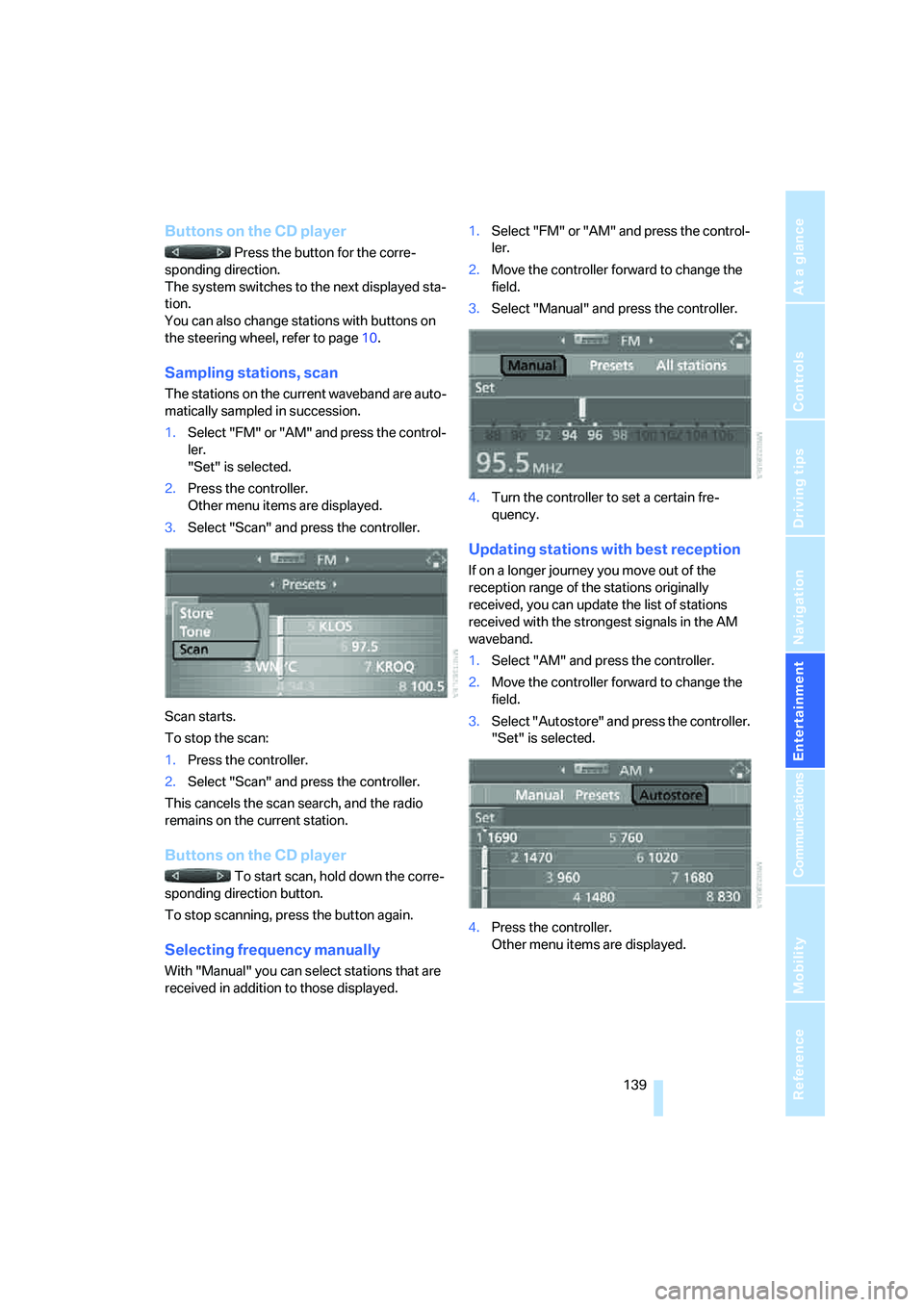
3.Select "Scan" and press the controller.
Scan starts.
To stop the scan:
1.Press the controller.
2.Select "Scan" and press the controller.
This cancels the scan search, and the radio
remains on the current station.
Buttons on the CD player
To start scan, hold down the corre-
sponding direction button.
To stop scanning, press the button again.
Selecting frequency manually
With "Manual" you can select stations that are
received in addition to those displayed.1.Select "FM" or "AM" and press the control-
ler.
2.Move the controller forward to change the
field.
3.Select "Manual" and press the controller.
4.Turn the controller to set a certain fre-
quency.
Updating stations with best reception
If on a longer journey you move out of the
reception range of the stations originally
received, you can update the list of stations
received with the strongest signals in the AM
waveband.
1.Select "AM" and press the controller.
2.Move the controller forward to change the
field.
3.Select "Autostore" and press the controller.
"Set" is selected.
4.Press the controller.
Other menu items are displayed.
Page 147 of 223
CD player and CD changer
146
Selecting a track
Buttons on the CD player
Press the button for the appropriate
direction as often as necessary until the desired
track on the current CD is reached.
The CD starts to play at the start of the track.
The track is displayed on the Control Display.
You can also change the track with buttons on
the steering wheel, refer to page10.
Via iDrive
Turn the controller to select a track.
Sampling tracks, Scan
All tracks on the current CD are automatically
sampled once in succession.
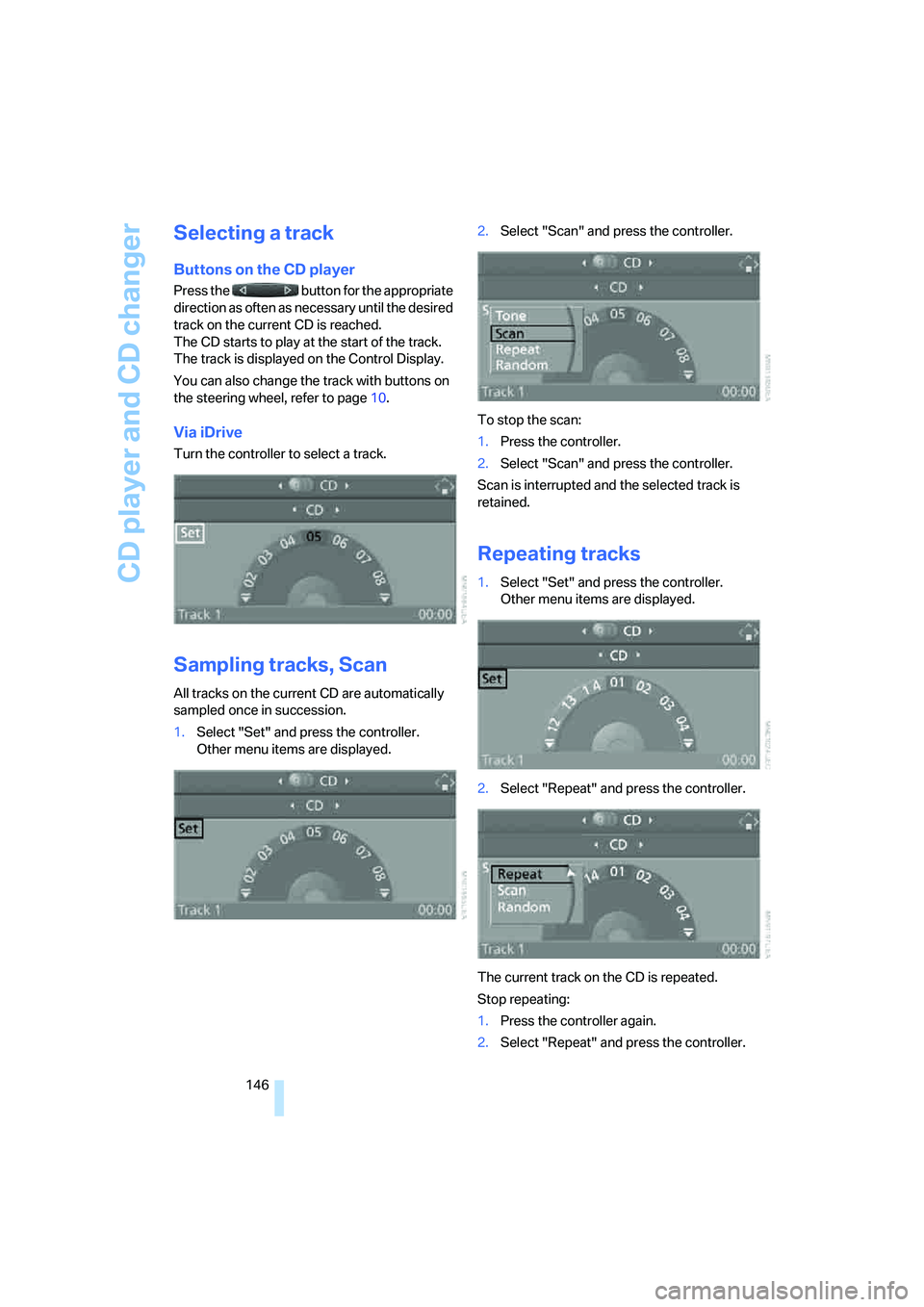
1.Select "Set" and press the controller.
Other menu items are displayed.2.Select "Scan" and press the controller.
To stop the scan:
1.Press the controller.
2.Select "Scan" and press the controller.
Scan is interrupted and the selected track is
retained.
Repeating tracks
1.Select "Set" and press the controller.
Other menu items are displayed.
2.Select "Repeat" and press the controller.
The current track on the CD is repeated.
Stop repeating:
1.Press the controller again.
2.Select "Repeat" and press the controller.
Page 197 of 223
Giving and receiving assistance
196
Vehicles with automatic transmission
Selector lever in position N.
Changing selector lever positions, refer to
page52.
Do not exceed a towing speed of 45 mph
or 70 km/h and a towing distance of
90 miles/150 km, as otherwise the automatic
transmission may be damaged.<
Towing methods
In some countries, towing with tow bars or
ropes is not permitted in public traffic.
Familiarize yourself with the regulations on tow-
ing in the respective country.
With tow bar
The towing vehicle must not be lighter
than the towed vehicle, otherwise it may
be impossible to maintain control.<
The tow fittings used should be on the same
side on both vehicles. Should it prove impossi-
ble to avoid mounting the tow bar at an angle,
please observe the following:
>Clearance and maneuvering capability will
be sharply limited during cornering.
>The tow bar will generate lateral forces if it is
attached offset.
Secure the tow bar to the tow fitting only.
Otherwise damage to other vehicle parts
could result.<
With tow rope
When starting off in the towing vehicle, make
sure that the tow rope is taut.
To avoid jerking and the associated
stresses on vehicle components when
towing, always use nylon ropes or nylon straps.
Secure the tow rope to the tow fitting only. Oth-
erwise damage to other vehicle parts could
result.<
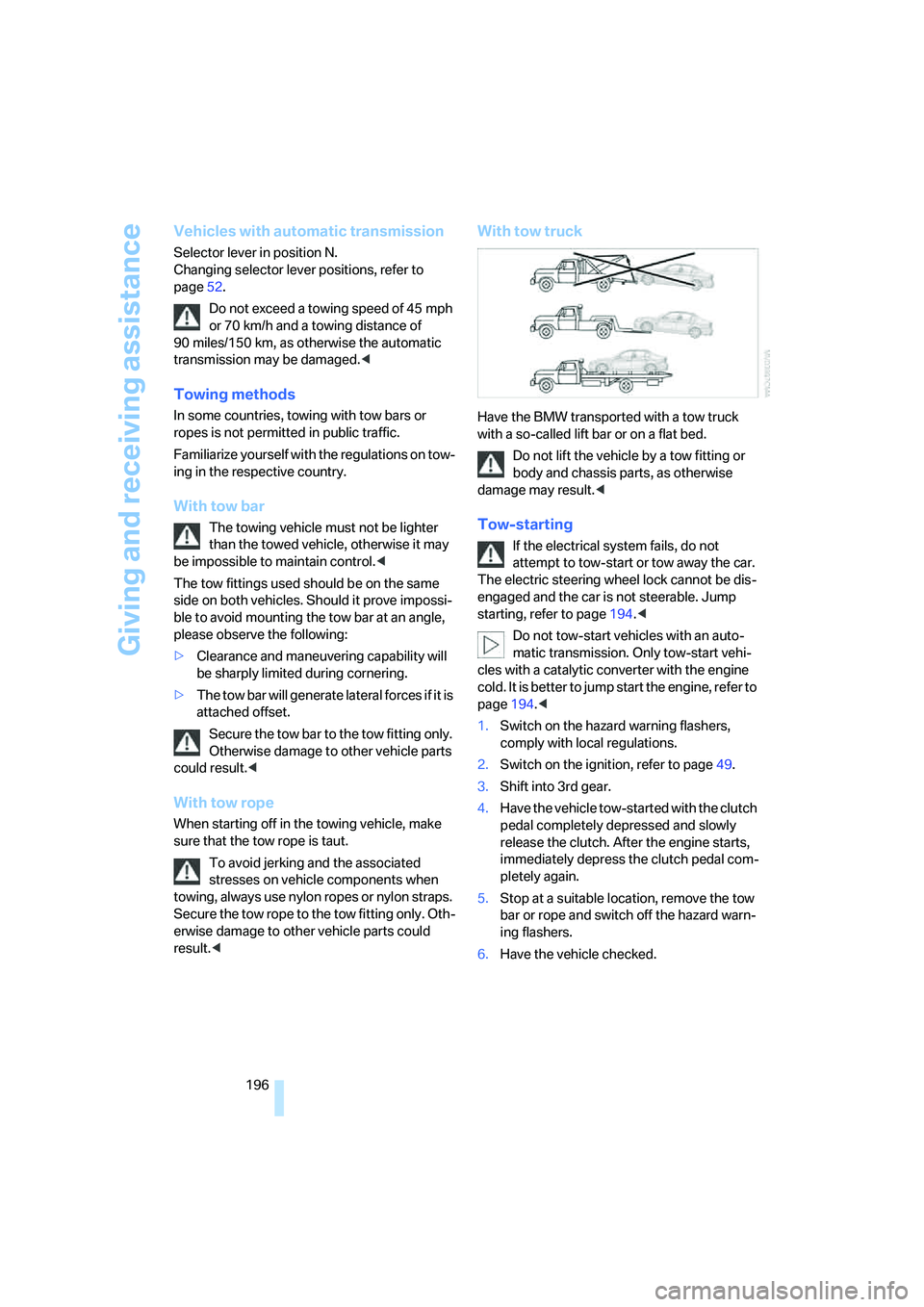
With tow truck
Have the BMW transported with a tow truck
with a so-called lift bar or on a flat bed.
Do not lift the vehicle by a tow fitting or
body and chassis parts, as otherwise
damage may result.<
Tow-starting
If the electrical system fails, do not
attempt to tow-start or tow away the car.
The electric steering wheel lock cannot be dis-
engaged and the car is not steerable. Jump
starting, refer to page194.<
Do not tow-start vehicles with an auto-
matic transmission. Only tow-start vehi-
cles with a catalytic converter with the engine
cold. It is better to jump start the engine, refer to
page194.<
1.Switch on the hazard warning flashers,
comply with local regulations.
2.Switch on the ignition, refer to page49.
3.Shift into 3rd gear.
4.Have the vehicle tow-started with the clutch
pedal completely depressed and slowly
release the clutch. After the engine starts,
immediately depress the clutch pedal com-
pletely again.
5.Stop at a suitable location, remove the tow
bar or rope and switch off the hazard warn-
ing flashers.
6.Have the vehicle checked.
Page 204 of 223
Reference 203
At a glance
Controls
Driving tips
Communications
Navigation
Entertainment
Mobility
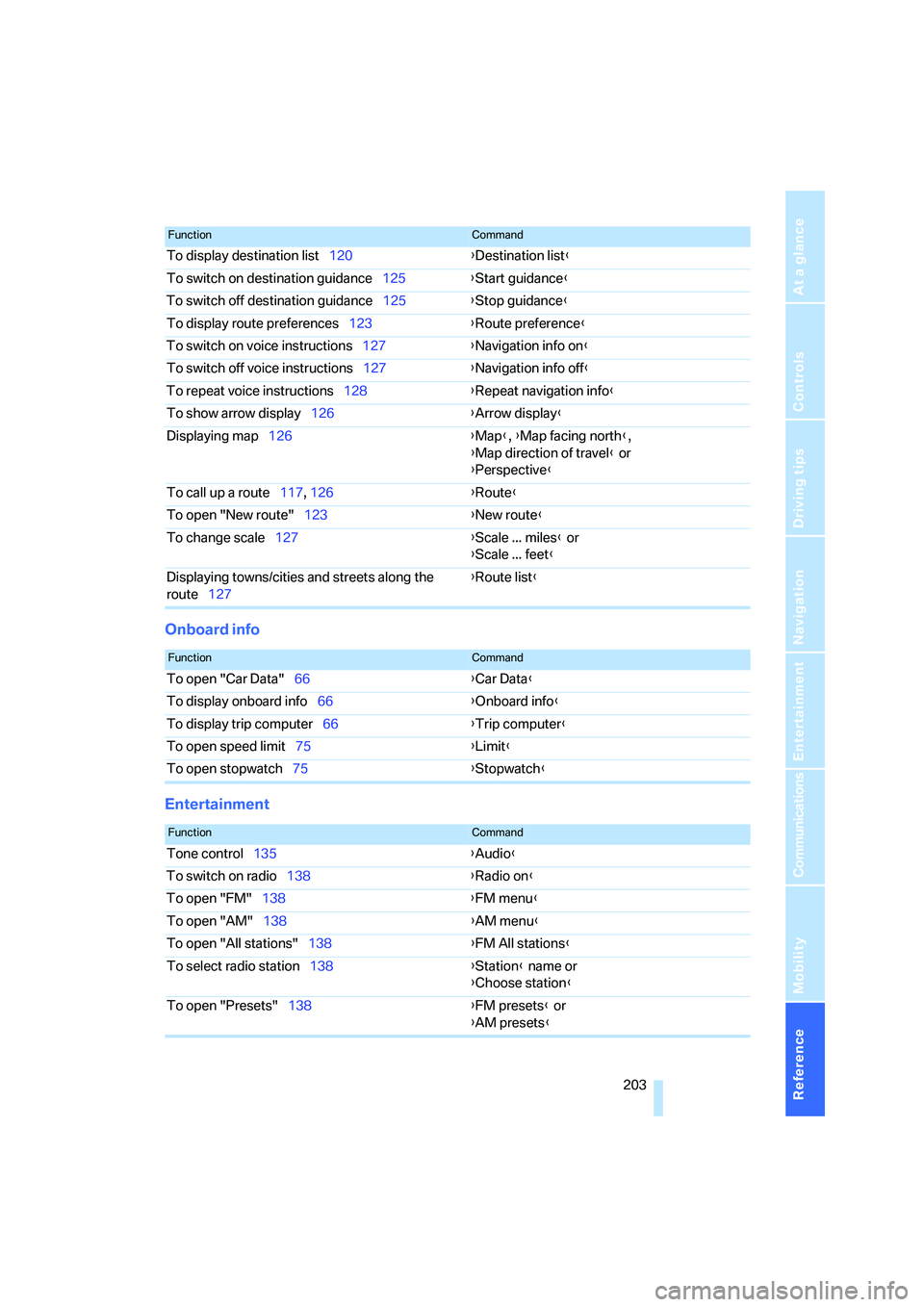
Onboard info
Entertainment
To display destination list120{Destination list}
To switch on destination guidance125{Start guidance}
To switch off destination guidance125{Stop guidance}
To display route preferences123{Route preference}
To switch on voice instructions127{Navigation info on}
To switch off voice instructions127{Navigation info off}
To repeat voice instructions128{Repeat navigation info}
To show arrow display126{Arrow display}
Displaying map126{Map}, {Map facing north},
{Map direction of travel} or
{Perspective}
To call up a route117, 126 {Route}
To open "New route"123{New route}
To change scale127{Scale ... miles} or
{Scale ... feet}
Displaying towns/cities and streets along the
route127{Route list}
FunctionCommand
FunctionCommand
To open "Car Data"66{Car Data}
To display onboard info66{Onboard info}
To display trip computer66{Trip computer}
To open speed limit75{Limit}
To open stopwatch75{Stopwatch}
FunctionCommand
Tone control135{Audio}
To switch on radio138{Radio on}
To open "FM"138{FM menu}
To open "AM"138{AM menu}
To open "All stations"138{FM All stations}
To select radio station138{Station} name or
{Choose station}
To open "Presets"138{FM presets} or
{AM presets}
Page 218 of 223
Reference 217
At a glance
Controls
Driving tips
Communications
Navigation
Entertainment
Mobility
"Short route" in
navigation123
"Show current position"119
"Show destination
position"119
Shuffled, refer to Random
– CD changer147
– CD player147
Side airbags82
Side-mounted turn signals
– replacing bulbs189
Side window blind, refer to
Roller sun blinds95
Side windows, refer to
Windows35
Signal horn, refer to Horn10
Sitting safely38
– airbags38
– safety belt38
– with head restraint38
Ski bag101
Ski sack, refer to Ski bag101
Sliding/tilt sunroof, refer to
Glass sunroof, electric36
Slot for remote control49
Smokers' package, refer to
Ashtray99
Socket, refer to Connecting
electrical appliances99
Sound output for
entertainment on/off134
Spare fuses192
Spare fuses, refer to
Fuses192
Spark plugs, refer to Service
requirements69
Speed
– for winter tires179
Speed-dependent
volume135
Speed limit75
– setting75
Speed limit warning, refer to
Speed limit75
Speedometer12
"Speed volume"136
Sports seat40Stability control, refer to
Driving stability control
systems78
Start/stop button49
– starting the engine49
– switching off the engine50
"Start guidance"118,125
Starting
– difficulties, temperature50
Starting, refer to Starting the
engine49
Starting assistance, refer to
Jump starting194
Starting the engine
– start/stop button49
Start menu17
"State / Province" in
destination entry116
Station, refer to Radio138
"Status"70
Status of this Owner's Manual
at time of printing5
Steering wheel44
– adjustment44
– buttons on steering
wheel11
– freely programmable
buttons45
– lock49
"Steering wheel buttons"45
Steering with variable ratio,
refer to Active steering81
Steptronic, refer to Automatic
transmission with
Steptronic51
"Stopwatch"76
Stopwatch75
Storage compartment
– permissible load97
Storage compartments97
Storage package97
"Store in address book" in
navigation121
"Store" on the radio140,143
Storing current position121
Storing radio stations140
Storing tires179
Stowage, refer to Storage
compartments97"Street" in destination
entry117
Summer tires, refer to Wheels
and tires170
Sun blinds95
SW, waveband138
Switches, refer to Cockpit10
Switching Control Display on/
off21
Switching navigation voice
instructions on/off127
Switching off
– engine50
Switching off the engine
– start/stop button49
Switching on
– audio134
– CD changer134
– CD player134
– radio134
Switching on the hour
signal72
Switching the cooling function
on and off
92
Symbols4
– Control Display20
T
Tachometer64
Tail lamps189
– replacing bulbs190
Tank contents, refer to
Capacities201
Technical data200
Telematik, refer to
TeleService, BMW
Assist160
Telephone, refer to Portable
phone152
Telephone, refer to separate
Owner's Manual
"Telephone list"45
TeleService160
– enabling160
– services offered161