buttons BMW 330I 2006 Owner's Manual
[x] Cancel search | Manufacturer: BMW, Model Year: 2006, Model line: 330I, Model: BMW 330I 2006Pages: 246, PDF Size: 8.43 MB
Page 168 of 246
Telephoning
166
Telephoning
The concept
Your BMW is equipped with a full mobile phone
preparation package. After pairing a suitable
mobile phone with the vehicle once, you can
operate the mobile phone via iDrive, the buttons
on the steering wheel or via voice commands.
Once a mobile phone has been paired with your
vehicle, it is automatically recognized as soon
as it is inside the vehicle while the engine is run-
ning or the ignition is switched on. You can
store the pairing data for up to four mobile
phones simultaneously. If several mobile
phones are detected at the same time, the
mobile phone last paired can be operated via
the vehicle.
Using the telephone inside
the vehicle
Using the snap-in adapter*
The so-called snap-in adapter, a holder for
mobile phones, allows you to charge the mobile
phone's battery and connect the mobile phone
to your vehicle's outside antenna. This ensures
better network reception and consistent repro-
duction quality. Please contact your
BMW Center to find out for which mobile
phones there are snap-in adapters available.
BMW discourages the use of mobile
phones or other mobile communications
devices inside the vehicle without a direct con-
nection to an outside antenna. Otherwise, inter-
ference between vehicle electronics systems
and the mobile communications device cannot
be ruled out. In addition, there is no assurance
that the radiation which results from transmis-
sion will be dissipated from the vehicle inte-
rior.<
Avoid operating a mobile phone recognized by
the vehicle via the mobile phone's keypad, oth-
erwise malfunctions may result.
For your safety
A car phone makes life more convenient in
many ways, and can even save lives in an emer-
gency. While you should consult your mobile
phone's separate Owner's Manual for a detailed
description of safety precautions and informa-
tion, we request that you direct your particular
attention to the following:
Only make entries when the traffic situa-
tion allows you to do so. Do not hold the
mobile phone in your hand while you are driving;
use the hands-free system instead. If you do
not observe this precaution, your being dis-
tracted can endanger vehicle occupants and
other road users.<
Suitable mobile phones
Please ask your BMW Center which mobile
phones with Bluetooth interface are supported
by the mobile phone preparation package and/
or which mobile phones are compatible with the
snap-in adapter. By virtue of their particular
software versions, these mobile phones sup-
port the functions described in this Owner's
Manual. Malfunctions may occur with other
mobile phones.
Care instructions
You can find what you need to know about car-
ing for your mobile phone in the separate Caring
for your vehicle brochure and in the mobile
phone Owner's Manual.
Operating options
You can operate the mobile phone* using:
>The steering wheel, refer to page10
>iDrive, refer to page170
>Voice commands, refer to page174
*
Page 172 of 246
Telephoning
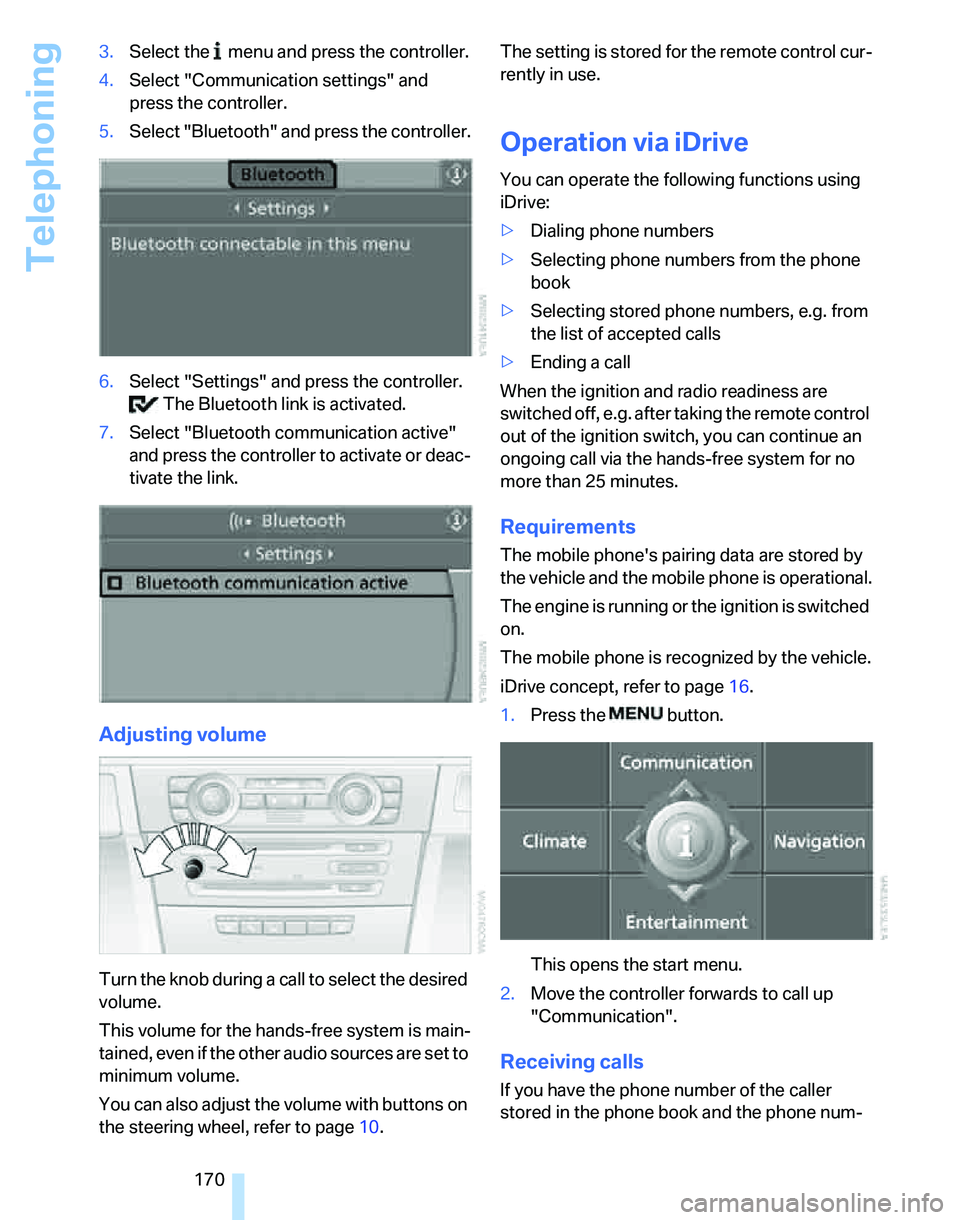
170 3.Select the menu and press the controller.
4.Select "Communication settings" and
press the controller.
5.Select "Bluetooth" and press the controller.
6.Select "Settings" and press the controller.
The Bluetooth link is activated.
7.Select "Bluetooth communication active"
and press the controller to activate or deac-
tivate the link.
Adjusting volume
Turn the knob during a call to select the desired
volume.
This volume for the hands-free system is main-
tained, even if the other audio sources are set to
minimum volume.
You can also adjust the volume with buttons on
the steering wheel, refer to page10.The setting is stored for the remote control cur-
rently in use.
Operation via iDrive
You can operate the following functions using
iDrive:
>Dialing phone numbers
>Selecting phone numbers from the phone
book
>Selecting stored phone numbers, e.g. from
the list of accepted calls
>Ending a call
When the ignition and radio readiness are
switched off, e.g. after taking the remote control
out of the ignition switch, you can continue an
ongoing call via the hands-free system for no
more than 25 minutes.
Requirements
The mobile phone's pairing data are stored by
the vehicle and the mobile phone is operational.
The engine is running or the ignition is switched
on.
The mobile phone is recognized by the vehicle.
iDrive concept, refer to page16.
1.Press the button.
This opens the start menu.
2.Move the controller forwards to call up
"Communication".
Receiving calls
If you have the phone number of the caller
stored in the phone book and the phone num-
Page 178 of 246
Telephoning
176
Selecting an entry
The connection to the phone number of the
selected entry is established.
Redialing
The {Redial} command calls up "Redial".
Notes
The commands in English were available
as of this printing. Other languages are
currently in preparation. To operate the mobile
phone via the voice command system, refer to
page22.<
Important for voice commands
For voice commands, bear in mind the follow-
ing:
>Pronounce the commands smoothly and at
normal volume, avoiding excessive empha-
ses and pauses.
>Keep the doors, windows and glass sunroof
closed to prevent interference from outside
noise.
>Avoid ambient noise in the vehicle while
speaking.
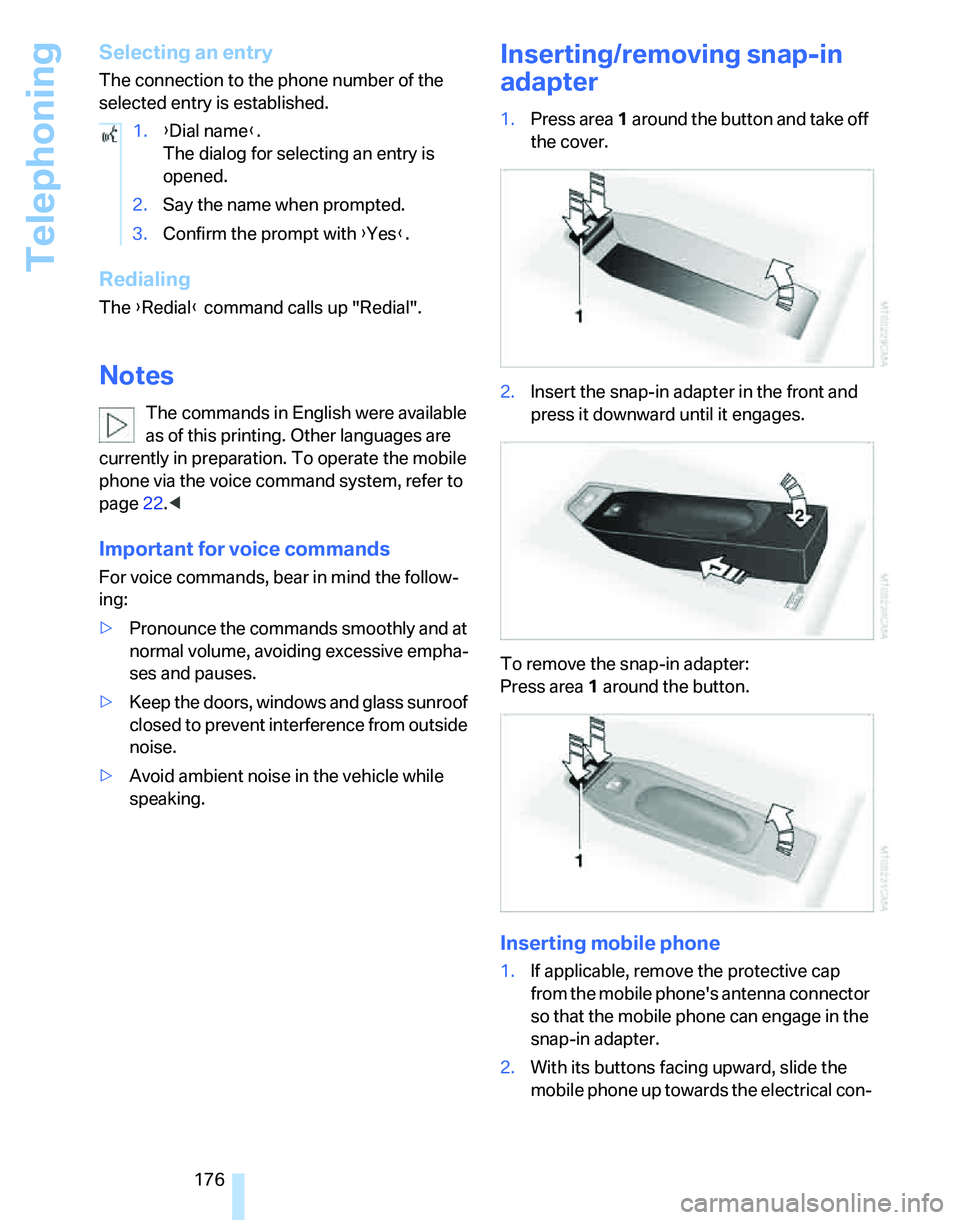
Inserting/removing snap-in
adapter
1.Press area1 around the button and take off
the cover.
2.Insert the snap-in adapter in the front and
press it downward until it engages.
To remove the snap-in adapter:
Press area 1 around the button.
Inserting mobile phone
1.If applicable, remove the protective cap
from the mobile phone's antenna connector
so that the mobile phone can engage in the
snap-in adapter.
2.With its buttons facing upward, slide the
mobile phone up towards the electrical con- 1.{Dial name}.
The dialog for selecting an entry is
opened.
2.Say the name when prompted.
3.Confirm the prompt with {Yes}.
Page 227 of 246
Reference 225
At a glance
Controls
Driving tips
Communications
Navigation
Entertainment
Mobility
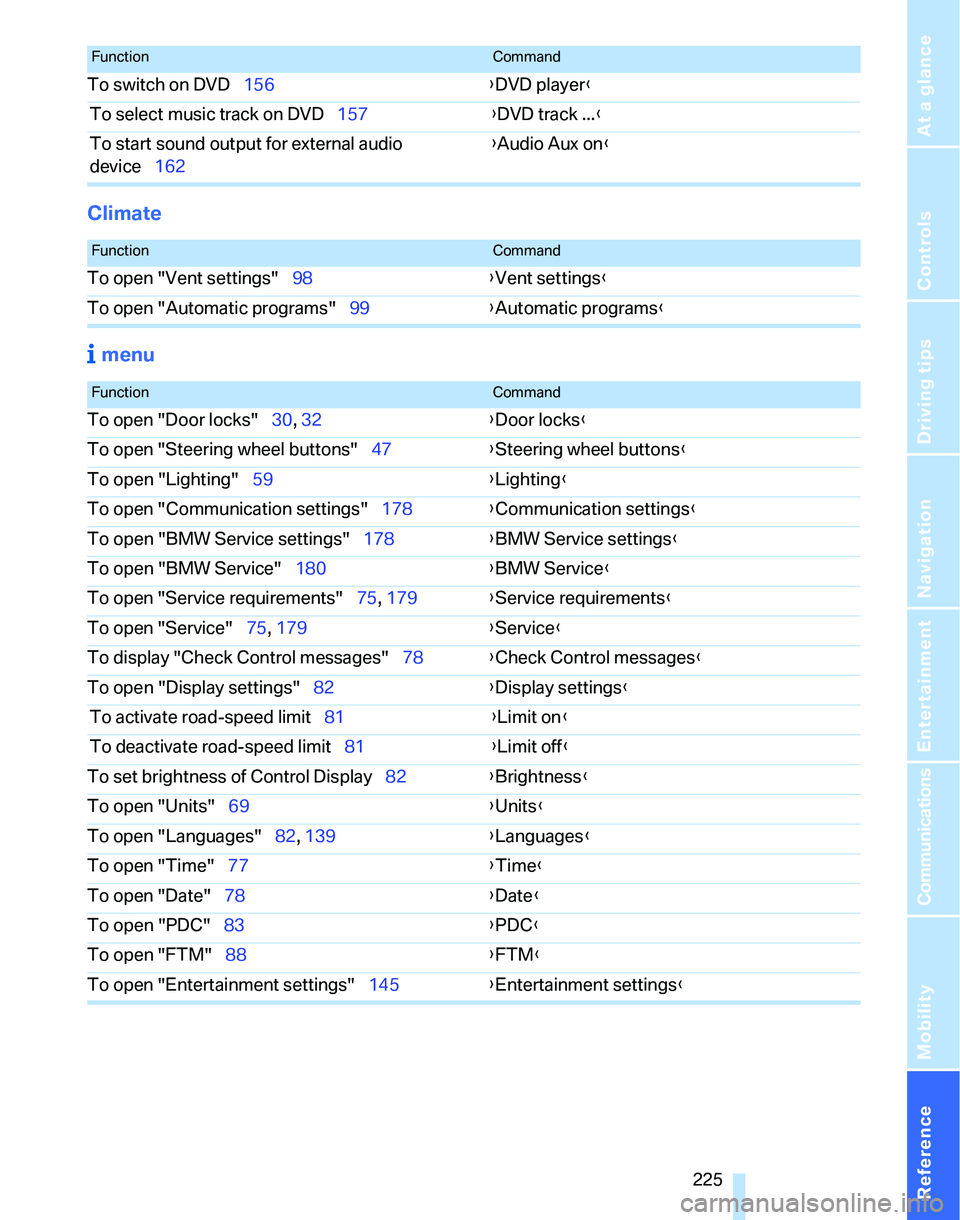
Climate
menu
To switch on DVD156{DVD player}
To select music track on DVD157{DVD track ...}
To start sound output for external audio
device162{Audio Aux on}
FunctionCommand
FunctionCommand
To open "Vent settings"98{Vent settings}
To open "Automatic programs"99{Automatic programs}
FunctionCommand
To open "Door locks"30, 32{Door locks}
To open "Steering wheel buttons"47{Steering wheel buttons}
To open "Lighting"59{Lighting}
To open "Communication settings"178{Communication settings}
To open "BMW Service settings"178{BMW Service settings}
To open "BMW Service"180{BMW Service}
To open "Service requirements"75, 179{Service requirements}
To open "Service"75, 179{Service}
To display "Check Control messages"78{Check Control messages}
To open "Display settings"82{Display settings}
To activate road-speed limit81{Limit on}
To deactivate road-speed limit81{Limit off}
To set brightness of Control Display82{Brightness}
To open "Units"69{Units}
To open "Languages"82, 139{Languages}
To open "Time"77{Time}
To open "Date"78{Date}
To open "PDC"83{PDC}
To open "FTM"88{
FTM}
To open "Entertainment settings"145{Entertainment settings}
Page 230 of 246
Everything from A - Z
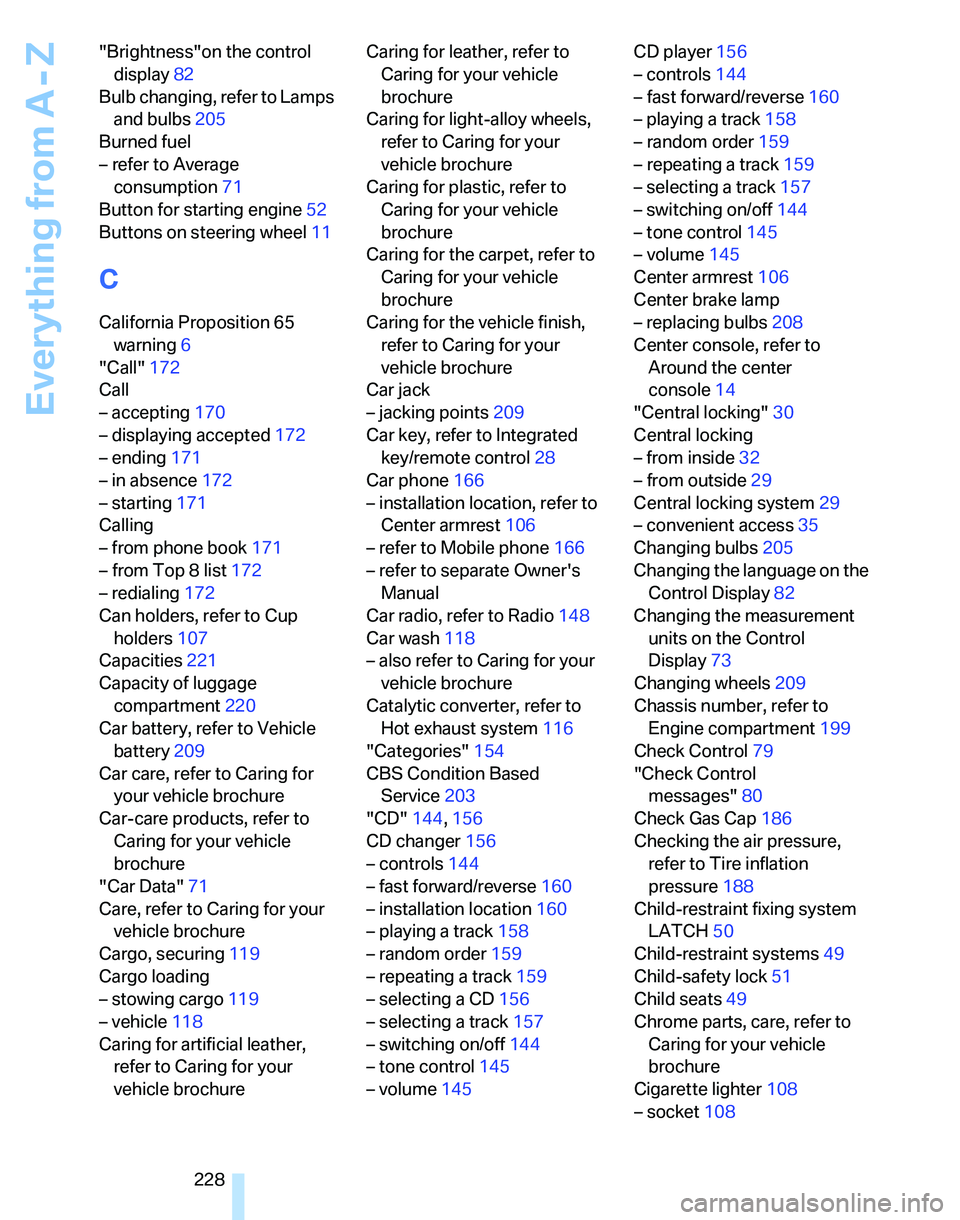
228 "Brightness"on the control
display82
Bulb changing, refer to Lamps
and bulbs205
Burned fuel
– refer to Average
consumption71
Button for starting engine52
Buttons on steering wheel11
C
California Proposition 65
warning6
"Call"172
Call
– accepting170
– displaying accepted172
– ending171
– in absence172
– starting171
Calling
– from phone book171
– from Top 8 list172
– redialing172
Can holders, refer to Cup
holders107
Capacities221
Capacity of luggage
compartment220
Car battery, refer to Vehicle
battery209
Car care, refer to Caring for
your vehicle brochure
Car-care products, refer to
Caring for your vehicle
brochure
"Car Data"71
Care, refer to Caring for your
vehicle brochure
Cargo, securing119
Cargo loading
– stowing cargo119
– vehicle118
Caring for artificial leather,
refer to Caring for your
vehicle brochureCaring for leather, refer to
Caring for your vehicle
brochure
Caring for light-alloy wheels,
refer to Caring for your
vehicle brochure
Caring for plastic, refer to
Caring for your vehicle
brochure
Caring for the carpet, refer to
Caring for your vehicle
brochure
Caring for the vehicle finish,
refer to Caring for your
vehicle brochure
Car jack
– jacking points209
Car key, refer to Integrated
key/remote control28
Car phone166
– installation location, refer to
Center armrest106
– refer to Mobile phone166
– refer to separate Owner's
Manual
Car radio, refer to Radio148
Car wash118
– also refer to Caring for your
vehicle brochure
Catalytic converter, refer to
Hot exhaust system116
"Categories"154
CBS Condition Based
Service203
"CD"144,156
CD changer156
– controls144
– fast forward/reverse
160
– installation location160
– playing a track158
– random order159
– repeating a track159
– selecting a CD156
– selecting a track157
– switching on/off144
– tone control145
– volume145CD player156
– controls144
– fast forward/reverse160
– playing a track158
– random order159
– repeating a track159
– selecting a track157
– switching on/off144
– tone control145
– volume145
Center armrest106
Center brake lamp
– replacing bulbs208
Center console, refer to
Around the center
console14
"Central locking"30
Central locking
– from inside32
– from outside29
Central locking system29
– convenient access35
Changing bulbs205
Changing the language on the
Control Display82
Changing the measurement
units on the Control
Display73
Changing wheels209
Chassis number, refer to
Engine compartment199
Check Control79
"Check Control
messages"80
Check Gas Cap186
Checking the air pressure,
refer to Tire inflation
pressure188
Child-restraint fixing system
LATCH50
Child-restraint systems49
Child-safety lock51
Child seats49
Chrome parts, care, refer to
Caring for your vehicle
brochure
Cigarette lighter108
– socket108
Page 232 of 246
Everything from A - Z
230 Defrosting windows and
removing condensation
– automatic climate
control100
Defrosting windshield, refer to
Defrosting windows100
Defrost position, refer to
Defrosting windows100
"Delete address book" in
navigation134
"Delete all numbers" on the
mobile phone173
"Delete data" in
navigation134
"Delete" for mobile
phone173
Destination address
– deleting133
– entering125,128
Destination for navigation
– entry125
– navigation list131
– selecting from address
book133
– selecting using
information130
– storing132
Destination guidance136
– bypassing route
sections140
– canceling voice
instructions48
– changing specified
route134
– displaying route137
– displaying routes137
– distance and arrival136
– interrupting136
– starting136
– terminating/continuing136
– voice instructions139
– volume of voice
instructions139
Destination list for navigation
system131
Destinations recently driven
to131
"Dial" for mobile phone171
"Dial number"171Digital clock69
Digital compass104
Digital radio151
Dimensions219
Directional indicators, refer to
Turn signals58
Direction instructions, refer to
Voice instructions139
Directory for navigation, refer
to Address book132
Displacement, refer to Engine
data218
Display, refer to iDrive
controls16
Display lighting, refer to
Instrument lighting96
"Display off"21
Displays
– instrument cluster12
– on the Control Display16
Displays and controls10
"Display settings"77
Disposal
– coolant201
– remote control battery37
– vehicle battery209
Distance control, refer to
Active cruise control62
Distance remaining to service,
refer to Service
requirements74
"Distance to dest."71
Distance warning, refer to
PDC Park Distance
Control83
Door key, refer to Integrated
key/remote control28
Door lock32
Door locking, confirmation
signals31
"Door locks"30
Doors, emergency
operation32
DOT Quality Grades194
Draft-free ventilation100
Drinks holders, refer to Cup
holders107
Drive mode56
Drive-off assistant87Driving lamps, refer to Parking
lamps/low beams93
Driving notes116
Driving route, refer to
Displaying route137
Driving stability control
systems84
Driving through water117
Driving tips, refer to Driving
notes116
Dry air, refer to Cooling
function100
DSC Dynamic Stability
Control84
DTC Dynamic Traction
Control85
– indicator lamps85
DVD for navigation124
Dynamic Driving Control56
Dynamic Traction Control
DTC
– indicator lamps85
E
EBV Electronic brake-force
distribution84
Eject button, refer to Buttons
on the CD player144
Electrical malfunction
– door lock32
– fuel filler door186
– glass sunroof39
– panorama glass roof39
Electric seat adjustment41
Electronic brake-force
distribution84
Electronic oil level check199
Emergency call211
Emergency operation, refer to
Closing manually
– glass sunroof39
– panorama glass roof39
Emergency operation, refer to
Manual operation
– door lock32
– fuel filler door186
– transmission lock, automatic
transmission58
Page 235 of 246
Reference 233
At a glance
Controls
Driving tips
Communications
Navigation
Entertainment
Mobility
Indicator and warning
lamps13
Individual air distribution98
Individually programmable
buttons on steering
wheel47
Individual settings, refer to
Personal Profile29
Information
– on another location130
– on country130
– on current position130
– on destination location130
"Information" in
navigation131
"Information on
destination"132
Initializing
– compass, refer to
Calibrating105
– Flat Tire Monitor FTM88
– glass sunroof39
"Input map"130
Installation location
– CD changer160
Instructions for navigation
system, refer to Voice
instructions139
Instrument cluster12
Instrument lighting96
Instrument panel, refer to
Cockpit10
Integrated key28
Integrated universal remote
control103
Interesting destination for
navigation130
"Interim time"82
Interior lamps96
– remote control30
Interior motion sensor35
Interior rearview mirror46
– automatic dimming
feature117
Interior rearview mirror with
digital compass104
Interlock57
Intermittent mode of the
wipers59J
Jacking points209
Joystick, refer to iDrive16
Jumpering, refer to Jump
starting212
Jump starting212
K
Key, refer to Integrated key/
remote control28
Keyless Go, refer to
Convenient access35
Keyless opening and closing,
refer to Convenient
access35
Key Memory, refer to Personal
Profile29
"Keypad"173
Kick-down58
– automatic transmission with
Steptronic58
– sequential manual gearbox
SMG56
Knock control186
L
Lamps, refer to Parking lamps/
low beams93
Lamps and bulbs, replacing
bulbs205
"Languages" in
navigation139
"Languages"on the control
display82
Lap-and-shoulder safety
belt45
Lashing eyes, refer to
Securing cargo119
Last destinations, refer to
Destination list131
"Last seat pos."44
LATCH child-restraint fixing
system50
LEDs light-emitting
diodes205Length, refer to
Dimensions219
License plate lamp, replacing
bulbs208
Light-emitting diodes
LEDs205
Lighter108
"Lighting"94
Lighting
– instruments96
– lamps and bulbs205
– of the vehicle, refer to
Lamps93
Light switch93
"Limit"81
Limit, refer to Speed limit81
Loading
– securing cargo119
Load securing equipment,
refer to Securing cargo119
Location
– drive for navigation DVD and
audio CD124
Lock buttons in the doors,
refer to Locking33
Locking
– adjusting confirmation
signal31
– from inside33
– from outside30
– without remote control, refer
to Convenient access35
Locking and unlocking doors
– from inside32
– from outside30
"LOGIC7", refer to Tone
control146
Low beams93
– automatic93
– replacing bulbs206
Lower back support, refer to
Lumbar support41
Page 236 of 246
Everything from A - Z
234 Luggage compartment
– capacity220
– convenient access36
– folding up the floor
panel110
– lamp96
– opening from inside33
– opening from outside33
Luggage compartment lid33
– convenient access36
– unlocking with remote
control31
Luggage compartment lid,
refer to Tailgate33
Luggage compartment net,
refer to Securing cargo119
Luggage rack, refer to Roof-
mounted luggage rack119
Lumbar support41
M
M+S tires, refer to Winter
tires197
Maintenance, refer to Service
Booklet
Maintenance system203
Malfunction warnings, refer to
Check Control79
Manual mode
– automatic transmission with
Steptronic58
– sequential manual gearbox
SMG55
"Manual" on the radio149
Manual operation
– door lock32
– glass sunroof39
– panorama glass roof39
– transmission lock, automatic
transmission58
Manual release
– fuel filler door186
Manual transmission54
Map
– changing scale138
– destination entry129
"Map direction of travel"138
"Map facing north"138Master key, refer to Integrated
key/remote control28
Maximum cooling98
Maximum speed
– with winter tires197
Memory, refer to Seat and
mirror memory44
MENU button16
Menus, refer to iDrive16
Microfilter
– BMW Maintenance
System203
– for automatic climate
control101
Microfilter/activated-charcoal
filter
– BMW Maintenance
System203
Microphone for telephone14
Mirror dimming feature117
Mirrors45
– automatic curb monitor46
– exterior mirrors45
– heating46
– interior rearview mirror46
"Missed calls"172
Missed calls172
Mobile phone
– accepted calls172
– adjusting volume170
– calling171
– ending call171
– installation location, refer to
Center armrest106
– missed calls
172
– operation via iDrive170
– redialing172
– refer to separate Owner's
Manual
– Top 8172
– touch tone dialing173
Mobile phone, installation
location, refer to Center
armrest106
Mobile phone, refer to the
separate Owner's Manual
Mobile phone in the
vehicle116Mobile phones, use inside the
car, refer to Mobile phone in
the vehicle116
Modifications, technical, refer
to For your own safety5
Monitor, refer to iDrive
controls16
Monitoring system for tire
pressures, refer to Flat Tire
Monitor88
"Monitor on / off"47
Most recent mobile phone
numbers172
MP3, refer to Compressed
audio files156
Multifunctional steering
wheel, refer to Buttons on
the steering wheel11
Multifunction switch
– refer to Turn signals/
headlamp flasher58
– refer to Wiper system59
Music track
– finding158
"Mute on / off"47
Muting the TV144
N
"Navigation"125
Navigation address
– home address134
Navigation announcements,
refer to Switching voice
instructions on/off139
Navigation destination
– manual entry125,128
– selecting via map129
Navigation drive, location124
Navigation DVD124
Page 237 of 246
Reference 235
At a glance
Controls
Driving tips
Communications
Navigation
Entertainment
Mobility
Navigation system124
– address book132
– destination entry125
– destination guidance in
assistance window124
– destination list131
– displaying current
position140
– entering a destination
manually125,128
– last destinations131
– opening125
– route display137
– route list139
– searching for a special
destination130
– selecting destination using
information130
– selecting destination via
map129
– selecting route criteria134
– starting destination
guidance136
– switching off, refer to
Terminating/continuing
destination guidance136
– terminating/continuing
destination guidance136
– voice instructions139
– volume adjustment139
"Navigation voice
instructions" via buttons on
the steering wheel47
Neck support, refer to Head
restraints42
Nets, refer to Storage
compartments107
"New address" in
navigation132
"New destination"125,129
"New route"140
New tires196
"Next entertainment
source"47
North-facing map138
Nose weight220
Nozzles97
Nozzles, refer to Windshield
washer nozzles60Number of cylinders, refer to
Engine data218
O
OBD socket204
OBD socket, refer to Socket
for On-Board Diagnosis204
Octane ratings, refer to Fuel
specifications186
Odometer69
Oil
– capacity221
Oil, refer to Engine oil199
Oil consumption199
Oil level199
Old batteries, refer to
Disposal209
"On a new destination" in
navigation131
"Onboard info"71
Onboard tool kit205
"On destination"131
"On location"131
Opening and closing
– convenient access35
– from inside32
– from outside30
– using the door lock32
– via the remote control30
Opening and unlocking
– from the inside32
Operation by voice for mobile
phone174
– adjusting volume175
– canceling174
– correcting phone
number175
– dialing phone number175
– placing a call175
– redialing176
– voice commands174
– voice phone book175
Orientation menu, refer to
Start menu17
Outlets
– refer to Ventilation100
Output, refer to Engine
data218Outside-air mode
– automatic climate control99
Outside-temperature
display69
– changing units of
measure73
– in computer73
Overheated engine, refer to
Coolant temperature69
Overriding selector lever
lock58
P
Panorama glass roof
– closing after electrical
malfunction39
– convenient operation30
– remote control30
"Parked car operation"101
"Parked car ventilation"101
Parked car ventilation101
Parked car ventilation/heating
– activating switch-on
times102
– preselecting switch-on
times101
– switching on and off
directly101
Parking
– vehicle53
Parking aid, refer to PDC Park
Distance Control83
Parking brake, refer to
Handbrake54
Parking lamps/low beams93
– replacing bulbs207
Parts and accessories, refer to
The individual vehicle5
Passenger-side mirror tilt
function46
"Pathway lighting"94
Pathway lighting94
"PDC"84
PDC Park Distance Control83
Personal Profile29
"Perspective"138
Phone book170
Page 241 of 246
Reference 239
At a glance
Controls
Driving tips
Communications
Navigation
Entertainment
Mobility
Steering wheel47
– adjustment47
– buttons on steering
wheel11
– freely programmable
buttons47
– lock52
"Steering wheel buttons"47
Steering with variable ratio,
refer to Active steering89
Steptronic, refer to Automatic
transmission with
Steptronic57
"Stopwatch"81
Stopwatch81
Storage compartments107
"Store in address book" in
navigation132
"Store" on the radio150,155
Storing current position132
Storing radio stations150
Storing seat positions, refer to
Seat and mirror memory44
Storing tires197
Stowage, refer to Storage
compartments107
"Street" in destination
entry127
Summer tires, refer to Wheels
and tires188
Sun blinds106
Switches, refer to Cockpit10
Switching off
– engine53
Switching off the engine
– start/stop button52
Switching on
– audio144
– CD changer144
– CD player144
– radio144
Switching on the hour
signal78
Switching the cooling function
on and off100
Symbols4
– Control Display20T
Tachometer69
Tailgate
– locking or unlocking
separately33
– opening and closing33
– opening from inside33
– opening from outside33
Tail lamps207
– replacing bulbs208
Tank contents, refer to
Capacities221
Technical data218
Technical modifications5
Telematik, refer to
TeleService, BMW
Assist178
Telephone
– installation location, refer to
Center armrest106
– refer to separate Owner's
Manual
Telephone, refer to Mobile
phone166
"Telephone list"47
TeleService178
– enabling178
– services offered179
Temperature adjustments
– automatic climate control98
Temperature display
– ice warning69
– outside temperature69
– setting the units73
Temperature of the coolant,
refer to Coolant
temperature69
Tensioning straps, refer to
Securing cargo119
"Terminate services"181
"Text language"82
"Theater" tone settings146
The individual vehicle5
Thigh support42
Third brake lamp, refer to
Center brake lamp208
Tilt alarm sensor35Tilt function, passenger-side
mirror46
"Time"78
"Time format"78
Timer, refer to Preselecting
switch-on times101
"Timer 1" for parked car
ventilation/heating101
"Timer 2" for parked car
ventilation/heating101
Tire inflation pressures188
Tire pressure
– loss89
Tire pressure monitoring,
refer to Flat Tire Monitor88
Tire puncture, refer to Flat Tire
Monitor89
Tire Quality Grading194
Tires
– age194,196
– breaking in116
– changing, refer to Changing
wheels209
– condition195
– damage195
– inflation pressure188
– minimum tread depth195
– new tires196
– pressure monitoring, refer to
Flat Tire Monitor88
– puncture89
– Run-Flat Tires196
– size194
– wear indicators, refer to
Minimum tread depth195
– winter tires197
"Tone"145
Tone in audio mode
– adjusting145
– middle setting147
Tools, refer to Onboard tool
kit205
"Top 8" for mobile phone172
Torque218
Touch tone dialing173
Tow bar214
Tow fitting
– screw thread213
Tow fittings213