Button BMW 330I SEDAN 2006 E90 Manual Online
[x] Cancel search | Manufacturer: BMW, Model Year: 2006, Model line: 330I SEDAN, Model: BMW 330I SEDAN 2006 E90Pages: 245, PDF Size: 8.24 MB
Page 179 of 245
177
Entertainment
Reference
At a glance
Controls
Driving tips Communications
Navigation
Mobility
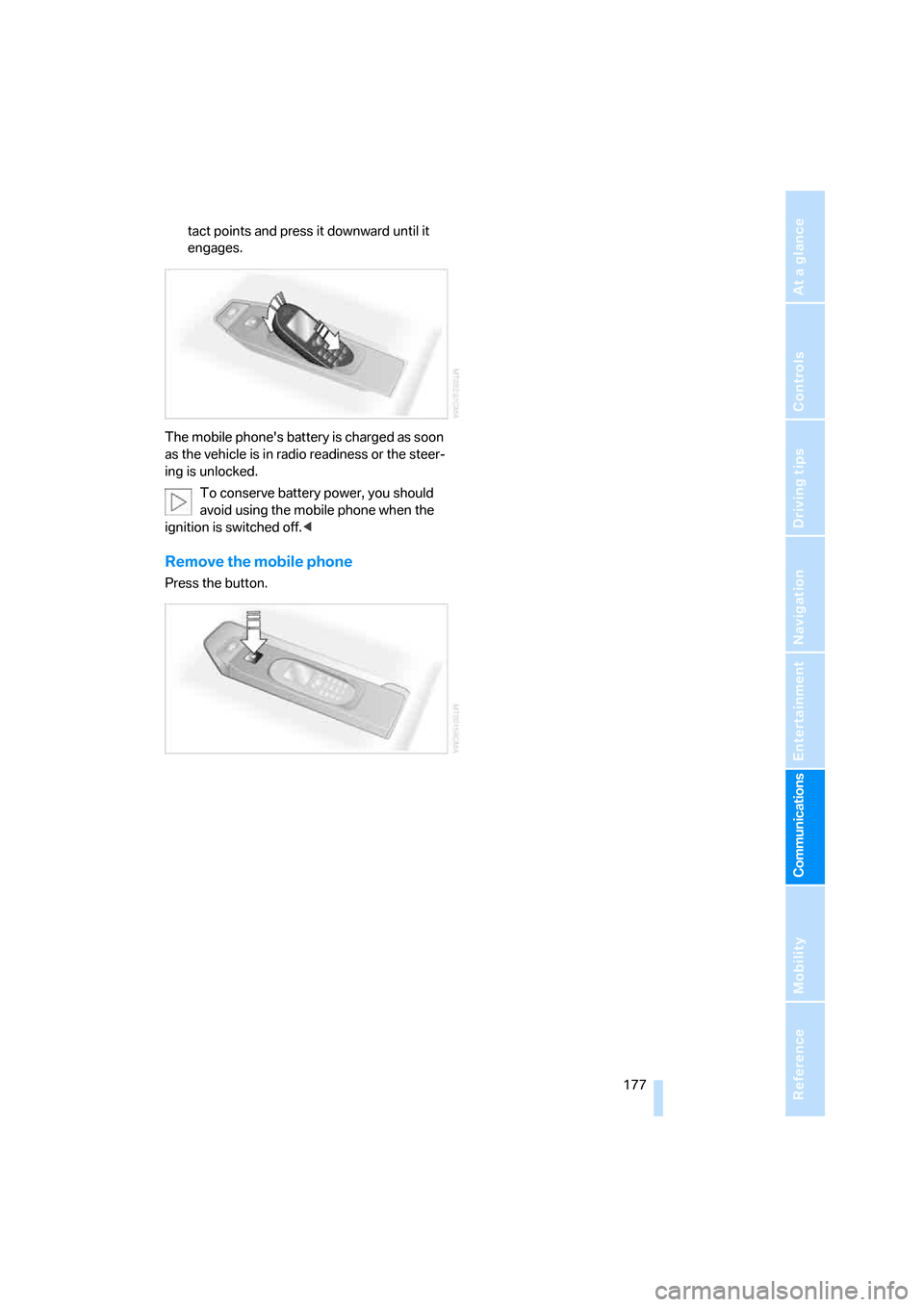
tact points and press it downward until it
engages.
The mobile phone's battery is charged as soon
as the vehicle is in radio readiness or the steer-
ing is unlocked.
To conserve battery power, you should
avoid using the mobile phone when the
ignition is switched off.<
Remove the mobile phone
Press the button.
Page 181 of 245
179
Entertainment
Reference
At a glance
Controls
Driving tips Communications
Navigation
Mobility
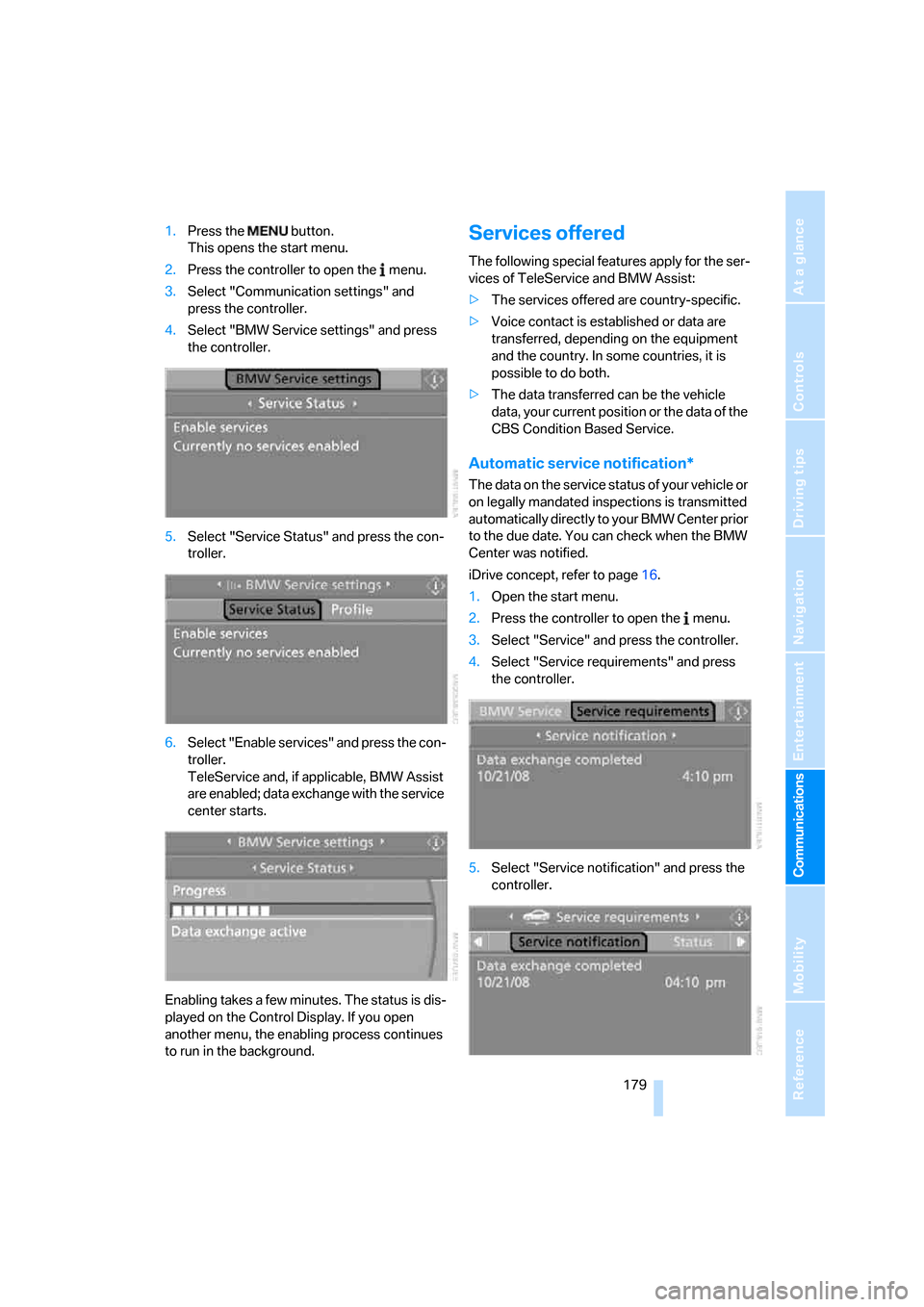
1.Press the button.
This opens the start menu.
2.Press the controller to open the menu.
3.Select "Communication settings" and
press the controller.
4.Select "BMW Service settings" and press
the controller.
5.Select "Service Status" and press the con-
troller.
6.Select "Enable services" and press the con-
troller.
TeleService and, if applicable, BMW Assist
are enabled; data exchange with the service
center starts.
Enabling takes a few minutes. The status is dis-
played on the Control Display. If you open
another menu, the enabling process continues
to run in the background.Services offered
The following special features apply for the ser-
vices of TeleService and BMW Assist:
>The services offered are country-specific.
>Voice contact is established or data are
transferred, depending on the equipment
and the country. In some countries, it is
possible to do both.
>The data transferred can be the vehicle
data, your current position or the data of the
CBS Condition Based Service.
Automatic service notification*
The data on the service status of your vehicle or
on legally mandated inspections is transmitted
automatically directly to your BMW Center prior
to the due date. You can check when the BMW
Center was notified.
iDrive concept, refer to page16.
1.Open the start menu.
2.Press the controller to open the menu.
3.Select "Service" and press the controller.
4.Select "Service requirements" and press
the controller.
5.Select "Service notification" and press the
controller.
Page 182 of 245
TeleService, BMW Assist
180
Roadside Assistance
You can call the Roadside Assistance* of the
BMW Group should you require help in the
event of a breakdown.
iDrive concept, refer to page16.
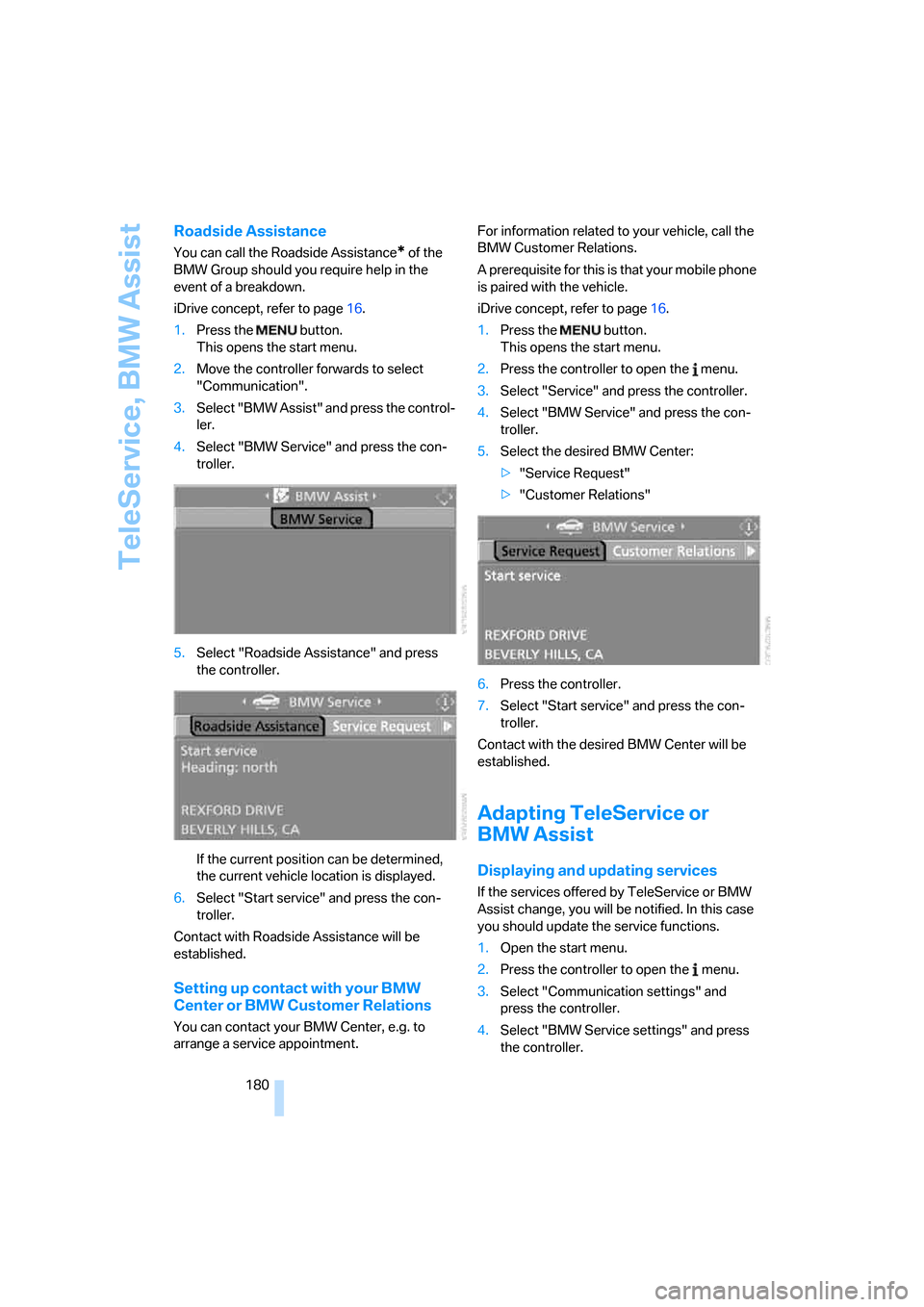
1.Press the button.
This opens the start menu.
2.Move the controller forwards to select
"Communication".
3.Select "BMW Assist" and press the control-
ler.
4.Select "BMW Service" and press the con-
troller.
5.Select "Roadside Assistance" and press
the controller.
If the current position can be determined,
the current vehicle location is displayed.
6.Select "Start service" and press the con-
troller.
Contact with Roadside Assistance will be
established.
Setting up contact with your BMW
Center or BMW Customer Relations
You can contact your BMW Center, e.g. to
arrange a service appointment.For information related to your vehicle, call the
BMW Customer Relations.
A prerequisite for this is that your mobile phone
is paired with the vehicle.
iDrive concept, refer to page16.
1.Press the button.
This opens the start menu.
2.Press the controller to open the menu.
3.Select "Service" and press the controller.
4.Select "BMW Service" and press the con-
troller.
5.Select the desired BMW Center:
>"Service Request"
>"Customer Relations"
6.Press the controller.
7.Select "Start service" and press the con-
troller.
Contact with the desired BMW Center will be
established.
Adapting TeleService or
BMW Assist
Displaying and updating services
If the services offered by TeleService or BMW
Assist change, you will be notified. In this case
you should update the service functions.
1.Open the start menu.
2.Press the controller to open the menu.
3.Select "Communication settings" and
press the controller.
4.Select "BMW Service settings" and press
the controller.
Page 183 of 245
181
Entertainment
Reference
At a glance
Controls
Driving tips Communications
Navigation
Mobility
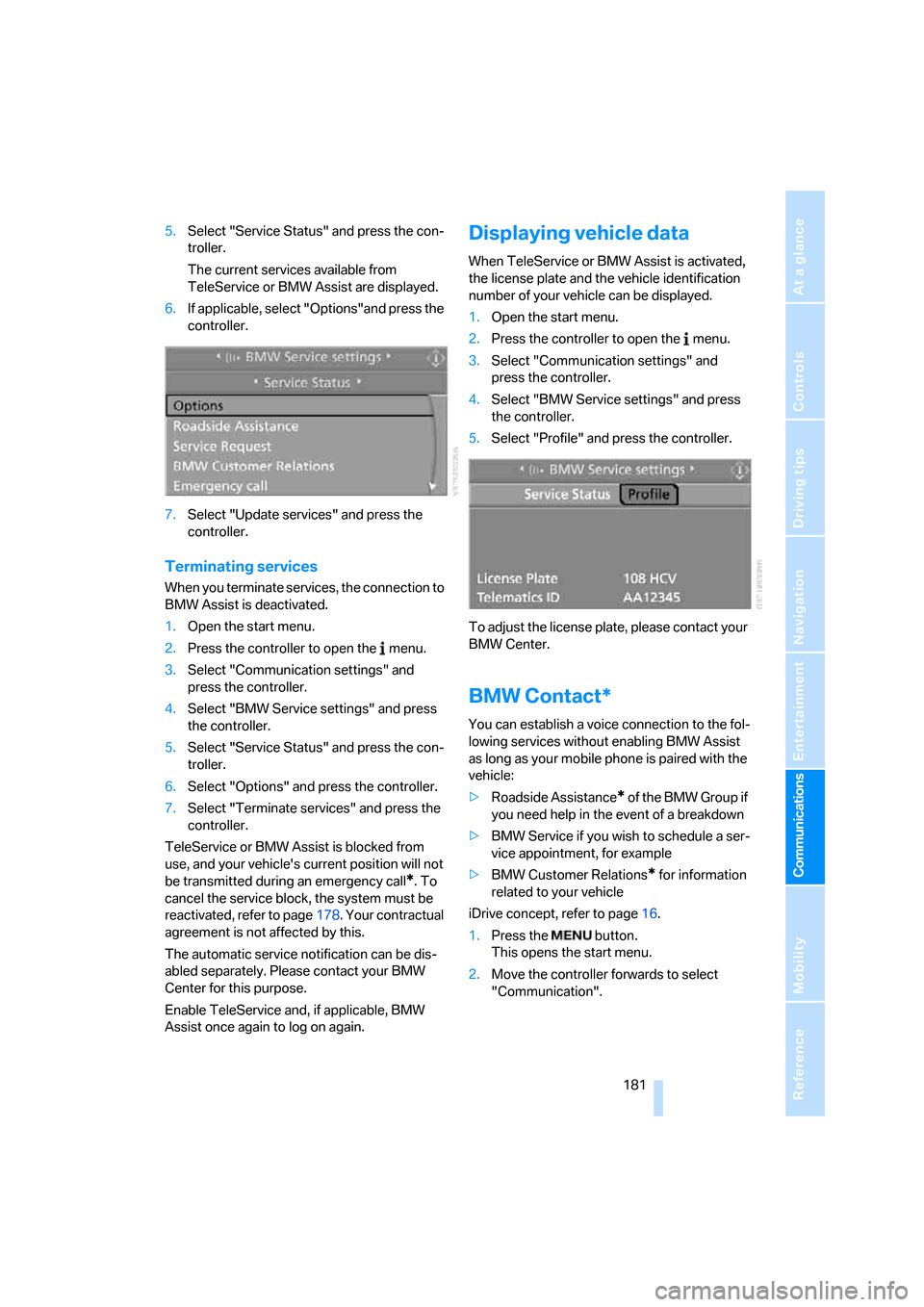
5.Select "Service Status" and press the con-
troller.
The current services available from
TeleService or BMW Assist are displayed.
6.If applicable, select "Options"and press the
controller.
7.Select "Update services" and press the
controller.
Terminating services
When you terminate services, the connection to
BMW Assist is deactivated.
1.Open the start menu.
2.Press the controller to open the menu.
3.Select "Communication settings" and
press the controller.
4.Select "BMW Service settings" and press
the controller.
5.Select "Service Status" and press the con-
troller.
6.Select "Options" and press the controller.
7.Select "Terminate services" and press the
controller.
TeleService or BMW Assist is blocked from
use, and your vehicle's current position will not
be transmitted during an emergency call
*. To
cancel the service block, the system must be
reactivated, refer to page178. Your contractual
agreement is not affected by this.
The automatic service notification can be dis-
abled separately. Please contact your BMW
Center for this purpose.
Enable TeleService and, if applicable, BMW
Assist once again to log on again.
Displaying vehicle data
When TeleService or BMW Assist is activated,
the license plate and the vehicle identification
number of your vehicle can be displayed.
1.Open the start menu.
2.Press the controller to open the menu.
3.Select "Communication settings" and
press the controller.
4.Select "BMW Service settings" and press
the controller.
5.Select "Profile" and press the controller.
To adjust the license plate, please contact your
BMW Center.
BMW Contact*
You can establish a voice connection to the fol-
lowing services without enabling BMW Assist
as long as your mobile phone is paired with the
vehicle:
>Roadside Assistance
* of the BMW Group if
you need help in the event of a breakdown
>BMW Service if you wish to schedule a ser-
vice appointment, for example
>BMW Customer Relations
* for information
related to your vehicle
iDrive concept, refer to page16.
1.Press the button.
This opens the start menu.
2.Move the controller forwards to select
"Communication".
Page 201 of 245
Mobility
199Reference
At a glance
Controls
Driving tips
Communications
Navigation
Entertainment
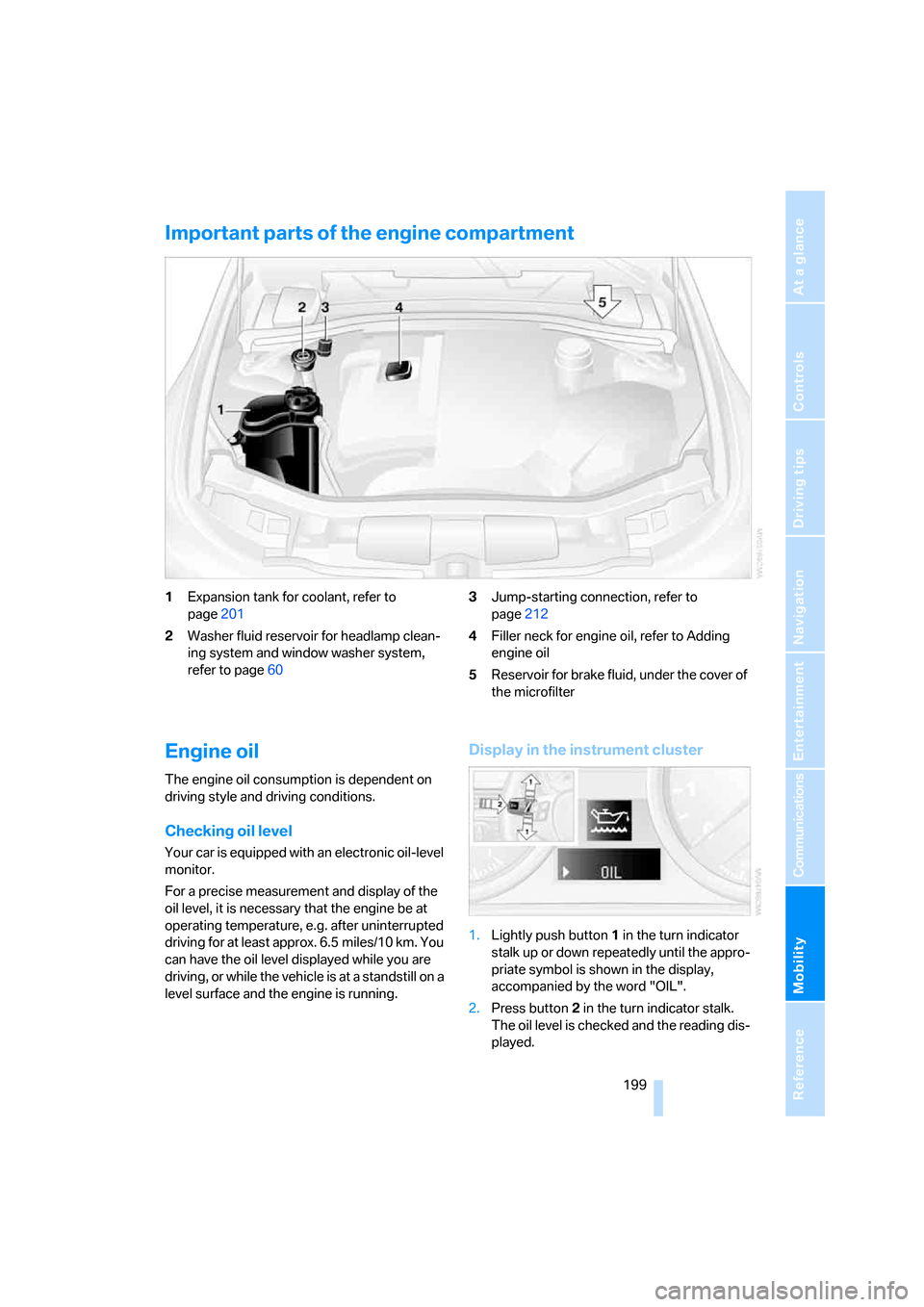
Important parts of the engine compartment
1Expansion tank for coolant, refer to
page201
2Washer fluid reservoir for headlamp clean-
ing system and window washer system,
refer to page603Jump-starting connection, refer to
page212
4Filler neck for engine oil, refer to Adding
engine oil
5Reservoir for brake fluid, under the cover of
the microfilter
Engine oil
The engine oil consumption is dependent on
driving style and driving conditions.
Checking oil level
Your car is equipped with an electronic oil-level
monitor.
For a precise measurement and display of the
oil level, it is necessary that the engine be at
operating temperature, e.g. after uninterrupted
driving for at least approx. 6.5 miles/10 km. You
can have the oil level displayed while you are
driving, or while the vehicle is at a standstill on a
level surface and the engine is running.
Display in the instrument cluster
1.Lightly push button 1 in the turn indicator
stalk up or down repeatedly until the appro-
priate symbol is shown in the display,
accompanied by the word "OIL".
2.Press button 2 in the turn indicator stalk.
The oil level is checked and the reading dis-
played.
Page 202 of 245
Under the hood
200
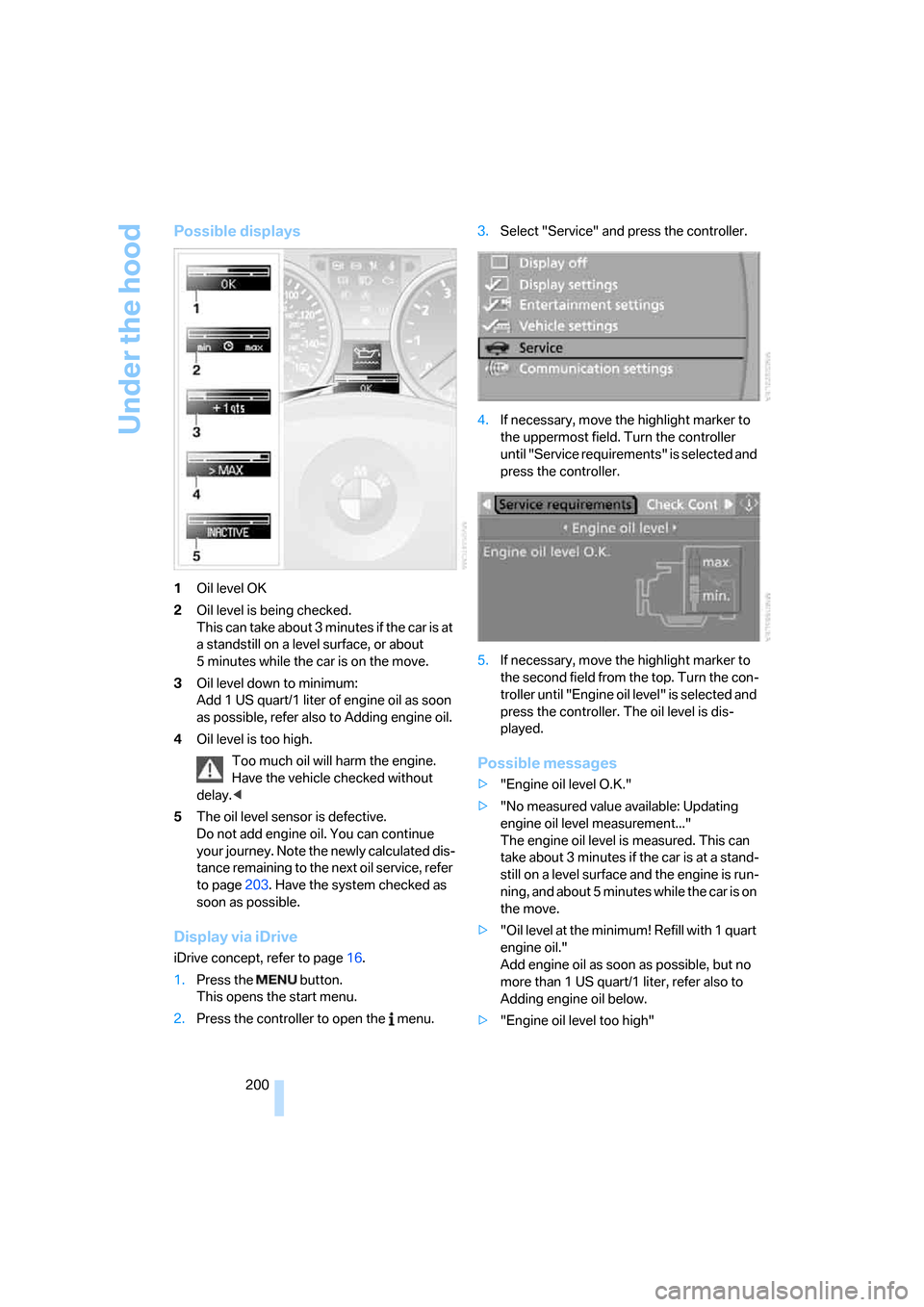
Possible displays
1Oil level OK
2Oil level is being checked.
This can take about 3 minutes if the car is at
a standstill on a level surface, or about
5 minutes while the car is on the move.
3Oil level down to minimum:
Add 1 US quart/1 liter of engine oil as soon
as possible, refer also to Adding engine oil.
4Oil level is too high.
Too much oil will harm the engine.
Have the vehicle checked without
delay.<
5The oil level sensor is defective.
Do not add engine oil. You can continue
your journey. Note the newly calculated dis-
tance remaining to the next oil service, refer
to page203. Have the system checked as
soon as possible.
Display via iDrive
iDrive concept, refer to page16.
1.Press the button.
This opens the start menu.
2.Press the controller to open the menu.3.Select "Service" and press the controller.
4.If necessary, move the highlight marker to
the uppermost field. Turn the controller
until "Service requirements" is selected and
press the controller.
5.If necessary, move the highlight marker to
the second field from the top. Turn the con-
troller until "Engine oil level" is selected and
press the controller. The oil level is dis-
played.
Possible messages
>"Engine oil level O.K."
>"No measured value available: Updating
engine oil level measurement..."
The engine oil level is measured. This can
take about 3 minutes if the car is at a stand-
still on a level surface and the engine is run-
ning, and about 5 minutes while the car is on
the move.
>"Oil level at the minimum! Refill with 1 quart
engine oil."
Add engine oil as soon as possible, but no
more than 1 US quart/1 liter, refer also to
Adding engine oil below.
>"Engine oil level too high"
Page 213 of 245
Mobility
211Reference
At a glance
Controls
Driving tips
Communications
Navigation
Entertainment
Giving and receiving assistance
Emergency calling*
Conditions for an emergency call:
>Full preparation package mobile phone
>BMW Assist is enabled. Enabling BMW
Assist, refer to page178.
>Radio readiness is on.
>The car phone is logged on to a mobile tele-
phone network.
>The emergency call system is operable.
If your subscription contract with BMW Assist
expires, the car phone can be deactivated by a
BMW Center without having to schedule an
appointment at a workshop. Once the car
phone has been deactivated, emergency calls
are not possible. The car phone can be reacti-
vated by a BMW Center after signing a new
contract.
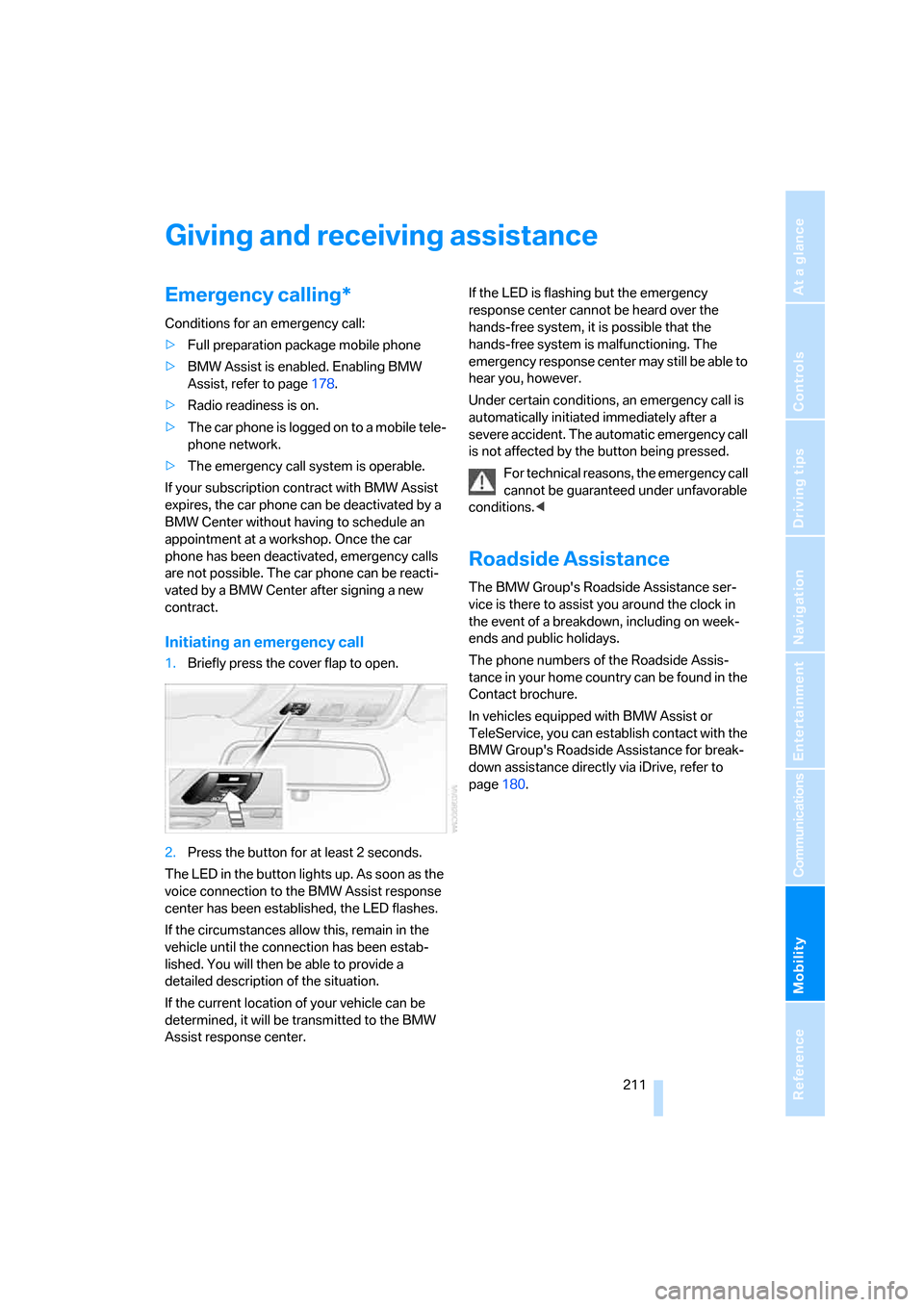
Initiating an emergency call
1.Briefly press the cover flap to open.
2.Press the button for at least 2 seconds.
The LED in the button lights up. As soon as the
voice connection to the BMW Assist response
center has been established, the LED flashes.
If the circumstances allow this, remain in the
vehicle until the connection has been estab-
lished. You will then be able to provide a
detailed description of the situation.
If the current location of your vehicle can be
determined, it will be transmitted to the BMW
Assist response center.If the LED is flashing but the emergency
response center cannot be heard over the
hands-free system, it is possible that the
hands-free system is malfunctioning. The
emergency response center may still be able to
hear you, however.
Under certain conditions, an emergency call is
automatically initiated immediately after a
severe accident. The automatic emergency call
is not affected by the button being pressed.
For technical reasons, the emergency call
cannot be guaranteed under unfavorable
conditions.<
Roadside Assistance
The BMW Group's Roadside Assistance ser-
vice is there to assist you around the clock in
the event of a breakdown, including on week-
ends and public holidays.
The phone numbers of the Roadside Assis-
tance in your home country can be found in the
Contact brochure.
In vehicles equipped with BMW Assist or
TeleService, you can establish contact with the
BMW Group's Roadside Assistance for break-
down assistance directly via iDrive, refer to
page180.
Page 227 of 245
Reference 225
At a glance
Controls
Driving tips
Communications
Navigation
Entertainment
Mobility
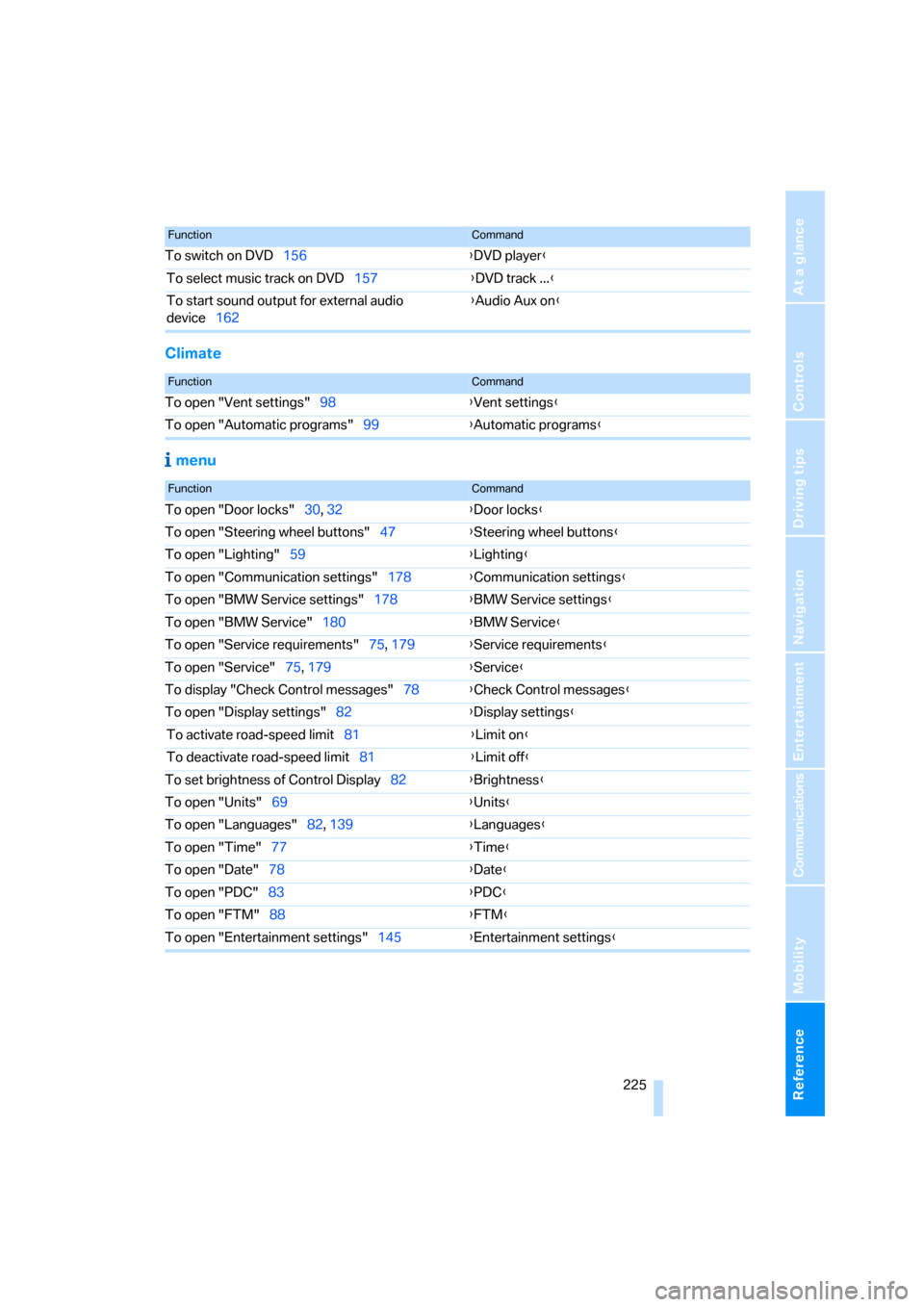
Climate
menu
To switch on DVD156{DVD player}
To select music track on DVD157{DVD track ...}
To start sound output for external audio
device162{Audio Aux on}
FunctionCommand
FunctionCommand
To open "Vent settings"98{Vent settings}
To open "Automatic programs"99{Automatic programs}
FunctionCommand
To open "Door locks"30, 32{Door locks}
To open "Steering wheel buttons"47{Steering wheel buttons}
To open "Lighting"59{Lighting}
To open "Communication settings"178{Communication settings}
To open "BMW Service settings"178{BMW Service settings}
To open "BMW Service"180{BMW Service}
To open "Service requirements"75, 179{Service requirements}
To open "Service"75, 179{Service}
To display "Check Control messages"78{Check Control messages}
To open "Display settings"82{Display settings}
To activate road-speed limit81{Limit on}
To deactivate road-speed limit81{Limit off}
To set brightness of Control Display82{Brightness}
To open "Units"69{Units}
To open "Languages"82, 139{Languages}
To open "Time"77{Time}
To open "Date"78{Date}
To open "PDC"83{PDC}
To open "FTM"88{
FTM}
To open "Entertainment settings"145{Entertainment settings}
Page 230 of 245
Everything from A - Z
228 "Brightness"on the control
display82
Bulb changing, refer to Lamps
and bulbs205
Burned fuel
– refer to Average
consumption71
Button for starting engine52
Buttons on steering wheel11
C
California Proposition 65
warning6
"Call"172
Call
– accepting170
– displaying accepted172
– ending171
– in absence172
– starting171
Calling
– from phone book171
– from Top 8 list172
– redialing172
Can holders, refer to Cup
holders107
Capacities221
Capacity of luggage
compartment220
Car battery, refer to Vehicle
battery209
Car care, refer to Caring for
your vehicle brochure
Car-care products, refer to
Caring for your vehicle
brochure
"Car Data"71
Care, refer to Caring for your
vehicle brochure
Cargo, securing119
Cargo loading
– stowing cargo119
– vehicle118
Caring for artificial leather,
refer to Caring for your
vehicle brochureCaring for leather, refer to
Caring for your vehicle
brochure
Caring for light-alloy wheels,
refer to Caring for your
vehicle brochure
Caring for plastic, refer to
Caring for your vehicle
brochure
Caring for the carpet, refer to
Caring for your vehicle
brochure
Caring for the vehicle finish,
refer to Caring for your
vehicle brochure
Car jack
– jacking points209
Car key, refer to Integrated
key/remote control28
Car phone166
– installation location, refer to
Center armrest106
– refer to Mobile phone166
– refer to separate Owner's
Manual
Car radio, refer to Radio148
Car wash118
– also refer to Caring for your
vehicle brochure
Catalytic converter, refer to
Hot exhaust system116
"Categories"154
CBS Condition Based
Service203
"CD"144,156
CD changer156
– controls144
– fast forward/reverse160
– installation location160
– playing a track158
– random order159
– repeating a track159
– selecting a CD156
– selecting a track157
– switching on/off144
– tone control145
– volume145CD player156
– controls144
– fast forward/reverse160
– playing a track158
– random order159
– repeating a track159
– selecting a track157
– switching on/off144
– tone control145
– volume145
Center armrest106
Center brake lamp
– replacing bulbs208
Center console, refer to
Around the center
console14
"Central locking"30
Central locking
– from inside32
– from outside29
Central locking system29
– convenient access35
Changing bulbs205
Changing the language on the
Control Display82
Changing the measurement
units on the Control
Display73
Changing wheels209
Chassis number, refer to
Engine compartment199
Check Control79
"Check Control
messages"80
Check Gas Cap186
Checking the air pressure,
refer to Tire inflation
pressure188
Child-restraint fixing system
LATCH50
Child-restraint systems49
Child-safety lock51
Child seats49
Chrome parts, care, refer to
Caring for your vehicle
brochure
Cigarette lighter108
– socket108
Page 232 of 245
Everything from A - Z
230 Defrosting windows and
removing condensation
– automatic climate
control100
Defrosting windshield, refer to
Defrosting windows100
Defrost position, refer to
Defrosting windows100
"Delete address book" in
navigation134
"Delete all numbers" on the
mobile phone173
"Delete data" in
navigation134
"Delete" for mobile
phone173
Destination address
– deleting133
– entering125,128
Destination for navigation
– entry125
– navigation list131
– selecting from address
book133
– selecting using
information130
– storing132
Destination guidance136
– bypassing route
sections140
– canceling voice
instructions48
– changing specified
route134
– displaying route137
– displaying routes137
– distance and arrival136
– interrupting136
– starting136
– terminating/continuing136
– voice instructions139
– volume of voice
instructions139
Destination list for navigation
system131
Destinations recently driven
to131
"Dial" for mobile phone171
"Dial number"171Digital clock69
Digital compass104
Digital radio151
Dimensions219
Directional indicators, refer to
Turn signals58
Direction instructions, refer to
Voice instructions139
Directory for navigation, refer
to Address book132
Displacement, refer to Engine
data
218
Display, refer to iDrive
controls16
Display lighting, refer to
Instrument lighting96
"Display off"21
Displays
– instrument cluster12
– on the Control Display16
Displays and controls10
"Display settings"77
Disposal
– coolant201
– remote control battery37
– vehicle battery209
Distance control, refer to
Active cruise control62
Distance remaining to service,
refer to Service
requirements74
"Distance to dest."71
Distance warning, refer to
PDC Park Distance
Control83
Door key, refer to Integrated
key/remote control28
Door lock32
Door locking, confirmation
signals31
"Door locks"30
Doors, emergency
operation32
DOT Quality Grades194
Draft-free ventilation100
Drinks holders, refer to Cup
holders107
Drive mode56
Drive-off assistant87Driving lamps, refer to Parking
lamps/low beams93
Driving notes116
Driving route, refer to
Displaying route137
Driving stability control
systems84
Driving through water117
Driving tips, refer to Driving
notes116
Dry air, refer to Cooling
function100
DSC Dynamic Stability
Control84
DTC Dynamic Traction
Control85
– indicator lamps85
DVD for navigation124
Dynamic Driving Control56
Dynamic Traction Control
DTC
– indicator lamps85
E
EBV Electronic brake-force
distribution84
Eject button, refer to Buttons
on the CD player144
Electrical malfunction
– door lock32
– fuel filler door186
– glass sunroof39
– panorama glass roof39
Electric seat adjustment41
Electronic brake-force
distribution84
Electronic oil level check199
Emergency call211
Emergency operation, refer to
Closing manually
– glass sunroof39
– panorama glass roof39
Emergency operation, refer to
Manual operation
– door lock32
– fuel filler door186
– transmission lock, automatic
transmission58