Center armrest BMW 330I SEDAN 2006 E90 Owner's Manual
[x] Cancel search | Manufacturer: BMW, Model Year: 2006, Model line: 330I SEDAN, Model: BMW 330I SEDAN 2006 E90Pages: 245, PDF Size: 8.24 MB
Page 39 of 245
Controls
37Reference
At a glance
Driving tips
Communications
Navigation
Entertainment
Mobility
The indicator lamp in the instrument
cluster comes on and a message
appears on the Control Display:
replace the battery in the remote control.
Replacing the battery
The remote control for convenient access con-
tains a battery that will need to be replaced from
time to time.
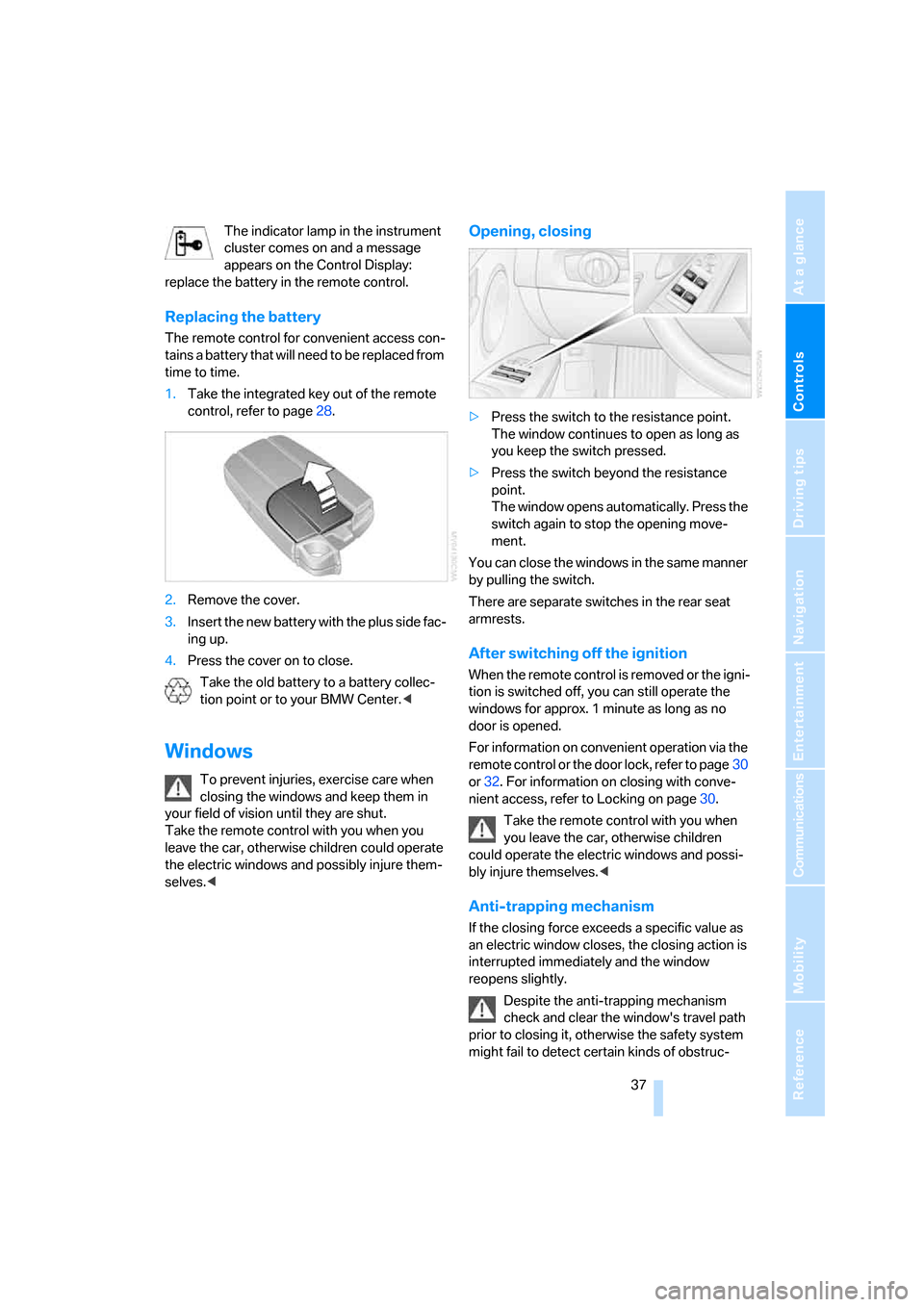
1.Take the integrated key out of the remote
control, refer to page28.
2.Remove the cover.
3.Insert the new battery with the plus side fac-
ing up.
4.Press the cover on to close.
Take the old battery to a battery collec-
tion point or to your BMW Center.<
Windows
To prevent injuries, exercise care when
closing the windows and keep them in
your field of vision until they are shut.
Take the remote control with you when you
leave the car, otherwise children could operate
the electric windows and possibly injure them-
selves.<
Opening, closing
>Press the switch to the resistance point.
The window continues to open as long as
you keep the switch pressed.
>Press the switch beyond the resistance
point.
The window opens automatically. Press the
switch again to stop the opening move-
ment.
You can close the windows in the same manner
by pulling the switch.
There are separate switches in the rear seat
armrests.
After switching off the ignition
When the remote control is removed or the igni-
tion is switched off, you can still operate the
windows for approx. 1 minute as long as no
door is opened.
For information on convenient operation via the
remote control or the door lock, refer to page30
or32. For information on closing with conve-
nient access, refer to Locking on page30.
Take the remote control with you when
you leave the car, otherwise children
could operate the electric windows and possi-
bly injure themselves.<
Anti-trapping mechanism
If the closing force exceeds a specific value as
an electric window closes, the closing action is
interrupted immediately and the window
reopens slightly.
Despite the anti-trapping mechanism
check and clear the window's travel path
prior to closing it, otherwise the safety system
might fail to detect certain kinds of obstruc-
Page 108 of 245
Practical interior accessories
106
Roller sun blinds*
Rear window blind
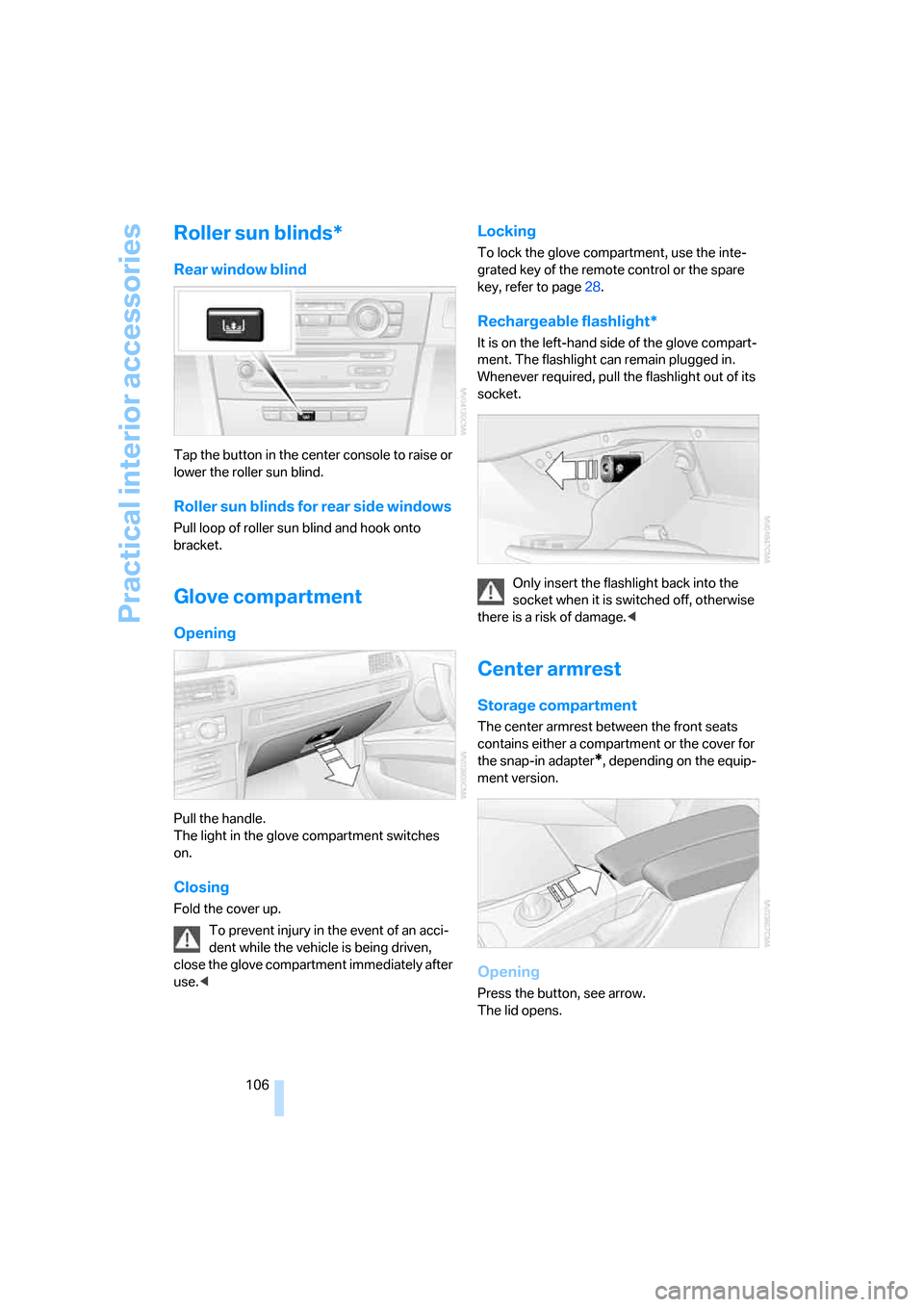
Tap the button in the center console to raise or
lower the roller sun blind.
Roller sun blinds for rear side windows
Pull loop of roller sun blind and hook onto
bracket.
Glove compartment
Opening
Pull the handle.
The light in the glove compartment switches
on.
Closing
Fold the cover up.
To prevent injury in the event of an acci-
dent while the vehicle is being driven,
close the glove compartment immediately after
use.<
Locking
To lock the glove compartment, use the inte-
grated key of the remote control or the spare
key, refer to page28.
Rechargeable flashlight*
It is on the left-hand side of the glove compart-
ment. The flashlight can remain plugged in.
Whenever required, pull the flashlight out of its
socket.
Only insert the flashlight back into the
socket when it is switched off, otherwise
there is a risk of damage.<
Center armrest
Storage compartment
The center armrest between the front seats
contains either a compartment or the cover for
the snap-in adapter
*, depending on the equip-
ment version.
Opening
Press the button, see arrow.
The lid opens.
Page 109 of 245
Controls
107Reference
At a glance
Driving tips
Communications
Navigation
Entertainment
Mobility
Ventilated storage compartment
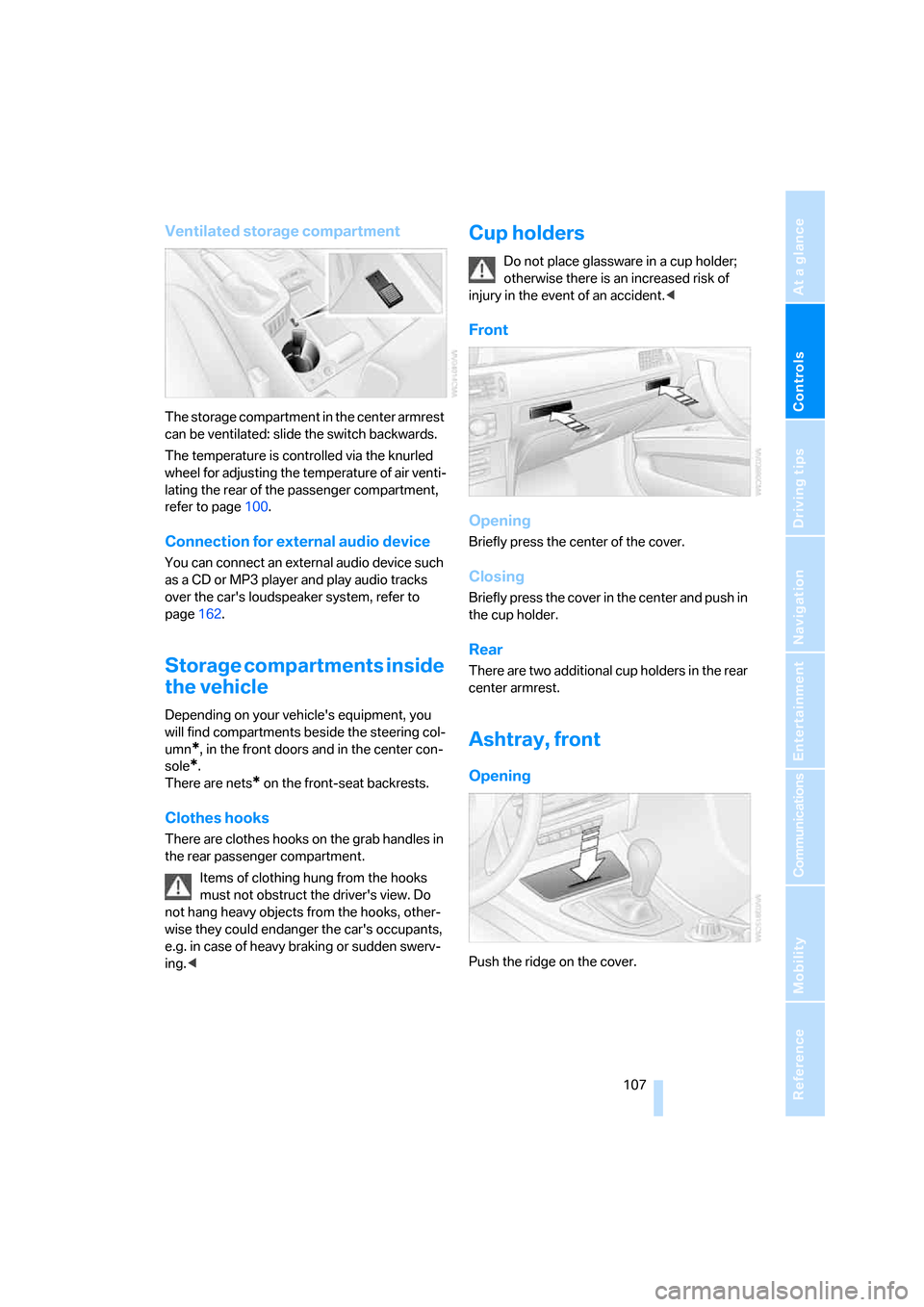
The storage compartment in the center armrest
can be ventilated: slide the switch backwards.
The temperature is controlled via the knurled
wheel for adjusting the temperature of air venti-
lating the rear of the passenger compartment,
refer to page100.
Connection for external audio device
You can connect an external audio device such
as a CD or MP3 player and play audio tracks
over the car's loudspeaker system, refer to
page162.
Storage compartments inside
the vehicle
Depending on your vehicle's equipment, you
will find compartments beside the steering col-
umn
*, in the front doors and in the center con-
sole
*.
There are nets
* on the front-seat backrests.
Clothes hooks
There are clothes hooks on the grab handles in
the rear passenger compartment.
Items of clothing hung from the hooks
must not obstruct the driver's view. Do
not hang heavy objects from the hooks, other-
wise they could endanger the car's occupants,
e.g. in case of heavy braking or sudden swerv-
ing.<
Cup holders
Do not place glassware in a cup holder;
otherwise there is an increased risk of
injury in the event of an accident.<
Front
Opening
Briefly press the center of the cover.
Closing
Briefly press the cover in the center and push in
the cup holder.
Rear
There are two additional cup holders in the rear
center armrest.
Ashtray, front
Opening
Push the ridge on the cover.
Page 110 of 245
Practical interior accessories
108
Emptying
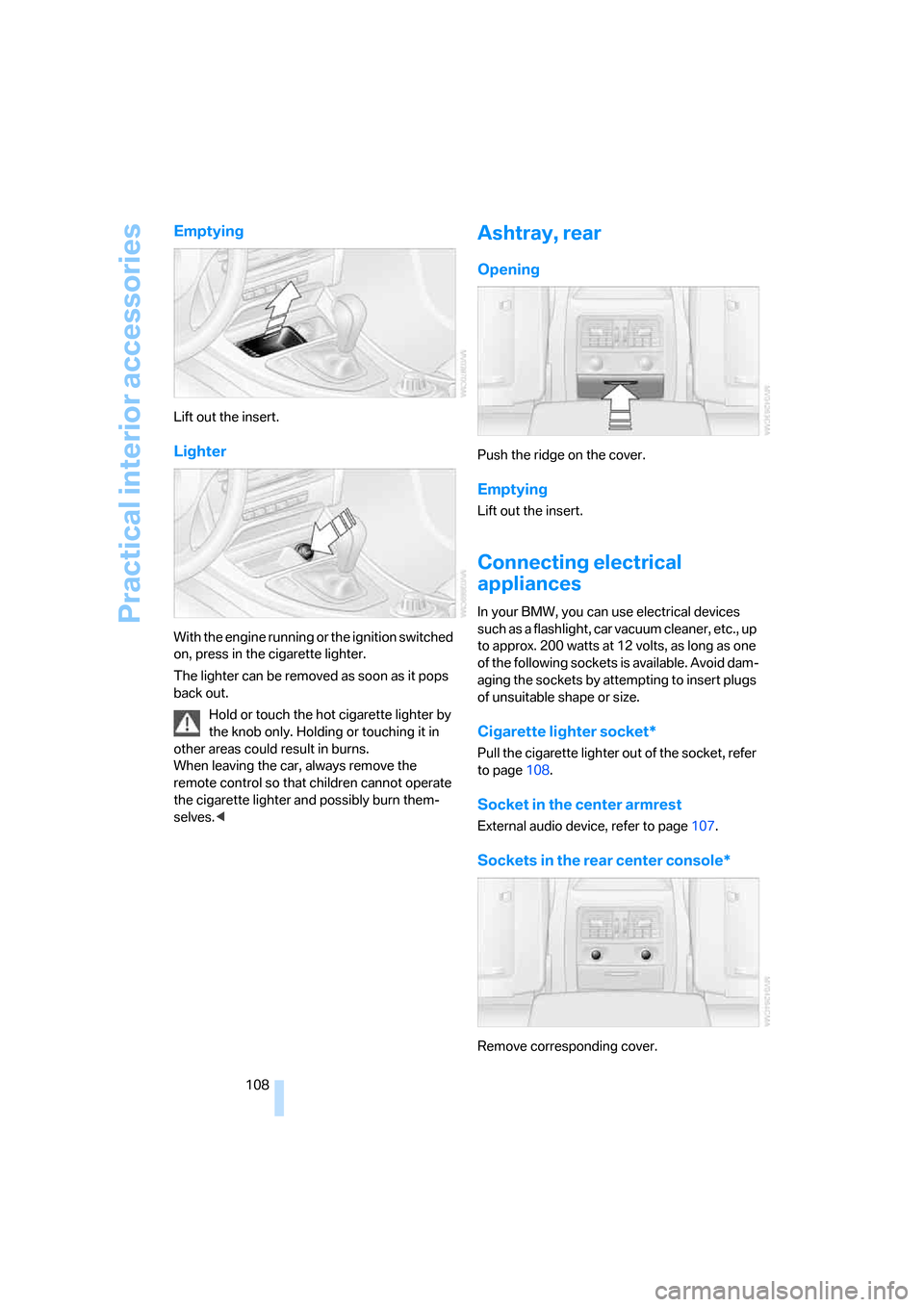
Lift out the insert.
Lighter
With the engine running or the ignition switched
on, press in the cigarette lighter.
The lighter can be removed as soon as it pops
back out.
Hold or touch the hot cigarette lighter by
the knob only. Holding or touching it in
other areas could result in burns.
When leaving the car, always remove the
remote control so that children cannot operate
the cigarette lighter and possibly burn them-
selves.<
Ashtray, rear
Opening
Push the ridge on the cover.
Emptying
Lift out the insert.
Connecting electrical
appliances
In your BMW, you can use electrical devices
such as a flashlight, car vacuum cleaner, etc., up
to approx. 200 watts at 12 volts, as long as one
of the following sockets is available. Avoid dam-
aging the sockets by attempting to insert plugs
of unsuitable shape or size.
Cigarette lighter socket*
Pull the cigarette lighter out of the socket, refer
to page108.
Socket in the center armrest
External audio device, refer to page107.
Sockets in the rear center console*
Remove corresponding cover.
Page 113 of 245
Controls
111Reference
At a glance
Driving tips
Communications
Navigation
Entertainment
Mobility
Take the retaining strap on the right-hand side
of the drawer out of the bracket and use it to fix
the cargo luggage compartment panel in place.
Do not exceed the maximum permissible
load of 55 lbs/25 kg for the storage com-
partment under the floor panel, otherwise dam-
age could result.<
Lashing eyes
You will find lashing eyes in the luggage com-
partment for securing luggage items with nets
or tensioning straps, refer to page119.
Ski bag*
Designed for safe, clean transport of up to
4 pairs of standard skis or up to 2 snowboards.
With the ski bag you can stow skis with a length
of up to 6ft 10in/2.10m. When skis of 6ft 10in/
2.10 m length are loaded, the overall capacity of
the ski bag is reduced due to its tapered design.
Loading
1.Fold down the center armrest.
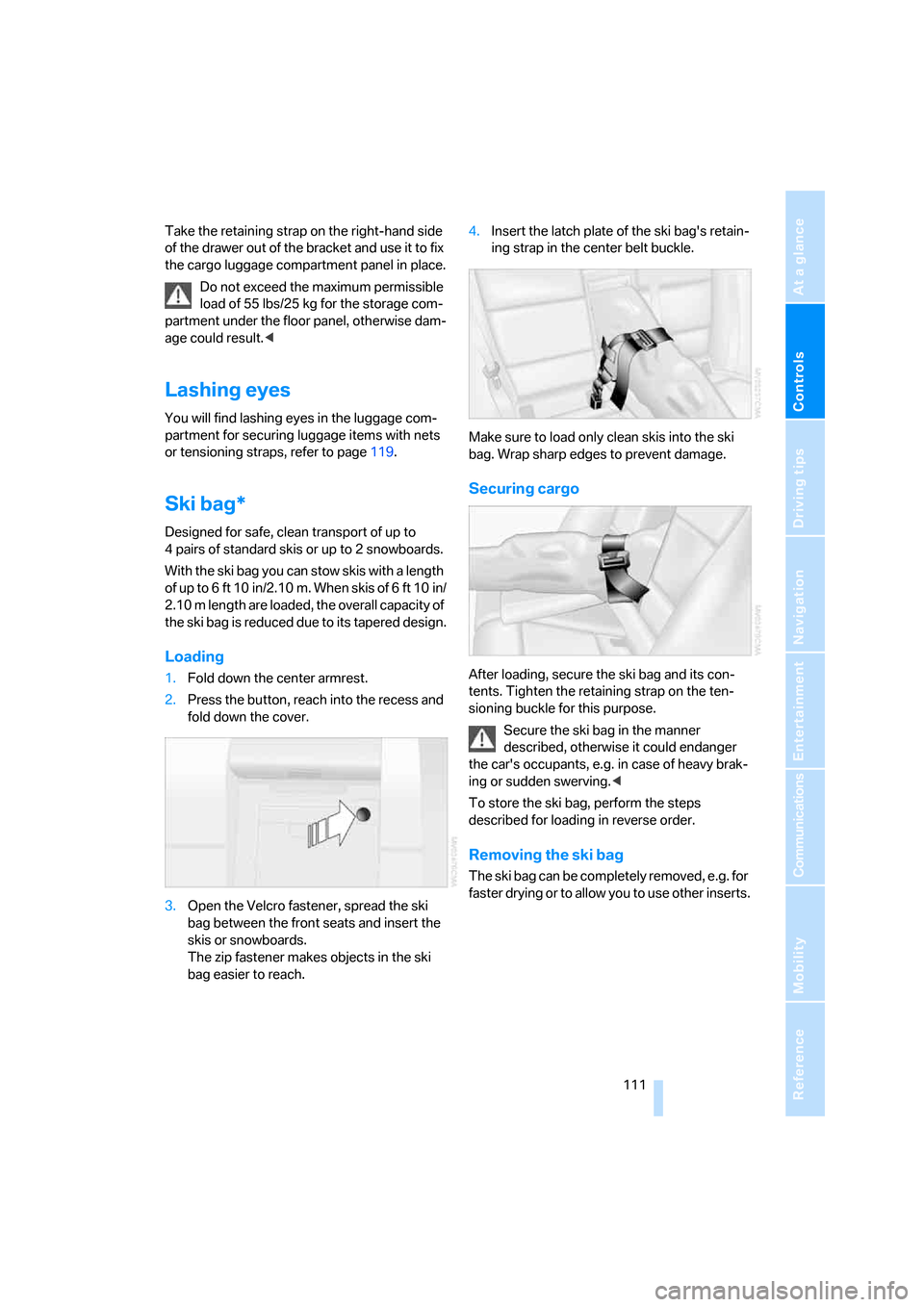
2.Press the button, reach into the recess and
fold down the cover.
3.Open the Velcro fastener, spread the ski
bag between the front seats and insert the
skis or snowboards.
The zip fastener makes objects in the ski
bag easier to reach.4.Insert the latch plate of the ski bag's retain-
ing strap in the center belt buckle.
Make sure to load only clean skis into the ski
bag. Wrap sharp edges to prevent damage.
Securing cargo
After loading, secure the ski bag and its con-
tents. Tighten the retaining strap on the ten-
sioning buckle for this purpose.
Secure the ski bag in the manner
described, otherwise it could endanger
the car's occupants, e.g. in case of heavy brak-
ing or sudden swerving.<
To store the ski bag, perform the steps
described for loading in reverse order.
Removing the ski bag
The ski bag can be completely removed, e.g. for
faster drying or to allow you to use other inserts.
Page 164 of 245
External audio device
162
External audio device
You can connect an external audio device, for
instance an MP3 player, and play audio tracks
over the car's loudspeaker system. You can
adjust the tone using iDrive.
Connecting
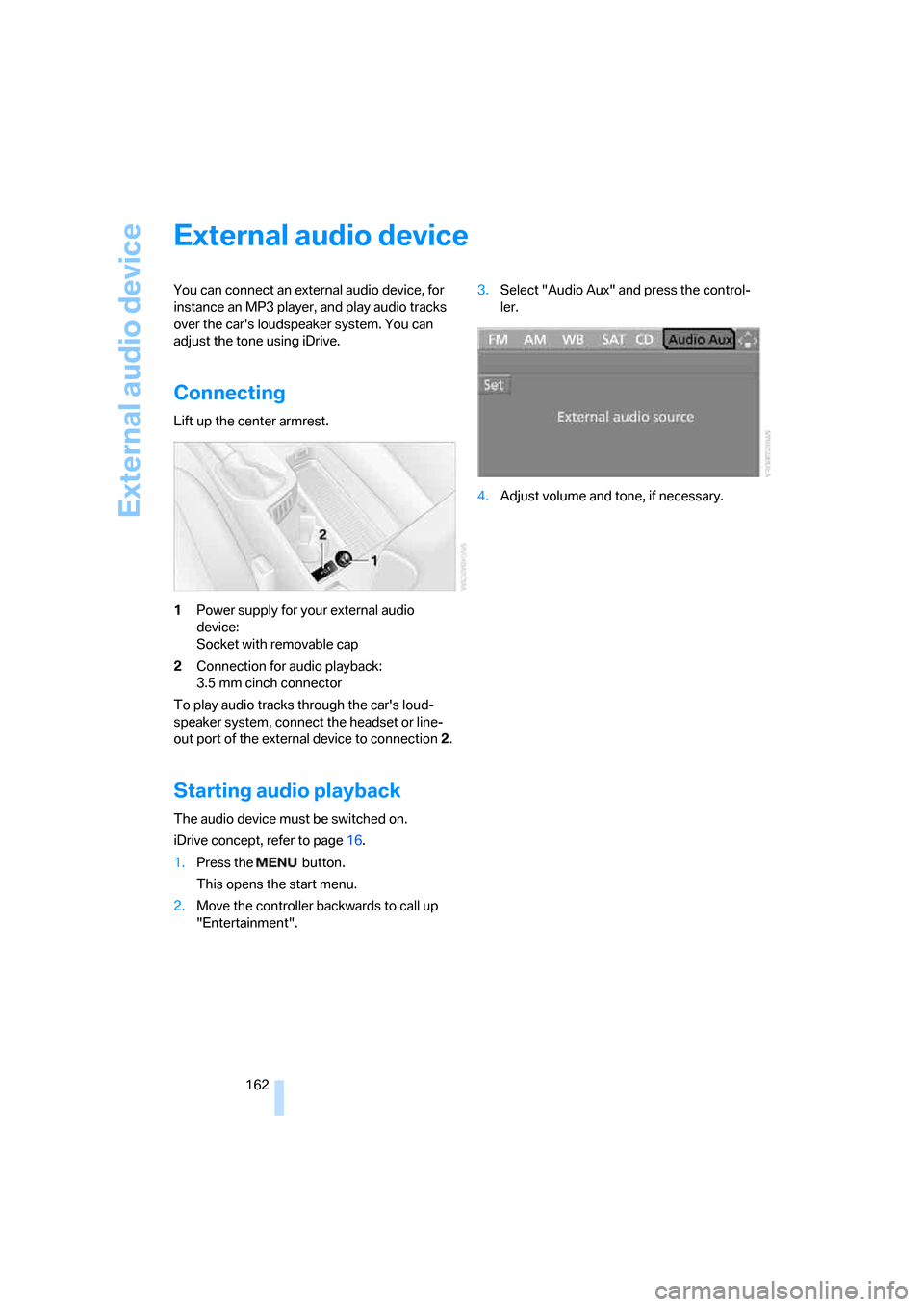
Lift up the center armrest.
1Power supply for your external audio
device:
Socket with removable cap
2Connection for audio playback:
3.5 mm cinch connector
To play audio tracks through the car's loud-
speaker system, connect the headset or line-
out port of the external device to connection 2.
Starting audio playback
The audio device must be switched on.
iDrive concept, refer to page16.
1.Press the button.
This opens the start menu.
2.Move the controller backwards to call up
"Entertainment".3.Select "Audio Aux" and press the control-
ler.
4.Adjust volume and tone, if necessary.
Page 228 of 245
Everything from A - Z
226
Everything from A - Z
Index
"..." Identifies Control Display
texts used to select
individual functions and
refers you to the page where
these texts can be found.
A
ABS Antilock Brake
System84
ACC, refer to Active cruise
control62
Acceleration assistant with
the sequential manual
gearbox SMG57
Accessories, refer to The
individual vehicle5
Activated-charcoal filter for
automatic climate
control101
"Activation time"101
Active cruise control62
– indicator lamps65
– malfunction66
– selecting distance64
– sensor66
Active steering89
– warning lamp89
Adapter for spare key28
Adaptive Head Light95
"Add digits" for mobile
phone172
Additives
– coolant201
"Address book" in
navigation132
Address for navigation
– deleting133
– entering125,128,132
– selecting133
– storing132
– storing current position132"Add to destination
list"128,129
Adjusting temperature inside
the car, refer to Automatic
climate control98
Adjusting the tone during
audio operation, refer to
Tone control145
Adjustment in audio mode
– front-to-rear145
– right/left balance145
Airbags90
– sitting safely40
– warning lamp92
Air conditioning mode
– automatic climate control98
– ventilation100
Air distribution
– automatic98
– individual98
Air flow rate99
Airing, refer to Ventilation100
Air pressure, tires188
Air recirculation, refer to
Recirculated-air mode99
"Air recirculation on / off"47
Air supply
– automatic climate control98
– ventilation100
Air vents97
AKI, refer to Fuel
specifications186
Alarm system34
– avoiding unintentional
alarms35
– interior motion sensor35
– switching off an alarm34
– tilt alarm sensor35
"All channels"154
All-season tires, refer to
Winter tires197
"All stations", calling up on
radio148"AM", waveband144,148
Ambient air, refer to
Recirculated-air mode99
Antenna for mobile phone166
Antifreeze
– coolant201
– washer fluid60
Anti-theft alarm system, refer
to Alarm system34
Anti-theft system30
Anti-trapping mechanism
– glass sunroof, electric39
– windows37
Approved axle loads, refer to
Weights220
Approved gross vehicle
weight, refer to Weights220
Armrest, refer to Center
armrest106
Arrival time
– computer71
– destination guidance136
"Arrow display" in
navigation137
Ashtray
– front107
– rear108
Assist, refer to BMW
Assist178
Assistance systems, refer to
Dynamic Stability Control
DSC84
Assistance window20
– refer to iDrive20
AUC Automatic recirculated-
air control99
Audio144
– controls144
– switching on/off144
– tone control145
– volume145
"Audio Aux"
144,162
Page 230 of 245
Everything from A - Z
228 "Brightness"on the control
display82
Bulb changing, refer to Lamps
and bulbs205
Burned fuel
– refer to Average
consumption71
Button for starting engine52
Buttons on steering wheel11
C
California Proposition 65
warning6
"Call"172
Call
– accepting170
– displaying accepted172
– ending171
– in absence172
– starting171
Calling
– from phone book171
– from Top 8 list172
– redialing172
Can holders, refer to Cup
holders107
Capacities221
Capacity of luggage
compartment220
Car battery, refer to Vehicle
battery209
Car care, refer to Caring for
your vehicle brochure
Car-care products, refer to
Caring for your vehicle
brochure
"Car Data"71
Care, refer to Caring for your
vehicle brochure
Cargo, securing119
Cargo loading
– stowing cargo119
– vehicle118
Caring for artificial leather,
refer to Caring for your
vehicle brochureCaring for leather, refer to
Caring for your vehicle
brochure
Caring for light-alloy wheels,
refer to Caring for your
vehicle brochure
Caring for plastic, refer to
Caring for your vehicle
brochure
Caring for the carpet, refer to
Caring for your vehicle
brochure
Caring for the vehicle finish,
refer to Caring for your
vehicle brochure
Car jack
– jacking points209
Car key, refer to Integrated
key/remote control28
Car phone166
– installation location, refer to
Center armrest106
– refer to Mobile phone166
– refer to separate Owner's
Manual
Car radio, refer to Radio148
Car wash118
– also refer to Caring for your
vehicle brochure
Catalytic converter, refer to
Hot exhaust system116
"Categories"154
CBS Condition Based
Service203
"CD"144,156
CD changer156
– controls144
– fast forward/reverse160
– installation location160
– playing a track158
– random order159
– repeating a track159
– selecting a CD156
– selecting a track157
– switching on/off144
– tone control145
– volume145CD player156
– controls144
– fast forward/reverse160
– playing a track158
– random order159
– repeating a track159
– selecting a track157
– switching on/off144
– tone control145
– volume145
Center armrest106
Center brake lamp
– replacing bulbs208
Center console, refer to
Around the center
console14
"Central locking"30
Central locking
– from inside32
– from outside29
Central locking system29
– convenient access35
Changing bulbs205
Changing the language on the
Control Display82
Changing the measurement
units on the Control
Display73
Changing wheels209
Chassis number, refer to
Engine compartment199
Check Control79
"Check Control
messages"80
Check Gas Cap186
Checking the air pressure,
refer to Tire inflation
pressure188
Child-restraint fixing system
LATCH50
Child-restraint systems49
Child-safety lock51
Child seats49
Chrome parts, care, refer to
Caring for your vehicle
brochure
Cigarette lighter108
– socket108
Page 236 of 245
Everything from A - Z
234 Luggage compartment
– capacity220
– convenient access36
– folding up the floor
panel110
– lamp96
– opening from inside33
– opening from outside33
Luggage compartment lid33
– convenient access36
– unlocking with remote
control31
Luggage compartment lid,
refer to Tailgate33
Luggage compartment net,
refer to Securing cargo119
Luggage rack, refer to Roof-
mounted luggage rack119
Lumbar support41
M
M+S tires, refer to Winter
tires197
Maintenance, refer to Service
Booklet
Maintenance system203
Malfunction warnings, refer to
Check Control79
Manual mode
– automatic transmission with
Steptronic58
– sequential manual gearbox
SMG55
"Manual" on the radio149
Manual operation
– door lock32
– glass sunroof39
– panorama glass roof39
– transmission lock, automatic
transmission58
Manual release
– fuel filler door186
Manual transmission54
Map
– changing scale138
– destination entry129
"Map direction of travel"138
"Map facing north"138Master key, refer to Integrated
key/remote control28
Maximum cooling98
Maximum speed
– with winter tires197
Memory, refer to Seat and
mirror memory44
MENU button16
Menus, refer to iDrive16
Microfilter
– BMW Maintenance
System203
– for automatic climate
control101
Microfilter/activated-charcoal
filter
– BMW Maintenance
System203
Microphone for telephone14
Mirror dimming feature117
Mirrors45
– automatic curb monitor46
– exterior mirrors45
– heating46
– interior rearview mirror46
"Missed calls"172
Missed calls172
Mobile phone
– accepted calls172
– adjusting volume170
– calling171
– ending call171
– installation location, refer to
Center armrest106
– missed calls172
– operation via iDrive170
– redialing172
– refer to separate Owner's
Manual
– Top 8172
– touch tone dialing173
Mobile phone, installation
location, refer to Center
armrest106
Mobile phone, refer to the
separate Owner's Manual
Mobile phone in the
vehicle116Mobile phones, use inside the
car, refer to Mobile phone in
the vehicle116
Modifications, technical, refer
to For your own safety5
Monitor, refer to iDrive
controls16
Monitoring system for tire
pressures, refer to Flat Tire
Monitor88
"Monitor on / off"47
Most recent mobile phone
numbers172
MP3, refer to Compressed
audio files156
Multifunctional steering
wheel, refer to Buttons on
the steering wheel11
Multifunction switch
– refer to Turn signals/
headlamp flasher58
– refer to Wiper system59
Music track
– finding158
"Mute on / off"47
Muting the TV144
N
"Navigation"125
Navigation address
– home address134
Navigation announcements,
refer to Switching voice
instructions on/off139
Navigation destination
– manual entry125,128
– selecting via map129
Navigation drive, location124
Navigation DVD124
Page 240 of 245
Everything from A - Z
238 Sequential manual gearbox
SMG55
– acceleration assistant57
– breaking in116
– Dynamic Driving Control56
– gear indicator55
– kick-down56
– shiftlock55
– tow-starting215
"Service"80,179,200
Service, refer to Roadside
Assistance211
Service car, refer to Roadside
Assistance211
Service data in the remote
control203
Service Interval Display, refer
to Condition Based Service
CBS203
"Service notification"179
"Service Request"180,182
Service requirement display,
refer to Condition Based
Service CBS203
"Service
requirements"75,179,200
Service requirements74
"Service Status"179
"Set date"79
"Set" for audio mode144
"Set time"78
Settings
– clock, 12h/24h mode78
– date format79
Setting times, refer to
Preselecting switch-on
times101
"Set tire pressure"88
Shifting gears
– automatic transmission with
Steptronic58
– sequential manual gearbox
SMG55
Shiftlock
– automatic transmission,
refer to Changing selector
lever positions57
– sequential manual gearbox
SMG55Shift paddles56
Short commands of voice
command system222
Shortest route in navigation,
refer to Selecting route134
"Short route" in
navigation135
"Show current position"130
"Show destination
position"130
Shuffled, refer to Random
– CD changer159
– CD player159
Side airbags90
Side-mounted turn signals
– replacing bulbs207
Side window blind, refer to
Roller sun blinds106
Side windows, refer to
Windows37
Signal horn, refer to Horn10
Sitting safely40
– airbags40
– safety belt40
– with head restraint40
Ski bag111
Ski sack, refer to Ski bag111
Sliding/tilt sunroof, refer to
Glass sunroof, electric38
Slot for remote control52
SMG, refer to Sequential
manual gearbox55
Smokers' package, refer to
Ashtray108
Snap-in adapter, refer to
Center armrest storage
compartment106
Socket, refer to Connecting
electrical appliances108
Socket for On-Board
Diagnosis OBD204
Song search, refer to Playing a
track158
Sound output for
entertainment on/off144
Spare fuses209
Spare fuses, refer to
Fuses209Spare key28
– adapter28
Spark plugs, refer to Service
requirements74
Speaking, refer to Voice
instructions for navigation
system139
Speed
– with winter tires197
Speed-dependent
volume145
Speed limit81
– setting81
Speed limit warning, refer to
Speed limit81
Speedometer12
"Speed volume", refer to Tone
control146
Sport program
– refer to Dynamic Driving
Control56
Sports seat42
Stability control, refer to
Driving stability control
systems84
Start/stop button52
– starting the engine53
– switching off the engine53
"Start guid-
ance"128,132,133,136
Starting
– difficulties, temperature53
Starting, refer to Starting the
engine53
Starting assistance, refer to
Jump starting212
Starting the engine
– start/stop button52
Start menu17
"State / Province" in
destination entry126
Station, refer to Radio148
"Status"75
Status of this Owner's Manual
at time of printing5