ECU BMW 330XI SEDAN 2005 User Guide
[x] Cancel search | Manufacturer: BMW, Model Year: 2005, Model line: 330XI SEDAN, Model: BMW 330XI SEDAN 2005Pages: 223, PDF Size: 7.49 MB
Page 111 of 223
Things to remember when driving
110
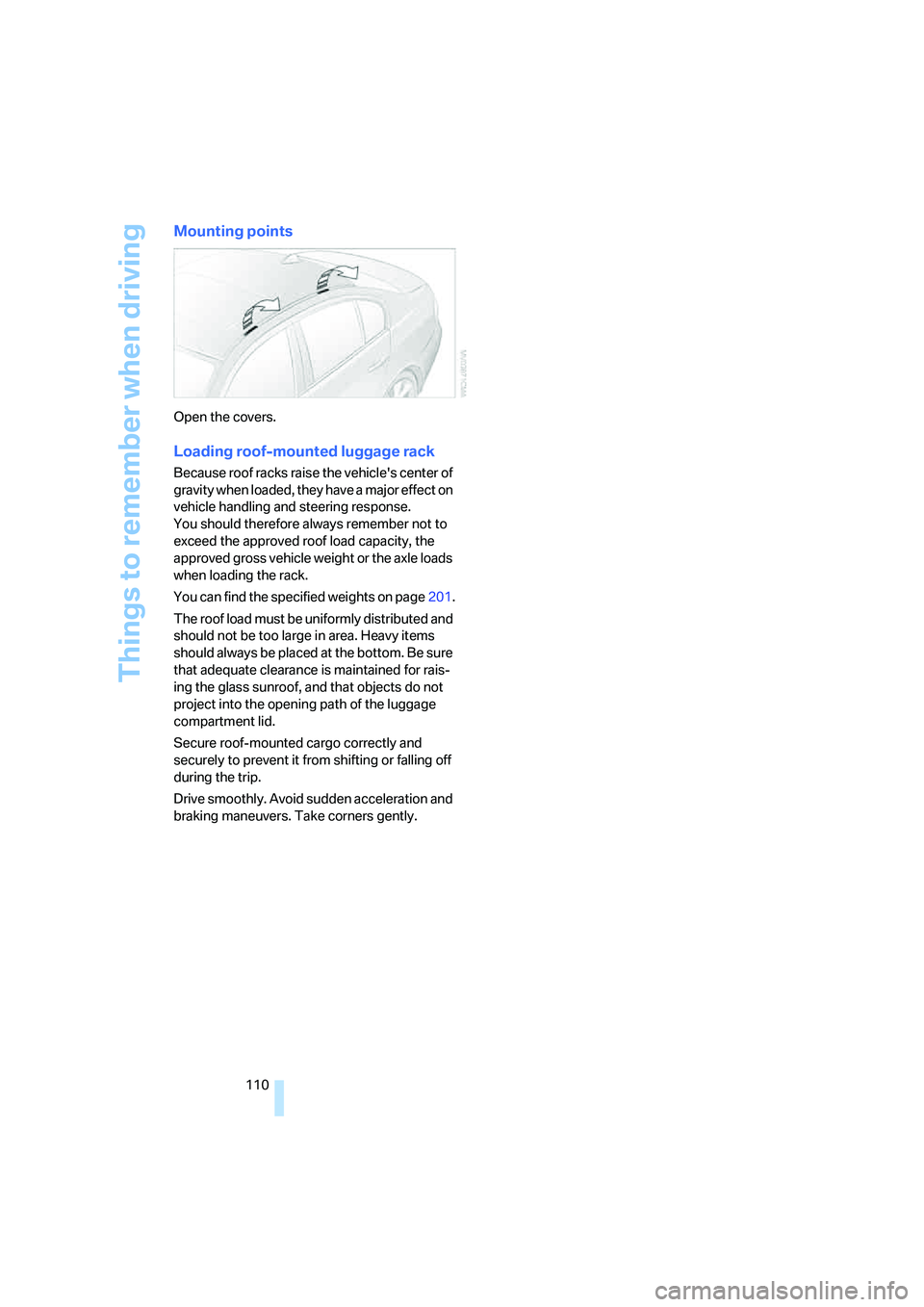
Mounting points
Open the covers.
Loading roof-mounted luggage rack
Because roof racks raise the vehicle's center of
gravity when loaded, they have a major effect on
vehicle handling and steering response.
You should therefore always remember not to
exceed the approved roof load capacity, the
approved gross vehicle weight or the axle loads
when loading the rack.
You can find the specified weights on page201.
The roof load must be uniformly distributed and
should not be too large in area. Heavy items
should always be placed at the bottom. Be sure
that adequate clearance is maintained for rais-
ing the glass sunroof, and that objects do not
project into the opening path of the luggage
compartment lid.
Secure roof-mounted cargo correctly and
securely to prevent it from shifting or falling off
during the trip.
Drive smoothly. Avoid sudden acceleration and
braking maneuvers. Take corners gently.
Page 129 of 223
Destination guidance
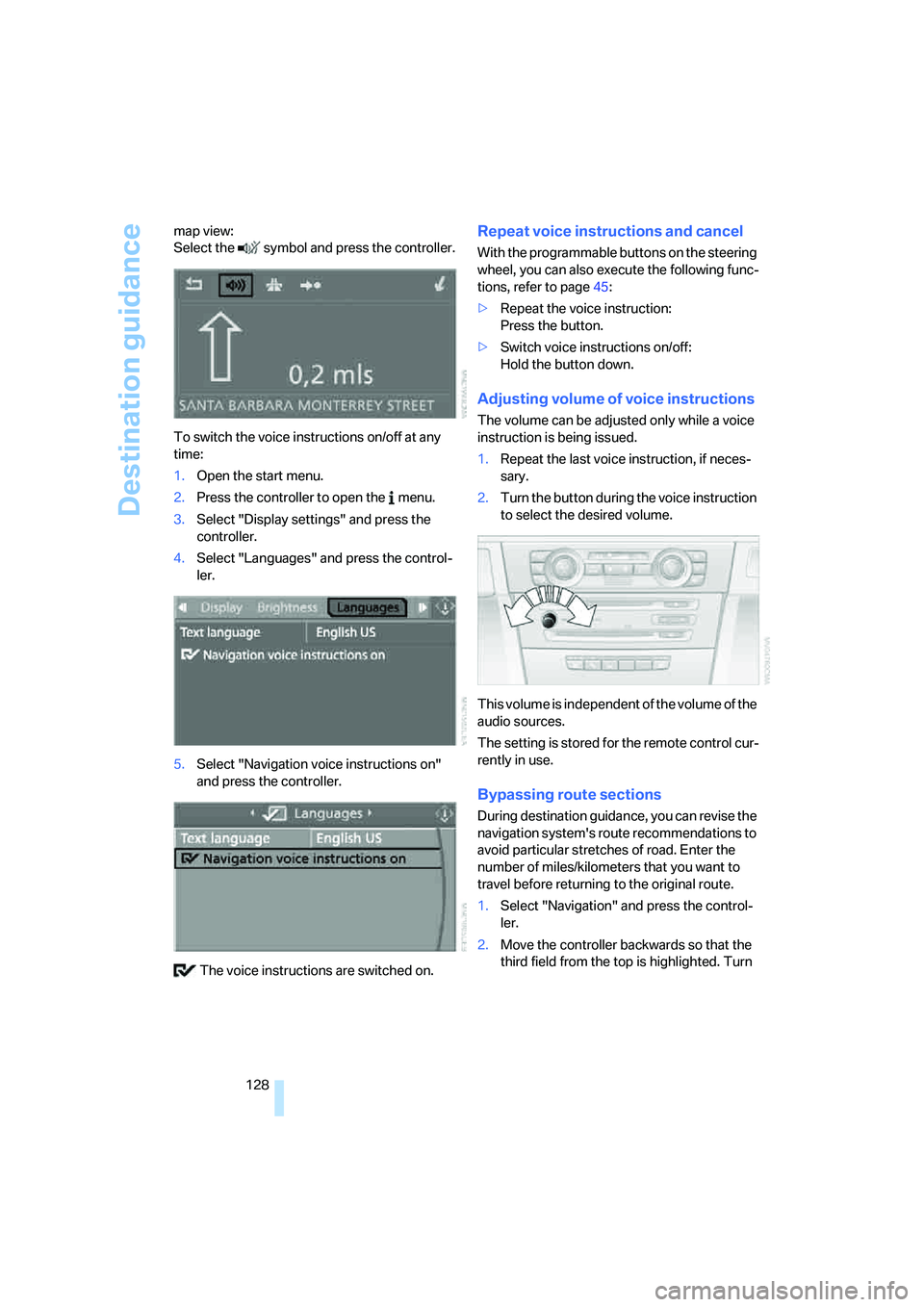
128 map view:
Select the symbol and press the controller.
To switch the voice instructions on/off at any
time:
1.Open the start menu.
2.Press the controller to open the menu.
3.Select "Display settings" and press the
controller.
4.Select "Languages" and press the control-
ler.
5.Select "Navigation voice instructions on"
and press the controller.
The voice instructions are switched on.
Repeat voice instructions and cancel
With the programmable buttons on the steering
wheel, you can also execute the following func-
tions, refer to page45:
>Repeat the voice instruction:
Press the button.
>Switch voice instructions on/off:
Hold the button down.
Adjusting volume of voice instructions
The volume can be adjusted only while a voice
instruction is being issued.
1.Repeat the last voice instruction, if neces-
sary.
2.Turn the button during the voice instruction
to select the desired volume.
This volume is independent of the volume of the
audio sources.
The setting is stored for the remote control cur-
rently in use.
Bypassing route sections
During destination guidance, you can revise the
navigation system's route recommendations to
avoid particular stretches of road. Enter the
number of miles/kilometers that you want to
travel before returning to the original route.
1.Select "Navigation" and press the control-
ler.
2.Move the controller backwards so that the
third field from the top is highlighted. Turn
Page 181 of 223
Under the hood
180
Under the hood
Do not work on the car unless you pos-
sess the necessary technical knowledge.
If you are unfamiliar with the statutory guide-
lines, have any work on the vehicle performed
only by a BMW center or by a workshop that
work according to BMW repair procedures with
correspondingly trained personnel. If this work
is not carried out properly, there is a danger of
subsequent damage and related safety haz-
ards.<
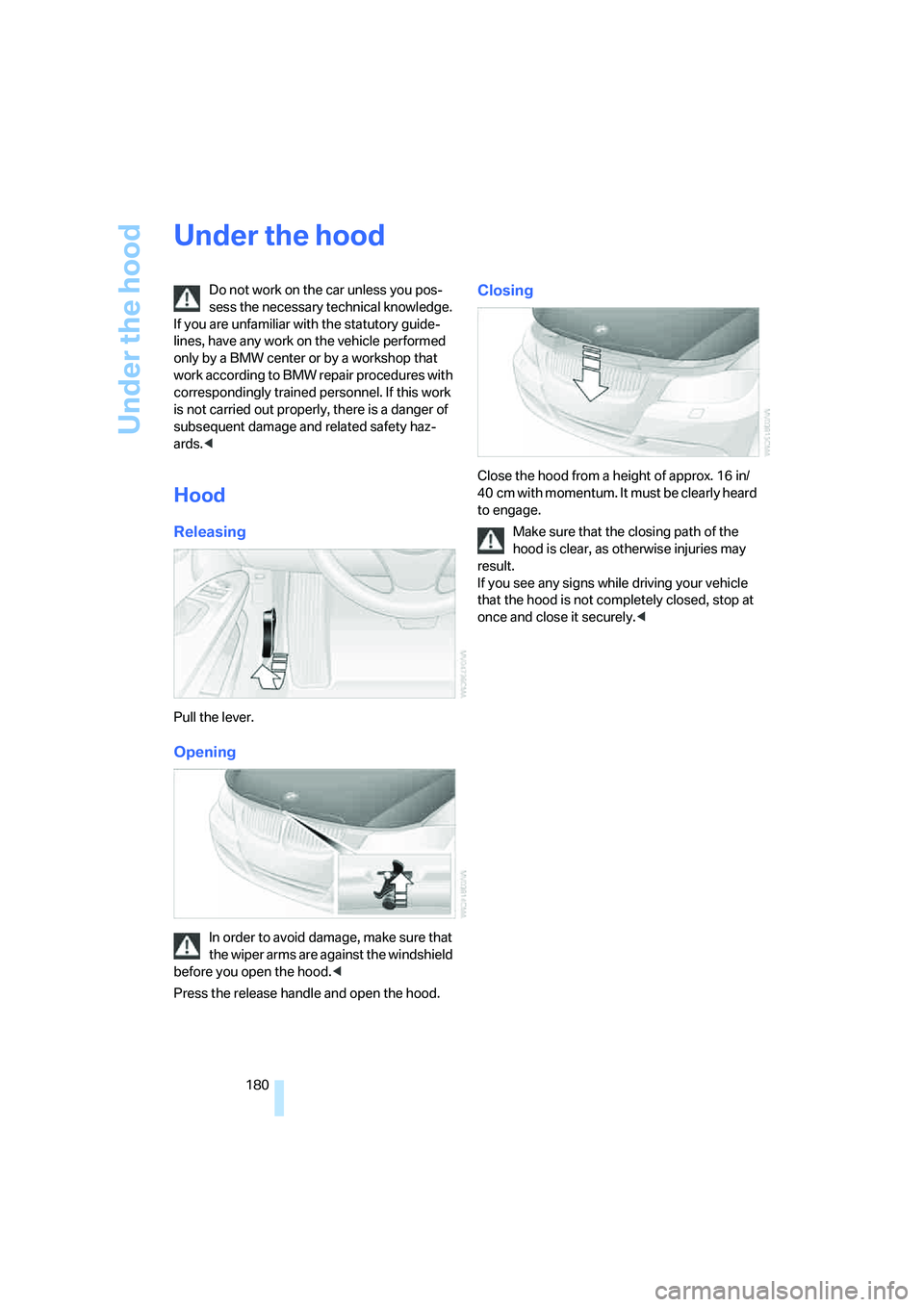
Hood
Releasing
Pull the lever.
Opening
In order to avoid damage, make sure that
the wiper arms are against the windshield
before you open the hood.<
Press the release handle and open the hood.
Closing
Close the hood from a height of approx. 16 in/
4 0 c m w i t h m o m e n t um . I t m u st b e c l e a r l y h e a r d
to engage.
Make sure that the closing path of the
hood is clear, as otherwise injuries may
result.
If you see any signs while driving your vehicle
that the hood is not completely closed, stop at
once and close it securely.<
Page 192 of 223
Mobility
191Reference
At a glance
Controls
Driving tips
Communications
Navigation
Entertainment
according to BMW repair procedures with cor-
respondingly trained personnel.
Light-emitting diodes LEDs
Light-emitting diodes installed behind translu-
c e n t l e n s e s s e r v e a s t h e l i g h t s o u r c e f o r m a n y o f
the controls and displays in your vehicle. These
light-emitting diodes, which operate using a
concept similar to that applied in conventional
lasers, are officially designated as Class 1 light-
emitting diodes.
Do not remove the covers or expose the
eyes directly to the unfiltered light source
for several hours at a time, as this could cause
irritation to the retina.<
Changing wheels
Your BMW is equipped with Run-Flat Tires as
standard. This removes the need to change a
wheel immediately in the event of a puncture.
The symbol identifying Run-Flat Tires is a circle
with the letters RSC on the sidewall, refer to
Run-Flat Tires, page178.
When mounting new tires or changing over
from summer to winter tires and vice versa,
mount Run-Flat Tires for your own safety. In the
event of a flat, moreover, no spare wheel is
available. Your BMW center will be glad to
advise you. Refer also to New wheels and tires,
page178.
The tools for changing wheels are avail-
able as optional accessories from your
BMW center.<
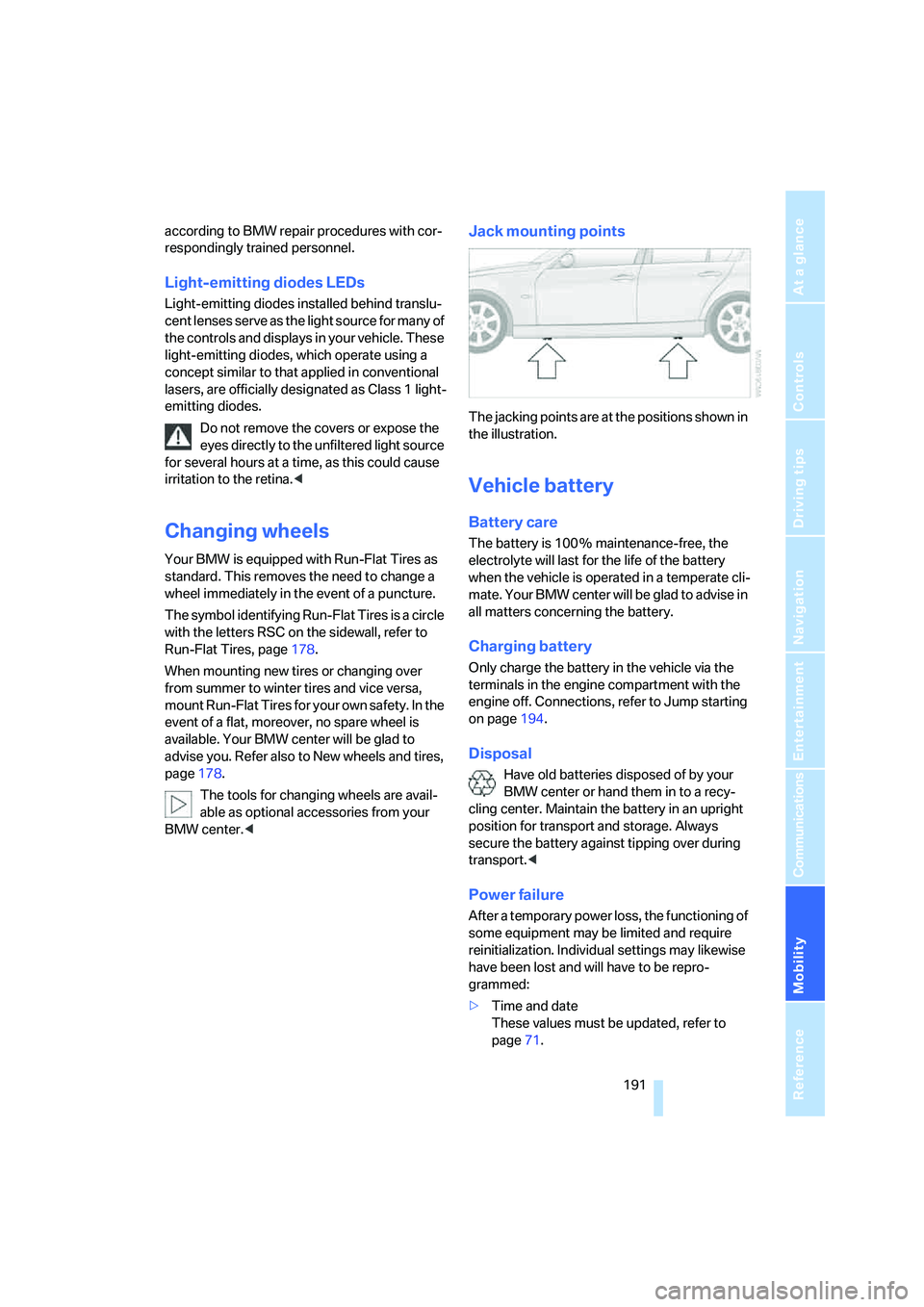
Jack mounting points
The jacking points are at the positions shown in
the illustration.
Vehicle battery
Battery care
The battery is 100 % maintenance-free, the
electrolyte will last for the life of the battery
when the vehicle is operated in a temperate cli-
mate. Your BMW center will be glad to advise in
all matters concerning the battery.
Charging battery
Only charge the battery in the vehicle via the
terminals in the engine compartment with the
engine off. Connections, refer to Jump starting
on page194.
Disposal
Have old batteries disposed of by your
BMW center or hand them in to a recy-
cling center. Maintain the battery in an upright
position for transport and storage. Always
secure the battery against tipping over during
transport.<
Power failure
After a temporary power loss, the functioning of
some equipment may be limited and require
reinitialization. Individual settings may likewise
have been lost and will have to be repro-
grammed:
>Time and date
These values must be updated, refer to
page71.
Page 197 of 223
Giving and receiving assistance
196
Vehicles with automatic transmission
Selector lever in position N.
Changing selector lever positions, refer to
page52.
Do not exceed a towing speed of 45 mph
or 70 km/h and a towing distance of
90 miles/150 km, as otherwise the automatic
transmission may be damaged.<
Towing methods
In some countries, towing with tow bars or
ropes is not permitted in public traffic.
Familiarize yourself with the regulations on tow-
ing in the respective country.
With tow bar
The towing vehicle must not be lighter
than the towed vehicle, otherwise it may
be impossible to maintain control.<
The tow fittings used should be on the same
side on both vehicles. Should it prove impossi-
ble to avoid mounting the tow bar at an angle,
please observe the following:
>Clearance and maneuvering capability will
be sharply limited during cornering.
>The tow bar will generate lateral forces if it is
attached offset.
Secure the tow bar to the tow fitting only.
Otherwise damage to other vehicle parts
could result.<
With tow rope
When starting off in the towing vehicle, make
sure that the tow rope is taut.
To avoid jerking and the associated
stresses on vehicle components when
towing, always use nylon ropes or nylon straps.
Secure the tow rope to the tow fitting only. Oth-
erwise damage to other vehicle parts could
result.<
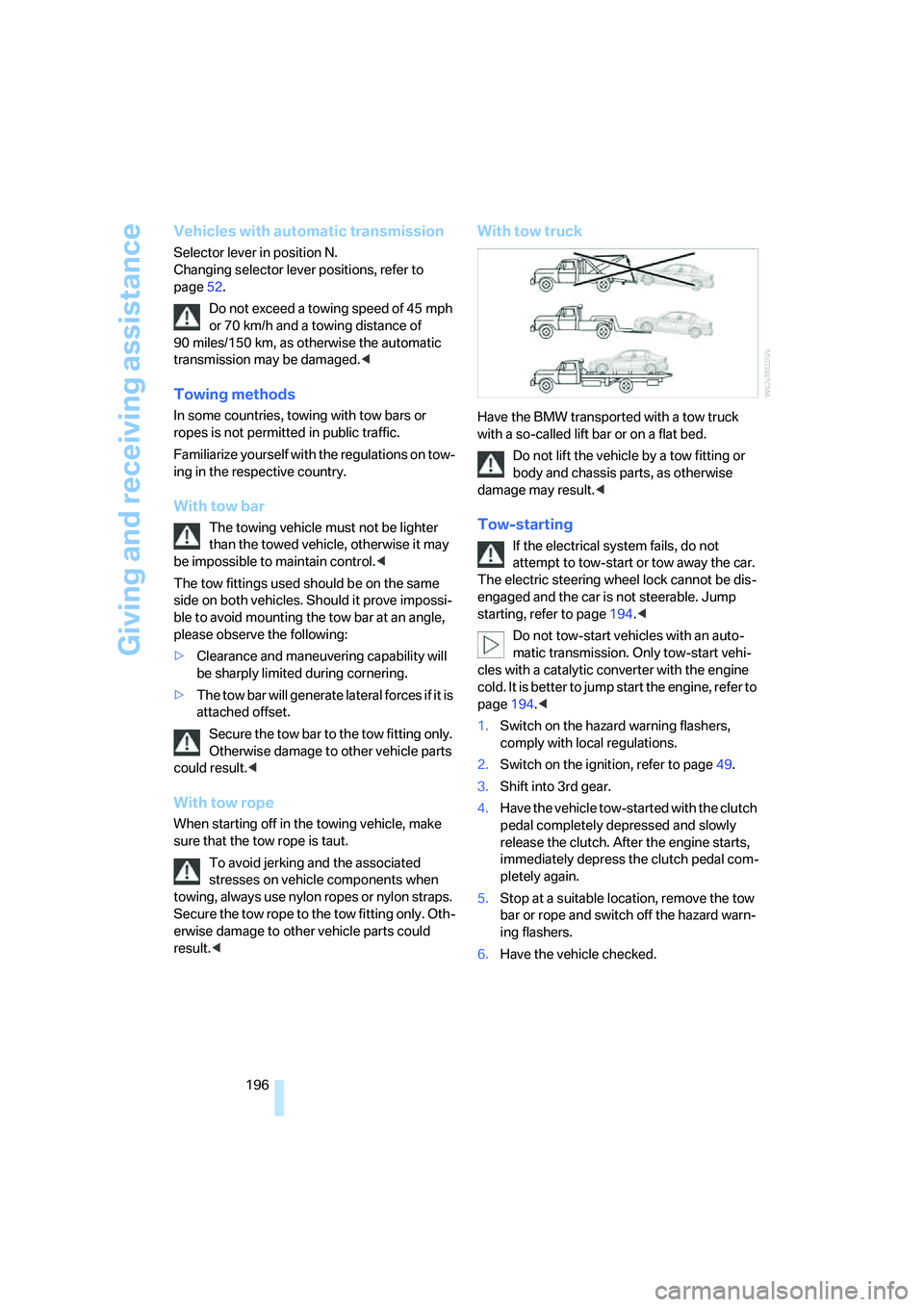
With tow truck
Have the BMW transported with a tow truck
with a so-called lift bar or on a flat bed.
Do not lift the vehicle by a tow fitting or
body and chassis parts, as otherwise
damage may result.<
Tow-starting
If the electrical system fails, do not
attempt to tow-start or tow away the car.
The electric steering wheel lock cannot be dis-
engaged and the car is not steerable. Jump
starting, refer to page194.<
Do not tow-start vehicles with an auto-
matic transmission. Only tow-start vehi-
cles with a catalytic converter with the engine
cold. It is better to jump start the engine, refer to
page194.<
1.Switch on the hazard warning flashers,
comply with local regulations.
2.Switch on the ignition, refer to page49.
3.Shift into 3rd gear.
4.Have the vehicle tow-started with the clutch
pedal completely depressed and slowly
release the clutch. After the engine starts,
immediately depress the clutch pedal com-
pletely again.
5.Stop at a suitable location, remove the tow
bar or rope and switch off the hazard warn-
ing flashers.
6.Have the vehicle checked.
Page 209 of 223
Everything from A - Z
208 Car battery, refer to Vehicle
battery191
Car care, refer to Caring for
your vehicle brochure
Car-care products, refer to
Caring for your vehicle
brochure
"Car Data"66
Care, refer to Caring for your
vehicle brochure
Cargo, securing109
Cargo loading
– stowing cargo109
– vehicle108
Caring for artificial leather,
refer to Caring for your
vehicle brochure
Caring for leather, refer to
Caring for your vehicle
brochure
Caring for light-alloy wheels,
refer to Caring for your
vehicle brochure
Caring for plastic, refer to
Caring for your vehicle
brochure
Caring for the carpet, refer to
Caring for your vehicle
brochure
Caring for the vehicle finish,
refer to Caring for your
vehicle brochure
Car jack
– jacking points191
Car key, refer to Integrated
key/remote control28
Car phone152
– installation location, refer to
Center armrest96
– refer to Portable phone152
– refer to separate Owner's
Manual
Car radio, refer to Radio138
Car wash108
– also refer to Caring for your
vehicle brochure
Catalytic converter, refer to
Hot exhaust system106
"Categories"142CBS Condition Based
Service185
"CD"134,145
CD changer145
– controls134
– fast forward/reverse147
– installation location147
– playing a track146
– random order147
– repeating a track146
– selecting a CD145
– selecting a track146
– switching on/off134
– tone control135
– volume135
CD player145
– controls134
– fast forward/reverse147
– playing a track
146
– random order147
– repeating a track146
– selecting a track146
– switching on/off134
– tone control135
– volume135
Center armrest96
Center brake lamp
– replacing bulbs190
Center console, refer to
Around the center
console14
"Central locking"30
Central locking
– from inside32
– from outside29
Central locking system29
Changing bulbs187
Changing the language on the
Control Display76
Changing the measurement
units on the Control
Display68
Changing wheels191
Chassis number, refer to
Engine compartment181
Check Control73
"Check Control
messages"75
Check Gas Cap168Checking the air pressure,
refer to Tire inflation
pressure170
Child-restraint fixing system
LATCH48
Child-restraint systems46
Child-safety lock48
Child seats46
Chrome parts, care, refer to
Caring for your vehicle
brochure
Cigarette lighter99
– socket99
Cleaning, refer to Caring for
your vehicle brochure
Cleaning headlamps54
– washer fluid55
"Climate"90
Clock64
– 12h/24h mode72
– setting time71
Closing
– from inside32
– from outside30
Clothes hooks97
Cold start, refer to Starting the
engine49
Combined instrument, refer to
Instrument cluster12
Comfort area, refer to Around
the center console14
"Communication"153
"Communication
settings"160
Compact disc, refer to
– CD changer145
– CD player145
Compact wheel
– inflation pressure
172,173,174,175
Compartment for remote
control, refer to Ignition
lock49
Compass94
Computer65
– displays on Control
Display66
– hour signal72
Computer, refer to iDrive16
Page 213 of 223
Everything from A - Z
212 Heavy loads, refer to Stowing
cargo109
Height, refer to
Dimensions200
Height adjustment
– seats39
– steering wheel44
High beams86
– indicator lamp13
– replacing bulbs188
High water, refer to Driving
through water107
Hills107
Holders for cups98
"Home address" in
navigation123
Hood180
Horn10
Hot exhaust system106
"Hour memo"72
"House number" in
destination entry117
Hydraulic brake assist, refer to
Dynamic Brake Control78
Hydroplaning107
I
Ice warning64
iDrive16
– adjusting brightness76
– assistance window20
– automatic climate control90
– changing language76
– confirming a selection or
entry19
– date and time, setting72
– displays, menus17
– lists19
– menu guidance17
– operating principle16
– selecting a menu item19
– status information20
– switching menu pages19
– symbols18
Ignition49
– switched off49
– switched on49Ignition key, refer to
Integrated key/remote
control28
Ignition key position 1, refer to
Radio readiness49
Ignition key position 2, refer to
Ignition on49
Ignition lock49
Indicator and warning
lamps13
Individual air distribution90
Individually programmable
buttons on steering
wheel45
Individual settings, refer to
Personal Profile29
Information
– on another location119
– on country119
– on current position119
– on destination location119
"Information" in
navigation119
"Information on
destination"120
"Input map"118
Installation location
– CD changer147
Instructions for navigation
system, refer to Voice
instructions127
Instrument cluster12
Instrument lighting87
Integrated key28
Integrated universal remote
control93
Interesting destination for
navigation119
"Interim time"76
Interior lamps87
– remote control30
Interior motion sensor35
Interior rearview mirror44
– automatic dimming
feature107
Interior rearview mirror with
digital compass94
Interlock52Intermittent mode of the
wipers54
J
Jacking points191
Joystick, refer to iDrive16
Jumpering, refer to Jump
starting194
Jump starting194
K
Key, refer to Integrated key/
remote control28
Key Memory, refer to Personal
Profile29
"Keypad"156
Kick-down52
Knock control168
L
Lamps, refer to Parking lamps/
low beams85
Lamps and bulbs, replacing
bulbs187
"Languages" in
navigation128
"Languages"on the control
display76
Lap-and-shoulder safety
belt43
Lashing eyes, refer to
Securing cargo109
Last destinations, refer to
Destination list120
"Last seat pos."42
LATCH child-restraint fixing
system48
LEDs light-emitting
diodes191
Length, refer to
Dimensions200
License plate lamp, replacing
bulbs190
Light-emitting diodes
LEDs191
Lighter99
Page 214 of 223
Reference 213
At a glance
Controls
Driving tips
Communications
Navigation
Entertainment
Mobility
"Lighting"85,86
Lighting
– instruments87
– lamps and bulbs187
– of the vehicle, refer to
Lamps85
Light switch85
"Limit"75
Limit, refer to Speed limit75
Loading
– securing cargo109
Load securing equipment,
refer to Securing cargo109
Location
– drive for navigation DVD and
audio CD114
Lock buttons in the doors,
refer to Locking32
Locking
– adjusting confirmation
signal31
– from inside32
– from outside30
Locking and unlocking doors
– from inside32
– from outside30
"LOGIC7", refer to Tone
control136
Low beams85
– automatic85
– replacing bulbs188
Lower back support, refer to
Lumbar support39
Luggage compartment
– capacity201
– lamp87
– lid32
– opening from inside33
– opening from outside33
– volume201
Luggage compartment lid32
– locking or unlocking
separately33
– opening and closing33
– opening from inside33
– opening from outside33
– unlocking with remote
control30Luggage compartment net,
refer to Securing cargo109
Luggage rack, refer to Roof-
mounted luggage rack109
Lumbar support39
LW, waveband138
M
M+S tires, refer to Winter
tires179
Maintenance, refer to Service
Booklet
Maintenance system185
Malfunction warnings, refer to
Check Control73
Manual mode of automatic
transmission52
"Manual"
on the radio139
Manual operation
– door lock31
– glass sunroof37
– transmission lock, automatic
transmission53
Manual release
– fuel filler door168
Manual transmission51
Map
– changing scale127
– destination entry118
"Map direction of travel"127
"Map facing north"127
Master key, refer to Integrated
key/remote control28
Maximum cooling90
Maximum speed
– for winter tires179
Menus, refer to iDrive16
Microfilter
– BMW Maintenance
System185
– for automatic climate
control92
Microfilter/activated-charcoal
filter
– BMW Maintenance
System185Microphone
– for hands-free system152
Microphone for telephone14
Mirror dimming feature107
Mirrors43
– automatic curb monitor44
– exterior mirrors43
– heating44
– interior rearview mirror44
"Missed calls"155
Missed calls155
Modifications, technical, refer
to For your own safety5
Monitor, refer to iDrive
controls16
Monitoring system for tire
pressures, refer to Flat Tire
Monitor80
"Monitor on / off"45
Most recent portable phone
numbers155
Multifunction switch
– refer to Turn signals/
headlamp flasher53
– refer to Wiper system
54
Music track
– finding146
"Mute on / off"45
N
"Navigation"115
Navigation address
– home address122
Navigation destination
– manual entry115
– selecting via map118
Navigation drive, location114
Navigation DVD114
Page 217 of 223
Everything from A - Z
216 Reverse gear
– automatic transmission with
Steptronic52
– manual transmission51
Road map126
"Roadside Assistance"162
Roadside
Assistance162,193
Roadside parking lamps86
– replacing bulbs189
Roadworthiness test, refer to
Service requirements69
Roller blind
– sun blinds95
Roof load capacity201
Roof-mounted luggage
rack109
Rope, refer to Tow-starting,
towing away196
Rotary/pushbutton, refer to
iDrive16
Route123
– changing123
– display126
– displaying arrow view126
– displaying map view126
– displaying town127
– list127
– selecting123
– selecting criteria123
"Route list" in navigation127
Route map126
"Route preference",
changing123
Route selection123
RSC Runflat System
Component, refer to Run-
Flat Tires178
Runflat System Component
RSC, refer to Run-Flat
Tires178
Run-Flat Tires178
– continuing driving with a
damaged tire81
– flat tire81
– new tires178
– replacing tires178
– tire pressures170
– winter tires179Runflat Tyres, refer to Run-
Flat Tires178
S
Safety-belt height
adjustment43
Safety belts43
– damage43
– indicator lamp43
– reminder43
– sitting safely38
Safety systems
– airbags82
– Antilock Brake System
ABS78
– Dynamic Stability Control
DSC78
– safety belts43
Safety tires, refer to Run-Flat
Tires178
Sampling tracks
– scan146
Satellite radio141
– enabling141
– selecting channel142
– storing channel142
"SAT" for radio134,142
Scan
– CD changer146
– CD player146
– radio139
"Scan", sampling radio
stations139
"Scan", sampling
tracks on CD146
Screen, refer to iDrive
controls16
Seat adjustment
– electric39
– mechanical39
Seat belt reminder, refer to
'Fasten safety belts'
reminder43
Seats39
– adjusting the seats39
– heating41
– sitting safely38
Securing cargo101"Select as destination"120
"Select current speed"75
Selecting distance for active
cruise control59
Selecting menu items19
Selecting new scale for
navigation127
Selecting the frequency
manually139
Selection options with
navigation system123
Selector lever
– automatic transmission with
Steptronic52
"Service"75
,161,182
Service, refer to Roadside
Assistance193
Service car, refer to Roadside
Assistance193
Service data in the remote
control185
Service Interval Display, refer
to Condition Based Service
CBS185
"Service notification"161
"Service Request"162,164
Service requirement display,
refer to Condition Based
Service CBS185
"Service
requirements"70,161,182
Service requirements69
"Service Status"161
"Set date"73
"Set" for audio mode134
"Set time"72
Settings
– clock,12h/24h mode72
– date format73
"Set tire pressure"81
Shifting with automatic
transmission with
Steptronic52
Shiftlock, refer to Changing
selector lever positions52
Short commands of voice
command system202
Shortest route in navigation,
refer to Selecting route123
Page 219 of 223
Everything from A - Z
218 Temperature display
– ice warning64
– outside temperature64
– setting the units68
"Terminate services"163
"Text language"76
"Theater" tone settings136
Thigh support40
Third brake lamp, refer to
Center brake lamp190
Tilt alarm sensor35
Tilt function, passenger-side
mirror44
"Time"72
"Time format"72
Tire inflation pressures170
Tire pressure
– loss81
Tire pressure monitoring,
refer to Flat Tire Monitor80
Tire puncture, refer to Flat Tire
Monitor81
Tire Quality Grading176
Tires
– age176,178
– breaking in106
– changing, refer to Changing
wheels191
– condition177
– damage177
– inflation pressure170
– minimum tread depth177
– new tires178
– pressure monitoring, refer to
Flat Tire Monitor80
– puncture81
– Run-Flat Tires178
– size176
– wear indicators, refer to
Minimum tread depth177
– winter tires179
"Tone"135
Tone in audio mode
– adjusting135
– middle setting137
Tools, refer to Onboard tool
kit187
"Top 8" for portable
phone155Torque200
Touch tone dialing156
Tow bar196
Tow fittings195
Tow fittings for tow-starting
and towing away195
Towing195
– methods
196
Towing away
– car with automatic
transmission195
"Town / City" in destination
entry116
Tow rope196
Tow-starting195
Tracks
– random play sequence147
Track width, refer to
Dimensions200
Traction-assist feature, refer
to DSC78
Traction control, refer to DSC
Dynamic Stability
Control78
Trailer towing
– towing loads and gross
weight201
Transmission
– automatic transmission with
Steptronic51
– manual transmission51
Transporting children
safely46
Transport securing device,
refer to Securing cargo109
Tread depth, refer to Minimum
tire tread177
Treble, tone control135
"Trip computer"66
Trip computer66
Trip-distance counter, refer to
Trip odometer64
"Triple turn signal
activation"53,85
Trip odometer64
Trunk lid, refer to Luggage
compartment lid32
Trunk lights, refer to Luggage
compartment lamp87Turning circle, refer to
Dimensions200
Turn signals53
– indicator lamp12
– replacing bulbs189
Tying down loads, refer to
Cargo loading109
U
Underbody protection, refer to
Caring for your vehicle
brochure
Uniform Tire Quality Grading/
UTQR176
"Units"68
Units
– average consumption68
– temperature68
Universal garage door opener,
refer to Integrated universal
remote control93
Universal remote control93
"Unlock button"30
Unlocking
– from inside32
– from outside30
"Update services"163
V
Vehicle
– battery191
– breaking in106
– care, refer to Caring for your
vehicle brochure
– cargo loading108
– dimensions200
– Identification Number, refer
to Engine compartment181
– parking50
– washing, refer to Caring for
your vehicle brochure
– weight201
Vehicle jack191
Vehicle position, refer to
Displaying current
position129
"Vehicle settings"80