navigation BMW 330XI SEDAN 2005 Manual Online
[x] Cancel search | Manufacturer: BMW, Model Year: 2005, Model line: 330XI SEDAN, Model: BMW 330XI SEDAN 2005Pages: 223, PDF Size: 7.49 MB
Page 148 of 223
Navigation
Entertainment
Driving tips
147Reference
At a glance
Controls
Communications
Mobility
Random play sequence
The tracks on the current CD are played once
each in random order.
1.Select "Set" and press the controller.
Other menu items are displayed.
2.Select "Random" and press the controller.
Stop random function:
1.Press the controller.
2.Select "Random" and press the controller.
Fast forward/reverse
Buttons on the CD player:
Press and hold the button for the
corresponding direction.
The tracks can be heard, but reproduction is
distorted.
CD magazine
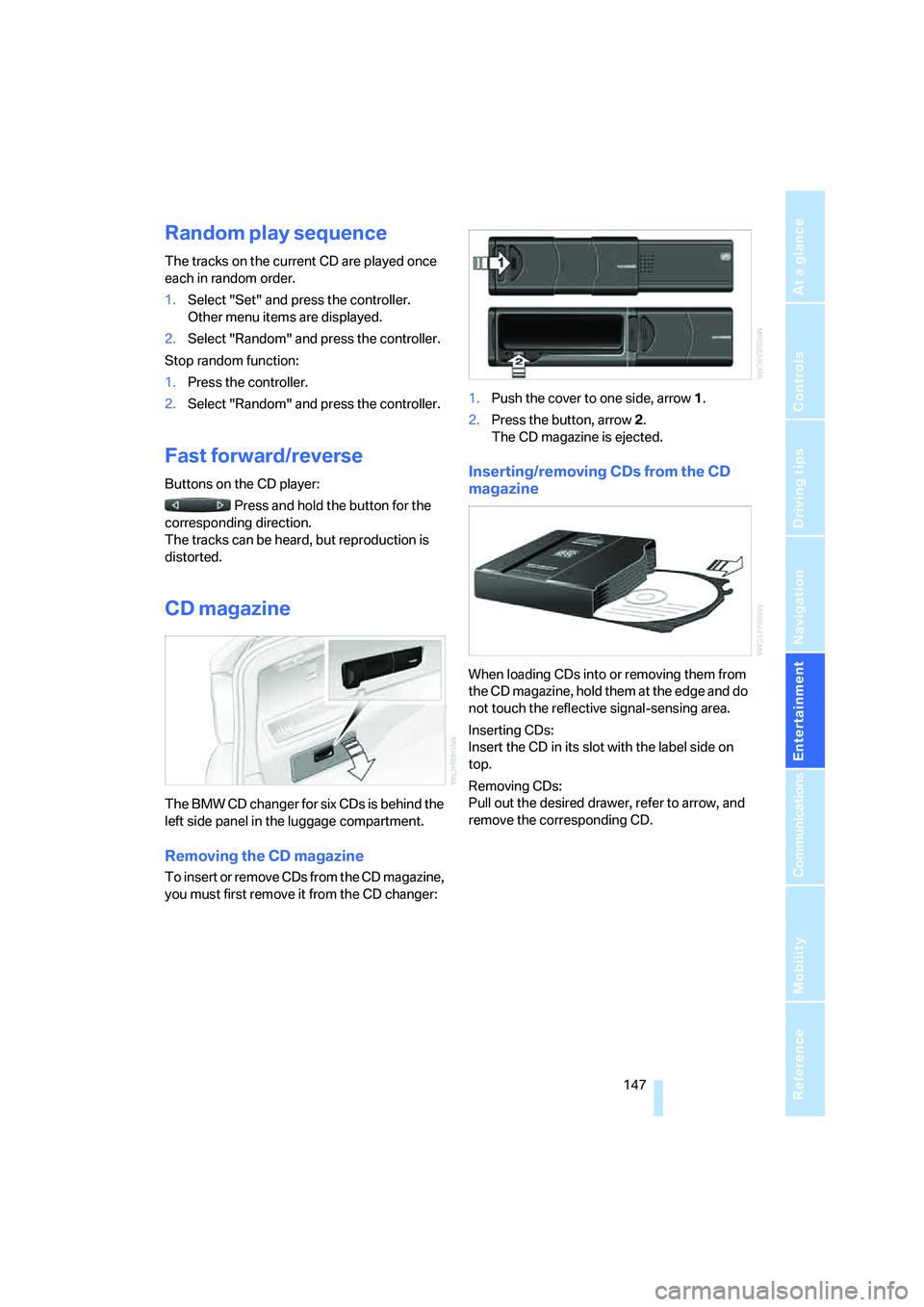
The BMW CD changer for six CDs is behind the
left side panel in the luggage compartment.
Removing the CD magazine
To insert or remove CDs from the CD magazine,
you must first remove it from the CD changer:1.Push the cover to one side, arrow 1.
2.Press the button, arrow 2.
The CD magazine is ejected.
Inserting/removing CDs from the CD
magazine
When loading CDs into or removing them from
the CD magazine, hold them at the edge and do
not touch the reflective signal-sensing area.
Inserting CDs:
Insert the CD in its slot with the label side on
top.
Removing CDs:
Pull out the desired drawer, refer to arrow, and
remove the corresponding CD.
Page 150 of 223
Navigation
Entertainment
Driving tips
149Reference
At a glance
Controls
Communications
Mobility
External audio device
You can connect an external audio device, for
instance an MP3 player, and play audio tracks
over the car's loudspeaker system. You can
adjust the tone using iDrive.
Connecting
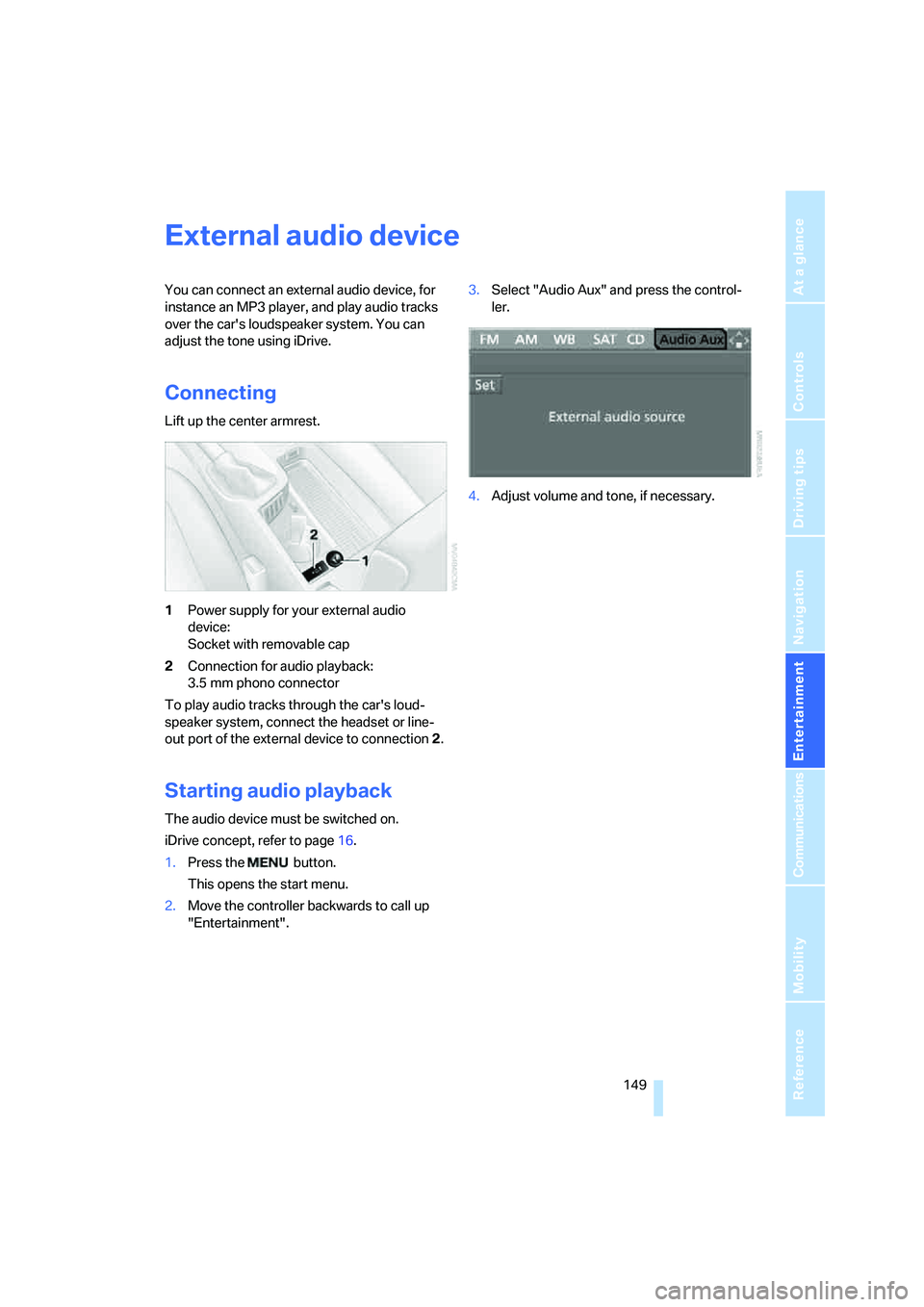
Lift up the center armrest.
1Power supply for your external audio
device:
Socket with removable cap
2Connection for audio playback:
3.5 mm phono connector
To play audio tracks through the car's loud-
speaker system, connect the headset or line-
out port of the external device to connection 2.
Starting audio playback
The audio device must be switched on.
iDrive concept, refer to page16.
1.Press the button.
This opens the start menu.
2.Move the controller backwards to call up
"Entertainment".3.Select "Audio Aux" and press the control-
ler.
4.Adjust volume and tone, if necessary.
Page 154 of 223
153
Entertainment
Reference
At a glance
Controls
Driving tips Communications
Navigation
Mobility
Adjusting volume
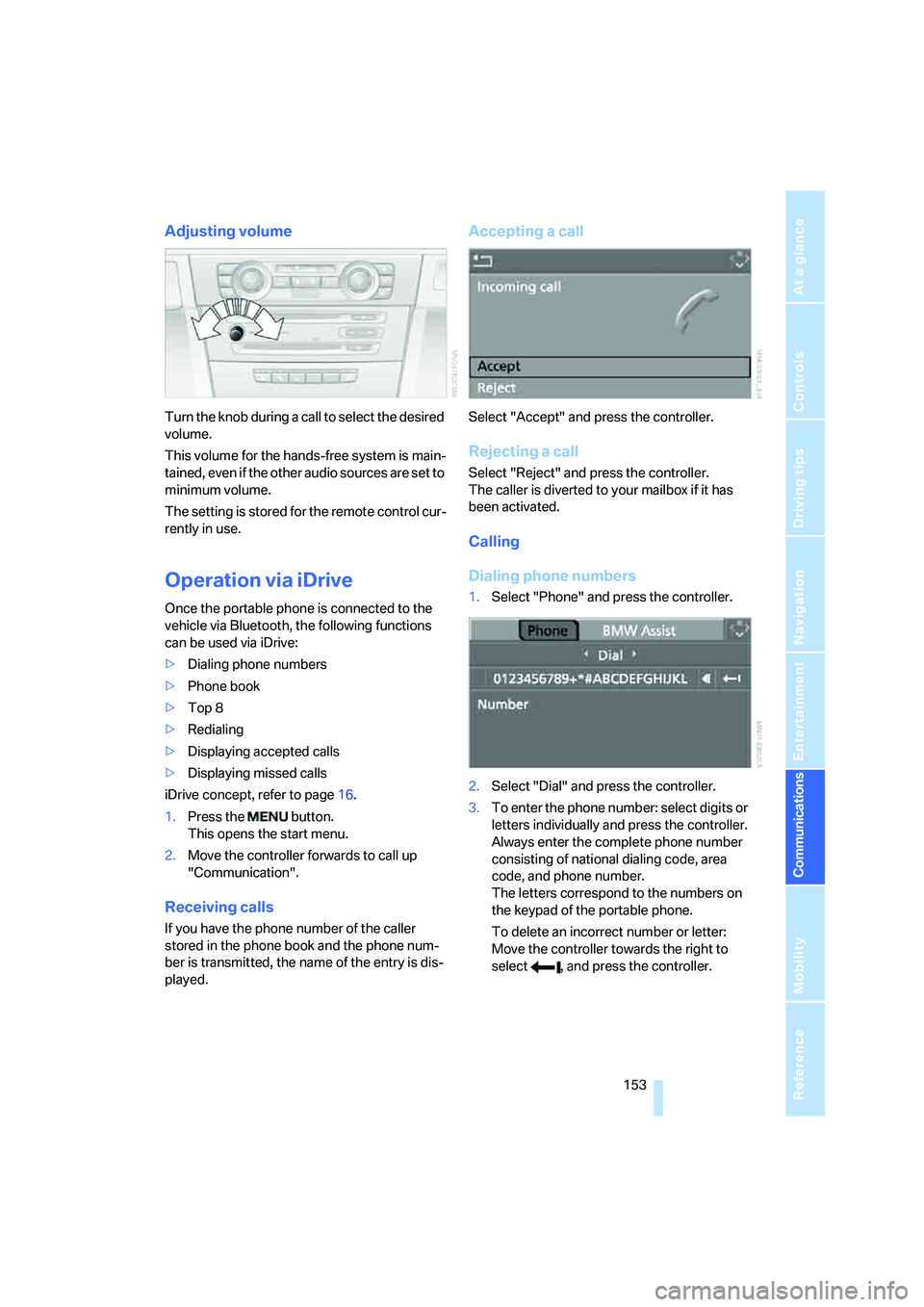
Turn the knob during a call to select the desired
volume.
This volume for the hands-free system is main-
tained, even if the other audio sources are set to
minimum volume.
The setting is stored for the remote control cur-
rently in use.
Operation via iDrive
Once the portable phone is connected to the
vehicle via Bluetooth, the following functions
can be used via iDrive:
>Dialing phone numbers
>Phone book
>Top 8
>Redialing
>Displaying accepted calls
>Displaying missed calls
iDrive concept, refer to page16.
1.Press the button.
This opens the start menu.
2.Move the controller forwards to call up
"Communication".
Receiving calls
If you have the phone number of the caller
stored in the phone book and the phone num-
ber is transmitted, the name of the entry is dis-
played.
Accepting a call
Select "Accept" and press the controller.
Rejecting a call
Select "Reject" and press the controller.
The caller is diverted to your mailbox if it has
been activated.
Calling
Dialing phone numbers
1.Select "Phone" and press the controller.
2.Select "Dial" and press the controller.
3.To enter the phone number: select digits or
letters individually and press the controller.
Always enter the complete phone number
consisting of national dialing code, area
code, and phone number.
The letters correspond to the numbers on
the keypad of the portable phone.
To delete an incorrect number or letter:
Move the controller towards the right to
select , and press the controller.
Page 156 of 223
155
Entertainment
Reference
At a glance
Controls
Driving tips Communications
Navigation
Mobility
1.Select "Phone" and press the controller.
2.Select "A - Z" and press the controller.
3.Select the desired entry.
4.Press the controller.
Other menu items are displayed.
5.Select "Add digits" and press the controller.
6.To add to the phone number: select digits
individually and press the controller.
7.Select "Dial number" and press the control-
ler.
Lists
Your phone can store phone numbers you have
dialed and incoming calls in lists. If the caller is
entered in the phone book, the name of the
entry is displayed instead of the phone number.
You can select the desired subscriber from the
list and establish the connection.
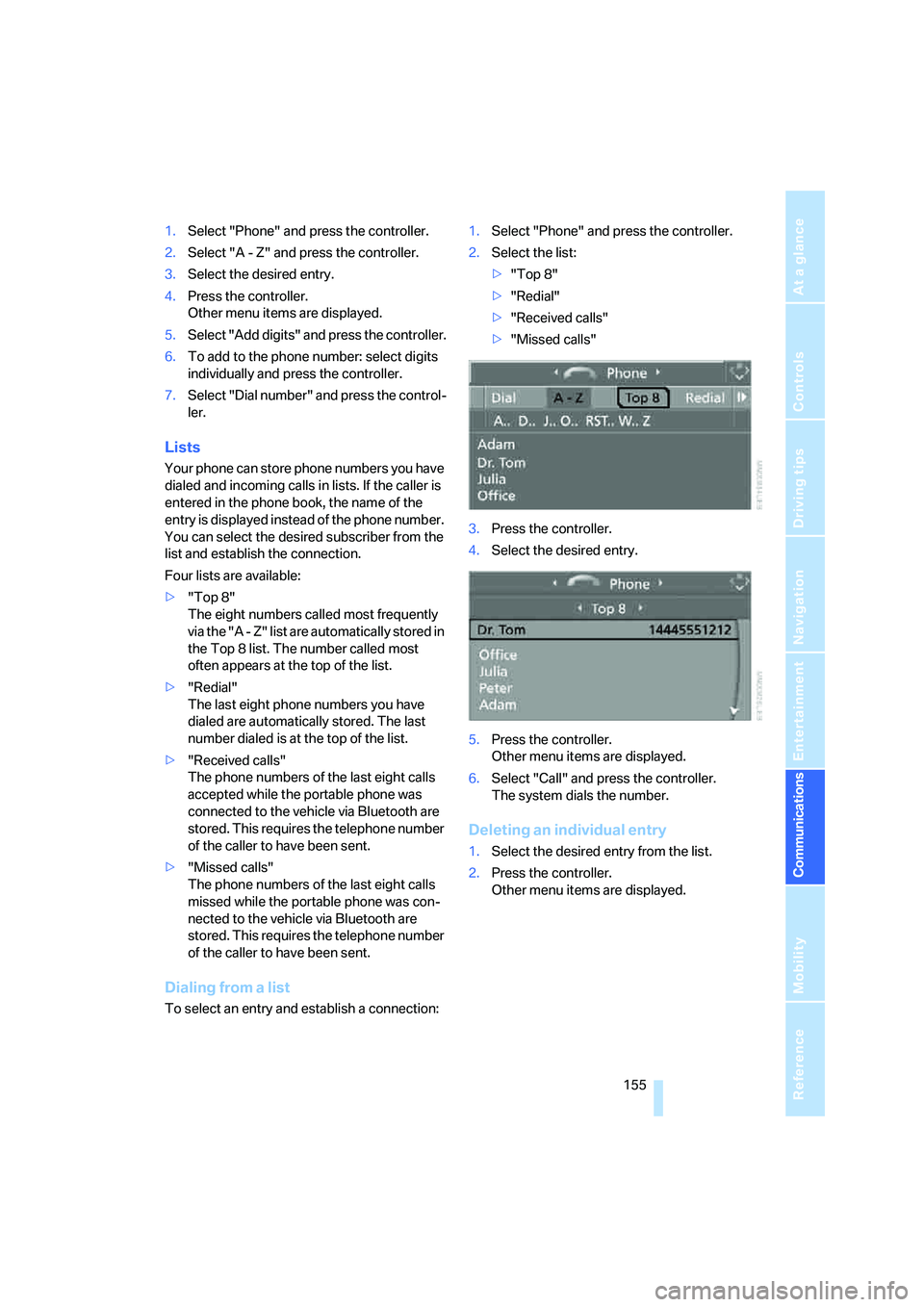
Four lists are available:
>"Top 8"
The eight numbers called most frequently
via the "A - Z" list are automatically stored in
the Top 8 list. The number called most
often appears at the top of the list.
>"Redial"
The last eight phone numbers you have
dialed are automatically stored. The last
number dialed is at the top of the list.
>"Received calls"
The phone numbers of the last eight calls
accepted while the portable phone was
connected to the vehicle via Bluetooth are
stored. This requires the telephone number
of the caller to have been sent.
>"Missed calls"
The phone numbers of the last eight calls
missed while the portable phone was con-
nected to the vehicle via Bluetooth are
stored. This requires the telephone number
of the caller to have been sent.
Dialing from a list
To select an entry and establish a connection:1.Select "Phone" and press the controller.
2.Select the list:
>"Top 8"
>"Redial"
>"Received calls"
>"Missed calls"
3.Press the controller.
4.Select the desired entry.
5.Press the controller.
Other menu items are displayed.
6.Select "Call" and press the controller.
The system dials the number.
Deleting an individual entry
1.Select the desired entry from the list.
2.Press the controller.
Other menu items are displayed.
Page 158 of 223
157
Entertainment
Reference
At a glance
Controls
Driving tips Communications
Navigation
Mobility
Canceling operation by voice
Press button on steering wheel
or
In dialogs where text is spoken, e.g. a name
rather than a command, canceling is only possi-
ble using the button. The dialog is automati-
cally interrupted when an incoming call is
received.
Voice commands
In addition to the commands described in this
Owner's Manual, alternative commands are
often possible for the same functions, e.g.:
The system recognizes digits from zero to nine.
You can say each digit individually or group
them into a sequence of three to five digits to
accelerate the input.{Cancel}.
{Dial name} or {Name}.
Page 160 of 223
159
Entertainment
Reference
At a glance
Controls
Driving tips Communications
Navigation
Mobility
Storing an entry
An entry always consists of a name and phone
number.
Selecting an entry
The connection to the phone number of the
selected entry is established.
Having entries read aloud and selecting
You can have all the entries of your voice phone
book read aloud in the order of input and select
a certain entry to establish a connection:
Redialing
The {Redial} command calls up "Redial".
Deleting an entry
You can delete any entry from the voice phone
book.
Deleting all entries
{Delete phone book} deletes all entries in the
phone book.
Notes
The voice commands in English were
available as of this printing. Other lan-
guages are currently in preparation. To operate
the portable phone via the voice command sys-
tem, refer to page22.<
Important for voice commands
For voice commands, bear in mind the follow-
ing:
>Issue the commands smoothly and at nor-
mal volume, avoiding excessive emphasis
and pauses.
>Keep the doors, windows and glass sunroof
closed to prevent interference from ambi-
ent noise.
>Avoid other sources of noise in the vehicle
while speaking, and ask other vehicle occu-
pants to refrain from talking while you are
using the system. 1.{Save name}.
The dialog for storing a name is
opened.
2.Say the name and repeat it upon
request.
The spoken length of the names in the
phone book must not exceed approx.
2seconds.
3.Say the phone number when prompted.
4.To store the phone number:
{Save}.
1.{Dial name}.
The dialog for selecting an entry is
opened.
2.Say the name when prompted.
3.Confirm the prompt with {Yes}.
1.{Read phone book}.
The dialog for having the phone book
read is opened.
2.{Dial number} when the desired entry is
read aloud.
1.{Delete name}.
The dialog for deleting an entry is
opened.
2.Say the name when prompted.
3.Confirm the prompt with {Yes}.
1.{Delete phone book}.
The dialog for deleting phone book is
opened.
2.Confirm the prompt with {Yes}.
3.Confirm the repeated prompt with
{Yes}.
Page 162 of 223
161
Entertainment
Reference
At a glance
Controls
Driving tips Communications
Navigation
Mobility
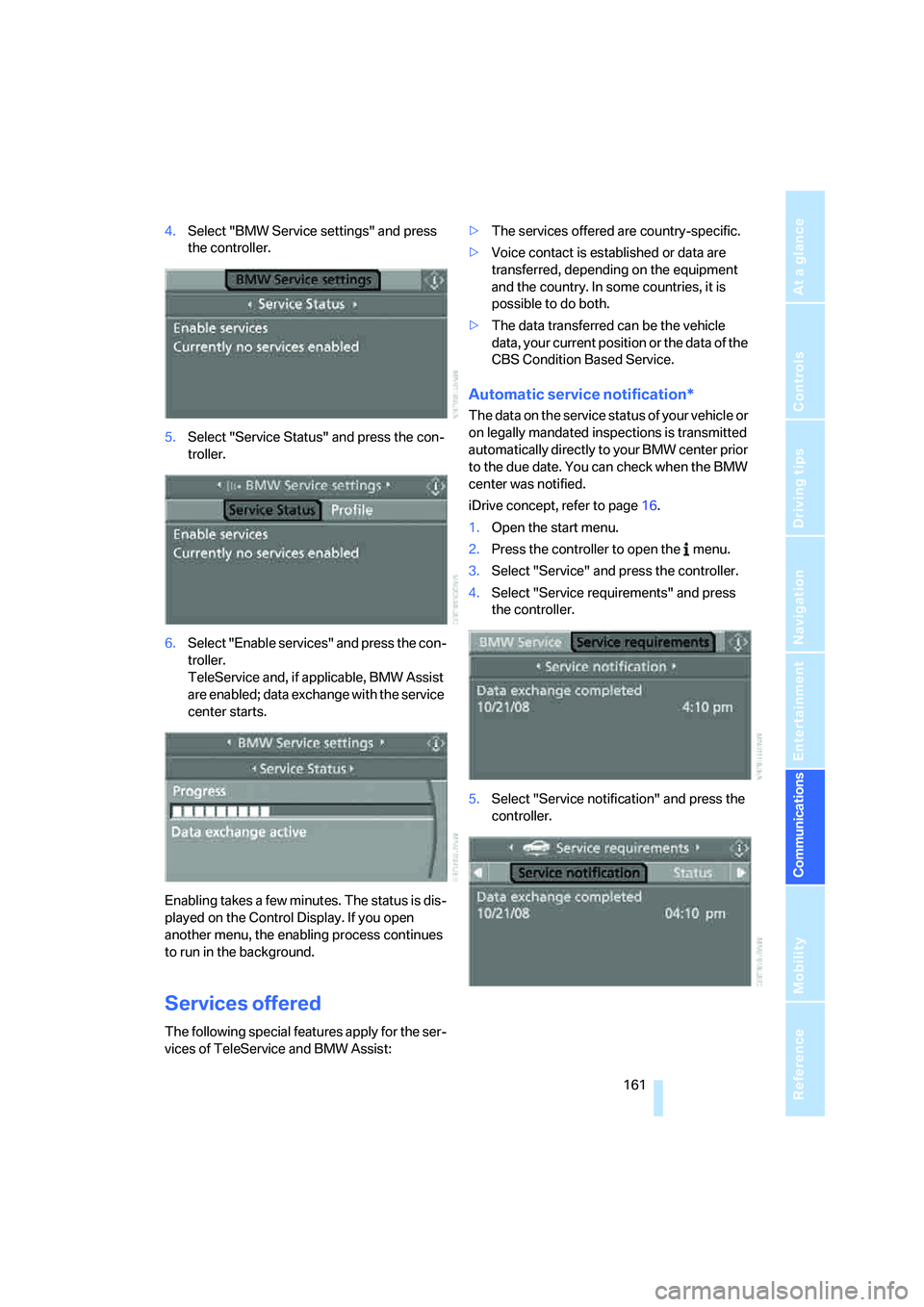
4.Select "BMW Service settings" and press
the controller.
5.Select "Service Status" and press the con-
troller.
6.Select "Enable services" and press the con-
troller.
TeleService and, if applicable, BMW Assist
are enabled; data exchange with the service
center starts.
Enabling takes a few minutes. The status is dis-
played on the Control Display. If you open
another menu, the enabling process continues
to run in the background.
Services offered
The following special features apply for the ser-
vices of TeleService and BMW Assist:>The services offered are country-specific.
>Voice contact is established or data are
transferred, depending on the equipment
and the country. In some countries, it is
possible to do both.
>The data transferred can be the vehicle
data, your current position or the data of the
CBS Condition Based Service.
Automatic service notification*
The data on the service status of your vehicle or
on legally mandated inspections is transmitted
automatically directly to your BMW center prior
to the due date. You can check when the BMW
center was notified.
iDrive concept, refer to page16.
1.Open the start menu.
2.Press the controller to open the menu.
3.Select "Service" and press the controller.
4.Select "Service requirements" and press
the controller.
5.Select "Service notification" and press the
controller.
Page 164 of 223
163
Entertainment
Reference
At a glance
Controls
Driving tips Communications
Navigation
Mobility
3.Select "Communication settings" and
press the controller.
4.Select "BMW Service settings" and press
the controller.
5.Select "Service Status" and press the con-
troller.
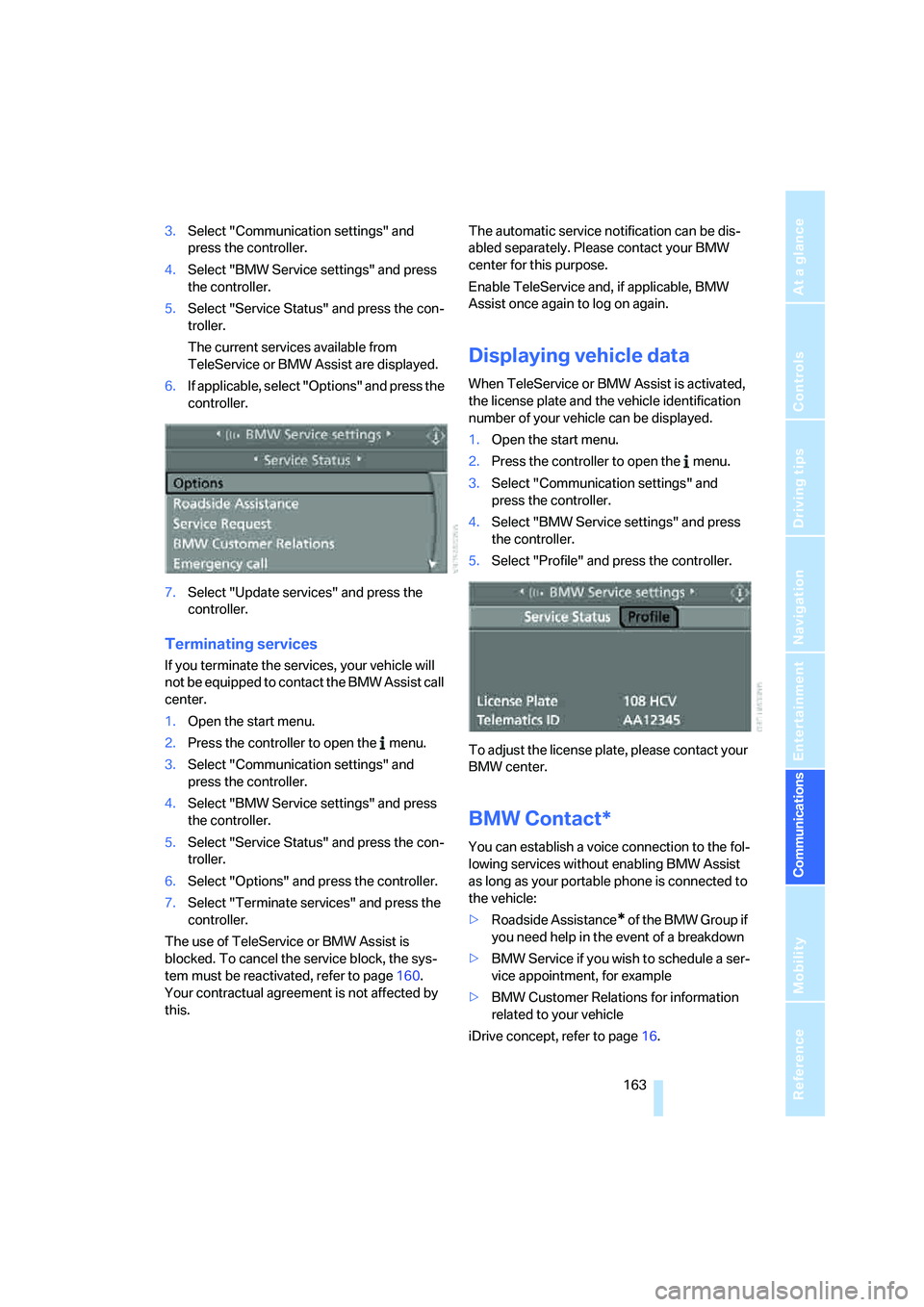
The current services available from
TeleService or BMW Assist are displayed.
6.If applicable, select "Options" and press the
controller.
7.Select "Update services" and press the
controller.
Terminating services
If you terminate the services, your vehicle will
not be equipped to contact the BMW Assist call
center.
1.Open the start menu.
2.Press the controller to open the menu.
3.Select "Communication settings" and
press the controller.
4.Select "BMW Service settings" and press
the controller.
5.Select "Service Status" and press the con-
troller.
6.Select "Options" and press the controller.
7.Select "Terminate services" and press the
controller.
The use of TeleService or BMW Assist is
blocked. To cancel the service block, the sys-
tem must be reactivated, refer to page160.
Your contractual agreement is not affected by
this.The automatic service notification can be dis-
abled separately. Please contact your BMW
center for this purpose.
Enable TeleService and, if applicable, BMW
Assist once again to log on again.
Displaying vehicle data
When TeleService or BMW Assist is activated,
the license plate and the vehicle identification
number of your vehicle can be displayed.
1.Open the start menu.
2.Press the controller to open the menu.
3.Select "Communication settings" and
press the controller.
4.Select "BMW Service settings" and press
the controller.
5.Select "Profile" and press the controller.
To adjust the license plate, please contact your
BMW center.
BMW Contact*
You can establish a voice connection to the fol-
lowing services without enabling BMW Assist
as long as your portable phone is connected to
the vehicle:
>Roadside Assistance
* of the BMW Group if
you need help in the event of a breakdown
>BMW Service if you wish to schedule a ser-
vice appointment, for example
>BMW Customer Relations for information
related to your vehicle
iDrive concept, refer to page16.
Page 166 of 223

165
Entertainment
Reference
At a glance
Controls
Driving tips Communications
Navigation
Mobility
Page 170 of 223
Mobility
169Reference
At a glance
Controls
Driving tips
Communications
Navigation
Entertainment
Required fuel
Premium Unleaded Gasoline
The minimum octane rating is 91.
If you use gasoline with this minimum octane
rating, the engine may produce knocking
sounds when starting at high outside tempera-
tures. This has no affect on the engine life.
Minimum octane rating corresponds to the Anti
Knock Index AKI and is determined according
to the so-called (R+M)/2 method.
Do not fill the tank with leaded fuel, as this
would cause permanent damage to the
catalytic converter.<
Use high-quality brands
Field experience has indicated significant dif-
ferences in fuel quality: volatility, composition,
additives, etc., among gasolines offered for sale
in the United States and Canada. Fuels contain-
ing up to and including 10 % ethanol or other
oxygenates with up to 2.8 % oxygen by weight,
that is, 15 % MTBE or 3 % methanol plus an
equivalent amount of co-solvent, will not void
the applicable warranties with respect to
defects in materials or workmanship.
The use of poor-quality fuels may result in
drivability, starting and stalling problems
especially under certain environmental condi-
tions such as high ambient temperature and
high altitude.
Should you encounter drivability problems
which you suspect could be related to the fuel
you are using, we recommend that you respond
by switching to a recognized high-quality
brand.
Failure to comply with these recommendations
may also result in unscheduled maintenance.<