reset BMW 335I 2012 User Guide
[x] Cancel search | Manufacturer: BMW, Model Year: 2012, Model line: 335I, Model: BMW 335I 2012Pages: 325, PDF Size: 12.26 MB
Page 98 of 325
A natural, even pressure loss in all four tires can‐
not be detected. Therefore, check the tire infla‐
tion pressure regularly.
The system could be delayed or malfunction in
the following situations:▷When the system has not been initialized.▷When driving on a snowy or slippery road
surface.▷Sporty driving style: slip in the drive wheels,
high lateral acceleration.▷When driving with snow chains.
Status display
The current status of the Flat Tire Monitor can
be displayed on the Control Display, e.g.,
whether or not the FTM is active.
1."Vehicle Info"2."Vehicle status"3. "Flat Tire Monitor"
The status is displayed.
Initialization
The initialization process adopts the set inflation
tire pressures as reference values for the detec‐
tion of a flat tire. Initialization is started by con‐
firming the inflation pressures.
Do not initialize the system when driving with
snow chains.
1."Vehicle Info"2."Vehicle status"3. "Reset"4.Start the engine - do not drive away.5.Start the initialization with "Reset".6.Drive away.
The initialization is completed while driving,
which can be interrupted at any time.
The initialization automatically continues when
driving resumes.
Indication of a flat tire
The yellow warning lamp lights up. A
Check Control message is displayed.
There is a flat tire or a major loss in tire
inflation pressure.1.Reduce your speed and stop cautiously.
Avoid sudden braking and steering maneu‐
vers.2.Check whether the vehicle is fitted with reg‐
ular tires or run-flat tires.
Run-flat tires, refer to page 271, are labeled
with a circular symbol containing the letters
RSC marked on the tire sidewall.
Do not continue driving without run-flat
tires
Do not continue driving if the vehicle is not
equipped with run-flat tires; continued driving
may result in serious accidents.◀
When a flat tire is indicated, DSC Dynamic Sta‐
bility Control is switched on if necessary.
Actions in the event of a flat tire
Normal tires
1.Identify the damaged tire.
Do this by checking the air pressure in all
four tires.
If the tire inflation pressure in all four tires is
correct, the Flat Tire Monitor may not have
been initialized. In this case, initialize the
system.
If an identification is not possible, please
contact the service center.2.Rectify the flat tire.
Run-flat tires
Maximum speed
You can continue driving with a damaged tire at
speeds up to 50 mph/80 km/h.
Seite 98ControlsSafety98
Online Edition for Part no. 01 40 2 608 633 - 11 09 490
Page 139 of 325
Microfilter/activated-charcoal filter,
recirculated-air filter
The microfilter removes dust and pollen from
the incoming air.
The activated-charcoal filter removes gaseous
pollutants from the outside air that enters the
vehicle.
The recirculated-air filter removes dust from the
interior air in recirculated-air mode.
These filters should be replaced during sched‐
uled maintenance, refer to page 277, of your
vehicle.
Ventilation
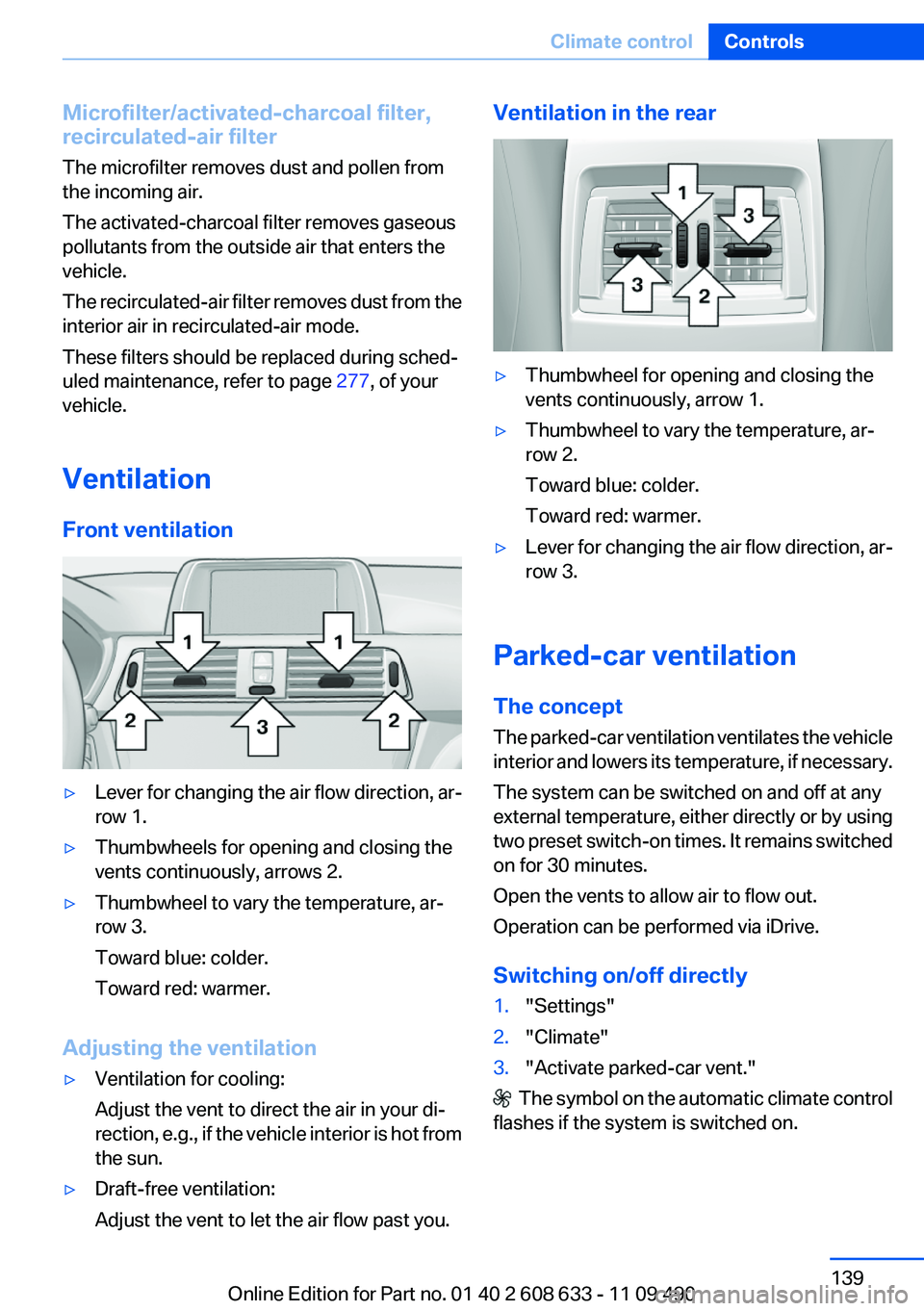
Front ventilation▷Lever for changing the air flow direction, ar‐
row 1.▷Thumbwheels for opening and closing the
vents continuously, arrows 2.▷Thumbwheel to vary the temperature, ar‐
row 3.
Toward blue: colder.
Toward red: warmer.
Adjusting the ventilation
▷Ventilation for cooling:
Adjust the vent to direct the air in your di‐
rection, e.g., if the vehicle interior is hot from
the sun.▷Draft-free ventilation:
Adjust the vent to let the air flow past you.Ventilation in the rear▷Thumbwheel for opening and closing the
vents continuously, arrow 1.▷Thumbwheel to vary the temperature, ar‐
row 2.
Toward blue: colder.
Toward red: warmer.▷Lever for changing the air flow direction, ar‐
row 3.
Parked-car ventilation
The concept
The parked-car ventilation ventilates the vehicle
interior and lowers its temperature, if necessary.
The system can be switched on and off at any
external temperature, either directly or by using
two preset switch-on times. It remains switched
on for 30 minutes.
Open the vents to allow air to flow out.
Operation can be performed via iDrive.
Switching on/off directly
1."Settings"2."Climate"3."Activate parked-car vent."
The symbol on the automatic climate control
flashes if the system is switched on.
Seite 139Climate controlControls139
Online Edition for Part no. 01 40 2 608 633 - 11 09 490
Page 165 of 325
Resetting fuel consumption history1."Options" Open.2."Reset consumption history"
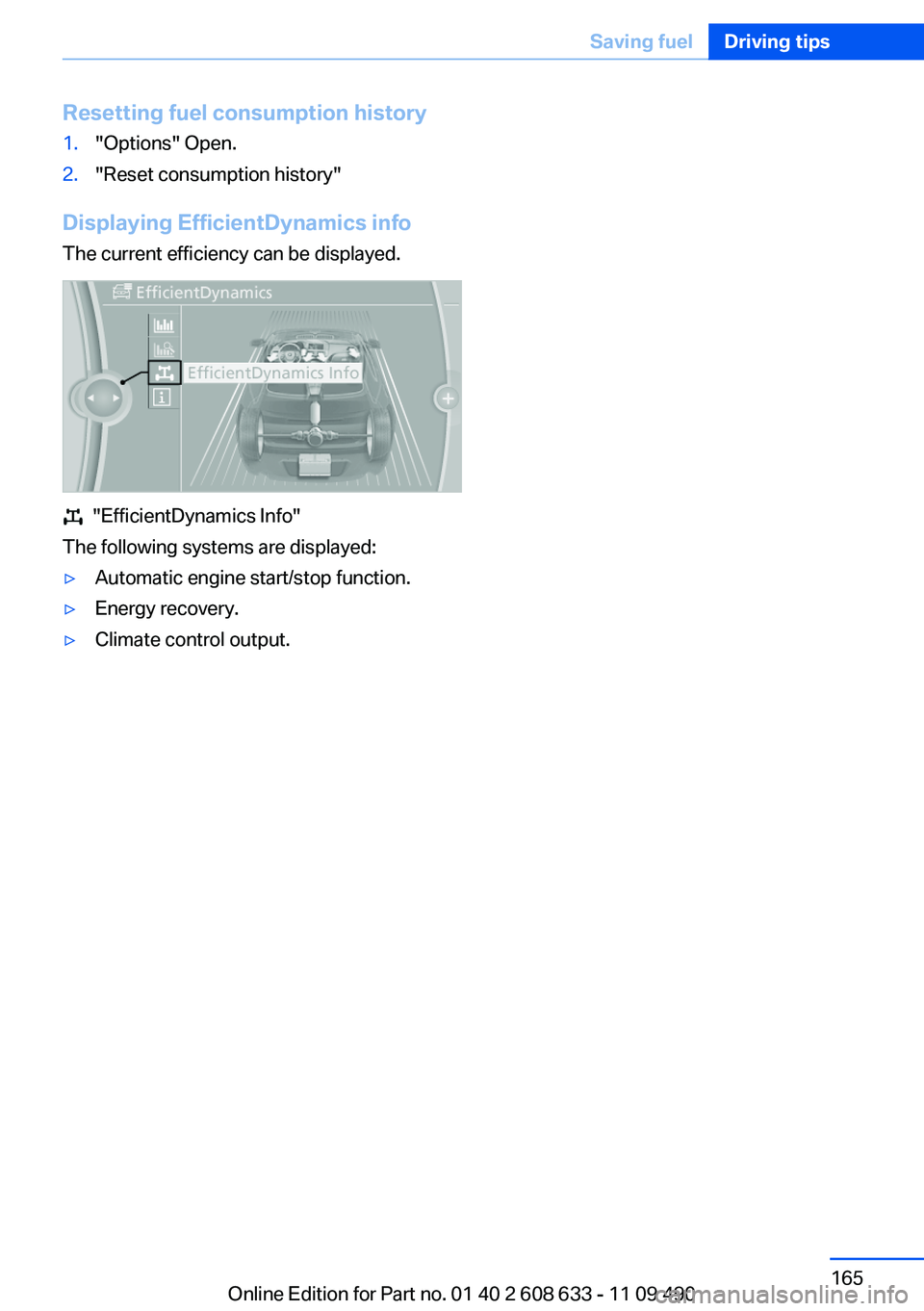
Displaying EfficientDynamics info
The current efficiency can be displayed.
"EfficientDynamics Info"
The following systems are displayed:
▷Automatic engine start/stop function.▷Energy recovery.▷Climate control output.Seite 165Saving fuelDriving tips165
Online Edition for Part no. 01 40 2 608 633 - 11 09 490
Page 189 of 325
Multi-channel playback,
surround
Choose between stereo and multi-channel play‐
back, surround.
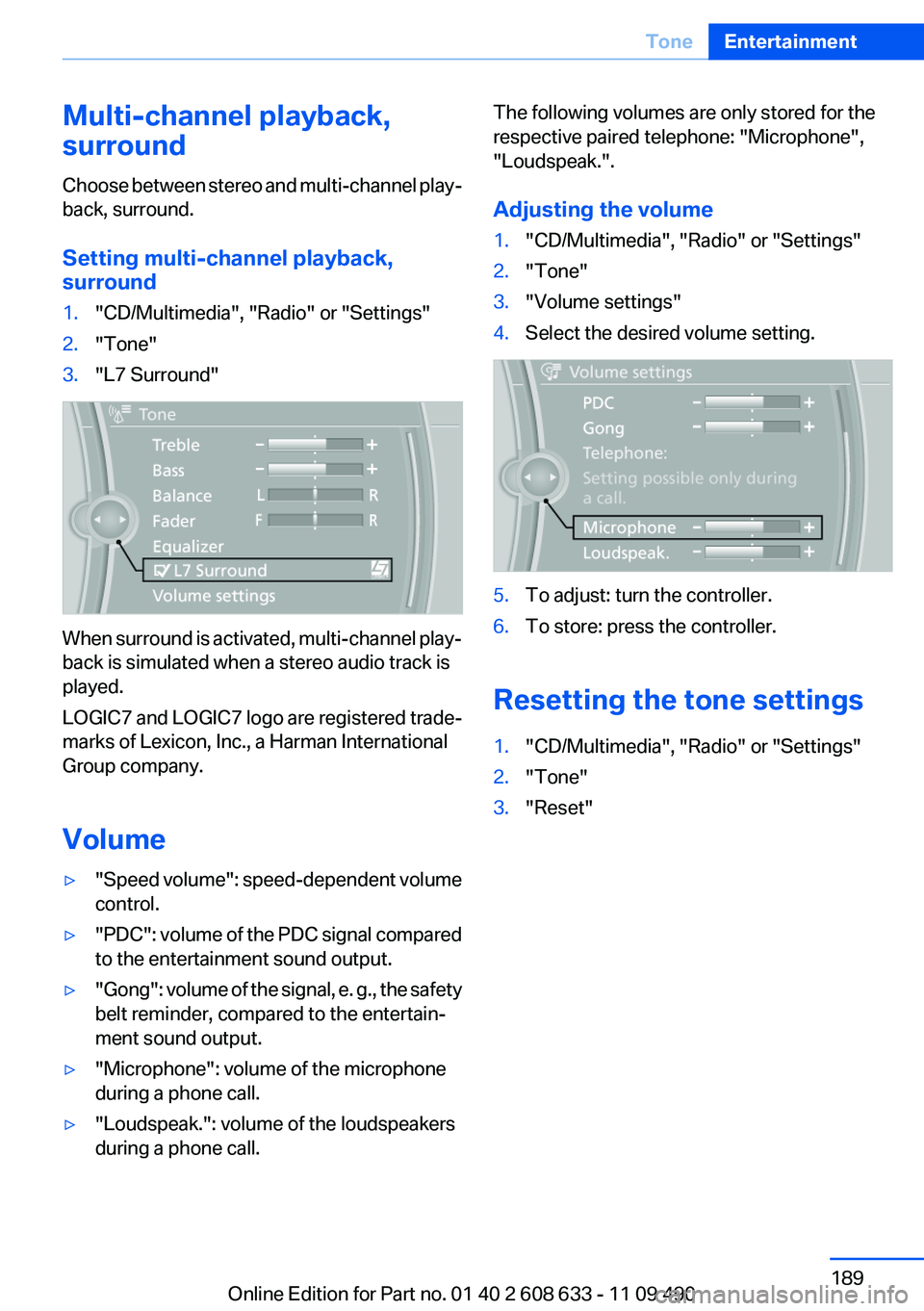
Setting multi-channel playback,
surround1."CD/Multimedia", "Radio" or "Settings"2."Tone"3."L7 Surround"
When surround is activated, multi-channel play‐
back is simulated when a stereo audio track is
played.
LOGIC7 and LOGIC7 logo are registered trade‐
marks of Lexicon, Inc., a Harman International
Group company.
Volume
▷" Speed volume": speed-dependent volume
control.▷"PDC" : volume of the PDC signal compared
to the entertainment sound output.▷"Gong" : volume of the signal, e. g., the safety
belt reminder, compared to the entertain‐
ment sound output.▷"Microphone": volume of the microphone
during a phone call.▷"Loudspeak.": volume of the loudspeakers
during a phone call.The following volumes are only stored for the
respective paired telephone: "Microphone",
"Loudspeak.".
Adjusting the volume1."CD/Multimedia", "Radio" or "Settings"2."Tone"3."Volume settings"4.Select the desired volume setting.5.To adjust: turn the controller.6.To store: press the controller.
Resetting the tone settings
1."CD/Multimedia", "Radio" or "Settings"2."Tone"3."Reset"Seite 189ToneEntertainment189
Online Edition for Part no. 01 40 2 608 633 - 11 09 490
Page 197 of 325
Stored stations
General information
It is possible to store up to 40 stations.
Calling up a station1."Radio"2."Presets"3.Select the desired station.
Storing a station
The station currently selected is stored.
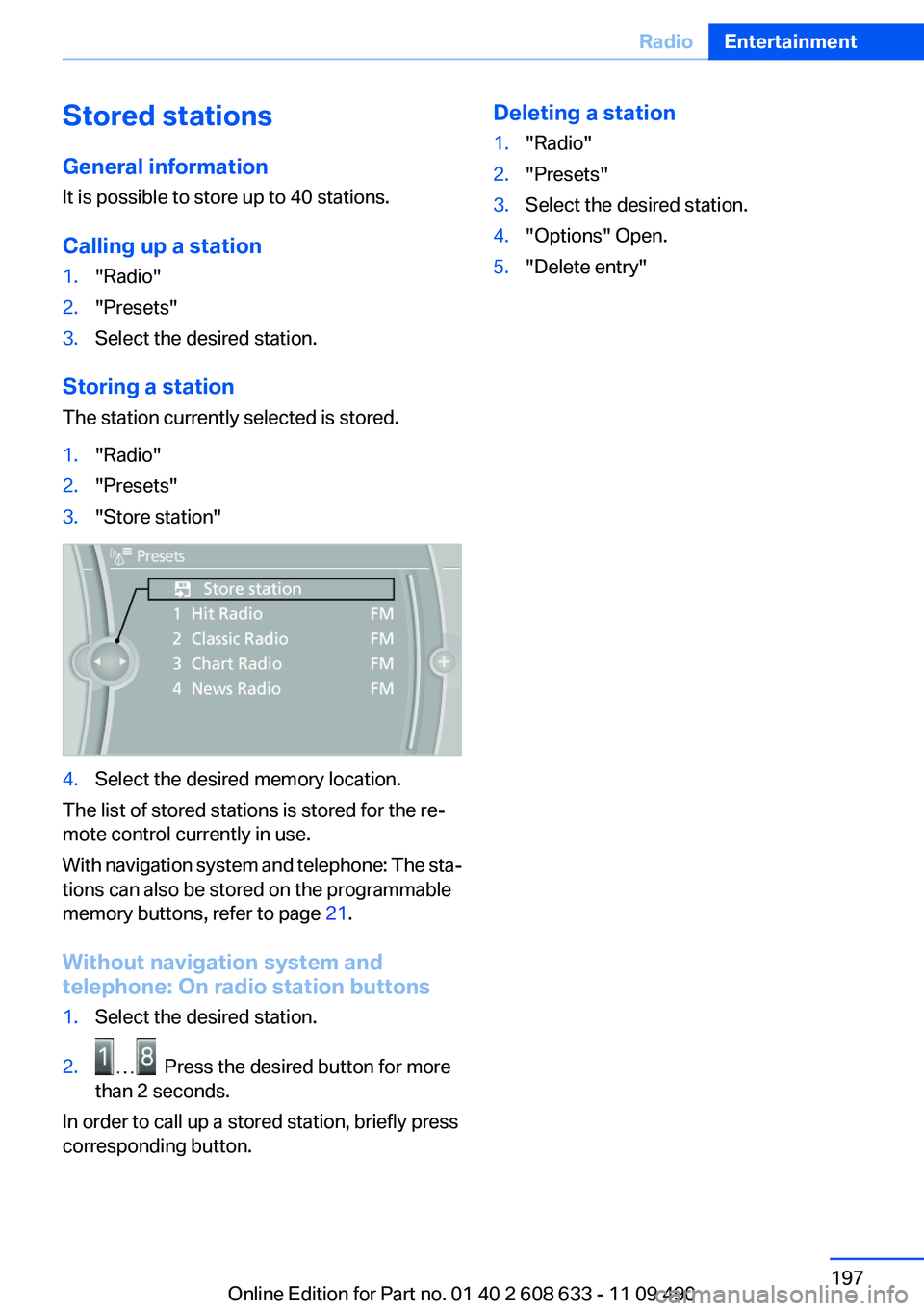
1."Radio"2."Presets"3."Store station"4.Select the desired memory location.
The list of stored stations is stored for the re‐
mote control currently in use.
With navigation system and telephone: The sta‐
tions can also be stored on the programmable
memory buttons, refer to page 21.
Without navigation system and
telephone: On radio station buttons
1.Select the desired station.2. Press the desired button for more
than 2 seconds.
In order to call up a stored station, briefly press
corresponding button.
Deleting a station1."Radio"2."Presets"3.Select the desired station.4."Options" Open.5."Delete entry"Seite 197RadioEntertainment197
Online Edition for Part no. 01 40 2 608 633 - 11 09 490
Page 214 of 325
Use of a mobile phone as an audio source,
refer to page 229.▷The sound is output on the vehicle loud‐
speakers.▷The volume of the sound output is depend‐
ent on the device. If necessary, adjust the
volume on the device.▷Up to four external devices can be paired
with the vehicle.
Requirements
▷The device is suitable. Information under
www.bmwusa.com/bluetooth.▷The device is ready for operation.▷The ignition is switched on.▷Bluetooth is activated on the vehicle, refer to
page 229, and on the device.▷Bluetooth presettings must be made on the
device, such as for a connection without
confirmation or visibility; refer to the device
operating instructions.▷A number with at least four and a maximum
of 16 digits is defined as the Bluetooth pass‐
key. It is only required once for pairing.
Pairing and connecting
Pairing a device
To avoid becoming distracted and posing
an unnecessary hazard both to your own vehi‐
cle's occupants and to other road users, only
pair the device while the vehicle is stationary.◀
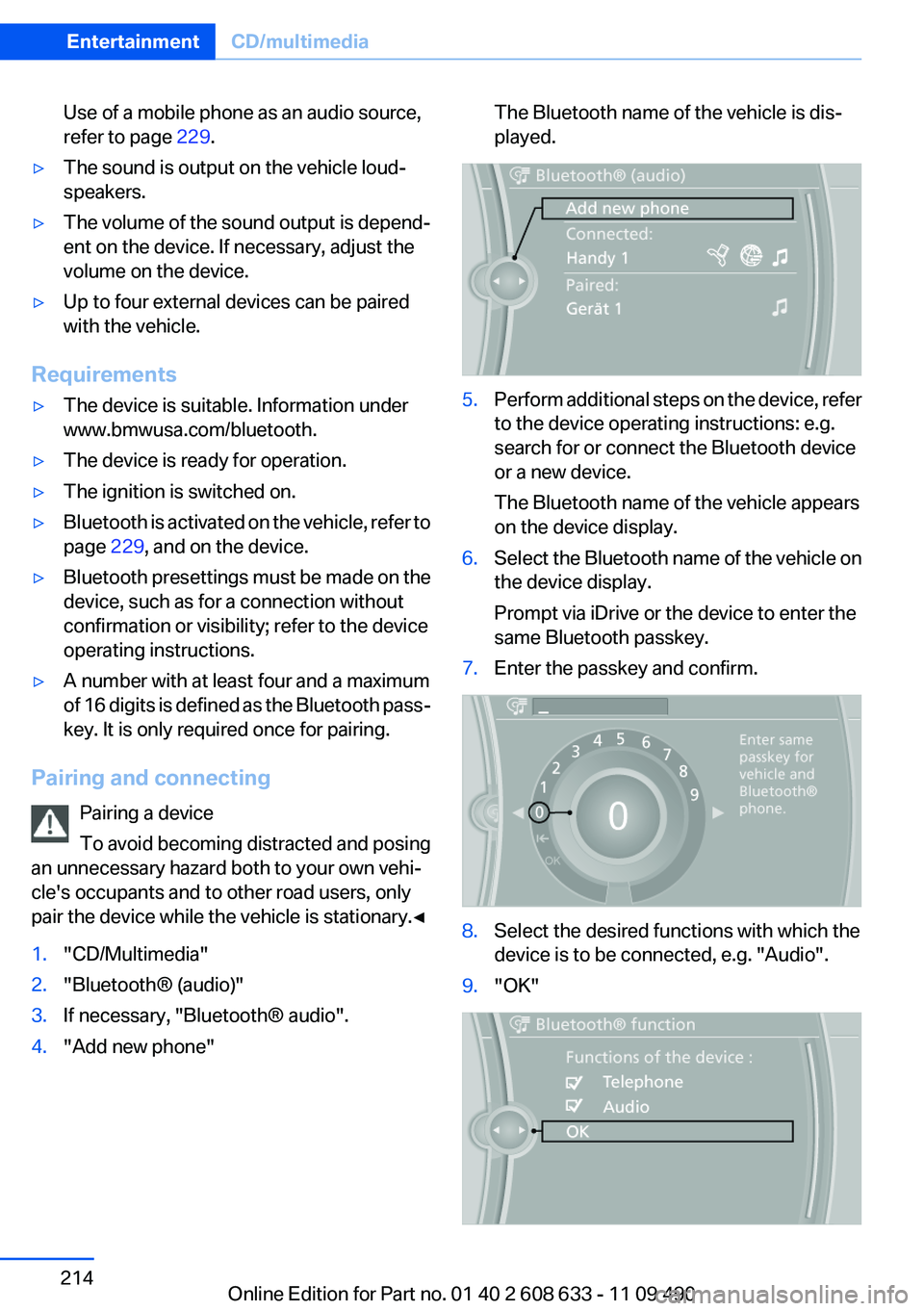
1."CD/Multimedia"2."Bluetooth® (audio)"3.If necessary, "Bluetooth® audio".4."Add new phone"The Bluetooth name of the vehicle is dis‐
played.5.Perform additional steps on the device, refer
to the device operating instructions: e.g.
search for or connect the Bluetooth device
or a new device.
The Bluetooth name of the vehicle appears
on the device display.6.Select the Bluetooth name of the vehicle on
the device display.
Prompt via iDrive or the device to enter the
same Bluetooth passkey.7.Enter the passkey and confirm.8.Select the desired functions with which the
device is to be connected, e.g. "Audio".9."OK"Seite 214EntertainmentCD/multimedia214
Online Edition for Part no. 01 40 2 608 633 - 11 09 490
Page 221 of 325
Gray symbol: the function is inactive.SymbolFunction Telephone.
Requirements
▷The mobile phone is suitable.▷The mobile phone is ready for operation.▷Bluetooth is activated in the vehicle, refer to
page 222, and on the mobile phone.▷Bluetooth presettings may need to be made
on the mobile phone, e.g., for a connection
without confirmation or visibility, refer to the
mobile phone operating instructions.▷A number with at least four and a maximum
of 16 digits was defined as the Bluetooth
passkey, depending on the mobile phone. It
is only required once for pairing.▷The ignition is switched on.
Pairing and connecting
Pairing the mobile phone
To avoid becoming distracted and posing
an unnecessary hazard both to your own vehi‐
cle's occupants and to other road users, only
pair the mobile phone while the vehicle is sta‐
tionary.◀
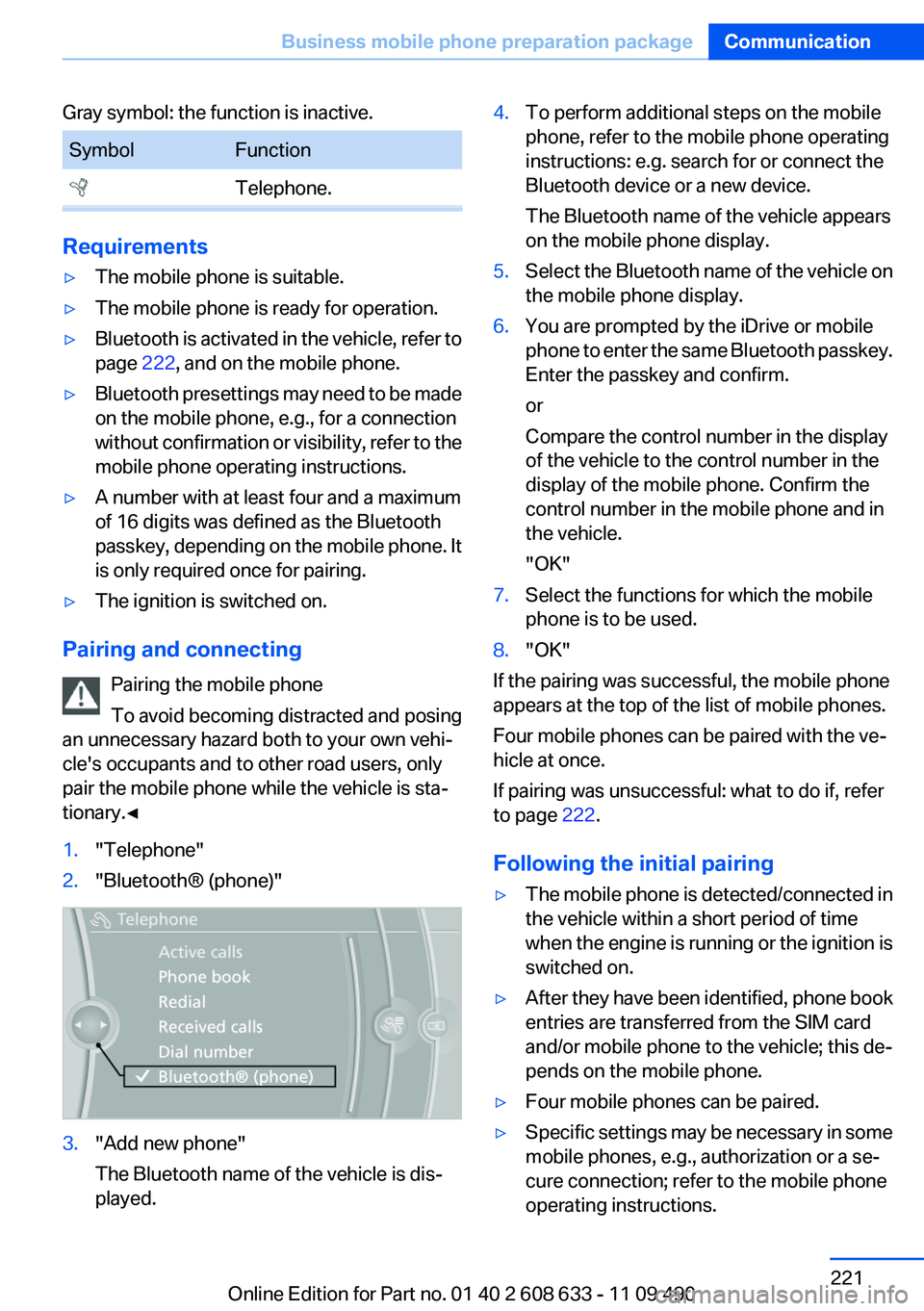
1."Telephone"2."Bluetooth® (phone)"3."Add new phone"
The Bluetooth name of the vehicle is dis‐
played.4.To perform additional steps on the mobile
phone, refer to the mobile phone operating
instructions: e.g. search for or connect the
Bluetooth device or a new device.
The Bluetooth name of the vehicle appears
on the mobile phone display.5.Select the Bluetooth name of the vehicle on
the mobile phone display.6.You are prompted by the iDrive or mobile
phone to enter the same Bluetooth passkey.
Enter the passkey and confirm.
or
Compare the control number in the display
of the vehicle to the control number in the
display of the mobile phone. Confirm the
control number in the mobile phone and in
the vehicle.
"OK"7.Select the functions for which the mobile
phone is to be used.8."OK"
If the pairing was successful, the mobile phone
appears at the top of the list of mobile phones.
Four mobile phones can be paired with the ve‐
hicle at once.
If pairing was unsuccessful: what to do if, refer
to page 222.
Following the initial pairing
▷The mobile phone is detected/connected in
the vehicle within a short period of time
when the engine is running or the ignition is
switched on.▷After they have been identified, phone book
entries are transferred from the SIM card
and/or mobile phone to the vehicle; this de‐
pends on the mobile phone.▷Four mobile phones can be paired.▷Specific settings may be necessary in some
mobile phones, e.g., authorization or a se‐
cure connection; refer to the mobile phone
operating instructions.Seite 221Business mobile phone preparation packageCommunication221
Online Edition for Part no. 01 40 2 608 633 - 11 09 490
Page 229 of 325
Notes
At high temperatures, the charge function of the
mobile phone can be limited where appropriate
and the functions are no longer executed.
When the mobile phone is used via the vehicle,
heed the operating manual of the mobile phone.
Pairing/unpairing the mobile
phone
General information
The following functions are available:▷Use of a mobile phone as a telephone.▷Use of a mobile phone as an additional tele‐
phone.▷Use of a mobile phone as an audio source.▷Use of an audio device as an audio source,
refer to page 214.
Requirements
▷The mobile phone is suitable.▷The mobile phone is ready for operation.▷Bluetooth is activated in the vehicle and on
the mobile phone.▷Bluetooth presettings may need to be made
on the mobile phone, e.g., for a connection
without confirmation or visibility, refer to the
mobile phone operating instructions.▷Deactivate Bluetooth audio if necessary.▷A number with at least four and a maximum
of 16 digits was defined as the Bluetooth
passkey. It is only required once for pairing.▷The ignition is switched on.
Activating/deactivating Bluetooth
Bluetooth is not permitted everywhere. Comply
with all safety guidelines and regulations.
1."Telephone"2."Options" Open.3."Bluetooth®"Additional functions
Activating/deactivating the additional
functions
Activate the functions before pairing to be able
to use them in the vehicle. Information on suit‐
able mobile phones that support this function,
refer to page 228.1."Telephone"2."Bluetooth® (phone)"3."Options" Open.4."Configure Bluetooth®"5.Select the desired additional function.▷"Additional telephone"▷"Office"▷"Bluetooth® audio"6."OK"
As long as an additional function is deactivated,
it cannot be assigned to a telephone.
Additional telephone
A mobile phone can be used as an additional
telephone.
The additional telephone can be used to accept
incoming calls, refer to page 232. While a call is
active on the additional telephone, incoming
calls are displayed on the Control Display.
Audio source
A mobile phone can be used as an audio source.
Pairing and connecting cell phone Pairing the mobile phone
To avoid becoming distracted and posing
an unnecessary hazard both to your own vehi‐
cle's occupants and to other road users, only
pair the mobile phone while the vehicle is sta‐
tionary.◀
1."Telephone"2."Bluetooth® (phone)"Seite 229Professional mobile phone preparation packageCommunication229
Online Edition for Part no. 01 40 2 608 633 - 11 09 490
Page 311 of 325
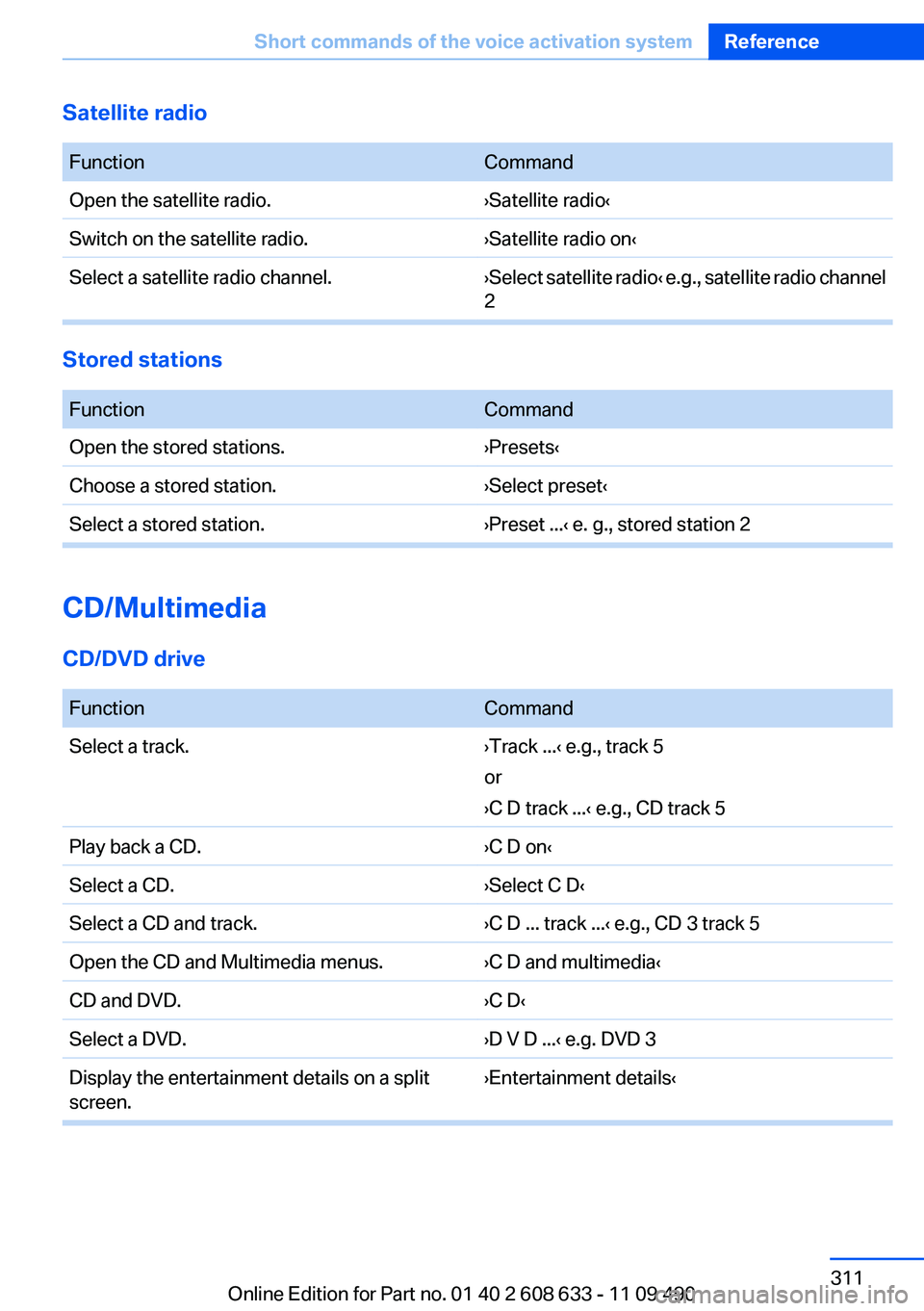
Satellite radio
FunctionCommandOpen the satellite radio.›Satellite radio‹Switch on the satellite radio.›Satellite radio on‹Select a satellite radio channel.› Select satellite radio ‹ e.g., satellite radio channel
2
Stored stations
FunctionCommandOpen the stored stations.›Presets‹Choose a stored station.›Select preset‹Select a stored station.›Preset ...‹ e. g., stored station 2
CD/Multimedia
CD/DVD drive
FunctionCommandSelect a track.›Track ...‹ e.g., track 5
or
›C D track ...‹ e.g., CD track 5Play back a CD.›C D on‹Select a CD.›Select C D‹Select a CD and track.›C D ... track ...‹ e.g., CD 3 track 5Open the CD and Multimedia menus.›C D and multimedia‹CD and DVD.›C D‹Select a DVD.›D V D ...‹ e.g. DVD 3Display the entertainment details on a split
screen.›Entertainment details‹Seite 311Short commands of the voice activation systemReference311
Online Edition for Part no. 01 40 2 608 633 - 11 09 490
Page 320 of 325
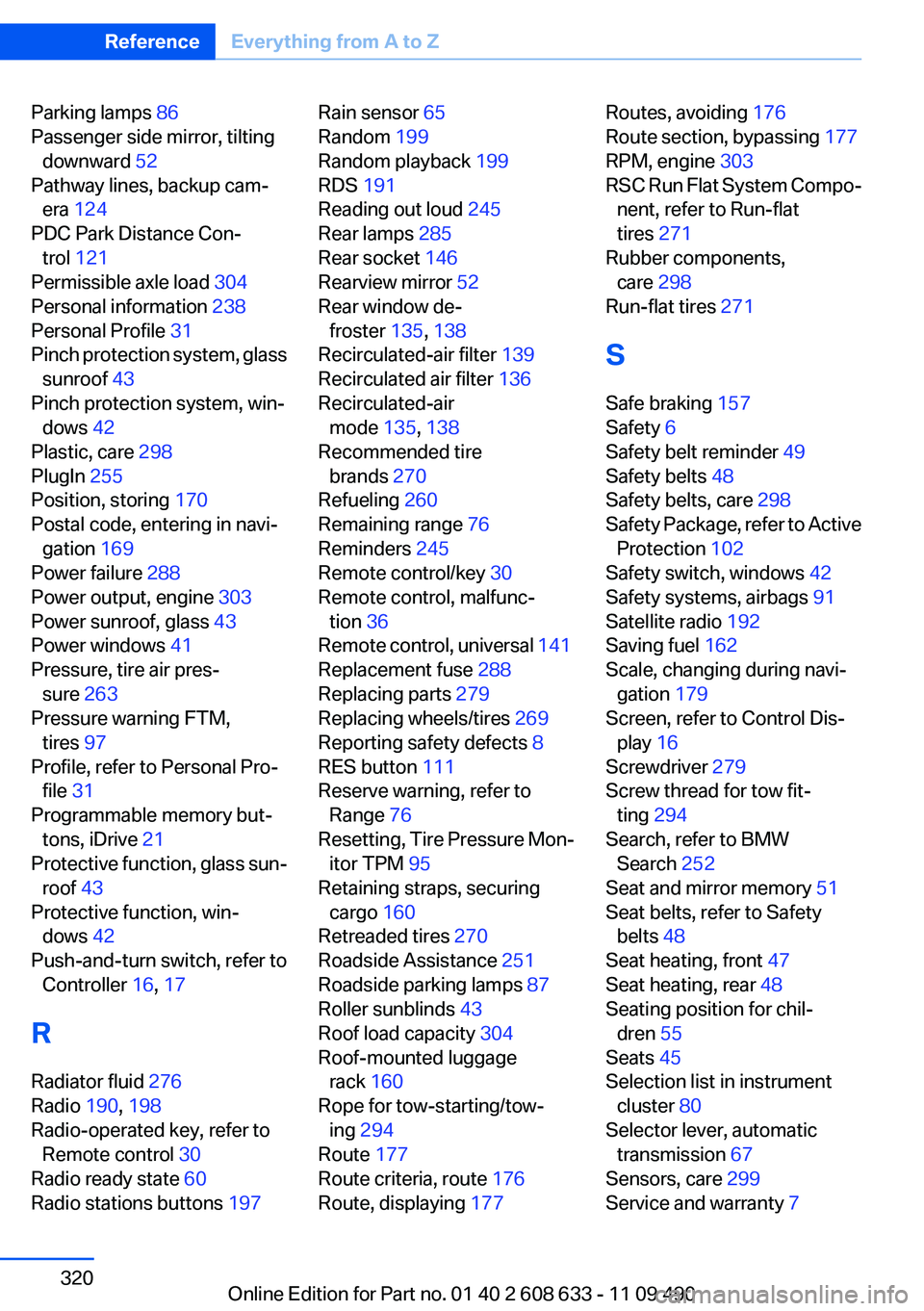
Parking lamps 86
Passenger side mirror, tilting downward 52
Pathway lines, backup cam‐ era 124
PDC Park Distance Con‐ trol 121
Permissible axle load 304
Personal information 238
Personal Profile 31
Pinch protection system, glass sunroof 43
Pinch protection system, win‐ dows 42
Plastic, care 298
PlugIn 255
Position, storing 170
Postal code, entering in navi‐ gation 169
Power failure 288
Power output, engine 303
Power sunroof, glass 43
Power windows 41
Pressure, tire air pres‐ sure 263
Pressure warning FTM, tires 97
Profile, refer to Personal Pro‐ file 31
Programmable memory but‐ tons, iDrive 21
Protective function, glass sun‐ roof 43
Protective function, win‐ dows 42
Push-and-turn switch, refer to Controller 16, 17
R
Radiator fluid 276
Radio 190, 198
Radio-operated key, refer to Remote control 30
Radio ready state 60
Radio stations buttons 197 Rain sensor 65
Random 199
Random playback 199
RDS 191
Reading out loud 245
Rear lamps 285
Rear socket 146
Rearview mirror 52
Rear window de‐ froster 135, 138
Recirculated-air filter 139
Recirculated air filter 136
Recirculated-air mode 135, 138
Recommended tire brands 270
Refueling 260
Remaining range 76
Reminders 245
Remote control/key 30
Remote control, malfunc‐ tion 36
Remote control, universal 141
Replacement fuse 288
Replacing parts 279
Replacing wheels/tires 269
Reporting safety defects 8
RES button 111
Reserve warning, refer to Range 76
Resetting, Tire Pressure Mon‐ itor TPM 95
Retaining straps, securing cargo 160
Retreaded tires 270
Roadside Assistance 251
Roadside parking lamps 87
Roller sunblinds 43
Roof load capacity 304
Roof-mounted luggage rack 160
Rope for tow-starting/tow‐ ing 294
Route 177
Route criteria, route 176
Route, displaying 177 Routes, avoiding 176
Route section, bypassing 177
RPM, engine 303
RSC Run Flat System Compo‐ nent, refer to Run-flat
tires 271
Rubber components, care 298
Run-flat tires 271
S
Safe braking 157
Safety 6
Safety belt reminder 49
Safety belts 48
Safety belts, care 298
Safety Package, refer to Active Protection 102
Safety switch, windows 42
Safety systems, airbags 91
Satellite radio 192
Saving fuel 162
Scale, changing during navi‐ gation 179
Screen, refer to Control Dis‐ play 16
Screwdriver 279
Screw thread for tow fit‐ ting 294
Search, refer to BMW Search 252
Seat and mirror memory 51
Seat belts, refer to Safety belts 48
Seat heating, front 47
Seat heating, rear 48
Seating position for chil‐ dren 55
Seats 45
Selection list in instrument cluster 80
Selector lever, automatic transmission 67
Sensors, care 299
Service and warranty 7 Seite 320ReferenceEverything from A to Z320
Online Edition for Part no. 01 40 2 608 633 - 11 09 490