ad blue BMW 335I 2012 Owner's Manual
[x] Cancel search | Manufacturer: BMW, Model Year: 2012, Model line: 335I, Model: BMW 335I 2012Pages: 325, PDF Size: 12.26 MB
Page 232 of 325
notes? Reduce the data volume of the con‐
tact.▷Is the mobile phone connected as an audio
source or additional telephone? The mobile
phone must be connected as a telephone.
The phone connection quality is poor.
▷The strength of the Bluetooth signal on the
mobile phone can be adjusted, depending
on the mobile phone.▷Insert the mobile phone into the snap-in
adapter or place it in the area of the center
console.▷Adjust the volume of the microphone and
loudspeakers separately.
If all points in this list have been checked and the
required function is still not available, contact
the hotline or service center.
Controls
Adjusting the volume
Turn the knob until the desired volume is se‐
lected. The setting is stored for the remote con‐
trol currently in use.
The vehicle automatically adjusts the volume of
the microphone on the telephone and the vol‐
ume of the called party. Depending on the mo‐
bile phone, the volumes may need to be ad‐
justed. The settings can only be created during
a call and must be adjusted separately for each
telephone. The settings are deleted when the
telephone is unpaired.
1."Settings"2."Tone"3."Volume settings"4.Select the desired setting: "Microphone" or
"Loudspeak."5.To adjust: turn the controller.6.To store: press the controller.Incoming call
Receiving calls
If the number of the caller is stored in the phone
book and is transmitted by the network, the
name of the contact is displayed. Otherwise,
only the phone number is displayed.
If more than one phone number is assigned to a
contact, only the name of the contact is dis‐
played.
For calls on the additional telephone, the num‐
ber is only displayed if it is transmitted by the
network.
An incoming call to the additional telephone is
automatically rejected if there is an active call on
the other telephone.
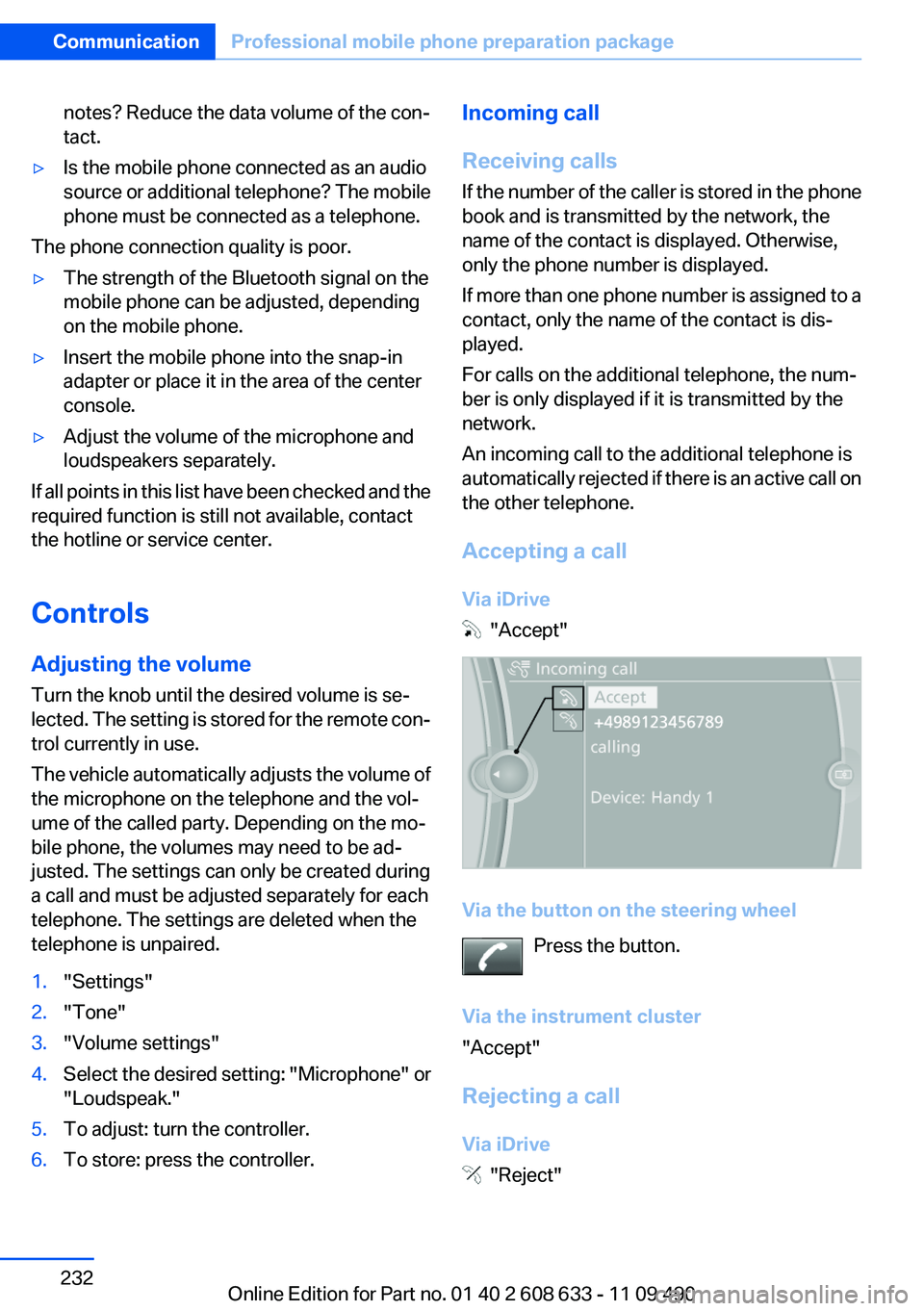
Accepting a call
Via iDrive
"Accept"
Via the button on the steering wheel Press the button.
Via the instrument cluster
"Accept"
Rejecting a call
Via iDrive
"Reject"
Seite 232CommunicationProfessional mobile phone preparation package232
Online Edition for Part no. 01 40 2 608 633 - 11 09 490
Page 236 of 325
6.Complete the entries if necessary.7."Store contact"
Received calls
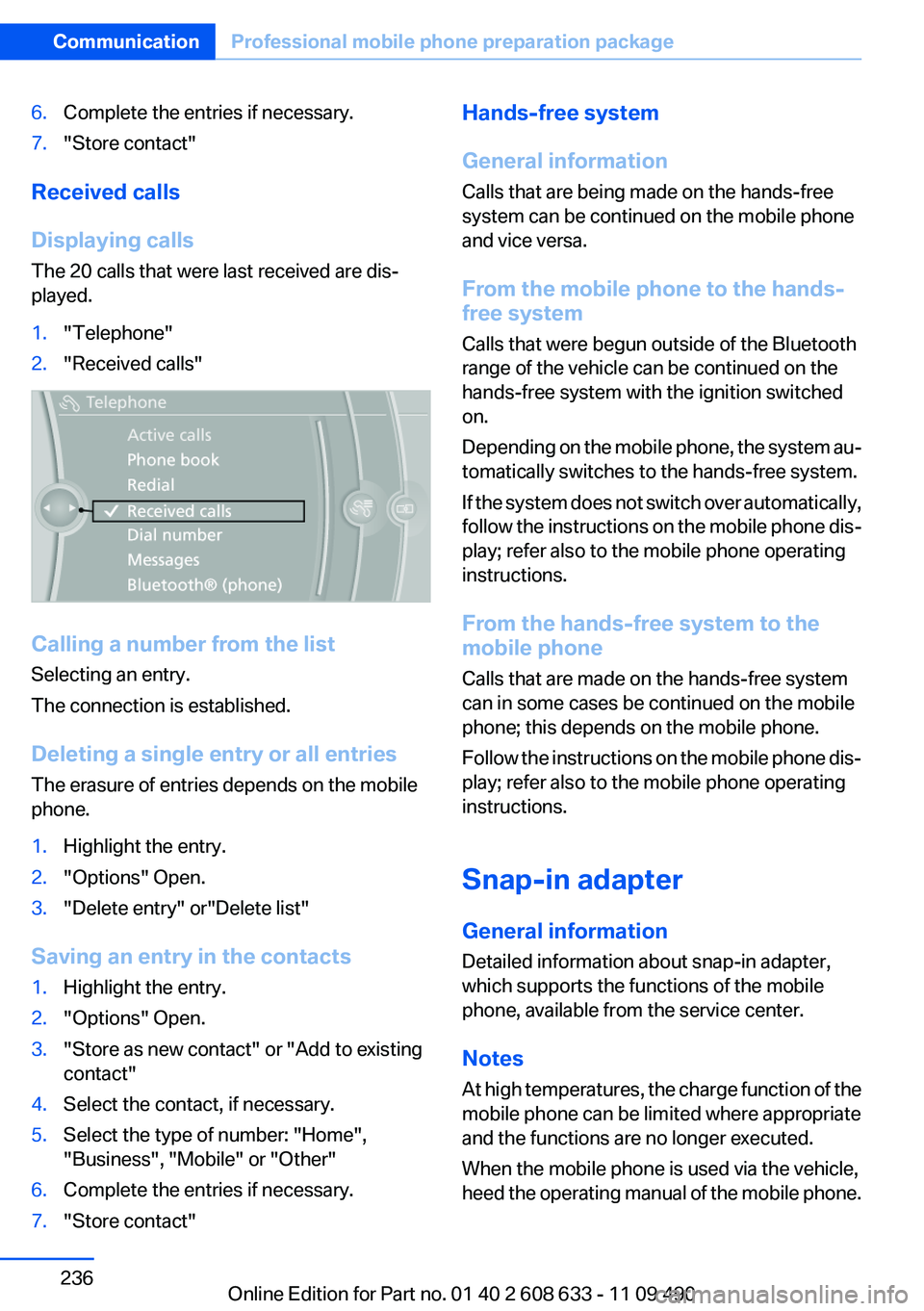
Displaying calls
The 20 calls that were last received are dis‐
played.
1."Telephone"2."Received calls"
Calling a number from the list
Selecting an entry.
The connection is established.
Deleting a single entry or all entries
The erasure of entries depends on the mobile
phone.
1.Highlight the entry.2."Options" Open.3."Delete entry" or"Delete list"
Saving an entry in the contacts
1.Highlight the entry.2."Options" Open.3."Store as new contact" or "Add to existing
contact"4.Select the contact, if necessary.5.Select the type of number: "Home",
"Business", "Mobile" or "Other"6.Complete the entries if necessary.7."Store contact"Hands-free system
General information
Calls that are being made on the hands-free
system can be continued on the mobile phone
and vice versa.
From the mobile phone to the hands-
free system
Calls that were begun outside of the Bluetooth
range of the vehicle can be continued on the
hands-free system with the ignition switched
on.
Depending on the mobile phone, the system au‐
tomatically switches to the hands-free system.
If the system does not switch over automatically,
follow the instructions on the mobile phone dis‐
play; refer also to the mobile phone operating
instructions.
From the hands-free system to the
mobile phone
Calls that are made on the hands-free system
can in some cases be continued on the mobile
phone; this depends on the mobile phone.
Follow the instructions on the mobile phone dis‐
play; refer also to the mobile phone operating
instructions.
Snap-in adapter
General information
Detailed information about snap-in adapter,
which supports the functions of the mobile
phone, available from the service center.
Notes
At high temperatures, the charge function of the
mobile phone can be limited where appropriate
and the functions are no longer executed.
When the mobile phone is used via the vehicle,
heed the operating manual of the mobile phone.Seite 236CommunicationProfessional mobile phone preparation package236
Online Edition for Part no. 01 40 2 608 633 - 11 09 490
Page 238 of 325
OfficeVehicle equipment
All standard, country-specific and optional
equipment that is offered in the model series is
described in this chapter. Therefore, equipment
is also described that is not available in a vehicle,
e. g., because of the selected optional equip‐
ment or country variant. This also applies for
safety-related functions and systems.
At a glance
General information
Contacts, appointments, tasks, notes, text mes‐
sages, and e-mails from the mobile phone can
be displayed on the Control Display if the mobile
phone provides compatible support of these
functions and the necessary Bluetooth stand‐
ards.
Information about which mobile phones support
Office functions can be found at
www.bmwusa.com/bluetooth. A limited number
of compatible mobile phones is available for Of‐
fice.
Contents are only displayed in full length when
the vehicle is stationary.
The mobile phone has read-access only.
Do not use Office while driving
To avoid becoming distracted and posing
an unnecessary hazard to your vehicle's occu‐
pants and to other road users, never attempt to
use the controls or enter information unless traf‐
fic and road conditions allow this.◀
Requirements▷A suitable mobile phone is paired with the
vehicle and connected. In some mobile
phones, data access must be confirmed on
the mobile phone.▷The time, time zone, and date, refer to
page 83, are correctly set on the Control
Display and on the mobile phone to correctly
display appointments, for example.▷Office is activated, refer to page 229.
Updating
Data are updated every time the mobile phone
is connected to the vehicle. Appointment en‐
tries, tasks, notes and reminders can be updated
separately.
1."Office"2."Current office", "Calendar", "Tasks",
"Notes" or "Reminders"3."Options" Open.4."Update data"
Cell phone data are transmitted again to the
vehicle.
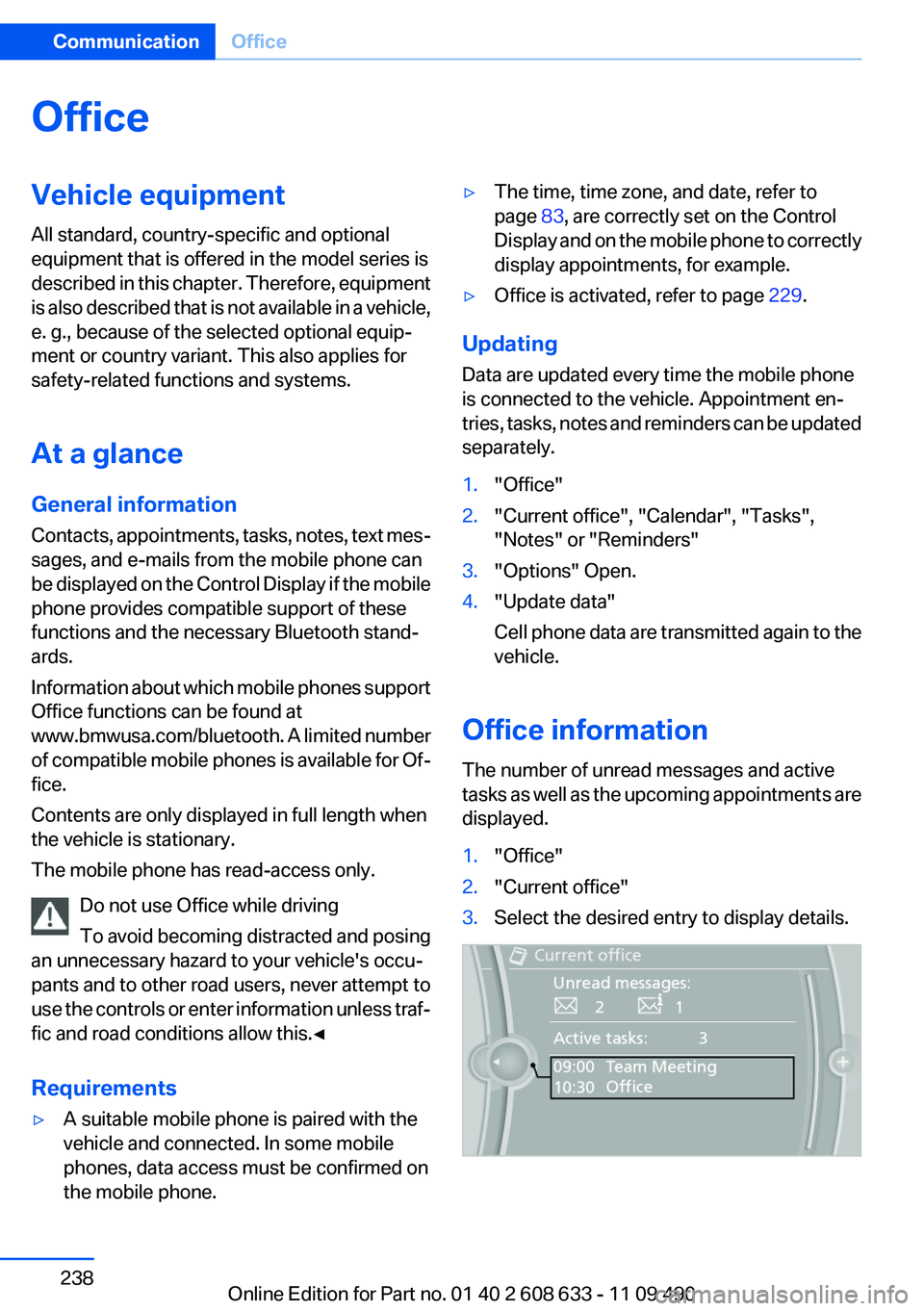
Office information
The number of unread messages and active
tasks as well as the upcoming appointments are
displayed.
1."Office"2."Current office"3.Select the desired entry to display details.Seite 238CommunicationOffice238
Online Edition for Part no. 01 40 2 608 633 - 11 09 490
Page 241 of 325
Show contact pictures
Pictures stored with the contacts are stored in
the vehicle when the mobile phone is connected
to the vehicle. The number of transmitted pic‐
tures depends on the mobile phone. The mobile
phone must support this function.1."Office"2."Contacts"3."Options" Open.4."Configure Bluetooth®"5."Show images"
Display of all contact pictures is activated or de‐
activated.
Exporting/importing contacts
Contacts can be exported and imported via the
Personal Profile, refer to page 31. The contacts
stored in the vehicle are exported, but not those
from the mobile phone.
Deleting contacts
Only contacts that are stored in the vehicle are
deleted. The contacts on the mobile phone can‐
not be deleted.
1."Office"2."Contacts"3.Highlight the contact.4.Open "Options".5."Delete contact"or "Delete all contacts".6.If necessary "Yes"
Messages
General information
Whether or not text messages and e-mails from
the mobile phone are displayed depends on
whether transmission from the mobile phone to
the vehicle is supported. Text messages and e-
mails may not be supported by the service pro‐
vider, or the function may need to be enabled
separately. After the mobile phone is first paired,
transmission may take several minutes. Mes‐
sages are only displayed in full length when the
vehicle is stationary. Messages from the addi‐
tional telephone are not transmitted.
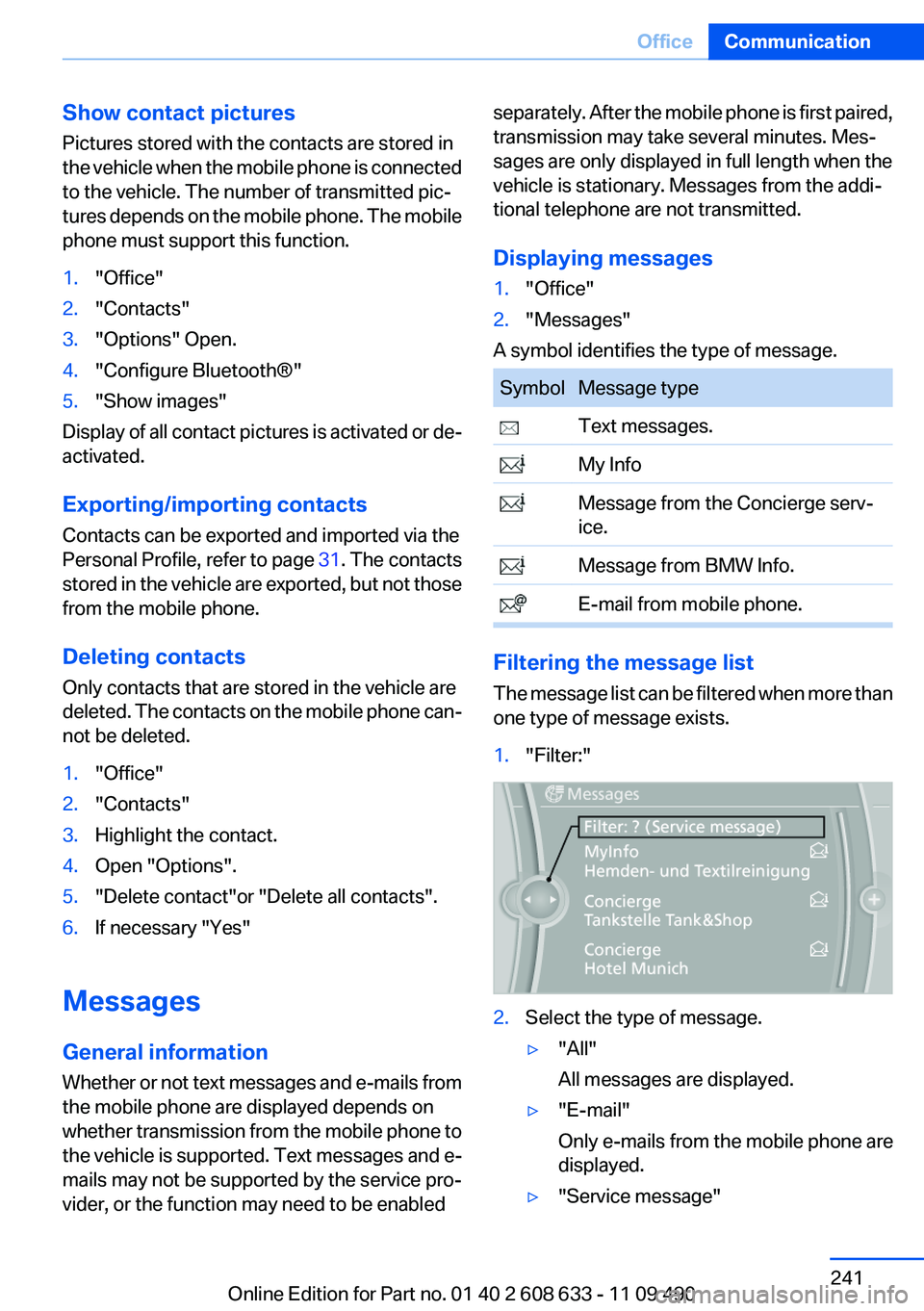
Displaying messages1."Office"2."Messages"
A symbol identifies the type of message.
SymbolMessage type Text messages. My Info Message from the Concierge serv‐
ice. Message from BMW Info. E-mail from mobile phone.
Filtering the message list
The message list can be filtered when more than
one type of message exists.
1."Filter:"2.Select the type of message.▷"All"
All messages are displayed.▷"E-mail"
Only e-mails from the mobile phone are
displayed.▷"Service message"Seite 241OfficeCommunication241
Online Edition for Part no. 01 40 2 608 633 - 11 09 490
Page 256 of 325
tions depend on the speed of the available
Internet connection of the cell phone.▷Some cell phones cannot simultaneously
use Apps and the Bluetooth hands-free sys‐
tem.
If necessary, restart the software application
on the cell phone after a phone conversa‐
tion.Seite 256CommunicationConnectedDrive256
Online Edition for Part no. 01 40 2 608 633 - 11 09 490
Page 312 of 325
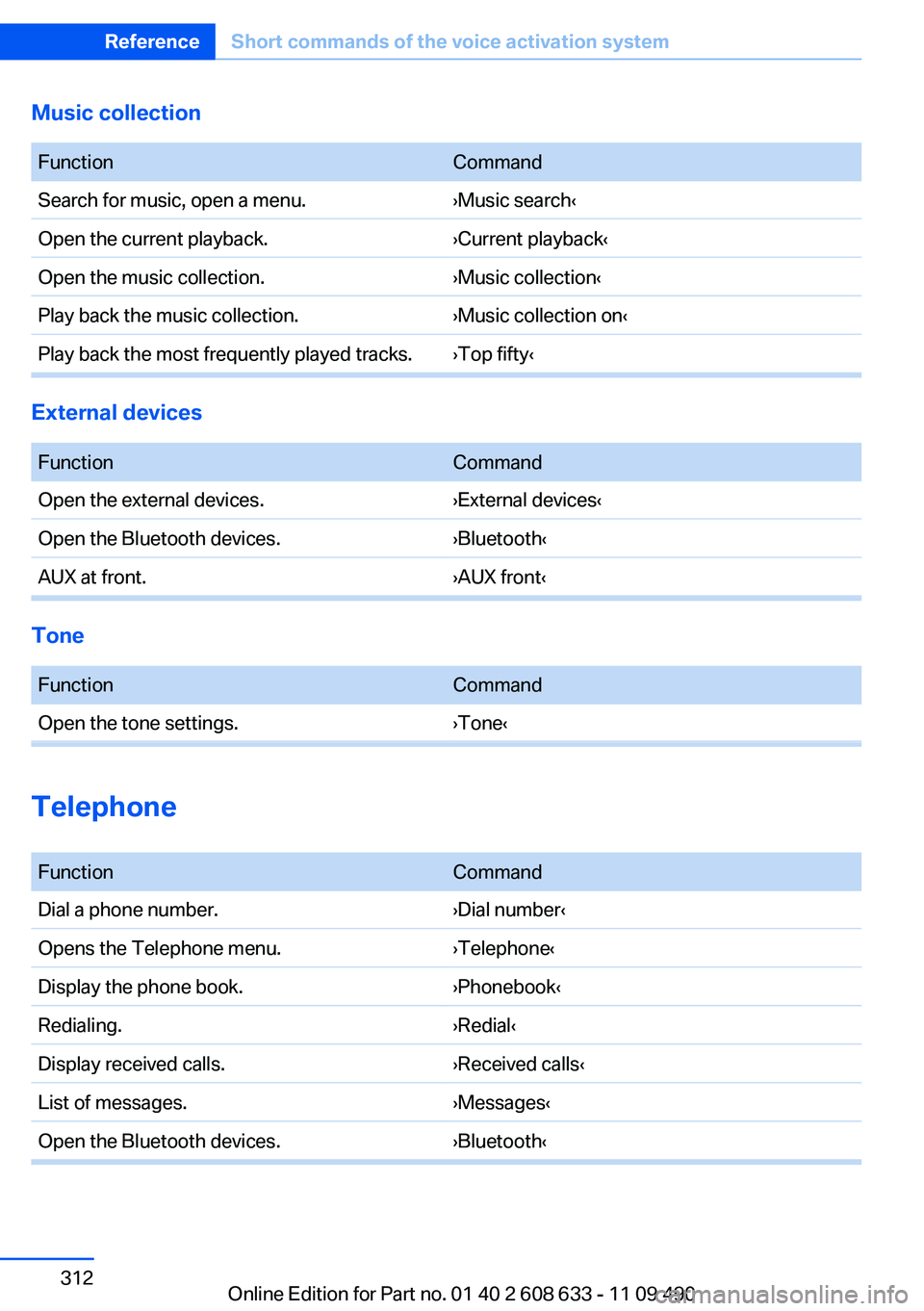
Music collection
FunctionCommandSearch for music, open a menu.›Music search‹Open the current playback.›Current playback‹Open the music collection.›Music collection‹Play back the music collection.›Music collection on‹Play back the most frequently played tracks.›Top fifty‹
External devices
FunctionCommandOpen the external devices.›External devices‹Open the Bluetooth devices.›Bluetooth‹AUX at front.›AUX front‹
Tone
FunctionCommandOpen the tone settings.›Tone‹
Telephone
FunctionCommandDial a phone number.›Dial number‹Opens the Telephone menu.›Telephone‹Display the phone book.›Phonebook‹Redialing.›Redial‹Display received calls.›Received calls‹List of messages.›Messages‹Open the Bluetooth devices.›Bluetooth‹Seite 312ReferenceShort commands of the voice activation system312
Online Edition for Part no. 01 40 2 608 633 - 11 09 490
Page 314 of 325
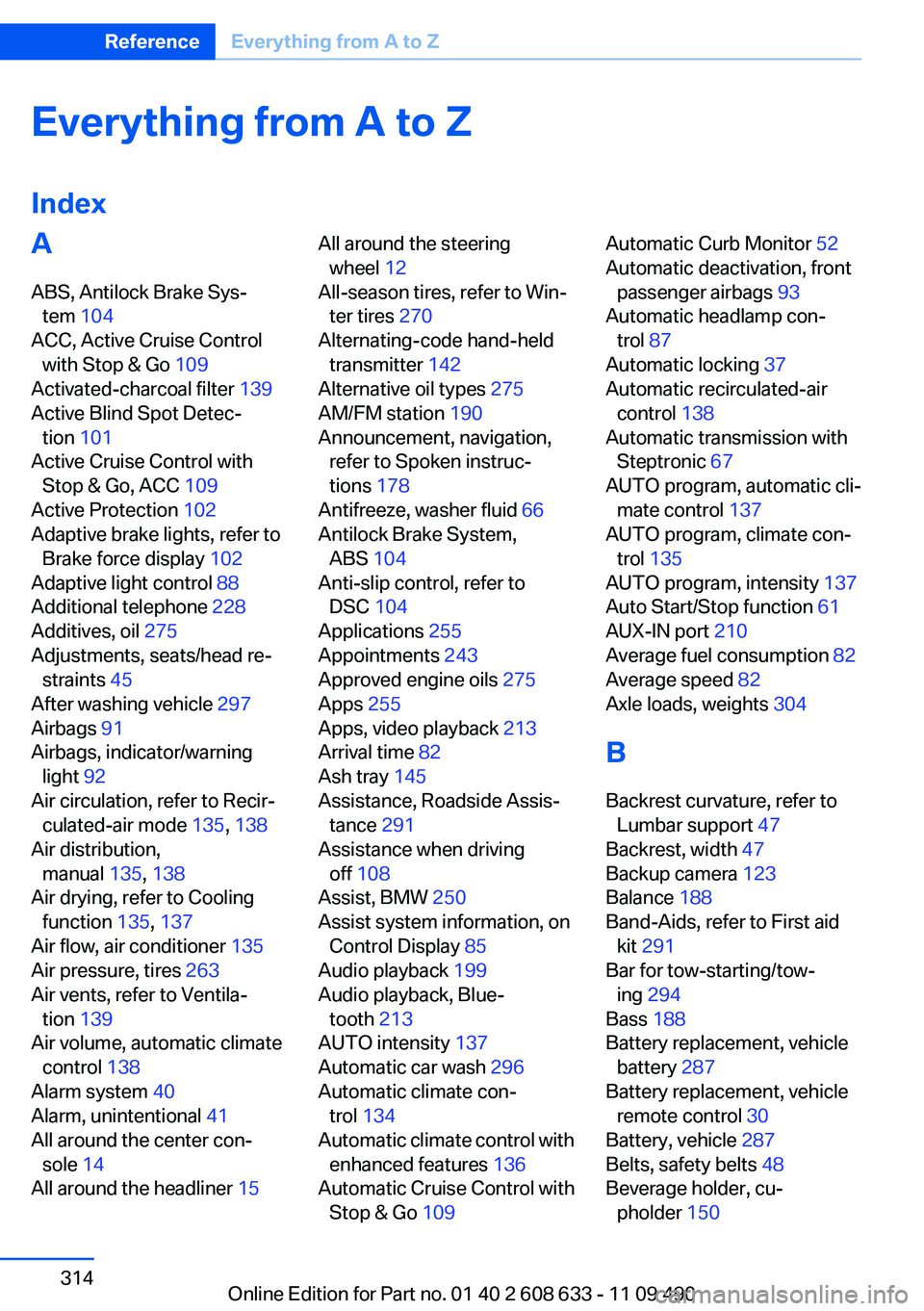
Everything from A to Z
IndexA
ABS, Antilock Brake Sys‐ tem 104
ACC, Active Cruise Control with Stop & Go 109
Activated-charcoal filter 139
Active Blind Spot Detec‐ tion 101
Active Cruise Control with Stop & Go, ACC 109
Active Protection 102
Adaptive brake lights, refer to Brake force display 102
Adaptive light control 88
Additional telephone 228
Additives, oil 275
Adjustments, seats/head re‐ straints 45
After washing vehicle 297
Airbags 91
Airbags, indicator/warning light 92
Air circulation, refer to Recir‐ culated-air mode 135, 138
Air distribution, manual 135, 138
Air drying, refer to Cooling function 135, 137
Air flow, air conditioner 135
Air pressure, tires 263
Air vents, refer to Ventila‐ tion 139
Air volume, automatic climate control 138
Alarm system 40
Alarm, unintentional 41
All around the center con‐ sole 14
All around the headliner 15 All around the steering
wheel 12
All-season tires, refer to Win‐ ter tires 270
Alternating-code hand-held transmitter 142
Alternative oil types 275
AM/FM station 190
Announcement, navigation, refer to Spoken instruc‐
tions 178
Antifreeze, washer fluid 66
Antilock Brake System, ABS 104
Anti-slip control, refer to DSC 104
Applications 255
Appointments 243
Approved engine oils 275
Apps 255
Apps, video playback 213
Arrival time 82
Ash tray 145
Assistance, Roadside Assis‐ tance 291
Assistance when driving off 108
Assist, BMW 250
Assist system information, on Control Display 85
Audio playback 199
Audio playback, Blue‐ tooth 213
AUTO intensity 137
Automatic car wash 296
Automatic climate con‐ trol 134
Automatic climate control with enhanced features 136
Automatic Cruise Control with Stop & Go 109 Automatic Curb Monitor 52
Automatic deactivation, front passenger airbags 93
Automatic headlamp con‐ trol 87
Automatic locking 37
Automatic recirculated-air control 138
Automatic transmission with Steptronic 67
AUTO program, automatic cli‐ mate control 137
AUTO program, climate con‐ trol 135
AUTO program, intensity 137
Auto Start/Stop function 61
AUX-IN port 210
Average fuel consumption 82
Average speed 82
Axle loads, weights 304
B
Backrest curvature, refer to Lumbar support 47
Backrest, width 47
Backup camera 123
Balance 188
Band-Aids, refer to First aid kit 291
Bar for tow-starting/tow‐ ing 294
Bass 188
Battery replacement, vehicle battery 287
Battery replacement, vehicle remote control 30
Battery, vehicle 287
Belts, safety belts 48
Beverage holder, cu‐ pholder 150 Seite 314ReferenceEverything from A to Z314
Online Edition for Part no. 01 40 2 608 633 - 11 09 490
Page 315 of 325
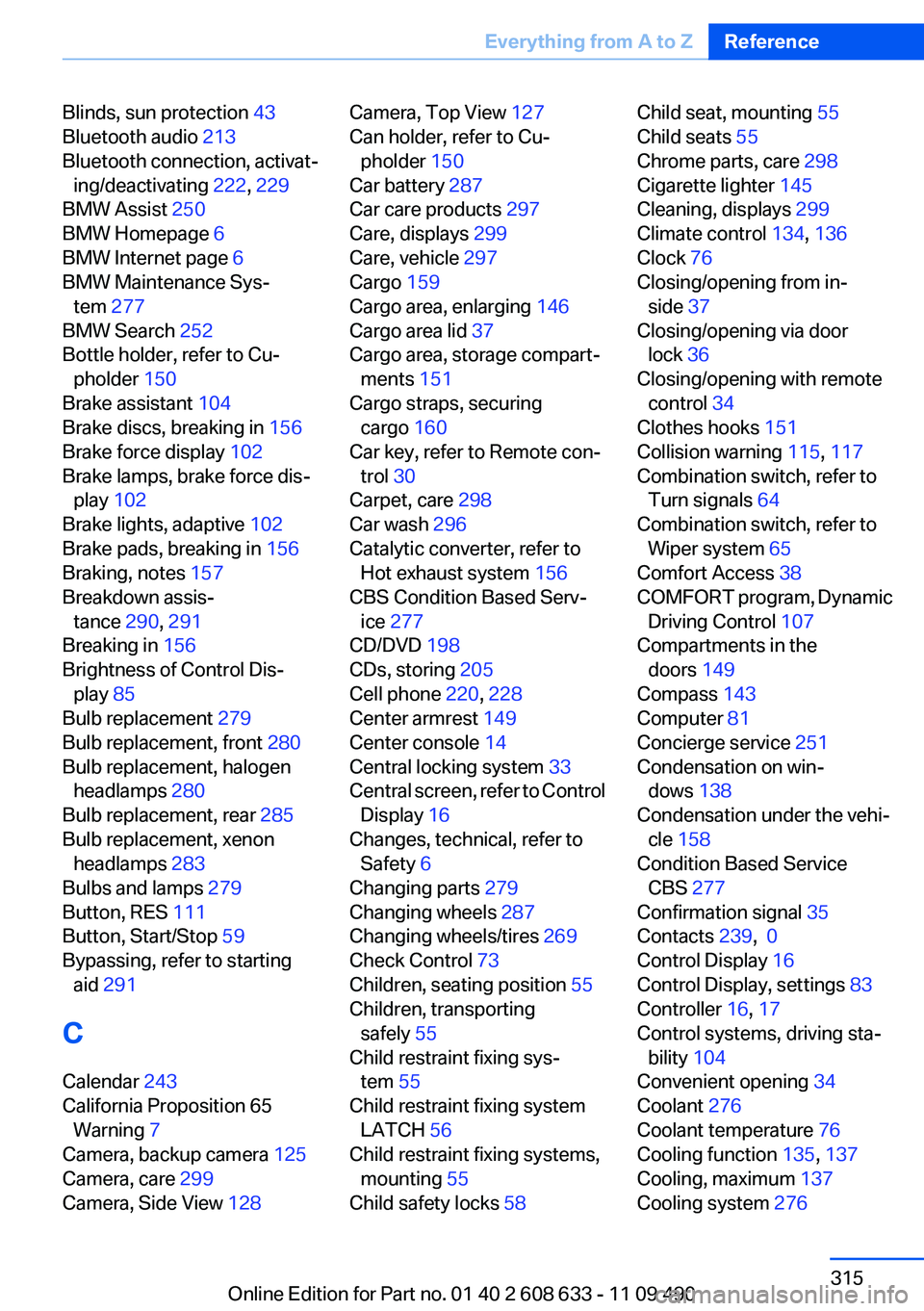
Blinds, sun protection 43
Bluetooth audio 213
Bluetooth connection, activat‐ ing/deactivating 222, 229
BMW Assist 250
BMW Homepage 6
BMW Internet page 6
BMW Maintenance Sys‐ tem 277
BMW Search 252
Bottle holder, refer to Cu‐ pholder 150
Brake assistant 104
Brake discs, breaking in 156
Brake force display 102
Brake lamps, brake force dis‐ play 102
Brake lights, adaptive 102
Brake pads, breaking in 156
Braking, notes 157
Breakdown assis‐ tance 290, 291
Breaking in 156
Brightness of Control Dis‐ play 85
Bulb replacement 279
Bulb replacement, front 280
Bulb replacement, halogen headlamps 280
Bulb replacement, rear 285
Bulb replacement, xenon headlamps 283
Bulbs and lamps 279
Button, RES 111
Button, Start/Stop 59
Bypassing, refer to starting aid 291
C
Calendar 243
California Proposition 65 Warning 7
Camera, backup camera 125
Camera, care 299
Camera, Side View 128 Camera, Top View 127
Can holder, refer to Cu‐ pholder 150
Car battery 287
Car care products 297
Care, displays 299
Care, vehicle 297
Cargo 159
Cargo area, enlarging 146
Cargo area lid 37
Cargo area, storage compart‐ ments 151
Cargo straps, securing cargo 160
Car key, refer to Remote con‐ trol 30
Carpet, care 298
Car wash 296
Catalytic converter, refer to Hot exhaust system 156
CBS Condition Based Serv‐ ice 277
CD/DVD 198
CDs, storing 205
Cell phone 220, 228
Center armrest 149
Center console 14
Central locking system 33
Central screen, refer to Control Display 16
Changes, technical, refer to Safety 6
Changing parts 279
Changing wheels 287
Changing wheels/tires 269
Check Control 73
Children, seating position 55
Children, transporting safely 55
Child restraint fixing sys‐ tem 55
Child restraint fixing system LATCH 56
Child restraint fixing systems, mounting 55
Child safety locks 58 Child seat, mounting 55
Child seats 55
Chrome parts, care 298
Cigarette lighter 145
Cleaning, displays 299
Climate control 134, 136
Clock 76
Closing/opening from in‐ side 37
Closing/opening via door lock 36
Closing/opening with remote control 34
Clothes hooks 151
Collision warning 115, 117
Combination switch, refer to Turn signals 64
Combination switch, refer to Wiper system 65
Comfort Access 38
COMFORT program, Dynamic Driving Control 107
Compartments in the doors 149
Compass 143
Computer 81
Concierge service 251
Condensation on win‐ dows 138
Condensation under the vehi‐ cle 158
Condition Based Service CBS 277
Confirmation signal 35
Contacts 239, 0
Control Display 16
Control Display, settings 83
Controller 16, 17
Control systems, driving sta‐ bility 104
Convenient opening 34
Coolant 276
Coolant temperature 76
Cooling function 135, 137
Cooling, maximum 137
Cooling system 276 Seite 315Everything from A to ZReference315
Online Edition for Part no. 01 40 2 608 633 - 11 09 490