turn signal BMW 335I 2012 Owner's Manual
[x] Cancel search | Manufacturer: BMW, Model Year: 2012, Model line: 335I, Model: BMW 335I 2012Pages: 325, PDF Size: 12.26 MB
Page 281 of 325
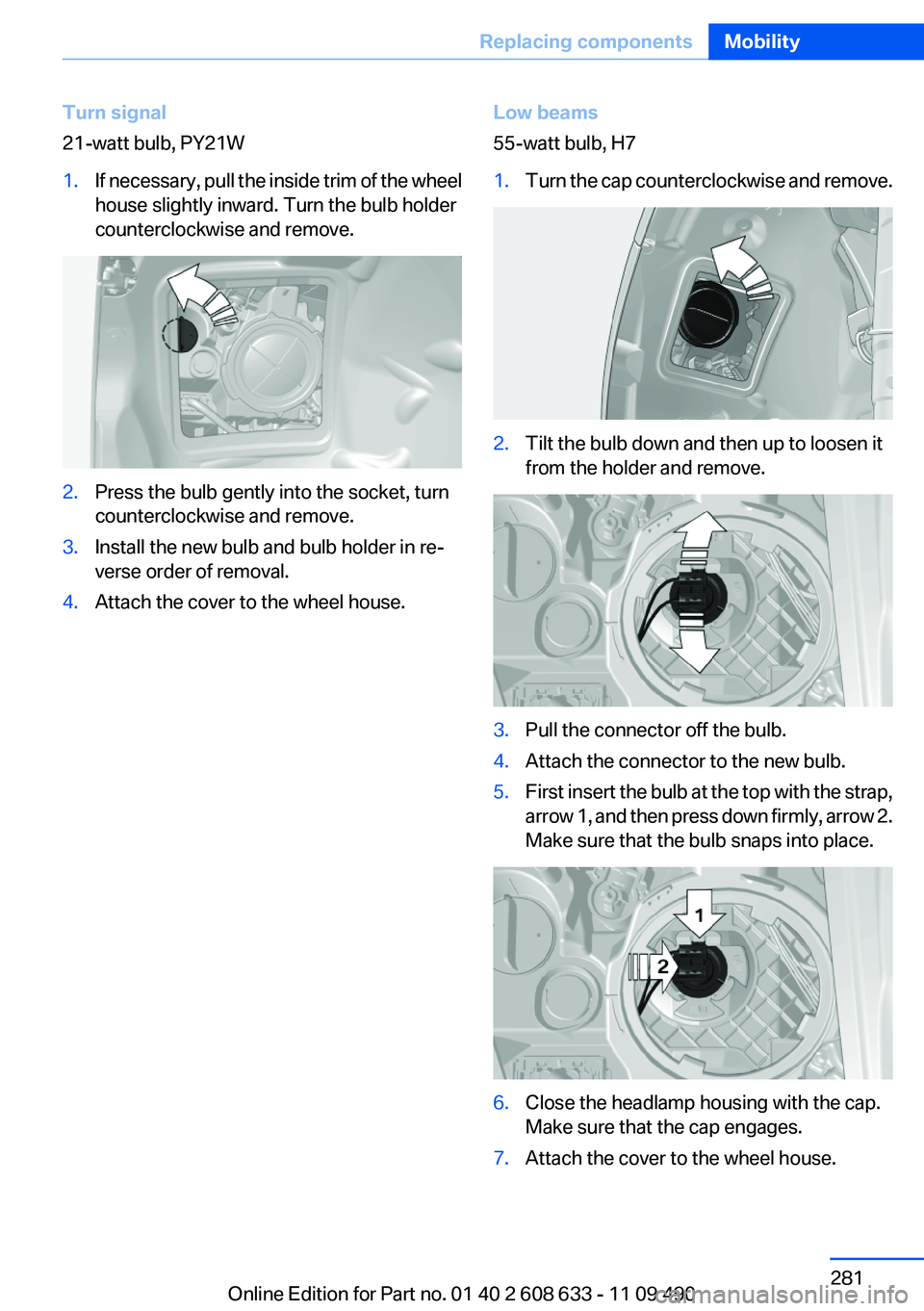
Turn signal
21-watt bulb, PY21W1.If necessary, pull the inside trim of the wheel
house slightly inward. Turn the bulb holder
counterclockwise and remove.2.Press the bulb gently into the socket, turn
counterclockwise and remove.3.Install the new bulb and bulb holder in re‐
verse order of removal.4.Attach the cover to the wheel house.Low beams
55-watt bulb, H71.Turn the cap counterclockwise and remove.2.Tilt the bulb down and then up to loosen it
from the holder and remove.3.Pull the connector off the bulb.4.Attach the connector to the new bulb.5.First insert the bulb at the top with the strap,
arrow 1, and then press down firmly, arrow 2.
Make sure that the bulb snaps into place.6.Close the headlamp housing with the cap.
Make sure that the cap engages.7.Attach the cover to the wheel house.Seite 281Replacing componentsMobility281
Online Edition for Part no. 01 40 2 608 633 - 11 09 490
Page 283 of 325
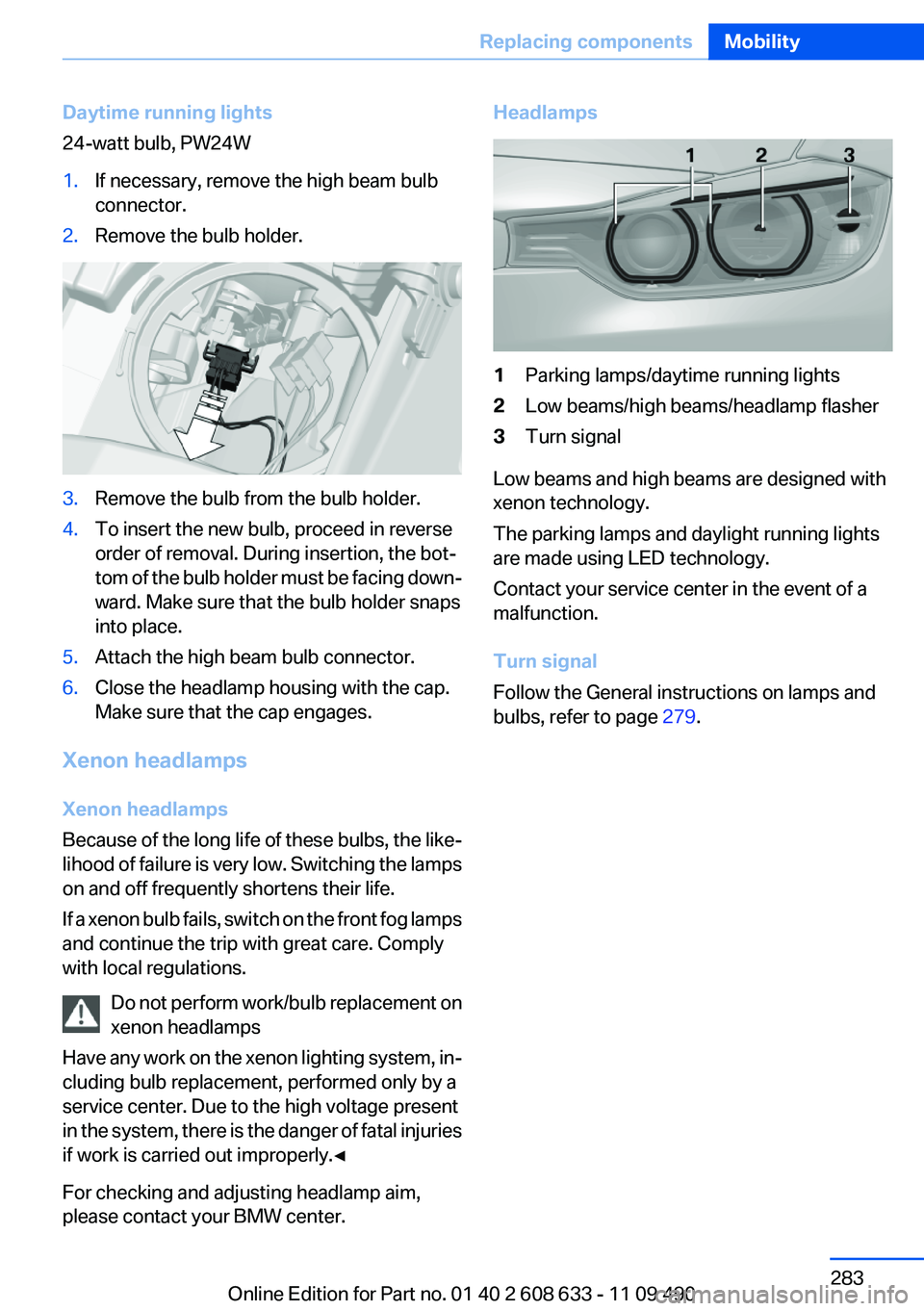
Daytime running lights
24-watt bulb, PW24W1.If necessary, remove the high beam bulb
connector.2.Remove the bulb holder.3.Remove the bulb from the bulb holder.4.To insert the new bulb, proceed in reverse
order of removal. During insertion, the bot‐
tom of the bulb holder must be facing down‐
ward. Make sure that the bulb holder snaps
into place.5.Attach the high beam bulb connector.6.Close the headlamp housing with the cap.
Make sure that the cap engages.
Xenon headlamps
Xenon headlamps
Because of the long life of these bulbs, the like‐
lihood of failure is very low. Switching the lamps
on and off frequently shortens their life.
If a xenon bulb fails, switch on the front fog lamps
and continue the trip with great care. Comply
with local regulations.
Do not perform work/bulb replacement on
xenon headlamps
Have any work on the xenon lighting system, in‐
cluding bulb replacement, performed only by a
service center. Due to the high voltage present
in the system, there is the danger of fatal injuries
if work is carried out improperly.◀
For checking and adjusting headlamp aim,
please contact your BMW center.
Headlamps1Parking lamps/daytime running lights2Low beams/high beams/headlamp flasher3Turn signal
Low beams and high beams are designed with
xenon technology.
The parking lamps and daylight running lights
are made using LED technology.
Contact your service center in the event of a
malfunction.
Turn signal
Follow the General instructions on lamps and
bulbs, refer to page 279.
Seite 283Replacing componentsMobility283
Online Edition for Part no. 01 40 2 608 633 - 11 09 490
Page 284 of 325
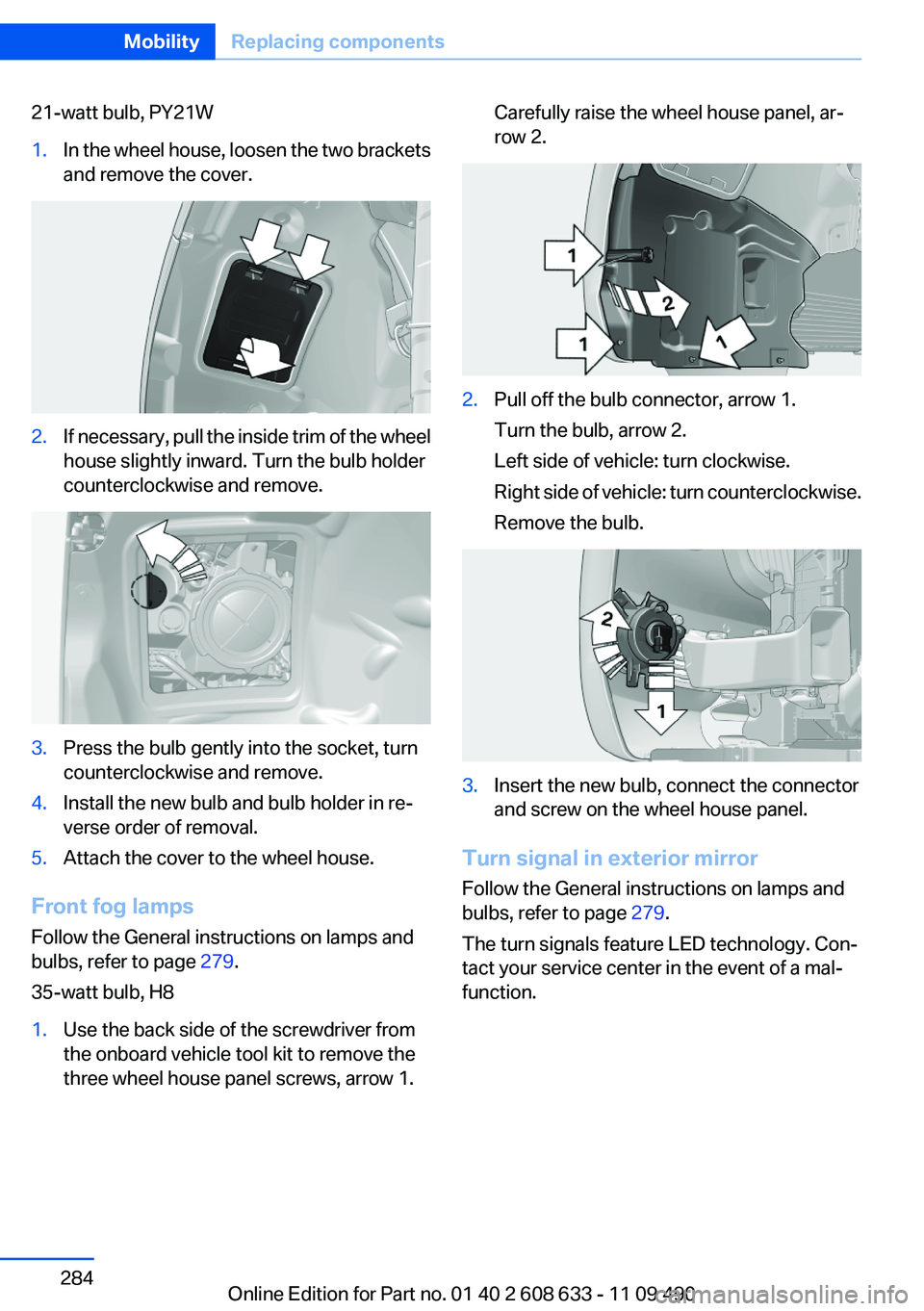
21-watt bulb, PY21W1.In the wheel house, loosen the two brackets
and remove the cover.2.If necessary, pull the inside trim of the wheel
house slightly inward. Turn the bulb holder
counterclockwise and remove.3.Press the bulb gently into the socket, turn
counterclockwise and remove.4.Install the new bulb and bulb holder in re‐
verse order of removal.5.Attach the cover to the wheel house.
Front fog lamps
Follow the General instructions on lamps and
bulbs, refer to page 279.
35-watt bulb, H8
1.Use the back side of the screwdriver from
the onboard vehicle tool kit to remove the
three wheel house panel screws, arrow 1.Carefully raise the wheel house panel, ar‐
row 2.2.Pull off the bulb connector, arrow 1.
Turn the bulb, arrow 2.
Left side of vehicle: turn clockwise.
Right side of vehicle: turn counterclockwise.
Remove the bulb.3.Insert the new bulb, connect the connector
and screw on the wheel house panel.
Turn signal in exterior mirror
Follow the General instructions on lamps and
bulbs, refer to page 279.
The turn signals feature LED technology. Con‐
tact your service center in the event of a mal‐
function.
Seite 284MobilityReplacing components284
Online Edition for Part no. 01 40 2 608 633 - 11 09 490
Page 285 of 325
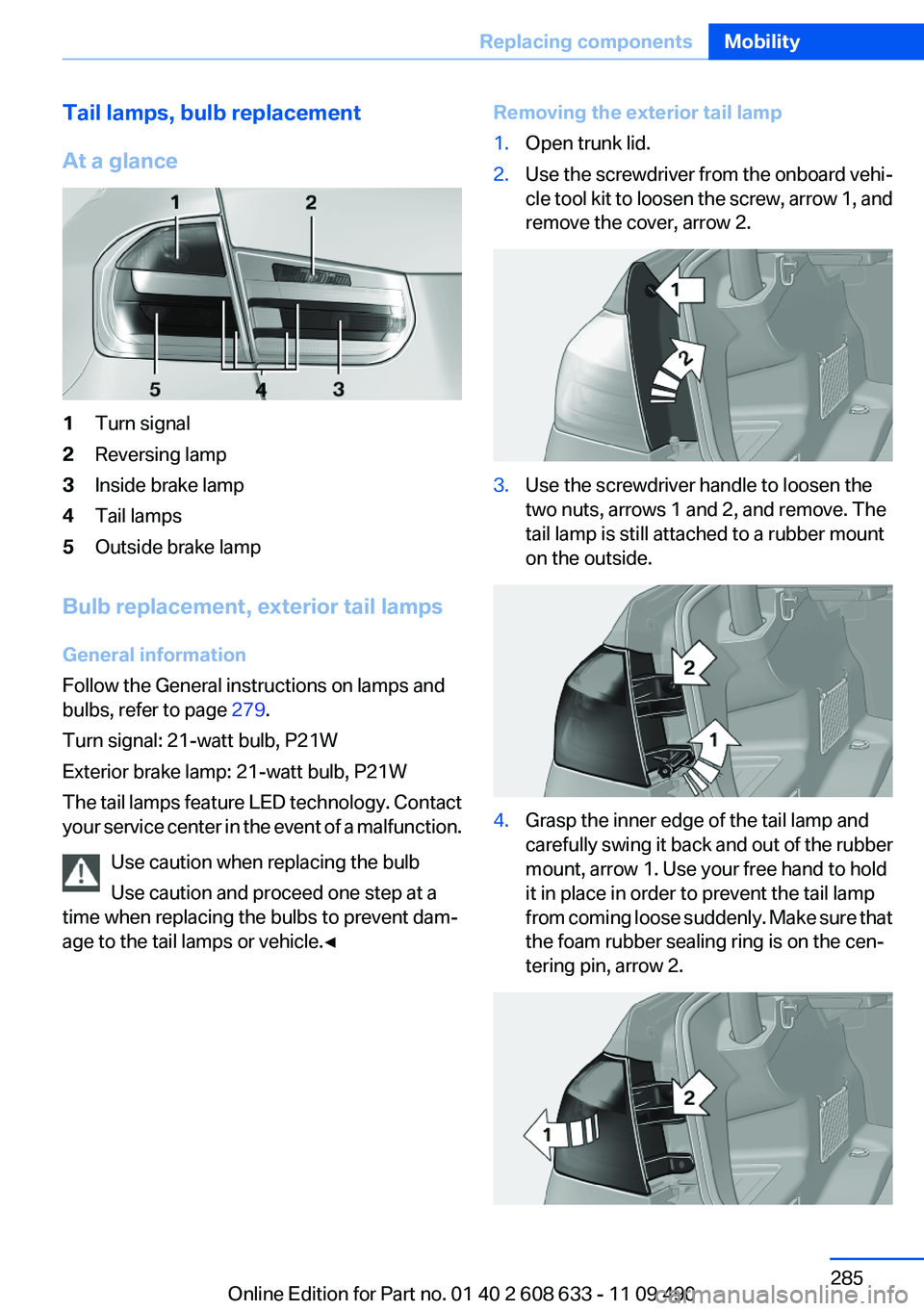
Tail lamps, bulb replacement
At a glance1Turn signal2Reversing lamp3Inside brake lamp4Tail lamps5Outside brake lamp
Bulb replacement, exterior tail lamps
General information
Follow the General instructions on lamps and
bulbs, refer to page 279.
Turn signal: 21-watt bulb, P21W
Exterior brake lamp: 21-watt bulb, P21W
The tail lamps feature LED technology. Contact
your service center in the event of a malfunction.
Use caution when replacing the bulb
Use caution and proceed one step at a
time when replacing the bulbs to prevent dam‐
age to the tail lamps or vehicle.◀
Removing the exterior tail lamp1.Open trunk lid.2.Use the screwdriver from the onboard vehi‐
cle tool kit to loosen the screw, arrow 1, and
remove the cover, arrow 2.3.Use the screwdriver handle to loosen the
two nuts, arrows 1 and 2, and remove. The
tail lamp is still attached to a rubber mount
on the outside.4.Grasp the inner edge of the tail lamp and
carefully swing it back and out of the rubber
mount, arrow 1. Use your free hand to hold
it in place in order to prevent the tail lamp
from coming loose suddenly. Make sure that
the foam rubber sealing ring is on the cen‐
tering pin, arrow 2.Seite 285Replacing componentsMobility285
Online Edition for Part no. 01 40 2 608 633 - 11 09 490
Page 293 of 325
3.Let both engines run for several minutes.4.Disconnect the jumper cables in the reverse
order.
Check the battery and recharge if necessary.
Tow-starting and towing
Automatic transmission: transporting
your vehicle
Note
Your vehicle is not permitted to be towed.
Therefore, contact a service center in the event
of a breakdown.
Do not have the vehicle towed
Have your vehicle transported on a loading
platform only; otherwise, damage may occur.◀
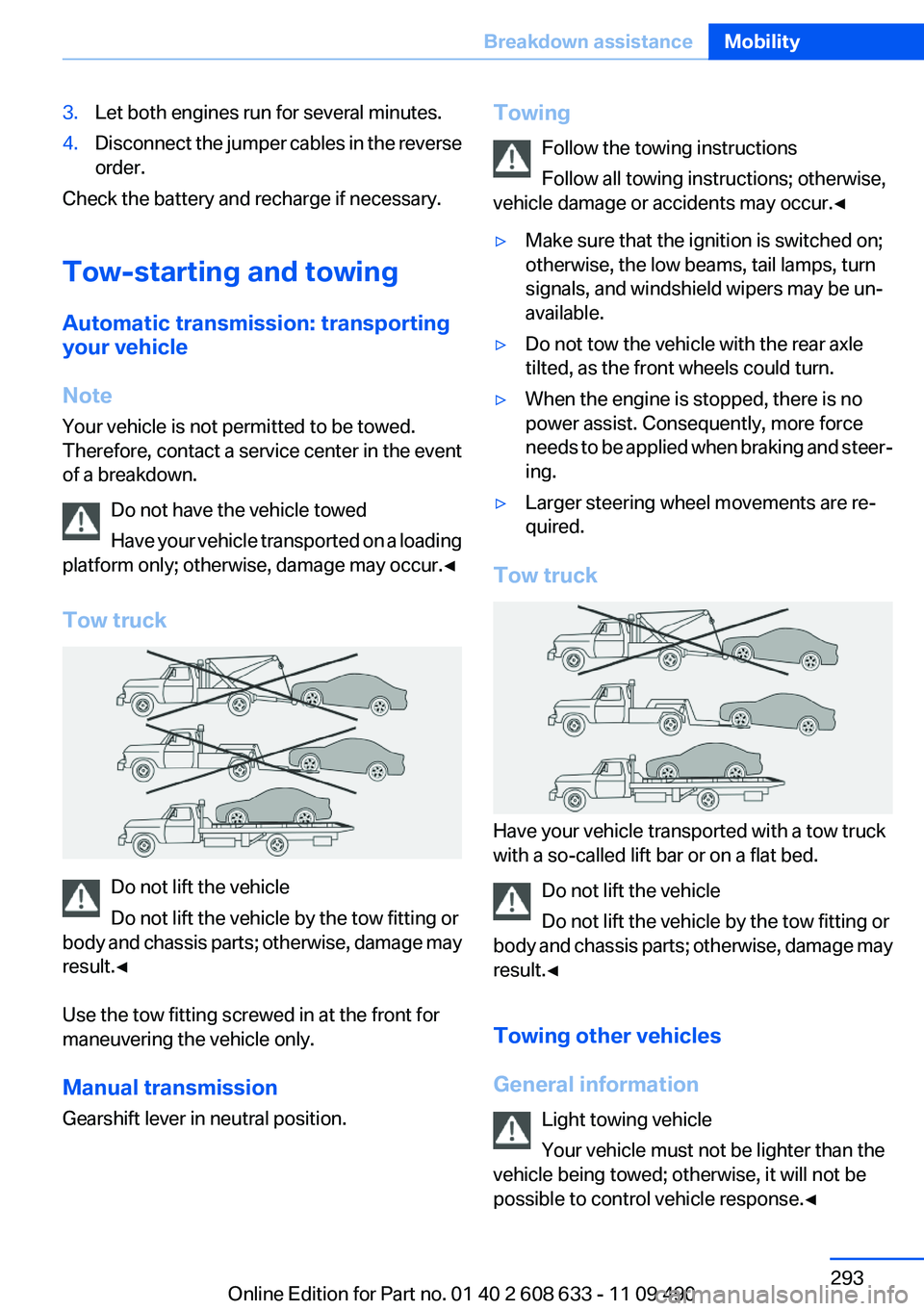
Tow truck
Do not lift the vehicle
Do not lift the vehicle by the tow fitting or
body and chassis parts; otherwise, damage may
result.◀
Use the tow fitting screwed in at the front for
maneuvering the vehicle only.
Manual transmission
Gearshift lever in neutral position.
Towing
Follow the towing instructions
Follow all towing instructions; otherwise,
vehicle damage or accidents may occur.◀▷Make sure that the ignition is switched on;
otherwise, the low beams, tail lamps, turn
signals, and windshield wipers may be un‐
available.▷Do not tow the vehicle with the rear axle
tilted, as the front wheels could turn.▷When the engine is stopped, there is no
power assist. Consequently, more force
needs to be applied when braking and steer‐
ing.▷Larger steering wheel movements are re‐
quired.
Tow truck
Have your vehicle transported with a tow truck
with a so-called lift bar or on a flat bed.
Do not lift the vehicle
Do not lift the vehicle by the tow fitting or
body and chassis parts; otherwise, damage may
result.◀
Towing other vehicles
General information Light towing vehicle
Your vehicle must not be lighter than the
vehicle being towed; otherwise, it will not be
possible to control vehicle response.◀
Seite 293Breakdown assistanceMobility293
Online Edition for Part no. 01 40 2 608 633 - 11 09 490
Page 315 of 325
Blinds, sun protection 43
Bluetooth audio 213
Bluetooth connection, activat‐ ing/deactivating 222, 229
BMW Assist 250
BMW Homepage 6
BMW Internet page 6
BMW Maintenance Sys‐ tem 277
BMW Search 252
Bottle holder, refer to Cu‐ pholder 150
Brake assistant 104
Brake discs, breaking in 156
Brake force display 102
Brake lamps, brake force dis‐ play 102
Brake lights, adaptive 102
Brake pads, breaking in 156
Braking, notes 157
Breakdown assis‐ tance 290, 291
Breaking in 156
Brightness of Control Dis‐ play 85
Bulb replacement 279
Bulb replacement, front 280
Bulb replacement, halogen headlamps 280
Bulb replacement, rear 285
Bulb replacement, xenon headlamps 283
Bulbs and lamps 279
Button, RES 111
Button, Start/Stop 59
Bypassing, refer to starting aid 291
C
Calendar 243
California Proposition 65 Warning 7
Camera, backup camera 125
Camera, care 299
Camera, Side View 128 Camera, Top View 127
Can holder, refer to Cu‐ pholder 150
Car battery 287
Car care products 297
Care, displays 299
Care, vehicle 297
Cargo 159
Cargo area, enlarging 146
Cargo area lid 37
Cargo area, storage compart‐ ments 151
Cargo straps, securing cargo 160
Car key, refer to Remote con‐ trol 30
Carpet, care 298
Car wash 296
Catalytic converter, refer to Hot exhaust system 156
CBS Condition Based Serv‐ ice 277
CD/DVD 198
CDs, storing 205
Cell phone 220, 228
Center armrest 149
Center console 14
Central locking system 33
Central screen, refer to Control Display 16
Changes, technical, refer to Safety 6
Changing parts 279
Changing wheels 287
Changing wheels/tires 269
Check Control 73
Children, seating position 55
Children, transporting safely 55
Child restraint fixing sys‐ tem 55
Child restraint fixing system LATCH 56
Child restraint fixing systems, mounting 55
Child safety locks 58 Child seat, mounting 55
Child seats 55
Chrome parts, care 298
Cigarette lighter 145
Cleaning, displays 299
Climate control 134, 136
Clock 76
Closing/opening from in‐ side 37
Closing/opening via door lock 36
Closing/opening with remote control 34
Clothes hooks 151
Collision warning 115, 117
Combination switch, refer to Turn signals 64
Combination switch, refer to Wiper system 65
Comfort Access 38
COMFORT program, Dynamic Driving Control 107
Compartments in the doors 149
Compass 143
Computer 81
Concierge service 251
Condensation on win‐ dows 138
Condensation under the vehi‐ cle 158
Condition Based Service CBS 277
Confirmation signal 35
Contacts 239, 0
Control Display 16
Control Display, settings 83
Controller 16, 17
Control systems, driving sta‐ bility 104
Convenient opening 34
Coolant 276
Coolant temperature 76
Cooling function 135, 137
Cooling, maximum 137
Cooling system 276 Seite 315Everything from A to ZReference315
Online Edition for Part no. 01 40 2 608 633 - 11 09 490
Page 316 of 325
Corrosion on brake discs 158
Cruise control 119
Cruise control, active with Stop & Go 109
Cruising range 76
Cupholder 150
Current fuel consumption 77
Current location, storing 170
Customer Relations 253
D
Damage, tires 269
Damping control, dy‐ namic 105
Data, technical 302
Date 76
Daytime running lights 87
Defrosting, refer to defrosting the windows 135
Defrosting, refer to Windows, defrosting 138
Defrosting the windows 135
Destination distance 82
Destination guidance 176
Destination guidance with in‐ termediate destinations 174
Destination input, naviga‐ tion 168
Digital clock 76
Digital compass 143
Digital radio 191
Dimensions 302
Dimmable exterior mirrors 53
Dimmable interior rearview mirror 53
Direction indicator, refer to Turn signals 64
Displacement, engine 303
Display, ECO PRO 163
Display, electronic, instrument cluster 72
Display in front wind‐ shield 128
Display lighting, refer to Instru‐ ment lighting 89 Displays 70
Displays, cleaning 299
Disposal, coolant 276
Disposal, vehicle battery 288
Distance control, refer to PDC 121
Distance, selecting for ACC 111
Distance to destination 82
Divided screen view, split screen 21
Door lock, refer to Remote control 30
Drive-off assistant 108
Drive-off assistant, refer to DSC 104
Driving Experience Switch 106
Driving instructions, breaking in 156
Driving notes, general 156
Driving stability control sys‐ tems 104
Driving tips 156
DSC Dynamic Stability Con‐ trol 104
DTC Dynamic Traction Con‐ trol 105
DVD/CD 198
DVD/CD notes 204
DVD changer 202
DVD settings 201
DVDs, storing 205
DVD, video 200
Dynamic Damping Con‐ trol 105
Dynamic destination guid‐ ance 183
Dynamic Stability Control DSC 104
Dynamic Traction Control DTC 105
E
ECO PRO 163 EfficientDynamics 164
EfficientDynamics menu, refer to ECO PRO 163
Electronic displays, instru‐ ment cluster 72
Electronic Stability Program ESP, refer to DSC 104
Emergency detection, remote control 31
Emergency release, door lock 37
Emergency release, fuel filler flap 260
Emergency Request 290
Emergency service, refer to Roadside Assistance 291
Emergency start function, en‐ gine start 31
Emergency unlocking, trunk lid 38
Energy Control 77
Energy recovery 77
Engine, automatic start/stop function 61
Engine, automatic switch- off 61
Engine compartment 272
Engine compartment, working in 273
Engine coolant 276
Engine oil 274
Engine oil, adding 274
Engine oil additives 275
Engine oil change 275
Engine oil filler neck 274
Engine oil temperature 75
Engine oil types, alterna‐ tive 275
Engine oil types, ap‐ proved 275
Engine specifications 303
Engine start during malfunc‐ tion 31
Engine start, refer to Starting the engine 60
Engine start, Starting aid 291 Seite 316ReferenceEverything from A to Z316
Online Edition for Part no. 01 40 2 608 633 - 11 09 490
Page 321 of 325
Service history 78
Service requirements, Condi‐ tion Based Service CBS 277
Service requirements, dis‐ play 77
Service, Roadside Assis‐ tance 291
Settings on Control Dis‐ play 83
Settings, storing for seat, mir‐ ror 51
Shifting, automatic transmis‐ sion 67
Shifting, manual transmis‐ sion 67
Shift paddles on steering wheel 69
Short commands 306
Side airbags 91
Side View 127
Signaling, horn 12
Signals when unlocking 35
Sitting safely 45
Size 302
Slide/tilt glass roof 43
Smallest turning circle 303
Snap-in adapter, mobile phone 236
Snow chains 271
Socket 145
Socket, OBD Onboard Diag‐ nostics 278
Software applications, iPhone 255
Software update 217
Spare fuse 288
Special destinations, naviga‐ tion 171
Specified engine oil types 275
Speed, average 82
Speed limit detection 79
Speed limit detection, com‐ puter 82
Speed limit, setting 82 Speed Volume, volume equal‐
ization 189
Split screen 21
Split screen map settings 180
Spoken instructions, naviga‐ tion 178
SPORT+ - program, Dynamic Driving Control 106
Sport automatic transmis‐ sion 69
Sport displays, torque display, performance display 83
SPORT program, Dynamic Driving Control 106
Sport program, transmis‐ sion 68
Sport steering, variable 105
Stability control systems 104
Start/stop, automatic func‐ tion 61
Start/Stop button 59
Start function during malfunc‐ tion 31
Starting aid 291
Starting the engine 60
State/province, selecting for navigation 168
Stations, stored 197
Station, storing 190
Status display, tires 94
Status information, iDrive 20
Status of Owner's Manual 6
Steering wheel, adjusting 53
Steering wheel heating 53
Steptronic, automatic trans‐ mission 67
Stopping the engine 61
Storage compartment in the rear 150
Storage compartments 148
Storage compartments, loca‐ tions 148
Storage, tires 270
Storing the vehicle 299
Street, entering for naviga‐ tion 169 Summer tires, tread 268
Supplementary text mes‐ sage 75
Surround View 123
Switch-on times, parked-car ventilation 140
Switch, refer to Cockpit 12
Symbols 6
T
Tachometer 75
Tailgate 37
Tailgate, opening with no- touch activation 39
Tailgate via remote control 35
Tail lamps 285
Tasks 244
Technical changes, refer to Safety 6
Technical data 302
Telephone 220, 228
TeleService 251
Temperature, automatic cli‐ mate control 135, 137
Temperature display, external temperature 76
Temperature, engine oil 75
Tempomat, refer to Active Cruise Control 109
Terminal, jump-starting 292
Text messages 241
Text message, supplemen‐ tary 75
Theft alarm system, refer to Alarm system 40
Theft protection, refer to Cen‐ tral locking system 33
Thigh support 47
Through-loading system 146
Tilt alarm sensor 41
Time of arrival 82
Tire damage 269
Tire identification marks 267
Tire inflation pressure 263 Seite 321Everything from A to ZReference321
Online Edition for Part no. 01 40 2 608 633 - 11 09 490
Page 322 of 325
Tire inflation pressure monitor,refer to FTM 97
Tire Pressure Monitor TPM 94
Tires, changing 269
Tires, everything on wheels and tires 263
Tires, run-flat tires 271
Tire tread 268
Toll roads, route 176
Tone 188
Tools 279
Top View 126
Torque, engine 303
Total vehicle weight 304
Tow fitting 294
Towing 293
Town/city, navigation 169
Tow-starting 293
Tow truck 293
TPM Tire Pressure Moni‐ tor 94
Traction control 105
TRACTION program, Dynamic Driving Control 105
Traffic bulletins, naviga‐ tion 180
Transmission, automatic 67
Transmission, manual 67
Transporting children safely 55
Tread, tires 268
Treble, tone 188
Trip computer 83
Triple turn signal activa‐ tion 64
Trip odometer 76
Truck for tow-starting/tow‐ ing 293
Trunk lid 37
Trunk lid, emergency unlock‐ ing 38
Trunk lid, hotel function 38
Trunk lid, opening with no- touch activation 39 Trunk lid via remote con‐
trol 35
Turning circle 303
Turning circle lines, backup camera 124
Turn signals, operation 64
Turn signals, rear, bulb re‐ placement 285
U
Unintentional alarm 41
Units of measure 85
Universal remote control 141
Unlock button, automatic transmission 68
Unlocking/locking from in‐ side 37
Unlocking/locking via door lock 36
Unlocking/locking with remote control 34
Updates made after the edito‐ rial deadline 6
Updating software 217
Upholstery care 298
USB audio interface 210
USB interface 149
V
Variable sport steering 105
Vehicle battery 287
Vehicle battery, replacing 287
Vehicle, breaking in 156
Vehicle care 297
Vehicle equipment 6
Vehicle identification number, refer to Identification number
in the engine compart‐
ment 272
Vehicle jack 287
Vehicle paint 297
Vehicle storage 299
Vehicle wash 296
Ventilation 139 Ventilation, refer to Parked-car
ventilation 139
Version of the navigation data 183
Video playback 200
Video playback, iPhone 213
Video playback, snap-in adapter 213
Voice activation, short com‐ mands 306
Voice activation system 23
Volume, setting 188
W
Warning messages, refer to Check Control 73
Warning triangle 291
Washer fluid 66
Washer fluid reservoir, ca‐ pacity 305
Washer nozzles, wind‐ shield 66
Washer system 65
Washing, vehicle 296
Water on roads 157
Weights 304
Welcome lamps 86
Wheel base, vehicle 303
Wheels, changing 269
Wheels, everything on wheels and tires 263
Wheels, Flat Tire Monitor FTM 97
Wheels, Tire Pressure Monitor TPM 94
Width, vehicle 302
Window defroster, rear 135, 138
Windows, powered 41
Windshield washer fluid 66
Windshield washer noz‐ zles 66
Windshield washer system 65
Windshield wiper 65 Seite 322ReferenceEverything from A to Z322
Online Edition for Part no. 01 40 2 608 633 - 11 09 490