wheel BMW 335I 2012 Workshop Manual
[x] Cancel search | Manufacturer: BMW, Model Year: 2012, Model line: 335I, Model: BMW 335I 2012Pages: 325, PDF Size: 12.26 MB
Page 228 of 325
Professional mobile phone preparation
packageVehicle equipment
All standard, country-specific and optional
equipment that is offered in the model series is
described in this chapter. Therefore, equipment
is also described that is not available in a vehicle,
e. g., because of the selected optional equip‐
ment or country variant. This also applies for
safety-related functions and systems.
At a glance
The concept
Mobile phones or other external devices such as
audio players can be connected to the vehicle
via Bluetooth.
After these devices are paired once, they are
recognized automatically when the ignition is
switched on as soon as they are inside the ve‐
hicle and can be operated via iDrive, the buttons
on the steering wheel, and via voice activation.
Depending on their functionality, external devi‐
ces can be used via the vehicle as a telephone
or as an audio source.
The telephone functions are described in the
following. Operation of the audio functions, refer
to page 213.
Up to four external devices can be paired.
Certain functions may need to be enabled by the
mobile phone provider or service provider.
Using the mobile phone while driving
Make entries only when traffic and road
conditions allow. Do not hold the mobile phone
in your hand while you are driving; use the
hands-free system instead. If you do not ob‐
serve this precaution, you can endanger the ve‐
hicle occupants and other road users.◀Snap-in adapter
The snap-in adapter is used to:▷Hold the mobile phone.▷Recharge the battery.▷Connect the mobile phone to an outside an‐
tenna of the vehicle.
This provides for better network reception
and consistent sound quality.
Approved mobile phones
Details on which mobile phones and external
devices with a Bluetooth interface are sup‐
ported by the mobile phone preparation pack‐
age can be obtained at www.bmwusa.com/blue‐
tooth.
Displaying the vehicle identification
number and software part number
The vehicle identification number and software
part number are needed to determine which mo‐
bile phones are supported by the mobile phone
preparation package. The software version of
the mobile phone may also be required.
1."Telephone"2."Options" Open.3."Bluetooth® info"4."Display system information"
These approved mobile phones with a certain
software version, support the vehicle functions
described below.
Malfunctions may occur with other mobile
phones or software versions.
Do not operate a mobile phone that is connected
to the vehicle on the mobile phone keypad, as
this may lead to a malfunction.
Seite 228CommunicationProfessional mobile phone preparation package228
Online Edition for Part no. 01 40 2 608 633 - 11 09 490
Page 232 of 325
notes? Reduce the data volume of the con‐
tact.▷Is the mobile phone connected as an audio
source or additional telephone? The mobile
phone must be connected as a telephone.
The phone connection quality is poor.
▷The strength of the Bluetooth signal on the
mobile phone can be adjusted, depending
on the mobile phone.▷Insert the mobile phone into the snap-in
adapter or place it in the area of the center
console.▷Adjust the volume of the microphone and
loudspeakers separately.
If all points in this list have been checked and the
required function is still not available, contact
the hotline or service center.
Controls
Adjusting the volume
Turn the knob until the desired volume is se‐
lected. The setting is stored for the remote con‐
trol currently in use.
The vehicle automatically adjusts the volume of
the microphone on the telephone and the vol‐
ume of the called party. Depending on the mo‐
bile phone, the volumes may need to be ad‐
justed. The settings can only be created during
a call and must be adjusted separately for each
telephone. The settings are deleted when the
telephone is unpaired.
1."Settings"2."Tone"3."Volume settings"4.Select the desired setting: "Microphone" or
"Loudspeak."5.To adjust: turn the controller.6.To store: press the controller.Incoming call
Receiving calls
If the number of the caller is stored in the phone
book and is transmitted by the network, the
name of the contact is displayed. Otherwise,
only the phone number is displayed.
If more than one phone number is assigned to a
contact, only the name of the contact is dis‐
played.
For calls on the additional telephone, the num‐
ber is only displayed if it is transmitted by the
network.
An incoming call to the additional telephone is
automatically rejected if there is an active call on
the other telephone.
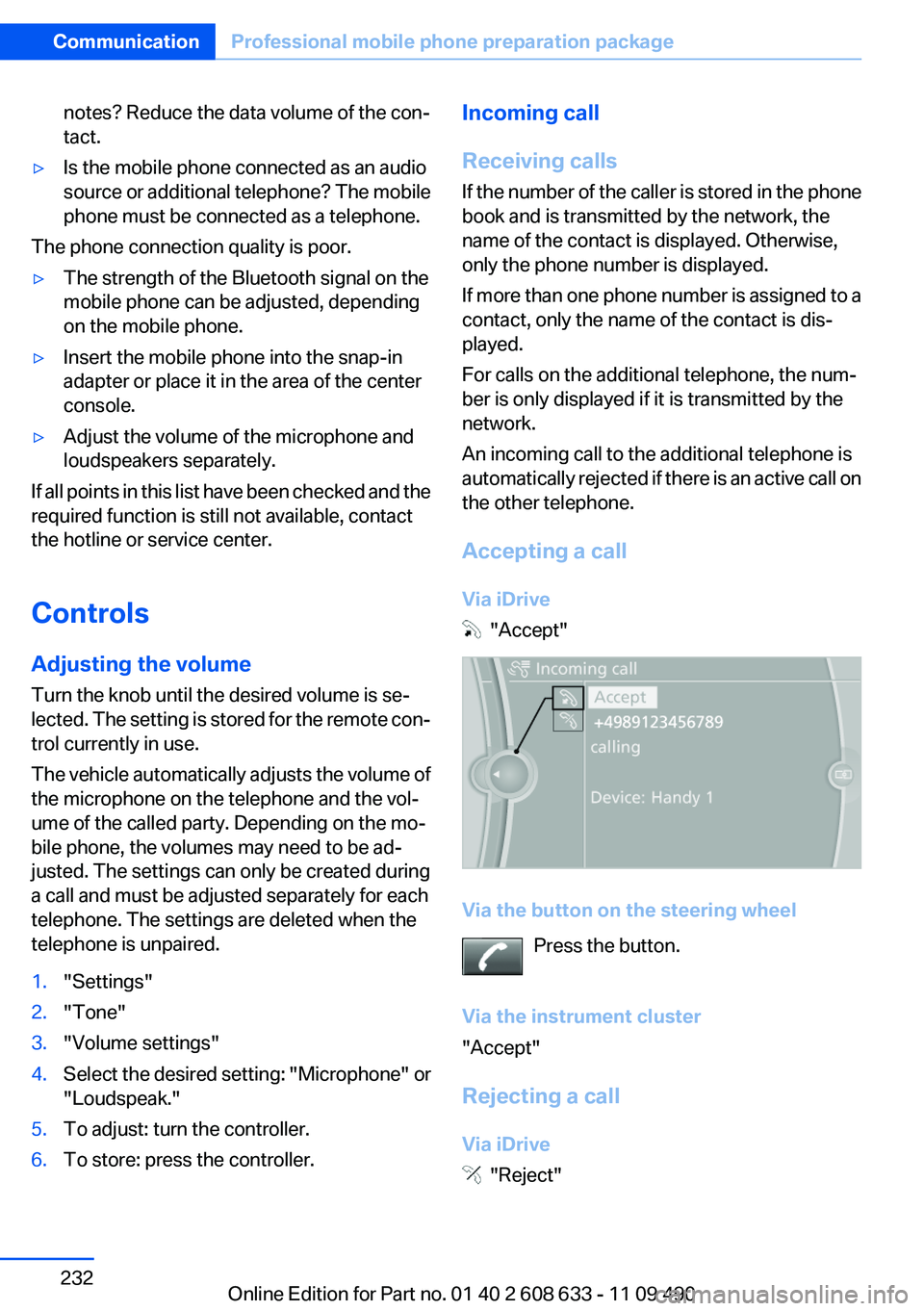
Accepting a call
Via iDrive
"Accept"
Via the button on the steering wheel Press the button.
Via the instrument cluster
"Accept"
Rejecting a call
Via iDrive
"Reject"
Seite 232CommunicationProfessional mobile phone preparation package232
Online Edition for Part no. 01 40 2 608 633 - 11 09 490
Page 233 of 325
Via the instrument cluster
"Reject"
Ending a call
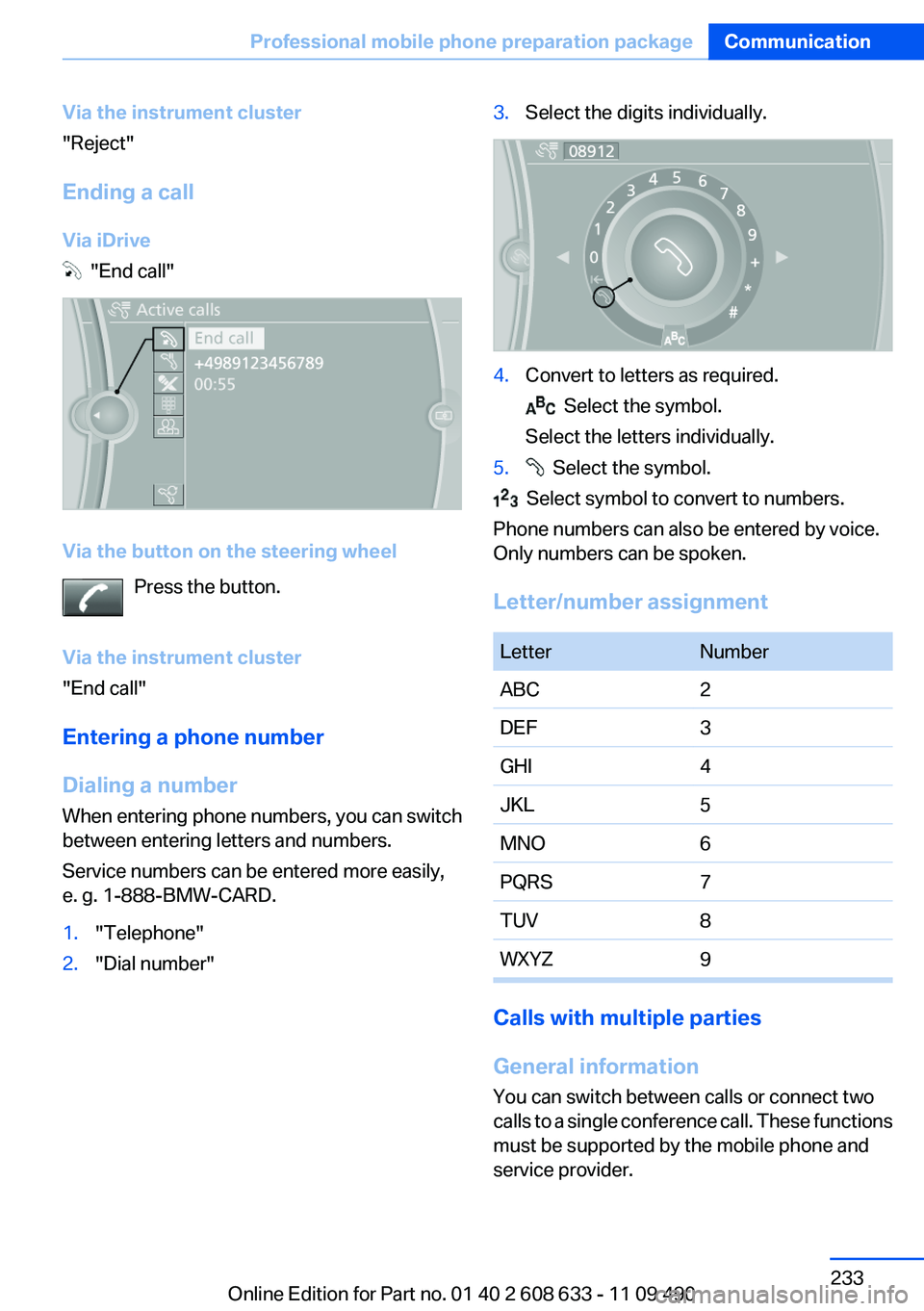
Via iDrive
"End call"
Via the button on the steering wheel Press the button.
Via the instrument cluster
"End call"
Entering a phone number
Dialing a number
When entering phone numbers, you can switch
between entering letters and numbers.
Service numbers can be entered more easily,
e. g. 1-888-BMW-CARD.
1."Telephone"2."Dial number"3.Select the digits individually.4.Convert to letters as required.
Select the symbol.
Select the letters individually.
5. Select the symbol.
Select symbol to convert to numbers.
Phone numbers can also be entered by voice.
Only numbers can be spoken.
Letter/number assignment
LetterNumberABC2DEF3GHI4JKL5MNO6PQRS7TUV8WXYZ9
Calls with multiple parties
General information
You can switch between calls or connect two
calls to a single conference call. These functions
must be supported by the mobile phone and
service provider.
Seite 233Professional mobile phone preparation packageCommunication233
Online Edition for Part no. 01 40 2 608 633 - 11 09 490
Page 235 of 325
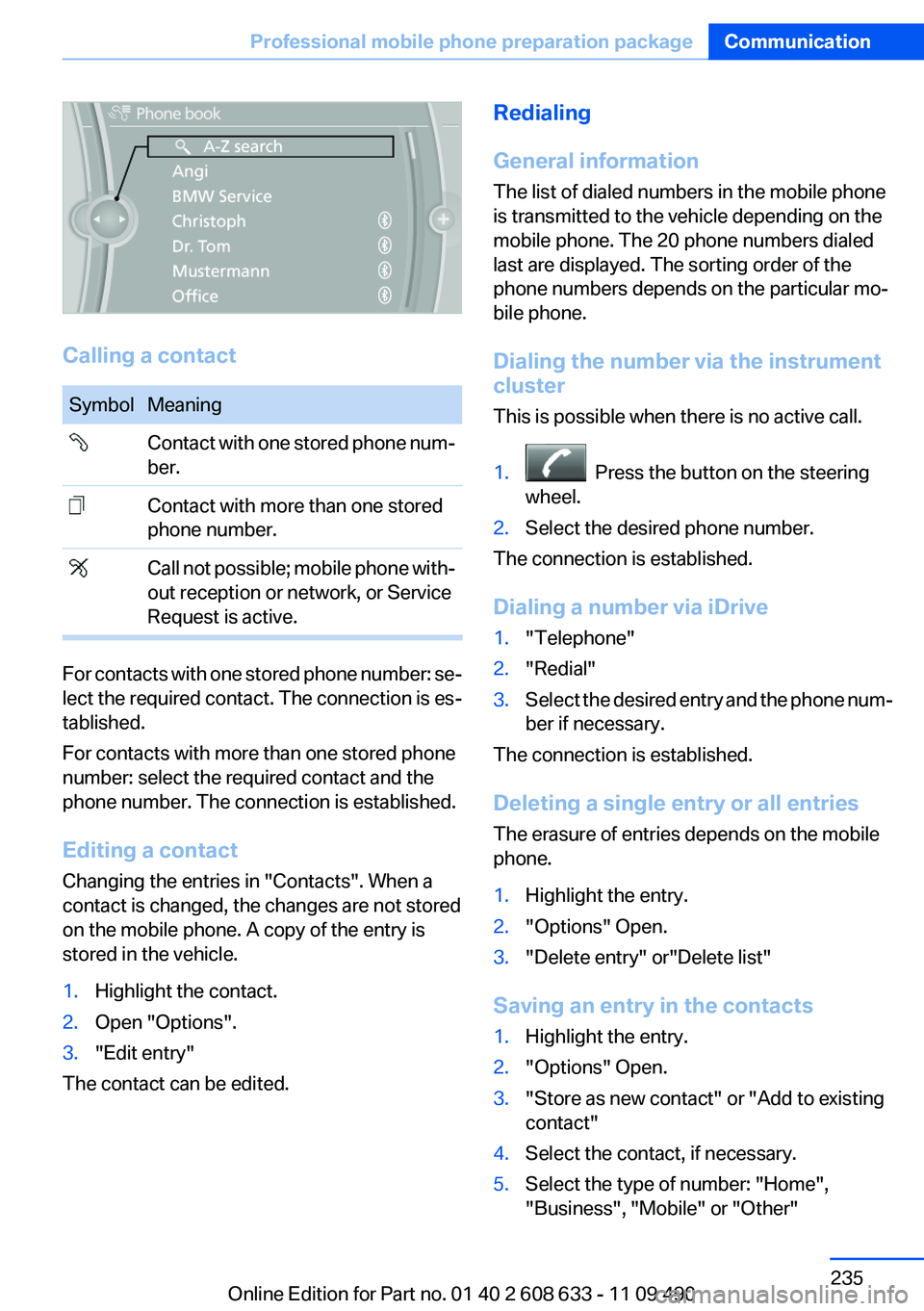
Calling a contact
SymbolMeaning Contact with one stored phone num‐
ber. Contact with more than one stored
phone number. Call not possible; mobile phone with‐
out reception or network, or Service
Request is active.
For contacts with one stored phone number: se‐
lect the required contact. The connection is es‐
tablished.
For contacts with more than one stored phone
number: select the required contact and the
phone number. The connection is established.
Editing a contact
Changing the entries in "Contacts". When a
contact is changed, the changes are not stored
on the mobile phone. A copy of the entry is
stored in the vehicle.
1.Highlight the contact.2.Open "Options".3."Edit entry"
The contact can be edited.
Redialing
General information
The list of dialed numbers in the mobile phone
is transmitted to the vehicle depending on the
mobile phone. The 20 phone numbers dialed
last are displayed. The sorting order of the
phone numbers depends on the particular mo‐
bile phone.
Dialing the number via the instrument
cluster
This is possible when there is no active call.1. Press the button on the steering
wheel.2.Select the desired phone number.
The connection is established.
Dialing a number via iDrive
1."Telephone"2."Redial"3.Select the desired entry and the phone num‐
ber if necessary.
The connection is established.
Deleting a single entry or all entries
The erasure of entries depends on the mobile
phone.
1.Highlight the entry.2."Options" Open.3."Delete entry" or"Delete list"
Saving an entry in the contacts
1.Highlight the entry.2."Options" Open.3."Store as new contact" or "Add to existing
contact"4.Select the contact, if necessary.5.Select the type of number: "Home",
"Business", "Mobile" or "Other"Seite 235Professional mobile phone preparation packageCommunication235
Online Edition for Part no. 01 40 2 608 633 - 11 09 490
Page 259 of 325
Mobility
To ensure that you remain mobile at all times, this chapter supplies you with important information
on the topics of fuels and lubricants, wheels and tires, service, maintenance, and Roadside Assistance.Online Edition for Part no. 01 40 2 608 633 - 11 09 490
Page 263 of 325
Wheels and tiresVehicle equipment
All standard, country-specific and optional
equipment that is offered in the model series is
described in this chapter. Therefore, equipment
is also described that is not available in a vehicle,
e. g., because of the selected optional equip‐
ment or country variant. This also applies for
safety-related functions and systems.
Tire inflation pressure
Safety information
The tire characteristics and tire inflation pres‐
sure influence the following:▷The service life of the tires.▷Road safety.▷Driving comfort.
Checking the pressure
Only check the tire inflation pressure when the
tires are cold. This means after driving no more
than 1.25 miles/2 km or when the vehicle has
been parked for at least 2 hours. When the tires
are warm, the tire inflation pressure is higher.
Check the tire inflation pressure regularly
Regularly check the tire inflation pressure
and correct it as needed: at least twice a month
and before a long trip. If you fail to observe this
precaution, you may be driving on tires with in‐
correct tire pressures, a condition that may not
only compromise your vehicle's driving stability,
but also lead to tire damage and the risk of an
accident.◀
After correcting the tire inflation pressure:
▷Reinitialize the Flat Tire Monitor.▷Reinitialize the Tire Pressure Monitor.Pressure specifications
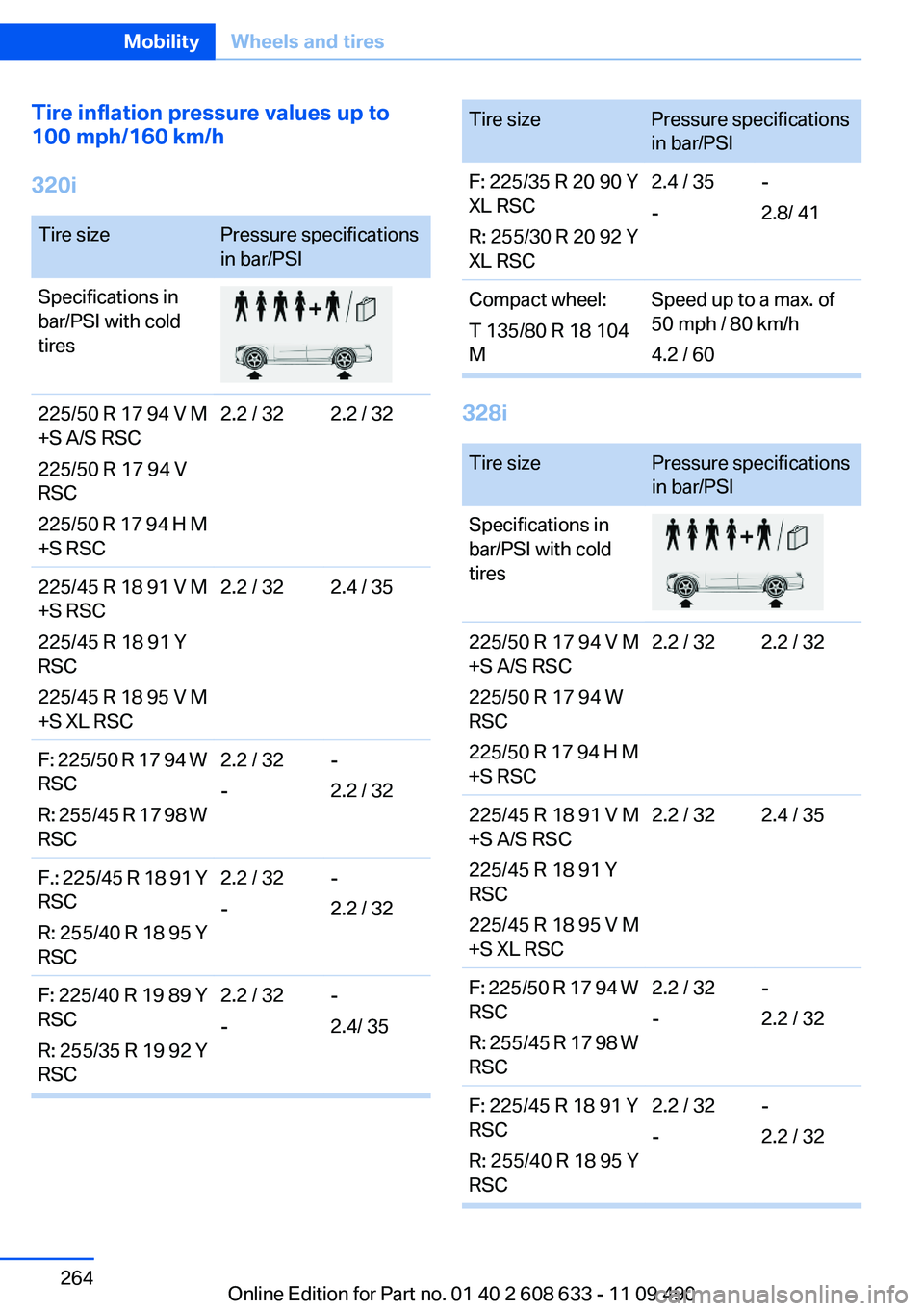
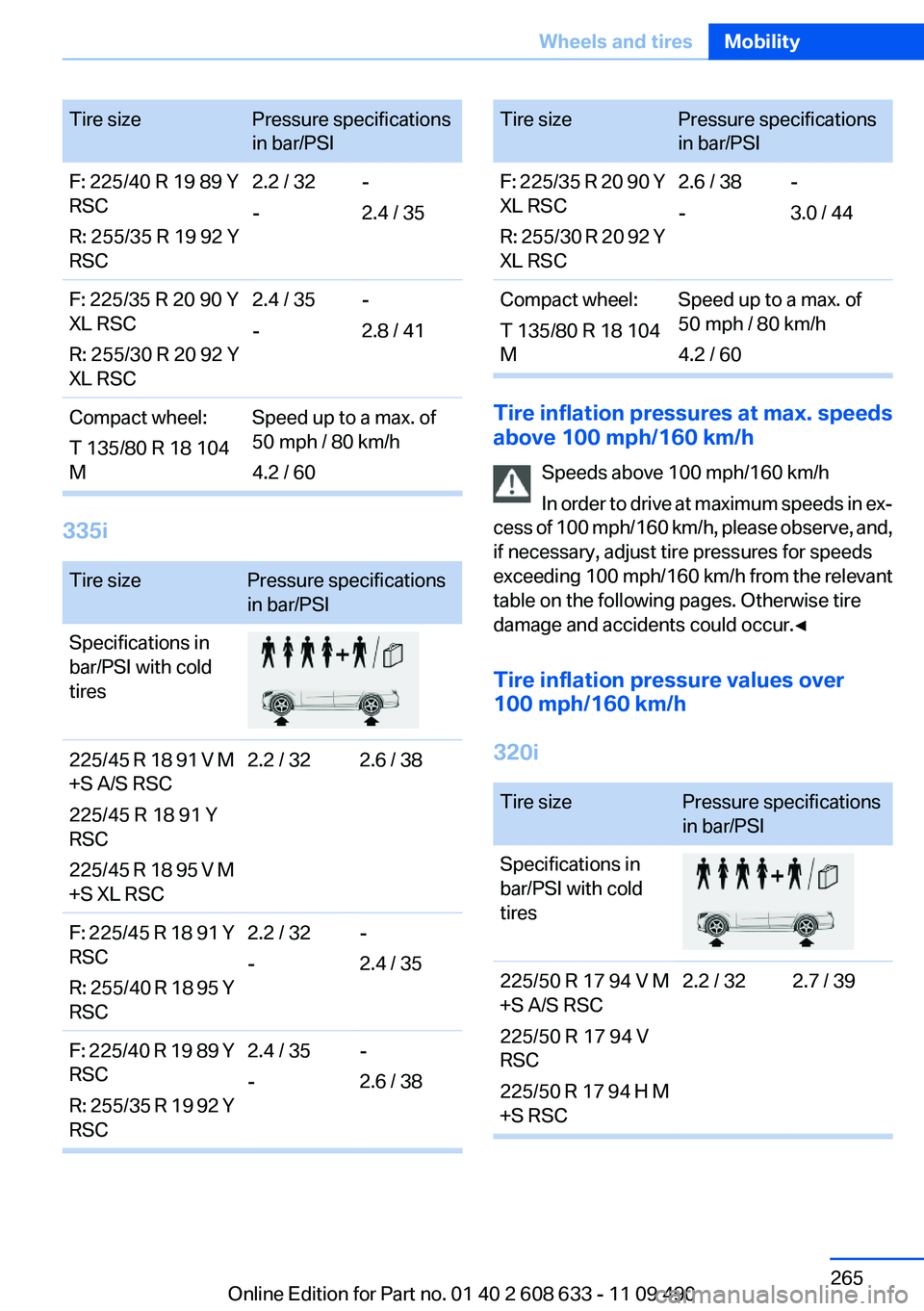
The tire inflation pressure table, refer to
page 264, contains all pressure specifications
for the specified tire sizes at the ambient tem‐
perature. Pressure specifications apply to ap‐
proved tire sizes and recommended tire brands.
This information can be obtained from your
service center.
To identify the correct tire inflation pressure,
please note the following:▷Tire sizes of your vehicle.▷Maximum allowable driving speed.
Tire inflation pressures up to 100 mph/
160 km/h
For speeds of up to 100 mph/160 km/h and for
optimum driving comfort, note the pressure val‐
ues in the tire inflation pressure table, refer to
page 264, and adjust as necessary.
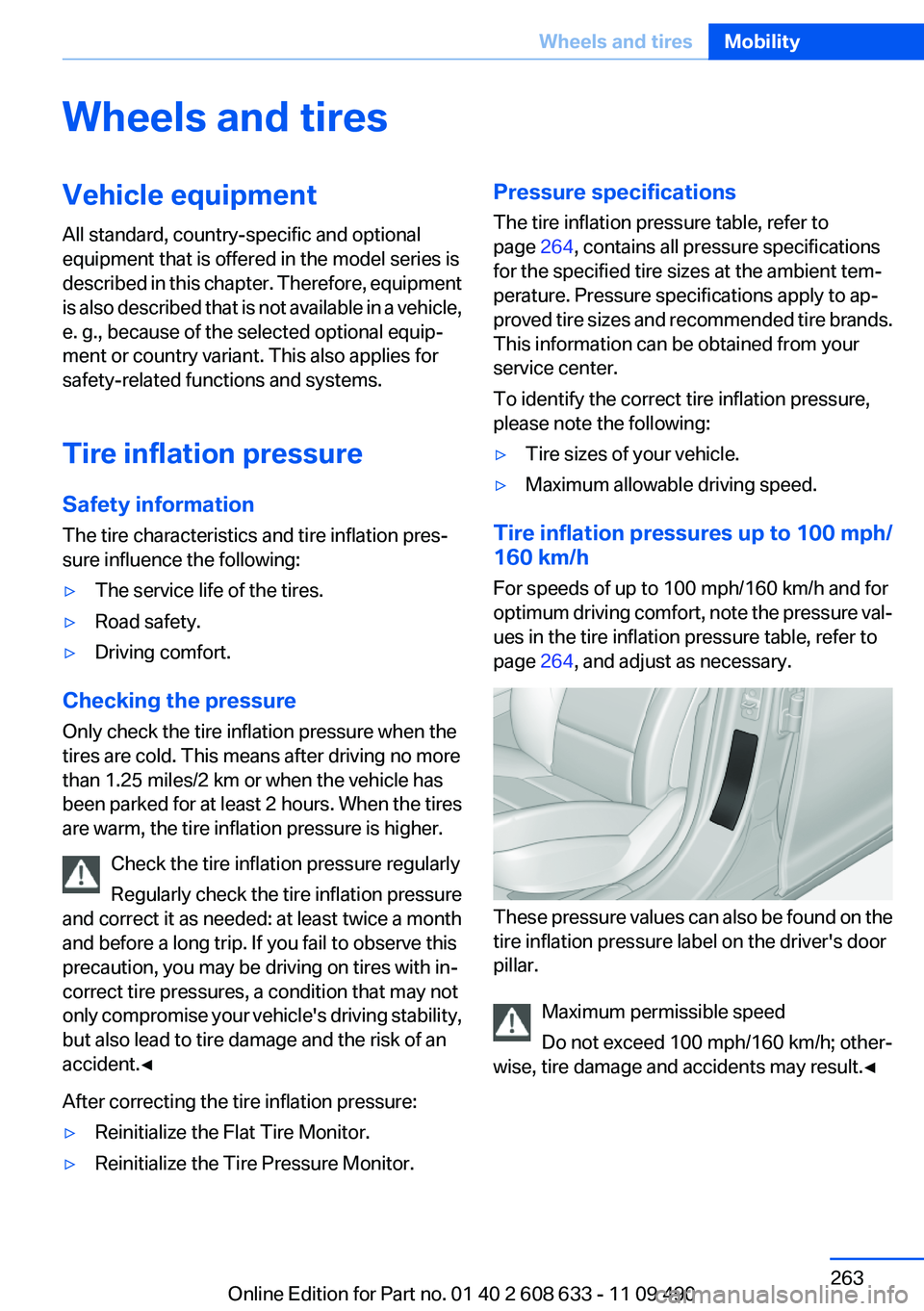
These pressure values can also be found on the
tire inflation pressure label on the driver's door
pillar.
Maximum permissible speed
Do not exceed 100 mph/160 km/h; other‐
wise, tire damage and accidents may result.◀
Seite 263Wheels and tiresMobility263
Online Edition for Part no. 01 40 2 608 633 - 11 09 490
Page 264 of 325
Tire inflation pressure values up to
100 mph/160 km/h
320iTire sizePressure specifications
in bar/PSISpecifications in
bar/PSI with cold
tires225/50 R 17 94 V M
+S A/S RSC
225/50 R 17 94 V
RSC
225/50 R 17 94 H M
+S RSC2.2 / 322.2 / 32225/45 R 18 91 V M
+S RSC
225/45 R 18 91 Y
RSC
225/45 R 18 95 V M
+S XL RSC2.2 / 322.4 / 35F: 225/50 R 17 94 W
RSC
R: 255/45 R 17 98 W
RSC2.2 / 32
--
2.2 / 32F.: 225/45 R 18 91 Y
RSC
R: 255/40 R 18 95 Y
RSC2.2 / 32
--
2.2 / 32F: 225/40 R 19 89 Y
RSC
R: 255/35 R 19 92 Y
RSC2.2 / 32
--
2.4/ 35Tire sizePressure specifications
in bar/PSIF: 225/35 R 20 90 Y
XL RSC
R: 255/30 R 20 92 Y
XL RSC2.4 / 35
--
2.8/ 41Compact wheel:
T 135/80 R 18 104
MSpeed up to a max. of
50 mph / 80 km/h
4.2 / 60
328i
Tire sizePressure specifications
in bar/PSISpecifications in
bar/PSI with cold
tires225/50 R 17 94 V M
+S A/S RSC
225/50 R 17 94 W
RSC
225/50 R 17 94 H M
+S RSC2.2 / 322.2 / 32225/45 R 18 91 V M
+S A/S RSC
225/45 R 18 91 Y
RSC
225/45 R 18 95 V M
+S XL RSC2.2 / 322.4 / 35F: 225/50 R 17 94 W
RSC
R: 255/45 R 17 98 W
RSC2.2 / 32
--
2.2 / 32F: 225/45 R 18 91 Y
RSC
R: 255/40 R 18 95 Y
RSC2.2 / 32
--
2.2 / 32Seite 264MobilityWheels and tires264
Online Edition for Part no. 01 40 2 608 633 - 11 09 490
Page 265 of 325
Tire sizePressure specifications
in bar/PSIF: 225/40 R 19 89 Y
RSC
R: 255/35 R 19 92 Y
RSC2.2 / 32
--
2.4 / 35F: 225/35 R 20 90 Y
XL RSC
R: 255/30 R 20 92 Y
XL RSC2.4 / 35
--
2.8 / 41Compact wheel:
T 135/80 R 18 104
MSpeed up to a max. of
50 mph / 80 km/h
4.2 / 60
335i
Tire sizePressure specifications
in bar/PSISpecifications in
bar/PSI with cold
tires225/45 R 18 91 V M
+S A/S RSC
225/45 R 18 91 Y
RSC
225/45 R 18 95 V M
+S XL RSC2.2 / 322.6 / 38F: 225/45 R 18 91 Y
RSC
R: 255/40 R 18 95 Y
RSC2.2 / 32
--
2.4 / 35F: 225/40 R 19 89 Y
RSC
R: 255/35 R 19 92 Y
RSC2.4 / 35
--
2.6 / 38Tire sizePressure specifications
in bar/PSIF: 225/35 R 20 90 Y
XL RSC
R: 255/30 R 20 92 Y
XL RSC2.6 / 38
--
3.0 / 44Compact wheel:
T 135/80 R 18 104
MSpeed up to a max. of
50 mph / 80 km/h
4.2 / 60
Tire inflation pressures at max. speeds
above 100 mph/160 km/h
Speeds above 100 mph/160 km/h
In order to drive at maximum speeds in ex‐
cess of 100 mph/160 km/h, please observe, and,
if necessary, adjust tire pressures for speeds
exceeding 100 mph/160 km/h from the relevant
table on the following pages. Otherwise tire
damage and accidents could occur.◀
Tire inflation pressure values over
100 mph/160 km/h
320i
Tire sizePressure specifications
in bar/PSISpecifications in
bar/PSI with cold
tires225/50 R 17 94 V M
+S A/S RSC
225/50 R 17 94 V
RSC
225/50 R 17 94 H M
+S RSC2.2 / 322.7 / 39Seite 265Wheels and tiresMobility265
Online Edition for Part no. 01 40 2 608 633 - 11 09 490
Page 266 of 325
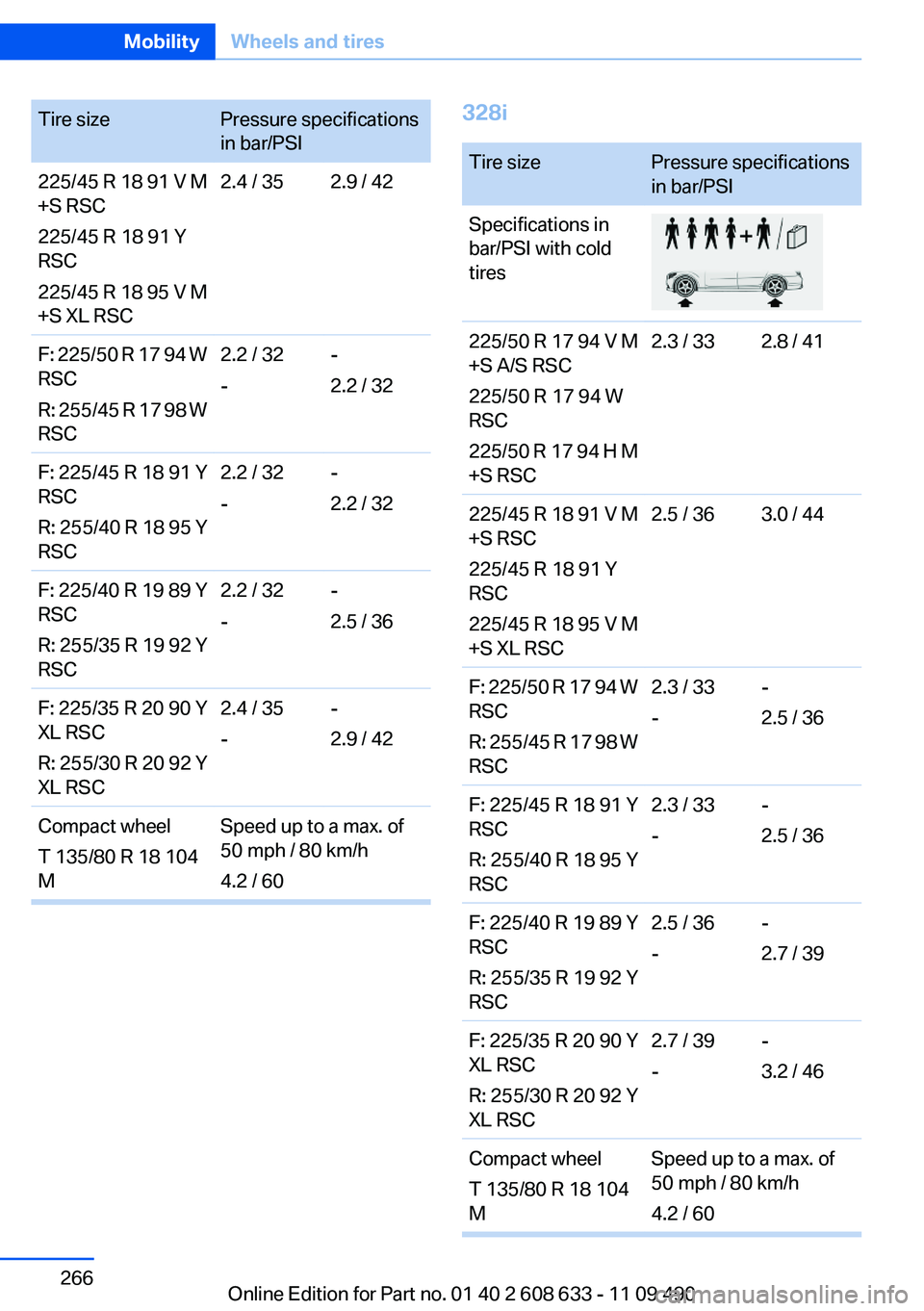
Tire sizePressure specifications
in bar/PSI225/45 R 18 91 V M
+S RSC
225/45 R 18 91 Y
RSC
225/45 R 18 95 V M
+S XL RSC2.4 / 352.9 / 42F: 225/50 R 17 94 W
RSC
R: 255/45 R 17 98 W
RSC2.2 / 32
--
2.2 / 32F: 225/45 R 18 91 Y
RSC
R: 255/40 R 18 95 Y
RSC2.2 / 32
--
2.2 / 32F: 225/40 R 19 89 Y
RSC
R: 255/35 R 19 92 Y
RSC2.2 / 32
--
2.5 / 36F: 225/35 R 20 90 Y
XL RSC
R: 255/30 R 20 92 Y
XL RSC2.4 / 35
--
2.9 / 42Compact wheel
T 135/80 R 18 104
MSpeed up to a max. of
50 mph / 80 km/h
4.2 / 60328iTire sizePressure specifications
in bar/PSISpecifications in
bar/PSI with cold
tires225/50 R 17 94 V M
+S A/S RSC
225/50 R 17 94 W
RSC
225/50 R 17 94 H M
+S RSC2.3 / 332.8 / 41225/45 R 18 91 V M
+S RSC
225/45 R 18 91 Y
RSC
225/45 R 18 95 V M
+S XL RSC2.5 / 363.0 / 44F: 225/50 R 17 94 W
RSC
R: 255/45 R 17 98 W
RSC2.3 / 33
--
2.5 / 36F: 225/45 R 18 91 Y
RSC
R: 255/40 R 18 95 Y
RSC2.3 / 33
--
2.5 / 36F: 225/40 R 19 89 Y
RSC
R: 255/35 R 19 92 Y
RSC2.5 / 36
--
2.7 / 39F: 225/35 R 20 90 Y
XL RSC
R: 255/30 R 20 92 Y
XL RSC2.7 / 39
--
3.2 / 46Compact wheel
T 135/80 R 18 104
MSpeed up to a max. of
50 mph / 80 km/h
4.2 / 60Seite 266MobilityWheels and tires266
Online Edition for Part no. 01 40 2 608 633 - 11 09 490
Page 267 of 325
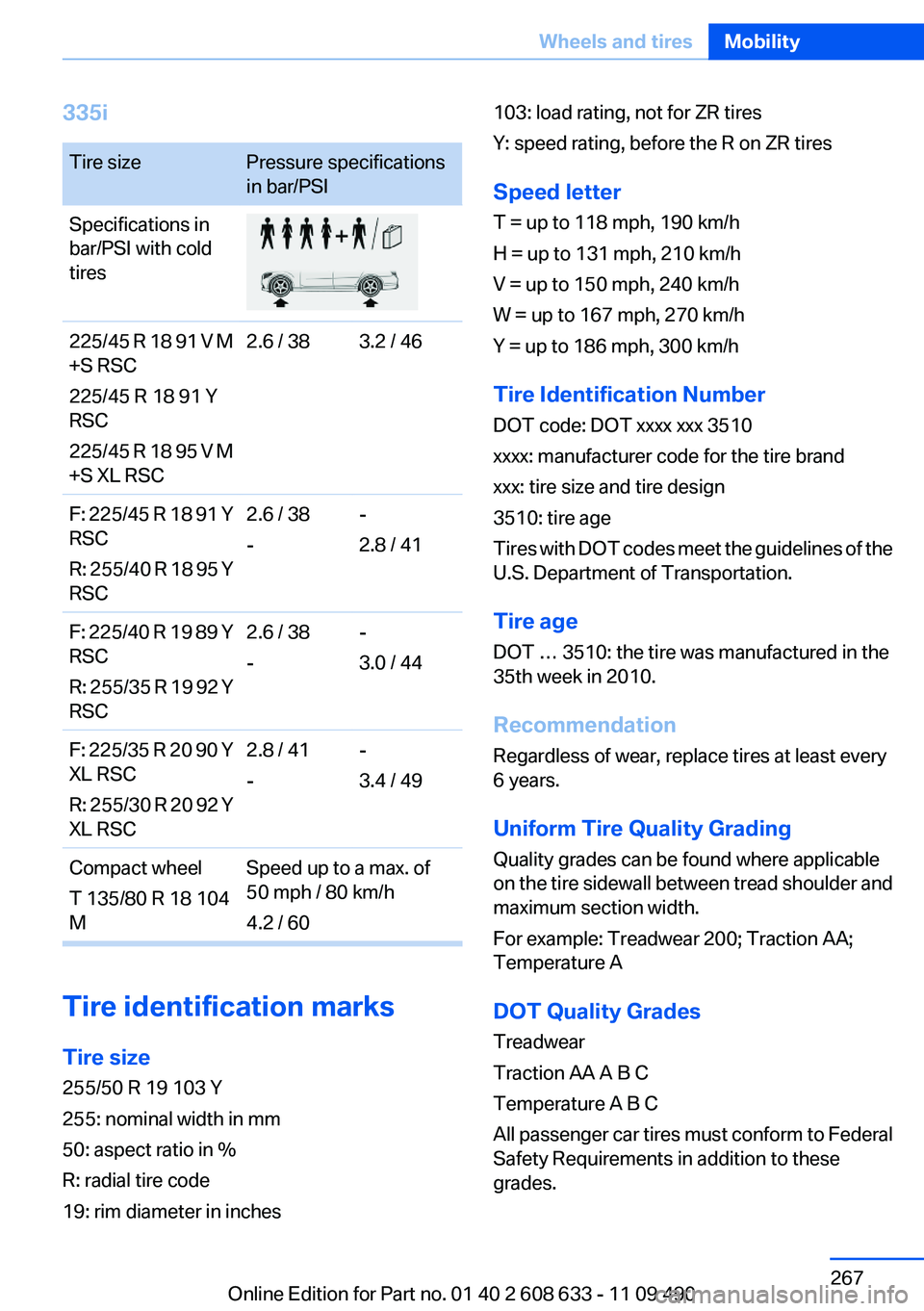
335iTire sizePressure specifications
in bar/PSISpecifications in
bar/PSI with cold
tires225/45 R 18 91 V M
+S RSC
225/45 R 18 91 Y
RSC
225/45 R 18 95 V M
+S XL RSC2.6 / 383.2 / 46F: 225/45 R 18 91 Y
RSC
R: 255/40 R 18 95 Y
RSC2.6 / 38
--
2.8 / 41F: 225/40 R 19 89 Y
RSC
R: 255/35 R 19 92 Y
RSC2.6 / 38
--
3.0 / 44F: 225/35 R 20 90 Y
XL RSC
R: 255/30 R 20 92 Y
XL RSC2.8 / 41
--
3.4 / 49Compact wheel
T 135/80 R 18 104
MSpeed up to a max. of
50 mph / 80 km/h
4.2 / 60
Tire identification marks
Tire size
255/50 R 19 103 Y
255: nominal width in mm
50: aspect ratio in %
R: radial tire code
19: rim diameter in inches
103: load rating, not for ZR tires
Y: speed rating, before the R on ZR tires
Speed letter
T = up to 118 mph, 190 km/h
H = up to 131 mph, 210 km/h
V = up to 150 mph, 240 km/h
W = up to 167 mph, 270 km/h
Y = up to 186 mph, 300 km/h
Tire Identification Number
DOT code: DOT xxxx xxx 3510
xxxx: manufacturer code for the tire brand
xxx: tire size and tire design
3510: tire age
Tires with DOT codes meet the guidelines of the
U.S. Department of Transportation.
Tire age
DOT … 3510: the tire was manufactured in the
35th week in 2010.
Recommendation
Regardless of wear, replace tires at least every
6 years.
Uniform Tire Quality Grading
Quality grades can be found where applicable
on the tire sidewall between tread shoulder and
maximum section width.
For example: Treadwear 200; Traction AA;
Temperature A
DOT Quality Grades
Treadwear
Traction AA A B C
Temperature A B C
All passenger car tires must conform to Federal
Safety Requirements in addition to these
grades.Seite 267Wheels and tiresMobility267
Online Edition for Part no. 01 40 2 608 633 - 11 09 490