start stop button BMW 335I 2013 User Guide
[x] Cancel search | Manufacturer: BMW, Model Year: 2013, Model line: 335I, Model: BMW 335I 2013Pages: 242, PDF Size: 5.38 MB
Page 133 of 242
A component of the parking assistant is the PDC
Park Distance Control, refer to page 123.
Notes Personal responsibility
The parking assistant does not relieve the
driver of responsibility for the vehicle during the
parking procedure.
Watch the parking space and parking procedure
closely and intervene if necessary; otherwise,
there is the danger of an accident.◀
Changes to the parking space
Changes to the parking space after it was
measured are not taken into account by the sys‐
tem.
Therefore, always be alert and ready to inter‐
vene; otherwise, there is the danger of an acci‐
dent occurring.◀
Transporting loads
Loads that extend beyond the perimeter
of the vehicle are not taken into account by the
system during the parking procedure.
Therefore, always be alert and ready to inter‐
vene; otherwise, there is the danger of an acci‐
dent occurring.◀
Curbs
The parking assistant may steer the vehi‐
cle over or onto curbs.
Therefore, always be alert and ready to inter‐
vene; otherwise, the wheels, tires, or the vehicle
may become damaged.◀
An engine that has been switched off by the
Auto Start Stop function is restarted automati‐
cally when the parking assistant is activated.
Requirements
For measuring parking spaces▷Maximum speed while driving forward ap‐
prox. 22 mph/35 km/h.▷Maximum distance to row of parked vehi‐
cles: 5 ft/1.5 m.▷When parking in parking spaces on the driv‐
er's side, the corresponding turn signal must
be set.
Suitable parking space
▷Gap between two objects with a minimum
length of approx. 5 ft/1.5 m.▷Minimum length of the gap: own vehicle's
length plus approx 4 ft/1.2 m.▷Minimum depth: approx. 5 ft/1.5 m.
For parking procedure
Closed doors.
At a glance
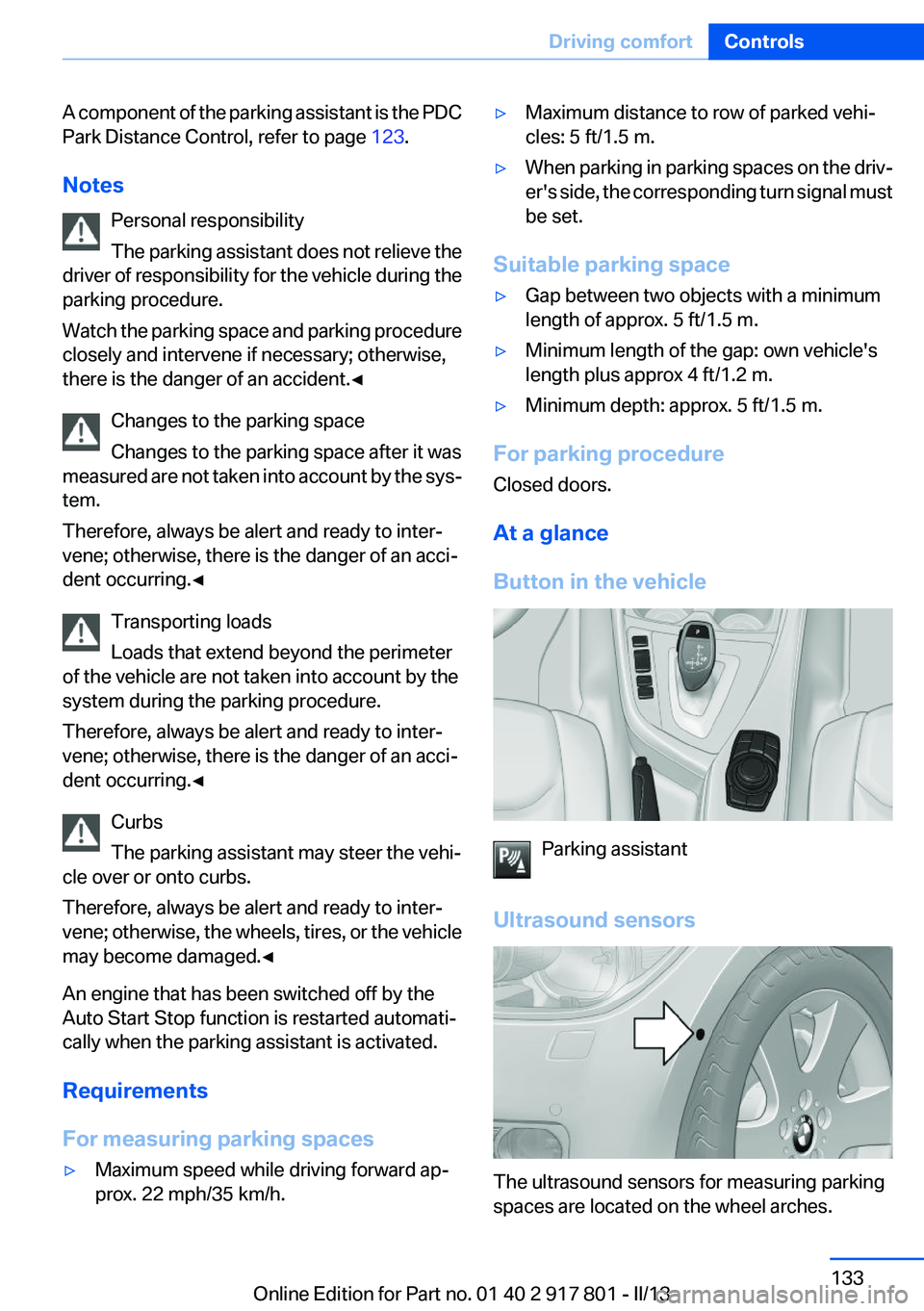
Button in the vehicle
Parking assistant
Ultrasound sensors
The ultrasound sensors for measuring parking
spaces are located on the wheel arches.
Seite 133Driving comfortControls133
Online Edition for Part no. 01 40 2 917 801 - II/13
Page 233 of 242
Brake assistant 110
Brake discs, breaking in 158
Brake force display 107
Brake lamps, brake force dis‐ play 107
Brake lights, adaptive 107
Brake pads, breaking in 158
Braking, notes 159
Breakdown assis‐ tance 213, 214
Breaking in 158
Brightness of Control Dis‐ play 85
Bulb replacement 202
Bulb replacement, front 203
Bulb replacement, halogen headlamps 203
Bulb replacement, rear 208
Bulb replacement, xenon headlamps 206
Bulbs and lamps 202
Button, RES 117
Button, Start/Stop 59
Bypassing, refer to Jump- starting 214
C
California Proposition 65 Warning 7
Camera, backup camera 126
Camera, care 222
Camera, Side View 130
Camera, Top View 128
Can holder, refer to Cu‐ pholder 154
Car battery 210
Car care products 220
Care, displays 222
Care, vehicle 220
Cargo 161
Cargo area, enlarging 150
Cargo area lid 37
Cargo area, storage compart‐ ments 155 Cargo straps, securing
cargo 162
Car key, refer to Remote con‐ trol 30
Carpet, care 221
Car wash 219
Catalytic converter, refer to Hot exhaust system 159
CBS Condition Based Serv‐ ice 200
CD/Multimedia, see user's manual for Navigation, Enter‐
tainment and Communica‐
tion
Center armrest 153
Center console 14
Central locking system 33
Central screen, refer to Control Display 16
Changes, technical, refer to Safety 7
Changing parts 202
Changing wheels 210
Changing wheels/tires 191
Check Control 73
Children, seating position 55
Children, transporting safely 55
Child restraint fixing sys‐ tem 55
Child restraint fixing system LATCH 56
Child restraint fixing systems, mounting 55
Child safety locks 58
Child seat, mounting 55
Child seats 55
Chrome parts, care 221
Cigarette lighter 148
Cleaning, displays 222
Climate control 137, 139
Clock 76
Closing/opening from in‐ side 36
Closing/opening via door lock 36 Closing/opening with remote
control 34
Clothes hooks 154
Cold starting, refer to Starting the engine 60
Collision warning 100, 102
Combination switch, refer to Turn signals 64
Combination switch, refer to Wiper system 64
Comfort Access 38
COMFORT program, Dynamic Driving Control 113
Compartments in the doors 153
Compass 146
Computer 81
Condensation on win‐ dows 141
Condensation under the vehi‐ cle 160
Condition Based Service CBS 200
Configure driving mode 113
Confirmation signal 35
ConnectedDrive, see user's manual for Navigation, Enter‐
tainment and Communica‐
tion
Control Display 16
Control Display, settings 84
Controller 16, 17
Control systems, driving sta‐ bility 110
Convenient opening 34
Coolant 199
Coolant temperature 76
Cooling function 138, 140
Cooling, maximum 140
Cooling system 199
Corrosion on brake discs 160
Cruise control 121
Cruise control, active with Stop & Go 115
Cruising range 77
Cupholder 154 Seite 233Everything from A to ZReference233
Online Edition for Part no. 01 40 2 917 801 - II/13
Page 239 of 242
Sport program, transmis‐sion 68
Sport steering, variable 112
Stability control systems 110
Start/stop, automatic func‐ tion 61
Start/Stop button 59
Start function during malfunc‐ tion 31
Starting the engine 60
Status display, tires 95
Status information, iDrive 20
Status of Owner's Manual 6
Steering wheel, adjusting 54
Steering wheel heating 54
Steptronic, automatic trans‐ mission 67
Stopping the engine 61
Storage compartment in the rear 154
Storage compartments 152
Storage compartments, loca‐ tions 152
Storage, tires 192
Storing the vehicle 222
Summer tires, tread 190
Supplementary text mes‐ sage 75
Surround View 125
Switch for Dynamic Driv‐ ing 112
Switch-on times, parked-car ventilation 143
Switch, refer to Cockpit 12
Symbols 6
T
Tachometer 76
Tailgate 37
Tailgate opening with no- touch activation 39
Tailgate via remote control 35
Tail lamps 208
Technical changes, refer to Safety 7 Technical data 226
Telephone, see user's manual for Navigation, Entertain‐
ment and Communication
Temperature, automatic cli‐ mate control 138, 140
Temperature display, external temperature 76
Temperature, engine oil 76
Tempomat, refer to Active Cruise Control 115
Terminal, jump-starting 215
Text message, supplemen‐ tary 75
Theft alarm system, refer to Alarm system 40
Theft protection, refer to Cen‐ tral locking system 33
Thigh support 47
Through-loading system 150
Tilt alarm sensor 41
Time of arrival 82
Tire damage 190
Tire identification marks 189
Tire inflation pressure 178
Tire inflation pressure monitor, refer to FTM 98
Tire Pressure Monitor TPM 95
Tires, changing 191
Tires, everything on wheels and tires 178
Tires, run-flat tires 192
Tire tread 190
Tone, see user's manual for Navigation, Entertainment
and Communication
Tools 202
Top View 128
Total vehicle weight 227
Tow fitting 217
Towing 216
Tow-starting 216
Tow truck 216
TPM Tire Pressure Moni‐ tor 95 Traction control 111
TRACTION program, Dynamic Driving Control 111
Transmission, automatic 67
Transmission, manual 67
Transporting children safely 55
Tread, tires 190
Trip computer 83
Triple turn signal activa‐ tion 64
Trip odometer 76
Truck for tow-starting/tow‐ ing 216
Trunk lid 37
Trunk lid, emergency unlock‐ ing 38
Trunk lid, hotel function 37
Trunk lid opening with no- touch activation 39
Trunk lid via remote con‐ trol 35
Turning circle 227
Turning circle lines, backup camera 127
Turn signals, operation 64
Turn signals, rear, bulb re‐ placement 208
U
Unintentional alarm 41
Units of measure 85
Universal remote control 144
Unlock button, automatic transmission 68
Unlocking/locking from in‐ side 36
Unlocking/locking via door lock 36
Unlocking/locking with remote control 34
Updates made after the edito‐ rial deadline 7
Upholstery care 221
USB interface 149 Seite 239Everything from A to ZReference239
Online Edition for Part no. 01 40 2 917 801 - II/13