start BMW 335I CONVERTIBLE 2007 E93 Owners Manual
[x] Cancel search | Manufacturer: BMW, Model Year: 2007, Model line: 335I CONVERTIBLE, Model: BMW 335I CONVERTIBLE 2007 E93Pages: 272, PDF Size: 8.97 MB
Page 200 of 272
Telephoning
198
Example: dialing phone numbers
Start the dialog:
Press the button on the steering wheel.
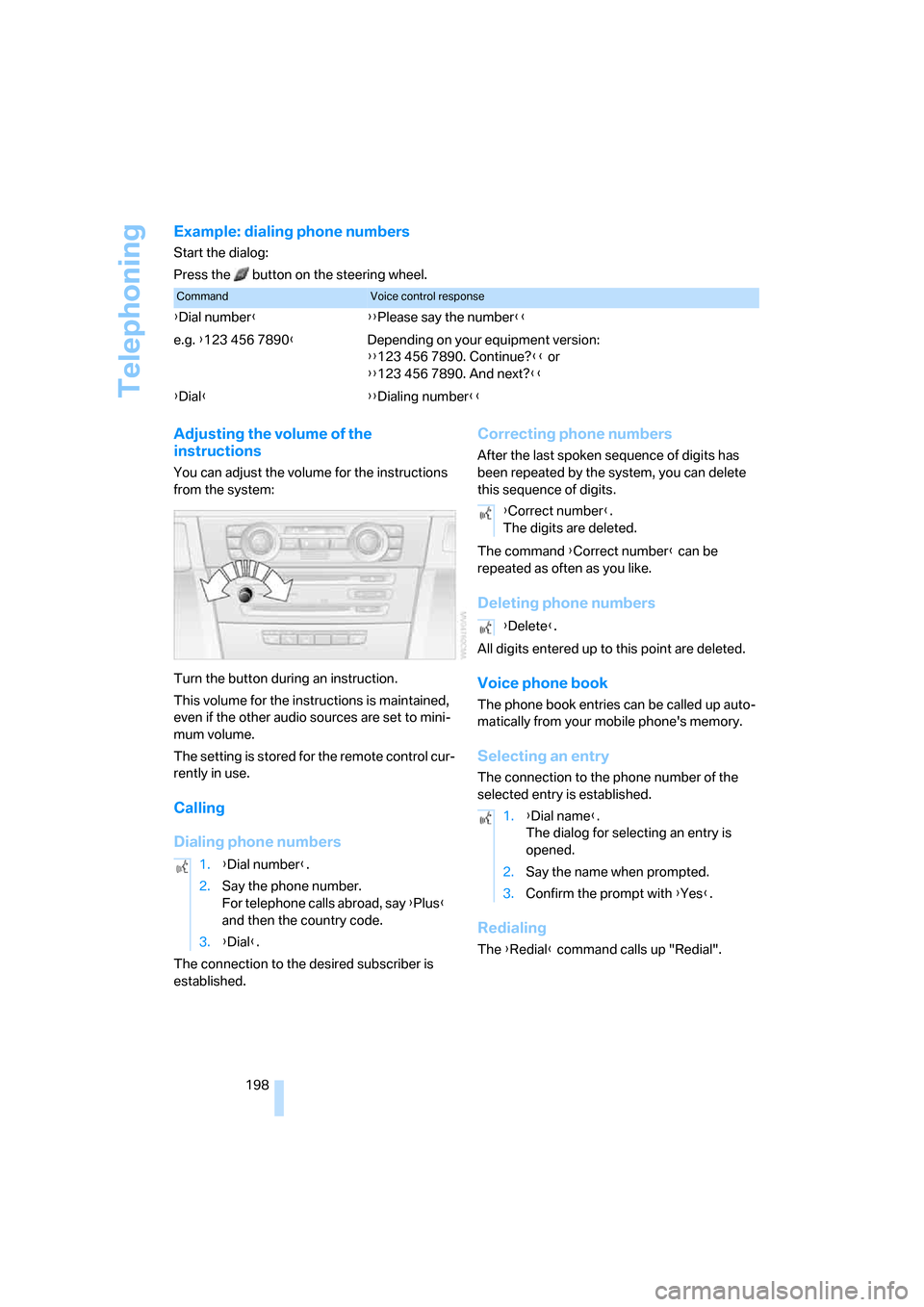
Adjusting the volume of the
instructions
You can adjust the volume for the instructions
from the system:
Turn the button during an instruction.
This volume for the instructions is maintained,
even if the other audio sources are set to mini-
mum volume.
The setting is stored for the remote control cur-
rently in use.
Calling
Dialing phone numbers
The connection to the desired subscriber is
established.
Correcting phone numbers
After the last spoken sequence of digits has
been repeated by the system, you can delete
this sequence of digits.
The command {Correct number} can be
repeated as often as you like.
Deleting phone numbers
All digits entered up to this point are deleted.
Voice phone book
The phone book entries can be called up auto-
matically from your mobile phone's memory.
Selecting an entry
The connection to the phone number of the
selected entry is established.
Redialing
The {Redial} command calls up "Redial".
CommandVoice control response
{Dial number}{{Please say the number}}
e.g. {123 456 7890}Depending on your equipment version:
{{123 456 7890. Continue?}} or
{{123 456 7890. And next?}}
{Dial}{{Dialing number}}
1.{Dial number}.
2.Say the phone number.
For telephone calls abroad, say {Plus}
and then the country code.
3.{Dial}.
{Correct number}.
The digits are deleted.
{Delete}.
1.{Dial name}.
The dialog for selecting an entry is
opened.
2.Say the name when prompted.
3.Confirm the prompt with {Yes}.
Page 204 of 272
BMW Assist
202
Characteristics of the offered services
The following characteristics apply to the ser-
vices:
>The services offered are country-specific.
>Voice contact is established or data are
transferred, depending on the equipment
and the country. In some countries, it is
possible to do both.
>The data transmitted can be vehicle data,
for example, your current position or the
Condition Based Service CBS data.
Using services
Contacting the BMW Assist Response
Center
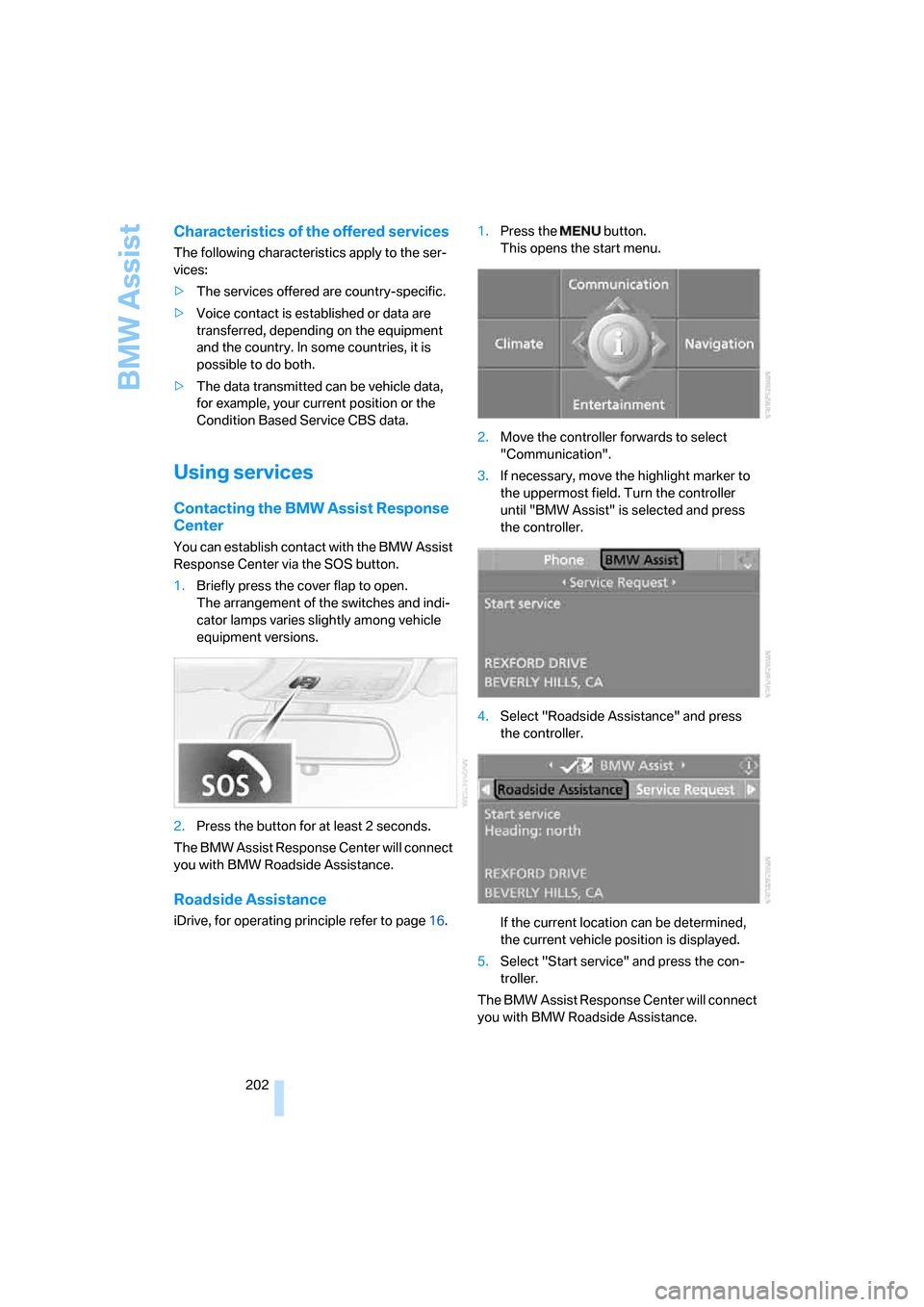
You can establish contact with the BMW Assist
Response Center via the SOS button.
1.Briefly press the cover flap to open.
The arrangement of the switches and indi-
cator lamps varies slightly among vehicle
equipment versions.
2.Press the button for at least 2 seconds.
The BMW Assist Response Center will connect
you with BMW Roadside Assistance.
Roadside Assistance
iDrive, for operating principle refer to page16.1.Press the button.
This opens the start menu.
2.Move the controller forwards to select
"Communication".
3.If necessary, move the highlight marker to
the uppermost field. Turn the controller
until "BMW Assist" is selected and press
the controller.
4.Select "Roadside Assistance" and press
the controller.
If the current location can be determined,
the current vehicle position is displayed.
5.Select "Start service" and press the con-
troller.
The BMW Assist Response Center will connect
you with BMW Roadside Assistance.
Page 205 of 272
203
Entertainment
Reference
At a glance
Controls
Driving tips Communications
Navigation
Mobility
TeleService
Automatic service notification*
The data on the service status of your vehicle or
on required inspections are transmitted auto-
matically prior to the due date. You can check
when the BMW center was notified.
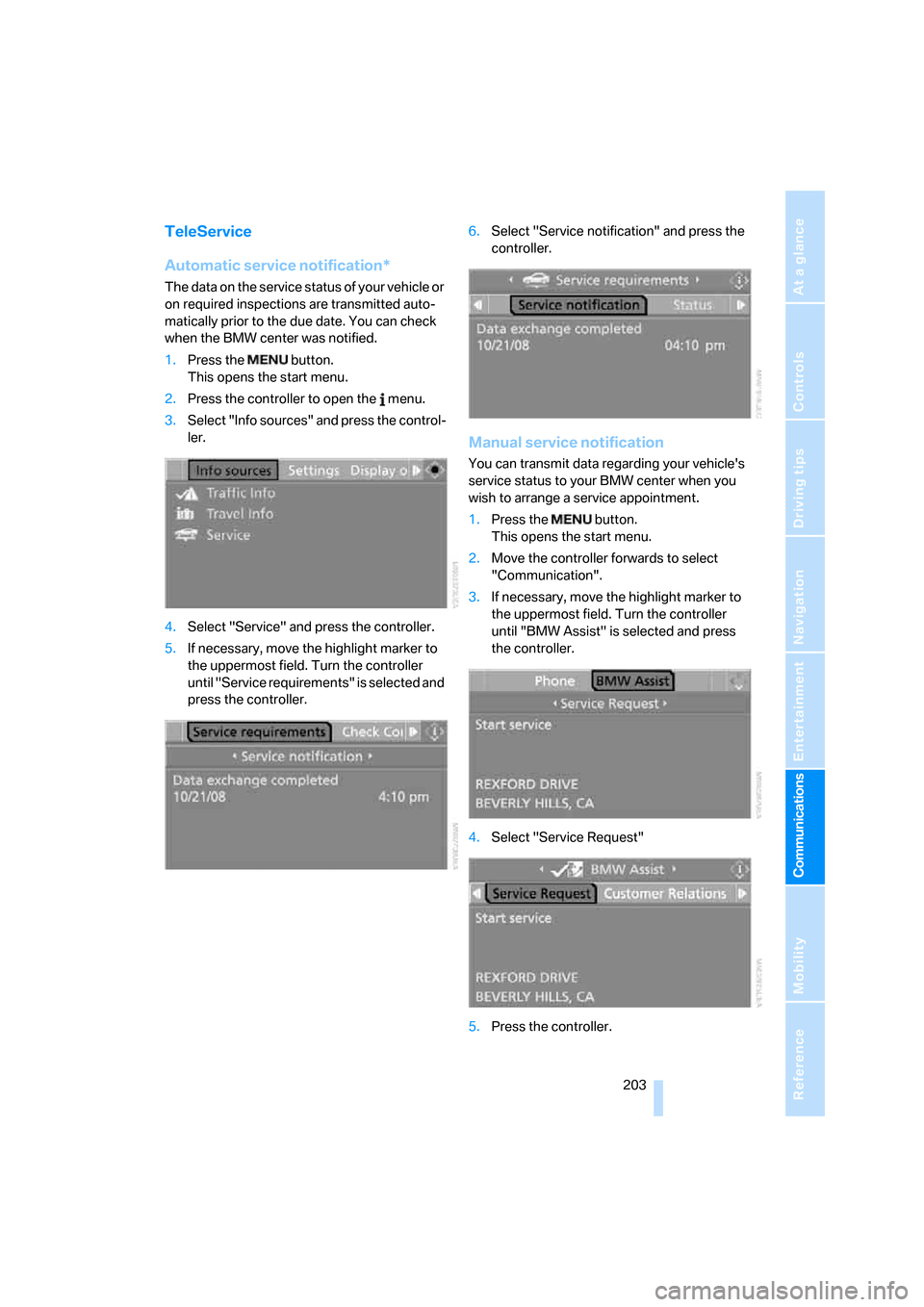
1.Press the button.
This opens the start menu.
2.Press the controller to open the menu.
3.Select "Info sources" and press the control-
ler.
4.Select "Service" and press the controller.
5.If necessary, move the highlight marker to
the uppermost field. Turn the controller
until "Service requirements" is selected and
press the controller.6.Select "Service notification" and press the
controller.
Manual service notification
You can transmit data regarding your vehicle's
service status to your BMW center when you
wish to arrange a service appointment.
1.Press the button.
This opens the start menu.
2.Move the controller forwards to select
"Communication".
3.If necessary, move the highlight marker to
the uppermost field. Turn the controller
until "BMW Assist" is selected and press
the controller.
4.Select "Service Request"
5.Press the controller.
Page 206 of 272
BMW Assist
204 6.Select "Start service" and press the con-
troller.
The service-relevant data are transmitted. Your
BMW center will contact you to arrange a ser-
vice appointment.
Contacting BMW Customer Relations
For all information related to your vehicle you
can call BMW Customer Relations.
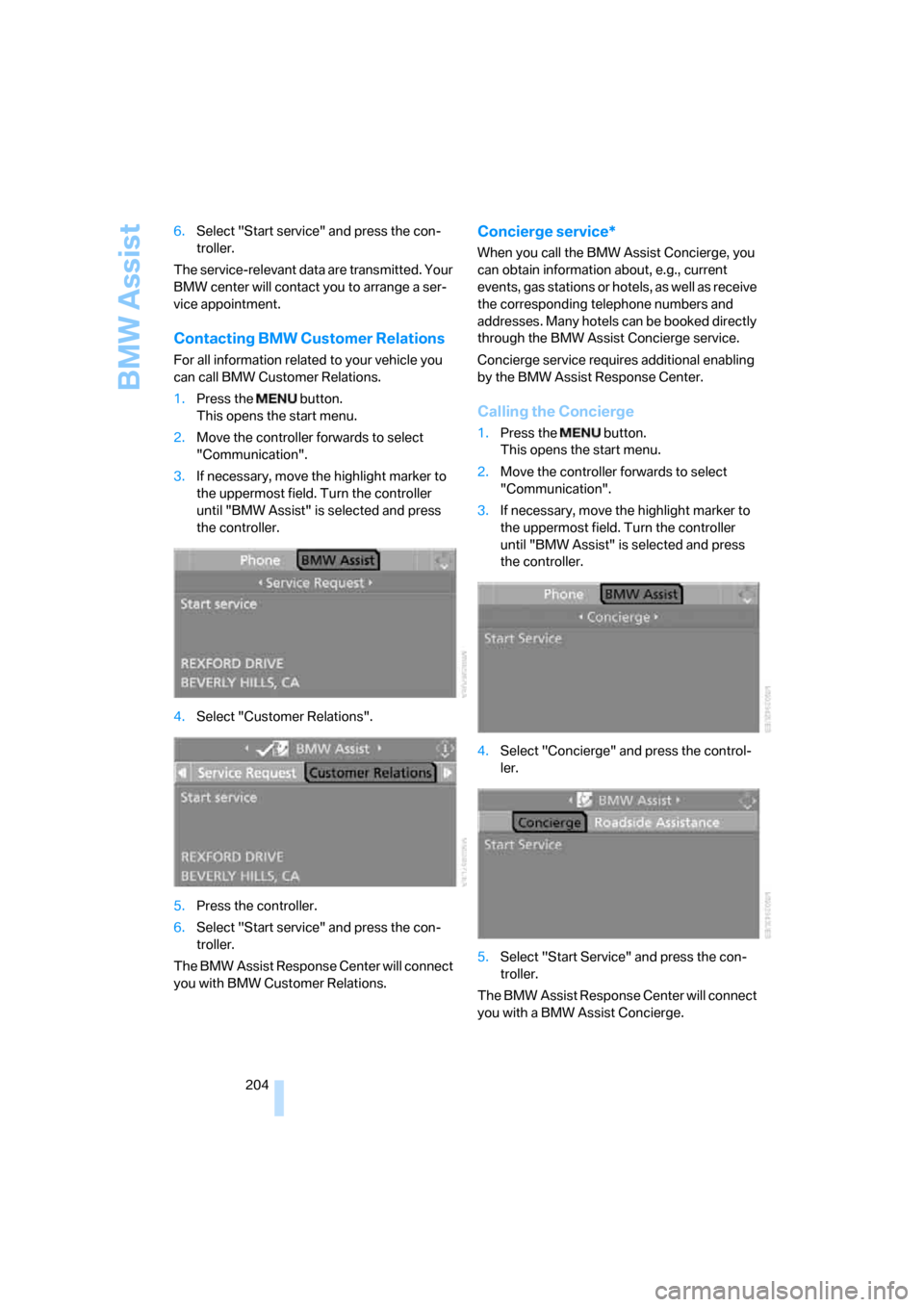
1.Press the button.
This opens the start menu.
2.Move the controller forwards to select
"Communication".
3.If necessary, move the highlight marker to
the uppermost field. Turn the controller
until "BMW Assist" is selected and press
the controller.
4.Select "Customer Relations".
5.Press the controller.
6.Select "Start service" and press the con-
troller.
The BMW Assist Response Center will connect
you with BMW Customer Relations.
Concierge service*
When you call the BMW Assist Concierge, you
can obtain information about, e.g., current
e v e n t s , g a s s t a t i o n s o r h o t e ls , a s w e ll a s r ec e i v e
the corresponding telephone numbers and
addresses. Many hotels can be booked directly
through the BMW Assist Concierge service.
Concierge service requires additional enabling
by the BMW Assist Response Center.
Calling the Concierge
1.Press the button.
This opens the start menu.
2.Move the controller forwards to select
"Communication".
3.If necessary, move the highlight marker to
the uppermost field. Turn the controller
until "BMW Assist" is selected and press
the controller.
4.Select "Concierge" and press the control-
ler.
5.Select "Start Service" and press the con-
troller.
The BMW Assist Response Center will connect
you with a BMW Assist Concierge.
Page 207 of 272
205
Entertainment
Reference
At a glance
Controls
Driving tips Communications
Navigation
Mobility
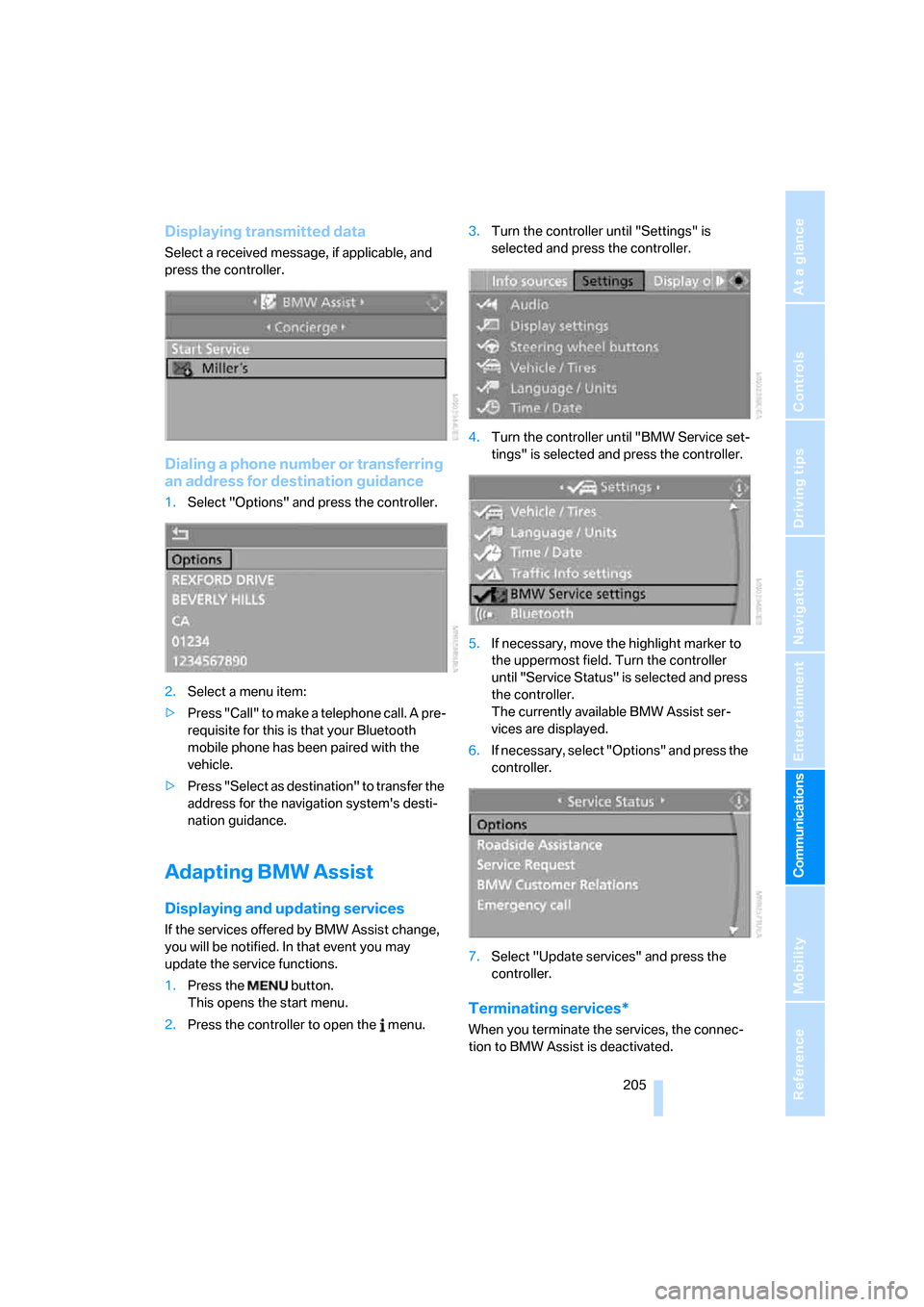
Displaying transmitted data
Select a received message, if applicable, and
press the controller.
Dialing a phone number or transferring
an address for destination guidance
1.Select "Options" and press the controller.
2.Select a menu item:
>Press "Call" to make a telephone call. A pre-
requisite for this is that your Bluetooth
mobile phone has been paired with the
vehicle.
>Press "Select as destination" to transfer the
address for the navigation system's desti-
nation guidance.
Adapting BMW Assist
Displaying and updating services
If the services offered by BMW Assist change,
you will be notified. In that event you may
update the service functions.
1.Press the button.
This opens the start menu.
2.Press the controller to open the menu.3.Turn the controller until "Settings" is
selected and press the controller.
4.Turn the controller until "BMW Service set-
tings" is selected and press the controller.
5.If necessary, move the highlight marker to
the uppermost field. Turn the controller
until "Service Status" is selected and press
the controller.
The currently available BMW Assist ser-
vices are displayed.
6.If necessary, select "Options" and press the
controller.
7.Select "Update services" and press the
controller.
Terminating services*
When you terminate the services, the connec-
tion to BMW Assist is deactivated.
Page 208 of 272
BMW Assist
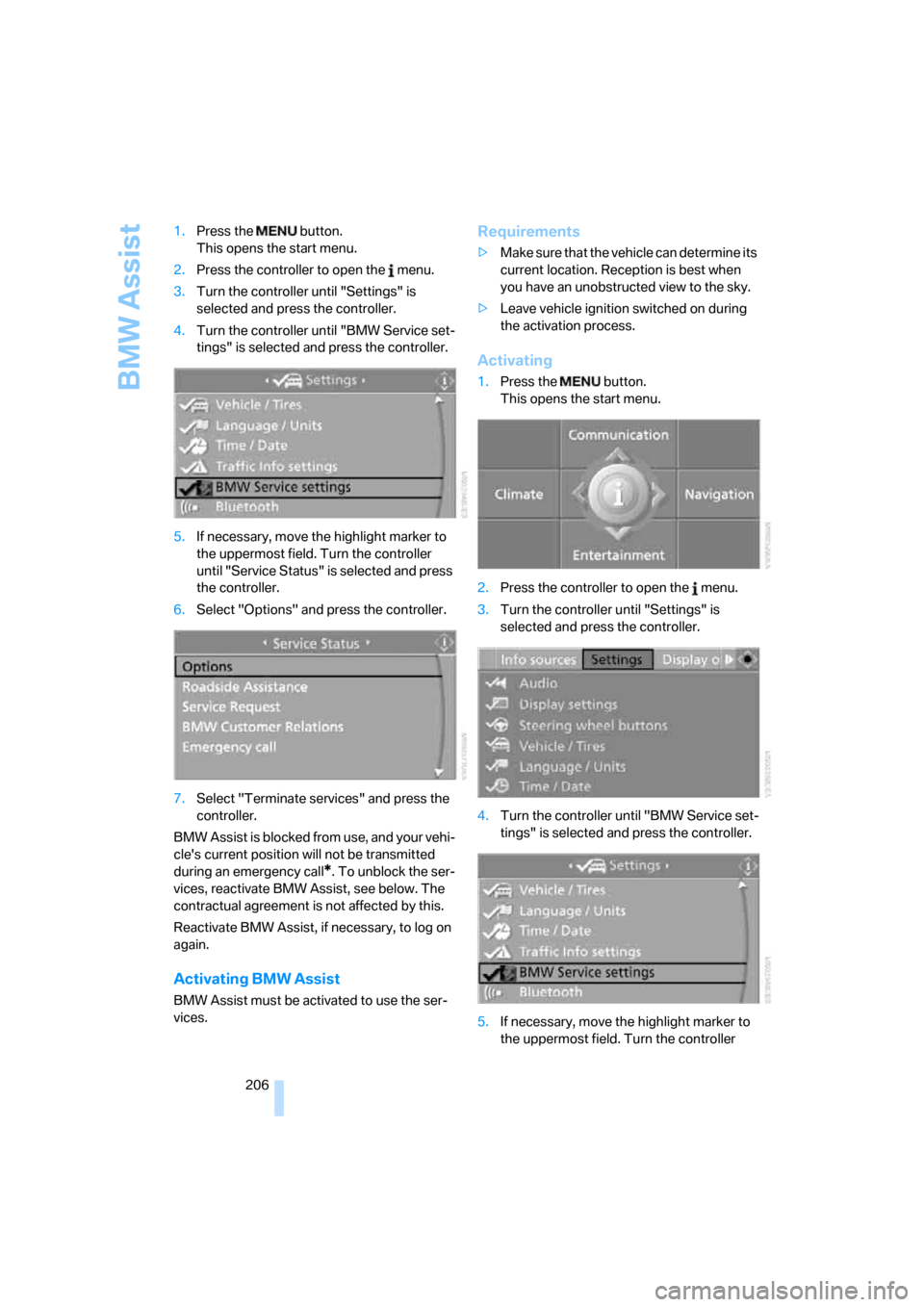
206 1.Press the button.
This opens the start menu.
2.Press the controller to open the menu.
3.Turn the controller until "Settings" is
selected and press the controller.
4.Turn the controller until "BMW Service set-
tings" is selected and press the controller.
5.If necessary, move the highlight marker to
the uppermost field. Turn the controller
until "Service Status" is selected and press
the controller.
6.Select "Options" and press the controller.
7.Select "Terminate services" and press the
controller.
BMW Assist is blocked from use, and your vehi-
cle's current position will not be transmitted
during an emergency call
*. To unblock the ser-
vices, reactivate BMW Assist, see below. The
contractual agreement is not affected by this.
Reactivate BMW Assist, if necessary, to log on
again.
Activating BMW Assist
BMW Assist must be activated to use the ser-
vices.
Requirements
>Make sure that the vehicle can determine its
current location. Reception is best when
you have an unobstructed view to the sky.
>Leave vehicle ignition switched on during
the activation process.
Activating
1.Press the button.
This opens the start menu.
2.Press the controller to open the menu.
3.Turn the controller until "Settings" is
selected and press the controller.
4.Turn the controller until "BMW Service set-
tings" is selected and press the controller.
5.If necessary, move the highlight marker to
the uppermost field. Turn the controller
Page 209 of 272
207
Entertainment
Reference
At a glance
Controls
Driving tips Communications
Navigation
Mobility
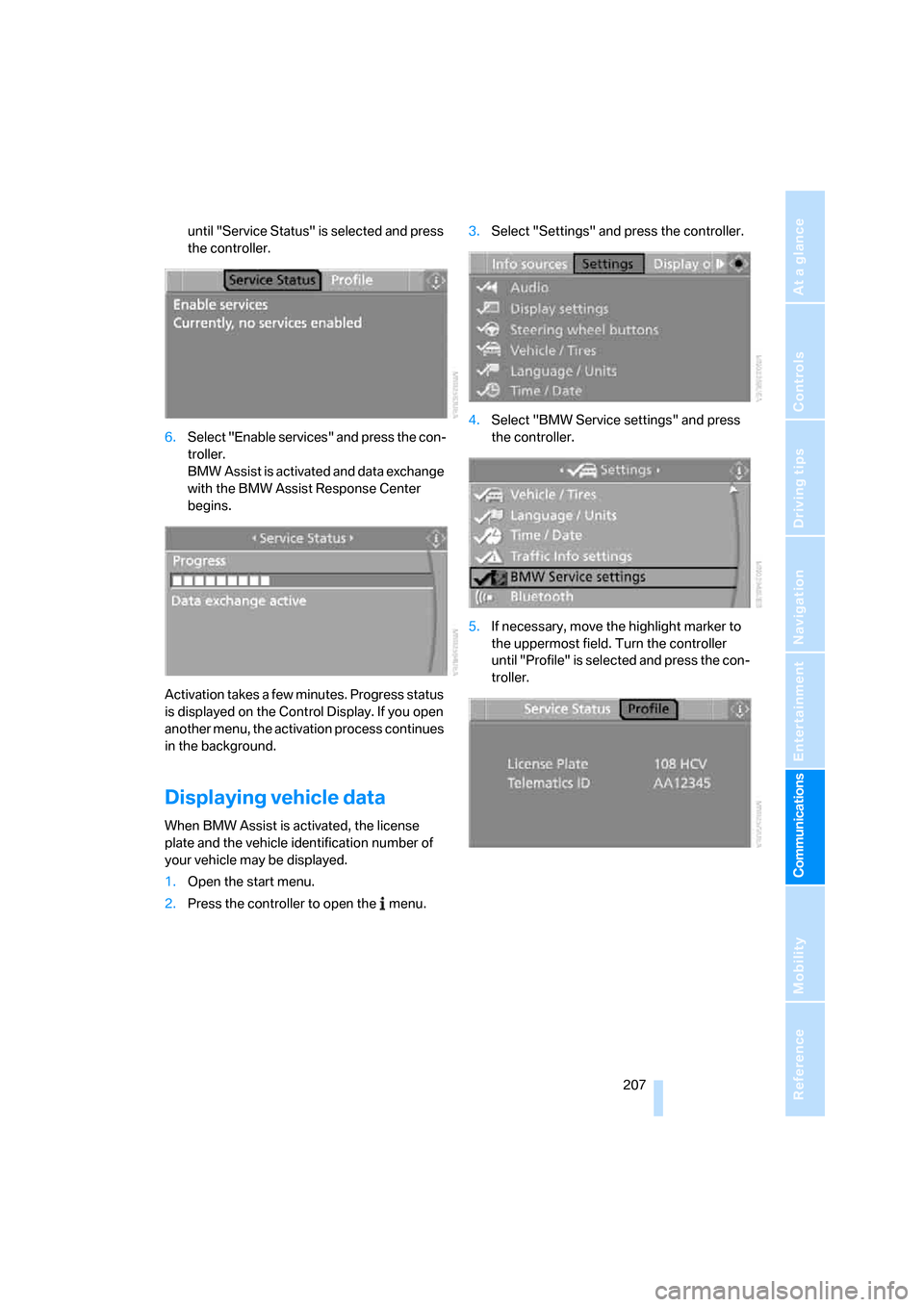
until "Service Status" is selected and press
the controller.
6.Select "Enable services" and press the con-
troller.
BMW Assist is activated and data exchange
with the BMW Assist Response Center
begins.
Activation takes a few minutes. Progress status
is displayed on the Control Display. If you open
another menu, the activation process continues
in the background.
Displaying vehicle data
When BMW Assist is activated, the license
plate and the vehicle identification number of
your vehicle may be displayed.
1.Open the start menu.
2.Press the controller to open the menu.3.Select "Settings" and press the controller.
4.Select "BMW Service settings" and press
the controller.
5.If necessary, move the highlight marker to
the uppermost field. Turn the controller
until "Profile" is selected and press the con-
troller.
Page 213 of 272
Mobility
211Reference
At a glance
Controls
Driving tips
Communications
Navigation
Entertainment
>reduced efficiency of the fuel-vapor recov-
ery system.
The fuel tank is full when the filler nozzle clicks
off the first time.
Fuel tank capacity
Approx. 16.1 US gallons/61 liters, including the
reserve capacity of 2.1 US gallons/8 liters.
Refuel as soon as possible once your
cruising range falls below 30 miles/
50 km, otherwise engine functions are not
ensured and damage can occur.<
Fuel specifications
Do not fill the tank with leaded fuel, as this
would cause permanent damage to the
catalytic converter.
Do not fill the tank with E85, i.e. fuel containing
85 % ethanol, nor with FlexFuel. Otherwise the
engine and fuel supply system will be dam-
aged.<
Required fuel
Super Premium Gasoline/AKI 91
This gasoline is highly recommended.
However, you may also use gasoline with less
AKI. The minimum AKI Rating is:
>328i/xi: 87
>335i: 89.
If you use gasoline with this minimum AKI Rat-
ing, the engine may produce knocking sounds
when starting at high outside temperatures.
This has no effect on the engine life.
Do not use any gasoline below the speci-
fied minimum fuel grade. Otherwise the
engine could be damaged.<
Use high-quality brands
Field experience has indicated significant dif-
ferences in fuel quality: volatility, composition,
additives, etc., among gasolines offered for sale
in the United States and Canada. Fuels contain-
ing up to and including 10 % ethanol or other oxygenates with up to 2.8 % oxygen by weight,
that is, 15 % MTBE or 3 % methanol plus an
equivalent amount of co-solvent, will not void
the applicable warranties with respect to
defects in materials or workmanship.
The use of poor-quality fuels may result in
driveability, starting and stalling problems
especially under certain environmental condi-
tions such as high ambient temperature and
high altitude.
Should you encounter driveability problems
which you suspect could be related to the fuel
you are using, we recommend that you respond
by switching to a recognized high-quality brand
such as gasoline that is advertised as Top Tier
Detergent Gasoline.
Failure to comply with these recommendations
may also result in unscheduled maintenance.<
Page 214 of 272
Wheels and tires
212
Wheels and tires
Tire inflation pressures
Information for your safety
It is not merely the tires' service life, but also
driving comfort and, to a great extent, driving
safety that depend on the condition of the tires
and the maintenance of the specified tire pres-
sure.
Check the tire inflation pressure regularly
and correct it, if necessary: at least twice a
month and before starting long trips. If you fail
to observe this precaution you may be driving
on tires with incorrect tire pressures, a condi-
tion that can not only compromise your vehi-
cle's driving stability, but also lead to tire dam-
age and the risk of an accident. Do not drive
with deflated, i.e. flat tires, except when using
Run-Flat Tires. A flat tire will seriously impair
your vehicle's handling and braking response.
Attempts to drive on a flat tire can lead to loss of
control over the vehicle.<
Checking pressure
Only check tire inflation pressure when the
tires are cold. This means after a maximum of
1.25 miles/2 km driving or when the vehicle has
been parked for at least 2 hours. When tires are
warm, the tire inflation pressure is higher.
After correcting tire inflation pressures,
always reinitialize the Flat Tire Monitor,
refer to page92.<
Inflation pressure specifications
The tables below provide all the correct inflation
pressures for the specified tire sizes at ambient
temperature.
The inflation pressures apply to the tire
sizes approved and tire brands recom-
mended by BMW; a list of these is available
from your BMW center.<
For correct identification of the right tire infla-
tion pressures, observe the following:
>Tire sizes for your vehicle>Load conditions
>Maximum allowable driving speed
Tire inflation pressures for driving up to
100 mph or 160 km/h
For normal driving up to 100 mph or 160 km/h
and to achieve optimum driving comfort, adjust
pressures to the respective tire inflation pres-
sures listed on the following pages in the col-
umns for traveling speeds up to a maximum of
100mph or 160km/h.
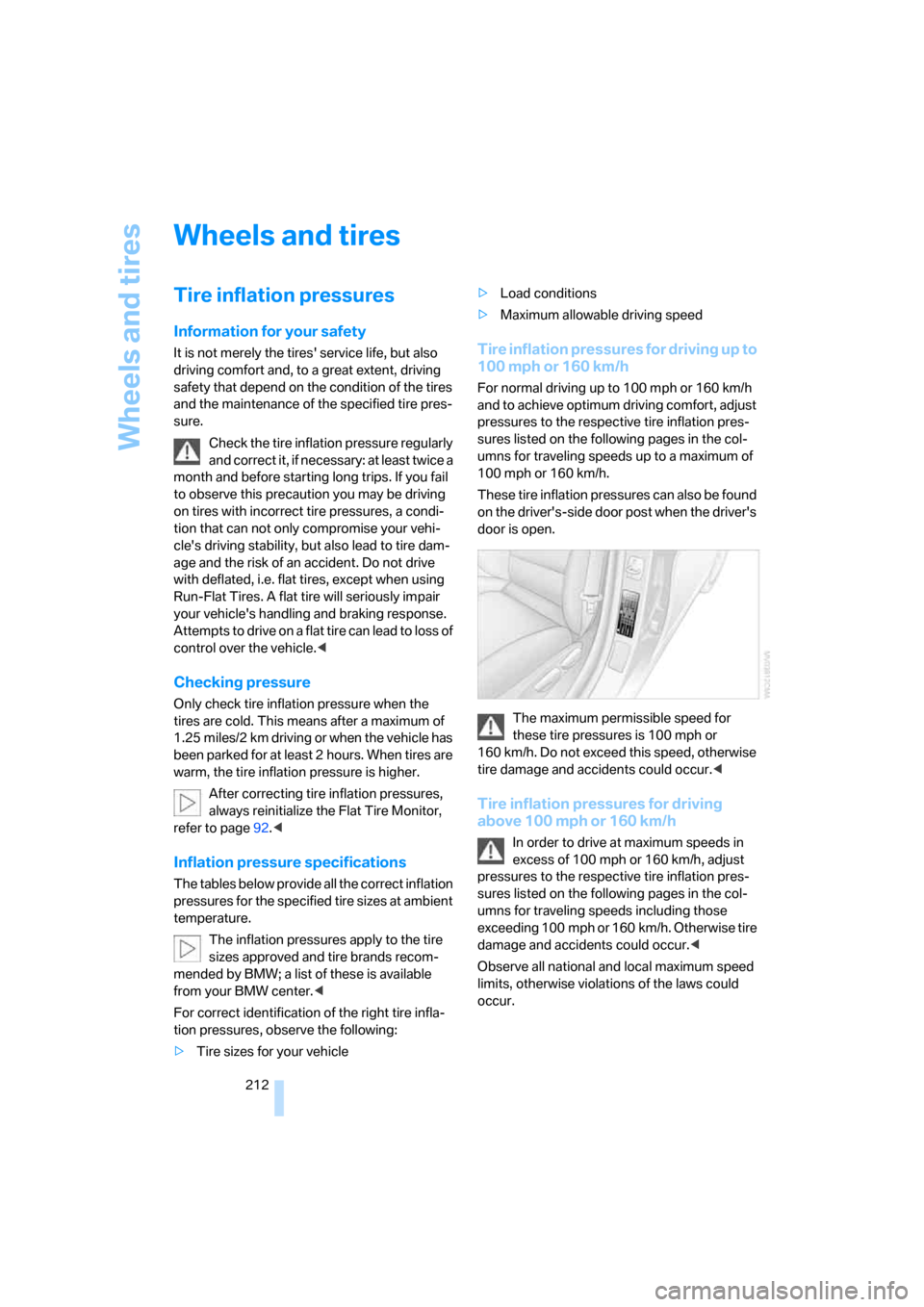
These tire inflation pressures can also be found
on the driver's-side door post when the driver's
door is open.
The maximum permissible speed for
these tire pressures is 100 mph or
160 km/h. Do not exceed this speed, otherwise
tire damage and accidents could occur.<
Tire inflation pressures for driving
above 100 mph or 160 km/h
In order to drive at maximum speeds in
excess of 100 mph or 160 km/h, adjust
pressures to the respective tire inflation pres-
sures listed on the following pages in the col-
umns for traveling speeds including those
exceeding 100 mph or 160 km/h. Otherwise tire
damage and accidents could occur.<
Observe all national and local maximum speed
limits, otherwise violations of the laws could
occur.
Page 226 of 272
Under the hood
224
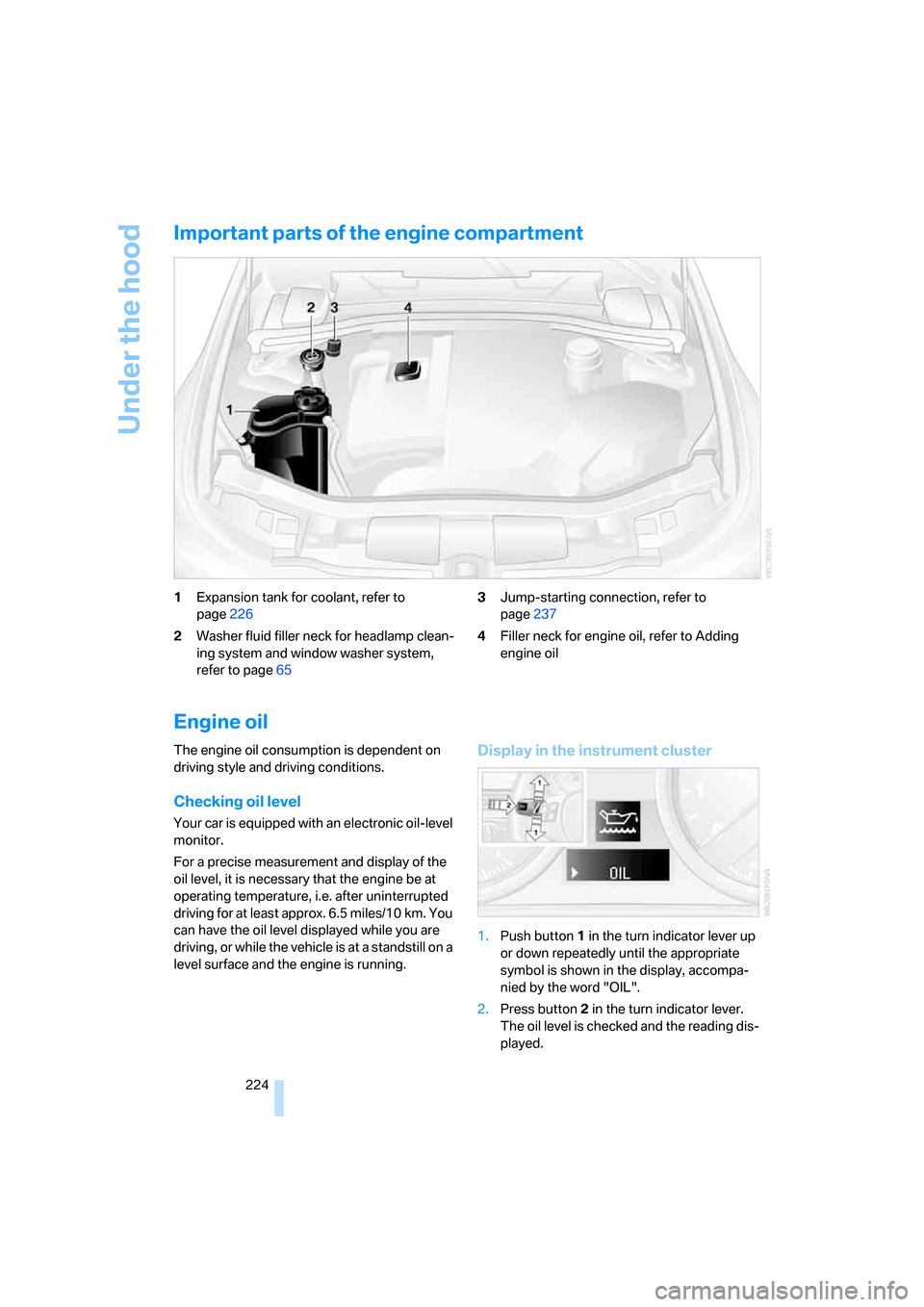
Important parts of the engine compartment
1Expansion tank for coolant, refer to
page226
2Washer fluid filler neck for headlamp clean-
ing system and window washer system,
refer to page653Jump-starting connection, refer to
page237
4Filler neck for engine oil, refer to Adding
engine oil
Engine oil
The engine oil consumption is dependent on
driving style and driving conditions.
Checking oil level
Your car is equipped with an electronic oil-level
monitor.
For a precise measurement and display of the
oil level, it is necessary that the engine be at
operating temperature, i.e. after uninterrupted
driving for at least approx. 6.5 miles/10 km. You
can have the oil level displayed while you are
driving, or while the vehicle is at a standstill on a
level surface and the engine is running.
Display in the instrument cluster
1.Push button 1 in the turn indicator lever up
or down repeatedly until the appropriate
symbol is shown in the display, accompa-
nied by the word "OIL".
2.Press button 2 in the turn indicator lever.
The oil level is checked and the reading dis-
played.