Parking sensor BMW 335I CONVERTIBLE 2007 E93 Owner's Manual
[x] Cancel search | Manufacturer: BMW, Model Year: 2007, Model line: 335I CONVERTIBLE, Model: BMW 335I CONVERTIBLE 2007 E93Pages: 272, PDF Size: 8.97 MB
Page 13 of 272
At a glance
11Reference
Controls
Driving tips
Communications
Navigation
Entertainment
Mobility
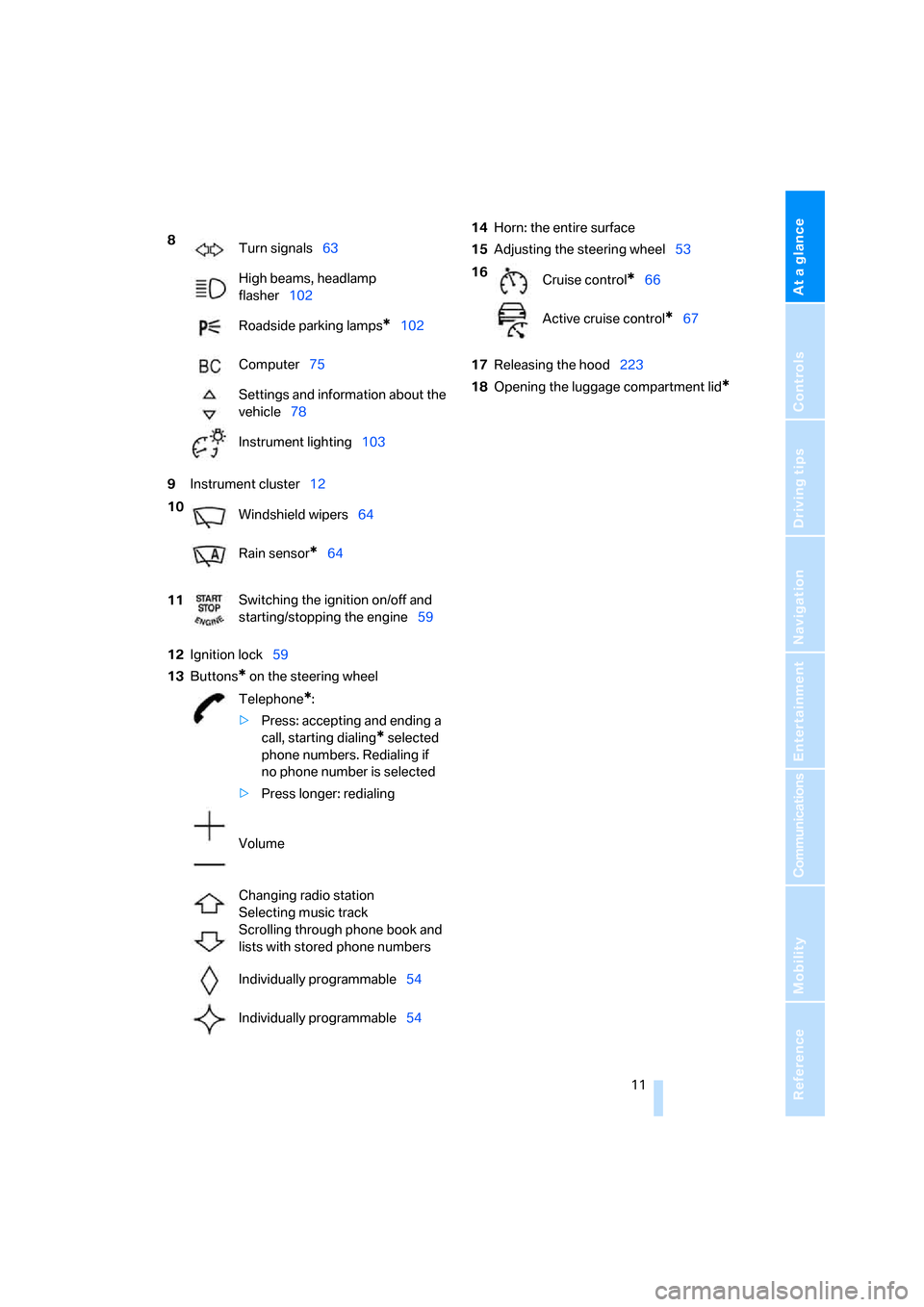
9Instrument cluster12
12Ignition lock59
13Buttons
* on the steering wheel14Horn: the entire surface
15Adjusting the steering wheel53
17Releasing the hood223
18Opening the luggage compartment lid
*
8
Turn signals63
High beams, headlamp
flasher102
Roadside parking lamps
*102
Computer75
Settings and information about the
vehicle78
Instrument lighting103
10
Windshield wipers64
Rain sensor
*64
11Switching the ignition on/off and
starting/stopping the engine59
Telephone
*:
>Press: accepting and ending a
call, starting dialing
* selected
phone numbers. Redialing if
no phone number is selected
>Press longer: redialing
Volume
Changing radio station
Selecting music track
Scrolling through phone book and
lists with stored phone numbers
Individually programmable54
Individually programmable54
16
Cruise control*66
Active cruise control
*67
Page 72 of 272
Driving
70
Deactivating cruise control
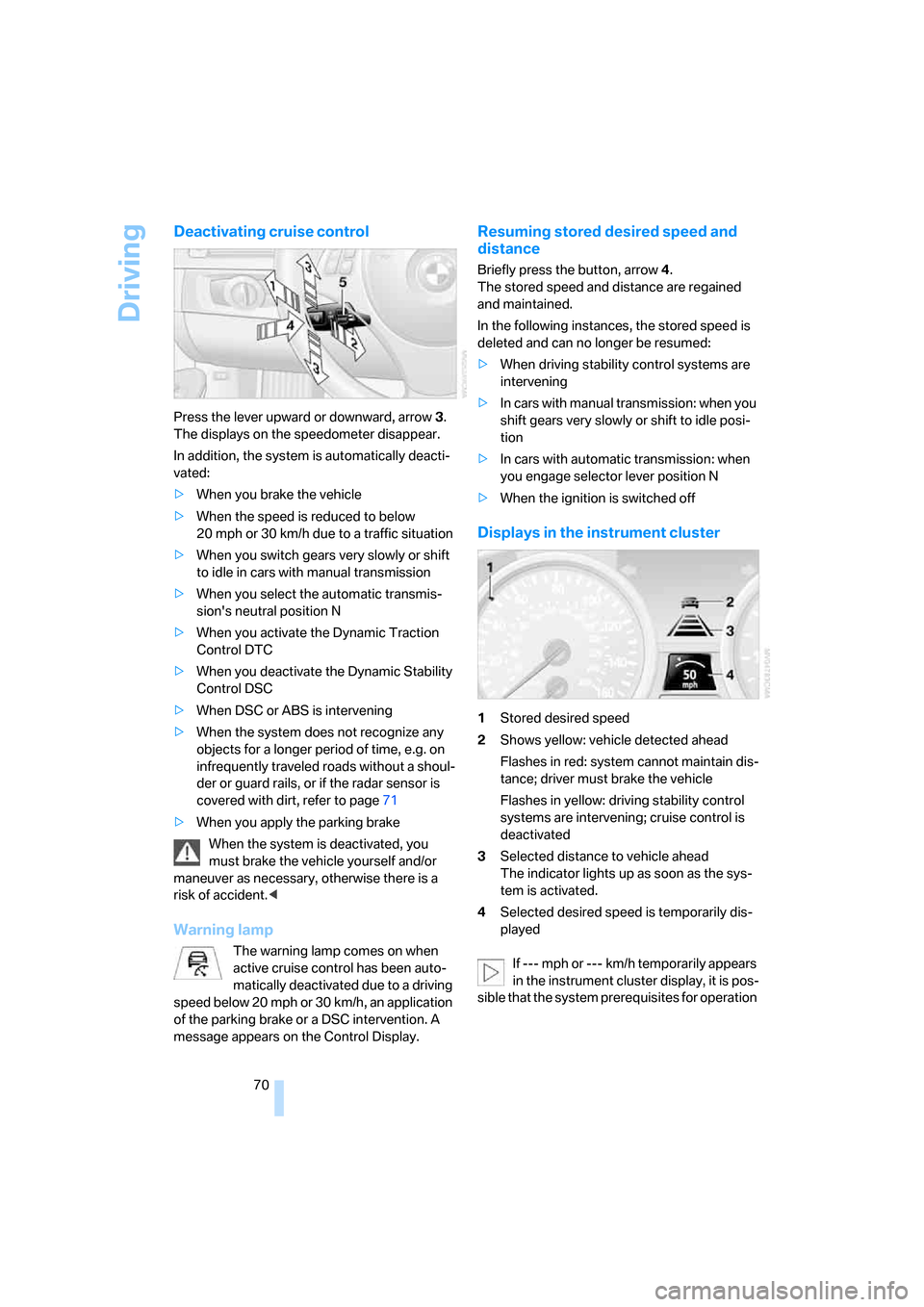
Press the lever upward or downward, arrow3.
The displays on the speedometer disappear.
In addition, the system is automatically deacti-
vated:
>When you brake the vehicle
>When the speed is reduced to below
20 mph or 30 km/h due to a traffic situation
>When you switch gears very slowly or shift
to idle in cars with manual transmission
>When you select the automatic transmis-
sion's neutral position N
>When you activate the Dynamic Traction
Control DTC
>When you deactivate the Dynamic Stability
Control DSC
>When DSC or ABS is intervening
>When the system does not recognize any
objects for a longer period of time, e.g. on
infrequently traveled roads without a shoul-
der or guard rails, or if the radar sensor is
covered with dirt, refer to page71
>When you apply the parking brake
When the system is deactivated, you
must brake the vehicle yourself and/or
maneuver as necessary, otherwise there is a
risk of accident.<
Warning lamp
The warning lamp comes on when
active cruise control has been auto-
matically deactivated due to a driving
speed below 20 mph or 30 km/h, an application
of the parking brake or a DSC intervention. A
message appears on the Control Display.
Resuming stored desired speed and
distance
Briefly press the button, arrow 4.
The stored speed and distance are regained
and maintained.
In the following instances, the stored speed is
deleted and can no longer be resumed:
>When driving stability control systems are
intervening
>In cars with ma nua l trans mis sio n: when you
shift gears very slowly or shift to idle posi-
tion
>In cars with automatic transmission: when
you engage selector lever position N
>When the ignition is switched off
Displays in the instrument cluster
1Stored desired speed
2Shows yellow: vehicle detected ahead
Flashes in red: system cannot maintain dis-
tance; driver must brake the vehicle
Flashes in yellow: driving stability control
systems are intervening; cruise control is
deactivated
3Selected distance to vehicle ahead
The indicator lights up as soon as the sys-
tem is activated.
4Selected desired speed is temporarily dis-
played
If --- mph or --- km/h temporarily appears
in the instrument cluster display, it is pos-
sible that the system prerequisites for operation
Page 90 of 272
Technology for driving comfort and safety
88
Technology for driving comfort and safety
PDC Park Distance Control*
The concept
The PDC assists you with maneuvering in tight
parking spaces. Acoustic signals and a visual
indicator
warn you of the presence of an object
behind your vehicle. To measure the distance,
there are four ultrasonic sensors in either
bumper.
These sensors have a range of approx. 6.5 ft/
2 m. However, an acoustic warning does not
sound until an object is approx. 24 in/60 cm
from the corner sensors, or approx. 5 ft/1.50 m
from the center sensors.
PDC is a parking aid that can indicate
objects when they are approached
slowly, as is usually the case when parking.
Avoid approaching an object at high speed, oth-
erwise physical circumstances may lead to the
system warning being issued too late.<
Switching on automatically
With the engine running or the ignition switched
on, the system is activated after approx. 1 sec-
ond when you engage reverse gear or move the
automatic transmission selector lever to
position R. Wait this short period before driving.
Signal tones
When nearing an object, its position is indicated
correspondingly by an interval tone. As the dis-
tance between vehicle and object decreases,
the intervals between the tones become
shorter. If the distance to the nearest object
falls to below roughly 1 ft/30 cm, then a contin-
uous tone sounds.
An interval tone is interrupted after approx.
3seconds
>if you remain in front of an object that has
been detected by only one of the corner
sensors
>if you are driving parallel to a wall.
Malfunction
The indicator lamp in the instrument
cluster comes on. PDC is malfunc-
tioning. A message appears on the
Control Display. Have the system checked.
To avoid this problem, keep the sensors clean
and free of ice or snow in order to ensure that
they will continue to operate effectively. When
using a high-pressure cleaner, do not spray the
sensors for extended periods of time and only
from a distance of at least 4 in/10 cm.
PDC with visual warning
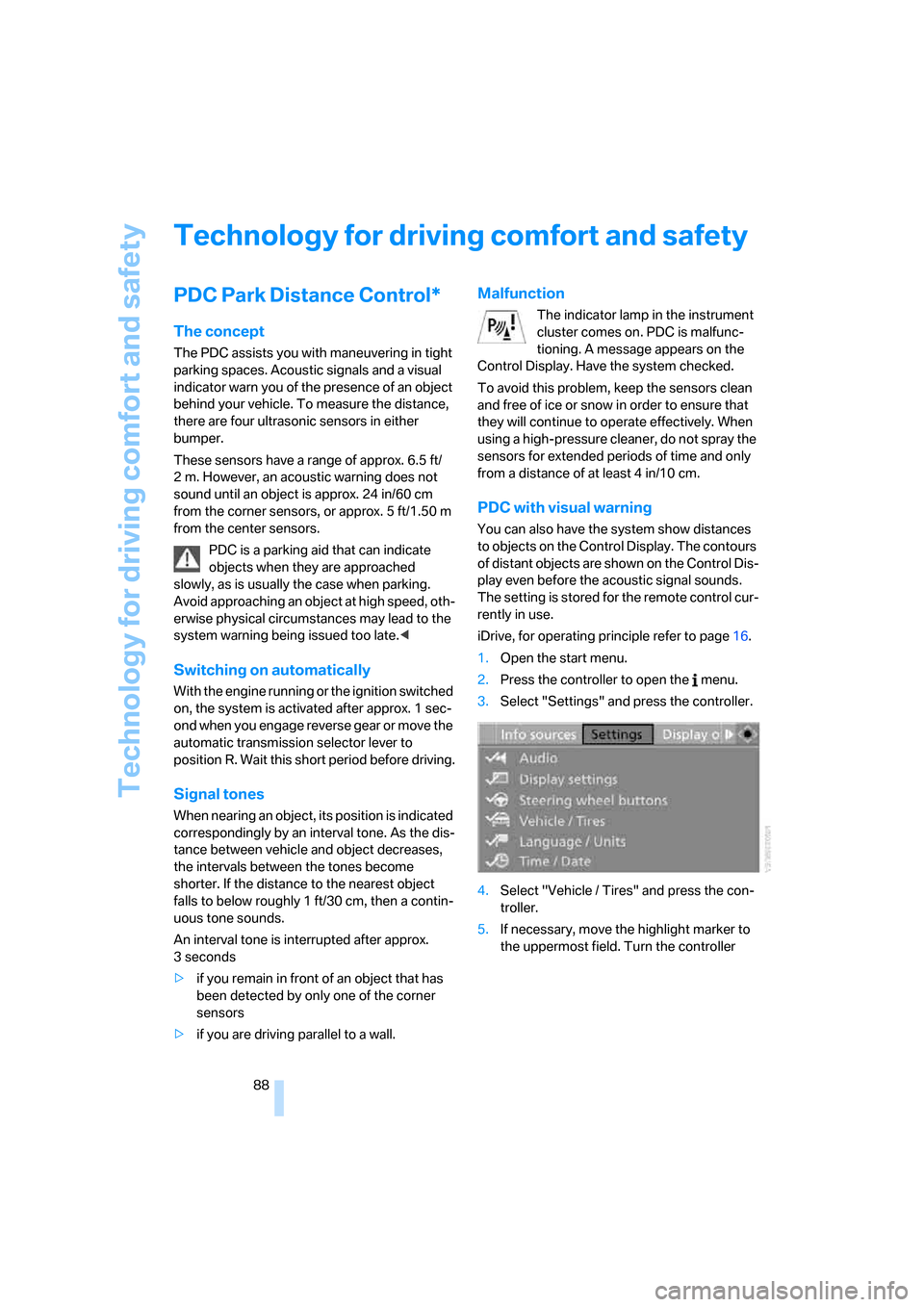
You can also have the system show distances
to objects on the Control Display. The contours
of distant objects are shown on the Control Dis-
play even before the acoustic signal sounds.
The setting is stored for the remote control cur-
rently in use.
iDrive, for operating principle refer to page16.
1.Open the start menu.
2.Press the controller to open the menu.
3.Select "Settings" and press the controller.
4.Select "Vehicle / Tires" and press the con-
troller.
5.If necessary, move the highlight marker to
the uppermost field. Turn the controller
Page 265 of 272
Reference 263
At a glance
Controls
Driving tips
Communications
Navigation
Entertainment
Mobility
R
Radio
– autostore165
– controls160
– High Definition Radio167
– listening to stations164
– sampling stations165
– satellite radio170
– selecting a
waveband160,164
– selecting the frequency
manually165
– station search165
– stations with best
reception165
– storing stations166
– switching on/off160
– tone control161
– volume161
Radio position, refer to Radio
readiness59
Radio readiness59
– switched off59
– switched on59
Radio-remote key, refer to
Remote control with
integrated key28
Rain sensor64
"Random", refer to Random
play176
"Random all" for audio
mode177
"Random directory" for audio
mode177
Random play176
"RDS" Radio Data
System167
Reading lamps103
Rear lamps, refer to Tail
lamps232
– replacing bulb232
Rear seats
– adjusting head restraints48
– folding down backrests117
Rear turn signals
– replacing bulb232
Rear ventilation108Rearview mirror, refer to
Mirrors52
Rear window defroster107
Rear window roller blind, refer
to Roller sun blinds113
"Received calls"194
Receiving level of mobile
phone, refer to Status
information20
Rechargeable flashlight114
Recirculated-air mode106
Recirculation of air, refer to
Recirculated-air mode106
Reclining seat, refer to
Backrest46
Recording times, refer to
Stopwatch86
"Redial" on the mobile
phone194
Refueling210
Releasing
– hood223
Remaining distance, refer to
Cruising range75
Remote control28
– battery renewal38
– convenient access36
– garage door opener110
– luggage compartment lid30
– malfunction31,37
– removing from the ignition
lock59
– service data228
"Repeat directory" for audio
mode176
"Repeat" for audio mode176
"Repeat track" for audio
mode176
Replacement remote
control28
Replacing bulbs, refer to
Lamps and bulbs230
Replacing tires221
Replacing tires, refer to New
wheels and tires221
Reporting safety defects6
Reserve warning, refer to Fuel
gauge75
"Reset"92,94Reset, refer to Resetting tone
settings163
"Reset" for stopwatch86
"Reset" for tone settings163
Residual heat107
Restraint systems
– for children56
– refer to Safety belts51
Retractable hardtop41
– care, refer to Caring for your
vehicle brochure
– convenient operation30
– opening and closing42
– remote control30
Reverse
– CD changer177
– CD player177
Reverse gear
– automatic transmission with
Steptronic62
– manual transmission61
Road map149
"Roadside Assistance"
202
Roadside
Assistance202,236
Roadside parking lamps102
Roadworthiness test, refer to
Service requirements79
Roller sun blinds113
Rollover protection system,
convertible99
– resetting99
Roof load capacity247
Roof-mounted luggage
rack128
Rope, refer to Tow-starting,
towing away240
Rotary/pushbutton, refer to
iDrive16