page 228 BMW 335I CONVERTIBLE 2007 E93 Owner's Manual
[x] Cancel search | Manufacturer: BMW, Model Year: 2007, Model line: 335I CONVERTIBLE, Model: BMW 335I CONVERTIBLE 2007 E93Pages: 272, PDF Size: 8.97 MB
Page 5 of 272
Reference
At a glance
Controls
Driving tips
Communications
Navigation
Entertainment
Mobility
Contents
The fastest way to find information on a partic-
ular topic or item is by using the index, refer to
page252.
Using this Owner's Manual
4Notes
6Reporting safety defects
At a glance
10Cockpit
16iDrive
23Voice command system
Controls
28Opening and closing
45Adjustments
56Transporting children safely
59Driving
74Everything under control
88Technology for driving comfort and
safety
100Lamps
104Climate
110Practical interior accessories
Driving tips
124Things to remember when driving
Navigation
132Starting the navigation system
134Destination entry
147Destination guidance
156What to do if …
Entertainment
160On/off and settings
164Radio
170Satellite radio
173CD player and CD changer
180AUX-In port
181USB/audio interface
Communications
186Telephoning
201BMW Assist
Mobility
210Refueling
212Wheels and tires
223Under the hood
228Maintenance
230Replacing components
236Giving and receiving assistance
Reference
244Technical data
248Short commands for the voice command
system
252Everything from A - Z
Page 30 of 272
Opening and closing
28
Opening and closing
Keys/remote controls
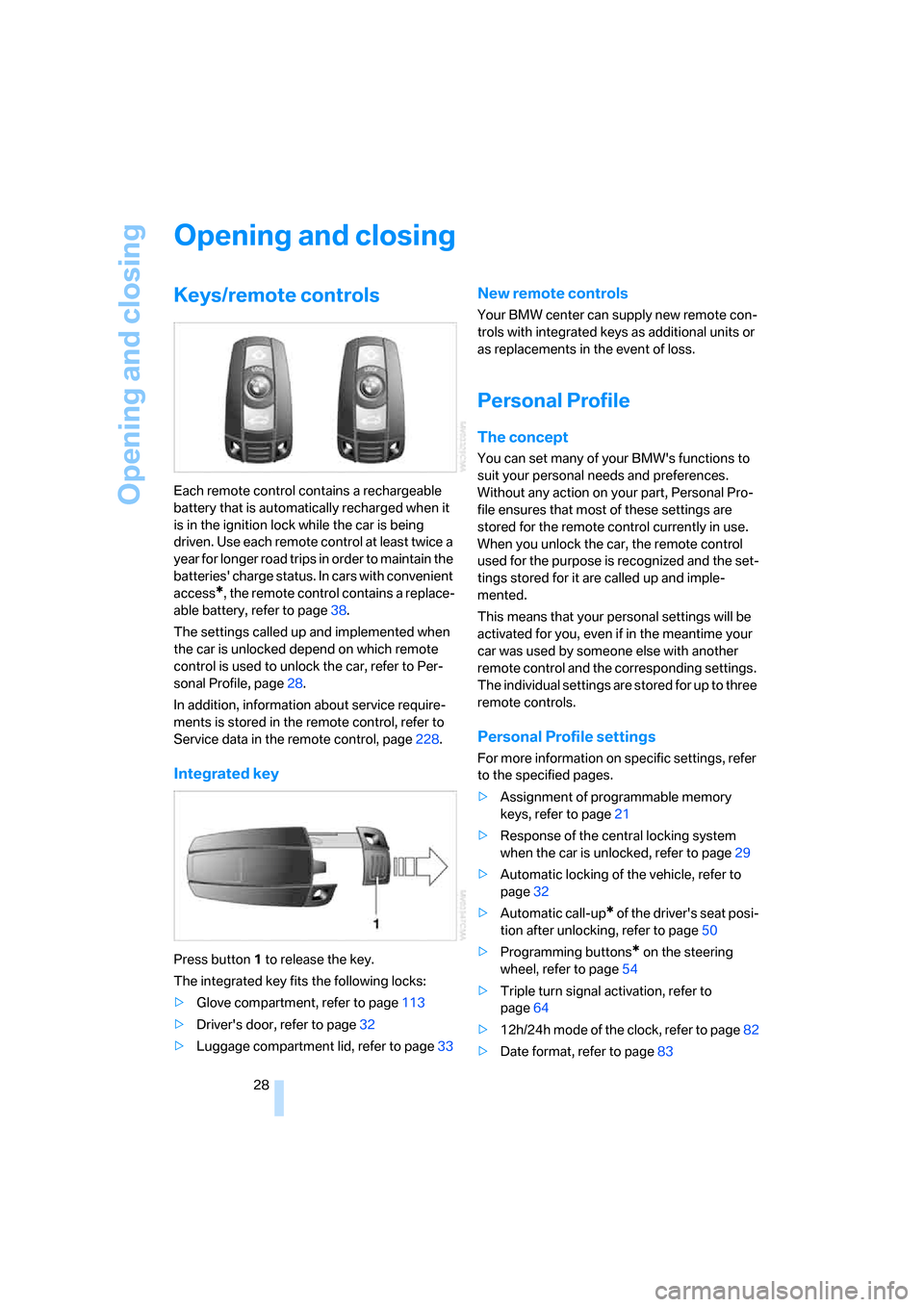
Each remote control contains a rechargeable
battery that is automatically recharged when it
is in the ignition lock while the car is being
driven. Use each remote control at least twice a
year for longer road trips in order to maintain the
batteries' charge status. In cars with convenient
access
*, the remote control contains a replace-
able battery, refer to page38.
The settings called up and implemented when
the car is unlocked depend on which remote
control is used to unlock the car, refer to Per-
sonal Profile, page28.
In addition, information about service require-
ments is stored in the remote control, refer to
Service data in the remote control, page228.
Integrated key
Press button1 to release the key.
The integrated key fits the following locks:
>Glove compartment, refer to page113
>Driver's door, refer to page32
>Luggage compartment lid, refer to page33
New remote controls
Your BMW center can supply new remote con-
trols with integrated keys as additional units or
as replacements in the event of loss.
Personal Profile
The concept
You can set many of your BMW's functions to
suit your personal needs and preferences.
Without any action on your part, Personal Pro-
file ensures that most of these settings are
stored for the remote control currently in use.
When you unlock the car, the remote control
used for the purpose is recognized and the set-
tings stored for it are called up and imple-
mented.
This means that your personal settings will be
activated for you, even if in the meantime your
car was used by someone else with another
remote control and the corresponding settings.
The individual settings are stored for up to three
remote controls.
Personal Profile settings
For more information on specific settings, refer
to the specified pages.
>Assignment of programmable memory
keys, refer to page21
>Response of the central locking system
when the car is unlocked, refer to page29
>Automatic locking of the vehicle, refer to
page32
>Automatic call-up
* of the driver's seat posi-
tion after unlocking, refer to page50
>Programming buttons
* on the steering
wheel, refer to page54
>Triple turn signal activation, refer to
page64
>12h/24h mode of the clock, refer to page82
>Date format, refer to page83
Page 83 of 272
Controls
81Reference
At a glance
Driving tips
Communications
Navigation
Entertainment
Mobility
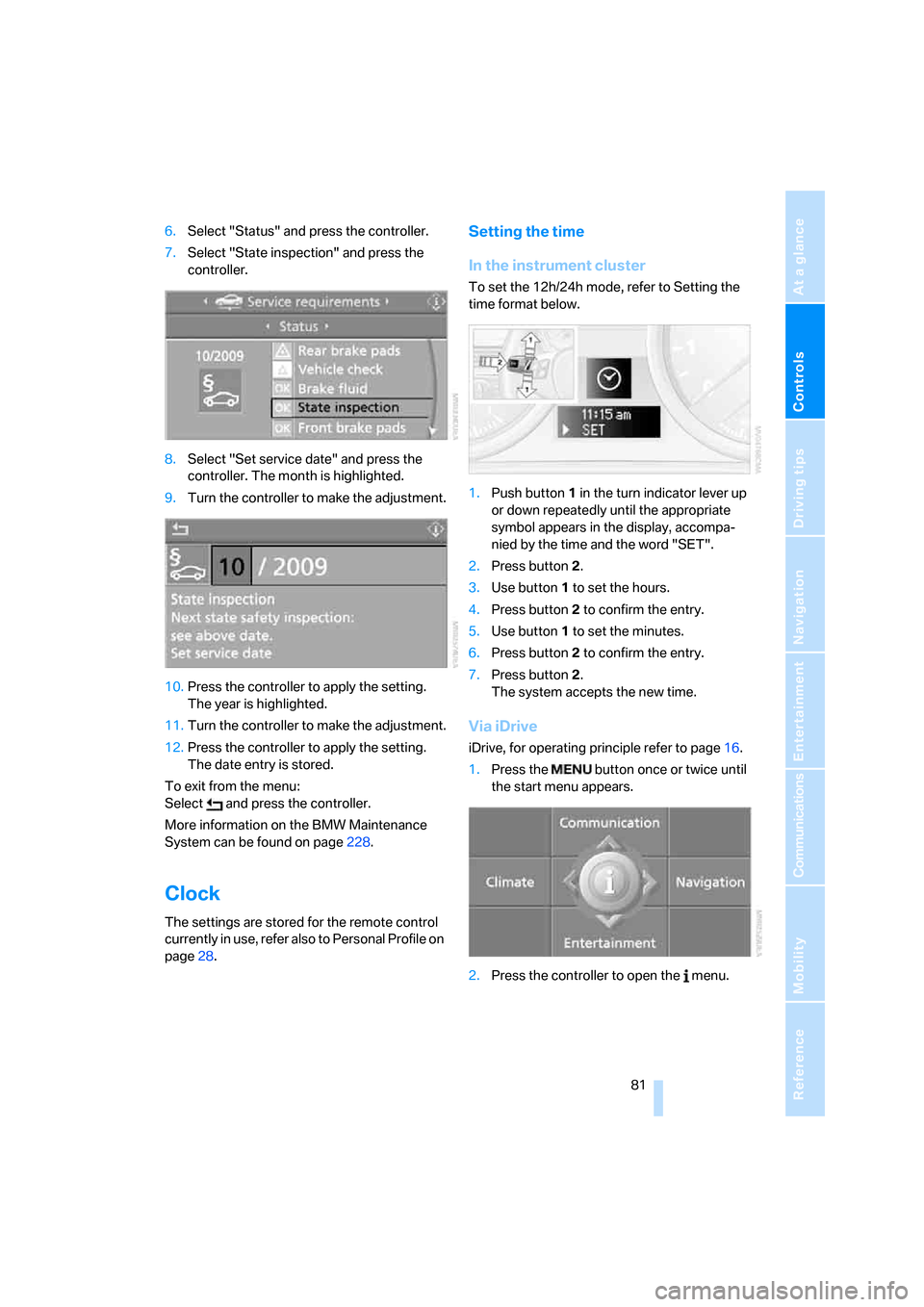
6.Select "Status" and press the controller.
7.Select "State inspection" and press the
controller.
8.Select "Set service date" and press the
controller. The month is highlighted.
9.Turn the controller to make the adjustment.
10.Press the controller to apply the setting.
The year is highlighted.
11.Turn the controller to make the adjustment.
12.Press the controller to apply the setting.
The date entry is stored.
To exit from the menu:
Select and press the controller.
More information on the BMW Maintenance
System can be found on page228.
Clock
The settings are stored for the remote control
currently in use, refer also to Personal Profile on
page28.
Setting the time
In the instrument cluster
To set the 12h/24h mode, refer to Setting the
time format below.
1.Push button 1 in the turn indicator lever up
or down repeatedly until the appropriate
symbol appears in the display, accompa-
nied by the time and the word "SET".
2.Press button 2.
3.Use button 1 to set the hours.
4.Press button 2 to confirm the entry.
5.Use button 1 to set the minutes.
6.Press button 2 to confirm the entry.
7.Press button 2.
The system accepts the new time.
Via iDrive
iDrive, for operating principle refer to page16.
1.Press the button once or twice until
the start menu appears.
2.Press the controller to open the menu.
Page 227 of 272
Mobility
225Reference
At a glance
Controls
Driving tips
Communications
Navigation
Entertainment
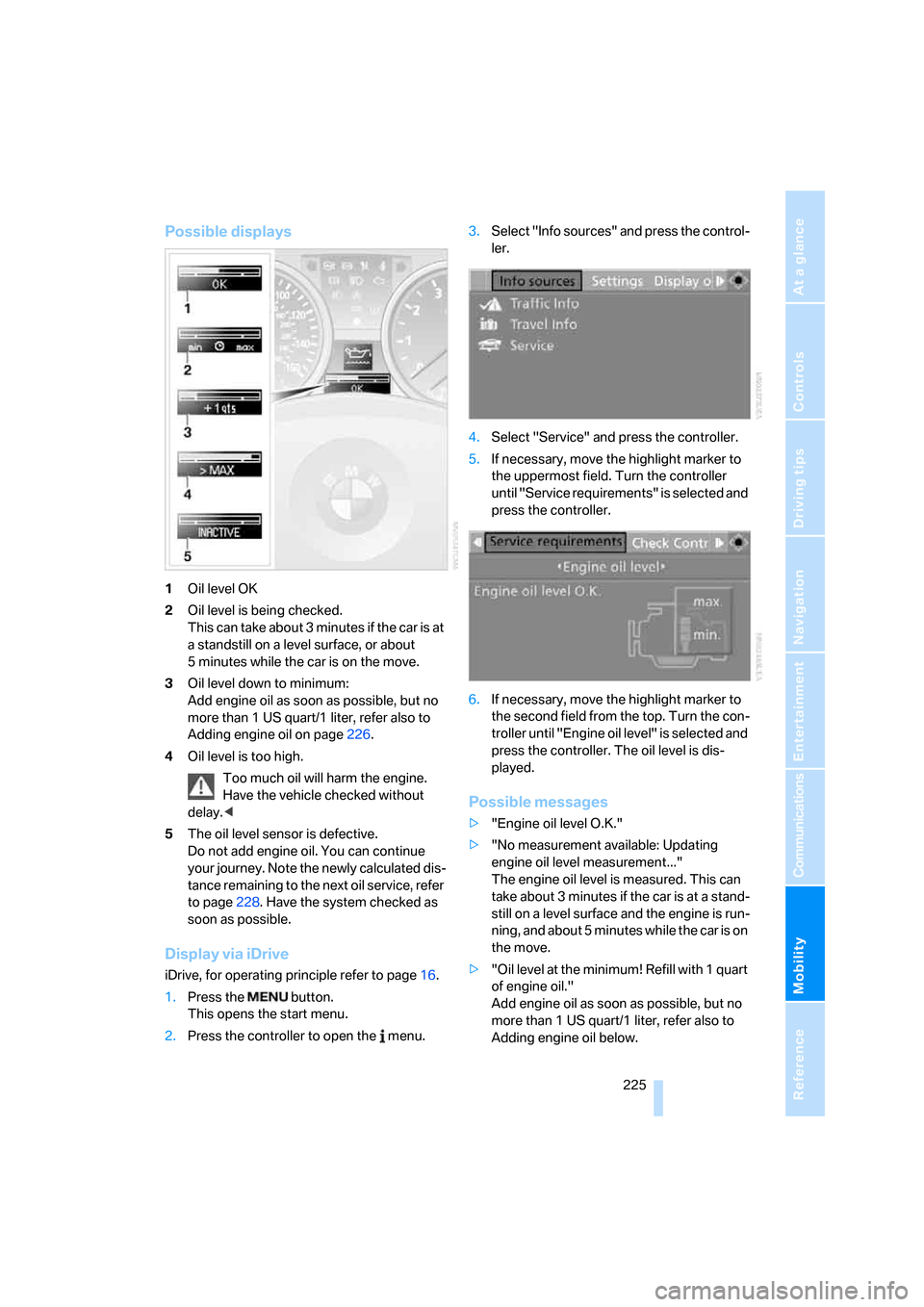
Possible displays
1Oil level OK
2Oil level is being checked.
This can take about 3 minutes if the car is at
a standstill on a level surface, or about
5 minutes while the car is on the move.
3Oil level down to minimum:
Add engine oil as soon as possible, but no
more than 1 US quart/1 liter, refer also to
Adding engine oil on page226.
4Oil level is too high.
Too much oil will harm the engine.
Have the vehicle checked without
delay.<
5The oil level sensor is defective.
Do not add engine oil. You can continue
your journey. Note the newly calculated dis-
tance remaining to the next oil service, refer
to page228. Have the system checked as
soon as possible.
Display via iDrive
iDrive, for operating principle refer to page16.
1.Press the button.
This opens the start menu.
2.Press the controller to open the menu.3.Select "Info sources" and press the control-
ler.
4.Select "Service" and press the controller.
5.If necessary, move the highlight marker to
the uppermost field. Turn the controller
until "Service requirements" is selected and
press the controller.
6.If necessary, move the highlight marker to
the second field from the top. Turn the con-
troller until "Engine oil level" is selected and
press the controller. The oil level is dis-
played.
Possible messages
>"Engine oil level O.K."
>"No measurement available: Updating
engine oil level measurement..."
The engine oil level is measured. This can
take about 3 minutes if the car is at a stand-
still on a level surface and the engine is run-
ning, and about 5 minutes while the car is on
the move.
>"Oil level at the minimum! Refill with 1 quart
of engine oil."
Add engine oil as soon as possible, but no
more than 1 US quart/1 liter, refer also to
Adding engine oil below.
Page 230 of 272
Maintenance
228
Maintenance
BMW Maintenance System
The BMW Maintenance System supports the
preservation of the traffic and operating safety
of your BMW. The objective is to optimize
efforts with respect to minimal vehicle mainte-
nance costs.
If and when you come to sell your BMW, a com-
prehensive record of servicing will prove a sig-
nificant benefit.
CBS Condition Based Service
Sensors and special algorithms take the differ-
ent driving conditions of your BMW into
account. Condition Based Service uses this to
determine the current and future service
requirements. By letting you define a service
and maintenance regimen that reflects your
own individual requirements, the system builds
the basis for trouble-free driving.
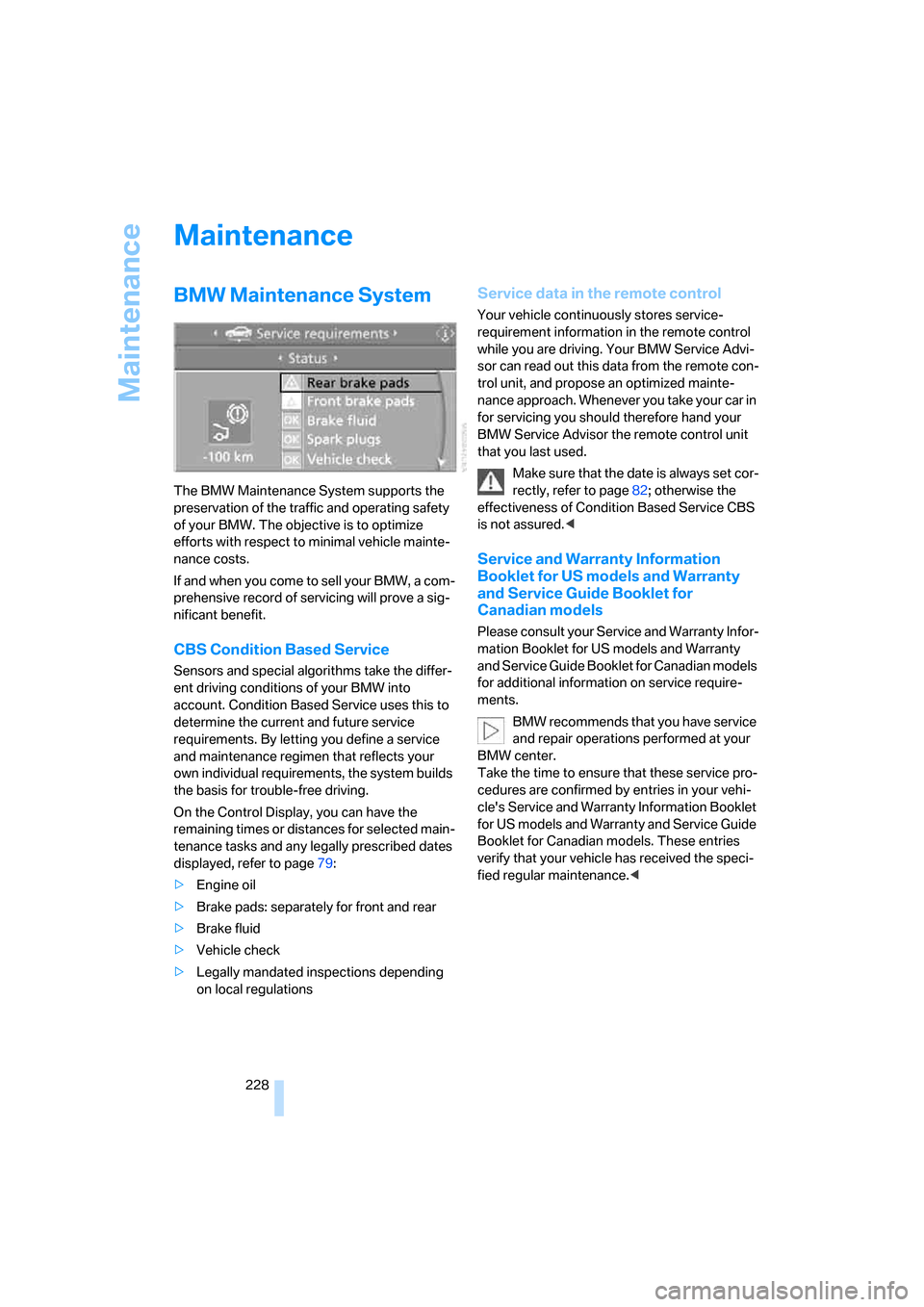
On the Control Display, you can have the
remaining times or distances for selected main-
tenance tasks and any legally prescribed dates
displayed, refer to page79:
>Engine oil
>Brake pads: separately for front and rear
>Brake fluid
>Vehicle check
>Legally mandated inspections depending
on local regulations
Service data in the remote control
Your vehicle continuously stores service-
requirement information in the remote control
while you are driving. Your BMW Service Advi-
sor can read out this data from the remote con-
trol unit, and propose an optimized mainte-
nance approach. Whenever you take your car in
for servicing you should therefore hand your
BMW Service Advisor the remote control unit
that you last used.
Make sure that the date is always set cor-
rectly, refer to page82; otherwise the
effectiveness of Condition Based Service CBS
is not assured.<
Service and Warranty Information
Booklet for US models and Warranty
and Service Guide Booklet for
Canadian models
Please consult your Service and Warranty Infor-
mation Booklet for US models and Warranty
and Service Guide Booklet for Canadian models
for additional information on service require-
ments.
BMW recommends that you have service
and repair operations performed at your
BMW center.
Take the time to ensure that these service pro-
cedures are confirmed by entries in your vehi-
cle's Service and Warranty Information Booklet
for US models and Warranty and Service Guide
Booklet for Canadian models. These entries
verify that your vehicle has received the speci-
fied regular maintenance.<
Page 255 of 272
Reference 253
At a glance
Controls
Driving tips
Communications
Navigation
Entertainment
Mobility
"Audio", refer to Tone
control161
Audio device, external114
Automatic
– air distribution106
– air flow rate106
– cruise control66,67
– headlamp control100
– service notification203
– storing of stations165
Automatic climate control104
– automatic air
distribution106
– settings via iDrive105
Automatic curb monitor53
"Automatic programs" with
automatic climate
control106
Automatic recirculated-air
control AUC106
Automatic station search165
Automatic transmission with
Steptronic61
– interlock61,62
– overriding selector lever
lock63
– shiftlock, refer to Changing
selector lever position62
– sport program62
– towing238
– tow-starting238
"Automatic ventilation"108
AUTO program for automatic
climate control106
"Autostore"
– on the radio166
"AUX"160,180,181
– AUX-In port180
– USB/audio interface181
AUX-IN
– port114
AUX-In port180
Average fuel consumption76
– setting the units78
Average speed76
"Avoid ferries" in
navigation145
"Avoid highways" in
navigation145Avoid highways in
navigation145
Avoiding unintentional
alarms36
"Avoid tollroads" in
navigation145
Axle loads, refer to
Weights
247
"A - Z"193,194
B
Backrest contour, refer to
Lumbar support47
Backrests, refer to Seat
adjustment46
Backrest width adjustment47
Back seats
– refer to Rear seats48
Backup lamps
– replacing bulb232
Backup lamps, refer to Tail
lamps232
Bag holder118
Balance, tone control161
Band-aids, refer to First-aid
pouch237
Bar, refer to Towing
methods239
Base plate for telephone or
mobile phone
– refer to Snap-in adapter in
the center armrest storage
compartment114
Bass, tone control161
Bass sounds, refer to Treble
and bass161
Battery234
– charging234
– disposal38,234
– jump starting237
– remote control28
– temporary power failure234
Battery renewal
– remote control38
– remote control for vehicle38
Being towed239
Belt hand-over52
Belts, refer to Safety belts51Belt tensioner, refer to Safety
belts51
Beverage holders, refer to
Cup holders115
Blinds, refer to Roller sun
blinds113
Blower, refer to Air flow
rate106
Bluetooth, refer to separate
Owner's Manual
"BMW Assist"202,203,204
BMW Assist
– activating206
– Concierge service204
– contacting BMW Customer
Relations204
– Roadside Assistance202
– services offered201
– TeleService203
"BMW Contact"196
"BMW Contact
Numbers"196
BMW Homepage
4
BMW Maintenance
System228
"BMW Service settings"207
BMW webpage4
Bottle holders, refer to Cup
holders115
Brake assist, refer to Dynamic
Brake Control DBC89
Brake fluid, refer to Service
requirements79
Brake Force Display97
Brake lamps
– replacing bulb232
– two-stage97
Brake pads124
– breaking in124
Brake rotors125
– brakes124
– breaking in124
Brakes
– ABS89
– BMW Maintenance
System228
– breaking in124
– parking brake60
– service requirements79