Child BMW 335I CONVERTIBLE 2008 E93 User Guide
[x] Cancel search | Manufacturer: BMW, Model Year: 2008, Model line: 335I CONVERTIBLE, Model: BMW 335I CONVERTIBLE 2008 E93Pages: 272, PDF Size: 8.98 MB
Page 99 of 272
Controls
97Reference
At a glance
Driving tips
Communications
Navigation
Entertainment
Mobility
Airbags
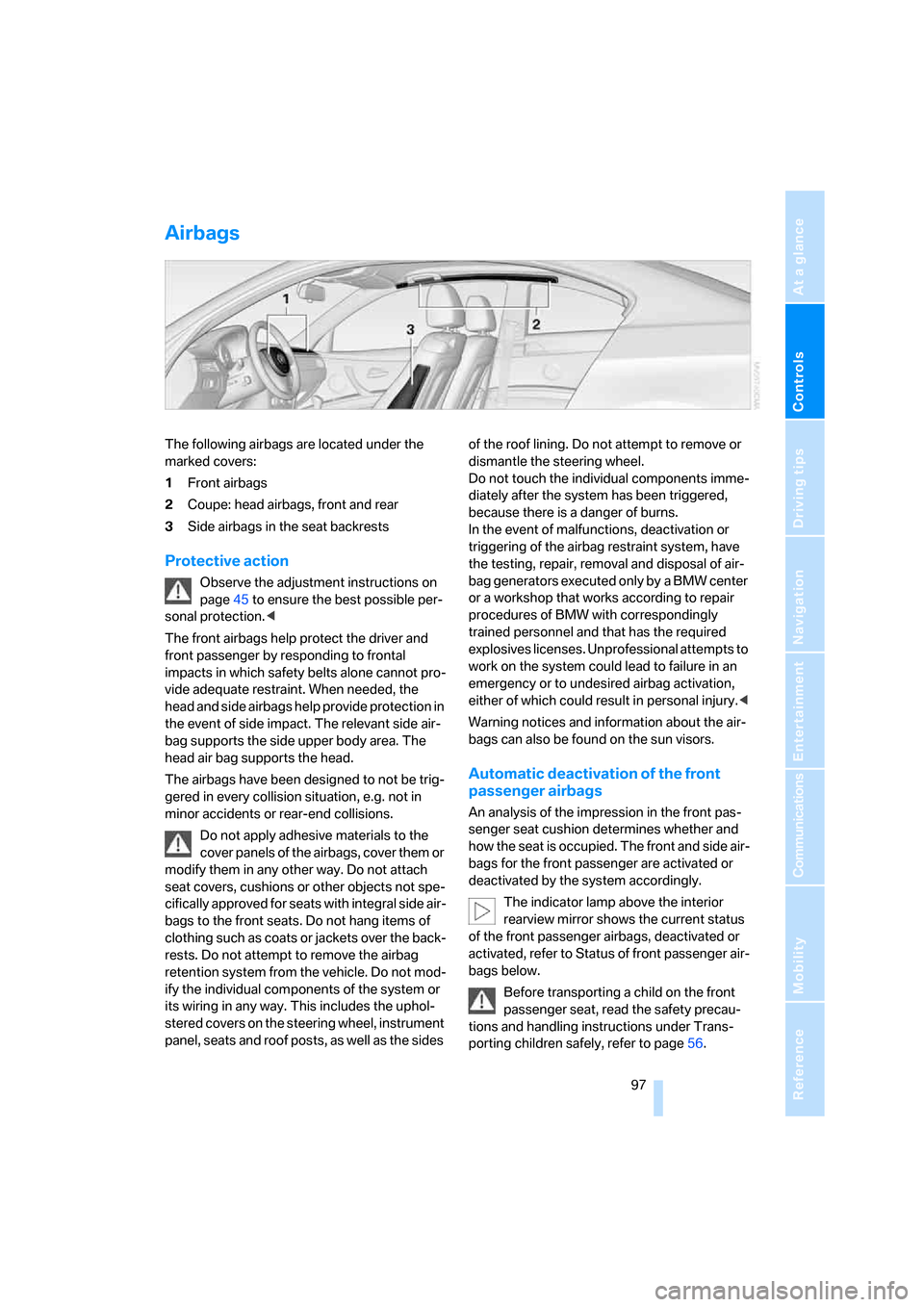
The following airbags are located under the
marked covers:
1Front airbags
2Coupe: head airbags, front and rear
3Side airbags in the seat backrests
Protective action
Observe the adjustment instructions on
page45 to ensure the best possible per-
sonal protection.<
The front airbags help protect the driver and
front passenger by responding to frontal
impacts in which safety belts alone cannot pro-
vide adequate restraint. When needed, the
head and side airbags help provide protection in
the event of side impact. The relevant side air-
bag supports the side upper body area. The
head air bag supports the head.
The airbags have been designed to not be trig-
gered in every collision situation, e.g. not in
minor accidents or rear-end collisions.
Do not apply adhesive materials to the
cover panels of the airbags, cover them or
modify them in any other way. Do not attach
seat covers, cushions or other objects not spe-
cifically approved for seats with integral side air-
bags to the front seats. Do not hang items of
clothing such as coats or jackets over the back-
rests. Do not attempt to remove the airbag
retention system from the vehicle. Do not mod-
ify the individual components of the system or
its wiring in any way. This includes the uphol-
stered covers on the steering wheel, instrument
panel, seats and roof posts, as well as the sides of the roof lining. Do not attempt to remove or
dismantle the steering wheel.
Do not touch the individual components imme-
diately after the system has been triggered,
because there is a danger of burns.
In the event of malfunctions, deactivation or
triggering of the airbag restraint system, have
the testing, repair, removal and disposal of air-
bag generators executed only by a BMW center
or a workshop that works according to repair
procedures of BMW with correspondingly
trained personnel and that has the required
explosives licenses. Unprofessional attempts to
work on the system could lead to failure in an
emergency or to undesired airbag activation,
either of which could result in personal injury.<
Warning notices and information about the air-
bags can also be found on the sun visors.
Automatic deactivation of the front
passenger airbags
An analysis of the impression in the front pas-
senger seat cushion determines whether and
how the seat is occupied. The front and side air-
bags for the front passenger are activated or
deactivated by the system accordingly.
The indicator lamp above the interior
rearview mirror shows the current status
of the front passenger airbags, deactivated or
activated, refer to Status of front passenger air-
bags below.
Before transporting a child on the front
passenger seat, read the safety precau-
tions and handling instructions under Trans-
porting children safely, refer to page56.
Page 100 of 272
Technology for driving comfort and safety
98 The front and side airbags can also be deacti-
vated by adolescents and adults sitting in cer-
tain positions; the indicator lamp for the front
passenger airbags comes on. In such cases, the
passenger should change his or her sitting
position so that the front passenger airbags are
activated and the indicator lamp goes out. If the
desired airbag status cannot be achieved by
changing the sitting position, transport the rele-
vant passenger on a rear seat. Do not attach
seat covers, seat cushion padding, ball mats or
other items to the front passenger seat unless
they are specifically recommended by BMW.
Do not place any items under the seat which
could press against the seat from below. Other-
wise a correct analysis of the seat cushion is not
ensured.<
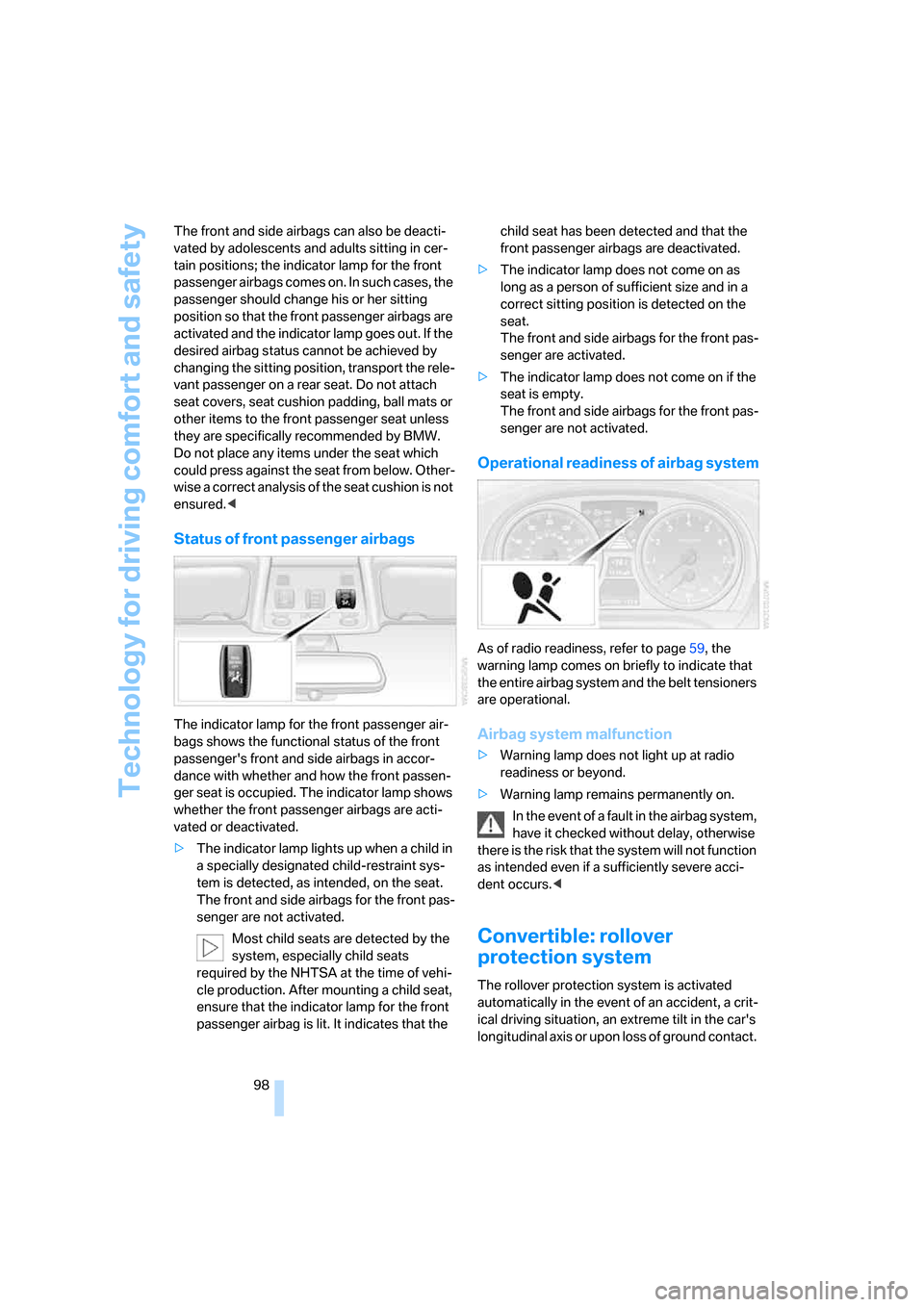
Status of front passenger airbags
The indicator lamp for the front passenger air-
bags shows the functional status of the front
passenger's front and side airbags in accor-
dance with whether and how the front passen-
ger seat is occupied. The indicator lamp shows
whether the front passenger airbags are acti-
vated or deactivated.
>The indicator lamp lights up when a child in
a specially designated child-restraint sys-
tem is detected, as intended, on the seat.
The front and side airbags for the front pas-
senger are not activated.
Most child seats are detected by the
system, especially child seats
required by the NHTSA at the time of vehi-
cle production. After mounting a child seat,
ensure that the indicator lamp for the front
passenger airbag is lit. It indicates that the child seat has been detected and that the
front passenger airbags are deactivated.
>The indicator lamp does not come on as
long as a person of sufficient size and in a
correct sitting position is detected on the
seat.
The front and side airbags for the front pas-
senger are activated.
>The indicator lamp does not come on if the
seat is empty.
The front and side airbags for the front pas-
senger are not activated.
Operational readiness of airbag system
As of radio readiness, refer to page59, the
warning lamp comes on briefly to indicate that
the entire airbag system and the belt tensioners
are operational.
Airbag system malfunction
>Warning lamp does not light up at radio
readiness or beyond.
>Warning lamp remains permanently on.
In the event of a fault in the airbag system,
have it checked without delay, otherwise
there is the risk that the system will not function
as intended even if a sufficiently severe acci-
dent occurs.<
Convertible: rollover
protection system
The rollover protection system is activated
automatically in the event of an accident, a crit-
ical driving situation, an extreme tilt in the car's
longitudinal axis or upon loss of ground contact.
Page 109 of 272
Controls
107Reference
At a glance
Driving tips
Communications
Navigation
Entertainment
Mobility
>Left-hand LED on, AUC mode: a sensor
detects pollutants in the outside air. If nec-
essary, the system blocks the supply of out-
side air and recirculates the inside air. As
soon as the concentration of pollutants in
the outside air has decreased sufficiently,
the system automatically switches back to
outside air supply.
>Right-hand LED on, recirculated-air mode:
the supply of outside air is permanently
shut off. The system then recirculates the
air currently within the vehicle.
If condensation starts to form on the
inside window surfaces during operation
in the recirculated-air mode, you should switch
it off while also increasing the air flow rate as
required.
The recirculated-air mode should not be used
over an extended period of time, otherwise the
air quality inside the car will deteriorate contin-
uously.<
Via the button* on the steering wheel
You can switch quickly between the recircu-
lated-air mode and the previous mode using an
individually programmable button
on the steer-
ing wheel, refer to page11.
Residual heat
The heat stored in the engine is
used to heat the passenger com-
partment, e.g. while stopped at a
school to pick up a child.
The function can be switched on when the fol-
lowing conditions are met:
>Up to 15 minutes after the engine has been
switched off
>While the engine is at operating tempera-
ture
>As long as battery voltage is sufficient
>At an outside temperature below 777/
256
The LED is lit when the function is on.
As of radio readiness, you can set the interior
temperature, the air flow rate and the air distri-
bution.
Defrosting windows and removing
condensation
Quickly removes ice and conden-
sation from the windshield and
front side windows.
Switch on the cooling function as well.
Switching cooling function on/off
The cooling function cools and
dehumidifies the incoming air
before reheating it as required,
according to the temperature setting. This
function is only available while the engine is
running.
The cooling function helps prevent condensa-
tion on the windows or removes it quickly.
Depending on the weather, the windshield may
fog over briefly when the engine is started.
The cooling function is automatically switched
on along with the AUTO program.
Rear window defroster
The defroster is switched off auto-
matically after a certain time.
Depending on your vehicle's
equipment, the upper wires serve as an antenna
and are not part of the rear window defroster.
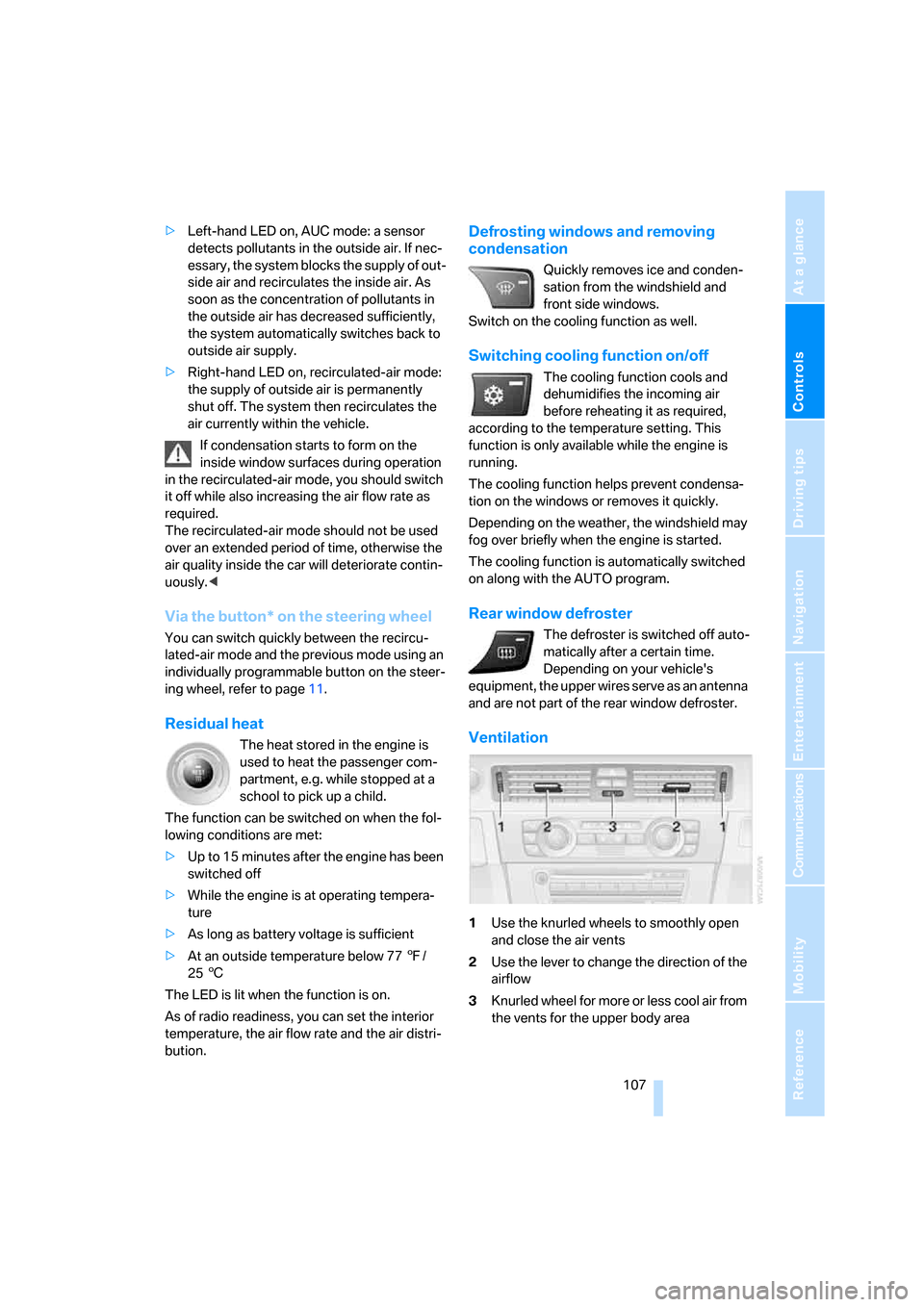
Ventilation
1Use the knurled wheels to smoothly open
and close the air vents
2Use the lever to change the direction of the
airflow
3Knurled wheel for more or less cool air from
the vents for the upper body area
Page 118 of 272
Practical interior accessories
116 Before folding down the rear seat back-
rest or using the transport bag, remove all
containers from the cup holder and close it. Do
not place objects into the cup holder and use
force to close it. Do not use the cup holder as a
grab handle.<
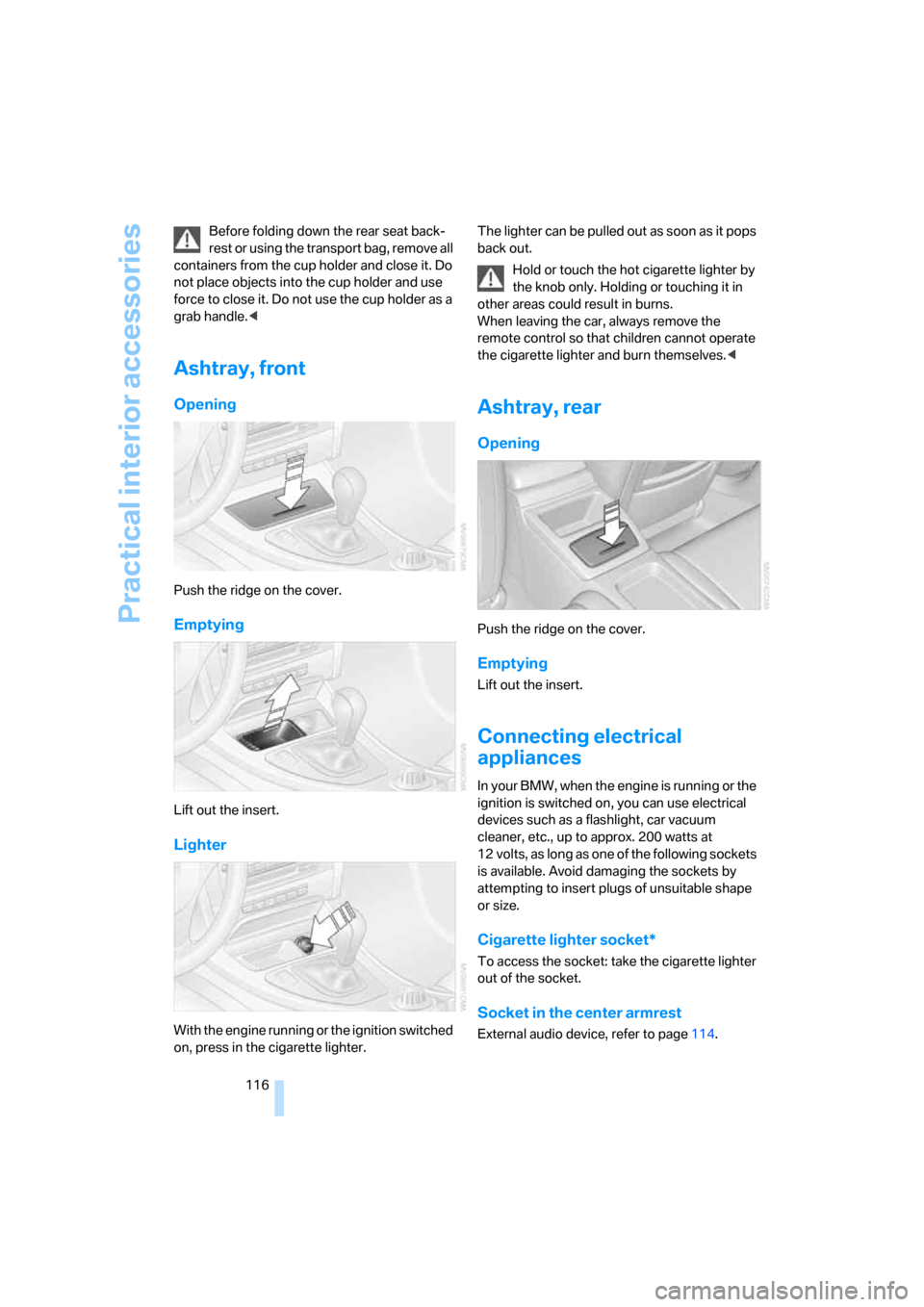
Ashtray, front
Opening
Push the ridge on the cover.
Emptying
Lift out the insert.
Lighter
With the engine running or the ignition switched
on, press in the cigarette lighter.The lighter can be pulled out as soon as it pops
back out.
Hold or touch the hot cigarette lighter by
the knob only. Holding or touching it in
other areas could result in burns.
When leaving the car, always remove the
remote control so that children cannot operate
the cigarette lighter and burn themselves.<
Ashtray, rear
Opening
Push the ridge on the cover.
Emptying
Lift out the insert.
Connecting electrical
appliances
In your BMW, when the engine is running or the
ignition is switched on, you can use electrical
devices such as a flashlight, car vacuum
cleaner, etc., up to approx. 200 watts at
12 volts, as long as one of the following sockets
is available. Avoid damaging the sockets by
attempting to insert plugs of unsuitable shape
or size.
Cigarette lighter socket*
To access the socket: take the cigarette lighter
out of the socket.
Socket in the center armrest
External audio device, refer to page114.
Page 229 of 272
Mobility
227Reference
At a glance
Controls
Driving tips
Communications
Navigation
Entertainment
more than 1 US quart/1 liter, refer also to
Adding engine oil below.
>"Engine oil level too high"
Too much oil will harm the engine.
Have the vehicle checked without
delay.<
>"Please observe recalculated service inter-
val for engine oil"
Do not add engine oil. You can continue
your journey. Note the newly calculated dis-
tance remaining to the next oil service, refer
to page79. Have the system checked as
soon as possible.
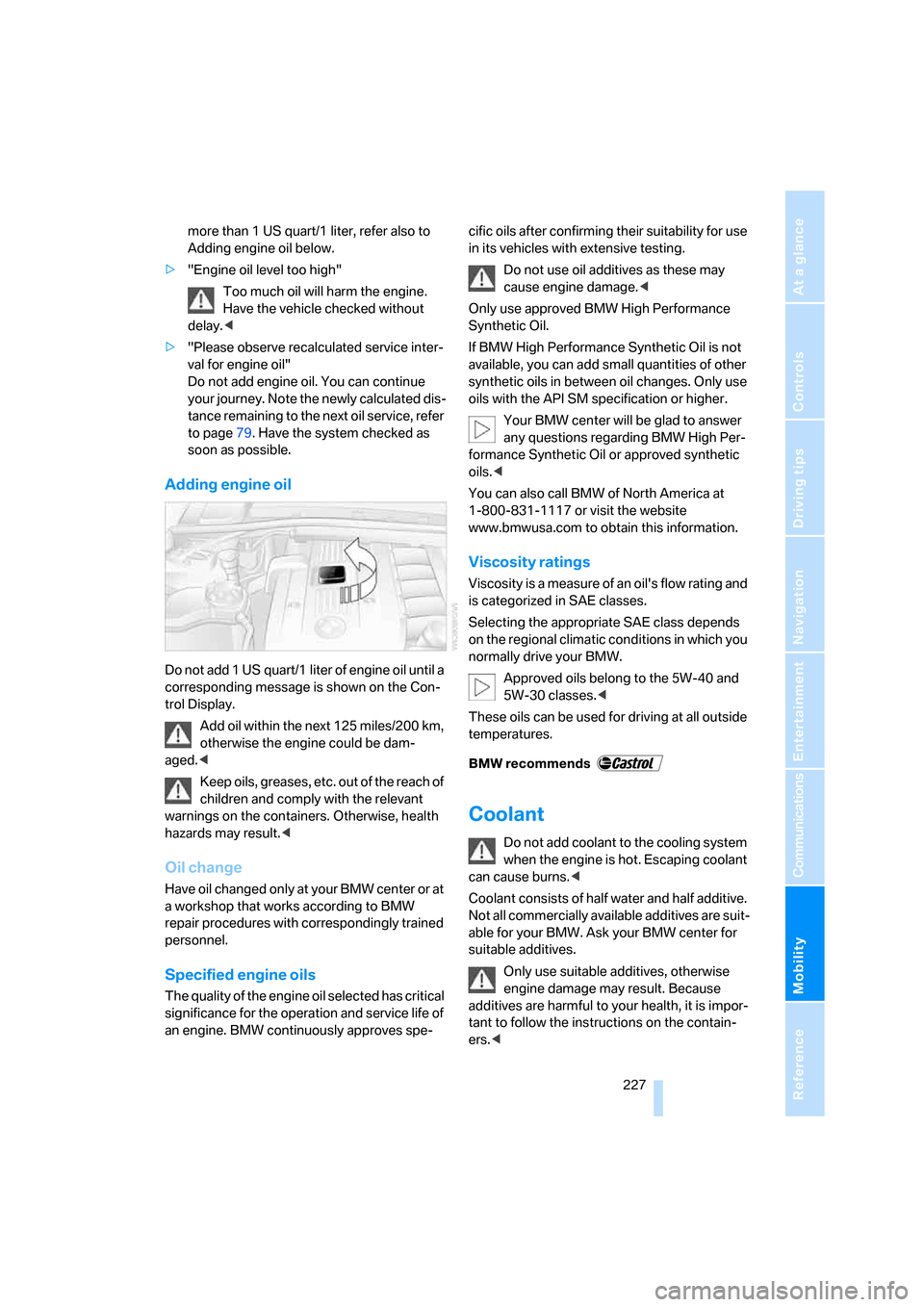
Adding engine oil
Do not add 1 US quart/1 liter of engine oil until a
corresponding message is shown on the Con-
trol Display.
Add oil within the next 125 miles/200 km,
otherwise the engine could be dam-
aged.<
Keep oils, greases, etc. out of the reach of
children and comply with the relevant
warnings on the containers. Otherwise, health
hazards may result.<
Oil change
Have oil changed only at your BMW center or at
a workshop that works according to BMW
repair procedures with correspondingly trained
personnel.
Specified engine oils
The quality of the engine oil selected has critical
significance for the operation and service life of
an engine. BMW continuously approves spe-cific oils after confirming their suitability for use
in its vehicles with extensive testing.
Do not use oil additives as these may
cause engine damage.<
Only use approved BMW High Performance
Synthetic Oil.
If BMW High Performance Synthetic Oil is not
available, you can add small quantities of other
synthetic oils in between oil changes. Only use
oils with the API SM specification or higher.
Your BMW center will be glad to answer
any questions regarding BMW High Per-
formance Synthetic Oil or approved synthetic
oils.<
You can also call BMW of North America at
1-800-831-1117 or visit the website
www.bmwusa.com to obtain this information.
Viscosity ratings
Viscosity is a measure of an oil's flow rating and
is categorized in SAE classes.
Selecting the appropriate SAE class depends
on the regional climatic conditions in which you
normally drive your BMW.
Approved oils belong to the 5W-40 and
5W-30 classes.<
These oils can be used for driving at all outside
temperatures.
Coolant
Do not add coolant to the cooling system
when the engine is hot. Escaping coolant
can cause burns.<
Coolant consists of half water and half additive.
Not all commercially available additives are suit-
able for your BMW. Ask your BMW center for
suitable additives.
Only use suitable additives, otherwise
engine damage may result. Because
additives are harmful to your health, it is impor-
tant to follow the instructions on the contain-
ers.<
Page 257 of 272
Reference 255
At a glance
Controls
Driving tips
Communications
Navigation
Entertainment
Mobility
Changes, technical, refer to
For your own safety5
Changing bulbs, refer to
Lamps and bulbs231
Changing the language on the
Control Display86
Changing the measurement
units on the Control
Display78
Changing wheels234
Chassis number, refer to
Engine compartment225
Check Control83
"Check Control
messages"85
Child-restraint fixing system
LATCH57
Child-restraint systems56
Child seats, refer to
Transporting children
safely56
Chrome parts, care, refer to
Caring for your vehicle
brochure
Cigarette lighter, refer to
Lighter116
Cleaning, refer to Caring for
your vehicle brochure
Cleaning headlamps65
– washer fluid65
"Climate"105
Clock74
– 12h/24h mode82
– setting time81
Closing
– from inside32
– from outside29
Clothes hooks115
Cockpit10
Cold start, refer to Starting the
engine60
Combined instrument, refer to
Instrument cluster12
Comfort access, refer to
Convenient access36
Comfort area, refer to Around
the center console14
"Communication"192,202,2
03,204Compact disc, refer to
– CD changer173
– CD player173
Compartment for remote
control, refer to Ignition
lock59
Compass112
Computer75
– displays on Control
Display76
– hour signal82
Computer, refer to iDrive16
"Concert hall" for Tone
control162
"Concierge"
204
Concierge service204
Condensation, refer to When
the vehicle is parked126
Condition Based Service
CBS229
Configuring settings, refer to
Personal Profile28
Confirmation signals for
locking/unlocking the
vehicle31
Connecting vacuum cleaner,
refer to Connecting
electrical appliances116
Consumption, refer to
Average consumption76
Consumption display
– average consumption76
"Continue guidance to
destination?"148
Control Center, refer to
iDrive16
Control Display
– brightness86
– changing the language86
– switching off/on21
Control Display, refer to
iDrive16
Controller, refer to iDrive16
Controls and displays10
Control unit, refer to iDrive16
Convenient access36
– replacing the battery38
– what to observe before
entering a car wash37Convenient loading in
convertible31
Convenient operation
– glass roof30
– glass roof with convenient
access37
– retractable hardtop30
– windows30
– windows with convenient
access37
Convertible
– bag holder118
– convenient loading31
– enlarging cargo bay117
– folding down rear
backrest118
– retractable hardtop41
– rollover protection
system98
– securing cargo128
– stowing cargo127
Coolant227
– checking level228
Coolant temperature75
Cooling, maximum106
Cooling fluid, refer to
Coolant227
Cooling system, refer to
Coolant227
Copyright2
Corner-illuminating lamps,
refer to Adaptive Head
Light101
Cornering lamps, refer to
Adaptive Head Light101
Correct tires222
Courtesy lamps, refer to
Interior lamps103
Cross-hairs in navigation139
Cruise control66
– active67
– malfunction67
Cruising range75
Cup holders115
Curb weight, refer to
Weights247
"Current position"155
Page 262 of 272
Everything from A - Z
260 Interior rearview mirror53
– automatic dimming
feature53
– compass112
Interlock, refer to Disengaging
the remote control61
Intermittent mode of the
wipers64
J
Jacking points235
Joystick, refer to iDrive16
Jumpering, refer to Jump
starting237
Jump starting237
K
Key, refer to Integrated key/
remote control28
Keyless go, refer to
Convenient access36
Keyless opening and closing,
refer to Convenient
access36
Key Memory, refer to Personal
Profile28
Kick-down62
– automatic transmission with
Steptronic62
Knock control211
L
Lamps
– automatic headlamp
control100
– parking lamps/low
beams100
Lamps and bulbs, replacing
bulbs231
"Language / Units"78
"Language / Units" in
navigation133,150
"Language" on the Control
Display86
"Languages" in
navigation133,150Lap-and-shoulder belt, refer
to Safety belts51
Lashing eyes, refer to
Securing cargo128
Last destinations, refer to
Destination list141
"Last seat pos."51
LATCH child-restraint fixing
system57
LED hand lamp114
LED Light-emitting
diodes232
Length, refer to
Dimensions245
License plate lamp, replacing
bulb234
Light-emitting diodes
LED232
Lighter116
– connecting electrical
appliances116
"Lighting"64
Lighting
– instruments103
– lamps and bulbs231
– vehicle, refer to Lamps100
Light-metal alloy wheels, care,
refer to Caring for your
vehicle brochure
Light switch100
"Limit"85
Limit, refer to Speed limit85
Load securing equipment,
refer to Securing cargo128
Lock buttons, doors, refer to
Locking33
Locking
– adjusting confirmation
signal31
– from inside33
– from outside30
– without remote control, refer
to Convenient access36
Locking and unlocking doors
– confirmation signals31
– from inside32
– from outside29
Low-beam headlamps100
– automatic
100Lower back support, refer to
Lumbar support47
Luggage compartment lid33
– convenient access37
– emergency operation, refer
to Opening manually33
– emergency release34
– locking or unlocking
separately34
– opening from inside33
– opening from outside33
– opening manually33
– remote control31
Luggage rack, refer to Roof-
mounted luggage rack129
Lumbar support47
M
M+S tires, refer to Winter
tires223
Maintenance, refer to Service
Booklet
Maintenance system229
Malfunction
– automatic transmission with
Steptronic63
– luggage compartment lid33
– tires93
Malfunction warnings, refer to
Check Control83
Manual mode, automatic
transmission with
Steptronic62
"Manual" on the radio165
Manual operation
– door lock32
– driver's door32
– fuel filler door210
– glass roof40
– luggage compartment lid33
– transmission lock, automatic
transmission63
Manual transmission61
Map
– changing scale149
– destination entry139
"Map direction of travel"149
"Map facing north"149
Page 265 of 272
Reference 263
At a glance
Controls
Driving tips
Communications
Navigation
Entertainment
Mobility
R
Radio
– autostore165
– controls160
– High Definition Radio167
– listening to stations164
– regional programs167
– sampling stations165
– satellite radio170
– selecting a
waveband160,164
– selecting the frequency
manually165
– station search165
– stations with best
reception165
– storing stations166
– switching on/off160
– tone control161
– volume161
Radio position, refer to Radio
readiness59
Radio readiness59
– switched off59
– switched on59
Radio-remote key, refer to
Remote control with
integrated key28
Rain sensor64
"Random", refer to Random
play176
"Random all" for audio
mode177
"Random directory" for audio
mode177
Random play176
"RDS" Radio Data
System167
Reading lamps103
Rear lamps, refer to Tail
lamps233
– replacing bulb233
Rear seats
– adjusting head restraints48
– folding down backrests117
Rear turn signals
– replacing bulb233
Rear ventilation108Rearview mirror, refer to
Mirrors52
Rear window defroster107
Rear window roller blind, refer
to Roller sun blinds113
"Received calls"194
Receiving level of mobile
phone, refer to Status
information20
Recirculated-air mode106
Recirculation of air, refer to
Recirculated-air mode106
Reclining seat, refer to
Backrest46
Recording times, refer to
Stopwatch86
"Redial" for mobile phone194
Refueling210
Releasing
– hood224
Remaining distance, refer to
Cruising range75
Remote control28
– battery renewal38
– convenient access36
– garage door opener110
– luggage compartment lid31
– malfunction31,37
– removing from the ignition
lock59
– service data229
"Repeat directory" for audio
mode176
"Repeat" for audio mode176
"Repeat track" for audio
mode176
Replacement remote
control28
Replacing bulbs, refer to
Lamps and bulbs231
Replacing tires222
Replacing tires, refer to New
wheels and tires222
Reporting safety defects6
Reserve warning, refer to Fuel
gauge75
"Reset"92,94
Reset, refer to Resetting tone
settings163"Reset" for stopwatch86
"Reset" for tone settings163
Residual heat107
Restraint systems
– for children56
– refer to Safety belts51
Retractable hardtop41
– care, refer to Caring for your
vehicle brochure
– convenient operation30
– opening and closing42
– remote control30
Reverse
– CD changer177
– CD player177
Reverse gear
– automatic transmission with
Steptronic62
– manual transmission61
Road map149
"Roadside Assistance"202
Roadside
Assistance
202,236
Roadside parking lamps102
Roadworthiness test, refer to
Service requirements79
Roller sun blinds113
Rollover protection system,
convertible98
– resetting99
Roof load capacity247
Roof-mounted luggage
rack129
"Roomsound", refer to Tone
control162
Rope, refer to Tow-starting,
towing away240
Rotary/pushbutton, refer to
iDrive16
Page 269 of 272
Reference 267
At a glance
Controls
Driving tips
Communications
Navigation
Entertainment
Mobility
Torque, refer to Engine
data244
Touch tone dialing196
Tow bar239
Tow fitting239
– screw thread239
Tow fittings for tow-starting
and towing away239
Towing238
– car with automatic
transmission238
– methods239
Towing and tow-starting238
Town/city for destination135
"Town / City" in destination
entry135
Tow rope240
Tow-starting238,240
"TPM"94
TPM, refer to Tire Pressure
Monitor93
Tracks
– random play sequence176
– sampling, Scan175
– searching for175
Track width, refer to
Dimensions245
Traction control, refer to DSC
Dynamic Stability
Control89
Traffic information for
navigation
– calling up152
– display on route map153
– during destination
guidance154
– switching on/off151
– symbols154
"Traffic Info settings"152
Traffic jam
– displaying traffic
information151
– driving around154Transmission
– automatic transmission with
Steptronic61
– manual transmission61
– overriding selector lever lock
for automatic transmission
with Steptronic63
Transmission interlock
– refer to Changing selector
lever position62
– refer to P Park62
Transporting children
safely56
Transport securing devices,
refer to Securing cargo128
Tread depth, refer to Minimum
tire tread221
Treble, refer to Treble and
bass161
Treble, tone control
161
"Trip computer"77
Trip computer77
Trip-distance counter, refer to
Trip odometer74
"Triple turn signal"64
Triple turn signal activation64
Trip odometer74
Trunk lid, refer to Luggage
compartment lid33
Turning circle, refer to
Dimensions245
Turn signal indicators
– indicator/warning lamp12
– triple turn signal64
Turn signals63
Tying down loads, refer to
Cargo loading128
U
Underbody protection, refer to
Caring for your vehicle
brochure
Uniform Tire Quality Grading/
UTQR220
"Units"78
Units
– average consumption78
– temperature78Universal garage door opener,
refer to Integrated universal
remote control110
Universal mobile phone
preparation package, refer
to separate Owner's Manual
Universal remote control110
Unlatching, refer to
Unlocking36
"Unlock button"30
Unlocking
– from inside33
– from outside29
– luggage compartment lid37
– without remote control, refer
to Convenient access36
"Update services"205
USB-audio interface180
"USB" for audio
mode179,181
V
Vehicle
– battery235
– breaking in124
– care, refer to Caring for your
vehicle brochure
– cargo loading127
– Identification Number, refer
to Engine compartment225
– measurements, refer to
Dimensions245
– parking60
– washing, refer to Caring for
your vehicle brochure
– weight247
"Vehicle / Tires" for
unlocking30
Vehicle decommissioning
– refer to Caring for your
vehicle brochure
Vehicle jack235
Vehicle position, refer to
Displaying current
position155
Ventilation107
– draft-free108
– in the rear108