Pdc BMW 335I CONVERTIBLE 2009 E93 Owner's Manual
[x] Cancel search | Manufacturer: BMW, Model Year: 2009, Model line: 335I CONVERTIBLE, Model: BMW 335I CONVERTIBLE 2009 E93Pages: 260, PDF Size: 7.95 MB
Page 17 of 260
At a glance
15Reference
Controls
Driving tips
Communications
Navigation
Entertainment
Mobility
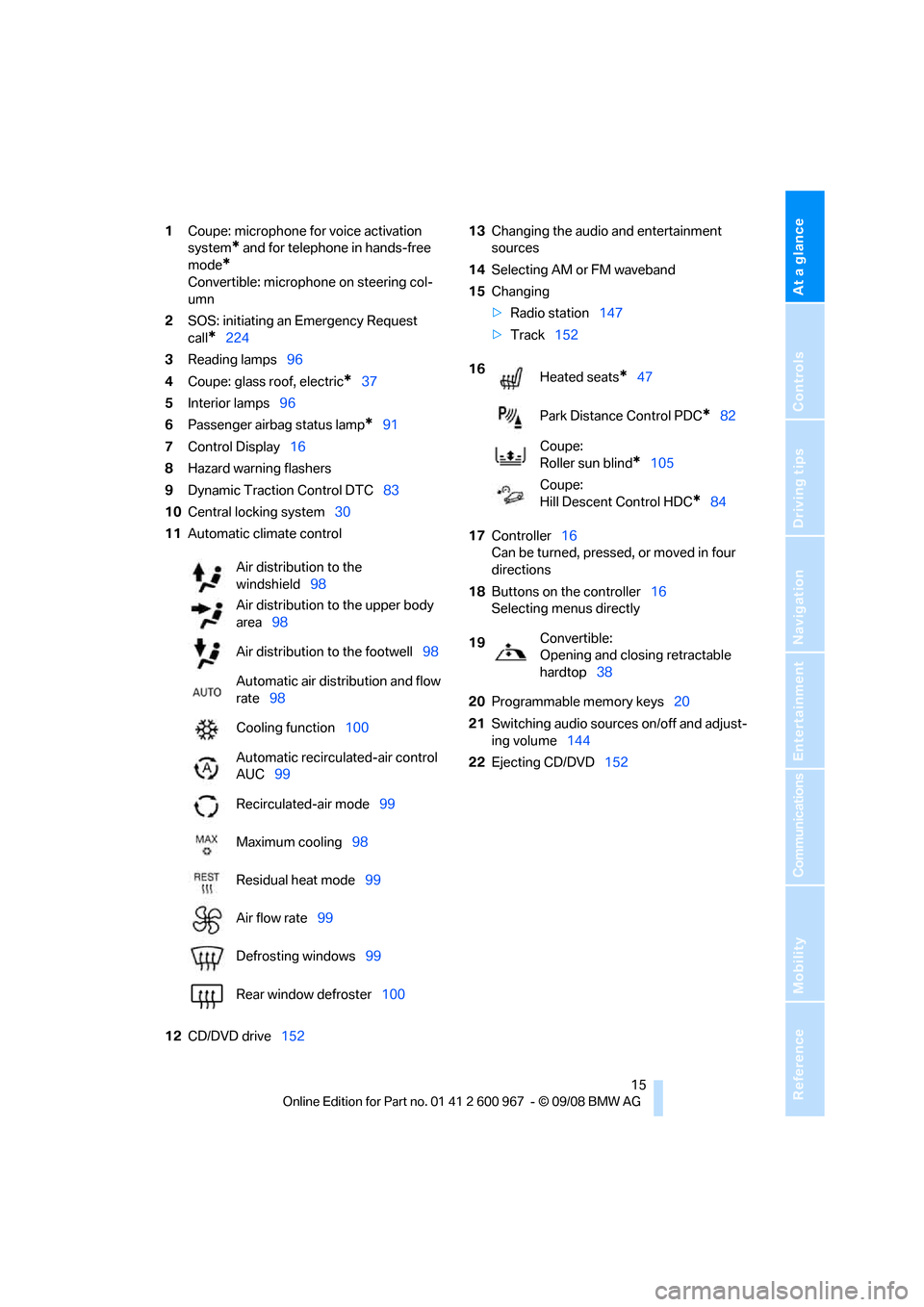
1Coupe: microphone for voice activation
system
* and for telephone in hands-free
mode
*
Convertible: microphone on steering col-
umn
2SOS: initiating an Emergency Request
call
*224
3Reading lamps96
4Coupe: glass roof, electric
*37
5Interior lamps96
6Passenger airbag status lamp
*91
7Control Display16
8Hazard warning flashers
9Dynamic Traction Control DTC83
10Central locking system30
11Automatic climate control
12CD/DVD drive15213Changing the audio and entertainment
sources
14Selecting AM or FM waveband
15Changing
>Radio station147
>Track152
17Controller16
Can be turned, pressed, or moved in four
directions
18Buttons on the controller16
Selecting menus directly
20Programmable memory keys20
21Switching audio sources on/off and adjust-
ing volume144
22Ejecting CD/DVD152 Air distribution to the
windshield98
Air distribution to the upper body
area98
Air distribution to the footwell98
Automatic air distribution and flow
rate98
Cooling function100
Automatic recirculated-air control
AUC99
Recirculated-air mode99
Maximum cooling98
Residual heat mode99
Air flow rate99
Defrosting windows99
Rear window defroster100
16
Heated seats*47
Park Distance Control PDC
*82
Coupe:
Roller sun blind
*105
Coupe:
Hill Descent Control HDC
*84
19Convertible:
Opening and closing retractable
hardtop38
Page 29 of 260
Controls
27Reference
At a glance
Driving tips
Communications
Navigation
Entertainment
Mobility
>Settings for the display on the Control Dis-
play and in the instrument cluster:
>12h/24h format of the clock, refer to
page76
>Date format, refer to page77
>Brightness of Control Display, refer to
page80
>Language on the Control Display, refer
to page80
>Units of measure, refer to page72
>Show visual warning for Park Distance Con-
trol PDC
*, refer to page82
>Light settings:
>Welcome lamps, refer to page93
>Pathway lighting, refer to page94
>Daytime running lamps, refer to page94
>Automatic climate control: activating/deac-
tivating AUTO program, cooling function
and automatic recirculated-air control, set-
ting temperature, air flow rate and distribu-
tion, refer to page98 ff
>Entertainment:
>Audio volume, refer to page144
>Tone control, refer to page144
>Speed-dependent volume control, refer
to page145
Central locking system
The concept
The central locking system functions when the
driver's door is closed.
The system simultaneously engages and
releases the locks on the following:
>Doors
>Luggage compartment lid
>Fuel filler door
>Convertible: glove compartment
Operating from outside
>Via the remote control>Via the door lock
*
>In cars with convenient access*, via the
handles on the driver's and front passen-
ger's doors
In addition, if the remote control is used, the
welcome lamps, interior lamps and the door's
courtesy lamps
* are switched on or off. The
alarm system
* is also armed or disarmed.
For further details of the alarm system,
refer to
page32.
Operating from inside
By means of the button for central locking, refer
to page30.
In the event of a sufficiently severe accident, the
central locking system unlocks automatically. In
addition, the hazard warning flashers and inte-
rior lamps come on.
Opening and closing:
Using the remote control
Persons or animals in a parked vehicle
could lock the doors from the inside. You
should therefore take the remote control with
you when you leave the vehicle so that the latter
can be opened from outside.<
Convertible: to operate the retractable
hardtop with the remote control, the
doors and luggage compartment lid must be
closed and the cargo bay partition must be
folded down and engaged on both sides. Refer
also to page39.<
Unlocking
Press the button.
The interior lamps, the courtesy lamps
* and the
welcome lamps come on.
Setting unlocking characteristics
You can set whether only the driver's door or
the entire vehicle is to be unlocked when the
button is pressed for the first time.
iDrive, for operating principle refer to page16.
Page 82 of 260
Everything under control
80
Settings on the Control
Display
Language on the Control Display
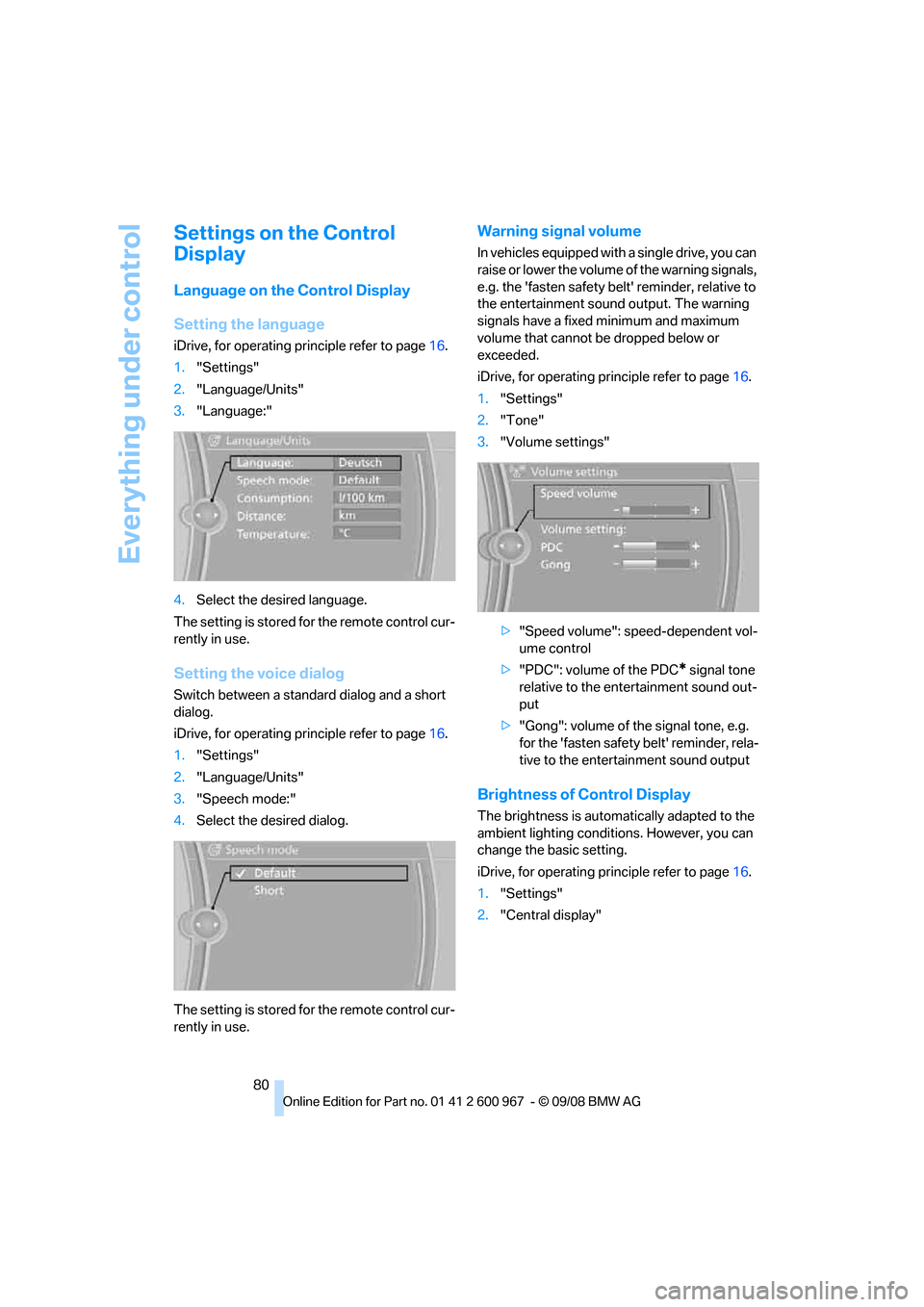
Setting the language
iDrive, for operating principle refer to page16.
1."Settings"
2."Language/Units"
3."Language:"
4.Select the desired language.
The setting is stored for the remote control cur-
rently in use.
Setting the voice dialog
Switch between a standard dialog and a short
dialog.
iDrive, for operating principle refer to page16.
1."Settings"
2."Language/Units"
3."Speech mode:"
4.Select the desired dialog.
The setting is stored for the remote control cur-
rently in use.
Warning signal volume
In vehicles equipped with a single drive, you can
raise or lower the volume of the warning signals,
e.g. the 'fasten safety belt' reminder, relative to
the entertainment sound output. The warning
signals have a fixed minimum and maximum
volume that cannot be dropped below or
exceeded.
iDrive, for operating principle refer to page16.
1."Settings"
2."Tone"
3."Volume settings"
>"Speed volume": speed-dependent vol-
ume control
>"PDC": volume of the PDC
* signal tone
relative to the entertainment sound out-
put
>"Gong": volume of the signal tone, e.g.
for the 'fasten safety belt' reminder, rela-
tive to the entertainment sound output
Brightness of Control Display
The brightness is automatically adapted to the
ambient lighting conditions. However, you can
change the basic setting.
iDrive, for operating principle refer to page16.
1."Settings"
2."Central display"
Page 84 of 260
Technology for driving comfort and safety
82
Technology for driving comfort and safety
Park Distance Control PDC*
The concept
The PDC assists you with maneuvering in tight
parking spaces. Acoustic signals and a visual
indicator
warn you of the presence of an object
behind your vehicle. To measure the distance,
there are four ultrasonic sensors in either
bumper.
These sensors have a range of approx. 6.5 ft/
2 m. However, an acoustic warning does not
sound until an object is approx. 24 in/60 cm
from the corner sensors, or approx. 5 ft/1.50 m
from the center sensors.
PDC is a parking aid that can indicate
objects when they are approached
slowly, as is usually the case when parking.
Avoid approaching an object at high speed, oth-
erwise physical circumstances may lead to the
system warning being issued too late.<
Switching on automatically
With the engine running or the ignition switched
on, the system is activated approx. 1 second
after you engage reverse gear or selector lever
or transmission position R. Wait this short
period before driving.
Switching off automatically
After approx. 165 ft/50 m of driving or above
approx. 20 mph/approx. 30 km/h, the system
switches off and the LED goes out.
Signal tones
When nearing an object, its position is indicated
correspondingly by an interval tone. As the dis-
tance between vehicle and object decreases,
the intervals between the tones become
shorter. If the distance to the nearest object
falls to below roughly 1 ft/30 cm, then a contin-
uous tone sounds.
An interval tone is interrupted after approx.
3seconds>if you remain in front of an object that has
been detected by only one of the corner
sensors
>if you are driving parallel to a wall.
Malfunction
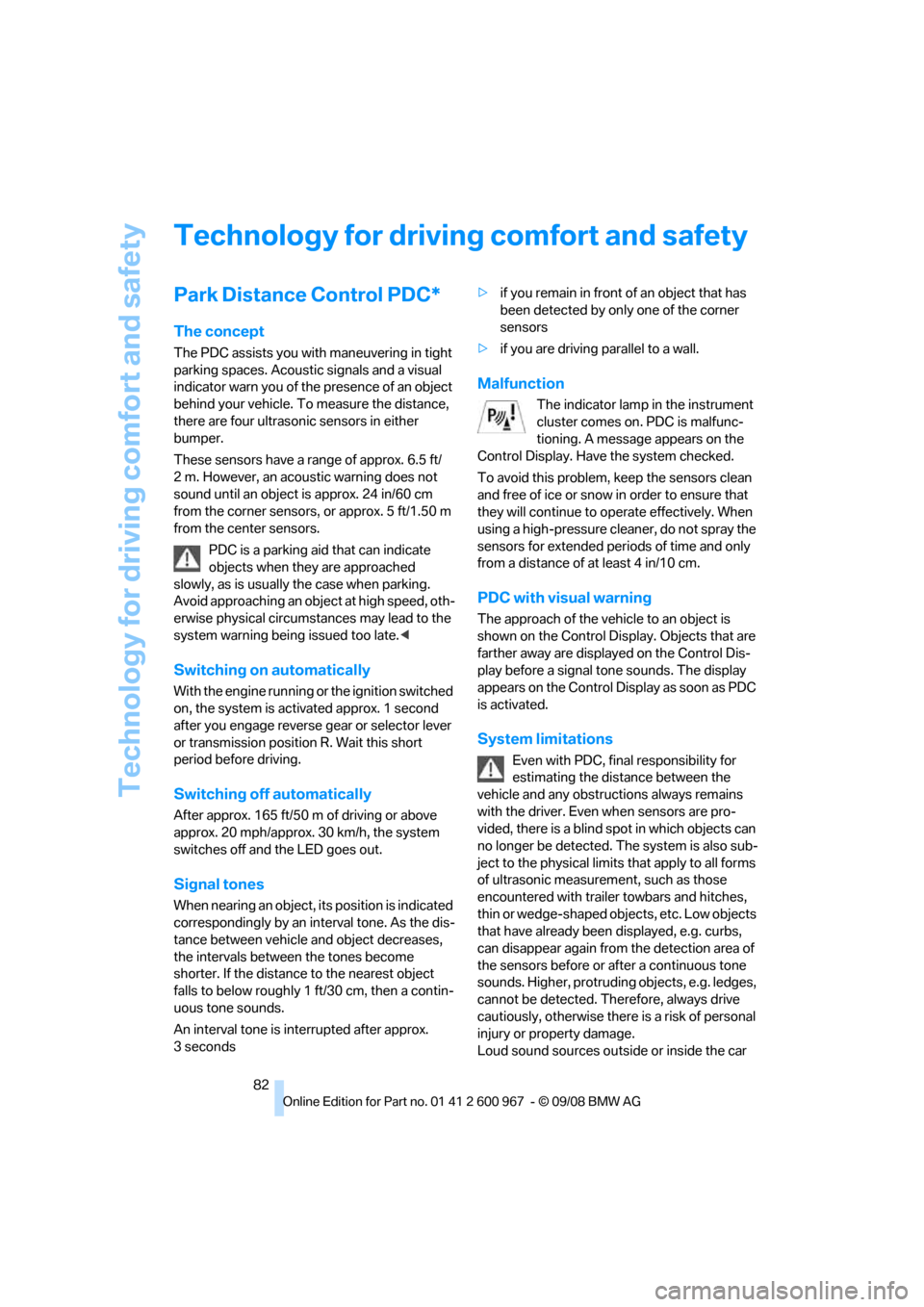
The indicator lamp in the instrument
cluster comes on. PDC is malfunc-
tioning. A message appears on the
Control Display. Have the system checked.
To avoid this problem, keep the sensors clean
and free of ice or snow in order to ensure that
they will continue to operate effectively. When
using a high-pressure cleaner, do not spray the
sensors for extended periods of time and only
from a distance of at least 4 in/10 cm.
PDC with visual warning
The approach of the vehicle to an object is
shown on the Control Display. Objects that are
farther away are displayed on the Control Dis-
play before a signal tone sounds. The display
appears on the Control Display as soon as PDC
is activated.
System limitations
Even with PDC, final responsibility for
estimating the distance between the
vehicle and any obstructions always remains
with the driver. Even when sensors are pro-
vided, there is a blind spot in which objects can
no longer be detected. The system is also sub-
ject to the physical limits that apply to all forms
of ultrasonic measurement, such as those
encountered with trailer towbars and hitches,
thin or wedge-shaped objects, etc. Low objects
that have already been displayed, e.g. curbs,
can disappear again from the detection area of
the sensors before or after a continuous tone
sounds. Higher, protruding objects, e.g. ledges,
cannot be detected. Therefore, always drive
cautiously, otherwise there is a risk of personal
injury or property damage.
Loud sound sources outside or inside the car
Page 85 of 260
Controls
83Reference
At a glance
Driving tips
Communications
Navigation
Entertainment
Mobility
can drown out the PDC signal. Therefore,
always drive cautiously, otherwise there is a risk
of personal injury or property damage.<
Driving stability control
systems
Your BMW has a number of systems that help
to maintain the vehicle's stability even in
adverse driving conditions.
Antilock Brake System ABS
ABS prevents locking of the wheels during
braking. Safe steering response is maintained
even during full braking. Active safety is thus
increased.
The ABS is operational every time you start the
engine. Braking safely, refer to page118.
Electronic brake-force distribution
The system controls the brake pressure in the
rear wheels to ensure stable braking behavior.
Dynamic Brake Control DBC
When you apply the brakes rapidly, this system
automatically produces the maximum braking
force boost and thus helps to achieve the short-
est possible braking distance during full brak-
ing. This system exploits all of the benefits pro-
vided by ABS.
Do not reduce the pressure on the brake for the
duration of the full braking application.
Dynamic Stability Control DSC
DSC prevents the driving wheels from losing
traction when you pull away from rest or accel-
erate. The system also recognizes unstable
driving conditions, for example if the rear of the
car is about to swerve or if momentum is acting
at an angle past the front wheels. In these
cases, DSC helps the vehicle maintain a safe
course within physical limits by reducing engine
output and through braking actions at the indi-
vidual wheels.
The laws of physics cannot be repealed,
even with DSC. An appropriate driving style always remains the responsibility of the
driver. Therefore, do not reduce the additional
s a f e t y m a r g i n a g a i n b y t a k i n g r i s k s , a s t h i s c o u l d
result in an accident.<
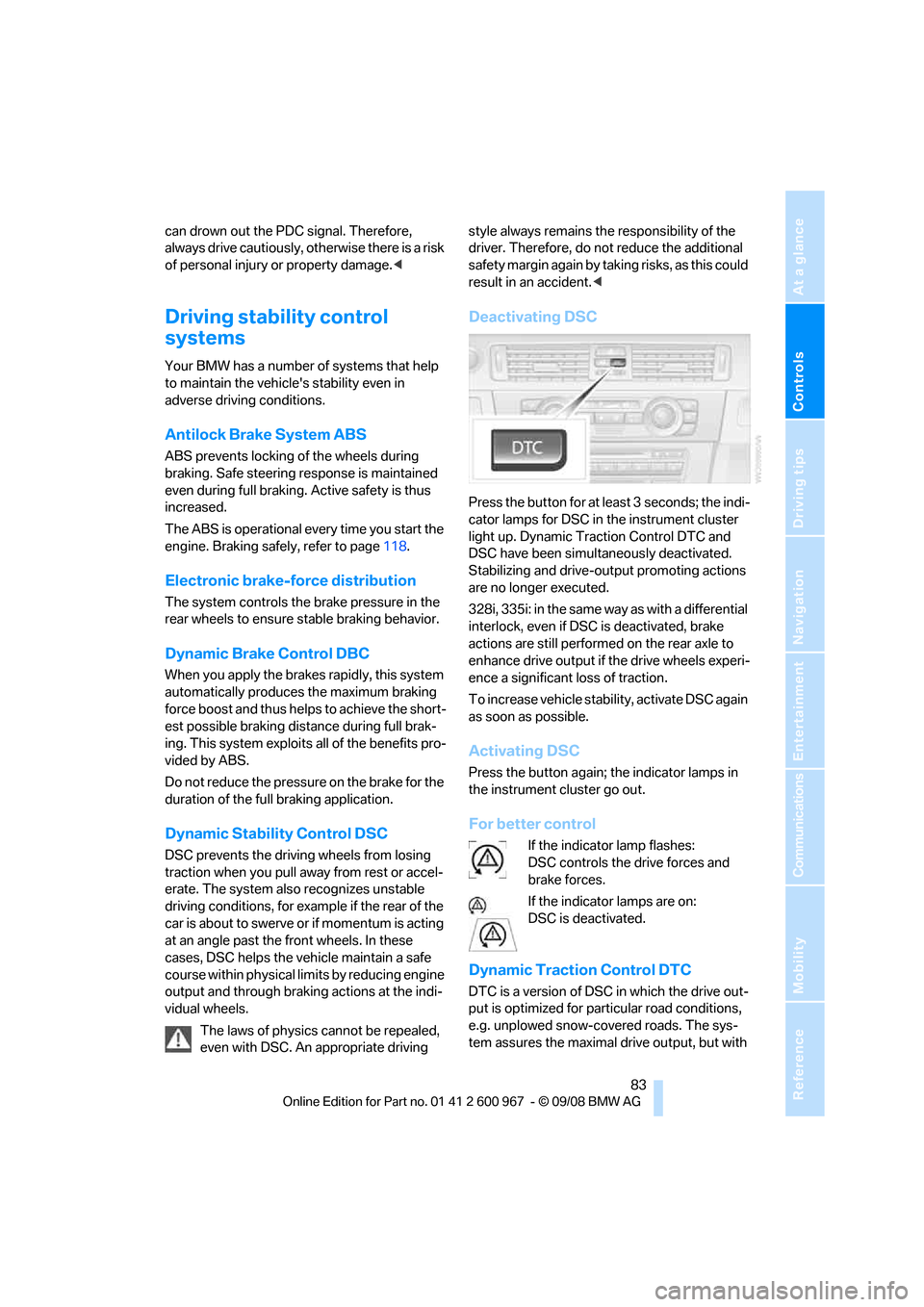
Deactivating DSC
Press the button for at least 3 seconds; the indi-
cator lamps for DSC in the instrument cluster
light up. Dynamic Traction Control DTC and
DSC have been simultaneously deactivated.
Stabilizing and drive-output promoting actions
are no longer executed.
328i, 335i: in the same way as with a differential
interlock, even if DSC is deactivated, brake
actions are still performed on the rear axle to
enhance drive output if the drive wheels experi-
ence a significant loss of traction.
To increase vehicle stability, activate DSC again
as soon as possible.
Activating DSC
Press the button again; the indicator lamps in
the instrument cluster go out.
For better control
If the indicator lamp flashes:
DSC controls the drive forces and
brake forces.
If the indicator lamps are on:
DSC is deactivated.
Dynamic Traction Control DTC
DTC is a version of DSC in which the drive out-
put is optimized for particular road conditions,
e.g. unplowed snow-covered roads. The sys-
tem assures the maximal drive output, but with
Page 147 of 260
Navigation
Entertainment
Driving tips
145Reference
At a glance
Controls
Communications
Mobility
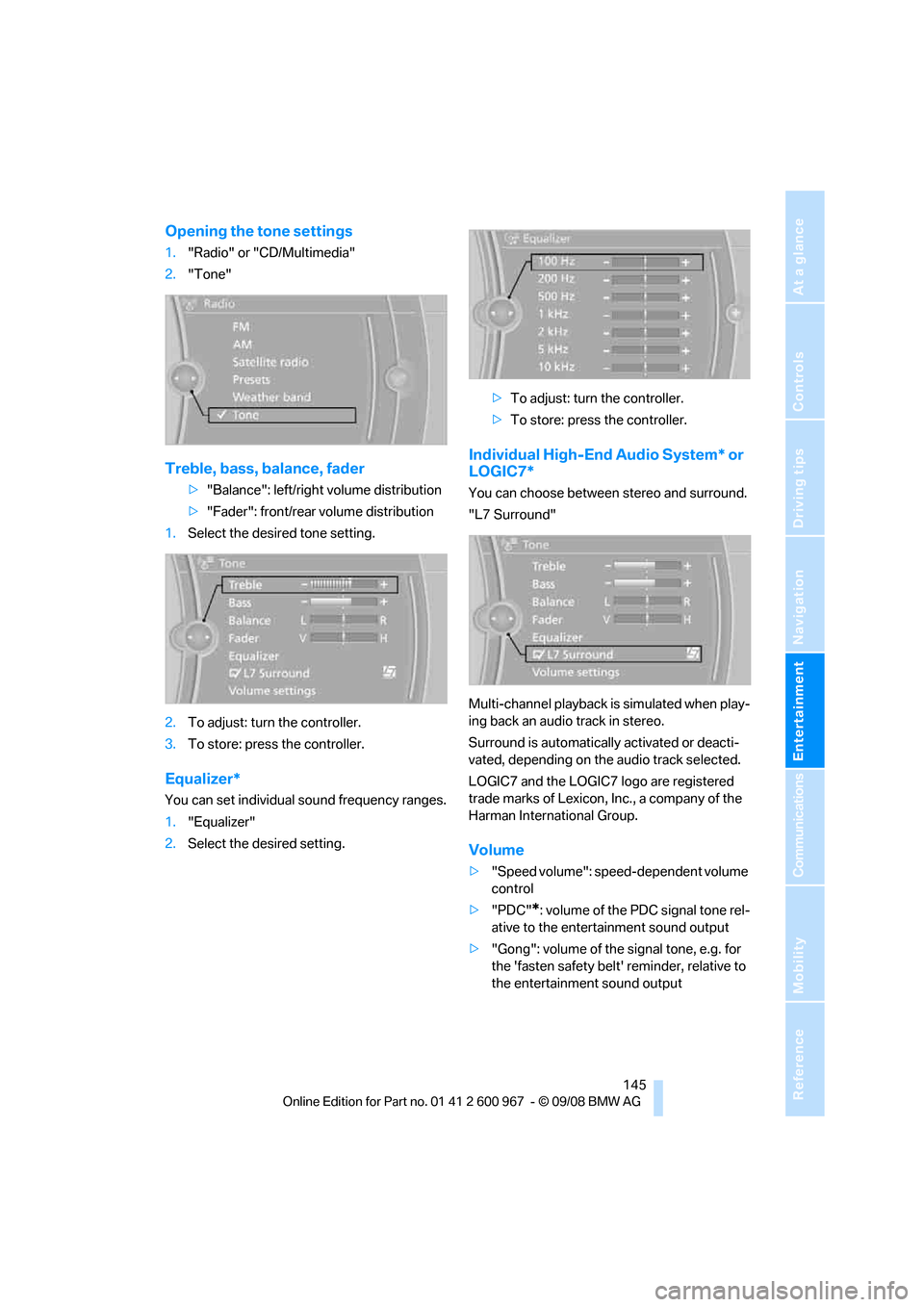
Opening the tone settings
1."Radio" or "CD/Multimedia"
2."Tone"
Treble, bass, balance, fader
>"Balance": left/right volume distribution
>"Fader": front/rear volume distribution
1.Select the desired tone setting.
2.To adjust: turn the controller.
3.To store: press the controller.
Equalizer*
You can set individual sound frequency ranges.
1."Equalizer"
2.Select the desired setting.>To adjust: turn the controller.
>To store: press the controller.
Individual High-End Audio System* or
LOGIC7*
You can choose between stereo and surround.
"L7 Surround"
Multi-channel playback is simulated when play-
ing back an audio track in stereo.
Surround is automatically activated or deacti-
vated, depending on the audio track selected.
LOGIC7 and the LOGIC7 logo are registered
trade marks of Lexicon, Inc., a company of the
Harman International Group.
Volume
>"Speed volume": speed-dependent volume
control
>"PDC"
*: volume of the PDC signal tone rel-
ative to the entertainment sound output
>"Gong": volume of the signal tone, e.g. for
the 'fasten safety belt' reminder, relative to
the entertainment sound output
Page 248 of 260
Everything from A - Z
246 Displays
– on the Control Display16
Displays, refer to Instrument
cluster12
Displays and controls10
Disposal
– coolant209
– remote control battery35
– vehicle battery222
Distance control, refer to
Active cruise control63
Distance remaining to service,
refer to Service
requirements73
Distance warning, refer to
Park Distance Control
PDC82
Door key, refer to Remote
control with integrated
key26
Door lock29
Doors, emergency
operation30
DOT Quality Grades202
Draft-free ventilation100
Drinks holders, refer to Cup
holders107
Drive-off assistance, refer to
Dynamic Stability Control
DSC83
Drive-off assistant85
Driving lamps, refer to Parking
lamps/low beams93
Driving notes116
Driving off on hills, refer to
Drive-off assistant85
Driving stability control
systems83
Driving through water118
Driving tips, refer to Driving
notes116
Dry air, refer to Cooling
function100
DSC Dynamic Stability
Control83
DTC Dynamic Traction
Control83
– indicator/warning lamp83DVD
– country codes154
– settings155
– video playback154
DVD menu155
DVD video154
Dynamic Brake Control
DBC83
Dynamic Stability Control
DSC
– indicator/warning lamp83
Dynamic Traction Control
DTC
– indicator/warning lamp84
E
Eject button, refer to Buttons
on the CD player144
Electrical malfunction
– door lock30
– driver's door30
– fuel filler door192
– glass roof38
Electric seat adjustment43
Electric steering wheel lock
– with convenient access34
Electronic brake-force
distribution EBV83
Electronic oil level check207
Electronic Stability Program
ESP, refer to Dynamic
Stability Control DSC83
Emergency actuation,
automatic transmission,
refer to Overriding selector
lever lock59
Emergency operation
– fuel filler door, manual
release192
Emergency operation, refer to
Closing manually
– glass roof38
Emergency operation, refer to
Manual operation
– door lock30
Emergency release
– luggage compartment lid
from inside32Emergency Request224
Emergency services, refer to
Roadside Assistance224
Energy, saving
– saving fuel116
Engine
– breaking in116
– data232
– overheated, refer to Coolant
temperature70
– speed232
– starting55
– starting, convenient
access34
– switching off56
Engine compartment207
Engine coolant, refer to
Coolant209
Engine oil
– adding209
– BMW Maintenance
System211
– capacity235
– checking level207
– intervals between changes,
refer to Service
requirements73
Engine output, refer to Engine
data232
Engine speed, refer to Engine
data232
Engine starting, refer to
Starting the engine55
Entry lamps, refer to Interior
lamps
96
Entry map for destination130
Equalizer, tone setting145
Error messages, refer to
Check Control77
Event data recorders212
Exhaust system, refer to Hot
exhaust system117
Exterior mirrors49
– adjusting49
– automatic dimming
feature50
– automatic heating50
– folding in and out49
External audio device106
Page 253 of 260
Reference 251
At a glance
Controls
Driving tips
Communications
Navigation
Entertainment
Mobility
P
Paintwork care214
Park assistant, refer to Park
Distance Control82
Park Distance Control PDC82
Parked car ventilation100
– preselecting switch-on
times101
– switching on and off
directly101
Parking
– vehicle56
Parking aid, refer to Park
Distance Control PDC82
Parking brake56
– indicator lamp56
Parking lamps93
– replacing bulbs219
Parking lamps/low beams93
Passenger-side mirror tilt
function50
Pathway lighting94
Personal Profile26
Phone book173
Phone numbers
– dialing174
Pinch protection system
– glass roof, electric37
– windows36
Placing a call, refer to
telephone owner's manual
Polish215
Pollen
– refer to Microfilter/activated-
charcoal filter for automatic
climate control100
Position, refer to Current
position, displaying141
Postal code, entering for
navigation126
Power failure222
Power windows36
Power windows, refer to
Windows35
Pressure, tires194
Pressure monitoring, tires85
– Flat Tire Monitor85Pressure monitoring of tires,
refer to Tire Pressure
Monitor TPM86
Programmable buttons on the
steering wheel11
Protection function, refer to
Pinch protection system
– glass roof, electric37
– windows36
Providing medical assistance,
refer to First add pouch225
Puncture
– Flat Tire Monitor85
R
Radio
– controls144
– High Definition Radio148
– satellite radio150
– selecting a waveband147
– storing stations147
– switching on/off144
– tone control144
– volume144
– Weather Band, refer to
Weather information150
Radio position, refer to Radio
readiness55
Radio readiness55
– switched off55
– switched on55
Radio-remote key, refer to
Remote control with
integrated key26
Rain sensor60
Reading lamps96
Rear lamps, refer to Tail
lamps220
Rear seats
– adjusting head restraints45
– folding down backrests109
Rear turn signals
– replacing bulb220
Rear ventilation100
Rearview mirror, refer to
Mirrors49
Rear window defroster100Rear window roller blind, refer
to Roller sun blinds105
Receiving level of mobile
phone, refer to Status
information19
Reception
– quality148
– radio station148
Recirculated-air mode99
Recirculation of air, refer to
Recirculated-air mode99
Reclining seat, refer to
Backrest43
Refueling192
Releasing
– hood206
Remaining distance, refer to
Cruising range70
Remote control26
– battery renewal35
– convenient access34
– garage door opener102
– luggage compartment lid28
– malfunction29,35
– removing from the ignition
lock55
– service data211
Replacement remote
control26
Replacing bulbs, refer to
Lamps and bulbs218
Replacing tires204
Replacing tires, refer to New
wheels and tires204
Reporting safety defects6
Reserve warning, refer to Fuel
gauge70
Reset, refer to Resetting tone
settings146
Residual heat99
Restraint systems
– for children52
– refer to Safety belts48
Retractable hardtop38
– care, refer to Caring for your
vehicle brochure
– convenient operation28
– opening and closing39
– remote control28