stop start BMW 335I CONVERTIBLE 2013 User Guide
[x] Cancel search | Manufacturer: BMW, Model Year: 2013, Model line: 335I CONVERTIBLE, Model: BMW 335I CONVERTIBLE 2013Pages: 308, PDF Size: 5.65 MB
Page 113 of 308
112
ControlsLamps
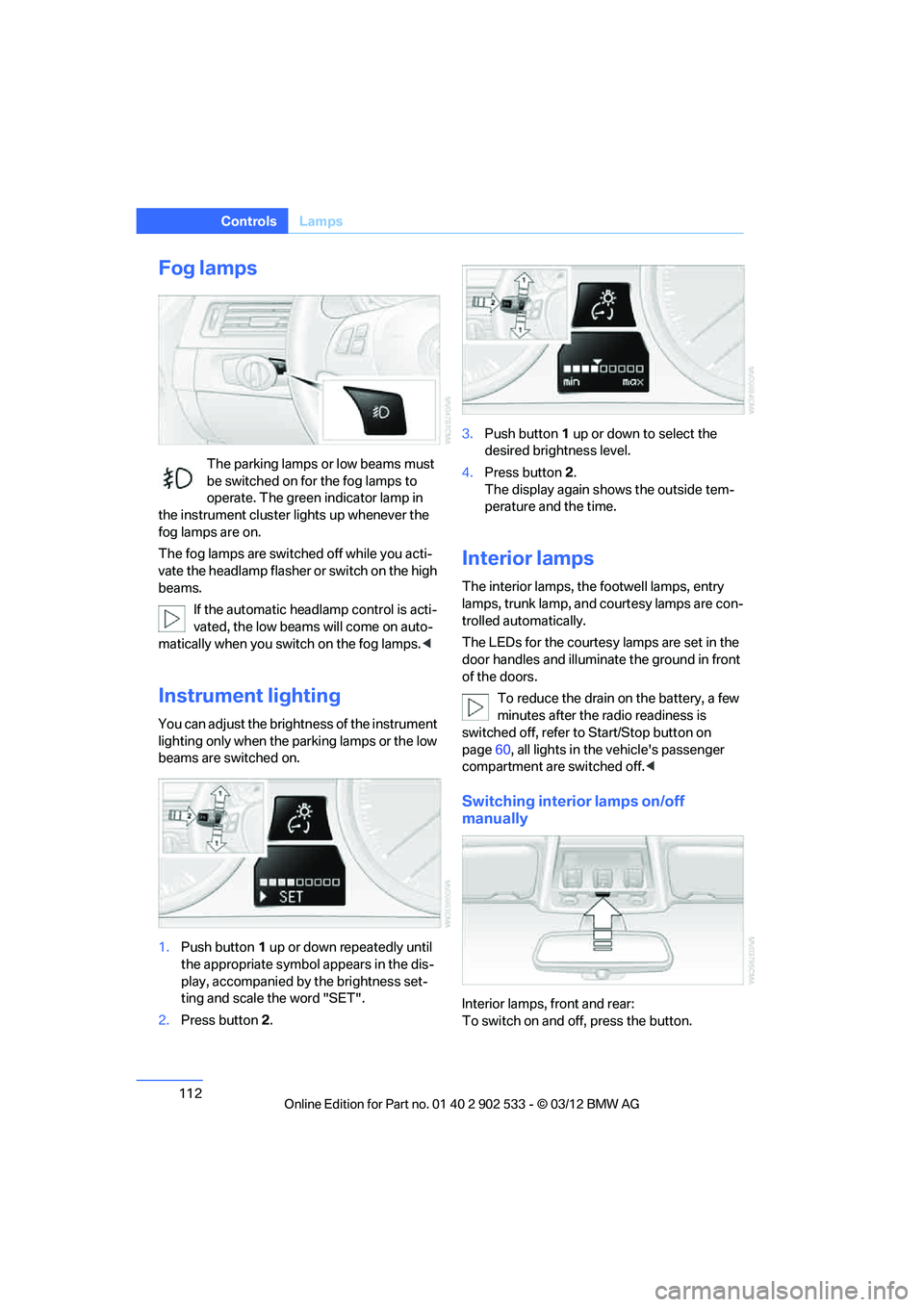
Fog lamps
The parking lamps or low beams must
be switched on for the fog lamps to
operate. The green indicator lamp in
the instrument cluster lights up whenever the
fog lamps are on.
The fog lamps are switched off while you acti-
vate the headlamp flasher or switch on the high
beams.
If the automatic headlamp control is acti-
vated, the low beams will come on auto-
matically when you switch on the fog lamps. <
Instrument lighting
You can adjust the brightness of the instrument
lighting only when the parking lamps or the low
beams are switched on.
1.Push button 1 up or down repeatedly until
the appropriate symbol appears in the dis-
play, accompanied by the brightness set-
ting and scale the word "SET".
2. Press button 2. 3.
Push button 1 up or down to select the
desired brightness level.
4. Press button 2.
The display again shows the outside tem-
perature and the time.
Interior lamps
The interior lamps, the footwell lamps, entry
lamps, trunk lamp, and courtesy lamps are con-
trolled automatically.
The LEDs for the courtesy lamps are set in the
door handles and illuminate the ground in front
of the doors.
To reduce the drain on the battery, a few
minutes after the radio readiness is
switched off, refer to Start/Stop button on
page 60, all lights in the vehicle's passenger
compartment are switched off. <
Switching interior lamps on/off
manually
Interior lamps, front and rear:
To switch on and off, press the button.
00320051004F004C00510048000300280047004C0057004C005200510003
Page 156 of 308
155
Destination guidance
Navigation
Destination guidance
Vehicle equipment
In this chapter, all production, country, and
optional equipment that is offered in the model
range is described. Equipment is also described
that is not available because of, for example,
selected options or country version. This also
applies to safety related functions and systems.
Starting destination
guidance
1.
"Navigation"
2. Entering a destination, refer to page 146.
3. "Accept destination"
4. "Start guidance"
The route is displayed on the Control Display
after it is calculated.
In the map view, the distance to the destination/
intermediate destination and the estimated
time of arrival are displayed.
The arrow display appears on the Control Dis-
play, if so desired.
Terminating destination
guidance
1. "Navigation"
2. "Map"
3. "Guidance".
4. "Stop guidance"
Continuing destination
guidance
If the destination was not reached during the
last trip, destination guidance can be resumed.
"Resume guidance"
Route criteria
General information
>You can influence the calculated route by
selecting certain trip criteria.
> Route criteria can be changed during desti-
nation entry and during route guidance.
> Street types are part of the navigation data
and are taken into account in route plan-
ning, e.g. avoiding highways.
> The proposed route can differ from per-
sonal experience.
> The settings are stored for the remote con-
trol currently in use.
> Route guidance with traffic bulletins, refer
to page 161.
Changing route criteria
1."Navigation"
2. "Map"
3. "Route preference"
4. Selecting a criterion:
> "Fast route": time-optimized route
through a combination of the least pos-
sible distance and stretches of road that
allow rapid driving.
> "ECO PRO route": optimized combi-
nation of the fastest and shortest possi-
ble route.
> "Short route": short distance without
taking time into account.
> "Alternative routes": are suggested,
where possible, during active route
guidance.
00320051004F004C00510048000300280047004C0057004C005200510003
Page 159 of 308
158
NavigationDestination guidance
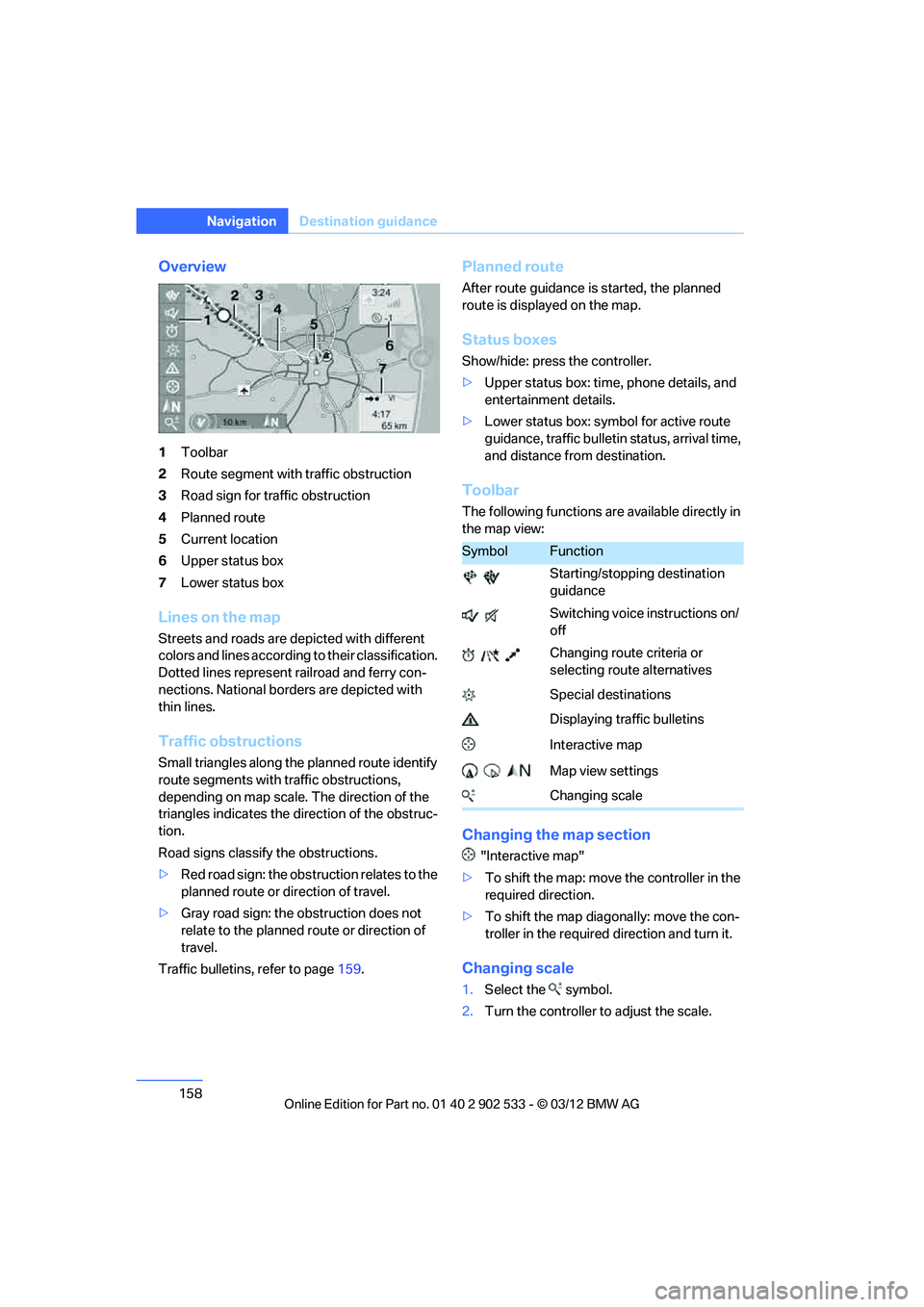
Overview
1Toolbar
2 Route segment with traffic obstruction
3 Road sign for traffic obstruction
4 Planned route
5 Current location
6 Upper status box
7 Lower status box
Lines on the map
Streets and roads are depicted with different
colors and lines according to their classification.
Dotted lines represent railroad and ferry con-
nections. National borders are depicted with
thin lines.
Traffic obstructions
Small triangles along the planned route identify
route segments with traffic obstructions,
depending on map scale. The direction of the
triangles indicates the direction of the obstruc-
tion.
Road signs classify the obstructions.
>Red road sign: the obstruction relates to the
planned route or direction of travel.
> Gray road sign: the obstruction does not
relate to the planned route or direction of
travel.
Traffic bulletins, refer to page 159.
Planned route
After route guidance is started, the planned
route is displayed on the map.
Status boxes
Show/hide: press the controller.
>Upper status box: time, phone details, and
entertainment details.
> Lower status box: symbol for active route
guidance, traffic bulletin status, arrival time,
and distance from destination.
Toolbar
The following functions are available directly in
the map view:
Changing the map section
"Interactive map"
> To shift the map: move the controller in the
required direction.
> To shift the map diagonally: move the con-
troller in the required direction and turn it.
Changing scale
1.Select the symbol.
2. Turn the controller to adjust the scale.
SymbolFunction
Starting/stopping destination
guidance
Switching voice instructions on/
off
Changing route criteria or
selecting route alternatives
Special destinations
Displaying traffic bulletins
Interactive map
Map view settings
Changing scale
00320051004F004C00510048000300280047004C0057004C005200510003
Page 162 of 308
161
Destination guidance
Navigation
Symbols in the map view
Depending on the scale of the map and the
location of the traffic obstruction along the
route, the symbols for the traffic obstructions
are displayed.
Additional information in the map view
Depending on the map scale, a traffic obstruc-
tion's length, direction and impact are displayed
on the map using triangles or gray bars along
the calculated route.
>
Red: traffic congestion
> Orange: stop-and-go traffic
> Yellow: heavy traffic
> Green: clear roads
> Gray: general traffic in formation, e.g. con-
struction zone
The bulletins displayed depend in the respec-
tive traffic information service.
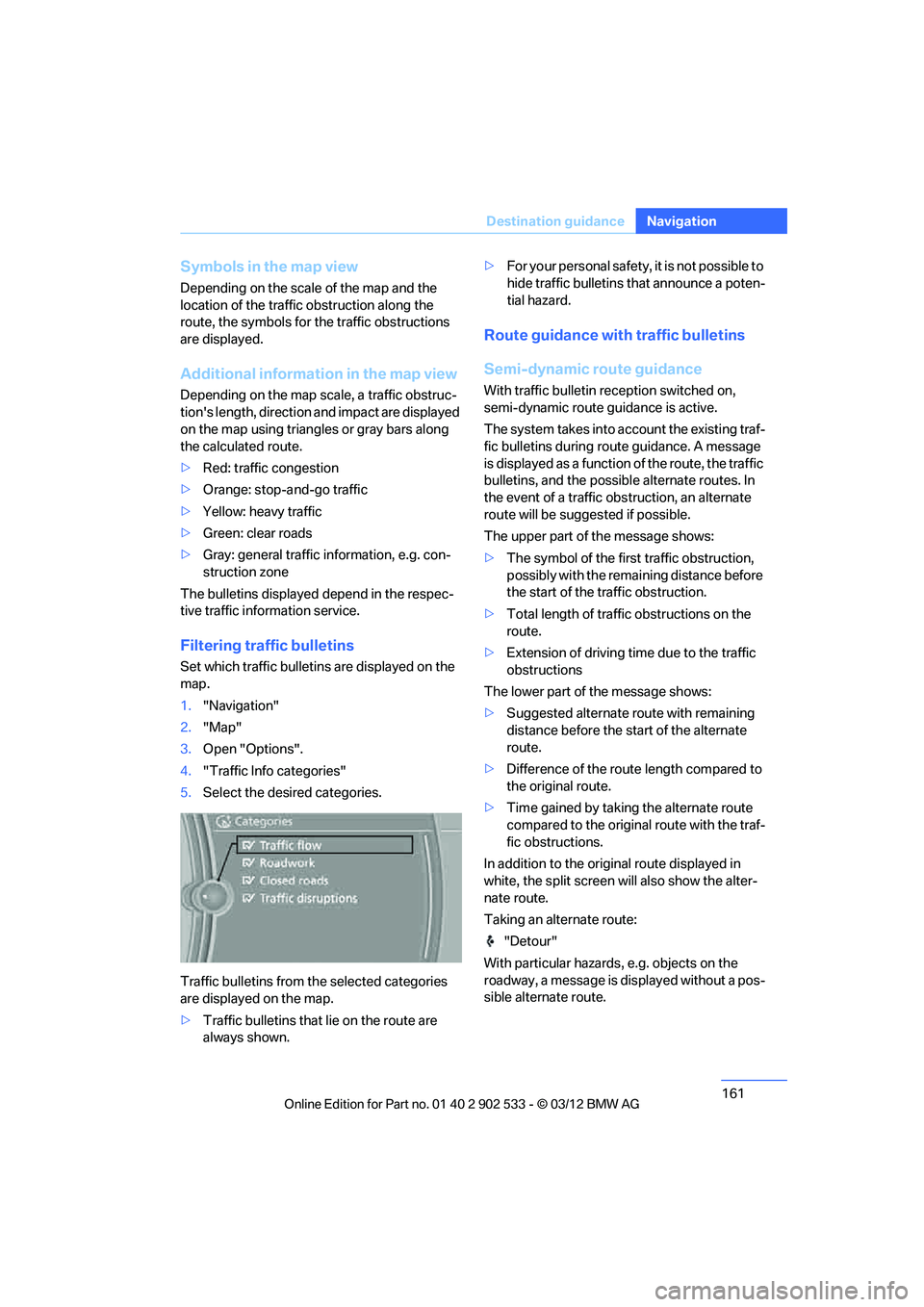
Filtering traffic bulletins
Set which traffic bulletins are displayed on the
map.
1. "Navigation"
2. "Map"
3. Open "Options".
4. "Traffic Info categories"
5. Select the desired categories.
Traffic bulletins from the selected categories
are displayed on the map.
> Traffic bulletins that lie on the route are
always shown. >
For your personal safety, it is not possible to
hide traffic bulletins that announce a poten-
tial hazard.
Route guidance with traffic bulletins
Semi-dynamic route guidance
With traffic bulletin reception switched on,
semi-dynamic route guidance is active.
The system takes into account the existing traf-
fic bulletins during route guidance. A message
is displayed as a function of the route, the traffic
bulletins, and the possible alternate routes. In
the event of a traffic obstruction, an alternate
route will be suggested if possible.
The upper part of the message shows:
>The symbol of the first traffic obstruction,
possibly with the remaining distance before
the start of the traffic obstruction.
> Total length of traffic obstructions on the
route.
> Extension of driving time due to the traffic
obstructions
The lower part of the message shows:
> Suggested alternate route with remaining
distance before the start of the alternate
route.
> Difference of the route length compared to
the original route.
> Time gained by taking the alternate route
compared to the original route with the traf-
fic obstructions.
In addition to the original route displayed in
white, the split screen will also show the alter-
nate route.
Taking an alternate route: "Detour"
With particular hazards, e.g. objects on the
roadway, a message is displayed without a pos-
sible alternate route.
00320051004F004C00510048000300280047004C0057004C005200510003
Page 181 of 308
180
EntertainmentCD/DVD player and CD changer
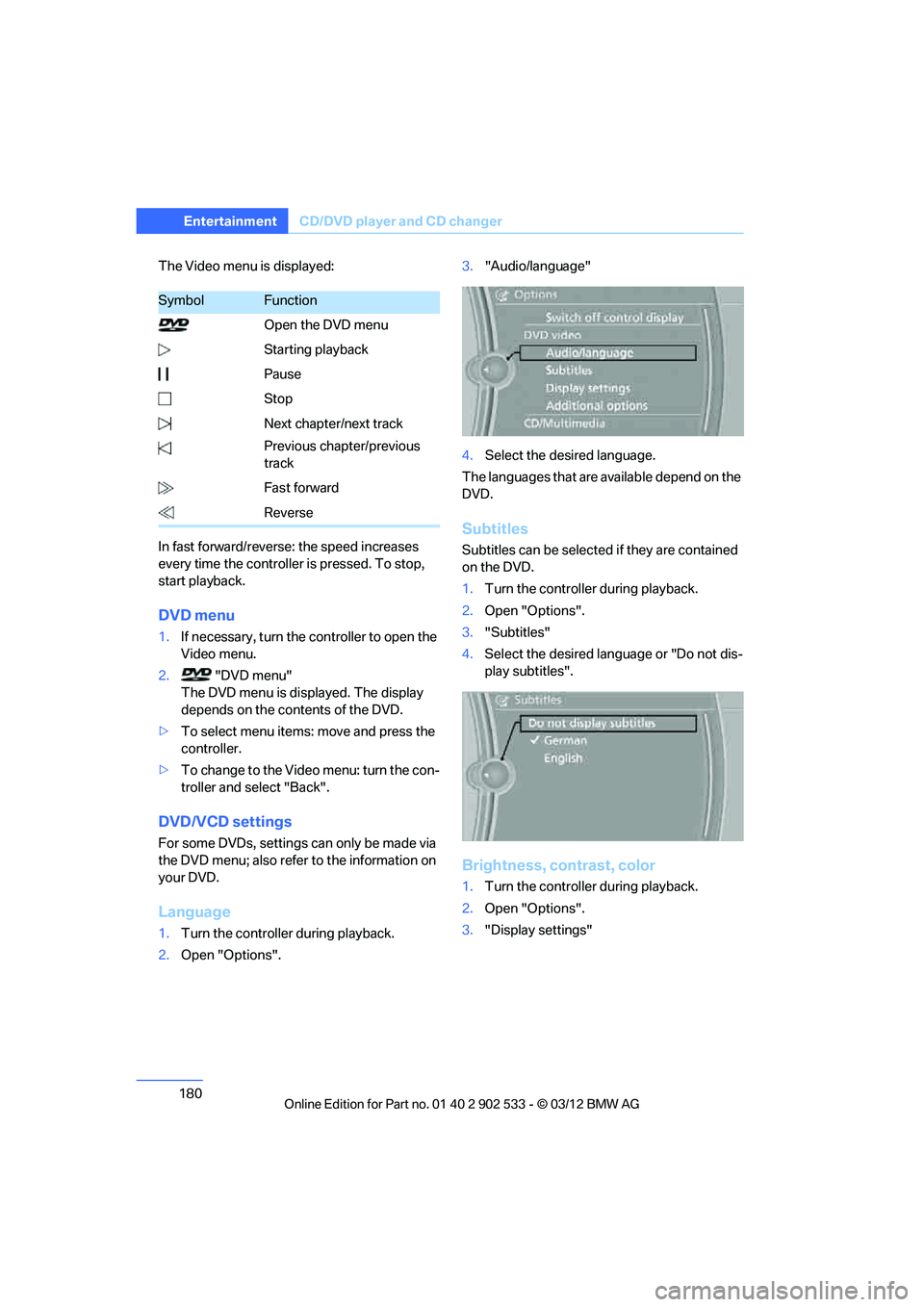
The Video menu is displayed:
In fast forward/reverse: the speed increases
every time the controller is pressed. To stop,
start playback.
DVD menu
1.If necessary, turn the controller to open the
Video menu.
2. "DVD menu"
The DVD menu is displayed. The display
depends on the contents of the DVD.
> To select menu items: move and press the
controller.
> To change to the Video menu: turn the con-
troller and select "Back".
DVD/VCD settings
For some DVDs, settings can only be made via
the DVD menu; also refer to the information on
your DVD.
Language
1.Turn the controller during playback.
2. Open "Options". 3.
"Audio/language"
4. Select the desired language.
The languages that are available depend on the
DVD.
Subtitles
Subtitles can be selected if they are contained
on the DVD.
1. Turn the controller during playback.
2. Open "Options".
3. "Subtitles"
4. Select the desired language or "Do not dis-
play subtitles".
Brightness, contrast, color
1.Turn the controller during playback.
2. Open "Options".
3. "Display settings"
SymbolFunction
Open the DVD menu
Starting playback
Pause
Stop
Next chapter/next track
Previous chapter/previous
track
Fast forward
Reverse
00320051004F004C00510048000300280047004C0057004C005200510003
Page 197 of 308
196
EntertainmentExternal devices
If you have gone through all items in the list and
still cannot activate the desired function, please
contact Customer Relations or your BMW cen-
ter.
Software update
The vehicle supports various external devices,
depending on the software it is currently using.
A software update can enable the vehicle to
support, for example, new mobile phones or
new external devices.
Software updates and associated, up-to-date
instructions are available on the web page
www.bmwusa.com/update.
Displaying current version
The currently installed software is displayed.
1."Settings"
2. "Software update"
3. "Show current version"
Select the desired version to display additional
information.
Updating software by USB
The software update ca n only be performed
when stopped.
1. Save the file for the software update in the
main directory of a USB data storage
device.
2. Connect the USB data storage device to the
USB interface of the USB audio interface in
the center armrest. It is not possible to per-
form the update using the USB interface in
the glove compartment.
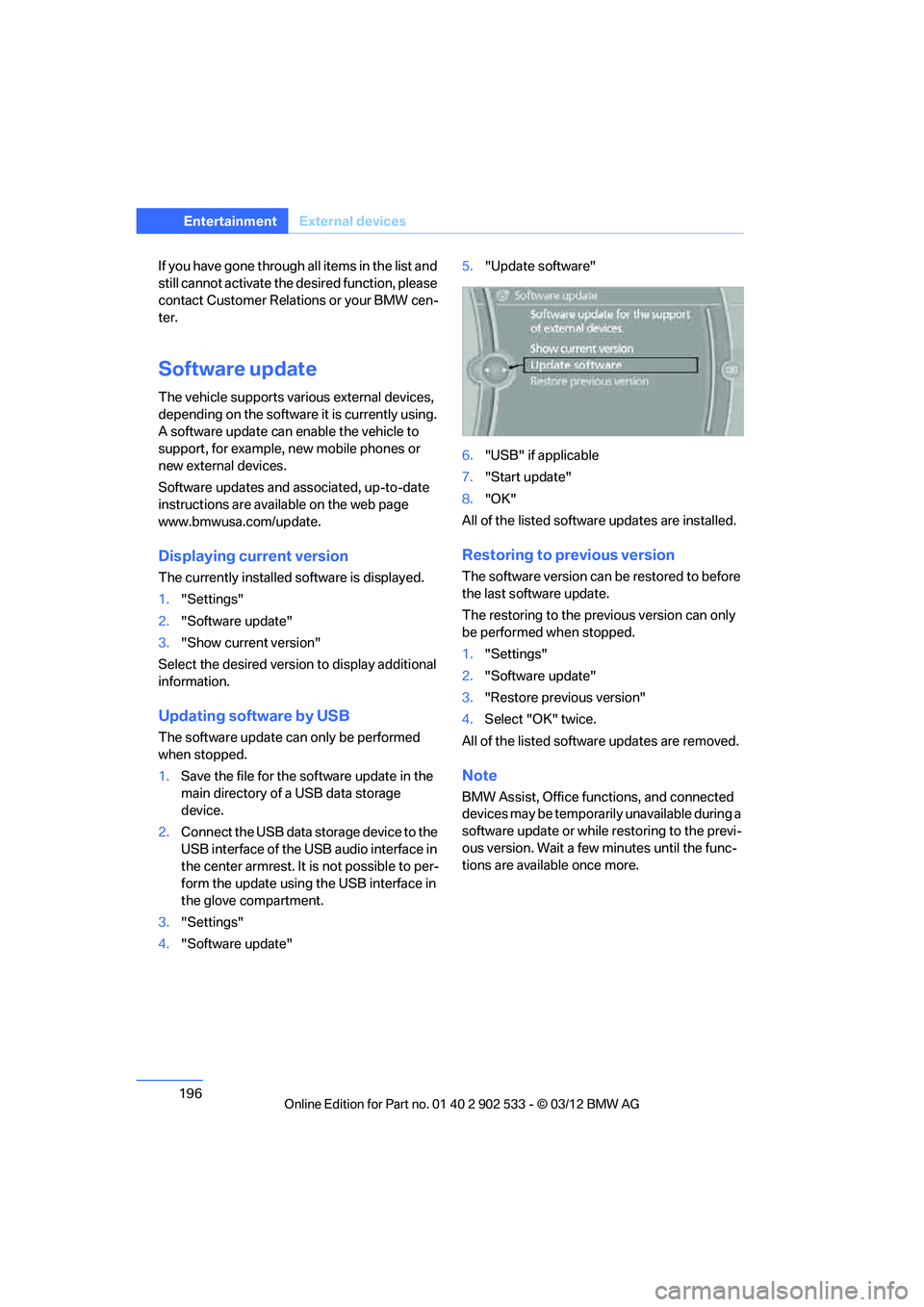
3. "Settings"
4. "Software update" 5.
"Update software"
6. "USB" if applicable
7. "Start update"
8. "OK"
All of the listed software updates are installed.
Restoring to previous version
The software version can be restored to before
the last software update.
The restoring to the previous version can only
be performed when stopped.
1. "Settings"
2. "Software update"
3. "Restore previous version"
4. Select "OK" twice.
All of the listed software updates are removed.
Note
BMW Assist, Office functions, and connected
devices may be temporarily unavailable during a
software update or while restoring to the previ-
ous version. Wait a few minutes until the func-
tions are available once more.
00320051004F004C00510048000300280047004C0057004C005200510003
Page 278 of 308
277
Giving and receiving assistance
Mobility
Do not tow the vehicle with just the rear axle
raised as this may cause the steering to turn.
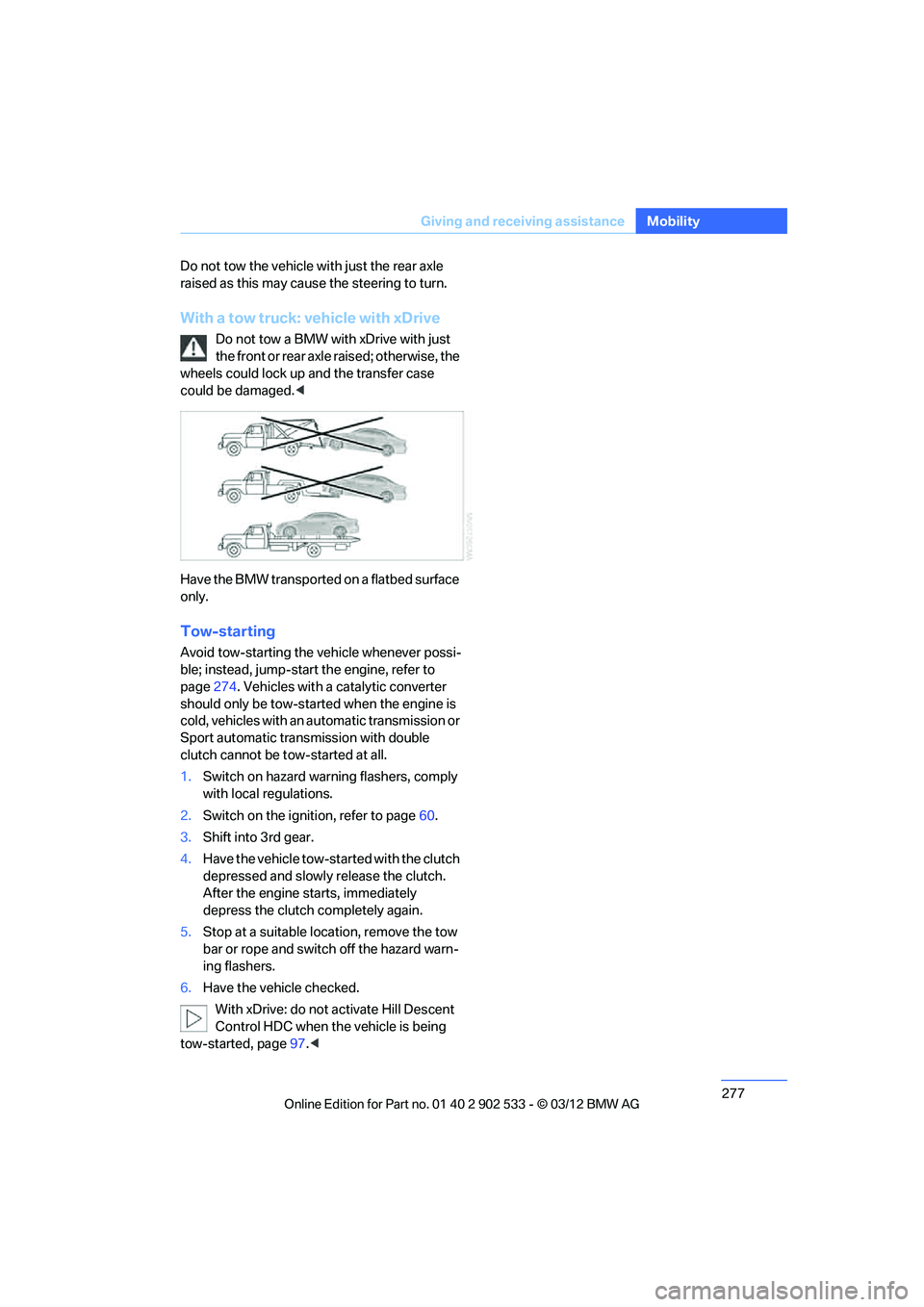
With a tow truck: vehicle with xDrive
Do not tow a BMW with xDrive with just
the front or rear axle raised; otherwise, the
wheels could lock up and the transfer case
could be damaged. <
Have the BMW transported on a flatbed surface
only.
Tow-starting
Avoid tow-starting the vehicle whenever possi-
ble; instead, jump-start the engine, refer to
page 274. Vehicles with a catalytic converter
should only be tow-started when the engine is
cold, vehicles with an automatic transmission or
Sport automatic transmission with double
clutch cannot be tow-started at all.
1. Switch on hazard warning flashers, comply
with local regulations.
2. Switch on the ignition, refer to page 60.
3. Shift into 3rd gear.
4. Have the vehicle tow-started with the clutch
depressed and slowly release the clutch.
After the engine starts, immediately
depress the clutch completely again.
5. Stop at a suitable location, remove the tow
bar or rope and switch off the hazard warn-
ing flashers.
6. Have the vehicle checked.
With xDrive: do not activate Hill Descent
Control HDC when the vehicle is being
tow-started, page 97.<
00320051004F004C00510048000300280047004C0057004C005200510003
Page 289 of 308
288
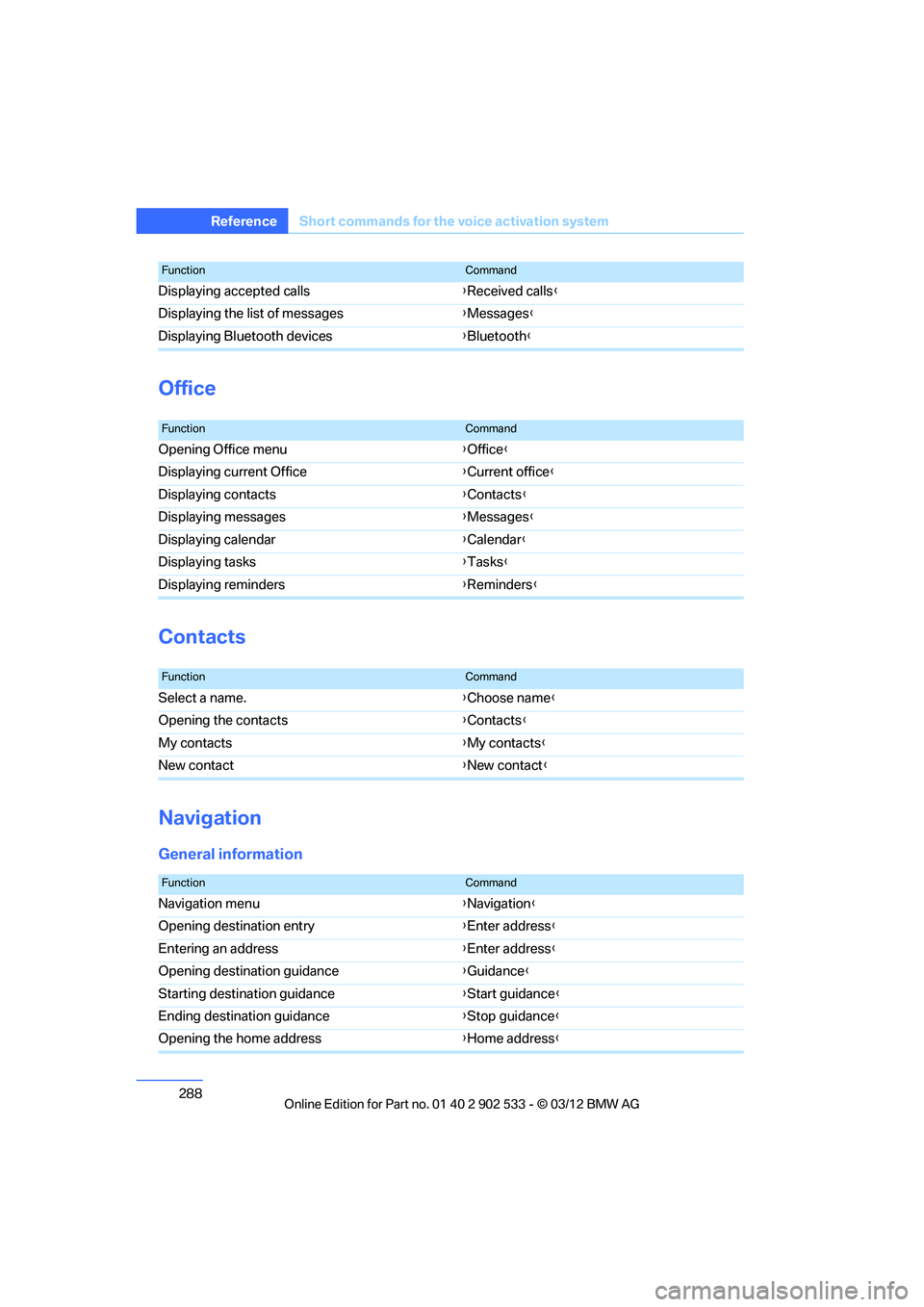
Referen ceShort commands for the voice activation system
Office
Contacts
Navigation
General information
Displaying accepted calls {Received calls }
Displaying the list of messages {Messages }
Displaying Bluetooth devices {Bluetooth}
FunctionCommand
FunctionCommand
Opening Office menu {Office }
Displaying current Office {Current office }
Displaying contacts {Contacts }
Displaying messages {Messages }
Displaying calendar {Calendar }
Displaying tasks {Tasks }
Displaying reminders {Reminders }
FunctionCommand
Select a name. {Choose name }
Opening the contacts {Contacts }
My contacts {My contacts }
New contact {New contact }
FunctionCommand
Navigation menu {Navigation }
Opening destination entry {Enter address }
Entering an address {Enter address }
Opening destination guidance {Guidance }
Starting destination guidance {Start guidance }
Ending destination guidance {Stop guidance }
Opening the home address {Home address }
00320051004F004C00510048000300280047004C0057004C005200510003
Page 294 of 308
293
Everything from A to Z
Reference
AUX-IN
– port
125
Available services 228
Average fuel consumption 82
– setting the units 85
Average speed 82
Avoid highways in
navigation 155
Avoiding unintentional alarms 38
Axle loads, refer to Weights 283
B
Backrest contour, refer to
Lumbar support 48
Backrests, refer to Seat adjustment 47
Backrest width adjustment 48
Back seats
– refer to Rear seats 50
Bag holder 129
Band-aids, refer to First aid pouch 273
Bar, refer to Towing methods 276
Base plate for telephone or
mobile phone
– refer to Snap-in adapter 211
– refer to Snap-in adapter in
the center armrest storage
compartment 124
Battery 270
– charging 270
– disposal 40,271
– jump-starting 274
– remote control 30
– replacing 270
– temporary power failure 270
Battery renewal
– remote control 40
– remote control for vehicle 39
Being towed 275
Belt hand-over 53
– pinch protection system 53
Belts, refer to Safety belts 52Belt tensioner, refer to Safety
belts 52
Beverage holders, refer to Cupholders 126
Black ice, refer to Outside temperature warning 80
Blinds, refer to Roller
sunblinds 124
Blower, refer to Air volume 116
Bluetooth, activating/ deactivating 201
BMW
– car shampoo 265
BMW Assist 224
– updating 228
BMW Homepage 4
BMW Info 218
BMW Maintenance
System 260
BMW Online 226
BMW webpage 4
Bottle holders, refer to Cupholders 126
Brake Assist, refer to Dynamic
Brake Control DBC 95
Brake fluid, refer to Service requirements 85
Brake Force Display 104
Brake lamps
– B ra
ke Force Display 104
Brake pads 136
– breaking in 136
Brake pedal, refer to Braking
safely 138
Brake rotors 139
– brakes 136
– breaking in 136
Brakes
– ABS 95
– BMW Maintenance System 260
– Brake Force Display 104
– breaking in 136
– parking brake 62
– service requirements 85Brakes, refer to Braking
safely 138
Brake system 136
– BMW Maintenance
System 260
– breaking in 136
– disc brakes 139
Breakdown services, refer to Roadside Assistance 273
Breaking in the clutch 136
Breaking in the differential, refer to Engine and
differential 136
Break-in period 136
Brightness of the Control Display 92
Bulb changing, refer to Lamps and bulbs 266
Button for starting the engine,
refer to Start/Stop button 60
Buttons on the steering wheel 11
C
Calendar 219
– displaying appointment 219
– selecting calendar day 219
California Proposition 65 warning 6
Call
– accepting 205
– ending 205
– muting the microphone 207
– rejecting 205
Calling, refer to Phone numbers, dialing 206
Calling, refer to Telephone owner's manual
Calls
– with multiple parties 206
Can holders, refer to Cupholders 126
Capacities 284
Capacity of the trunk 283
Car battery, refer to Vehicle
battery 270
00320051004F004C00510048000300280047004C0057004C005200510003
Page 304 of 308
303
Everything from A to Z
Reference
Setting times, refer to
Preselecting switch-on
times 118
Shifting 67
– 7-gear Sport automatic transmission with double
clutch 67
Shifting gears
– automatic transmission with Steptronic 64
– manual transmission 63
Shift into a drive position, refer to selector lever
positions 66
Shiftlock
– automatic transmission, refer to Changing selector
lever positions 63
Shift paddles on the steering
wheel 67
Short commands for the voice activation system 285
Short route in navigation, refer to Selecting route 155
Side airbags 104
Side windows, refer to Windows 40
Signal horn, refer to
Horn 10,11
Sitting safely 46
– with airbags 46
– with head restraint 46
– with safety belts 46
Ski bag 130
Ski bag for Convertible, refer to Through-loading opening
with integrated transport
bag 131
Sliding/tilt sunroof, refer to Glass roof, electric 41
Slot for remote control 60
Smokers' package, refer to Ashtray 127
Snap-in adapter 200
– inserting/removing 211Snap-in adapter, refer to
Center armrest storage
compartment 124
Socket, Onboard Diagnosis
OBD 261
Socket, refer to Connecting electrical appliances 127
SOS, refer to Sending an Emergency Request 272
Spare fuses 271
Special destinations 150
Special destinations, displaying 151
Special oils, refer to Approved engine oils 258
Specified engine oils, refer to
Approved engine oils 258
Speed
– run-flat tires 99
– with winter tires 254
Speed limit 91
Speed limit warning, refer to
Speed limit 91
Spee do,
refer to
Speedometer 12
Speedometer 12
Split screen content, refer to Selecting the display for the
split screen content 22
Sport automatic transmission with double clutch 65
– driving dynamics control 68
– kickdown 67
– Launch Control 69
– manually unlocking parking lock 68
– neutral 66
– reverse gear 66
Sport program with 7-gear Sport automatic
transmission with double
clutch 67
Spray nozzles, refer to
Cleaning windshield and
headlamps 71 Stability control, refer to
Driving stability control
systems 95
Start/Stop button 60
– starting the engine 61
– switching off the engine 62
Starting, refer to Starting the
engine 61
Starting assistance, refer to Jump-starting 274
Starting difficulties
– jump-starting 274
Starting the engine
– Start/Stop button 60
Start menu 19
State/province, for
navigation 146
Status information on the Control Display 21
Status of this Owner's Manual at time of printing 5
Steam jet 262,263
Steering wheel 55
– adjustment 55
– buttons on steering
wheel 11
– heating 55
– lock 60
– locking with Comfort Access 38
– shift paddles 67
Steering wheel buttons, refer to Shift paddles 67
Steering with variable ratio,
refer to Active steering 103
Steptronic, refer to Automatic transmission with
Steptronic 63
Storage 265
Storage compartments 125
Storage nets 129
Stored trip, calling up 154
St or
ing a destination in the
address book 148
Storing seat positions, refer to Seat and mirror memory 52
00320051004F004C00510048000300280047004C0057004C005200510003