steering wheel adjustment BMW 335I CONVERTIBLE 2013 Owners Manual
[x] Cancel search | Manufacturer: BMW, Model Year: 2013, Model line: 335I CONVERTIBLE, Model: BMW 335I CONVERTIBLE 2013Pages: 308, PDF Size: 5.65 MB
Page 47 of 308
46
ControlsAdjustments
Adjustments
Vehicle equipment
In this chapter, all production, country, and
optional equipment that is offered in the model
range is described. As a result, some equip-
ment described may not be available in a partic-
ular vehicle, for example due to the options or
national-market version selected. This also
applies to safety related functions and systems.
Sitting safely
The ideal sitting position can make a vital con-
tribution to relaxed, fatigue-free driving. In con-
junction with the safety belts, the head
restraints and the airbags, the seated position
has a major influence on your safety in the event
of an accident. To ensure that the safety sys-
tems operate with optimal efficiency, we
strongly urge you to ob serve the instructions
contained in the following section.
For additional information on transporting chil-
dren safely, refer to page 56.
Airbags
Always maintain an adequate distance
between yourself and the airbags. Always
grip the steering wheel on the rim, with your
hands in the 3 o'clock and 9 o'clock positions,
to minimize the risk of injury to the hands or
arms in the event of the airbag being triggered
off.
No one and nothing should come between the
airbags and the seat occupant.
Do not use the cover of the front airbag on the
front passenger side as a storage area. Make
sure that the front passenger is sitting correctly,
e.g. not resting feet or legs on the dashboard;
otherwise, leg injuries can occur if the front air-
bag deploys.
Make sure that passengers keep their heads
away from the side airbag and do not lean against the cover of the head airbag; otherwise,
serious injuries can result if the airbag
deploys.
<
Even if you follow all the instructions, injuries
resulting from contact with airbags cannot be
fully excluded, depending on the circum-
stances. The ignition and inflation noise may
provoke a mild hearing loss in extremely sensi-
tive individuals. This effect is usually only tem-
porary.
For airbag locations and additional information
on airbags, refer to page 104.
Head restraint
A correctly adjusted head restraint reduces the
risk of neck injury in the event of an accident.
Adjust the head restraint in such a way
that its center is at approx. ear level. Oth-
erwise, there is an increased risk of injury in the
event of an accident. <
Head restraints, refer to page 49.
Safety belt
Before every drive, make sure that all occupants
wear their safety belts. Airbags complement the
safety belt as an additional safety device, but
they do not represent a substitute.
Your vehicle has four seats, each of which is
equipped with a safety belt.
Never allow more than one person to
wear a single safety belt. Never allow
infants or small children to ride in a passenger's
lap. Make sure that the belt in the lap area sits
low across the hips and does not press against
the abdomen.
The safety belt must not rest against the throat,
run across sharp edges, pass over hard or frag-
ile objects or be pinched. Fasten the safety belt
so that it sits as snugly as possible against the
lap and shoulder without being twisted. Other-
wise, the belt could slide over your hips and
00320051004F004C00510048000300280047004C0057004C005200510003
Page 56 of 308
55
Adjustments
Controls
Interior and exterior mirrors,
automatic dimming feature
The automatic dimming feature of the interior
and exterior mirrors is controlled by two photo
cells in the interior rearview mirror. One photo
cell is in the mirror frame, see arrow; the other is
on the back of the mirror.
In order to ensure that the system functions
correctly, keep the photo cells clean, do not
cover the area between the interior rearview
mirror and windshield, and do not affix adhesive
labels or stickers of any kind to the windshield
directly in front of the mirror.
Steering wheel
Adjustments
Do not adjust the steering wheel position
while the car is in motion; otherwise, there
is a risk of an accident due to unexpected move-
ment. <
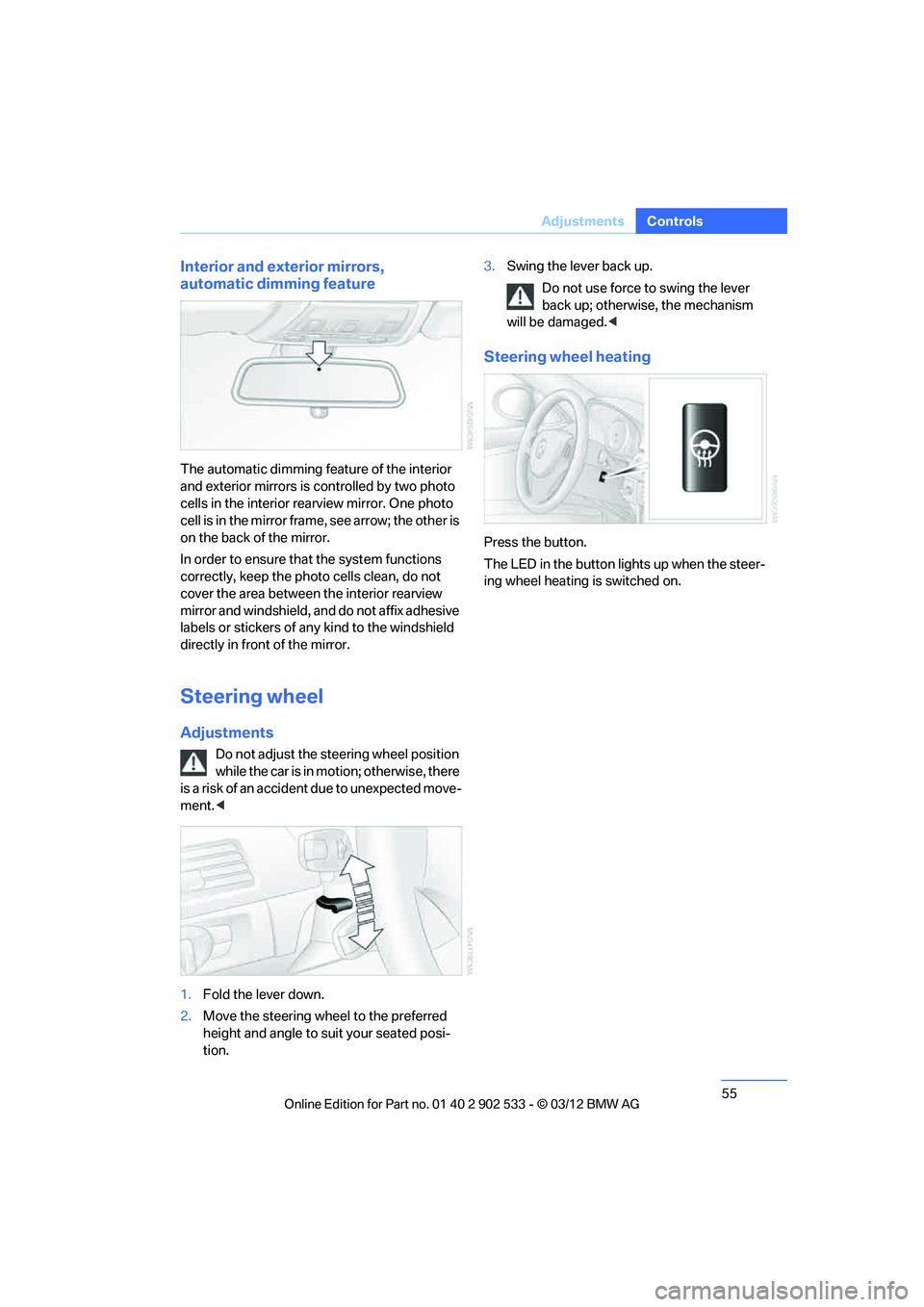
1. Fold the lever down.
2. Move the steering wheel to the preferred
height and angle to suit your seated posi-
tion. 3.
Swing the lever back up.
Do not use force to swing the lever
back up; otherwise, the mechanism
will be damaged. <
Steering wheel heating
Press the button.
The LED in the button lights up when the steer-
ing wheel heating is switched on.
00320051004F004C00510048000300280047004C0057004C005200510003
Page 167 of 308
166
EntertainmentOn/off and tone
On/off and tone
Vehicle equipment
In this chapter, all production, country, and
optional equipment that is offered in the model
range is described. Equipment is also described
that is not available because of, for example,
selected options or country version. This also
applies to safety related functions and systems.
General information
The following audio and video sources share
the same control elements and adjustments:
>Radio
> CD/DVD player
> CD changer
> Video
> External devices, e.g. MP3 player
Controls
The audio and video sources can be controlled
using the:
>Buttons near the CD/DVD player
> iDrive
> Buttons on the steering wheel, refer to
page 11
> Programmable memory keys, refer to
page 23
> Voice activation system
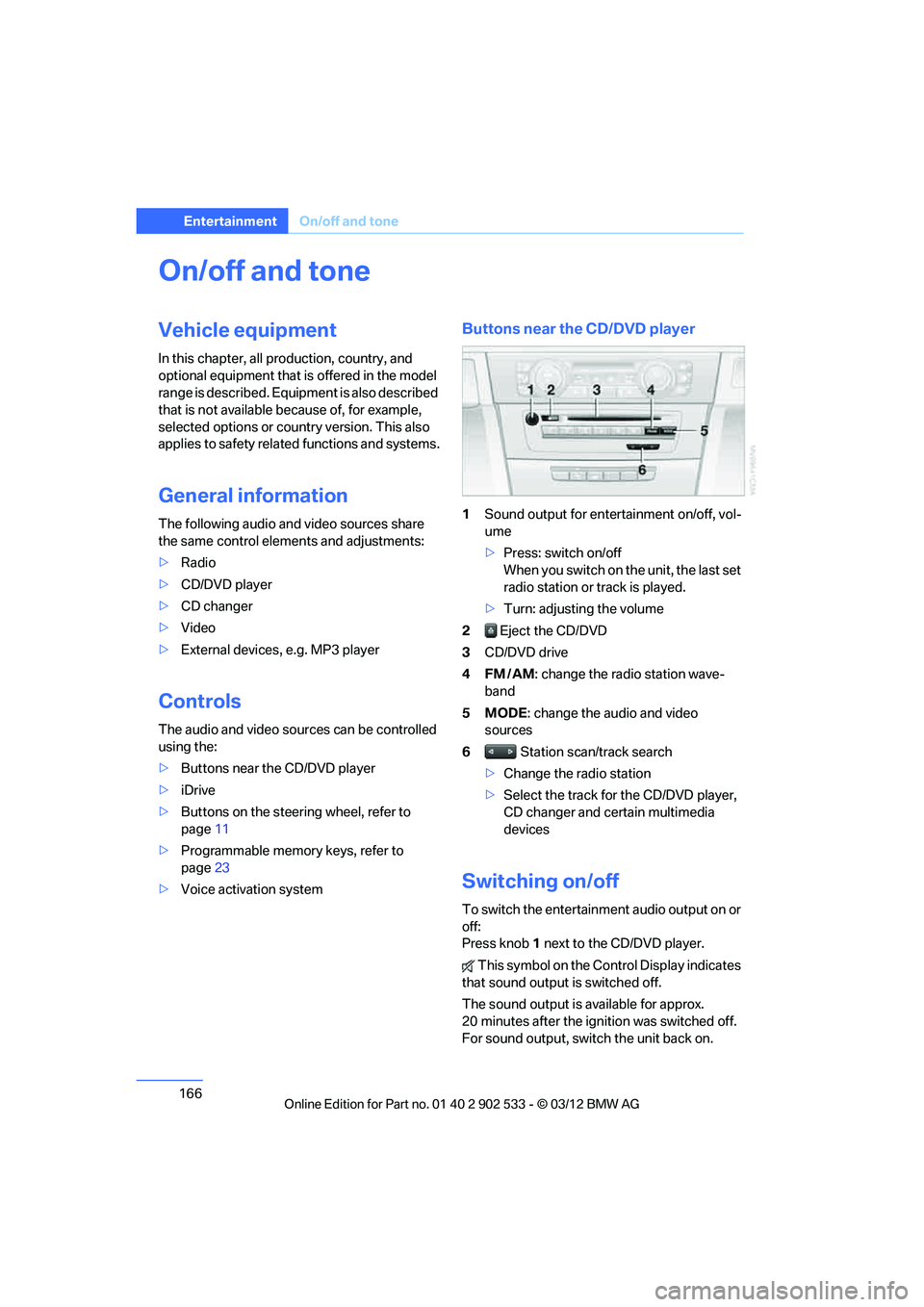
Buttons near the CD/DVD player
1Sound output for entertainment on/off, vol-
ume
>Press: switch on/off
When you switch on the unit, the last set
radio station or track is played.
> Turn: adjusting the volume
2 Eject the CD/DVD
3 CD/DVD drive
4FM/AM : change the radio station wave-
band
5MODE : change the audio and video
sources
6 Station scan/track search
> Change the radio station
> Select the track for the CD/DVD player,
CD changer and certain multimedia
devices
Switching on/off
To switch the entertainment audio output on or
off:
Press knob 1 next to the CD/DVD player.
This symbol on the Control Display indicates
that sound output is switched off.
The sound output is available for approx.
20 minutes after the ignition was switched off.
For sound output, switch the unit back on.
00320051004F004C00510048000300280047004C0057004C005200510003
Page 168 of 308
167
On/off and tone
Entertainment
Adjusting volume
Turn knob
1 next to the CD/DVD player until the
desired volume is obtained.
You can also adjust the volume with buttons on
the steering wheel, refer to page 11.
Setting tone controls
You can alter various tone settings, e.g. treble
and bass or the speed-dependent volume
increase.
The tone settings are set for all audio sources at
once.
The settings are stored for the remote control
currently in use.
Treble, bass, balance, fader
> "Treble": treble adjustment.
> "Bass": bass adjustment.
> "Balance": left/right volume distribution
> "Fader": front/rear volume distribution
Adjustments
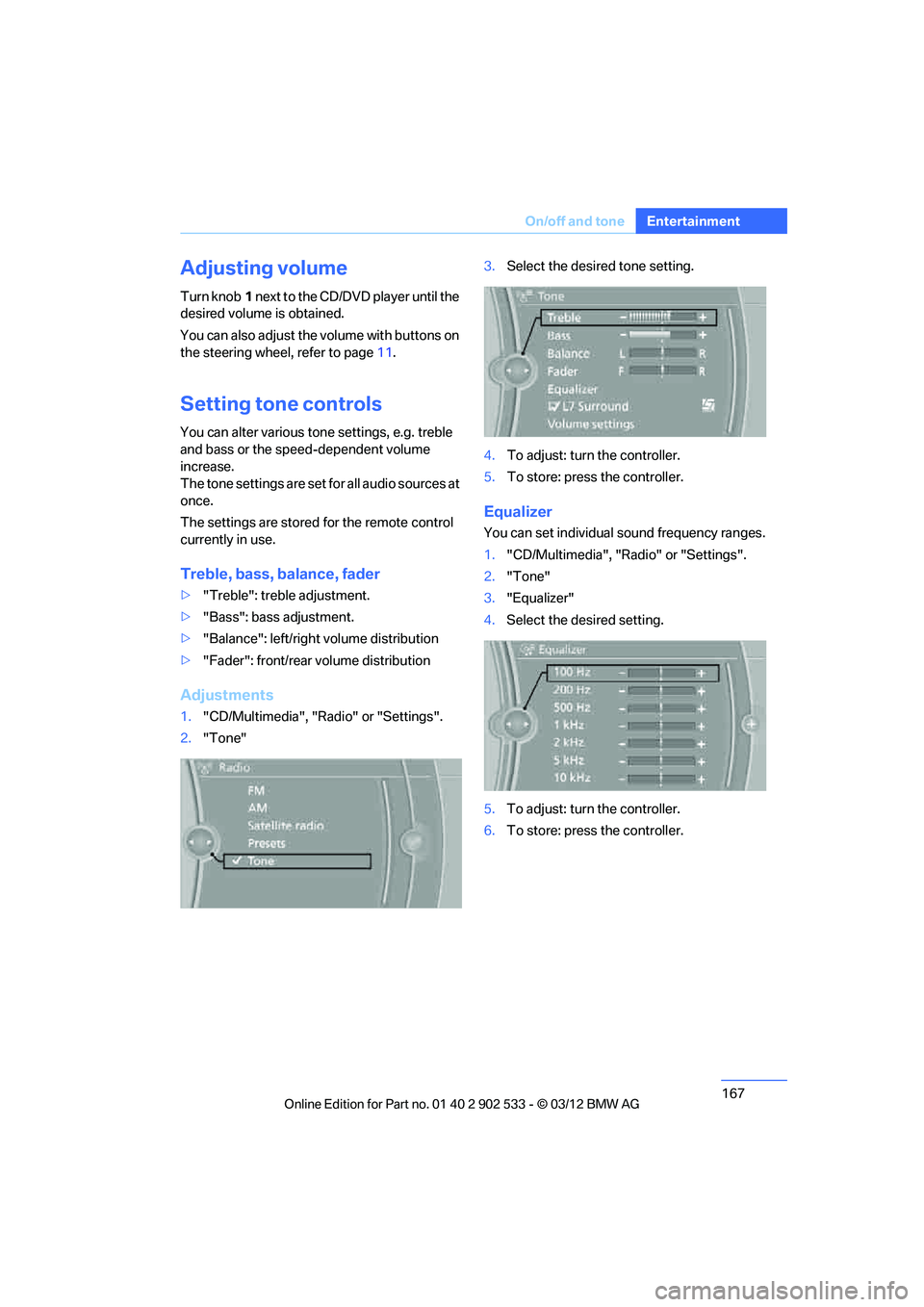
1."CD/Multimedia", "Radio" or "Settings".
2. "Tone" 3.
Select the desired tone setting.
4. To adjust: turn the controller.
5. To store: press the controller.
Equalizer
You can set individual sound frequency ranges.
1."CD/Multimedia", "Radio" or "Settings".
2. "Tone"
3. "Equalizer"
4. Select the desired setting.
5. To adjust: turn the controller.
6. To store: press the controller.
00320051004F004C00510048000300280047004C0057004C005200510003
Page 206 of 308
205
Te l e p h o n e
Communications
check the website www.bmw.com/bluetooth
for further notes or contact Customer Relations
or a BMW center.
Operation
Adjusting volume
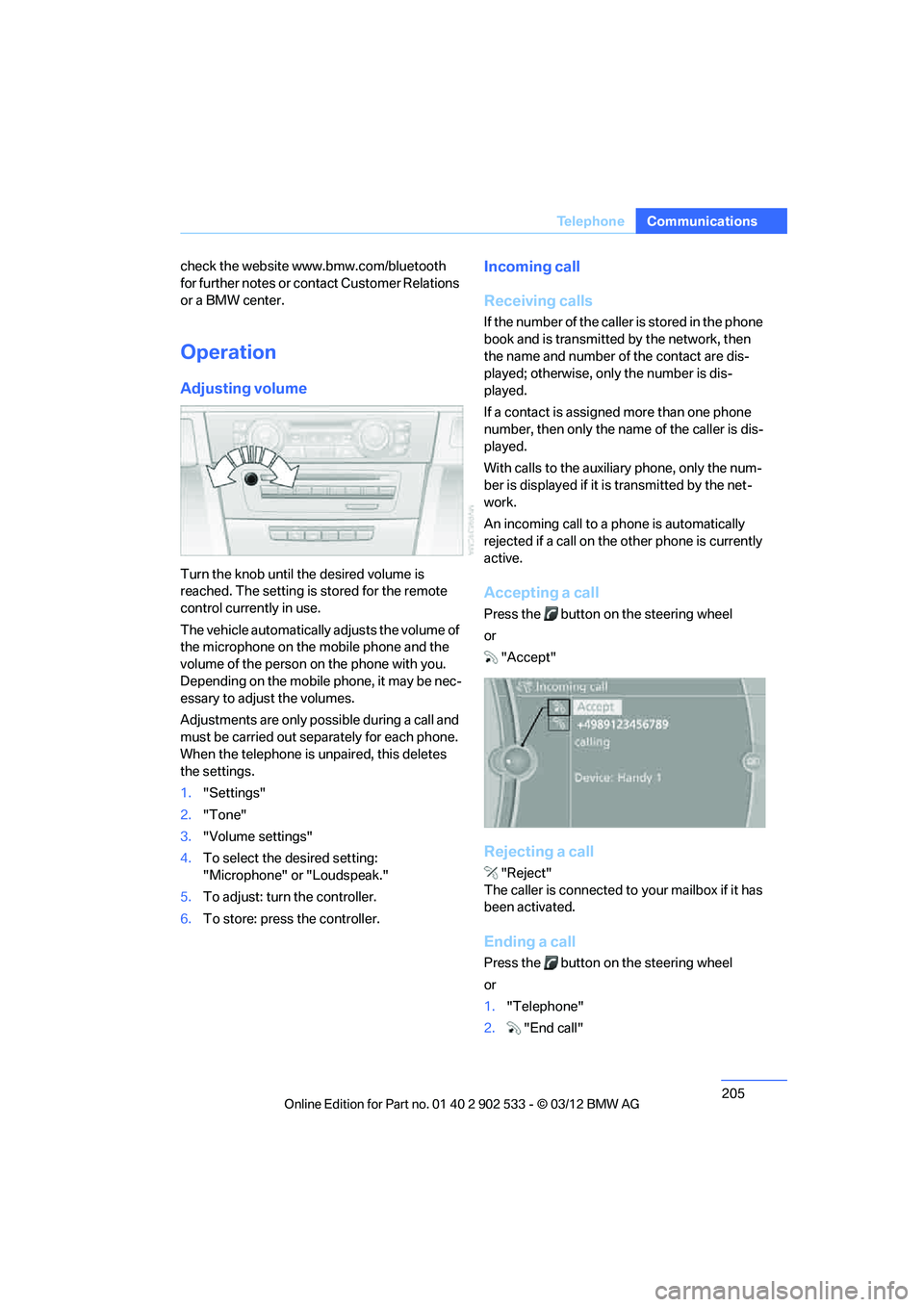
Turn the knob until the desired volume is
reached. The setting is stored for the remote
control currently in use.
The vehicle automatically adjusts the volume of
the microphone on the mobile phone and the
volume of the person on the phone with you.
Depending on the mobile phone, it may be nec-
essary to adjust the volumes.
Adjustments are only possible during a call and
must be carried out sepa
rately for each phone.
When the telephone is unpaired, this deletes
the settings.
1. "Settings"
2. "Tone"
3. "Volume settings"
4. To select the desired setting:
"Microphone" or "Loudspeak."
5. To adjust: turn the controller.
6. To store: press the controller.
Incoming call
Receiving calls
If the number of the caller is stored in the phone
book and is transmitted by the network, then
the name and number of the contact are dis-
played; otherwise, only the number is dis-
played.
If a contact is assigned more than one phone
number, then only the name of the caller is dis-
played.
With calls to the auxiliary phone, only the num-
ber is displayed if it is transmitted by the net-
work.
An incoming call to a phone is automatically
rejected if a call on the other phone is currently
active.
Accepting a call
Press the button on the steering wheel
or
"Accept"
Rejecting a call
"Reject"
The caller is connected to your mailbox if it has
been activated.
Ending a call
Press the button on the steering wheel
or
1. "Telephone"
2. "End call"
00320051004F004C00510048000300280047004C0057004C005200510003
Page 294 of 308
293
Everything from A to Z
Reference
AUX-IN
– port
125
Available services 228
Average fuel consumption 82
– setting the units 85
Average speed 82
Avoid highways in
navigation 155
Avoiding unintentional alarms 38
Axle loads, refer to Weights 283
B
Backrest contour, refer to
Lumbar support 48
Backrests, refer to Seat adjustment 47
Backrest width adjustment 48
Back seats
– refer to Rear seats 50
Bag holder 129
Band-aids, refer to First aid pouch 273
Bar, refer to Towing methods 276
Base plate for telephone or
mobile phone
– refer to Snap-in adapter 211
– refer to Snap-in adapter in
the center armrest storage
compartment 124
Battery 270
– charging 270
– disposal 40,271
– jump-starting 274
– remote control 30
– replacing 270
– temporary power failure 270
Battery renewal
– remote control 40
– remote control for vehicle 39
Being towed 275
Belt hand-over 53
– pinch protection system 53
Belts, refer to Safety belts 52Belt tensioner, refer to Safety
belts 52
Beverage holders, refer to Cupholders 126
Black ice, refer to Outside temperature warning 80
Blinds, refer to Roller
sunblinds 124
Blower, refer to Air volume 116
Bluetooth, activating/ deactivating 201
BMW
– car shampoo 265
BMW Assist 224
– updating 228
BMW Homepage 4
BMW Info 218
BMW Maintenance
System 260
BMW Online 226
BMW webpage 4
Bottle holders, refer to Cupholders 126
Brake Assist, refer to Dynamic
Brake Control DBC 95
Brake fluid, refer to Service requirements 85
Brake Force Display 104
Brake lamps
– B ra
ke Force Display 104
Brake pads 136
– breaking in 136
Brake pedal, refer to Braking
safely 138
Brake rotors 139
– brakes 136
– breaking in 136
Brakes
– ABS 95
– BMW Maintenance System 260
– Brake Force Display 104
– breaking in 136
– parking brake 62
– service requirements 85Brakes, refer to Braking
safely 138
Brake system 136
– BMW Maintenance
System 260
– breaking in 136
– disc brakes 139
Breakdown services, refer to Roadside Assistance 273
Breaking in the clutch 136
Breaking in the differential, refer to Engine and
differential 136
Break-in period 136
Brightness of the Control Display 92
Bulb changing, refer to Lamps and bulbs 266
Button for starting the engine,
refer to Start/Stop button 60
Buttons on the steering wheel 11
C
Calendar 219
– displaying appointment 219
– selecting calendar day 219
California Proposition 65 warning 6
Call
– accepting 205
– ending 205
– muting the microphone 207
– rejecting 205
Calling, refer to Phone numbers, dialing 206
Calling, refer to Telephone owner's manual
Calls
– with multiple parties 206
Can holders, refer to Cupholders 126
Capacities 284
Capacity of the trunk 283
Car battery, refer to Vehicle
battery 270
00320051004F004C00510048000300280047004C0057004C005200510003
Page 297 of 308
296
Referen ceEverything from A to Z
Distance warning, refer to
Park Distance Control
PDC 94
Door key, refer to Remote
control with integrated
key 30
Door lock 34
Doors, emergency operation 34
DOT Quality Grades 251
Draft-free ventilation 117
Drinks holders, refer to Cupholders 126
Drive mode 67
Drive-off assistance, refer to Dynamic Stability Control
DSC 95
Drive-off assistant 98
Driving dynamics control 68
Driving lamps, refer to Parking lamps/low beams 108
Driving notes 136
Driving off on hills, refer to Drive-off assistant 98
Driving stability control
systems 95
Driving through water 138
Driving tips, refer to Driving
notes 136
Dry air, refer to Cooling function 117
DSC Dynamic Stability Control 95
DTC Dynamic Traction
Control 96
– indicator/warning lamp 96
Dynamic Brake Control
DBC 95
Dynamic destination guidance 162
Dynamic Stability Control DSC 95
– indicator/warning lamp 96
Dynamic Traction Control DTC 96
– indicator/warning lamp 96E
EBV Electronic brake-force
distribution 95
Electrical defect
– 7-gear Sport automatic transmission with double
clutch 68
Electrical malfunction
– door lock 34
– driver's door 34
– fuel filler flap 232
Electric seat adjustment 48
Electric steering wheel lock
– with Comfort Access 38
Electronic brake-force
distribution EBV 95
Electronic oil level check 256
Electronic Stability Program
ESP, refer to Dynamic
Stability Control DSC 95
E-mail 218
Emergency actuation, automatic transmission,
refer to Overriding selector
lever lock 65
Emergency operation
– fuel filler flap, manual release 232
Emergency operation, refer to Manual operation
– door lock 34
Emergency release
– trunk lid from inside 36
Emergency Request 272
Emergency services, refer to Roadside Assistance 273
Energy, saving
– saving fuel 136
Engine
– breaking in 136
– overheated, refer to Coolant temperature 259
– starting 61
– starting, Comfort Access 38
– switching off 62
Engine compartment 255Engine coolant, refer to
Coolant 259
Engine oil
– adding 258
– additives, refer to Approved engine oils 258
– alternative oil types 259
– approved engine oils 258
– BMW Maintenance System 260
– capacity 284
– checking level 256
– intervals between changes,
refer to Service
requirements 85
Engine starting, refer to
Starting the engine 61
Entering the postal code for navigation 147
Entry lamps, refer to Interior lamps 112
Entry map for destination 151
ESP Electronic Stability Program, refer to Dynamic
Stability Control DSC 95
Ex haust sy
stem, refer to Hot
exhaust system 137
Exterior mirrors 53
– adjusting 53
– automatic dimming feature 55
– automatic heating 54
– folding in and out 54
External audio device 125
Eyes
– for tow-starting and towing away 275
– for tying down loads 140
F
Failure messages, refer to
Check Control 89
Failure of an electrical consumer 271
00320051004F004C00510048000300280047004C0057004C005200510003
Page 299 of 308
298
Referen ceEverything from A to Z
Heating
– mirrors54
– rear window 117
– seats 51
– steering wheel 55
Heating and ventilation, refer to Climate 114
Heavy loads, refer to Stowing cargo 140
Height, refer to
Dimensions 281
Height adjustment
– seats 47
– steering wheel 55
High-beam Assistant 110
High beams 110
– headlamp flasher 110
– indicator lamp 13
High beams and low beams,
automatic, refer to High-
beam Assistant 110
High-pressure
washer 262,263
High water, refer to Driving through water 138
Highways, refer to Route criteria 155
Hill Descent Control HDC 97
Hills 139
Holders for cups 126
Homepage BMW 4
Hood 256
Hooks for shopping bags 129
Horn 10,11
Hotel function, refer to Locking or unlocking
separately 36
Hot exhaust system 137
Hydraulic brake assist, refer to Dynamic Brake Control 95
Hydroplaning 138
I
Ice warning, refer to Outside
temperature warning 80Identification marks
– run-flat tires
254
– tire coding 251
iDrive 18
– adjusting brightness 92
– changing date and time 88
– changing language 92
– changing settings 92
– changing units of measure and display format 85
– controls 18
– menu guidance 19
– operating principle 18
– overview 18
– start menu 19
– status information 21
Ignition 61
– switched off 61
– switched on 61
Ignition key, refer to Remote control with integrated
key 30
Ignition key position 1, refer to Radio readiness 60
Ignition key position 2, refer to
Ignition on 61
Ignition lock 60
Imprint 2
Incoming call 205
Indicator and warning lamps 13
– Tire Pressure Monitor TPM 101
Inflation pressure, refer to Tire
inflation pressure 235
Inflation pressure monitoring, refer to Tire Pressure
Monitor TPM 100
Initializing
– after power failure 270
– compass, refer to Calibrating 123
– Flat Tire Monitor FTM 98
– glass roof 42
– refer to Setting the time and date 88 Installation location
– telephone
124
Instructions for navigation system, refer to Voice
instructions 157
Instrument cluster 12
Instrument cluster, refer to
Cockpit 10
Instrument combination, refer to Instrument cluster 12
Instrument lighting 112
Integrated key 30
Integrated universal remote
control 12
0
Intera
ctive map 152
Interior lamps 112
– remote control 32
Interior motion sensor 37
Interior rearview mirror 54
– automatic dimming feature 55
– compass 122
Interlock, refer to Disengaging the remote control 63
Intermittent mode of the
wipers 71
Intersection, entering, navigation 147
J
Jacking points 270
Joystick, refer to iDrive 18
Jumpering, refer to Jump-
starting 274
Jump-starting 274
K
Key, refer to Integrated key/
remote control 30
Keyless go, refer to Comfort Access 38
Keyless opening and closing, refer to Comfort Access 38
00320051004F004C00510048000300280047004C0057004C005200510003
Page 301 of 308
300
Referen ceEverything from A to Z
Mirrors53
– automatic curb monitor 54
– exterior mirrors 53
– heating 54
– interior rearview mirror 54
– memory, refer to Seat and mirror memory 52
Mirrors, folding in before entering a car wash 54
Mobile phone
– adjusting volume 205
– connecting, refer to Mobile phone, pairing 201
– installation location, refer to Center armrest 124
– operation 205
– pairing 201
– refer to separate Owner's Manual
– suitable mobile phones 200
– unpairing 203
– What to do if…. 204
Mobile phone, installation location, refer to Center
armrest 124
Mobile phone, refer to Telephone 200
Mobile phone, refer to the
separate Owner's Manual
Modifications, technical, refer to For your own safety 5
Monitor, refer to iDrive controls 18
Monitoring system for tire
pressures, refer to Flat Tire
Monitor 98
Multifunctional steering
wheel, refer to Buttons on
the steering wheel 11
Multifunction switch
– refer to Turn signals/
headlamp flasher 70
– refer to Wiper system 70
Multimedia screen, refer to iDrive 18
My Info 217N
Navigation
– starting destination
guidance after entering a
destination 148
– storing current position 149
– voice activation 152
Navigation announcements, refer to Switching voice
instructions on/off 157
Navigation data 144
Navigation system 144
– address book 148
– bypassing a route section 156
– continuing destination guidance 155
– destination entry 146
– dynamic destination guidance 162
– entering a destination by
voice 152
– entering a destination manually 146
– frequently asked questions 163
– gas station
recommendations 157
– planning a trip 153
– route list 156
– selecting destination via map 151
– selecting route criteria 155
– special destinations 150
– starting destination guidance 155
– terminating destination guidance 155
– traffic bulletins 159
– voice instructions 157
– volume adjustment 157
Neck support, refer to Head
restraints 49
Nets, refer to Storage compartments 125
Neutral 66 New tires
253
Next Service indicator, refer to Condition Based Service
CBS 260
North-facing map 157
Notes 220
Nozzles 114
Nylon rope, refer to Tow rope 276
O
OBD socket, refer to Socket
for Onboard Diagnosis 261
Octane ratings, refer to Fuel specifications 233
Odometer 80
Office 213
– current office 213
– What to do if…. 221
Oil, refer to Engine oil 256
Oil consumption 256
Oil level 256
Old batteries, refer to Disposal 271
Onboard vehicle tool kit 266
Opening and closing
– Comfort Access 38
– from inside 34
– from outside 32
– retractable hardtop 43
– using the door lock 34
– using the remote control 32
Options, selecting for
navigation 155
Orientation menu, refer to Start menu 19
Outlets
– refer to Ventilation 117
Outside-air mode
– automatic climate
control 116
Outside temperature
display 80
– changing unit of measure 85
– in computer 85
00320051004F004C00510048000300280047004C0057004C005200510003
Page 304 of 308
303
Everything from A to Z
Reference
Setting times, refer to
Preselecting switch-on
times 118
Shifting 67
– 7-gear Sport automatic transmission with double
clutch 67
Shifting gears
– automatic transmission with Steptronic 64
– manual transmission 63
Shift into a drive position, refer to selector lever
positions 66
Shiftlock
– automatic transmission, refer to Changing selector
lever positions 63
Shift paddles on the steering
wheel 67
Short commands for the voice activation system 285
Short route in navigation, refer to Selecting route 155
Side airbags 104
Side windows, refer to Windows 40
Signal horn, refer to
Horn 10,11
Sitting safely 46
– with airbags 46
– with head restraint 46
– with safety belts 46
Ski bag 130
Ski bag for Convertible, refer to Through-loading opening
with integrated transport
bag 131
Sliding/tilt sunroof, refer to Glass roof, electric 41
Slot for remote control 60
Smokers' package, refer to Ashtray 127
Snap-in adapter 200
– inserting/removing 211Snap-in adapter, refer to
Center armrest storage
compartment 124
Socket, Onboard Diagnosis
OBD 261
Socket, refer to Connecting electrical appliances 127
SOS, refer to Sending an Emergency Request 272
Spare fuses 271
Special destinations 150
Special destinations, displaying 151
Special oils, refer to Approved engine oils 258
Specified engine oils, refer to
Approved engine oils 258
Speed
– run-flat tires 99
– with winter tires 254
Speed limit 91
Speed limit warning, refer to
Speed limit 91
Spee do,
refer to
Speedometer 12
Speedometer 12
Split screen content, refer to Selecting the display for the
split screen content 22
Sport automatic transmission with double clutch 65
– driving dynamics control 68
– kickdown 67
– Launch Control 69
– manually unlocking parking lock 68
– neutral 66
– reverse gear 66
Sport program with 7-gear Sport automatic
transmission with double
clutch 67
Spray nozzles, refer to
Cleaning windshield and
headlamps 71 Stability control, refer to
Driving stability control
systems 95
Start/Stop button 60
– starting the engine 61
– switching off the engine 62
Starting, refer to Starting the
engine 61
Starting assistance, refer to Jump-starting 274
Starting difficulties
– jump-starting 274
Starting the engine
– Start/Stop button 60
Start menu 19
State/province, for
navigation 146
Status information on the Control Display 21
Status of this Owner's Manual at time of printing 5
Steam jet 262,263
Steering wheel 55
– adjustment 55
– buttons on steering
wheel 11
– heating 55
– lock 60
– locking with Comfort Access 38
– shift paddles 67
Steering wheel buttons, refer to Shift paddles 67
Steering with variable ratio,
refer to Active steering 103
Steptronic, refer to Automatic transmission with
Steptronic 63
Storage 265
Storage compartments 125
Storage nets 129
Stored trip, calling up 154
St or
ing a destination in the
address book 148
Storing seat positions, refer to Seat and mirror memory 52
00320051004F004C00510048000300280047004C0057004C005200510003