stop start BMW 335I COUPE 2006 E92 User Guide
[x] Cancel search | Manufacturer: BMW, Model Year: 2006, Model line: 335I COUPE, Model: BMW 335I COUPE 2006 E92Pages: 239, PDF Size: 11.87 MB
Page 136 of 239
Destination guidance
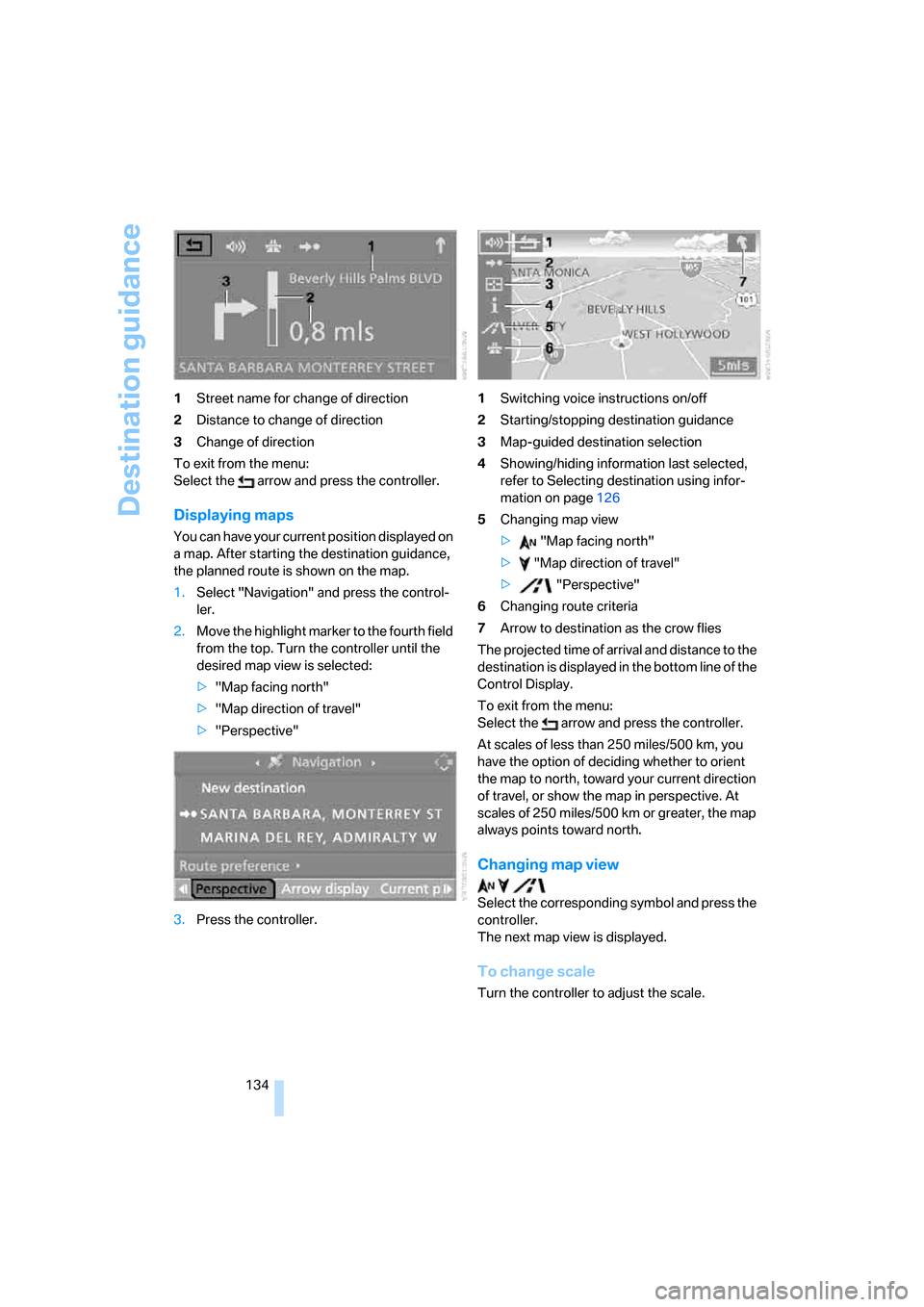
134 1Street name for change of direction
2Distance to change of direction
3Change of direction
To exit from the menu:
Select the arrow and press the controller.
Displaying maps
You can have your current position displayed on
a map. After starting the destination guidance,
the planned route is shown on the map.
1.Select "Navigation" and press the control-
ler.
2.Move the highlight marker to the fourth field
from the top. Turn the controller until the
desired map view is selected:
>"Map facing north"
>"Map direction of travel"
>"Perspective"
3.Press the controller.1Switching voice instructions on/off
2Starting/stopping destination guidance
3Map-guided destination selection
4Showing/hiding information last selected,
refer to Selecting destination using infor-
mation on page126
5Changing map view
> "Map facing north"
> "Map direction of travel"
> "Perspective"
6Changing route criteria
7Arrow to destination as the crow flies
The projected time of arrival and distance to the
destination is displayed in the bottom line of the
Control Display.
To exit from the menu:
Select the arrow and press the controller.
At scales of less than 250 miles/500 km, you
have the option of deciding whether to orient
the map to north, toward your current direction
of travel, or show the map in perspective. At
scales of 250 miles/500 km or greater, the map
always points toward north.
Changing map view
Select the corresponding symbol and press the
controller.
The next map view is displayed.
To change scale
Turn the controller to adjust the scale.
ba8_E9293_US.book Seite 134 Freitag, 5. Mai 2006 1:02 13
Page 139 of 239
Navigation
Driving tips
137Reference
At a glance
Controls
Communications
Entertainment
Mobility
What to do if …
What to do if …
>a navigation DVD is inserted, but an instruc-
tion to insert the DVD appears on the Con-
trol Display?
The navigation DVD may not be the correct
DVD for the navigation system. This infor-
mation is indicated on the DVD label.
>you request the current position of your
vehicle, but do not receive a precise dis-
play?
The system is unable to receive enough
GPS signals at your current position due to
obstructions, your current position is not
yet available on your navigation DVD, or the
system is in the process of calculating your
current position. As a rule, reception is
guaranteed when you are in the open.
>the destination guidance does not accept a
destination?
The data of the destination is not stored on
the navigation DVD that is loaded. Choose a
destination as close as possible to the orig-
inal one.
>the destination guidance does not accept
an address without the street name?
On the navigation DVD, no downtown area
can be determined for the city or town
entered. Enter any street, or a destination
such as the railway station in the selected
town, and then start the destination guid-
ance.
>you want to enter a destination for the des-
tination guidance, but it is not possible to
select the letters for your desired entry?
The data of the destination is not stored on
the navigation DVD that is loaded. In this
case, the system will not offer you any let-
ters to choose from. Choose a destination
as close as possible to the original one.
>the system stops furnishing directions on
which way to turn as you approach intersec-
tions?
You are driving in an area that has not yet
been completely recorded on the naviga-tion DVD. Instead of an arrow indicating a
turn, you will see an arrow which indicates
the general direction of your planned route.
Or you have left the recommended route
and the system requires a few seconds to
calculate a new recommended route.
>the navigation system does not react to
entries?
If the battery was disconnected, it takes
about 10 minutes before the system is once
again operational.
ba8_E9293_US.book Seite 137 Freitag, 5. Mai 2006 1:02 13
Page 165 of 239
163
Entertainment
Reference
At a glance
Controls
Driving tips Communications
Navigation
Mobility
Making calls with the car phone*:
BMW Assist calls
You can use the car phone via the hands-free
system for BMW Assist calls.
When the status information "BMW Assist" or
"BMW Service" is displayed in "Communica-
tion", only BMW Assist calls are possible.
It may not be possible to establish a telephone
connection using the mobile phone while a con-
nection is being established to BMW Assist or
while a call to BMW Assist is already in
progress. If this happens, you must unpair the
mobile phone and the vehicle if you wish to
place a call with the mobile phone.
Start-up
Pairing the mobile phone with the
vehicle
The following prerequisites must be met:
>The mobile phone is ready to operate
>The Bluetooth link in the vehicle, refer to
page165, and in the mobile phone are acti-
vated
>Depending on the mobile phone, some
default settings may be necessary for the
mobile phone: e.g. via the menu item Blue-
tooth switched on or the menu item Con-
nection without confirmation.
>For pairing purposes, define any number as
the Bluetooth passkey, e.g. 1. This Blue-
tooth passkey is no longer required after
pairing has been successful.
>The ignition is switched on.
Pair the mobile phone with the vehicle
only when the car is stationary, to avoid
endangering the car's occupants and other
road users by being distracted.<
Switch on ignition
1.Insert remote control all the way into the
ignition lock.
2.Switch on ignition without operating the
brake or clutch or pressing the start/stop
button.
Preparation via iDrive
iDrive, operating principle refer to page16.
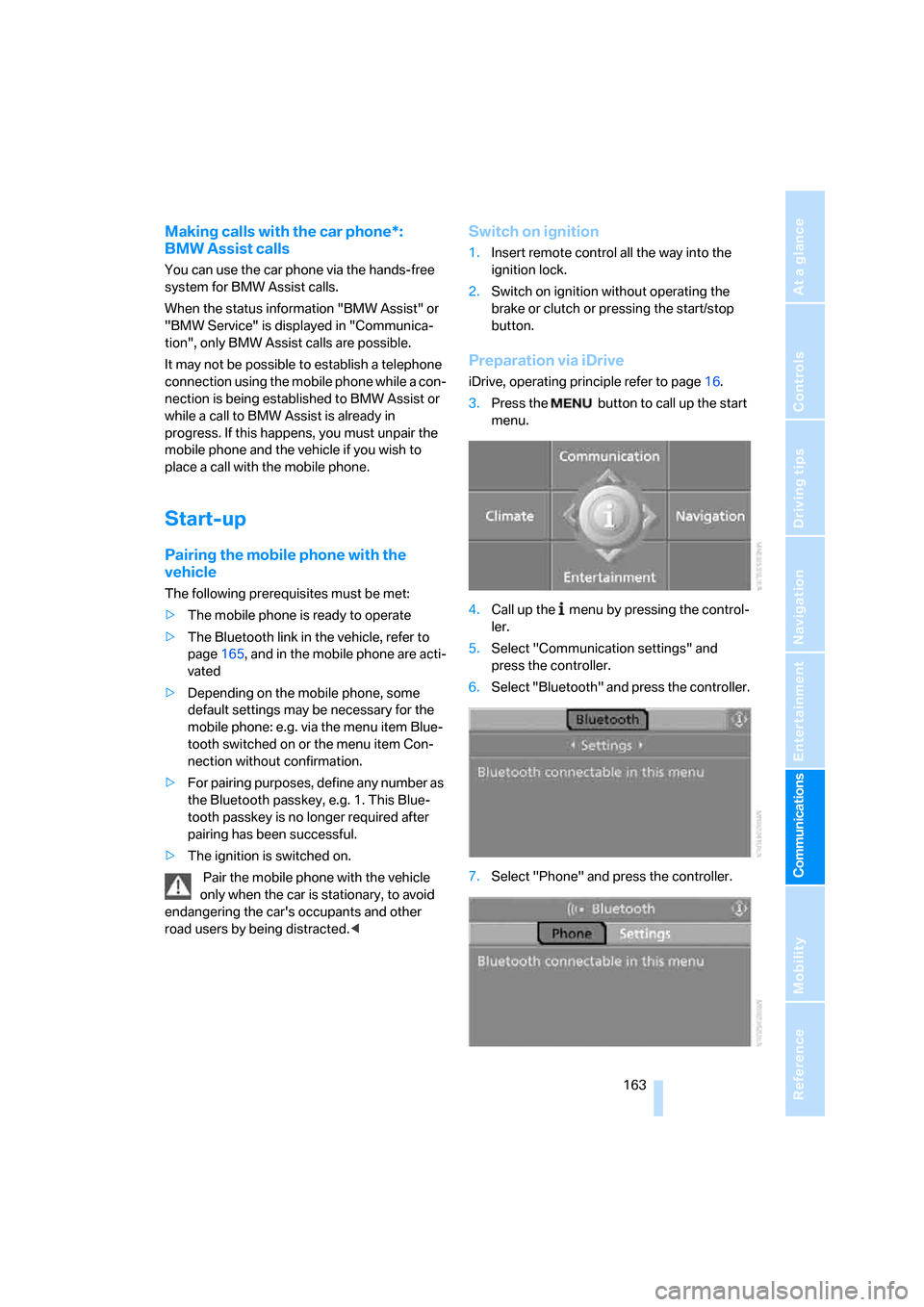
3.Press the button to call up the start
menu.
4.Call up the menu by pressing the control-
ler.
5.Select "Communication settings" and
press the controller.
6.Select "Bluetooth" and press the controller.
7.Select "Phone" and press the controller.
ba8_E9293_US.book Seite 163 Freitag, 5. Mai 2006 1:02 13
Page 209 of 239
Mobility
207Reference
At a glance
Controls
Driving tips
Communications
Navigation
Entertainment
4.Have the vehicle tow-started with the clutch
depressed and slowly release the clutch.
After the engine starts, immediately
depress the clutch completely.
5.Stop at a suitable location, remove the tow
bar or rope and switch off the hazard warn-
ing flashers.
6.Have the vehicle checked.
ba8_E9293_US.book Seite 207 Freitag, 5. Mai 2006 1:02 13
Page 217 of 239
Reference 215
At a glance
Controls
Driving tips
Communications
Navigation
Entertainment
Mobility
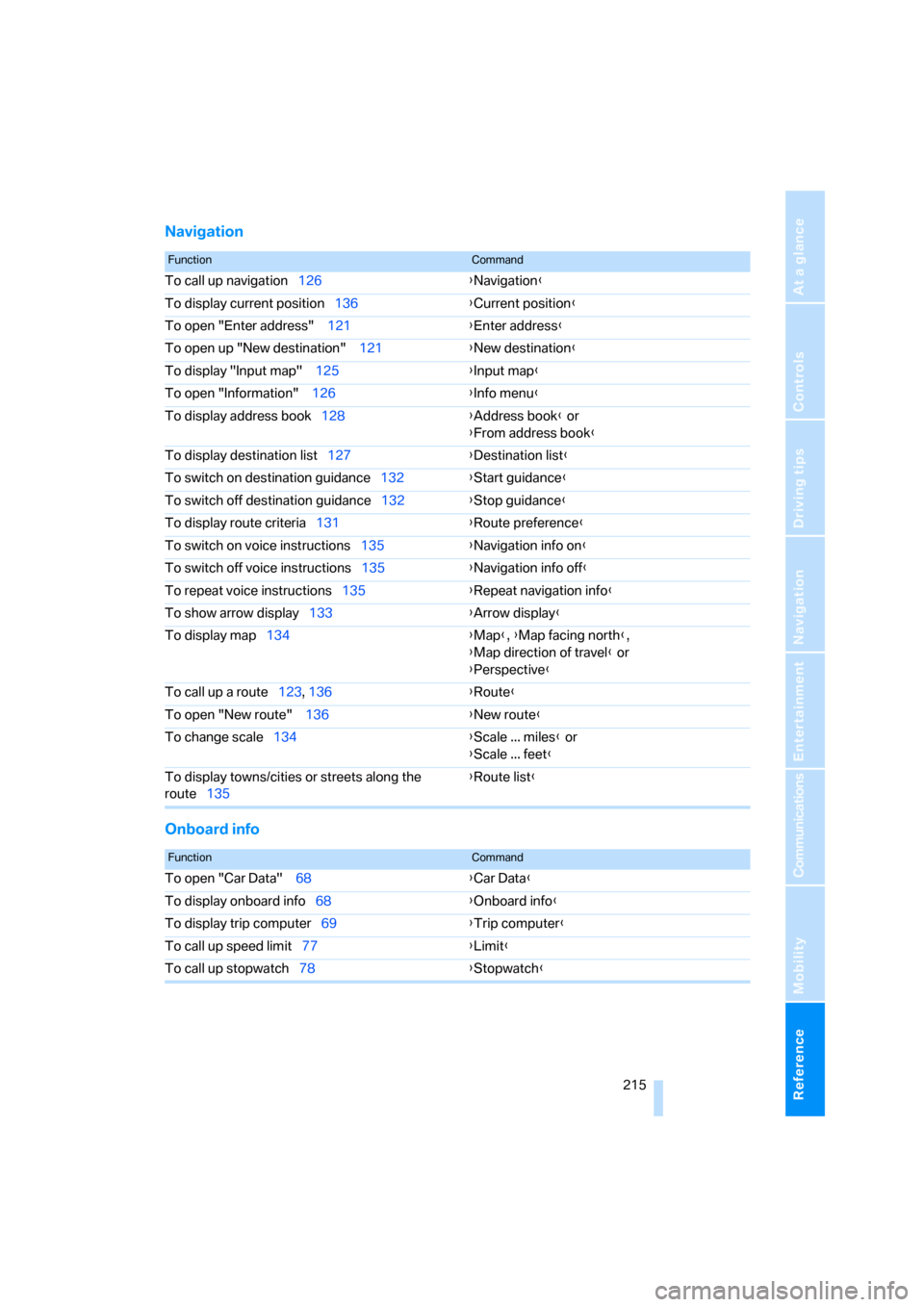
Navigation
Onboard info
FunctionCommand
To call up navigation126{Navigation}
To display current position136{Current position}
To open "Enter address" 121{Enter address}
To open up "New destination" 121{New destination}
To display "Input map" 125{Input map}
To open "Information" 126{Info menu}
To display address book128{Address book} or
{From address book}
To display destination list127{Destination list}
To switch on destination guidance132{Start guidance}
To switch off destination guidance132{Stop guidance}
To display route criteria131{Route preference}
To switch on voice instructions135{Navigation info on}
To switch off voice instructions135{Navigation info off}
To repeat voice instructions135{Repeat navigation info}
To show arrow display133{Arrow display}
To display map134{Map}, {Map facing north},
{Map direction of travel} or
{Perspective}
To call up a route123, 136
{Route}
To open "New route" 136{New route}
To change scale134{Scale ... miles} or
{Scale ... feet}
To display towns/cities or streets along the
route135{Route list}
FunctionCommand
To open "Car Data" 68{Car Data}
To display onboard info68{Onboard info}
To display trip computer69{Trip computer}
To call up speed limit77{Limit}
To call up stopwatch78{Stopwatch}
ba8_E9293_US.book Seite 215 Freitag, 5. Mai 2006 1:02 13
Page 222 of 239
Everything from A - Z
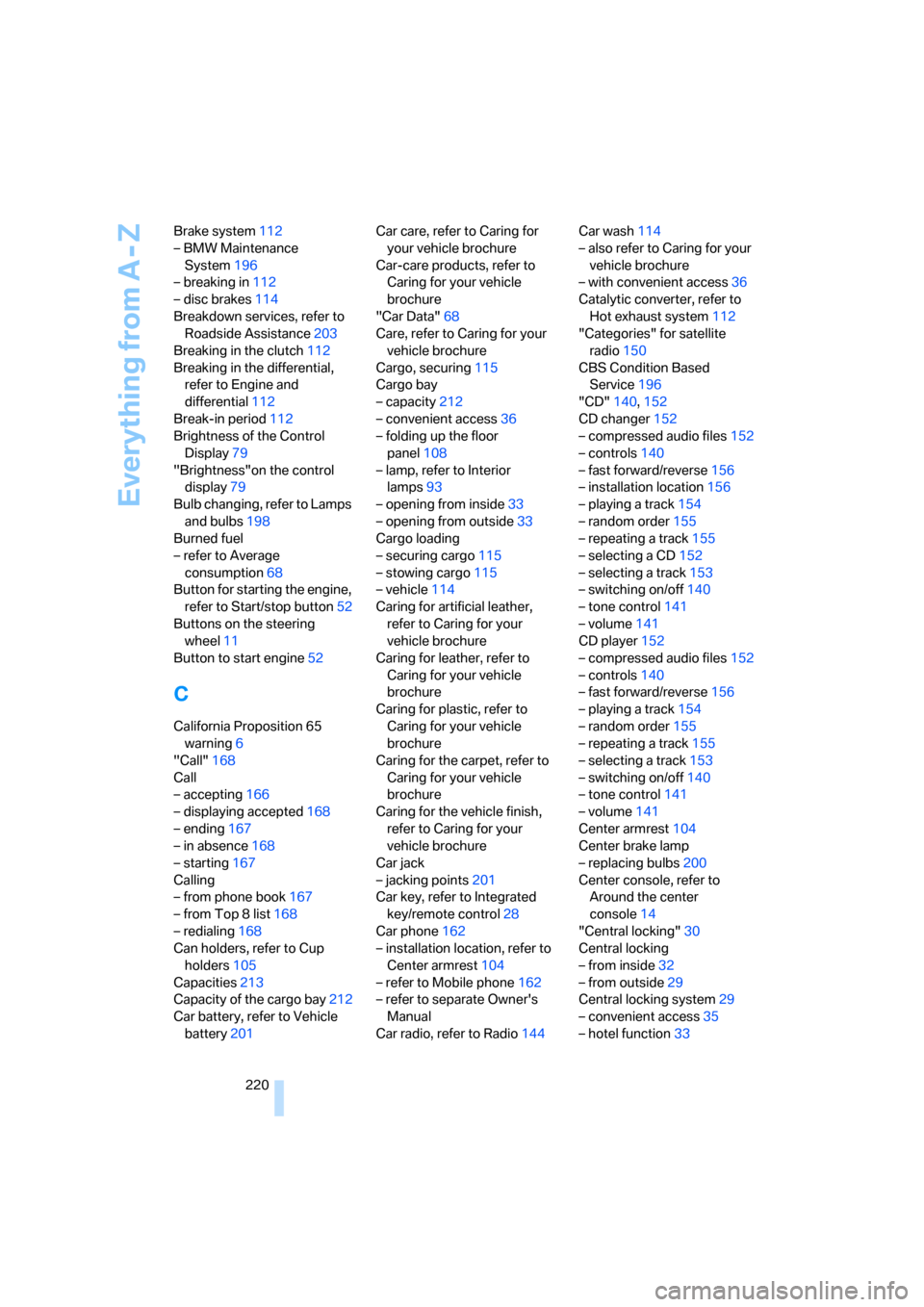
220 Brake system112
– BMW Maintenance
System196
– breaking in112
– disc brakes114
Breakdown services, refer to
Roadside Assistance203
Breaking in the clutch112
Breaking in the differential,
refer to Engine and
differential112
Break-in period112
Brightness of the Control
Display79
"Brightness"on the control
display79
Bulb changing, refer to Lamps
and bulbs198
Burned fuel
– refer to Average
consumption68
Button for starting the engine,
refer to Start/stop button52
Buttons on the steering
wheel11
Button to start engine52
C
California Proposition 65
warning6
"Call"168
Call
– accepting166
– displaying accepted168
– ending167
– in absence168
– starting167
Calling
– from phone book167
– from Top 8 list168
– redialing168
Can holders, refer to Cup
holders105
Capacities213
Capacity of the cargo bay212
Car battery, refer to Vehicle
battery201Car care, refer to Caring for
your vehicle brochure
Car-care products, refer to
Caring for your vehicle
brochure
"Car Data"68
Care, refer to Caring for your
vehicle brochure
Cargo, securing115
Cargo bay
– capacity212
– convenient access36
– folding up the floor
panel108
– lamp, refer to Interior
lamps93
– opening from inside33
– opening from outside33
Cargo loading
– securing cargo115
– stowing cargo115
– vehicle114
Caring for artificial leather,
refer to Caring for your
vehicle brochure
Caring for leather, refer to
Caring for your vehicle
brochure
Caring for plastic, refer to
Caring for your vehicle
brochure
Caring for the carpet, refer to
Caring for your vehicle
brochure
Caring for the vehicle finish,
refer to Caring for your
vehicle brochure
Car jack
– jacking points201
Car key, refer to Integrated
key/remote control28
Car phone162
– installation location, refer to
Center armrest104
– refer to Mobile phone162
– refer to separate Owner's
Manual
Car radio, refer to Radio144Car wash114
– also refer to Caring for your
vehicle brochure
– with convenient access36
Catalytic converter, refer to
Hot exhaust system112
"Categories" for satellite
radio150
CBS Condition Based
Service196
"CD"140,152
CD changer152
– compressed audio files152
– controls140
– fast forward/reverse156
– installation location156
– playing a track154
– random order155
– repeating a track155
– selecting a CD152
– selecting a track153
– switching on/off140
– tone control141
– volume141
CD player152
– compressed audio files152
– controls140
– fast forward/reverse156
– playing a track154
– random order155
– repeating a track155
– selecting a track153
– switching on/off140
– tone control141
– volume141
Center armrest104
Center brake lamp
– replacing bulbs200
Center console, refer to
Around the center
console14
"Central locking"30
Central locking
– from inside32
– from outside29
Central locking system29
– convenient access35
– hotel function33
ba8_E9293_US.book Seite 220 Freitag, 5. Mai 2006 1:02 13
Page 231 of 239
Reference 229
At a glance
Controls
Driving tips
Communications
Navigation
Entertainment
Mobility
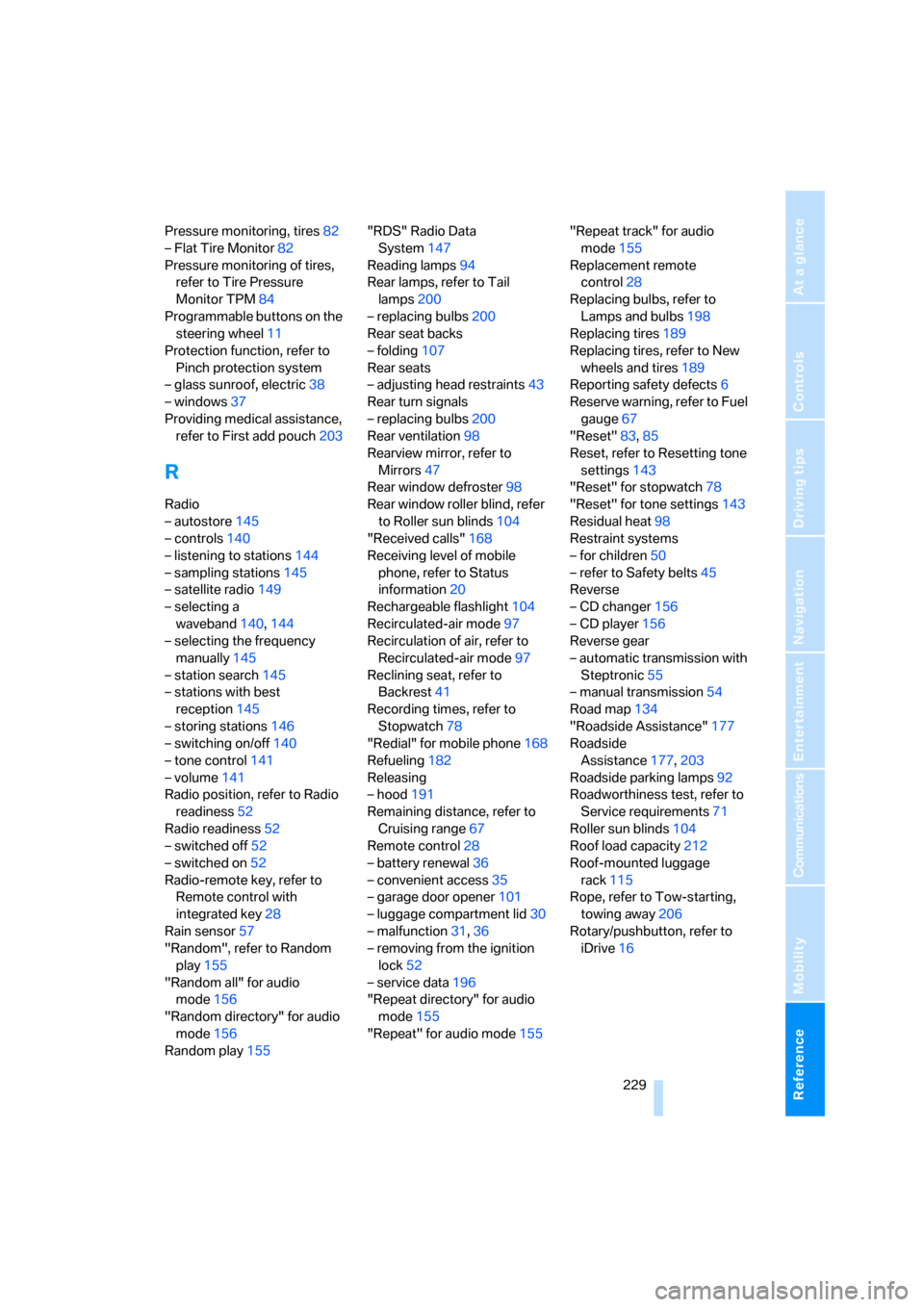
Pressure monitoring, tires82
– Flat Tire Monitor82
Pressure monitoring of tires,
refer to Tire Pressure
Monitor TPM84
Programmable buttons on the
steering wheel11
Protection function, refer to
Pinch protection system
– glass sunroof, electric38
– windows37
Providing medical assistance,
refer to First add pouch203
R
Radio
– autostore145
– controls140
– listening to stations144
– sampling stations145
– satellite radio149
– selecting a
waveband140,144
– selecting the frequency
manually145
– station search145
– stations with best
reception145
– storing stations146
– switching on/off140
– tone control141
– volume141
Radio position, refer to Radio
readiness52
Radio readiness52
– switched off52
– switched on52
Radio-remote key, refer to
Remote control with
integrated key28
Rain sensor57
"Random", refer to Random
play155
"Random all" for audio
mode156
"Random directory" for audio
mode156
Random play155"RDS" Radio Data
System147
Reading lamps94
Rear lamps, refer to Tail
lamps200
– replacing bulbs200
Rear seat backs
– folding107
Rear seats
– adjusting head restraints43
Rear turn signals
– replacing bulbs200
Rear ventilation98
Rearview mirror, refer to
Mirrors47
Rear window defroster98
Rear window roller blind, refer
to Roller sun blinds104
"Received calls"168
Receiving level of mobile
phone, refer to Status
information20
Rechargeable flashlight104
Recirculated-air mode97
Recirculation of air, refer to
Recirculated-air mode97
Reclining seat, refer to
Backrest
41
Recording times, refer to
Stopwatch78
"Redial" for mobile phone168
Refueling182
Releasing
– hood191
Remaining distance, refer to
Cruising range67
Remote control28
– battery renewal36
– convenient access35
– garage door opener101
– luggage compartment lid30
– malfunction31,36
– removing from the ignition
lock52
– service data196
"Repeat directory" for audio
mode155
"Repeat" for audio mode155"Repeat track" for audio
mode155
Replacement remote
control28
Replacing bulbs, refer to
Lamps and bulbs198
Replacing tires189
Replacing tires, refer to New
wheels and tires189
Reporting safety defects6
Reserve warning, refer to Fuel
gauge67
"Reset"83,85
Reset, refer to Resetting tone
settings143
"Reset" for stopwatch78
"Reset" for tone settings143
Residual heat98
Restraint systems
– for children50
– refer to Safety belts45
Reverse
– CD changer156
– CD player156
Reverse gear
– automatic transmission with
Steptronic55
– manual transmission54
Road map134
"Roadside Assistance"177
Roadside
Assistance177,203
Roadside parking lamps92
Roadworthiness test, refer to
Service requirements71
Roller sun blinds
104
Roof load capacity212
Roof-mounted luggage
rack115
Rope, refer to Tow-starting,
towing away206
Rotary/pushbutton, refer to
iDrive16
ba8_E9293_US.book Seite 229 Freitag, 5. Mai 2006 1:02 13
Page 233 of 239
Reference 231
At a glance
Controls
Driving tips
Communications
Navigation
Entertainment
Mobility
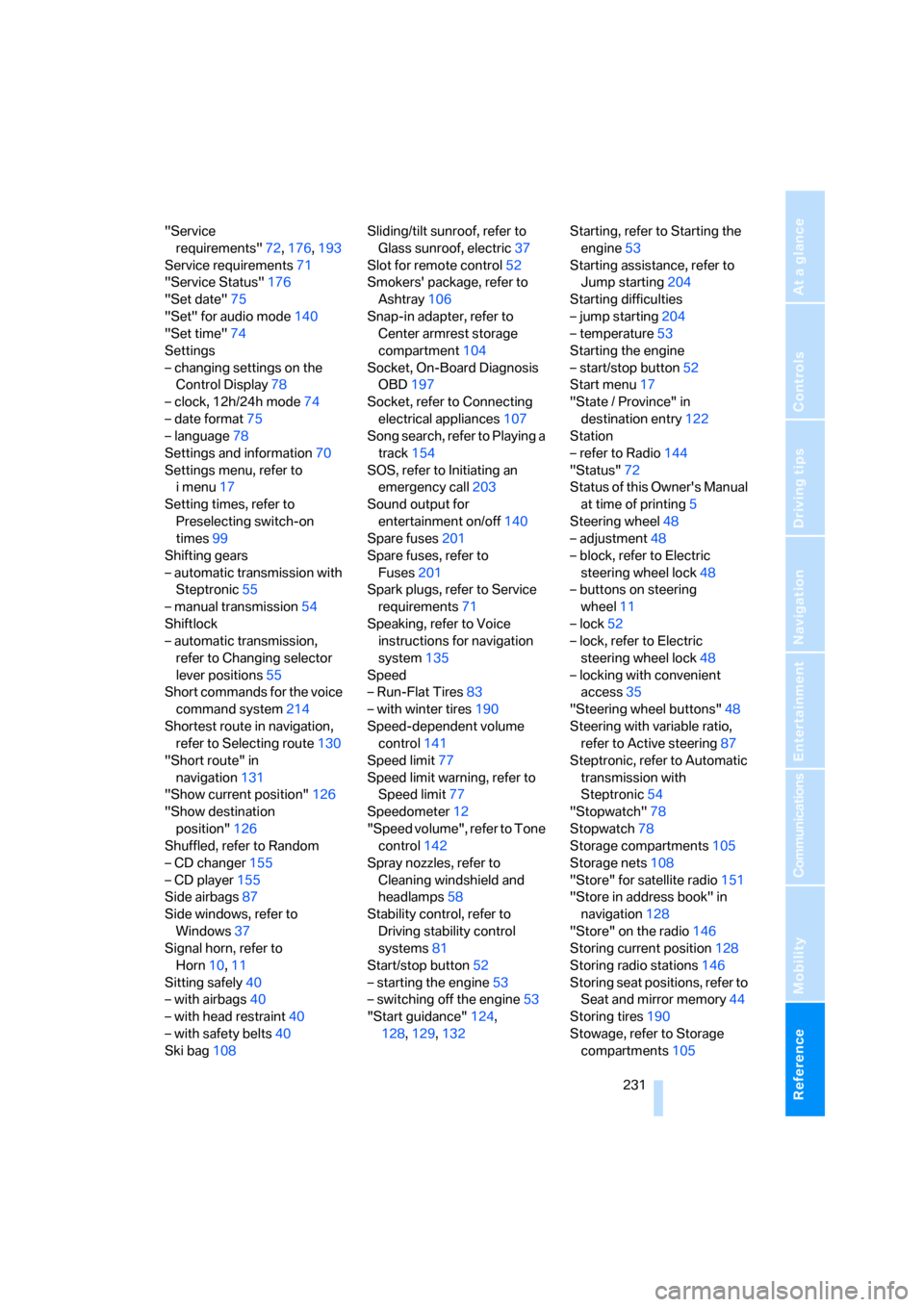
"Service
requirements"72,176,193
Service requirements71
"Service Status"176
"Set date"75
"Set" for audio mode140
"Set time"74
Settings
– changing settings on the
Control Display78
– clock, 12h/24h mode74
– date format75
– language78
Settings and information70
Settings menu, refer to
imenu17
Setting times, refer to
Preselecting switch-on
times99
Shifting gears
– automatic transmission with
Steptronic55
– manual transmission54
Shiftlock
– automatic transmission,
refer to Changing selector
lever positions55
Short commands for the voice
command system214
Shortest route in navigation,
refer to Selecting route130
"Short route" in
navigation131
"Show current position"126
"Show destination
position"126
Shuffled, refer to Random
– CD changer155
– CD player155
Side airbags87
Side windows, refer to
Windows37
Signal horn, refer to
Horn10,11
Sitting safely40
– with airbags40
– with head restraint40
– with safety belts40
Ski bag108Sliding/tilt sunroof, refer to
Glass sunroof, electric37
Slot for remote control52
Smokers' package, refer to
Ashtray106
Snap-in adapter, refer to
Center armrest storage
compartment104
Socket, On-Board Diagnosis
OBD197
Socket, refer to Connecting
electrical appliances107
Song search, refer to Playing a
track154
SOS, refer to Initiating an
emergency call203
Sound output for
entertainment on/off140
Spare fuses201
Spare fuses, refer to
Fuses201
Spark plugs, refer to Service
requirements71
Speaking, refer to Voice
instructions for navigation
system135
Speed
– Run-Flat Tires83
– with winter tires190
Speed-dependent volume
control141
Speed limit77
Speed limit warning, refer to
Speed limit77
Speedometer12
"Speed volume", refer to Tone
control142
Spray nozzles, refer to
Cleaning windshield and
headlamps58
Stability control, refer to
Driving stability control
systems81
Start/stop button52
– starting the engine53
– switching off the engine53
"Start guidance"124,
128,129,132Starting, refer to Starting the
engine53
Starting assistance, refer to
Jump starting204
Starting difficulties
– jump starting204
– temperature53
Starting the engine
– start/stop button52
Start menu17
"State / Province" in
destination entry122
Station
– refer to Radio144
"Status"72
Status of this Owner's Manual
at time of printing5
Steering wheel48
– adjustment48
– block, refer to Electric
steering wheel lock48
– buttons on steering
wheel11
– lock52
– lock, refer to Electric
steering wheel lock48
– locking with convenient
access35
"Steering wheel buttons"48
Steering with variable ratio,
refer to Active steering87
Steptronic, refer to Automatic
transmission with
Steptronic54
"Stopwatch"78
Stopwatch78
Storage compartments105
Storage nets108
"Store" for satellite radio151
"Store in address book" in
navigation128
"Store" on the radio146
Storing current position128
Storing radio stations146
Storing seat positions, refer to
Seat and mirror memory44
Storing tires190
Stowage, refer to Storage
compartments105
ba8_E9293_US.book Seite 231 Freitag, 5. Mai 2006 1:02 13
Page 234 of 239
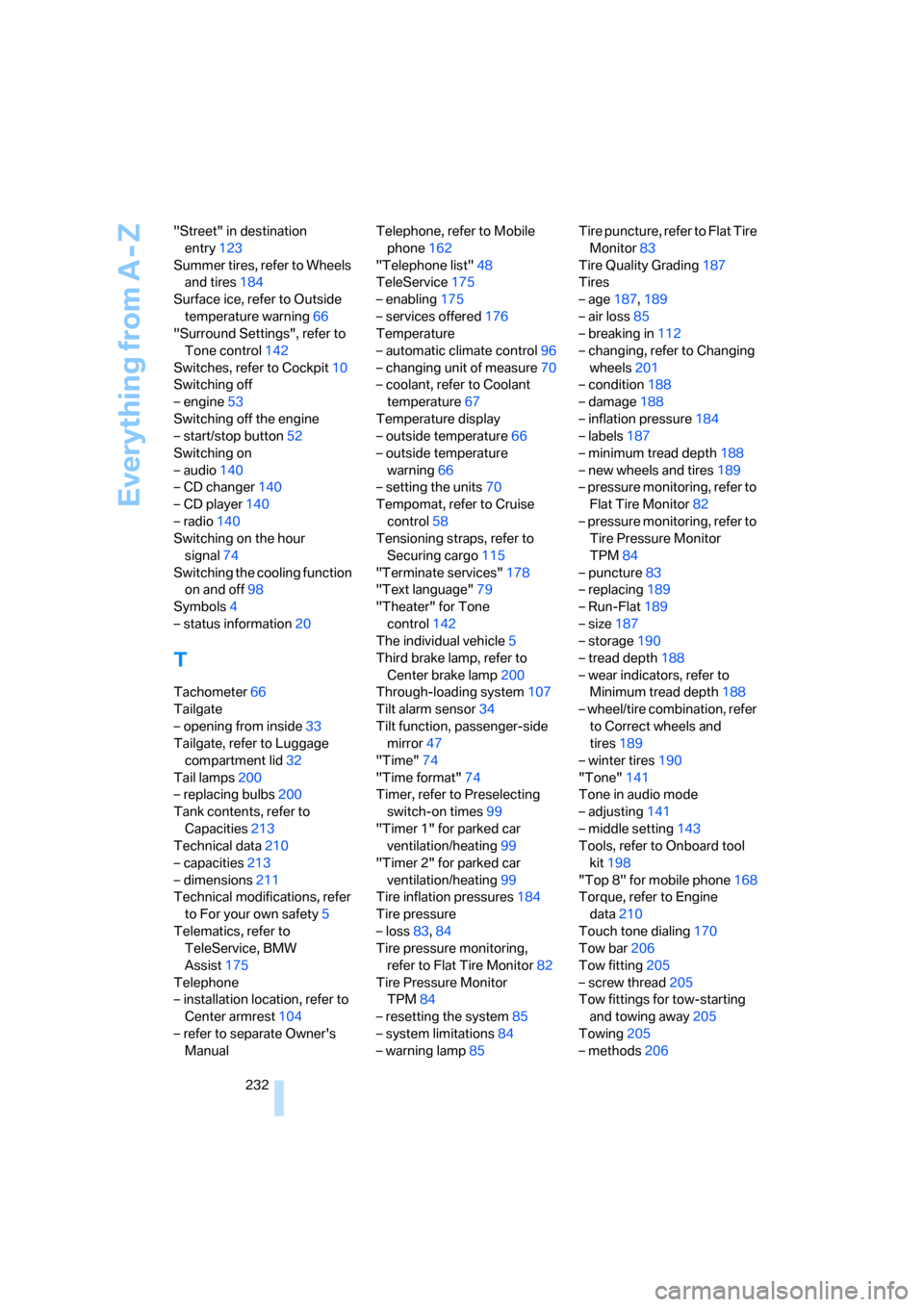
Everything from A - Z
232 "Street" in destination
entry123
Summer tires, refer to Wheels
and tires184
Surface ice, refer to Outside
temperature warning66
"Surround Settings", refer to
Tone control142
Switches, refer to Cockpit10
Switching off
– engine53
Switching off the engine
– start/stop button52
Switching on
– audio140
– CD changer140
– CD player140
– radio140
Switching on the hour
signal74
Switching the cooling function
on and off98
Symbols4
– status information20
T
Tachometer66
Tailgate
– opening from inside33
Tailgate, refer to Luggage
compartment lid32
Tail lamps200
– replacing bulbs200
Tank contents, refer to
Capacities213
Technical data210
– capacities213
– dimensions211
Technical modifications, refer
to For your own safety5
Telematics, refer to
TeleService, BMW
Assist175
Telephone
– installation location, refer to
Center armrest104
– refer to separate Owner's
ManualTelephone, refer to Mobile
phone162
"Telephone list"48
TeleService175
– enabling175
– services offered176
Temperature
– automatic climate control96
– changing unit of measure70
– coolant, refer to Coolant
temperature67
Temperature display
– outside temperature66
– outside temperature
warning66
– setting the units70
Tempomat, refer to Cruise
control58
Tensioning straps, refer to
Securing cargo115
"Terminate services"178
"Text language"79
"Theater" for Tone
control142
The individual vehicle5
Third brake lamp, refer to
Center brake lamp200
Through-loading system107
Tilt alarm sensor34
Tilt function, passenger-side
mirror47
"Time"74
"Time format"74
Timer, refer to Preselecting
switch-on times99
"Timer 1" for parked car
ventilation/heating99
"Timer 2" for parked car
ventilation/heating99
Tire inflation pressures184
Tire pressure
– loss83,84
Tire pressure monitoring,
refer to Flat Tire Monitor82
Tire Pressure Monitor
TPM84
– resetting the system85
– system limitations84
– warning lamp85Tire puncture, refer to Flat Tire
Monitor83
Tire Quality Grading187
Tires
– age187,189
– air loss85
– breaking in112
– changing, refer to Changing
wheels201
– condition188
– damage188
– inflation pressure184
– labels187
– minimum tread depth188
– new wheels and tires189
– pressure monitoring, refer to
Flat Tire Monitor82
– pressure monitoring, refer to
Tire Pressure Monitor
TPM84
– puncture83
– replacing189
– Run-Flat189
– size187
– storage190
– tread depth188
– wear indicators, refer to
Minimum tread depth188
– wheel/tire combination, refer
to Correct wheels and
tires189
– winter tires190
"Tone"141
Tone in audio mode
– adjusting141
– middle setting143
Tools, refer to Onboard tool
kit198
"Top 8" for mobile phone168
Torque, refer to Engine
data210
Touch tone dialing170
Tow bar206
Tow fitting205
– screw thread205
Tow fittings for tow-starting
and towing away205
Towing205
– methods206
ba8_E9293_US.book Seite 232 Freitag, 5. Mai 2006 1:02 13