Entertainment BMW 335I COUPE 2007 E92 Manual PDF
[x] Cancel search | Manufacturer: BMW, Model Year: 2007, Model line: 335I COUPE, Model: BMW 335I COUPE 2007 E92Pages: 272, PDF Size: 8.97 MB
Page 143 of 272
Navigation
Driving tips
141Reference
At a glance
Controls
Communications
Entertainment
Mobility
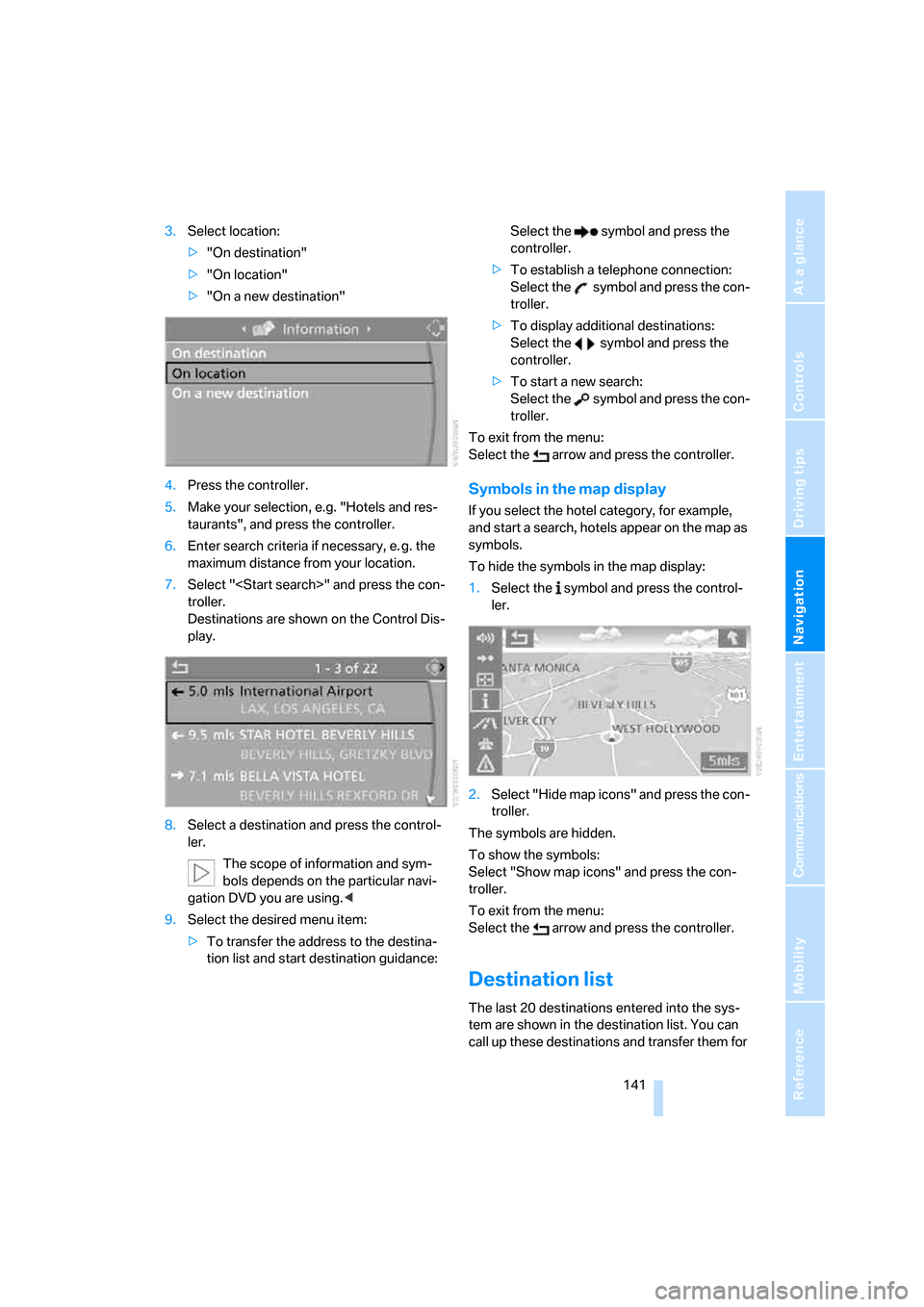
3.Select location:
>"On destination"
>"On location"
>"On a new destination"
4.Press the controller.
5.Make your selection, e.g. "Hotels and res-
taurants", and press the controller.
6.Enter search criteria if necessary, e. g. the
maximum distance from your location.
7.Select "
troller.
Destinations are shown on the Control Dis-
play.
8.Select a destination and press the control-
ler.
The scope of information and sym-
bols depends on the particular navi-
gation DVD you are using.<
9.Select the desired menu item:
>To transfer the address to the destina-
tion list and start destination guidance:Select the symbol and press the
controller.
>To establish a telephone connection:
Select the symbol and press the con-
troller.
>To display additional destinations:
Select the symbol and press the
controller.
>To start a new search:
Select the symbol and press the con-
troller.
To exit from the menu:
Select the arrow and press the controller.
Symbols in the map display
If you select the hotel category, for example,
and start a search, hotels appear on the map as
symbols.
To hide the symbols in the map display:
1.Select the symbol and press the control-
ler.
2.Select "Hide map icons" and press the con-
troller.
The symbols are hidden.
To show the symbols:
Select "Show map icons" and press the con-
troller.
To exit from the menu:
Select the arrow and press the controller.
Destination list
The last 20 destinations entered into the sys-
tem are shown in the destination list. You can
call up these destinations and transfer them for
Page 145 of 272
Navigation
Driving tips
143Reference
At a glance
Controls
Communications
Entertainment
Mobility
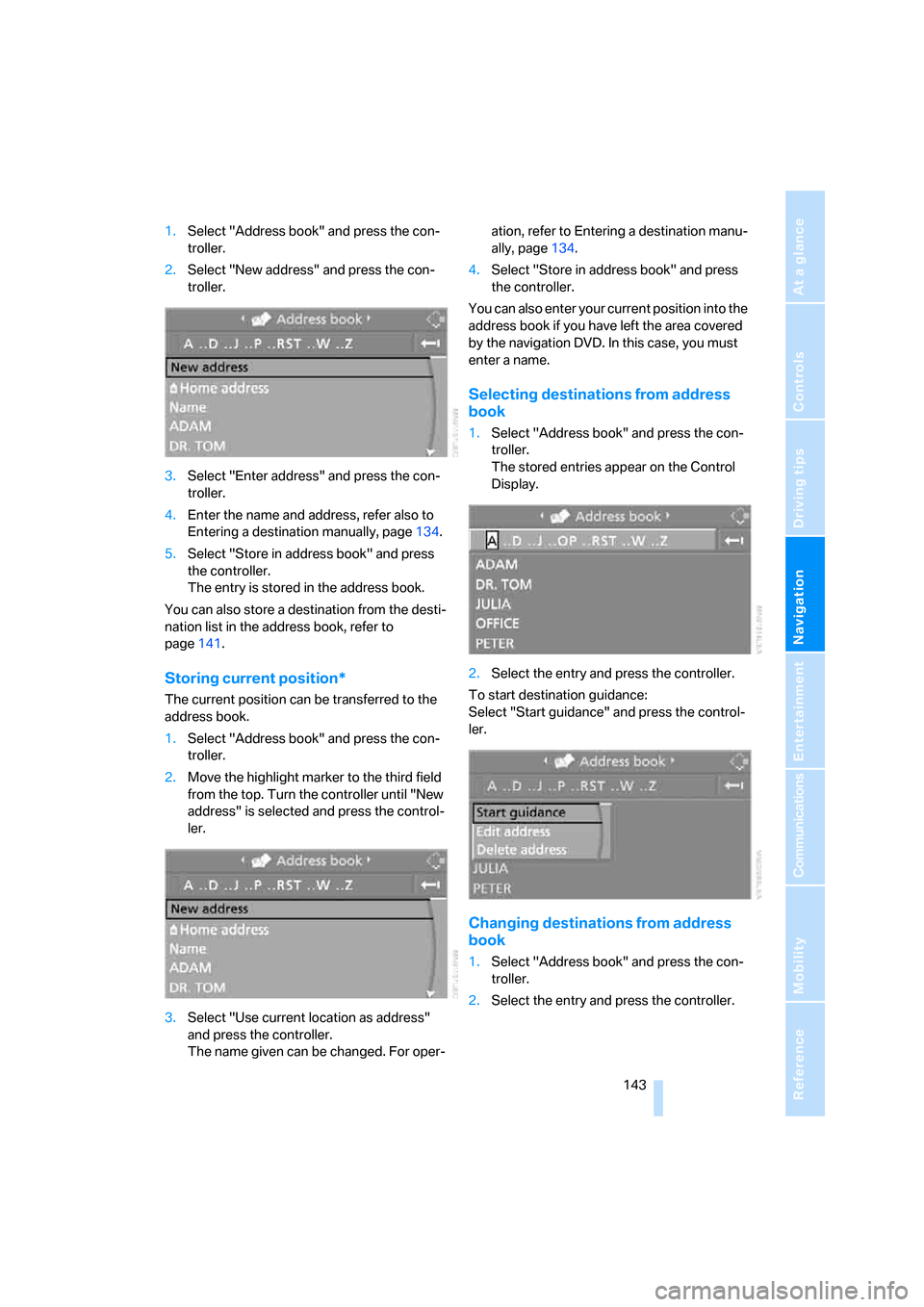
1.Select "Address book" and press the con-
troller.
2.Select "New address" and press the con-
troller.
3.Select "Enter address" and press the con-
troller.
4.Enter the name and address, refer also to
Entering a destination manually, page134.
5.Select "Store in address book" and press
the controller.
The entry is stored in the address book.
You can also store a destination from the desti-
nation list in the address book, refer to
page141.
Storing current position*
The current position can be transferred to the
address book.
1.Select "Address book" and press the con-
troller.
2.Move the highlight marker to the third field
from the top. Turn the controller until "New
address" is selected and press the control-
ler.
3.Select "Use current location as address"
and press the controller.
The name given can be changed. For oper-ation, refer to Entering a destination manu-
ally, page134.
4.Select "Store in address book" and press
the controller.
You can also enter your current position into the
address book if you have left the area covered
by the navigation DVD. In this case, you must
enter a name.
Selecting destinations from address
book
1.Select "Address book" and press the con-
troller.
The stored entries appear on the Control
Display.
2.Select the entry and press the controller.
To start destination guidance:
Select "Start guidance" and press the control-
ler.
Changing destinations from address
book
1.Select "Address book" and press the con-
troller.
2.Select the entry and press the controller.
Page 147 of 272
Navigation
Driving tips
145Reference
At a glance
Controls
Communications
Entertainment
Mobility
Using home address as destination
1.Select "Home address" and press the con-
troller.
2.Select "Start guidance" and press the con-
troller.
Changing home address
1.Select "Home address" and press the con-
troller.
2.Select "Edit address" and press the con-
troller. For operation, refer to Entering a
destination manually, page134.
Route selection
You can influence the calculated route by
choosing certain route criteria. You can change
the route criteria as often as you like during des-
tination entry or during destination guidance.
The route is planned according to fixed rules.
The type of road is taken into account, e.g.
whether it is a highway or a winding road. The
road types are stored on the navigation DVD. As
a result, the routes recommended by the navi-
gation system may not always be the same
ones that you would choose based on personal
experience.
Changing route criteria
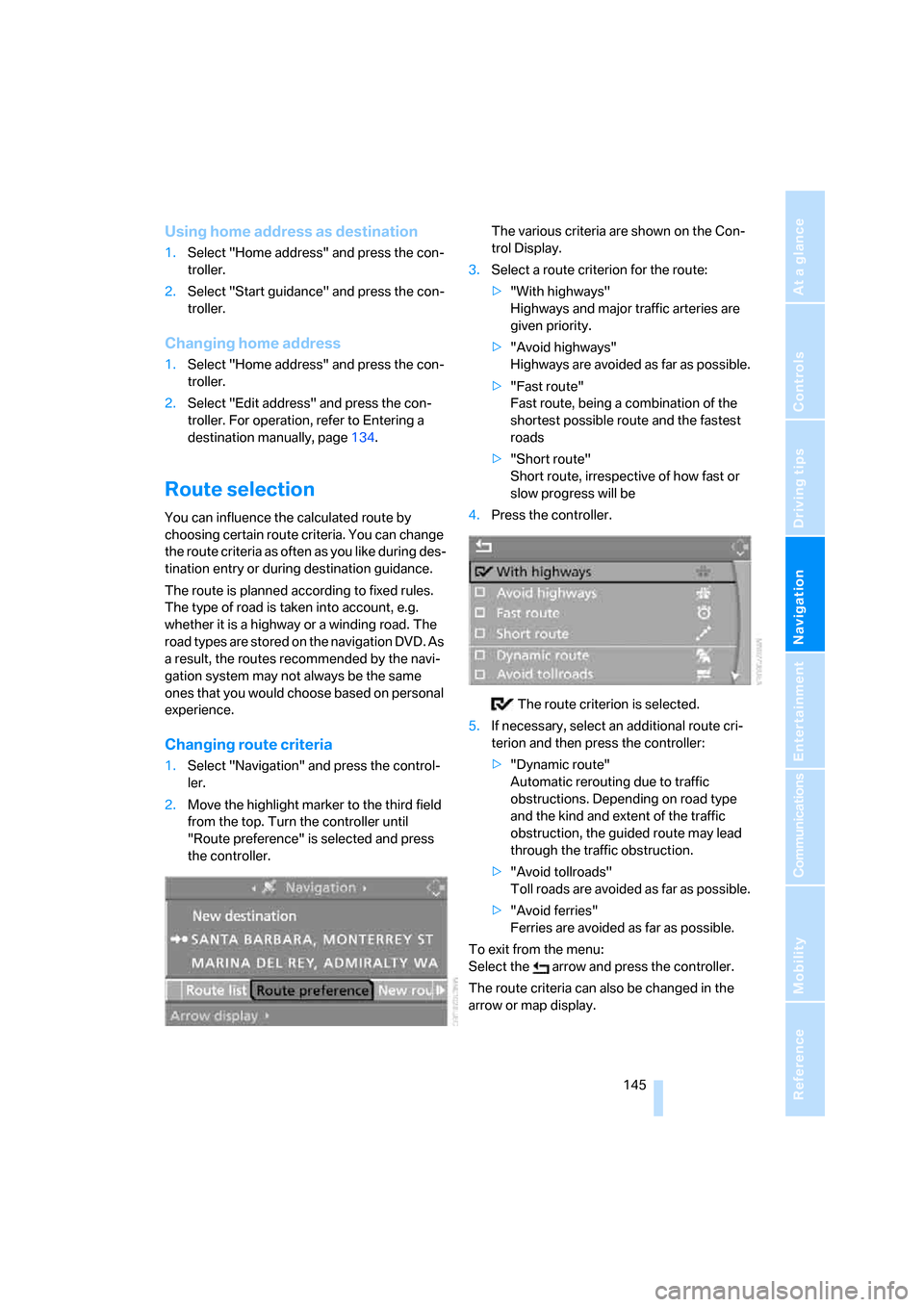
1.Select "Navigation" and press the control-
ler.
2.Move the highlight marker to the third field
from the top. Turn the controller until
"Route preference" is selected and press
the controller.The various criteria are shown on the Con-
trol Display.
3.Select a route criterion for the route:
>"With highways"
Highways and major traffic arteries are
given priority.
>"Avoid highways"
Highways are avoided as far as possible.
>"Fast route"
Fast route, being a combination of the
shortest possible route and the fastest
roads
>"Short route"
Short route, irrespective of how fast or
slow progress will be
4.Press the controller.
The route criterion is selected.
5.If necessary, select an additional route cri-
terion and then press the controller:
>"Dynamic route"
Automatic rerouting due to traffic
obstructions. Depending on road type
and the kind and extent of the traffic
obstruction, the guided route may lead
through the traffic obstruction.
>"Avoid tollroads"
Toll roads are avoided as far as possible.
>"Avoid ferries"
Ferries are avoided as far as possible.
To exit from the menu:
Select the arrow and press the controller.
The route criteria can also be changed in the
arrow or map display.
Page 149 of 272
Navigation
Driving tips
147Reference
At a glance
Controls
Communications
Entertainment
Mobility
Destination guidance
Starting destination
guidance
Via iDrive
iDrive, for operating principle refer to page16.
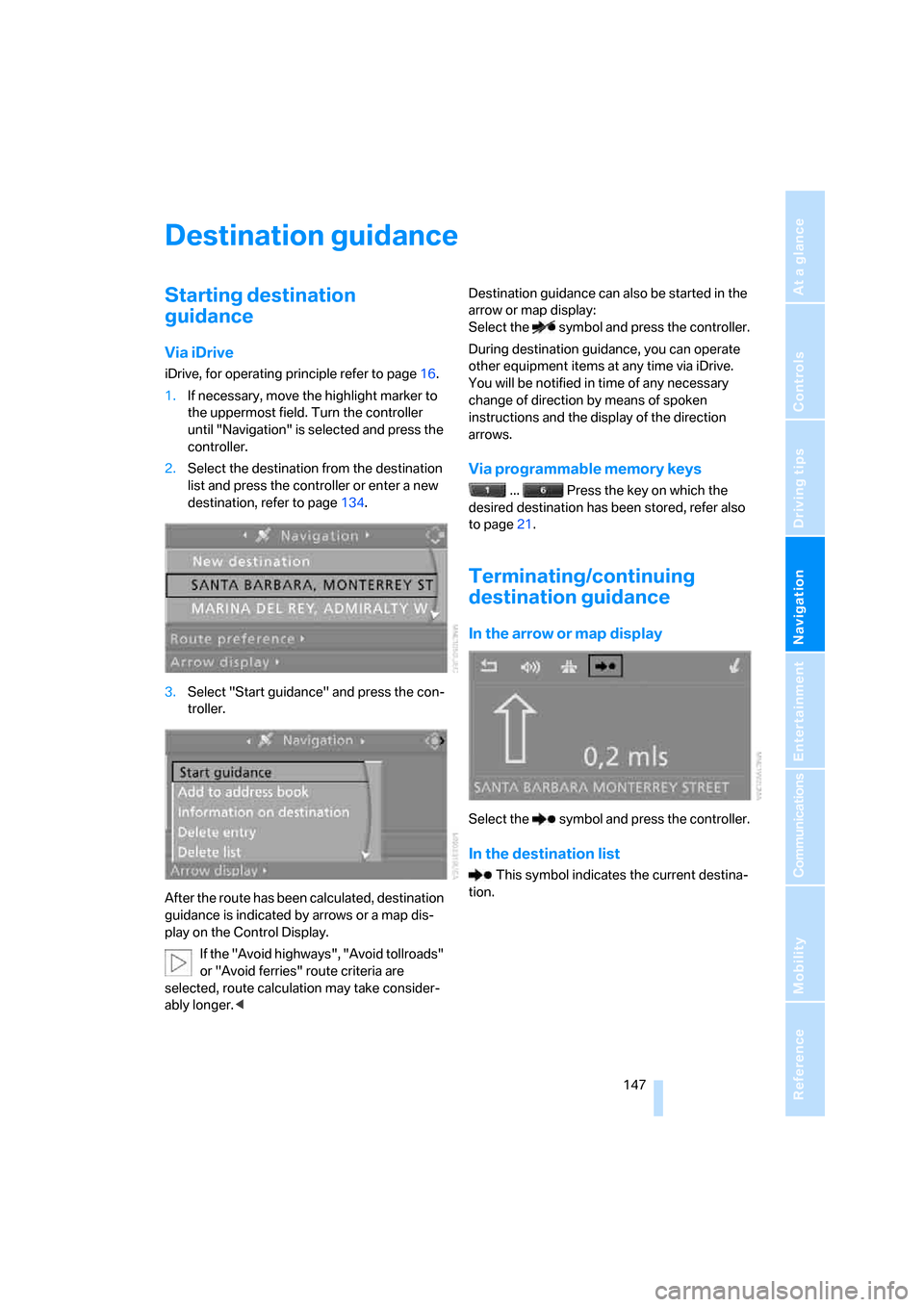
1.If necessary, move the highlight marker to
the uppermost field. Turn the controller
until "Navigation" is selected and press the
controller.
2.Select the destination from the destination
list and press the controller or enter a new
destination, refer to page134.
3.Select "Start guidance" and press the con-
troller.
After the route has been calculated, destination
guidance is indicated by arrows or a map dis-
play on the Control Display.
If the "Avoid highways", "Avoid tollroads"
or "Avoid ferries" route criteria are
selected, route calculation may take consider-
ably longer.
Select the symbol and press the controller.
During destination guidance, you can operate
other equipment items at any time via iDrive.
You will be notified in time of any necessary
change of direction by means of spoken
instructions and the display of the direction
arrows.
Via programmable memory keys
... Press the key on which the
desired destination has been stored, refer also
to page21.
Terminating/continuing
destination guidance
In the arrow or map display
Select the symbol and press the controller.
In the destination list
This symbol indicates the current destina-
tion.
Page 151 of 272
Navigation
Driving tips
149Reference
At a glance
Controls
Communications
Entertainment
Mobility
destination is displayed in the top or bottom line
of the Control Display.
The arrows change appearance before a
change of direction.
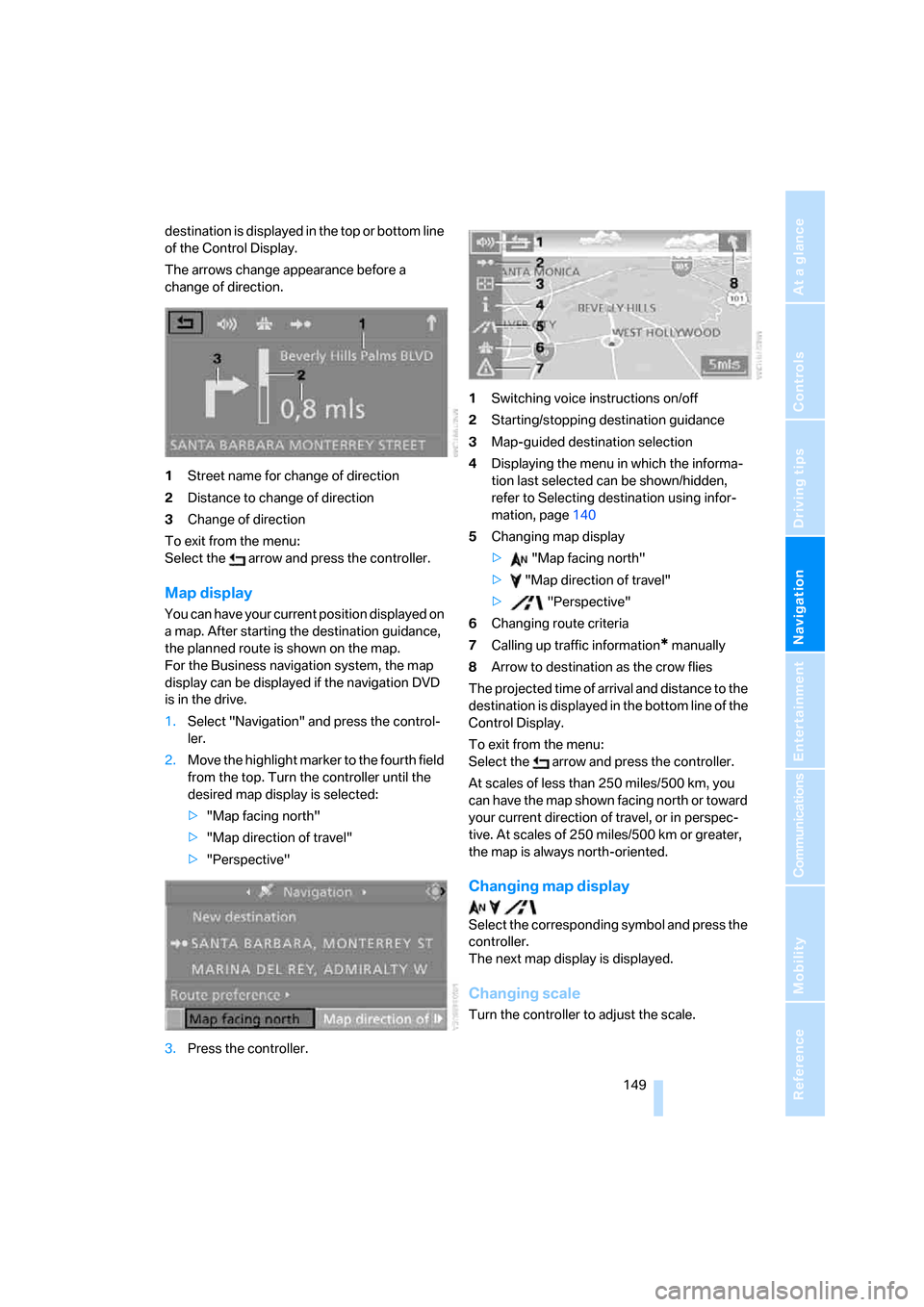
1Street name for change of direction
2Distance to change of direction
3Change of direction
To exit from the menu:
Select the arrow and press the controller.
Map display
You can have your current position displayed on
a map. After starting the destination guidance,
the planned route is shown on the map.
For the Business navigation system, the map
display can be displayed if the navigation DVD
is in the drive.
1.Select "Navigation" and press the control-
ler.
2.Move the highlight marker to the fourth field
from the top. Turn the controller until the
desired map display is selected:
>"Map facing north"
>"Map direction of travel"
>"Perspective"
3.Press the controller.1Switching voice instructions on/off
2Starting/stopping destination guidance
3Map-guided destination selection
4Displaying the menu in which the informa-
tion last selected can be shown/hidden,
refer to Selecting destination using infor-
mation, page140
5Changing map display
> "Map facing north"
> "Map direction of travel"
> "Perspective"
6Changing route criteria
7Calling up traffic information
* manually
8Arrow to destination as the crow flies
The projected time of arrival and distance to the
destination is displayed in the bottom line of the
Control Display.
To exit from the menu:
Select the arrow and press the controller.
At scales of less than 250 miles/500 km, you
can have the map shown facing north or toward
your current direction of travel, or in perspec-
tive. At scales of 250 miles/500 km or greater,
the map is always north-oriented.
Changing map display
Select the corresponding symbol and press the
controller.
The next map display is displayed.
Changing scale
Turn the controller to adjust the scale.
Page 153 of 272
Navigation
Driving tips
151Reference
At a glance
Controls
Communications
Entertainment
Mobility
Repeating or canceling voice
instructions
With the programmable buttons on the steering
wheel, you can also execute the following func-
tions, refer to page54:
>Repeat the voice instruction:
Press the button.
>Switch voice instructions on/off:
Press the button for a longer period.
Adjusting volume for voice instructions
The volume can be adjusted only while a voice
instruction is being issued.
1.Have the last voice instruction repeated, if
necessary.
2.Turn the button during the voice instruction
to select the desired volume.
This volume is independent of the volume of the
audio sources.
The setting is stored for the remote control cur-
rently in use.
Changing a route
During destination guidance, you can revise the
navigation system's route recommendations to
avoid particular stretches of road. Enter the
number of miles/kilometers that you want to
travel before returning to the original route.1.Select "Navigation" and press the control-
ler.
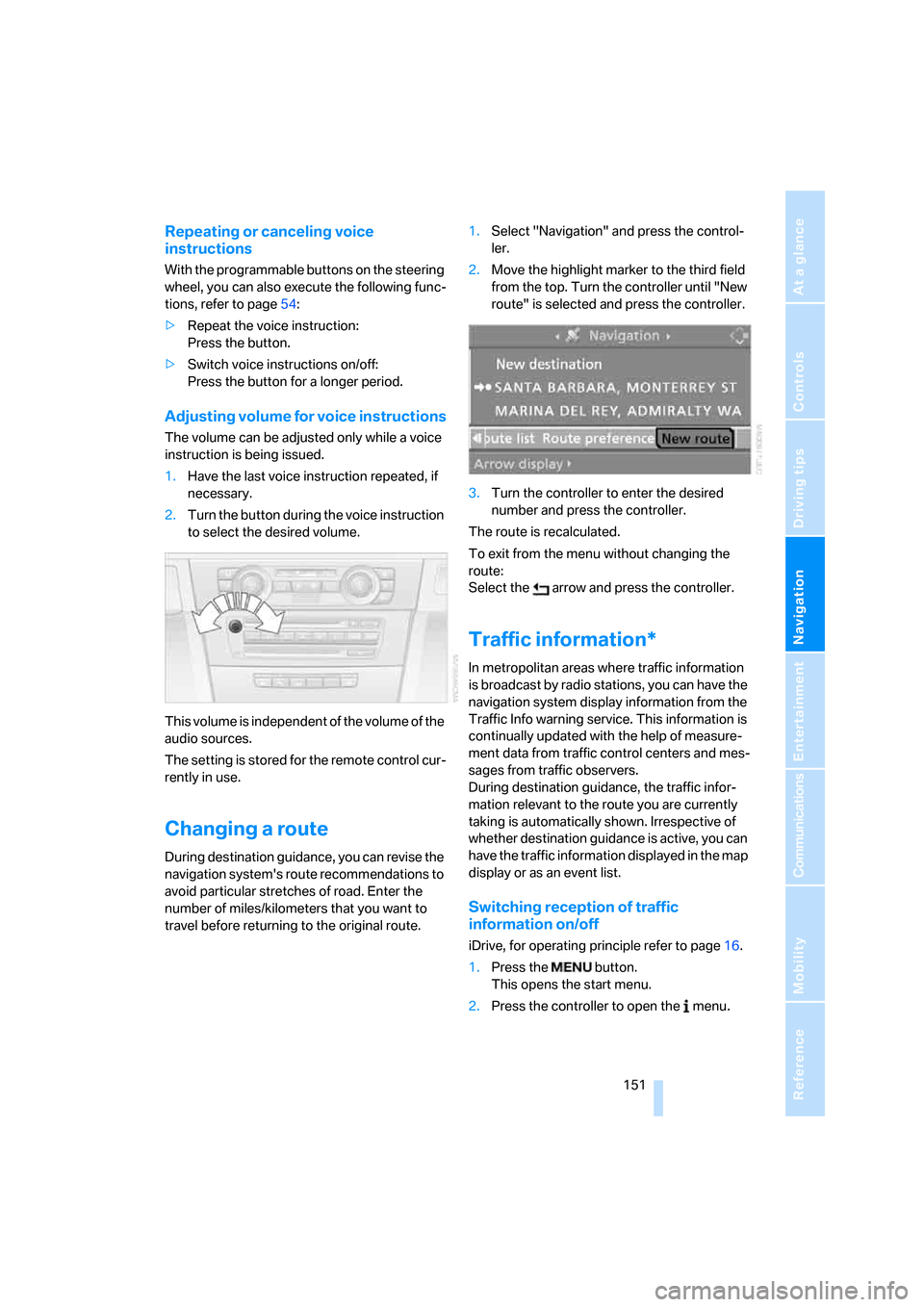
2.Move the highlight marker to the third field
from the top. Turn the controller until "New
route" is selected and press the controller.
3.Turn the controller to enter the desired
number and press the controller.
The route is recalculated.
To exit from the menu without changing the
route:
Select the arrow and press the controller.
Traffic information*
In metropolitan areas where traffic information
is broadcast by radio stations, you can have the
navigation system display information from the
Traffic Info warning service. This information is
continually updated with the help of measure-
ment data from traffic control centers and mes-
sages from traffic observers.
During destination guidance, the traffic infor-
mation relevant to the route you are currently
taking is automatically shown. Irrespective of
whether destination guidance is active, you can
have the traffic information displayed in the map
display or as an event list.
Switching reception of traffic
information on/off
iDrive, for operating principle refer to page16.
1.Press the button.
This opens the start menu.
2.Press the controller to open the menu.
Page 155 of 272
Navigation
Driving tips
153Reference
At a glance
Controls
Communications
Entertainment
Mobility
3.Select "Traffic Info" and press the control-
ler.
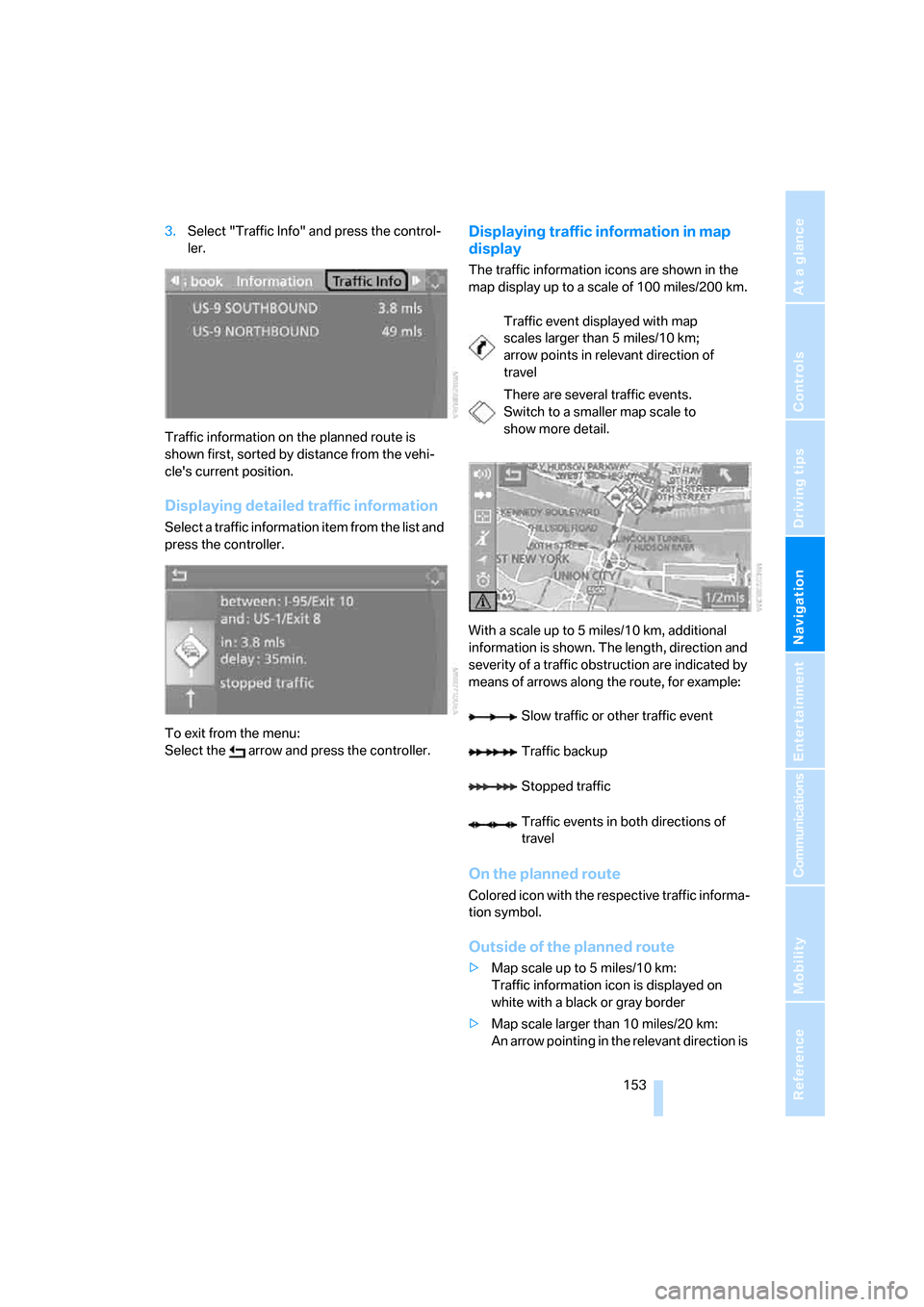
Traffic information on the planned route is
shown first, sorted by distance from the vehi-
cle's current position.
Displaying detailed traffic information
Select a traffic information item from the list and
press the controller.
To exit from the menu:
Select the arrow and press the controller.
Displaying traffic information in map
display
The traffic information icons are shown in the
map display up to a scale of 100 miles/200 km.
With a scale up to 5 miles/10 km, additional
information is shown. The length, direction and
severity of a traffic obstruction are indicated by
means of arrows along the route, for example:
On the planned route
Colored icon with the respective traffic informa-
tion symbol.
Outside of the planned route
>Map scale up to 5 miles/10 km:
Traffic information icon is displayed on
white with a black or gray border
>Map scale larger than 10 miles/20 km:
An arrow pointing in the relevant direction is
Traffic event displayed with map
scales larger than 5 miles/10 km;
arrow points in relevant direction of
travel
There are several traffic events.
Switch to a smaller map scale to
show more detail.
Slow traffic or other traffic event
Traffic backup
Stopped traffic
Traffic events in both directions of
travel
Page 157 of 272
Navigation
Driving tips
155Reference
At a glance
Controls
Communications
Entertainment
Mobility
Displaying current position
You can have your current position displayed
even when the destination guidance is
switched off.
1.Select "Navigation" and press the control-
ler.
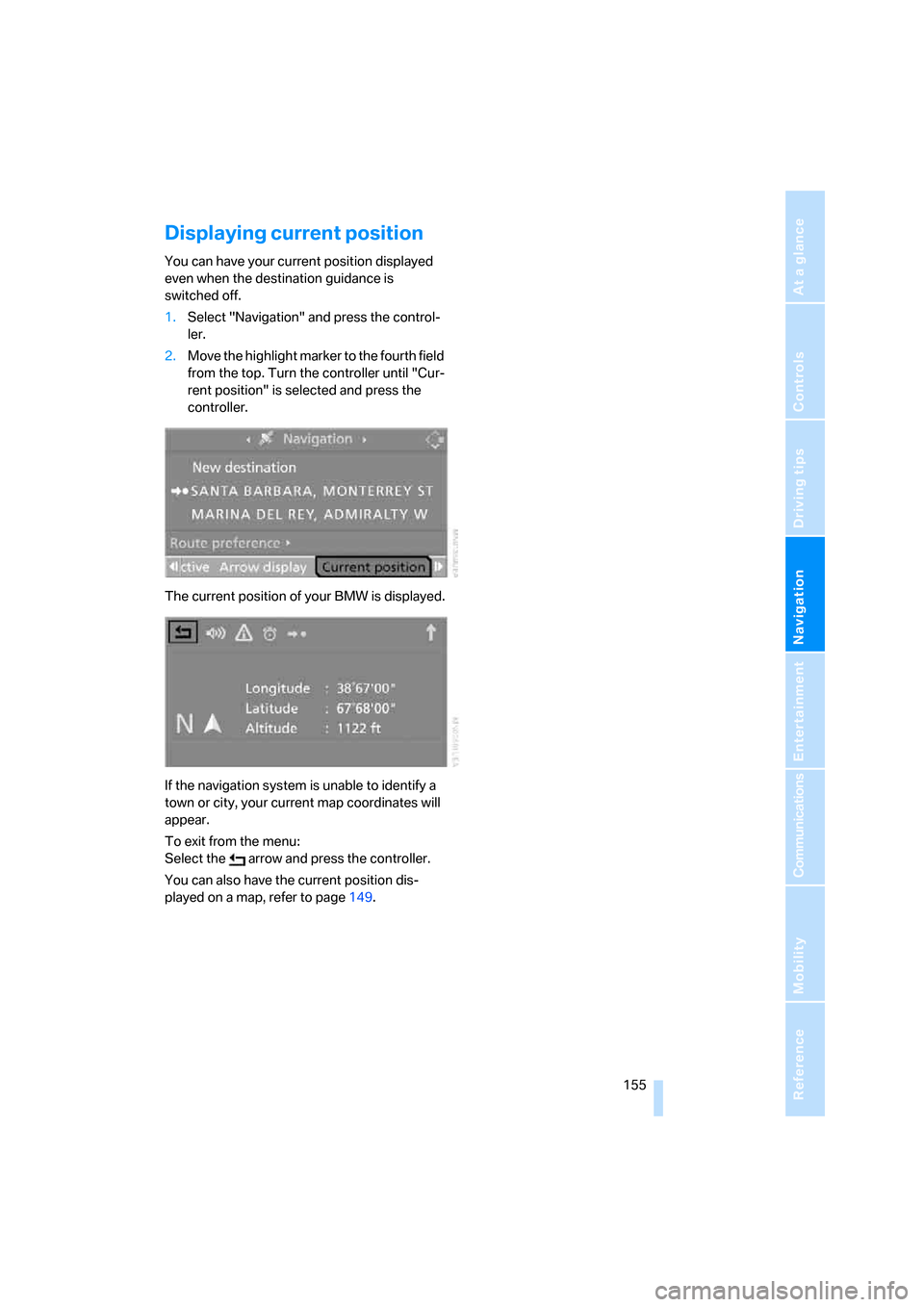
2.Move the highlight marker to the fourth field
from the top. Turn the controller until "Cur-
rent position" is selected and press the
controller.
The current position of your BMW is displayed.
If the navigation system is unable to identify a
town or city, your current map coordinates will
appear.
To exit from the menu:
Select the arrow and press the controller.
You can also have the current position dis-
played on a map, refer to page149.
Page 159 of 272
Navigation
Driving tips
157Reference
At a glance
Controls
Communications
Entertainment
Mobility
Page 161 of 272
Entertainment
Operation of the radio, CD equipment and
external audio devices as well as their tone
settings are described in this chapter.
Entertainment