hdc BMW 335I COUPE 2007 E92 Owner's Manual
[x] Cancel search | Manufacturer: BMW, Model Year: 2007, Model line: 335I COUPE, Model: BMW 335I COUPE 2007 E92Pages: 272, PDF Size: 8.97 MB
Page 17 of 272
At a glance
15Reference
Controls
Driving tips
Communications
Navigation
Entertainment
Mobility
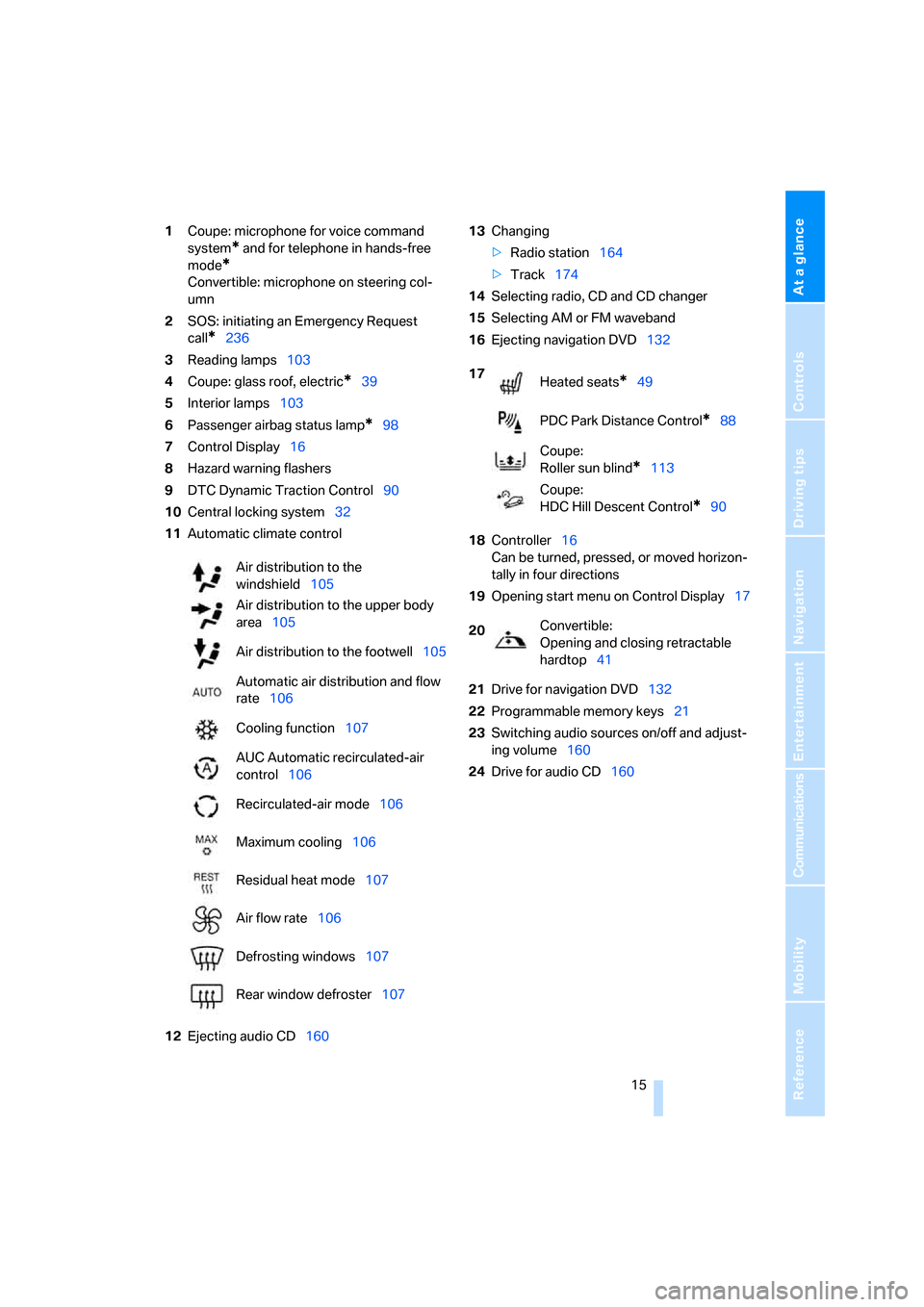
1Coupe: microphone for voice command
system
* and for telephone in hands-free
mode
*
Convertible: microphone on steering col-
umn
2SOS: initiating an Emergency Request
call
*236
3Reading lamps103
4Coupe: glass roof, electric
*39
5Interior lamps103
6Passenger airbag status lamp
*98
7Control Display16
8Hazard warning flashers
9DTC Dynamic Traction Control90
10Central locking system32
11Automatic climate control
12Ejecting audio CD16013Changing
>Radio station164
>Track174
14Selecting radio, CD and CD changer
15Selecting AM or FM waveband
16Ejecting navigation DVD132
18Controller16
Can be turned, pressed, or moved horizon-
tally in four directions
19Opening start menu on Control Display17
21Drive for navigation DVD132
22Programmable memory keys21
23Switching audio sources on/off and adjust-
ing volume160
24Drive for audio CD160 Air distribution to the
windshield105
Air distribution to the upper body
area105
Air distribution to the footwell105
Automatic air distribution and flow
rate106
Cooling function107
AUC Automatic recirculated-air
control106
Recirculated-air mode106
Maximum cooling106
Residual heat mode107
Air flow rate106
Defrosting windows107
Rear window defroster107
17
Heated seats*49
PDC Park Distance Control
*88
Coupe:
Roller sun blind
*113
Coupe:
HDC Hill Descent Control
*90
20Convertible:
Opening and closing retractable
hardtop41
Page 93 of 272
Controls
91Reference
At a glance
Driving tips
Communications
Navigation
Entertainment
Mobility
HDC Hill Descent Control*
HDC is a downhill driving assistant that controls
your speed on steep downhill gradients and
makes it even easier to control your BMW's
handling under these conditions. The vehicle
then moves slightly faster than double walking
speed without the driver needing to intervene.
HDC can be activated as long as you are driving
under approx. 20 mph or 35 km/h. When driving
downhill at a speed of under approx. 20 mph or
35 km/h, the vehicle's speed is automatically
reduced to slightly more than double walking
speed and maintained.
Increasing or decreasing speed
By accelerating or braking you can change the
speed within a range from approx. 3 to 15 mph,
approx. 5 to 25 km/h.
You can specify a target speed within the same
range using the cruise control
* lever on the
steering column.
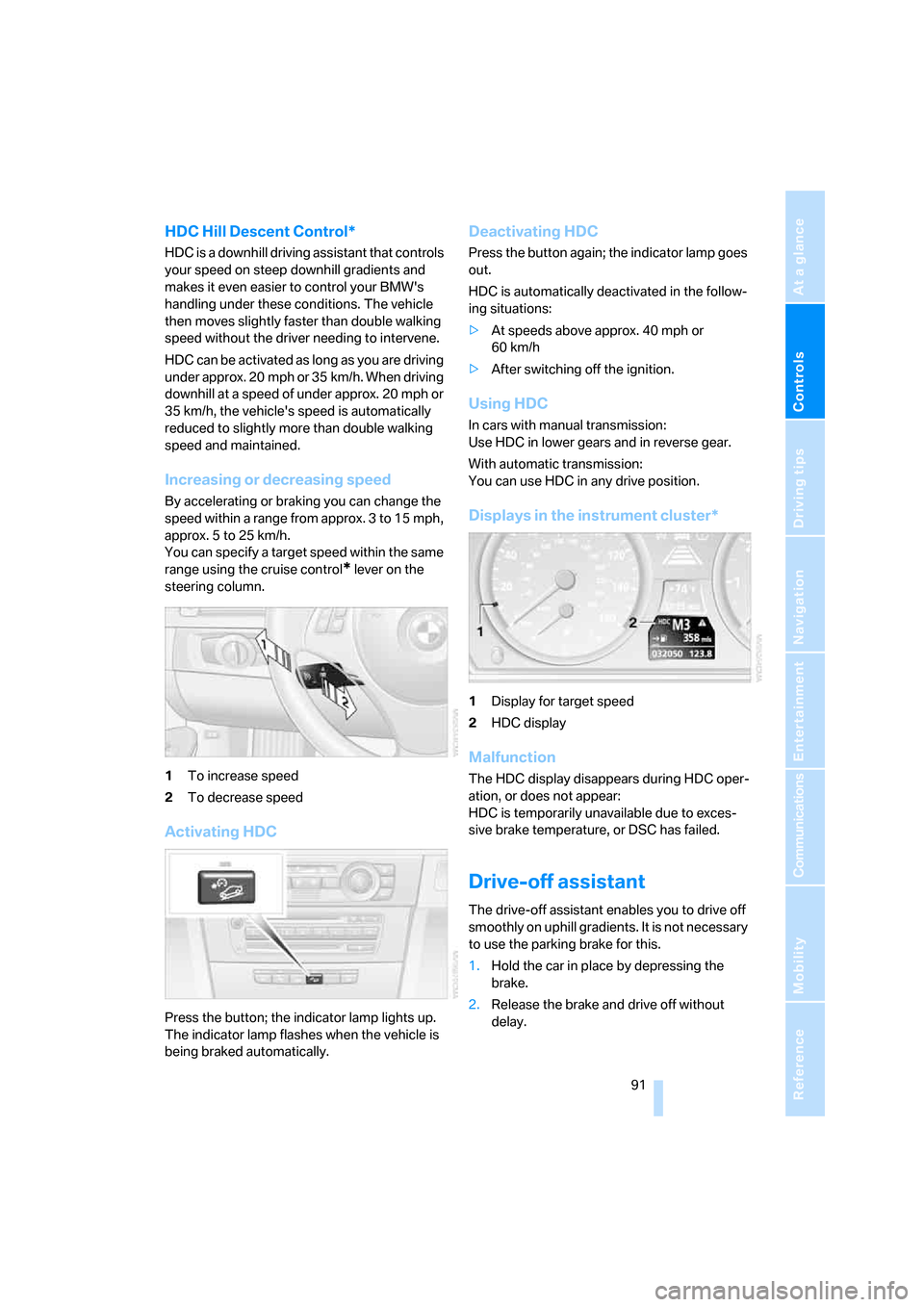
1To increase speed
2To decrease speed
Activating HDC
Press the button; the indicator lamp lights up.
The indicator lamp flashes when the vehicle is
being braked automatically.
Deactivating HDC
Press the button again; the indicator lamp goes
out.
HDC is automatically deactivated in the follow-
ing situations:
>At speeds above approx. 40 mph or
60 km/h
>After switching off the ignition.
Using HDC
In cars with manual transmission:
Use HDC in lower gears and in reverse gear.
With automatic transmission:
You can use HDC in any drive position.
Displays in the instrument cluster*
1Display for target speed
2HDC display
Malfunction
The HDC display disappears during HDC oper-
ation, or does not appear:
HDC is temporarily unavailable due to exces-
sive brake temperature, or DSC has failed.
Drive-off assistant
The drive-off assistant enables you to drive off
smoothly on uphill gradients. It is not necessary
to use the parking brake for this.
1.Hold the car in place by depressing the
brake.
2.Release the brake and drive off without
delay.
Page 242 of 272
Giving and receiving assistance
240
With a tow rope
When starting off in the towing vehicle, make
sure that the tow rope is taut.
To avoid jerking and the associated
stresses on vehicle components when
towing, always use nylon ropes or nylon straps.
Attach the tow rope to the tow fittings only, as
attaching it to other parts of the vehicle could
result in damage.<
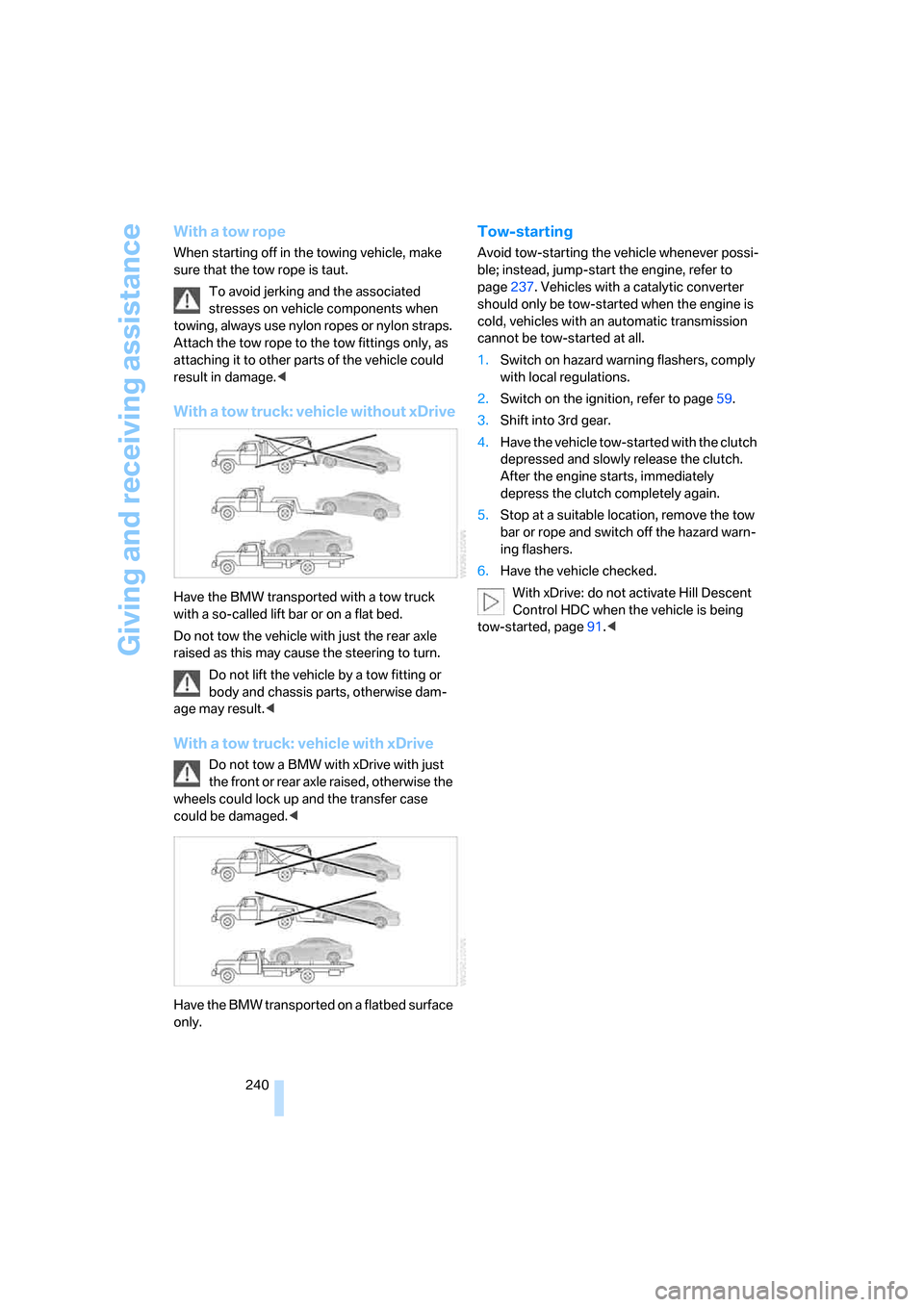
With a tow truck: vehicle without xDrive
Have the BMW transported with a tow truck
with a so-called lift bar or on a flat bed.
Do not tow the vehicle with just the rear axle
raised as this may cause the steering to turn.
Do not lift the vehicle by a tow fitting or
body and chassis parts, otherwise dam-
age may result.<
With a tow truck: vehicle with xDrive
Do not tow a BMW with xDrive with just
the front or rear axle raised, otherwise the
wheels could lock up and the transfer case
could be damaged.<
Have the BMW transported on a flatbed surface
only.
Tow-starting
Avoid tow-starting the vehicle whenever possi-
ble; instead, jump-start the engine, refer to
page237. Vehicles with a catalytic converter
should only be tow-started when the engine is
cold, vehicles with an automatic transmission
cannot be tow-started at all.
1.Switch on hazard warning flashers, comply
with local regulations.
2.Switch on the ignition, refer to page59.
3.Shift into 3rd gear.
4.Have the vehicle tow-started with the clutch
depressed and slowly release the clutch.
After the engine starts, immediately
depress the clutch completely again.
5.Stop at a suitable location, remove the tow
bar or rope and switch off the hazard warn-
ing flashers.
6.Have the vehicle checked.
With xDrive: do not activate Hill Descent
Control HDC when the vehicle is being
tow-started, page91.<
Page 260 of 272
Everything from A - Z
258 Fastest route for
navigation145
Fast forward
– CD changer177
– CD player177
"Fast route" in navigation145
Filter
– refer to Microfilter/activated-
charcoal filter for automatic
climate control108
Fine wood, refer to Caring for
your vehicle brochure
First aid pouch237
Fixture for remote control,
refer to Ignition lock59
Flashlight, refer to
Rechargeable flashlight114
Flash when locking/
unlocking31
Flat tire
– Run-Flat Tires221
– Tire Pressure Monitor
TPM93
Flat Tire Monitor FTM92
– indicating a flat tire93
– indicator/warning lamp93
– initializing the system92
– malfunction93
– snow chains92,222
– system limits92
Flat tires, refer to Tire
condition220
Floor mats, carpets, refer to
Caring for your vehicle
brochure
Fluid reservoir, refer to
Washer fluid reservoir65
"FM", waveband160,164
FM, waveband164
Fog lamps102
– indicator lamp13,102
Folding in the mirrors, before
driving into a car wash52
Folding up the floor panel119
Footbrake, refer to Braking
safely125
Footwell lamps, refer to
Interior lamps103
For your own safety5Four-wheel drive, refer to
xDrive90
Frequency, selecting
manually165
Front airbags97
FTM, refer to Flat Tire
Monitor92
Fuel211
– average consumption76
– gauge75
– high-quality brands211
– quality211
– specifications211
– tank contents, refer to
Capacities247
Fuel clock, refer to Fuel
gauge75
Fuel display, refer to Fuel
gauge75
Fuel filler door210
– releasing in the event of
electrical malfunction210
Fuses234
G
Garage door opener, refer to
Integrated universal remote
control110
Gasoline
– refer to Average
consumption76
Gasoline, refer to Required
fuel211
Gasoline display, refer to Fuel
gauge75
Gasoline engine, checking oil
level224
Gear indicator, automatic
transmission with
Steptronic61
Gearshift lever
– automatic transmission with
Steptronic62
– manual transmission61
Gearshifts
– automatic transmission with
Steptronic62
– manual transmission61General driving notes124
Glass roof, electric39
– closing after electrical
malfunction40
– convenient operation30,32
– initializing40
– opening, closing40
– operation with convenient
access37
– pinch protection system40
– power failure40
– raising39
– remote control30
Glove compartment113
– rechargeable flashlight114
GPS navigation, refer to
Navigation system132
Grills104
Gross vehicle weight, refer to
Weights247
H
Handbrake, refer to Parking
brake60
Hand lamp, refer to
Rechargeable flashlight114
Hands-free system14
Hazard warning flashers14
HDC Hill Descent Control91
"HD radio"167
HD radio, refer to High
Definition Radio167
Head airbags97
Headlamp control,
automatic100
Headlamp flasher63
– indicator lamp11,13
Headlamps
– care, refer to Caring for your
vehicle brochure
Head restraints47
– front, removing48
– rear, removing48
– sitting safely45
Heated
– mirrors52
– rear window107
– seats49
Page 261 of 272
Reference 259
At a glance
Controls
Driving tips
Communications
Navigation
Entertainment
Mobility
Heating
– mirrors52
– rear window107
– residual heat107
– seats49
Heating and ventilation, refer
to Climate104
Heating while at a standstill,
refer to Using residual
heat107
Heavy loads, refer to Stowing
cargo126
Height, refer to
Dimensions245
Height adjustment
– seats46
– steering wheel53
High beams102
– headlamp flasher102
– indicator lamp13
High Definition Radio167
High water, refer to Driving
through water125
Highways, refer to Route
criteria145
Hill Descent Control HDC91
Hills125
Holders for cups115
Home address144
"Home address" in
navigation145
Homepage BMW4
Hood223
Hooks for shopping bags118
Horn10,11
Hotel function34
Hot exhaust system124
"Hour memo"82
"House number" in
destination entry137
Hydraulic brake assist, refer to
Dynamic Brake Control
DBC89
Hydroplaning125
I
IBOC, refer to High Definition
Radio167Ice warning, refer to Outside
temperature
warning74
ID3 tag, refer to Information
about the track175
Identification marks
– Run-Flat Tires221
– tire coding219
iDrive16
– adjusting brightness86
– assistance window20
– automatic climate
control105
– changing language86
– changing units of measure
and display format78
– confirming selection or
entry19
– controls16
– displays, menus17
– menu guidance17
– operating principle16
– overview16
– selecting a menu item19
– setting the date and time81
– start menu17
– status information20
– switching menu pages19
– symbols18
iDrive operating principle16
Ignition59
– switched off59
– switched on59
Ignition key, refer to Remote
control with integrated
key28
Ignition key position 1, refer to
Radio readiness59
Ignition key position 2, refer to
Ignition on59
Ignition lock59
i menu18
Imprint2
Indicator and warning
lamps13
– Tire Pressure Monitor
TPM95
Individual air distribution105Inflation pressure, refer to Tire
inflation pressure212
Inflation pressure monitoring,
refer to Tire Pressure
Monitor TPM93
Information
– on another location140
– on country140
– on current position140
– on destination location140
Information menu, refer to
i menu18
"Information on
destination"142
"Info sources"80
Initializing
– active steering96
– after power failure234
– compass, refer to
Calibrating112
– Flat Tire Monitor FTM92
– glass roof40
"Input map"139
Installation location
– CD changer177
– navigation DVD drive132
– telephone114
Instructions for navigation
system, refer to Voice
instructions150
Instrument cluster12
Instrument lighting103
Instrument panel, refer to
Cockpit10
Integrated key28
Integrated universal remote
control110
Interesting destination for
navigation140
"Interim time"86
Interior lamps103
– remote control30
Interior motion sensor36
Interior rearview mirror53
– automatic dimming
feature53
– compass112
Interlock, refer to Disengaging
the remote control61