steering BMW 335I XDRIVE 2009 Owner's Manual
[x] Cancel search | Manufacturer: BMW, Model Year: 2009, Model line: 335I XDRIVE, Model: BMW 335I XDRIVE 2009Pages: 268, PDF Size: 11.52 MB
Page 121 of 268
Driving tips
119Reference
At a glance
Controls
Communications
Navigation
Entertainment
Mobility
Only attach the cargo straps using the lashing
eyes shown in the illustration. Do not secure
cargo with the anchors for tether straps, refer to
page 50, otherwise these could be damaged. <
Roof-mounted luggage rack*
A special rack system is available as an option
for your BMW. Comply with the directions given
in the installation instructions.
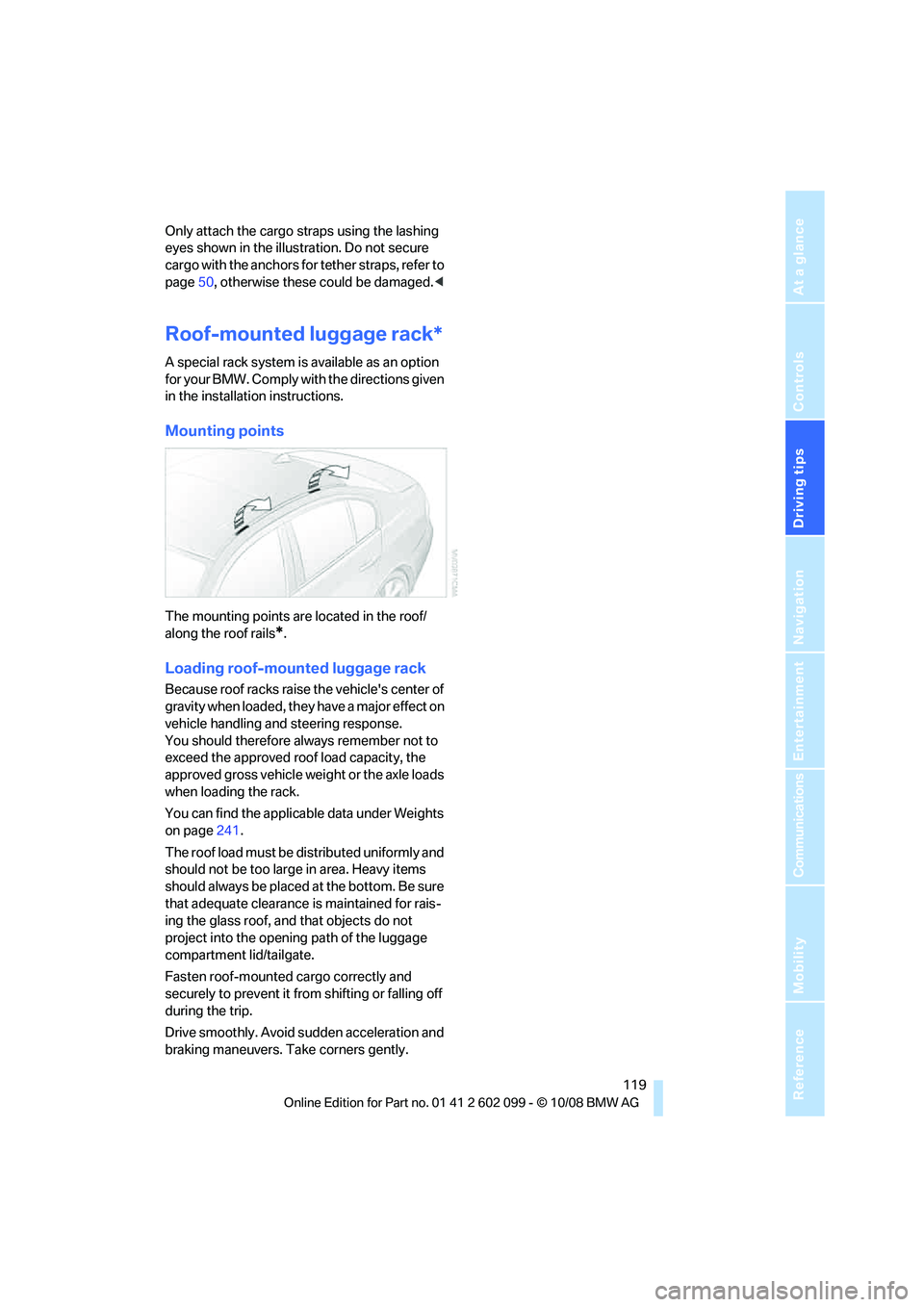
Mounting points
The mounting points are located in the roof/
along the roof rails
*.
Loading roof-mounted luggage rack
Because roof racks raise the vehicle's center of
gravity when loaded, they have a major effect on
vehicle handling and steering response.
You should therefore always remember not to
exceed the approved roof load capacity, the
approved gross vehicle weight or the axle loads
when loading the rack.
You can find the applicab le data under Weights
on page 241.
The roof load must be distributed uniformly and
should not be too large in area. Heavy items
should always be placed at the bottom. Be sure
that adequate clearance is maintained for rais-
ing the glass roof, and that objects do not
project into the opening path of the luggage
compartment lid/tailgate.
Fasten roof-mounted cargo correctly and
securely to prevent it from shifting or falling off
during the trip.
Drive smoothly. Avoid sudden acceleration and
braking maneuvers. Ta ke corners gently.
ba8_E9091_cic.book Seite 119 Mittwoch, 29. Oktober 2008 2:59 14
Page 131 of 268
Navigation
Driving tips
129Reference
At a glance
Controls
Communications
Entertainment
Mobility
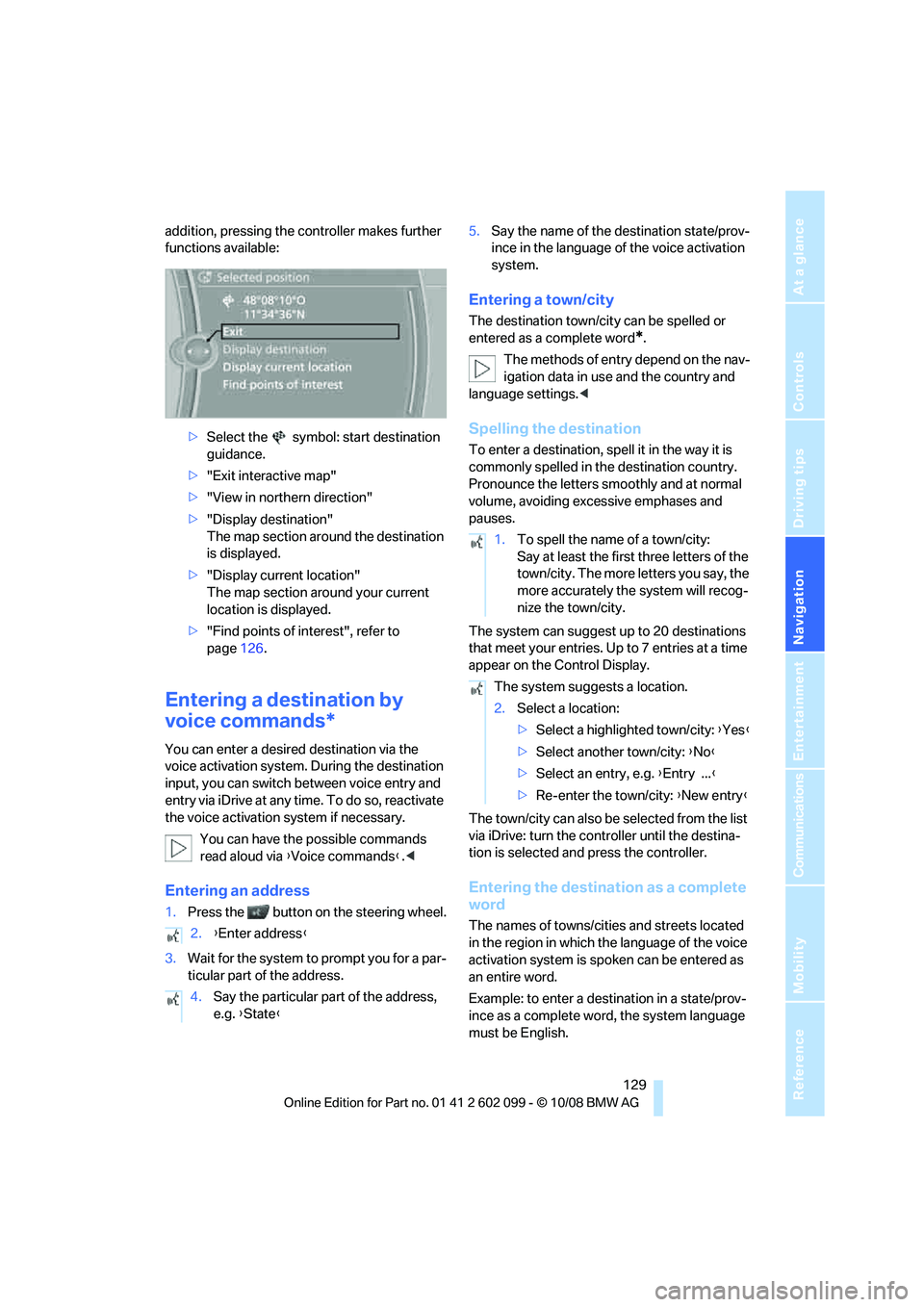
addition, pressing the controller makes further
functions available:>Select the symbol: start destination
guidance.
> "Exit interactive map"
> "View in northern direction"
> "Display destination"
The map section around the destination
is displayed.
> "Display current location"
The map section around your current
location is displayed.
> "Find points of interest", refer to
page 126.
Entering a destination by
voice commands*
You can enter a desired destination via the
voice activation system. During the destination
input, you can switch between voice entry and
entry via iDrive at any ti me. To do so, reactivate
the voice activation system if necessary.
You can have the possible commands
read aloud via {Voice commands }.<
Entering an address
1. Press the button on the steering wheel.
3. Wait for the system to prompt you for a par-
ticular part of the address. 5.
Say the name of the destination state/prov-
ince in the language of the voice activation
system.
Entering a town/city
The destination town/cit y can be spelled or
entered as a complete word
*.
The methods of entry depend on the nav-
igation data in use and the country and
language settings. <
Spelling the destination
To enter a destination, spell it in the way it is
commonly spelled in th e destination country.
Pronounce the letters smoothly and at normal
volume, avoiding excessive emphases and
pauses.
The system can suggest up to 20 destinations
that meet your entries. Up to 7 entries at a time
appear on the Control Display.
The town/city can also be selected from the list
via iDrive: turn the controller until the destina-
tion is selected and press the controller.
Entering the destination as a complete
word
The names of towns/cities and streets located
in the region in which th e language of the voice
activation system is spoken can be entered as
an entire word.
Example: to enter a destination in a state/prov-
ince as a complete word , the system language
must be English.
2.
{Enter address }
4. Say the particular part of the address,
e.g. {State }
1.To spell the name of a town/city:
Say at least the first three letters of the
town/city. The more letters you say, the
more accurately th e system will recog-
nize the town/city.
The system suggests a location.
2. Select a location:
>Select a highlighted town/city: {Yes }
> Select another town/city: {No }
> Select an entry, e.g. {Entry ... }
> Re-enter the town/city: {New entry }
ba8_E9091_cic.book Seite 129 Mittwoch, 29. Oktober 2008 2:59 14
Page 144 of 268
On/off and tone
142
On/off and tone
The following audio and video sources share
the same control elements and adjustments:
>Radio
> CD player
> CD changer
*
>Video
> External devices, e.g. MP3 player
Controls
The audio and video sources can be controlled
using the:
>Buttons near the CD player
> iDrive
> Buttons on the steeri ng wheel, refer to
page 11
> Programmable memory keys, refer to
page 20
> Voice activation system
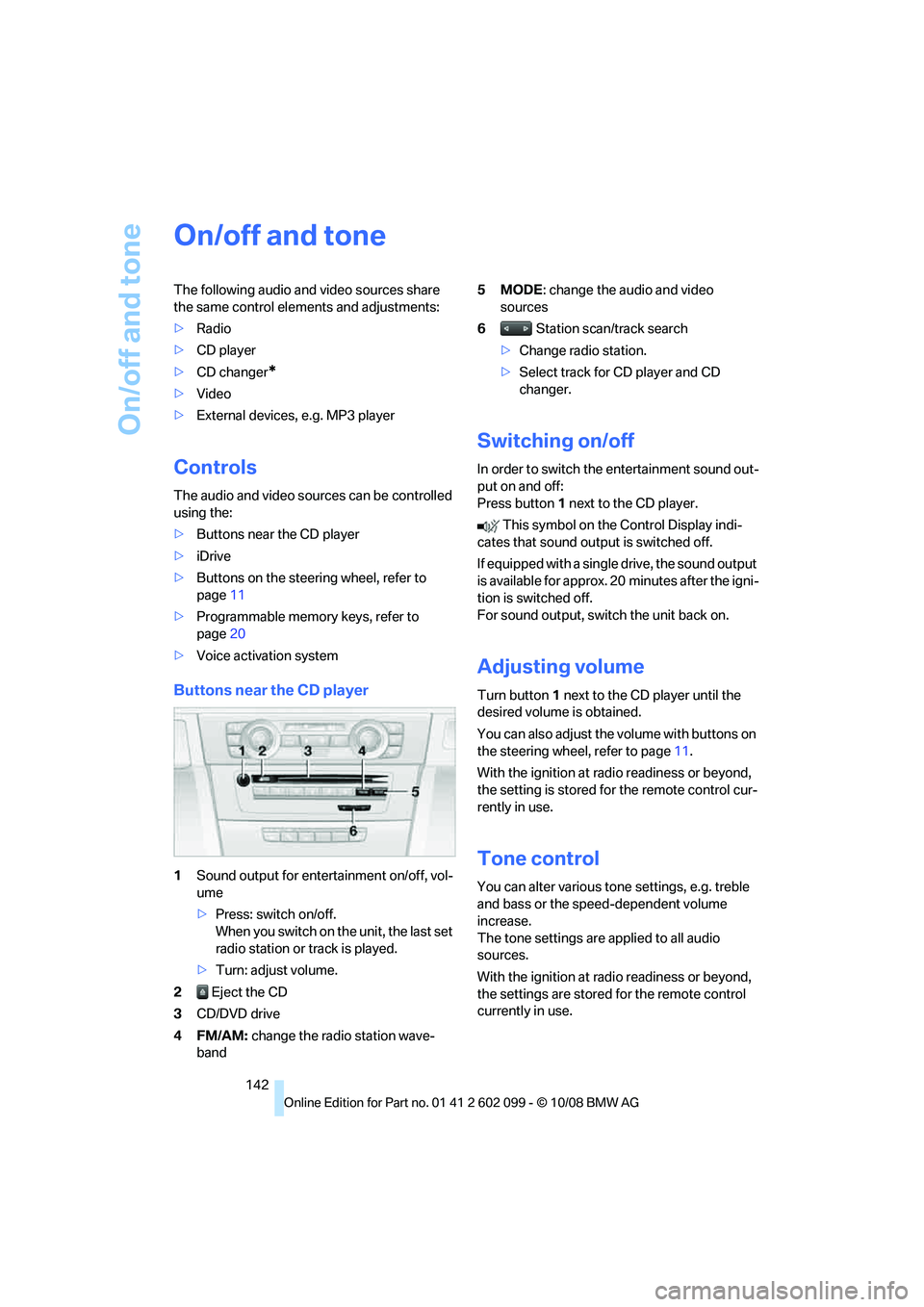
Buttons near the CD player
1Sound output for entertainment on/off, vol-
ume
>Press: switch on/off.
When you switch on the unit, the last set
radio station or track is played.
> Turn: adjust volume.
2 Eject the CD
3 CD/DVD drive
4FM/AM: change the radio station wave-
band 5MODE
: change the audio and video
sources
6 Station scan/track search
> Change radio station.
> Select track for CD player and CD
changer.
Switching on/off
In order to switch the entertainment sound out-
put on and off:
Press button 1 next to the CD player.
This symbol on the Control Display indi-
cates that sound output is switched off.
If equipped with a single drive, the sound output
is available for approx. 20 minutes after the igni-
tion is switched off.
For sound output, switch the unit back on.
Adjusting volume
Turn button 1 next to the CD player until the
desired volume is obtained.
You can also adjust the volume with buttons on
the steering wheel, refer to page 11.
With the ignition at ra dio readiness or beyond,
the setting is stored fo r the remote control cur-
rently in use.
Tone control
You can alter various tone settings, e.g. treble
and bass or the speed-dependent volume
increase.
The tone settings are applied to all audio
sources.
With the ignition at ra dio readiness or beyond,
the settings are stored for the remote control
currently in use.
ba8_E9091_cic.book Seite 142 Mittwoch, 29. Oktober 2008 2:59 14
Page 147 of 268
Navigation
Entertainment
Driving tips
145Reference
At a glance
Controls
Communications
Mobility
Radio
Your radio provides reception of the FM and AM
wavebands.
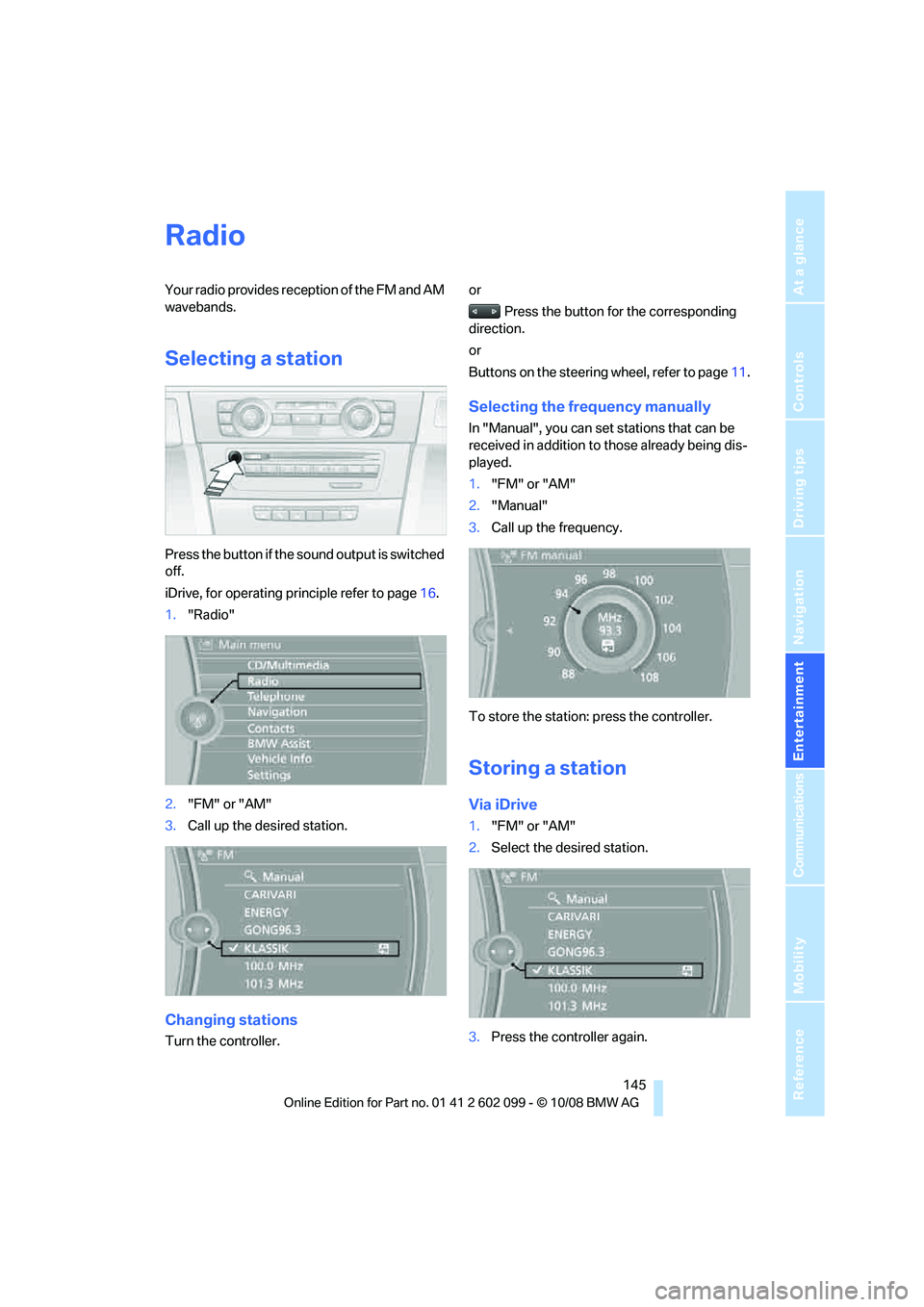
Selecting a station
Press the button if the sound output is switched
off.
iDrive, for operating principle refer to page16.
1. "Radio"
2. "FM" or "AM"
3. Call up the desired station.
Changing stations
Turn the controller. or
Press the button for the corresponding
direction.
or
Buttons on the steering wheel, refer to page11.
Selecting the frequency manually
In "Manual", you can set stations that can be
received in addition to those already being dis-
played.
1."FM" or "AM"
2. "Manual"
3. Call up the frequency.
To store the station: press the controller.
Storing a station
Via iDrive
1. "FM" or "AM"
2. Select the desired station.
3. Press the controller again.
ba8_E9091_cic.book Seite 145 Mittwoch, 29. Oktober 2008 2:59 14
Page 170 of 268
Telephone
168
Telephone
The concept
Your BMW is equipped with a full mobile phone
preparation package. After pairing a suitable
mobile phone with the vehicle once, you can
operate the mobile phone via iDrive, the buttons
on the steering wheel or via voice commands.
Once a mobile phone has been paired with your
vehicle, it is automatically recognized as soon
as it is inside the vehicl e while the engine is run-
ning or the ignition is switched on. You can
store the pairing data for up to four mobile
phones simultaneously . If several mobile
phones are detected at the same time, the
mobile phone last paired can be operated via
the vehicle.
Using the telephone inside
the vehicle
Using the snap-in adapter*
The so-called snap-in adapter, a holder for
mobile phones, allows you to charge the mobile
phone's battery and connect the mobile phone
to your vehicle's outside antenna. This ensures
better network reception and consistent repro-
duction quality. Please contact your
BMW center to find ou t for which mobile
phones there are snap-in adapters available.
For your safety
A car phone makes life more convenient in
many ways, and can even save lives in an emer-
gency. While you should consult your mobile
phone's separate operating instructions for a
detailed description of safety precautions and
information, we request that you direct your
particular attention to the following:
Only make entries when the traffic situa-
tion allows you to do so. Do not hold the
mobile phone in your hand while you are driving;
use the hands-free system instead. If you do
not observe this precau tion, your being dis- tracted can endanger vehicle occupants and
other road users.
<
Suitable mobile phones
Please ask your BMW center which mobile
phones with Bluetooth interface are supported
by the mobile phone pr eparation package and
which mobile phones are compatible with the
snap-in adapter. By virtue of their particular
software versions, thes e mobile phones sup-
port the functions described in this Owner's
Manual. Malfunctions may occur with other
mobile phones.
Operating options
You can operate the mobile phone* using:
> Buttons on the steering wheel, refer to
page 10
> iDrive, refer to page 16
> Voice commands, refer to page 175
> Programmable memory keys, refer to
page 20
Avoid operating a mobile phone recognized by
the vehicle via the mobile phone's keypad, oth-
erwise malfunctions may result.
Start-up
Pairing the mobile phone with the
vehicle
The following prerequisites must be met:
> Compatible mobile phone: the mobile
phone is supported by the mobile phone full
preparation package. You can obtain infor-
mation on the Internet at: www.bmw.com
> The mobile phone is ready to operate.
> Bluetooth is activated in the vehicle, refer to
page 170, and on the mobile phone.
*
ba8_E9091_cic.book Seite 168 Mittwoch, 29. Oktober 2008 2:59 14
Page 173 of 268
171
Entertainment
Reference
At a glance
Controls
Driving tips
Communications
Navigation
Mobility
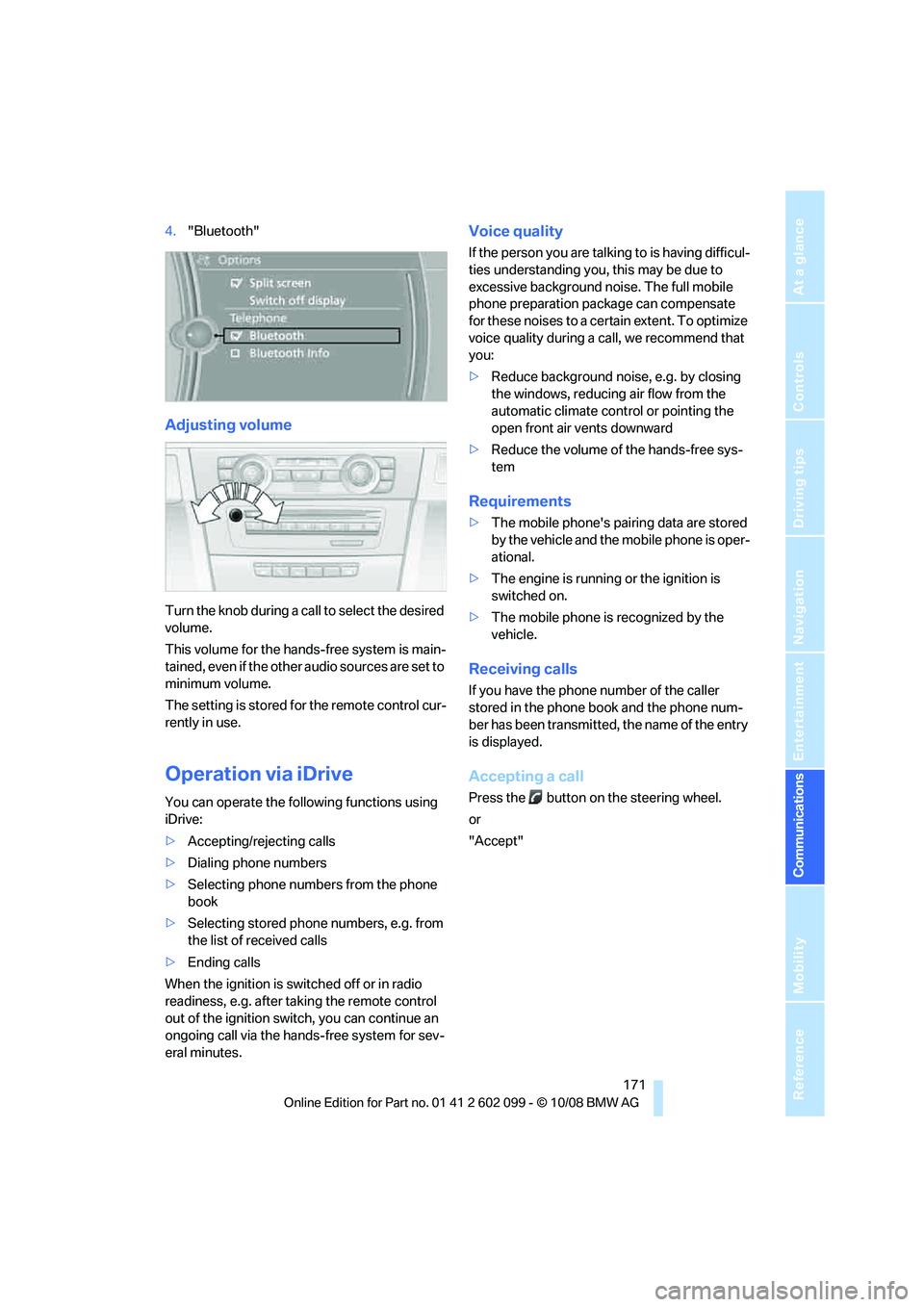
4. "Bluetooth"
Adjusting volume
Turn the knob during a call to select the desired
volume.
This volume for the hands-free system is main-
tained, even if the other audio sources are set to
minimum volume.
The setting is stored for the remote control cur-
rently in use.
Operation via iDrive
You can operate the following functions using
iDrive:
> Accepting/rejecting calls
> Dialing phone numbers
> Selecting phone numbers from the phone
book
> Selecting stored phone numbers, e.g. from
the list of received calls
> Ending calls
When the ignition is switched off or in radio
readiness, e.g. after ta king the remote control
out of the ignition swit ch, you can continue an
ongoing call via the hand s-free system for sev-
eral minutes.
Voice quality
If the person you are talk ing to is having difficul-
ties understanding you, this may be due to
excessive background noise. The full mobile
phone preparation pack age can compensate
for these noises to a cert ain extent. To optimize
voice quality during a call, we recommend that
you:
> Reduce background noise, e.g. by closing
the windows, reducing air flow from the
automatic climate cont rol or pointing the
open front air vents downward
> Reduce the volume of the hands-free sys-
tem
Requirements
>The mobile phone's pair ing data are stored
by the vehicle and the mobile phone is oper-
ational.
> The engine is running or the ignition is
switched on.
> The mobile phone is recognized by the
vehicle.
Receiving calls
If you have the phone number of the caller
stored in the phone b ook and the phone num-
ber has been transmitted, the name of the entry
is displayed.
Accepting a call
Press the button on the steering wheel.
or
"Accept"
ba8_E9091_cic.book Seite 171 Mittwoch, 29. Oktober 2008 2:59 14
Page 174 of 268
Telephone
172
Rejecting a call
"Reject"
The caller is diverted to your mailbox if it has
been activated.
Ending a call
Press the button on the steering wheel.
or
1. Select the phone number and press the
controller.
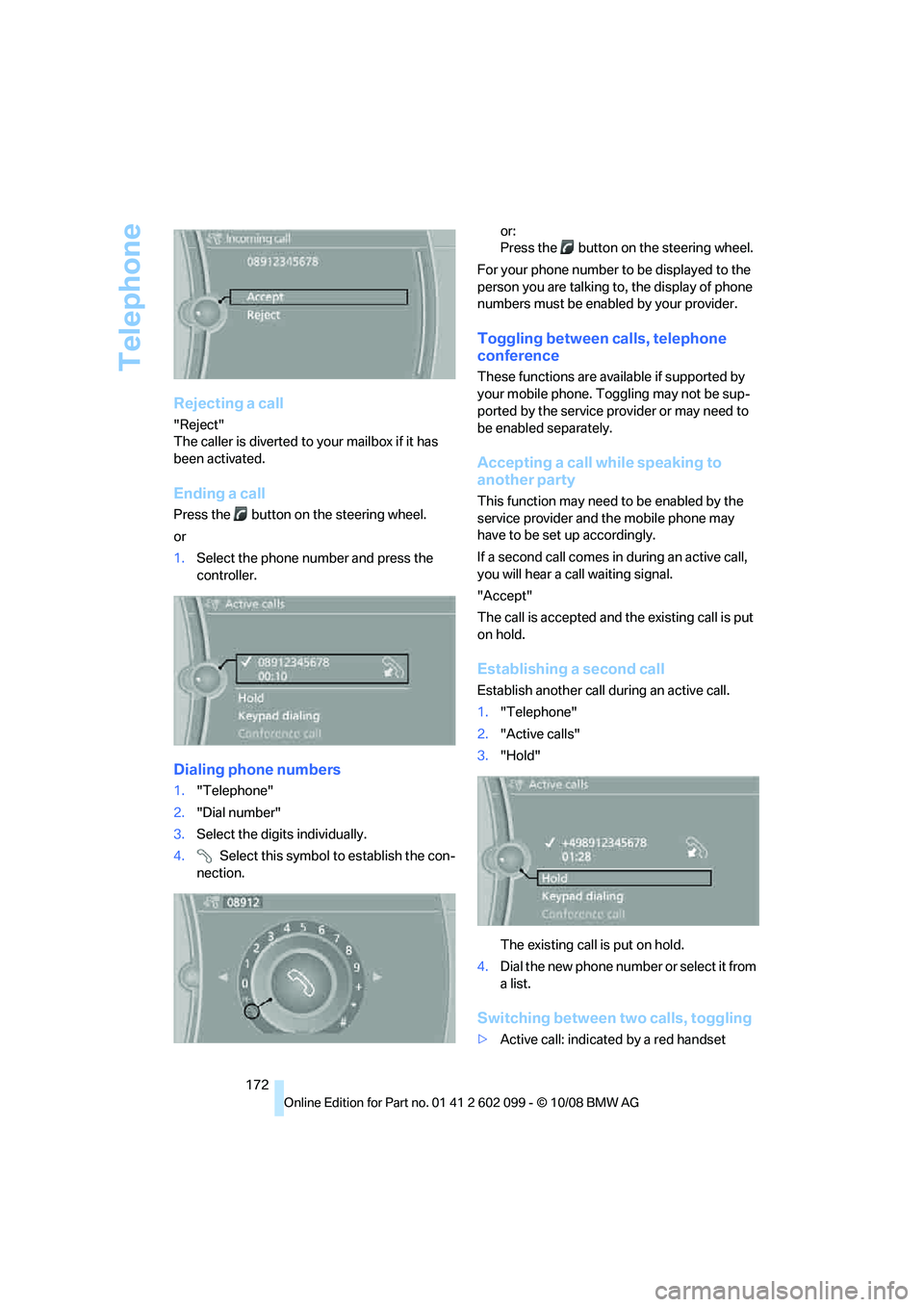
Dialing phone numbers
1."Telephone"
2. "Dial number"
3. Select the digits individually.
4. Select this symbol to establish the con-
nection. or:
Press the button on the steering wheel.
For your phone number to be displayed to the
person you are talking to, the display of phone
numbers must be enabled by your provider.
Toggling between calls, telephone
conference
These functions are available if supported by
your mobile phone. Toggling may not be sup-
ported by the service pr ovider or may need to
be enabled separately.
Accepting a call while speaking to
another party
This function may need to be enabled by the
service provider and the mobile phone may
have to be set up accordingly.
If a second call comes in during an active call,
you will hear a call waiting signal.
"Accept"
The call is accepted and the existing call is put
on hold.
Establishing a second call
Establish anothe r call during an active call.
1. "Telephone"
2. "Active calls"
3. "Hold"
The existing call is put on hold.
4. Dia l the ne w pho ne numbe r o r sele ct it from
a list.
Switching between two calls, toggling
>Active call: indicate d by a red handset
ba8_E9091_cic.book Seite 172 Mittwoch, 29. Oktober 2008 2:59 14
Page 177 of 268
175
Entertainment
Reference
At a glance
Controls
Driving tips
Communications
Navigation
Mobility
Depending on the type of mobile phone you are
using, it may occur that calls are switched from
the hands-free system to the mobile phone if
reception of the wireless network is poor.
Operation by voice
commands*
The concept
You can operate your mobile phone without
having to take a hand off the steering wheel.
During your entries, you will be guided in many
cases by announcements or questions.
The same prerequisites apply as for operation
via iDrive, refer to page 171.
Saying commands
Activating the system
1.Briefly press the button on the steering
wheel.
A sound signal indicates that you can say
commands.
2. Say the command.
Ending/canceling operation by voice
commands
Press the button on the steering wheel
or
In dialogs where text, e.g. a name, rather than a
command is spoken, canceling is only possible
using the button on the steering wheel.
Having the possible commands read
aloud
The system recognizes specific commands
that must be pronounced exactly word for word.
You can have the possible commands for any
function read aloud to you:
Using alternative commands
Often there is more than a single command to
run a function, e.g.:
Digits from zero to nine are recognized.
You can say each digit individually or group
them into a sequence to accelerate the input.
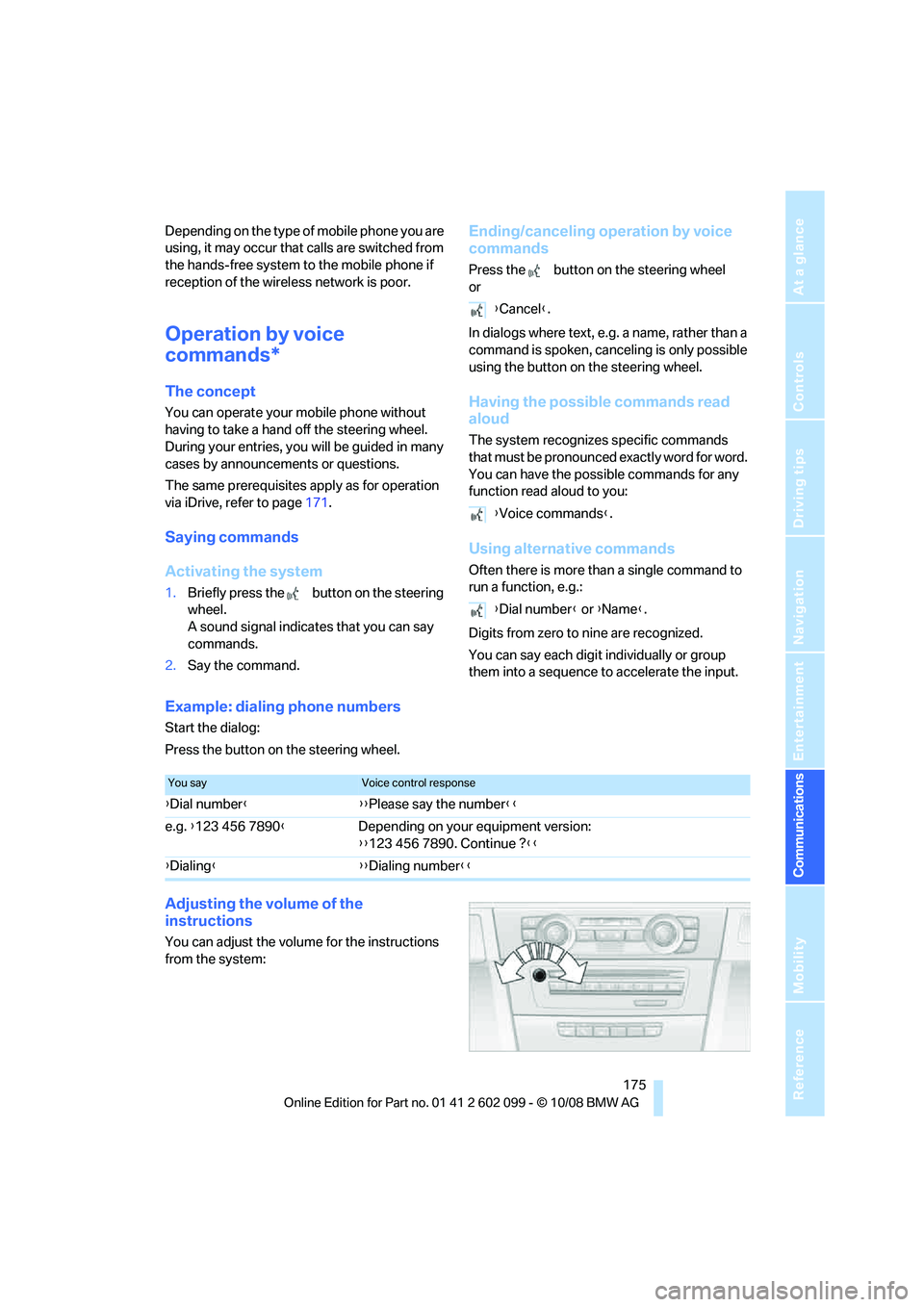
Example: dialing phone numbers
Start the dialog:
Press the button on the steering wheel.
Adjusting the volume of the
instructions
You can adjust the volume for the instructions
from the system:
{Cancel }.
{ Voice commands }.
{ Dial number } or {Name }.
You sayVoice control response
{Dial number }{ {Please say the number }}
e.g. {123 456 7890 }Depending on your equipment version:
{{123 456 7890. Continue ? }}
{ Dialing }{ {Dialing number }}
ba8_E9091_cic.book Seite 175 Mittwoch, 29. Oktober 2008 2:59 14
Page 235 of 268
Mobility
233Reference
At a glance
Controls
Driving tips
Communications
Navigation
Entertainment
Using a tow fitting
The screw-in tow fitting must always be carried
in the car. It can be screwed in at the front or
rear of the BMW.
Sedan: it is stored in the onboard tool kit under-
neath the cover on the right-hand side of the
cargo bay, refer to page 222.
Sports Wagon: it is stored in the onboard tool kit
underneath the cover on the left-hand side of
the cargo bay, refer to page 222.
Use only the tow fitting provided with the
vehicle and screw it all the way in. Use the
tow fitting for towing on paved roads only. Avoid
lateral loading of the tow fitting, e.g. do not lift
the vehicle by the tow fi tting. Otherwise the tow
fitting and the vehicle could be damaged. <
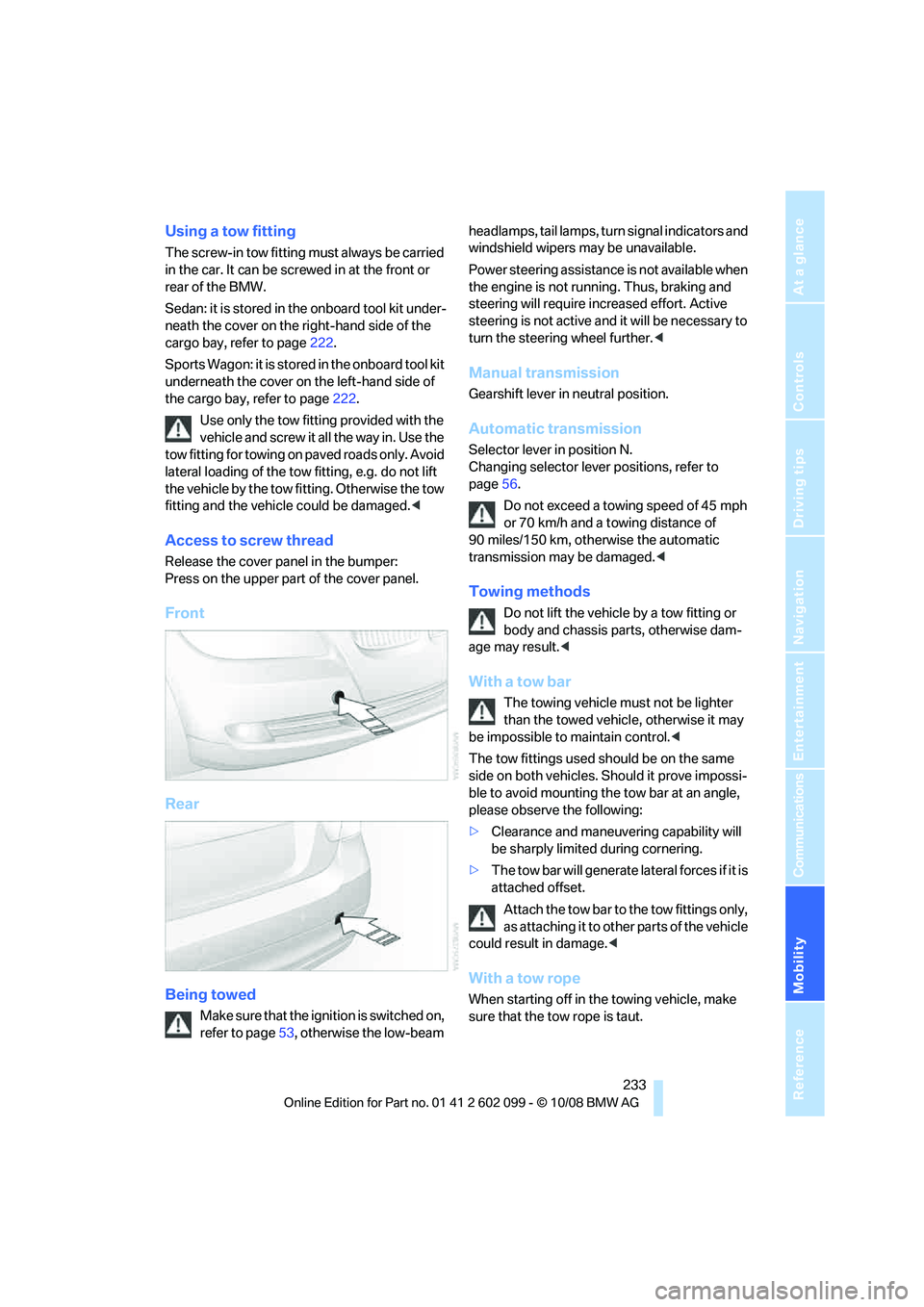
Access to screw thread
Release the cover panel in the bumper:
Press on the upper part of the cover panel.
Front
Rear
Being towed
Make sure that the ignition is switched on,
refer to page53, otherwise the low-beam headlamps, tail lamps, turn
signal indicators and
windshield wipers may be unavailable.
Power steering assistance is not available when
the engine is not running. Thus, braking and
steering will require increased effort. Active
steering is not active an d it will be necessary to
turn the steering wheel further.<
Manual transmission
Gearshift lever in neutral position.
Automatic transmission
Selector lever in position N.
Changing selector lever positions, refer to
page56.
Do not exceed a towing speed of 45 mph
or 70 km/h and a towing distance of
90 miles/150 km, otherwise the automatic
transmission may be damaged. <
Towing methods
Do not lift the vehicle by a tow fitting or
body and chassis parts, otherwise dam-
age may result. <
With a tow bar
The towing vehicle must not be lighter
than the towed vehicl e, otherwise it may
be impossible to maintain control.<
The tow fittings used should be on the same
side on both vehicles. Should it prove impossi-
ble to avoid mounting the tow bar at an angle,
please observe the following:
> Clearance and maneuvering capability will
be sharply limited during cornering.
> The tow bar will generate la teral forces if it is
attached offset.
Attach the tow bar to the tow fittings only,
as attaching it to other parts of the vehicle
could result in damage. <
With a tow rope
When starting off in the towing vehicle, make
sure that the tow rope is taut.
ba8_E9091_cic.book Seite 233 Mittwoch, 29. Oktober 2008 2:59 14
Page 236 of 268
Giving and receiving assistance
234
To avoid jerking and the associated
stresses on vehicle components when
towing, always use nylon ropes or nylon straps.
Attach the tow rope to the tow fittings only, as
attaching it to other pa rts of the vehicle could
result in damage. <
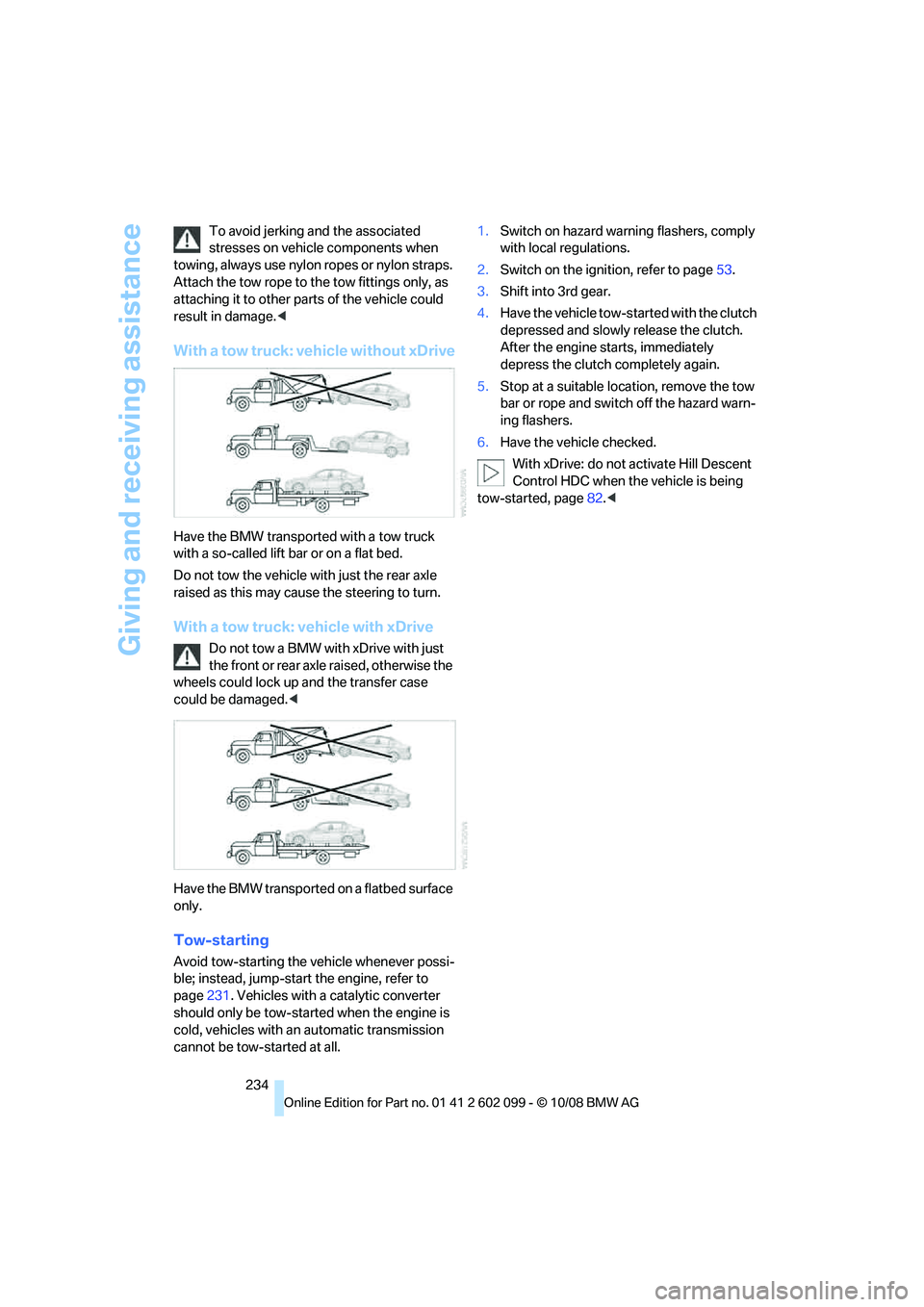
With a tow truck: vehicle without xDrive
Have the BMW transported with a tow truck
with a so-called lift bar or on a flat bed.
Do not tow the vehicle with just the rear axle
raised as this may cause the steering to turn.
With a tow truck: vehicle with xDrive
Do not tow a BMW with xDrive with just
the front or rear axle raised, otherwise the
wheels could lock up an d the transfer case
could be damaged. <
Have the BMW transported on a flatbed surface
only.
Tow-starting
Avoid tow-starting the vehicle whenever possi-
ble; instead, jump-start the engine, refer to
page 231. Vehicles with a catalytic converter
should only be tow-started when the engine is
cold, vehicles with an automatic transmission
cannot be tow-started at all. 1.
Switch on hazard warning flashers, comply
with local regulations.
2. Switch on the igni tion, refer to page 53.
3. Shift into 3rd gear.
4. Have the vehicle tow-st arted with the clutch
depressed and slowly release the clutch.
After the engine starts, immediately
depress the clutch completely again.
5. Stop at a suitable location, remove the tow
bar or rope and switch off the hazard warn-
ing flashers.
6. Have the vehicle checked.
With xDrive: do not activate Hill Descent
Control HDC when the vehicle is being
tow-started, page 82.<
ba8_E9091_cic.book Seite 234 Mittwoch, 29. Oktober 2008 2:59 14