reset BMW 335IS CONVERTIBLE 2013 User Guide
[x] Cancel search | Manufacturer: BMW, Model Year: 2013, Model line: 335IS CONVERTIBLE, Model: BMW 335IS CONVERTIBLE 2013Pages: 308, PDF Size: 5.65 MB
Page 103 of 308
102
ControlsTechnology for driving comfort and safety
When driving with damaged tires, the handling
characteristics change, e.g. the vehicle will skid
sooner when braking, braking distances will be
longer, or self-steering response will change.
Adapt your driving style accordingly. Avoid
turning abruptly and driving over obstacles
such as curbs, potholes, etc.
Since the possible driving distance depends to
a considerable degree on the strain exerted on
the vehicle while driving, it can be shorter or,
with a gentle driving style, can also be longer,
depending on the speed, road condition, out-
side temperature, vehicle load, etc.
Drive cautiously and do not exceed a
speed of 50 mph/80 km/h.
When there is a tire pressure loss, the handling
characteristics change, e.g. there will be
reduced directional stability during braking,
braking distances will be longer, and self-steer-
ing response will change. <
Vibrations or loud noises while driving can
indicate complete failure of the tire.
Reduce your speed and bring the vehicle to a
stop; otherwise, tire components may become
detached, which could result in an accident. Do
not continue driving; instead, contact your
BMW center. <
Message for unsuccessful system
reset
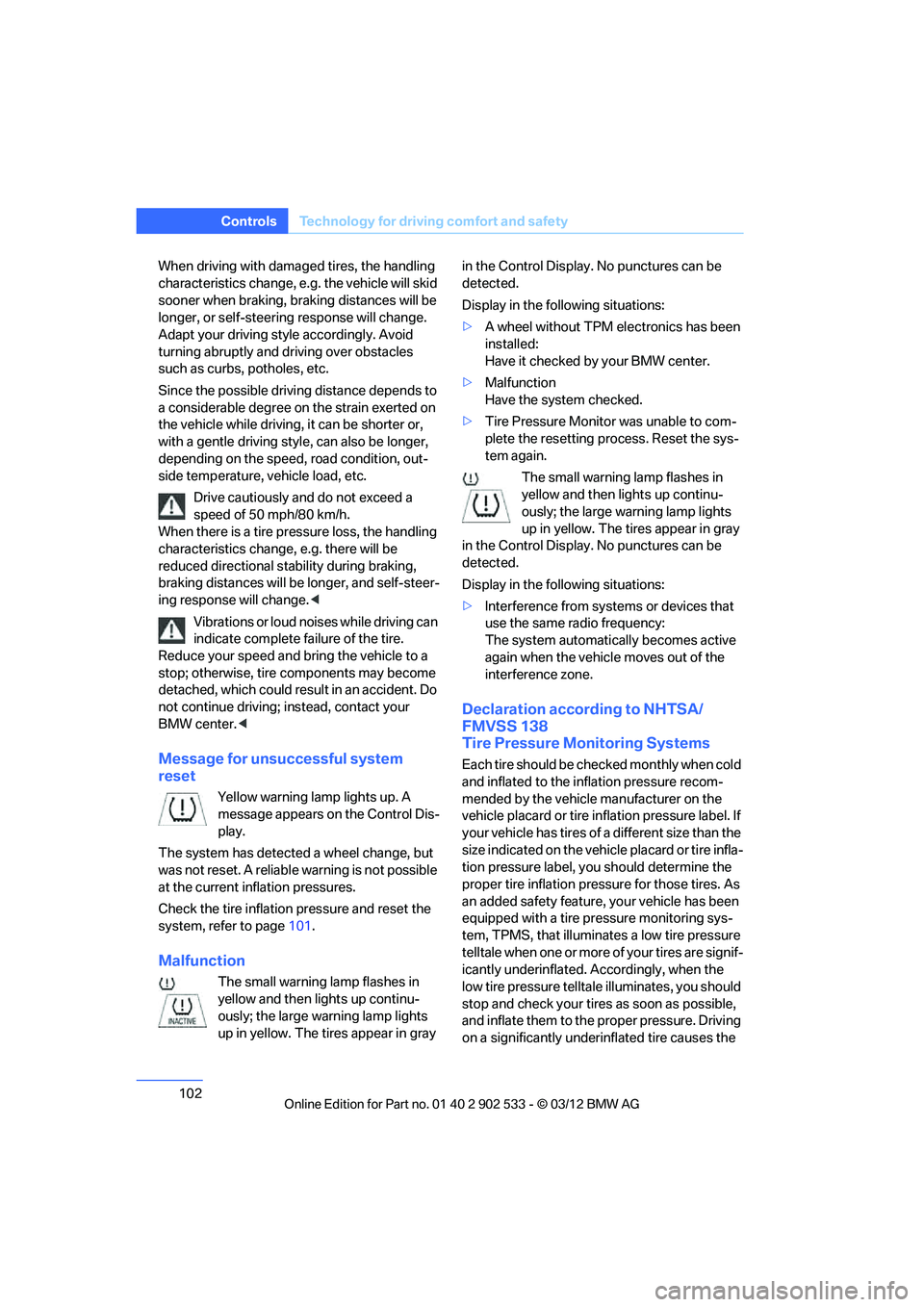
Yellow warning lamp lights up. A
message appears on the Control Dis-
play.
The system has detected a wheel change, but
was not reset. A reliable warning is not possible
at the current inflation pressures.
Check the tire inflation pressure and reset the
system, refer to page 101.
Malfunction
The small warning lamp flashes in
yellow and then lights up continu-
ously; the large warning lamp lights
up in yellow. The tires appear in gray in the Control Display. No punctures can be
detected.
Display in the following situations:
>
A wheel without TPM electronics has been
installed:
Have it checked by your BMW center.
> Malfunction
Have the system checked.
> Tire Pressure Monitor was unable to com-
plete the resetting process. Reset the sys-
tem again.
The small warning lamp flashes in
yellow and then lights up continu-
ously; the large warning lamp lights
up in yellow. The tires appear in gray
in the Control Display. No punctures can be
detected.
Display in the following situations:
> Interference from systems or devices that
use the same radio frequency:
The system automatically becomes active
again when the vehicle moves out of the
interference zone.
Declaration according to NHTSA/
FMVSS 138
Tire Pressure Monitoring Systems
Each tire should be checked monthly when cold
and inflated to the inflation pressure recom-
mended by the vehicle manufacturer on the
vehicle placard or tire inflation pressure label. If
your vehicle has tires of a different size than the
size indicated on the vehicle placard or tire infla-
tion pressure label, you should determine the
proper tire inflation pressure for those tires. As
an added safety feature, your vehicle has been
equipped with a tire pressure monitoring sys-
tem, TPMS, that illuminates a low tire pressure
telltale when one or more of your tires are signif-
icantly underinflated. Accordingly, when the
low tire pressure telltale illuminates, you should
stop and check your tires as soon as possible,
and inflate them to the proper pressure. Driving
on a significantly underinflated tire causes the
00320051004F004C00510048000300280047004C0057004C005200510003
Page 107 of 308
106
ControlsTechnology for driving comfort and safety
The front and side airbags for the front pas-
senger are activated.
> The indicator lamp does not light up if the
seat is empty.
The front and side airbags for the front pas-
senger are not activated.
Operational readiness of airbag system
As of radio readiness, refer to page 60, the
warning lamp lights up briefly to indicate that
the entire airbag system and the belt tensioners
are operational.
Airbag system malfunction
> Warning lamp does not light up at radio
readiness or beyond.
> Warning lamp remains permanently on.
In the event of a fault in the airbag system,
have it checked without delay; otherwise,
there is the risk that the system will not function
as intended even if a sufficiently severe acci-
dent occurs. <
Convertible: rollover
protection system
The rollover protection system is activated
automatically in the event of an accident of suf-
ficient severity or an extreme tilt in the car's lon-
gitudinal axis. The protection bars behind the
rear head restraints deploy within fractions of a
second.
As a supplementary system to the reinforced
windshield frame, the rollover protection sys- tem increases the safety of the vehicle occu-
pants.
Always keep the area of movement of the
rollover protection system clear.
In minor accidents, you are protected by the
fastened safety belt and, depending on acci-
dent severity, by the safety belt tensioner and
multi-phase airbag retention system. <
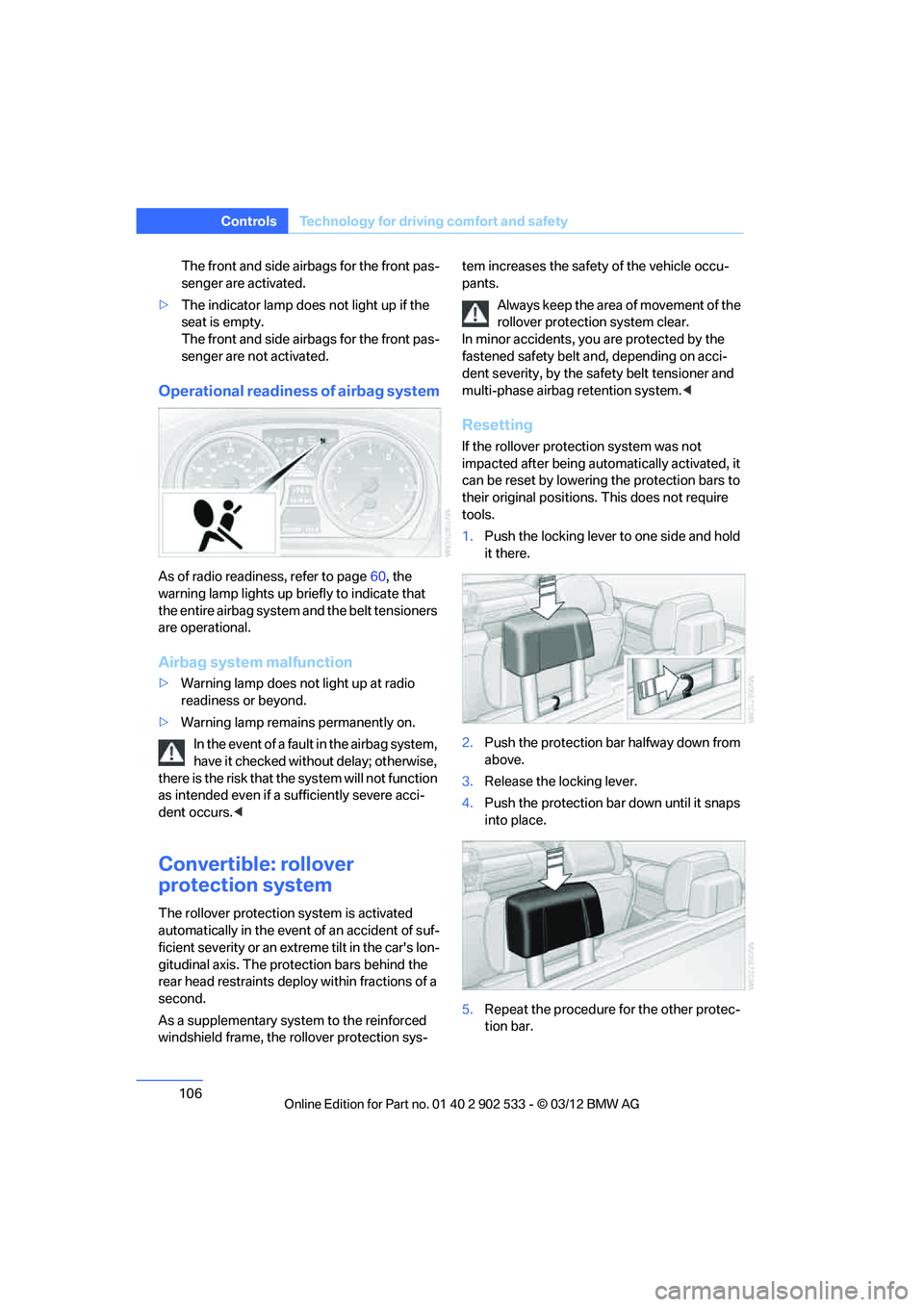
Resetting
If the rollover protection system was not
impacted after being automatically activated, it
can be reset by lowering the protection bars to
their original positions. This does not require
tools.
1.Push the locking lever to one side and hold
it there.
2. Push the protection bar halfway down from
above.
3. Release the locking lever.
4. Push the protection bar down until it snaps
into place.
5. Repeat the procedure for the other protec-
tion bar.
00320051004F004C00510048000300280047004C0057004C005200510003
Page 169 of 308
168
EntertainmentOn/off and tone
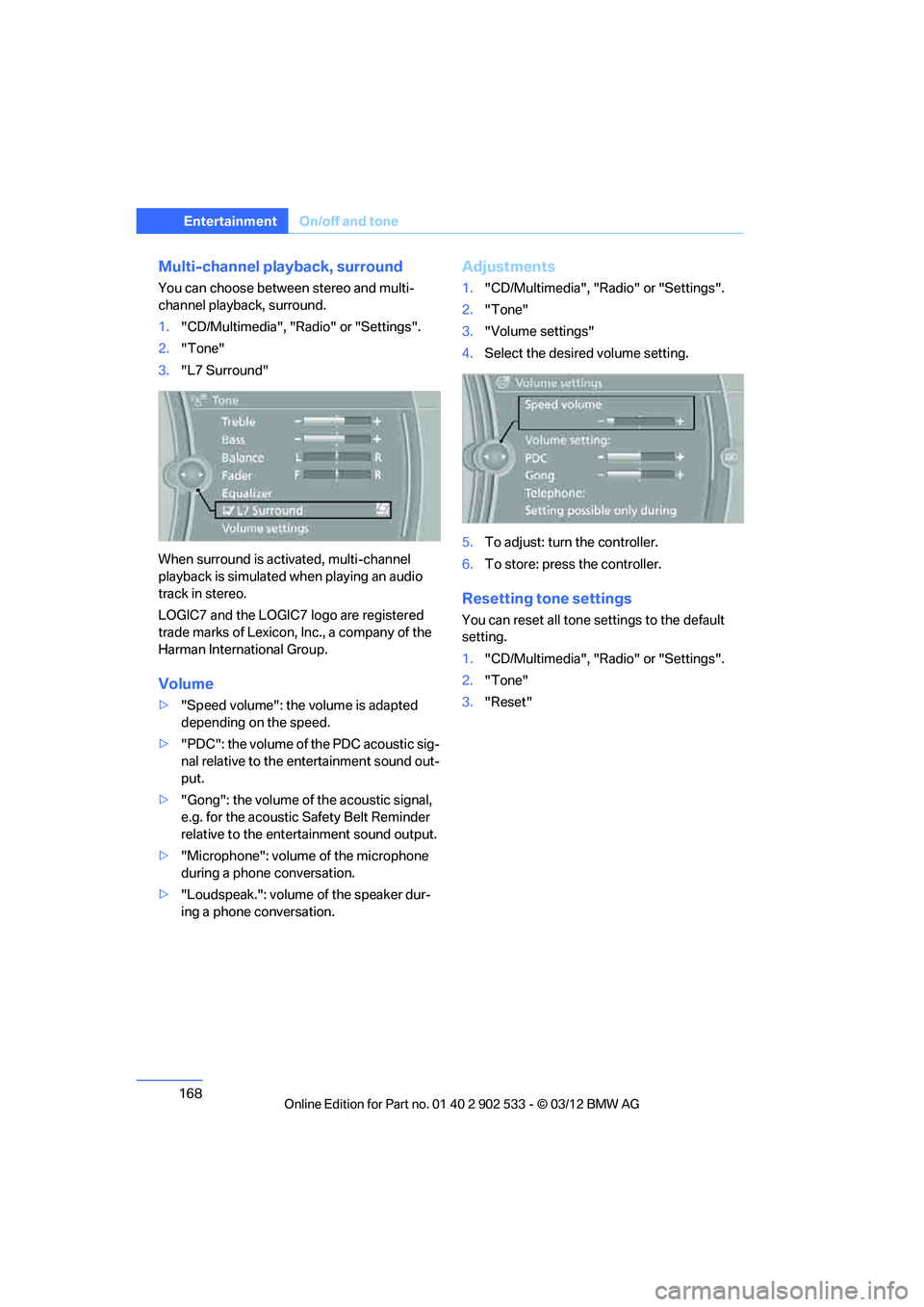
Multi-channel playback, surround
You can choose between stereo and multi-
channel playback, surround.
1."CD/Multimedia", "Radio" or "Settings".
2. "Tone"
3. "L7 Surround"
When surround is activated, multi-channel
playback is simulated when playing an audio
track in stereo.
LOGIC7 and the LOGIC7 logo are registered
trade marks of Lexicon, Inc., a company of the
Harman International Group.
Volume
> "Speed volume": the volume is adapted
depending on the speed.
> "PDC": the volume of the PDC acoustic sig-
nal relative to the entertainment sound out-
put.
> "Gong": the volume of the acoustic signal,
e.g. for the acoustic Safety Belt Reminder
relative to the entertainment sound output.
> "Microphone": volume of the microphone
during a phone conversation.
> "Loudspeak.": volume of the speaker dur-
ing a phone conversation.
Adjustments
1."CD/Multimedia", "Radio" or "Settings".
2. "Tone"
3. "Volume settings"
4. Select the desired volume setting.
5. To adjust: turn the controller.
6. To store: press the controller.
Resetting tone settings
You can reset all tone settings to the default
setting.
1."CD/Multimedia", "Radio" or "Settings".
2. "Tone"
3. "Reset"
00320051004F004C00510048000300280047004C0057004C005200510003
Page 172 of 308
171
Radio
Entertainment
License conditions
HD Radio™ technology is manufactured under
U.S. and Foreign Patents licensed from iBiquity
Digital Corp. HD Radio™ and the HD and HD
Radio logos are proprietary trademarks of iBiq-
uity Digital Corp.
Activating/deactivating digital radio
reception
1.
"Radio"
2. "FM" or "AM"
3. Open "Options".
4. "HD Radio Reception"
The setting is stored for the remote control cur-
rently in use. This symbol is displayed when a station is
being received digitally.
When setting a station that has a digital signal, it
may take several seconds before the station
plays in digital quality.
In areas in which the station is not continuously
received in digital mode, playback switches
between analog and digital reception. In this
case, switch off digital radio reception.
Displaying additional information
Some stations broadcast additional information
on the current track, such as the name of the
artist.
1. Select the desired station.
2. Open "Options".
3. "Station info"
Selecting a substation
The symbol indicates that a main station also
broadcasts additional substations. The station
name of the main station ends in HD1. The sta-
tion names of the substations end in HD2, HD3,
etc.
1.Select the desired station.
2. Press the controller.
3. Select the substation. When reception is poor, the substation is muted
for several seconds.
Presets
It is possible to store up to 40 stations.
Selecting a station
1.
"Radio"
2. "Presets"
3. Select the desired station.
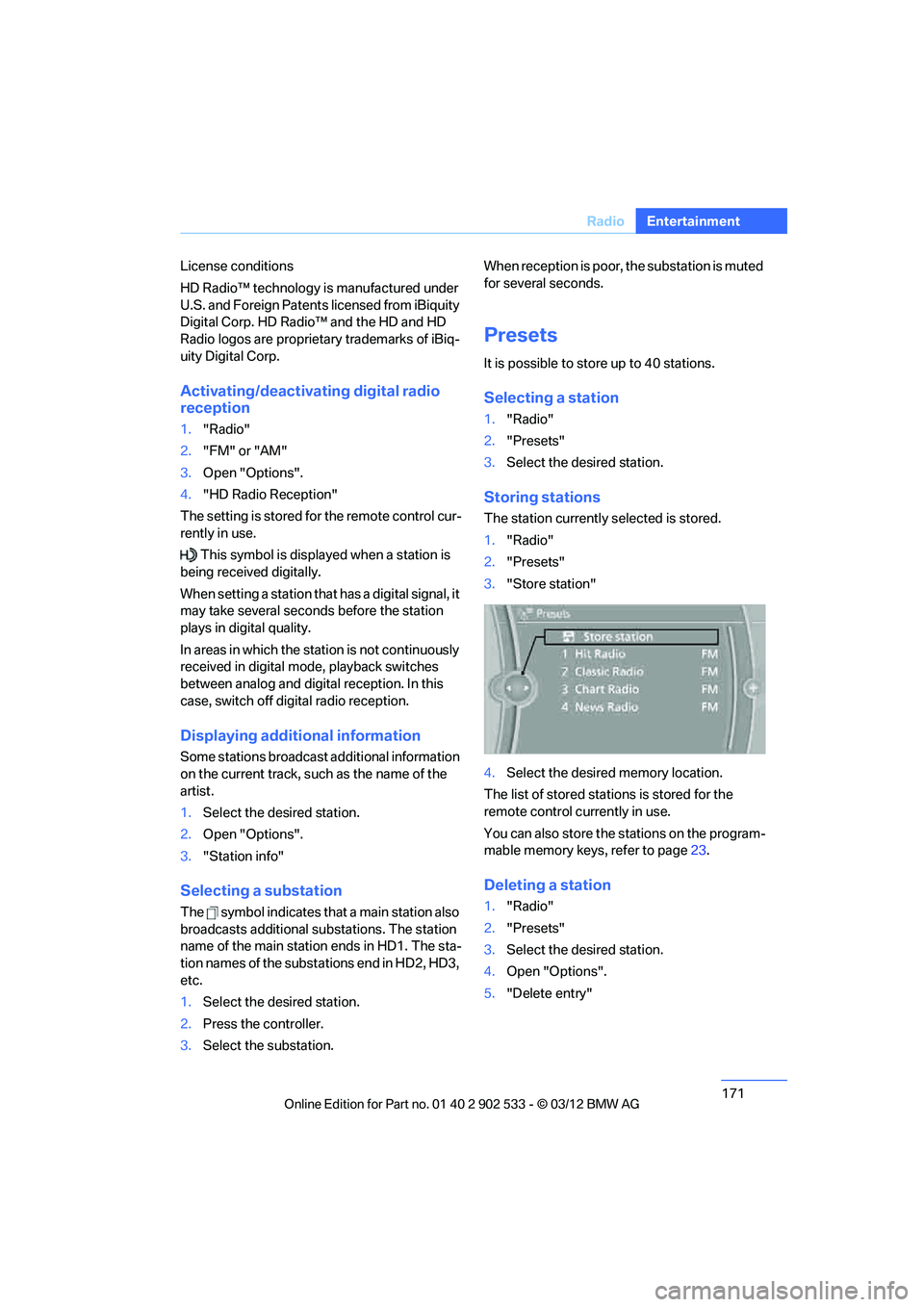
Storing stations
The station currently selected is stored.
1."Radio"
2. "Presets"
3. "Store station"
4. Select the desired memory location.
The list of stored stations is stored for the
remote control currently in use.
You can also store the stations on the program-
mable memory keys, refer to page 23.
Deleting a station
1. "Radio"
2. "Presets"
3. Select the desired station.
4. Open "Options".
5. "Delete entry"
00320051004F004C00510048000300280047004C0057004C005200510003
Page 194 of 308
193
External devices
Entertainment
>
Bluetooth® is a registered trademark of
Bluetooth® SIG, Inc.
> Sound is output over the vehicle speakers.
> The volume of the sound output depends
on the device. If necessary, change the vol-
ume setting on the device.
> Up to four external devices can be paired
with the vehicle.
Requirements
>Suitable device. For information, go to
www.bmwusa.com/bluetooth.
> Device operational.
> Ignition switched on.
> Bluetooth activated in vehicle, refer to
page 201, and in the device.
> Activating Bluetooth audio, refer to
page 201.
> Bluetooth presets in the device are
required, e.g. connection not confirmed or
visible, refer to Owner's Manual for the
device.
> A number with at least 4 and at most
16 digits has been established as the Blue-
tooth passkey. Only required once for pair-
ing.
Pairing and connecting
Only pair the device when the vehicle is
stopped; otherwise, inattention may lead
to endangerment of passengers or other road
users. <
1. "CD/Multimedia"
2. "Bluetooth® (audio)"
3. "Bluetooth® audio" if applicable
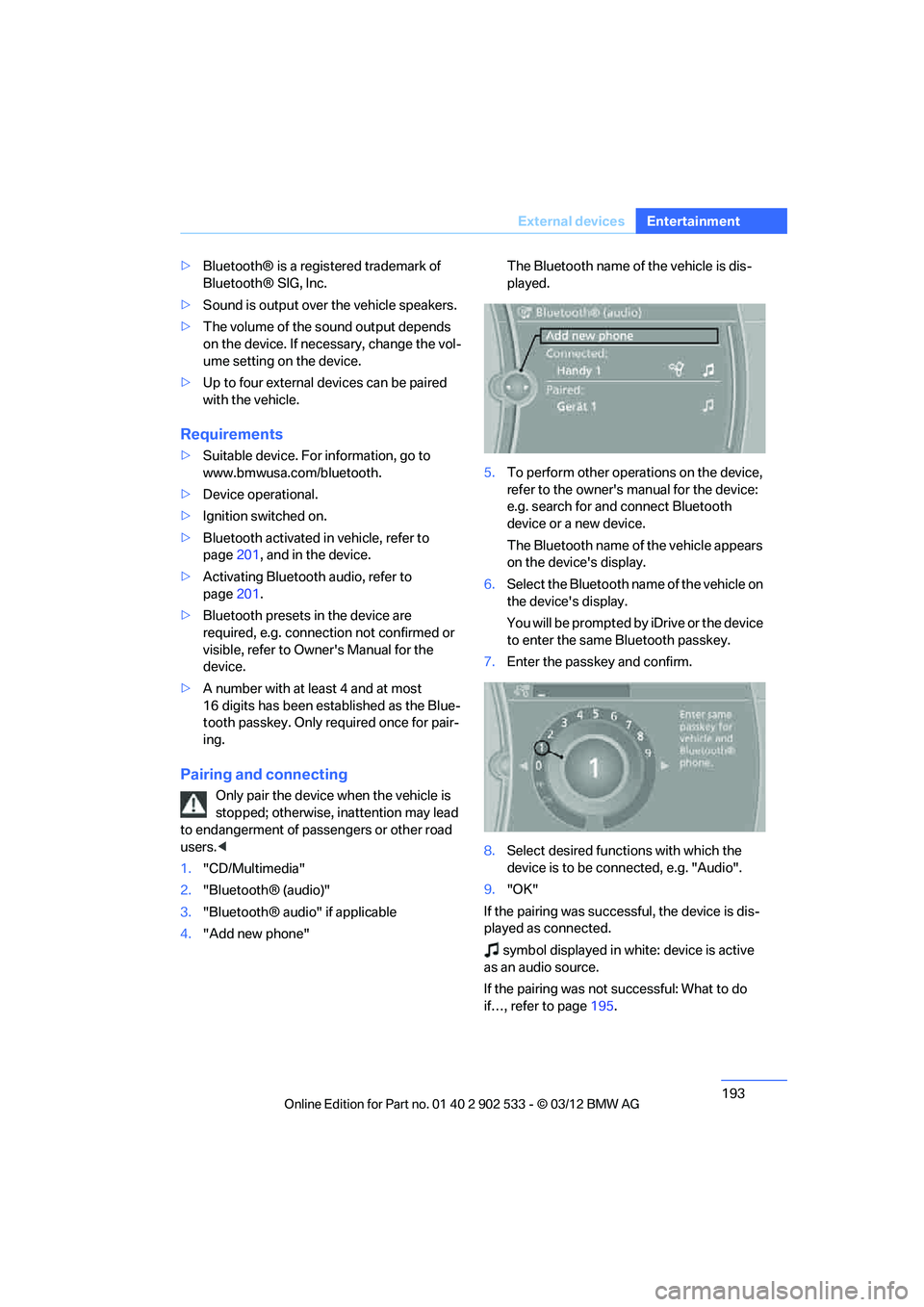
4. "Add new phone" The Bluetooth name of the vehicle is dis-
played.
5. To perform other operations on the device,
refer to the owner's manual for the device:
e.g. search for and connect Bluetooth
device or a new device.
The Bluetooth name of the vehicle appears
on the device's display.
6. Select the Bluetooth name of the vehicle on
the device's display.
You will be prompted by iDrive or the device
to enter the same Bluetooth passkey.
7. Enter the passkey and confirm.
8. Select desired functions with which the
device is to be connected, e.g. "Audio".
9. "OK"
If the pairing was successful, the device is dis-
played as connected. symbol displayed in white: device is active
as an audio source.
If the pairing was not successful: What to do
if…, refer to page 195.
00320051004F004C00510048000300280047004C0057004C005200510003
Page 202 of 308
201
Te l e p h o n e
Communications
Notes
At high temperatures, the charging function of
the mobile phone may be limited and some
functions may no longer be carried out.
When using the mobile phone via the vehicle,
follow the operating instructions of the mobile
phone.
Pairing/unpairing mobile
phone
General information
The following functions are available:
>
Using a mobile phone as a telephone.
> Using the mobile phone as an auxiliary
phone.
> Using the mobile phone as an audio source.
> Using an audio device as an audio source,
refer to page 192.
Requirements
>Suitable mobile phone, refer to page 200.
> Mobile phone operational.
> Bluetooth activated in vehicle, refer to
page 203, and in the mobile phone.
> Bluetooth presets in the mobile phone are
required, e.g. connection not confirmed or
visible, refer to Owner's Manual for the
mobile phone.
> Deactivating Bluetooth audio, refer to
page 201.
> A number with at least 4 and at most
16 digits has been established as the Blue-
tooth passkey. Only required once for pair-
ing.
> Ignition switched on.
Activating/deactivating Bluetooth link
Bluetooth is not permitted everywhere. Comply
with all safety guidelines and regulations.
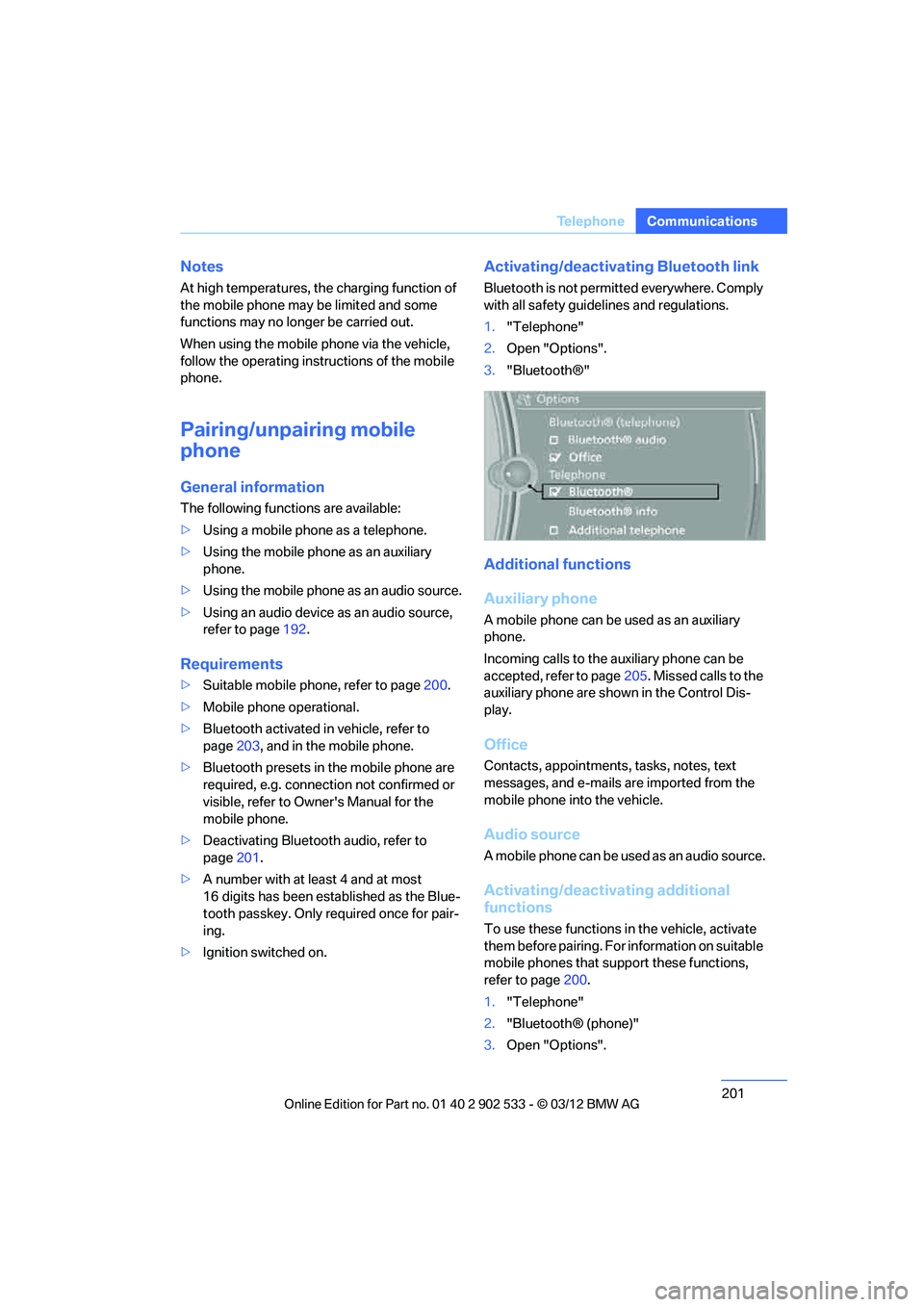
1."Telephone"
2. Open "Options".
3. "Bluetooth®"
Additional functions
Auxiliary phone
A mobile phone can be used as an auxiliary
phone.
Incoming calls to the auxiliary phone can be
accepted, refer to page 205. Missed calls to the
auxiliary phone are shown in the Control Dis-
play.
Office
Contacts, appointments, tasks, notes, text
messages, and e-mails are imported from the
mobile phone into the vehicle.
Audio source
A mobile phone can be used as an audio source.
Activating/deactivating additional
functions
To use these functions in the vehicle, activate
them before pairing. For information on suitable
mobile phones that support these functions,
refer to page 200.
1. "Telephone"
2. "Bluetooth® (phone)"
3. Open "Options".
00320051004F004C00510048000300280047004C0057004C005200510003
Page 212 of 308
211
Te l e p h o n e
Communications
Adjusting volume
Turn knob during announcement.
>
The volume remains the same, even if the
volume of other audio sources is changed.
> The volume is stored for the remote control
currently in use.
Notes
Notes on Emergency Requests
Do not use the voice operation system to ini-
tiate an emergency call. In stressful situations,
the voice and vocal pitch can change. This can
unnecessarily delay the establishment of a tele-
phone connection.
Instead, use the SOS button, refer to page 272,
in the vicinity of the interior rearview mirror.
Ambient conditions
> Say the commands, numbers and letters
smoothly and with normal volume, empha-
sis and speed.
> Always say the commands in the language
of the system. The language of the voice
operation of the mobile phone is preset and
cannot be changed via the Control Display.
> Keep the doors, windows, glass roof, and
convertible top closed to prevent interfer-
ence from outside noise.
> Avoid ambient noise in the vehicle while
speaking.
Snap-in adapter
General information
Detailed information on snap-in adapters that
compatibly support mobile phone functions can
be found at your BMW center.
Notes
At high temperatures, the charging function of
the mobile phone may be limited and some
functions may no longer be carried out.
When using the mobile phone via the vehicle,
follow the operating instructions of the mobile
phone.
Installation location
In the center armrest.
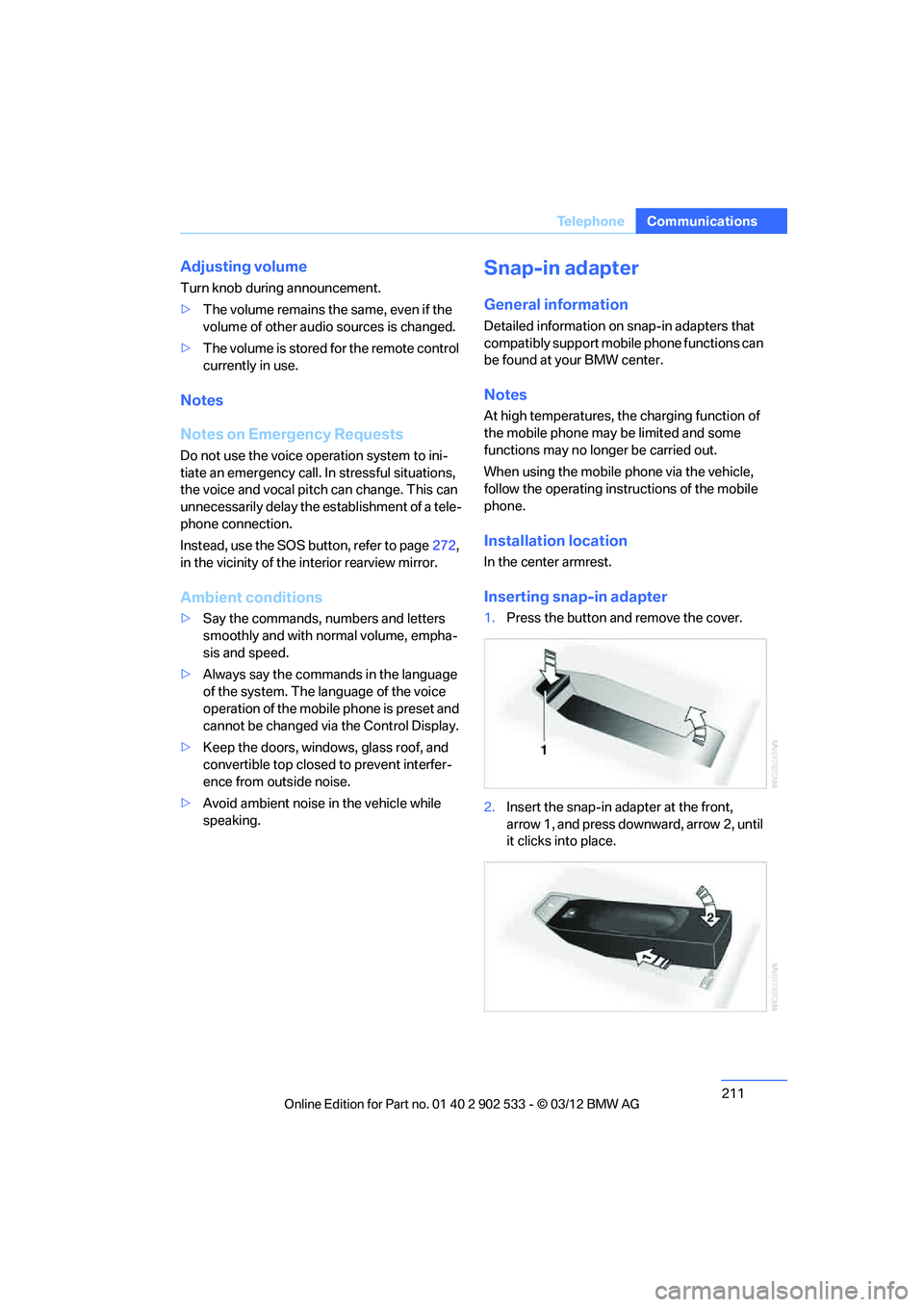
Inserting snap-in adapter
1.Press the button and remove the cover.
2. Insert the snap-in adapter at the front,
arrow 1, and press downward, arrow 2, until
it clicks into place.
00320051004F004C00510048000300280047004C0057004C005200510003
Page 236 of 308
235
Wheels and tires
Mobility
Wheels and tires
Vehicle equipment
In this chapter, all production, country, and
optional equipment that is offered in the model
range is described. For this reason, descrip-
tions will be given of some equipment that may
not be available in a vehicle, for example due to
the special options or national-market version
selected. This also applies to safety related
functions and systems.
Tire inflation pressures
Information for your safety
It is not merely the tires' service life, but also
driving comfort and, to a great extent, driving
safety that depend on the condition of the tires
and the maintenance of the specified tire pres-
sure.
Check the tire inflation pressure regularly
and correct it, if necessary: at least twice a
month and before starting long trips. If you fail
to observe this precaution you may be driving
on tires with incorrect tire pressures, a condi-
tion that can not only compromise your vehi-
cle's driving stability, but also lead to tire dam-
age and the risk of an accident. Do not drive
with deflated, i.e. flat tires, except when using
run-flat tires. A flat tire will seriously impair your
vehicle's handling and braking response.
Attempts to drive on a flat tire can lead to loss of
control over the vehicle. <
Checking pressure
Only check tire inflation pressure when the
tires are cold. This means after a maximum of
1.25 miles/2 km driving or when the vehicle has
been parked for at least 2 hours. When tires are
warm, the tire inflation pressure is higher.
After correcting the tire inflation pressure,
reset the Tire Pressure Monitor, refer to page
101, or reinitialize the Flat Tire Monitor,
refer to page 98.<
Inflation pressure specifications
The tables below provide all the correct inflation
pressures for the specified tire sizes at ambient
temperature.
The inflation pressures apply to the tire
sizes approved and tire brands recom-
mended by BMW; a list of these is available
from your BMW center. <
For correct identification of the right tire infla-
tion pressures, observe the following:
> Tire sizes for your vehicle
> Maximum allowable driving speed
Tire inflation pressures for driving up to
100 mph or 160 km/h
For normal driving up to 100 mph or 160 km/h
and to achieve optimum driving comfort, adjust
pressures to the respective tire inflation pres-
sures listed on the following pages in the col-
umns for traveling speeds up to a maximum of
100mph or 160km/h.
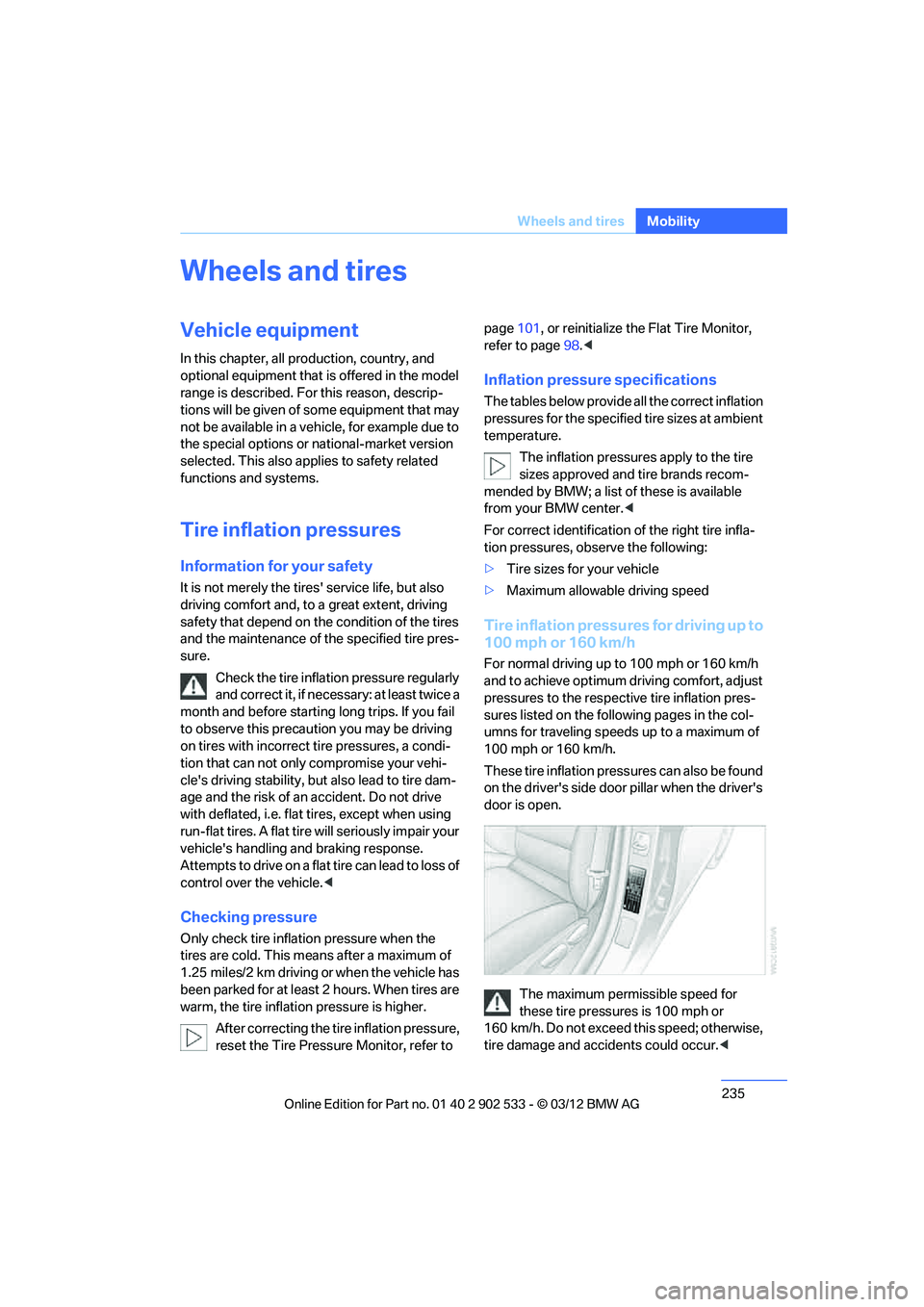
These tire inflation pressures can also be found
on the driver's side door pillar when the driver's
door is open.
The maximum permissible speed for
these tire pressures is 100 mph or
160 km/h. Do not exceed this speed; otherwise,
tire damage and accidents could occur. <
00320051004F004C00510048000300280047004C0057004C005200510003
Page 288 of 308
287
Short commands for the voice activation system
Reference
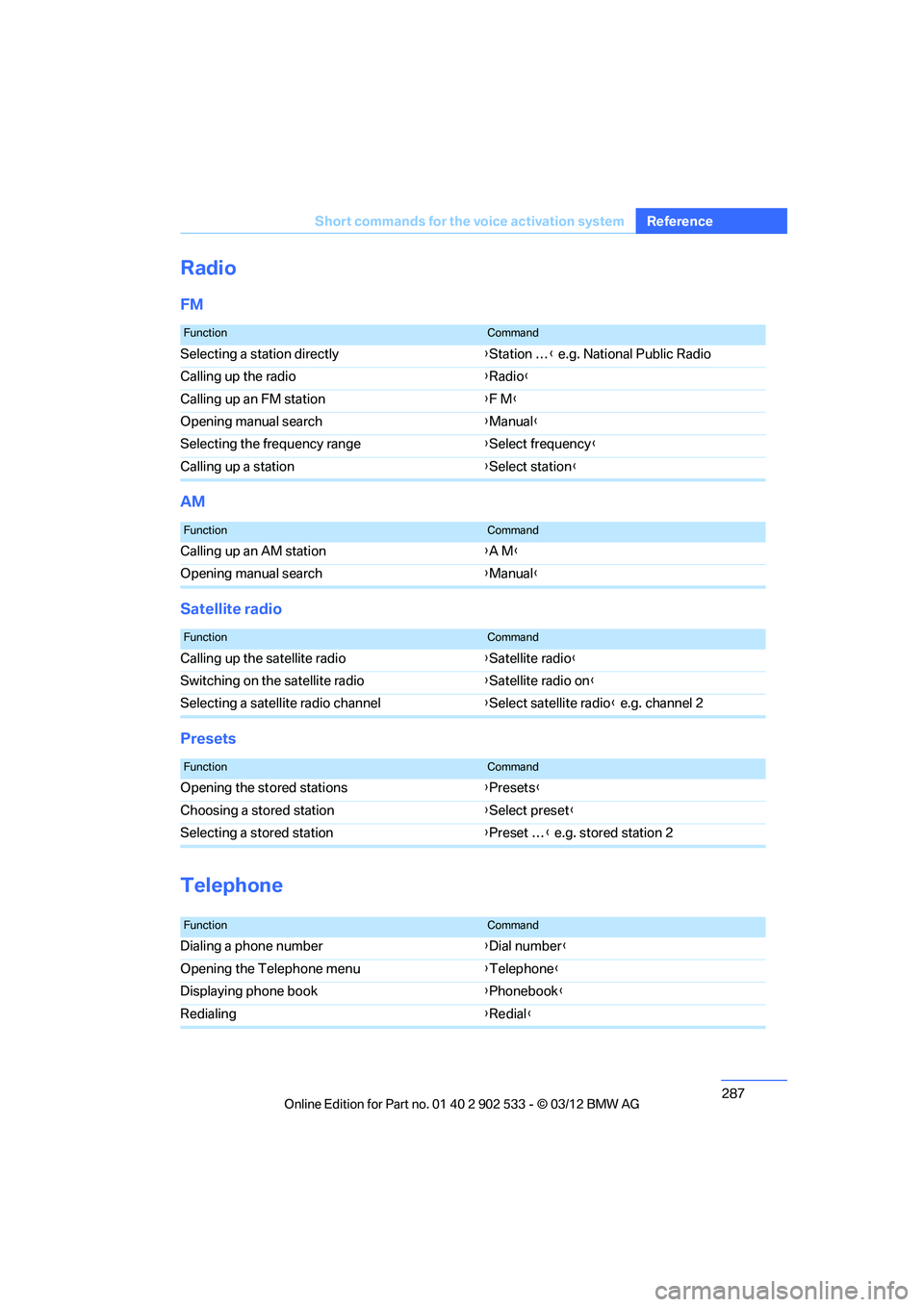
Radio
FM
AM
Satellite radio
Presets
Telephone
FunctionCommand
Selecting a station directly
{Station … } e.g. National Public Radio
Calling up the radio {Radio }
Calling up an FM station {F M }
Opening manual search {Manual }
Selecting the frequency range {Select frequency }
Calling up a station {Select station }
FunctionCommand
Calling up an AM station {A M }
Opening manual search {Manual }
FunctionCommand
Calling up the satellite radio {Satellite radio }
Switching on the satellite radio {Satellite radio on }
Selecting a satellite radio channel {Select satellite radio } e.g. channel 2
FunctionCommand
Opening the stored stations {Presets }
Choosing a stored station {Select preset }
Selecting a stored station {Preset … } e.g. stored station 2
FunctionCommand
Dialing a phone number {Dial number }
Opening the Telephone menu {Telephone}
Displaying phone book {Phonebook }
Redialing {Redial }
00320051004F004C00510048000300280047004C0057004C005200510003
Page 303 of 308
302
Referen ceEverything from A to Z
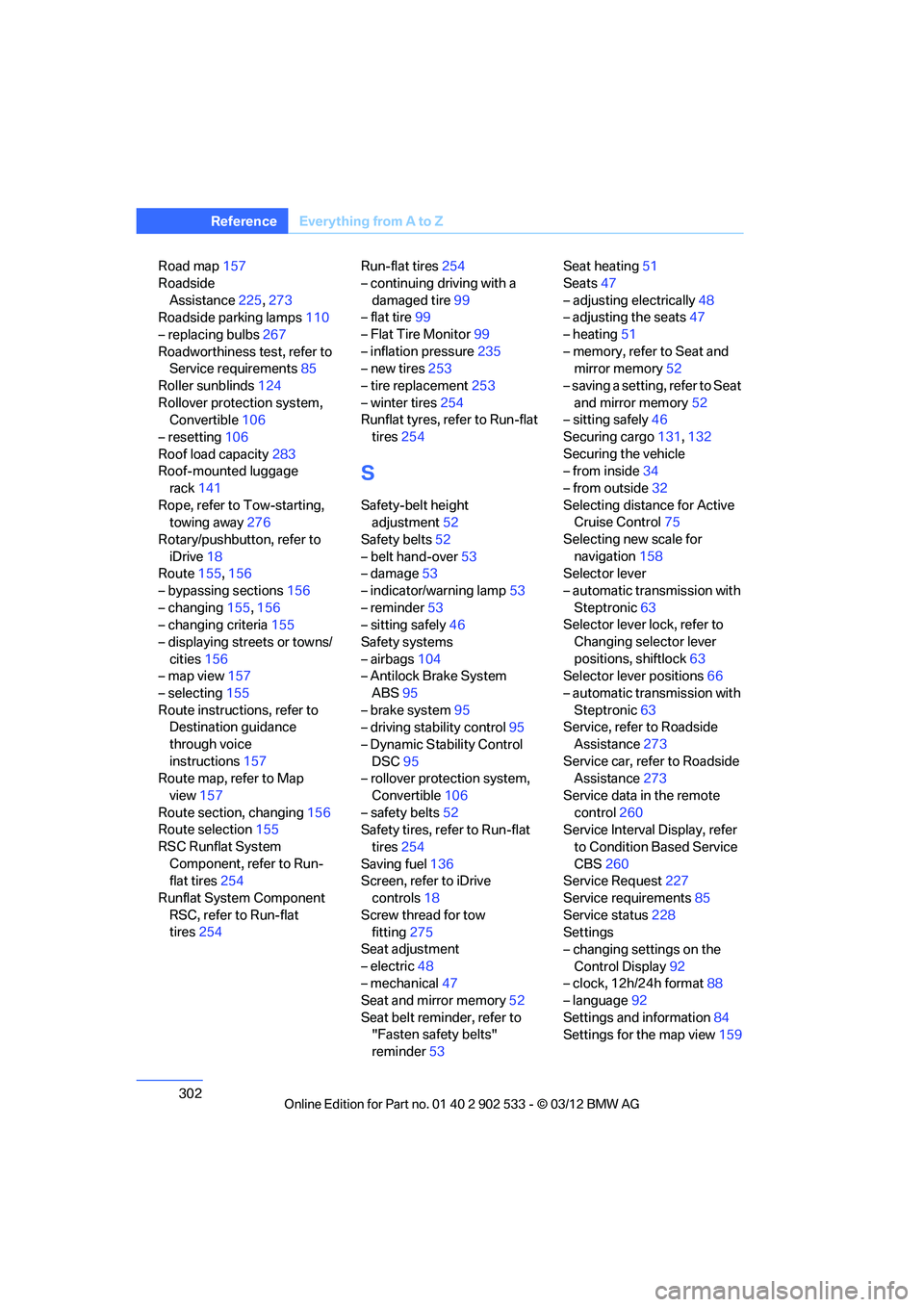
Road map157
Roadside Assistance 225,273
Roadside parking lamps 110
– replacing bulbs 267
Roadworthiness test, refer to Service requirements 85
Roller sunblinds 124
Rollover protection system, Convertible 106
– resetting 106
Roof load capacity 283
Roof-mounted luggage
rack 141
Rope, refer to Tow-starting, towing away 276
Rotary/pushbutton, refer to iDrive 18
Route 155,156
– bypassing sections 156
– changing 155,156
– changing criteria 155
– displaying streets or towns/ cities 156
– map view 157
– selecting 155
Route instructions, refer to Destination guidance
through voice
instructions 157
Route map, refer to Map
view 157
Route section, changing 156
Route selection 155
RSC Runflat System Component, refer to Run-
flat tires 254
Runflat System Component RSC, refer to Run-flat
tires 254 Run-flat tires
254
– continuing driving with a damaged tire 99
– flat tire 99
– Flat Tire Monitor 99
– inflation pressure 235
– new tires 253
– tire replacement 253
– winter tires 254
Runflat tyres, refer to Run-flat
tires 254
S
Safety-belt height
adjustment 52
Safety belts 52
– belt hand-over 53
– damage 53
– indicator/warning lamp 53
– reminder 53
– sitting safely 46
Safety systems
– airbags 104
– Antilock Brake System
ABS 95
– brake system 95
– driving stability control 95
– Dynamic Stability Control DSC 95
– rollover protection system,
Convertible 106
– safety belts 52
Safety tires, refer to Run-flat
tires 254
Saving fuel 136
Screen, refer to iDrive
controls 18
Screw thread for tow fitting 275
Seat adjustment
– electric 48
– mechanical 47
Seat and mirror memory 52
Seat belt reminder, refer to "Fasten safety belts"
reminder 53 Seat heating
51
Seats 47
– adjusting electrically 48
– adjusting the seats 47
– heating 51
– memory, refer to Seat and mirror memory 52
– saving a setting, refer to Seat and mirror memory 52
– sitting safely 46
Securing cargo 131,132
Securing the vehicle
– from inside 34
– from outside 32
Selecting distance for Active Cruise Control 75
Selecting new scale for navigation 158
Selector lever
– automatic transmission with
Steptronic 63
Selector lever lock, refer to
Changing selector lever
positions, shiftlock 63
Selector lever positions 66
– automatic transmission with Steptronic 63
Service, refer to Roadside
Assistance 273
Service car, refer to Roadside Assi sta
nce273
Service data in the remote control 260
Service Interval Display, refer
to Condition Based Service
CBS 260
Service Request 227
Service requirements 85
Service status 228
Settings
– changing settings on the
Control Display 92
– clock, 12h/24h format 88
– language 92
Settings and information 84
Settings for the map view 159
00320051004F004C00510048000300280047004C0057004C005200510003